tofscope 0.1.0__tar.gz → 0.1.2__tar.gz
This diff represents the content of publicly available package versions that have been released to one of the supported registries. The information contained in this diff is provided for informational purposes only and reflects changes between package versions as they appear in their respective public registries.
- {tofscope-0.1.0 → tofscope-0.1.2}/LICENSE +1 -1
- tofscope-0.1.2/PKG-INFO +104 -0
- {tofscope-0.1.0 → tofscope-0.1.2}/README.md +22 -15
- {tofscope-0.1.0 → tofscope-0.1.2}/pyproject.toml +5 -1
- tofscope-0.1.2/src/tofscope/__init__.py +1 -0
- {tofscope-0.1.0 → tofscope-0.1.2}/src/tofscope/application/analyses.py +29 -2
- {tofscope-0.1.0 → tofscope-0.1.2}/src/tofscope/application/explore.py +1 -1
- {tofscope-0.1.0 → tofscope-0.1.2}/src/tofscope/cli.py +24 -13
- {tofscope-0.1.0 → tofscope-0.1.2}/src/tofscope/science/signals.py +1 -1
- tofscope-0.1.0/src/tofscope/static/assets/VtkScene-q-o3MPFv.js → tofscope-0.1.2/src/tofscope/static/assets/VtkScene-BMAtiZcm.js +1 -1
- tofscope-0.1.0/src/tofscope/static/assets/index-djLJCKw_.js → tofscope-0.1.2/src/tofscope/static/assets/index-D15XNFrC.js +2 -2
- tofscope-0.1.0/src/tofscope/static/assets/index-CeV0NVRS.css → tofscope-0.1.2/src/tofscope/static/assets/index-Dx1YS1Fe.css +1 -1
- {tofscope-0.1.0 → tofscope-0.1.2}/src/tofscope/static/index.html +2 -2
- tofscope-0.1.2/src/tofscope/static/manifest.json +13 -0
- tofscope-0.1.2/src/tofscope.egg-info/PKG-INFO +104 -0
- {tofscope-0.1.0 → tofscope-0.1.2}/src/tofscope.egg-info/SOURCES.txt +3 -3
- tofscope-0.1.0/PKG-INFO +0 -14
- tofscope-0.1.0/src/tofscope/__init__.py +0 -1
- tofscope-0.1.0/src/tofscope/static/manifest.json +0 -13
- tofscope-0.1.0/src/tofscope.egg-info/PKG-INFO +0 -14
- {tofscope-0.1.0 → tofscope-0.1.2}/MANIFEST.in +0 -0
- {tofscope-0.1.0 → tofscope-0.1.2}/setup.cfg +0 -0
- {tofscope-0.1.0 → tofscope-0.1.2}/setup.py +0 -0
- {tofscope-0.1.0 → tofscope-0.1.2}/src/tofscope/api/__init__.py +0 -0
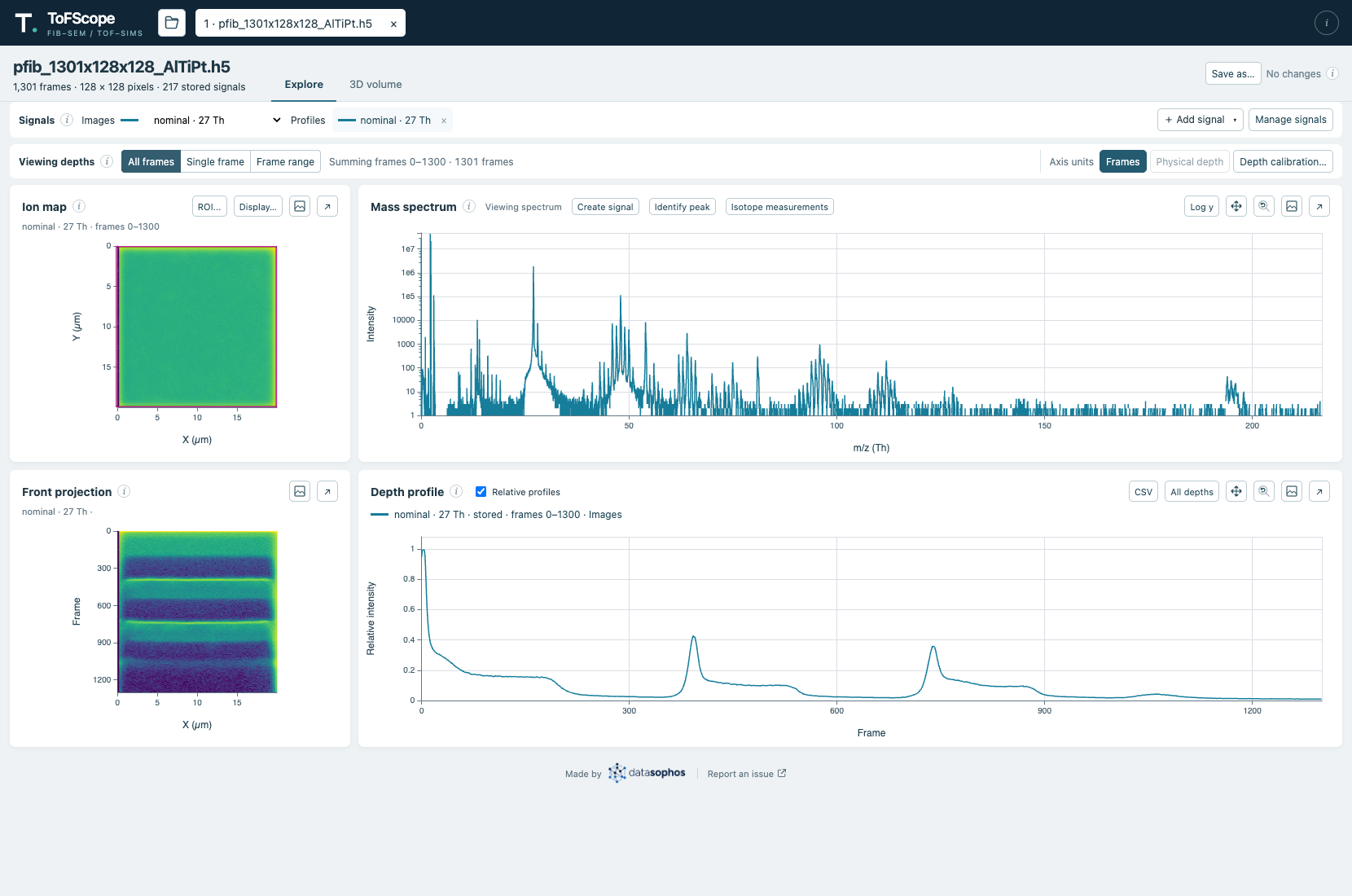
- {tofscope-0.1.0 → tofscope-0.1.2}/src/tofscope/api/app.py +0 -0
- {tofscope-0.1.0 → tofscope-0.1.2}/src/tofscope/api/auth.py +0 -0
- {tofscope-0.1.0 → tofscope-0.1.2}/src/tofscope/api/schemas.py +0 -0
- {tofscope-0.1.0 → tofscope-0.1.2}/src/tofscope/application/__init__.py +0 -0
- {tofscope-0.1.0 → tofscope-0.1.2}/src/tofscope/application/cache.py +0 -0
- {tofscope-0.1.0 → tofscope-0.1.2}/src/tofscope/application/commands.py +0 -0
- {tofscope-0.1.0 → tofscope-0.1.2}/src/tofscope/application/identification.py +0 -0
- {tofscope-0.1.0 → tofscope-0.1.2}/src/tofscope/application/identification_models.py +0 -0
- {tofscope-0.1.0 → tofscope-0.1.2}/src/tofscope/application/jobs.py +0 -0
- {tofscope-0.1.0 → tofscope-0.1.2}/src/tofscope/application/lifecycle.py +0 -0
- {tofscope-0.1.0 → tofscope-0.1.2}/src/tofscope/application/models.py +0 -0
- {tofscope-0.1.0 → tofscope-0.1.2}/src/tofscope/application/preparations.py +0 -0
- {tofscope-0.1.0 → tofscope-0.1.2}/src/tofscope/application/resources.py +0 -0
- {tofscope-0.1.0 → tofscope-0.1.2}/src/tofscope/application/saves.py +0 -0
- {tofscope-0.1.0 → tofscope-0.1.2}/src/tofscope/application/signals.py +0 -0
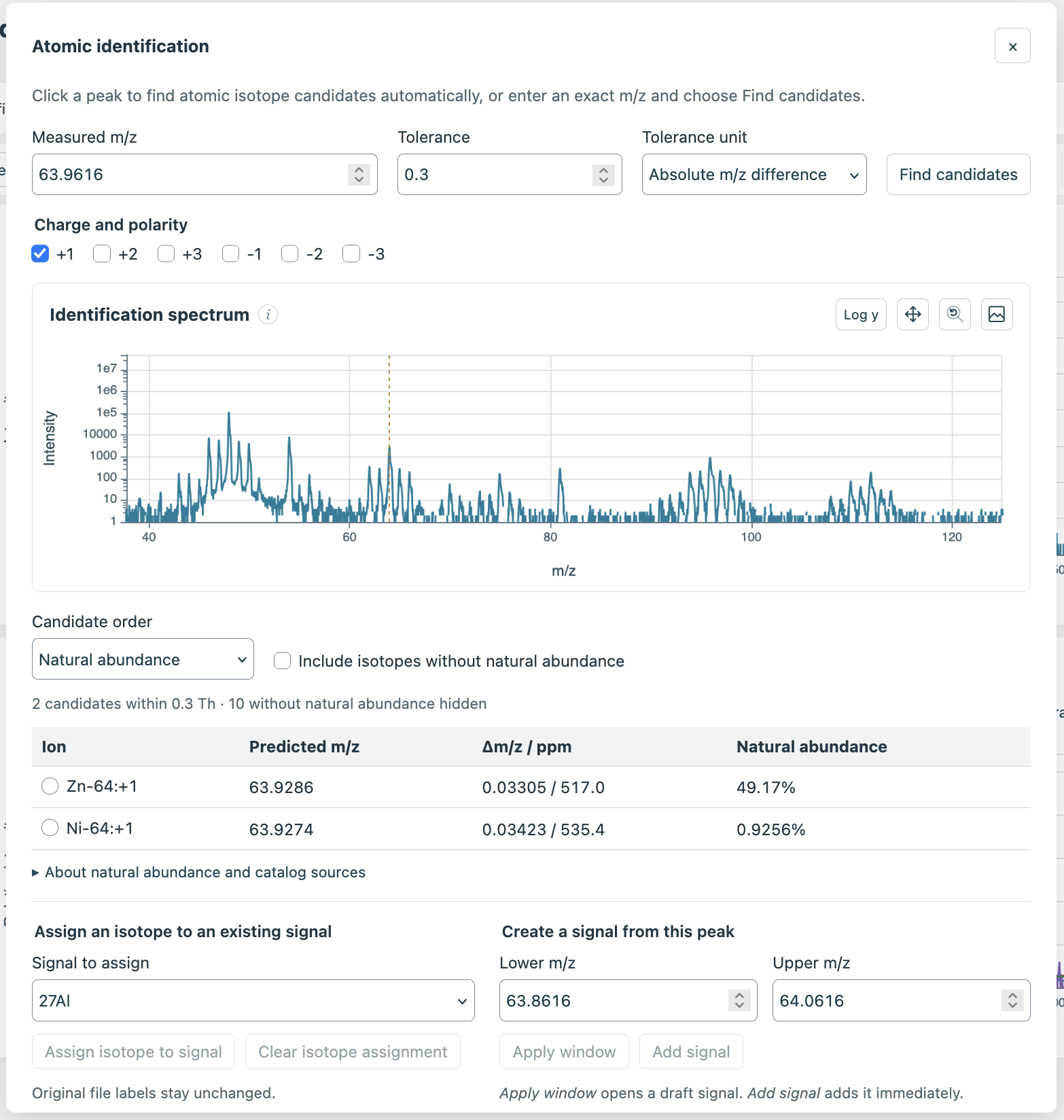
- {tofscope-0.1.0 → tofscope-0.1.2}/src/tofscope/application/spatial.py +0 -0
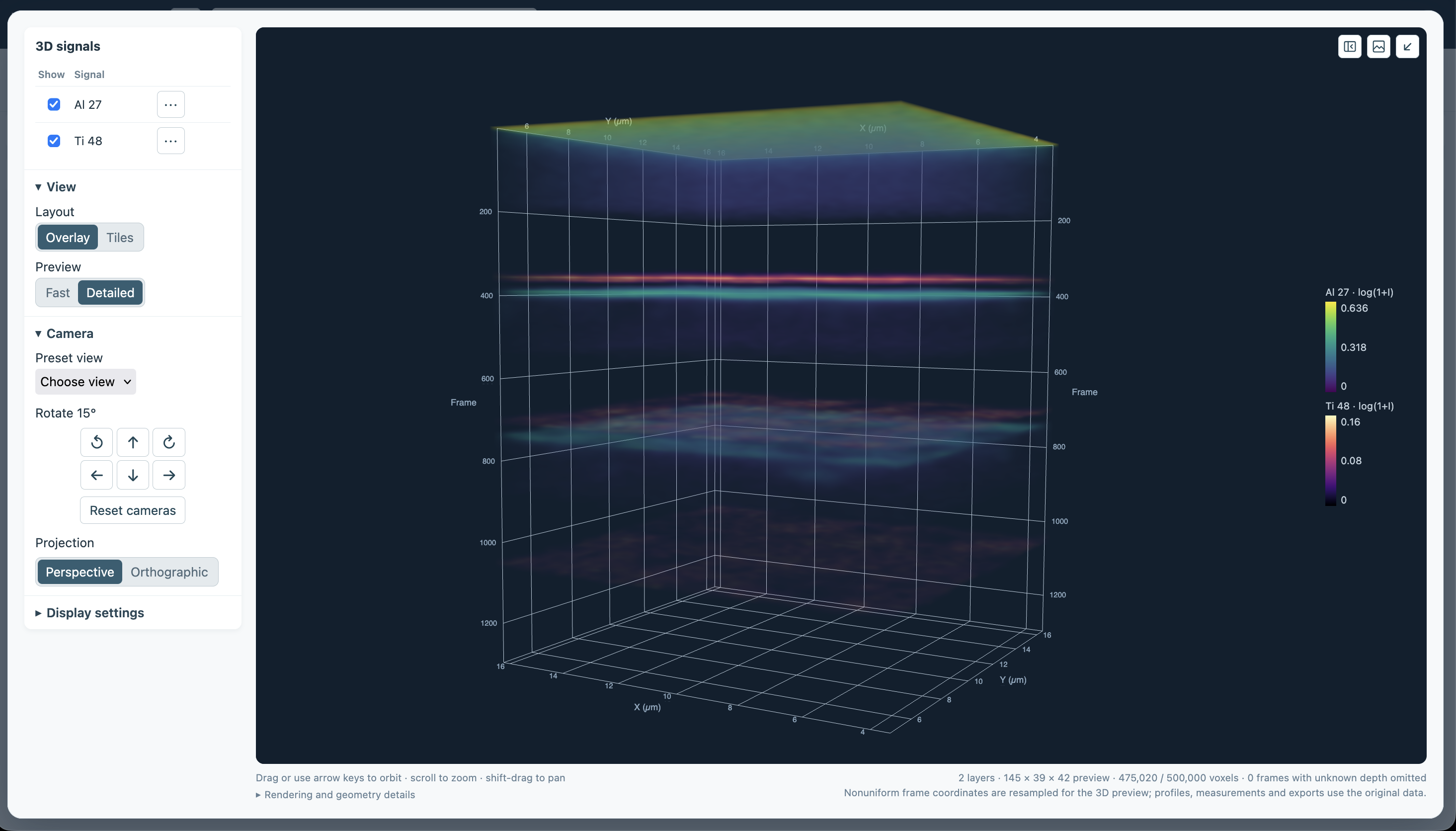
- {tofscope-0.1.0 → tofscope-0.1.2}/src/tofscope/config.py +0 -0
- {tofscope-0.1.0 → tofscope-0.1.2}/src/tofscope/presentation/__init__.py +0 -0
- {tofscope-0.1.0 → tofscope-0.1.2}/src/tofscope/presentation/coordinates.py +0 -0
- {tofscope-0.1.0 → tofscope-0.1.2}/src/tofscope/presentation/data.py +0 -0
- {tofscope-0.1.0 → tofscope-0.1.2}/src/tofscope/presentation/explore.py +0 -0
- {tofscope-0.1.0 → tofscope-0.1.2}/src/tofscope/presentation/exports.py +0 -0
- {tofscope-0.1.0 → tofscope-0.1.2}/src/tofscope/presentation/isotopes.py +0 -0
- {tofscope-0.1.0 → tofscope-0.1.2}/src/tofscope/presentation/volumes.py +0 -0
- {tofscope-0.1.0 → tofscope-0.1.2}/src/tofscope/resources/__init__.py +0 -0
- {tofscope-0.1.0 → tofscope-0.1.2}/src/tofscope/resources/reference/README.md +0 -0
- {tofscope-0.1.0 → tofscope-0.1.2}/src/tofscope/resources/reference/isotopes.json +0 -0
- {tofscope-0.1.0 → tofscope-0.1.2}/src/tofscope/science/__init__.py +0 -0
- {tofscope-0.1.0 → tofscope-0.1.2}/src/tofscope/science/abundance.py +0 -0
- {tofscope-0.1.0 → tofscope-0.1.2}/src/tofscope/science/depth_calibration.py +0 -0
- {tofscope-0.1.0 → tofscope-0.1.2}/src/tofscope/science/integration.py +0 -0
- {tofscope-0.1.0 → tofscope-0.1.2}/src/tofscope/science/isotopes.py +0 -0
- {tofscope-0.1.0 → tofscope-0.1.2}/src/tofscope/science/raw_peaks.py +0 -0
- {tofscope-0.1.0 → tofscope-0.1.2}/src/tofscope/science/volume_layers.py +0 -0
- {tofscope-0.1.0 → tofscope-0.1.2}/src/tofscope/static/assets/datasophos-wordmark.png +0 -0
- {tofscope-0.1.0 → tofscope-0.1.2}/src/tofscope/static/assets/favicon.svg +0 -0
- {tofscope-0.1.0 → tofscope-0.1.2}/src/tofscope/static/licenses/matplotlib.txt +0 -0
- {tofscope-0.1.0 → tofscope-0.1.2}/src/tofscope/storage/__init__.py +0 -0
- {tofscope-0.1.0 → tofscope-0.1.2}/src/tofscope/storage/acquisitions.py +0 -0
- {tofscope-0.1.0 → tofscope-0.1.2}/src/tofscope/storage/analysis_document.py +0 -0
- {tofscope-0.1.0 → tofscope-0.1.2}/src/tofscope/storage/bounded_events.py +0 -0
- {tofscope-0.1.0 → tofscope-0.1.2}/src/tofscope/storage/compact_copy.py +0 -0
- {tofscope-0.1.0 → tofscope-0.1.2}/src/tofscope/storage/dataset_io.py +0 -0
- {tofscope-0.1.0 → tofscope-0.1.2}/src/tofscope/storage/explorer.py +0 -0
- {tofscope-0.1.0 → tofscope-0.1.2}/src/tofscope/storage/file_browser.py +0 -0
- {tofscope-0.1.0 → tofscope-0.1.2}/src/tofscope/storage/identification_document.py +0 -0
- {tofscope-0.1.0 → tofscope-0.1.2}/src/tofscope/storage/integration_store.py +0 -0
- {tofscope-0.1.0 → tofscope-0.1.2}/src/tofscope/storage/native_saved_copy.py +0 -0
- {tofscope-0.1.0 → tofscope-0.1.2}/src/tofscope/storage/raw_preparation.py +0 -0
- {tofscope-0.1.0 → tofscope-0.1.2}/src/tofscope/storage/saved_files.py +0 -0
- {tofscope-0.1.0 → tofscope-0.1.2}/src/tofscope/storage/vendor_export.py +0 -0
- {tofscope-0.1.0 → tofscope-0.1.2}/src/tofscope.egg-info/dependency_links.txt +0 -0
- {tofscope-0.1.0 → tofscope-0.1.2}/src/tofscope.egg-info/entry_points.txt +0 -0
- {tofscope-0.1.0 → tofscope-0.1.2}/src/tofscope.egg-info/requires.txt +0 -0
- {tofscope-0.1.0 → tofscope-0.1.2}/src/tofscope.egg-info/top_level.txt +0 -0
tofscope-0.1.2/PKG-INFO
ADDED
|
@@ -0,0 +1,104 @@
|
|
|
1
|
+
Metadata-Version: 2.4
|
|
2
|
+
Name: tofscope
|
|
3
|
+
Version: 0.1.2
|
|
4
|
+
Summary: Multi-analysis ToF-SIMS exploration and calibrated 3D visualization
|
|
5
|
+
License-Expression: MIT
|
|
6
|
+
Requires-Python: >=3.11
|
|
7
|
+
Description-Content-Type: text/markdown
|
|
8
|
+
License-File: LICENSE
|
|
9
|
+
Requires-Dist: h5py>=3.11
|
|
10
|
+
Requires-Dist: numpy>=2.0
|
|
11
|
+
Requires-Dist: filelock>=3.16
|
|
12
|
+
Requires-Dist: fastapi>=0.115
|
|
13
|
+
Requires-Dist: uvicorn>=0.30
|
|
14
|
+
Requires-Dist: psutil>=6
|
|
15
|
+
Dynamic: license-file
|
|
16
|
+
|
|
17
|
+
<p align="center">
|
|
18
|
+
<img src="https://raw.githubusercontent.com/datasophos/ToFScope/main/docs/assets/tofscope-logo.svg" alt="ToFScope — FIB–SEM / TOF–SIMS" width="324">
|
|
19
|
+
</p>
|
|
20
|
+
|
|
21
|
+
# ToFScope
|
|
22
|
+
|
|
23
|
+
[](https://pypi.org/project/tofscope/)
|
|
24
|
+
[](https://datasophos.github.io/ToFScope/)
|
|
25
|
+
|
|
26
|
+
ToFScope is a browser-based application for exploring time-of-flight secondary ion mass spectrometry (ToF-SIMS) data. It allows you to analyze ion images, mass spectra, and depth profiles together so you can inspect an acquisition, compare signals, and save your analysis for later.
|
|
27
|
+
|
|
28
|
+
ToFScope runs locally as a Python application and opens in your browser. It reads TOFWERK TOFexplorer[^trademark] HDF5 (`.h5`) acquisitions, and provides interactive tools for exploring their mass spectra, ion images, and depth profiles in two and three dimensions.
|
|
29
|
+
|
|
30
|
+
**[Read the ToFScope documentation](https://datasophos.github.io/ToFScope/)** for installation, user guides, deployment, and developer information. Start with [Install and launch](https://datasophos.github.io/ToFScope/docs/getting-started/installation.html) or [Your first analysis](https://datasophos.github.io/ToFScope/docs/getting-started/first-analysis.html).
|
|
31
|
+
|
|
32
|
+
|
|
33
|
+
|
|
34
|
+
*Explore view showing an ion map, mass spectrum, front projection, and depth profile for a real acquisition.*
|
|
35
|
+
|
|
36
|
+
## What you can do
|
|
37
|
+
|
|
38
|
+
- **Explore an acquisition:** view ion maps, a mass spectrum, front projections, and depth profiles together; choose custom regions of interest and frame range.
|
|
39
|
+
- **Compare signals:** use stored ion channels or define custom mass windows from the spectrum, then compare their profiles.
|
|
40
|
+
- **Work with depth:** add calibration anchors to display profiles and projections in physical depth where calibration is known.
|
|
41
|
+
- **Inspect peaks and isotopes:** find candidate atomic isotope ions and measure selected signals over a region and frame range.
|
|
42
|
+
- **Visualize in 3D:** compare signals as volume overlays or tiled views, with controls for color, opacity, and threshold.
|
|
43
|
+
- **Keep and share results:** export profiles as CSV or plots as PNG, and save data back into TOFexplorer-compatible `.h5` files.
|
|
44
|
+
|
|
45
|
+
|
|
46
|
+
|
|
47
|
+
*3D volume view comparing aluminum and titanium signals across acquisition frames.*
|
|
48
|
+
|
|
49
|
+
|
|
50
|
+
|
|
51
|
+
*Atomic identification compares a measured mass-to-charge ratio with candidate isotope ions.*
|
|
52
|
+
|
|
53
|
+
## Get started
|
|
54
|
+
|
|
55
|
+
You need Python 3.11 or newer, [uv](https://docs.astral.sh/uv/getting-started/installation/), and a folder containing supported TOFexplorer `.h5` files. Install from PyPI:
|
|
56
|
+
|
|
57
|
+
```sh
|
|
58
|
+
uv tool install tofscope
|
|
59
|
+
tofscope --data-root /path/to/acquisitions --output-root /path/to/saved-analyses
|
|
60
|
+
```
|
|
61
|
+
|
|
62
|
+
Replace the example paths with your folders. The output folder must be writable and have enough space for a full copy of an acquisition. ToFScope starts a local service and opens the app in your browser. Select a file to begin; keep the terminal open while you work and press **Ctrl-C** there to stop the app.
|
|
63
|
+
|
|
64
|
+
For step-by-step installation, folder setup, and troubleshooting, see [Install and launch](https://datasophos.github.io/ToFScope/docs/getting-started/installation.html). See the [configuration reference](https://datasophos.github.io/ToFScope/docs/technical-documentation/configuration.html) for settings, and [deployment](https://datasophos.github.io/ToFScope/docs/technical-documentation/deployment.html) for hosted use and containers.
|
|
65
|
+
|
|
66
|
+
## Your first analysis
|
|
67
|
+
|
|
68
|
+
1. Open an acquisition and choose a stored signal, or create one from a mass window in the spectrum.
|
|
69
|
+
2. Select a frame range and region of interest to explore its ion image and depth profile. Add other signals to compare profiles.
|
|
70
|
+
3. Use **Depth calibration…** if you have known frame-to-depth measurements, or open **3D volume** to explore the signal spatially.
|
|
71
|
+
4. Choose **Save as…** to save a new analysis copy. After a restart, open it through **Saved files** to resume your saved work.
|
|
72
|
+
|
|
73
|
+
Saving leaves the source acquisition unchanged. Unsaved tabs and in-progress calculations do not survive a restart. Some raw files require preparation into a new copy before exploration; ToFScope previews that step and asks for confirmation.
|
|
74
|
+
|
|
75
|
+
The [user guide](https://datasophos.github.io/ToFScope/docs/getting-started/index.html) covers signals, calibration, exports, isotope identification, saving, and 3D controls in more detail.
|
|
76
|
+
|
|
77
|
+
## Current limitations
|
|
78
|
+
|
|
79
|
+
ToFScope is under active development and is in an alpha state. The application may change substantially prior to a stable 1.0.0 release.
|
|
80
|
+
See the [user guide](https://datasophos.github.io/ToFScope/docs/getting-started/index.html) for details.
|
|
81
|
+
If you have ideas of features to add, or notice any bugs, please open an [issue](https://github.com/datasophos/ToFScope/issues)!
|
|
82
|
+
|
|
83
|
+
## Developing ToFScope
|
|
84
|
+
|
|
85
|
+
The frontend is built with React and TypeScript; the service backend uses Python and FastAPI. Node.js is needed to develop or rebuild the frontend, but not to run the packaged application. From a source checkout:
|
|
86
|
+
|
|
87
|
+
```sh
|
|
88
|
+
uv sync --frozen
|
|
89
|
+
uv run tofscope --data-root /path/to/acquisitions --output-root /path/to/saved-analyses
|
|
90
|
+
```
|
|
91
|
+
|
|
92
|
+
For frontend and Python checks, build instructions, and distribution validation, see the [developer commands](https://datasophos.github.io/ToFScope/docs/technical-documentation/building-and-testing.html).
|
|
93
|
+
|
|
94
|
+
For a diagram-led overview of the application, see [ToFScope architecture](https://datasophos.github.io/ToFScope/docs/technical-documentation/architecture.html).
|
|
95
|
+
|
|
96
|
+
To build or preview the documentation site, see [maintaining the documentation](https://datasophos.github.io/ToFScope/docs/technical-documentation/documentation.html).
|
|
97
|
+
|
|
98
|
+
## License
|
|
99
|
+
|
|
100
|
+
ToFScope is available under the [MIT License](https://github.com/datasophos/ToFScope/blob/main/LICENSE).
|
|
101
|
+
|
|
102
|
+
---
|
|
103
|
+
|
|
104
|
+
[^trademark]: TOFWERK and TOFexplorer are names owned by [TOFWERK AG](https://www.tofwerk.com/). They are used here solely to identify the products and file formats supported by ToFScope. ToFScope is an independent project and is not affiliated with, endorsed by, or sponsored by TOFWERK AG.
|
|
@@ -1,14 +1,19 @@
|
|
|
1
1
|
<p align="center">
|
|
2
|
-
<img src="docs/assets/tofscope-logo.svg" alt="ToFScope — FIB–SEM / TOF–SIMS" width="324">
|
|
2
|
+
<img src="https://raw.githubusercontent.com/datasophos/ToFScope/main/docs/assets/tofscope-logo.svg" alt="ToFScope — FIB–SEM / TOF–SIMS" width="324">
|
|
3
3
|
</p>
|
|
4
4
|
|
|
5
5
|
# ToFScope
|
|
6
6
|
|
|
7
|
+
[](https://pypi.org/project/tofscope/)
|
|
8
|
+
[](https://datasophos.github.io/ToFScope/)
|
|
9
|
+
|
|
7
10
|
ToFScope is a browser-based application for exploring time-of-flight secondary ion mass spectrometry (ToF-SIMS) data. It allows you to analyze ion images, mass spectra, and depth profiles together so you can inspect an acquisition, compare signals, and save your analysis for later.
|
|
8
11
|
|
|
9
|
-
ToFScope runs locally as a Python application and opens in your browser. It reads
|
|
12
|
+
ToFScope runs locally as a Python application and opens in your browser. It reads TOFWERK TOFexplorer[^trademark] HDF5 (`.h5`) acquisitions, and provides interactive tools for exploring their mass spectra, ion images, and depth profiles in two and three dimensions.
|
|
13
|
+
|
|
14
|
+
**[Read the ToFScope documentation](https://datasophos.github.io/ToFScope/)** for installation, user guides, deployment, and developer information. Start with [Install and launch](https://datasophos.github.io/ToFScope/docs/getting-started/installation.html) or [Your first analysis](https://datasophos.github.io/ToFScope/docs/getting-started/first-analysis.html).
|
|
10
15
|
|
|
11
|
-

|
|
16
|
+

|
|
12
17
|
|
|
13
18
|
*Explore view showing an ion map, mass spectrum, front projection, and depth profile for a real acquisition.*
|
|
14
19
|
|
|
@@ -21,26 +26,26 @@ ToFScope runs locally as a Python application and opens in your browser. It read
|
|
|
21
26
|
- **Visualize in 3D:** compare signals as volume overlays or tiled views, with controls for color, opacity, and threshold.
|
|
22
27
|
- **Keep and share results:** export profiles as CSV or plots as PNG, and save data back into TOFexplorer-compatible `.h5` files.
|
|
23
28
|
|
|
24
|
-

|
|
29
|
+

|
|
25
30
|
|
|
26
31
|
*3D volume view comparing aluminum and titanium signals across acquisition frames.*
|
|
27
32
|
|
|
28
|
-

|
|
33
|
+

|
|
29
34
|
|
|
30
35
|
*Atomic identification compares a measured mass-to-charge ratio with candidate isotope ions.*
|
|
31
36
|
|
|
32
37
|
## Get started
|
|
33
38
|
|
|
34
|
-
You need Python 3.11 or newer, [uv](https://docs.astral.sh/uv/getting-started/installation/), and a folder containing supported TOFexplorer `.h5` files.
|
|
39
|
+
You need Python 3.11 or newer, [uv](https://docs.astral.sh/uv/getting-started/installation/), and a folder containing supported TOFexplorer `.h5` files. Install from PyPI:
|
|
35
40
|
|
|
36
41
|
```sh
|
|
37
|
-
uv tool install
|
|
42
|
+
uv tool install tofscope
|
|
38
43
|
tofscope --data-root /path/to/acquisitions --output-root /path/to/saved-analyses
|
|
39
44
|
```
|
|
40
45
|
|
|
41
46
|
Replace the example paths with your folders. The output folder must be writable and have enough space for a full copy of an acquisition. ToFScope starts a local service and opens the app in your browser. Select a file to begin; keep the terminal open while you work and press **Ctrl-C** there to stop the app.
|
|
42
47
|
|
|
43
|
-
For
|
|
48
|
+
For step-by-step installation, folder setup, and troubleshooting, see [Install and launch](https://datasophos.github.io/ToFScope/docs/getting-started/installation.html). See the [configuration reference](https://datasophos.github.io/ToFScope/docs/technical-documentation/configuration.html) for settings, and [deployment](https://datasophos.github.io/ToFScope/docs/technical-documentation/deployment.html) for hosted use and containers.
|
|
44
49
|
|
|
45
50
|
## Your first analysis
|
|
46
51
|
|
|
@@ -51,12 +56,12 @@ For a step-by-step installation, including folder setup and troubleshooting, see
|
|
|
51
56
|
|
|
52
57
|
Saving leaves the source acquisition unchanged. Unsaved tabs and in-progress calculations do not survive a restart. Some raw files require preparation into a new copy before exploration; ToFScope previews that step and asks for confirmation.
|
|
53
58
|
|
|
54
|
-
The [user guide](docs/
|
|
59
|
+
The [user guide](https://datasophos.github.io/ToFScope/docs/getting-started/index.html) covers signals, calibration, exports, isotope identification, saving, and 3D controls in more detail.
|
|
55
60
|
|
|
56
61
|
## Current limitations
|
|
57
62
|
|
|
58
63
|
ToFScope is under active development and is in an alpha state. The application may change substantially prior to a stable 1.0.0 release.
|
|
59
|
-
See the [user guide](docs/
|
|
64
|
+
See the [user guide](https://datasophos.github.io/ToFScope/docs/getting-started/index.html) for details.
|
|
60
65
|
If you have ideas of features to add, or notice any bugs, please open an [issue](https://github.com/datasophos/ToFScope/issues)!
|
|
61
66
|
|
|
62
67
|
## Developing ToFScope
|
|
@@ -68,14 +73,16 @@ uv sync --frozen
|
|
|
68
73
|
uv run tofscope --data-root /path/to/acquisitions --output-root /path/to/saved-analyses
|
|
69
74
|
```
|
|
70
75
|
|
|
71
|
-
For frontend and Python checks, build instructions, and distribution validation, see the [developer commands](docs/
|
|
76
|
+
For frontend and Python checks, build instructions, and distribution validation, see the [developer commands](https://datasophos.github.io/ToFScope/docs/technical-documentation/building-and-testing.html).
|
|
77
|
+
|
|
78
|
+
For a diagram-led overview of the application, see [ToFScope architecture](https://datasophos.github.io/ToFScope/docs/technical-documentation/architecture.html).
|
|
79
|
+
|
|
80
|
+
To build or preview the documentation site, see [maintaining the documentation](https://datasophos.github.io/ToFScope/docs/technical-documentation/documentation.html).
|
|
72
81
|
|
|
73
82
|
## License
|
|
74
83
|
|
|
75
|
-
ToFScope is available under the [MIT License](LICENSE).
|
|
84
|
+
ToFScope is available under the [MIT License](https://github.com/datasophos/ToFScope/blob/main/LICENSE).
|
|
76
85
|
|
|
77
86
|
---
|
|
78
87
|
|
|
79
|
-
|
|
80
|
-
|
|
81
|
-
TOFWERK and TOFexplorer are names owned by [TOFWERK AG](https://www.tofwerk.com/). They are used here solely to identify the products and file formats supported by ToFScope. ToFScope is an independent project and is not affiliated with, endorsed by, or sponsored by TOFWERK AG.
|
|
88
|
+
[^trademark]: TOFWERK and TOFexplorer are names owned by [TOFWERK AG](https://www.tofwerk.com/). They are used here solely to identify the products and file formats supported by ToFScope. ToFScope is an independent project and is not affiliated with, endorsed by, or sponsored by TOFWERK AG.
|
|
@@ -4,8 +4,9 @@ build-backend = "setuptools.build_meta"
|
|
|
4
4
|
|
|
5
5
|
[project]
|
|
6
6
|
name = "tofscope"
|
|
7
|
-
version = "0.1.
|
|
7
|
+
version = "0.1.2"
|
|
8
8
|
description = "Multi-analysis ToF-SIMS exploration and calibrated 3D visualization"
|
|
9
|
+
readme = "README.md"
|
|
9
10
|
requires-python = ">=3.11"
|
|
10
11
|
license = "MIT"
|
|
11
12
|
dependencies = ["h5py>=3.11", "numpy>=2.0", "filelock>=3.16", "fastapi>=0.115", "uvicorn>=0.30", "psutil>=6"]
|
|
@@ -20,6 +21,9 @@ dev = [
|
|
|
20
21
|
"playwright>=1.50",
|
|
21
22
|
"rosettasciio==0.15.0",
|
|
22
23
|
]
|
|
24
|
+
docs = [
|
|
25
|
+
"great-docs==0.17.0",
|
|
26
|
+
]
|
|
23
27
|
|
|
24
28
|
[tool.setuptools.packages.find]
|
|
25
29
|
where = ["src"]
|
|
@@ -0,0 +1 @@
|
|
|
1
|
+
__version__ = "0.1.2"
|
|
@@ -2,6 +2,8 @@ from collections import OrderedDict
|
|
|
2
2
|
from dataclasses import dataclass, field, replace
|
|
3
3
|
from threading import RLock
|
|
4
4
|
from uuid import uuid4
|
|
5
|
+
|
|
6
|
+
import numpy as np
|
|
5
7
|
from tofscope.storage.acquisitions import SourceChanged
|
|
6
8
|
from tofscope.application.models import (
|
|
7
9
|
AnalysisSnapshot,
|
|
@@ -13,6 +15,31 @@ from tofscope.application.commands import AllDepth
|
|
|
13
15
|
from tofscope.science.signals import SignalRecipe
|
|
14
16
|
|
|
15
17
|
|
|
18
|
+
DEFAULT_MIN_MZ = 20.0
|
|
19
|
+
|
|
20
|
+
|
|
21
|
+
def strongest_spectral_peak(peaks, mass_axis, spectrum):
|
|
22
|
+
"""Estimate stored-channel intensity from its inclusive spectrum window.
|
|
23
|
+
|
|
24
|
+
The sum spectrum is a fast proxy; it need not match stored ion-map totals.
|
|
25
|
+
Peaks below m/z 20 are excluded unless no peak meets that threshold.
|
|
26
|
+
Nonfinite spectrum samples are ignored, and ties retain peak-table order.
|
|
27
|
+
"""
|
|
28
|
+
axis = np.asarray(mass_axis, dtype=np.float64)
|
|
29
|
+
finite = np.isfinite(spectrum)
|
|
30
|
+
eligible = [peak for peak in peaks if peak["mass"] >= DEFAULT_MIN_MZ] or peaks
|
|
31
|
+
best = eligible[0]
|
|
32
|
+
best_score = float("-inf")
|
|
33
|
+
for peak in eligible:
|
|
34
|
+
included = finite & (axis >= peak["low"]) & (axis <= peak["high"])
|
|
35
|
+
if not included.any():
|
|
36
|
+
continue
|
|
37
|
+
score = np.sum(spectrum, where=included, dtype=np.float64)
|
|
38
|
+
if score > best_score:
|
|
39
|
+
best, best_score = peak, score
|
|
40
|
+
return best
|
|
41
|
+
|
|
42
|
+
|
|
16
43
|
class CapacityError(ValueError):
|
|
17
44
|
pass
|
|
18
45
|
|
|
@@ -90,10 +117,10 @@ class AnalysisService:
|
|
|
90
117
|
def initial(self, owner, dataset, aid=None, revision=0):
|
|
91
118
|
with self.repository.metadata(owner, dataset, aid) as m:
|
|
92
119
|
nz, ny, nx, _ = m.shape
|
|
93
|
-
default =
|
|
120
|
+
default = strongest_spectral_peak(m.peaks, m.mass_axis, m.sum_spectrum)
|
|
94
121
|
frames = (0, nz - 1)
|
|
95
122
|
recipe = SignalRecipe(
|
|
96
|
-
label=f"{default['label']} · {default['mass']:g}
|
|
123
|
+
label=f"{default['label']} · m/z {default['mass']:g}",
|
|
97
124
|
source="stored",
|
|
98
125
|
stored_index=default["index"],
|
|
99
126
|
intervals=((default["low"], default["high"]),),
|
|
@@ -20,7 +20,7 @@ class ExploreService:
|
|
|
20
20
|
raise ValueError("Coverage outside acquisition.")
|
|
21
21
|
p = s.peaks[index]
|
|
22
22
|
return SignalRecipe(
|
|
23
|
-
label=f"{p.label} · {p.mass:g}
|
|
23
|
+
label=f"{p.label} · m/z {p.mass:g}",
|
|
24
24
|
source="stored",
|
|
25
25
|
stored_index=index,
|
|
26
26
|
intervals=((p.low, p.high),),
|
|
@@ -1,12 +1,9 @@
|
|
|
1
1
|
"""One Python service/port, loopback by default; Node is build-time only."""
|
|
2
2
|
|
|
3
3
|
import argparse
|
|
4
|
-
from dataclasses import asdict
|
|
5
4
|
import hashlib
|
|
6
|
-
from importlib.resources import files
|
|
7
5
|
import json
|
|
8
6
|
import os
|
|
9
|
-
from pathlib import Path
|
|
10
7
|
import secrets
|
|
11
8
|
import socket
|
|
12
9
|
import sys
|
|
@@ -14,7 +11,12 @@ import threading
|
|
|
14
11
|
import time
|
|
15
12
|
import urllib.request
|
|
16
13
|
import webbrowser
|
|
14
|
+
from dataclasses import asdict
|
|
15
|
+
from importlib.resources import files
|
|
16
|
+
from pathlib import Path
|
|
17
|
+
|
|
17
18
|
import uvicorn
|
|
19
|
+
|
|
18
20
|
from tofscope import __version__
|
|
19
21
|
from tofscope.api.app import create_app
|
|
20
22
|
from tofscope.config import load_settings
|
|
@@ -56,6 +58,9 @@ def run_service(settings, browser=False):
|
|
|
56
58
|
socket.AF_INET6 if ":" in settings.host else socket.AF_INET, socket.SOCK_STREAM
|
|
57
59
|
)
|
|
58
60
|
try:
|
|
61
|
+
if os.name != "nt":
|
|
62
|
+
# Rebind promptly after closed connections leave the port in TIME_WAIT.
|
|
63
|
+
sock.setsockopt(socket.SOL_SOCKET, socket.SO_REUSEADDR, 1)
|
|
59
64
|
sock.bind((settings.host, settings.port))
|
|
60
65
|
sock.listen(128)
|
|
61
66
|
except OSError:
|
|
@@ -106,8 +111,11 @@ def main(argv=None):
|
|
|
106
111
|
p.add_argument("--port", type=int)
|
|
107
112
|
p.add_argument("--mode", choices=["local", "proxy"])
|
|
108
113
|
p.add_argument("--no-browser", action="store_true")
|
|
114
|
+
p.add_argument("--json", action="store_true", help="Print the doctor report as JSON")
|
|
109
115
|
p.add_argument("--version", action="version", version=__version__)
|
|
110
116
|
a = p.parse_args(argv)
|
|
117
|
+
if a.json and a.command != "doctor":
|
|
118
|
+
p.error("--json is only available with doctor")
|
|
111
119
|
try:
|
|
112
120
|
settings = load_settings(
|
|
113
121
|
a.config,
|
|
@@ -126,16 +134,19 @@ def main(argv=None):
|
|
|
126
134
|
)
|
|
127
135
|
if a.command == "doctor":
|
|
128
136
|
assets = asset_status()
|
|
129
|
-
|
|
130
|
-
|
|
131
|
-
|
|
132
|
-
|
|
133
|
-
|
|
134
|
-
|
|
135
|
-
|
|
136
|
-
|
|
137
|
-
|
|
138
|
-
|
|
137
|
+
if a.json:
|
|
138
|
+
public = asdict(settings)
|
|
139
|
+
public.update(
|
|
140
|
+
version=__version__,
|
|
141
|
+
asset_version=assets["version"],
|
|
142
|
+
scope="Explore-only",
|
|
143
|
+
writes_available=False,
|
|
144
|
+
save_copies_available=True,
|
|
145
|
+
notes="Managed array budget excludes Python/HDF5/browser allocator overhead; one API process.",
|
|
146
|
+
)
|
|
147
|
+
print(json.dumps(public, default=str, indent=2))
|
|
148
|
+
else:
|
|
149
|
+
print("Everything looks good: configuration loaded and frontend assets verified.")
|
|
139
150
|
return 0
|
|
140
151
|
if a.command == "open":
|
|
141
152
|
credential = json.loads((settings.runtime_dir / "launch.json").read_text())
|