tintkit 0.1.0__tar.gz
This diff represents the content of publicly available package versions that have been released to one of the supported registries. The information contained in this diff is provided for informational purposes only and reflects changes between package versions as they appear in their respective public registries.
- tintkit-0.1.0/LICENSE +21 -0
- tintkit-0.1.0/PKG-INFO +124 -0
- tintkit-0.1.0/README.md +81 -0
- tintkit-0.1.0/pyproject.toml +40 -0
- tintkit-0.1.0/setup.cfg +4 -0
- tintkit-0.1.0/tintkit/__init__.py +99 -0
- tintkit-0.1.0/tintkit/composites.py +459 -0
- tintkit-0.1.0/tintkit/containers.py +296 -0
- tintkit-0.1.0/tintkit/controls.py +794 -0
- tintkit-0.1.0/tintkit/icons/check.png +0 -0
- tintkit-0.1.0/tintkit/icons/chevron-down.png +0 -0
- tintkit-0.1.0/tintkit/icons/chevron-left.png +0 -0
- tintkit-0.1.0/tintkit/icons/chevron-right.png +0 -0
- tintkit-0.1.0/tintkit/icons/chevron-up.png +0 -0
- tintkit-0.1.0/tintkit/icons/crop.png +0 -0
- tintkit-0.1.0/tintkit/icons/droplets.png +0 -0
- tintkit-0.1.0/tintkit/icons/folder-check.png +0 -0
- tintkit-0.1.0/tintkit/icons/folder-open.png +0 -0
- tintkit-0.1.0/tintkit/icons/info.png +0 -0
- tintkit-0.1.0/tintkit/icons/layout-grid.png +0 -0
- tintkit-0.1.0/tintkit/icons/menu.png +0 -0
- tintkit-0.1.0/tintkit/icons/redo.png +0 -0
- tintkit-0.1.0/tintkit/icons/rotate-ccw.png +0 -0
- tintkit-0.1.0/tintkit/icons/save.png +0 -0
- tintkit-0.1.0/tintkit/icons/search.png +0 -0
- tintkit-0.1.0/tintkit/icons/settings.png +0 -0
- tintkit-0.1.0/tintkit/icons/sliders-horizontal.png +0 -0
- tintkit-0.1.0/tintkit/icons/star.png +0 -0
- tintkit-0.1.0/tintkit/icons/trash-2.png +0 -0
- tintkit-0.1.0/tintkit/icons/undo.png +0 -0
- tintkit-0.1.0/tintkit/icons/upload.png +0 -0
- tintkit-0.1.0/tintkit/icons/x.png +0 -0
- tintkit-0.1.0/tintkit/icons.py +72 -0
- tintkit-0.1.0/tintkit/primitives.py +387 -0
- tintkit-0.1.0/tintkit/scaling.py +24 -0
- tintkit-0.1.0/tintkit/theme.py +193 -0
- tintkit-0.1.0/tintkit.egg-info/PKG-INFO +124 -0
- tintkit-0.1.0/tintkit.egg-info/SOURCES.txt +39 -0
- tintkit-0.1.0/tintkit.egg-info/dependency_links.txt +1 -0
- tintkit-0.1.0/tintkit.egg-info/requires.txt +3 -0
- tintkit-0.1.0/tintkit.egg-info/top_level.txt +1 -0
tintkit-0.1.0/LICENSE
ADDED
|
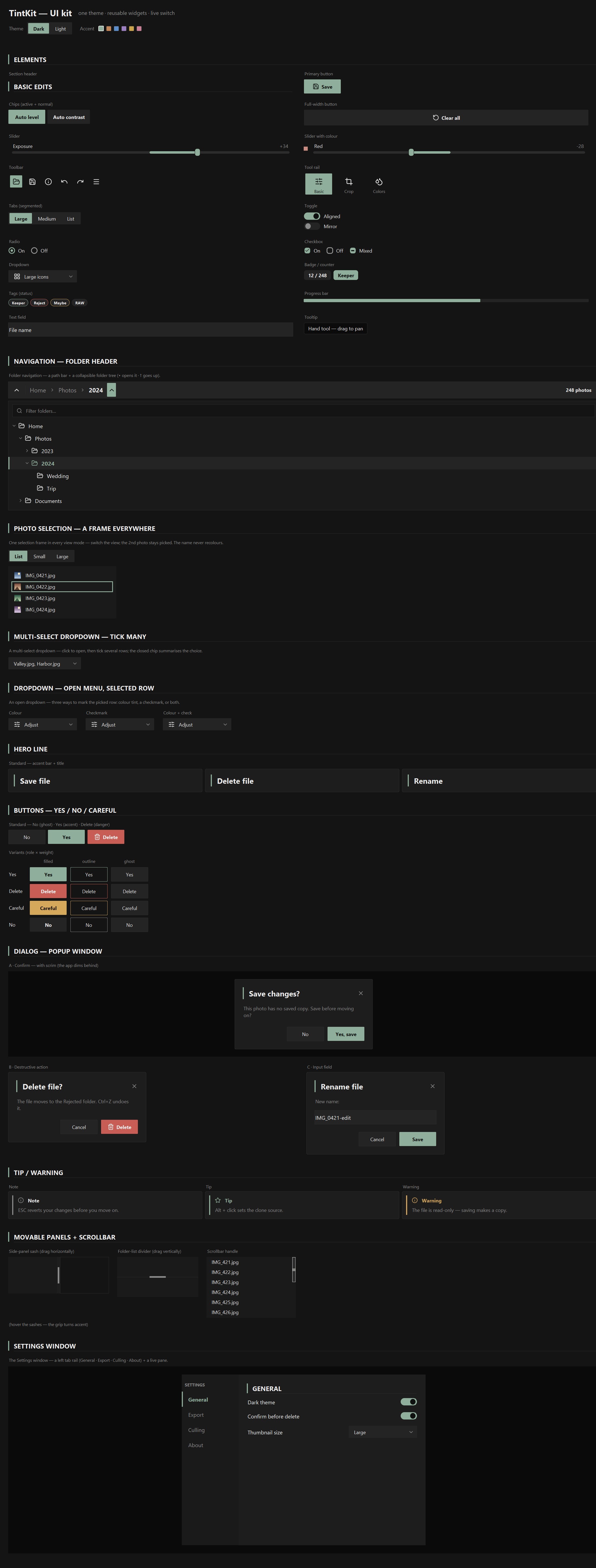
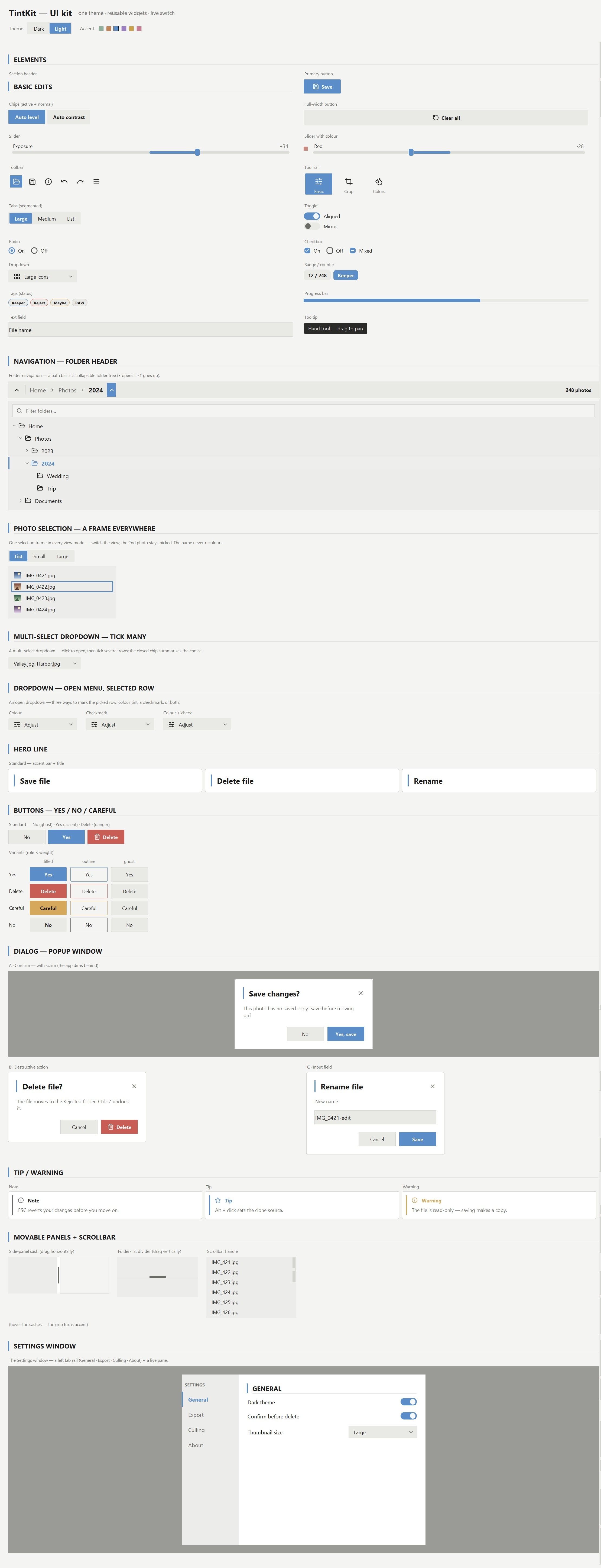
@@ -0,0 +1,21 @@
|
|
|
1
|
+
MIT License
|
|
2
|
+
|
|
3
|
+
Copyright (c) 2026 Lasha Kandelaki
|
|
4
|
+
|
|
5
|
+
Permission is hereby granted, free of charge, to any person obtaining a copy
|
|
6
|
+
of this software and associated documentation files (the "Software"), to deal
|
|
7
|
+
in the Software without restriction, including without limitation the rights
|
|
8
|
+
to use, copy, modify, merge, publish, distribute, sublicense, and/or sell
|
|
9
|
+
copies of the Software, and to permit persons to whom the Software is
|
|
10
|
+
furnished to do so, subject to the following conditions:
|
|
11
|
+
|
|
12
|
+
The above copyright notice and this permission notice shall be included in all
|
|
13
|
+
copies or substantial portions of the Software.
|
|
14
|
+
|
|
15
|
+
THE SOFTWARE IS PROVIDED "AS IS", WITHOUT WARRANTY OF ANY KIND, EXPRESS OR
|
|
16
|
+
IMPLIED, INCLUDING BUT NOT LIMITED TO THE WARRANTIES OF MERCHANTABILITY,
|
|
17
|
+
FITNESS FOR A PARTICULAR PURPOSE AND NONINFRINGEMENT. IN NO EVENT SHALL THE
|
|
18
|
+
AUTHORS OR COPYRIGHT HOLDERS BE LIABLE FOR ANY CLAIM, DAMAGES OR OTHER
|
|
19
|
+
LIABILITY, WHETHER IN AN ACTION OF CONTRACT, TORT OR OTHERWISE, ARISING FROM,
|
|
20
|
+
OUT OF OR IN CONNECTION WITH THE SOFTWARE OR THE USE OR OTHER DEALINGS IN THE
|
|
21
|
+
SOFTWARE.
|
tintkit-0.1.0/PKG-INFO
ADDED
|
@@ -0,0 +1,124 @@
|
|
|
1
|
+
Metadata-Version: 2.4
|
|
2
|
+
Name: tintkit
|
|
3
|
+
Version: 0.1.0
|
|
4
|
+
Summary: A small, themeable Tkinter widget kit — a dark/light photo-tool look with one live theme.
|
|
5
|
+
Author: Lasha Kandelaki
|
|
6
|
+
License: MIT License
|
|
7
|
+
|
|
8
|
+
Copyright (c) 2026 Lasha Kandelaki
|
|
9
|
+
|
|
10
|
+
Permission is hereby granted, free of charge, to any person obtaining a copy
|
|
11
|
+
of this software and associated documentation files (the "Software"), to deal
|
|
12
|
+
in the Software without restriction, including without limitation the rights
|
|
13
|
+
to use, copy, modify, merge, publish, distribute, sublicense, and/or sell
|
|
14
|
+
copies of the Software, and to permit persons to whom the Software is
|
|
15
|
+
furnished to do so, subject to the following conditions:
|
|
16
|
+
|
|
17
|
+
The above copyright notice and this permission notice shall be included in all
|
|
18
|
+
copies or substantial portions of the Software.
|
|
19
|
+
|
|
20
|
+
THE SOFTWARE IS PROVIDED "AS IS", WITHOUT WARRANTY OF ANY KIND, EXPRESS OR
|
|
21
|
+
IMPLIED, INCLUDING BUT NOT LIMITED TO THE WARRANTIES OF MERCHANTABILITY,
|
|
22
|
+
FITNESS FOR A PARTICULAR PURPOSE AND NONINFRINGEMENT. IN NO EVENT SHALL THE
|
|
23
|
+
AUTHORS OR COPYRIGHT HOLDERS BE LIABLE FOR ANY CLAIM, DAMAGES OR OTHER
|
|
24
|
+
LIABILITY, WHETHER IN AN ACTION OF CONTRACT, TORT OR OTHERWISE, ARISING FROM,
|
|
25
|
+
OUT OF OR IN CONNECTION WITH THE SOFTWARE OR THE USE OR OTHER DEALINGS IN THE
|
|
26
|
+
SOFTWARE.
|
|
27
|
+
|
|
28
|
+
Project-URL: Homepage, https://github.com/kandelucky/tintkit
|
|
29
|
+
Project-URL: Repository, https://github.com/kandelucky/tintkit
|
|
30
|
+
Project-URL: Issues, https://github.com/kandelucky/tintkit/issues
|
|
31
|
+
Keywords: tkinter,ui,widgets,theme,gui,dark-mode,lucide
|
|
32
|
+
Classifier: Programming Language :: Python :: 3
|
|
33
|
+
Classifier: License :: OSI Approved :: MIT License
|
|
34
|
+
Classifier: Operating System :: OS Independent
|
|
35
|
+
Classifier: Topic :: Software Development :: User Interfaces
|
|
36
|
+
Classifier: Environment :: X11 Applications
|
|
37
|
+
Requires-Python: >=3.8
|
|
38
|
+
Description-Content-Type: text/markdown
|
|
39
|
+
License-File: LICENSE
|
|
40
|
+
Provides-Extra: icons
|
|
41
|
+
Requires-Dist: pillow; extra == "icons"
|
|
42
|
+
Dynamic: license-file
|
|
43
|
+
|
|
44
|
+
# TintKit
|
|
45
|
+
|
|
46
|
+
A small, themeable **tkinter** UI kit — a dark/light photo-tool look as reusable
|
|
47
|
+
controls. One theme drives every colour, widgets reuse each other, and the look
|
|
48
|
+
switches live with no restart.
|
|
49
|
+
|
|
50
|
+
  
|
|
51
|
+
|
|
52
|
+
|
|
53
|
+
|
|
54
|
+
|
|
55
|
+
## Run the gallery
|
|
56
|
+
|
|
57
|
+
```bash
|
|
58
|
+
python gallery.py
|
|
59
|
+
```
|
|
60
|
+
|
|
61
|
+
Every component in one scrollable window, with a live **Dark / Light + accent**
|
|
62
|
+
switcher at the top — the whole window repaints instantly. (The handlers are
|
|
63
|
+
demos; the controls themselves are genuinely interactive.)
|
|
64
|
+
|
|
65
|
+
## Install
|
|
66
|
+
|
|
67
|
+
```bash
|
|
68
|
+
pip install git+https://github.com/kandelucky/tintkit
|
|
69
|
+
```
|
|
70
|
+
|
|
71
|
+
Pure-stdlib tkinter — **zero required dependencies**. For the bundled
|
|
72
|
+
[Lucide](https://lucide.dev/) icons (recoloured per theme) also `pip install
|
|
73
|
+
pillow`; without it widgets still work and shapes stay anti-aliased (drawn in
|
|
74
|
+
pure Tk) — only the glyphs are skipped. Point at your own icons with
|
|
75
|
+
`set_icon_dir("…/my_icons")`.
|
|
76
|
+
|
|
77
|
+
## Use it
|
|
78
|
+
|
|
79
|
+
```python
|
|
80
|
+
import tkinter as tk
|
|
81
|
+
from tintkit import Theme, setup_dpi, Button, Toggle
|
|
82
|
+
|
|
83
|
+
root = tk.Tk()
|
|
84
|
+
setup_dpi(root) # crisp icons on high-DPI screens
|
|
85
|
+
theme = Theme(scheme="dark", accent="#8fae9b")
|
|
86
|
+
|
|
87
|
+
Button(root, theme, "Save", icon="save", command=lambda: print("saved")).pack()
|
|
88
|
+
Toggle(root, theme, value=True, command=lambda on: print(on)).pack()
|
|
89
|
+
root.mainloop()
|
|
90
|
+
```
|
|
91
|
+
|
|
92
|
+
Every widget takes the same first two args — the parent and the shared `theme` —
|
|
93
|
+
and returns an object you `.pack()` / `.grid()` like any tk widget. One theme is
|
|
94
|
+
the single source of truth; change it and the whole tree repaints:
|
|
95
|
+
|
|
96
|
+
```python
|
|
97
|
+
theme.set(scheme="light") # dark <-> light
|
|
98
|
+
theme.set(accent="#c08457") # any accent; shades derived for you
|
|
99
|
+
theme.toggle_scheme()
|
|
100
|
+
```
|
|
101
|
+
|
|
102
|
+
Read any token anywhere with `theme["accent"]`, `theme["panel"]`,
|
|
103
|
+
`theme["r_control"]` …
|
|
104
|
+
|
|
105
|
+
## What's inside
|
|
106
|
+
|
|
107
|
+
| module | what it holds |
|
|
108
|
+
|---|---|
|
|
109
|
+
| `tintkit/theme.py` | dark/light schemes, accent + danger/warn derivation, repaint observer |
|
|
110
|
+
| `tintkit/icons.py` | the Lucide icon loader (recoloured per theme) |
|
|
111
|
+
| `tintkit/primitives.py` | `rounded_rect`, the `CanvasControl` base, themed `Surface` / `Label` |
|
|
112
|
+
| `tintkit/controls.py` | Button, Slider, Toggle, Radio, Checkbox, SegmentedTabs, Dropdown, Badge, Tag, ProgressBar, Tooltip, TextField |
|
|
113
|
+
| `tintkit/containers.py` | Card, dialog, callout, section header, drag sashes, scrollbar |
|
|
114
|
+
| `tintkit/composites.py` | toolbar, tool rail, folder nav + tree, selection views, settings window |
|
|
115
|
+
| `gallery.py` | the style guide window + live switcher |
|
|
116
|
+
|
|
117
|
+
**Design rules:** no widget hard-codes a colour (each reads `theme[...]` and
|
|
118
|
+
repaints on change); one radius scale — `r_control` / `r_pill` / `r_card`, no
|
|
119
|
+
magic numbers; widgets reuse widgets; all glyphs are
|
|
120
|
+
[Lucide](https://lucide.dev/) PNGs (ISC) recoloured at load.
|
|
121
|
+
|
|
122
|
+
## License
|
|
123
|
+
|
|
124
|
+
MIT — see [LICENSE](LICENSE).
|
tintkit-0.1.0/README.md
ADDED
|
@@ -0,0 +1,81 @@
|
|
|
1
|
+
# TintKit
|
|
2
|
+
|
|
3
|
+
A small, themeable **tkinter** UI kit — a dark/light photo-tool look as reusable
|
|
4
|
+
controls. One theme drives every colour, widgets reuse each other, and the look
|
|
5
|
+
switches live with no restart.
|
|
6
|
+
|
|
7
|
+
  
|
|
8
|
+
|
|
9
|
+

|
|
10
|
+

|
|
11
|
+
|
|
12
|
+
## Run the gallery
|
|
13
|
+
|
|
14
|
+
```bash
|
|
15
|
+
python gallery.py
|
|
16
|
+
```
|
|
17
|
+
|
|
18
|
+
Every component in one scrollable window, with a live **Dark / Light + accent**
|
|
19
|
+
switcher at the top — the whole window repaints instantly. (The handlers are
|
|
20
|
+
demos; the controls themselves are genuinely interactive.)
|
|
21
|
+
|
|
22
|
+
## Install
|
|
23
|
+
|
|
24
|
+
```bash
|
|
25
|
+
pip install git+https://github.com/kandelucky/tintkit
|
|
26
|
+
```
|
|
27
|
+
|
|
28
|
+
Pure-stdlib tkinter — **zero required dependencies**. For the bundled
|
|
29
|
+
[Lucide](https://lucide.dev/) icons (recoloured per theme) also `pip install
|
|
30
|
+
pillow`; without it widgets still work and shapes stay anti-aliased (drawn in
|
|
31
|
+
pure Tk) — only the glyphs are skipped. Point at your own icons with
|
|
32
|
+
`set_icon_dir("…/my_icons")`.
|
|
33
|
+
|
|
34
|
+
## Use it
|
|
35
|
+
|
|
36
|
+
```python
|
|
37
|
+
import tkinter as tk
|
|
38
|
+
from tintkit import Theme, setup_dpi, Button, Toggle
|
|
39
|
+
|
|
40
|
+
root = tk.Tk()
|
|
41
|
+
setup_dpi(root) # crisp icons on high-DPI screens
|
|
42
|
+
theme = Theme(scheme="dark", accent="#8fae9b")
|
|
43
|
+
|
|
44
|
+
Button(root, theme, "Save", icon="save", command=lambda: print("saved")).pack()
|
|
45
|
+
Toggle(root, theme, value=True, command=lambda on: print(on)).pack()
|
|
46
|
+
root.mainloop()
|
|
47
|
+
```
|
|
48
|
+
|
|
49
|
+
Every widget takes the same first two args — the parent and the shared `theme` —
|
|
50
|
+
and returns an object you `.pack()` / `.grid()` like any tk widget. One theme is
|
|
51
|
+
the single source of truth; change it and the whole tree repaints:
|
|
52
|
+
|
|
53
|
+
```python
|
|
54
|
+
theme.set(scheme="light") # dark <-> light
|
|
55
|
+
theme.set(accent="#c08457") # any accent; shades derived for you
|
|
56
|
+
theme.toggle_scheme()
|
|
57
|
+
```
|
|
58
|
+
|
|
59
|
+
Read any token anywhere with `theme["accent"]`, `theme["panel"]`,
|
|
60
|
+
`theme["r_control"]` …
|
|
61
|
+
|
|
62
|
+
## What's inside
|
|
63
|
+
|
|
64
|
+
| module | what it holds |
|
|
65
|
+
|---|---|
|
|
66
|
+
| `tintkit/theme.py` | dark/light schemes, accent + danger/warn derivation, repaint observer |
|
|
67
|
+
| `tintkit/icons.py` | the Lucide icon loader (recoloured per theme) |
|
|
68
|
+
| `tintkit/primitives.py` | `rounded_rect`, the `CanvasControl` base, themed `Surface` / `Label` |
|
|
69
|
+
| `tintkit/controls.py` | Button, Slider, Toggle, Radio, Checkbox, SegmentedTabs, Dropdown, Badge, Tag, ProgressBar, Tooltip, TextField |
|
|
70
|
+
| `tintkit/containers.py` | Card, dialog, callout, section header, drag sashes, scrollbar |
|
|
71
|
+
| `tintkit/composites.py` | toolbar, tool rail, folder nav + tree, selection views, settings window |
|
|
72
|
+
| `gallery.py` | the style guide window + live switcher |
|
|
73
|
+
|
|
74
|
+
**Design rules:** no widget hard-codes a colour (each reads `theme[...]` and
|
|
75
|
+
repaints on change); one radius scale — `r_control` / `r_pill` / `r_card`, no
|
|
76
|
+
magic numbers; widgets reuse widgets; all glyphs are
|
|
77
|
+
[Lucide](https://lucide.dev/) PNGs (ISC) recoloured at load.
|
|
78
|
+
|
|
79
|
+
## License
|
|
80
|
+
|
|
81
|
+
MIT — see [LICENSE](LICENSE).
|
|
@@ -0,0 +1,40 @@
|
|
|
1
|
+
[build-system]
|
|
2
|
+
requires = ["setuptools>=61"]
|
|
3
|
+
build-backend = "setuptools.build_meta"
|
|
4
|
+
|
|
5
|
+
[project]
|
|
6
|
+
name = "tintkit"
|
|
7
|
+
version = "0.1.0"
|
|
8
|
+
description = "A small, themeable Tkinter widget kit — a dark/light photo-tool look with one live theme."
|
|
9
|
+
readme = "README.md"
|
|
10
|
+
requires-python = ">=3.8"
|
|
11
|
+
license = { file = "LICENSE" }
|
|
12
|
+
authors = [{ name = "Lasha Kandelaki" }]
|
|
13
|
+
keywords = ["tkinter", "ui", "widgets", "theme", "gui", "dark-mode", "lucide"]
|
|
14
|
+
classifiers = [
|
|
15
|
+
"Programming Language :: Python :: 3",
|
|
16
|
+
"License :: OSI Approved :: MIT License",
|
|
17
|
+
"Operating System :: OS Independent",
|
|
18
|
+
"Topic :: Software Development :: User Interfaces",
|
|
19
|
+
"Environment :: X11 Applications",
|
|
20
|
+
]
|
|
21
|
+
|
|
22
|
+
# Zero required dependencies — the kit is pure-stdlib tkinter and runs as-is.
|
|
23
|
+
dependencies = []
|
|
24
|
+
|
|
25
|
+
[project.optional-dependencies]
|
|
26
|
+
# Pillow is only needed to recolour the bundled Lucide icons. Without it every
|
|
27
|
+
# widget still works and the shapes are still anti-aliased; the glyphs are just
|
|
28
|
+
# skipped. Install with: pip install tintkit[icons]
|
|
29
|
+
icons = ["pillow"]
|
|
30
|
+
|
|
31
|
+
[project.urls]
|
|
32
|
+
Homepage = "https://github.com/kandelucky/tintkit"
|
|
33
|
+
Repository = "https://github.com/kandelucky/tintkit"
|
|
34
|
+
Issues = "https://github.com/kandelucky/tintkit/issues"
|
|
35
|
+
|
|
36
|
+
[tool.setuptools]
|
|
37
|
+
packages = ["tintkit"]
|
|
38
|
+
|
|
39
|
+
[tool.setuptools.package-data]
|
|
40
|
+
tintkit = ["icons/*.png"]
|
tintkit-0.1.0/setup.cfg
ADDED
|
@@ -0,0 +1,99 @@
|
|
|
1
|
+
"""TintKit — a small, themeable Tkinter widget kit.
|
|
2
|
+
|
|
3
|
+
A dark/light photo-tool look as reusable controls. One theme drives every
|
|
4
|
+
colour; controls reuse each other; everything is interactive.
|
|
5
|
+
|
|
6
|
+
import tkinter as tk
|
|
7
|
+
from tintkit import Theme, Button, setup_dpi
|
|
8
|
+
|
|
9
|
+
root = tk.Tk()
|
|
10
|
+
setup_dpi(root) # crisp icons on high-DPI screens
|
|
11
|
+
theme = Theme(scheme="dark", accent="#8fae9b")
|
|
12
|
+
Button(root, theme, "Save", icon="save", command=lambda: None).pack()
|
|
13
|
+
root.mainloop()
|
|
14
|
+
|
|
15
|
+
Switch the look at any time — the whole window repaints::
|
|
16
|
+
|
|
17
|
+
theme.set(scheme="light")
|
|
18
|
+
theme.set(accent="#c08457")
|
|
19
|
+
|
|
20
|
+
See ``gallery.py`` for every component rendered together with a live switcher.
|
|
21
|
+
"""
|
|
22
|
+
|
|
23
|
+
from . import icons
|
|
24
|
+
from .icons import set_icon_dir
|
|
25
|
+
from .scaling import s, set_scale
|
|
26
|
+
from .theme import (Theme, mix, lighten, darken, on_color,
|
|
27
|
+
SCHEMES, DEFAULT_ACCENT)
|
|
28
|
+
from .primitives import (CanvasControl, Surface, Label, IconLabel,
|
|
29
|
+
rounded_rect, put_icon, font, measure, FONT_FAMILY)
|
|
30
|
+
from .controls import (Button, IconButton, Slider, Toggle, Radio, RadioGroup,
|
|
31
|
+
Checkbox, SegmentedTabs, Badge, Tag, ProgressBar,
|
|
32
|
+
Tooltip, TextField, Dropdown, MultiDropdown)
|
|
33
|
+
from .containers import (Card, SectionHeader, hero_line, callout, dialog,
|
|
34
|
+
v_sash, h_sash, themed_scrollbar)
|
|
35
|
+
from .composites import (toolbar, tool_rail, FolderNav, folder_tree,
|
|
36
|
+
SelectTile, SelectRow, MultiSelectRow,
|
|
37
|
+
multiselect_list, SettingsWindow)
|
|
38
|
+
|
|
39
|
+
__all__ = [
|
|
40
|
+
"Theme", "mix", "lighten", "darken", "on_color", "SCHEMES",
|
|
41
|
+
"DEFAULT_ACCENT", "icons", "set_icon_dir", "setup_dpi",
|
|
42
|
+
"enable_dpi_awareness", "s", "set_scale",
|
|
43
|
+
"CanvasControl", "Surface", "Label", "IconLabel",
|
|
44
|
+
"rounded_rect", "put_icon", "font", "measure", "FONT_FAMILY",
|
|
45
|
+
"Button", "IconButton", "Slider", "Toggle", "Radio", "RadioGroup",
|
|
46
|
+
"Checkbox", "SegmentedTabs", "Badge", "Tag", "ProgressBar", "Tooltip",
|
|
47
|
+
"TextField", "Dropdown", "MultiDropdown",
|
|
48
|
+
"Card", "SectionHeader", "hero_line", "callout", "dialog",
|
|
49
|
+
"v_sash", "h_sash", "themed_scrollbar",
|
|
50
|
+
"toolbar", "tool_rail", "FolderNav", "folder_tree", "SelectTile",
|
|
51
|
+
"SelectRow", "MultiSelectRow", "multiselect_list", "SettingsWindow",
|
|
52
|
+
]
|
|
53
|
+
|
|
54
|
+
|
|
55
|
+
def enable_dpi_awareness():
|
|
56
|
+
"""Tell Windows this process draws at the real screen resolution.
|
|
57
|
+
|
|
58
|
+
MUST run before the first ``tk.Tk()`` — otherwise Tk caches the virtualised
|
|
59
|
+
96 DPI and everything renders tiny. The kit calls this automatically on
|
|
60
|
+
import, so importing ``tintkit`` before creating the root is enough.
|
|
61
|
+
"""
|
|
62
|
+
import sys
|
|
63
|
+
if sys.platform != "win32":
|
|
64
|
+
return
|
|
65
|
+
try:
|
|
66
|
+
import ctypes
|
|
67
|
+
ctypes.windll.shcore.SetProcessDpiAwareness(2) # per-monitor aware
|
|
68
|
+
except Exception:
|
|
69
|
+
try:
|
|
70
|
+
ctypes.windll.user32.SetProcessDPIAware() # older fallback
|
|
71
|
+
except Exception:
|
|
72
|
+
pass
|
|
73
|
+
|
|
74
|
+
|
|
75
|
+
def setup_dpi(root, zoom=1.0):
|
|
76
|
+
"""Scale fonts + icons + geometry to the screen. Returns the scale factor.
|
|
77
|
+
|
|
78
|
+
Call once, right after creating the root window and BEFORE building the
|
|
79
|
+
Theme. ``zoom`` is an extra comfort multiplier on top of the screen DPI
|
|
80
|
+
(1.0 = true size; raise it to make the whole UI bigger).
|
|
81
|
+
|
|
82
|
+
* Tk text scaling → ``(screen_dpi / 72) * zoom`` (fonts + text measurement).
|
|
83
|
+
* The kit's geometry scale ``S`` → ``(screen_dpi / 96) * zoom`` (canvas px).
|
|
84
|
+
"""
|
|
85
|
+
from . import scaling
|
|
86
|
+
enable_dpi_awareness() # idempotent; real fix is at import
|
|
87
|
+
try:
|
|
88
|
+
fpix = root.winfo_fpixels("1i")
|
|
89
|
+
root.tk.call("tk", "scaling", (fpix / 72.0) * zoom)
|
|
90
|
+
factor = max(1.0, fpix / 96.0) * zoom
|
|
91
|
+
except Exception:
|
|
92
|
+
factor = zoom
|
|
93
|
+
scaling.set_scale(factor)
|
|
94
|
+
icons.DPI = factor
|
|
95
|
+
return factor
|
|
96
|
+
|
|
97
|
+
|
|
98
|
+
# Set DPI awareness at import — before any tk.Tk() the caller creates.
|
|
99
|
+
enable_dpi_awareness()
|