ticketrail 0.1.0__tar.gz
This diff represents the content of publicly available package versions that have been released to one of the supported registries. The information contained in this diff is provided for informational purposes only and reflects changes between package versions as they appear in their respective public registries.
- ticketrail-0.1.0/.github/workflows/ci.yml +32 -0
- ticketrail-0.1.0/.github/workflows/release.yml +32 -0
- ticketrail-0.1.0/.gitignore +12 -0
- ticketrail-0.1.0/CHANGELOG.md +24 -0
- ticketrail-0.1.0/LICENSE +21 -0
- ticketrail-0.1.0/PKG-INFO +215 -0
- ticketrail-0.1.0/README.md +190 -0
- ticketrail-0.1.0/docs/configuration.md +179 -0
- ticketrail-0.1.0/docs/how-grouping-works.md +99 -0
- ticketrail-0.1.0/docs/images/picker-group.svg +236 -0
- ticketrail-0.1.0/docs/images/picker-session.svg +234 -0
- ticketrail-0.1.0/docs/privacy.md +67 -0
- ticketrail-0.1.0/examples/github.toml +10 -0
- ticketrail-0.1.0/examples/jira.toml +15 -0
- ticketrail-0.1.0/examples/user-config.toml +21 -0
- ticketrail-0.1.0/pyproject.toml +41 -0
- ticketrail-0.1.0/src/ticketrail/__init__.py +2 -0
- ticketrail-0.1.0/src/ticketrail/__main__.py +3 -0
- ticketrail-0.1.0/src/ticketrail/cli.py +396 -0
- ticketrail-0.1.0/src/ticketrail/config.py +326 -0
- ticketrail-0.1.0/src/ticketrail/digests.py +86 -0
- ticketrail-0.1.0/src/ticketrail/groups.py +263 -0
- ticketrail-0.1.0/src/ticketrail/i18n.py +238 -0
- ticketrail-0.1.0/src/ticketrail/labeler.py +213 -0
- ticketrail-0.1.0/src/ticketrail/links.py +237 -0
- ticketrail-0.1.0/src/ticketrail/live.py +44 -0
- ticketrail-0.1.0/src/ticketrail/model.py +234 -0
- ticketrail-0.1.0/src/ticketrail/signals.py +95 -0
- ticketrail-0.1.0/src/ticketrail/sources/__init__.py +4 -0
- ticketrail-0.1.0/src/ticketrail/sources/base.py +54 -0
- ticketrail-0.1.0/src/ticketrail/sources/claude.py +164 -0
- ticketrail-0.1.0/src/ticketrail/sources/codex.py +165 -0
- ticketrail-0.1.0/src/ticketrail/tui/__init__.py +1 -0
- ticketrail-0.1.0/src/ticketrail/tui/app.py +975 -0
- ticketrail-0.1.0/src/ticketrail/util.py +112 -0
- ticketrail-0.1.0/tests/helpers.py +115 -0
- ticketrail-0.1.0/tests/test_core.py +685 -0
- ticketrail-0.1.0/tests/test_e2e.py +96 -0
- ticketrail-0.1.0/tests/test_no_hardcoding.py +32 -0
- ticketrail-0.1.0/tests/test_tui.py +405 -0
|
@@ -0,0 +1,32 @@
|
|
|
1
|
+
name: tests
|
|
2
|
+
on:
|
|
3
|
+
push:
|
|
4
|
+
branches: [main]
|
|
5
|
+
pull_request:
|
|
6
|
+
permissions:
|
|
7
|
+
contents: read
|
|
8
|
+
jobs:
|
|
9
|
+
test:
|
|
10
|
+
strategy:
|
|
11
|
+
fail-fast: false
|
|
12
|
+
matrix:
|
|
13
|
+
os: [ubuntu-latest, macos-latest]
|
|
14
|
+
python: ["3.11", "3.12", "3.13"]
|
|
15
|
+
runs-on: ${{ matrix.os }}
|
|
16
|
+
steps:
|
|
17
|
+
- uses: actions/checkout@v4
|
|
18
|
+
- uses: actions/setup-python@v5
|
|
19
|
+
with:
|
|
20
|
+
python-version: ${{ matrix.python }}
|
|
21
|
+
- run: python -m pip install -e .
|
|
22
|
+
- run: python -m unittest discover -s tests -v
|
|
23
|
+
- run: ticketrail --version
|
|
24
|
+
build:
|
|
25
|
+
runs-on: ubuntu-latest
|
|
26
|
+
steps:
|
|
27
|
+
- uses: actions/checkout@v4
|
|
28
|
+
- uses: actions/setup-python@v5
|
|
29
|
+
with:
|
|
30
|
+
python-version: "3.13"
|
|
31
|
+
- run: python -m pip install build && python -m build
|
|
32
|
+
- run: python -m pip install dist/*.whl && ticketrail --help
|
|
@@ -0,0 +1,32 @@
|
|
|
1
|
+
name: release
|
|
2
|
+
# Publishing a GitHub Release builds the package and uploads it to PyPI with trusted publishing (no token stored).
|
|
3
|
+
on:
|
|
4
|
+
release:
|
|
5
|
+
types: [published]
|
|
6
|
+
permissions:
|
|
7
|
+
contents: read
|
|
8
|
+
jobs:
|
|
9
|
+
build:
|
|
10
|
+
runs-on: ubuntu-latest
|
|
11
|
+
steps:
|
|
12
|
+
- uses: actions/checkout@v4
|
|
13
|
+
- uses: actions/setup-python@v5
|
|
14
|
+
with:
|
|
15
|
+
python-version: "3.13"
|
|
16
|
+
- run: python -m pip install build twine && python -m build && python -m twine check dist/*
|
|
17
|
+
- uses: actions/upload-artifact@v4
|
|
18
|
+
with:
|
|
19
|
+
name: dist
|
|
20
|
+
path: dist/
|
|
21
|
+
publish:
|
|
22
|
+
needs: build
|
|
23
|
+
runs-on: ubuntu-latest
|
|
24
|
+
environment: pypi
|
|
25
|
+
permissions:
|
|
26
|
+
id-token: write
|
|
27
|
+
steps:
|
|
28
|
+
- uses: actions/download-artifact@v4
|
|
29
|
+
with:
|
|
30
|
+
name: dist
|
|
31
|
+
path: dist/
|
|
32
|
+
- uses: pypa/gh-action-pypi-publish@release/v1
|
|
@@ -0,0 +1,24 @@
|
|
|
1
|
+
# Changelog
|
|
2
|
+
|
|
3
|
+
## 0.1.0 — unreleased
|
|
4
|
+
|
|
5
|
+
First public version. Sessions are organised into work items (one per ticket or topic) instead of plain session lists.
|
|
6
|
+
|
|
7
|
+
- CLI: `list`, `find`, `show`, `index`, `dump`, `label`, `config`, `doctor`. Reads Claude Code and Codex CLI transcripts
|
|
8
|
+
of a workspace and its subdirectories.
|
|
9
|
+
- Picker (`ticketrail pick`):
|
|
10
|
+
- groups and sessions panes, with a detail pane below;
|
|
11
|
+
- resume or fork the selected session;
|
|
12
|
+
- hand off a group's work to a new session;
|
|
13
|
+
- move, merge and rename groups;
|
|
14
|
+
- pin the key session of a group;
|
|
15
|
+
- clickable links with Markdown preview.
|
|
16
|
+
- Grouping by manual override, ticket in the session name or title, git branch, ticket hits, then LLM topic.
|
|
17
|
+
- Work status: LLM judgement with a reason ("waiting on others — QA retest"). Merged GitHub pull requests confirm
|
|
18
|
+
"done" (`github.pull_requests`, opt-in).
|
|
19
|
+
- Live state of Claude sessions from `claude agents --json`; Codex falls back to transcript activity.
|
|
20
|
+
- Hand-off (`n`) to a new Claude or Codex session whose first prompt lists the work item's earlier sessions.
|
|
21
|
+
- Optional LLM labels through the `claude` CLI: topic, title, role, status, summary, next step.
|
|
22
|
+
- Configuration in `.ticketrail.toml` or `~/.config/ticketrail/config.toml`. It covers ticket patterns and
|
|
23
|
+
links, naming tags, paths, backlinks, the labeler and hand-off.
|
|
24
|
+
- Interface in English and Vietnamese.
|
ticketrail-0.1.0/LICENSE
ADDED
|
@@ -0,0 +1,21 @@
|
|
|
1
|
+
MIT License
|
|
2
|
+
|
|
3
|
+
Copyright (c) 2026 Lê Thế Quang
|
|
4
|
+
|
|
5
|
+
Permission is hereby granted, free of charge, to any person obtaining a copy
|
|
6
|
+
of this software and associated documentation files (the "Software"), to deal
|
|
7
|
+
in the Software without restriction, including without limitation the rights
|
|
8
|
+
to use, copy, modify, merge, publish, distribute, sublicense, and/or sell
|
|
9
|
+
copies of the Software, and to permit persons to whom the Software is
|
|
10
|
+
furnished to do so, subject to the following conditions:
|
|
11
|
+
|
|
12
|
+
The above copyright notice and this permission notice shall be included in all
|
|
13
|
+
copies or substantial portions of the Software.
|
|
14
|
+
|
|
15
|
+
THE SOFTWARE IS PROVIDED "AS IS", WITHOUT WARRANTY OF ANY KIND, EXPRESS OR
|
|
16
|
+
IMPLIED, INCLUDING BUT NOT LIMITED TO THE WARRANTIES OF MERCHANTABILITY,
|
|
17
|
+
FITNESS FOR A PARTICULAR PURPOSE AND NONINFRINGEMENT. IN NO EVENT SHALL THE
|
|
18
|
+
AUTHORS OR COPYRIGHT HOLDERS BE LIABLE FOR ANY CLAIM, DAMAGES OR OTHER
|
|
19
|
+
LIABILITY, WHETHER IN AN ACTION OF CONTRACT, TORT OR OTHERWISE, ARISING FROM,
|
|
20
|
+
OUT OF OR IN CONNECTION WITH THE SOFTWARE OR THE USE OR OTHER DEALINGS IN THE
|
|
21
|
+
SOFTWARE.
|
|
@@ -0,0 +1,215 @@
|
|
|
1
|
+
Metadata-Version: 2.5
|
|
2
|
+
Name: ticketrail
|
|
3
|
+
Version: 0.1.0
|
|
4
|
+
Summary: A work tracker for coding-agent sessions: Claude Code and Codex CLI sessions grouped by ticket, with work status, links and resume — in the terminal.
|
|
5
|
+
Project-URL: Homepage, https://github.com/lethequang/ticketrail
|
|
6
|
+
Project-URL: Repository, https://github.com/lethequang/ticketrail
|
|
7
|
+
Project-URL: Issues, https://github.com/lethequang/ticketrail/issues
|
|
8
|
+
Project-URL: Changelog, https://github.com/lethequang/ticketrail/blob/main/CHANGELOG.md
|
|
9
|
+
Author-email: Lê Thế Quang <lethequang565@gmail.com>
|
|
10
|
+
License-Expression: MIT
|
|
11
|
+
License-File: LICENSE
|
|
12
|
+
Keywords: ai-agents,claude-code,codex,sessions,textual,tui
|
|
13
|
+
Classifier: Environment :: Console
|
|
14
|
+
Classifier: Intended Audience :: Developers
|
|
15
|
+
Classifier: Operating System :: MacOS
|
|
16
|
+
Classifier: Operating System :: POSIX :: Linux
|
|
17
|
+
Classifier: Programming Language :: Python :: 3
|
|
18
|
+
Classifier: Programming Language :: Python :: 3.11
|
|
19
|
+
Classifier: Programming Language :: Python :: 3.12
|
|
20
|
+
Classifier: Programming Language :: Python :: 3.13
|
|
21
|
+
Classifier: Topic :: Software Development
|
|
22
|
+
Requires-Python: >=3.11
|
|
23
|
+
Requires-Dist: textual<9,>=8.2
|
|
24
|
+
Description-Content-Type: text/markdown
|
|
25
|
+
|
|
26
|
+
# ticketrail
|
|
27
|
+
|
|
28
|
+
[](https://github.com/lethequang/ticketrail/actions/workflows/ci.yml)
|
|
29
|
+
[](https://pypi.org/project/ticketrail/)
|
|
30
|
+
[](LICENSE)
|
|
31
|
+
|
|
32
|
+
**A work tracker for your coding-agent sessions.** `ticketrail` turns the Claude Code and Codex CLI transcripts of a
|
|
33
|
+
workspace into **work items**, one per ticket or topic. For each item it tells you whether the work is done, still in
|
|
34
|
+
progress, or waiting, and on whom it is waiting. It reopens the right session with one key.
|
|
35
|
+
|
|
36
|
+
After a few weeks with coding agents, one ticket is spread over five to ten sessions, often across both agents:
|
|
37
|
+
investigation, code, tests, docs, follow-ups. The questions that matter are about the *work*, not the sessions:
|
|
38
|
+
"is SHOP-142 done?", "what are we waiting for on the search bug?", "which session has the real fix?". `ticketrail`
|
|
39
|
+
answers them in the terminal, locally.
|
|
40
|
+
|
|
41
|
+
- **Work items, not session lists.** Sessions from Claude Code and Codex are gathered by ticket key, using:
|
|
42
|
+
- the session name;
|
|
43
|
+
- the title;
|
|
44
|
+
- the git branch;
|
|
45
|
+
- mentions in the prompts.
|
|
46
|
+
Sessions without a ticket go under a topic named by a cheap LLM call. You can move or merge anything by hand.
|
|
47
|
+
- **Status of the work, with a reason.** For example "⏳ waiting on others — QA retest on staging", or "✓ done", which
|
|
48
|
+
can be confirmed by a merged pull request when the repository is on GitHub (opt-in).
|
|
49
|
+
- **What each item left behind.** Tickets, docs, plans, artifacts and changelog entries that cite the session. All of
|
|
50
|
+
them are clickable, and Markdown can be previewed in place.
|
|
51
|
+
- **Pick up where it stopped.** Resume or fork any session. Or start a new one, Claude or Codex, whose first prompt
|
|
52
|
+
already summarises every earlier session of the work item.
|
|
53
|
+
|
|
54
|
+
[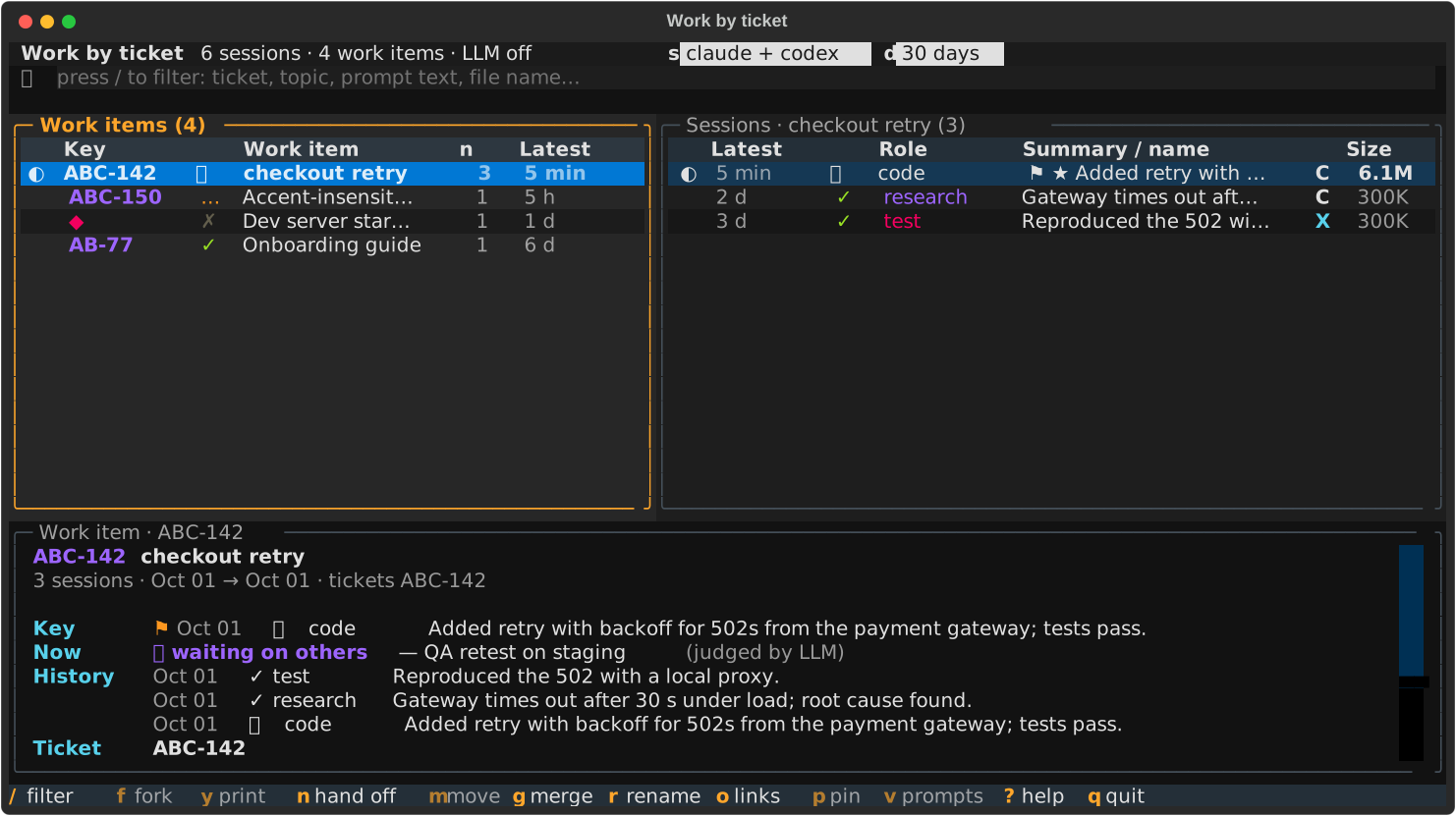](https://raw.githubusercontent.com/lethequang/ticketrail/main/docs/images/picker-group.svg)
|
|
55
|
+
|
|
56
|
+
## How it differs
|
|
57
|
+
|
|
58
|
+
Many tools list or search agent sessions, and several manage running agents. `ticketrail` sits one level up: the unit
|
|
59
|
+
is the piece of work, and the status is the status of that work. The comparison was made in October 2026 and is
|
|
60
|
+
summarised from each project's README.
|
|
61
|
+
|
|
62
|
+
| Tool | What it is | Where ticketrail differs |
|
|
63
|
+
|---|---|---|
|
|
64
|
+
| cass, memex, claude-history, agent-session-browser | Search and browse sessions of many agents, and resume them | They list sessions; ticketrail groups them into work items with a work status, and shows the docs and tickets around them |
|
|
65
|
+
| agent-deck, claude-squad, ccmanager | Run and supervise agents in tmux, with running / waiting-for-input / idle states | That state is about the process; ticketrail's is about the work (done, in progress, waiting on a review…), and it is read from past sessions as well |
|
|
66
|
+
| claude-code-karma, claude-tracker | Web dashboards that link Claude Code sessions to Jira / Linear / GitHub tickets | ticketrail also covers Codex, runs in the terminal, and groups ticketless sessions by topic |
|
|
67
|
+
| Claude Code agent view (`claude agents`) | Native list of background Claude sessions and their live state | ticketrail uses it when available for the live dot, and adds Codex, tickets and history |
|
|
68
|
+
|
|
69
|
+
ticketrail does not index or search transcripts as a search engine, and it does not run agents. For those jobs, use the
|
|
70
|
+
tools above.
|
|
71
|
+
|
|
72
|
+
## Install
|
|
73
|
+
|
|
74
|
+
Requires Python ≥ 3.11 on macOS or Linux. Install it as a tool, so it gets its own environment:
|
|
75
|
+
|
|
76
|
+
```sh
|
|
77
|
+
uv tool install ticketrail # or: pipx install ticketrail
|
|
78
|
+
```
|
|
79
|
+
|
|
80
|
+
Straight from GitHub: `uv tool install git+https://github.com/lethequang/ticketrail`.
|
|
81
|
+
From a clone, for development: `uv tool install -e .`
|
|
82
|
+
|
|
83
|
+
Optionally add a short alias. The package does not install one, because `ss` is a system command on Linux:
|
|
84
|
+
|
|
85
|
+
```sh
|
|
86
|
+
alias ss='ticketrail pick'
|
|
87
|
+
```
|
|
88
|
+
|
|
89
|
+
## Use
|
|
90
|
+
|
|
91
|
+
Run it from anywhere inside a workspace:
|
|
92
|
+
|
|
93
|
+
```sh
|
|
94
|
+
ticketrail # picker (same as `ticketrail pick`)
|
|
95
|
+
ticketrail pick ABC-142 # picker, pre-filtered
|
|
96
|
+
ticketrail list --days 7
|
|
97
|
+
ticketrail find "checkout retry" --brief
|
|
98
|
+
ticketrail show aaaa1111 # one session: prompts, files written, artifacts, final answer
|
|
99
|
+
ticketrail index # markdown index by ticket → .ticketrail/INDEX.md
|
|
100
|
+
ticketrail doctor # what it found and where
|
|
101
|
+
```
|
|
102
|
+
|
|
103
|
+
The **workspace** is the nearest parent directory with a `.ticketrail.toml` file. Without one, it is the git
|
|
104
|
+
repository root, or else the current directory. Use `--root DIR` to choose it yourself. Sessions started in
|
|
105
|
+
subdirectories of the workspace are included.
|
|
106
|
+
|
|
107
|
+
### Picker keys
|
|
108
|
+
|
|
109
|
+
| Key | Does |
|
|
110
|
+
|---|---|
|
|
111
|
+
| `/` | filter (accents optional, several words = AND); `Esc` clears |
|
|
112
|
+
| `← →` `Tab` | switch between the work items and sessions panes |
|
|
113
|
+
| `Enter` | work item: go to its sessions · session: resume it (sessions over 5 MB ask whether to fork) |
|
|
114
|
+
| `f` / `y` | fork the session / print the command and quit |
|
|
115
|
+
| `n` | start a new Claude or Codex session that picks up the work item, its history in the first prompt |
|
|
116
|
+
| `m` `g` `r` | move a session to another work item / merge work items / rename one |
|
|
117
|
+
| `o` | links of the session or work item: preview Markdown in place, open URLs, `e` editor (`open.editor`), `c` copy |
|
|
118
|
+
| `p` | pin the key session of the work item (`⚑`) |
|
|
119
|
+
| `v` | show every prompt with its time |
|
|
120
|
+
| `s` `d` | source (claude + codex / claude / codex) and date range (30 days / 7 days / all) |
|
|
121
|
+
| `?` | all keys |
|
|
122
|
+
|
|
123
|
+
The bottom pane depends on which pane has focus:
|
|
124
|
+
|
|
125
|
+
- **Work items pane:** a summary of the whole item. It shows the key session, the status of the work, the history
|
|
126
|
+
from oldest to newest, and every ticket, pull request, doc, plan and artifact the item produced.
|
|
127
|
+
- **Sessions pane:** the details of one session.
|
|
128
|
+
|
|
129
|
+
Links are clickable.
|
|
130
|
+
|
|
131
|
+
## How sessions become work items
|
|
132
|
+
|
|
133
|
+
Each session belongs to exactly one work item. The rules are tried in this order:
|
|
134
|
+
|
|
135
|
+
1. your manual override (`m`, `g`);
|
|
136
|
+
2. a ticket key in the name you gave the session (`/rename ABC-142 checkout retry`);
|
|
137
|
+
3. a ticket key in the session's title (the name you gave it, else the AI-generated title);
|
|
138
|
+
4. the ticket of the git branch (`feature/ABC-142-…`), if the session also mentions it and did not hop between ticket
|
|
139
|
+
branches;
|
|
140
|
+
5. the ticket mentioned most often;
|
|
141
|
+
6. the ticket of the git branch, for a session that mentions no ticket at all;
|
|
142
|
+
7. the LLM topic;
|
|
143
|
+
8. "Unsorted".
|
|
144
|
+
|
|
145
|
+
Files several sessions wrote and secondary tickets only mark sessions as *related*; they never merge work items.
|
|
146
|
+
|
|
147
|
+
The status of a work item is the LLM's judgement of its newest session ("waiting on others — QA retest"), unless a
|
|
148
|
+
hard signal settles it. With `github.pull_requests = true`, the item counts as done when its branches' pull requests are
|
|
149
|
+
merged and none is still open. The dot in front of a session shows whether an agent is working (`●`) or waiting for
|
|
150
|
+
you (`◐`). For Claude sessions this comes from `claude agents`; for Codex sessions it comes from the transcript's last
|
|
151
|
+
change. Details are in [docs/how-grouping-works.md](docs/how-grouping-works.md).
|
|
152
|
+
|
|
153
|
+
Manual changes are saved in `.ticketrail/groups.json` inside the workspace. Commit it to share the grouping with
|
|
154
|
+
your team. (`ticketrail index` writes `.ticketrail/INDEX.md` next to it, with a `.gitignore`: the index quotes
|
|
155
|
+
prompts.)
|
|
156
|
+
|
|
157
|
+
## Configure
|
|
158
|
+
|
|
159
|
+
Everything workspace-specific is configured; the defaults work with no configuration file at all. Run
|
|
160
|
+
`ticketrail config init` to write a starter `.ticketrail.toml`:
|
|
161
|
+
|
|
162
|
+
```toml
|
|
163
|
+
lang = "en" # or "vi"
|
|
164
|
+
|
|
165
|
+
[tickets]
|
|
166
|
+
patterns = ['\bSHOP-\d+\b'] # default: any Jira-style key
|
|
167
|
+
url = "https://jira.example.com/browse/{key}"
|
|
168
|
+
|
|
169
|
+
[naming]
|
|
170
|
+
tags = ["OPS", "DOC"] # session-name prefixes for work without a ticket
|
|
171
|
+
|
|
172
|
+
[labeler]
|
|
173
|
+
context = "An online shop: checkout, search, payments."
|
|
174
|
+
```
|
|
175
|
+
|
|
176
|
+
All keys and more examples (Jira, GitHub issues, Linear) are in
|
|
177
|
+
[docs/configuration.md](docs/configuration.md). You can also keep the configuration outside the repository, in
|
|
178
|
+
`~/.config/ticketrail/config.toml`, under a `[workspace."/path/to/repo"]` table.
|
|
179
|
+
|
|
180
|
+
## Privacy
|
|
181
|
+
|
|
182
|
+
Everything runs locally. The tool reads transcripts and never changes them. Caches are kept in
|
|
183
|
+
`~/.cache/ticketrail/`.
|
|
184
|
+
|
|
185
|
+
Data leaves your machine in three opt-out or opt-in cases only:
|
|
186
|
+
|
|
187
|
+
- **the labeler** (on by default, turn it off with `labeler.enabled = false` or `--no-llm`);
|
|
188
|
+
- `gh pr list` when you enable `github.pull_requests`;
|
|
189
|
+
- a hand-off to **Codex**, whose first prompt carries the summaries of the item's earlier sessions, including Claude
|
|
190
|
+
sessions, to your Codex provider.
|
|
191
|
+
|
|
192
|
+
For each session, the labeler sends the following through your own `claude` CLI login:
|
|
193
|
+
|
|
194
|
+
- the session name;
|
|
195
|
+
- its tickets;
|
|
196
|
+
- the names of the files it wrote;
|
|
197
|
+
- up to 10 prompts;
|
|
198
|
+
- the end of the final answer;
|
|
199
|
+
- the topic names already used in this workspace;
|
|
200
|
+
- `labeler.context`, if you set it.
|
|
201
|
+
|
|
202
|
+
Turn it off with `labeler.enabled = false` or `--no-llm`. See [docs/privacy.md](docs/privacy.md).
|
|
203
|
+
|
|
204
|
+
## Development
|
|
205
|
+
|
|
206
|
+
```sh
|
|
207
|
+
uv run --no-project --with textual python -m unittest discover -s tests
|
|
208
|
+
```
|
|
209
|
+
|
|
210
|
+
The tests build fake Claude Code and Codex transcripts in a temporary home directory. They never read your real
|
|
211
|
+
sessions.
|
|
212
|
+
|
|
213
|
+
## License
|
|
214
|
+
|
|
215
|
+
MIT
|
|
@@ -0,0 +1,190 @@
|
|
|
1
|
+
# ticketrail
|
|
2
|
+
|
|
3
|
+
[](https://github.com/lethequang/ticketrail/actions/workflows/ci.yml)
|
|
4
|
+
[](https://pypi.org/project/ticketrail/)
|
|
5
|
+
[](LICENSE)
|
|
6
|
+
|
|
7
|
+
**A work tracker for your coding-agent sessions.** `ticketrail` turns the Claude Code and Codex CLI transcripts of a
|
|
8
|
+
workspace into **work items**, one per ticket or topic. For each item it tells you whether the work is done, still in
|
|
9
|
+
progress, or waiting, and on whom it is waiting. It reopens the right session with one key.
|
|
10
|
+
|
|
11
|
+
After a few weeks with coding agents, one ticket is spread over five to ten sessions, often across both agents:
|
|
12
|
+
investigation, code, tests, docs, follow-ups. The questions that matter are about the *work*, not the sessions:
|
|
13
|
+
"is SHOP-142 done?", "what are we waiting for on the search bug?", "which session has the real fix?". `ticketrail`
|
|
14
|
+
answers them in the terminal, locally.
|
|
15
|
+
|
|
16
|
+
- **Work items, not session lists.** Sessions from Claude Code and Codex are gathered by ticket key, using:
|
|
17
|
+
- the session name;
|
|
18
|
+
- the title;
|
|
19
|
+
- the git branch;
|
|
20
|
+
- mentions in the prompts.
|
|
21
|
+
Sessions without a ticket go under a topic named by a cheap LLM call. You can move or merge anything by hand.
|
|
22
|
+
- **Status of the work, with a reason.** For example "⏳ waiting on others — QA retest on staging", or "✓ done", which
|
|
23
|
+
can be confirmed by a merged pull request when the repository is on GitHub (opt-in).
|
|
24
|
+
- **What each item left behind.** Tickets, docs, plans, artifacts and changelog entries that cite the session. All of
|
|
25
|
+
them are clickable, and Markdown can be previewed in place.
|
|
26
|
+
- **Pick up where it stopped.** Resume or fork any session. Or start a new one, Claude or Codex, whose first prompt
|
|
27
|
+
already summarises every earlier session of the work item.
|
|
28
|
+
|
|
29
|
+
[](https://raw.githubusercontent.com/lethequang/ticketrail/main/docs/images/picker-group.svg)
|
|
30
|
+
|
|
31
|
+
## How it differs
|
|
32
|
+
|
|
33
|
+
Many tools list or search agent sessions, and several manage running agents. `ticketrail` sits one level up: the unit
|
|
34
|
+
is the piece of work, and the status is the status of that work. The comparison was made in October 2026 and is
|
|
35
|
+
summarised from each project's README.
|
|
36
|
+
|
|
37
|
+
| Tool | What it is | Where ticketrail differs |
|
|
38
|
+
|---|---|---|
|
|
39
|
+
| cass, memex, claude-history, agent-session-browser | Search and browse sessions of many agents, and resume them | They list sessions; ticketrail groups them into work items with a work status, and shows the docs and tickets around them |
|
|
40
|
+
| agent-deck, claude-squad, ccmanager | Run and supervise agents in tmux, with running / waiting-for-input / idle states | That state is about the process; ticketrail's is about the work (done, in progress, waiting on a review…), and it is read from past sessions as well |
|
|
41
|
+
| claude-code-karma, claude-tracker | Web dashboards that link Claude Code sessions to Jira / Linear / GitHub tickets | ticketrail also covers Codex, runs in the terminal, and groups ticketless sessions by topic |
|
|
42
|
+
| Claude Code agent view (`claude agents`) | Native list of background Claude sessions and their live state | ticketrail uses it when available for the live dot, and adds Codex, tickets and history |
|
|
43
|
+
|
|
44
|
+
ticketrail does not index or search transcripts as a search engine, and it does not run agents. For those jobs, use the
|
|
45
|
+
tools above.
|
|
46
|
+
|
|
47
|
+
## Install
|
|
48
|
+
|
|
49
|
+
Requires Python ≥ 3.11 on macOS or Linux. Install it as a tool, so it gets its own environment:
|
|
50
|
+
|
|
51
|
+
```sh
|
|
52
|
+
uv tool install ticketrail # or: pipx install ticketrail
|
|
53
|
+
```
|
|
54
|
+
|
|
55
|
+
Straight from GitHub: `uv tool install git+https://github.com/lethequang/ticketrail`.
|
|
56
|
+
From a clone, for development: `uv tool install -e .`
|
|
57
|
+
|
|
58
|
+
Optionally add a short alias. The package does not install one, because `ss` is a system command on Linux:
|
|
59
|
+
|
|
60
|
+
```sh
|
|
61
|
+
alias ss='ticketrail pick'
|
|
62
|
+
```
|
|
63
|
+
|
|
64
|
+
## Use
|
|
65
|
+
|
|
66
|
+
Run it from anywhere inside a workspace:
|
|
67
|
+
|
|
68
|
+
```sh
|
|
69
|
+
ticketrail # picker (same as `ticketrail pick`)
|
|
70
|
+
ticketrail pick ABC-142 # picker, pre-filtered
|
|
71
|
+
ticketrail list --days 7
|
|
72
|
+
ticketrail find "checkout retry" --brief
|
|
73
|
+
ticketrail show aaaa1111 # one session: prompts, files written, artifacts, final answer
|
|
74
|
+
ticketrail index # markdown index by ticket → .ticketrail/INDEX.md
|
|
75
|
+
ticketrail doctor # what it found and where
|
|
76
|
+
```
|
|
77
|
+
|
|
78
|
+
The **workspace** is the nearest parent directory with a `.ticketrail.toml` file. Without one, it is the git
|
|
79
|
+
repository root, or else the current directory. Use `--root DIR` to choose it yourself. Sessions started in
|
|
80
|
+
subdirectories of the workspace are included.
|
|
81
|
+
|
|
82
|
+
### Picker keys
|
|
83
|
+
|
|
84
|
+
| Key | Does |
|
|
85
|
+
|---|---|
|
|
86
|
+
| `/` | filter (accents optional, several words = AND); `Esc` clears |
|
|
87
|
+
| `← →` `Tab` | switch between the work items and sessions panes |
|
|
88
|
+
| `Enter` | work item: go to its sessions · session: resume it (sessions over 5 MB ask whether to fork) |
|
|
89
|
+
| `f` / `y` | fork the session / print the command and quit |
|
|
90
|
+
| `n` | start a new Claude or Codex session that picks up the work item, its history in the first prompt |
|
|
91
|
+
| `m` `g` `r` | move a session to another work item / merge work items / rename one |
|
|
92
|
+
| `o` | links of the session or work item: preview Markdown in place, open URLs, `e` editor (`open.editor`), `c` copy |
|
|
93
|
+
| `p` | pin the key session of the work item (`⚑`) |
|
|
94
|
+
| `v` | show every prompt with its time |
|
|
95
|
+
| `s` `d` | source (claude + codex / claude / codex) and date range (30 days / 7 days / all) |
|
|
96
|
+
| `?` | all keys |
|
|
97
|
+
|
|
98
|
+
The bottom pane depends on which pane has focus:
|
|
99
|
+
|
|
100
|
+
- **Work items pane:** a summary of the whole item. It shows the key session, the status of the work, the history
|
|
101
|
+
from oldest to newest, and every ticket, pull request, doc, plan and artifact the item produced.
|
|
102
|
+
- **Sessions pane:** the details of one session.
|
|
103
|
+
|
|
104
|
+
Links are clickable.
|
|
105
|
+
|
|
106
|
+
## How sessions become work items
|
|
107
|
+
|
|
108
|
+
Each session belongs to exactly one work item. The rules are tried in this order:
|
|
109
|
+
|
|
110
|
+
1. your manual override (`m`, `g`);
|
|
111
|
+
2. a ticket key in the name you gave the session (`/rename ABC-142 checkout retry`);
|
|
112
|
+
3. a ticket key in the session's title (the name you gave it, else the AI-generated title);
|
|
113
|
+
4. the ticket of the git branch (`feature/ABC-142-…`), if the session also mentions it and did not hop between ticket
|
|
114
|
+
branches;
|
|
115
|
+
5. the ticket mentioned most often;
|
|
116
|
+
6. the ticket of the git branch, for a session that mentions no ticket at all;
|
|
117
|
+
7. the LLM topic;
|
|
118
|
+
8. "Unsorted".
|
|
119
|
+
|
|
120
|
+
Files several sessions wrote and secondary tickets only mark sessions as *related*; they never merge work items.
|
|
121
|
+
|
|
122
|
+
The status of a work item is the LLM's judgement of its newest session ("waiting on others — QA retest"), unless a
|
|
123
|
+
hard signal settles it. With `github.pull_requests = true`, the item counts as done when its branches' pull requests are
|
|
124
|
+
merged and none is still open. The dot in front of a session shows whether an agent is working (`●`) or waiting for
|
|
125
|
+
you (`◐`). For Claude sessions this comes from `claude agents`; for Codex sessions it comes from the transcript's last
|
|
126
|
+
change. Details are in [docs/how-grouping-works.md](docs/how-grouping-works.md).
|
|
127
|
+
|
|
128
|
+
Manual changes are saved in `.ticketrail/groups.json` inside the workspace. Commit it to share the grouping with
|
|
129
|
+
your team. (`ticketrail index` writes `.ticketrail/INDEX.md` next to it, with a `.gitignore`: the index quotes
|
|
130
|
+
prompts.)
|
|
131
|
+
|
|
132
|
+
## Configure
|
|
133
|
+
|
|
134
|
+
Everything workspace-specific is configured; the defaults work with no configuration file at all. Run
|
|
135
|
+
`ticketrail config init` to write a starter `.ticketrail.toml`:
|
|
136
|
+
|
|
137
|
+
```toml
|
|
138
|
+
lang = "en" # or "vi"
|
|
139
|
+
|
|
140
|
+
[tickets]
|
|
141
|
+
patterns = ['\bSHOP-\d+\b'] # default: any Jira-style key
|
|
142
|
+
url = "https://jira.example.com/browse/{key}"
|
|
143
|
+
|
|
144
|
+
[naming]
|
|
145
|
+
tags = ["OPS", "DOC"] # session-name prefixes for work without a ticket
|
|
146
|
+
|
|
147
|
+
[labeler]
|
|
148
|
+
context = "An online shop: checkout, search, payments."
|
|
149
|
+
```
|
|
150
|
+
|
|
151
|
+
All keys and more examples (Jira, GitHub issues, Linear) are in
|
|
152
|
+
[docs/configuration.md](docs/configuration.md). You can also keep the configuration outside the repository, in
|
|
153
|
+
`~/.config/ticketrail/config.toml`, under a `[workspace."/path/to/repo"]` table.
|
|
154
|
+
|
|
155
|
+
## Privacy
|
|
156
|
+
|
|
157
|
+
Everything runs locally. The tool reads transcripts and never changes them. Caches are kept in
|
|
158
|
+
`~/.cache/ticketrail/`.
|
|
159
|
+
|
|
160
|
+
Data leaves your machine in three opt-out or opt-in cases only:
|
|
161
|
+
|
|
162
|
+
- **the labeler** (on by default, turn it off with `labeler.enabled = false` or `--no-llm`);
|
|
163
|
+
- `gh pr list` when you enable `github.pull_requests`;
|
|
164
|
+
- a hand-off to **Codex**, whose first prompt carries the summaries of the item's earlier sessions, including Claude
|
|
165
|
+
sessions, to your Codex provider.
|
|
166
|
+
|
|
167
|
+
For each session, the labeler sends the following through your own `claude` CLI login:
|
|
168
|
+
|
|
169
|
+
- the session name;
|
|
170
|
+
- its tickets;
|
|
171
|
+
- the names of the files it wrote;
|
|
172
|
+
- up to 10 prompts;
|
|
173
|
+
- the end of the final answer;
|
|
174
|
+
- the topic names already used in this workspace;
|
|
175
|
+
- `labeler.context`, if you set it.
|
|
176
|
+
|
|
177
|
+
Turn it off with `labeler.enabled = false` or `--no-llm`. See [docs/privacy.md](docs/privacy.md).
|
|
178
|
+
|
|
179
|
+
## Development
|
|
180
|
+
|
|
181
|
+
```sh
|
|
182
|
+
uv run --no-project --with textual python -m unittest discover -s tests
|
|
183
|
+
```
|
|
184
|
+
|
|
185
|
+
The tests build fake Claude Code and Codex transcripts in a temporary home directory. They never read your real
|
|
186
|
+
sessions.
|
|
187
|
+
|
|
188
|
+
## License
|
|
189
|
+
|
|
190
|
+
MIT
|