texas2step 2.4.4__tar.gz → 2.5.0__tar.gz
This diff represents the content of publicly available package versions that have been released to one of the supported registries. The information contained in this diff is provided for informational purposes only and reflects changes between package versions as they appear in their respective public registries.
- {texas2step-2.4.4 → texas2step-2.5.0}/PKG-INFO +7 -5
- {texas2step-2.4.4 → texas2step-2.5.0}/README.md +6 -4
- {texas2step-2.4.4 → texas2step-2.5.0}/deploy/texas2step.service +4 -0
- {texas2step-2.4.4 → texas2step-2.5.0}/docs/access.md +15 -0
- {texas2step-2.4.4 → texas2step-2.5.0}/docs/api.md +22 -6
- texas2step-2.5.0/docs/clients.md +198 -0
- {texas2step-2.4.4 → texas2step-2.5.0}/docs/configuration.md +8 -3
- {texas2step-2.4.4 → texas2step-2.5.0}/docs/development.md +3 -1
- {texas2step-2.4.4 → texas2step-2.5.0}/docs/install.md +1 -0
- {texas2step-2.4.4 → texas2step-2.5.0}/docs/methodology.md +87 -6
- {texas2step-2.4.4 → texas2step-2.5.0}/docs/roadmap.md +65 -0
- {texas2step-2.4.4 → texas2step-2.5.0}/docs/security.md +11 -2
- {texas2step-2.4.4 → texas2step-2.5.0}/docs/traffic.md +3 -1
- {texas2step-2.4.4 → texas2step-2.5.0}/src/texas2step/__init__.py +1 -1
- texas2step-2.5.0/src/texas2step/api/__init__.py +10 -0
- texas2step-2.5.0/src/texas2step/api/clients.py +36 -0
- {texas2step-2.4.4 → texas2step-2.5.0}/src/texas2step/api/measure.py +17 -0
- {texas2step-2.4.4 → texas2step-2.5.0}/src/texas2step/api/meta.py +6 -0
- {texas2step-2.4.4 → texas2step-2.5.0}/src/texas2step/api/wire.py +20 -6
- {texas2step-2.4.4 → texas2step-2.5.0}/src/texas2step/app.py +82 -3
- {texas2step-2.4.4 → texas2step-2.5.0}/src/texas2step/cli.py +120 -0
- texas2step-2.5.0/src/texas2step/clients.py +722 -0
- {texas2step-2.4.4 → texas2step-2.5.0}/src/texas2step/config.py +35 -4
- {texas2step-2.4.4 → texas2step-2.5.0}/src/texas2step/config_template.toml +10 -0
- texas2step-2.5.0/src/texas2step/documents/constitution-of-the-republic-of-texas.md +298 -0
- texas2step-2.5.0/src/texas2step/documents/constitution-of-the-united-states.md +604 -0
- texas2step-2.5.0/src/texas2step/documents/declaration-of-independence.md +172 -0
- texas2step-2.5.0/src/texas2step/documents/texas-constitution.md +4973 -0
- texas2step-2.5.0/src/texas2step/documents/texas-declaration-of-independence.md +116 -0
- {texas2step-2.4.4 → texas2step-2.5.0}/src/texas2step/engine.py +25 -9
- {texas2step-2.4.4 → texas2step-2.5.0}/src/texas2step/logs.py +4 -1
- {texas2step-2.4.4 → texas2step-2.5.0}/src/texas2step/page.py +5 -0
- texas2step-2.5.0/src/texas2step/payload.py +66 -0
- {texas2step-2.4.4 → texas2step-2.5.0}/src/texas2step/rtc.py +26 -1
- texas2step-2.5.0/src/texas2step/static/assets/app.css +1 -0
- texas2step-2.5.0/src/texas2step/static/assets/app.js +8 -0
- {texas2step-2.4.4 → texas2step-2.5.0}/src/texas2step/static/index.html +3 -2
- texas2step-2.4.4/src/texas2step/api/__init__.py +0 -3
- texas2step-2.4.4/src/texas2step/payload.py +0 -38
- texas2step-2.4.4/src/texas2step/static/assets/app.css +0 -1
- texas2step-2.4.4/src/texas2step/static/assets/app.js +0 -8
- {texas2step-2.4.4 → texas2step-2.5.0}/.gitignore +0 -0
- {texas2step-2.4.4 → texas2step-2.5.0}/LICENSE.md +0 -0
- {texas2step-2.4.4 → texas2step-2.5.0}/deploy/nginx/texas2step-http.conf +0 -0
- {texas2step-2.4.4 → texas2step-2.5.0}/deploy/nginx/texas2step-log.conf +0 -0
- {texas2step-2.4.4 → texas2step-2.5.0}/deploy/nginx/texas2step-speedtest.conf +0 -0
- {texas2step-2.4.4 → texas2step-2.5.0}/deploy/nginx/texas2step.conf +0 -0
- {texas2step-2.4.4 → texas2step-2.5.0}/deploy/texas2step-update.service +0 -0
- {texas2step-2.4.4 → texas2step-2.5.0}/deploy/texas2step-update.timer +0 -0
- {texas2step-2.4.4 → texas2step-2.5.0}/deploy/texas2step.default +0 -0
- {texas2step-2.4.4 → texas2step-2.5.0}/docs/experience.md +0 -0
- {texas2step-2.4.4 → texas2step-2.5.0}/docs/images/hero-dark.jpg +0 -0
- {texas2step-2.4.4 → texas2step-2.5.0}/docs/images/results-dark.jpg +0 -0
- {texas2step-2.4.4 → texas2step-2.5.0}/docs/images/results-light.jpg +0 -0
- {texas2step-2.4.4 → texas2step-2.5.0}/docs/images/upload-light.jpg +0 -0
- {texas2step-2.4.4 → texas2step-2.5.0}/legacy/README.md +0 -0
- {texas2step-2.4.4 → texas2step-2.5.0}/pyproject.toml +0 -0
- {texas2step-2.4.4 → texas2step-2.5.0}/src/texas2step/__main__.py +0 -0
- {texas2step-2.4.4 → texas2step-2.5.0}/src/texas2step/access.py +0 -0
- {texas2step-2.4.4 → texas2step-2.5.0}/src/texas2step/api/access.py +0 -0
- {texas2step-2.4.4 → texas2step-2.5.0}/src/texas2step/api/results.py +0 -0
- {texas2step-2.4.4 → texas2step-2.5.0}/src/texas2step/cluster.py +0 -0
- {texas2step-2.4.4 → texas2step-2.5.0}/src/texas2step/config_edit.py +0 -0
- {texas2step-2.4.4 → texas2step-2.5.0}/src/texas2step/config_merge.py +0 -0
- {texas2step-2.4.4 → texas2step-2.5.0}/src/texas2step/iface.py +0 -0
- {texas2step-2.4.4 → texas2step-2.5.0}/src/texas2step/lockouts.py +0 -0
- {texas2step-2.4.4 → texas2step-2.5.0}/src/texas2step/quality.py +0 -0
- {texas2step-2.4.4 → texas2step-2.5.0}/src/texas2step/static/assets/swagger/LICENSE +0 -0
- {texas2step-2.4.4 → texas2step-2.5.0}/src/texas2step/static/assets/swagger/NOTICE +0 -0
- {texas2step-2.4.4 → texas2step-2.5.0}/src/texas2step/static/assets/swagger/swagger-ui-bundle.js +0 -0
- {texas2step-2.4.4 → texas2step-2.5.0}/src/texas2step/static/assets/swagger/swagger-ui-bundle.js.LICENSE.txt +0 -0
- {texas2step-2.4.4 → texas2step-2.5.0}/src/texas2step/static/assets/swagger/swagger-ui.css +0 -0
- {texas2step-2.4.4 → texas2step-2.5.0}/src/texas2step/static/favicon.svg +0 -0
- {texas2step-2.4.4 → texas2step-2.5.0}/src/texas2step/stats.py +0 -0
- {texas2step-2.4.4 → texas2step-2.5.0}/src/texas2step/store.py +0 -0
- {texas2step-2.4.4 → texas2step-2.5.0}/src/texas2step/traffic.py +0 -0
- {texas2step-2.4.4 → texas2step-2.5.0}/src/texas2step/update.py +0 -0
- {texas2step-2.4.4 → texas2step-2.5.0}/src/texas2step/words.txt +0 -0
|
@@ -1,6 +1,6 @@
|
|
|
1
1
|
Metadata-Version: 2.5
|
|
2
2
|
Name: texas2step
|
|
3
|
-
Version: 2.
|
|
3
|
+
Version: 2.5.0
|
|
4
4
|
Summary: Web-centric throughput, latency, jitter and packet-loss measurement between endpoints.
|
|
5
5
|
Project-URL: Homepage, https://github.com/robert-patrick-texas/texas2step
|
|
6
6
|
Project-URL: Documentation, https://robert-patrick-texas.github.io/texas2step/
|
|
@@ -62,14 +62,14 @@ to the people using a connection: [docs/experience.md](https://github.com/robert
|
|
|
62
62
|
|
|
63
63
|
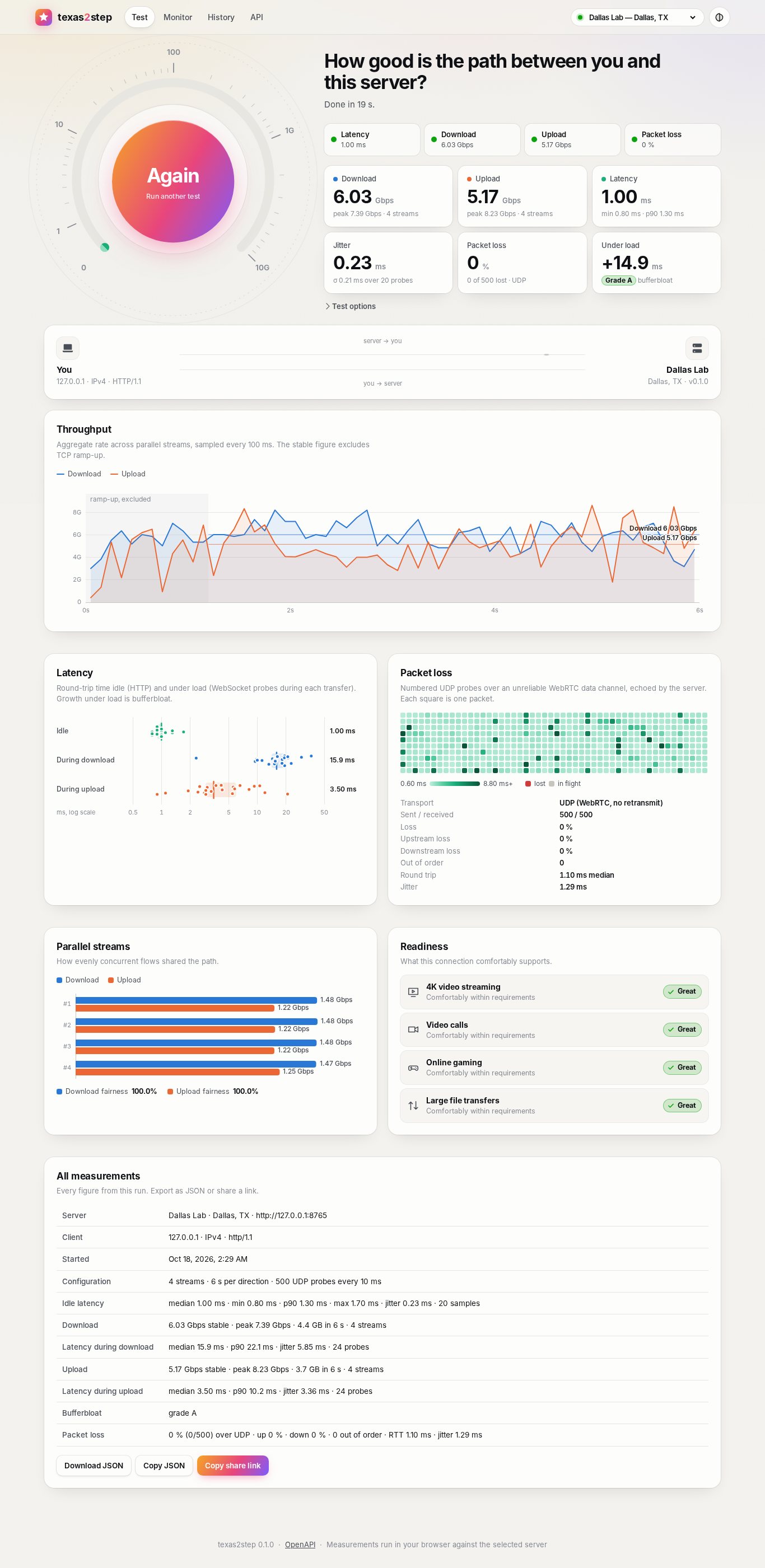
|
|
64
64
|
|
|
65
|
-
The UI has
|
|
65
|
+
The UI has six views: **Test** (gauge, live link animation, charts, exportable and
|
|
66
66
|
shareable results), **Monitor** (continuous UDP probing with a scrolling RTT and loss
|
|
67
67
|
trace, to one server or to two at once for a side-by-side comparison, or a voice or video
|
|
68
68
|
call's packets scored every 10 seconds), **Diag** (HTTP/1.1,
|
|
69
69
|
HTTP/2 and HTTP/3, WebSocket and UDP over IPv4 and IPv6, tried once a second, with your addresses, NAT,
|
|
70
|
-
TLS and an event log), **History** (saved runs and trend),
|
|
71
|
-
examples). A site can hide any of them
|
|
72
|
-
`page_history`, `page_api`). Every
|
|
70
|
+
TLS and an event log), **History** (saved runs and trend), **?** (what the tool does, in plain
|
|
71
|
+
words, for anyone), and **API** (copy-ready examples). A site can hide any of them
|
|
72
|
+
(`page_test`, `page_monitor`, `page_diag`, `page_history`, `page_help`, `page_api`). Every
|
|
73
73
|
chart has a hover readout and a table equivalent.
|
|
74
74
|
|
|
75
75
|
Visitors pick a theme from the header: Light, Dark, America, Energy, Federal, Military or
|
|
@@ -176,6 +176,8 @@ For servers open to the Internet, see [Access codes](https://github.com/robert-p
|
|
|
176
176
|
desk, and the desk's tools kept to your networks.
|
|
177
177
|
* [Traffic limits](https://github.com/robert-patrick-texas/texas2step/blob/main/docs/traffic.md): a daily and monthly cap on what the tests move,
|
|
178
178
|
for servers whose traffic is billed.
|
|
179
|
+
* [Active clients](https://github.com/robert-patrick-texas/texas2step/blob/main/docs/clients.md): who is using the server now, page by page, without
|
|
180
|
+
cookies.
|
|
179
181
|
* [Security](https://github.com/robert-patrick-texas/texas2step/blob/main/docs/security.md): the security controls, what each guards against, and
|
|
180
182
|
what is left to the operator.
|
|
181
183
|
* [Methodology](https://github.com/robert-patrick-texas/texas2step/blob/main/docs/methodology.md): what is measured, and how.
|
|
@@ -34,14 +34,14 @@ to the people using a connection: [docs/experience.md](docs/experience.md).
|
|
|
34
34
|
|
|
35
35
|

|
|
36
36
|
|
|
37
|
-
The UI has
|
|
37
|
+
The UI has six views: **Test** (gauge, live link animation, charts, exportable and
|
|
38
38
|
shareable results), **Monitor** (continuous UDP probing with a scrolling RTT and loss
|
|
39
39
|
trace, to one server or to two at once for a side-by-side comparison, or a voice or video
|
|
40
40
|
call's packets scored every 10 seconds), **Diag** (HTTP/1.1,
|
|
41
41
|
HTTP/2 and HTTP/3, WebSocket and UDP over IPv4 and IPv6, tried once a second, with your addresses, NAT,
|
|
42
|
-
TLS and an event log), **History** (saved runs and trend),
|
|
43
|
-
examples). A site can hide any of them
|
|
44
|
-
`page_history`, `page_api`). Every
|
|
42
|
+
TLS and an event log), **History** (saved runs and trend), **?** (what the tool does, in plain
|
|
43
|
+
words, for anyone), and **API** (copy-ready examples). A site can hide any of them
|
|
44
|
+
(`page_test`, `page_monitor`, `page_diag`, `page_history`, `page_help`, `page_api`). Every
|
|
45
45
|
chart has a hover readout and a table equivalent.
|
|
46
46
|
|
|
47
47
|
Visitors pick a theme from the header: Light, Dark, America, Energy, Federal, Military or
|
|
@@ -148,6 +148,8 @@ For servers open to the Internet, see [Access codes](docs/access.md).
|
|
|
148
148
|
desk, and the desk's tools kept to your networks.
|
|
149
149
|
* [Traffic limits](docs/traffic.md): a daily and monthly cap on what the tests move,
|
|
150
150
|
for servers whose traffic is billed.
|
|
151
|
+
* [Active clients](docs/clients.md): who is using the server now, page by page, without
|
|
152
|
+
cookies.
|
|
151
153
|
* [Security](docs/security.md): the security controls, what each guards against, and
|
|
152
154
|
what is left to the operator.
|
|
153
155
|
* [Methodology](docs/methodology.md): what is measured, and how.
|
|
@@ -19,6 +19,10 @@ RestartSec=3
|
|
|
19
19
|
# Saved results live in /var/lib/texas2step.
|
|
20
20
|
StateDirectory=texas2step
|
|
21
21
|
WorkingDirectory=/var/lib/texas2step
|
|
22
|
+
# The active clients (texas2step clients) in /run/texas2step: in memory, kept over a
|
|
23
|
+
# restart or an upgrade, gone at a reboot.
|
|
24
|
+
RuntimeDirectory=texas2step
|
|
25
|
+
RuntimeDirectoryPreserve=yes
|
|
22
26
|
LimitNOFILE=65536
|
|
23
27
|
|
|
24
28
|
NoNewPrivileges=true
|
|
@@ -337,6 +337,21 @@ A pass that hasn't run out but is refused anyway, as from a network blocked by h
|
|
|
337
337
|
([lockouts and blocks](#lockouts-and-blocks)), isn't asked for again by itself. To have
|
|
338
338
|
neither family asked, list both of a site's addresses in `internal_networks`.
|
|
339
339
|
|
|
340
|
+
### Measuring between servers
|
|
341
|
+
|
|
342
|
+
A server measuring toward another for its `/api/v1/measure/*` gets past the other's code
|
|
343
|
+
as a visitor does, with a pass: it issues itself one with its access key, and the other
|
|
344
|
+
takes it if its key is the same. The pass lets the test in and nothing more, so the
|
|
345
|
+
measuring server needn't be in the other's `internal_networks`, and may leave by a NAT
|
|
346
|
+
address it shares with people who aren't trusted. It works with codes off on the
|
|
347
|
+
measuring server too, from the key the package made at install.
|
|
348
|
+
|
|
349
|
+
A server whose key differs refuses the test: give both the same key (step 1 of
|
|
350
|
+
[Turn it on](#turn-it-on)), or list the measuring server's outgoing address in the other's
|
|
351
|
+
`internal_networks`. The pass goes only to servers in `[[locations]]`, never to a target
|
|
352
|
+
that only `allow_any_target` lets in: a pass works on every server with the key, for
|
|
353
|
+
`access_pass_hours`.
|
|
354
|
+
|
|
340
355
|
## Lockouts and blocks
|
|
341
356
|
|
|
342
357
|
Wrong codes count against the visitor's network, its IPv4 /24 or IPv6 /48, not its
|
|
@@ -17,10 +17,10 @@ headers. Measurement endpoints add `Server-Timing` so clients can subtract serve
|
|
|
17
17
|
| Method | Path | Purpose |
|
|
18
18
|
|---|---|---|
|
|
19
19
|
| GET | `/api/v1/ping` | Minimal response for round-trip timing. `Server-Timing: app;dur=…` |
|
|
20
|
-
| GET | `/api/v1/down?bytes=N` | Exactly N
|
|
21
|
-
| GET | `/api/v1/down?seconds=S` |
|
|
20
|
+
| GET | `/api/v1/down?bytes=N` | Exactly N bytes (≤ `max_download_bytes`) with `Content-Length`: [five founding documents](methodology.md#what-the-tests-send) as text, then random bytes |
|
|
21
|
+
| GET | `/api/v1/down?seconds=S` | The documents, then random bytes for S seconds (chunked, ≤ `max_stream_seconds`) |
|
|
22
22
|
| POST | `/api/v1/up` | Read and discard the body; returns `{"bytes", "rx_ms", "mbps"}` measured server-side |
|
|
23
|
-
| WS | `/api/v1/ws` | Echo every message unchanged |
|
|
23
|
+
| WS | `/api/v1/ws` | Echo every message unchanged; closed with code `4001` once `session_max_runtime` is up |
|
|
24
24
|
| POST | `/api/v1/rtc/offer` | WebRTC signalling for the UDP probe (see below) |
|
|
25
25
|
|
|
26
26
|
```bash
|
|
@@ -52,6 +52,12 @@ and `_`) to every request of one test: once the server has let a test in, it let
|
|
|
52
52
|
rest of it in for up to 10 minutes, so a running test finishes. The browser and the
|
|
53
53
|
command line do this.
|
|
54
54
|
|
|
55
|
+
Any request may also carry `?session=<id>` (4 to 32 letters, digits, `-` and `_`) and
|
|
56
|
+
`?page=<name>` (`test`, `monitor`, `diag`, `history`, `help`, `api`, `cli` or `server`).
|
|
57
|
+
The server's [active clients](clients.md) list tells sessions apart by them; without one,
|
|
58
|
+
requests go by address and User-Agent. The page makes a new id each time it loads, and
|
|
59
|
+
the command line one for each run. Nothing else changes with them.
|
|
60
|
+
|
|
55
61
|
### UDP probe protocol
|
|
56
62
|
|
|
57
63
|
`POST /api/v1/rtc/offer` with `{"sdp": "<offer>", "type": "offer"}` returns
|
|
@@ -60,7 +66,8 @@ sending the offer. The offer must include data channels:
|
|
|
60
66
|
|
|
61
67
|
* `probe`: create it with `ordered: false, maxRetransmits: 0`. Every message is echoed,
|
|
62
68
|
verbatim unless stamps are on. texas2step clients send
|
|
63
|
-
`u32 sequence (LE) | f64 send time ms (LE) | padding`, 200 bytes in all
|
|
69
|
+
`u32 sequence (LE) | f64 send time ms (LE) | padding`, 200 bytes in all on the Test
|
|
70
|
+
page, with random padding, new for each probe.
|
|
64
71
|
* `control` (reliable, optional): send `{"op":"stats"}` to receive
|
|
65
72
|
`{"op":"stats","rx":…,"tx":…,"rx_bytes":…}`, or `{"op":"reset"}` to zero the counters.
|
|
66
73
|
`{"op":"addr"}` returns both ends of the UDP path ICE chose:
|
|
@@ -84,7 +91,12 @@ sending the offer. The offer must include data channels:
|
|
|
84
91
|
server sends `{"op":"limit","message":…,"url":…}` unasked and from then on echoes only
|
|
85
92
|
probes of up to 64 bytes.
|
|
86
93
|
|
|
87
|
-
|
|
94
|
+
Once `session_max_runtime` is up, the server sends `{"op":"ended","reason":"runtime","seconds":…}`
|
|
95
|
+
unasked and closes the session a few seconds later. texas2step's pages then stop and ask
|
|
96
|
+
for a reload rather than open another session.
|
|
97
|
+
|
|
98
|
+
Sessions close when the peer disconnects, after `rtc_session_timeout` seconds idle, or
|
|
99
|
+
after `session_max_runtime` seconds in all, where it is set.
|
|
88
100
|
The server answers `503` when it already holds `max_rtc_sessions` sessions, or when
|
|
89
101
|
every port in its `rtc_port_min`–`rtc_port_max` range is taken.
|
|
90
102
|
|
|
@@ -92,11 +104,12 @@ every port in its `rtc_port_min`–`rtc_port_max` range is taken.
|
|
|
92
104
|
|
|
93
105
|
| Method | Path | Returns |
|
|
94
106
|
|---|---|---|
|
|
95
|
-
| GET | `/api/v1/info` | name, version (left out for clients outside `internal_networks`), server identity, capabilities (`stamps`: the UDP probe can [stamp](#udp-probe-protocol) its echoes), limits, ICE servers, UI defaults (`one_stream`: whether a test downloads over one stream too, unless asked otherwise), `monitor` (`profile`: Monitor's until a visitor picks; `voice`, `video`: whether the Voice call and Video call profiles are offered); with a [traffic limit](traffic.md), `traffic` (below) |
|
|
107
|
+
| GET | `/api/v1/info` | name, version (left out for clients outside `internal_networks`), server identity, capabilities (`stamps`: the UDP probe can [stamp](#udp-probe-protocol) its echoes), limits (`max_session_seconds`: `session_max_runtime`; `max_monitor_seconds`, `max_diag_seconds`: `page_monitor_max_runtime` and `page_diag_max_runtime`, which pages from other servers keep while they test this one; `0` for none), ICE servers, UI defaults (`one_stream`: whether a test downloads over one stream too, unless asked otherwise), `monitor` (`profile`: Monitor's until a visitor picks; `voice`, `video`: whether the Voice call and Video call profiles are offered); with a [traffic limit](traffic.md), `traffic` (below) |
|
|
96
108
|
| GET | `/api/v1/whoami` | client IP, port, family, scheme, HTTP version, user agent |
|
|
97
109
|
| GET | `/api/v1/diag/http` | both ends of this HTTP connection, its HTTP version and TLS, the server's TCP RTT and clock (below) |
|
|
98
110
|
| GET | `/api/v1/locations` | servers offered in the picker (this one first) |
|
|
99
111
|
| GET | `/api/v1/health` | `{"status": "ok", "version": …}`; without the version for clients outside `internal_networks`, or that need an [access code](#access-codes) |
|
|
112
|
+
| GET | `/api/v1/clients` | The pages and command-line runs active now, and in `ended` those of the last hour, as `texas2step clients --json` prints them; only for `internal_networks`, and `404` on a server without them. See [Active clients](clients.md#over-the-api). |
|
|
100
113
|
|
|
101
114
|
With a traffic limit, `traffic` says whether this client may start a test, and if not,
|
|
102
115
|
what it is told:
|
|
@@ -147,6 +160,9 @@ TCP times are `null`. `time_ms` is the server's clock, in milliseconds since the
|
|
|
147
160
|
|
|
148
161
|
The server runs the Python engine **toward another texas2step server** and returns the
|
|
149
162
|
result. `target` must be a configured location URL unless `allow_any_target` is set.
|
|
163
|
+
A target that asks for the access code takes a pass this server issues itself, if their
|
|
164
|
+
keys are the same; only targets in `[[locations]]` get one
|
|
165
|
+
([Measuring between servers](access.md#measuring-between-servers)).
|
|
150
166
|
At most two run at once per worker; extra requests get `429`. A
|
|
151
167
|
[traffic limit](traffic.md) refuses download, upload and full ones with `503`, and counts
|
|
152
168
|
this server's side of them.
|
|
@@ -0,0 +1,198 @@
|
|
|
1
|
+
# Active clients
|
|
2
|
+
|
|
3
|
+
Who is using a texas2step server right now, and who did in the last hour: each browser
|
|
4
|
+
page and each command-line run, what page it is on, and what it is doing.
|
|
5
|
+
`texas2step clients` lists them, the journal says when each starts and ends, and
|
|
6
|
+
internal networks can read the same list over the API.
|
|
7
|
+
|
|
8
|
+
## How pages are told apart
|
|
9
|
+
|
|
10
|
+
Each page makes a random id when it loads, such as `k7q2m9xd`, and sends it with every
|
|
11
|
+
request as `?session=`, with the page shown as `?page=`. The command line makes one id
|
|
12
|
+
for each run. So two browsers on one computer are two sessions, though they come from the
|
|
13
|
+
same address, and so are two tabs.
|
|
14
|
+
|
|
15
|
+
No cookie is set, and nothing is kept in the browser: the id lives only in the page's
|
|
16
|
+
memory, and a reload starts a new one. It identifies no one and is never reused, so it
|
|
17
|
+
can't follow a visitor from one visit to the next.
|
|
18
|
+
|
|
19
|
+
A client's port can't do this job. One page opens several connections: HTTP/2, a
|
|
20
|
+
WebSocket, the IPv4-only and IPv6-only names, HTTP/3 over UDP. Each gets a new port when
|
|
21
|
+
it reconnects after going idle, and behind NAT the ports change again. The id ties all
|
|
22
|
+
of a page's traffic together, over both address families.
|
|
23
|
+
|
|
24
|
+
Requests without an id are grouped by address and User-Agent, and listed as `(no id)`.
|
|
25
|
+
They come from curl, scripts, and pages and command lines of texas2step 2.4 and older.
|
|
26
|
+
Monitoring's `/api/v1/health` checks, which carry no id, aren't listed.
|
|
27
|
+
|
|
28
|
+
## What counts as active
|
|
29
|
+
|
|
30
|
+
A session is active while it sends. One with no request for 60 seconds has ended, and is
|
|
31
|
+
listed with the ended ones for an hour from its last request.
|
|
32
|
+
|
|
33
|
+
* **Monitor** and **Diag** send all the time they run. A Monitor whose server has gone
|
|
34
|
+
quiet keeps asking it over HTTPS, so it stays listed.
|
|
35
|
+
* **Test** sends while a test runs. A Test page left idle after its test ends a minute
|
|
36
|
+
later, and starts again with its next test.
|
|
37
|
+
* **History**, **?** and **API** count for a minute after their last request.
|
|
38
|
+
* **The command line** counts for as long as its run.
|
|
39
|
+
|
|
40
|
+
No heartbeat is added: a page that sends nothing isn't listed.
|
|
41
|
+
|
|
42
|
+
## Use it
|
|
43
|
+
|
|
44
|
+
```console
|
|
45
|
+
$ sudo texas2step clients
|
|
46
|
+
4 active in the last 60s: 3 pages, 1 command-line run.
|
|
47
|
+
|
|
48
|
+
Session Address Program Page Doing now For Moved
|
|
49
|
+
k7q2m9xd 2001:db8::7 Chrome 141 on Windows Monitor Voice call over UDP 12 min 210 MB
|
|
50
|
+
203.0.113.7
|
|
51
|
+
p3x8wq2n 203.0.113.7 Firefox 157 on Windows Diag WebSocket echo, HTTP checks, UDP probes 3 min 1.1 MB
|
|
52
|
+
h4c9tz6e 10.20.0.15 Edge 141 on macOS Test Download, 4 streams, Latency, WebSocket echo 31s 1.4 GB
|
|
53
|
+
d9f4m2kq 198.51.100.4 texas2step 2.5.0 CLI Upload, 4 streams, Latency, WebSocket echo 8s 410 MB
|
|
54
|
+
|
|
55
|
+
37 ended in the last hour, the latest first:
|
|
56
|
+
|
|
57
|
+
Session Address Program Page Last seen For Moved
|
|
58
|
+
w2n8kd4r 10.20.0.31 Chrome 141 on Windows Test 2 min ago 48s 2.8 GB
|
|
59
|
+
...
|
|
60
|
+
|
|
61
|
+
17 more: --history lists them all.
|
|
62
|
+
```
|
|
63
|
+
|
|
64
|
+
It only reads: nothing changes, and the service keeps running.
|
|
65
|
+
|
|
66
|
+
* **Session**: the id the page or run sent, the same one the journal names.
|
|
67
|
+
* **Address**: each address it came from, the latest first, one per line. A page that
|
|
68
|
+
tests both address families, as Diag does, shows both.
|
|
69
|
+
* **Program**: the browser and system its User-Agent names, or `texas2step` and the
|
|
70
|
+
version for the command line.
|
|
71
|
+
* **Page**: Test, Monitor, Diag, History, Help (the **?** tab), API, CLI, or Server: another
|
|
72
|
+
texas2step server testing toward this one for its `/api/v1/measure`.
|
|
73
|
+
* **Doing now**: what it has open, and what it did in the last 5 seconds:
|
|
74
|
+
|
|
75
|
+
| Shown | What it is |
|
|
76
|
+
|---|---|
|
|
77
|
+
| Download, 4 streams | The download test's requests |
|
|
78
|
+
| Upload, 4 streams | The upload test's |
|
|
79
|
+
| Latency | `/api/v1/ping`: idle latency, and the latency under load |
|
|
80
|
+
| WebSocket echo | The echo socket: latency under load, Diag's WebSocket rows, Monitor where UDP can't get through |
|
|
81
|
+
| HTTP checks | Diag's HTTP rows |
|
|
82
|
+
| UDP probes | The UDP probe: the Test page's packet loss, Monitor's Path profile, Diag's UDP rows |
|
|
83
|
+
| Voice call over UDP, Video call over UDP | Monitor's call profiles |
|
|
84
|
+
| Test toward another server | `/api/v1/measure`, run by this server on the client's behalf |
|
|
85
|
+
|
|
86
|
+
`-` when it is between requests.
|
|
87
|
+
* **For**: since its first request, or since it last came back after a minute away. For
|
|
88
|
+
an ended session, from its first request to its last.
|
|
89
|
+
* **Last seen**: an ended session's last request.
|
|
90
|
+
* **Moved**: the bytes of its requests and answers, WebSocket messages and UDP probes,
|
|
91
|
+
both ways, without headers or packet overhead.
|
|
92
|
+
|
|
93
|
+
The latest 20 ended sessions are listed; `--history` lists every one of the last hour.
|
|
94
|
+
`--watch` shows the list again every 2 seconds, until Ctrl-C: each time it is read
|
|
95
|
+
afresh, and a session drops from the ended ones an hour after its last request. `--json`
|
|
96
|
+
prints the active and the ended ones for scripts, with the full User-Agent and times in
|
|
97
|
+
seconds since the epoch:
|
|
98
|
+
|
|
99
|
+
```json
|
|
100
|
+
{
|
|
101
|
+
"time": 1793068862.8,
|
|
102
|
+
"idle_seconds": 60.0,
|
|
103
|
+
"history_seconds": 3600.0,
|
|
104
|
+
"clients_max": 1000,
|
|
105
|
+
"full": false,
|
|
106
|
+
"clients": [
|
|
107
|
+
{
|
|
108
|
+
"session": "k7q2m9xd",
|
|
109
|
+
"page": "monitor",
|
|
110
|
+
"program": "Chrome 141 on Windows",
|
|
111
|
+
"user_agent": "Mozilla/5.0 (Windows NT 10.0; Win64; x64) AppleWebKit/537.36 ...",
|
|
112
|
+
"addresses": ["2001:db8::7", "203.0.113.7"],
|
|
113
|
+
"started": 1793068142.1,
|
|
114
|
+
"last_seen": 1793068862.7,
|
|
115
|
+
"seconds": 720.7,
|
|
116
|
+
"sent": 109051904,
|
|
117
|
+
"received": 101187584,
|
|
118
|
+
"doing": ["Voice call over UDP"],
|
|
119
|
+
"activities": {"udp:voice": 1}
|
|
120
|
+
}
|
|
121
|
+
],
|
|
122
|
+
"ended": []
|
|
123
|
+
}
|
|
124
|
+
```
|
|
125
|
+
|
|
126
|
+
An ended session has the same fields, with `doing` empty and `seconds` from its first
|
|
127
|
+
request to its last.
|
|
128
|
+
|
|
129
|
+
It exits 0, with "No clients active in the last 60s." when there are none, or "No
|
|
130
|
+
clients: the service makes /run/texas2step as it starts." when the service hasn't run
|
|
131
|
+
since the computer started. It exits 1 when it can't read the file, saying why; run it
|
|
132
|
+
with `sudo`.
|
|
133
|
+
|
|
134
|
+
## How many are listed
|
|
135
|
+
|
|
136
|
+
At most `clients_max` sessions, 1,000 by default, active and ended together. Ended ones
|
|
137
|
+
make room for active ones, the oldest first, so a busy hour keeps fewer than an hour's.
|
|
138
|
+
|
|
139
|
+
With that many active at once, a new session is served as usual but not listed, nor
|
|
140
|
+
told of in the journal; once some end, it is tried again, a minute after it was left
|
|
141
|
+
out. The list says so ("The list is full"), and the journal gets a warning, at most once
|
|
142
|
+
every 10 minutes, with how many sessions were left out since the last one, and the
|
|
143
|
+
addresses that have the most sessions:
|
|
144
|
+
|
|
145
|
+
```text
|
|
146
|
+
clients: the list is full: 1,000 sessions active, clients_max = 1,000; 4,512 new ones weren't listed. The most sessions come from 203.0.113.9 (812), 198.51.100.4 (97), 10.20.0.15 (12)
|
|
147
|
+
```
|
|
148
|
+
|
|
149
|
+
That is what a reload a thousand times over looks like, or bots that each open the page
|
|
150
|
+
in a browser: every load is a new session. No one address is held to fewer, as a whole
|
|
151
|
+
office can share one behind NAT; the warning names the address, and the
|
|
152
|
+
`clients: … started` lines before it show what its sessions did.
|
|
153
|
+
|
|
154
|
+
Every 2 seconds, each of the service's workers writes the sessions that changed since
|
|
155
|
+
it last wrote. At 1,000 sessions that takes 20 to 30 ms if every one of them sent
|
|
156
|
+
something, and 5 to 7 ms if a few did; at 5,000, the most `clients_max` allows, about
|
|
157
|
+
six times as long. It all stays in memory. The workers take turns at the file, and the
|
|
158
|
+
one whose turn finds the list full leaves the new session out, so it never holds more
|
|
159
|
+
than `clients_max`.
|
|
160
|
+
|
|
161
|
+
## In the journal
|
|
162
|
+
|
|
163
|
+
Each session's start, each move to another page, and its end:
|
|
164
|
+
|
|
165
|
+
```text
|
|
166
|
+
clients: k7q2m9xd started: Monitor, Chrome 141 on Windows, from 2001:db8::7
|
|
167
|
+
clients: k7q2m9xd now on Diag
|
|
168
|
+
clients: k7q2m9xd ended: Diag, Chrome 141 on Windows, from 2001:db8::7, 203.0.113.7, after 14 min, moved 212 MB
|
|
169
|
+
```
|
|
170
|
+
|
|
171
|
+
`journalctl -u texas2step -g clients:` lists them. They're written at info priority,
|
|
172
|
+
with `debug` on or off, once each, whichever worker sees them. A session ends a minute
|
|
173
|
+
after its last request, so its end comes a minute after the page closed. After the
|
|
174
|
+
service restarts, the sessions that keep sending carry on, and the rest end a minute
|
|
175
|
+
after their last request. The warning that [the list is full](#how-many-are-listed) is
|
|
176
|
+
at warning priority, so `journalctl -u texas2step -p warning` finds it.
|
|
177
|
+
|
|
178
|
+
## Over the API
|
|
179
|
+
|
|
180
|
+
For a dashboard: `GET /api/v1/clients` answers callers in `internal_networks` with what
|
|
181
|
+
`--json` prints. Everyone else gets `404`, as everyone does on a server without
|
|
182
|
+
`internal_networks`.
|
|
183
|
+
|
|
184
|
+
```bash
|
|
185
|
+
curl -s https://houston.example.net/texas2step/api/v1/clients
|
|
186
|
+
```
|
|
187
|
+
|
|
188
|
+
## Where it's kept
|
|
189
|
+
|
|
190
|
+
| | |
|
|
191
|
+
|---|---|
|
|
192
|
+
| `/run/texas2step/clients.db` (`clients_file`) | For each active session, and each worker that served it: its id, page, User-Agent, addresses, when it started and was last seen, the bytes it moved, and what it is doing. For each ended one of the last hour, the same without the last. Nothing older, and at most `clients_max` sessions |
|
|
193
|
+
|
|
194
|
+
`/run` is a tmpfs, in memory: nothing is written to disk, and a reboot clears it.
|
|
195
|
+
systemd makes `/run/texas2step` for the service as it starts, belonging to the service's
|
|
196
|
+
user, and keeps it over a restart or an upgrade; `apt purge` removes it. `/dev/shm`, also
|
|
197
|
+
in memory, would serve as well, but any local user can write there and could plant a
|
|
198
|
+
file in its place first.
|
|
@@ -23,6 +23,7 @@ file up to date with the new version's template and keeps your values; see
|
|
|
23
23
|
| `server_location` | `""` | Free text, e.g. `Dallas, TX` |
|
|
24
24
|
| `server_url_v4` / `server_url_v6` | `""` | IPv4-only / IPv6-only base URLs for this server; they add the header's IP drop-down. See [IPv4 and IPv6](#ipv4-and-ipv6). |
|
|
25
25
|
| `server_url_v4_http1` / `server_url_v4_http3` / `server_url_v6_http1` / `server_url_v6_http3` | `""` | Single-family base URLs that serve only HTTP/1.1, or offer HTTP/3, for Diag's rows of those versions. See [HTTP versions](#http-versions). |
|
|
26
|
+
| `download_documents` | `true` | Start each download with five founding documents as text, about 770 KB, before its random bytes; `false` sends random bytes from the first byte, for a site whose WAN optimizer decrypts and compresses traffic. See [What the tests send](methodology.md#what-the-tests-send). |
|
|
26
27
|
| `max_download_bytes` | 1 GiB | Largest single `/down` response |
|
|
27
28
|
| `max_upload_bytes` | 1 GiB | Largest single `/up` body |
|
|
28
29
|
| `max_stream_seconds` | 60 | Cap for `/down?seconds=` |
|
|
@@ -30,17 +31,19 @@ file up to date with the new version's template and keeps your values; see
|
|
|
30
31
|
| `ice_servers` | `[]` | STUN/TURN URLs given to both peers, e.g. `["stun:stun.example:3478"]`. No public STUN server is used unless listed here. |
|
|
31
32
|
| `max_rtc_sessions` | 32 | Concurrent UDP probe sessions per worker. Each costs the server some CPU: about 1 % of a core for Monitor's Path profile at 10 probes a second, 3 % for its Voice call and 8 % for its Video call, measured on a 2019 server CPU. |
|
|
32
33
|
| `rtc_session_timeout` | 120 | Seconds of inactivity before a session is closed |
|
|
34
|
+
| `session_max_runtime` | 0 | Seconds any one UDP probe session or echo socket may last, however busy: 0 for no limit, else 300 or more. The server then ends it and says why, and Monitor or Diag stops and asks for a reload rather than open another. A test's own sessions last a minute or two; a long `texas2step loss` run is cut off too. Unlike the page limits below, it holds for any client, though one that ignores it can open a new session. |
|
|
33
35
|
| `rtc_port_min` / `rtc_port_max` | 0 / 0 | Inclusive UDP port range for the probe's server sockets, so a firewall can open just that range. Both 0 lets the OS pick ports. See [Pinning the UDP ports](install.md#pinning-the-udp-ports). |
|
|
34
36
|
| `results_enabled` | `true` | Store results and serve History. `sudo texas2step results clear` deletes those saved; see [Clear saved results](install.md#clear-saved-results). |
|
|
35
37
|
| `results_path` | `texas2step.db` | SQLite file (relative to the working directory) |
|
|
36
38
|
| `results_max_rows` | 10000 | Oldest results are pruned beyond this |
|
|
37
39
|
| `measure_enabled` | `true` | Enable `/api/v1/measure/*` |
|
|
38
40
|
| `allow_any_target` | `false` | Let `/measure/*` target any URL, not just configured locations. Leave off on shared networks: it turns the server into a request relay. |
|
|
39
|
-
| `page_test` / `page_monitor` / `page_diag` / `page_history` / `page_api` | `true` | Show that tab of the web UI. Any can be hidden, but not all. A hidden page's address opens the first page shown. The API stays on: `results_enabled` and `measure_enabled` turn parts of it off, and `/api/docs` stays reachable without the API tab. |
|
|
41
|
+
| `page_test` / `page_monitor` / `page_diag` / `page_history` / `page_help` / `page_api` | `true` | Show that tab of the web UI. `page_help` is the **?** tab: what the tool does, a summary for anyone and then a section on each page shown, never naming the tool, so it reads right on a renamed site. Any can be hidden, but not all, and the ? tab alone doesn't count. A hidden page's address opens the first page shown. The API stays on: `results_enabled` and `measure_enabled` turn parts of it off, and `/api/docs` stays reachable without the API tab. |
|
|
42
|
+
| `page_monitor_max_runtime` / `page_diag_max_runtime` | 0 | Seconds Monitor runs from each Start, and Diag each time it's shown, before it stops: 0 for no limit, else 60 or more, as `900` or `3600`. For pages left open unattended. The page stops as it does for another page, keeps its chart and figures, says why, and starts again only once it's reloaded; a small Runtime box on it counts the seconds against the limit. Every visitor gets the limit, inside `internal_networks` too. Pages from other texas2step servers keep it while they test this one, picked in their location picker or compared in Monitor: each keeps the strictest of its own site's limit and those of the servers it tests (`/api/v1/info` says them). The page keeps it, so a client that scripts the API isn't held to it; `session_max_runtime` is the server's own. |
|
|
40
43
|
| `default_streams` / `default_seconds` / `default_packets` | 4 / 10 / 500 | Defaults advertised by `/api/v1/info` |
|
|
41
44
|
| `monitor_profile` | `path` | Monitor's profile until a visitor picks one: `path` (small probes, to follow the path), `voice` or `video` (a call's packets, scored every 10 seconds); see [Live monitor](methodology.md#live-monitor) |
|
|
42
|
-
| `monitor_voice` | `true` | Offer Monitor's Voice call profile, about
|
|
43
|
-
| `monitor_video` | `true` | Offer Monitor's Video call profile, about 1.
|
|
45
|
+
| `monitor_voice` | `true` | Offer Monitor's Voice call profile, about 160 kb/s each way while a tab runs it. With `false`, the page shows no Voice call button and the server refuses the profile. |
|
|
46
|
+
| `monitor_video` | `true` | Offer Monitor's Video call profile, about 1.5 Mb/s each way while a tab runs it. With `false`, the page shows no Video call button and the server refuses the profile. With both `false`, Monitor runs Path only, and shows no profile switch. Voice and video count toward a [traffic limit](traffic.md#monitors-call-profiles). |
|
|
44
47
|
| `default_one_stream` | `true` | Whether a test also downloads over [one stream](methodology.md#one-stream), unless the visitor chooses in Test options or the command line with `--one-stream` or `--no-one-stream`. It can add up to half again to a test's traffic, so a server whose traffic is billed may want `false`; see [Traffic limits](traffic.md#what-a-test-moves). |
|
|
45
48
|
| `cors_origins` | `["*"]` | Origins allowed to call the API from a browser |
|
|
46
49
|
| `trusted_proxies` | `["127.0.0.1", "::1"]` | Peers whose `X-Forwarded-For`, `X-Forwarded-Proto`, `X-Forwarded-Prefix` and `X-Client-Protocol` are believed |
|
|
@@ -69,6 +72,8 @@ file up to date with the new version's template and keeps your values; see
|
|
|
69
72
|
| `traffic_file` | `/var/lib/texas2step/traffic.db` | The figures, shared by the workers and `texas2step traffic`; used only while a limit is set |
|
|
70
73
|
| `traffic_message` | `Testing temporarily disabled.` | What a visitor refused by a traffic limit reads |
|
|
71
74
|
| `traffic_url` | `""` | If set, the message is followed by "Click here to continue.", linking here: another texas2step server, another provider's test, the service desk's page |
|
|
75
|
+
| `clients_file` | `/run/texas2step/clients.db` | The pages and command-line runs active now and in the last hour, shared by the workers, `texas2step clients` and `/api/v1/clients`; in memory, on the tmpfs the service's `/run/texas2step` is. See [Active clients](clients.md). |
|
|
76
|
+
| `clients_max` | 1000 | Sessions listed at most, active and the last hour's ended together: ended ones make room, the oldest first. With this many active, new ones go unlisted and the journal is warned. 10 to 5000; see [How many are listed](clients.md#how-many-are-listed). |
|
|
72
77
|
| `brand_name` | `texas2step` | Name in the header and the browser tab |
|
|
73
78
|
| `brand_organization` | `""` | Organization shown beside the name and in the footer |
|
|
74
79
|
| `brand_url` | `""` | The organization's website; the organization name links to it |
|
|
@@ -21,7 +21,9 @@ make dev # http://127.0.0.1:8080
|
|
|
21
21
|
```
|
|
22
22
|
|
|
23
23
|
The built UI is committed under `src/texas2step/static/`, so the server runs without
|
|
24
|
-
Node.
|
|
24
|
+
Node. `make dev` keeps saved results in `texas2step.db` and the active clients in
|
|
25
|
+
`texas2step-clients.db`, both in the working folder; `TEXAS2STEP_CLIENTS_FILE=texas2step-clients.db
|
|
26
|
+
uv run texas2step clients` lists them. To work on the UI, run `make web-watch` in a second terminal. It rebuilds the
|
|
25
27
|
bundle on every change, unminified and with source maps.
|
|
26
28
|
|
|
27
29
|
To try the server under a path prefix the way nginx publishes it, send the header
|
|
@@ -191,6 +191,7 @@ What the package installs:
|
|
|
191
191
|
| `/etc/nginx/snippets/texas2step.conf` | The `/texas2step/` location for your site |
|
|
192
192
|
| `/etc/nginx/snippets/texas2step-speedtest.conf` | Optional `/speedtest` redirect |
|
|
193
193
|
| `/var/lib/texas2step/` | Saved results (SQLite); [`texas2step results clear`](#clear-saved-results) deletes them. With access codes on, also the [lockouts](access.md#lockouts-and-blocks) (`access.db`); with a traffic limit, the [traffic figures](traffic.md) (`traffic.db`) |
|
|
194
|
+
| `/run/texas2step/` | The [active clients](clients.md) (`clients.db`), in memory: kept over a restart, gone at a reboot |
|
|
194
195
|
|
|
195
196
|
Files under `/etc` are conffiles: upgrades keep your edits.
|
|
196
197
|
|
|
@@ -73,8 +73,10 @@ than a fixed number of fixed-size transfers:
|
|
|
73
73
|
256 KiB and grows until each request takes about a second, which is large enough for
|
|
74
74
|
TCP to reach steady state while still giving many samples. The Python engine streams
|
|
75
75
|
one chunked body per stream instead.
|
|
76
|
-
* Payloads are
|
|
77
|
-
|
|
76
|
+
* Payloads are served from memory, so the server never touches disk: each download
|
|
77
|
+
starts with five founding documents as text, about 770 KB, then random bytes made once
|
|
78
|
+
when the server starts; uploads are random throughout. See
|
|
79
|
+
[What the tests send](#what-the-tests-send).
|
|
78
80
|
|
|
79
81
|
From the 100 ms timeline:
|
|
80
82
|
|
|
@@ -163,8 +165,8 @@ retransmits, so a packet the network drops stays dropped.
|
|
|
163
165
|
`control` (reliable), gathers ICE candidates, and posts the offer to
|
|
164
166
|
`POST /api/v1/rtc/offer`. The server (aiortc) answers.
|
|
165
167
|
2. The client asks the server to **stamp** its echoes, where the server can.
|
|
166
|
-
3. The client sends numbered probes (`u32 sequence | f64 send time | padding`) on
|
|
167
|
-
schedule. They are 200 bytes, at least the size of a voice call's packets, so a path
|
|
168
|
+
3. The client sends numbered probes (`u32 sequence | f64 send time | random padding`) on
|
|
169
|
+
a fixed schedule. They are 200 bytes, at least the size of a voice call's packets, so a path
|
|
168
170
|
that can't carry them can't carry calls. Pacing works against the schedule, not
|
|
169
171
|
`setInterval`, so timer clamping cannot drop probes.
|
|
170
172
|
4. The server echoes each probe and counts what it receives and sends. A stamped echo
|
|
@@ -280,8 +282,12 @@ the nearest one offered.
|
|
|
280
282
|
| Profile | Sends | Each way, as the network carries it |
|
|
281
283
|
|---|---|---|
|
|
282
284
|
| **Path** | Small probes, 64 bytes, 5 to 50 a second (10 by default): a running record of the path's round trip, jitter and loss | about 25 kb/s at 10 a second |
|
|
283
|
-
| **Voice call** | A voice call's packets: 200 bytes every 20 ms | about
|
|
284
|
-
| **Video call** | The voice packets, and 30 video frames a second, each a burst of 1,100-byte packets (4 for 1 Mb/s of video) | about 1.
|
|
285
|
+
| **Voice call** | A voice call's packets: 200 bytes every 20 ms | about 160 kb/s |
|
|
286
|
+
| **Video call** | The voice packets, and 30 video frames a second, each a burst of 1,100-byte packets (4 for 1 Mb/s of video) | about 1.5 Mb/s |
|
|
287
|
+
|
|
288
|
+
The call figures, as the page states them, count each packet's headers, encryption and a
|
|
289
|
+
VPN's wrapping. Options change them: 0.8 Mb/s for 0.5 Mb/s of video, 3.0 Mb/s for 2.5 Mb/s.
|
|
290
|
+
Comparing two servers sends the same to each, so twice as much in all.
|
|
285
291
|
|
|
286
292
|
Video packets are 1,100 bytes so that each travels as a single UDP packet: a browser
|
|
287
293
|
splits a data-channel message much larger than that, and one lost piece would lose the
|
|
@@ -311,6 +317,16 @@ screenshot of. The window can still be changed, to look back over the last 15 mi
|
|
|
311
317
|
The 10 seconds cut short by Stop aren't scored. Going to another page stops the monitor
|
|
312
318
|
the same way, and the page says so when you come back to it.
|
|
313
319
|
|
|
320
|
+
**Time limits.** A site can stop Monitor a set time after each Start
|
|
321
|
+
(`page_monitor_max_runtime`), for pages left running unattended, and a server can end any
|
|
322
|
+
session after a set time (`session_max_runtime`). Either way Monitor stops as Stop does,
|
|
323
|
+
holds its chart and figures, says why, and starts again only once the page is reloaded.
|
|
324
|
+
With a site limit, a small **Runtime** box in the toolbar counts the seconds since Start
|
|
325
|
+
against it ("312s of 900s"); it holds at Stop, and the next Start counts from zero. A page
|
|
326
|
+
monitoring another server, picked at the top of the page or compared, keeps the
|
|
327
|
+
strictest of its own site's limit and each server's, and says whose stopped it
|
|
328
|
+
("Stopped after 15 min, Houston's limit.").
|
|
329
|
+
|
|
314
330
|
**Outages.** A server that hasn't answered for 3 seconds has gone quiet: when Wi-Fi or
|
|
315
331
|
mobile data drops while you move around, say, or when the server restarts. The line
|
|
316
332
|
beside the chart's title says so. Its probes keep their places and count as lost, so
|
|
@@ -384,6 +400,13 @@ An attempt not answered within 2 s (1.5 s for WebSocket and UDP) counts as misse
|
|
|
384
400
|
method that has answered before shows a miss as loss (red). One that hasn't answered
|
|
385
401
|
yet stays grey and keeps trying. One the server turns out not to offer, such as UDP in
|
|
386
402
|
a family it has no address in, is grey and isn't tried again.
|
|
403
|
+
A site can stop Diag a set time after it's shown (`page_diag_max_runtime`), and a server
|
|
404
|
+
can end its WebSocket or UDP session after a set time (`session_max_runtime`). Either way
|
|
405
|
+
Diag stops as it does for another page, keeps its rows and events, says why, and starts
|
|
406
|
+
again only once the page is reloaded. With a site limit, a small **Runtime** box beside
|
|
407
|
+
Keep screen on counts the seconds since Diag was last shown against it; coming back to
|
|
408
|
+
Diag, or picking another server, counts from zero. With another server picked, Diag keeps
|
|
409
|
+
the stricter of its own site's limit and that server's, and says whose stopped it.
|
|
387
410
|
One whose address asks for the access code, as a server's IPv4-only name can for a
|
|
388
411
|
visitor inside on IPv6 only, says **Restricted** (amber) and doesn't count as loss:
|
|
389
412
|
its HTTP rows are tried every 10 s until the code is in, and no WebSocket is opened there
|
|
@@ -432,6 +455,64 @@ over loopback and has none. It prints both, `--save` stores them with the result
|
|
|
432
455
|
`--no-local` leaves them out. A server measuring for `/api/v1/measure/*` keeps its own
|
|
433
456
|
to itself.
|
|
434
457
|
|
|
458
|
+
## What the tests send
|
|
459
|
+
|
|
460
|
+
What the tests put in their packets. On the wire none of it shows: TLS encrypts every
|
|
461
|
+
HTTPS payload, and DTLS every UDP one, so a capture sees ciphertext either way.
|
|
462
|
+
|
|
463
|
+
**Downloads** (`GET /api/v1/down`) start with five founding documents, as UTF-8 Markdown
|
|
464
|
+
text, about 770 KB together, in the order they were written:
|
|
465
|
+
|
|
466
|
+
1. The Declaration of Independence, 1776 (the National Archives' transcription)
|
|
467
|
+
2. The Constitution of the United States, 1787, with its 27 amendments (the National
|
|
468
|
+
Archives' transcriptions)
|
|
469
|
+
3. The Texas Declaration of Independence, March 2, 1836
|
|
470
|
+
4. The Constitution of the Republic of Texas, March 17, 1836
|
|
471
|
+
5. The Texas Constitution of 1876, as amended (the Texas Legislative Council's text)
|
|
472
|
+
|
|
473
|
+
They are public domain, and ship with the package in `src/texas2step/documents/`, each
|
|
474
|
+
naming its source at its top. Random bytes follow to the end: 8 MiB from the operating
|
|
475
|
+
system's random source, made when each worker starts and sent in turn, round and round.
|
|
476
|
+
Every response starts with the documents: each stream of a test, and each request a
|
|
477
|
+
stream makes. A download shorter than them is the start of their text. With
|
|
478
|
+
`download_documents = false`, downloads are random from the first byte.
|
|
479
|
+
|
|
480
|
+
Text compresses and random bytes don't, but nothing between the server and the client
|
|
481
|
+
compresses a test: nginx's gzip is off for texas2step, and TLS and QUIC don't compress.
|
|
482
|
+
Only a device that decrypts and compresses traffic, such as a WAN optimizer doing TLS
|
|
483
|
+
interception, would carry the text faster. Even then, a test's 4 streams carry 3.1 MB of
|
|
484
|
+
text in their first moments, inside the ramp-up window the stable rate leaves out on any
|
|
485
|
+
path faster than about 12 Mb/s. A site behind such a device can turn the documents off.
|
|
486
|
+
|
|
487
|
+
**Uploads** are random. The browser fills 1 MiB from `crypto.getRandomValues` once and
|
|
488
|
+
sends it over and over, each request cut to its size; the command line sends the 8 MiB
|
|
489
|
+
pool in turn. The server reads and discards them.
|
|
490
|
+
|
|
491
|
+
**UDP probes** have a 12-byte header, little-endian: the probe's sequence number (`u32`)
|
|
492
|
+
and the sender's clock in milliseconds (`f64`). Random bytes fill the rest, new for each
|
|
493
|
+
probe. The server echoes each one as it came, except that with stamps on, bytes 12 to 23
|
|
494
|
+
of the echo become its own clock when the probe arrived (`f64`) and how many probes it
|
|
495
|
+
had received (`u32`).
|
|
496
|
+
|
|
497
|
+
| Probes | Bytes each |
|
|
498
|
+
|---|---|
|
|
499
|
+
| Monitor's Path profile; Diag's UDP rows | 64; Path also offers 200 and 1,100 |
|
|
500
|
+
| Packet loss on the Test page; the command line's `loss` | 200 |
|
|
501
|
+
| Monitor's voice packets | 100, 200 or 300 |
|
|
502
|
+
| Monitor's video packets, in a burst for each frame | 1,100 |
|
|
503
|
+
|
|
504
|
+
A DTLS record and an SCTP chunk carry each probe, so its UDP datagram is 65 bytes longer
|
|
505
|
+
with the cipher browsers and the server agree on (DTLS 1.2, AES-128-GCM): 129 bytes for
|
|
506
|
+
a 64-byte probe, 1,165 for a video packet, under what a browser sends in one packet.
|
|
507
|
+
|
|
508
|
+
**WebSocket probes** (latency under load, Diag's WebSocket rows, and Monitor where UDP
|
|
509
|
+
can't get through) are the 12-byte header alone, echoed as they came.
|
|
510
|
+
|
|
511
|
+
**Everything else is small**: `/ping` answers `{"pong":true}`, and the page's other
|
|
512
|
+
requests and answers are JSON. Each request carries its page's session and name as
|
|
513
|
+
`?session=` and `?page=` (see [Active clients](clients.md)), and each of a test's
|
|
514
|
+
downloads and uploads the test's `?test=`.
|
|
515
|
+
|
|
435
516
|
## Known limitations
|
|
436
517
|
|
|
437
518
|
* The UDP test needs UDP from the client to the server. Set `rtc_port_min` and
|