tencentcloud-sdk-python-essbasic 3.1.166__tar.gz → 3.1.171__tar.gz
This diff represents the content of publicly available package versions that have been released to one of the supported registries. The information contained in this diff is provided for informational purposes only and reflects changes between package versions as they appear in their respective public registries.
- {tencentcloud_sdk_python_essbasic-3.1.166 → tencentcloud_sdk_python_essbasic-3.1.171}/PKG-INFO +2 -2
- {tencentcloud_sdk_python_essbasic-3.1.166 → tencentcloud_sdk_python_essbasic-3.1.171}/setup.py +1 -1
- {tencentcloud_sdk_python_essbasic-3.1.166 → tencentcloud_sdk_python_essbasic-3.1.171}/tencentcloud/__init__.py +1 -1
- {tencentcloud_sdk_python_essbasic-3.1.166 → tencentcloud_sdk_python_essbasic-3.1.171}/tencentcloud/essbasic/v20210526/essbasic_client.py +52 -128
- {tencentcloud_sdk_python_essbasic-3.1.166 → tencentcloud_sdk_python_essbasic-3.1.171}/tencentcloud/essbasic/v20210526/essbasic_client_async.py +52 -118
- {tencentcloud_sdk_python_essbasic-3.1.166 → tencentcloud_sdk_python_essbasic-3.1.171}/tencentcloud/essbasic/v20210526/models.py +74 -594
- {tencentcloud_sdk_python_essbasic-3.1.166 → tencentcloud_sdk_python_essbasic-3.1.171}/tencentcloud_sdk_python_essbasic.egg-info/PKG-INFO +2 -2
- tencentcloud_sdk_python_essbasic-3.1.171/tencentcloud_sdk_python_essbasic.egg-info/requires.txt +1 -0
- tencentcloud_sdk_python_essbasic-3.1.166/tencentcloud_sdk_python_essbasic.egg-info/requires.txt +0 -1
- {tencentcloud_sdk_python_essbasic-3.1.166 → tencentcloud_sdk_python_essbasic-3.1.171}/README.rst +0 -0
- {tencentcloud_sdk_python_essbasic-3.1.166 → tencentcloud_sdk_python_essbasic-3.1.171}/setup.cfg +0 -0
- {tencentcloud_sdk_python_essbasic-3.1.166 → tencentcloud_sdk_python_essbasic-3.1.171}/tencentcloud/essbasic/__init__.py +0 -0
- {tencentcloud_sdk_python_essbasic-3.1.166 → tencentcloud_sdk_python_essbasic-3.1.171}/tencentcloud/essbasic/v20201222/__init__.py +0 -0
- {tencentcloud_sdk_python_essbasic-3.1.166 → tencentcloud_sdk_python_essbasic-3.1.171}/tencentcloud/essbasic/v20201222/errorcodes.py +0 -0
- {tencentcloud_sdk_python_essbasic-3.1.166 → tencentcloud_sdk_python_essbasic-3.1.171}/tencentcloud/essbasic/v20201222/essbasic_client.py +0 -0
- {tencentcloud_sdk_python_essbasic-3.1.166 → tencentcloud_sdk_python_essbasic-3.1.171}/tencentcloud/essbasic/v20201222/essbasic_client_async.py +0 -0
- {tencentcloud_sdk_python_essbasic-3.1.166 → tencentcloud_sdk_python_essbasic-3.1.171}/tencentcloud/essbasic/v20201222/models.py +0 -0
- {tencentcloud_sdk_python_essbasic-3.1.166 → tencentcloud_sdk_python_essbasic-3.1.171}/tencentcloud/essbasic/v20210526/__init__.py +0 -0
- {tencentcloud_sdk_python_essbasic-3.1.166 → tencentcloud_sdk_python_essbasic-3.1.171}/tencentcloud/essbasic/v20210526/errorcodes.py +0 -0
- {tencentcloud_sdk_python_essbasic-3.1.166 → tencentcloud_sdk_python_essbasic-3.1.171}/tencentcloud_sdk_python_essbasic.egg-info/SOURCES.txt +0 -0
- {tencentcloud_sdk_python_essbasic-3.1.166 → tencentcloud_sdk_python_essbasic-3.1.171}/tencentcloud_sdk_python_essbasic.egg-info/dependency_links.txt +0 -0
- {tencentcloud_sdk_python_essbasic-3.1.166 → tencentcloud_sdk_python_essbasic-3.1.171}/tencentcloud_sdk_python_essbasic.egg-info/top_level.txt +0 -0
{tencentcloud_sdk_python_essbasic-3.1.166 → tencentcloud_sdk_python_essbasic-3.1.171}/PKG-INFO
RENAMED
|
@@ -1,6 +1,6 @@
|
|
|
1
1
|
Metadata-Version: 2.1
|
|
2
2
|
Name: tencentcloud-sdk-python-essbasic
|
|
3
|
-
Version: 3.1.
|
|
3
|
+
Version: 3.1.171
|
|
4
4
|
Summary: Tencent Cloud Essbasic SDK for Python
|
|
5
5
|
Home-page: https://github.com/TencentCloud/tencentcloud-sdk-python
|
|
6
6
|
Author: Tencent Cloud
|
|
@@ -15,7 +15,7 @@ Classifier: Programming Language :: Python :: 2.7
|
|
|
15
15
|
Classifier: Programming Language :: Python :: 3
|
|
16
16
|
Classifier: Programming Language :: Python :: 3.6
|
|
17
17
|
Classifier: Programming Language :: Python :: 3.7
|
|
18
|
-
Requires-Dist: tencentcloud-sdk-python-common<4.0.0,>=3.1.
|
|
18
|
+
Requires-Dist: tencentcloud-sdk-python-common<4.0.0,>=3.1.171
|
|
19
19
|
|
|
20
20
|
============================
|
|
21
21
|
Tencent Cloud SDK for Python
|
{tencentcloud_sdk_python_essbasic-3.1.166 → tencentcloud_sdk_python_essbasic-3.1.171}/setup.py
RENAMED
|
@@ -8,7 +8,7 @@ ROOT = os.path.dirname(__file__)
|
|
|
8
8
|
|
|
9
9
|
setup(
|
|
10
10
|
name='tencentcloud-sdk-python-essbasic',
|
|
11
|
-
install_requires=["tencentcloud-sdk-python-common>=3.1.
|
|
11
|
+
install_requires=["tencentcloud-sdk-python-common>=3.1.171,<4.0.0"],
|
|
12
12
|
|
|
13
13
|
version=tencentcloud.__version__,
|
|
14
14
|
description='Tencent Cloud Essbasic SDK for Python',
|
|
@@ -367,37 +367,6 @@ class EssbasicClient(AbstractClient):
|
|
|
367
367
|
raise TencentCloudSDKException(type(e).__name__, str(e))
|
|
368
368
|
|
|
369
369
|
|
|
370
|
-
def ChannelCreateConvertTaskApi(self, request):
|
|
371
|
-
r"""此接口(ChannelCreateConvertTaskApi)用来将word、excel、html、图片、txt类型文件转换为PDF文件。<br />
|
|
372
|
-
前提条件:源文件已经通过 <a href="https://qian.tencent.com/developers/partnerApis/files/UploadFiles" target="_blank">文件上传接口</a>完成上传,并得到了源文件的资源Id。<br />
|
|
373
|
-
适用场景1:已经上传了一个word文件,希望将该word文件转换成pdf文件后发起合同
|
|
374
|
-
适用场景2:已经上传了一个jpg图片文件,希望将该图片文件转换成pdf文件后发起合同<br />
|
|
375
|
-
转换文件是一个耗时操作,若想查看转换任务是否完成,可以通过<a href="https://qian.tencent.com/developers/partnerApis/files/ChannelGetTaskResultApi" target="_blank">查询转换任务状态</a>接口获取任务状态。<br />
|
|
376
|
-
<font color="red">此接口于 2026 年 12月 31 日下线</font>,请使用新接口: <a href="https://qian.tencent.com/developers/partnerApis/files/CreateFileConvertTask" target="_blank">新建文件转换任务(CreateFileConvertTask)</a><br />
|
|
377
|
-
注:
|
|
378
|
-
1. `支持的文件类型有doc、docx、xls、xlsx、html、jpg、jpeg、png、bmp、txt`
|
|
379
|
-
2. `可通过发起合同时设置预览来检查转换文件是否达到预期效果`
|
|
380
|
-
|
|
381
|
-
:param request: Request instance for ChannelCreateConvertTaskApi.
|
|
382
|
-
:type request: :class:`tencentcloud.essbasic.v20210526.models.ChannelCreateConvertTaskApiRequest`
|
|
383
|
-
:rtype: :class:`tencentcloud.essbasic.v20210526.models.ChannelCreateConvertTaskApiResponse`
|
|
384
|
-
|
|
385
|
-
"""
|
|
386
|
-
try:
|
|
387
|
-
params = request._serialize()
|
|
388
|
-
headers = request.headers
|
|
389
|
-
body = self.call("ChannelCreateConvertTaskApi", params, headers=headers)
|
|
390
|
-
response = json.loads(body)
|
|
391
|
-
model = models.ChannelCreateConvertTaskApiResponse()
|
|
392
|
-
model._deserialize(response["Response"])
|
|
393
|
-
return model
|
|
394
|
-
except Exception as e:
|
|
395
|
-
if isinstance(e, TencentCloudSDKException):
|
|
396
|
-
raise
|
|
397
|
-
else:
|
|
398
|
-
raise TencentCloudSDKException(type(e).__name__, str(e))
|
|
399
|
-
|
|
400
|
-
|
|
401
370
|
def ChannelCreateDynamicFlowApprover(self, request):
|
|
402
371
|
r"""接口(ChannelCreateDynamicFlowApprover)用来补充<a href="https://qian.tencent.com/developers/partnerApis/startFlows/ChannelCreateFlowByFiles" target="_blank">用PDF文件创建签署流程</a>发起的动态合同的签署人信息
|
|
403
372
|
**注**:
|
|
@@ -506,34 +475,33 @@ class EssbasicClient(AbstractClient):
|
|
|
506
475
|
|
|
507
476
|
|
|
508
477
|
def ChannelCreateFlowByFiles(self, request):
|
|
509
|
-
r"""
|
|
510
|
-
|
|
511
|
-
适用场景:适用非制式的合同文件签署,开发者有每个签署流程的PDF,可以通过该接口传入完整的PDF文件及流程信息生成待签署的合同流程。
|
|
478
|
+
r"""本接口(ChannelCreateFlowByFiles)用于通过**已上传的 PDF 资源编号**创建待签署的合同流程。
|
|
512
479
|
|
|
513
|
-
|
|
514
|
-
<ul>
|
|
515
|
-
<li>此接口静默签(企业自动签)能力为白名单功能,使用前请联系对接的客户经理沟通。</li>
|
|
516
|
-
<li>此接口需要依赖<a href="https://qian.tencent.com/developers/partnerApis/files/UploadFiles" target="_blank">文件上传接口</a>生成pdf资源编号(FileIds)进行使用。整体的逻辑如下图</li>
|
|
517
|
-
</ul>
|
|
480
|
+
**适用场景**:适用于非制式的合同文件签署。当开发者已拥有每个签署流程完整的 PDF 文件时,可通过本接口传入完整的 PDF 文件及流程信息,生成待签署的合同流程。
|
|
518
481
|
|
|
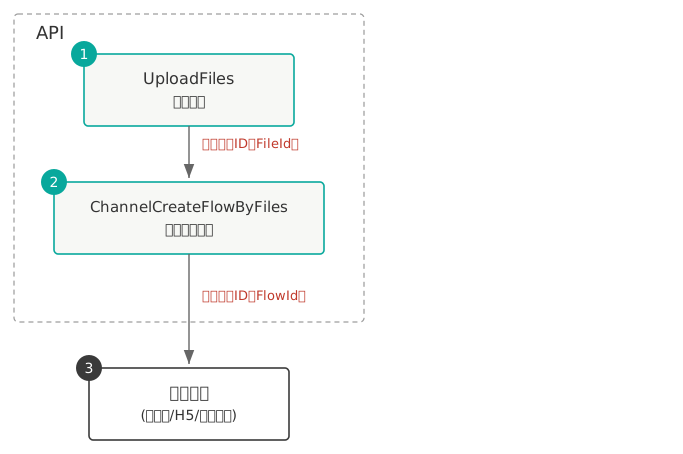
519
|
-
|
|
482
|
+
### 1.1 调用依赖
|
|
520
483
|
|
|
521
|
-
|
|
522
|
-
<table> <thead> <tr> <th>场景编号</th> <th>发起方</th> <th>签署方</th> <th>补充</th> </tr> </thead> <tbody> <tr> <td>场景一</td> <td>子企业A的员工</td> <td>子企业A的员工</td> <td>子企业是通过<a href="https://qian.tencent.com/developers/partnerApis/accounts/CreateConsoleLoginUrl" target="_blank">CreateConsoleLoginUrl</a>生成子客登录链接注册的企业</td> </tr> <tr> <td>场景二</td> <td>子企业A的员工</td> <td>子企业B(不指定经办人走领取逻辑)</td> <td>领取的逻辑可以参考文档<a href="https://qian.tencent.com/developers/partner/dynamic_signer" target="_blank">动态签署方</a> </td> </tr> <tr> <td>场景三</td> <td>子企业A的员工</td> <td>子企业B的员工</td> <td>-</td> </tr> <tr> <td>场景四</td> <td>子企业A的员工</td> <td>个人</td> <td>就是自然人,不是企业员工</td> </tr> <tr> <td>场景五</td> <td>子企业A的员工</td> <td>SaaS平台企业员工</td> <td>SaaS平台企业是通过<a href="https://qian.tencent.cn/console/company-register" target="_blank">https://qian.tencent.cn/console/company-register</a>链接注册的企业</td> </tr> </tbody> </table>
|
|
484
|
+
本接口需依赖[文件上传接口](https://qian.tencent.com/developers/partnerApis/files/UploadFiles)生成 PDF 资源编号(FileId)后使用,整体逻辑如下图:
|
|
523
485
|
|
|
486
|
+
|
|
524
487
|
|
|
525
|
-
|
|
526
|
-
|
|
488
|
+
### 1.2 发起方和签署方
|
|
489
|
+
<table> <thead> <tr> <th>场景编号</th> <th>发起方</th> <th>签署方</th> <th>补充</th> </tr> </thead> <tbody> <tr> <td>场景一</td> <td>子企业A的员工</td> <td>子企业A的员工</td> <td>子企业是通过<a href="https://qian.tencent.com/developers/partnerApis/accounts/CreateConsoleLoginUrl" target="_blank">CreateConsoleLoginUrl</a>生成子客登录链接注册的企业</td> </tr> <tr> <td>场景二</td> <td>子企业A的员工</td> <td>子企业B(不指定经办人走领取逻辑)</td> <td>领取的逻辑可以参考文档<a href="https://qian.tencent.com/developers/partner/dynamic_signer" target="_blank">动态签署方</a> </td> </tr> <tr> <td>场景三</td> <td>子企业A的员工</td> <td>子企业B的员工</td> <td>-</td> </tr> <tr> <td>场景四</td> <td>子企业A的员工</td> <td>个人</td> <td>就是自然人,不是企业员工</td> </tr> <tr> <td>场景五</td> <td>子企业A的员工</td> <td>SaaS平台企业员工</td> <td>SaaS平台企业是通过<a href="https://qian.tencent.cn/console/company-register" target="_blank">https://qian.tencent.cn/console/company-register</a>链接注册的企业</td> </tr> </tbody> </table>
|
|
527
490
|
|
|
528
|
-
`2. 不同类型的签署方传参不同, 可以参考开发者中心的FlowApproverInfo结构体说明`
|
|
529
491
|
|
|
530
|
-
|
|
492
|
+
<font color="red">发起方(第三方子企业 A 的企业与员工)必须完成实名</font>;作为 **签署方** 的第三方子企业 A 员工 / 个人自然人 / SaaS 平台企业员工 / 第三方子企业 B 员工等,其企业和个人可以未实名。
|
|
531
493
|
|
|
532
|
-
|
|
494
|
+
### 1.3 注意事项
|
|
495
|
+
- 合同<font color="red">发起后就会扣减合同的额度</font> , 只有撤销没有参与方签署过或只有自动签署签署过的合同,且<font color="red">有撤销合同额度</font>的情形下,才会返还合同额度。(**过期,拒签,签署完成,解除完成等状态不会返还额度**)。具体可以参考 [合同撤销返还额度说明](https://qian.tencent.com/developers/partner/contract_cancel_quota) 。
|
|
496
|
+
- <font color="red">支持的证件类型</font>可以参考 [支持的证件类型](https://qian.tencent.com/developers/partner/id_card_support) 。
|
|
497
|
+
- <font color="red">不同类型的签署方传参不同</font>,各类型签署方的信息传递方式详见 [签署方入参指引](https://qian.tencent.com/developers/partner/flow_approver) 。
|
|
498
|
+
- 如果合同正式发起前如需<font color="red">预览</font>效果,可参考 [使用文件发起的预览](https://qian.tencent.com/developers/partner/preview_guide#%E4%B8%80%E4%BD%BF%E7%94%A8%E6%96%87%E4%BB%B6%E5%8F%91%E8%B5%B7%E7%9A%84%E9%A2%84%E8%A7%88)
|
|
499
|
+
- 关于填写方与签署方的<font color="red">填写、签署先后顺序</font>设置,详见 [填写与签署顺序说明](https://qian.tencent.com/developers/partner/fill_sign_order)。
|
|
500
|
+
- 关于<font color="red">本企业自动签署与其他企业自动签署</font>的配置与使用,详见 [自动签署](https://qian.tencent.com/developers/partner/autosign_guide)。
|
|
533
501
|
|
|
534
|
-
|
|
535
|
-
1. <a href="https://dyn.ess.tencent.cn/guide/apivideo/essbasic-UploadFiles.mp4" target="_blank">【上传文件代码】编写示例</a
|
|
536
|
-
|
|
502
|
+
### 1.4 视频教程
|
|
503
|
+
1. <a href="https://dyn.ess.tencent.cn/guide/apivideo/essbasic-UploadFiles.mp4" target="_blank">【上传文件代码】编写示例</a>
|
|
504
|
+
2. <a href="https://dyn.ess.tencent.cn/guide/apivideo/essbasic-ChannelCreateFlowByFiles.mp4" target="_blank">【用PDF文件创建签署流程】编写示例</a>
|
|
537
505
|
|
|
538
506
|
:param request: Request instance for ChannelCreateFlowByFiles.
|
|
539
507
|
:type request: :class:`tencentcloud.essbasic.v20210526.models.ChannelCreateFlowByFilesRequest`
|
|
@@ -1577,36 +1545,6 @@ class EssbasicClient(AbstractClient):
|
|
|
1577
1545
|
raise TencentCloudSDKException(type(e).__name__, str(e))
|
|
1578
1546
|
|
|
1579
1547
|
|
|
1580
|
-
def ChannelGetTaskResultApi(self, request):
|
|
1581
|
-
r"""此接口(ChannelGetTaskResultApi)用来查询转换任务的状态。如需发起转换任务,请使用<a href="https://qian.tencent.com/developers/partnerApis/files/ChannelCreateConvertTaskApi" target="_blank">创建文件转换任务接口</a>进行资源文件的转换操作<br />
|
|
1582
|
-
前提条件:已调用 <a href="https://qian.tencent.com/developers/partnerApis/files/ChannelCreateConvertTaskApi" target="_blank">创建文件转换任务接口</a>进行文件转换,并得到了返回的转换任务Id。<br />
|
|
1583
|
-
|
|
1584
|
-
适用场景:已创建一个文件转换任务,想查询该文件转换任务的状态,或获取转换后的文件资源ID。<br />
|
|
1585
|
-
<font color="red">此接口于 2026 年 12月 31 日下线</font>,请使用新接口: <a href="https://qian.tencent.com/developers/partnerApis/files/DescribeFileConvertTask" target="_blank">查询文件转换任务状态(DescribeFileConvertTask)</a><br />
|
|
1586
|
-
注:
|
|
1587
|
-
1. `大文件转换所需的时间可能会比较长。`
|
|
1588
|
-
2. `本接口返回的文件资源ID就是PDF资源ID,可以直接用于【用PDF文件创建签署流程】接口发起合同。`
|
|
1589
|
-
|
|
1590
|
-
:param request: Request instance for ChannelGetTaskResultApi.
|
|
1591
|
-
:type request: :class:`tencentcloud.essbasic.v20210526.models.ChannelGetTaskResultApiRequest`
|
|
1592
|
-
:rtype: :class:`tencentcloud.essbasic.v20210526.models.ChannelGetTaskResultApiResponse`
|
|
1593
|
-
|
|
1594
|
-
"""
|
|
1595
|
-
try:
|
|
1596
|
-
params = request._serialize()
|
|
1597
|
-
headers = request.headers
|
|
1598
|
-
body = self.call("ChannelGetTaskResultApi", params, headers=headers)
|
|
1599
|
-
response = json.loads(body)
|
|
1600
|
-
model = models.ChannelGetTaskResultApiResponse()
|
|
1601
|
-
model._deserialize(response["Response"])
|
|
1602
|
-
return model
|
|
1603
|
-
except Exception as e:
|
|
1604
|
-
if isinstance(e, TencentCloudSDKException):
|
|
1605
|
-
raise
|
|
1606
|
-
else:
|
|
1607
|
-
raise TencentCloudSDKException(type(e).__name__, str(e))
|
|
1608
|
-
|
|
1609
|
-
|
|
1610
1548
|
def ChannelModifyRole(self, request):
|
|
1611
1549
|
r"""此接口(ChannelModifyRole)用来更新企业自定义角色。
|
|
1612
1550
|
|
|
@@ -2284,70 +2222,54 @@ class EssbasicClient(AbstractClient):
|
|
|
2284
2222
|
|
|
2285
2223
|
|
|
2286
2224
|
def CreateFlowsByTemplates(self, request):
|
|
2287
|
-
r"""
|
|
2288
|
-
如若在模板中配置了动态表格, 上传的附件必须为A4大小
|
|
2289
|
-
合同发起人必须在电子签已经进行实名。
|
|
2225
|
+
r"""本接口(CreateFlowsByTemplates)用于**使用模板批量创建签署流程**,当前单次可批量发起合同(签署流程)数量为 1~20 个。
|
|
2290
2226
|
|
|
2291
|
-
### 一. 整体的逻辑如下
|
|
2292
2227
|
|
|
2293
|
-
|
|
2228
|
+
### 1.1 整体逻辑如下
|
|
2294
2229
|
|
|
2295
|
-
|
|
2230
|
+
|
|
2231
|
+
|
|
2232
|
+
### 1.2 发起方和签署方
|
|
2296
2233
|
|
|
2297
2234
|
<table> <thead> <tr> <th>场景编号</th> <th>发起方</th> <th>签署方</th> <th>补充</th> </tr> </thead> <tbody> <tr> <td>场景一</td> <td>子企业A的员工</td> <td>子企业A的员工</td> <td>子企业是通过<a href="https://qian.tencent.com/developers/partnerApis/accounts/CreateConsoleLoginUrl" target="_blank">CreateConsoleLoginUrl</a>生成子客登录链接注册的企业</td> </tr> <tr> <td>场景二</td> <td>子企业A的员工</td> <td>子企业B(不指定经办人走领取逻辑)</td> <td>领取的逻辑可以参考文档<a href="https://qian.tencent.com/developers/partner/dynamic_signer" target="_blank">动态签署方</a> </td> </tr> <tr> <td>场景三</td> <td>子企业A的员工</td> <td>子企业B的员工</td> <td>-</td> </tr> <tr> <td>场景四</td> <td>子企业A的员工</td> <td>个人</td> <td>就是自然人,不是企业员工</td> </tr> <tr> <td>场景五</td> <td>子企业A的员工</td> <td>SaaS平台企业员工</td> <td>SaaS平台企业是通过<a href="https://qian.tencent.cn/console/company-register" target="_blank">https://qian.tencent.cn/console/company-register</a>链接注册的企业</td> </tr> </tbody> </table>
|
|
2298
2235
|
|
|
2236
|
+
<font color="red">发起方(第三方子企业 A 的企业与员工)必须完成实名</font>;作为 **签署方** 的第三方子企业 A 员工 / 个人自然人 / SaaS 平台企业员工 / 第三方子企业 B 员工等,其企业和个人可以未实名。
|
|
2299
2237
|
|
|
2300
2238
|
|
|
2239
|
+
### 1.3 填充模板中定义的发起人填写控件
|
|
2301
2240
|
|
|
2302
|
-
|
|
2303
|
-
模板中配置的<font color="red">发起人填充控件</font>可以通过本接口的**FormFields数组**字段填充
|
|
2241
|
+
模板中配置的 **发起人填充控件** 可以通过本接口的 **FormFields 数组** 字段填充。<font color="red">只能填充分配给发起方的填写控件,不能填充分配给签署方的签署控件</font> ,分配给签署方的签署控件需要签署方在签署环节填充。
|
|
2304
2242
|
|
|
2305
2243
|
|
|
2306
2244
|
填充的传参示例如下
|
|
2307
2245
|
|
|
2308
2246
|
```
|
|
2309
|
-
request.FormFields = [
|
|
2310
|
-
|
|
2311
|
-
|
|
2312
|
-
|
|
2313
|
-
|
|
2314
|
-
|
|
2315
|
-
|
|
2316
|
-
|
|
2317
|
-
"ComponentValue": "凤凰山至107国道",
|
|
2318
|
-
}, {
|
|
2319
|
-
"ComponentName": "面积",
|
|
2320
|
-
"ComponentValue": "100亩",
|
|
2321
|
-
}, {
|
|
2322
|
-
"ComponentName": "基本情况",
|
|
2323
|
-
"ComponentValue": "完好",
|
|
2324
|
-
}, , {
|
|
2325
|
-
"ComponentName": "用途",
|
|
2326
|
-
"ComponentValue": "经营农家乐",
|
|
2327
|
-
}
|
|
2328
|
-
]
|
|
2247
|
+
request.FormFields = [
|
|
2248
|
+
{ "ComponentName": "项目的名字", "ComponentValue": "休闲山庄" },
|
|
2249
|
+
{ "ComponentName": "项目的地址", "ComponentValue": "凤凰山北侧" },
|
|
2250
|
+
{ "ComponentName": "范围", "ComponentValue": "凤凰山至107国道" },
|
|
2251
|
+
{ "ComponentName": "面积", "ComponentValue": "100亩" },
|
|
2252
|
+
{ "ComponentName": "基本情况", "ComponentValue": "完好" },
|
|
2253
|
+
{ "ComponentName": "用途", "ComponentValue": "经营农家乐" }
|
|
2254
|
+
]
|
|
2329
2255
|
```
|
|
2330
|
-
|
|
2256
|
+
合成后合同样子
|
|
2331
2257
|
|
|
2332
2258
|
|
|
2333
2259
|
|
|
2260
|
+
### 1.4 注意事项
|
|
2261
|
+
- 合同<font color="red">发起后就会扣减合同的额度</font> , 只有撤销没有参与方签署过或只有自动签署签署过的合同,且<font color="red">有撤销合同额度</font>的情形下,才会返还合同额度。(**过期,拒签,签署完成,解除完成等状态不会返还额度**)。具体可以参考 [合同撤销返还额度说明](https://qian.tencent.com/developers/partner/contract_cancel_quota) 。
|
|
2262
|
+
- <font color="red">支持的证件类型</font>可以参考 [支持的证件类型](https://qian.tencent.com/developers/partner/id_card_support) 。
|
|
2263
|
+
- <font color="red">不同类型的签署方传参不同</font>,各类型签署方的信息传递方式详见 [签署方入参指引](https://qian.tencent.com/developers/partner/flow_approver) 。
|
|
2264
|
+
- 如果合同正式发起前如需<font color="red">预览</font>效果,可参考 [使用模板发起的预览](https://qian.tencent.com/developers/partner/preview_guide/#%E4%BA%8C%E4%BD%BF%E7%94%A8%E6%A8%A1%E6%9D%BF%E5%8F%91%E8%B5%B7%E7%9A%84%E9%A2%84%E8%A7%88)
|
|
2265
|
+
- 关于填写方与签署方的<font color="red">填写、签署先后顺序</font>设置,详见 [填写与签署顺序说明](https://qian.tencent.com/developers/partner/fill_sign_order)。
|
|
2266
|
+
- 关于<font color="red">本企业自动签署与其他企业自动签署</font>的配置与使用,详见 [自动签署](https://qian.tencent.com/developers/partner/autosign_guide)。
|
|
2267
|
+
- 如若在模板中配置了[动态表格](https://qian.tencent.com/developers/partner/dynamic_table), 如果模板中配有附件控件,上传的附件必须为A4尺寸的PDF。
|
|
2334
2268
|
|
|
2269
|
+
### 1.5 视频教程
|
|
2335
2270
|
|
|
2336
|
-
|
|
2337
|
-
|
|
2338
|
-
|
|
2339
|
-
2. 不同类型的签署方传参不同, 可以参考开发者中心的FlowApproverInfo结构体说明
|
|
2340
|
-
|
|
2341
|
-
3. <font color="red">调用接口发起合同成功就会扣减合同的额度</font>, 只有撤销没有参与方签署过或只有自动签署签署过的合同,才会返还合同额度。(过期,拒签,签署完成,解除完成等状态不会返还额度)
|
|
2342
|
-
|
|
2343
|
-
4. <font color="red">静默(自动)签署不支持合同签署方存在填写</font>
|
|
2344
|
-
|
|
2345
|
-
5. <font color="red">在下一步创建签署链接前,建议等待DocumentFill </font> <a href="https://qian.tencent.com/developers/partner/callback_types_file_resources">PDF合成完成的回调</a>或者睡眠几秒,尤其是当模板中存在动态表格等复杂填写控件时,因为合成过程可能会耗费秒级别的时间。
|
|
2346
|
-
|
|
2347
|
-
|
|
2348
|
-
<font color="red">相关视频指引</font> <br>
|
|
2349
|
-
1. <a href="https://dyn.ess.tencent.cn/guide/apivideo/essbasic-CreateTemplates.mp4" target="_blank">创建模板&设置成本企业自动签署</a><br>
|
|
2350
|
-
2. <a href="https://dyn.ess.tencent.cn/guide/apivideo/essbasic-CreateFlowsByTemplates.mp4" target="_blank">【用模板创建签署流程】编写示例视频教程</a><br>
|
|
2271
|
+
1. <a href="https://dyn.ess.tencent.cn/guide/apivideo/essbasic-CreateTemplates.mp4" target="_blank">创建模板 & 设置成本企业自动签署</a>
|
|
2272
|
+
2. <a href="https://dyn.ess.tencent.cn/guide/apivideo/essbasic-CreateFlowsByTemplates.mp4" target="_blank">【用模板创建签署流程】编写示例视频教程</a>
|
|
2351
2273
|
|
|
2352
2274
|
:param request: Request instance for CreateFlowsByTemplates.
|
|
2353
2275
|
:type request: :class:`tencentcloud.essbasic.v20210526.models.CreateFlowsByTemplatesRequest`
|
|
@@ -2566,7 +2488,7 @@ class EssbasicClient(AbstractClient):
|
|
|
2566
2488
|
ciphertext = SymmetricEncrypt(ALGO, AESKey, iv, plaintext)
|
|
2567
2489
|
# 4. 计算完整性签名:HMAC(Key, IV || Ciphertext)
|
|
2568
2490
|
signature = HMAC(HMACKey, concat(iv, ciphertext))
|
|
2569
|
-
# 5.
|
|
2491
|
+
# 5. 组装外层请求参数
|
|
2570
2492
|
encReq = {
|
|
2571
2493
|
RequestAction: bizAction,
|
|
2572
2494
|
ApplicationId: bizApplicationId,
|
|
@@ -2605,6 +2527,7 @@ class EssbasicClient(AbstractClient):
|
|
|
2605
2527
|
```
|
|
2606
2528
|
|
|
2607
2529
|
**AES-CBC 示例**
|
|
2530
|
+
|
|
2608
2531
|
以下示例参数及结果可用于验证 AES-CBC 加密和 HMAC-SHA256 签名算法的实现是否正确。
|
|
2609
2532
|
|
|
2610
2533
|
加密密钥:AES-CBC-Key-1234
|
|
@@ -2615,7 +2538,7 @@ class EssbasicClient(AbstractClient):
|
|
|
2615
2538
|
最终请求参数:
|
|
2616
2539
|
```
|
|
2617
2540
|
{
|
|
2618
|
-
"RequestAction": "
|
|
2541
|
+
"RequestAction": "ChannelDescribeFlowComponents",
|
|
2619
2542
|
"ApplicationId: "yD******************************,
|
|
2620
2543
|
"IV": "MTIzNDU2Nzg5MGFiY2RlZg==",
|
|
2621
2544
|
"EncryptedData": "Iqp2W1jislwMNmE7bH9dKZZiMQsfkAPyvAAqDFRnWLw=",
|
|
@@ -2624,6 +2547,7 @@ class EssbasicClient(AbstractClient):
|
|
|
2624
2547
|
```
|
|
2625
2548
|
|
|
2626
2549
|
**SM4-CBC 示例**
|
|
2550
|
+
|
|
2627
2551
|
以下示例参数及结果可用于验证 SM4-CBC 加密和 HMAC-SM4 签名算法的实现是否正确。
|
|
2628
2552
|
|
|
2629
2553
|
加密密钥:SM4-CBC-Key-1234
|
|
@@ -2634,7 +2558,7 @@ class EssbasicClient(AbstractClient):
|
|
|
2634
2558
|
最终请求参数:
|
|
2635
2559
|
```
|
|
2636
2560
|
{
|
|
2637
|
-
"RequestAction": "
|
|
2561
|
+
"RequestAction": "ChannelDescribeFlowComponents",
|
|
2638
2562
|
"ApplicationId: "yD******************************,
|
|
2639
2563
|
"IV": "ZmVkY2JhMDk4NzY1NDMyMQ==",
|
|
2640
2564
|
"EncryptedData": "GwUovQhNUPaUnVM/UDXMtPOYTpTSi2B1oyZDFbyyvns=",
|
|
@@ -3570,7 +3494,7 @@ class EssbasicClient(AbstractClient):
|
|
|
3570
3494
|
|
|
3571
3495
|
适用场景:用于合同,印章的文件上传。文件上传以后,
|
|
3572
3496
|
如果是PDF格式文件可配合<a href="https://qian.tencent.com/developers/partnerApis/startFlows/ChannelCreateFlowByFiles" target="_blank">用PDF文件创建签署流程</a>接口进行合同流程的发起
|
|
3573
|
-
如果是其他类型可以配合<a href="https://qian.tencent.com/developers/partnerApis/files/
|
|
3497
|
+
如果是其他类型可以配合<a href="https://qian.tencent.com/developers/partnerApis/files/CreateFileConvertTask" target="_blank">创建文件转换任务</a>接口转换成PDF文件
|
|
3574
3498
|
|
|
3575
3499
|
注:
|
|
3576
3500
|
1. 图片类型(png/jpg/jpeg)限制大小为8M以下, PDF/word/excel等其他格式限制大小为60M以下
|
|
@@ -316,32 +316,6 @@ class EssbasicClient(AbstractClient):
|
|
|
316
316
|
|
|
317
317
|
return await self.call_and_deserialize(**kwargs)
|
|
318
318
|
|
|
319
|
-
async def ChannelCreateConvertTaskApi(
|
|
320
|
-
self,
|
|
321
|
-
request: models.ChannelCreateConvertTaskApiRequest,
|
|
322
|
-
opts: Dict = None,
|
|
323
|
-
) -> models.ChannelCreateConvertTaskApiResponse:
|
|
324
|
-
"""
|
|
325
|
-
此接口(ChannelCreateConvertTaskApi)用来将word、excel、html、图片、txt类型文件转换为PDF文件。<br />
|
|
326
|
-
前提条件:源文件已经通过 <a href="https://qian.tencent.com/developers/partnerApis/files/UploadFiles" target="_blank">文件上传接口</a>完成上传,并得到了源文件的资源Id。<br />
|
|
327
|
-
适用场景1:已经上传了一个word文件,希望将该word文件转换成pdf文件后发起合同
|
|
328
|
-
适用场景2:已经上传了一个jpg图片文件,希望将该图片文件转换成pdf文件后发起合同<br />
|
|
329
|
-
转换文件是一个耗时操作,若想查看转换任务是否完成,可以通过<a href="https://qian.tencent.com/developers/partnerApis/files/ChannelGetTaskResultApi" target="_blank">查询转换任务状态</a>接口获取任务状态。<br />
|
|
330
|
-
<font color="red">此接口于 2026 年 12月 31 日下线</font>,请使用新接口: <a href="https://qian.tencent.com/developers/partnerApis/files/CreateFileConvertTask" target="_blank">新建文件转换任务(CreateFileConvertTask)</a><br />
|
|
331
|
-
注:
|
|
332
|
-
1. `支持的文件类型有doc、docx、xls、xlsx、html、jpg、jpeg、png、bmp、txt`
|
|
333
|
-
2. `可通过发起合同时设置预览来检查转换文件是否达到预期效果`
|
|
334
|
-
"""
|
|
335
|
-
|
|
336
|
-
kwargs = {}
|
|
337
|
-
kwargs["action"] = "ChannelCreateConvertTaskApi"
|
|
338
|
-
kwargs["params"] = request._serialize()
|
|
339
|
-
kwargs["resp_cls"] = models.ChannelCreateConvertTaskApiResponse
|
|
340
|
-
kwargs["headers"] = request.headers
|
|
341
|
-
kwargs["opts"] = opts or {}
|
|
342
|
-
|
|
343
|
-
return await self.call_and_deserialize(**kwargs)
|
|
344
|
-
|
|
345
319
|
async def ChannelCreateDynamicFlowApprover(
|
|
346
320
|
self,
|
|
347
321
|
request: models.ChannelCreateDynamicFlowApproverRequest,
|
|
@@ -440,34 +414,33 @@ class EssbasicClient(AbstractClient):
|
|
|
440
414
|
opts: Dict = None,
|
|
441
415
|
) -> models.ChannelCreateFlowByFilesResponse:
|
|
442
416
|
"""
|
|
443
|
-
|
|
444
|
-
|
|
445
|
-
适用场景:适用非制式的合同文件签署,开发者有每个签署流程的PDF,可以通过该接口传入完整的PDF文件及流程信息生成待签署的合同流程。
|
|
417
|
+
本接口(ChannelCreateFlowByFiles)用于通过**已上传的 PDF 资源编号**创建待签署的合同流程。
|
|
446
418
|
|
|
447
|
-
|
|
448
|
-
<ul>
|
|
449
|
-
<li>此接口静默签(企业自动签)能力为白名单功能,使用前请联系对接的客户经理沟通。</li>
|
|
450
|
-
<li>此接口需要依赖<a href="https://qian.tencent.com/developers/partnerApis/files/UploadFiles" target="_blank">文件上传接口</a>生成pdf资源编号(FileIds)进行使用。整体的逻辑如下图</li>
|
|
451
|
-
</ul>
|
|
419
|
+
**适用场景**:适用于非制式的合同文件签署。当开发者已拥有每个签署流程完整的 PDF 文件时,可通过本接口传入完整的 PDF 文件及流程信息,生成待签署的合同流程。
|
|
452
420
|
|
|
453
|
-
|
|
421
|
+
### 1.1 调用依赖
|
|
454
422
|
|
|
455
|
-
|
|
456
|
-
<table> <thead> <tr> <th>场景编号</th> <th>发起方</th> <th>签署方</th> <th>补充</th> </tr> </thead> <tbody> <tr> <td>场景一</td> <td>子企业A的员工</td> <td>子企业A的员工</td> <td>子企业是通过<a href="https://qian.tencent.com/developers/partnerApis/accounts/CreateConsoleLoginUrl" target="_blank">CreateConsoleLoginUrl</a>生成子客登录链接注册的企业</td> </tr> <tr> <td>场景二</td> <td>子企业A的员工</td> <td>子企业B(不指定经办人走领取逻辑)</td> <td>领取的逻辑可以参考文档<a href="https://qian.tencent.com/developers/partner/dynamic_signer" target="_blank">动态签署方</a> </td> </tr> <tr> <td>场景三</td> <td>子企业A的员工</td> <td>子企业B的员工</td> <td>-</td> </tr> <tr> <td>场景四</td> <td>子企业A的员工</td> <td>个人</td> <td>就是自然人,不是企业员工</td> </tr> <tr> <td>场景五</td> <td>子企业A的员工</td> <td>SaaS平台企业员工</td> <td>SaaS平台企业是通过<a href="https://qian.tencent.cn/console/company-register" target="_blank">https://qian.tencent.cn/console/company-register</a>链接注册的企业</td> </tr> </tbody> </table>
|
|
423
|
+
本接口需依赖[文件上传接口](https://qian.tencent.com/developers/partnerApis/files/UploadFiles)生成 PDF 资源编号(FileId)后使用,整体逻辑如下图:
|
|
457
424
|
|
|
425
|
+

|
|
458
426
|
|
|
459
|
-
|
|
460
|
-
|
|
427
|
+
### 1.2 发起方和签署方
|
|
428
|
+
<table> <thead> <tr> <th>场景编号</th> <th>发起方</th> <th>签署方</th> <th>补充</th> </tr> </thead> <tbody> <tr> <td>场景一</td> <td>子企业A的员工</td> <td>子企业A的员工</td> <td>子企业是通过<a href="https://qian.tencent.com/developers/partnerApis/accounts/CreateConsoleLoginUrl" target="_blank">CreateConsoleLoginUrl</a>生成子客登录链接注册的企业</td> </tr> <tr> <td>场景二</td> <td>子企业A的员工</td> <td>子企业B(不指定经办人走领取逻辑)</td> <td>领取的逻辑可以参考文档<a href="https://qian.tencent.com/developers/partner/dynamic_signer" target="_blank">动态签署方</a> </td> </tr> <tr> <td>场景三</td> <td>子企业A的员工</td> <td>子企业B的员工</td> <td>-</td> </tr> <tr> <td>场景四</td> <td>子企业A的员工</td> <td>个人</td> <td>就是自然人,不是企业员工</td> </tr> <tr> <td>场景五</td> <td>子企业A的员工</td> <td>SaaS平台企业员工</td> <td>SaaS平台企业是通过<a href="https://qian.tencent.cn/console/company-register" target="_blank">https://qian.tencent.cn/console/company-register</a>链接注册的企业</td> </tr> </tbody> </table>
|
|
461
429
|
|
|
462
|
-
`2. 不同类型的签署方传参不同, 可以参考开发者中心的FlowApproverInfo结构体说明`
|
|
463
430
|
|
|
464
|
-
|
|
431
|
+
<font color="red">发起方(第三方子企业 A 的企业与员工)必须完成实名</font>;作为 **签署方** 的第三方子企业 A 员工 / 个人自然人 / SaaS 平台企业员工 / 第三方子企业 B 员工等,其企业和个人可以未实名。
|
|
465
432
|
|
|
466
|
-
|
|
433
|
+
### 1.3 注意事项
|
|
434
|
+
- 合同<font color="red">发起后就会扣减合同的额度</font> , 只有撤销没有参与方签署过或只有自动签署签署过的合同,且<font color="red">有撤销合同额度</font>的情形下,才会返还合同额度。(**过期,拒签,签署完成,解除完成等状态不会返还额度**)。具体可以参考 [合同撤销返还额度说明](https://qian.tencent.com/developers/partner/contract_cancel_quota) 。
|
|
435
|
+
- <font color="red">支持的证件类型</font>可以参考 [支持的证件类型](https://qian.tencent.com/developers/partner/id_card_support) 。
|
|
436
|
+
- <font color="red">不同类型的签署方传参不同</font>,各类型签署方的信息传递方式详见 [签署方入参指引](https://qian.tencent.com/developers/partner/flow_approver) 。
|
|
437
|
+
- 如果合同正式发起前如需<font color="red">预览</font>效果,可参考 [使用文件发起的预览](https://qian.tencent.com/developers/partner/preview_guide#%E4%B8%80%E4%BD%BF%E7%94%A8%E6%96%87%E4%BB%B6%E5%8F%91%E8%B5%B7%E7%9A%84%E9%A2%84%E8%A7%88)
|
|
438
|
+
- 关于填写方与签署方的<font color="red">填写、签署先后顺序</font>设置,详见 [填写与签署顺序说明](https://qian.tencent.com/developers/partner/fill_sign_order)。
|
|
439
|
+
- 关于<font color="red">本企业自动签署与其他企业自动签署</font>的配置与使用,详见 [自动签署](https://qian.tencent.com/developers/partner/autosign_guide)。
|
|
467
440
|
|
|
468
|
-
|
|
469
|
-
1. <a href="https://dyn.ess.tencent.cn/guide/apivideo/essbasic-UploadFiles.mp4" target="_blank">【上传文件代码】编写示例</a
|
|
470
|
-
|
|
441
|
+
### 1.4 视频教程
|
|
442
|
+
1. <a href="https://dyn.ess.tencent.cn/guide/apivideo/essbasic-UploadFiles.mp4" target="_blank">【上传文件代码】编写示例</a>
|
|
443
|
+
2. <a href="https://dyn.ess.tencent.cn/guide/apivideo/essbasic-ChannelCreateFlowByFiles.mp4" target="_blank">【用PDF文件创建签署流程】编写示例</a>
|
|
471
444
|
"""
|
|
472
445
|
|
|
473
446
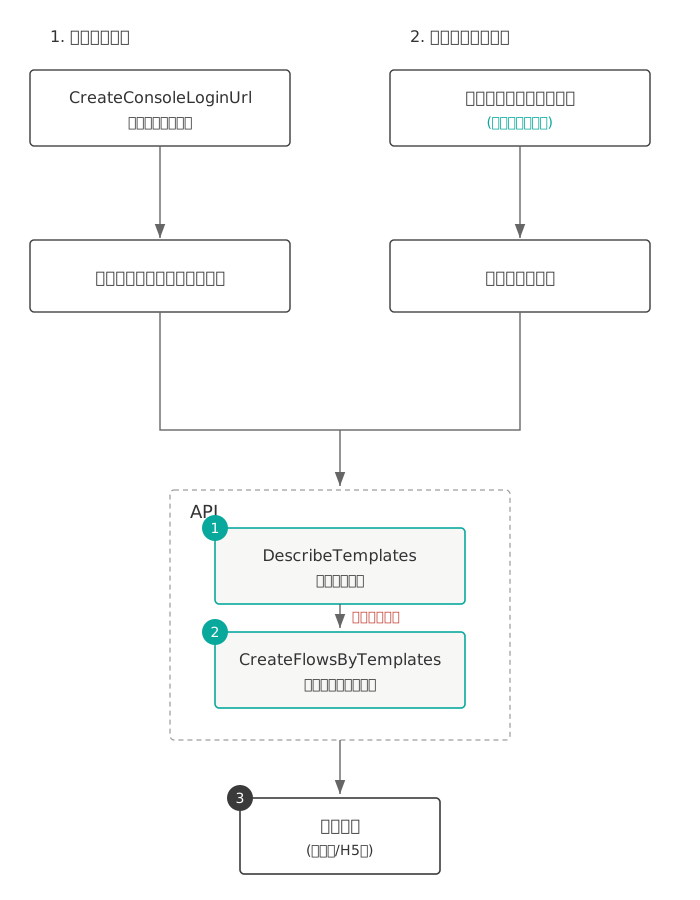
|
kwargs = {}
|
|
@@ -1351,31 +1324,6 @@ class EssbasicClient(AbstractClient):
|
|
|
1351
1324
|
|
|
1352
1325
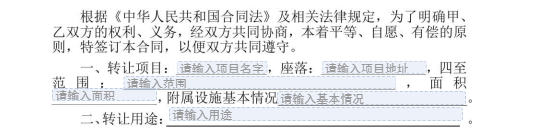
|
return await self.call_and_deserialize(**kwargs)
|
|
1353
1326
|
|
|
1354
|
-
async def ChannelGetTaskResultApi(
|
|
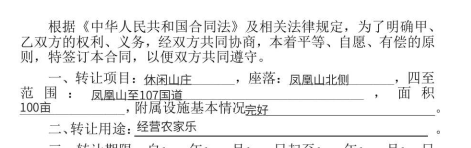
1355
|
-
self,
|
|
1356
|
-
request: models.ChannelGetTaskResultApiRequest,
|
|
1357
|
-
opts: Dict = None,
|
|
1358
|
-
) -> models.ChannelGetTaskResultApiResponse:
|
|
1359
|
-
"""
|
|
1360
|
-
此接口(ChannelGetTaskResultApi)用来查询转换任务的状态。如需发起转换任务,请使用<a href="https://qian.tencent.com/developers/partnerApis/files/ChannelCreateConvertTaskApi" target="_blank">创建文件转换任务接口</a>进行资源文件的转换操作<br />
|
|
1361
|
-
前提条件:已调用 <a href="https://qian.tencent.com/developers/partnerApis/files/ChannelCreateConvertTaskApi" target="_blank">创建文件转换任务接口</a>进行文件转换,并得到了返回的转换任务Id。<br />
|
|
1362
|
-
|
|
1363
|
-
适用场景:已创建一个文件转换任务,想查询该文件转换任务的状态,或获取转换后的文件资源ID。<br />
|
|
1364
|
-
<font color="red">此接口于 2026 年 12月 31 日下线</font>,请使用新接口: <a href="https://qian.tencent.com/developers/partnerApis/files/DescribeFileConvertTask" target="_blank">查询文件转换任务状态(DescribeFileConvertTask)</a><br />
|
|
1365
|
-
注:
|
|
1366
|
-
1. `大文件转换所需的时间可能会比较长。`
|
|
1367
|
-
2. `本接口返回的文件资源ID就是PDF资源ID,可以直接用于【用PDF文件创建签署流程】接口发起合同。`
|
|
1368
|
-
"""
|
|
1369
|
-
|
|
1370
|
-
kwargs = {}
|
|
1371
|
-
kwargs["action"] = "ChannelGetTaskResultApi"
|
|
1372
|
-
kwargs["params"] = request._serialize()
|
|
1373
|
-
kwargs["resp_cls"] = models.ChannelGetTaskResultApiResponse
|
|
1374
|
-
kwargs["headers"] = request.headers
|
|
1375
|
-
kwargs["opts"] = opts or {}
|
|
1376
|
-
|
|
1377
|
-
return await self.call_and_deserialize(**kwargs)
|
|
1378
|
-
|
|
1379
1327
|
async def ChannelModifyRole(
|
|
1380
1328
|
self,
|
|
1381
1329
|
request: models.ChannelModifyRoleRequest,
|
|
@@ -1958,70 +1906,54 @@ class EssbasicClient(AbstractClient):
|
|
|
1958
1906
|
opts: Dict = None,
|
|
1959
1907
|
) -> models.CreateFlowsByTemplatesResponse:
|
|
1960
1908
|
"""
|
|
1961
|
-
|
|
1962
|
-
如若在模板中配置了动态表格, 上传的附件必须为A4大小
|
|
1963
|
-
合同发起人必须在电子签已经进行实名。
|
|
1909
|
+
本接口(CreateFlowsByTemplates)用于**使用模板批量创建签署流程**,当前单次可批量发起合同(签署流程)数量为 1~20 个。
|
|
1964
1910
|
|
|
1965
|
-
### 一. 整体的逻辑如下
|
|
1966
1911
|
|
|
1967
|
-
|
|
1912
|
+
### 1.1 整体逻辑如下
|
|
1968
1913
|
|
|
1969
|
-
|
|
1914
|
+

|
|
1915
|
+
|
|
1916
|
+
### 1.2 发起方和签署方
|
|
1970
1917
|
|
|
1971
1918
|
<table> <thead> <tr> <th>场景编号</th> <th>发起方</th> <th>签署方</th> <th>补充</th> </tr> </thead> <tbody> <tr> <td>场景一</td> <td>子企业A的员工</td> <td>子企业A的员工</td> <td>子企业是通过<a href="https://qian.tencent.com/developers/partnerApis/accounts/CreateConsoleLoginUrl" target="_blank">CreateConsoleLoginUrl</a>生成子客登录链接注册的企业</td> </tr> <tr> <td>场景二</td> <td>子企业A的员工</td> <td>子企业B(不指定经办人走领取逻辑)</td> <td>领取的逻辑可以参考文档<a href="https://qian.tencent.com/developers/partner/dynamic_signer" target="_blank">动态签署方</a> </td> </tr> <tr> <td>场景三</td> <td>子企业A的员工</td> <td>子企业B的员工</td> <td>-</td> </tr> <tr> <td>场景四</td> <td>子企业A的员工</td> <td>个人</td> <td>就是自然人,不是企业员工</td> </tr> <tr> <td>场景五</td> <td>子企业A的员工</td> <td>SaaS平台企业员工</td> <td>SaaS平台企业是通过<a href="https://qian.tencent.cn/console/company-register" target="_blank">https://qian.tencent.cn/console/company-register</a>链接注册的企业</td> </tr> </tbody> </table>
|
|
1972
1919
|
|
|
1920
|
+
<font color="red">发起方(第三方子企业 A 的企业与员工)必须完成实名</font>;作为 **签署方** 的第三方子企业 A 员工 / 个人自然人 / SaaS 平台企业员工 / 第三方子企业 B 员工等,其企业和个人可以未实名。
|
|
1973
1921
|
|
|
1974
1922
|
|
|
1923
|
+
### 1.3 填充模板中定义的发起人填写控件
|
|
1975
1924
|
|
|
1976
|
-
|
|
1977
|
-
模板中配置的<font color="red">发起人填充控件</font>可以通过本接口的**FormFields数组**字段填充
|
|
1925
|
+
模板中配置的 **发起人填充控件** 可以通过本接口的 **FormFields 数组** 字段填充。<font color="red">只能填充分配给发起方的填写控件,不能填充分配给签署方的签署控件</font> ,分配给签署方的签署控件需要签署方在签署环节填充。
|
|
1978
1926
|
|
|
1979
1927
|

|
|
1980
1928
|
填充的传参示例如下
|
|
1981
1929
|
|
|
1982
1930
|
```
|
|
1983
|
-
request.FormFields = [
|
|
1984
|
-
|
|
1985
|
-
|
|
1986
|
-
|
|
1987
|
-
|
|
1988
|
-
|
|
1989
|
-
|
|
1990
|
-
|
|
1991
|
-
"ComponentValue": "凤凰山至107国道",
|
|
1992
|
-
}, {
|
|
1993
|
-
"ComponentName": "面积",
|
|
1994
|
-
"ComponentValue": "100亩",
|
|
1995
|
-
}, {
|
|
1996
|
-
"ComponentName": "基本情况",
|
|
1997
|
-
"ComponentValue": "完好",
|
|
1998
|
-
}, , {
|
|
1999
|
-
"ComponentName": "用途",
|
|
2000
|
-
"ComponentValue": "经营农家乐",
|
|
2001
|
-
}
|
|
2002
|
-
]
|
|
1931
|
+
request.FormFields = [
|
|
1932
|
+
{ "ComponentName": "项目的名字", "ComponentValue": "休闲山庄" },
|
|
1933
|
+
{ "ComponentName": "项目的地址", "ComponentValue": "凤凰山北侧" },
|
|
1934
|
+
{ "ComponentName": "范围", "ComponentValue": "凤凰山至107国道" },
|
|
1935
|
+
{ "ComponentName": "面积", "ComponentValue": "100亩" },
|
|
1936
|
+
{ "ComponentName": "基本情况", "ComponentValue": "完好" },
|
|
1937
|
+
{ "ComponentName": "用途", "ComponentValue": "经营农家乐" }
|
|
1938
|
+
]
|
|
2003
1939
|
```
|
|
2004
|
-
|
|
1940
|
+
合成后合同样子
|
|
2005
1941
|
|
|
2006
1942
|

|
|
2007
1943
|
|
|
1944
|
+
### 1.4 注意事项
|
|
1945
|
+
- 合同<font color="red">发起后就会扣减合同的额度</font> , 只有撤销没有参与方签署过或只有自动签署签署过的合同,且<font color="red">有撤销合同额度</font>的情形下,才会返还合同额度。(**过期,拒签,签署完成,解除完成等状态不会返还额度**)。具体可以参考 [合同撤销返还额度说明](https://qian.tencent.com/developers/partner/contract_cancel_quota) 。
|
|
1946
|
+
- <font color="red">支持的证件类型</font>可以参考 [支持的证件类型](https://qian.tencent.com/developers/partner/id_card_support) 。
|
|
1947
|
+
- <font color="red">不同类型的签署方传参不同</font>,各类型签署方的信息传递方式详见 [签署方入参指引](https://qian.tencent.com/developers/partner/flow_approver) 。
|
|
1948
|
+
- 如果合同正式发起前如需<font color="red">预览</font>效果,可参考 [使用模板发起的预览](https://qian.tencent.com/developers/partner/preview_guide/#%E4%BA%8C%E4%BD%BF%E7%94%A8%E6%A8%A1%E6%9D%BF%E5%8F%91%E8%B5%B7%E7%9A%84%E9%A2%84%E8%A7%88)
|
|
1949
|
+
- 关于填写方与签署方的<font color="red">填写、签署先后顺序</font>设置,详见 [填写与签署顺序说明](https://qian.tencent.com/developers/partner/fill_sign_order)。
|
|
1950
|
+
- 关于<font color="red">本企业自动签署与其他企业自动签署</font>的配置与使用,详见 [自动签署](https://qian.tencent.com/developers/partner/autosign_guide)。
|
|
1951
|
+
- 如若在模板中配置了[动态表格](https://qian.tencent.com/developers/partner/dynamic_table), 如果模板中配有附件控件,上传的附件必须为A4尺寸的PDF。
|
|
2008
1952
|
|
|
1953
|
+
### 1.5 视频教程
|
|
2009
1954
|
|
|
2010
|
-
|
|
2011
|
-
|
|
2012
|
-
|
|
2013
|
-
2. 不同类型的签署方传参不同, 可以参考开发者中心的FlowApproverInfo结构体说明
|
|
2014
|
-
|
|
2015
|
-
3. <font color="red">调用接口发起合同成功就会扣减合同的额度</font>, 只有撤销没有参与方签署过或只有自动签署签署过的合同,才会返还合同额度。(过期,拒签,签署完成,解除完成等状态不会返还额度)
|
|
2016
|
-
|
|
2017
|
-
4. <font color="red">静默(自动)签署不支持合同签署方存在填写</font>
|
|
2018
|
-
|
|
2019
|
-
5. <font color="red">在下一步创建签署链接前,建议等待DocumentFill </font> <a href="https://qian.tencent.com/developers/partner/callback_types_file_resources">PDF合成完成的回调</a>或者睡眠几秒,尤其是当模板中存在动态表格等复杂填写控件时,因为合成过程可能会耗费秒级别的时间。
|
|
2020
|
-
|
|
2021
|
-
|
|
2022
|
-
<font color="red">相关视频指引</font> <br>
|
|
2023
|
-
1. <a href="https://dyn.ess.tencent.cn/guide/apivideo/essbasic-CreateTemplates.mp4" target="_blank">创建模板&设置成本企业自动签署</a><br>
|
|
2024
|
-
2. <a href="https://dyn.ess.tencent.cn/guide/apivideo/essbasic-CreateFlowsByTemplates.mp4" target="_blank">【用模板创建签署流程】编写示例视频教程</a><br>
|
|
1955
|
+
1. <a href="https://dyn.ess.tencent.cn/guide/apivideo/essbasic-CreateTemplates.mp4" target="_blank">创建模板 & 设置成本企业自动签署</a>
|
|
1956
|
+
2. <a href="https://dyn.ess.tencent.cn/guide/apivideo/essbasic-CreateFlowsByTemplates.mp4" target="_blank">【用模板创建签署流程】编写示例视频教程</a>
|
|
2025
1957
|
"""
|
|
2026
1958
|
|
|
2027
1959
|
kwargs = {}
|
|
@@ -2210,7 +2142,7 @@ class EssbasicClient(AbstractClient):
|
|
|
2210
2142
|
ciphertext = SymmetricEncrypt(ALGO, AESKey, iv, plaintext)
|
|
2211
2143
|
# 4. 计算完整性签名:HMAC(Key, IV || Ciphertext)
|
|
2212
2144
|
signature = HMAC(HMACKey, concat(iv, ciphertext))
|
|
2213
|
-
# 5.
|
|
2145
|
+
# 5. 组装外层请求参数
|
|
2214
2146
|
encReq = {
|
|
2215
2147
|
RequestAction: bizAction,
|
|
2216
2148
|
ApplicationId: bizApplicationId,
|
|
@@ -2249,6 +2181,7 @@ class EssbasicClient(AbstractClient):
|
|
|
2249
2181
|
```
|
|
2250
2182
|
|
|
2251
2183
|
**AES-CBC 示例**
|
|
2184
|
+
|
|
2252
2185
|
以下示例参数及结果可用于验证 AES-CBC 加密和 HMAC-SHA256 签名算法的实现是否正确。
|
|
2253
2186
|
|
|
2254
2187
|
加密密钥:AES-CBC-Key-1234
|
|
@@ -2259,7 +2192,7 @@ class EssbasicClient(AbstractClient):
|
|
|
2259
2192
|
最终请求参数:
|
|
2260
2193
|
```
|
|
2261
2194
|
{
|
|
2262
|
-
"RequestAction": "
|
|
2195
|
+
"RequestAction": "ChannelDescribeFlowComponents",
|
|
2263
2196
|
"ApplicationId: "yD******************************,
|
|
2264
2197
|
"IV": "MTIzNDU2Nzg5MGFiY2RlZg==",
|
|
2265
2198
|
"EncryptedData": "Iqp2W1jislwMNmE7bH9dKZZiMQsfkAPyvAAqDFRnWLw=",
|
|
@@ -2268,6 +2201,7 @@ class EssbasicClient(AbstractClient):
|
|
|
2268
2201
|
```
|
|
2269
2202
|
|
|
2270
2203
|
**SM4-CBC 示例**
|
|
2204
|
+
|
|
2271
2205
|
以下示例参数及结果可用于验证 SM4-CBC 加密和 HMAC-SM4 签名算法的实现是否正确。
|
|
2272
2206
|
|
|
2273
2207
|
加密密钥:SM4-CBC-Key-1234
|
|
@@ -2278,7 +2212,7 @@ class EssbasicClient(AbstractClient):
|
|
|
2278
2212
|
最终请求参数:
|
|
2279
2213
|
```
|
|
2280
2214
|
{
|
|
2281
|
-
"RequestAction": "
|
|
2215
|
+
"RequestAction": "ChannelDescribeFlowComponents",
|
|
2282
2216
|
"ApplicationId: "yD******************************,
|
|
2283
2217
|
"IV": "ZmVkY2JhMDk4NzY1NDMyMQ==",
|
|
2284
2218
|
"EncryptedData": "GwUovQhNUPaUnVM/UDXMtPOYTpTSi2B1oyZDFbyyvns=",
|
|
@@ -3074,7 +3008,7 @@ class EssbasicClient(AbstractClient):
|
|
|
3074
3008
|
|
|
3075
3009
|
适用场景:用于合同,印章的文件上传。文件上传以后,
|
|
3076
3010
|
如果是PDF格式文件可配合<a href="https://qian.tencent.com/developers/partnerApis/startFlows/ChannelCreateFlowByFiles" target="_blank">用PDF文件创建签署流程</a>接口进行合同流程的发起
|
|
3077
|
-
如果是其他类型可以配合<a href="https://qian.tencent.com/developers/partnerApis/files/
|
|
3011
|
+
如果是其他类型可以配合<a href="https://qian.tencent.com/developers/partnerApis/files/CreateFileConvertTask" target="_blank">创建文件转换任务</a>接口转换成PDF文件
|
|
3078
3012
|
|
|
3079
3013
|
注:
|
|
3080
3014
|
1. 图片类型(png/jpg/jpeg)限制大小为8M以下, PDF/word/excel等其他格式限制大小为60M以下
|