tencentcloud-sdk-python-ess 3.1.172__tar.gz → 3.1.173__tar.gz
This diff represents the content of publicly available package versions that have been released to one of the supported registries. The information contained in this diff is provided for informational purposes only and reflects changes between package versions as they appear in their respective public registries.
- {tencentcloud_sdk_python_ess-3.1.172 → tencentcloud_sdk_python_ess-3.1.173}/PKG-INFO +2 -2
- {tencentcloud_sdk_python_ess-3.1.172 → tencentcloud_sdk_python_ess-3.1.173}/setup.py +1 -1
- {tencentcloud_sdk_python_ess-3.1.172 → tencentcloud_sdk_python_ess-3.1.173}/tencentcloud/__init__.py +1 -1
- {tencentcloud_sdk_python_ess-3.1.172 → tencentcloud_sdk_python_ess-3.1.173}/tencentcloud/ess/v20201111/ess_client.py +17 -7
- {tencentcloud_sdk_python_ess-3.1.172 → tencentcloud_sdk_python_ess-3.1.173}/tencentcloud/ess/v20201111/ess_client_async.py +17 -7
- {tencentcloud_sdk_python_ess-3.1.172 → tencentcloud_sdk_python_ess-3.1.173}/tencentcloud/ess/v20201111/models.py +193 -233
- {tencentcloud_sdk_python_ess-3.1.172 → tencentcloud_sdk_python_ess-3.1.173}/tencentcloud_sdk_python_ess.egg-info/PKG-INFO +2 -2
- tencentcloud_sdk_python_ess-3.1.173/tencentcloud_sdk_python_ess.egg-info/requires.txt +1 -0
- tencentcloud_sdk_python_ess-3.1.172/tencentcloud_sdk_python_ess.egg-info/requires.txt +0 -1
- {tencentcloud_sdk_python_ess-3.1.172 → tencentcloud_sdk_python_ess-3.1.173}/README.rst +0 -0
- {tencentcloud_sdk_python_ess-3.1.172 → tencentcloud_sdk_python_ess-3.1.173}/setup.cfg +0 -0
- {tencentcloud_sdk_python_ess-3.1.172 → tencentcloud_sdk_python_ess-3.1.173}/tencentcloud/ess/__init__.py +0 -0
- {tencentcloud_sdk_python_ess-3.1.172 → tencentcloud_sdk_python_ess-3.1.173}/tencentcloud/ess/v20201111/__init__.py +0 -0
- {tencentcloud_sdk_python_ess-3.1.172 → tencentcloud_sdk_python_ess-3.1.173}/tencentcloud/ess/v20201111/errorcodes.py +0 -0
- {tencentcloud_sdk_python_ess-3.1.172 → tencentcloud_sdk_python_ess-3.1.173}/tencentcloud_sdk_python_ess.egg-info/SOURCES.txt +0 -0
- {tencentcloud_sdk_python_ess-3.1.172 → tencentcloud_sdk_python_ess-3.1.173}/tencentcloud_sdk_python_ess.egg-info/dependency_links.txt +0 -0
- {tencentcloud_sdk_python_ess-3.1.172 → tencentcloud_sdk_python_ess-3.1.173}/tencentcloud_sdk_python_ess.egg-info/top_level.txt +0 -0
|
@@ -1,6 +1,6 @@
|
|
|
1
1
|
Metadata-Version: 2.1
|
|
2
2
|
Name: tencentcloud-sdk-python-ess
|
|
3
|
-
Version: 3.1.
|
|
3
|
+
Version: 3.1.173
|
|
4
4
|
Summary: Tencent Cloud Ess SDK for Python
|
|
5
5
|
Home-page: https://github.com/TencentCloud/tencentcloud-sdk-python
|
|
6
6
|
Author: Tencent Cloud
|
|
@@ -15,7 +15,7 @@ Classifier: Programming Language :: Python :: 2.7
|
|
|
15
15
|
Classifier: Programming Language :: Python :: 3
|
|
16
16
|
Classifier: Programming Language :: Python :: 3.6
|
|
17
17
|
Classifier: Programming Language :: Python :: 3.7
|
|
18
|
-
Requires-Dist: tencentcloud-sdk-python-common<4.0.0,>=3.1.
|
|
18
|
+
Requires-Dist: tencentcloud-sdk-python-common<4.0.0,>=3.1.173
|
|
19
19
|
|
|
20
20
|
============================
|
|
21
21
|
Tencent Cloud SDK for Python
|
|
@@ -8,7 +8,7 @@ ROOT = os.path.dirname(__file__)
|
|
|
8
8
|
|
|
9
9
|
setup(
|
|
10
10
|
name='tencentcloud-sdk-python-ess',
|
|
11
|
-
install_requires=["tencentcloud-sdk-python-common>=3.1.
|
|
11
|
+
install_requires=["tencentcloud-sdk-python-common>=3.1.173,<4.0.0"],
|
|
12
12
|
|
|
13
13
|
version=tencentcloud.__version__,
|
|
14
14
|
description='Tencent Cloud Ess SDK for Python',
|
|
@@ -536,6 +536,9 @@ class EssClient(AbstractClient):
|
|
|
536
536
|
3. 该接口返回的签署链接适用于APP集成的场景,支持APP打开或浏览器直接打开,**不支持微信小程序嵌入**。
|
|
537
537
|
4. 因h5涉及人脸身份认证能力基于慧眼人脸核身,对Android和iOS系统均有一定要求, 因此<font color='red'>App嵌入H5签署合同需要按照慧眼提供的<a href="https://cloud.tencent.com/document/product/1007/61076">慧眼人脸核身兼容性文档</a>做兼容性适配</font>。
|
|
538
538
|
5. <font color='red'>iframe 嵌入暂不支持人脸相关操作</font>,包括设置密码等需要进行的人脸核验。
|
|
539
|
+
6. 生成批量签署或合同组签署链接时,需通过以下参数重新指定签署配置( `SignatureTypes`和`ApproverSignTypes`的配置将覆盖合同发起时设置的签名类型和身份认证方式,并应用于本次生成的批量签署或合同组签署链接。)
|
|
540
|
+
- `SignatureTypes`:指定签名类型;未传入时,<font color='red'>默认使用手写签名</font>。
|
|
541
|
+
- `ApproverSignTypes`:指定签署人的身份认证方式;未传入时,<font color='red'>默认使用人脸认证</font>。
|
|
539
542
|
|
|
540
543
|
:param request: Request instance for CreateBatchQuickSignUrl.
|
|
541
544
|
:type request: :class:`tencentcloud.ess.v20201111.models.CreateBatchQuickSignUrlRequest`
|
|
@@ -995,7 +998,8 @@ class EssClient(AbstractClient):
|
|
|
995
998
|
|
|
996
999
|
def CreateFileConvertTask(self, request):
|
|
997
1000
|
r"""此接口(CreateFileConvertTask)用来将word、excel、html、图片、txt类型文件转换为PDF文件。<br />
|
|
998
|
-
|
|
1001
|
+
|
|
1002
|
+
|
|
999
1003
|
前提条件:源文件已经通过 <a href="https://qian.tencent.com/developers/companyApis/templatesAndFiles/UploadFiles" target="_blank">文件上传接口</a>完成上传,并得到了源文件的资源Id。<br />
|
|
1000
1004
|
适用场景1:已经上传了一个word文件,希望将该word文件转换成pdf文件后发起合同
|
|
1001
1005
|
适用场景2:已经上传了一个jpg图片文件,希望将该图片文件转换成pdf文件后发起合同<br />
|
|
@@ -2522,18 +2526,21 @@ class EssClient(AbstractClient):
|
|
|
2522
2526
|
|
|
2523
2527
|
|
|
2524
2528
|
def CreateSchemeUrl(self, request):
|
|
2525
|
-
r"""
|
|
2526
|
-
|
|
2527
|
-
适用场景:如果需要签署人在自己的APP、小程序、H5应用中签署,可以通过此接口获取跳转腾讯电子签小程序的签署跳转链接。
|
|
2529
|
+
r"""本接口(CreateSchemeUrl)用于获取跳转至腾讯电子签小程序的签署链接,签署人点击链接后即可跳转到腾讯电子签小程序完成合同的查看、填写与签署等操作。
|
|
2528
2530
|
|
|
2531
|
+
### 1.1 适用场景
|
|
2532
|
+
当需要签署人在贵方自有的 APP、小程序、H5、公众号等应用中发起或完成签署时,可通过此接口获取跳转至腾讯电子签小程序的签署链接,并结合短信、页面按钮、二维码等方式触达签署人。
|
|
2529
2533
|
跳转到小程序的实现,参考微信官方文档(分为<a href="https://developers.weixin.qq.com/miniprogram/dev/api/navigate/wx.navigateToMiniProgram.html">全屏</a>、<a href="https://developers.weixin.qq.com/miniprogram/dev/framework/open-ability/openEmbeddedMiniProgram.html">半屏</a>两种方式),如何配置也可以请参考: <a href="https://qian.tencent.com/developers/company/openwxminiprogram">跳转电子签小程序配置</a>
|
|
2530
2534
|
|
|
2531
|
-
|
|
2535
|
+
### 1.2 注意事项
|
|
2532
2536
|
<ul><li>1. 如果签署人是在PC端扫码签署,可以通过生成跳转链接自主转换成二维码,让签署人在PC端扫码签署</li>
|
|
2533
2537
|
<li>2. 签署链接的有效期为<font color="red">90天</font>,超过有效期链接不可用</li>
|
|
2534
2538
|
<li>3. 如果需跳转详情页(即PathType值为1)进行填写或签署合同,需指定签署方信息:姓名、手机号码、企业名称等,才能生成正确的跳转链接</li>
|
|
2535
|
-
<li>4. <font color="red">生成的链路后面不能再增加参数</font>(会出现覆盖链接中已有参数导致错误)</li
|
|
2539
|
+
<li>4. <font color="red">生成的链路后面不能再增加参数</font>(会出现覆盖链接中已有参数导致错误)</li>
|
|
2540
|
+
<li>5. <font color="red">签署链接与签署人一一对应,仅限对应签署人本人打开</font>。例如给签署人A生成的链接只能A本人打开,其他人打开会提示无权限,不同签署人的链接不能混用</li></ul>
|
|
2536
2541
|
|
|
2542
|
+
|
|
2543
|
+
### 1.3 腾讯电子签小程序AppID
|
|
2537
2544
|
其中小程序的原始Id如下,或者查看小程序信息自助获取。
|
|
2538
2545
|
|
|
2539
2546
|
| 小程序 | AppID | 原始ID |
|
|
@@ -2541,6 +2548,8 @@ class EssClient(AbstractClient):
|
|
|
2541
2548
|
| 腾讯电子签(正式版) | wxa023b292fd19d41d | gh_da88f6188665 |
|
|
2542
2549
|
| 腾讯电子签Demo | wx371151823f6f3edf | gh_39a5d3de69fa |
|
|
2543
2550
|
|
|
2551
|
+
<font color="red">注:如果客户在线上小程序环境中打开的是腾讯电子签的测试版本小程序(腾讯电子签Demo),需要联系其前端将跳转配置中小程序的 AppID 从 `腾讯电子签Demo(wx371151823f6f3edf)` 更换为 `腾讯电子签(正式版)(wxa023b292fd19d41d)`。</font>
|
|
2552
|
+
|
|
2544
2553
|
:param request: Request instance for CreateSchemeUrl.
|
|
2545
2554
|
:type request: :class:`tencentcloud.ess.v20201111.models.CreateSchemeUrlRequest`
|
|
2546
2555
|
:rtype: :class:`tencentcloud.ess.v20201111.models.CreateSchemeUrlResponse`
|
|
@@ -3474,7 +3483,8 @@ class EssClient(AbstractClient):
|
|
|
3474
3483
|
|
|
3475
3484
|
def DescribeFileConvertTask(self, request):
|
|
3476
3485
|
r"""此接口(DescribeFileConvertTask)用来查询转换任务的状态。如需发起转换任务,请使用<a href="https://qian.tencent.com/developers/companyApis/templatesAndFiles/CreateFileConvertTask" target="_blank">创建文件转换任务接口</a>进行资源文件的转换操作<br />
|
|
3477
|
-
|
|
3486
|
+
|
|
3487
|
+
|
|
3478
3488
|
前提条件:已调用 <a href="https://qian.tencent.com/developers/companyApis/templatesAndFiles/CreateFileConvertTask" target="_blank">创建文件转换任务接口</a>进行文件转换,并得到了返回的转换任务Id。<br />
|
|
3479
3489
|
|
|
3480
3490
|
适用场景:已创建一个文件转换任务,想查询该文件转换任务的状态,或获取转换后的文件资源Id。<br />
|
|
@@ -465,6 +465,9 @@ class EssClient(AbstractClient):
|
|
|
465
465
|
3. 该接口返回的签署链接适用于APP集成的场景,支持APP打开或浏览器直接打开,**不支持微信小程序嵌入**。
|
|
466
466
|
4. 因h5涉及人脸身份认证能力基于慧眼人脸核身,对Android和iOS系统均有一定要求, 因此<font color='red'>App嵌入H5签署合同需要按照慧眼提供的<a href="https://cloud.tencent.com/document/product/1007/61076">慧眼人脸核身兼容性文档</a>做兼容性适配</font>。
|
|
467
467
|
5. <font color='red'>iframe 嵌入暂不支持人脸相关操作</font>,包括设置密码等需要进行的人脸核验。
|
|
468
|
+
6. 生成批量签署或合同组签署链接时,需通过以下参数重新指定签署配置( `SignatureTypes`和`ApproverSignTypes`的配置将覆盖合同发起时设置的签名类型和身份认证方式,并应用于本次生成的批量签署或合同组签署链接。)
|
|
469
|
+
- `SignatureTypes`:指定签名类型;未传入时,<font color='red'>默认使用手写签名</font>。
|
|
470
|
+
- `ApproverSignTypes`:指定签署人的身份认证方式;未传入时,<font color='red'>默认使用人脸认证</font>。
|
|
468
471
|
"""
|
|
469
472
|
|
|
470
473
|
kwargs = {}
|
|
@@ -849,7 +852,8 @@ class EssClient(AbstractClient):
|
|
|
849
852
|
) -> models.CreateFileConvertTaskResponse:
|
|
850
853
|
"""
|
|
851
854
|
此接口(CreateFileConvertTask)用来将word、excel、html、图片、txt类型文件转换为PDF文件。<br />
|
|
852
|
-
|
|
855
|
+
|
|
856
|
+
|
|
853
857
|
前提条件:源文件已经通过 <a href="https://qian.tencent.com/developers/companyApis/templatesAndFiles/UploadFiles" target="_blank">文件上传接口</a>完成上传,并得到了源文件的资源Id。<br />
|
|
854
858
|
适用场景1:已经上传了一个word文件,希望将该word文件转换成pdf文件后发起合同
|
|
855
859
|
适用场景2:已经上传了一个jpg图片文件,希望将该图片文件转换成pdf文件后发起合同<br />
|
|
@@ -2176,24 +2180,29 @@ class EssClient(AbstractClient):
|
|
|
2176
2180
|
opts: Dict = None,
|
|
2177
2181
|
) -> models.CreateSchemeUrlResponse:
|
|
2178
2182
|
"""
|
|
2179
|
-
|
|
2180
|
-
|
|
2181
|
-
适用场景:如果需要签署人在自己的APP、小程序、H5应用中签署,可以通过此接口获取跳转腾讯电子签小程序的签署跳转链接。
|
|
2183
|
+
本接口(CreateSchemeUrl)用于获取跳转至腾讯电子签小程序的签署链接,签署人点击链接后即可跳转到腾讯电子签小程序完成合同的查看、填写与签署等操作。
|
|
2182
2184
|
|
|
2185
|
+
### 1.1 适用场景
|
|
2186
|
+
当需要签署人在贵方自有的 APP、小程序、H5、公众号等应用中发起或完成签署时,可通过此接口获取跳转至腾讯电子签小程序的签署链接,并结合短信、页面按钮、二维码等方式触达签署人。
|
|
2183
2187
|
跳转到小程序的实现,参考微信官方文档(分为<a href="https://developers.weixin.qq.com/miniprogram/dev/api/navigate/wx.navigateToMiniProgram.html">全屏</a>、<a href="https://developers.weixin.qq.com/miniprogram/dev/framework/open-ability/openEmbeddedMiniProgram.html">半屏</a>两种方式),如何配置也可以请参考: <a href="https://qian.tencent.com/developers/company/openwxminiprogram">跳转电子签小程序配置</a>
|
|
2184
2188
|
|
|
2185
|
-
|
|
2189
|
+
### 1.2 注意事项
|
|
2186
2190
|
<ul><li>1. 如果签署人是在PC端扫码签署,可以通过生成跳转链接自主转换成二维码,让签署人在PC端扫码签署</li>
|
|
2187
2191
|
<li>2. 签署链接的有效期为<font color="red">90天</font>,超过有效期链接不可用</li>
|
|
2188
2192
|
<li>3. 如果需跳转详情页(即PathType值为1)进行填写或签署合同,需指定签署方信息:姓名、手机号码、企业名称等,才能生成正确的跳转链接</li>
|
|
2189
|
-
<li>4. <font color="red">生成的链路后面不能再增加参数</font>(会出现覆盖链接中已有参数导致错误)</li
|
|
2193
|
+
<li>4. <font color="red">生成的链路后面不能再增加参数</font>(会出现覆盖链接中已有参数导致错误)</li>
|
|
2194
|
+
<li>5. <font color="red">签署链接与签署人一一对应,仅限对应签署人本人打开</font>。例如给签署人A生成的链接只能A本人打开,其他人打开会提示无权限,不同签署人的链接不能混用</li></ul>
|
|
2190
2195
|
|
|
2196
|
+
|
|
2197
|
+
### 1.3 腾讯电子签小程序AppID
|
|
2191
2198
|
其中小程序的原始Id如下,或者查看小程序信息自助获取。
|
|
2192
2199
|
|
|
2193
2200
|
| 小程序 | AppID | 原始ID |
|
|
2194
2201
|
| ------------ | ------------ | ------------ |
|
|
2195
2202
|
| 腾讯电子签(正式版) | wxa023b292fd19d41d | gh_da88f6188665 |
|
|
2196
2203
|
| 腾讯电子签Demo | wx371151823f6f3edf | gh_39a5d3de69fa |
|
|
2204
|
+
|
|
2205
|
+
<font color="red">注:如果客户在线上小程序环境中打开的是腾讯电子签的测试版本小程序(腾讯电子签Demo),需要联系其前端将跳转配置中小程序的 AppID 从 `腾讯电子签Demo(wx371151823f6f3edf)` 更换为 `腾讯电子签(正式版)(wxa023b292fd19d41d)`。</font>
|
|
2197
2206
|
"""
|
|
2198
2207
|
|
|
2199
2208
|
kwargs = {}
|
|
@@ -2948,7 +2957,8 @@ class EssClient(AbstractClient):
|
|
|
2948
2957
|
) -> models.DescribeFileConvertTaskResponse:
|
|
2949
2958
|
"""
|
|
2950
2959
|
此接口(DescribeFileConvertTask)用来查询转换任务的状态。如需发起转换任务,请使用<a href="https://qian.tencent.com/developers/companyApis/templatesAndFiles/CreateFileConvertTask" target="_blank">创建文件转换任务接口</a>进行资源文件的转换操作<br />
|
|
2951
|
-
|
|
2960
|
+
|
|
2961
|
+
|
|
2952
2962
|
前提条件:已调用 <a href="https://qian.tencent.com/developers/companyApis/templatesAndFiles/CreateFileConvertTask" target="_blank">创建文件转换任务接口</a>进行文件转换,并得到了返回的转换任务Id。<br />
|
|
2953
2963
|
|
|
2954
2964
|
适用场景:已创建一个文件转换任务,想查询该文件转换任务的状态,或获取转换后的文件资源Id。<br />
|
|
@@ -3906,7 +3906,7 @@ class Component(AbstractModel):
|
|
|
3906
3906
|
:type ComponentRequired: bool
|
|
3907
3907
|
:param _ComponentRecipientId: <p><strong>在通过接口拉取控件信息场景下</strong>,为出参参数,此控件归属的参与方的角色ID角色(即RecipientId),<strong>发起合同时候不要填写此字段留空即可</strong></p>
|
|
3908
3908
|
:type ComponentRecipientId: str
|
|
3909
|
-
:param _ComponentExtra: <p><strong>在所有的定位方式下</strong>,控件的扩展参数,为<font color="red">JSON格式</font>,不同类型的控件会有部分非通用参数。</p><p><font color="red">ComponentType为TEXT、MULTI_LINE_TEXT时</font>,支持以下参数:</p><ul><li> <b>Font</b>:目前只支持黑体、宋体、仿宋</li><li> <b>FontSize</b>: 范围6 :72</li><li> <b>FontAlign</b>: Left/Right/Center,左对齐/居中/右对齐</li><li> <b>FontColor</b>:字符串类型,格式为RGB颜色数字</li><li> <b>Bold</b>是否加粗:true/false</li></ul><b>参数样例</b>:<code>{"FontColor":"255,0,0","FontSize":12,"Bold":false}</code><p><font color="red">ComponentType为DATE时</font>,支持以下参数:</p><ul><li> <b>Font</b>:目前只支持黑体、宋体、仿宋</li><li> <b>FontSize</b>: 范围6 :72</li></ul><b>参数样例</b>:<code>{"FontColor":"255,0,0","FontSize":12}</code><p><font color="red">ComponentType为WATERMARK时</font>,支持以下参数:</p><ul><li> <b>Font</b>:目前只支持黑体、宋体、仿宋</li><li> <b>FontSize</b>: 范围6 :72</li><li> <b>Opacity</b>: 透明度,范围0 :1</li><li> <b>Rotate</b>: 水印旋转角度,范围0 :359</li><li> <b>Density</b>: 水印样式,1-宽松,2-标准(默认值),3-密集,</li><li> <b>Position</b>: 水印位置,None-平铺(默认值),LeftTop-左上,LeftBottom-左下,RightTop-右上,RightBottom-右下,Center-居中</li><li> <b>SubType</b>: 水印类型:CUSTOM_WATERMARK-自定义内容,PERSON_INFO_WATERMARK-访问者信息</li></ul><b>参数样例</b>:<code>"{\"Font\":\"黑体\",\"FontSize\":20,\"Opacity\":0.1,\"Density\":2,\"SubType\":\"PERSON_INFO_WATERMARK\"}"</code><p><font color="red">ComponentType为FILL_IMAGE时</font>,支持以下参数:</p><ul><li> <b>NotMakeImageCenter</b>:bool。是否设置图片居中。false:居中(默认)。 true : 不居中</li><li> <b>FillMethod</b> : int. 填充方式。0-铺满(默认);1-等比例缩放</li></ul><p><font color="red">ComponentType为SELECTOR时</font>,支持以下参数:</p><ul><li> <b>WordWrap</b>:bool。是否支持选择控件内容自动折行合成。false:不支持(默认)。 true : 支持自动折行合成</li></ul><p><font color="red">ComponentType为SIGN_SIGNATURE、SIGN_PAGING_SIGNATURE类型时</font>,可以通过<strong>ComponentTypeLimit</strong>参数控制签名方式</p><ul><li> <b>HANDWRITE</b> : 需要实时手写的手写签名</li><li> <b>HANDWRITTEN_ESIGN</b> : 长效手写签名, 是使用保存到个人中心的印章列表的手写签名(并且包含HANDWRITE)</li><li> <b>OCR_ESIGN</b> : AI智能识别手写签名</li><li> <b>ESIGN</b> : 个人印章类型</li><li> <b>SYSTEM_ESIGN</b> : 系统签名(该类型可以在用户签署时根据用户姓名一键生成一个签名来进行签署)</li><li> <b>IMG_ESIGN</b> : 图片印章(该类型支持用户在签署将上传的PNG格式的图片作为签名)</li></ul><b>参考样例</b>:<code>{"ComponentTypeLimit": ["SYSTEM_ESIGN"]}</code>印章的对应关系参考下图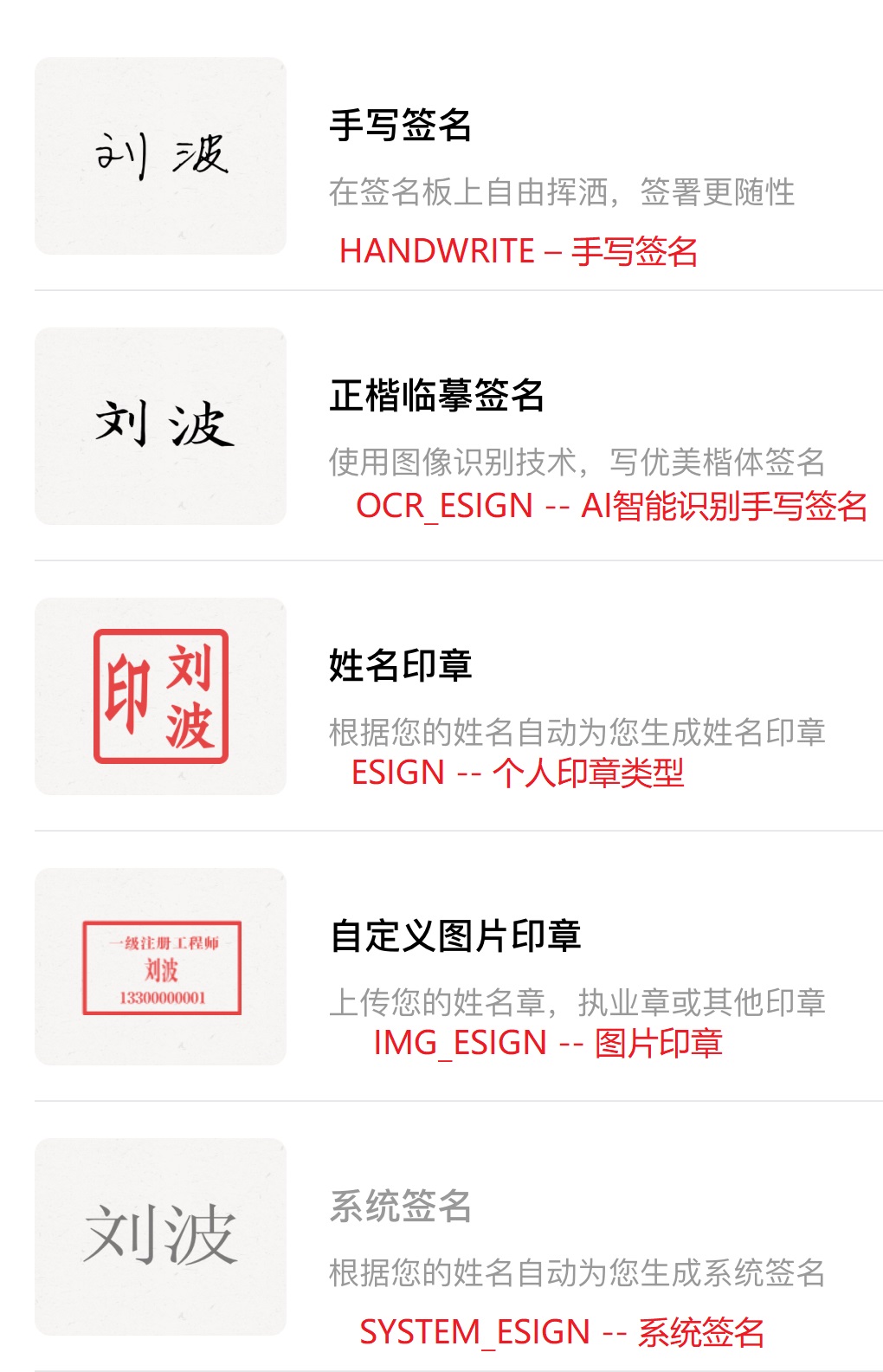<br><br><p><font color="red">ComponentType为SIGN_SEAL 或者 SIGN_PAGING_SEAL类型时</font>,可以通过<strong>ComponentTypeLimit</strong>参数控制签署方签署时要使用的印章类型,支持指定以下印章类型</p><ul><li> <b>OFFICIAL</b> : 企业公章</li><li> <b>CONTRACT</b> : 合同专用章</li><li> <b>FINANCE</b> : 财务专用章</li><li> <b>PERSONNEL</b> : 人事专用章</li><li> <b>OTHER</b> : 其他</li></ul><b>参考样例</b>:<code>{\"ComponentTypeLimit\":[\"PERSONNEL\",\"FINANCE\"]}</code> 表示改印章签署区,客户需使用人事专用章或财务专用章盖章签署。<br><br><p><font color="red">ComponentType为SIGN_DATE时</font>,支持以下参数:</p><ul><li> <b>Font</b> :字符串类型目前只支持"黑体"、"宋体"、"仿宋",如果不填默认为"黑体"</li><li> <b>FontSize</b> : 数字类型,范围6-72,默认值为12</li><li> <b>FontAlign</b> : 字符串类型,可取Left/Right/Center,对应左对齐/居中/右对齐</li><li> <b>Format</b> : 字符串类型,日期格式,必须是以下五种之一 “yyyy m d”,”yyyy年m月d日”,”yyyy/m/d”,”yyyy-m-d”,”yyyy.m.d”。</li><li> <b>Gaps</b> : 字符串类型,仅在Format为“yyyy m d”时起作用,格式为用逗号分开的两个整数,例如”2,2”,两个数字分别是日期格式的前后两个空隙中的空格个数</li></ul>如果extra参数为空,默认为”yyyy年m月d日”格式的居中日期特别地,如果extra中Format字段为空或无法被识别,则extra参数会被当作默认值处理(Font,FontSize,Gaps和FontAlign都不会起效)<b>参数样例</b>: <code>"{"Format":"yyyy m d","FontSize":12,"Gaps":"2,2", "FontAlign":"Right"}"</code><p><font color="red">ComponentType为SIGN_SEAL、SIGN_SIGNATURE类型时</font>,支持以下参数:</p><ul><li> <b>PageRanges</b> :PageRange的数组,通过PageRanges属性设置该印章在PDF所有页面上盖章(适用于标书在所有页面盖章的情况)</li></ul><b>参数样例</b>:<code>"{"PageRanges":[{"BeginPage":1,"EndPage":-1}]}"</code><p><font color="red">签署印章透明度功能设置,</font>当ComponentType为SIGN_SIGNATURE、SIGN_SEAL、SIGN_PAGING_SEAL、SIGN_LEGAL_PERSON_SEAL时,可以通过以下参数设置签署印章的透明度:</p><ul><li> <b>Opacity</b>:印章透明度,支持范围:0.6-1,0.7表示70%的透明度,1表示无透明度</li></ul><b>参数样例</b>:<code>{"Opacity":0.7}</code><p><font color="red">签署印章大小功能设置,</font>当ComponentType为SIGN_SEAL、SIGN_PAGING_SEAL、SIGN_LEGAL_PERSON_SEAL时,可以通过以下参数设置签署时按照实际印章的大小进行签署,如果印章没有设置大小,那么默认会是4.2cm的印章大小:</p><ul><li> <b>UseSealSize</b>:使用印章设置的大小盖章,true表示使用印章设置的大小盖章,false表示使用签署控件的大小进行盖章;不传则为false</li></ul><b>参数样例</b>:<code>{"UseSealSize":true}</code><p><font color="red">签署意见功能设置,</font>当ComponentType为SIGN_OPINION时,可以通过以下参数设置签署意见的相关内容:</p><ul><li> <b>Values</b>:签署意见预设的需要用户填写的文本</li><li> <b>ValuesArray</b>:签署意见需要用户按顺序点击的分词(组合后应和Values内容一致)</li></ul><b>参数样例</b>:<code>{"Values":"我已知晓内容并同意签署","ValuesArray":["我","已知晓","内容","并","同意","签署"]}</code><p><font color="red">关键字模式下支持关键字找不到的情况下不进行报错的设置</font></p><ul><li> <b>IgnoreKeywordError</b> :1-关键字查找不到时不进行报错</li></ul>场景说明:如果使用关键字进行定位,但是指定的PDF文件中又没有设置的关键字时,发起合同会进行关键字是否存在的校验,如果关键字不存在,会进行报错返回。如果不希望进行报错,可以设置"IgnoreKeywordError"来忽略错误。请注意,如果关键字签署控件对应的签署方在整个PDF文件中一个签署控件都没有,还是会触发报错逻辑。<b>参数样例</b>:<code>"{"IgnoreKeywordError":1}"</code><p><font color="red">ComponentType为SIGN_VIRTUAL_COMBINATION或者VIRTUAL_COMBINATION时</font>,支持以下参数:</p><ul><li><b>Children:</b> 绝对定位模式下,用来指定此签批控件的组合子控件 </li><b>参数样例</b>:<br><code>{"Children":["ComponentId_29","ComponentId_27","ComponentId_28","ComponentId_30"]}</code><li><b>ChildrenComponents:</b> 关键字定位模式下,用来指定此签批控件的组合子控件 </li>ChildrenComponent结构体定义:<table border="1"> <thead> <tr> <th>字段名称</th> <th>类型</th> <th>描述</th> </tr> </thead> <tbody> <tr> <td>ComponentType</td> <td>string</td> <td>子控件类型-可选值:SIGN_SIGNATURE,SIGN_DATE,SIGN_SELECTOR,SIGN_MULTI_LINE_TEXT</td> </tr> <tr> <td>ComponentName</td> <td>string</td> <td>子控件名称</td> </tr> <tr> <td>Placeholder</td> <td>string</td> <td>子控件提示语</td></tr><tr> <td>ComponentValue</td> <td>string</td> <td>子控件值(签署方不可设置)</td> </tr> <tr> <td>ComponentOffsetX</td> <td>float</td> <td>控件偏移位置X(相对于父控件(签批控件的ComponentX))</td> </tr> <tr> <td>ComponentOffsetY</td> <td>float</td> <td>控件偏移位置Y 相对于父控件(签批控件的ComponentY))</td> </tr> <tr> <td>ComponentWidth</td> <td>float</td> <td>控件宽</td> </tr> <tr> <td>ComponentHeight</td> <td>float</td> <td>控件高</td> </tr> <tr> <td>ComponentExtra</td> <td>string</td> <td>控件的附属信息,根据ComponentType设置</td> </tr> </tbody> </table><b>参数样例</b>:<p>输入:</p><pre>{ ChildrenComponents: [ { ComponentType: SIGN_SIGNATURE, ComponentName: 个人签名, Placeholder: 请签名, ComponentOffsetX: 10, ComponentOffsetY: 30, ComponentWidth: 119, ComponentHeight: 43, ComponentExtra: {\ComponentTypeLimit\:[\SYSTEM_ESIGN\]} }, { ComponentType: SIGN_SELECTOR, ComponentName: 是否同意此协议, Placeholder: , ComponentOffsetX: 50, ComponentOffsetY: 130, ComponentWidth: 120, ComponentHeight: 43, ComponentExtra: {\Values\:[\同意\,\不同意\,\再想想\],\FontSize\:12,\FontAlign\:\Left\,\Font\:\黑体\,\MultiSelect\:false} }, { ComponentType: SIGN_MULTI_LINE_TEXT, ComponentName: 批注附言, Placeholder: , ComponentOffsetX: 150, ComponentOffsetY: 300, ComponentWidth: 200, ComponentHeight: 86, ComponentExtra: } ]}</pre></ul>
|
|
3909
|
+
:param _ComponentExtra: <p><strong>在所有的定位方式下</strong>,控件的扩展参数,为<font color="red">JSON格式</font>,不同类型的控件会有部分非通用参数。</p><p><font color="red">ComponentType为TEXT、MULTI_LINE_TEXT时</font>,支持以下参数:</p><ul><li> <b>Font</b>:目前只支持黑体、宋体、仿宋</li><li> <b>FontSize</b>: 范围6 :72</li><li> <b>FontAlign</b>: Left/Right/Center,左对齐/居中/右对齐</li><li> <b>FontColor</b>:字符串类型,格式为RGB颜色数字</li><li> <b>Bold</b>是否加粗:true/false</li></ul><b>参数样例</b>:<code>{"FontColor":"255,0,0","FontSize":12,"Bold":false}</code><p><font color="red">ComponentType为DATE时</font>,支持以下参数:</p><ul><li> <b>Font</b>:目前只支持黑体、宋体、仿宋</li><li> <b>FontSize</b>: 范围6 :72</li></ul><b>参数样例</b>:<code>{"FontColor":"255,0,0","FontSize":12}</code><p><font color="red">ComponentType为WATERMARK时</font>,支持以下参数:</p><ul><li> <b>Font</b>:目前只支持黑体、宋体、仿宋</li><li> <b>FontSize</b>: 范围6 :72</li><li> <b>Opacity</b>: 透明度,范围0 :1</li><li> <b>Rotate</b>: 水印旋转角度,范围0 :359</li><li> <b>Density</b>: 水印样式,1-宽松,2-标准(默认值),3-密集,</li><li> <b>Position</b>: 水印位置,None-平铺(默认值),LeftTop-左上,LeftBottom-左下,RightTop-右上,RightBottom-右下,Center-居中</li><li> <b>SubType</b>: 水印类型:CUSTOM_WATERMARK-自定义内容,PERSON_INFO_WATERMARK-访问者信息</li></ul><b>参数样例</b>:<code>"{\"Font\":\"黑体\",\"FontSize\":20,\"Opacity\":0.1,\"Density\":2,\"SubType\":\"PERSON_INFO_WATERMARK\"}"</code><p><font color="red">ComponentType为FILL_IMAGE时</font>,支持以下参数:</p><ul><li> <b>NotMakeImageCenter</b>:bool。是否设置图片居中。false:居中(默认)。 true : 不居中</li><li> <b>FillMethod</b> : int. 填充方式。0-铺满(默认);1-等比例缩放</li></ul><p><font color="red">ComponentType为SELECTOR时</font>,支持以下参数:</p><ul><li> <b>WordWrap</b>:bool。是否支持选择控件内容自动折行合成。false:不支持(默认)。 true : 支持自动折行合成</li></ul><p><font color="red">ComponentType为SIGN_SIGNATURE、SIGN_PAGING_SIGNATURE类型时</font>,可以通过<strong>ComponentTypeLimit</strong>参数控制签名方式</p><ul><li> <b>HANDWRITE</b> : 需要实时手写的手写签名</li><li> <b>HANDWRITTEN_ESIGN</b> : 长效手写签名, 是使用保存到个人中心的印章列表的手写签名(并且包含HANDWRITE)</li><li> <b>OCR_ESIGN</b> : AI智能识别手写签名</li><li> <b>ESIGN</b> : 个人印章类型</li><li> <b>SYSTEM_ESIGN</b> : 系统签名(该类型可以在用户签署时根据用户姓名一键生成一个签名来进行签署)</li><li> <b>IMG_ESIGN</b> : 图片印章(该类型支持用户在签署将上传的PNG格式的图片作为签名)</li></ul><b>参考样例</b>:<code>{"ComponentTypeLimit": ["SYSTEM_ESIGN"]}</code>印章的对应关系参考下图<br><br><p><font color="red">ComponentType为SIGN_SEAL 或者 SIGN_PAGING_SEAL类型时</font>,可以通过<strong>ComponentTypeLimit</strong>参数控制签署方签署时要使用的印章类型,支持指定以下印章类型</p><ul><li> <b>OFFICIAL</b> : 企业公章</li><li> <b>CONTRACT</b> : 合同专用章</li><li> <b>FINANCE</b> : 财务专用章</li><li> <b>PERSONNEL</b> : 人事专用章</li><li> <b>OTHER</b> : 其他</li></ul><b>参考样例</b>:<code>{\"ComponentTypeLimit\":[\"PERSONNEL\",\"FINANCE\"]}</code> 表示改印章签署区,客户需使用人事专用章或财务专用章盖章签署。<br><br><p><font color="red">ComponentType为SIGN_DATE时</font>,支持以下参数:</p><ul><li> <b>Font</b> :字符串类型目前只支持"黑体"、"宋体"、"仿宋",如果不填默认为"黑体"</li><li> <b>FontSize</b> : 数字类型,范围6-72,默认值为12</li><li> <b>FontAlign</b> : 字符串类型,可取Left/Right/Center,对应左对齐/居中/右对齐</li><li> <b>Format</b> : 字符串类型,日期格式,必须是以下五种之一 “yyyy m d”,”yyyy年m月d日”,”yyyy/m/d”,”yyyy-m-d”,”yyyy.m.d”,”yyyy m d HH:MM:SS”,”yyyy/m/d HH:MM:SS”,”yyyy-m-d HH:MM:SS”,”yyyy.m.d HH:MM:SS”。</li><li> <b>Gaps</b> : 字符串类型,仅在Format为“yyyy m d”时起作用,格式为用逗号分开的两个整数,例如”2,2”,两个数字分别是日期格式的前后两个空隙中的空格个数</li></ul>如果extra参数为空,默认为”yyyy年m月d日”格式的居中日期特别地,如果extra中Format字段为空或无法被识别,则extra参数会被当作默认值处理(Font,FontSize,Gaps和FontAlign都不会起效)<b>参数样例</b>: <code>"{"Format":"yyyy m d","FontSize":12,"Gaps":"2,2", "FontAlign":"Right"}"</code><p><font color="red">ComponentType为SIGN_SEAL、SIGN_SIGNATURE类型时</font>,支持以下参数:</p><ul><li> <b>PageRanges</b> :PageRange的数组,通过PageRanges属性设置该印章在PDF所有页面上盖章(适用于标书在所有页面盖章的情况)</li></ul><b>参数样例</b>:<code>"{"PageRanges":[{"BeginPage":1,"EndPage":-1}]}"</code><p><font color="red">签署印章透明度功能设置,</font>当ComponentType为SIGN_SIGNATURE、SIGN_SEAL、SIGN_PAGING_SEAL、SIGN_LEGAL_PERSON_SEAL时,可以通过以下参数设置签署印章的透明度:</p><ul><li> <b>Opacity</b>:印章透明度,支持范围:0.6-1,0.7表示70%的透明度,1表示无透明度</li></ul><b>参数样例</b>:<code>{"Opacity":0.7}</code><p><font color="red">签署印章大小功能设置,</font>当ComponentType为SIGN_SEAL、SIGN_PAGING_SEAL、SIGN_LEGAL_PERSON_SEAL时,可以通过以下参数设置签署时按照实际印章的大小进行签署,如果印章没有设置大小,那么默认会是4.2cm的印章大小:</p><ul><li> <b>UseSealSize</b>:使用印章设置的大小盖章,true表示使用印章设置的大小盖章,false表示使用签署控件的大小进行盖章;不传则为false</li></ul><b>参数样例</b>:<code>{"UseSealSize":true}</code><p><font color="red">签署意见功能设置,</font>当ComponentType为SIGN_OPINION时,可以通过以下参数设置签署意见的相关内容:</p><ul><li> <b>Values</b>:签署意见预设的需要用户填写的文本</li><li> <b>ValuesArray</b>:签署意见需要用户按顺序点击的分词(组合后应和Values内容一致)</li><li> <b>SignMethod</b>:签署方式,目前支持1-词组拼接方式</li></ul><b>参数样例</b>:<code>{"Values":"我已知晓内容并同意签署","ValuesArray":["我","已知晓","内容","并","同意","签署"],"SignMethod":1}</code><p><font color="red">关键字模式下支持关键字找不到的情况下不进行报错的设置</font></p><ul><li> <b>IgnoreKeywordError</b> :1-关键字查找不到时不进行报错</li></ul>场景说明:如果使用关键字进行定位,但是指定的PDF文件中又没有设置的关键字时,发起合同会进行关键字是否存在的校验,如果关键字不存在,会进行报错返回。如果不希望进行报错,可以设置"IgnoreKeywordError"来忽略错误。请注意,如果关键字签署控件对应的签署方在整个PDF文件中一个签署控件都没有,还是会触发报错逻辑。<b>参数样例</b>:<code>"{"IgnoreKeywordError":1}"</code><p><font color="red">ComponentType为SIGN_VIRTUAL_COMBINATION或者VIRTUAL_COMBINATION时</font>,支持以下参数:</p><ul><li><b>Children:</b> 绝对定位模式下,用来指定此签批控件的组合子控件 </li><b>参数样例</b>:<br><code>{"Children":["ComponentId_29","ComponentId_27","ComponentId_28","ComponentId_30"]}</code><li><b>ChildrenComponents:</b> 关键字定位模式下,用来指定此签批控件的组合子控件 </li>ChildrenComponent结构体定义:<table border="1"> <thead> <tr> <th>字段名称</th> <th>类型</th> <th>描述</th> </tr> </thead> <tbody> <tr> <td>ComponentType</td> <td>string</td> <td>子控件类型-可选值:SIGN_SIGNATURE,SIGN_DATE,SIGN_SELECTOR,SIGN_MULTI_LINE_TEXT</td> </tr> <tr> <td>ComponentName</td> <td>string</td> <td>子控件名称</td> </tr> <tr> <td>Placeholder</td> <td>string</td> <td>子控件提示语</td></tr><tr> <td>ComponentValue</td> <td>string</td> <td>子控件值(签署方不可设置)</td> </tr> <tr> <td>ComponentOffsetX</td> <td>float</td> <td>控件偏移位置X(相对于父控件(签批控件的ComponentX))</td> </tr> <tr> <td>ComponentOffsetY</td> <td>float</td> <td>控件偏移位置Y 相对于父控件(签批控件的ComponentY))</td> </tr> <tr> <td>ComponentWidth</td> <td>float</td> <td>控件宽</td> </tr> <tr> <td>ComponentHeight</td> <td>float</td> <td>控件高</td> </tr> <tr> <td>ComponentExtra</td> <td>string</td> <td>控件的附属信息,根据ComponentType设置</td> </tr> </tbody> </table><b>参数样例</b>:<p>输入:</p><pre>{ ChildrenComponents: [ { ComponentType: SIGN_SIGNATURE, ComponentName: 个人签名, Placeholder: 请签名, ComponentOffsetX: 10, ComponentOffsetY: 30, ComponentWidth: 119, ComponentHeight: 43, ComponentExtra: {\ComponentTypeLimit\:[\SYSTEM_ESIGN\]} }, { ComponentType: SIGN_SELECTOR, ComponentName: 是否同意此协议, Placeholder: , ComponentOffsetX: 50, ComponentOffsetY: 130, ComponentWidth: 120, ComponentHeight: 43, ComponentExtra: {\Values\:[\同意\,\不同意\,\再想想\],\FontSize\:12,\FontAlign\:\Left\,\Font\:\黑体\,\MultiSelect\:false} }, { ComponentType: SIGN_MULTI_LINE_TEXT, ComponentName: 批注附言, Placeholder: , ComponentOffsetX: 150, ComponentOffsetY: 300, ComponentWidth: 200, ComponentHeight: 86, ComponentExtra: } ]}</pre></ul>
|
|
3910
3910
|
:type ComponentExtra: str
|
|
3911
3911
|
:param _IsFormType: <p><strong>在通过接口拉取控件信息场景下</strong>,为出参参数,此控件是否通过表单域定位方式生成,默认false-不是,<strong>发起合同时候不要填写此字段留空即可</strong></p>
|
|
3912
3912
|
:type IsFormType: bool
|
|
@@ -4096,7 +4096,7 @@ class Component(AbstractModel):
|
|
|
4096
4096
|
|
|
4097
4097
|
@property
|
|
4098
4098
|
def ComponentExtra(self):
|
|
4099
|
-
r"""<p><strong>在所有的定位方式下</strong>,控件的扩展参数,为<font color="red">JSON格式</font>,不同类型的控件会有部分非通用参数。</p><p><font color="red">ComponentType为TEXT、MULTI_LINE_TEXT时</font>,支持以下参数:</p><ul><li> <b>Font</b>:目前只支持黑体、宋体、仿宋</li><li> <b>FontSize</b>: 范围6 :72</li><li> <b>FontAlign</b>: Left/Right/Center,左对齐/居中/右对齐</li><li> <b>FontColor</b>:字符串类型,格式为RGB颜色数字</li><li> <b>Bold</b>是否加粗:true/false</li></ul><b>参数样例</b>:<code>{"FontColor":"255,0,0","FontSize":12,"Bold":false}</code><p><font color="red">ComponentType为DATE时</font>,支持以下参数:</p><ul><li> <b>Font</b>:目前只支持黑体、宋体、仿宋</li><li> <b>FontSize</b>: 范围6 :72</li></ul><b>参数样例</b>:<code>{"FontColor":"255,0,0","FontSize":12}</code><p><font color="red">ComponentType为WATERMARK时</font>,支持以下参数:</p><ul><li> <b>Font</b>:目前只支持黑体、宋体、仿宋</li><li> <b>FontSize</b>: 范围6 :72</li><li> <b>Opacity</b>: 透明度,范围0 :1</li><li> <b>Rotate</b>: 水印旋转角度,范围0 :359</li><li> <b>Density</b>: 水印样式,1-宽松,2-标准(默认值),3-密集,</li><li> <b>Position</b>: 水印位置,None-平铺(默认值),LeftTop-左上,LeftBottom-左下,RightTop-右上,RightBottom-右下,Center-居中</li><li> <b>SubType</b>: 水印类型:CUSTOM_WATERMARK-自定义内容,PERSON_INFO_WATERMARK-访问者信息</li></ul><b>参数样例</b>:<code>"{\"Font\":\"黑体\",\"FontSize\":20,\"Opacity\":0.1,\"Density\":2,\"SubType\":\"PERSON_INFO_WATERMARK\"}"</code><p><font color="red">ComponentType为FILL_IMAGE时</font>,支持以下参数:</p><ul><li> <b>NotMakeImageCenter</b>:bool。是否设置图片居中。false:居中(默认)。 true : 不居中</li><li> <b>FillMethod</b> : int. 填充方式。0-铺满(默认);1-等比例缩放</li></ul><p><font color="red">ComponentType为SELECTOR时</font>,支持以下参数:</p><ul><li> <b>WordWrap</b>:bool。是否支持选择控件内容自动折行合成。false:不支持(默认)。 true : 支持自动折行合成</li></ul><p><font color="red">ComponentType为SIGN_SIGNATURE、SIGN_PAGING_SIGNATURE类型时</font>,可以通过<strong>ComponentTypeLimit</strong>参数控制签名方式</p><ul><li> <b>HANDWRITE</b> : 需要实时手写的手写签名</li><li> <b>HANDWRITTEN_ESIGN</b> : 长效手写签名, 是使用保存到个人中心的印章列表的手写签名(并且包含HANDWRITE)</li><li> <b>OCR_ESIGN</b> : AI智能识别手写签名</li><li> <b>ESIGN</b> : 个人印章类型</li><li> <b>SYSTEM_ESIGN</b> : 系统签名(该类型可以在用户签署时根据用户姓名一键生成一个签名来进行签署)</li><li> <b>IMG_ESIGN</b> : 图片印章(该类型支持用户在签署将上传的PNG格式的图片作为签名)</li></ul><b>参考样例</b>:<code>{"ComponentTypeLimit": ["SYSTEM_ESIGN"]}</code>印章的对应关系参考下图<br><br><p><font color="red">ComponentType为SIGN_SEAL 或者 SIGN_PAGING_SEAL类型时</font>,可以通过<strong>ComponentTypeLimit</strong>参数控制签署方签署时要使用的印章类型,支持指定以下印章类型</p><ul><li> <b>OFFICIAL</b> : 企业公章</li><li> <b>CONTRACT</b> : 合同专用章</li><li> <b>FINANCE</b> : 财务专用章</li><li> <b>PERSONNEL</b> : 人事专用章</li><li> <b>OTHER</b> : 其他</li></ul><b>参考样例</b>:<code>{\"ComponentTypeLimit\":[\"PERSONNEL\",\"FINANCE\"]}</code> 表示改印章签署区,客户需使用人事专用章或财务专用章盖章签署。<br><br><p><font color="red">ComponentType为SIGN_DATE时</font>,支持以下参数:</p><ul><li> <b>Font</b> :字符串类型目前只支持"黑体"、"宋体"、"仿宋",如果不填默认为"黑体"</li><li> <b>FontSize</b> : 数字类型,范围6-72,默认值为12</li><li> <b>FontAlign</b> : 字符串类型,可取Left/Right/Center,对应左对齐/居中/右对齐</li><li> <b>Format</b> : 字符串类型,日期格式,必须是以下五种之一 “yyyy m d”,”yyyy年m月d日”,”yyyy/m/d”,”yyyy-m-d”,”yyyy.m.d”。</li><li> <b>Gaps</b> : 字符串类型,仅在Format为“yyyy m d”时起作用,格式为用逗号分开的两个整数,例如”2,2”,两个数字分别是日期格式的前后两个空隙中的空格个数</li></ul>如果extra参数为空,默认为”yyyy年m月d日”格式的居中日期特别地,如果extra中Format字段为空或无法被识别,则extra参数会被当作默认值处理(Font,FontSize,Gaps和FontAlign都不会起效)<b>参数样例</b>: <code>"{"Format":"yyyy m d","FontSize":12,"Gaps":"2,2", "FontAlign":"Right"}"</code><p><font color="red">ComponentType为SIGN_SEAL、SIGN_SIGNATURE类型时</font>,支持以下参数:</p><ul><li> <b>PageRanges</b> :PageRange的数组,通过PageRanges属性设置该印章在PDF所有页面上盖章(适用于标书在所有页面盖章的情况)</li></ul><b>参数样例</b>:<code>"{"PageRanges":[{"BeginPage":1,"EndPage":-1}]}"</code><p><font color="red">签署印章透明度功能设置,</font>当ComponentType为SIGN_SIGNATURE、SIGN_SEAL、SIGN_PAGING_SEAL、SIGN_LEGAL_PERSON_SEAL时,可以通过以下参数设置签署印章的透明度:</p><ul><li> <b>Opacity</b>:印章透明度,支持范围:0.6-1,0.7表示70%的透明度,1表示无透明度</li></ul><b>参数样例</b>:<code>{"Opacity":0.7}</code><p><font color="red">签署印章大小功能设置,</font>当ComponentType为SIGN_SEAL、SIGN_PAGING_SEAL、SIGN_LEGAL_PERSON_SEAL时,可以通过以下参数设置签署时按照实际印章的大小进行签署,如果印章没有设置大小,那么默认会是4.2cm的印章大小:</p><ul><li> <b>UseSealSize</b>:使用印章设置的大小盖章,true表示使用印章设置的大小盖章,false表示使用签署控件的大小进行盖章;不传则为false</li></ul><b>参数样例</b>:<code>{"UseSealSize":true}</code><p><font color="red">签署意见功能设置,</font>当ComponentType为SIGN_OPINION时,可以通过以下参数设置签署意见的相关内容:</p><ul><li> <b>Values</b>:签署意见预设的需要用户填写的文本</li><li> <b>ValuesArray</b>:签署意见需要用户按顺序点击的分词(组合后应和Values内容一致)</li></ul><b>参数样例</b>:<code>{"Values":"我已知晓内容并同意签署","ValuesArray":["我","已知晓","内容","并","同意","签署"]}</code><p><font color="red">关键字模式下支持关键字找不到的情况下不进行报错的设置</font></p><ul><li> <b>IgnoreKeywordError</b> :1-关键字查找不到时不进行报错</li></ul>场景说明:如果使用关键字进行定位,但是指定的PDF文件中又没有设置的关键字时,发起合同会进行关键字是否存在的校验,如果关键字不存在,会进行报错返回。如果不希望进行报错,可以设置"IgnoreKeywordError"来忽略错误。请注意,如果关键字签署控件对应的签署方在整个PDF文件中一个签署控件都没有,还是会触发报错逻辑。<b>参数样例</b>:<code>"{"IgnoreKeywordError":1}"</code><p><font color="red">ComponentType为SIGN_VIRTUAL_COMBINATION或者VIRTUAL_COMBINATION时</font>,支持以下参数:</p><ul><li><b>Children:</b> 绝对定位模式下,用来指定此签批控件的组合子控件 </li><b>参数样例</b>:<br><code>{"Children":["ComponentId_29","ComponentId_27","ComponentId_28","ComponentId_30"]}</code><li><b>ChildrenComponents:</b> 关键字定位模式下,用来指定此签批控件的组合子控件 </li>ChildrenComponent结构体定义:<table border="1"> <thead> <tr> <th>字段名称</th> <th>类型</th> <th>描述</th> </tr> </thead> <tbody> <tr> <td>ComponentType</td> <td>string</td> <td>子控件类型-可选值:SIGN_SIGNATURE,SIGN_DATE,SIGN_SELECTOR,SIGN_MULTI_LINE_TEXT</td> </tr> <tr> <td>ComponentName</td> <td>string</td> <td>子控件名称</td> </tr> <tr> <td>Placeholder</td> <td>string</td> <td>子控件提示语</td></tr><tr> <td>ComponentValue</td> <td>string</td> <td>子控件值(签署方不可设置)</td> </tr> <tr> <td>ComponentOffsetX</td> <td>float</td> <td>控件偏移位置X(相对于父控件(签批控件的ComponentX))</td> </tr> <tr> <td>ComponentOffsetY</td> <td>float</td> <td>控件偏移位置Y 相对于父控件(签批控件的ComponentY))</td> </tr> <tr> <td>ComponentWidth</td> <td>float</td> <td>控件宽</td> </tr> <tr> <td>ComponentHeight</td> <td>float</td> <td>控件高</td> </tr> <tr> <td>ComponentExtra</td> <td>string</td> <td>控件的附属信息,根据ComponentType设置</td> </tr> </tbody> </table><b>参数样例</b>:<p>输入:</p><pre>{ ChildrenComponents: [ { ComponentType: SIGN_SIGNATURE, ComponentName: 个人签名, Placeholder: 请签名, ComponentOffsetX: 10, ComponentOffsetY: 30, ComponentWidth: 119, ComponentHeight: 43, ComponentExtra: {\ComponentTypeLimit\:[\SYSTEM_ESIGN\]} }, { ComponentType: SIGN_SELECTOR, ComponentName: 是否同意此协议, Placeholder: , ComponentOffsetX: 50, ComponentOffsetY: 130, ComponentWidth: 120, ComponentHeight: 43, ComponentExtra: {\Values\:[\同意\,\不同意\,\再想想\],\FontSize\:12,\FontAlign\:\Left\,\Font\:\黑体\,\MultiSelect\:false} }, { ComponentType: SIGN_MULTI_LINE_TEXT, ComponentName: 批注附言, Placeholder: , ComponentOffsetX: 150, ComponentOffsetY: 300, ComponentWidth: 200, ComponentHeight: 86, ComponentExtra: } ]}</pre></ul>
|
|
4099
|
+
r"""<p><strong>在所有的定位方式下</strong>,控件的扩展参数,为<font color="red">JSON格式</font>,不同类型的控件会有部分非通用参数。</p><p><font color="red">ComponentType为TEXT、MULTI_LINE_TEXT时</font>,支持以下参数:</p><ul><li> <b>Font</b>:目前只支持黑体、宋体、仿宋</li><li> <b>FontSize</b>: 范围6 :72</li><li> <b>FontAlign</b>: Left/Right/Center,左对齐/居中/右对齐</li><li> <b>FontColor</b>:字符串类型,格式为RGB颜色数字</li><li> <b>Bold</b>是否加粗:true/false</li></ul><b>参数样例</b>:<code>{"FontColor":"255,0,0","FontSize":12,"Bold":false}</code><p><font color="red">ComponentType为DATE时</font>,支持以下参数:</p><ul><li> <b>Font</b>:目前只支持黑体、宋体、仿宋</li><li> <b>FontSize</b>: 范围6 :72</li></ul><b>参数样例</b>:<code>{"FontColor":"255,0,0","FontSize":12}</code><p><font color="red">ComponentType为WATERMARK时</font>,支持以下参数:</p><ul><li> <b>Font</b>:目前只支持黑体、宋体、仿宋</li><li> <b>FontSize</b>: 范围6 :72</li><li> <b>Opacity</b>: 透明度,范围0 :1</li><li> <b>Rotate</b>: 水印旋转角度,范围0 :359</li><li> <b>Density</b>: 水印样式,1-宽松,2-标准(默认值),3-密集,</li><li> <b>Position</b>: 水印位置,None-平铺(默认值),LeftTop-左上,LeftBottom-左下,RightTop-右上,RightBottom-右下,Center-居中</li><li> <b>SubType</b>: 水印类型:CUSTOM_WATERMARK-自定义内容,PERSON_INFO_WATERMARK-访问者信息</li></ul><b>参数样例</b>:<code>"{\"Font\":\"黑体\",\"FontSize\":20,\"Opacity\":0.1,\"Density\":2,\"SubType\":\"PERSON_INFO_WATERMARK\"}"</code><p><font color="red">ComponentType为FILL_IMAGE时</font>,支持以下参数:</p><ul><li> <b>NotMakeImageCenter</b>:bool。是否设置图片居中。false:居中(默认)。 true : 不居中</li><li> <b>FillMethod</b> : int. 填充方式。0-铺满(默认);1-等比例缩放</li></ul><p><font color="red">ComponentType为SELECTOR时</font>,支持以下参数:</p><ul><li> <b>WordWrap</b>:bool。是否支持选择控件内容自动折行合成。false:不支持(默认)。 true : 支持自动折行合成</li></ul><p><font color="red">ComponentType为SIGN_SIGNATURE、SIGN_PAGING_SIGNATURE类型时</font>,可以通过<strong>ComponentTypeLimit</strong>参数控制签名方式</p><ul><li> <b>HANDWRITE</b> : 需要实时手写的手写签名</li><li> <b>HANDWRITTEN_ESIGN</b> : 长效手写签名, 是使用保存到个人中心的印章列表的手写签名(并且包含HANDWRITE)</li><li> <b>OCR_ESIGN</b> : AI智能识别手写签名</li><li> <b>ESIGN</b> : 个人印章类型</li><li> <b>SYSTEM_ESIGN</b> : 系统签名(该类型可以在用户签署时根据用户姓名一键生成一个签名来进行签署)</li><li> <b>IMG_ESIGN</b> : 图片印章(该类型支持用户在签署将上传的PNG格式的图片作为签名)</li></ul><b>参考样例</b>:<code>{"ComponentTypeLimit": ["SYSTEM_ESIGN"]}</code>印章的对应关系参考下图<br><br><p><font color="red">ComponentType为SIGN_SEAL 或者 SIGN_PAGING_SEAL类型时</font>,可以通过<strong>ComponentTypeLimit</strong>参数控制签署方签署时要使用的印章类型,支持指定以下印章类型</p><ul><li> <b>OFFICIAL</b> : 企业公章</li><li> <b>CONTRACT</b> : 合同专用章</li><li> <b>FINANCE</b> : 财务专用章</li><li> <b>PERSONNEL</b> : 人事专用章</li><li> <b>OTHER</b> : 其他</li></ul><b>参考样例</b>:<code>{\"ComponentTypeLimit\":[\"PERSONNEL\",\"FINANCE\"]}</code> 表示改印章签署区,客户需使用人事专用章或财务专用章盖章签署。<br><br><p><font color="red">ComponentType为SIGN_DATE时</font>,支持以下参数:</p><ul><li> <b>Font</b> :字符串类型目前只支持"黑体"、"宋体"、"仿宋",如果不填默认为"黑体"</li><li> <b>FontSize</b> : 数字类型,范围6-72,默认值为12</li><li> <b>FontAlign</b> : 字符串类型,可取Left/Right/Center,对应左对齐/居中/右对齐</li><li> <b>Format</b> : 字符串类型,日期格式,必须是以下五种之一 “yyyy m d”,”yyyy年m月d日”,”yyyy/m/d”,”yyyy-m-d”,”yyyy.m.d”,”yyyy m d HH:MM:SS”,”yyyy/m/d HH:MM:SS”,”yyyy-m-d HH:MM:SS”,”yyyy.m.d HH:MM:SS”。</li><li> <b>Gaps</b> : 字符串类型,仅在Format为“yyyy m d”时起作用,格式为用逗号分开的两个整数,例如”2,2”,两个数字分别是日期格式的前后两个空隙中的空格个数</li></ul>如果extra参数为空,默认为”yyyy年m月d日”格式的居中日期特别地,如果extra中Format字段为空或无法被识别,则extra参数会被当作默认值处理(Font,FontSize,Gaps和FontAlign都不会起效)<b>参数样例</b>: <code>"{"Format":"yyyy m d","FontSize":12,"Gaps":"2,2", "FontAlign":"Right"}"</code><p><font color="red">ComponentType为SIGN_SEAL、SIGN_SIGNATURE类型时</font>,支持以下参数:</p><ul><li> <b>PageRanges</b> :PageRange的数组,通过PageRanges属性设置该印章在PDF所有页面上盖章(适用于标书在所有页面盖章的情况)</li></ul><b>参数样例</b>:<code>"{"PageRanges":[{"BeginPage":1,"EndPage":-1}]}"</code><p><font color="red">签署印章透明度功能设置,</font>当ComponentType为SIGN_SIGNATURE、SIGN_SEAL、SIGN_PAGING_SEAL、SIGN_LEGAL_PERSON_SEAL时,可以通过以下参数设置签署印章的透明度:</p><ul><li> <b>Opacity</b>:印章透明度,支持范围:0.6-1,0.7表示70%的透明度,1表示无透明度</li></ul><b>参数样例</b>:<code>{"Opacity":0.7}</code><p><font color="red">签署印章大小功能设置,</font>当ComponentType为SIGN_SEAL、SIGN_PAGING_SEAL、SIGN_LEGAL_PERSON_SEAL时,可以通过以下参数设置签署时按照实际印章的大小进行签署,如果印章没有设置大小,那么默认会是4.2cm的印章大小:</p><ul><li> <b>UseSealSize</b>:使用印章设置的大小盖章,true表示使用印章设置的大小盖章,false表示使用签署控件的大小进行盖章;不传则为false</li></ul><b>参数样例</b>:<code>{"UseSealSize":true}</code><p><font color="red">签署意见功能设置,</font>当ComponentType为SIGN_OPINION时,可以通过以下参数设置签署意见的相关内容:</p><ul><li> <b>Values</b>:签署意见预设的需要用户填写的文本</li><li> <b>ValuesArray</b>:签署意见需要用户按顺序点击的分词(组合后应和Values内容一致)</li><li> <b>SignMethod</b>:签署方式,目前支持1-词组拼接方式</li></ul><b>参数样例</b>:<code>{"Values":"我已知晓内容并同意签署","ValuesArray":["我","已知晓","内容","并","同意","签署"],"SignMethod":1}</code><p><font color="red">关键字模式下支持关键字找不到的情况下不进行报错的设置</font></p><ul><li> <b>IgnoreKeywordError</b> :1-关键字查找不到时不进行报错</li></ul>场景说明:如果使用关键字进行定位,但是指定的PDF文件中又没有设置的关键字时,发起合同会进行关键字是否存在的校验,如果关键字不存在,会进行报错返回。如果不希望进行报错,可以设置"IgnoreKeywordError"来忽略错误。请注意,如果关键字签署控件对应的签署方在整个PDF文件中一个签署控件都没有,还是会触发报错逻辑。<b>参数样例</b>:<code>"{"IgnoreKeywordError":1}"</code><p><font color="red">ComponentType为SIGN_VIRTUAL_COMBINATION或者VIRTUAL_COMBINATION时</font>,支持以下参数:</p><ul><li><b>Children:</b> 绝对定位模式下,用来指定此签批控件的组合子控件 </li><b>参数样例</b>:<br><code>{"Children":["ComponentId_29","ComponentId_27","ComponentId_28","ComponentId_30"]}</code><li><b>ChildrenComponents:</b> 关键字定位模式下,用来指定此签批控件的组合子控件 </li>ChildrenComponent结构体定义:<table border="1"> <thead> <tr> <th>字段名称</th> <th>类型</th> <th>描述</th> </tr> </thead> <tbody> <tr> <td>ComponentType</td> <td>string</td> <td>子控件类型-可选值:SIGN_SIGNATURE,SIGN_DATE,SIGN_SELECTOR,SIGN_MULTI_LINE_TEXT</td> </tr> <tr> <td>ComponentName</td> <td>string</td> <td>子控件名称</td> </tr> <tr> <td>Placeholder</td> <td>string</td> <td>子控件提示语</td></tr><tr> <td>ComponentValue</td> <td>string</td> <td>子控件值(签署方不可设置)</td> </tr> <tr> <td>ComponentOffsetX</td> <td>float</td> <td>控件偏移位置X(相对于父控件(签批控件的ComponentX))</td> </tr> <tr> <td>ComponentOffsetY</td> <td>float</td> <td>控件偏移位置Y 相对于父控件(签批控件的ComponentY))</td> </tr> <tr> <td>ComponentWidth</td> <td>float</td> <td>控件宽</td> </tr> <tr> <td>ComponentHeight</td> <td>float</td> <td>控件高</td> </tr> <tr> <td>ComponentExtra</td> <td>string</td> <td>控件的附属信息,根据ComponentType设置</td> </tr> </tbody> </table><b>参数样例</b>:<p>输入:</p><pre>{ ChildrenComponents: [ { ComponentType: SIGN_SIGNATURE, ComponentName: 个人签名, Placeholder: 请签名, ComponentOffsetX: 10, ComponentOffsetY: 30, ComponentWidth: 119, ComponentHeight: 43, ComponentExtra: {\ComponentTypeLimit\:[\SYSTEM_ESIGN\]} }, { ComponentType: SIGN_SELECTOR, ComponentName: 是否同意此协议, Placeholder: , ComponentOffsetX: 50, ComponentOffsetY: 130, ComponentWidth: 120, ComponentHeight: 43, ComponentExtra: {\Values\:[\同意\,\不同意\,\再想想\],\FontSize\:12,\FontAlign\:\Left\,\Font\:\黑体\,\MultiSelect\:false} }, { ComponentType: SIGN_MULTI_LINE_TEXT, ComponentName: 批注附言, Placeholder: , ComponentOffsetX: 150, ComponentOffsetY: 300, ComponentWidth: 200, ComponentHeight: 86, ComponentExtra: } ]}</pre></ul>
|
|
4100
4100
|
:rtype: str
|
|
4101
4101
|
"""
|
|
4102
4102
|
return self._ComponentExtra
|
|
@@ -11864,7 +11864,7 @@ class CreateFlowOption(AbstractModel):
|
|
|
11864
11864
|
:type PreviewAfterStart: bool
|
|
11865
11865
|
:param _SignAfterStart: <p>发起成功之后是否签署合同,仅当前经办人作为签署人时生效 <ul><li>(默认) false -否</li> <li> true - 展示签署按钮</li></ul></p>
|
|
11866
11866
|
:type SignAfterStart: bool
|
|
11867
|
-
:param _NeedFlowDraft: <p
|
|
11867
|
+
:param _NeedFlowDraft: <p>发起过程中是否展示“保存草稿”按钮<br><img src="https://qcloudimg.tencent-cloud.cn/raw/9e863549f7f53c8bab2fa3c4b43c1715.png" alt="image"></p><ol><li>点击保存后,可以通过CreatePrepareFlow返回的DraftId保存草稿id</li><li>可以用于二次发起合同: <a href="https://qian.tencent.com/developers/companyApis/embedPages/CreatePrepareFlow/">CreatePrepareFlow</a>,ResourceType =3 //草稿</li></ol>
|
|
11868
11868
|
:type NeedFlowDraft: bool
|
|
11869
11869
|
:param _CcInfoVisibility: <p>若指定了合同抄送人,此参数用来控制操作人能否在嵌入式页面看见或编辑(修改、增加、删除)抄送人信息。</p><p>枚举值:</p><ul><li>0: 不可见不可编辑</li><li>1: 可见不可编辑</li><li>2: 可见可编辑</li></ul><p>默认值:0</p>
|
|
11870
11870
|
:type CcInfoVisibility: int
|
|
@@ -12154,7 +12154,7 @@ class CreateFlowOption(AbstractModel):
|
|
|
12154
12154
|
|
|
12155
12155
|
@property
|
|
12156
12156
|
def NeedFlowDraft(self):
|
|
12157
|
-
r"""<p
|
|
12157
|
+
r"""<p>发起过程中是否展示“保存草稿”按钮<br><img src="https://qcloudimg.tencent-cloud.cn/raw/9e863549f7f53c8bab2fa3c4b43c1715.png" alt="image"></p><ol><li>点击保存后,可以通过CreatePrepareFlow返回的DraftId保存草稿id</li><li>可以用于二次发起合同: <a href="https://qian.tencent.com/developers/companyApis/embedPages/CreatePrepareFlow/">CreatePrepareFlow</a>,ResourceType =3 //草稿</li></ol>
|
|
12158
12158
|
:rtype: bool
|
|
12159
12159
|
"""
|
|
12160
12160
|
return self._NeedFlowDraft
|
|
@@ -15449,7 +15449,7 @@ class CreateOrganizationAuthUrlRequest(AbstractModel):
|
|
|
15449
15449
|
:type LegalName: str
|
|
15450
15450
|
:param _AutoJumpUrl: <p><font color="red">即将废弃</font>,入参请使用JumpEvents。<br>认证完成跳回的链接,最长500个字符。</p>
|
|
15451
15451
|
:type AutoJumpUrl: str
|
|
15452
|
-
:param _OrganizationAddress: <p>营业执照企业地址</p>
|
|
15452
|
+
:param _OrganizationAddress: <p>营业执照企业地址</p><p>入参限制:最大长度500个字符</p>
|
|
15453
15453
|
:type OrganizationAddress: str
|
|
15454
15454
|
:param _AdminName: <p>认证人姓名</p>
|
|
15455
15455
|
:type AdminName: str
|
|
@@ -15600,7 +15600,7 @@ class CreateOrganizationAuthUrlRequest(AbstractModel):
|
|
|
15600
15600
|
|
|
15601
15601
|
@property
|
|
15602
15602
|
def OrganizationAddress(self):
|
|
15603
|
-
r"""<p>营业执照企业地址</p>
|
|
15603
|
+
r"""<p>营业执照企业地址</p><p>入参限制:最大长度500个字符</p>
|
|
15604
15604
|
:rtype: str
|
|
15605
15605
|
"""
|
|
15606
15606
|
return self._OrganizationAddress
|
|
@@ -17966,46 +17966,46 @@ class CreatePreparedPersonalEsignRequest(AbstractModel):
|
|
|
17966
17966
|
:type IdCardNumber: str
|
|
17967
17967
|
:param _SealName: <p>印章名称,长度1-50个字。</p>
|
|
17968
17968
|
:type SealName: str
|
|
17969
|
+
:param _Agent: <p>代理企业和员工的信息。<br>在集团企业代理子企业操作的场景中,需设置此参数。在此情境下,ProxyOrganizationId(子企业的组织ID)为必填项。</p>
|
|
17970
|
+
:type Agent: :class:`tencentcloud.ess.v20201111.models.Agent`
|
|
17969
17971
|
:param _Operator: <p>执行本接口操作的员工信息。<br>注: <code>在调用此接口时,请确保指定的员工已获得所需的接口调用权限,并具备接口传入的相应资源的数据权限。</code></p>
|
|
17970
17972
|
:type Operator: :class:`tencentcloud.ess.v20201111.models.UserInfo`
|
|
17971
17973
|
:param _IdCardType: <p>证件类型,支持以下类型</p><ul><li>ID_CARD : 中国大陆居民身份证 (默认值)</li><li>HONGKONG_AND_MACAO : 中国港澳居民来往内地通行证</li><li>HONGKONG_MACAO_AND_TAIWAN : 中国港澳台居民居住证(格式同 中国大陆居民身份证)</li></ul>
|
|
17972
17974
|
:type IdCardType: str
|
|
17973
|
-
:param _SealImage: <p>该字段已不再使用</p>
|
|
17974
|
-
:type SealImage: str
|
|
17975
|
-
:param _SealImageCompress: <p>是否开启印章图片压缩处理,默认不开启,如需开启请设置为 true。当印章超过 2M 时建议开启,开启后图片的 hash 将发生变化。</p>
|
|
17976
|
-
:type SealImageCompress: bool
|
|
17977
17975
|
:param _Mobile: <p>手机号码;当需要开通自动签时,该参数必传</p>
|
|
17978
17976
|
:type Mobile: str
|
|
17979
|
-
:param
|
|
17980
|
-
:type
|
|
17977
|
+
:param _FileId: <p>印章图片文件 id<br>取值:<br>填写的FileId通过UploadFiles接口上传文件获取。</p>
|
|
17978
|
+
:type FileId: str
|
|
17981
17979
|
:param _SealColor: <p>印章颜色(参数ProcessSeal=true时生效)<br>默认值:BLACK黑色<br>取值:<br>BLACK 黑色,<br>RED 红色,<br>BLUE 蓝色。</p>
|
|
17982
17980
|
:type SealColor: str
|
|
17983
17981
|
:param _ProcessSeal: <p>是否处理印章,默认不做印章处理。<br>取值如下:</p><ul><li>false:不做任何处理;</li><li>true:做透明化处理和颜色增强。</li></ul>
|
|
17984
17982
|
:type ProcessSeal: bool
|
|
17985
|
-
:param _FileId: <p>印章图片文件 id<br>取值:<br>填写的FileId通过UploadFiles接口上传文件获取。</p>
|
|
17986
|
-
:type FileId: str
|
|
17987
|
-
:param _Agent: <p>代理企业和员工的信息。<br>在集团企业代理子企业操作的场景中,需设置此参数。在此情境下,ProxyOrganizationId(子企业的组织ID)为必填项。</p>
|
|
17988
|
-
:type Agent: :class:`tencentcloud.ess.v20201111.models.Agent`
|
|
17989
|
-
:param _LicenseType: <p>设置用户开通自动签时是否绑定个人自动签账号许可。一旦绑定后,将扣减购买的个人自动签账号许可一次(1年有效期),不可解绑释放。不传默认为绑定自动签账号许可。 0-绑定个人自动签账号许可,开通后将扣减购买的个人自动签账号许可一次 1-不绑定,发起合同时将按标准合同套餐进行扣减</p>
|
|
17990
|
-
:type LicenseType: int
|
|
17991
17983
|
:param _SceneKey: <p>自动签使用的场景值, 可以选择的场景值如下:</p><ul><li> **E_PRESCRIPTION_AUTO_SIGN** : 电子处方场景</li><li> **OTHER** : 通用场景</li></ul><p>注: <code>不传默认为处方单场景,即E_PRESCRIPTION_AUTO_SIGN</code></p>
|
|
17992
17984
|
:type SceneKey: str
|
|
17985
|
+
:param _LicenseType: <p>该字段已不再使用,设置不生效。</p>
|
|
17986
|
+
:type LicenseType: int
|
|
17987
|
+
:param _SealImage: <p>该字段已不再使用,请使用 FileId 参数代替。</p>
|
|
17988
|
+
:type SealImage: str
|
|
17989
|
+
:param _EnableAutoSign: <p>该字段已不再使用,设置不生效。</p>
|
|
17990
|
+
:type EnableAutoSign: bool
|
|
17991
|
+
:param _SealImageCompress: <p>该字段已不再使用,设置不生效。</p>
|
|
17992
|
+
:type SealImageCompress: bool
|
|
17993
17993
|
"""
|
|
17994
17994
|
self._UserName = None
|
|
17995
17995
|
self._IdCardNumber = None
|
|
17996
17996
|
self._SealName = None
|
|
17997
|
+
self._Agent = None
|
|
17997
17998
|
self._Operator = None
|
|
17998
17999
|
self._IdCardType = None
|
|
17999
|
-
self._SealImage = None
|
|
18000
|
-
self._SealImageCompress = None
|
|
18001
18000
|
self._Mobile = None
|
|
18002
|
-
self.
|
|
18001
|
+
self._FileId = None
|
|
18003
18002
|
self._SealColor = None
|
|
18004
18003
|
self._ProcessSeal = None
|
|
18005
|
-
self._FileId = None
|
|
18006
|
-
self._Agent = None
|
|
18007
|
-
self._LicenseType = None
|
|
18008
18004
|
self._SceneKey = None
|
|
18005
|
+
self._LicenseType = None
|
|
18006
|
+
self._SealImage = None
|
|
18007
|
+
self._EnableAutoSign = None
|
|
18008
|
+
self._SealImageCompress = None
|
|
18009
18009
|
|
|
18010
18010
|
@property
|
|
18011
18011
|
def UserName(self):
|
|
@@ -18040,6 +18040,17 @@ class CreatePreparedPersonalEsignRequest(AbstractModel):
|
|
|
18040
18040
|
def SealName(self, SealName):
|
|
18041
18041
|
self._SealName = SealName
|
|
18042
18042
|
|
|
18043
|
+
@property
|
|
18044
|
+
def Agent(self):
|
|
18045
|
+
r"""<p>代理企业和员工的信息。<br>在集团企业代理子企业操作的场景中,需设置此参数。在此情境下,ProxyOrganizationId(子企业的组织ID)为必填项。</p>
|
|
18046
|
+
:rtype: :class:`tencentcloud.ess.v20201111.models.Agent`
|
|
18047
|
+
"""
|
|
18048
|
+
return self._Agent
|
|
18049
|
+
|
|
18050
|
+
@Agent.setter
|
|
18051
|
+
def Agent(self, Agent):
|
|
18052
|
+
self._Agent = Agent
|
|
18053
|
+
|
|
18043
18054
|
@property
|
|
18044
18055
|
def Operator(self):
|
|
18045
18056
|
r"""<p>执行本接口操作的员工信息。<br>注: <code>在调用此接口时,请确保指定的员工已获得所需的接口调用权限,并具备接口传入的相应资源的数据权限。</code></p>
|
|
@@ -18062,32 +18073,6 @@ class CreatePreparedPersonalEsignRequest(AbstractModel):
|
|
|
18062
18073
|
def IdCardType(self, IdCardType):
|
|
18063
18074
|
self._IdCardType = IdCardType
|
|
18064
18075
|
|
|
18065
|
-
@property
|
|
18066
|
-
def SealImage(self):
|
|
18067
|
-
warnings.warn("parameter `SealImage` is deprecated", DeprecationWarning)
|
|
18068
|
-
|
|
18069
|
-
r"""<p>该字段已不再使用</p>
|
|
18070
|
-
:rtype: str
|
|
18071
|
-
"""
|
|
18072
|
-
return self._SealImage
|
|
18073
|
-
|
|
18074
|
-
@SealImage.setter
|
|
18075
|
-
def SealImage(self, SealImage):
|
|
18076
|
-
warnings.warn("parameter `SealImage` is deprecated", DeprecationWarning)
|
|
18077
|
-
|
|
18078
|
-
self._SealImage = SealImage
|
|
18079
|
-
|
|
18080
|
-
@property
|
|
18081
|
-
def SealImageCompress(self):
|
|
18082
|
-
r"""<p>是否开启印章图片压缩处理,默认不开启,如需开启请设置为 true。当印章超过 2M 时建议开启,开启后图片的 hash 将发生变化。</p>
|
|
18083
|
-
:rtype: bool
|
|
18084
|
-
"""
|
|
18085
|
-
return self._SealImageCompress
|
|
18086
|
-
|
|
18087
|
-
@SealImageCompress.setter
|
|
18088
|
-
def SealImageCompress(self, SealImageCompress):
|
|
18089
|
-
self._SealImageCompress = SealImageCompress
|
|
18090
|
-
|
|
18091
18076
|
@property
|
|
18092
18077
|
def Mobile(self):
|
|
18093
18078
|
r"""<p>手机号码;当需要开通自动签时,该参数必传</p>
|
|
@@ -18100,19 +18085,15 @@ class CreatePreparedPersonalEsignRequest(AbstractModel):
|
|
|
18100
18085
|
self._Mobile = Mobile
|
|
18101
18086
|
|
|
18102
18087
|
@property
|
|
18103
|
-
def
|
|
18104
|
-
|
|
18105
|
-
|
|
18106
|
-
r"""<p>该字段已不再使用</p>
|
|
18107
|
-
:rtype: bool
|
|
18088
|
+
def FileId(self):
|
|
18089
|
+
r"""<p>印章图片文件 id<br>取值:<br>填写的FileId通过UploadFiles接口上传文件获取。</p>
|
|
18090
|
+
:rtype: str
|
|
18108
18091
|
"""
|
|
18109
|
-
return self.
|
|
18110
|
-
|
|
18111
|
-
@EnableAutoSign.setter
|
|
18112
|
-
def EnableAutoSign(self, EnableAutoSign):
|
|
18113
|
-
warnings.warn("parameter `EnableAutoSign` is deprecated", DeprecationWarning)
|
|
18092
|
+
return self._FileId
|
|
18114
18093
|
|
|
18115
|
-
|
|
18094
|
+
@FileId.setter
|
|
18095
|
+
def FileId(self, FileId):
|
|
18096
|
+
self._FileId = FileId
|
|
18116
18097
|
|
|
18117
18098
|
@property
|
|
18118
18099
|
def SealColor(self):
|
|
@@ -18137,70 +18118,97 @@ class CreatePreparedPersonalEsignRequest(AbstractModel):
|
|
|
18137
18118
|
self._ProcessSeal = ProcessSeal
|
|
18138
18119
|
|
|
18139
18120
|
@property
|
|
18140
|
-
def
|
|
18141
|
-
r"""<p
|
|
18121
|
+
def SceneKey(self):
|
|
18122
|
+
r"""<p>自动签使用的场景值, 可以选择的场景值如下:</p><ul><li> **E_PRESCRIPTION_AUTO_SIGN** : 电子处方场景</li><li> **OTHER** : 通用场景</li></ul><p>注: <code>不传默认为处方单场景,即E_PRESCRIPTION_AUTO_SIGN</code></p>
|
|
18142
18123
|
:rtype: str
|
|
18143
18124
|
"""
|
|
18144
|
-
return self.
|
|
18145
|
-
|
|
18146
|
-
@FileId.setter
|
|
18147
|
-
def FileId(self, FileId):
|
|
18148
|
-
self._FileId = FileId
|
|
18149
|
-
|
|
18150
|
-
@property
|
|
18151
|
-
def Agent(self):
|
|
18152
|
-
r"""<p>代理企业和员工的信息。<br>在集团企业代理子企业操作的场景中,需设置此参数。在此情境下,ProxyOrganizationId(子企业的组织ID)为必填项。</p>
|
|
18153
|
-
:rtype: :class:`tencentcloud.ess.v20201111.models.Agent`
|
|
18154
|
-
"""
|
|
18155
|
-
return self._Agent
|
|
18125
|
+
return self._SceneKey
|
|
18156
18126
|
|
|
18157
|
-
@
|
|
18158
|
-
def
|
|
18159
|
-
self.
|
|
18127
|
+
@SceneKey.setter
|
|
18128
|
+
def SceneKey(self, SceneKey):
|
|
18129
|
+
self._SceneKey = SceneKey
|
|
18160
18130
|
|
|
18161
18131
|
@property
|
|
18162
18132
|
def LicenseType(self):
|
|
18163
|
-
|
|
18133
|
+
warnings.warn("parameter `LicenseType` is deprecated", DeprecationWarning)
|
|
18134
|
+
|
|
18135
|
+
r"""<p>该字段已不再使用,设置不生效。</p>
|
|
18164
18136
|
:rtype: int
|
|
18165
18137
|
"""
|
|
18166
18138
|
return self._LicenseType
|
|
18167
18139
|
|
|
18168
18140
|
@LicenseType.setter
|
|
18169
18141
|
def LicenseType(self, LicenseType):
|
|
18142
|
+
warnings.warn("parameter `LicenseType` is deprecated", DeprecationWarning)
|
|
18143
|
+
|
|
18170
18144
|
self._LicenseType = LicenseType
|
|
18171
18145
|
|
|
18172
18146
|
@property
|
|
18173
|
-
def
|
|
18174
|
-
|
|
18147
|
+
def SealImage(self):
|
|
18148
|
+
warnings.warn("parameter `SealImage` is deprecated", DeprecationWarning)
|
|
18149
|
+
|
|
18150
|
+
r"""<p>该字段已不再使用,请使用 FileId 参数代替。</p>
|
|
18175
18151
|
:rtype: str
|
|
18176
18152
|
"""
|
|
18177
|
-
return self.
|
|
18153
|
+
return self._SealImage
|
|
18178
18154
|
|
|
18179
|
-
@
|
|
18180
|
-
def
|
|
18181
|
-
|
|
18155
|
+
@SealImage.setter
|
|
18156
|
+
def SealImage(self, SealImage):
|
|
18157
|
+
warnings.warn("parameter `SealImage` is deprecated", DeprecationWarning)
|
|
18158
|
+
|
|
18159
|
+
self._SealImage = SealImage
|
|
18160
|
+
|
|
18161
|
+
@property
|
|
18162
|
+
def EnableAutoSign(self):
|
|
18163
|
+
warnings.warn("parameter `EnableAutoSign` is deprecated", DeprecationWarning)
|
|
18164
|
+
|
|
18165
|
+
r"""<p>该字段已不再使用,设置不生效。</p>
|
|
18166
|
+
:rtype: bool
|
|
18167
|
+
"""
|
|
18168
|
+
return self._EnableAutoSign
|
|
18169
|
+
|
|
18170
|
+
@EnableAutoSign.setter
|
|
18171
|
+
def EnableAutoSign(self, EnableAutoSign):
|
|
18172
|
+
warnings.warn("parameter `EnableAutoSign` is deprecated", DeprecationWarning)
|
|
18173
|
+
|
|
18174
|
+
self._EnableAutoSign = EnableAutoSign
|
|
18175
|
+
|
|
18176
|
+
@property
|
|
18177
|
+
def SealImageCompress(self):
|
|
18178
|
+
warnings.warn("parameter `SealImageCompress` is deprecated", DeprecationWarning)
|
|
18179
|
+
|
|
18180
|
+
r"""<p>该字段已不再使用,设置不生效。</p>
|
|
18181
|
+
:rtype: bool
|
|
18182
|
+
"""
|
|
18183
|
+
return self._SealImageCompress
|
|
18184
|
+
|
|
18185
|
+
@SealImageCompress.setter
|
|
18186
|
+
def SealImageCompress(self, SealImageCompress):
|
|
18187
|
+
warnings.warn("parameter `SealImageCompress` is deprecated", DeprecationWarning)
|
|
18188
|
+
|
|
18189
|
+
self._SealImageCompress = SealImageCompress
|
|
18182
18190
|
|
|
18183
18191
|
|
|
18184
18192
|
def _deserialize(self, params):
|
|
18185
18193
|
self._UserName = params.get("UserName")
|
|
18186
18194
|
self._IdCardNumber = params.get("IdCardNumber")
|
|
18187
18195
|
self._SealName = params.get("SealName")
|
|
18196
|
+
if params.get("Agent") is not None:
|
|
18197
|
+
self._Agent = Agent()
|
|
18198
|
+
self._Agent._deserialize(params.get("Agent"))
|
|
18188
18199
|
if params.get("Operator") is not None:
|
|
18189
18200
|
self._Operator = UserInfo()
|
|
18190
18201
|
self._Operator._deserialize(params.get("Operator"))
|
|
18191
18202
|
self._IdCardType = params.get("IdCardType")
|
|
18192
|
-
self._SealImage = params.get("SealImage")
|
|
18193
|
-
self._SealImageCompress = params.get("SealImageCompress")
|
|
18194
18203
|
self._Mobile = params.get("Mobile")
|
|
18195
|
-
self.
|
|
18204
|
+
self._FileId = params.get("FileId")
|
|
18196
18205
|
self._SealColor = params.get("SealColor")
|
|
18197
18206
|
self._ProcessSeal = params.get("ProcessSeal")
|
|
18198
|
-
self._FileId = params.get("FileId")
|
|
18199
|
-
if params.get("Agent") is not None:
|
|
18200
|
-
self._Agent = Agent()
|
|
18201
|
-
self._Agent._deserialize(params.get("Agent"))
|
|
18202
|
-
self._LicenseType = params.get("LicenseType")
|
|
18203
18207
|
self._SceneKey = params.get("SceneKey")
|
|
18208
|
+
self._LicenseType = params.get("LicenseType")
|
|
18209
|
+
self._SealImage = params.get("SealImage")
|
|
18210
|
+
self._EnableAutoSign = params.get("EnableAutoSign")
|
|
18211
|
+
self._SealImageCompress = params.get("SealImageCompress")
|
|
18204
18212
|
memeber_set = set(params.keys())
|
|
18205
18213
|
for name, value in vars(self).items():
|
|
18206
18214
|
property_name = name[1:]
|
|
@@ -23130,9 +23138,9 @@ class DescribeBillUsageDetailRequest(AbstractModel):
|
|
|
23130
23138
|
|
|
23131
23139
|
def __init__(self):
|
|
23132
23140
|
r"""
|
|
23133
|
-
:param _StartTime: <p>查询开始时间字符串,格式为yyyyMMdd,时间跨度不能大于31天。<
|
|
23141
|
+
:param _StartTime: <p>查询开始时间字符串,格式为yyyyMMdd,时间跨度不能大于31天。<font color="red">注意:从 2026年10月10日起,开始日期和结束日期必须在同一个自然月内,不支持跨月查询。</font></p><ul><li><p>正确示例:StartTime=20260901,EndTime=20260930。开始和结束日期都在 2026年9月,可以查询。</p></li><li><p>错误示例:StartTime=20260815,EndTime=20260915。开始日期在8月,结束日期在9月,属于跨月查询,不支持。</p></li></ul><p>参数格式:yyyyMMdd</p>
|
|
23134
23142
|
:type StartTime: str
|
|
23135
|
-
:param _EndTime: <p>查询结束时间字符串,格式为yyyyMMdd,时间跨度不能大于31天。<
|
|
23143
|
+
:param _EndTime: <p>查询结束时间字符串,格式为yyyyMMdd,时间跨度不能大于31天。<font color="red">注意:从 2026年10月10日起,开始日期和结束日期必须在同一个自然月内,不支持跨月查询。</font></p><ul><li><p>正确示例:StartTime=20260901,EndTime=20260930。开始和结束日期都在 2026年9月,可以查询。</p></li><li><p>错误示例:StartTime=20260815,EndTime=20260915。开始日期在8月,结束日期在9月,属于跨月查询,不支持。</p></li></ul><p>参数格式:yyyyMMdd</p>
|
|
23136
23144
|
:type EndTime: str
|
|
23137
23145
|
:param _Offset: <p>指定分页返回第几页的数据,如果不传默认返回第一页,页码从 0 开始,即首页为 0</p>
|
|
23138
23146
|
:type Offset: int
|
|
@@ -23152,7 +23160,7 @@ class DescribeBillUsageDetailRequest(AbstractModel):
|
|
|
23152
23160
|
|
|
23153
23161
|
@property
|
|
23154
23162
|
def StartTime(self):
|
|
23155
|
-
r"""<p>查询开始时间字符串,格式为yyyyMMdd,时间跨度不能大于31天。<
|
|
23163
|
+
r"""<p>查询开始时间字符串,格式为yyyyMMdd,时间跨度不能大于31天。<font color="red">注意:从 2026年10月10日起,开始日期和结束日期必须在同一个自然月内,不支持跨月查询。</font></p><ul><li><p>正确示例:StartTime=20260901,EndTime=20260930。开始和结束日期都在 2026年9月,可以查询。</p></li><li><p>错误示例:StartTime=20260815,EndTime=20260915。开始日期在8月,结束日期在9月,属于跨月查询,不支持。</p></li></ul><p>参数格式:yyyyMMdd</p>
|
|
23156
23164
|
:rtype: str
|
|
23157
23165
|
"""
|
|
23158
23166
|
return self._StartTime
|
|
@@ -23163,7 +23171,7 @@ class DescribeBillUsageDetailRequest(AbstractModel):
|
|
|
23163
23171
|
|
|
23164
23172
|
@property
|
|
23165
23173
|
def EndTime(self):
|
|
23166
|
-
r"""<p>查询结束时间字符串,格式为yyyyMMdd,时间跨度不能大于31天。<
|
|
23174
|
+
r"""<p>查询结束时间字符串,格式为yyyyMMdd,时间跨度不能大于31天。<font color="red">注意:从 2026年10月10日起,开始日期和结束日期必须在同一个自然月内,不支持跨月查询。</font></p><ul><li><p>正确示例:StartTime=20260901,EndTime=20260930。开始和结束日期都在 2026年9月,可以查询。</p></li><li><p>错误示例:StartTime=20260815,EndTime=20260915。开始日期在8月,结束日期在9月,属于跨月查询,不支持。</p></li></ul><p>参数格式:yyyyMMdd</p>
|
|
23167
23175
|
:rtype: str
|
|
23168
23176
|
"""
|
|
23169
23177
|
return self._EndTime
|
|
@@ -27070,6 +27078,8 @@ class DescribeFlowTemplatesRequest(AbstractModel):
|
|
|
27070
27078
|
:type GenerateSource: int
|
|
27071
27079
|
:param _WithPreviewUrl: <p>是否获取模板预览链接。</p><ul><li><strong>false</strong>:不获取(默认)</li><li><strong>true</strong>:需要获取</li></ul>设置为true之后, 返回参数PreviewUrl,为模板的H5预览链接, 有效期5分钟。可以通过浏览器打开此链接预览模板,或者嵌入到iframe中预览模板。
|
|
27072
27080
|
:type WithPreviewUrl: bool
|
|
27081
|
+
:param _ShowPreviewComponents: <p>是否在模板预览页面展示模板控件。<br><br><ul><li><strong>false</strong>:不展示(默认),返回嵌入式预览链接,预览页面仅显示模板文件内容<br><img src="https://qcloudimg.tencent-cloud.cn/raw/7524b0fba5ad2b83a53ee9d7d486d233.png" alt="ShowTemplateControls=false"></li><li><strong>true</strong>:展示,返回嵌入式预览链接,预览页面在文件上叠加展示模板中的填写控件与签署控件,并增加模拟签署的特性。<br><img src="https://qcloudimg.tencent-cloud.cn/raw/ff1b707408f9b3a7ef2e39b8ad659135.png" alt="ShowTemplateControls=true"></li></ul><br>注:仅在 <strong>WithPreviewUrl=true</strong> 时生效;当 <strong>WithPreviewUrl=false</strong> 时不生成预览链接,本参数被忽略。<br><br><strong>适用场景</strong>:当业务方需要在发起合同前预览模板中各角色的填写控件与签署控件的位置和布局,以便确认用户使用模板的控件配置是否正确时,可将此参数设置为 true。<br>示例值:false</p>
|
|
27082
|
+
:type ShowPreviewComponents: bool
|
|
27073
27083
|
"""
|
|
27074
27084
|
self._Operator = None
|
|
27075
27085
|
self._Agent = None
|
|
@@ -27082,6 +27092,7 @@ class DescribeFlowTemplatesRequest(AbstractModel):
|
|
|
27082
27092
|
self._Organization = None
|
|
27083
27093
|
self._GenerateSource = None
|
|
27084
27094
|
self._WithPreviewUrl = None
|
|
27095
|
+
self._ShowPreviewComponents = None
|
|
27085
27096
|
|
|
27086
27097
|
@property
|
|
27087
27098
|
def Operator(self):
|
|
@@ -27216,6 +27227,17 @@ class DescribeFlowTemplatesRequest(AbstractModel):
|
|
|
27216
27227
|
def WithPreviewUrl(self, WithPreviewUrl):
|
|
27217
27228
|
self._WithPreviewUrl = WithPreviewUrl
|
|
27218
27229
|
|
|
27230
|
+
@property
|
|
27231
|
+
def ShowPreviewComponents(self):
|
|
27232
|
+
r"""<p>是否在模板预览页面展示模板控件。<br><br><ul><li><strong>false</strong>:不展示(默认),返回嵌入式预览链接,预览页面仅显示模板文件内容<br><img src="https://qcloudimg.tencent-cloud.cn/raw/7524b0fba5ad2b83a53ee9d7d486d233.png" alt="ShowTemplateControls=false"></li><li><strong>true</strong>:展示,返回嵌入式预览链接,预览页面在文件上叠加展示模板中的填写控件与签署控件,并增加模拟签署的特性。<br><img src="https://qcloudimg.tencent-cloud.cn/raw/ff1b707408f9b3a7ef2e39b8ad659135.png" alt="ShowTemplateControls=true"></li></ul><br>注:仅在 <strong>WithPreviewUrl=true</strong> 时生效;当 <strong>WithPreviewUrl=false</strong> 时不生成预览链接,本参数被忽略。<br><br><strong>适用场景</strong>:当业务方需要在发起合同前预览模板中各角色的填写控件与签署控件的位置和布局,以便确认用户使用模板的控件配置是否正确时,可将此参数设置为 true。<br>示例值:false</p>
|
|
27233
|
+
:rtype: bool
|
|
27234
|
+
"""
|
|
27235
|
+
return self._ShowPreviewComponents
|
|
27236
|
+
|
|
27237
|
+
@ShowPreviewComponents.setter
|
|
27238
|
+
def ShowPreviewComponents(self, ShowPreviewComponents):
|
|
27239
|
+
self._ShowPreviewComponents = ShowPreviewComponents
|
|
27240
|
+
|
|
27219
27241
|
|
|
27220
27242
|
def _deserialize(self, params):
|
|
27221
27243
|
if params.get("Operator") is not None:
|
|
@@ -27240,6 +27262,7 @@ class DescribeFlowTemplatesRequest(AbstractModel):
|
|
|
27240
27262
|
self._Organization._deserialize(params.get("Organization"))
|
|
27241
27263
|
self._GenerateSource = params.get("GenerateSource")
|
|
27242
27264
|
self._WithPreviewUrl = params.get("WithPreviewUrl")
|
|
27265
|
+
self._ShowPreviewComponents = params.get("ShowPreviewComponents")
|
|
27243
27266
|
memeber_set = set(params.keys())
|
|
27244
27267
|
for name, value in vars(self).items():
|
|
27245
27268
|
property_name = name[1:]
|
|
@@ -45485,94 +45508,55 @@ class TemplateInfo(AbstractModel):
|
|
|
45485
45508
|
|
|
45486
45509
|
def __init__(self):
|
|
45487
45510
|
r"""
|
|
45488
|
-
:param _TemplateId:
|
|
45511
|
+
:param _TemplateId: <p>模板ID,模板的唯一标识</p>
|
|
45489
45512
|
:type TemplateId: str
|
|
45490
|
-
:param _TemplateName:
|
|
45513
|
+
:param _TemplateName: <p>模板的名字</p>
|
|
45491
45514
|
:type TemplateName: str
|
|
45492
|
-
:param _Recipients:
|
|
45493
|
-
|
|
45494
|
-
[点击查看在模板中配置的签署参与方角色列表的样子](https://qcloudimg.tencent-cloud.cn/raw/e082bbcc0d923f8cb723d98382410aa2.png)
|
|
45495
|
-
|
|
45496
|
-
|
|
45515
|
+
:param _Recipients: <p>此模块需要签署的各个参与方的角色列表。RecipientId标识每个参与方角色对应的唯一标识符,用于确定此角色的信息。</p><p><a href="https://qcloudimg.tencent-cloud.cn/raw/e082bbcc0d923f8cb723d98382410aa2.png">点击查看在模板中配置的签署参与方角色列表的样子</a></p>
|
|
45497
45516
|
:type Recipients: list of Recipient
|
|
45498
|
-
:param _Components:
|
|
45499
|
-
|
|
45500
|
-
[点击查看在模板中配置的填充控件的样子](https://qcloudimg.tencent-cloud.cn/raw/cb2f58529fca8d909258f9d45a56f7f4.png)
|
|
45517
|
+
:param _Components: <p>模板的填充控件列表</p><p><a href="https://qcloudimg.tencent-cloud.cn/raw/cb2f58529fca8d909258f9d45a56f7f4.png">点击查看在模板中配置的填充控件的样子</a></p>
|
|
45501
45518
|
:type Components: list of Component
|
|
45502
|
-
:param _SignComponents:
|
|
45503
|
-
|
|
45504
|
-
[点击查看在模板中配置的签署控件的样子](https://qcloudimg.tencent-cloud.cn/raw/29bc6ed753a5a0fce4a3ab02e2c0d955.png)
|
|
45519
|
+
:param _SignComponents: <p>此模板中的签署控件列表</p><p><a href="https://qcloudimg.tencent-cloud.cn/raw/29bc6ed753a5a0fce4a3ab02e2c0d955.png">点击查看在模板中配置的签署控件的样子</a></p>
|
|
45505
45520
|
:type SignComponents: list of Component
|
|
45506
|
-
:param _Description:
|
|
45521
|
+
:param _Description: <p>模板描述信息</p>
|
|
45507
45522
|
:type Description: str
|
|
45508
|
-
:param _DocumentResourceIds:
|
|
45523
|
+
:param _DocumentResourceIds: <p>此模板的资源ID</p>
|
|
45509
45524
|
:type DocumentResourceIds: list of str
|
|
45510
|
-
:param _FileInfos:
|
|
45525
|
+
:param _FileInfos: <p>生成模板的文件基础信息</p>
|
|
45511
45526
|
:type FileInfos: list of FileInfo
|
|
45512
|
-
:param _AttachmentResourceIds:
|
|
45527
|
+
:param _AttachmentResourceIds: <p>此模板里边附件的资源ID</p>
|
|
45513
45528
|
:type AttachmentResourceIds: list of str
|
|
45514
|
-
:param _SignOrder:
|
|
45515
|
-
|
|
45516
|
-
<b>无序</b>:不限定签署人的签署顺序,签署人可以在任何时间签署。此种方式值为 :{-1}
|
|
45517
|
-
<b>有序</b>:通过序列数字标识签署顺序,从0开始编码,数字越大签署顺序越靠后,签署人按照指定的顺序依次签署。此种方式值为: {0,1,2,3………}
|
|
45529
|
+
:param _SignOrder: <p>签署人参与签署的顺序,可以分为以下两种方式:</p><p><b>无序</b>:不限定签署人的签署顺序,签署人可以在任何时间签署。此种方式值为 :{-1}<br><b>有序</b>:通过序列数字标识签署顺序,从0开始编码,数字越大签署顺序越靠后,签署人按照指定的顺序依次签署。此种方式值为: {0,1,2,3………}</p>
|
|
45518
45530
|
:type SignOrder: list of int
|
|
45519
|
-
:param _Status:
|
|
45520
|
-
|
|
45521
|
-
<b>-1</b>:不可用状态。
|
|
45522
|
-
<b>0</b>:草稿态,即模板正在编辑或未发布状态。
|
|
45523
|
-
<b>1</b>:正式态,只有正式态的模板才可以发起合同。
|
|
45531
|
+
:param _Status: <p>此模板的状态可以分为以下几种:</p><p><b>-1</b>:不可用状态。<br><b>0</b>:草稿态,即模板正在编辑或未发布状态。<br><b>1</b>:正式态,只有正式态的模板才可以发起合同。</p>
|
|
45524
45532
|
:type Status: int
|
|
45525
|
-
:param _Creator:
|
|
45526
|
-
|
|
45527
|
-
注: `是创建者的名字,而非创建者的用户ID`
|
|
45533
|
+
:param _Creator: <p>模板的创建者信息,用户的名字</p><p>注: <code>是创建者的名字,而非创建者的用户ID</code></p>
|
|
45528
45534
|
:type Creator: str
|
|
45529
|
-
:param _CreatedOn:
|
|
45535
|
+
:param _CreatedOn: <p>模板创建的时间戳,格式为Unix标准时间戳(秒)</p>
|
|
45530
45536
|
:type CreatedOn: int
|
|
45531
|
-
:param _Promoter:
|
|
45532
|
-
|
|
45533
|
-
[点击查看在模板中配置的创建方角色的样子](https://qcloudimg.tencent-cloud.cn/raw/e082bbcc0d923f8cb723d98382410aa2.png)
|
|
45534
|
-
|
|
45537
|
+
:param _Promoter: <p>此模板创建方角色信息。</p><p><a href="https://qcloudimg.tencent-cloud.cn/raw/e082bbcc0d923f8cb723d98382410aa2.png">点击查看在模板中配置的创建方角色的样子</a></p>
|
|
45535
45538
|
:type Promoter: :class:`tencentcloud.ess.v20201111.models.Recipient`
|
|
45536
|
-
:param _TemplateType:
|
|
45537
|
-
|
|
45538
|
-
<b>1</b>:带有本企业自动签署的模板,即签署过程无需签署人手动操作,系统自动完成签署。
|
|
45539
|
-
<b>3</b>:普通模板,即签署人需要手动进行签署操作。
|
|
45539
|
+
:param _TemplateType: <p>模板类型可以分为以下两种:</p><p><b>1</b>:带有本企业自动签署的模板,即签署过程无需签署人手动操作,系统自动完成签署。<br><b>3</b>:普通模板,即签署人需要手动进行签署操作。</p>
|
|
45540
45540
|
:type TemplateType: int
|
|
45541
|
-
:param _Available:
|
|
45542
|
-
|
|
45543
|
-
<b>1</b>:(默认)启用状态,即模板可以正常使用。
|
|
45544
|
-
<b>2</b>:停用状态,即模板暂时无法使用。
|
|
45545
|
-
|
|
45546
|
-
可到控制台启停模板
|
|
45541
|
+
:param _Available: <p>模板可用状态可以分为以下两种:</p><p><b>1</b>:(默认)启用状态,即模板可以正常使用。<br><b>2</b>:停用状态,即模板暂时无法使用。</p><p>可到控制台启停模板</p>
|
|
45547
45542
|
:type Available: int
|
|
45548
|
-
:param _OrganizationId:
|
|
45543
|
+
:param _OrganizationId: <p>创建模板的企业ID,电子签的机构ID</p>
|
|
45549
45544
|
:type OrganizationId: str
|
|
45550
|
-
:param _CreatorId:
|
|
45545
|
+
:param _CreatorId: <p>模板创建人用户ID</p>
|
|
45551
45546
|
:type CreatorId: str
|
|
45552
|
-
:param _PreviewUrl:
|
|
45553
|
-
您可以通过浏览器直接打开此链接预览模板,或将其嵌入到 iframe 中进行预览。
|
|
45554
|
-
|
|
45555
|
-
注意:只有在请求接口时将 <b>WithPreviewUrl </b>参数设置为 true,才会生成预览链接。
|
|
45547
|
+
:param _PreviewUrl: <p>模板的 H5 预览链接,有效期为 5 分钟。<br>您可以通过浏览器直接打开此链接预览模板,或将其嵌入到 iframe 中进行预览。</p><p>注意:只有在请求接口时将 <b>WithPreviewUrl </b>参数设置为 true,才会生成预览链接。</p>
|
|
45556
45548
|
:type PreviewUrl: str
|
|
45557
|
-
:param _UserFlowType:
|
|
45558
|
-
|
|
45559
|
-
返回配置模板的时候选择的合同类型。[点击查看配置的位置](https://qcloudimg.tencent-cloud.cn/raw/4a766f0540253bf2a05d50c58bd14990.png)
|
|
45560
|
-
|
|
45561
|
-
自定义合同类型配置的地方如链接图所示。[点击查看自定义合同类型管理的位置](https://qcloudimg.tencent-cloud.cn/raw/36582cea03ae6a2559894844942b5d5c.png)
|
|
45562
|
-
|
|
45549
|
+
:param _UserFlowType: <p>用户自定义合同类型。</p><p>返回配置模板的时候选择的合同类型。<a href="https://qcloudimg.tencent-cloud.cn/raw/4a766f0540253bf2a05d50c58bd14990.png">点击查看配置的位置</a></p><p>自定义合同类型配置的地方如链接图所示。<a href="https://qcloudimg.tencent-cloud.cn/raw/36582cea03ae6a2559894844942b5d5c.png">点击查看自定义合同类型管理的位置</a></p>
|
|
45563
45550
|
:type UserFlowType: :class:`tencentcloud.ess.v20201111.models.UserFlowType`
|
|
45564
|
-
:param _TemplateVersion:
|
|
45551
|
+
:param _TemplateVersion: <p>模板版本的编号,旨在标识其独特的版本信息,通常呈现为一串字符串,由日期和递增的数字组成</p>
|
|
45565
45552
|
:type TemplateVersion: str
|
|
45566
|
-
:param _Published:
|
|
45567
|
-
|
|
45568
|
-
<b>true</b>:已发布状态,表示该模板已经发布并可以正常使用。
|
|
45569
|
-
<b>false</b>:未发布状态,表示该模板还未发布,无法使用。
|
|
45553
|
+
:param _Published: <p>模板是否已发布可以分为以下两种状态:</p><p><b>true</b>:已发布状态,表示该模板已经发布并可以正常使用。<br><b>false</b>:未发布状态,表示该模板还未发布,无法使用。</p>
|
|
45570
45554
|
:type Published: bool
|
|
45571
|
-
:param _ShareTemplateId: <b>集体账号场景下</b>: 集团账号分享给子企业的模板的来源模板ID
|
|
45555
|
+
:param _ShareTemplateId: <p><b>集体账号场景下</b>: 集团账号分享给子企业的模板的来源模板ID。</p>
|
|
45572
45556
|
:type ShareTemplateId: str
|
|
45573
|
-
:param _TemplateSeals:
|
|
45557
|
+
:param _TemplateSeals: <p>此模板配置的预填印章列表(包括自动签署指定的印章)</p>
|
|
45574
45558
|
:type TemplateSeals: list of SealInfo
|
|
45575
|
-
:param _Seals:
|
|
45559
|
+
:param _Seals: <p>模板内部指定的印章列表</p>
|
|
45576
45560
|
注意:此字段可能返回 null,表示取不到有效值。
|
|
45577
45561
|
:type Seals: list of SealInfo
|
|
45578
45562
|
"""
|
|
@@ -45604,7 +45588,7 @@ class TemplateInfo(AbstractModel):
|
|
|
45604
45588
|
|
|
45605
45589
|
@property
|
|
45606
45590
|
def TemplateId(self):
|
|
45607
|
-
r"""
|
|
45591
|
+
r"""<p>模板ID,模板的唯一标识</p>
|
|
45608
45592
|
:rtype: str
|
|
45609
45593
|
"""
|
|
45610
45594
|
return self._TemplateId
|
|
@@ -45615,7 +45599,7 @@ class TemplateInfo(AbstractModel):
|
|
|
45615
45599
|
|
|
45616
45600
|
@property
|
|
45617
45601
|
def TemplateName(self):
|
|
45618
|
-
r"""
|
|
45602
|
+
r"""<p>模板的名字</p>
|
|
45619
45603
|
:rtype: str
|
|
45620
45604
|
"""
|
|
45621
45605
|
return self._TemplateName
|
|
@@ -45626,11 +45610,7 @@ class TemplateInfo(AbstractModel):
|
|
|
45626
45610
|
|
|
45627
45611
|
@property
|
|
45628
45612
|
def Recipients(self):
|
|
45629
|
-
r"""
|
|
45630
|
-
|
|
45631
|
-
[点击查看在模板中配置的签署参与方角色列表的样子](https://qcloudimg.tencent-cloud.cn/raw/e082bbcc0d923f8cb723d98382410aa2.png)
|
|
45632
|
-
|
|
45633
|
-
|
|
45613
|
+
r"""<p>此模块需要签署的各个参与方的角色列表。RecipientId标识每个参与方角色对应的唯一标识符,用于确定此角色的信息。</p><p><a href="https://qcloudimg.tencent-cloud.cn/raw/e082bbcc0d923f8cb723d98382410aa2.png">点击查看在模板中配置的签署参与方角色列表的样子</a></p>
|
|
45634
45614
|
:rtype: list of Recipient
|
|
45635
45615
|
"""
|
|
45636
45616
|
return self._Recipients
|
|
@@ -45641,9 +45621,7 @@ class TemplateInfo(AbstractModel):
|
|
|
45641
45621
|
|
|
45642
45622
|
@property
|
|
45643
45623
|
def Components(self):
|
|
45644
|
-
r"""
|
|
45645
|
-
|
|
45646
|
-
[点击查看在模板中配置的填充控件的样子](https://qcloudimg.tencent-cloud.cn/raw/cb2f58529fca8d909258f9d45a56f7f4.png)
|
|
45624
|
+
r"""<p>模板的填充控件列表</p><p><a href="https://qcloudimg.tencent-cloud.cn/raw/cb2f58529fca8d909258f9d45a56f7f4.png">点击查看在模板中配置的填充控件的样子</a></p>
|
|
45647
45625
|
:rtype: list of Component
|
|
45648
45626
|
"""
|
|
45649
45627
|
return self._Components
|
|
@@ -45654,9 +45632,7 @@ class TemplateInfo(AbstractModel):
|
|
|
45654
45632
|
|
|
45655
45633
|
@property
|
|
45656
45634
|
def SignComponents(self):
|
|
45657
|
-
r"""
|
|
45658
|
-
|
|
45659
|
-
[点击查看在模板中配置的签署控件的样子](https://qcloudimg.tencent-cloud.cn/raw/29bc6ed753a5a0fce4a3ab02e2c0d955.png)
|
|
45635
|
+
r"""<p>此模板中的签署控件列表</p><p><a href="https://qcloudimg.tencent-cloud.cn/raw/29bc6ed753a5a0fce4a3ab02e2c0d955.png">点击查看在模板中配置的签署控件的样子</a></p>
|
|
45660
45636
|
:rtype: list of Component
|
|
45661
45637
|
"""
|
|
45662
45638
|
return self._SignComponents
|
|
@@ -45667,7 +45643,7 @@ class TemplateInfo(AbstractModel):
|
|
|
45667
45643
|
|
|
45668
45644
|
@property
|
|
45669
45645
|
def Description(self):
|
|
45670
|
-
r"""
|
|
45646
|
+
r"""<p>模板描述信息</p>
|
|
45671
45647
|
:rtype: str
|
|
45672
45648
|
"""
|
|
45673
45649
|
return self._Description
|
|
@@ -45678,7 +45654,7 @@ class TemplateInfo(AbstractModel):
|
|
|
45678
45654
|
|
|
45679
45655
|
@property
|
|
45680
45656
|
def DocumentResourceIds(self):
|
|
45681
|
-
r"""
|
|
45657
|
+
r"""<p>此模板的资源ID</p>
|
|
45682
45658
|
:rtype: list of str
|
|
45683
45659
|
"""
|
|
45684
45660
|
return self._DocumentResourceIds
|
|
@@ -45689,7 +45665,7 @@ class TemplateInfo(AbstractModel):
|
|
|
45689
45665
|
|
|
45690
45666
|
@property
|
|
45691
45667
|
def FileInfos(self):
|
|
45692
|
-
r"""
|
|
45668
|
+
r"""<p>生成模板的文件基础信息</p>
|
|
45693
45669
|
:rtype: list of FileInfo
|
|
45694
45670
|
"""
|
|
45695
45671
|
return self._FileInfos
|
|
@@ -45700,7 +45676,7 @@ class TemplateInfo(AbstractModel):
|
|
|
45700
45676
|
|
|
45701
45677
|
@property
|
|
45702
45678
|
def AttachmentResourceIds(self):
|
|
45703
|
-
r"""
|
|
45679
|
+
r"""<p>此模板里边附件的资源ID</p>
|
|
45704
45680
|
:rtype: list of str
|
|
45705
45681
|
"""
|
|
45706
45682
|
return self._AttachmentResourceIds
|
|
@@ -45711,10 +45687,7 @@ class TemplateInfo(AbstractModel):
|
|
|
45711
45687
|
|
|
45712
45688
|
@property
|
|
45713
45689
|
def SignOrder(self):
|
|
45714
|
-
r"""
|
|
45715
|
-
|
|
45716
|
-
<b>无序</b>:不限定签署人的签署顺序,签署人可以在任何时间签署。此种方式值为 :{-1}
|
|
45717
|
-
<b>有序</b>:通过序列数字标识签署顺序,从0开始编码,数字越大签署顺序越靠后,签署人按照指定的顺序依次签署。此种方式值为: {0,1,2,3………}
|
|
45690
|
+
r"""<p>签署人参与签署的顺序,可以分为以下两种方式:</p><p><b>无序</b>:不限定签署人的签署顺序,签署人可以在任何时间签署。此种方式值为 :{-1}<br><b>有序</b>:通过序列数字标识签署顺序,从0开始编码,数字越大签署顺序越靠后,签署人按照指定的顺序依次签署。此种方式值为: {0,1,2,3………}</p>
|
|
45718
45691
|
:rtype: list of int
|
|
45719
45692
|
"""
|
|
45720
45693
|
return self._SignOrder
|
|
@@ -45725,11 +45698,7 @@ class TemplateInfo(AbstractModel):
|
|
|
45725
45698
|
|
|
45726
45699
|
@property
|
|
45727
45700
|
def Status(self):
|
|
45728
|
-
r"""
|
|
45729
|
-
|
|
45730
|
-
<b>-1</b>:不可用状态。
|
|
45731
|
-
<b>0</b>:草稿态,即模板正在编辑或未发布状态。
|
|
45732
|
-
<b>1</b>:正式态,只有正式态的模板才可以发起合同。
|
|
45701
|
+
r"""<p>此模板的状态可以分为以下几种:</p><p><b>-1</b>:不可用状态。<br><b>0</b>:草稿态,即模板正在编辑或未发布状态。<br><b>1</b>:正式态,只有正式态的模板才可以发起合同。</p>
|
|
45733
45702
|
:rtype: int
|
|
45734
45703
|
"""
|
|
45735
45704
|
return self._Status
|
|
@@ -45740,9 +45709,7 @@ class TemplateInfo(AbstractModel):
|
|
|
45740
45709
|
|
|
45741
45710
|
@property
|
|
45742
45711
|
def Creator(self):
|
|
45743
|
-
r"""
|
|
45744
|
-
|
|
45745
|
-
注: `是创建者的名字,而非创建者的用户ID`
|
|
45712
|
+
r"""<p>模板的创建者信息,用户的名字</p><p>注: <code>是创建者的名字,而非创建者的用户ID</code></p>
|
|
45746
45713
|
:rtype: str
|
|
45747
45714
|
"""
|
|
45748
45715
|
return self._Creator
|
|
@@ -45753,7 +45720,7 @@ class TemplateInfo(AbstractModel):
|
|
|
45753
45720
|
|
|
45754
45721
|
@property
|
|
45755
45722
|
def CreatedOn(self):
|
|
45756
|
-
r"""
|
|
45723
|
+
r"""<p>模板创建的时间戳,格式为Unix标准时间戳(秒)</p>
|
|
45757
45724
|
:rtype: int
|
|
45758
45725
|
"""
|
|
45759
45726
|
return self._CreatedOn
|
|
@@ -45764,10 +45731,7 @@ class TemplateInfo(AbstractModel):
|
|
|
45764
45731
|
|
|
45765
45732
|
@property
|
|
45766
45733
|
def Promoter(self):
|
|
45767
|
-
r"""
|
|
45768
|
-
|
|
45769
|
-
[点击查看在模板中配置的创建方角色的样子](https://qcloudimg.tencent-cloud.cn/raw/e082bbcc0d923f8cb723d98382410aa2.png)
|
|
45770
|
-
|
|
45734
|
+
r"""<p>此模板创建方角色信息。</p><p><a href="https://qcloudimg.tencent-cloud.cn/raw/e082bbcc0d923f8cb723d98382410aa2.png">点击查看在模板中配置的创建方角色的样子</a></p>
|
|
45771
45735
|
:rtype: :class:`tencentcloud.ess.v20201111.models.Recipient`
|
|
45772
45736
|
"""
|
|
45773
45737
|
return self._Promoter
|
|
@@ -45778,10 +45742,7 @@ class TemplateInfo(AbstractModel):
|
|
|
45778
45742
|
|
|
45779
45743
|
@property
|
|
45780
45744
|
def TemplateType(self):
|
|
45781
|
-
r"""
|
|
45782
|
-
|
|
45783
|
-
<b>1</b>:带有本企业自动签署的模板,即签署过程无需签署人手动操作,系统自动完成签署。
|
|
45784
|
-
<b>3</b>:普通模板,即签署人需要手动进行签署操作。
|
|
45745
|
+
r"""<p>模板类型可以分为以下两种:</p><p><b>1</b>:带有本企业自动签署的模板,即签署过程无需签署人手动操作,系统自动完成签署。<br><b>3</b>:普通模板,即签署人需要手动进行签署操作。</p>
|
|
45785
45746
|
:rtype: int
|
|
45786
45747
|
"""
|
|
45787
45748
|
return self._TemplateType
|
|
@@ -45792,12 +45753,7 @@ class TemplateInfo(AbstractModel):
|
|
|
45792
45753
|
|
|
45793
45754
|
@property
|
|
45794
45755
|
def Available(self):
|
|
45795
|
-
r"""
|
|
45796
|
-
|
|
45797
|
-
<b>1</b>:(默认)启用状态,即模板可以正常使用。
|
|
45798
|
-
<b>2</b>:停用状态,即模板暂时无法使用。
|
|
45799
|
-
|
|
45800
|
-
可到控制台启停模板
|
|
45756
|
+
r"""<p>模板可用状态可以分为以下两种:</p><p><b>1</b>:(默认)启用状态,即模板可以正常使用。<br><b>2</b>:停用状态,即模板暂时无法使用。</p><p>可到控制台启停模板</p>
|
|
45801
45757
|
:rtype: int
|
|
45802
45758
|
"""
|
|
45803
45759
|
return self._Available
|
|
@@ -45808,7 +45764,7 @@ class TemplateInfo(AbstractModel):
|
|
|
45808
45764
|
|
|
45809
45765
|
@property
|
|
45810
45766
|
def OrganizationId(self):
|
|
45811
|
-
r"""
|
|
45767
|
+
r"""<p>创建模板的企业ID,电子签的机构ID</p>
|
|
45812
45768
|
:rtype: str
|
|
45813
45769
|
"""
|
|
45814
45770
|
return self._OrganizationId
|
|
@@ -45819,7 +45775,7 @@ class TemplateInfo(AbstractModel):
|
|
|
45819
45775
|
|
|
45820
45776
|
@property
|
|
45821
45777
|
def CreatorId(self):
|
|
45822
|
-
r"""
|
|
45778
|
+
r"""<p>模板创建人用户ID</p>
|
|
45823
45779
|
:rtype: str
|
|
45824
45780
|
"""
|
|
45825
45781
|
return self._CreatorId
|
|
@@ -45830,10 +45786,7 @@ class TemplateInfo(AbstractModel):
|
|
|
45830
45786
|
|
|
45831
45787
|
@property
|
|
45832
45788
|
def PreviewUrl(self):
|
|
45833
|
-
r"""
|
|
45834
|
-
您可以通过浏览器直接打开此链接预览模板,或将其嵌入到 iframe 中进行预览。
|
|
45835
|
-
|
|
45836
|
-
注意:只有在请求接口时将 <b>WithPreviewUrl </b>参数设置为 true,才会生成预览链接。
|
|
45789
|
+
r"""<p>模板的 H5 预览链接,有效期为 5 分钟。<br>您可以通过浏览器直接打开此链接预览模板,或将其嵌入到 iframe 中进行预览。</p><p>注意:只有在请求接口时将 <b>WithPreviewUrl </b>参数设置为 true,才会生成预览链接。</p>
|
|
45837
45790
|
:rtype: str
|
|
45838
45791
|
"""
|
|
45839
45792
|
return self._PreviewUrl
|
|
@@ -45844,12 +45797,7 @@ class TemplateInfo(AbstractModel):
|
|
|
45844
45797
|
|
|
45845
45798
|
@property
|
|
45846
45799
|
def UserFlowType(self):
|
|
45847
|
-
r"""
|
|
45848
|
-
|
|
45849
|
-
返回配置模板的时候选择的合同类型。[点击查看配置的位置](https://qcloudimg.tencent-cloud.cn/raw/4a766f0540253bf2a05d50c58bd14990.png)
|
|
45850
|
-
|
|
45851
|
-
自定义合同类型配置的地方如链接图所示。[点击查看自定义合同类型管理的位置](https://qcloudimg.tencent-cloud.cn/raw/36582cea03ae6a2559894844942b5d5c.png)
|
|
45852
|
-
|
|
45800
|
+
r"""<p>用户自定义合同类型。</p><p>返回配置模板的时候选择的合同类型。<a href="https://qcloudimg.tencent-cloud.cn/raw/4a766f0540253bf2a05d50c58bd14990.png">点击查看配置的位置</a></p><p>自定义合同类型配置的地方如链接图所示。<a href="https://qcloudimg.tencent-cloud.cn/raw/36582cea03ae6a2559894844942b5d5c.png">点击查看自定义合同类型管理的位置</a></p>
|
|
45853
45801
|
:rtype: :class:`tencentcloud.ess.v20201111.models.UserFlowType`
|
|
45854
45802
|
"""
|
|
45855
45803
|
return self._UserFlowType
|
|
@@ -45860,7 +45808,7 @@ class TemplateInfo(AbstractModel):
|
|
|
45860
45808
|
|
|
45861
45809
|
@property
|
|
45862
45810
|
def TemplateVersion(self):
|
|
45863
|
-
r"""
|
|
45811
|
+
r"""<p>模板版本的编号,旨在标识其独特的版本信息,通常呈现为一串字符串,由日期和递增的数字组成</p>
|
|
45864
45812
|
:rtype: str
|
|
45865
45813
|
"""
|
|
45866
45814
|
return self._TemplateVersion
|
|
@@ -45871,10 +45819,7 @@ class TemplateInfo(AbstractModel):
|
|
|
45871
45819
|
|
|
45872
45820
|
@property
|
|
45873
45821
|
def Published(self):
|
|
45874
|
-
r"""
|
|
45875
|
-
|
|
45876
|
-
<b>true</b>:已发布状态,表示该模板已经发布并可以正常使用。
|
|
45877
|
-
<b>false</b>:未发布状态,表示该模板还未发布,无法使用。
|
|
45822
|
+
r"""<p>模板是否已发布可以分为以下两种状态:</p><p><b>true</b>:已发布状态,表示该模板已经发布并可以正常使用。<br><b>false</b>:未发布状态,表示该模板还未发布,无法使用。</p>
|
|
45878
45823
|
:rtype: bool
|
|
45879
45824
|
"""
|
|
45880
45825
|
return self._Published
|
|
@@ -45885,7 +45830,7 @@ class TemplateInfo(AbstractModel):
|
|
|
45885
45830
|
|
|
45886
45831
|
@property
|
|
45887
45832
|
def ShareTemplateId(self):
|
|
45888
|
-
r"""<b>集体账号场景下</b>: 集团账号分享给子企业的模板的来源模板ID
|
|
45833
|
+
r"""<p><b>集体账号场景下</b>: 集团账号分享给子企业的模板的来源模板ID。</p>
|
|
45889
45834
|
:rtype: str
|
|
45890
45835
|
"""
|
|
45891
45836
|
return self._ShareTemplateId
|
|
@@ -45896,7 +45841,7 @@ class TemplateInfo(AbstractModel):
|
|
|
45896
45841
|
|
|
45897
45842
|
@property
|
|
45898
45843
|
def TemplateSeals(self):
|
|
45899
|
-
r"""
|
|
45844
|
+
r"""<p>此模板配置的预填印章列表(包括自动签署指定的印章)</p>
|
|
45900
45845
|
:rtype: list of SealInfo
|
|
45901
45846
|
"""
|
|
45902
45847
|
return self._TemplateSeals
|
|
@@ -45909,7 +45854,7 @@ class TemplateInfo(AbstractModel):
|
|
|
45909
45854
|
def Seals(self):
|
|
45910
45855
|
warnings.warn("parameter `Seals` is deprecated", DeprecationWarning)
|
|
45911
45856
|
|
|
45912
|
-
r"""
|
|
45857
|
+
r"""<p>模板内部指定的印章列表</p>
|
|
45913
45858
|
注意:此字段可能返回 null,表示取不到有效值。
|
|
45914
45859
|
:rtype: list of SealInfo
|
|
45915
45860
|
"""
|
|
@@ -45999,23 +45944,26 @@ class TemplateUserFlowType(AbstractModel):
|
|
|
45999
45944
|
|
|
46000
45945
|
def __init__(self):
|
|
46001
45946
|
r"""
|
|
46002
|
-
:param _UserFlowTypeId:
|
|
45947
|
+
:param _UserFlowTypeId: <p>合同类型id</p>
|
|
46003
45948
|
:type UserFlowTypeId: str
|
|
46004
|
-
:param _Name:
|
|
45949
|
+
:param _Name: <p>合同类型名称</p>
|
|
46005
45950
|
:type Name: str
|
|
46006
|
-
:param _Description:
|
|
45951
|
+
:param _Description: <p>合同类型的具体描述</p>
|
|
46007
45952
|
:type Description: str
|
|
46008
|
-
:param _TemplateNum:
|
|
45953
|
+
:param _TemplateNum: <p>每个合同类型绑定的模板数量</p>
|
|
46009
45954
|
:type TemplateNum: int
|
|
45955
|
+
:param _Status: <p>自定义合同类型状态</p><p>枚举值:</p><ul><li>0: 未启用</li><li>1: 启用</li></ul>
|
|
45956
|
+
:type Status: int
|
|
46010
45957
|
"""
|
|
46011
45958
|
self._UserFlowTypeId = None
|
|
46012
45959
|
self._Name = None
|
|
46013
45960
|
self._Description = None
|
|
46014
45961
|
self._TemplateNum = None
|
|
45962
|
+
self._Status = None
|
|
46015
45963
|
|
|
46016
45964
|
@property
|
|
46017
45965
|
def UserFlowTypeId(self):
|
|
46018
|
-
r"""
|
|
45966
|
+
r"""<p>合同类型id</p>
|
|
46019
45967
|
:rtype: str
|
|
46020
45968
|
"""
|
|
46021
45969
|
return self._UserFlowTypeId
|
|
@@ -46026,7 +45974,7 @@ class TemplateUserFlowType(AbstractModel):
|
|
|
46026
45974
|
|
|
46027
45975
|
@property
|
|
46028
45976
|
def Name(self):
|
|
46029
|
-
r"""
|
|
45977
|
+
r"""<p>合同类型名称</p>
|
|
46030
45978
|
:rtype: str
|
|
46031
45979
|
"""
|
|
46032
45980
|
return self._Name
|
|
@@ -46037,7 +45985,7 @@ class TemplateUserFlowType(AbstractModel):
|
|
|
46037
45985
|
|
|
46038
45986
|
@property
|
|
46039
45987
|
def Description(self):
|
|
46040
|
-
r"""
|
|
45988
|
+
r"""<p>合同类型的具体描述</p>
|
|
46041
45989
|
:rtype: str
|
|
46042
45990
|
"""
|
|
46043
45991
|
return self._Description
|
|
@@ -46048,7 +45996,7 @@ class TemplateUserFlowType(AbstractModel):
|
|
|
46048
45996
|
|
|
46049
45997
|
@property
|
|
46050
45998
|
def TemplateNum(self):
|
|
46051
|
-
r"""
|
|
45999
|
+
r"""<p>每个合同类型绑定的模板数量</p>
|
|
46052
46000
|
:rtype: int
|
|
46053
46001
|
"""
|
|
46054
46002
|
return self._TemplateNum
|
|
@@ -46057,12 +46005,24 @@ class TemplateUserFlowType(AbstractModel):
|
|
|
46057
46005
|
def TemplateNum(self, TemplateNum):
|
|
46058
46006
|
self._TemplateNum = TemplateNum
|
|
46059
46007
|
|
|
46008
|
+
@property
|
|
46009
|
+
def Status(self):
|
|
46010
|
+
r"""<p>自定义合同类型状态</p><p>枚举值:</p><ul><li>0: 未启用</li><li>1: 启用</li></ul>
|
|
46011
|
+
:rtype: int
|
|
46012
|
+
"""
|
|
46013
|
+
return self._Status
|
|
46014
|
+
|
|
46015
|
+
@Status.setter
|
|
46016
|
+
def Status(self, Status):
|
|
46017
|
+
self._Status = Status
|
|
46018
|
+
|
|
46060
46019
|
|
|
46061
46020
|
def _deserialize(self, params):
|
|
46062
46021
|
self._UserFlowTypeId = params.get("UserFlowTypeId")
|
|
46063
46022
|
self._Name = params.get("Name")
|
|
46064
46023
|
self._Description = params.get("Description")
|
|
46065
46024
|
self._TemplateNum = params.get("TemplateNum")
|
|
46025
|
+
self._Status = params.get("Status")
|
|
46066
46026
|
memeber_set = set(params.keys())
|
|
46067
46027
|
for name, value in vars(self).items():
|
|
46068
46028
|
property_name = name[1:]
|
|
@@ -1,6 +1,6 @@
|
|
|
1
1
|
Metadata-Version: 2.1
|
|
2
2
|
Name: tencentcloud-sdk-python-ess
|
|
3
|
-
Version: 3.1.
|
|
3
|
+
Version: 3.1.173
|
|
4
4
|
Summary: Tencent Cloud Ess SDK for Python
|
|
5
5
|
Home-page: https://github.com/TencentCloud/tencentcloud-sdk-python
|
|
6
6
|
Author: Tencent Cloud
|
|
@@ -15,7 +15,7 @@ Classifier: Programming Language :: Python :: 2.7
|
|
|
15
15
|
Classifier: Programming Language :: Python :: 3
|
|
16
16
|
Classifier: Programming Language :: Python :: 3.6
|
|
17
17
|
Classifier: Programming Language :: Python :: 3.7
|
|
18
|
-
Requires-Dist: tencentcloud-sdk-python-common<4.0.0,>=3.1.
|
|
18
|
+
Requires-Dist: tencentcloud-sdk-python-common<4.0.0,>=3.1.173
|
|
19
19
|
|
|
20
20
|
============================
|
|
21
21
|
Tencent Cloud SDK for Python
|
|
@@ -0,0 +1 @@
|
|
|
1
|
+
tencentcloud-sdk-python-common<4.0.0,>=3.1.173
|
|
@@ -1 +0,0 @@
|
|
|
1
|
-
tencentcloud-sdk-python-common<4.0.0,>=3.1.172
|
|
File without changes
|
|
File without changes
|
|
File without changes
|
|
File without changes
|
|
File without changes
|
|
File without changes
|
|
File without changes
|