tencentcloud-sdk-python-ess 3.0.1050__tar.gz → 3.0.1069__tar.gz

This diff represents the content of publicly available package versions that have been released to one of the supported registries. The information contained in this diff is provided for informational purposes only and reflects changes between package versions as they appear in their respective public registries.
Files changed (16) hide show
  1. {tencentcloud-sdk-python-ess-3.0.1050 → tencentcloud-sdk-python-ess-3.0.1069}/PKG-INFO +1 -1
  2. {tencentcloud-sdk-python-ess-3.0.1050 → tencentcloud-sdk-python-ess-3.0.1069}/setup.py +1 -1
  3. {tencentcloud-sdk-python-ess-3.0.1050 → tencentcloud-sdk-python-ess-3.0.1069}/tencentcloud/__init__.py +1 -1
  4. {tencentcloud-sdk-python-ess-3.0.1050 → tencentcloud-sdk-python-ess-3.0.1069}/tencentcloud/ess/v20201111/ess_client.py +252 -35
  5. {tencentcloud-sdk-python-ess-3.0.1050 → tencentcloud-sdk-python-ess-3.0.1069}/tencentcloud/ess/v20201111/models.py +1189 -362
  6. {tencentcloud-sdk-python-ess-3.0.1050 → tencentcloud-sdk-python-ess-3.0.1069}/tencentcloud_sdk_python_ess.egg-info/PKG-INFO +1 -1
  7. tencentcloud-sdk-python-ess-3.0.1069/tencentcloud_sdk_python_ess.egg-info/requires.txt +1 -0
  8. tencentcloud-sdk-python-ess-3.0.1050/tencentcloud_sdk_python_ess.egg-info/requires.txt +0 -1
  9. {tencentcloud-sdk-python-ess-3.0.1050 → tencentcloud-sdk-python-ess-3.0.1069}/README.rst +0 -0
  10. {tencentcloud-sdk-python-ess-3.0.1050 → tencentcloud-sdk-python-ess-3.0.1069}/setup.cfg +0 -0
  11. {tencentcloud-sdk-python-ess-3.0.1050 → tencentcloud-sdk-python-ess-3.0.1069}/tencentcloud/ess/__init__.py +0 -0
  12. {tencentcloud-sdk-python-ess-3.0.1050 → tencentcloud-sdk-python-ess-3.0.1069}/tencentcloud/ess/v20201111/__init__.py +0 -0
  13. {tencentcloud-sdk-python-ess-3.0.1050 → tencentcloud-sdk-python-ess-3.0.1069}/tencentcloud/ess/v20201111/errorcodes.py +0 -0
  14. {tencentcloud-sdk-python-ess-3.0.1050 → tencentcloud-sdk-python-ess-3.0.1069}/tencentcloud_sdk_python_ess.egg-info/SOURCES.txt +0 -0
  15. {tencentcloud-sdk-python-ess-3.0.1050 → tencentcloud-sdk-python-ess-3.0.1069}/tencentcloud_sdk_python_ess.egg-info/dependency_links.txt +0 -0
  16. {tencentcloud-sdk-python-ess-3.0.1050 → tencentcloud-sdk-python-ess-3.0.1069}/tencentcloud_sdk_python_ess.egg-info/top_level.txt +0 -0
@@ -1,6 +1,6 @@
1
1
  Metadata-Version: 1.1
2
2
  Name: tencentcloud-sdk-python-ess
3
- Version: 3.0.1050
3
+ Version: 3.0.1069
4
4
  Summary: Tencent Cloud Ess SDK for Python
5
5
  Home-page: https://github.com/TencentCloud/tencentcloud-sdk-python
6
6
  Author: Tencent Cloud
@@ -8,7 +8,7 @@ ROOT = os.path.dirname(__file__)
8
8
 
9
9
  setup(
10
10
  name='tencentcloud-sdk-python-ess',
11
- install_requires=["tencentcloud-sdk-python-common==3.0.1050"],
11
+ install_requires=["tencentcloud-sdk-python-common==3.0.1069"],
12
12
  version=tencentcloud.__version__,
13
13
  description='Tencent Cloud Ess SDK for Python',
14
14
  long_description=open('README.rst').read(),
@@ -14,4 +14,4 @@
14
14
  # limitations under the License.
15
15
 
16
16
 
17
- __version__ = '3.0.1050'
17
+ __version__ = '3.0.1069'
@@ -77,9 +77,9 @@ class EssClient(AbstractClient):
77
77
 
78
78
 
79
79
  def CancelMultiFlowSignQRCode(self, request):
80
- """此接口(CancelMultiFlowSignQRCode)用于废除一码多扫流程签署二维码。
81
- 该接口所需的二维码ID,源自[创建一码多扫流程签署二维码](https://qian.tencent.com/developers/companyApis/startFlows/CreateMultiFlowSignQRCode)生成的。
82
- 如果该二维码尚处于有效期内,可通过本接口将其设置为失效状态。
80
+ """此接口(CancelMultiFlowSignQRCode)用于废除一码多签签署码。
81
+ 该接口所需的二维码ID,源自[创建一码多签签署码](https://qian.tencent.com/developers/companyApis/startFlows/CreateMultiFlowSignQRCode)生成的。
82
+ 如果该签署码尚处于有效期内,可通过本接口将其设置为失效状态。
83
83
 
84
84
  :param request: Request instance for CancelMultiFlowSignQRCode.
85
85
  :type request: :class:`tencentcloud.ess.v20201111.models.CancelMultiFlowSignQRCodeRequest`
@@ -157,7 +157,7 @@ class EssClient(AbstractClient):
157
157
  """该接口用于发起合同后,生成个人用户的批量签署链接, 暂时不支持企业端签署。
158
158
  **注意:**
159
159
  1. 该接口目前仅支持签署人类型是**个人签署方的批量签署场景**(ApproverType=1)。
160
- 2. 该接口可生成批量签署链接的C端签署人**必须仅有手写签名和时间类型的签署控件**,**不支持填写控件**
160
+ 2. 该接口可生成批量签署链接的C端签署人**必须仅有手写签名(控件类型为SIGN_SIGNATURE)和时间类型的签署控件**,**不支持填写控件**
161
161
  3. 请确保C端签署人在批量签署合同中**为待签署状态**,如需顺序签署请待前一位参与人签署完成后,再创建该C端用户的签署链接。
162
162
  4. 该签署链接**有效期为30分钟**,过期后将失效,如需签署可重新创建批量签署链接 。
163
163
  5. 该接口返回的签署链接适用于APP集成的场景,支持APP打开或浏览器直接打开,**不支持微信小程序嵌入**。
@@ -189,6 +189,7 @@ class EssClient(AbstractClient):
189
189
  请确保生成链接时候的身份信息和签署合同参与方的信息保持一致。
190
190
 
191
191
  注:
192
+ - 使用此接口生成链接,需要提前开通 `使用手机号验证签署方身份` 功能,在 `腾讯电子签网页端-企业设置-拓展服务` 中可以找到。
192
193
  - 参与人点击链接后需短信验证码才能查看合同内容。
193
194
  - 企业用户批量签署,需要传OrganizationName(参与方所在企业名称)参数生成签署链接,`请确保此企业已完成腾讯电子签企业认证`。
194
195
  - 个人批量签署,签名区`仅支持手写签名`。
@@ -245,12 +246,10 @@ class EssClient(AbstractClient):
245
246
 
246
247
  def CreateDocument(self, request):
247
248
  """创建签署流程电子文档<br />
248
- 适用场景:见创建签署流程接口。<br />
249
- 点击查看<a href="https://qian.tencent.com/developers/startFlows/CreateFlow" target="_blank">通过模板创建签署流程</a>
250
- <a href="https://qian.tencent.com/developers/startFlows/CreateFlowByFiles" target="_blank">用PDF文件创建签署流程</a>。<br />
249
+
251
250
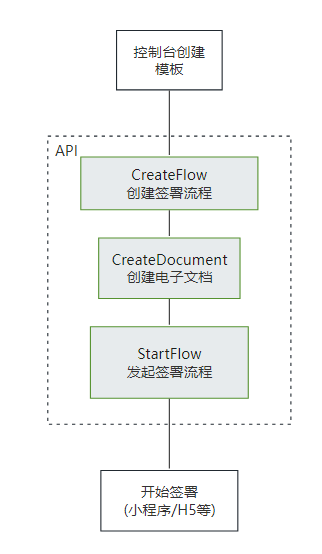
  注:该接口需要给对应的流程指定一个模板id,并且填充该模板中需要补充的信息。需要配置<a href="https://qian.tencent.com/developers/companyApis/startFlows/CreateFlow" target="_blank">创建签署流程</a>和<a href="https://qian.tencent.com/developers/companyApis/startFlows/StartFlow" target="_blank">发起签署流程</a>接口使用。具体逻辑可以参考下图:
252
251
 
253
- <svg id="SvgjsSvg1077" width="304" height="505" xmlns="http://www.w3.org/2000/svg" version="1.1" xmlns:xlink="http://www.w3.org/1999/xlink" xmlns:svgjs="http://svgjs.com/svgjs"><defs id="SvgjsDefs1078"><pattern patternUnits="userSpaceOnUse" id="pattern_mark_0" width="300" height="300"><text x="150" y="100" fill="rgba(229,229,229,0.8)" font-size="18" transform="rotate(-45, 150, 150)" style="dominant-baseline: middle; text-anchor: middle;"></text></pattern><pattern patternUnits="userSpaceOnUse" id="pattern_mark_1" width="300" height="300"><text x="150" y="200" fill="rgba(229,229,229,0.8)" font-size="18" transform="rotate(-45, 150, 150)" style="dominant-baseline: middle; text-anchor: middle;"></text></pattern><marker id="SvgjsMarker1096" markerWidth="12" markerHeight="8" refX="9" refY="4" viewBox="0 0 12 8" orient="auto" markerUnits="userSpaceOnUse" stroke-dasharray="0,0"><path id="SvgjsPath1097" d="M0,0 L12,4 L0,8 L0,0" fill="#323232" stroke="#323232" stroke-width="1"></path></marker><marker id="SvgjsMarker1108" markerWidth="12" markerHeight="8" refX="9" refY="4" viewBox="0 0 12 8" orient="auto" markerUnits="userSpaceOnUse" stroke-dasharray="0,0"><path id="SvgjsPath1109" d="M0,0 L12,4 L0,8 L0,0" fill="#323232" stroke="#323232" stroke-width="1"></path></marker><marker id="SvgjsMarker1120" markerWidth="12" markerHeight="8" refX="9" refY="4" viewBox="0 0 12 8" orient="auto" markerUnits="userSpaceOnUse" stroke-dasharray="0,0"><path id="SvgjsPath1121" d="M0,0 L12,4 L0,8 L0,0" fill="#323232" stroke="#323232" stroke-width="1"></path></marker><marker id="SvgjsMarker1140" markerWidth="12" markerHeight="8" refX="9" refY="4" viewBox="0 0 12 8" orient="auto" markerUnits="userSpaceOnUse" stroke-dasharray="0,0"><path id="SvgjsPath1141" d="M0,0 L12,4 L0,8 L0,0" fill="#323232" stroke="#323232" stroke-width="1"></path></marker></defs><rect id="svgbackgroundid" width="304" height="505" fill="transparent"></rect><rect id="SvgjsRect1080" width="304" height="505" fill="url(#pattern_mark_0)"></rect><rect id="SvgjsRect1081" width="304" height="505" fill="url(#pattern_mark_1)"></rect><g id="SvgjsG1082" transform="translate(58,121)"><path id="SvgjsPath1083" d="M 0 0L 221 0L 221 262L 0 262Z" stroke-dasharray="3,4" stroke="rgba(33,41,48,1)" stroke-width="1" fill-opacity="1" fill="#ffffff"></path><g id="SvgjsG1084"><text id="SvgjsText1085" font-family="微软雅黑" text-anchor="middle" font-size="13px" width="201px" fill="#323232" font-weight="400" align="middle" lineHeight="125%" anchor="middle" family="微软雅黑" size="13px" weight="400" font-style="" opacity="1" y="120.375" transform="rotate(0)"></text></g></g><g id="SvgjsG1086" transform="translate(88,140.00000000000006)"><path id="SvgjsPath1087" d="M 0 0L 161 0L 161 48L 0 48Z" stroke="rgba(86,146,48,1)" stroke-width="1" fill-opacity="1" fill="#e7ebed"></path><g id="SvgjsG1088"><text id="SvgjsText1089" font-family="微软雅黑" text-anchor="middle" font-size="13px" width="141px" fill="#323232" font-weight="400" align="middle" lineHeight="125%" anchor="middle" family="微软雅黑" size="13px" weight="400" font-style="" opacity="1" y="4.875" transform="rotate(0)"><tspan id="SvgjsTspan1090" dy="16" x="80.5"><tspan id="SvgjsTspan1091" style="text-decoration:;fill: rgb(28, 30, 33);">CreateFlow</tspan></tspan><tspan id="SvgjsTspan1092" dy="16" x="80.5"><tspan id="SvgjsTspan1093" style="text-decoration:;">创建签署流程</tspan></tspan></text></g></g><g id="SvgjsG1094"><path id="SvgjsPath1095" d="M168.5 188.50000000000006L168.5 200.83333333333337L168.5 200.83333333333337L168.5 211.86666666666667" stroke="#323232" stroke-width="1" fill="none" marker-end="url(#SvgjsMarker1096)"></path></g><g id="SvgjsG1098" transform="translate(104.25,213.66666666666669)"><path id="SvgjsPath1099" d="M 0 0L 128.5 0L 128.5 55L 0 55Z" stroke="rgba(86,146,48,1)" stroke-width="1" fill-opacity="1" fill="#e7ebed"></path><g id="SvgjsG1100"><text id="SvgjsText1101" font-family="微软雅黑" text-anchor="middle" font-size="13px" width="109px" fill="#323232" font-weight="400" align="middle" lineHeight="125%" anchor="middle" family="微软雅黑" size="13px" weight="400" font-style="" opacity="1" y="8.375" transform="rotate(0)"><tspan id="SvgjsTspan1102" dy="16" x="64.5"><tspan id="SvgjsTspan1103" style="text-decoration:;fill: rgb(28, 30, 33);">CreateDocument</tspan></tspan><tspan id="SvgjsTspan1104" dy="16" x="64.5"><tspan id="SvgjsTspan1105" style="text-decoration:;">创建电子文档</tspan></tspan></text></g></g><g id="SvgjsG1106"><path id="SvgjsPath1107" d="M168.5 269.16666666666674L168.5 281.5L168.5 281.5L168.5 292.5333333333334" stroke="#323232" stroke-width="1" fill="none" marker-end="url(#SvgjsMarker1108)"></path></g><g id="SvgjsG1110" transform="translate(96.75,294.33333333333337)"><path id="SvgjsPath1111" d="M 0 0L 143.5 0L 143.5 65L 0 65Z" stroke="rgba(86,146,48,1)" stroke-width="1" fill-opacity="1" fill="#e7ebed"></path><g id="SvgjsG1112"><text id="SvgjsText1113" font-family="微软雅黑" text-anchor="middle" font-size="13px" width="124px" fill="#323232" font-weight="400" align="middle" lineHeight="125%" anchor="middle" family="微软雅黑" size="13px" weight="400" font-style="" opacity="1" y="13.375" transform="rotate(0)"><tspan id="SvgjsTspan1114" dy="16" x="72"><tspan id="SvgjsTspan1115" style="text-decoration:;fill: rgb(28, 30, 33);">StartFlow</tspan></tspan><tspan id="SvgjsTspan1116" dy="16" x="72"><tspan id="SvgjsTspan1117" style="text-decoration:;">发起签署流程</tspan></tspan></text></g></g><g id="SvgjsG1118"><path id="SvgjsPath1119" d="M168.5 359.83333333333337L168.5 392.16666666666674L168.5 392.16666666666674L168.5 423.20000000000005" stroke="#323232" stroke-width="1" fill="none" marker-end="url(#SvgjsMarker1120)"></path></g><g id="SvgjsG1122" transform="translate(106.25,425)"><path id="SvgjsPath1123" d="M 0 0L 124.5 0L 124.5 55L 0 55Z" stroke="rgba(33,41,48,1)" stroke-width="1" fill-opacity="1" fill="#ffffff"></path><g id="SvgjsG1124"><text id="SvgjsText1125" font-family="微软雅黑" text-anchor="middle" font-size="13px" width="105px" fill="#323232" font-weight="400" align="middle" lineHeight="125%" anchor="middle" family="微软雅黑" size="13px" weight="400" font-style="" opacity="1" y="8.375" transform="rotate(0)"><tspan id="SvgjsTspan1126" dy="16" x="62.5"><tspan id="SvgjsTspan1127" style="text-decoration:;">开始签署</tspan></tspan><tspan id="SvgjsTspan1128" dy="16" x="62.5"><tspan id="SvgjsTspan1129" style="text-decoration:;">(小程序/H5等)</tspan></tspan></text></g></g><g id="SvgjsG1130" transform="translate(120.5,25)"><path id="SvgjsPath1131" d="M 0 0L 96 0L 96 54L 0 54Z" stroke="rgba(33,41,48,1)" stroke-width="1" fill-opacity="1" fill="#ffffff"></path><g id="SvgjsG1132"><text id="SvgjsText1133" font-family="微软雅黑" text-anchor="middle" font-size="13px" width="76px" fill="#323232" font-weight="400" align="middle" lineHeight="125%" anchor="middle" family="微软雅黑" size="13px" weight="400" font-style="" opacity="1" y="7.875" transform="rotate(0)"><tspan id="SvgjsTspan1134" dy="16" x="48"><tspan id="SvgjsTspan1135" style="text-decoration:;">控制台创建</tspan></tspan><tspan id="SvgjsTspan1136" dy="16" x="48"><tspan id="SvgjsTspan1137" style="text-decoration:;">模板</tspan></tspan></text></g></g><g id="SvgjsG1138"><path id="SvgjsPath1139" d="M168.5 79.5L168.5 109.5L168.5 109.5L168.5 138.20000000000005" stroke="#323232" stroke-width="1" fill="none" marker-end="url(#SvgjsMarker1140)"></path></g><g id="SvgjsG1142" transform="translate(25,114)"><path id="SvgjsPath1143" d="M 0 0L 100 0L 100 40L 0 40Z" stroke="none" fill="none"></path><g id="SvgjsG1144"><text id="SvgjsText1145" font-family="微软雅黑" text-anchor="middle" font-size="13px" width="100px" fill="#323232" font-weight="400" align="middle" lineHeight="125%" anchor="middle" family="微软雅黑" size="13px" weight="400" font-style="" opacity="1" y="9.375" transform="rotate(0)"><tspan id="SvgjsTspan1146" dy="16" x="50"><tspan id="SvgjsTspan1147" style="text-decoration:;">API</tspan></tspan></text></g></g></svg>
252
+ ![image](https://qcloudimg.tencent-cloud.cn/raw/06f2bc0f1772d8deac2f92b5df61a5ac.png)
254
253
 
255
254
  :param request: Request instance for CreateDocument.
256
255
  :type request: :class:`tencentcloud.ess.v20201111.models.CreateDocumentRequest`
@@ -331,10 +330,39 @@ class EssClient(AbstractClient):
331
330
  def CreateFlow(self, request):
332
331
  """通过模板创建签署流程<br/>
333
332
  适用场景:在标准制式的合同场景中,可通过提前预制好模板文件,每次调用模板文件的id,补充合同内容信息及签署信息生成电子合同。
333
+ <table>
334
+ <thead>
335
+ <tr>
336
+ <th>签署人类别</th>
337
+ <th>需要提前准备的信息</th>
338
+ </tr>
339
+ </thead>
340
+ <tbody>
341
+ <tr>
342
+ <td>自己企业的员工签署(未认证加入或已认证加入)</td>
343
+ <td>签署企业的名字、员工的真实名字、员工的触达手机号、员工的证件号(证件号非必传)</td>
344
+ </tr>
345
+ <tr>
346
+ <td>自己企业的员工签署(已认证加入)</td>
347
+ <td>签署企业的名字、员工在电子签平台的ID(UserId)</td>
348
+ </tr>
349
+ <tr>
350
+ <td>其他企业的员工签署</td>
351
+ <td>签署企业的名字、员工的真实名字、员工的触达手机号、员工的证件号(证件号非必传)</td>
352
+ </tr>
353
+ <tr>
354
+ <td>个人(自然人)签署</td>
355
+ <td>个人的真实名字、个人的触达手机号、个人的身份证(证件号非必传)</td>
356
+ </tr>
357
+ </tbody>
358
+ </table>
359
+
334
360
 
335
361
  注:配合<a href="https://qian.tencent.com/developers/companyApis/startFlows/CreateDocument" target="_blank">创建电子文档</a>和<a href="https://qian.tencent.com/developers/companyApis/startFlows/StartFlow" target="_blank">发起签署流程</a>接口使用。整体的逻辑如下图
336
362
 
337
- <svg id="SvgjsSvg1077" width="304" height="505" xmlns="http://www.w3.org/2000/svg" version="1.1" xmlns:xlink="http://www.w3.org/1999/xlink" xmlns:svgjs="http://svgjs.com/svgjs"><defs id="SvgjsDefs1078"><pattern patternUnits="userSpaceOnUse" id="pattern_mark_0" width="300" height="300"><text x="150" y="100" fill="rgba(229,229,229,0.8)" font-size="18" transform="rotate(-45, 150, 150)" style="dominant-baseline: middle; text-anchor: middle;"></text></pattern><pattern patternUnits="userSpaceOnUse" id="pattern_mark_1" width="300" height="300"><text x="150" y="200" fill="rgba(229,229,229,0.8)" font-size="18" transform="rotate(-45, 150, 150)" style="dominant-baseline: middle; text-anchor: middle;"></text></pattern><marker id="SvgjsMarker1096" markerWidth="12" markerHeight="8" refX="9" refY="4" viewBox="0 0 12 8" orient="auto" markerUnits="userSpaceOnUse" stroke-dasharray="0,0"><path id="SvgjsPath1097" d="M0,0 L12,4 L0,8 L0,0" fill="#323232" stroke="#323232" stroke-width="1"></path></marker><marker id="SvgjsMarker1108" markerWidth="12" markerHeight="8" refX="9" refY="4" viewBox="0 0 12 8" orient="auto" markerUnits="userSpaceOnUse" stroke-dasharray="0,0"><path id="SvgjsPath1109" d="M0,0 L12,4 L0,8 L0,0" fill="#323232" stroke="#323232" stroke-width="1"></path></marker><marker id="SvgjsMarker1120" markerWidth="12" markerHeight="8" refX="9" refY="4" viewBox="0 0 12 8" orient="auto" markerUnits="userSpaceOnUse" stroke-dasharray="0,0"><path id="SvgjsPath1121" d="M0,0 L12,4 L0,8 L0,0" fill="#323232" stroke="#323232" stroke-width="1"></path></marker><marker id="SvgjsMarker1140" markerWidth="12" markerHeight="8" refX="9" refY="4" viewBox="0 0 12 8" orient="auto" markerUnits="userSpaceOnUse" stroke-dasharray="0,0"><path id="SvgjsPath1141" d="M0,0 L12,4 L0,8 L0,0" fill="#323232" stroke="#323232" stroke-width="1"></path></marker></defs><rect id="svgbackgroundid" width="304" height="505" fill="transparent"></rect><rect id="SvgjsRect1080" width="304" height="505" fill="url(#pattern_mark_0)"></rect><rect id="SvgjsRect1081" width="304" height="505" fill="url(#pattern_mark_1)"></rect><g id="SvgjsG1082" transform="translate(58,121)"><path id="SvgjsPath1083" d="M 0 0L 221 0L 221 262L 0 262Z" stroke-dasharray="3,4" stroke="rgba(33,41,48,1)" stroke-width="1" fill-opacity="1" fill="#ffffff"></path><g id="SvgjsG1084"><text id="SvgjsText1085" font-family="微软雅黑" text-anchor="middle" font-size="13px" width="201px" fill="#323232" font-weight="400" align="middle" lineHeight="125%" anchor="middle" family="微软雅黑" size="13px" weight="400" font-style="" opacity="1" y="120.375" transform="rotate(0)"></text></g></g><g id="SvgjsG1086" transform="translate(88,140.00000000000006)"><path id="SvgjsPath1087" d="M 0 0L 161 0L 161 48L 0 48Z" stroke="rgba(86,146,48,1)" stroke-width="1" fill-opacity="1" fill="#e7ebed"></path><g id="SvgjsG1088"><text id="SvgjsText1089" font-family="微软雅黑" text-anchor="middle" font-size="13px" width="141px" fill="#323232" font-weight="400" align="middle" lineHeight="125%" anchor="middle" family="微软雅黑" size="13px" weight="400" font-style="" opacity="1" y="4.875" transform="rotate(0)"><tspan id="SvgjsTspan1090" dy="16" x="80.5"><tspan id="SvgjsTspan1091" style="text-decoration:;fill: rgb(28, 30, 33);">CreateFlow</tspan></tspan><tspan id="SvgjsTspan1092" dy="16" x="80.5"><tspan id="SvgjsTspan1093" style="text-decoration:;">创建签署流程</tspan></tspan></text></g></g><g id="SvgjsG1094"><path id="SvgjsPath1095" d="M168.5 188.50000000000006L168.5 200.83333333333337L168.5 200.83333333333337L168.5 211.86666666666667" stroke="#323232" stroke-width="1" fill="none" marker-end="url(#SvgjsMarker1096)"></path></g><g id="SvgjsG1098" transform="translate(104.25,213.66666666666669)"><path id="SvgjsPath1099" d="M 0 0L 128.5 0L 128.5 55L 0 55Z" stroke="rgba(86,146,48,1)" stroke-width="1" fill-opacity="1" fill="#e7ebed"></path><g id="SvgjsG1100"><text id="SvgjsText1101" font-family="微软雅黑" text-anchor="middle" font-size="13px" width="109px" fill="#323232" font-weight="400" align="middle" lineHeight="125%" anchor="middle" family="微软雅黑" size="13px" weight="400" font-style="" opacity="1" y="8.375" transform="rotate(0)"><tspan id="SvgjsTspan1102" dy="16" x="64.5"><tspan id="SvgjsTspan1103" style="text-decoration:;fill: rgb(28, 30, 33);">CreateDocument</tspan></tspan><tspan id="SvgjsTspan1104" dy="16" x="64.5"><tspan id="SvgjsTspan1105" style="text-decoration:;">创建电子文档</tspan></tspan></text></g></g><g id="SvgjsG1106"><path id="SvgjsPath1107" d="M168.5 269.16666666666674L168.5 281.5L168.5 281.5L168.5 292.5333333333334" stroke="#323232" stroke-width="1" fill="none" marker-end="url(#SvgjsMarker1108)"></path></g><g id="SvgjsG1110" transform="translate(96.75,294.33333333333337)"><path id="SvgjsPath1111" d="M 0 0L 143.5 0L 143.5 65L 0 65Z" stroke="rgba(86,146,48,1)" stroke-width="1" fill-opacity="1" fill="#e7ebed"></path><g id="SvgjsG1112"><text id="SvgjsText1113" font-family="微软雅黑" text-anchor="middle" font-size="13px" width="124px" fill="#323232" font-weight="400" align="middle" lineHeight="125%" anchor="middle" family="微软雅黑" size="13px" weight="400" font-style="" opacity="1" y="13.375" transform="rotate(0)"><tspan id="SvgjsTspan1114" dy="16" x="72"><tspan id="SvgjsTspan1115" style="text-decoration:;fill: rgb(28, 30, 33);">StartFlow</tspan></tspan><tspan id="SvgjsTspan1116" dy="16" x="72"><tspan id="SvgjsTspan1117" style="text-decoration:;">发起签署流程</tspan></tspan></text></g></g><g id="SvgjsG1118"><path id="SvgjsPath1119" d="M168.5 359.83333333333337L168.5 392.16666666666674L168.5 392.16666666666674L168.5 423.20000000000005" stroke="#323232" stroke-width="1" fill="none" marker-end="url(#SvgjsMarker1120)"></path></g><g id="SvgjsG1122" transform="translate(106.25,425)"><path id="SvgjsPath1123" d="M 0 0L 124.5 0L 124.5 55L 0 55Z" stroke="rgba(33,41,48,1)" stroke-width="1" fill-opacity="1" fill="#ffffff"></path><g id="SvgjsG1124"><text id="SvgjsText1125" font-family="微软雅黑" text-anchor="middle" font-size="13px" width="105px" fill="#323232" font-weight="400" align="middle" lineHeight="125%" anchor="middle" family="微软雅黑" size="13px" weight="400" font-style="" opacity="1" y="8.375" transform="rotate(0)"><tspan id="SvgjsTspan1126" dy="16" x="62.5"><tspan id="SvgjsTspan1127" style="text-decoration:;">开始签署</tspan></tspan><tspan id="SvgjsTspan1128" dy="16" x="62.5"><tspan id="SvgjsTspan1129" style="text-decoration:;">(小程序/H5等)</tspan></tspan></text></g></g><g id="SvgjsG1130" transform="translate(120.5,25)"><path id="SvgjsPath1131" d="M 0 0L 96 0L 96 54L 0 54Z" stroke="rgba(33,41,48,1)" stroke-width="1" fill-opacity="1" fill="#ffffff"></path><g id="SvgjsG1132"><text id="SvgjsText1133" font-family="微软雅黑" text-anchor="middle" font-size="13px" width="76px" fill="#323232" font-weight="400" align="middle" lineHeight="125%" anchor="middle" family="微软雅黑" size="13px" weight="400" font-style="" opacity="1" y="7.875" transform="rotate(0)"><tspan id="SvgjsTspan1134" dy="16" x="48"><tspan id="SvgjsTspan1135" style="text-decoration:;">控制台创建</tspan></tspan><tspan id="SvgjsTspan1136" dy="16" x="48"><tspan id="SvgjsTspan1137" style="text-decoration:;">模板</tspan></tspan></text></g></g><g id="SvgjsG1138"><path id="SvgjsPath1139" d="M168.5 79.5L168.5 109.5L168.5 109.5L168.5 138.20000000000005" stroke="#323232" stroke-width="1" fill="none" marker-end="url(#SvgjsMarker1140)"></path></g><g id="SvgjsG1142" transform="translate(25,114)"><path id="SvgjsPath1143" d="M 0 0L 100 0L 100 40L 0 40Z" stroke="none" fill="none"></path><g id="SvgjsG1144"><text id="SvgjsText1145" font-family="微软雅黑" text-anchor="middle" font-size="13px" width="100px" fill="#323232" font-weight="400" align="middle" lineHeight="125%" anchor="middle" family="微软雅黑" size="13px" weight="400" font-style="" opacity="1" y="9.375" transform="rotate(0)"><tspan id="SvgjsTspan1146" dy="16" x="50"><tspan id="SvgjsTspan1147" style="text-decoration:;">API</tspan></tspan></text></g></g></svg>
363
+ ![image](https://qcloudimg.tencent-cloud.cn/raw/06f2bc0f1772d8deac2f92b5df61a5ac.png)
364
+
365
+ 注:**静默(自动)签署不支持合同签署方存在填写**功能
338
366
 
339
367
  :param request: Request instance for CreateFlow.
340
368
  :type request: :class:`tencentcloud.ess.v20201111.models.CreateFlowRequest`
@@ -387,9 +415,46 @@ class EssClient(AbstractClient):
387
415
 
388
416
  def CreateFlowByFiles(self, request):
389
417
  """此接口(CreateFlowByFiles)用来通过上传后的pdf资源编号来创建待签署的合同流程。<br/>
390
- 适用场景1:适用非制式的合同文件签署。一般开发者自己有完整的签署文件,可以通过该接口传入完整的PDF文件及流程信息生成待签署的合同流程。<br/>
391
- 适用场景2:可通过该接口传入制式合同文件,同时在指定位置添加签署控件。可以起到接口创建临时模板的效果。如果是标准的制式文件,建议使用模板功能生成模板ID进行合同流程的生成。<br/>
392
- 注意事项:该接口需要依赖“多文件上传”接口生成pdf资源编号(FileIds)进行使用。<br/>
418
+ 适用场景:适用非制式的合同文件签署。一般开发者自己有完整的签署文件,可以通过该接口传入完整的PDF文件及流程信息生成待签署的合同流程。<br/>
419
+
420
+ <table>
421
+ <thead>
422
+ <tr>
423
+ <th>签署人类别</th>
424
+ <th>需要提前准备的信息</th>
425
+ </tr>
426
+ </thead>
427
+ <tbody>
428
+ <tr>
429
+ <td>自己企业的员工签署(未认证加入或已认证加入)</td>
430
+ <td>签署企业的名字、员工的真实名字、员工的触达手机号、员工的证件号(证件号非必传)</td>
431
+ </tr>
432
+ <tr>
433
+ <td>自己企业的员工签署(已认证加入)</td>
434
+ <td>签署企业的名字、员工在电子签平台的ID(UserId)</td>
435
+ </tr>
436
+ <tr>
437
+ <td>其他企业的员工签署</td>
438
+ <td>签署企业的名字、员工的真实名字、员工的触达手机号、员工的证件号(证件号非必传)</td>
439
+ </tr>
440
+ <tr>
441
+ <td>个人(自然人)签署</td>
442
+ <td>个人的真实名字、个人的触达手机号、个人的身份证(证件号非必传)</td>
443
+ </tr>
444
+ </tbody>
445
+ </table>
446
+
447
+
448
+
449
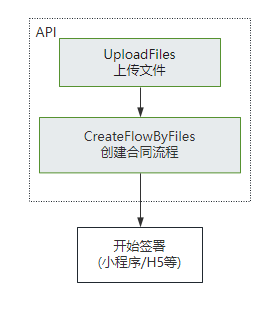
+ 该接口需要依赖[上传文件](https://qian.tencent.com/developers/companyApis/templatesAndFiles/UploadFiles)接口生成pdf资源编号(FileIds)进行使用。(如果非pdf文件需要调用[创建文件转换任务](https://qian.tencent.com/developers/companyApis/templatesAndFiles/CreateConvertTaskApi)接口转换成pdf资源)<br/>
450
+
451
+
452
+ ![image](https://qcloudimg.tencent-cloud.cn/raw/f097a74b289e3e1acd740936bdfe9843.png)
453
+
454
+ 注:
455
+ - 不同类型的签署方传参不同, 可以参考开发者中心的ApproverInfo结构体说明
456
+ - 合同**发起后就会扣减合同的额度**, 如果未签署完成时撤销合同会返还此额度(**过期,拒签,签署完成,解除完成等状态不会返还额度**)
457
+ - **静默(自动)签署不支持合同签署方存在填写**功能
393
458
 
394
459
  :param request: Request instance for CreateFlowByFiles.
395
460
  :type request: :class:`tencentcloud.ess.v20201111.models.CreateFlowByFilesRequest`
@@ -449,6 +514,8 @@ class EssClient(AbstractClient):
449
514
 
450
515
  注意事项:使用该接口需要先依赖[多文件上传](https://qian.tencent.com/developers/companyApis/templatesAndFiles/UploadFiles)接口返回的FileIds。
451
516
 
517
+ 注:`合同发起后就会扣减合同的额度, 如果未签署完成时撤销合同会返还此额度(过期,拒签,签署完成,解除完成等状态不会返还额度),合同组中每个合同会扣减一个合同额度`
518
+
452
519
  :param request: Request instance for CreateFlowGroupByFiles.
453
520
  :type request: :class:`tencentcloud.ess.v20201111.models.CreateFlowGroupByFilesRequest`
454
521
  :rtype: :class:`tencentcloud.ess.v20201111.models.CreateFlowGroupByFilesResponse`
@@ -474,6 +541,8 @@ class EssClient(AbstractClient):
474
541
 
475
542
  适用场景:该接口适用于需要一次性完成多份合同签署的情况,多份合同一般具有关联性,用户以目录的形式查看合同。
476
543
 
544
+ 注:`合同发起后就会扣减合同的额度, 如果未签署完成时撤销合同会返还此额度(过期,拒签,签署完成,解除完成等状态不会返还额度),合同组中每个合同会扣减一个合同额度`
545
+
477
546
  :param request: Request instance for CreateFlowGroupByTemplates.
478
547
  :type request: :class:`tencentcloud.ess.v20201111.models.CreateFlowGroupByTemplatesRequest`
479
548
  :rtype: :class:`tencentcloud.ess.v20201111.models.CreateFlowGroupByTemplatesResponse`
@@ -494,14 +563,47 @@ class EssClient(AbstractClient):
494
563
  raise TencentCloudSDKException(type(e).__name__, str(e))
495
564
 
496
565
 
566
+ def CreateFlowGroupSignReview(self, request):
567
+ """提交合同组签署流程审批结果的适用场景包括:
568
+
569
+ 1. 在使用[通过多文件创建合同组签署流程](https://qian.tencent.com/developers/companyApis/startFlows/CreateFlowGroupByFiles)或[通过多模板创建合同组签署流程](https://qian.tencent.com/developers/companyApis/startFlows/CreateFlowGroupByTemplates)创建合同组签署流程时,若指定了以下参数 为true,则可以调用此接口提交企业内部签署审批结果。即使是自动签署也需要进行审核通过才会进行签署。
570
+ - [FlowGroupInfo.NeedSignReview](https://qian.tencent.com/developers/companyApis/dataTypes/#flowgroupinfo)
571
+ - [ApproverInfo.ApproverNeedSignReview](https://qian.tencent.com/developers/companyApis/dataTypes/#approverinfo)
572
+
573
+
574
+ 2. 同一合同组,同一签署人可以多次提交签署审批结果,签署时的最后一个“审批结果”有效。
575
+
576
+ :param request: Request instance for CreateFlowGroupSignReview.
577
+ :type request: :class:`tencentcloud.ess.v20201111.models.CreateFlowGroupSignReviewRequest`
578
+ :rtype: :class:`tencentcloud.ess.v20201111.models.CreateFlowGroupSignReviewResponse`
579
+
580
+ """
581
+ try:
582
+ params = request._serialize()
583
+ headers = request.headers
584
+ body = self.call("CreateFlowGroupSignReview", params, headers=headers)
585
+ response = json.loads(body)
586
+ model = models.CreateFlowGroupSignReviewResponse()
587
+ model._deserialize(response["Response"])
588
+ return model
589
+ except Exception as e:
590
+ if isinstance(e, TencentCloudSDKException):
591
+ raise
592
+ else:
593
+ raise TencentCloudSDKException(type(e).__name__, str(e))
594
+
595
+
497
596
  def CreateFlowReminds(self, request):
498
597
  """指定需要批量催办的签署流程ID,批量催办合同,最多100个。需要符合以下条件的合同才可被催办:
499
598
 
500
- 1. 发起合同时,签署人的NotifyType需设置为sms
501
- 2. 合同中当前状态为“待签署”的签署人是催办的对象
502
- 3. 每个合同只能催办一次
599
+ 1. 发起合同时,**签署人的NotifyType需设置为sms**
600
+ 2. 合同中当前状态为 **待签署** 的签署人是催办的对象
601
+ 3. **每个合同只能催办一次**
602
+
603
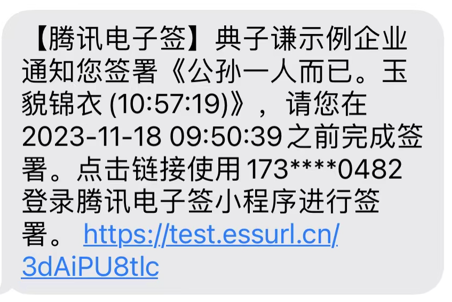
+ **催办的效果**: 对方会收到如下的短信通知
604
+ ![image](https://qcloudimg.tencent-cloud.cn/raw/3caf94b7f540fa5736270d38528d3a7b.png)
503
605
 
504
- 注意:该接口无法直接调用,请联系客户经理申请使用。
606
+ 注:`合同催办是白名单功能,请联系客户经理申请开白后使用`
505
607
 
506
608
  :param request: Request instance for CreateFlowReminds.
507
609
  :type request: :class:`tencentcloud.ess.v20201111.models.CreateFlowRemindsRequest`
@@ -524,9 +626,36 @@ class EssClient(AbstractClient):
524
626
 
525
627
 
526
628
  def CreateFlowSignReview(self, request):
527
- """提交签署流程审批结果的适用场景包括:
528
- 1. 在使用模板(CreateFlow)或文件(CreateFlowByFiles)创建签署流程时,若指定了参数NeedSignReview为true,且发起方企业作为签署方参与了流程签署,则可以调用此接口提交企业内部签署审批结果。自动签署也需要进行审核通过才会进行签署。
529
- 2. 若签署流程状态正常,同一签署流程可以多次提交签署审批结果,签署时的最后一个“审批结果”有效。
629
+ """提交企业流程审批结果
630
+ **当前存在两种审核操作:**
631
+ <ul>
632
+ <li>签署审核
633
+ <ul>
634
+ <li>在通过接口<ul>
635
+ <li>CreateFlowByFiles</li>
636
+ <li>CreateFlow</li>
637
+ <li>CreateFlowGroupByTemplates</li>
638
+ <li>CreateFlowGroupByFiles</li>
639
+ <li>CreatePrepareFlow</li>
640
+ </ul>
641
+ 发起签署流程时,通过指定NeedSignReview为true,则可以调用此接口,并指定operate=SignReview,以提交企业内部签署审批结果</li>
642
+ <li>在通过接口
643
+ <ul>
644
+ <li>CreateFlowByFiles</li>
645
+ <li>CreateFlow</li>
646
+ <li>CreateFlowGroupByTemplates</li>
647
+ <li>CreateFlowGroupByFiles</li>
648
+ </ul>
649
+ 发起签署流程时,通过指定签署人ApproverNeedSignReview为true,则可以调用此接口,并指定operate=SignReview,并指定RecipientId,以提交企业内部签署审批结果</li>
650
+ </ul>
651
+ </li>
652
+ <li>发起审核
653
+ <ul>
654
+ <li>通过接口CreatePrepareFlow指定发起后需要审核,那么可以调用此接口,并指定operate=CreateReview,以提交企业内部审批结果。可以多次提交审批结果,但一旦审批通过,后续提交的结果将无效
655
+ </li>
656
+ </ul>
657
+ </li>
658
+ </ul>
530
659
 
531
660
  :param request: Request instance for CreateFlowSignReview.
532
661
  :type request: :class:`tencentcloud.ess.v20201111.models.CreateFlowSignReviewRequest`
@@ -682,7 +811,7 @@ class EssClient(AbstractClient):
682
811
 
683
812
 
684
813
  def CreateMultiFlowSignQRCode(self, request):
685
- """此接口(CreateMultiFlowSignQRCode)用于创建一码多扫流程签署二维码。
814
+ """此接口(CreateMultiFlowSignQRCode)用于创建一码多签签署码。
686
815
 
687
816
  **适用场景**:
688
817
  签署人可通过扫描二维码补充签署信息进行实名签署。常用于提前不知道签署人的身份信息场景,例如:劳务工招工、大批量员工入职等场景。
@@ -692,11 +821,11 @@ class EssClient(AbstractClient):
692
821
  - 模板中配置的签署顺序是无序
693
822
  - B端企业的签署方式是静默签署
694
823
  - B端企业是非首位签署
695
- 2. 通过一码多扫二维码发起的合同,合同涉及到的回调消息可参考文档[合同发起及签署相关回调
824
+ 2. 通过一码多签签署码发起的合同,合同涉及到的回调消息可参考文档[合同发起及签署相关回调
696
825
  ]( https://qian.tencent.com/developers/company/callback_types_contracts_sign)
697
- 3. 用户通过签署二维码发起合同时,因企业额度不足导致失败 会触发签署二维码相关回调,具体参考文档[签署二维码相关回调](https://qian.tencent.com/developers/company/callback_types_commons#%E7%AD%BE%E7%BD%B2%E4%BA%8C%E7%BB%B4%E7%A0%81%E7%9B%B8%E5%85%B3%E5%9B%9E%E8%B0%83)
826
+ 3. 用户通过一码多签签署码发起合同时,因企业额度不足导致失败 会触发签署二维码相关回调,具体参考文档[签署二维码相关回调](https://qian.tencent.com/developers/company/callback_types_commons#%E7%AD%BE%E7%BD%B2%E4%BA%8C%E7%BB%B4%E7%A0%81%E7%9B%B8%E5%85%B3%E5%9B%9E%E8%B0%83)
698
827
 
699
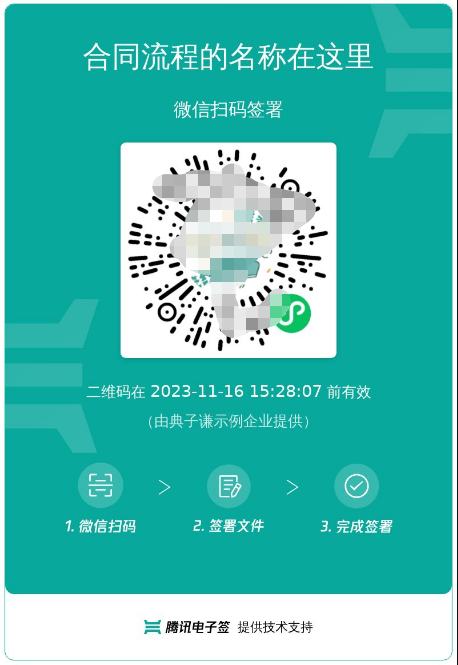
- 二维码的样式如下图:
828
+ 签署码的样式如下图:
700
829
  ![image](https://qcloudimg.tencent-cloud.cn/raw/27317cf5aacb094fb1dc6f94179a5148.png )
701
830
 
702
831
  :param request: Request instance for CreateMultiFlowSignQRCode.
@@ -922,9 +1051,10 @@ class EssClient(AbstractClient):
922
1051
  跳转到小程序的实现,参考微信官方文档(分为<a href="https://developers.weixin.qq.com/miniprogram/dev/api/navigate/wx.navigateToMiniProgram.html">全屏</a>、<a href="https://developers.weixin.qq.com/miniprogram/dev/framework/open-ability/openEmbeddedMiniProgram.html">半屏</a>两种方式),如何配置也可以请参考: <a href="https://qian.tencent.com/developers/company/openwxminiprogram">跳转电子签小程序配置</a>
923
1052
 
924
1053
  注:
925
- `1. 如果签署人是在PC端扫码签署,可以通过生成跳转链接自主转换成二维码,让签署人在PC端扫码签署`
926
- `2. 签署链接的有效期为90天,超过有效期链接不可用`
927
- `3. 如果需跳转详情页(即PathType值为1)进行填写或签署合同,需指定签署方信息:姓名、手机号码、企业名称等,才能生成正确的跳转链接`
1054
+ <ul><li>1. 如果签署人是在PC端扫码签署,可以通过生成跳转链接自主转换成二维码,让签署人在PC端扫码签署</li>
1055
+ <li>2. 签署链接的有效期为<font color="red">90天</font>,超过有效期链接不可用</li>
1056
+ <li>3. 如果需跳转详情页(即PathType值为1)进行填写或签署合同,需指定签署方信息:姓名、手机号码、企业名称等,才能生成正确的跳转链接</li>
1057
+ <li>4. <font color="red">生成的链路后面不能再增加参数</font>(会出现覆盖链接中已有参数导致错误)</li></ul>
928
1058
 
929
1059
  其中小程序的原始Id如下,或者查看小程序信息自助获取。
930
1060
 
@@ -1229,14 +1359,55 @@ class EssClient(AbstractClient):
1229
1359
  raise TencentCloudSDKException(type(e).__name__, str(e))
1230
1360
 
1231
1361
 
1362
+ def DescribeExtendedServiceAuthDetail(self, request):
1363
+ """查询企业扩展服务的授权详情(列表),当前支持查询以下内容:
1364
+ 1. 企业自动签(本企业授权、集团企业授权、合作企业授权)
1365
+ 2. 批量签署能力
1366
+
1367
+
1368
+ 注: <font color='red'>所在企业的超管、法人才有权限调用此接口</font>(Agent.ProxyOperator.OpenId 需要传递超管或者法人的OpenId)
1369
+
1370
+ :param request: Request instance for DescribeExtendedServiceAuthDetail.
1371
+ :type request: :class:`tencentcloud.ess.v20201111.models.DescribeExtendedServiceAuthDetailRequest`
1372
+ :rtype: :class:`tencentcloud.ess.v20201111.models.DescribeExtendedServiceAuthDetailResponse`
1373
+
1374
+ """
1375
+ try:
1376
+ params = request._serialize()
1377
+ headers = request.headers
1378
+ body = self.call("DescribeExtendedServiceAuthDetail", params, headers=headers)
1379
+ response = json.loads(body)
1380
+ model = models.DescribeExtendedServiceAuthDetailResponse()
1381
+ model._deserialize(response["Response"])
1382
+ return model
1383
+ except Exception as e:
1384
+ if isinstance(e, TencentCloudSDKException):
1385
+ raise
1386
+ else:
1387
+ raise TencentCloudSDKException(type(e).__name__, str(e))
1388
+
1389
+
1232
1390
  def DescribeExtendedServiceAuthInfos(self, request):
1233
1391
  """查询企业扩展服务的开通和授权情况,当前支持查询以下内容:
1234
- 1. 企业自动签
1235
- 2. 企业与港澳台居民签署合同
1236
- 3. 使用手机号验证签署方身份
1237
- 4. 骑缝章
1238
- 5. 批量签署能力
1239
- 6. 拓宽签署方年龄限制
1392
+
1393
+ 1. **企业自动签署**
1394
+ 2. **批量签署授权**
1395
+ 3. **企业与港澳台居民签署合同**
1396
+ 4. **拓宽签署方年龄限制**
1397
+ 5. **个人签署方仅校验手机号**
1398
+ 6. **隐藏合同经办人姓名**
1399
+ 7. **正楷临摹签名失败后更换其他签名类型**
1400
+ 8. **短信通知签署方**
1401
+ 9. **个人签署方手动签字**
1402
+ 10. **骑缝章**
1403
+ 11. **签署密码开通引导**
1404
+
1405
+
1406
+ 对应能力开通页面在Web控制台-更多-企业设置-拓展服务,如下图所示:
1407
+
1408
+ ![image](https://qcloudimg.tencent-cloud.cn/raw/7d79746ecca1c5fe878a2ec36ed69c23.jpg)
1409
+
1410
+ 注: <font color='red'>所在企业的超管、法人才有权限调用此接口</font>(Operator.UserId需要传递超管或者法人的UserId)
1240
1411
 
1241
1412
  :param request: Request instance for DescribeExtendedServiceAuthInfos.
1242
1413
  :type request: :class:`tencentcloud.ess.v20201111.models.DescribeExtendedServiceAuthInfosRequest`
@@ -1705,6 +1876,48 @@ class EssClient(AbstractClient):
1705
1876
  raise TencentCloudSDKException(type(e).__name__, str(e))
1706
1877
 
1707
1878
 
1879
+ def ModifyExtendedService(self, request):
1880
+ """管理企业扩展服务 ,企业经办人需要是企业超管或者法人。
1881
+
1882
+ 跳转小程序的几种方式:主要是设置不同的EndPoint
1883
+ 1. 通过链接Url直接跳转到小程序,不需要返回
1884
+ 设置EndPoint为WEIXINAPP,得到链接打开即可。
1885
+
1886
+ 2. 客户App直接跳转到小程序-->腾讯电子签小程序操作完成-->返回App
1887
+ 跳转到小程序的实现,参考官方文档<a href="https://developers.weixin.qq.com/miniprogram/dev/framework/open-ability/launchApp.html">打开 App</a>
1888
+ 设置EndPoint为APP,得到path。
1889
+
1890
+ 3. 客户小程序直接跳到电子签小程序-->腾讯电子签小程序操作完成--->回到客户小程序
1891
+ 跳转到小程序的实现,参考官方文档(分为<a href="https://developers.weixin.qq.com/miniprogram/dev/api/navigate/wx.navigateToMiniProgram.html">全屏</a>、<a href="https://developers.weixin.qq.com/miniprogram/dev/framework/open-ability/openEmbeddedMiniProgram.html">半屏</a>两种方式),如何配置也可以请参考: <a href="https://qian.tencent.com/developers/company/openwxminiprogram">跳转电子签小程序配置</a>
1892
+ 设置EndPoint为APP,得到path。
1893
+
1894
+ 4.其中小程序的原始Id如下,或者查看小程序信息自助获取。
1895
+
1896
+ | 小程序 | AppID | 原始ID |
1897
+ | ------------ | ------------ | ------------ |
1898
+ | 腾讯电子签(正式版) | wxa023b292fd19d41d | gh_da88f6188665 |
1899
+ | 腾讯电子签Demo | wx371151823f6f3edf | gh_39a5d3de69fa |
1900
+
1901
+ :param request: Request instance for ModifyExtendedService.
1902
+ :type request: :class:`tencentcloud.ess.v20201111.models.ModifyExtendedServiceRequest`
1903
+ :rtype: :class:`tencentcloud.ess.v20201111.models.ModifyExtendedServiceResponse`
1904
+
1905
+ """
1906
+ try:
1907
+ params = request._serialize()
1908
+ headers = request.headers
1909
+ body = self.call("ModifyExtendedService", params, headers=headers)
1910
+ response = json.loads(body)
1911
+ model = models.ModifyExtendedServiceResponse()
1912
+ model._deserialize(response["Response"])
1913
+ return model
1914
+ except Exception as e:
1915
+ if isinstance(e, TencentCloudSDKException):
1916
+ raise
1917
+ else:
1918
+ raise TencentCloudSDKException(type(e).__name__, str(e))
1919
+
1920
+
1708
1921
  def ModifyIntegrationDepartment(self, request):
1709
1922
  """此接口(ModifyIntegrationDepartment)用于更新企业的部门信息,支持更新部门名称、客户系统部门ID和部门序号等信息。
1710
1923
 
@@ -1765,7 +1978,11 @@ class EssClient(AbstractClient):
1765
1978
  """此接口用于启动流程。它是模板发起合同的最后一步。
1766
1979
  在[创建签署流程](https://qian.tencent.com/developers/companyApis/startFlows/CreateFlow)和[创建电子文档](https://qian.tencent.com/developers/companyApis/startFlows/CreateDocument)之后,用于开始整个合同流程, 推进流程进入到签署环节。
1767
1980
 
1768
- <svg id="SvgjsSvg1077" width="304" height="505" xmlns="http://www.w3.org/2000/svg" version="1.1" xmlns:xlink="http://www.w3.org/1999/xlink" xmlns:svgjs="http://svgjs.com/svgjs"><defs id="SvgjsDefs1078"><pattern patternUnits="userSpaceOnUse" id="pattern_mark_0" width="300" height="300"><text x="150" y="100" fill="rgba(229,229,229,0.8)" font-size="18" transform="rotate(-45, 150, 150)" style="dominant-baseline: middle; text-anchor: middle;"></text></pattern><pattern patternUnits="userSpaceOnUse" id="pattern_mark_1" width="300" height="300"><text x="150" y="200" fill="rgba(229,229,229,0.8)" font-size="18" transform="rotate(-45, 150, 150)" style="dominant-baseline: middle; text-anchor: middle;"></text></pattern><marker id="SvgjsMarker1096" markerWidth="12" markerHeight="8" refX="9" refY="4" viewBox="0 0 12 8" orient="auto" markerUnits="userSpaceOnUse" stroke-dasharray="0,0"><path id="SvgjsPath1097" d="M0,0 L12,4 L0,8 L0,0" fill="#323232" stroke="#323232" stroke-width="1"></path></marker><marker id="SvgjsMarker1108" markerWidth="12" markerHeight="8" refX="9" refY="4" viewBox="0 0 12 8" orient="auto" markerUnits="userSpaceOnUse" stroke-dasharray="0,0"><path id="SvgjsPath1109" d="M0,0 L12,4 L0,8 L0,0" fill="#323232" stroke="#323232" stroke-width="1"></path></marker><marker id="SvgjsMarker1120" markerWidth="12" markerHeight="8" refX="9" refY="4" viewBox="0 0 12 8" orient="auto" markerUnits="userSpaceOnUse" stroke-dasharray="0,0"><path id="SvgjsPath1121" d="M0,0 L12,4 L0,8 L0,0" fill="#323232" stroke="#323232" stroke-width="1"></path></marker><marker id="SvgjsMarker1140" markerWidth="12" markerHeight="8" refX="9" refY="4" viewBox="0 0 12 8" orient="auto" markerUnits="userSpaceOnUse" stroke-dasharray="0,0"><path id="SvgjsPath1141" d="M0,0 L12,4 L0,8 L0,0" fill="#323232" stroke="#323232" stroke-width="1"></path></marker></defs><rect id="svgbackgroundid" width="304" height="505" fill="transparent"></rect><rect id="SvgjsRect1080" width="304" height="505" fill="url(#pattern_mark_0)"></rect><rect id="SvgjsRect1081" width="304" height="505" fill="url(#pattern_mark_1)"></rect><g id="SvgjsG1082" transform="translate(58,121)"><path id="SvgjsPath1083" d="M 0 0L 221 0L 221 262L 0 262Z" stroke-dasharray="3,4" stroke="rgba(33,41,48,1)" stroke-width="1" fill-opacity="1" fill="#ffffff"></path><g id="SvgjsG1084"><text id="SvgjsText1085" font-family="微软雅黑" text-anchor="middle" font-size="13px" width="201px" fill="#323232" font-weight="400" align="middle" lineHeight="125%" anchor="middle" family="微软雅黑" size="13px" weight="400" font-style="" opacity="1" y="120.375" transform="rotate(0)"></text></g></g><g id="SvgjsG1086" transform="translate(88,140.00000000000006)"><path id="SvgjsPath1087" d="M 0 0L 161 0L 161 48L 0 48Z" stroke="rgba(86,146,48,1)" stroke-width="1" fill-opacity="1" fill="#e7ebed"></path><g id="SvgjsG1088"><text id="SvgjsText1089" font-family="微软雅黑" text-anchor="middle" font-size="13px" width="141px" fill="#323232" font-weight="400" align="middle" lineHeight="125%" anchor="middle" family="微软雅黑" size="13px" weight="400" font-style="" opacity="1" y="4.875" transform="rotate(0)"><tspan id="SvgjsTspan1090" dy="16" x="80.5"><tspan id="SvgjsTspan1091" style="text-decoration:;fill: rgb(28, 30, 33);">CreateFlow</tspan></tspan><tspan id="SvgjsTspan1092" dy="16" x="80.5"><tspan id="SvgjsTspan1093" style="text-decoration:;">创建签署流程</tspan></tspan></text></g></g><g id="SvgjsG1094"><path id="SvgjsPath1095" d="M168.5 188.50000000000006L168.5 200.83333333333337L168.5 200.83333333333337L168.5 211.86666666666667" stroke="#323232" stroke-width="1" fill="none" marker-end="url(#SvgjsMarker1096)"></path></g><g id="SvgjsG1098" transform="translate(104.25,213.66666666666669)"><path id="SvgjsPath1099" d="M 0 0L 128.5 0L 128.5 55L 0 55Z" stroke="rgba(86,146,48,1)" stroke-width="1" fill-opacity="1" fill="#e7ebed"></path><g id="SvgjsG1100"><text id="SvgjsText1101" font-family="微软雅黑" text-anchor="middle" font-size="13px" width="109px" fill="#323232" font-weight="400" align="middle" lineHeight="125%" anchor="middle" family="微软雅黑" size="13px" weight="400" font-style="" opacity="1" y="8.375" transform="rotate(0)"><tspan id="SvgjsTspan1102" dy="16" x="64.5"><tspan id="SvgjsTspan1103" style="text-decoration:;fill: rgb(28, 30, 33);">CreateDocument</tspan></tspan><tspan id="SvgjsTspan1104" dy="16" x="64.5"><tspan id="SvgjsTspan1105" style="text-decoration:;">创建电子文档</tspan></tspan></text></g></g><g id="SvgjsG1106"><path id="SvgjsPath1107" d="M168.5 269.16666666666674L168.5 281.5L168.5 281.5L168.5 292.5333333333334" stroke="#323232" stroke-width="1" fill="none" marker-end="url(#SvgjsMarker1108)"></path></g><g id="SvgjsG1110" transform="translate(96.75,294.33333333333337)"><path id="SvgjsPath1111" d="M 0 0L 143.5 0L 143.5 65L 0 65Z" stroke="rgba(86,146,48,1)" stroke-width="1" fill-opacity="1" fill="#e7ebed"></path><g id="SvgjsG1112"><text id="SvgjsText1113" font-family="微软雅黑" text-anchor="middle" font-size="13px" width="124px" fill="#323232" font-weight="400" align="middle" lineHeight="125%" anchor="middle" family="微软雅黑" size="13px" weight="400" font-style="" opacity="1" y="13.375" transform="rotate(0)"><tspan id="SvgjsTspan1114" dy="16" x="72"><tspan id="SvgjsTspan1115" style="text-decoration:;fill: rgb(28, 30, 33);">StartFlow</tspan></tspan><tspan id="SvgjsTspan1116" dy="16" x="72"><tspan id="SvgjsTspan1117" style="text-decoration:;">发起签署流程</tspan></tspan></text></g></g><g id="SvgjsG1118"><path id="SvgjsPath1119" d="M168.5 359.83333333333337L168.5 392.16666666666674L168.5 392.16666666666674L168.5 423.20000000000005" stroke="#323232" stroke-width="1" fill="none" marker-end="url(#SvgjsMarker1120)"></path></g><g id="SvgjsG1122" transform="translate(106.25,425)"><path id="SvgjsPath1123" d="M 0 0L 124.5 0L 124.5 55L 0 55Z" stroke="rgba(33,41,48,1)" stroke-width="1" fill-opacity="1" fill="#ffffff"></path><g id="SvgjsG1124"><text id="SvgjsText1125" font-family="微软雅黑" text-anchor="middle" font-size="13px" width="105px" fill="#323232" font-weight="400" align="middle" lineHeight="125%" anchor="middle" family="微软雅黑" size="13px" weight="400" font-style="" opacity="1" y="8.375" transform="rotate(0)"><tspan id="SvgjsTspan1126" dy="16" x="62.5"><tspan id="SvgjsTspan1127" style="text-decoration:;">开始签署</tspan></tspan><tspan id="SvgjsTspan1128" dy="16" x="62.5"><tspan id="SvgjsTspan1129" style="text-decoration:;">(小程序/H5等)</tspan></tspan></text></g></g><g id="SvgjsG1130" transform="translate(120.5,25)"><path id="SvgjsPath1131" d="M 0 0L 96 0L 96 54L 0 54Z" stroke="rgba(33,41,48,1)" stroke-width="1" fill-opacity="1" fill="#ffffff"></path><g id="SvgjsG1132"><text id="SvgjsText1133" font-family="微软雅黑" text-anchor="middle" font-size="13px" width="76px" fill="#323232" font-weight="400" align="middle" lineHeight="125%" anchor="middle" family="微软雅黑" size="13px" weight="400" font-style="" opacity="1" y="7.875" transform="rotate(0)"><tspan id="SvgjsTspan1134" dy="16" x="48"><tspan id="SvgjsTspan1135" style="text-decoration:;">控制台创建</tspan></tspan><tspan id="SvgjsTspan1136" dy="16" x="48"><tspan id="SvgjsTspan1137" style="text-decoration:;">模板</tspan></tspan></text></g></g><g id="SvgjsG1138"><path id="SvgjsPath1139" d="M168.5 79.5L168.5 109.5L168.5 109.5L168.5 138.20000000000005" stroke="#323232" stroke-width="1" fill="none" marker-end="url(#SvgjsMarker1140)"></path></g><g id="SvgjsG1142" transform="translate(25,114)"><path id="SvgjsPath1143" d="M 0 0L 100 0L 100 40L 0 40Z" stroke="none" fill="none"></path><g id="SvgjsG1144"><text id="SvgjsText1145" font-family="微软雅黑" text-anchor="middle" font-size="13px" width="100px" fill="#323232" font-weight="400" align="middle" lineHeight="125%" anchor="middle" family="微软雅黑" size="13px" weight="400" font-style="" opacity="1" y="9.375" transform="rotate(0)"><tspan id="SvgjsTspan1146" dy="16" x="50"><tspan id="SvgjsTspan1147" style="text-decoration:;">API</tspan></tspan></text></g></g></svg>
1981
+ ![image](https://qcloudimg.tencent-cloud.cn/raw/06f2bc0f1772d8deac2f92b5df61a5ac.png)
1982
+
1983
+ 注:
1984
+ - **合同发起后就会扣减合同的额度**, 如果未签署完成时撤销合同会返还此额度(过期,拒签,签署完成,解除完成等状态不会返还额度)
1985
+ - **静默(自动)签署不支持合同签署方存在填写**功能
1769
1986
 
1770
1987
  :param request: Request instance for StartFlow.
1771
1988
  :type request: :class:`tencentcloud.ess.v20201111.models.StartFlowRequest`
@@ -1844,8 +2061,8 @@ class EssClient(AbstractClient):
1844
2061
  如果是其他类型可以配合<a href="https://qian.tencent.com/developers/companyApis/templatesAndFiles/CreateConvertTaskApi" target="_blank">创建文件转换任务</a>接口转换成PDF文件
1845
2062
 
1846
2063
  注:
1847
- 1. `图片类型(png/jpg/jpeg)限制大小为5M以下, PDF/word/excel等其他格式限制大小为60M以下`
1848
- 2. `联调开发环境调用时需要设置Domain接口请求域名为 file.test.ess.tencent.cn,正式环境需要设置为file.ess.tencent.cn,代码示例`
2064
+ 1. 图片类型(png/jpg/jpeg)限制大小为5M以下, PDF/word/excel等其他格式限制大小为60M以下
2065
+ 2. 调用此接口时需要设置单独的Domain请求域名,<font color="red">联调开发环境为: file.test.ess.tencent.cn,正式环境需要设置为:file.ess.tencent.cn</font>,代码示例
1849
2066
  ```
1850
2067
  HttpProfile httpProfile = new HttpProfile();
1851
2068
  httpProfile.setEndpoint("file.test.ess.tencent.cn");