talkthrough 0.1.0__tar.gz
This diff represents the content of publicly available package versions that have been released to one of the supported registries. The information contained in this diff is provided for informational purposes only and reflects changes between package versions as they appear in their respective public registries.
- talkthrough-0.1.0/.claude-plugin/marketplace.json +11 -0
- talkthrough-0.1.0/.claude-plugin/plugin.json +8 -0
- talkthrough-0.1.0/.gitignore +7 -0
- talkthrough-0.1.0/CONTRIBUTING.md +25 -0
- talkthrough-0.1.0/LICENSE +21 -0
- talkthrough-0.1.0/PKG-INFO +183 -0
- talkthrough-0.1.0/README.md +153 -0
- talkthrough-0.1.0/SECURITY.md +7 -0
- talkthrough-0.1.0/pyproject.toml +40 -0
- talkthrough-0.1.0/skills/talkthrough/SKILL.md +117 -0
- talkthrough-0.1.0/src/talkthrough/__init__.py +1 -0
- talkthrough-0.1.0/src/talkthrough/__main__.py +3 -0
- talkthrough-0.1.0/src/talkthrough/capture.py +344 -0
- talkthrough-0.1.0/src/talkthrough/cli.py +200 -0
- talkthrough-0.1.0/src/talkthrough/local_voice.py +46 -0
- talkthrough-0.1.0/src/talkthrough/plan.py +124 -0
- talkthrough-0.1.0/src/talkthrough/render.py +606 -0
- talkthrough-0.1.0/src/talkthrough/voice.py +231 -0
|
@@ -0,0 +1,8 @@
|
|
|
1
|
+
{
|
|
2
|
+
"name": "talkthrough",
|
|
3
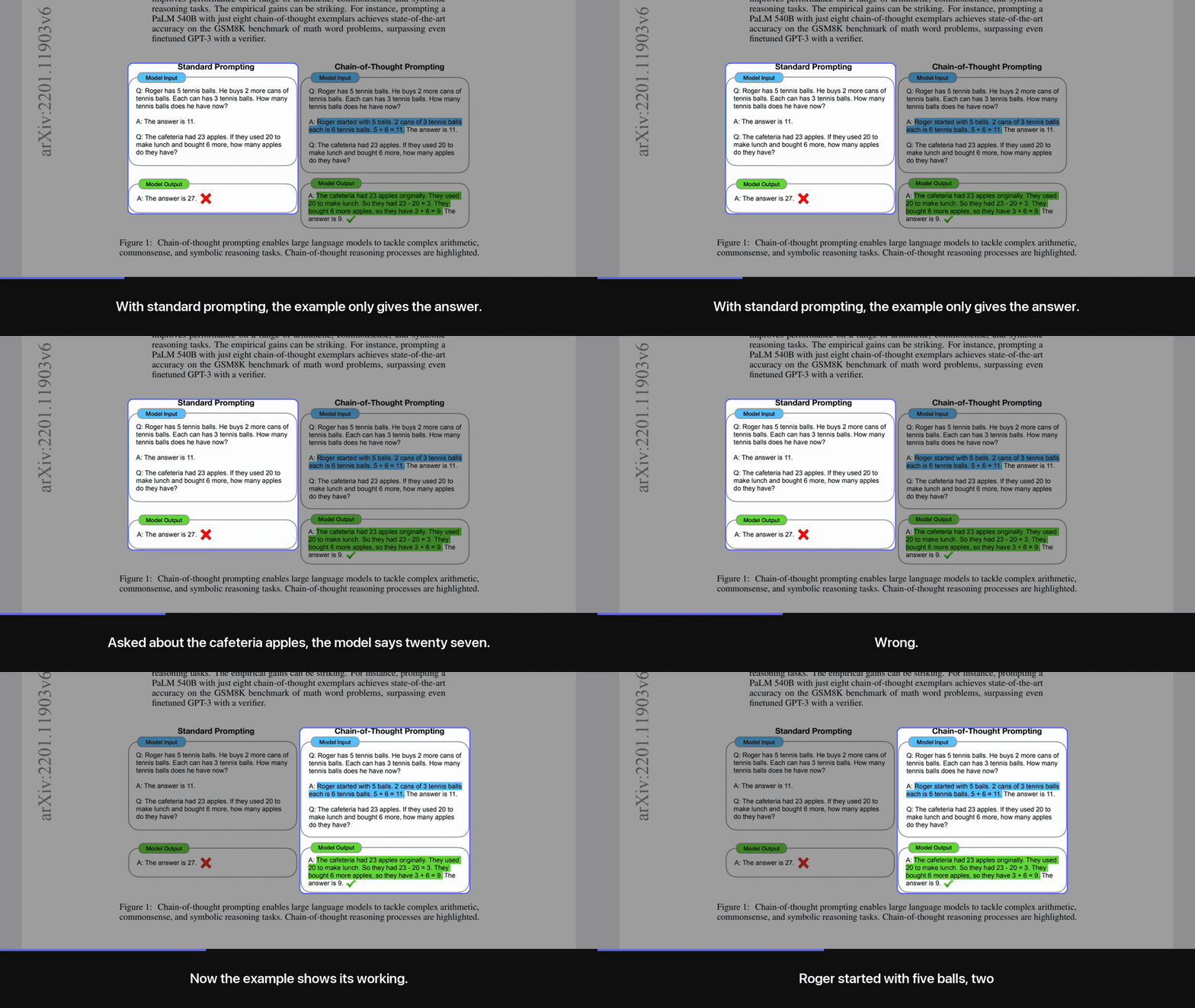
|
+
"version": "0.1.0",
|
|
4
|
+
"description": "Turn any HTML page or PDF into a narrated walkthrough video of itself: real captures, a spotlight camera, a voiceover written only from the page's words, synced captions.",
|
|
5
|
+
"author": { "name": "Karan Bansal" },
|
|
6
|
+
"homepage": "https://github.com/amishah1998/talkthrough",
|
|
7
|
+
"license": "MIT"
|
|
8
|
+
}
|
|
@@ -0,0 +1,25 @@
|
|
|
1
|
+
# Contributing
|
|
2
|
+
|
|
3
|
+
Issues and pull requests are welcome.
|
|
4
|
+
|
|
5
|
+
## Set up
|
|
6
|
+
|
|
7
|
+
```bash
|
|
8
|
+
git clone https://github.com/amishah1998/talkthrough
|
|
9
|
+
cd talkthrough
|
|
10
|
+
python3 -m venv .venv && . .venv/bin/activate
|
|
11
|
+
pip install -e ".[all]"
|
|
12
|
+
talkthrough doctor
|
|
13
|
+
```
|
|
14
|
+
|
|
15
|
+
## Before you open a PR
|
|
16
|
+
|
|
17
|
+
- Render one real video with your change and look at a few frames from it
|
|
18
|
+
(`ffmpeg -ss 10 -i out.mp4 -frames:v 1 frame.png`), including one mid-transition.
|
|
19
|
+
Framing bugs only show up in real frames.
|
|
20
|
+
- If you touch narration rules, keep the one promise: the voice says only what the page says.
|
|
21
|
+
- Keep the code dependency-light. Pillow, websockets and pypdfium2 are the only hard dependencies.
|
|
22
|
+
|
|
23
|
+
## Reporting a bad video
|
|
24
|
+
|
|
25
|
+
Attach the page (or a link to it), the `shots.json`, and a frame that shows the problem.
|
|
@@ -0,0 +1,21 @@
|
|
|
1
|
+
MIT License
|
|
2
|
+
|
|
3
|
+
Copyright (c) 2026 Karan Bansal
|
|
4
|
+
|
|
5
|
+
Permission is hereby granted, free of charge, to any person obtaining a copy
|
|
6
|
+
of this software and associated documentation files (the "Software"), to deal
|
|
7
|
+
in the Software without restriction, including without limitation the rights
|
|
8
|
+
to use, copy, modify, merge, publish, distribute, sublicense, and/or sell
|
|
9
|
+
copies of the Software, and to permit persons to whom the Software is
|
|
10
|
+
furnished to do so, subject to the following conditions:
|
|
11
|
+
|
|
12
|
+
The above copyright notice and this permission notice shall be included in all
|
|
13
|
+
copies or substantial portions of the Software.
|
|
14
|
+
|
|
15
|
+
THE SOFTWARE IS PROVIDED "AS IS", WITHOUT WARRANTY OF ANY KIND, EXPRESS OR
|
|
16
|
+
IMPLIED, INCLUDING BUT NOT LIMITED TO THE WARRANTIES OF MERCHANTABILITY,
|
|
17
|
+
FITNESS FOR A PARTICULAR PURPOSE AND NONINFRINGEMENT. IN NO EVENT SHALL THE
|
|
18
|
+
AUTHORS OR COPYRIGHT HOLDERS BE LIABLE FOR ANY CLAIM, DAMAGES OR OTHER
|
|
19
|
+
LIABILITY, WHETHER IN AN ACTION OF CONTRACT, TORT OR OTHERWISE, ARISING FROM,
|
|
20
|
+
OUT OF OR IN CONNECTION WITH THE SOFTWARE OR THE USE OR OTHER DEALINGS IN THE
|
|
21
|
+
SOFTWARE.
|
|
@@ -0,0 +1,183 @@
|
|
|
1
|
+
Metadata-Version: 2.5
|
|
2
|
+
Name: talkthrough
|
|
3
|
+
Version: 0.1.0
|
|
4
|
+
Summary: Turn any HTML page or PDF into a narrated walkthrough video of itself
|
|
5
|
+
Project-URL: Homepage, https://github.com/amishah1998/talkthrough
|
|
6
|
+
Project-URL: Issues, https://github.com/amishah1998/talkthrough/issues
|
|
7
|
+
Author: Karan Bansal
|
|
8
|
+
License-Expression: MIT
|
|
9
|
+
License-File: LICENSE
|
|
10
|
+
Keywords: claude-code,html,narration,pdf,text-to-speech,video,walkthrough
|
|
11
|
+
Classifier: Environment :: Console
|
|
12
|
+
Classifier: Operating System :: MacOS
|
|
13
|
+
Classifier: Operating System :: POSIX :: Linux
|
|
14
|
+
Classifier: Programming Language :: Python :: 3
|
|
15
|
+
Classifier: Topic :: Multimedia :: Video
|
|
16
|
+
Requires-Python: >=3.10
|
|
17
|
+
Requires-Dist: pillow>=10
|
|
18
|
+
Requires-Dist: pypdfium2>=4.30
|
|
19
|
+
Requires-Dist: websockets>=12
|
|
20
|
+
Provides-Extra: all
|
|
21
|
+
Requires-Dist: anthropic>=0.60; extra == 'all'
|
|
22
|
+
Requires-Dist: kokoro-onnx>=0.4; extra == 'all'
|
|
23
|
+
Requires-Dist: soundfile>=0.12; extra == 'all'
|
|
24
|
+
Provides-Extra: local
|
|
25
|
+
Requires-Dist: kokoro-onnx>=0.4; extra == 'local'
|
|
26
|
+
Requires-Dist: soundfile>=0.12; extra == 'local'
|
|
27
|
+
Provides-Extra: plan
|
|
28
|
+
Requires-Dist: anthropic>=0.60; extra == 'plan'
|
|
29
|
+
Description-Content-Type: text/markdown
|
|
30
|
+
|
|
31
|
+
# talkthrough
|
|
32
|
+
|
|
33
|
+
[](https://github.com/amishah1998/talkthrough/actions/workflows/smoke.yml)
|
|
34
|
+
|
|
35
|
+
**A walkthrough that talks. Any HTML page or PDF becomes a narrated video of itself.**
|
|
36
|
+
|
|
37
|
+
A camera moves over the real page one section at a time, a spotlight shows what is being explained,
|
|
38
|
+
a voice explains it, and captions follow the voice. Nothing on screen is redrawn or restyled: every
|
|
39
|
+
frame is a real crop of your page, so the diagram in the video is the diagram in the document.
|
|
40
|
+
|
|
41
|
+
|
|
42
|
+
|
|
43
|
+
*The Chain-of-Thought Prompting paper ([Wei et al. 2022](https://arxiv.org/abs/2201.11903), CC BY 4.0).
|
|
44
|
+
The full 58-second walkthrough, with sound and the free local voice:*
|
|
45
|
+
|
|
46
|
+
https://github.com/user-attachments/assets/bbc0805c-d711-4213-aeb9-a08ec82a8158
|
|
47
|
+
|
|
48
|
+
The narration is written by Claude from the page's own text, under one rule: add nothing the page
|
|
49
|
+
does not say. That keeps the numbers right far more often than a fresh script would, but it is a model
|
|
50
|
+
writing text, not a guarantee. Read the shot list or the preview sheet before you share a video about
|
|
51
|
+
numbers that matter.
|
|
52
|
+
|
|
53
|
+
Use it for the report nobody will open, the recap your students watch on the bus, or the docs page
|
|
54
|
+
you want to post as a 90-second clip.
|
|
55
|
+
|
|
56
|
+
## Quickstart
|
|
57
|
+
|
|
58
|
+
### In Claude Code (recommended)
|
|
59
|
+
|
|
60
|
+
```
|
|
61
|
+
/plugin marketplace add amishah1998/talkthrough
|
|
62
|
+
/plugin install talkthrough@talkthrough
|
|
63
|
+
```
|
|
64
|
+
|
|
65
|
+
Then ask: "make a walkthrough video of report.pdf". Claude reads the page, decides what to focus on,
|
|
66
|
+
writes the shot list, checks the framing on a preview sheet, and renders with the free local voice.
|
|
67
|
+
No API key needed; the agent does the planning.
|
|
68
|
+
|
|
69
|
+
The skill in `skills/talkthrough/` follows the Agent Skills format, so other agents that read
|
|
70
|
+
skills can use the same folder.
|
|
71
|
+
|
|
72
|
+
### From the command line
|
|
73
|
+
|
|
74
|
+
You write the shot list, the tool does the rest. No API key, and this is the path the test suite runs
|
|
75
|
+
on Linux:
|
|
76
|
+
|
|
77
|
+
```bash
|
|
78
|
+
pip install "talkthrough[local] @ git+https://github.com/amishah1998/talkthrough"
|
|
79
|
+
talkthrough doctor # checks browser, ffmpeg and a voice
|
|
80
|
+
talkthrough capture report.pdf --out work/ # page image and a numbered list of sections
|
|
81
|
+
# write work/shots.json (format below), then:
|
|
82
|
+
talkthrough preview work/ && talkthrough render work/ --out report.mp4 --open
|
|
83
|
+
```
|
|
84
|
+
|
|
85
|
+
The `plan` and `make` commands are untested as of this release; the capture, hand-written
|
|
86
|
+
shots.json, preview and render path is verified. `talkthrough make report.pdf` does it all in one go,
|
|
87
|
+
with Claude choosing the sections through the API, and needs `ANTHROPIC_API_KEY` plus
|
|
88
|
+
`pip install "talkthrough[all] @ git+https://github.com/amishah1998/talkthrough"`.
|
|
89
|
+
|
|
90
|
+
## How it works
|
|
91
|
+
|
|
92
|
+
```
|
|
93
|
+
page.html / report.pdf
|
|
94
|
+
│ capture headless browser (HTML) or pdfium (PDF): one tall image + a list of sections
|
|
95
|
+
▼
|
|
96
|
+
page.png + boxes.json
|
|
97
|
+
│ plan an agent or Claude picks the sections that matter and writes what to say
|
|
98
|
+
▼
|
|
99
|
+
shots.json
|
|
100
|
+
│ preview one spotlighted frame per shot, to check framing before rendering
|
|
101
|
+
│ render voice per shot, eased camera moves, spotlight, captions, H.264 + AAC
|
|
102
|
+
▼
|
|
103
|
+
walkthrough.mp4 (portrait 1080x1920 by default; landscape and square too)
|
|
104
|
+
```
|
|
105
|
+
|
|
106
|
+
Step by step, with a shot list you write or edit yourself:
|
|
107
|
+
|
|
108
|
+
```bash
|
|
109
|
+
talkthrough capture recap.html --out work/
|
|
110
|
+
talkthrough plan work/ --seconds 90 --note "focus on the pricing table" # or write work/shots.json by hand
|
|
111
|
+
talkthrough preview work/
|
|
112
|
+
talkthrough render work/ --out recap.mp4
|
|
113
|
+
```
|
|
114
|
+
|
|
115
|
+
A shot list looks like this:
|
|
116
|
+
|
|
117
|
+
```json
|
|
118
|
+
{
|
|
119
|
+
"format": "portrait",
|
|
120
|
+
"tts": "auto",
|
|
121
|
+
"shots": [
|
|
122
|
+
{"boxes": ["b0"], "say": "Here is the whole report in ninety seconds. Three findings, one decision."},
|
|
123
|
+
{"rect": [95, 828, 470, 440], "move": "hold", "say": "This chart is the one to remember: costs fell while usage doubled."}
|
|
124
|
+
]
|
|
125
|
+
}
|
|
126
|
+
```
|
|
127
|
+
|
|
128
|
+
### Title card, end card, file size
|
|
129
|
+
|
|
130
|
+
Every video opens on a short title card (the page title and the running time) and closes on an end
|
|
131
|
+
card: "Read the full page", the page's link, and a small "made with talkthrough" line. In the
|
|
132
|
+
shot list, `"title"` and `"link"` override what is shown (set `"link"` to the public URL when you
|
|
133
|
+
render a local file), and `"intro": false`, `"outro": false` or `"credit": false` turn parts off.
|
|
134
|
+
|
|
135
|
+
`--speed 1.25` (or `"speed": 1.25`) makes the voice itself talk faster, with natural pitch; the camera
|
|
136
|
+
and captions follow because they are timed from the audio. Useful for readers who would otherwise
|
|
137
|
+
watch at 1.5x.
|
|
138
|
+
|
|
139
|
+
`render --share` (or `"quality": "share"`) encodes for chat apps at about half the size of the
|
|
140
|
+
default, with no visible loss on text. Audio is loudness-normalised in both modes, so every voice
|
|
141
|
+
comes out at the same level.
|
|
142
|
+
|
|
143
|
+
## Voices
|
|
144
|
+
|
|
145
|
+
It picks the first one available, in this order, or you choose with `"tts"` in the shot list or `--tts`:
|
|
146
|
+
|
|
147
|
+
| Voice | Setup | Captions | Cost | Notes |
|
|
148
|
+
|---|---|---|---|---|
|
|
149
|
+
| **Cartesia Sonic 3.6** | `CARTESIA_API_KEY` | exact word timings | about $0.25 per 1,000 words | #1 on the [Artificial Analysis TTS leaderboard](https://artificialanalysis.ai/text-to-speech/leaderboard) when this was written |
|
|
150
|
+
| **ElevenLabs** | `ELEVENLABS_API_KEY` | exact word timings | about $0.30 to $0.60 per 1,000 words | Large voice library |
|
|
151
|
+
| **OpenAI gpt-4o-mini-tts** | `OPENAI_API_KEY` | per sentence | cents per video | Tone and pace steerable with `"instructions"` |
|
|
152
|
+
| **Kokoro** (local, free) | `pip install "talkthrough[local] @ git+https://github.com/amishah1998/talkthrough"` | per sentence | free | Apache-2.0 weights, runs on CPU on macOS, Linux and Windows; one-time ~350 MB download |
|
|
153
|
+
| **macOS `say`** | nothing | per sentence | free | Zero setup on a Mac; clearly synthetic |
|
|
154
|
+
|
|
155
|
+
"Per sentence" means each sentence is voiced on its own and measured, so captions change exactly on
|
|
156
|
+
sentence boundaries; words inside a sentence are spread by length.
|
|
157
|
+
|
|
158
|
+
## Requirements
|
|
159
|
+
|
|
160
|
+
| For | Needs | Notes |
|
|
161
|
+
|---|---|---|
|
|
162
|
+
| Everything | Python 3.10+ and ffmpeg | Pillow, websockets and pypdfium2 install with the package |
|
|
163
|
+
| HTML pages | Chrome, Chromium or Edge | Found automatically; or set `CHROME=/path/to/browser` |
|
|
164
|
+
| PDFs | nothing extra | Rendered with pdfium; sections come from the page's white space, not its text layer |
|
|
165
|
+
| A voice | one of the options above | `talkthrough doctor` shows what it found |
|
|
166
|
+
| Auto-planning | `anthropic` and `ANTHROPIC_API_KEY` | Not needed when an agent writes the shot list |
|
|
167
|
+
|
|
168
|
+
## Limits
|
|
169
|
+
|
|
170
|
+
- Tested on macOS by hand and on Ubuntu (Python 3.10 and 3.12) by the smoke test on every push:
|
|
171
|
+
an HTML page and a PDF rendered with the Kokoro voice. Windows support is written but untested.
|
|
172
|
+
- The Cartesia, ElevenLabs and OpenAI voices and the `plan` and `make` commands have not been run
|
|
173
|
+
end to end yet. The local Kokoro voice has.
|
|
174
|
+
- Section detection splits on white space, so a figure with tightly packed panels can come out as
|
|
175
|
+
one section. Frame part of it with a `rect`; the outline snaps to the content you meant.
|
|
176
|
+
- Pages behind a login or that build slowly can capture half-loaded. Capture a saved copy or a PDF.
|
|
177
|
+
- Narration works best in English or Hinglish in Roman letters. Pages in any language capture fine,
|
|
178
|
+
and Hindi in a caption gets a Devanagari font, but the voices are tuned for English and correctly
|
|
179
|
+
joined Hindi letters need libraqm installed.
|
|
180
|
+
|
|
181
|
+
## Licence
|
|
182
|
+
|
|
183
|
+
[MIT](LICENSE)
|
|
@@ -0,0 +1,153 @@
|
|
|
1
|
+
# talkthrough
|
|
2
|
+
|
|
3
|
+
[](https://github.com/amishah1998/talkthrough/actions/workflows/smoke.yml)
|
|
4
|
+
|
|
5
|
+
**A walkthrough that talks. Any HTML page or PDF becomes a narrated video of itself.**
|
|
6
|
+
|
|
7
|
+
A camera moves over the real page one section at a time, a spotlight shows what is being explained,
|
|
8
|
+
a voice explains it, and captions follow the voice. Nothing on screen is redrawn or restyled: every
|
|
9
|
+
frame is a real crop of your page, so the diagram in the video is the diagram in the document.
|
|
10
|
+
|
|
11
|
+

|
|
12
|
+
|
|
13
|
+
*The Chain-of-Thought Prompting paper ([Wei et al. 2022](https://arxiv.org/abs/2201.11903), CC BY 4.0).
|
|
14
|
+
The full 58-second walkthrough, with sound and the free local voice:*
|
|
15
|
+
|
|
16
|
+
https://github.com/user-attachments/assets/bbc0805c-d711-4213-aeb9-a08ec82a8158
|
|
17
|
+
|
|
18
|
+
The narration is written by Claude from the page's own text, under one rule: add nothing the page
|
|
19
|
+
does not say. That keeps the numbers right far more often than a fresh script would, but it is a model
|
|
20
|
+
writing text, not a guarantee. Read the shot list or the preview sheet before you share a video about
|
|
21
|
+
numbers that matter.
|
|
22
|
+
|
|
23
|
+
Use it for the report nobody will open, the recap your students watch on the bus, or the docs page
|
|
24
|
+
you want to post as a 90-second clip.
|
|
25
|
+
|
|
26
|
+
## Quickstart
|
|
27
|
+
|
|
28
|
+
### In Claude Code (recommended)
|
|
29
|
+
|
|
30
|
+
```
|
|
31
|
+
/plugin marketplace add amishah1998/talkthrough
|
|
32
|
+
/plugin install talkthrough@talkthrough
|
|
33
|
+
```
|
|
34
|
+
|
|
35
|
+
Then ask: "make a walkthrough video of report.pdf". Claude reads the page, decides what to focus on,
|
|
36
|
+
writes the shot list, checks the framing on a preview sheet, and renders with the free local voice.
|
|
37
|
+
No API key needed; the agent does the planning.
|
|
38
|
+
|
|
39
|
+
The skill in `skills/talkthrough/` follows the Agent Skills format, so other agents that read
|
|
40
|
+
skills can use the same folder.
|
|
41
|
+
|
|
42
|
+
### From the command line
|
|
43
|
+
|
|
44
|
+
You write the shot list, the tool does the rest. No API key, and this is the path the test suite runs
|
|
45
|
+
on Linux:
|
|
46
|
+
|
|
47
|
+
```bash
|
|
48
|
+
pip install "talkthrough[local] @ git+https://github.com/amishah1998/talkthrough"
|
|
49
|
+
talkthrough doctor # checks browser, ffmpeg and a voice
|
|
50
|
+
talkthrough capture report.pdf --out work/ # page image and a numbered list of sections
|
|
51
|
+
# write work/shots.json (format below), then:
|
|
52
|
+
talkthrough preview work/ && talkthrough render work/ --out report.mp4 --open
|
|
53
|
+
```
|
|
54
|
+
|
|
55
|
+
The `plan` and `make` commands are untested as of this release; the capture, hand-written
|
|
56
|
+
shots.json, preview and render path is verified. `talkthrough make report.pdf` does it all in one go,
|
|
57
|
+
with Claude choosing the sections through the API, and needs `ANTHROPIC_API_KEY` plus
|
|
58
|
+
`pip install "talkthrough[all] @ git+https://github.com/amishah1998/talkthrough"`.
|
|
59
|
+
|
|
60
|
+
## How it works
|
|
61
|
+
|
|
62
|
+
```
|
|
63
|
+
page.html / report.pdf
|
|
64
|
+
│ capture headless browser (HTML) or pdfium (PDF): one tall image + a list of sections
|
|
65
|
+
▼
|
|
66
|
+
page.png + boxes.json
|
|
67
|
+
│ plan an agent or Claude picks the sections that matter and writes what to say
|
|
68
|
+
▼
|
|
69
|
+
shots.json
|
|
70
|
+
│ preview one spotlighted frame per shot, to check framing before rendering
|
|
71
|
+
│ render voice per shot, eased camera moves, spotlight, captions, H.264 + AAC
|
|
72
|
+
▼
|
|
73
|
+
walkthrough.mp4 (portrait 1080x1920 by default; landscape and square too)
|
|
74
|
+
```
|
|
75
|
+
|
|
76
|
+
Step by step, with a shot list you write or edit yourself:
|
|
77
|
+
|
|
78
|
+
```bash
|
|
79
|
+
talkthrough capture recap.html --out work/
|
|
80
|
+
talkthrough plan work/ --seconds 90 --note "focus on the pricing table" # or write work/shots.json by hand
|
|
81
|
+
talkthrough preview work/
|
|
82
|
+
talkthrough render work/ --out recap.mp4
|
|
83
|
+
```
|
|
84
|
+
|
|
85
|
+
A shot list looks like this:
|
|
86
|
+
|
|
87
|
+
```json
|
|
88
|
+
{
|
|
89
|
+
"format": "portrait",
|
|
90
|
+
"tts": "auto",
|
|
91
|
+
"shots": [
|
|
92
|
+
{"boxes": ["b0"], "say": "Here is the whole report in ninety seconds. Three findings, one decision."},
|
|
93
|
+
{"rect": [95, 828, 470, 440], "move": "hold", "say": "This chart is the one to remember: costs fell while usage doubled."}
|
|
94
|
+
]
|
|
95
|
+
}
|
|
96
|
+
```
|
|
97
|
+
|
|
98
|
+
### Title card, end card, file size
|
|
99
|
+
|
|
100
|
+
Every video opens on a short title card (the page title and the running time) and closes on an end
|
|
101
|
+
card: "Read the full page", the page's link, and a small "made with talkthrough" line. In the
|
|
102
|
+
shot list, `"title"` and `"link"` override what is shown (set `"link"` to the public URL when you
|
|
103
|
+
render a local file), and `"intro": false`, `"outro": false` or `"credit": false` turn parts off.
|
|
104
|
+
|
|
105
|
+
`--speed 1.25` (or `"speed": 1.25`) makes the voice itself talk faster, with natural pitch; the camera
|
|
106
|
+
and captions follow because they are timed from the audio. Useful for readers who would otherwise
|
|
107
|
+
watch at 1.5x.
|
|
108
|
+
|
|
109
|
+
`render --share` (or `"quality": "share"`) encodes for chat apps at about half the size of the
|
|
110
|
+
default, with no visible loss on text. Audio is loudness-normalised in both modes, so every voice
|
|
111
|
+
comes out at the same level.
|
|
112
|
+
|
|
113
|
+
## Voices
|
|
114
|
+
|
|
115
|
+
It picks the first one available, in this order, or you choose with `"tts"` in the shot list or `--tts`:
|
|
116
|
+
|
|
117
|
+
| Voice | Setup | Captions | Cost | Notes |
|
|
118
|
+
|---|---|---|---|---|
|
|
119
|
+
| **Cartesia Sonic 3.6** | `CARTESIA_API_KEY` | exact word timings | about $0.25 per 1,000 words | #1 on the [Artificial Analysis TTS leaderboard](https://artificialanalysis.ai/text-to-speech/leaderboard) when this was written |
|
|
120
|
+
| **ElevenLabs** | `ELEVENLABS_API_KEY` | exact word timings | about $0.30 to $0.60 per 1,000 words | Large voice library |
|
|
121
|
+
| **OpenAI gpt-4o-mini-tts** | `OPENAI_API_KEY` | per sentence | cents per video | Tone and pace steerable with `"instructions"` |
|
|
122
|
+
| **Kokoro** (local, free) | `pip install "talkthrough[local] @ git+https://github.com/amishah1998/talkthrough"` | per sentence | free | Apache-2.0 weights, runs on CPU on macOS, Linux and Windows; one-time ~350 MB download |
|
|
123
|
+
| **macOS `say`** | nothing | per sentence | free | Zero setup on a Mac; clearly synthetic |
|
|
124
|
+
|
|
125
|
+
"Per sentence" means each sentence is voiced on its own and measured, so captions change exactly on
|
|
126
|
+
sentence boundaries; words inside a sentence are spread by length.
|
|
127
|
+
|
|
128
|
+
## Requirements
|
|
129
|
+
|
|
130
|
+
| For | Needs | Notes |
|
|
131
|
+
|---|---|---|
|
|
132
|
+
| Everything | Python 3.10+ and ffmpeg | Pillow, websockets and pypdfium2 install with the package |
|
|
133
|
+
| HTML pages | Chrome, Chromium or Edge | Found automatically; or set `CHROME=/path/to/browser` |
|
|
134
|
+
| PDFs | nothing extra | Rendered with pdfium; sections come from the page's white space, not its text layer |
|
|
135
|
+
| A voice | one of the options above | `talkthrough doctor` shows what it found |
|
|
136
|
+
| Auto-planning | `anthropic` and `ANTHROPIC_API_KEY` | Not needed when an agent writes the shot list |
|
|
137
|
+
|
|
138
|
+
## Limits
|
|
139
|
+
|
|
140
|
+
- Tested on macOS by hand and on Ubuntu (Python 3.10 and 3.12) by the smoke test on every push:
|
|
141
|
+
an HTML page and a PDF rendered with the Kokoro voice. Windows support is written but untested.
|
|
142
|
+
- The Cartesia, ElevenLabs and OpenAI voices and the `plan` and `make` commands have not been run
|
|
143
|
+
end to end yet. The local Kokoro voice has.
|
|
144
|
+
- Section detection splits on white space, so a figure with tightly packed panels can come out as
|
|
145
|
+
one section. Frame part of it with a `rect`; the outline snaps to the content you meant.
|
|
146
|
+
- Pages behind a login or that build slowly can capture half-loaded. Capture a saved copy or a PDF.
|
|
147
|
+
- Narration works best in English or Hinglish in Roman letters. Pages in any language capture fine,
|
|
148
|
+
and Hindi in a caption gets a Devanagari font, but the voices are tuned for English and correctly
|
|
149
|
+
joined Hindi letters need libraqm installed.
|
|
150
|
+
|
|
151
|
+
## Licence
|
|
152
|
+
|
|
153
|
+
[MIT](LICENSE)
|
|
@@ -0,0 +1,7 @@
|
|
|
1
|
+
# Security
|
|
2
|
+
|
|
3
|
+
Please report security issues privately to karan@karanbansal.in rather than in a public issue.
|
|
4
|
+
|
|
5
|
+
talkthrough runs a local headless browser against the page you give it and, when a cloud
|
|
6
|
+
voice or the `plan` command is used, sends the page text and images to that provider. Do not point
|
|
7
|
+
it at pages you are not allowed to share with those providers.
|
|
@@ -0,0 +1,40 @@
|
|
|
1
|
+
[project]
|
|
2
|
+
name = "talkthrough"
|
|
3
|
+
version = "0.1.0"
|
|
4
|
+
description = "Turn any HTML page or PDF into a narrated walkthrough video of itself"
|
|
5
|
+
readme = "README.md"
|
|
6
|
+
requires-python = ">=3.10"
|
|
7
|
+
license = "MIT"
|
|
8
|
+
authors = [{ name = "Karan Bansal" }]
|
|
9
|
+
keywords = ["pdf", "html", "video", "walkthrough", "narration", "text-to-speech", "claude-code"]
|
|
10
|
+
classifiers = [
|
|
11
|
+
"Programming Language :: Python :: 3",
|
|
12
|
+
"Operating System :: MacOS",
|
|
13
|
+
"Operating System :: POSIX :: Linux",
|
|
14
|
+
"Topic :: Multimedia :: Video",
|
|
15
|
+
"Environment :: Console",
|
|
16
|
+
]
|
|
17
|
+
dependencies = [
|
|
18
|
+
"pillow>=10",
|
|
19
|
+
"websockets>=12",
|
|
20
|
+
"pypdfium2>=4.30",
|
|
21
|
+
]
|
|
22
|
+
|
|
23
|
+
[project.optional-dependencies]
|
|
24
|
+
plan = ["anthropic>=0.60"]
|
|
25
|
+
local = ["kokoro-onnx>=0.4", "soundfile>=0.12"]
|
|
26
|
+
all = ["anthropic>=0.60", "kokoro-onnx>=0.4", "soundfile>=0.12"]
|
|
27
|
+
|
|
28
|
+
[project.scripts]
|
|
29
|
+
talkthrough = "talkthrough.cli:main"
|
|
30
|
+
|
|
31
|
+
[project.urls]
|
|
32
|
+
Homepage = "https://github.com/amishah1998/talkthrough"
|
|
33
|
+
Issues = "https://github.com/amishah1998/talkthrough/issues"
|
|
34
|
+
|
|
35
|
+
[tool.hatch.build.targets.sdist]
|
|
36
|
+
exclude = ["docs", "tests", ".github"]
|
|
37
|
+
|
|
38
|
+
[build-system]
|
|
39
|
+
requires = ["hatchling"]
|
|
40
|
+
build-backend = "hatchling.build"
|
|
@@ -0,0 +1,117 @@
|
|
|
1
|
+
---
|
|
2
|
+
name: talkthrough
|
|
3
|
+
description: Turn an existing HTML page or PDF (a report, recap, cheat sheet, slide deck, docs page) into a narrated walkthrough video of the page itself, like an automatic screen-share. It captures the real page, moves a camera over one section at a time with a spotlight, adds a voiceover written only from the page's own words, and burns in captions synced to the voice. Nothing is redrawn or invented. Use when the user says "make a video of this page", "walkthrough video", "turn this HTML/PDF into a video", "narrate this report", "screen-share video of this", "video version of this doc", "/talkthrough". Not for motion graphics designed from scratch, and not for screen recordings of an app in use.
|
|
4
|
+
---
|
|
5
|
+
|
|
6
|
+
# talkthrough
|
|
7
|
+
|
|
8
|
+
The video shows the page the reader already has, section by section, with a voice explaining it.
|
|
9
|
+
The promise is fidelity: every frame is a real crop of the real page, and every sentence of
|
|
10
|
+
narration is something the page says. That is what makes it safe for reports, recaps and anything
|
|
11
|
+
with numbers in it.
|
|
12
|
+
|
|
13
|
+
The `talkthrough` CLI does the mechanics. Your job is the part that needs judgement: deciding
|
|
14
|
+
what on the page matters, and writing what the voice says over each part.
|
|
15
|
+
|
|
16
|
+
## Setup
|
|
17
|
+
|
|
18
|
+
Run `talkthrough doctor`. If the command is missing, run every command through
|
|
19
|
+
`uvx --from "talkthrough[local] @ git+https://github.com/amishah1998/talkthrough" talkthrough ...`
|
|
20
|
+
(the `[local]` part brings the free Kokoro voice; without it only macOS `say` is available), or install it
|
|
21
|
+
with `pip install "talkthrough[local] @ git+https://github.com/amishah1998/talkthrough"`. It needs a Chromium browser
|
|
22
|
+
(Chrome, Chromium or Edge) and ffmpeg. For the voice it uses, in order: Cartesia if
|
|
23
|
+
`CARTESIA_API_KEY` is set, ElevenLabs if `ELEVENLABS_API_KEY` is set, OpenAI if `OPENAI_API_KEY` is
|
|
24
|
+
set, the free local Kokoro voice if installed (`pip install "talkthrough[local] @ git+https://github.com/amishah1998/talkthrough"`), then macOS
|
|
25
|
+
`say`. If none is available, suggest the local voice.
|
|
26
|
+
|
|
27
|
+
## Workflow
|
|
28
|
+
|
|
29
|
+
Use a fresh work folder per video, e.g. `./walkthrough-work/<name>`.
|
|
30
|
+
|
|
31
|
+
1. **Capture.** `talkthrough capture PAGE --out DIR`
|
|
32
|
+
PAGE is an .html file, a URL or a .pdf. It writes `page.png` (the whole page, or every PDF page
|
|
33
|
+
stacked), `boxes.json` (each section with an id, its rect in css px, and a text excerpt),
|
|
34
|
+
`page.txt` and `page.json`. HTML sections come from the DOM; PDF sections come from the white
|
|
35
|
+
space between blocks, so scanned PDFs work too.
|
|
36
|
+
|
|
37
|
+
2. **Decide what matters.** Read `page.txt` in full. Look at `page.png` in slices if the layout is
|
|
38
|
+
not obvious from the text. Pick the sections a busy reader most needs, following the page's own
|
|
39
|
+
signals: its title and opening promise, anything it calls key or essential, the central diagram
|
|
40
|
+
or table, the decisions, the takeaways, the closing call to action. Skip what is meant to be
|
|
41
|
+
looked up rather than heard: long reference tables, appendices, source lists, boilerplate.
|
|
42
|
+
If the user said what to focus on, that wins.
|
|
43
|
+
|
|
44
|
+
3. **Write `DIR/shots.json`.**
|
|
45
|
+
|
|
46
|
+
```json
|
|
47
|
+
{
|
|
48
|
+
"format": "portrait",
|
|
49
|
+
"tts": "auto",
|
|
50
|
+
"shots": [
|
|
51
|
+
{"boxes": ["b0"], "say": "The page's hook, in one or two sentences."},
|
|
52
|
+
{"boxes": ["b41", "b42"], "say": "One idea, framed by two boxes together."},
|
|
53
|
+
{"rect": [95, 828, 470, 440], "move": "hold", "say": "Part of a wide diagram, in css px."}
|
|
54
|
+
]
|
|
55
|
+
}
|
|
56
|
+
```
|
|
57
|
+
|
|
58
|
+
- `format`: `portrait` 1080x1920 (default, for phones), `landscape` 1920x1080, `square` 1080x1080.
|
|
59
|
+
A single-column page reads best in portrait.
|
|
60
|
+
- `boxes` frames the union of those boxes; `rect` frames a hand-picked region instead. The camera
|
|
61
|
+
will not zoom past about 1.15x the capture's pixel density, so text stays sharp. Split a wide
|
|
62
|
+
diagram into two or three `rect` shots so a phone can read it.
|
|
63
|
+
- `move`: `auto` (default) pans down a tall region and slowly pushes in on the rest; `pan`,
|
|
64
|
+
`zoom` and `hold` force one.
|
|
65
|
+
- `spotlight` (default on) dims everything outside the framed region and outlines it, so the
|
|
66
|
+
viewer knows what the voice is talking about. Set `false` per shot or at the top level.
|
|
67
|
+
- The outline snaps to the content inside `boxes` or `rect`: it shrinks to the ink, drops a thin
|
|
68
|
+
edge strip the rect cut through (half a caption, a sliver of the next panel), and pads each side
|
|
69
|
+
by up to `pad` (24 css px) or halfway to the nearest neighbour. A rough `rect` is fine. Set
|
|
70
|
+
`"snap": false` on a shot to outline the exact rect instead.
|
|
71
|
+
- `tts`: `auto`, `cartesia`, `elevenlabs`, `openai`, `kokoro` or `say`. With a named backend you may also set
|
|
72
|
+
`voice`, `model` (cloud), `instructions` (OpenAI) or `rate` (say).
|
|
73
|
+
|
|
74
|
+
- `speed`: voice pace for every backend, e.g. 1.25. Use it when the user wants a faster watch.
|
|
75
|
+
- `title` / `link`: what the opening and closing cards show. Defaults are the page title and its
|
|
76
|
+
URL; for a local file, ask the user for the public URL and set `link` to it. `intro`, `outro`
|
|
77
|
+
and `credit` set to `false` turn those parts off.
|
|
78
|
+
|
|
79
|
+
If the user has no agent handy, `talkthrough plan DIR --seconds 90` asks Claude to write this
|
|
80
|
+
file (needs `pip install "talkthrough[plan] @ git+https://github.com/amishah1998/talkthrough"` and `ANTHROPIC_API_KEY`).
|
|
81
|
+
|
|
82
|
+
4. **Preview before rendering.** `talkthrough preview DIR` writes `DIR/preview.png`, one
|
|
83
|
+
spotlighted frame per shot, and prints the expected length. Look at it. Each shot must frame what
|
|
84
|
+
its narration talks about, with no key text cut at the edge. Fix `shots.json` and preview again.
|
|
85
|
+
|
|
86
|
+
5. **Render.** `talkthrough render DIR --out NAME.mp4` (add `--share` when the video is going to
|
|
87
|
+
WhatsApp, Slack or similar: about half the size). It voices each shot, moves the camera
|
|
88
|
+
with eased travel between shots, draws captions (synced to the voice's word timings when the
|
|
89
|
+
backend gives them), adds a progress line, and encodes H.264 + AAC at 30 fps. Expect roughly
|
|
90
|
+
real-time rendering: a 90-second video takes about 90 seconds on a laptop.
|
|
91
|
+
|
|
92
|
+
6. **Check the real video.** Pull a few frames with `ffmpeg -ss T -i NAME.mp4 -frames:v 1 f.png`,
|
|
93
|
+
including one mid-transition and one on the densest shot, and look at them before handing over.
|
|
94
|
+
|
|
95
|
+
## Writing the narration
|
|
96
|
+
|
|
97
|
+
- **Only what the page says.** Paraphrase for the ear, but add no fact, number, name, claim or
|
|
98
|
+
example that is not on the page. If the page hedges, the voice hedges. An invented line breaks the
|
|
99
|
+
one promise this format makes.
|
|
100
|
+
- **60 to 120 seconds**, about 150 to 300 words. Each shot 1 to 3 short sentences, 12 to 45 words.
|
|
101
|
+
More shots with less text beat a few long monologues.
|
|
102
|
+
- **Page order, with a spine.** Open on the hook, walk the sections that matter, close on the
|
|
103
|
+
page's own takeaway or next step.
|
|
104
|
+
- **Point at what is on screen.** "This diagram", "the bad one on the left", "step three".
|
|
105
|
+
- **Write for a voice.** Spell out symbols it would stumble on ("server dot py"), drop code syntax
|
|
106
|
+
and parentheses, and use plain punctuation.
|
|
107
|
+
|
|
108
|
+
## Gotchas
|
|
109
|
+
|
|
110
|
+
- **Box ids are positional.** Re-capturing after the page changes can shift every id; write
|
|
111
|
+
`shots.json` against the capture you render from.
|
|
112
|
+
- **A frame is usually taller than the section it shows.** The spotlight handles that; do not
|
|
113
|
+
shrink `rect` below the zoom limit to crop neighbours away.
|
|
114
|
+
- **Pages that need a login or build their content slowly** may capture half-loaded. Capture a saved
|
|
115
|
+
copy or the PDF instead.
|
|
116
|
+
- **Captions** use exact word timings from Cartesia and ElevenLabs. Other voices speak one sentence
|
|
117
|
+
at a time, so captions change exactly on sentence boundaries.
|
|
@@ -0,0 +1 @@
|
|
|
1
|
+
__version__ = "0.1.0"
|