strava-activity-mcp-server 0.2.2__tar.gz → 0.2.4__tar.gz
This diff represents the content of publicly available package versions that have been released to one of the supported registries. The information contained in this diff is provided for informational purposes only and reflects changes between package versions as they appear in their respective public registries.
Potentially problematic release.
This version of strava-activity-mcp-server might be problematic. Click here for more details.
- {strava_activity_mcp_server-0.2.2 → strava_activity_mcp_server-0.2.4}/.python-version +1 -1
- {strava_activity_mcp_server-0.2.2 → strava_activity_mcp_server-0.2.4}/PKG-INFO +40 -13
- {strava_activity_mcp_server-0.2.2 → strava_activity_mcp_server-0.2.4}/README.md +38 -11
- {strava_activity_mcp_server-0.2.2 → strava_activity_mcp_server-0.2.4}/pyproject.toml +21 -21
- strava_activity_mcp_server-0.2.4/ref/prompts.md +231 -0
- {strava_activity_mcp_server-0.2.2 → strava_activity_mcp_server-0.2.4}/src/strava_activity_mcp_server/__init__.py +3 -3
- {strava_activity_mcp_server-0.2.2 → strava_activity_mcp_server-0.2.4}/src/strava_activity_mcp_server/strava_activity_mcp_server.py +129 -7
- {strava_activity_mcp_server-0.2.2 → strava_activity_mcp_server-0.2.4}/uv.lock +2 -2
- {strava_activity_mcp_server-0.2.2 → strava_activity_mcp_server-0.2.4}/.github/workflows/python-publish.yml +0 -0
- {strava_activity_mcp_server-0.2.2 → strava_activity_mcp_server-0.2.4}/.gitignore +0 -0
- {strava_activity_mcp_server-0.2.2 → strava_activity_mcp_server-0.2.4}/.vscode/settings.json +0 -0
- {strava_activity_mcp_server-0.2.2 → strava_activity_mcp_server-0.2.4}/LICENSE +0 -0
- {strava_activity_mcp_server-0.2.2 → strava_activity_mcp_server-0.2.4}/ref/auth.jpg +0 -0
- {strava_activity_mcp_server-0.2.2 → strava_activity_mcp_server-0.2.4}/ref/chat_1.jpg +0 -0
- {strava_activity_mcp_server-0.2.2 → strava_activity_mcp_server-0.2.4}/ref/chat_2.jpg +0 -0
- {strava_activity_mcp_server-0.2.2 → strava_activity_mcp_server-0.2.4}/ref/chat_3.jpg +0 -0
- {strava_activity_mcp_server-0.2.2 → strava_activity_mcp_server-0.2.4}/ref/chat_4.jpg +0 -0
- {strava_activity_mcp_server-0.2.2 → strava_activity_mcp_server-0.2.4}/ref/code.jpg +0 -0
- {strava_activity_mcp_server-0.2.2 → strava_activity_mcp_server-0.2.4}/ref/image.jpg +0 -0
- {strava_activity_mcp_server-0.2.2 → strava_activity_mcp_server-0.2.4}/ref/mcp_pypi_example.md +0 -0
- {strava_activity_mcp_server-0.2.2 → strava_activity_mcp_server-0.2.4}/requirements.txt +0 -0
- {strava_activity_mcp_server-0.2.2 → strava_activity_mcp_server-0.2.4}/src/strava_activity_mcp_server/__main__.py +0 -0
|
@@ -1 +1 @@
|
|
|
1
|
-
3.13
|
|
1
|
+
3.13
|
|
@@ -1,7 +1,7 @@
|
|
|
1
1
|
Metadata-Version: 2.4
|
|
2
2
|
Name: strava-activity-mcp-server
|
|
3
|
-
Version: 0.2.
|
|
4
|
-
Summary:
|
|
3
|
+
Version: 0.2.4
|
|
4
|
+
Summary: Strava MCP server: one-time browser auth, then automatic refresh-token login
|
|
5
5
|
License-File: LICENSE
|
|
6
6
|
Requires-Python: >=3.10
|
|
7
7
|
Requires-Dist: build>=1.3.0
|
|
@@ -21,6 +21,8 @@ Description-Content-Type: text/markdown
|
|
|
21
21
|
|
|
22
22
|
A small Model Context Protocol (MCP) server that exposes your Strava athlete data to language-model tooling.
|
|
23
23
|
|
|
24
|
+
After the first browser-based authorization, the server uses the saved `refresh_token` to automatically refresh your session; no further URL-redirected logins are required on subsequent runs.
|
|
25
|
+
|
|
24
26
|
This package provides a lightweight MCP server which communicates with the Strava API and exposes a few helper tools (authorization URL, token exchange/refresh, and fetching athlete activities) that language models or other local tools can call.
|
|
25
27
|
|
|
26
28
|
The project is intended to be used locally (for example with Claude MCP integrations) and is published on PyPI as `strava-activity-mcp-server`.
|
|
@@ -55,7 +57,7 @@ from strava_activity_mcp_server import main
|
|
|
55
57
|
main()
|
|
56
58
|
```
|
|
57
59
|
|
|
58
|
-
By default the server starts the MCP runtime; when used with an MCP-aware client (for example
|
|
60
|
+
By default the server starts the MCP runtime; when used with an MCP-aware client (for example Msty MCP orsome other MCP integrations such Claude, LM Tool and etc.) the exposed tools become callable.
|
|
59
61
|
|
|
60
62
|
## Authentication (Strava OAuth)
|
|
61
63
|
|
|
@@ -63,28 +65,54 @@ This server requires Strava OAuth credentials to access athlete data. You will n
|
|
|
63
65
|
|
|
64
66
|
- STRAVA_CLIENT_ID
|
|
65
67
|
- STRAVA_CLIENT_SECRET
|
|
66
|
-
- STRAVA_REFRESH_TOKEN (or a short-lived access token obtained from the authorization flow)
|
|
67
68
|
|
|
68
69
|
Steps:
|
|
69
70
|
|
|
70
71
|
1. Create a Strava API application at https://www.strava.com/settings/api and note your Client ID and Client Secret. Use `localhost` as the Authorization Callback Domain.
|
|
71
|
-
2.
|
|
72
|
+
2. Initial authorization: call the `strava://auth/url` tool to generate an authorization URL (see IMAGE below), open it in your browser, and grant access. This step is only needed the first time to obtain an authorization code.
|
|
72
73
|
|
|
73
74
|

|
|
74
75
|
|
|
75
|
-
3. Copy the code from the redirected URL (Image below)
|
|
76
|
+
3. Copy the `code` from the redirected URL (Image below). Use the provided tools to exchange it for access/refresh tokens.
|
|
76
77
|
|
|
77
78
|

|
|
78
79
|
|
|
79
80
|
|
|
80
|
-
|
|
81
|
+
4. After the initial authorization, a token file named `strava_mcp_tokens.json` is created and stored in your home directory (for example on Windows: `C:\\Users\\<YourUserName>\\strava_mcp_tokens.json`). This file contains your `refresh_token`, which will be used automatically for subsequent logins. After the first authorization you do not need to open the browser flow again; future runs refresh the access token from the locally stored `refresh_token`.
|
|
82
|
+
|
|
81
83
|
|
|
82
|
-
The MCP server exposes the following tools (tool IDs shown):
|
|
83
84
|
|
|
84
|
-
- `strava://auth/url` — Build the Strava OAuth authorization URL. Input: `client_id` (int). Output: URL string to open in a browser.
|
|
85
|
-
- `strava://athlete/stats` — Fetch recent athlete activities. Input: `client_id` (int), `client_secret` (str), `access_token` (str) and obtained `code` from URL generated by `strava://auth/url`. Output: JSON with activity list.
|
|
86
85
|
|
|
87
|
-
|
|
86
|
+
## Exposed Tools (what the server provides)
|
|
87
|
+
|
|
88
|
+
The MCP server exposes the following tools (tool IDs shown). These map to functions in `src/strava_activity_mcp_server/strava_activity_mcp_server.py` and cover both initial authorization and subsequent refresh flows:
|
|
89
|
+
|
|
90
|
+
- `strava://auth/url` — Build the Strava OAuth authorization URL.
|
|
91
|
+
- Inputs: `client_id` (int, optional; reads `STRAVA_CLIENT_ID` if omitted)
|
|
92
|
+
- Output: Authorization URL string
|
|
93
|
+
- `strava://auth/refresh` — Refresh an access token using a refresh token.
|
|
94
|
+
- Inputs: `refresh_token` (str), `client_id` (int, optional), `client_secret` (str, optional)
|
|
95
|
+
- Output: `{ access_token, refresh_token, expires_at, expires_in }`
|
|
96
|
+
- `strava://athlete/stats` — Exchange an authorization `code` for tokens and then fetch recent activities.
|
|
97
|
+
- Inputs: `code` (str), `client_id` (int, optional), `client_secret` (str, optional)
|
|
98
|
+
- Output: `{ activities, tokens, save }`
|
|
99
|
+
- `strava://athlete/stats-with-token` — Fetch recent activities using an existing access token.
|
|
100
|
+
- Inputs: `access_token` (str)
|
|
101
|
+
- Output: Activity list (JSON)
|
|
102
|
+
- `strava://auth/save` — Save tokens to `~\strava_mcp_tokens.json`.
|
|
103
|
+
- Inputs: `tokens` (dict)
|
|
104
|
+
- Output: `{ ok, path }` or error
|
|
105
|
+
- `strava://auth/load` — Load tokens from `~\strava_mcp_tokens.json`.
|
|
106
|
+
- Inputs: none
|
|
107
|
+
- Output: `{ ok, tokens, path }` or error
|
|
108
|
+
- `strava://athlete/refresh-and-stats` — Load saved refresh token, refresh access token, save it, and fetch activities.
|
|
109
|
+
- Inputs: `client_id` (int, optional), `client_secret` (str, optional)
|
|
110
|
+
- Output: `{ activities, tokens }`
|
|
111
|
+
- `strava://session/start` — Convenience entry: if tokens exist, refresh and fetch; otherwise return an auth URL to begin initial authorization.
|
|
112
|
+
- Inputs: `client_id` (int, optional), `client_secret` (str, optional)
|
|
113
|
+
- Output: Either `{ activities, tokens }` or `{ auth_url, token_file_checked }`
|
|
114
|
+
|
|
115
|
+
These tools are intended to be called by MCP clients.
|
|
88
116
|
|
|
89
117
|
## Example flows
|
|
90
118
|
|
|
@@ -109,8 +137,7 @@ Any MCP-capable client can launch the server using a config similar to the follo
|
|
|
109
137
|
],
|
|
110
138
|
"env": {
|
|
111
139
|
"STRAVA_CLIENT_ID": "12345",
|
|
112
|
-
"STRAVA_CLIENT_SECRET": "e1234a12d12345f12c1f12345a123bba1d12c1"
|
|
113
|
-
"STRAVA_REFRESH_TOKEN": "1a123eda1cfd12345678987db2db1bda234c38"
|
|
140
|
+
"STRAVA_CLIENT_SECRET": "e1234a12d12345f12c1f12345a123bba1d12c1"
|
|
114
141
|
}
|
|
115
142
|
}
|
|
116
143
|
```
|
|
@@ -10,6 +10,8 @@
|
|
|
10
10
|
|
|
11
11
|
A small Model Context Protocol (MCP) server that exposes your Strava athlete data to language-model tooling.
|
|
12
12
|
|
|
13
|
+
After the first browser-based authorization, the server uses the saved `refresh_token` to automatically refresh your session; no further URL-redirected logins are required on subsequent runs.
|
|
14
|
+
|
|
13
15
|
This package provides a lightweight MCP server which communicates with the Strava API and exposes a few helper tools (authorization URL, token exchange/refresh, and fetching athlete activities) that language models or other local tools can call.
|
|
14
16
|
|
|
15
17
|
The project is intended to be used locally (for example with Claude MCP integrations) and is published on PyPI as `strava-activity-mcp-server`.
|
|
@@ -44,7 +46,7 @@ from strava_activity_mcp_server import main
|
|
|
44
46
|
main()
|
|
45
47
|
```
|
|
46
48
|
|
|
47
|
-
By default the server starts the MCP runtime; when used with an MCP-aware client (for example
|
|
49
|
+
By default the server starts the MCP runtime; when used with an MCP-aware client (for example Msty MCP orsome other MCP integrations such Claude, LM Tool and etc.) the exposed tools become callable.
|
|
48
50
|
|
|
49
51
|
## Authentication (Strava OAuth)
|
|
50
52
|
|
|
@@ -52,28 +54,54 @@ This server requires Strava OAuth credentials to access athlete data. You will n
|
|
|
52
54
|
|
|
53
55
|
- STRAVA_CLIENT_ID
|
|
54
56
|
- STRAVA_CLIENT_SECRET
|
|
55
|
-
- STRAVA_REFRESH_TOKEN (or a short-lived access token obtained from the authorization flow)
|
|
56
57
|
|
|
57
58
|
Steps:
|
|
58
59
|
|
|
59
60
|
1. Create a Strava API application at https://www.strava.com/settings/api and note your Client ID and Client Secret. Use `localhost` as the Authorization Callback Domain.
|
|
60
|
-
2.
|
|
61
|
+
2. Initial authorization: call the `strava://auth/url` tool to generate an authorization URL (see IMAGE below), open it in your browser, and grant access. This step is only needed the first time to obtain an authorization code.
|
|
61
62
|
|
|
62
63
|

|
|
63
64
|
|
|
64
|
-
3. Copy the code from the redirected URL (Image below)
|
|
65
|
+
3. Copy the `code` from the redirected URL (Image below). Use the provided tools to exchange it for access/refresh tokens.
|
|
65
66
|
|
|
66
67
|

|
|
67
68
|
|
|
68
69
|
|
|
69
|
-
|
|
70
|
+
4. After the initial authorization, a token file named `strava_mcp_tokens.json` is created and stored in your home directory (for example on Windows: `C:\\Users\\<YourUserName>\\strava_mcp_tokens.json`). This file contains your `refresh_token`, which will be used automatically for subsequent logins. After the first authorization you do not need to open the browser flow again; future runs refresh the access token from the locally stored `refresh_token`.
|
|
71
|
+
|
|
70
72
|
|
|
71
|
-
The MCP server exposes the following tools (tool IDs shown):
|
|
72
73
|
|
|
73
|
-
- `strava://auth/url` — Build the Strava OAuth authorization URL. Input: `client_id` (int). Output: URL string to open in a browser.
|
|
74
|
-
- `strava://athlete/stats` — Fetch recent athlete activities. Input: `client_id` (int), `client_secret` (str), `access_token` (str) and obtained `code` from URL generated by `strava://auth/url`. Output: JSON with activity list.
|
|
75
74
|
|
|
76
|
-
|
|
75
|
+
## Exposed Tools (what the server provides)
|
|
76
|
+
|
|
77
|
+
The MCP server exposes the following tools (tool IDs shown). These map to functions in `src/strava_activity_mcp_server/strava_activity_mcp_server.py` and cover both initial authorization and subsequent refresh flows:
|
|
78
|
+
|
|
79
|
+
- `strava://auth/url` — Build the Strava OAuth authorization URL.
|
|
80
|
+
- Inputs: `client_id` (int, optional; reads `STRAVA_CLIENT_ID` if omitted)
|
|
81
|
+
- Output: Authorization URL string
|
|
82
|
+
- `strava://auth/refresh` — Refresh an access token using a refresh token.
|
|
83
|
+
- Inputs: `refresh_token` (str), `client_id` (int, optional), `client_secret` (str, optional)
|
|
84
|
+
- Output: `{ access_token, refresh_token, expires_at, expires_in }`
|
|
85
|
+
- `strava://athlete/stats` — Exchange an authorization `code` for tokens and then fetch recent activities.
|
|
86
|
+
- Inputs: `code` (str), `client_id` (int, optional), `client_secret` (str, optional)
|
|
87
|
+
- Output: `{ activities, tokens, save }`
|
|
88
|
+
- `strava://athlete/stats-with-token` — Fetch recent activities using an existing access token.
|
|
89
|
+
- Inputs: `access_token` (str)
|
|
90
|
+
- Output: Activity list (JSON)
|
|
91
|
+
- `strava://auth/save` — Save tokens to `~\strava_mcp_tokens.json`.
|
|
92
|
+
- Inputs: `tokens` (dict)
|
|
93
|
+
- Output: `{ ok, path }` or error
|
|
94
|
+
- `strava://auth/load` — Load tokens from `~\strava_mcp_tokens.json`.
|
|
95
|
+
- Inputs: none
|
|
96
|
+
- Output: `{ ok, tokens, path }` or error
|
|
97
|
+
- `strava://athlete/refresh-and-stats` — Load saved refresh token, refresh access token, save it, and fetch activities.
|
|
98
|
+
- Inputs: `client_id` (int, optional), `client_secret` (str, optional)
|
|
99
|
+
- Output: `{ activities, tokens }`
|
|
100
|
+
- `strava://session/start` — Convenience entry: if tokens exist, refresh and fetch; otherwise return an auth URL to begin initial authorization.
|
|
101
|
+
- Inputs: `client_id` (int, optional), `client_secret` (str, optional)
|
|
102
|
+
- Output: Either `{ activities, tokens }` or `{ auth_url, token_file_checked }`
|
|
103
|
+
|
|
104
|
+
These tools are intended to be called by MCP clients.
|
|
77
105
|
|
|
78
106
|
## Example flows
|
|
79
107
|
|
|
@@ -98,8 +126,7 @@ Any MCP-capable client can launch the server using a config similar to the follo
|
|
|
98
126
|
],
|
|
99
127
|
"env": {
|
|
100
128
|
"STRAVA_CLIENT_ID": "12345",
|
|
101
|
-
"STRAVA_CLIENT_SECRET": "e1234a12d12345f12c1f12345a123bba1d12c1"
|
|
102
|
-
"STRAVA_REFRESH_TOKEN": "1a123eda1cfd12345678987db2db1bda234c38"
|
|
129
|
+
"STRAVA_CLIENT_SECRET": "e1234a12d12345f12c1f12345a123bba1d12c1"
|
|
103
130
|
}
|
|
104
131
|
}
|
|
105
132
|
```
|
|
@@ -1,21 +1,21 @@
|
|
|
1
|
-
[project]
|
|
2
|
-
name = "strava-activity-mcp-server"
|
|
3
|
-
version = "0.2.
|
|
4
|
-
description = "
|
|
5
|
-
readme = "README.md"
|
|
6
|
-
requires-python = ">=3.10"
|
|
7
|
-
dependencies = [
|
|
8
|
-
"build>=1.3.0",
|
|
9
|
-
"mcp[cli]>=1.16.0",
|
|
10
|
-
"twine>=6.2.0",
|
|
11
|
-
]
|
|
12
|
-
|
|
13
|
-
[project.scripts]
|
|
14
|
-
strava-activity-mcp-server = "strava_activity_mcp_server:main"
|
|
15
|
-
|
|
16
|
-
[build-system]
|
|
17
|
-
requires = ["hatchling"]
|
|
18
|
-
build-backend = "hatchling.build"
|
|
19
|
-
|
|
20
|
-
[tool.hatch.build.targets.wheel]
|
|
21
|
-
packages = ["src/strava_activity_mcp_server"]
|
|
1
|
+
[project]
|
|
2
|
+
name = "strava-activity-mcp-server"
|
|
3
|
+
version = "0.2.4"
|
|
4
|
+
description = "Strava MCP server: one-time browser auth, then automatic refresh-token login"
|
|
5
|
+
readme = "README.md"
|
|
6
|
+
requires-python = ">=3.10"
|
|
7
|
+
dependencies = [
|
|
8
|
+
"build>=1.3.0",
|
|
9
|
+
"mcp[cli]>=1.16.0",
|
|
10
|
+
"twine>=6.2.0",
|
|
11
|
+
]
|
|
12
|
+
|
|
13
|
+
[project.scripts]
|
|
14
|
+
strava-activity-mcp-server = "strava_activity_mcp_server:main"
|
|
15
|
+
|
|
16
|
+
[build-system]
|
|
17
|
+
requires = ["hatchling"]
|
|
18
|
+
build-backend = "hatchling.build"
|
|
19
|
+
|
|
20
|
+
[tool.hatch.build.targets.wheel]
|
|
21
|
+
packages = ["src/strava_activity_mcp_server"]
|
|
@@ -0,0 +1,231 @@
|
|
|
1
|
+
Title: Prompts - Model Context Protocol
|
|
2
|
+
|
|
3
|
+
URL Source: http://modelcontextprotocol.io/specification/2025-06-18/server/prompts
|
|
4
|
+
|
|
5
|
+
Markdown Content:
|
|
6
|
+
The Model Context Protocol (MCP) provides a standardized way for servers to expose prompt templates to clients. Prompts allow servers to provide structured messages and instructions for interacting with language models. Clients can discover available prompts, retrieve their contents, and provide arguments to customize them.
|
|
7
|
+
|
|
8
|
+
User Interaction Model
|
|
9
|
+
----------------------
|
|
10
|
+
|
|
11
|
+
Prompts are designed to be **user-controlled**, meaning they are exposed from servers to clients with the intention of the user being able to explicitly select them for use.Typically, prompts would be triggered through user-initiated commands in the user interface, which allows users to naturally discover and invoke available prompts.For example, as slash commands: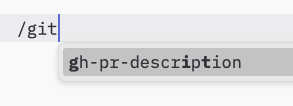However, implementors are free to expose prompts through any interface pattern that suits their needs—the protocol itself does not mandate any specific user interaction model.
|
|
12
|
+
|
|
13
|
+
Capabilities
|
|
14
|
+
------------
|
|
15
|
+
|
|
16
|
+
Servers that support prompts **MUST** declare the `prompts` capability during [initialization](https://modelcontextprotocol.io/specification/2025-06-18/basic/lifecycle#initialization):
|
|
17
|
+
|
|
18
|
+
```
|
|
19
|
+
{
|
|
20
|
+
"capabilities": {
|
|
21
|
+
"prompts": {
|
|
22
|
+
"listChanged": true
|
|
23
|
+
}
|
|
24
|
+
}
|
|
25
|
+
}
|
|
26
|
+
```
|
|
27
|
+
|
|
28
|
+
`listChanged` indicates whether the server will emit notifications when the list of available prompts changes.
|
|
29
|
+
|
|
30
|
+
Protocol Messages
|
|
31
|
+
-----------------
|
|
32
|
+
|
|
33
|
+
### Listing Prompts
|
|
34
|
+
|
|
35
|
+
To retrieve available prompts, clients send a `prompts/list` request. This operation supports [pagination](https://modelcontextprotocol.io/specification/2025-06-18/server/utilities/pagination).**Request:**
|
|
36
|
+
|
|
37
|
+
```
|
|
38
|
+
{
|
|
39
|
+
"jsonrpc": "2.0",
|
|
40
|
+
"id": 1,
|
|
41
|
+
"method": "prompts/list",
|
|
42
|
+
"params": {
|
|
43
|
+
"cursor": "optional-cursor-value"
|
|
44
|
+
}
|
|
45
|
+
}
|
|
46
|
+
```
|
|
47
|
+
|
|
48
|
+
**Response:**
|
|
49
|
+
|
|
50
|
+
```
|
|
51
|
+
{
|
|
52
|
+
"jsonrpc": "2.0",
|
|
53
|
+
"id": 1,
|
|
54
|
+
"result": {
|
|
55
|
+
"prompts": [
|
|
56
|
+
{
|
|
57
|
+
"name": "code_review",
|
|
58
|
+
"title": "Request Code Review",
|
|
59
|
+
"description": "Asks the LLM to analyze code quality and suggest improvements",
|
|
60
|
+
"arguments": [
|
|
61
|
+
{
|
|
62
|
+
"name": "code",
|
|
63
|
+
"description": "The code to review",
|
|
64
|
+
"required": true
|
|
65
|
+
}
|
|
66
|
+
]
|
|
67
|
+
}
|
|
68
|
+
],
|
|
69
|
+
"nextCursor": "next-page-cursor"
|
|
70
|
+
}
|
|
71
|
+
}
|
|
72
|
+
```
|
|
73
|
+
|
|
74
|
+
### Getting a Prompt
|
|
75
|
+
|
|
76
|
+
To retrieve a specific prompt, clients send a `prompts/get` request. Arguments may be auto-completed through [the completion API](https://modelcontextprotocol.io/specification/2025-06-18/server/utilities/completion).**Request:**
|
|
77
|
+
|
|
78
|
+
```
|
|
79
|
+
{
|
|
80
|
+
"jsonrpc": "2.0",
|
|
81
|
+
"id": 2,
|
|
82
|
+
"method": "prompts/get",
|
|
83
|
+
"params": {
|
|
84
|
+
"name": "code_review",
|
|
85
|
+
"arguments": {
|
|
86
|
+
"code": "def hello():\n print('world')"
|
|
87
|
+
}
|
|
88
|
+
}
|
|
89
|
+
}
|
|
90
|
+
```
|
|
91
|
+
|
|
92
|
+
**Response:**
|
|
93
|
+
|
|
94
|
+
```
|
|
95
|
+
{
|
|
96
|
+
"jsonrpc": "2.0",
|
|
97
|
+
"id": 2,
|
|
98
|
+
"result": {
|
|
99
|
+
"description": "Code review prompt",
|
|
100
|
+
"messages": [
|
|
101
|
+
{
|
|
102
|
+
"role": "user",
|
|
103
|
+
"content": {
|
|
104
|
+
"type": "text",
|
|
105
|
+
"text": "Please review this Python code:\ndef hello():\n print('world')"
|
|
106
|
+
}
|
|
107
|
+
}
|
|
108
|
+
]
|
|
109
|
+
}
|
|
110
|
+
}
|
|
111
|
+
```
|
|
112
|
+
|
|
113
|
+
### List Changed Notification
|
|
114
|
+
|
|
115
|
+
When the list of available prompts changes, servers that declared the `listChanged` capability **SHOULD** send a notification:
|
|
116
|
+
|
|
117
|
+
```
|
|
118
|
+
{
|
|
119
|
+
"jsonrpc": "2.0",
|
|
120
|
+
"method": "notifications/prompts/list_changed"
|
|
121
|
+
}
|
|
122
|
+
```
|
|
123
|
+
|
|
124
|
+
Message Flow
|
|
125
|
+
------------
|
|
126
|
+
|
|
127
|
+
Data Types
|
|
128
|
+
----------
|
|
129
|
+
|
|
130
|
+
### Prompt
|
|
131
|
+
|
|
132
|
+
A prompt definition includes:
|
|
133
|
+
|
|
134
|
+
* `name`: Unique identifier for the prompt
|
|
135
|
+
* `title`: Optional human-readable name of the prompt for display purposes.
|
|
136
|
+
* `description`: Optional human-readable description
|
|
137
|
+
* `arguments`: Optional list of arguments for customization
|
|
138
|
+
|
|
139
|
+
### PromptMessage
|
|
140
|
+
|
|
141
|
+
Messages in a prompt can contain:
|
|
142
|
+
|
|
143
|
+
* `role`: Either “user” or “assistant” to indicate the speaker
|
|
144
|
+
* `content`: One of the following content types:
|
|
145
|
+
|
|
146
|
+
#### Text Content
|
|
147
|
+
|
|
148
|
+
Text content represents plain text messages:
|
|
149
|
+
|
|
150
|
+
```
|
|
151
|
+
{
|
|
152
|
+
"type": "text",
|
|
153
|
+
"text": "The text content of the message"
|
|
154
|
+
}
|
|
155
|
+
```
|
|
156
|
+
|
|
157
|
+
This is the most common content type used for natural language interactions.
|
|
158
|
+
|
|
159
|
+
#### Image Content
|
|
160
|
+
|
|
161
|
+
Image content allows including visual information in messages:
|
|
162
|
+
|
|
163
|
+
```
|
|
164
|
+
{
|
|
165
|
+
"type": "image",
|
|
166
|
+
"data": "base64-encoded-image-data",
|
|
167
|
+
"mimeType": "image/png"
|
|
168
|
+
}
|
|
169
|
+
```
|
|
170
|
+
|
|
171
|
+
The image data **MUST** be base64-encoded and include a valid MIME type. This enables multi-modal interactions where visual context is important.
|
|
172
|
+
|
|
173
|
+
#### Audio Content
|
|
174
|
+
|
|
175
|
+
Audio content allows including audio information in messages:
|
|
176
|
+
|
|
177
|
+
```
|
|
178
|
+
{
|
|
179
|
+
"type": "audio",
|
|
180
|
+
"data": "base64-encoded-audio-data",
|
|
181
|
+
"mimeType": "audio/wav"
|
|
182
|
+
}
|
|
183
|
+
```
|
|
184
|
+
|
|
185
|
+
The audio data MUST be base64-encoded and include a valid MIME type. This enables multi-modal interactions where audio context is important.
|
|
186
|
+
|
|
187
|
+
#### Embedded Resources
|
|
188
|
+
|
|
189
|
+
Embedded resources allow referencing server-side resources directly in messages:
|
|
190
|
+
|
|
191
|
+
```
|
|
192
|
+
{
|
|
193
|
+
"type": "resource",
|
|
194
|
+
"resource": {
|
|
195
|
+
"uri": "resource://example",
|
|
196
|
+
"name": "example",
|
|
197
|
+
"title": "My Example Resource",
|
|
198
|
+
"mimeType": "text/plain",
|
|
199
|
+
"text": "Resource content"
|
|
200
|
+
}
|
|
201
|
+
}
|
|
202
|
+
```
|
|
203
|
+
|
|
204
|
+
Resources can contain either text or binary (blob) data and **MUST** include:
|
|
205
|
+
|
|
206
|
+
* A valid resource URI
|
|
207
|
+
* The appropriate MIME type
|
|
208
|
+
* Either text content or base64-encoded blob data
|
|
209
|
+
|
|
210
|
+
Embedded resources enable prompts to seamlessly incorporate server-managed content like documentation, code samples, or other reference materials directly into the conversation flow.
|
|
211
|
+
|
|
212
|
+
Error Handling
|
|
213
|
+
--------------
|
|
214
|
+
|
|
215
|
+
Servers **SHOULD** return standard JSON-RPC errors for common failure cases:
|
|
216
|
+
|
|
217
|
+
* Invalid prompt name: `-32602` (Invalid params)
|
|
218
|
+
* Missing required arguments: `-32602` (Invalid params)
|
|
219
|
+
* Internal errors: `-32603` (Internal error)
|
|
220
|
+
|
|
221
|
+
Implementation Considerations
|
|
222
|
+
-----------------------------
|
|
223
|
+
|
|
224
|
+
1. Servers **SHOULD** validate prompt arguments before processing
|
|
225
|
+
2. Clients **SHOULD** handle pagination for large prompt lists
|
|
226
|
+
3. Both parties **SHOULD** respect capability negotiation
|
|
227
|
+
|
|
228
|
+
Security
|
|
229
|
+
--------
|
|
230
|
+
|
|
231
|
+
Implementations **MUST** carefully validate all prompt inputs and outputs to prevent injection attacks or unauthorized access to resources.
|
|
@@ -1,4 +1,4 @@
|
|
|
1
|
-
from .strava_activity_mcp_server import mcp
|
|
2
|
-
def main() -> None:
|
|
3
|
-
"""Run the MCP server."""
|
|
1
|
+
from .strava_activity_mcp_server import mcp
|
|
2
|
+
def main() -> None:
|
|
3
|
+
"""Run the MCP server."""
|
|
4
4
|
mcp.run()
|
|
@@ -5,9 +5,37 @@ mcp = FastMCP("Strava") # Initialize an MCP server instance with a descriptive
|
|
|
5
5
|
sys.path.insert(0, os.path.join(os.path.dirname(__file__), ".."))
|
|
6
6
|
import requests
|
|
7
7
|
import urllib.parse
|
|
8
|
+
import json
|
|
9
|
+
from typing import Any, Dict
|
|
10
|
+
|
|
11
|
+
TOKEN_STORE_FILENAME = "strava_mcp_tokens.json"
|
|
12
|
+
|
|
13
|
+
def _get_token_store_path() -> str:
|
|
14
|
+
home_dir = os.path.expanduser("~")
|
|
15
|
+
return os.path.join(home_dir, TOKEN_STORE_FILENAME)
|
|
16
|
+
|
|
17
|
+
def _save_tokens_to_disk(tokens: Dict[str, Any]) -> dict:
|
|
18
|
+
try:
|
|
19
|
+
path = _get_token_store_path()
|
|
20
|
+
with open(path, "w", encoding="utf-8") as f:
|
|
21
|
+
json.dump(tokens, f)
|
|
22
|
+
return {"ok": True, "path": path}
|
|
23
|
+
except Exception as e:
|
|
24
|
+
return {"ok": False, "error": str(e)}
|
|
25
|
+
|
|
26
|
+
def _load_tokens_from_disk() -> dict:
|
|
27
|
+
try:
|
|
28
|
+
path = _get_token_store_path()
|
|
29
|
+
if not os.path.exists(path):
|
|
30
|
+
return {"ok": False, "error": "token store not found", "path": path}
|
|
31
|
+
with open(path, "r", encoding="utf-8") as f:
|
|
32
|
+
data = json.load(f)
|
|
33
|
+
return {"ok": True, "tokens": data, "path": path}
|
|
34
|
+
except Exception as e:
|
|
35
|
+
return {"ok": False, "error": str(e)}
|
|
8
36
|
|
|
9
37
|
@mcp.tool("strava://auth/url")
|
|
10
|
-
def get_auth_url(client_id: int | None = None):
|
|
38
|
+
async def get_auth_url(client_id: int | None = None):
|
|
11
39
|
"""Return the Strava OAuth authorization URL. If client_id is not provided,
|
|
12
40
|
read it from the STRAVA_CLIENT_ID environment variable."""
|
|
13
41
|
if client_id is None:
|
|
@@ -30,7 +58,8 @@ def get_auth_url(client_id: int | None = None):
|
|
|
30
58
|
return "https://www.strava.com/oauth/authorize?" + urllib.parse.urlencode(params)
|
|
31
59
|
|
|
32
60
|
@mcp.tool("strava://auth/refresh")
|
|
33
|
-
def refresh_access_token(
|
|
61
|
+
async def refresh_access_token(
|
|
62
|
+
|
|
34
63
|
refresh_token: str,
|
|
35
64
|
client_id: int | None = None,
|
|
36
65
|
client_secret: str | None = None,
|
|
@@ -85,7 +114,7 @@ def refresh_access_token(
|
|
|
85
114
|
}
|
|
86
115
|
|
|
87
116
|
@mcp.tool("strava://athlete/stats")
|
|
88
|
-
def get_athlete_stats(
|
|
117
|
+
async def get_athlete_stats(
|
|
89
118
|
code: str,
|
|
90
119
|
client_id: int | None = None,
|
|
91
120
|
client_secret: str | None = None,
|
|
@@ -135,6 +164,17 @@ def get_athlete_stats(
|
|
|
135
164
|
|
|
136
165
|
access_token = tokens.get("access_token")
|
|
137
166
|
refresh_token = tokens.get("refresh_token")
|
|
167
|
+
|
|
168
|
+
# Persist tokens for later refresh usage via the public save tool
|
|
169
|
+
save_result = await save_tokens({
|
|
170
|
+
"access_token": access_token,
|
|
171
|
+
"refresh_token": refresh_token,
|
|
172
|
+
"expires_at": tokens.get("expires_at"),
|
|
173
|
+
"expires_in": tokens.get("expires_in"),
|
|
174
|
+
"athlete": tokens.get("athlete"),
|
|
175
|
+
"token_type": tokens.get("token_type"),
|
|
176
|
+
"scope": tokens.get("scope"),
|
|
177
|
+
})
|
|
138
178
|
|
|
139
179
|
# return {"tokens": tokens, "access_token": access_token, "refresh_token": refresh_token}
|
|
140
180
|
|
|
@@ -145,11 +185,19 @@ def get_athlete_stats(
|
|
|
145
185
|
}
|
|
146
186
|
|
|
147
187
|
response = requests.get(url, headers=headers)
|
|
148
|
-
|
|
149
|
-
|
|
188
|
+
return {
|
|
189
|
+
"activities": response.json(),
|
|
190
|
+
"tokens": {
|
|
191
|
+
"access_token": access_token,
|
|
192
|
+
"refresh_token": refresh_token,
|
|
193
|
+
"expires_at": tokens.get("expires_at"),
|
|
194
|
+
"expires_in": tokens.get("expires_in"),
|
|
195
|
+
},
|
|
196
|
+
"save": save_result
|
|
197
|
+
}
|
|
150
198
|
|
|
151
199
|
@mcp.tool("strava://athlete/stats-with-token")
|
|
152
|
-
def get_athlete_stats_with_token(access_token: str) -> dict:
|
|
200
|
+
async def get_athlete_stats_with_token(access_token: str) -> dict:
|
|
153
201
|
"""Get athlete activities using an existing access token."""
|
|
154
202
|
if not access_token:
|
|
155
203
|
return {"error": "access token is required"}
|
|
@@ -169,8 +217,82 @@ def get_athlete_stats_with_token(access_token: str) -> dict:
|
|
|
169
217
|
except Exception as e:
|
|
170
218
|
return {"error": "API request failed", "status_code": response.status_code, "response": response.text, "error": str(e)}
|
|
171
219
|
|
|
172
|
-
|
|
220
|
+
activities_data = response.json()
|
|
221
|
+
return {
|
|
222
|
+
"activities": activities_data,
|
|
223
|
+
"count": len(activities_data) if isinstance(activities_data, list) else 0,
|
|
224
|
+
"status": "success"
|
|
225
|
+
}
|
|
226
|
+
|
|
227
|
+
@mcp.tool("strava://auth/save")
|
|
228
|
+
async def save_tokens(tokens: dict | None = None) -> dict:
|
|
229
|
+
"""Save tokens to local disk at ~/.strava_mcp_tokens.json. If tokens is not provided, no-op with error."""
|
|
230
|
+
if not tokens or not isinstance(tokens, dict):
|
|
231
|
+
return {"error": "tokens dict is required"}
|
|
232
|
+
result = _save_tokens_to_disk(tokens)
|
|
233
|
+
if not result.get("ok"):
|
|
234
|
+
return {"error": "failed to save tokens", **result}
|
|
235
|
+
return {"ok": True, "path": result.get("path")}
|
|
236
|
+
|
|
237
|
+
|
|
238
|
+
@mcp.tool("strava://auth/load")
|
|
239
|
+
async def load_tokens() -> dict:
|
|
240
|
+
"""Load tokens from local disk at ~/.strava_mcp_tokens.json"""
|
|
241
|
+
result = _load_tokens_from_disk()
|
|
242
|
+
if not result.get("ok"):
|
|
243
|
+
return {"error": result.get("error"), "path": result.get("path")}
|
|
244
|
+
return {"ok": True, "tokens": result.get("tokens"), "path": result.get("path")}
|
|
245
|
+
|
|
246
|
+
@mcp.tool("strava://athlete/refresh-and-stats")
|
|
247
|
+
async def refresh_and_get_stats(client_id: int | None = None, client_secret: str | None = None) -> dict:
|
|
248
|
+
"""Load saved refresh token, refresh access token, save it, then fetch activities."""
|
|
249
|
+
load_result = await load_tokens()
|
|
250
|
+
if not load_result.get("ok"):
|
|
251
|
+
return {"error": "no saved tokens", "details": load_result}
|
|
252
|
+
saved = load_result.get("tokens", {})
|
|
253
|
+
refresh_token = saved.get("refresh_token")
|
|
254
|
+
if not refresh_token:
|
|
255
|
+
return {"error": "refresh_token not found in saved tokens"}
|
|
256
|
+
|
|
257
|
+
refreshed = await refresh_access_token(refresh_token=refresh_token, client_id=client_id, client_secret=client_secret)
|
|
258
|
+
if "error" in refreshed:
|
|
259
|
+
return {"error": "refresh failed", "details": refreshed}
|
|
260
|
+
|
|
261
|
+
# Save refreshed tokens
|
|
262
|
+
await save_tokens(refreshed)
|
|
263
|
+
|
|
264
|
+
access_token = refreshed.get("access_token")
|
|
265
|
+
if not access_token:
|
|
266
|
+
return {"error": "no access_token after refresh"}
|
|
267
|
+
|
|
268
|
+
# Fetch activities with new token
|
|
269
|
+
activities = await get_athlete_stats_with_token(access_token)
|
|
270
|
+
return {"activities": activities, "tokens": refreshed}
|
|
271
|
+
|
|
272
|
+
@mcp.tool("strava://session/start")
|
|
273
|
+
async def start_session(client_id: int | None = None, client_secret: str | None = None) -> dict:
|
|
274
|
+
"""Start a session: if a refresh token exists, refresh and fetch; otherwise return auth URL."""
|
|
275
|
+
token_path = _get_token_store_path()
|
|
276
|
+
if os.path.exists(token_path):
|
|
277
|
+
loaded = _load_tokens_from_disk()
|
|
278
|
+
if loaded.get("ok"):
|
|
279
|
+
saved = loaded.get("tokens", {})
|
|
280
|
+
refresh_token = saved.get("refresh_token")
|
|
281
|
+
if isinstance(refresh_token, str) and refresh_token.strip():
|
|
282
|
+
result = await refresh_and_get_stats(client_id=client_id, client_secret=client_secret)
|
|
283
|
+
return {**result, "used_token_file": token_path}
|
|
284
|
+
# Fall back to auth URL flow
|
|
285
|
+
else:
|
|
286
|
+
url = await get_auth_url(client_id=client_id)
|
|
287
|
+
return {"auth_url": url, "token_file_checked": token_path}
|
|
173
288
|
|
|
289
|
+
#@mcp.prompt
|
|
290
|
+
#def greet_user_prompt(question: str) -> str:
|
|
291
|
+
#"""Generates a message orchestrating mcp tools"""
|
|
292
|
+
#return f"""
|
|
293
|
+
#Return a message for a user called '{question}'.
|
|
294
|
+
#if the user is asking, use a formal style, else use a street style.
|
|
295
|
+
#"""
|
|
174
296
|
|
|
175
297
|
if __name__ == "__main__":
|
|
176
298
|
mcp.run(transport="stdio") # Run the server, using standard input/output for communication
|
|
@@ -1,5 +1,5 @@
|
|
|
1
1
|
version = 1
|
|
2
|
-
revision =
|
|
2
|
+
revision = 2
|
|
3
3
|
requires-python = ">=3.10"
|
|
4
4
|
|
|
5
5
|
[[package]]
|
|
@@ -1031,7 +1031,7 @@ wheels = [
|
|
|
1031
1031
|
|
|
1032
1032
|
[[package]]
|
|
1033
1033
|
name = "strava-activity-mcp-server"
|
|
1034
|
-
version = "0.2.
|
|
1034
|
+
version = "0.2.4"
|
|
1035
1035
|
source = { editable = "." }
|
|
1036
1036
|
dependencies = [
|
|
1037
1037
|
{ name = "build" },
|
|
File without changes
|
|
File without changes
|
|
File without changes
|
|
File without changes
|
|
File without changes
|
|
File without changes
|
|
File without changes
|
|
File without changes
|
|
File without changes
|
|
File without changes
|
|
File without changes
|
{strava_activity_mcp_server-0.2.2 → strava_activity_mcp_server-0.2.4}/ref/mcp_pypi_example.md
RENAMED
|
File without changes
|
|
File without changes
|
|
File without changes
|