stltosolid 0.6.0__tar.gz
This diff represents the content of publicly available package versions that have been released to one of the supported registries. The information contained in this diff is provided for informational purposes only and reflects changes between package versions as they appear in their respective public registries.
- stltosolid-0.6.0/LICENSE +133 -0
- stltosolid-0.6.0/PKG-INFO +185 -0
- stltosolid-0.6.0/README.md +143 -0
- stltosolid-0.6.0/pyproject.toml +63 -0
- stltosolid-0.6.0/setup.cfg +4 -0
- stltosolid-0.6.0/stl_to_solid/__init__.py +11 -0
- stltosolid-0.6.0/stl_to_solid/bfill_check.py +392 -0
- stltosolid-0.6.0/stl_to_solid/blueprint/__init__.py +31 -0
- stltosolid-0.6.0/stl_to_solid/blueprint/build_cq.py +202 -0
- stltosolid-0.6.0/stl_to_solid/blueprint/compile.py +101 -0
- stltosolid-0.6.0/stl_to_solid/blueprint/expr.py +160 -0
- stltosolid-0.6.0/stl_to_solid/blueprint/freeform.py +300 -0
- stltosolid-0.6.0/stl_to_solid/blueprint/fusion_blueprint.py +453 -0
- stltosolid-0.6.0/stl_to_solid/blueprint/prompts.py +186 -0
- stltosolid-0.6.0/stl_to_solid/blueprint/providers.py +427 -0
- stltosolid-0.6.0/stl_to_solid/blueprint/read_drawing.py +363 -0
- stltosolid-0.6.0/stl_to_solid/blueprint/render.py +215 -0
- stltosolid-0.6.0/stl_to_solid/blueprint/schema.py +278 -0
- stltosolid-0.6.0/stl_to_solid/blueprint/validate.py +407 -0
- stltosolid-0.6.0/stl_to_solid/extrusion.py +690 -0
- stltosolid-0.6.0/stl_to_solid/facegroups.py +2629 -0
- stltosolid-0.6.0/stl_to_solid/features.py +555 -0
- stltosolid-0.6.0/stl_to_solid/fusion_boundary_fill.py +1338 -0
- stltosolid-0.6.0/stl_to_solid/fusion_export.py +936 -0
- stltosolid-0.6.0/stl_to_solid/hybrid.py +220 -0
- stltosolid-0.6.0/stl_to_solid/mesh_prep.py +827 -0
- stltosolid-0.6.0/stl_to_solid/parallel.py +300 -0
- stltosolid-0.6.0/stl_to_solid/pipeline.py +1624 -0
- stltosolid-0.6.0/stl_to_solid/profile_fit.py +999 -0
- stltosolid-0.6.0/stl_to_solid/rebuild.py +1444 -0
- stltosolid-0.6.0/stl_to_solid/script_export.py +180 -0
- stltosolid-0.6.0/stl_to_solid/section_fit.py +1360 -0
- stltosolid-0.6.0/stl_to_solid/service/__init__.py +4 -0
- stltosolid-0.6.0/stl_to_solid/service/analysis.py +216 -0
- stltosolid-0.6.0/stl_to_solid/service/calls.py +126 -0
- stltosolid-0.6.0/stl_to_solid/service/errors.py +50 -0
- stltosolid-0.6.0/stl_to_solid/service/freeform.py +63 -0
- stltosolid-0.6.0/stl_to_solid/service/jobs.py +597 -0
- stltosolid-0.6.0/stl_to_solid/service/preview.py +125 -0
- stltosolid-0.6.0/stl_to_solid/service/preview_helper.py +52 -0
- stltosolid-0.6.0/stl_to_solid/service/section_image.py +62 -0
- stltosolid-0.6.0/stl_to_solid/service/sections.py +123 -0
- stltosolid-0.6.0/stl_to_solid/service/worker.py +315 -0
- stltosolid-0.6.0/stl_to_solid/service/xray.py +70 -0
- stltosolid-0.6.0/stl_to_solid/sliced_loft.py +1220 -0
- stltosolid-0.6.0/stl_to_solid_mcp/__init__.py +3 -0
- stltosolid-0.6.0/stl_to_solid_mcp/__main__.py +4 -0
- stltosolid-0.6.0/stl_to_solid_mcp/cli.py +18 -0
- stltosolid-0.6.0/stl_to_solid_mcp/config.py +40 -0
- stltosolid-0.6.0/stl_to_solid_mcp/files.py +92 -0
- stltosolid-0.6.0/stl_to_solid_mcp/guide.py +106 -0
- stltosolid-0.6.0/stl_to_solid_mcp/http.py +107 -0
- stltosolid-0.6.0/stl_to_solid_mcp/runner.py +173 -0
- stltosolid-0.6.0/stl_to_solid_mcp/server.py +663 -0
- stltosolid-0.6.0/stltosolid.egg-info/PKG-INFO +185 -0
- stltosolid-0.6.0/stltosolid.egg-info/SOURCES.txt +89 -0
- stltosolid-0.6.0/stltosolid.egg-info/dependency_links.txt +1 -0
- stltosolid-0.6.0/stltosolid.egg-info/entry_points.txt +3 -0
- stltosolid-0.6.0/stltosolid.egg-info/requires.txt +21 -0
- stltosolid-0.6.0/stltosolid.egg-info/top_level.txt +2 -0
- stltosolid-0.6.0/tests/test_axis_budget.py +200 -0
- stltosolid-0.6.0/tests/test_backend_version.py +35 -0
- stltosolid-0.6.0/tests/test_bfill_check.py +162 -0
- stltosolid-0.6.0/tests/test_blueprint_api.py +473 -0
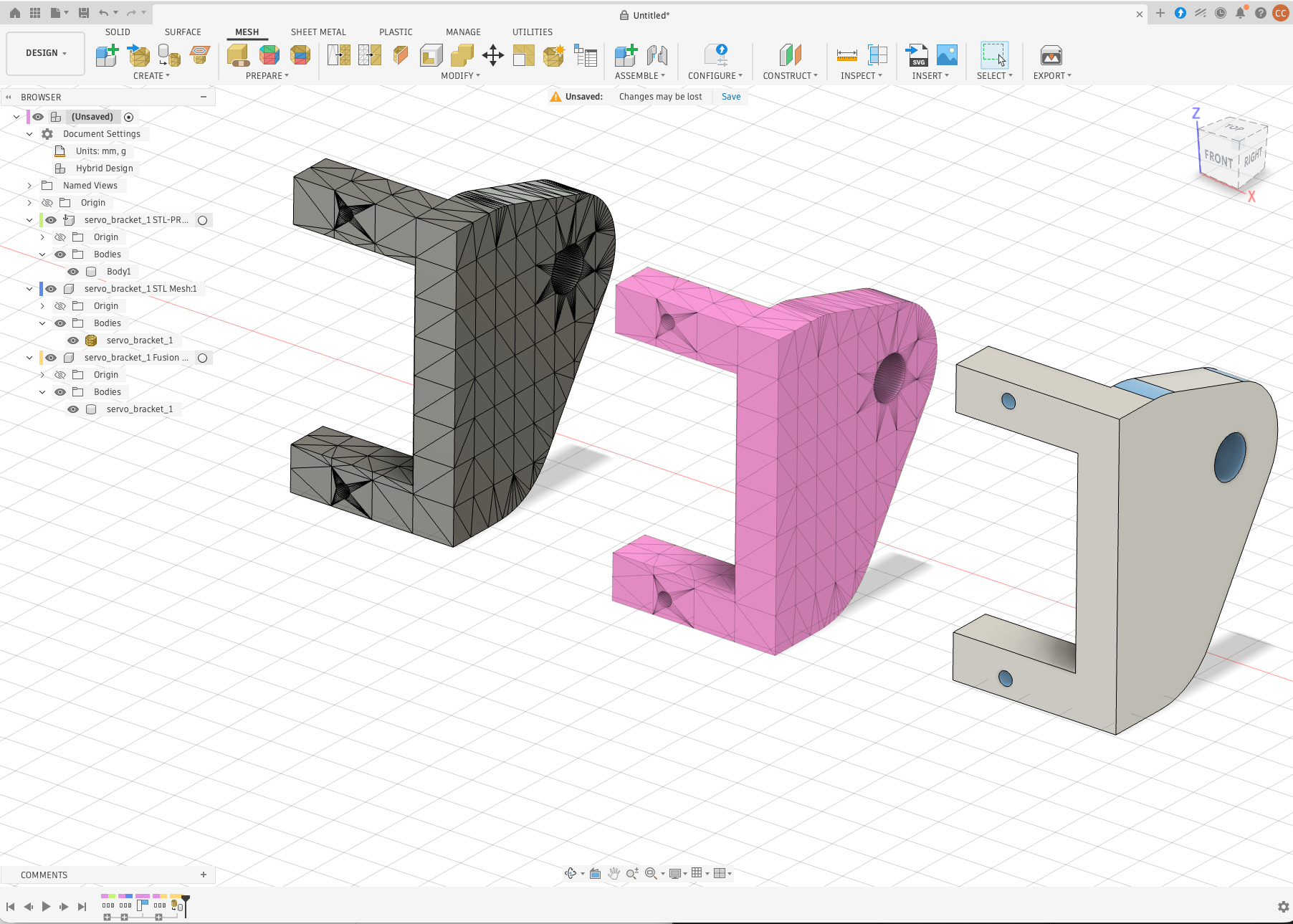
- stltosolid-0.6.0/tests/test_blueprint_build.py +123 -0
- stltosolid-0.6.0/tests/test_blueprint_expr.py +57 -0
- stltosolid-0.6.0/tests/test_blueprint_freeform.py +402 -0
- stltosolid-0.6.0/tests/test_blueprint_fusion.py +350 -0
- stltosolid-0.6.0/tests/test_blueprint_live.py +63 -0
- stltosolid-0.6.0/tests/test_blueprint_preview.py +125 -0
- stltosolid-0.6.0/tests/test_blueprint_read.py +206 -0
- stltosolid-0.6.0/tests/test_blueprint_render.py +76 -0
- stltosolid-0.6.0/tests/test_blueprint_validate.py +217 -0
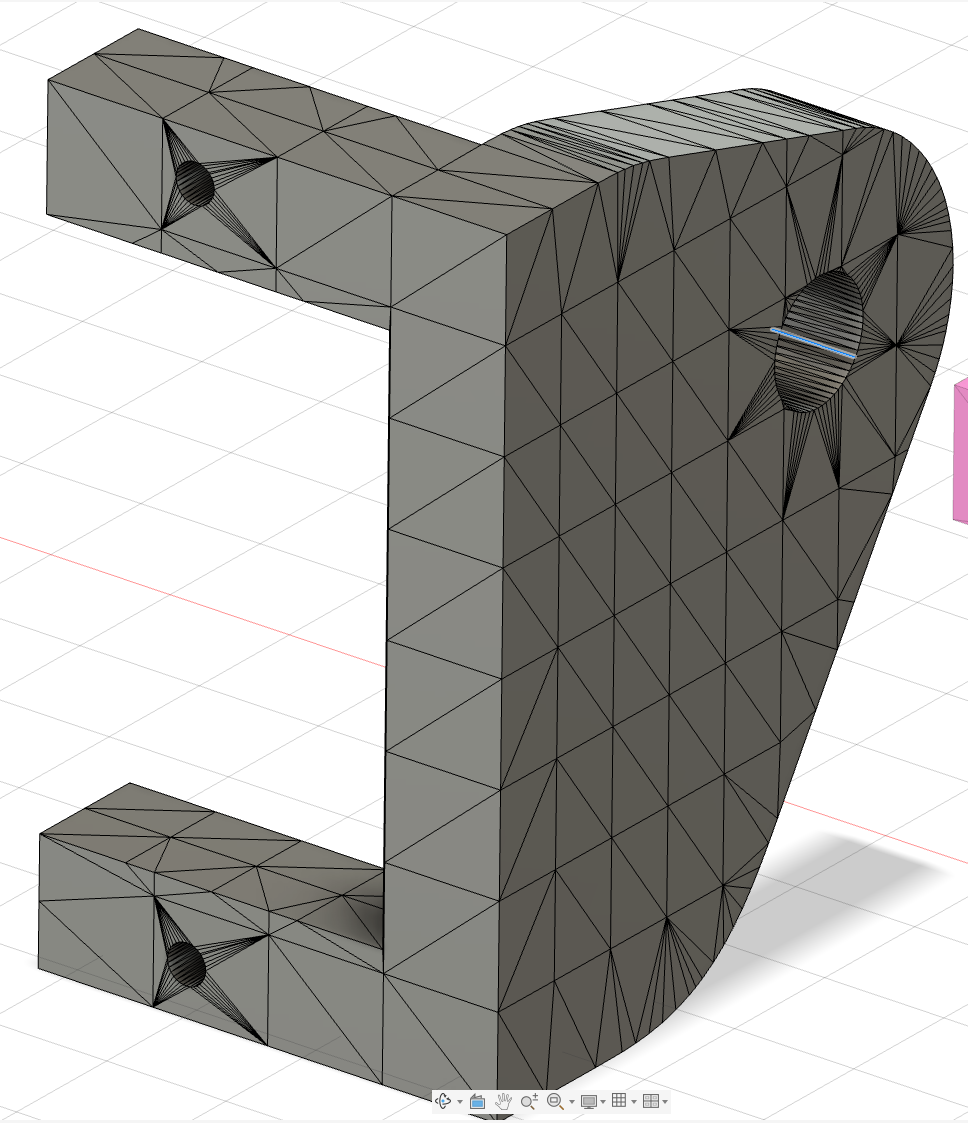
- stltosolid-0.6.0/tests/test_body_picker.py +850 -0
- stltosolid-0.6.0/tests/test_error_handling.py +305 -0
- stltosolid-0.6.0/tests/test_export.py +149 -0
- stltosolid-0.6.0/tests/test_facegroups.py +519 -0
- stltosolid-0.6.0/tests/test_fusion_boundary_fill.py +342 -0
- stltosolid-0.6.0/tests/test_geometry_features.py +141 -0
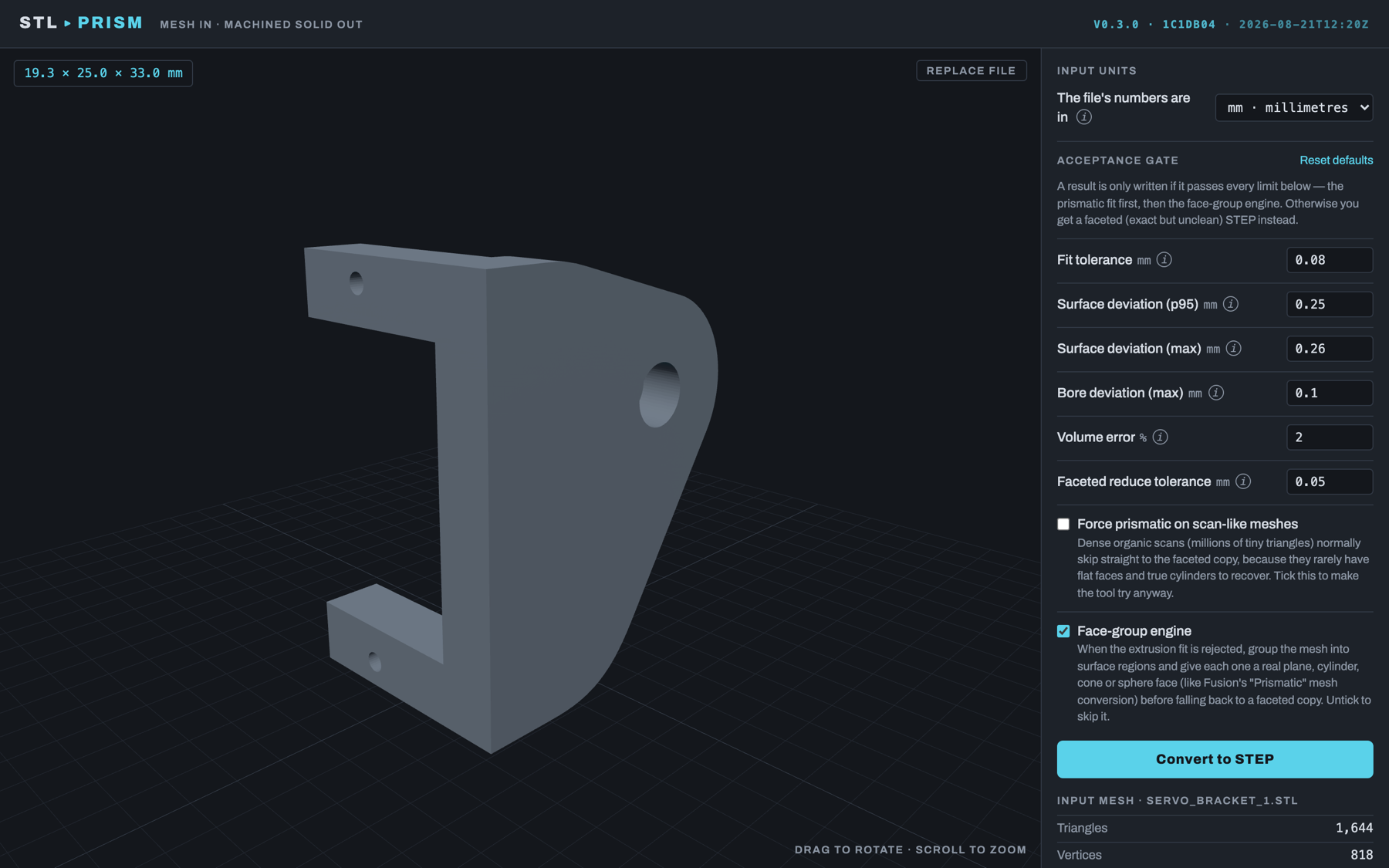
- stltosolid-0.6.0/tests/test_inner_shells.py +252 -0
- stltosolid-0.6.0/tests/test_matrix.py +54 -0
- stltosolid-0.6.0/tests/test_mcp_http.py +112 -0
- stltosolid-0.6.0/tests/test_mcp_server.py +427 -0
- stltosolid-0.6.0/tests/test_p0_fixes.py +281 -0
- stltosolid-0.6.0/tests/test_parallel.py +147 -0
- stltosolid-0.6.0/tests/test_parallel_inside.py +88 -0
- stltosolid-0.6.0/tests/test_parallel_shells.py +169 -0
- stltosolid-0.6.0/tests/test_pipeline.py +383 -0
- stltosolid-0.6.0/tests/test_profile_fit.py +215 -0
- stltosolid-0.6.0/tests/test_sliced_loft.py +835 -0
- stltosolid-0.6.0/tests/test_xray.py +434 -0
stltosolid-0.6.0/LICENSE
ADDED
|
@@ -0,0 +1,133 @@
|
|
|
1
|
+
Required Notice: Copyright (c) 2026 Chris Venter (https://github.com/Crypto69/stlToSolid)
|
|
2
|
+
|
|
3
|
+
# PolyForm Noncommercial License 1.0.0
|
|
4
|
+
|
|
5
|
+
<https://polyformproject.org/licenses/noncommercial/1.0.0>
|
|
6
|
+
|
|
7
|
+
## Acceptance
|
|
8
|
+
|
|
9
|
+
In order to get any license under these terms, you must agree
|
|
10
|
+
to them as both strict obligations and conditions to all
|
|
11
|
+
your licenses.
|
|
12
|
+
|
|
13
|
+
## Copyright License
|
|
14
|
+
|
|
15
|
+
The licensor grants you a copyright license for the
|
|
16
|
+
software to do everything you might do with the software
|
|
17
|
+
that would otherwise infringe the licensor's copyright
|
|
18
|
+
in it for any permitted purpose. However, you may
|
|
19
|
+
only distribute the software according to [Distribution
|
|
20
|
+
License](#distribution-license) and make changes or new works
|
|
21
|
+
based on the software according to [Changes and New Works
|
|
22
|
+
License](#changes-and-new-works-license).
|
|
23
|
+
|
|
24
|
+
## Distribution License
|
|
25
|
+
|
|
26
|
+
The licensor grants you an additional copyright license
|
|
27
|
+
to distribute copies of the software. Your license
|
|
28
|
+
to distribute covers distributing the software with
|
|
29
|
+
changes and new works permitted by [Changes and New Works
|
|
30
|
+
License](#changes-and-new-works-license).
|
|
31
|
+
|
|
32
|
+
## Notices
|
|
33
|
+
|
|
34
|
+
You must ensure that anyone who gets a copy of any part of
|
|
35
|
+
the software from you also gets a copy of these terms or the
|
|
36
|
+
URL for them above, as well as copies of any plain-text lines
|
|
37
|
+
beginning with `Required Notice:` that the licensor provided
|
|
38
|
+
with the software. For example:
|
|
39
|
+
|
|
40
|
+
> Required Notice: Copyright Yoyodyne, Inc. (http://example.com)
|
|
41
|
+
|
|
42
|
+
## Changes and New Works License
|
|
43
|
+
|
|
44
|
+
The licensor grants you an additional copyright license to
|
|
45
|
+
make changes and new works based on the software for any
|
|
46
|
+
permitted purpose.
|
|
47
|
+
|
|
48
|
+
## Patent License
|
|
49
|
+
|
|
50
|
+
The licensor grants you a patent license for the software that
|
|
51
|
+
covers patent claims the licensor can license, or becomes able
|
|
52
|
+
to license, that you would infringe by using the software.
|
|
53
|
+
|
|
54
|
+
## Noncommercial Purposes
|
|
55
|
+
|
|
56
|
+
Any noncommercial purpose is a permitted purpose.
|
|
57
|
+
|
|
58
|
+
## Personal Uses
|
|
59
|
+
|
|
60
|
+
Personal use for research, experiment, and testing for
|
|
61
|
+
the benefit of public knowledge, personal study, private
|
|
62
|
+
entertainment, hobby projects, amateur pursuits, or religious
|
|
63
|
+
observance, without any anticipated commercial application,
|
|
64
|
+
is use for a permitted purpose.
|
|
65
|
+
|
|
66
|
+
## Noncommercial Organizations
|
|
67
|
+
|
|
68
|
+
Use by any charitable organization, educational institution,
|
|
69
|
+
public research organization, public safety or health
|
|
70
|
+
organization, environmental protection organization,
|
|
71
|
+
or government institution is use for a permitted purpose
|
|
72
|
+
regardless of the source of funding or obligations resulting
|
|
73
|
+
from the funding.
|
|
74
|
+
|
|
75
|
+
## Fair Use
|
|
76
|
+
|
|
77
|
+
You may have "fair use" rights for the software under the
|
|
78
|
+
law. These terms do not limit them.
|
|
79
|
+
|
|
80
|
+
## No Other Rights
|
|
81
|
+
|
|
82
|
+
These terms do not allow you to sublicense or transfer any of
|
|
83
|
+
your licenses to anyone else, or prevent the licensor from
|
|
84
|
+
granting licenses to anyone else. These terms do not imply
|
|
85
|
+
any other licenses.
|
|
86
|
+
|
|
87
|
+
## Patent Defense
|
|
88
|
+
|
|
89
|
+
If you make any written claim that the software infringes or
|
|
90
|
+
contributes to infringement of any patent, your patent license
|
|
91
|
+
for the software granted under these terms ends immediately. If
|
|
92
|
+
your company makes such a claim, your patent license ends
|
|
93
|
+
immediately for work on behalf of your company.
|
|
94
|
+
|
|
95
|
+
## Violations
|
|
96
|
+
|
|
97
|
+
The first time you are notified in writing that you have
|
|
98
|
+
violated any of these terms, or done anything with the software
|
|
99
|
+
not covered by your licenses, your licenses can nonetheless
|
|
100
|
+
continue if you come into full compliance with these terms,
|
|
101
|
+
and take practical steps to correct past violations, within
|
|
102
|
+
32 days of receiving notice. Otherwise, all your licenses
|
|
103
|
+
end immediately.
|
|
104
|
+
|
|
105
|
+
## No Liability
|
|
106
|
+
|
|
107
|
+
***As far as the law allows, the software comes as is, without
|
|
108
|
+
any warranty or condition, and the licensor will not be liable
|
|
109
|
+
to you for any damages arising out of these terms or the use
|
|
110
|
+
or nature of the software, under any kind of legal claim.***
|
|
111
|
+
|
|
112
|
+
## Definitions
|
|
113
|
+
|
|
114
|
+
The **licensor** is the individual or entity offering these
|
|
115
|
+
terms, and the **software** is the software the licensor makes
|
|
116
|
+
available under these terms.
|
|
117
|
+
|
|
118
|
+
**You** refers to the individual or entity agreeing to these
|
|
119
|
+
terms.
|
|
120
|
+
|
|
121
|
+
**Your company** is any legal entity, sole proprietorship,
|
|
122
|
+
or other kind of organization that you work for, plus all
|
|
123
|
+
organizations that have control over, are under the control of,
|
|
124
|
+
or are under common control with that organization. **Control**
|
|
125
|
+
means ownership of substantially all the assets of an entity,
|
|
126
|
+
or the power to direct its management and policies by vote,
|
|
127
|
+
contract, or otherwise. Control can be direct or indirect.
|
|
128
|
+
|
|
129
|
+
**Your licenses** are all the licenses granted to you for the
|
|
130
|
+
software under these terms.
|
|
131
|
+
|
|
132
|
+
**Use** means anything you do with the software requiring one
|
|
133
|
+
of your licenses.
|
|
@@ -0,0 +1,185 @@
|
|
|
1
|
+
Metadata-Version: 2.4
|
|
2
|
+
Name: stltosolid
|
|
3
|
+
Version: 0.6.0
|
|
4
|
+
Summary: Convert STL/OBJ meshes into prismatic STEP solids via extrusion-structure recognition, with a faceted-BREP fallback
|
|
5
|
+
Author: Chris Venter
|
|
6
|
+
License-Expression: PolyForm-Noncommercial-1.0.0
|
|
7
|
+
Project-URL: Homepage, https://stltosolid.com
|
|
8
|
+
Project-URL: Documentation, https://stltosolid.com/docs/
|
|
9
|
+
Project-URL: Source, https://github.com/Crypto69/stlToSolid
|
|
10
|
+
Project-URL: Issues, https://github.com/Crypto69/stlToSolid/issues
|
|
11
|
+
Keywords: stl,step,mesh,cad,fusion-360,cadquery,mcp,model-context-protocol
|
|
12
|
+
Classifier: Intended Audience :: Manufacturing
|
|
13
|
+
Classifier: Operating System :: MacOS
|
|
14
|
+
Classifier: Operating System :: Microsoft :: Windows
|
|
15
|
+
Classifier: Operating System :: POSIX :: Linux
|
|
16
|
+
Classifier: Programming Language :: Python :: 3.11
|
|
17
|
+
Classifier: Programming Language :: Python :: 3.12
|
|
18
|
+
Classifier: Programming Language :: Python :: 3.13
|
|
19
|
+
Classifier: Topic :: Scientific/Engineering :: Visualization
|
|
20
|
+
Requires-Python: <3.14,>=3.11
|
|
21
|
+
Description-Content-Type: text/markdown
|
|
22
|
+
License-File: LICENSE
|
|
23
|
+
Requires-Dist: numpy
|
|
24
|
+
Requires-Dist: trimesh
|
|
25
|
+
Requires-Dist: shapely
|
|
26
|
+
Requires-Dist: networkx
|
|
27
|
+
Requires-Dist: rtree
|
|
28
|
+
Requires-Dist: scipy
|
|
29
|
+
Requires-Dist: cadquery
|
|
30
|
+
Requires-Dist: lxml
|
|
31
|
+
Requires-Dist: fast-simplification
|
|
32
|
+
Provides-Extra: scan
|
|
33
|
+
Requires-Dist: pymeshlab; extra == "scan"
|
|
34
|
+
Provides-Extra: blueprint
|
|
35
|
+
Requires-Dist: anthropic>=1; extra == "blueprint"
|
|
36
|
+
Requires-Dist: openai>=1; extra == "blueprint"
|
|
37
|
+
Requires-Dist: pillow; extra == "blueprint"
|
|
38
|
+
Provides-Extra: mcp
|
|
39
|
+
Requires-Dist: mcp<3,>=2.3; extra == "mcp"
|
|
40
|
+
Requires-Dist: pillow; extra == "mcp"
|
|
41
|
+
Dynamic: license-file
|
|
42
|
+
|
|
43
|
+
# stlToSolid
|
|
44
|
+
|
|
45
|
+
<!-- mcp-name: io.github.Crypto69/stltosolid -->
|
|
46
|
+
|
|
47
|
+
Turn an STL or OBJ mesh into a real solid you can model against in Fusion 360.
|
|
48
|
+
|
|
49
|
+
**[User manual](https://github.com/Crypto69/stlToSolid/blob/main/docs/manual/stlToSolid-User-Manual.md)**: how to use each
|
|
50
|
+
tool and what every setting does, with screenshots.
|
|
51
|
+
Also as a [PDF](https://github.com/Crypto69/stlToSolid/blob/main/docs/manual/stlToSolid-User-Manual.pdf) and on the website at
|
|
52
|
+
[stltosolid.com/docs](https://stltosolid.com/docs/).
|
|
53
|
+
|
|
54
|
+
## Why
|
|
55
|
+
|
|
56
|
+
I design 3D-printed parts as a hobby, and I kept needing to model *around*
|
|
57
|
+
a mesh: a bracket from Thingiverse, a scanned housing, a controller shell.
|
|
58
|
+
Fusion 360's free tier turns a mesh into a solid made of thousands of
|
|
59
|
+
little triangles. You can't sketch on it, measure it or build on it.
|
|
60
|
+
|
|
61
|
+
stlToSolid gives you flat faces, round holes and smooth curves instead,
|
|
62
|
+
so the part behaves like something you modelled yourself.
|
|
63
|
+
|
|
64
|
+
### Before and after
|
|
65
|
+
|
|
66
|
+
The same `servo_bracket_1.stl`, opened in Fusion 360 three ways. Left:
|
|
67
|
+
Fusion's own *Mesh → Solid* (every triangle becomes a face). Middle: the
|
|
68
|
+
STL mesh as loaded. Right: the STEP from stlToSolid, with 23 faces, planes
|
|
69
|
+
and cylinders, and holes that are real holes.
|
|
70
|
+
|
|
71
|
+
|
|
72
|
+
|
|
73
|
+
| | |
|
|
74
|
+
|---|---|
|
|
75
|
+
|  *Fusion Mesh → Solid, zoomed in: one face per triangle, so the "solid" carries all 1,644 facets and cannot be sketched on, filleted or measured like a modelled part.* | 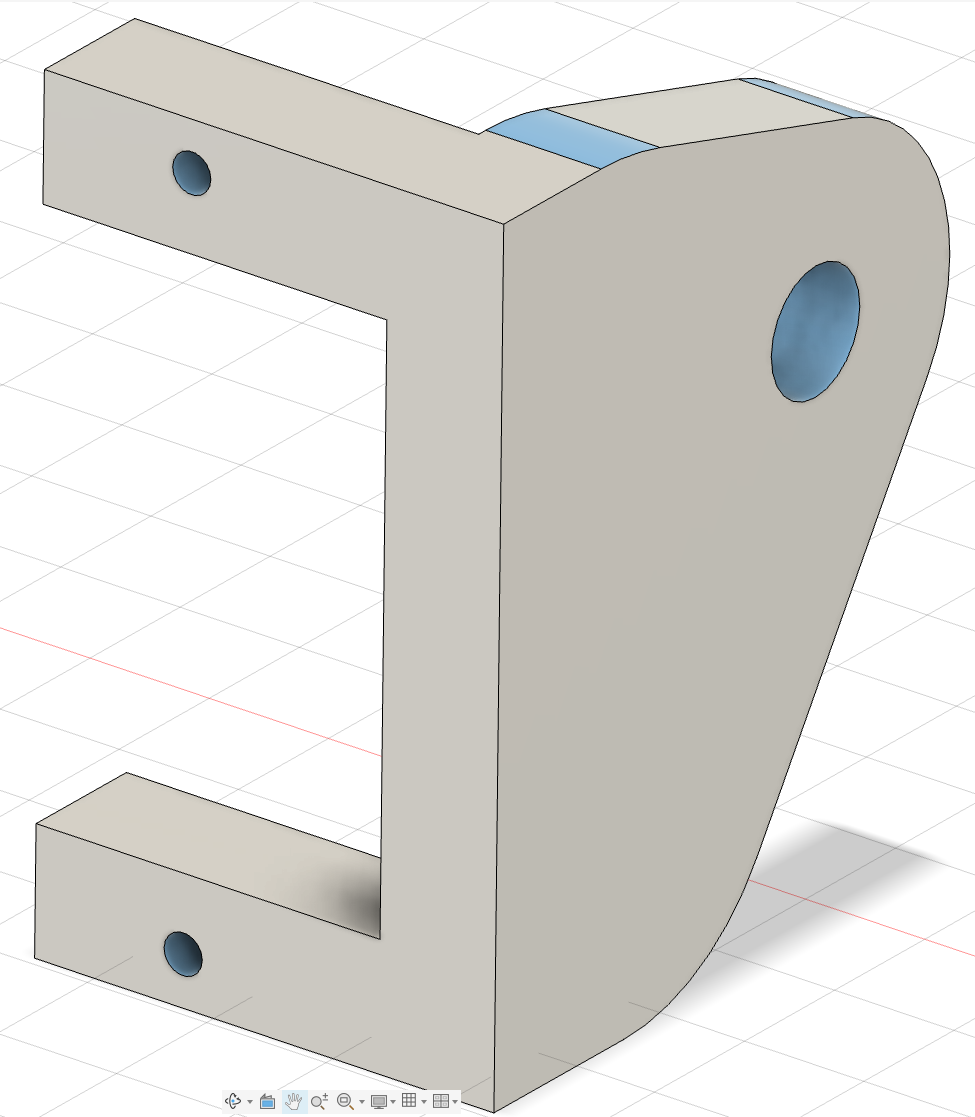 *stlToSolid, zoomed in: flat faces are single planes, the blend is one cylinder, the edges are where the design has them.* |
|
|
76
|
+
|
|
77
|
+
### In the app
|
|
78
|
+
|
|
79
|
+
| | |
|
|
80
|
+
|---|---|
|
|
81
|
+
|  *Mesh loaded, with units and quality limits.* | 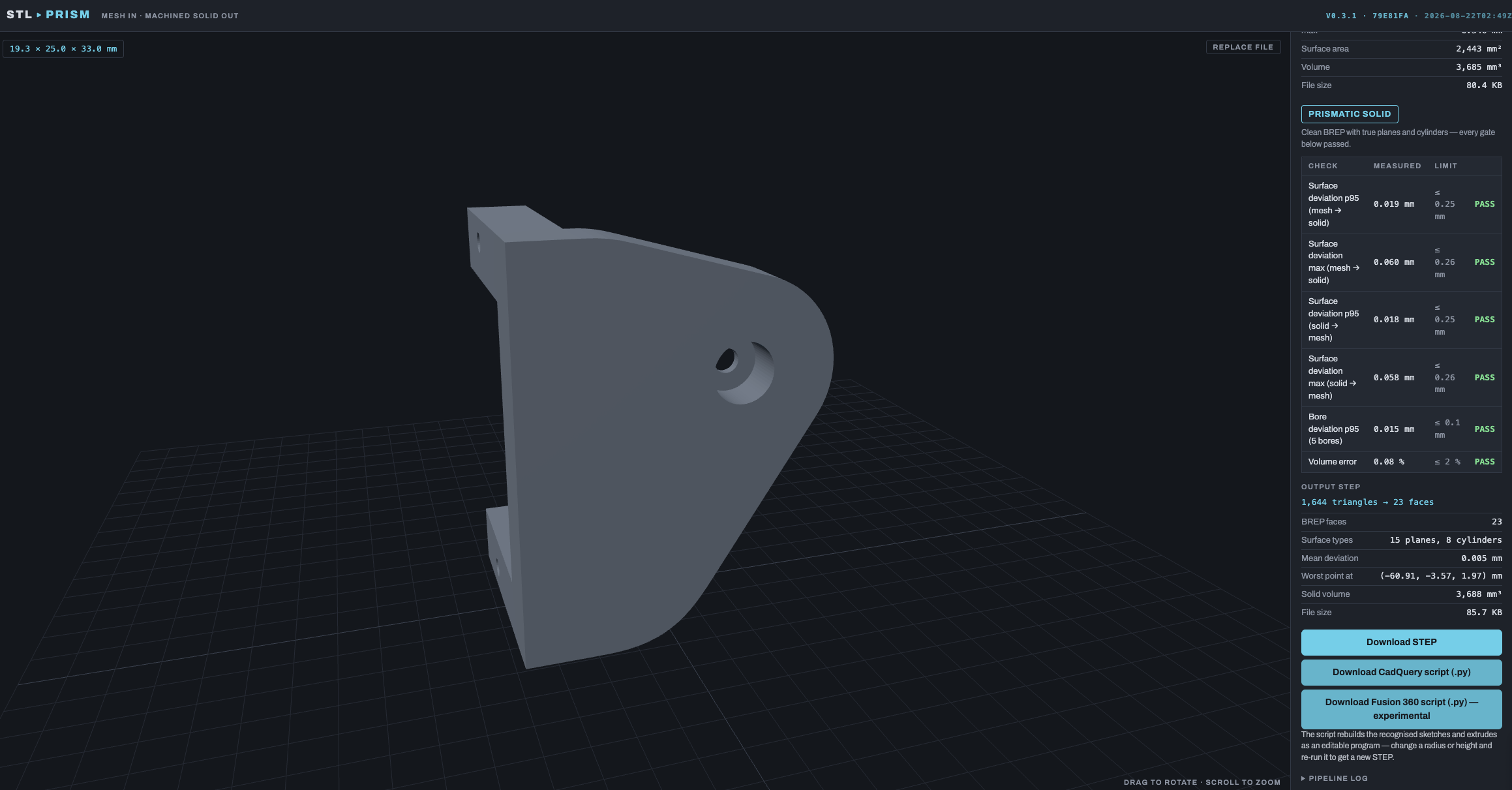 *Servo bracket: 1,644 triangles → 23 faces (15 planes, 8 cylinders), max deviation 0.060 mm.* |
|
|
82
|
+
| 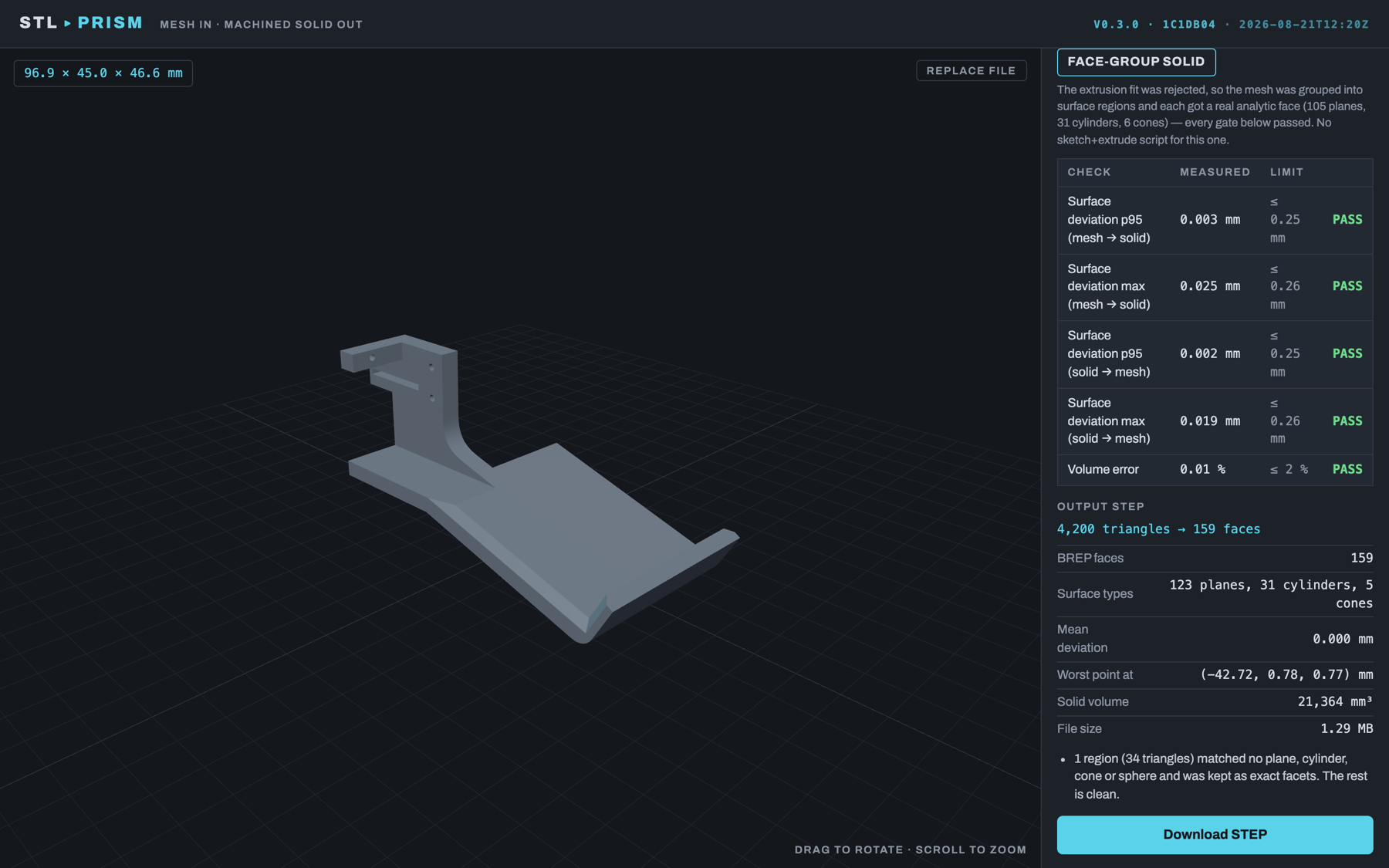 *Frame with countersinks: 4,200 triangles → 101 faces, max deviation 0.040 mm.* | 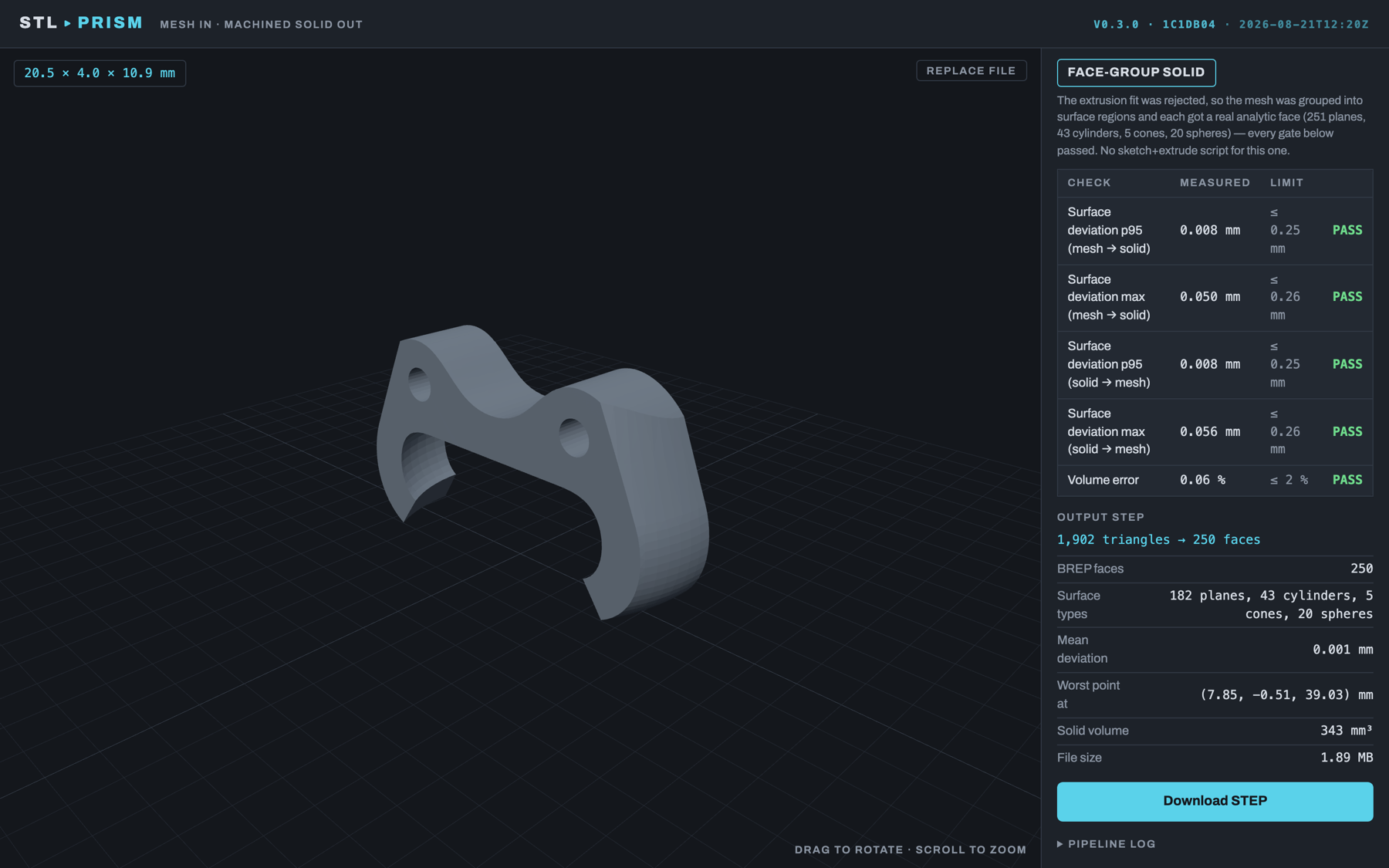 *Joystick claw: 1,902 triangles → 250 faces, including 43 cylinders and 20 spheres.* |
|
|
83
|
+
|
|
84
|
+
## The four tools
|
|
85
|
+
|
|
86
|
+
- **Mesh → Solid.** Drop in a mesh and get a STEP file with real planes,
|
|
87
|
+
cylinders, cones and fillets. Simple parts also come with a Fusion script
|
|
88
|
+
that rebuilds them as editable sketches and extrudes.
|
|
89
|
+
- **Sliced Loft.** For smooth, rounded shapes like caps, handles and shells.
|
|
90
|
+
It slices the mesh into outlines and lofts them into one smooth solid.
|
|
91
|
+
- **X-Ray.** Traces a stack of outlines between two planes and gives you a
|
|
92
|
+
Fusion script with one sketch per slice. It can also extrude the slices
|
|
93
|
+
into a stepped solid.
|
|
94
|
+
- **Blueprint.** Starts from a picture, not a mesh. Drop in a dimensioned
|
|
95
|
+
drawing, and an AI model of your choice reads the numbers and builds a
|
|
96
|
+
parametric Fusion script and a STEP. You can fix any number it misread.
|
|
97
|
+
It then looks at its own build from four sides and corrects what differs
|
|
98
|
+
from the drawing; a part with bends, blends or tilted bosses, which the
|
|
99
|
+
parametric recipe cannot draw, it writes as a short CadQuery script
|
|
100
|
+
instead (STEP only).
|
|
101
|
+
|
|
102
|
+
Results open in Fusion 360 (or any CAD program that reads STEP).
|
|
103
|
+
|
|
104
|
+
There is also a **Fusion 360 add-in, Mesh to Outline** (coming soon), that
|
|
105
|
+
does the X-Ray tracing inside Fusion itself. The
|
|
106
|
+
[user manual](https://github.com/Crypto69/stlToSolid/blob/main/docs/manual/stlToSolid-User-Manual.md) has a step-by-step guide
|
|
107
|
+
for every tool, the add-in included.
|
|
108
|
+
|
|
109
|
+
## Get it
|
|
110
|
+
|
|
111
|
+
| | |
|
|
112
|
+
|---|---|
|
|
113
|
+
| **Mac** (Apple Silicon) | Download the app from [Releases](https://github.com/Crypto69/stlToSolid/releases/latest). No Python or Docker needed. |
|
|
114
|
+
| **Windows** (64-bit) | Download from [Releases](https://github.com/Crypto69/stlToSolid/releases/latest). Unzip and open. |
|
|
115
|
+
| **Your NAS or a server** | One Docker container you open from any browser: `docker compose up --build`, then go to `http://localhost:8321`. Step-by-step NAS guide: [docs/DEPLOY-NAS.md](https://github.com/Crypto69/stlToSolid/blob/main/docs/DEPLOY-NAS.md). |
|
|
116
|
+
| **Command line** | `pip install stltosolid` then `stltosolid part.stl` makes `part.step`. |
|
|
117
|
+
| **An AI assistant** | Claude, Cursor or any MCP client can drive every tool. See below. |
|
|
118
|
+
|
|
119
|
+
The Mac and Windows apps are the same app as the web version, in their own
|
|
120
|
+
window.
|
|
121
|
+
|
|
122
|
+
### Running a Fusion script
|
|
123
|
+
|
|
124
|
+
Some results come with a `.py` script for Fusion 360. To run one:
|
|
125
|
+
|
|
126
|
+
1. Put the `.py` file in an empty folder.
|
|
127
|
+
2. In Fusion: **Utilities → Add-Ins → Scripts and Add-Ins → +**, and pick
|
|
128
|
+
that folder.
|
|
129
|
+
3. Press **Run**.
|
|
130
|
+
|
|
131
|
+
## Use it from an AI assistant
|
|
132
|
+
|
|
133
|
+
stlToSolid is also an [MCP](https://modelcontextprotocol.io) server. An assistant
|
|
134
|
+
can look at a mesh, convert it, read the report, slice it, and build a part from
|
|
135
|
+
a drawing it reads itself. Everything runs on your computer. Nothing is uploaded,
|
|
136
|
+
and no API key is needed.
|
|
137
|
+
|
|
138
|
+
```
|
|
139
|
+
claude mcp add stltosolid -- uvx --python 3.12 --from "stltosolid[mcp]" stltosolid-mcp
|
|
140
|
+
```
|
|
141
|
+
|
|
142
|
+
For Claude Desktop, Cursor and others, put this in the client's MCP settings:
|
|
143
|
+
|
|
144
|
+
```json
|
|
145
|
+
{
|
|
146
|
+
"mcpServers": {
|
|
147
|
+
"stltosolid": {
|
|
148
|
+
"command": "uvx",
|
|
149
|
+
"args": ["--python", "3.12", "--from", "stltosolid[mcp]", "stltosolid-mcp"]
|
|
150
|
+
}
|
|
151
|
+
}
|
|
152
|
+
}
|
|
153
|
+
```
|
|
154
|
+
|
|
155
|
+
You need [uv](https://docs.astral.sh/uv/). The first start downloads the geometry
|
|
156
|
+
kernel, about 2.8 GB, so run this once in a terminal first. It installs everything
|
|
157
|
+
and tests it. Later starts take under a second.
|
|
158
|
+
|
|
159
|
+
```
|
|
160
|
+
uvx --python 3.12 --from "stltosolid[mcp]" stltosolid-mcp --check
|
|
161
|
+
```
|
|
162
|
+
|
|
163
|
+
Results go to `~/stlToSolid/mcp-output`, and nothing is ever overwritten. The
|
|
164
|
+
[user manual](https://github.com/Crypto69/stlToSolid/blob/main/docs/manual/stlToSolid-User-Manual.md#12-using-stltosolid-from-an-ai-assistant)
|
|
165
|
+
lists the tools, the one-click Claude Desktop bundle and the remote mode for a NAS.
|
|
166
|
+
|
|
167
|
+
## More detail
|
|
168
|
+
|
|
169
|
+
**Using the app:** the [user manual](https://github.com/Crypto69/stlToSolid/blob/main/docs/manual/stlToSolid-User-Manual.md)
|
|
170
|
+
([PDF](https://github.com/Crypto69/stlToSolid/blob/main/docs/manual/stlToSolid-User-Manual.pdf)) walks through every tool and
|
|
171
|
+
every setting.
|
|
172
|
+
|
|
173
|
+
**How it works inside:** how each tool works, every setting, the API, measured results and the
|
|
174
|
+
version history are in [docs/TECHNICAL.md](https://github.com/Crypto69/stlToSolid/blob/main/docs/TECHNICAL.md).
|
|
175
|
+
|
|
176
|
+
## Licence
|
|
177
|
+
|
|
178
|
+
**PolyForm Noncommercial 1.0.0**. See [LICENSE](https://github.com/Crypto69/stlToSolid/blob/main/LICENSE). Free for personal,
|
|
179
|
+
hobby, educational and research use. Commercial use needs the author's
|
|
180
|
+
permission, so get in touch.
|
|
181
|
+
|
|
182
|
+
Third-party parts keep their own licences (CadQuery Apache-2.0, OpenCascade
|
|
183
|
+
LGPL-2.1 with exception, trimesh MIT, shapely/networkx BSD). The optional
|
|
184
|
+
`scan` extra installs pymeshlab, which is GPL-3.0. It is not part of this
|
|
185
|
+
package's licence and is only installed if you ask for it.
|
|
@@ -0,0 +1,143 @@
|
|
|
1
|
+
# stlToSolid
|
|
2
|
+
|
|
3
|
+
<!-- mcp-name: io.github.Crypto69/stltosolid -->
|
|
4
|
+
|
|
5
|
+
Turn an STL or OBJ mesh into a real solid you can model against in Fusion 360.
|
|
6
|
+
|
|
7
|
+
**[User manual](https://github.com/Crypto69/stlToSolid/blob/main/docs/manual/stlToSolid-User-Manual.md)**: how to use each
|
|
8
|
+
tool and what every setting does, with screenshots.
|
|
9
|
+
Also as a [PDF](https://github.com/Crypto69/stlToSolid/blob/main/docs/manual/stlToSolid-User-Manual.pdf) and on the website at
|
|
10
|
+
[stltosolid.com/docs](https://stltosolid.com/docs/).
|
|
11
|
+
|
|
12
|
+
## Why
|
|
13
|
+
|
|
14
|
+
I design 3D-printed parts as a hobby, and I kept needing to model *around*
|
|
15
|
+
a mesh: a bracket from Thingiverse, a scanned housing, a controller shell.
|
|
16
|
+
Fusion 360's free tier turns a mesh into a solid made of thousands of
|
|
17
|
+
little triangles. You can't sketch on it, measure it or build on it.
|
|
18
|
+
|
|
19
|
+
stlToSolid gives you flat faces, round holes and smooth curves instead,
|
|
20
|
+
so the part behaves like something you modelled yourself.
|
|
21
|
+
|
|
22
|
+
### Before and after
|
|
23
|
+
|
|
24
|
+
The same `servo_bracket_1.stl`, opened in Fusion 360 three ways. Left:
|
|
25
|
+
Fusion's own *Mesh → Solid* (every triangle becomes a face). Middle: the
|
|
26
|
+
STL mesh as loaded. Right: the STEP from stlToSolid, with 23 faces, planes
|
|
27
|
+
and cylinders, and holes that are real holes.
|
|
28
|
+
|
|
29
|
+

|
|
30
|
+
|
|
31
|
+
| | |
|
|
32
|
+
|---|---|
|
|
33
|
+
|  *Fusion Mesh → Solid, zoomed in: one face per triangle, so the "solid" carries all 1,644 facets and cannot be sketched on, filleted or measured like a modelled part.* |  *stlToSolid, zoomed in: flat faces are single planes, the blend is one cylinder, the edges are where the design has them.* |
|
|
34
|
+
|
|
35
|
+
### In the app
|
|
36
|
+
|
|
37
|
+
| | |
|
|
38
|
+
|---|---|
|
|
39
|
+
|  *Mesh loaded, with units and quality limits.* |  *Servo bracket: 1,644 triangles → 23 faces (15 planes, 8 cylinders), max deviation 0.060 mm.* |
|
|
40
|
+
|  *Frame with countersinks: 4,200 triangles → 101 faces, max deviation 0.040 mm.* |  *Joystick claw: 1,902 triangles → 250 faces, including 43 cylinders and 20 spheres.* |
|
|
41
|
+
|
|
42
|
+
## The four tools
|
|
43
|
+
|
|
44
|
+
- **Mesh → Solid.** Drop in a mesh and get a STEP file with real planes,
|
|
45
|
+
cylinders, cones and fillets. Simple parts also come with a Fusion script
|
|
46
|
+
that rebuilds them as editable sketches and extrudes.
|
|
47
|
+
- **Sliced Loft.** For smooth, rounded shapes like caps, handles and shells.
|
|
48
|
+
It slices the mesh into outlines and lofts them into one smooth solid.
|
|
49
|
+
- **X-Ray.** Traces a stack of outlines between two planes and gives you a
|
|
50
|
+
Fusion script with one sketch per slice. It can also extrude the slices
|
|
51
|
+
into a stepped solid.
|
|
52
|
+
- **Blueprint.** Starts from a picture, not a mesh. Drop in a dimensioned
|
|
53
|
+
drawing, and an AI model of your choice reads the numbers and builds a
|
|
54
|
+
parametric Fusion script and a STEP. You can fix any number it misread.
|
|
55
|
+
It then looks at its own build from four sides and corrects what differs
|
|
56
|
+
from the drawing; a part with bends, blends or tilted bosses, which the
|
|
57
|
+
parametric recipe cannot draw, it writes as a short CadQuery script
|
|
58
|
+
instead (STEP only).
|
|
59
|
+
|
|
60
|
+
Results open in Fusion 360 (or any CAD program that reads STEP).
|
|
61
|
+
|
|
62
|
+
There is also a **Fusion 360 add-in, Mesh to Outline** (coming soon), that
|
|
63
|
+
does the X-Ray tracing inside Fusion itself. The
|
|
64
|
+
[user manual](https://github.com/Crypto69/stlToSolid/blob/main/docs/manual/stlToSolid-User-Manual.md) has a step-by-step guide
|
|
65
|
+
for every tool, the add-in included.
|
|
66
|
+
|
|
67
|
+
## Get it
|
|
68
|
+
|
|
69
|
+
| | |
|
|
70
|
+
|---|---|
|
|
71
|
+
| **Mac** (Apple Silicon) | Download the app from [Releases](https://github.com/Crypto69/stlToSolid/releases/latest). No Python or Docker needed. |
|
|
72
|
+
| **Windows** (64-bit) | Download from [Releases](https://github.com/Crypto69/stlToSolid/releases/latest). Unzip and open. |
|
|
73
|
+
| **Your NAS or a server** | One Docker container you open from any browser: `docker compose up --build`, then go to `http://localhost:8321`. Step-by-step NAS guide: [docs/DEPLOY-NAS.md](https://github.com/Crypto69/stlToSolid/blob/main/docs/DEPLOY-NAS.md). |
|
|
74
|
+
| **Command line** | `pip install stltosolid` then `stltosolid part.stl` makes `part.step`. |
|
|
75
|
+
| **An AI assistant** | Claude, Cursor or any MCP client can drive every tool. See below. |
|
|
76
|
+
|
|
77
|
+
The Mac and Windows apps are the same app as the web version, in their own
|
|
78
|
+
window.
|
|
79
|
+
|
|
80
|
+
### Running a Fusion script
|
|
81
|
+
|
|
82
|
+
Some results come with a `.py` script for Fusion 360. To run one:
|
|
83
|
+
|
|
84
|
+
1. Put the `.py` file in an empty folder.
|
|
85
|
+
2. In Fusion: **Utilities → Add-Ins → Scripts and Add-Ins → +**, and pick
|
|
86
|
+
that folder.
|
|
87
|
+
3. Press **Run**.
|
|
88
|
+
|
|
89
|
+
## Use it from an AI assistant
|
|
90
|
+
|
|
91
|
+
stlToSolid is also an [MCP](https://modelcontextprotocol.io) server. An assistant
|
|
92
|
+
can look at a mesh, convert it, read the report, slice it, and build a part from
|
|
93
|
+
a drawing it reads itself. Everything runs on your computer. Nothing is uploaded,
|
|
94
|
+
and no API key is needed.
|
|
95
|
+
|
|
96
|
+
```
|
|
97
|
+
claude mcp add stltosolid -- uvx --python 3.12 --from "stltosolid[mcp]" stltosolid-mcp
|
|
98
|
+
```
|
|
99
|
+
|
|
100
|
+
For Claude Desktop, Cursor and others, put this in the client's MCP settings:
|
|
101
|
+
|
|
102
|
+
```json
|
|
103
|
+
{
|
|
104
|
+
"mcpServers": {
|
|
105
|
+
"stltosolid": {
|
|
106
|
+
"command": "uvx",
|
|
107
|
+
"args": ["--python", "3.12", "--from", "stltosolid[mcp]", "stltosolid-mcp"]
|
|
108
|
+
}
|
|
109
|
+
}
|
|
110
|
+
}
|
|
111
|
+
```
|
|
112
|
+
|
|
113
|
+
You need [uv](https://docs.astral.sh/uv/). The first start downloads the geometry
|
|
114
|
+
kernel, about 2.8 GB, so run this once in a terminal first. It installs everything
|
|
115
|
+
and tests it. Later starts take under a second.
|
|
116
|
+
|
|
117
|
+
```
|
|
118
|
+
uvx --python 3.12 --from "stltosolid[mcp]" stltosolid-mcp --check
|
|
119
|
+
```
|
|
120
|
+
|
|
121
|
+
Results go to `~/stlToSolid/mcp-output`, and nothing is ever overwritten. The
|
|
122
|
+
[user manual](https://github.com/Crypto69/stlToSolid/blob/main/docs/manual/stlToSolid-User-Manual.md#12-using-stltosolid-from-an-ai-assistant)
|
|
123
|
+
lists the tools, the one-click Claude Desktop bundle and the remote mode for a NAS.
|
|
124
|
+
|
|
125
|
+
## More detail
|
|
126
|
+
|
|
127
|
+
**Using the app:** the [user manual](https://github.com/Crypto69/stlToSolid/blob/main/docs/manual/stlToSolid-User-Manual.md)
|
|
128
|
+
([PDF](https://github.com/Crypto69/stlToSolid/blob/main/docs/manual/stlToSolid-User-Manual.pdf)) walks through every tool and
|
|
129
|
+
every setting.
|
|
130
|
+
|
|
131
|
+
**How it works inside:** how each tool works, every setting, the API, measured results and the
|
|
132
|
+
version history are in [docs/TECHNICAL.md](https://github.com/Crypto69/stlToSolid/blob/main/docs/TECHNICAL.md).
|
|
133
|
+
|
|
134
|
+
## Licence
|
|
135
|
+
|
|
136
|
+
**PolyForm Noncommercial 1.0.0**. See [LICENSE](https://github.com/Crypto69/stlToSolid/blob/main/LICENSE). Free for personal,
|
|
137
|
+
hobby, educational and research use. Commercial use needs the author's
|
|
138
|
+
permission, so get in touch.
|
|
139
|
+
|
|
140
|
+
Third-party parts keep their own licences (CadQuery Apache-2.0, OpenCascade
|
|
141
|
+
LGPL-2.1 with exception, trimesh MIT, shapely/networkx BSD). The optional
|
|
142
|
+
`scan` extra installs pymeshlab, which is GPL-3.0. It is not part of this
|
|
143
|
+
package's licence and is only installed if you ask for it.
|
|
@@ -0,0 +1,63 @@
|
|
|
1
|
+
[build-system]
|
|
2
|
+
requires = ["setuptools>=77"]
|
|
3
|
+
build-backend = "setuptools.build_meta"
|
|
4
|
+
|
|
5
|
+
[project]
|
|
6
|
+
name = "stltosolid"
|
|
7
|
+
version = "0.6.0"
|
|
8
|
+
description = "Convert STL/OBJ meshes into prismatic STEP solids via extrusion-structure recognition, with a faceted-BREP fallback"
|
|
9
|
+
readme = "README.md"
|
|
10
|
+
authors = [{ name = "Chris Venter" }]
|
|
11
|
+
keywords = ["stl", "step", "mesh", "cad", "fusion-360", "cadquery", "mcp", "model-context-protocol"]
|
|
12
|
+
classifiers = [
|
|
13
|
+
"Intended Audience :: Manufacturing",
|
|
14
|
+
"Operating System :: MacOS",
|
|
15
|
+
"Operating System :: Microsoft :: Windows",
|
|
16
|
+
"Operating System :: POSIX :: Linux",
|
|
17
|
+
"Programming Language :: Python :: 3.11",
|
|
18
|
+
"Programming Language :: Python :: 3.12",
|
|
19
|
+
"Programming Language :: Python :: 3.13",
|
|
20
|
+
"Topic :: Scientific/Engineering :: Visualization",
|
|
21
|
+
]
|
|
22
|
+
license = "PolyForm-Noncommercial-1.0.0"
|
|
23
|
+
license-files = ["LICENSE"]
|
|
24
|
+
requires-python = ">=3.11,<3.14"
|
|
25
|
+
dependencies = [
|
|
26
|
+
"numpy",
|
|
27
|
+
"trimesh",
|
|
28
|
+
"shapely",
|
|
29
|
+
"networkx",
|
|
30
|
+
"rtree",
|
|
31
|
+
"scipy",
|
|
32
|
+
"cadquery",
|
|
33
|
+
"lxml",
|
|
34
|
+
"fast-simplification",
|
|
35
|
+
]
|
|
36
|
+
|
|
37
|
+
[project.optional-dependencies]
|
|
38
|
+
scan = ["pymeshlab"]
|
|
39
|
+
# Blueprint: reading a drawing with a vision model (the web app's 4th tool)
|
|
40
|
+
blueprint = ["anthropic>=1", "openai>=1", "pillow"]
|
|
41
|
+
# The MCP server (stltosolid-mcp), for AI clients: pillow draws the pictures
|
|
42
|
+
# its tools answer with. No vision-model SDK: the client's model reads drawings.
|
|
43
|
+
mcp = ["mcp>=2.3,<3", "pillow"]
|
|
44
|
+
|
|
45
|
+
[project.urls]
|
|
46
|
+
Homepage = "https://stltosolid.com"
|
|
47
|
+
Documentation = "https://stltosolid.com/docs/"
|
|
48
|
+
Source = "https://github.com/Crypto69/stlToSolid"
|
|
49
|
+
Issues = "https://github.com/Crypto69/stlToSolid/issues"
|
|
50
|
+
|
|
51
|
+
[project.scripts]
|
|
52
|
+
stltosolid = "stl_to_solid.pipeline:main"
|
|
53
|
+
stltosolid-mcp = "stl_to_solid_mcp.cli:main"
|
|
54
|
+
|
|
55
|
+
[tool.setuptools.packages.find]
|
|
56
|
+
include = ["stl_to_solid*"]
|
|
57
|
+
|
|
58
|
+
[tool.pytest.ini_options]
|
|
59
|
+
markers = ["slow: end-to-end runs over large sample meshes"]
|
|
60
|
+
# Never collect a vendored dependency tree: a wheel unpacked into a lib/
|
|
61
|
+
# folder is built for another interpreter, and importing it shadows the
|
|
62
|
+
# venv's own copy and breaks every other test module.
|
|
63
|
+
norecursedirs = ["*/lib", "*.egg", ".*", "build", "dist", "node_modules"]
|
|
@@ -0,0 +1,11 @@
|
|
|
1
|
+
__version__ = '0.6.0'
|
|
2
|
+
|
|
3
|
+
|
|
4
|
+
def __getattr__(name):
|
|
5
|
+
# `from stl_to_solid import run` costs the mesh stack only when asked for:
|
|
6
|
+
# the job registry and the MCP server import this package and must start
|
|
7
|
+
# in a blink.
|
|
8
|
+
if name == 'run':
|
|
9
|
+
from .pipeline import run
|
|
10
|
+
return run
|
|
11
|
+
raise AttributeError(f'module {__name__!r} has no attribute {name!r}')
|