stljoiner 0.2.1__tar.gz
This diff represents the content of publicly available package versions that have been released to one of the supported registries. The information contained in this diff is provided for informational purposes only and reflects changes between package versions as they appear in their respective public registries.
- stljoiner-0.2.1/CHANGELOG.md +89 -0
- stljoiner-0.2.1/CONTRIBUTING.md +73 -0
- stljoiner-0.2.1/LICENSE +21 -0
- stljoiner-0.2.1/MANIFEST.in +4 -0
- stljoiner-0.2.1/PKG-INFO +152 -0
- stljoiner-0.2.1/README.md +105 -0
- stljoiner-0.2.1/SECURITY.md +33 -0
- stljoiner-0.2.1/docs/USER_GUIDE.md +216 -0
- stljoiner-0.2.1/pyproject.toml +81 -0
- stljoiner-0.2.1/setup.cfg +4 -0
- stljoiner-0.2.1/src/stljoiner/__init__.py +4 -0
- stljoiner-0.2.1/src/stljoiner/__main__.py +3 -0
- stljoiner-0.2.1/src/stljoiner/cli.py +23 -0
- stljoiner-0.2.1/src/stljoiner/join.py +651 -0
- stljoiner-0.2.1/src/stljoiner/static/index.html +605 -0
- stljoiner-0.2.1/src/stljoiner/static/vendor/three/LICENSE +21 -0
- stljoiner-0.2.1/src/stljoiner/static/vendor/three/addons/OrbitControls.js +1523 -0
- stljoiner-0.2.1/src/stljoiner/static/vendor/three/addons/STLLoader.js +411 -0
- stljoiner-0.2.1/src/stljoiner/static/vendor/three/three.module.min.js +6 -0
- stljoiner-0.2.1/src/stljoiner/version.py +1 -0
- stljoiner-0.2.1/src/stljoiner/web.py +397 -0
- stljoiner-0.2.1/src/stljoiner.egg-info/PKG-INFO +152 -0
- stljoiner-0.2.1/src/stljoiner.egg-info/SOURCES.txt +30 -0
- stljoiner-0.2.1/src/stljoiner.egg-info/dependency_links.txt +1 -0
- stljoiner-0.2.1/src/stljoiner.egg-info/entry_points.txt +2 -0
- stljoiner-0.2.1/src/stljoiner.egg-info/requires.txt +18 -0
- stljoiner-0.2.1/src/stljoiner.egg-info/top_level.txt +1 -0
- stljoiner-0.2.1/tests/conftest.py +21 -0
- stljoiner-0.2.1/tests/make_test_parts.py +121 -0
- stljoiner-0.2.1/tests/test_app.py +169 -0
- stljoiner-0.2.1/tests/test_browser.py +93 -0
- stljoiner-0.2.1/tests/test_stljoin.py +164 -0
|
@@ -0,0 +1,89 @@
|
|
|
1
|
+
# Changelog
|
|
2
|
+
|
|
3
|
+
All notable changes to stljoiner are recorded here. The format follows
|
|
4
|
+
[Keep a Changelog](https://keepachangelog.com/en/1.1.0/), and versions follow
|
|
5
|
+
[Semantic Versioning](https://semver.org/).
|
|
6
|
+
|
|
7
|
+
## [Unreleased]
|
|
8
|
+
|
|
9
|
+
## [0.2.1] - 2026-11-25
|
|
10
|
+
|
|
11
|
+
### Fixed
|
|
12
|
+
|
|
13
|
+
- The README's images and links now use full GitHub URLs, so they show up
|
|
14
|
+
on the PyPI project page.
|
|
15
|
+
|
|
16
|
+
## [0.2.0] - 2026-11-25
|
|
17
|
+
|
|
18
|
+
Install from PyPI, face suggestions, smarter auto-join and more file formats.
|
|
19
|
+
|
|
20
|
+
### Added
|
|
21
|
+
|
|
22
|
+
- stljoiner is a Python package: `pipx install stljoiner` (or `pip install
|
|
23
|
+
stljoiner`) installs the `stljoiner` command on Linux, macOS and Windows.
|
|
24
|
+
- `stljoiner web` starts the web interface (`--port`, `--host`).
|
|
25
|
+
- `python -m stljoiner` works the same as `stljoiner`.
|
|
26
|
+
- Release workflow: pushing a version tag creates the GitHub release and
|
|
27
|
+
uploads the package to PyPI.
|
|
28
|
+
- CI also runs on Windows and macOS and checks that the package builds.
|
|
29
|
+
- Face suggestions in the web interface: click face A and the best-fitting
|
|
30
|
+
faces on the other checked parts light up and are listed by fit. Press S
|
|
31
|
+
(or click one) to take it.
|
|
32
|
+
- Auto-join understands stepped and dovetailed cuts: face matches that agree
|
|
33
|
+
on the same placement count as one strong joint. Pegs and holes with
|
|
34
|
+
clearance match too.
|
|
35
|
+
- Auto-join never pushes one part into another, trusts faces that fit only
|
|
36
|
+
one partner over plain faces that fit many, and marks joints that are a
|
|
37
|
+
guess with ⚠.
|
|
38
|
+
- Mesh formats: read STL, 3MF, OBJ, PLY, OFF and GLB. A 3MF or GLB with
|
|
39
|
+
several objects loads as several parts. Write STL, 3MF, OBJ, PLY, OFF or
|
|
40
|
+
GLB (`-o` extension on the command line, a format menu in the page).
|
|
41
|
+
Unmerged 3MF/GLB keeps each part as its own object.
|
|
42
|
+
- Adjust panel: move a part (and what's joined to it) by a step, or turn it
|
|
43
|
+
90°.
|
|
44
|
+
- Green-screen theme, keyboard shortcuts (press ? in the page), and the
|
|
45
|
+
page remembers your theme, export format and unchecked parts.
|
|
46
|
+
- An optional end-to-end browser test (`tests/test_browser.py`).
|
|
47
|
+
|
|
48
|
+
### Changed
|
|
49
|
+
|
|
50
|
+
- `stljoiner PART.stl ...` replaces `python stljoin.py PART.stl ...`, and
|
|
51
|
+
`stljoiner web` replaces `python app.py`. The code now lives in
|
|
52
|
+
`src/stljoiner/`.
|
|
53
|
+
- Dependencies are listed in `pyproject.toml`. `requirements.txt` is gone.
|
|
54
|
+
- The web page works offline: three.js is bundled instead of loaded from a
|
|
55
|
+
CDN.
|
|
56
|
+
- Picked and suggested faces show through the model, so they're never
|
|
57
|
+
hidden.
|
|
58
|
+
|
|
59
|
+
### Fixed
|
|
60
|
+
|
|
61
|
+
- The disabled Join button no longer looks active in the green-screen theme.
|
|
62
|
+
|
|
63
|
+
## [0.1.0] - 2026-11-25
|
|
64
|
+
|
|
65
|
+
First release.
|
|
66
|
+
|
|
67
|
+
### Added
|
|
68
|
+
|
|
69
|
+
- Web interface (`app.py`, <http://127.0.0.1:4300>): drop in STL parts, view
|
|
70
|
+
them in 3D, click the two faces that touch to join them, step through
|
|
71
|
+
every rotation a symmetric face fits with **Next rotation**, auto-join,
|
|
72
|
+
undo, reset, detach, and export the checked parts as one merged STL.
|
|
73
|
+
Unchecked parts are faded out and left out of joining and export.
|
|
74
|
+
- Command line (`stljoin.py`): joins parts automatically and writes one STL,
|
|
75
|
+
with `--no-union`, `--export-parts`, `--tolerance`, `--max-faces`,
|
|
76
|
+
`--min-area`, `--version` and `-q`.
|
|
77
|
+
- Face matching by outline shape, holes included. Flat islands on one plane
|
|
78
|
+
count as one face, so cuts through holes and slots match.
|
|
79
|
+
- Exact alignment: a 2D ICP pass snaps the matched outlines together vertex
|
|
80
|
+
to vertex.
|
|
81
|
+
- Pieces already in their original positions are detected and kept in place.
|
|
82
|
+
- Seam vertices are welded before the boolean union (manifold3d), so the
|
|
83
|
+
result is watertight.
|
|
84
|
+
- User guide, test suite and CI.
|
|
85
|
+
|
|
86
|
+
[Unreleased]: https://github.com/drak42/stljoiner/compare/v0.2.1...HEAD
|
|
87
|
+
[0.2.1]: https://github.com/drak42/stljoiner/compare/v0.2.0...v0.2.1
|
|
88
|
+
[0.2.0]: https://github.com/drak42/stljoiner/compare/v0.1.0...v0.2.0
|
|
89
|
+
[0.1.0]: https://github.com/drak42/stljoiner/releases/tag/v0.1.0
|
|
@@ -0,0 +1,73 @@
|
|
|
1
|
+
# Contributing to stljoiner
|
|
2
|
+
|
|
3
|
+
Thank you for taking the time to contribute! Bug reports, ideas and pull requests are all welcome.
|
|
4
|
+
|
|
5
|
+
## Reporting a problem
|
|
6
|
+
|
|
7
|
+
Open an [issue](https://github.com/drak42/stljoiner/issues/new/choose). The most useful thing you can attach is the **STL pieces that don't join correctly** (zipped), plus a note on how they were split.
|
|
8
|
+
|
|
9
|
+
For security problems, please follow [SECURITY.md](SECURITY.md) instead of opening a public issue.
|
|
10
|
+
|
|
11
|
+
## Development setup
|
|
12
|
+
|
|
13
|
+
```bash
|
|
14
|
+
git clone https://github.com/drak42/stljoiner.git
|
|
15
|
+
cd stljoiner
|
|
16
|
+
python -m venv .venv
|
|
17
|
+
.venv/bin/pip install -e '.[dev]'
|
|
18
|
+
```
|
|
19
|
+
|
|
20
|
+
This installs the `stljoiner` command from your working copy (`.venv/bin/stljoiner`), so changes take effect right away. On Windows the programs are in `.venv\Scripts\` instead of `.venv/bin/`.
|
|
21
|
+
|
|
22
|
+
Before committing, run the same checks as GitHub Actions:
|
|
23
|
+
|
|
24
|
+
```bash
|
|
25
|
+
.venv/bin/ruff check .
|
|
26
|
+
.venv/bin/pytest -q
|
|
27
|
+
.venv/bin/python -m build && .venv/bin/twine check --strict dist/*
|
|
28
|
+
```
|
|
29
|
+
|
|
30
|
+
`tests/test_browser.py` drives the web page in a real browser. It's skipped unless Playwright and Google Chrome (or Chromium) are installed:
|
|
31
|
+
|
|
32
|
+
```bash
|
|
33
|
+
.venv/bin/pip install playwright
|
|
34
|
+
.venv/bin/pytest tests/test_browser.py
|
|
35
|
+
```
|
|
36
|
+
|
|
37
|
+
## Project layout
|
|
38
|
+
|
|
39
|
+
| Path | What it is |
|
|
40
|
+
|---|---|
|
|
41
|
+
| `src/stljoiner/join.py` | The joining engine and the `stljoiner` command line: face extraction, matching, alignment, assembly, union. |
|
|
42
|
+
| `src/stljoiner/web.py` | The Flask web server (`stljoiner web`) and its JSON API. |
|
|
43
|
+
| `src/stljoiner/static/index.html` | The web page (3D viewer, face picking, suggestions). |
|
|
44
|
+
| `src/stljoiner/static/vendor/three/` | three.js r170 (MIT, see its LICENSE), bundled so the page works offline. |
|
|
45
|
+
| `src/stljoiner/cli.py` | Sends `stljoiner web` to the web server and everything else to the joiner. |
|
|
46
|
+
| `src/stljoiner/version.py` | The version number (the only place it is set). |
|
|
47
|
+
| `tests/` | pytest suite. `make_test_parts.py` builds the test parts: the split L-bracket (also used by the media), plus connector, stepped and dovetail cuts. |
|
|
48
|
+
| `docs/USER_GUIDE.md` | The user guide. |
|
|
49
|
+
| `docs/images/` | README media. `make_media.py` regenerates them. |
|
|
50
|
+
|
|
51
|
+
## Guidelines
|
|
52
|
+
|
|
53
|
+
- **Keep it simple.** Readable code beats clever code.
|
|
54
|
+
- **Add a test** for any bug you fix or behavior you add. The test part in `tests/make_test_parts.py` covers most cases. Add new shapes there if you need them.
|
|
55
|
+
- **Update the docs** (README, user guide, CHANGELOG under *Unreleased*) when behavior changes.
|
|
56
|
+
- Code style is checked by ruff (settings in `pyproject.toml`, 120-column lines).
|
|
57
|
+
|
|
58
|
+
## Regenerating the media
|
|
59
|
+
|
|
60
|
+
The banner and animation are drawn from the real test part. You need Google Chrome or Chromium, plus Pillow:
|
|
61
|
+
|
|
62
|
+
```bash
|
|
63
|
+
.venv/bin/pip install -e '.[media]'
|
|
64
|
+
.venv/bin/python docs/images/make_media.py
|
|
65
|
+
```
|
|
66
|
+
|
|
67
|
+
## Releasing
|
|
68
|
+
|
|
69
|
+
1. Set the new version in `src/stljoiner/version.py`.
|
|
70
|
+
2. Move the *Unreleased* notes in `CHANGELOG.md` under a heading for the new version, and update the links at the bottom.
|
|
71
|
+
3. Commit, then tag and push: `git tag -a vX.Y.Z -m "stljoiner X.Y.Z" && git push origin vX.Y.Z`.
|
|
72
|
+
|
|
73
|
+
The **Release** workflow then checks that the tag matches the version, runs the tests, builds the package, creates the GitHub release with that version's changelog notes, and uploads to PyPI using trusted publishing (no token needed).
|
stljoiner-0.2.1/LICENSE
ADDED
|
@@ -0,0 +1,21 @@
|
|
|
1
|
+
MIT License
|
|
2
|
+
|
|
3
|
+
Copyright (c) 2026 Christopher Eslick
|
|
4
|
+
|
|
5
|
+
Permission is hereby granted, free of charge, to any person obtaining a copy
|
|
6
|
+
of this software and associated documentation files (the "Software"), to deal
|
|
7
|
+
in the Software without restriction, including without limitation the rights
|
|
8
|
+
to use, copy, modify, merge, publish, distribute, sublicense, and/or sell
|
|
9
|
+
copies of the Software, and to permit persons to whom the Software is
|
|
10
|
+
furnished to do so, subject to the following conditions:
|
|
11
|
+
|
|
12
|
+
The above copyright notice and this permission notice shall be included in all
|
|
13
|
+
copies or substantial portions of the Software.
|
|
14
|
+
|
|
15
|
+
THE SOFTWARE IS PROVIDED "AS IS", WITHOUT WARRANTY OF ANY KIND, EXPRESS OR
|
|
16
|
+
IMPLIED, INCLUDING BUT NOT LIMITED TO THE WARRANTIES OF MERCHANTABILITY,
|
|
17
|
+
FITNESS FOR A PARTICULAR PURPOSE AND NONINFRINGEMENT. IN NO EVENT SHALL THE
|
|
18
|
+
AUTHORS OR COPYRIGHT HOLDERS BE LIABLE FOR ANY CLAIM, DAMAGES OR OTHER
|
|
19
|
+
LIABILITY, WHETHER IN AN ACTION OF CONTRACT, TORT OR OTHERWISE, ARISING FROM,
|
|
20
|
+
OUT OF OR IN CONNECTION WITH THE SOFTWARE OR THE USE OR OTHER DEALINGS IN THE
|
|
21
|
+
SOFTWARE.
|
stljoiner-0.2.1/PKG-INFO
ADDED
|
@@ -0,0 +1,152 @@
|
|
|
1
|
+
Metadata-Version: 2.4
|
|
2
|
+
Name: stljoiner
|
|
3
|
+
Version: 0.2.1
|
|
4
|
+
Summary: Put split STL parts back together by matching their cut faces, and save them as one watertight solid. Web interface and command line.
|
|
5
|
+
Author: Christopher Eslick
|
|
6
|
+
License-Expression: MIT
|
|
7
|
+
Project-URL: Homepage, https://github.com/drak42/stljoiner
|
|
8
|
+
Project-URL: Repository, https://github.com/drak42/stljoiner
|
|
9
|
+
Project-URL: Issues, https://github.com/drak42/stljoiner/issues
|
|
10
|
+
Project-URL: Changelog, https://github.com/drak42/stljoiner/blob/main/CHANGELOG.md
|
|
11
|
+
Project-URL: Documentation, https://github.com/drak42/stljoiner/blob/main/docs/USER_GUIDE.md
|
|
12
|
+
Project-URL: Funding, https://buymeacoffee.com/drak42
|
|
13
|
+
Keywords: 3d-printing,stl,3mf,mesh,join,merge,split,assembly,trimesh
|
|
14
|
+
Classifier: Development Status :: 3 - Alpha
|
|
15
|
+
Classifier: Environment :: Console
|
|
16
|
+
Classifier: Environment :: Web Environment
|
|
17
|
+
Classifier: Intended Audience :: End Users/Desktop
|
|
18
|
+
Classifier: Intended Audience :: Manufacturing
|
|
19
|
+
Classifier: Operating System :: OS Independent
|
|
20
|
+
Classifier: Programming Language :: Python :: 3
|
|
21
|
+
Classifier: Programming Language :: Python :: 3.10
|
|
22
|
+
Classifier: Programming Language :: Python :: 3.11
|
|
23
|
+
Classifier: Programming Language :: Python :: 3.12
|
|
24
|
+
Classifier: Programming Language :: Python :: 3.13
|
|
25
|
+
Classifier: Topic :: Multimedia :: Graphics :: 3D Modeling
|
|
26
|
+
Classifier: Topic :: Printing
|
|
27
|
+
Requires-Python: >=3.10
|
|
28
|
+
Description-Content-Type: text/markdown
|
|
29
|
+
License-File: LICENSE
|
|
30
|
+
Requires-Dist: trimesh>=4
|
|
31
|
+
Requires-Dist: numpy
|
|
32
|
+
Requires-Dist: scipy
|
|
33
|
+
Requires-Dist: shapely>=2
|
|
34
|
+
Requires-Dist: manifold3d
|
|
35
|
+
Requires-Dist: networkx
|
|
36
|
+
Requires-Dist: rtree
|
|
37
|
+
Requires-Dist: flask>=3
|
|
38
|
+
Requires-Dist: lxml
|
|
39
|
+
Provides-Extra: dev
|
|
40
|
+
Requires-Dist: pytest>=8; extra == "dev"
|
|
41
|
+
Requires-Dist: ruff; extra == "dev"
|
|
42
|
+
Requires-Dist: build; extra == "dev"
|
|
43
|
+
Requires-Dist: twine; extra == "dev"
|
|
44
|
+
Provides-Extra: media
|
|
45
|
+
Requires-Dist: pillow; extra == "media"
|
|
46
|
+
Dynamic: license-file
|
|
47
|
+
|
|
48
|
+
# stljoiner
|
|
49
|
+
|
|
50
|
+
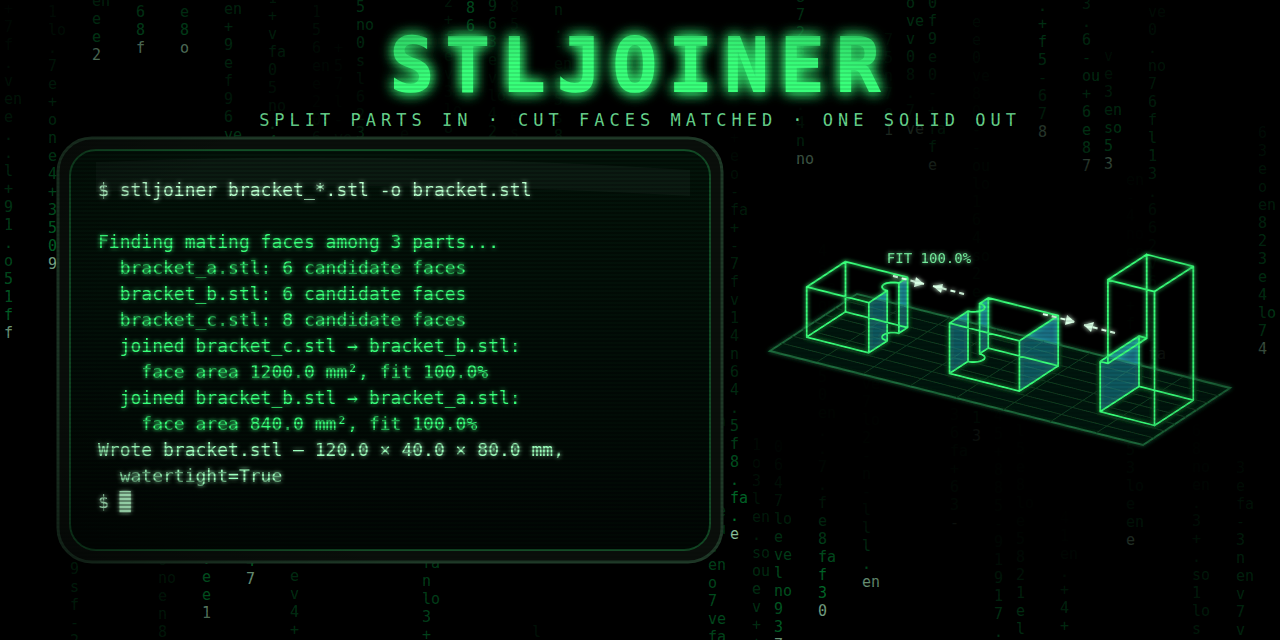
|
|
51
|
+
|
|
52
|
+
[](https://github.com/drak42/stljoiner/actions/workflows/ci.yml)
|
|
53
|
+
[](https://github.com/drak42/stljoiner/blob/main/LICENSE)
|
|
54
|
+
[](https://buymeacoffee.com/drak42)
|
|
55
|
+
|
|
56
|
+
Put split 3D-print parts back together by matching the faces where they were cut, and save them as **one watertight solid**. Reads and writes STL, 3MF, OBJ, PLY, OFF and GLB.
|
|
57
|
+
|
|
58
|
+
Did you cut a model to fit your print bed, or download one that came in pieces? stljoiner finds the faces that mate, moves each piece into place, even if it's scattered and rotated, and merges everything.
|
|
59
|
+
|
|
60
|
+
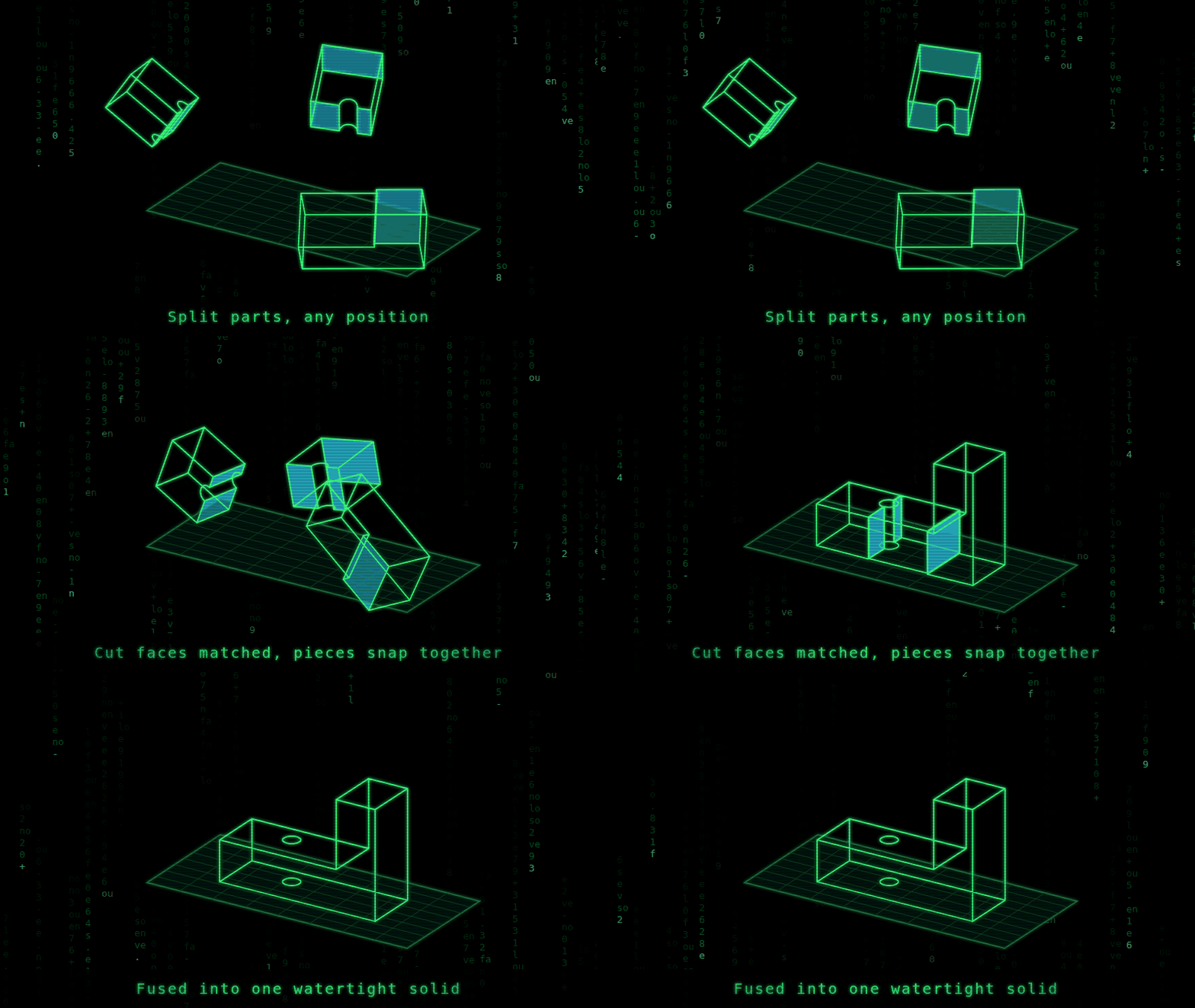
|
|
61
|
+
|
|
62
|
+
**New here? Start with the [user guide](https://github.com/drak42/stljoiner/blob/main/docs/USER_GUIDE.md).**
|
|
63
|
+
|
|
64
|
+
## Features
|
|
65
|
+
|
|
66
|
+
- **Web interface:** drop parts in, click a cut face, and stljoiner suggests the face it mates with. One more key press snaps the piece into place.
|
|
67
|
+
- **Works offline:** the 3D viewer ships inside the package. Nothing is loaded from the internet.
|
|
68
|
+
- **Pick which parts to use:** unchecked parts are faded out and left out of joining and export.
|
|
69
|
+
- **Exact alignment:** outlines are matched by shape (holes count), then snapped vertex to vertex, so seams close without gaps.
|
|
70
|
+
- **Connectors and shaped cuts:** pegs and holes, stepped cuts and dovetails are matched too.
|
|
71
|
+
- **Symmetric faces:** if a cut face fits more than one way, **Next rotation** steps through every way it fits.
|
|
72
|
+
- **Auto-join:** finds the joints by itself. It never pushes one part into another, and it warns you when a joint is a guess.
|
|
73
|
+
- **Fine-tune:** move or turn a part (and everything joined to it) by any step.
|
|
74
|
+
- **One clean solid out:** a boolean union with [manifold3d](https://github.com/elalish/manifold), with seam vertices welded first. You can also keep the parts as separate objects in a 3MF for multi-color printing.
|
|
75
|
+
- **Light or green-screen theme**, and keyboard shortcuts for everything.
|
|
76
|
+
- **Command line** for scripts and batches.
|
|
77
|
+
|
|
78
|
+
## Install
|
|
79
|
+
|
|
80
|
+
You need Python 3.10 or newer. The easiest way is [pipx](https://pipx.pypa.io/), which gives stljoiner its own environment:
|
|
81
|
+
|
|
82
|
+
```bash
|
|
83
|
+
pipx install stljoiner
|
|
84
|
+
```
|
|
85
|
+
|
|
86
|
+
`pip install stljoiner` works too, as does `uv tool install stljoiner`. Upgrade later with `pipx upgrade stljoiner`.
|
|
87
|
+
|
|
88
|
+
## Web interface
|
|
89
|
+
|
|
90
|
+
```bash
|
|
91
|
+
stljoiner web # then open http://127.0.0.1:4300
|
|
92
|
+
```
|
|
93
|
+
|
|
94
|
+
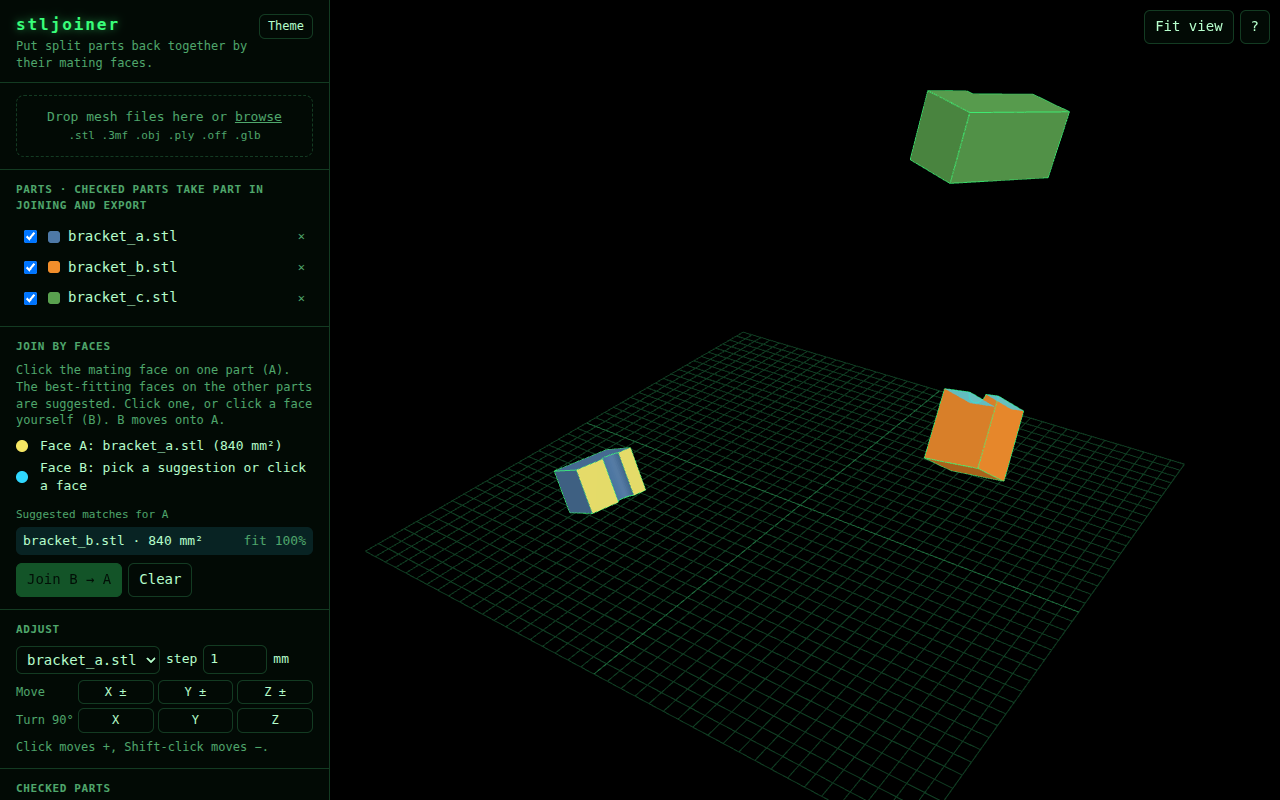
|
|
95
|
+
|
|
96
|
+
1. Drop your parts in (STL, 3MF, OBJ, PLY, OFF or GLB). A 3MF or GLB holding several objects loads as several parts. Only **checked** parts can be picked, joined or exported.
|
|
97
|
+
2. Click the cut face on one part (**A**, yellow). The best-fitting faces on the other parts light up cyan and are listed with their fit.
|
|
98
|
+
3. Press **S** to take the top suggestion (or click any face yourself), then **J** to join. Part B snaps onto part A.
|
|
99
|
+
4. If it's turned the wrong way, press **N** (**Next rotation**). Use **Adjust** to move or turn a part by hand.
|
|
100
|
+
5. Repeat until everything is joined, then **Export** as STL, 3MF, OBJ, PLY or GLB.
|
|
101
|
+
|
|
102
|
+
Press **?** in the page for all the keyboard shortcuts.
|
|
103
|
+
|
|
104
|
+
Use `stljoiner web --port 4301` to choose another port. The page is served on this computer only (`127.0.0.1`).
|
|
105
|
+
|
|
106
|
+
## Command line
|
|
107
|
+
|
|
108
|
+
```bash
|
|
109
|
+
stljoiner part1.stl part2.stl part3.stl -o joined.stl
|
|
110
|
+
stljoiner kit.3mf -o joined.3mf # every object in the 3MF is a part
|
|
111
|
+
stljoiner a.stl b.stl --no-union -o placed.3mf # placed, kept as separate objects
|
|
112
|
+
```
|
|
113
|
+
|
|
114
|
+
| Option | Meaning |
|
|
115
|
+
|---|---|
|
|
116
|
+
| `-o FILE` | Output file (default `joined.stl`). Its extension picks the format: `.stl`, `.3mf`, `.obj`, `.ply`, `.off`, `.glb`. |
|
|
117
|
+
| `--no-union` | Place the parts but don't merge them. 3MF and GLB keep each part as its own object. |
|
|
118
|
+
| `--export-parts DIR` | Also write each repositioned piece. |
|
|
119
|
+
| `--tolerance 0.05` | How closely mating faces must match (fraction). |
|
|
120
|
+
| `--max-faces`, `--min-area` | Which flat faces count as cut candidates. |
|
|
121
|
+
| `--version`, `-q` | Show the version, or run quietly. |
|
|
122
|
+
|
|
123
|
+
## How it works
|
|
124
|
+
|
|
125
|
+
1. Finds the flat faces on each part. Flat islands on the same plane count as one face, as happens when a cut passes through a hole.
|
|
126
|
+
2. For a pair of faces, turns B's face to point against A's, then searches the in-plane rotation for the best outline overlap (IoU, holes included).
|
|
127
|
+
3. Refines the match with 2D ICP on the outline vertices, so the faces line up exactly.
|
|
128
|
+
4. Groups face matches that agree on the same placement, so a stepped or dovetailed cut, made of several flat faces, counts as one strong joint. A plain face that fits many partners is trusted less than one that fits only one.
|
|
129
|
+
5. Joins parts best joint first (each face used once, whole groups moving together), and skips any joint that would push one part into another.
|
|
130
|
+
6. Welds the seam vertices and unions everything into one manifold mesh.
|
|
131
|
+
|
|
132
|
+
## Known limitations
|
|
133
|
+
|
|
134
|
+
- Auto-join (and the command line) only goes by shape. When a plain face, such as the end of a rectangular bar, has exactly the same outline as a cut face, nothing in the geometry tells them apart. stljoiner then flags the joint with ⚠ so you can check it. In the web interface, click the cut face and take the suggestion instead.
|
|
135
|
+
- For reliable automatic results, export the pieces at their original positions (most slicers' cut tools can), or use connectors (pegs, dowels, keys) or a shaped cut so each joint is unique.
|
|
136
|
+
- Cuts must be made of flat faces (straight, stepped or dovetailed). Curved cut surfaces aren't matched.
|
|
137
|
+
- Pieces should be watertight. Repair them first if the merge fails.
|
|
138
|
+
|
|
139
|
+
## Documentation
|
|
140
|
+
|
|
141
|
+
- [User guide](https://github.com/drak42/stljoiner/blob/main/docs/USER_GUIDE.md): a friendly walkthrough of the web interface and the command line.
|
|
142
|
+
- [Changelog](https://github.com/drak42/stljoiner/blob/main/CHANGELOG.md)
|
|
143
|
+
- [Contributing](https://github.com/drak42/stljoiner/blob/main/CONTRIBUTING.md)
|
|
144
|
+
- [Security](https://github.com/drak42/stljoiner/blob/main/SECURITY.md)
|
|
145
|
+
|
|
146
|
+
## Support
|
|
147
|
+
|
|
148
|
+
stljoiner is free and open source. If it saves a print or two, you can [buy me a coffee](https://buymeacoffee.com/drak42) ☕. Bug reports, ideas and pull requests are just as welcome: see [CONTRIBUTING.md](https://github.com/drak42/stljoiner/blob/main/CONTRIBUTING.md).
|
|
149
|
+
|
|
150
|
+
## License
|
|
151
|
+
|
|
152
|
+
[MIT](https://github.com/drak42/stljoiner/blob/main/LICENSE) © 2026 Christopher Eslick
|
|
@@ -0,0 +1,105 @@
|
|
|
1
|
+
# stljoiner
|
|
2
|
+
|
|
3
|
+

|
|
4
|
+
|
|
5
|
+
[](https://github.com/drak42/stljoiner/actions/workflows/ci.yml)
|
|
6
|
+
[](https://github.com/drak42/stljoiner/blob/main/LICENSE)
|
|
7
|
+
[](https://buymeacoffee.com/drak42)
|
|
8
|
+
|
|
9
|
+
Put split 3D-print parts back together by matching the faces where they were cut, and save them as **one watertight solid**. Reads and writes STL, 3MF, OBJ, PLY, OFF and GLB.
|
|
10
|
+
|
|
11
|
+
Did you cut a model to fit your print bed, or download one that came in pieces? stljoiner finds the faces that mate, moves each piece into place, even if it's scattered and rotated, and merges everything.
|
|
12
|
+
|
|
13
|
+

|
|
14
|
+
|
|
15
|
+
**New here? Start with the [user guide](https://github.com/drak42/stljoiner/blob/main/docs/USER_GUIDE.md).**
|
|
16
|
+
|
|
17
|
+
## Features
|
|
18
|
+
|
|
19
|
+
- **Web interface:** drop parts in, click a cut face, and stljoiner suggests the face it mates with. One more key press snaps the piece into place.
|
|
20
|
+
- **Works offline:** the 3D viewer ships inside the package. Nothing is loaded from the internet.
|
|
21
|
+
- **Pick which parts to use:** unchecked parts are faded out and left out of joining and export.
|
|
22
|
+
- **Exact alignment:** outlines are matched by shape (holes count), then snapped vertex to vertex, so seams close without gaps.
|
|
23
|
+
- **Connectors and shaped cuts:** pegs and holes, stepped cuts and dovetails are matched too.
|
|
24
|
+
- **Symmetric faces:** if a cut face fits more than one way, **Next rotation** steps through every way it fits.
|
|
25
|
+
- **Auto-join:** finds the joints by itself. It never pushes one part into another, and it warns you when a joint is a guess.
|
|
26
|
+
- **Fine-tune:** move or turn a part (and everything joined to it) by any step.
|
|
27
|
+
- **One clean solid out:** a boolean union with [manifold3d](https://github.com/elalish/manifold), with seam vertices welded first. You can also keep the parts as separate objects in a 3MF for multi-color printing.
|
|
28
|
+
- **Light or green-screen theme**, and keyboard shortcuts for everything.
|
|
29
|
+
- **Command line** for scripts and batches.
|
|
30
|
+
|
|
31
|
+
## Install
|
|
32
|
+
|
|
33
|
+
You need Python 3.10 or newer. The easiest way is [pipx](https://pipx.pypa.io/), which gives stljoiner its own environment:
|
|
34
|
+
|
|
35
|
+
```bash
|
|
36
|
+
pipx install stljoiner
|
|
37
|
+
```
|
|
38
|
+
|
|
39
|
+
`pip install stljoiner` works too, as does `uv tool install stljoiner`. Upgrade later with `pipx upgrade stljoiner`.
|
|
40
|
+
|
|
41
|
+
## Web interface
|
|
42
|
+
|
|
43
|
+
```bash
|
|
44
|
+
stljoiner web # then open http://127.0.0.1:4300
|
|
45
|
+
```
|
|
46
|
+
|
|
47
|
+

|
|
48
|
+
|
|
49
|
+
1. Drop your parts in (STL, 3MF, OBJ, PLY, OFF or GLB). A 3MF or GLB holding several objects loads as several parts. Only **checked** parts can be picked, joined or exported.
|
|
50
|
+
2. Click the cut face on one part (**A**, yellow). The best-fitting faces on the other parts light up cyan and are listed with their fit.
|
|
51
|
+
3. Press **S** to take the top suggestion (or click any face yourself), then **J** to join. Part B snaps onto part A.
|
|
52
|
+
4. If it's turned the wrong way, press **N** (**Next rotation**). Use **Adjust** to move or turn a part by hand.
|
|
53
|
+
5. Repeat until everything is joined, then **Export** as STL, 3MF, OBJ, PLY or GLB.
|
|
54
|
+
|
|
55
|
+
Press **?** in the page for all the keyboard shortcuts.
|
|
56
|
+
|
|
57
|
+
Use `stljoiner web --port 4301` to choose another port. The page is served on this computer only (`127.0.0.1`).
|
|
58
|
+
|
|
59
|
+
## Command line
|
|
60
|
+
|
|
61
|
+
```bash
|
|
62
|
+
stljoiner part1.stl part2.stl part3.stl -o joined.stl
|
|
63
|
+
stljoiner kit.3mf -o joined.3mf # every object in the 3MF is a part
|
|
64
|
+
stljoiner a.stl b.stl --no-union -o placed.3mf # placed, kept as separate objects
|
|
65
|
+
```
|
|
66
|
+
|
|
67
|
+
| Option | Meaning |
|
|
68
|
+
|---|---|
|
|
69
|
+
| `-o FILE` | Output file (default `joined.stl`). Its extension picks the format: `.stl`, `.3mf`, `.obj`, `.ply`, `.off`, `.glb`. |
|
|
70
|
+
| `--no-union` | Place the parts but don't merge them. 3MF and GLB keep each part as its own object. |
|
|
71
|
+
| `--export-parts DIR` | Also write each repositioned piece. |
|
|
72
|
+
| `--tolerance 0.05` | How closely mating faces must match (fraction). |
|
|
73
|
+
| `--max-faces`, `--min-area` | Which flat faces count as cut candidates. |
|
|
74
|
+
| `--version`, `-q` | Show the version, or run quietly. |
|
|
75
|
+
|
|
76
|
+
## How it works
|
|
77
|
+
|
|
78
|
+
1. Finds the flat faces on each part. Flat islands on the same plane count as one face, as happens when a cut passes through a hole.
|
|
79
|
+
2. For a pair of faces, turns B's face to point against A's, then searches the in-plane rotation for the best outline overlap (IoU, holes included).
|
|
80
|
+
3. Refines the match with 2D ICP on the outline vertices, so the faces line up exactly.
|
|
81
|
+
4. Groups face matches that agree on the same placement, so a stepped or dovetailed cut, made of several flat faces, counts as one strong joint. A plain face that fits many partners is trusted less than one that fits only one.
|
|
82
|
+
5. Joins parts best joint first (each face used once, whole groups moving together), and skips any joint that would push one part into another.
|
|
83
|
+
6. Welds the seam vertices and unions everything into one manifold mesh.
|
|
84
|
+
|
|
85
|
+
## Known limitations
|
|
86
|
+
|
|
87
|
+
- Auto-join (and the command line) only goes by shape. When a plain face, such as the end of a rectangular bar, has exactly the same outline as a cut face, nothing in the geometry tells them apart. stljoiner then flags the joint with ⚠ so you can check it. In the web interface, click the cut face and take the suggestion instead.
|
|
88
|
+
- For reliable automatic results, export the pieces at their original positions (most slicers' cut tools can), or use connectors (pegs, dowels, keys) or a shaped cut so each joint is unique.
|
|
89
|
+
- Cuts must be made of flat faces (straight, stepped or dovetailed). Curved cut surfaces aren't matched.
|
|
90
|
+
- Pieces should be watertight. Repair them first if the merge fails.
|
|
91
|
+
|
|
92
|
+
## Documentation
|
|
93
|
+
|
|
94
|
+
- [User guide](https://github.com/drak42/stljoiner/blob/main/docs/USER_GUIDE.md): a friendly walkthrough of the web interface and the command line.
|
|
95
|
+
- [Changelog](https://github.com/drak42/stljoiner/blob/main/CHANGELOG.md)
|
|
96
|
+
- [Contributing](https://github.com/drak42/stljoiner/blob/main/CONTRIBUTING.md)
|
|
97
|
+
- [Security](https://github.com/drak42/stljoiner/blob/main/SECURITY.md)
|
|
98
|
+
|
|
99
|
+
## Support
|
|
100
|
+
|
|
101
|
+
stljoiner is free and open source. If it saves a print or two, you can [buy me a coffee](https://buymeacoffee.com/drak42) ☕. Bug reports, ideas and pull requests are just as welcome: see [CONTRIBUTING.md](https://github.com/drak42/stljoiner/blob/main/CONTRIBUTING.md).
|
|
102
|
+
|
|
103
|
+
## License
|
|
104
|
+
|
|
105
|
+
[MIT](https://github.com/drak42/stljoiner/blob/main/LICENSE) © 2026 Christopher Eslick
|
|
@@ -0,0 +1,33 @@
|
|
|
1
|
+
# Security
|
|
2
|
+
|
|
3
|
+
## Reporting a problem
|
|
4
|
+
|
|
5
|
+
Please report security problems privately through GitHub:
|
|
6
|
+
[Report a vulnerability](https://github.com/drak42/stljoiner/security/advisories/new)
|
|
7
|
+
(the **Security** tab of the repository). Don't open a public issue for them.
|
|
8
|
+
|
|
9
|
+
Include what you found, how to reproduce it, and which version of stljoiner
|
|
10
|
+
(`stljoiner --version`) it affects. You'll get a reply as soon as possible,
|
|
11
|
+
and fixes are released as a new version on PyPI and GitHub.
|
|
12
|
+
|
|
13
|
+
## Supported versions
|
|
14
|
+
|
|
15
|
+
Only the latest release receives fixes. Upgrade with `pipx upgrade stljoiner`.
|
|
16
|
+
|
|
17
|
+
## What stljoiner touches
|
|
18
|
+
|
|
19
|
+
Useful context when judging a problem:
|
|
20
|
+
|
|
21
|
+
- The command line reads the STL files you name and writes only the output
|
|
22
|
+
file (and `--export-parts` folder) you choose.
|
|
23
|
+
- The web interface (`stljoiner web`) keeps uploaded parts in memory only.
|
|
24
|
+
Nothing is written to disk, and exports are sent straight to your browser.
|
|
25
|
+
- By default it listens on `127.0.0.1` only and answers only to the host
|
|
26
|
+
names `localhost` and `127.0.0.1`, which guards against DNS rebinding.
|
|
27
|
+
- It has **no login**. Starting it with `stljoiner web --host` set to another
|
|
28
|
+
address (for example `0.0.0.0`) lets anyone who can reach that address use
|
|
29
|
+
it, and turns off the host-name check. It prints a warning when you do.
|
|
30
|
+
- The page loads nothing from the internet: the 3D viewer (three.js) ships
|
|
31
|
+
inside the package.
|
|
32
|
+
- A way for another website, or another user on the computer, to make the
|
|
33
|
+
default (`127.0.0.1`) server act is a security problem worth reporting.
|