ssh-keyup 1.2.0__tar.gz → 1.4.0__tar.gz
This diff represents the content of publicly available package versions that have been released to one of the supported registries. The information contained in this diff is provided for informational purposes only and reflects changes between package versions as they appear in their respective public registries.
- {ssh_keyup-1.2.0 → ssh_keyup-1.4.0}/PKG-INFO +62 -31
- ssh_keyup-1.2.0/ssh_keyup.egg-info/PKG-INFO → ssh_keyup-1.4.0/README.md +50 -53
- {ssh_keyup-1.2.0 → ssh_keyup-1.4.0}/pyproject.toml +5 -0
- {ssh_keyup-1.2.0 → ssh_keyup-1.4.0}/setup.cfg +11 -2
- ssh_keyup-1.4.0/ssh_keyup.egg-info/PKG-INFO +212 -0
- ssh_keyup-1.4.0/ssh_keyup.py +1218 -0
- ssh_keyup-1.2.0/README.md +0 -156
- ssh_keyup-1.2.0/ssh_keyup.py +0 -960
- {ssh_keyup-1.2.0 → ssh_keyup-1.4.0}/LICENSE +0 -0
- {ssh_keyup-1.2.0 → ssh_keyup-1.4.0}/ssh_keyup.egg-info/SOURCES.txt +0 -0
- {ssh_keyup-1.2.0 → ssh_keyup-1.4.0}/ssh_keyup.egg-info/dependency_links.txt +0 -0
- {ssh_keyup-1.2.0 → ssh_keyup-1.4.0}/ssh_keyup.egg-info/entry_points.txt +0 -0
- {ssh_keyup-1.2.0 → ssh_keyup-1.4.0}/ssh_keyup.egg-info/top_level.txt +0 -0
|
@@ -1,14 +1,14 @@
|
|
|
1
1
|
Metadata-Version: 2.4
|
|
2
2
|
Name: ssh-keyup
|
|
3
|
-
Version: 1.
|
|
4
|
-
Summary: Passwordless SSH
|
|
3
|
+
Version: 1.4.0
|
|
4
|
+
Summary: Passwordless SSH from Windows or Linux to Raspberry Pi, NVIDIA Jetson, MikroTik routers and other Linux or RouterOS devices. One command, no ssh-copy-id needed
|
|
5
5
|
Home-page: https://github.com/Kurokesu/ssh-keyup
|
|
6
6
|
Author: UAB Kurokesu
|
|
7
7
|
License: GPL-3.0-or-later
|
|
8
8
|
Project-URL: Repository, https://github.com/Kurokesu/ssh-keyup
|
|
9
9
|
Project-URL: Issues, https://github.com/Kurokesu/ssh-keyup/issues
|
|
10
10
|
Project-URL: Changelog, https://github.com/Kurokesu/ssh-keyup/releases
|
|
11
|
-
Keywords: ssh,ssh-keys,ssh-config,ssh-copy-id,passwordless-ssh,openssh,ed25519,raspberry-pi,rpi,jetson,iot,automation,vscode,remote-ssh,windows,linux
|
|
11
|
+
Keywords: ssh,ssh-key,ssh-keys,ssh-config,ssh-copy-id,authorized-keys,passwordless-ssh,openssh,ed25519,rsa,raspberry-pi,raspberrypi,rpi,jetson,nvidia-jetson,orange-pi,dietpi,mikrotik,routeros,iot,automation,vscode,remote-ssh,windows,linux
|
|
12
12
|
Classifier: Development Status :: 5 - Production/Stable
|
|
13
13
|
Classifier: Environment :: Console
|
|
14
14
|
Classifier: Intended Audience :: Developers
|
|
@@ -16,6 +16,15 @@ Classifier: Intended Audience :: System Administrators
|
|
|
16
16
|
Classifier: Operating System :: Microsoft :: Windows
|
|
17
17
|
Classifier: Operating System :: POSIX :: Linux
|
|
18
18
|
Classifier: Programming Language :: Python :: 3
|
|
19
|
+
Classifier: Programming Language :: Python :: 3.8
|
|
20
|
+
Classifier: Programming Language :: Python :: 3.9
|
|
21
|
+
Classifier: Programming Language :: Python :: 3.10
|
|
22
|
+
Classifier: Programming Language :: Python :: 3.11
|
|
23
|
+
Classifier: Programming Language :: Python :: 3.12
|
|
24
|
+
Classifier: Programming Language :: Python :: 3.13
|
|
25
|
+
Classifier: Programming Language :: Python :: 3.14
|
|
26
|
+
Classifier: Topic :: Security
|
|
27
|
+
Classifier: Topic :: System :: Networking
|
|
19
28
|
Classifier: Topic :: System :: Systems Administration
|
|
20
29
|
Classifier: Topic :: Utilities
|
|
21
30
|
Requires-Python: >=3.8
|
|
@@ -30,7 +39,7 @@ Dynamic: license-file
|
|
|
30
39
|

|
|
31
40
|

|
|
32
41
|
|
|
33
|
-
**Set up passwordless SSH on Raspberry Pi, NVIDIA Jetson or
|
|
42
|
+
**Set up passwordless SSH in one command on any Linux or RouterOS device, such as Raspberry Pi, NVIDIA Jetson or MikroTik routers.**
|
|
34
43
|
|
|
35
44
|
Tired of juggling `ssh-keygen`, `ssh-copy-id` (missing on Windows) and `~/.ssh/config` edits every time you set up a new device?
|
|
36
45
|
|
|
@@ -40,6 +49,11 @@ Tired of juggling `ssh-keygen`, `ssh-copy-id` (missing on Windows) and `~/.ssh/c
|
|
|
40
49
|
|
|
41
50
|
## Quickstart
|
|
42
51
|
|
|
52
|
+
Needs **Python 3.8+** and OpenSSH tools (`ssh`, `ssh-keygen`) in PATH:
|
|
53
|
+
|
|
54
|
+
- **Windows 10/11**: Python from [python.org](https://www.python.org/downloads/) or Microsoft Store. OpenSSH Client via Settings > Optional Features or [Git for Windows](https://gitforwindows.org).
|
|
55
|
+
- **Linux**: `sudo apt install python3 openssh-client` (usually pre-installed).
|
|
56
|
+
|
|
43
57
|
Install globally with pip:
|
|
44
58
|
|
|
45
59
|
```bash
|
|
@@ -69,19 +83,21 @@ Follow prompts, enter remote password once and you're done. Alias now works in a
|
|
|
69
83
|
ssh mypi # no password, ever again
|
|
70
84
|
```
|
|
71
85
|
|
|
72
|
-
**
|
|
86
|
+
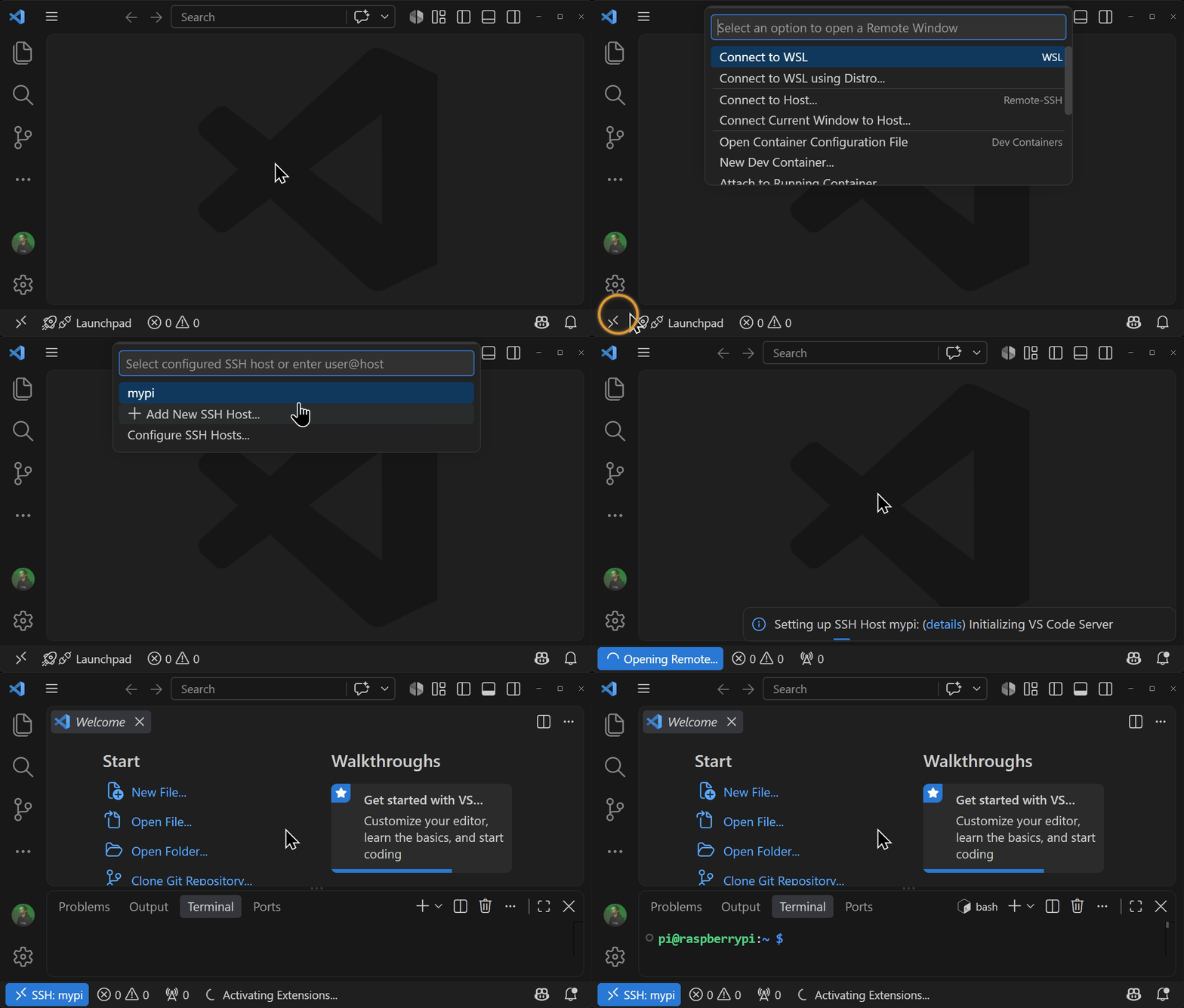
**VS Code:** [Remote - SSH](https://marketplace.visualstudio.com/items?itemName=ms-vscode-remote.remote-ssh) works out of the box. Press `Ctrl+Shift+P`, select **Remote-SSH: Connect to Host** and pick your alias for a full IDE on the device, no password:
|
|
73
87
|
|
|
74
|
-
|
|
75
89
|
|
|
76
90
|
## Usage
|
|
77
91
|
|
|
78
92
|
### Skip prompts
|
|
79
93
|
|
|
80
94
|
```bash
|
|
81
|
-
ssh-keyup pi@192.168.1.23 mypi
|
|
95
|
+
ssh-keyup pi@192.168.1.23 mypi # user, host and alias in one go
|
|
96
|
+
ssh-keyup pi@192.168.1.23:2222 mypi # non-default SSH port
|
|
97
|
+
ssh-keyup admin@192.168.88.1 router # RouterOS, detected automatically
|
|
82
98
|
```
|
|
83
99
|
|
|
84
|
-
Flags (`--host`, `--user`, `--alias`) work too, see `ssh-keyup --help
|
|
100
|
+
Flags (`--host`, `--user`, `--alias`, `--port`, `--os`, `--key-type`) work too, see `ssh-keyup --help`
|
|
85
101
|
|
|
86
102
|
### Set up a fleet
|
|
87
103
|
|
|
@@ -100,40 +116,34 @@ ssh-keyup --list
|
|
|
100
116
|
ssh-keyup --remove mypi # deletes its key pair too
|
|
101
117
|
```
|
|
102
118
|
|
|
103
|
-
## Prerequisites
|
|
104
|
-
|
|
105
|
-
**Python 3.8+** and OpenSSH tools (`ssh`, `ssh-keygen`) in PATH.
|
|
106
|
-
|
|
107
|
-
- **Windows 10/11**: Python from [python.org](https://www.python.org/downloads/) or Microsoft Store. OpenSSH Client via Settings > Optional Features or [Git for Windows](https://gitforwindows.org).
|
|
108
|
-
- **Linux**: `sudo apt install python3 openssh-client` (usually pre-installed).
|
|
109
|
-
|
|
110
119
|
## How it works
|
|
111
120
|
|
|
112
|
-
```
|
|
113
|
-
|
|
114
|
-
|
|
115
|
-
|
|
116
|
-
|
|
117
|
-
|
|
121
|
+
```text
|
|
122
|
+
local remote
|
|
123
|
+
check connection -------- SSH port --------> sshd
|
|
124
|
+
generate key ~/.ssh/id_ed25519_mypi
|
|
125
|
+
deploy public key -------- public key ------> ~/.ssh/authorized_keys
|
|
126
|
+
update ssh config ~/.ssh/config
|
|
118
127
|
```
|
|
119
128
|
|
|
120
129
|
## Features
|
|
121
130
|
|
|
122
131
|
- Works on **Windows OpenSSH**, where `ssh-copy-id` does not exist
|
|
123
132
|
- **Never touches your password**. Only the public key is piped over SSH and OpenSSH prompts for the password itself
|
|
124
|
-
-
|
|
133
|
+
- **Separate key per device** (`~/.ssh/id_ed25519_<alias>`), Ed25519 by default or RSA with `--key-type rsa`
|
|
125
134
|
- Deploys in a **single SSH session**, one password prompt total
|
|
126
|
-
- Adds a named entry to `~/.ssh/config`, works instantly with `ssh <alias>` and
|
|
135
|
+
- Adds a named entry to `~/.ssh/config`, works instantly with `ssh <alias>` and VS Code Remote SSH
|
|
127
136
|
- Checks host is **reachable** first, so typos surface before keys exist
|
|
128
|
-
-
|
|
137
|
+
- Detects **RouterOS** and imports the key its way
|
|
138
|
+
- Recovers from **host key mismatches** and stale SSH config entries after a reflash
|
|
129
139
|
- **Entry management**, list or retire devices without leaving stale keys behind
|
|
130
140
|
- **Zero dependencies**, standard library plus system OpenSSH
|
|
131
141
|
|
|
132
142
|
## FAQ
|
|
133
143
|
|
|
134
|
-
###
|
|
144
|
+
### How do I set up passwordless SSH from Windows by hand?
|
|
135
145
|
|
|
136
|
-
Usual commands
|
|
146
|
+
Usual commands:
|
|
137
147
|
|
|
138
148
|
```powershell
|
|
139
149
|
ssh-keygen -t ed25519
|
|
@@ -143,14 +153,15 @@ notepad $env:USERPROFILE\.ssh\config # then add a Host block by hand
|
|
|
143
153
|
|
|
144
154
|
Works once. Same key lands on every device, `~/.ssh` keeps default permissions that sshd may reject and each new device means another config edit.
|
|
145
155
|
|
|
146
|
-
###
|
|
156
|
+
### Is there ssh-copy-id for Windows?
|
|
147
157
|
|
|
148
|
-
|
|
158
|
+
Not built in. Windows OpenSSH does not ship it and RouterOS has no `authorized_keys` for it to append to. `ssh-keyup` covers both as an `ssh-copy-id` alternative:
|
|
149
159
|
|
|
150
160
|
| | ssh-keyup | ssh-copy-id |
|
|
151
161
|
|---|:---:|:---:|
|
|
152
162
|
| Works on Windows OpenSSH | yes | no |
|
|
153
|
-
|
|
|
163
|
+
| Works with RouterOS | yes | no |
|
|
164
|
+
| Separate key per device | yes | no |
|
|
154
165
|
| Sets `authorized_keys` permissions | yes | yes |
|
|
155
166
|
| Writes `~/.ssh/config` alias | yes | no |
|
|
156
167
|
| Recovers from changed host key | yes | no |
|
|
@@ -174,8 +185,28 @@ Run `ssh-keyup` again. It detects a changed key, shows new fingerprint for confi
|
|
|
174
185
|
|
|
175
186
|
### Does `--remove` clean up entries on the device?
|
|
176
187
|
|
|
177
|
-
No. It deletes local key pair and `~/.ssh/config` entry. Line in the device's `authorized_keys` stays until removed there.
|
|
188
|
+
No. It deletes local key pair and `~/.ssh/config` entry. Line in the device's `authorized_keys` (or `/user/ssh-keys` entry on RouterOS) stays until removed there.
|
|
178
189
|
|
|
179
190
|
### What devices are supported?
|
|
180
191
|
|
|
181
|
-
|
|
192
|
+
Any Linux device reachable over SSH: Raspberry Pi, NVIDIA Jetson, Orange Pi, VMs, servers. Any distribution works (Raspberry Pi OS, DietPi, Ubuntu and others). Any RouterOS 7.12 or newer device, MikroTik routers or CHR alike, is detected from SSH banner and gets its own key import, `--os routeros` forces it.
|
|
193
|
+
|
|
194
|
+
### Can I use an RSA key instead of Ed25519?
|
|
195
|
+
|
|
196
|
+
Yes. `--key-type rsa` generates a 4096-bit RSA key for devices or policies that will not take Ed25519. Keys carry their type in the name, `id_ed25519_mypi` or `id_rsa_mypi`, so switching type for an alias leaves the old key alone and ssh-keyup offers to delete it once the new one is verified working.
|
|
197
|
+
|
|
198
|
+
### How do I add an SSH key to a MikroTik router from Windows?
|
|
199
|
+
|
|
200
|
+
By hand on RouterOS 7:
|
|
201
|
+
|
|
202
|
+
```powershell
|
|
203
|
+
ssh-keygen -t ed25519
|
|
204
|
+
scp $env:USERPROFILE\.ssh\id_ed25519.pub admin@192.168.88.1:
|
|
205
|
+
ssh admin@192.168.88.1 "/user/ssh-keys/import public-key-file=id_ed25519.pub user=admin"
|
|
206
|
+
```
|
|
207
|
+
|
|
208
|
+
Works, with two password prompts and the default key shared across devices again. `ssh-keyup admin@192.168.88.1 router` does it in one session with one prompt, RouterOS is detected from SSH banner. Login user needs `policy` permission (`full` group has it) and firmware 7.12 or newer, older RouterOS rejects Ed25519 keys with `unable to load key file (wrong format or bad passphrase)`.
|
|
209
|
+
|
|
210
|
+
### Why does RouterOS refuse my password over SSH after adding a key?
|
|
211
|
+
|
|
212
|
+
That is the default: once a user has a key, RouterOS stops accepting that user's password over SSH. WinBox and WebFig are unaffected, and password SSH can be turned back on under `/ip/ssh`.
|
|
@@ -1,28 +1,3 @@
|
|
|
1
|
-
Metadata-Version: 2.4
|
|
2
|
-
Name: ssh-keyup
|
|
3
|
-
Version: 1.2.0
|
|
4
|
-
Summary: Passwordless SSH setup and ssh-copy-id alternative for Raspberry Pi, NVIDIA Jetson or any Linux device
|
|
5
|
-
Home-page: https://github.com/Kurokesu/ssh-keyup
|
|
6
|
-
Author: UAB Kurokesu
|
|
7
|
-
License: GPL-3.0-or-later
|
|
8
|
-
Project-URL: Repository, https://github.com/Kurokesu/ssh-keyup
|
|
9
|
-
Project-URL: Issues, https://github.com/Kurokesu/ssh-keyup/issues
|
|
10
|
-
Project-URL: Changelog, https://github.com/Kurokesu/ssh-keyup/releases
|
|
11
|
-
Keywords: ssh,ssh-keys,ssh-config,ssh-copy-id,passwordless-ssh,openssh,ed25519,raspberry-pi,rpi,jetson,iot,automation,vscode,remote-ssh,windows,linux
|
|
12
|
-
Classifier: Development Status :: 5 - Production/Stable
|
|
13
|
-
Classifier: Environment :: Console
|
|
14
|
-
Classifier: Intended Audience :: Developers
|
|
15
|
-
Classifier: Intended Audience :: System Administrators
|
|
16
|
-
Classifier: Operating System :: Microsoft :: Windows
|
|
17
|
-
Classifier: Operating System :: POSIX :: Linux
|
|
18
|
-
Classifier: Programming Language :: Python :: 3
|
|
19
|
-
Classifier: Topic :: System :: Systems Administration
|
|
20
|
-
Classifier: Topic :: Utilities
|
|
21
|
-
Requires-Python: >=3.8
|
|
22
|
-
Description-Content-Type: text/markdown
|
|
23
|
-
License-File: LICENSE
|
|
24
|
-
Dynamic: license-file
|
|
25
|
-
|
|
26
1
|
# ssh-keyup
|
|
27
2
|
|
|
28
3
|

|
|
@@ -30,7 +5,7 @@ Dynamic: license-file
|
|
|
30
5
|

|
|
31
6
|

|
|
32
7
|
|
|
33
|
-
**Set up passwordless SSH on Raspberry Pi, NVIDIA Jetson or
|
|
8
|
+
**Set up passwordless SSH in one command on any Linux or RouterOS device, such as Raspberry Pi, NVIDIA Jetson or MikroTik routers.**
|
|
34
9
|
|
|
35
10
|
Tired of juggling `ssh-keygen`, `ssh-copy-id` (missing on Windows) and `~/.ssh/config` edits every time you set up a new device?
|
|
36
11
|
|
|
@@ -40,6 +15,11 @@ Tired of juggling `ssh-keygen`, `ssh-copy-id` (missing on Windows) and `~/.ssh/c
|
|
|
40
15
|
|
|
41
16
|
## Quickstart
|
|
42
17
|
|
|
18
|
+
Needs **Python 3.8+** and OpenSSH tools (`ssh`, `ssh-keygen`) in PATH:
|
|
19
|
+
|
|
20
|
+
- **Windows 10/11**: Python from [python.org](https://www.python.org/downloads/) or Microsoft Store. OpenSSH Client via Settings > Optional Features or [Git for Windows](https://gitforwindows.org).
|
|
21
|
+
- **Linux**: `sudo apt install python3 openssh-client` (usually pre-installed).
|
|
22
|
+
|
|
43
23
|
Install globally with pip:
|
|
44
24
|
|
|
45
25
|
```bash
|
|
@@ -69,19 +49,21 @@ Follow prompts, enter remote password once and you're done. Alias now works in a
|
|
|
69
49
|
ssh mypi # no password, ever again
|
|
70
50
|
```
|
|
71
51
|
|
|
72
|
-
**
|
|
52
|
+
**VS Code:** [Remote - SSH](https://marketplace.visualstudio.com/items?itemName=ms-vscode-remote.remote-ssh) works out of the box. Press `Ctrl+Shift+P`, select **Remote-SSH: Connect to Host** and pick your alias for a full IDE on the device, no password:
|
|
73
53
|
|
|
74
|
-

|
|
75
55
|
|
|
76
56
|
## Usage
|
|
77
57
|
|
|
78
58
|
### Skip prompts
|
|
79
59
|
|
|
80
60
|
```bash
|
|
81
|
-
ssh-keyup pi@192.168.1.23 mypi
|
|
61
|
+
ssh-keyup pi@192.168.1.23 mypi # user, host and alias in one go
|
|
62
|
+
ssh-keyup pi@192.168.1.23:2222 mypi # non-default SSH port
|
|
63
|
+
ssh-keyup admin@192.168.88.1 router # RouterOS, detected automatically
|
|
82
64
|
```
|
|
83
65
|
|
|
84
|
-
Flags (`--host`, `--user`, `--alias`) work too, see `ssh-keyup --help
|
|
66
|
+
Flags (`--host`, `--user`, `--alias`, `--port`, `--os`, `--key-type`) work too, see `ssh-keyup --help`
|
|
85
67
|
|
|
86
68
|
### Set up a fleet
|
|
87
69
|
|
|
@@ -100,40 +82,34 @@ ssh-keyup --list
|
|
|
100
82
|
ssh-keyup --remove mypi # deletes its key pair too
|
|
101
83
|
```
|
|
102
84
|
|
|
103
|
-
## Prerequisites
|
|
104
|
-
|
|
105
|
-
**Python 3.8+** and OpenSSH tools (`ssh`, `ssh-keygen`) in PATH.
|
|
106
|
-
|
|
107
|
-
- **Windows 10/11**: Python from [python.org](https://www.python.org/downloads/) or Microsoft Store. OpenSSH Client via Settings > Optional Features or [Git for Windows](https://gitforwindows.org).
|
|
108
|
-
- **Linux**: `sudo apt install python3 openssh-client` (usually pre-installed).
|
|
109
|
-
|
|
110
85
|
## How it works
|
|
111
86
|
|
|
112
|
-
```
|
|
113
|
-
|
|
114
|
-
|
|
115
|
-
|
|
116
|
-
|
|
117
|
-
|
|
87
|
+
```text
|
|
88
|
+
local remote
|
|
89
|
+
check connection -------- SSH port --------> sshd
|
|
90
|
+
generate key ~/.ssh/id_ed25519_mypi
|
|
91
|
+
deploy public key -------- public key ------> ~/.ssh/authorized_keys
|
|
92
|
+
update ssh config ~/.ssh/config
|
|
118
93
|
```
|
|
119
94
|
|
|
120
95
|
## Features
|
|
121
96
|
|
|
122
97
|
- Works on **Windows OpenSSH**, where `ssh-copy-id` does not exist
|
|
123
98
|
- **Never touches your password**. Only the public key is piped over SSH and OpenSSH prompts for the password itself
|
|
124
|
-
-
|
|
99
|
+
- **Separate key per device** (`~/.ssh/id_ed25519_<alias>`), Ed25519 by default or RSA with `--key-type rsa`
|
|
125
100
|
- Deploys in a **single SSH session**, one password prompt total
|
|
126
|
-
- Adds a named entry to `~/.ssh/config`, works instantly with `ssh <alias>` and
|
|
101
|
+
- Adds a named entry to `~/.ssh/config`, works instantly with `ssh <alias>` and VS Code Remote SSH
|
|
127
102
|
- Checks host is **reachable** first, so typos surface before keys exist
|
|
128
|
-
-
|
|
103
|
+
- Detects **RouterOS** and imports the key its way
|
|
104
|
+
- Recovers from **host key mismatches** and stale SSH config entries after a reflash
|
|
129
105
|
- **Entry management**, list or retire devices without leaving stale keys behind
|
|
130
106
|
- **Zero dependencies**, standard library plus system OpenSSH
|
|
131
107
|
|
|
132
108
|
## FAQ
|
|
133
109
|
|
|
134
|
-
###
|
|
110
|
+
### How do I set up passwordless SSH from Windows by hand?
|
|
135
111
|
|
|
136
|
-
Usual commands
|
|
112
|
+
Usual commands:
|
|
137
113
|
|
|
138
114
|
```powershell
|
|
139
115
|
ssh-keygen -t ed25519
|
|
@@ -143,14 +119,15 @@ notepad $env:USERPROFILE\.ssh\config # then add a Host block by hand
|
|
|
143
119
|
|
|
144
120
|
Works once. Same key lands on every device, `~/.ssh` keeps default permissions that sshd may reject and each new device means another config edit.
|
|
145
121
|
|
|
146
|
-
###
|
|
122
|
+
### Is there ssh-copy-id for Windows?
|
|
147
123
|
|
|
148
|
-
|
|
124
|
+
Not built in. Windows OpenSSH does not ship it and RouterOS has no `authorized_keys` for it to append to. `ssh-keyup` covers both as an `ssh-copy-id` alternative:
|
|
149
125
|
|
|
150
126
|
| | ssh-keyup | ssh-copy-id |
|
|
151
127
|
|---|:---:|:---:|
|
|
152
128
|
| Works on Windows OpenSSH | yes | no |
|
|
153
|
-
|
|
|
129
|
+
| Works with RouterOS | yes | no |
|
|
130
|
+
| Separate key per device | yes | no |
|
|
154
131
|
| Sets `authorized_keys` permissions | yes | yes |
|
|
155
132
|
| Writes `~/.ssh/config` alias | yes | no |
|
|
156
133
|
| Recovers from changed host key | yes | no |
|
|
@@ -174,8 +151,28 @@ Run `ssh-keyup` again. It detects a changed key, shows new fingerprint for confi
|
|
|
174
151
|
|
|
175
152
|
### Does `--remove` clean up entries on the device?
|
|
176
153
|
|
|
177
|
-
No. It deletes local key pair and `~/.ssh/config` entry. Line in the device's `authorized_keys` stays until removed there.
|
|
154
|
+
No. It deletes local key pair and `~/.ssh/config` entry. Line in the device's `authorized_keys` (or `/user/ssh-keys` entry on RouterOS) stays until removed there.
|
|
178
155
|
|
|
179
156
|
### What devices are supported?
|
|
180
157
|
|
|
181
|
-
|
|
158
|
+
Any Linux device reachable over SSH: Raspberry Pi, NVIDIA Jetson, Orange Pi, VMs, servers. Any distribution works (Raspberry Pi OS, DietPi, Ubuntu and others). Any RouterOS 7.12 or newer device, MikroTik routers or CHR alike, is detected from SSH banner and gets its own key import, `--os routeros` forces it.
|
|
159
|
+
|
|
160
|
+
### Can I use an RSA key instead of Ed25519?
|
|
161
|
+
|
|
162
|
+
Yes. `--key-type rsa` generates a 4096-bit RSA key for devices or policies that will not take Ed25519. Keys carry their type in the name, `id_ed25519_mypi` or `id_rsa_mypi`, so switching type for an alias leaves the old key alone and ssh-keyup offers to delete it once the new one is verified working.
|
|
163
|
+
|
|
164
|
+
### How do I add an SSH key to a MikroTik router from Windows?
|
|
165
|
+
|
|
166
|
+
By hand on RouterOS 7:
|
|
167
|
+
|
|
168
|
+
```powershell
|
|
169
|
+
ssh-keygen -t ed25519
|
|
170
|
+
scp $env:USERPROFILE\.ssh\id_ed25519.pub admin@192.168.88.1:
|
|
171
|
+
ssh admin@192.168.88.1 "/user/ssh-keys/import public-key-file=id_ed25519.pub user=admin"
|
|
172
|
+
```
|
|
173
|
+
|
|
174
|
+
Works, with two password prompts and the default key shared across devices again. `ssh-keyup admin@192.168.88.1 router` does it in one session with one prompt, RouterOS is detected from SSH banner. Login user needs `policy` permission (`full` group has it) and firmware 7.12 or newer, older RouterOS rejects Ed25519 keys with `unable to load key file (wrong format or bad passphrase)`.
|
|
175
|
+
|
|
176
|
+
### Why does RouterOS refuse my password over SSH after adding a key?
|
|
177
|
+
|
|
178
|
+
That is the default: once a user has a key, RouterOS stops accepting that user's password over SSH. WinBox and WebFig are unaffected, and password SSH can be turned back on under `/ip/ssh`.
|
|
@@ -7,3 +7,8 @@ build-backend = "setuptools.build_meta"
|
|
|
7
7
|
line-length = 79
|
|
8
8
|
# match python_requires, keeps fixes runtime safe on old Pythons
|
|
9
9
|
target-version = "py38"
|
|
10
|
+
|
|
11
|
+
[tool.pytest.ini_options]
|
|
12
|
+
# plain pytest runs unit tests only
|
|
13
|
+
addopts = "-m 'not integration'"
|
|
14
|
+
markers = ["integration: drives a live SSH target"]
|
|
@@ -1,7 +1,7 @@
|
|
|
1
1
|
[metadata]
|
|
2
2
|
name = ssh-keyup
|
|
3
3
|
version = attr: ssh_keyup.__version__
|
|
4
|
-
description = Passwordless SSH
|
|
4
|
+
description = Passwordless SSH from Windows or Linux to Raspberry Pi, NVIDIA Jetson, MikroTik routers and other Linux or RouterOS devices. One command, no ssh-copy-id needed
|
|
5
5
|
long_description = file: README.md
|
|
6
6
|
long_description_content_type = text/markdown
|
|
7
7
|
author = UAB Kurokesu
|
|
@@ -12,7 +12,7 @@ project_urls =
|
|
|
12
12
|
Repository = https://github.com/Kurokesu/ssh-keyup
|
|
13
13
|
Issues = https://github.com/Kurokesu/ssh-keyup/issues
|
|
14
14
|
Changelog = https://github.com/Kurokesu/ssh-keyup/releases
|
|
15
|
-
keywords = ssh, ssh-keys, ssh-config, ssh-copy-id, passwordless-ssh, openssh, ed25519, raspberry-pi, rpi, jetson, iot, automation, vscode, remote-ssh, windows, linux
|
|
15
|
+
keywords = ssh, ssh-key, ssh-keys, ssh-config, ssh-copy-id, authorized-keys, passwordless-ssh, openssh, ed25519, rsa, raspberry-pi, raspberrypi, rpi, jetson, nvidia-jetson, orange-pi, dietpi, mikrotik, routeros, iot, automation, vscode, remote-ssh, windows, linux
|
|
16
16
|
classifiers =
|
|
17
17
|
Development Status :: 5 - Production/Stable
|
|
18
18
|
Environment :: Console
|
|
@@ -21,6 +21,15 @@ classifiers =
|
|
|
21
21
|
Operating System :: Microsoft :: Windows
|
|
22
22
|
Operating System :: POSIX :: Linux
|
|
23
23
|
Programming Language :: Python :: 3
|
|
24
|
+
Programming Language :: Python :: 3.8
|
|
25
|
+
Programming Language :: Python :: 3.9
|
|
26
|
+
Programming Language :: Python :: 3.10
|
|
27
|
+
Programming Language :: Python :: 3.11
|
|
28
|
+
Programming Language :: Python :: 3.12
|
|
29
|
+
Programming Language :: Python :: 3.13
|
|
30
|
+
Programming Language :: Python :: 3.14
|
|
31
|
+
Topic :: Security
|
|
32
|
+
Topic :: System :: Networking
|
|
24
33
|
Topic :: System :: Systems Administration
|
|
25
34
|
Topic :: Utilities
|
|
26
35
|
|
|
@@ -0,0 +1,212 @@
|
|
|
1
|
+
Metadata-Version: 2.4
|
|
2
|
+
Name: ssh-keyup
|
|
3
|
+
Version: 1.4.0
|
|
4
|
+
Summary: Passwordless SSH from Windows or Linux to Raspberry Pi, NVIDIA Jetson, MikroTik routers and other Linux or RouterOS devices. One command, no ssh-copy-id needed
|
|
5
|
+
Home-page: https://github.com/Kurokesu/ssh-keyup
|
|
6
|
+
Author: UAB Kurokesu
|
|
7
|
+
License: GPL-3.0-or-later
|
|
8
|
+
Project-URL: Repository, https://github.com/Kurokesu/ssh-keyup
|
|
9
|
+
Project-URL: Issues, https://github.com/Kurokesu/ssh-keyup/issues
|
|
10
|
+
Project-URL: Changelog, https://github.com/Kurokesu/ssh-keyup/releases
|
|
11
|
+
Keywords: ssh,ssh-key,ssh-keys,ssh-config,ssh-copy-id,authorized-keys,passwordless-ssh,openssh,ed25519,rsa,raspberry-pi,raspberrypi,rpi,jetson,nvidia-jetson,orange-pi,dietpi,mikrotik,routeros,iot,automation,vscode,remote-ssh,windows,linux
|
|
12
|
+
Classifier: Development Status :: 5 - Production/Stable
|
|
13
|
+
Classifier: Environment :: Console
|
|
14
|
+
Classifier: Intended Audience :: Developers
|
|
15
|
+
Classifier: Intended Audience :: System Administrators
|
|
16
|
+
Classifier: Operating System :: Microsoft :: Windows
|
|
17
|
+
Classifier: Operating System :: POSIX :: Linux
|
|
18
|
+
Classifier: Programming Language :: Python :: 3
|
|
19
|
+
Classifier: Programming Language :: Python :: 3.8
|
|
20
|
+
Classifier: Programming Language :: Python :: 3.9
|
|
21
|
+
Classifier: Programming Language :: Python :: 3.10
|
|
22
|
+
Classifier: Programming Language :: Python :: 3.11
|
|
23
|
+
Classifier: Programming Language :: Python :: 3.12
|
|
24
|
+
Classifier: Programming Language :: Python :: 3.13
|
|
25
|
+
Classifier: Programming Language :: Python :: 3.14
|
|
26
|
+
Classifier: Topic :: Security
|
|
27
|
+
Classifier: Topic :: System :: Networking
|
|
28
|
+
Classifier: Topic :: System :: Systems Administration
|
|
29
|
+
Classifier: Topic :: Utilities
|
|
30
|
+
Requires-Python: >=3.8
|
|
31
|
+
Description-Content-Type: text/markdown
|
|
32
|
+
License-File: LICENSE
|
|
33
|
+
Dynamic: license-file
|
|
34
|
+
|
|
35
|
+
# ssh-keyup
|
|
36
|
+
|
|
37
|
+

|
|
38
|
+

|
|
39
|
+

|
|
40
|
+

|
|
41
|
+
|
|
42
|
+
**Set up passwordless SSH in one command on any Linux or RouterOS device, such as Raspberry Pi, NVIDIA Jetson or MikroTik routers.**
|
|
43
|
+
|
|
44
|
+
Tired of juggling `ssh-keygen`, `ssh-copy-id` (missing on Windows) and `~/.ssh/config` edits every time you set up a new device?
|
|
45
|
+
|
|
46
|
+
**`ssh-keyup`** handles all three in one interactive session.
|
|
47
|
+
|
|
48
|
+

|
|
49
|
+
|
|
50
|
+
## Quickstart
|
|
51
|
+
|
|
52
|
+
Needs **Python 3.8+** and OpenSSH tools (`ssh`, `ssh-keygen`) in PATH:
|
|
53
|
+
|
|
54
|
+
- **Windows 10/11**: Python from [python.org](https://www.python.org/downloads/) or Microsoft Store. OpenSSH Client via Settings > Optional Features or [Git for Windows](https://gitforwindows.org).
|
|
55
|
+
- **Linux**: `sudo apt install python3 openssh-client` (usually pre-installed).
|
|
56
|
+
|
|
57
|
+
Install globally with pip:
|
|
58
|
+
|
|
59
|
+
```bash
|
|
60
|
+
pip install ssh-keyup
|
|
61
|
+
|
|
62
|
+
ssh-keyup # ready to use anywhere
|
|
63
|
+
```
|
|
64
|
+
|
|
65
|
+
> **Tip:** If `ssh-keyup` is missing or runs an old version after install, new script sits in a folder outside PATH (pip warns about this). Add that folder to PATH, or install with [pipx](https://pipx.pypa.io/) instead:
|
|
66
|
+
>
|
|
67
|
+
> `pipx install ssh-keyup`
|
|
68
|
+
|
|
69
|
+
Or run directly without installing:
|
|
70
|
+
|
|
71
|
+
```bash
|
|
72
|
+
git clone https://github.com/Kurokesu/ssh-keyup.git
|
|
73
|
+
cd ssh-keyup
|
|
74
|
+
python ssh_keyup.py # Windows
|
|
75
|
+
python3 ssh_keyup.py # Linux
|
|
76
|
+
```
|
|
77
|
+
|
|
78
|
+
Follow prompts, enter remote password once and you're done. Alias now works in anything that reads `~/.ssh/config`:
|
|
79
|
+
|
|
80
|
+
**Terminal:**
|
|
81
|
+
|
|
82
|
+
```bash
|
|
83
|
+
ssh mypi # no password, ever again
|
|
84
|
+
```
|
|
85
|
+
|
|
86
|
+
**VS Code:** [Remote - SSH](https://marketplace.visualstudio.com/items?itemName=ms-vscode-remote.remote-ssh) works out of the box. Press `Ctrl+Shift+P`, select **Remote-SSH: Connect to Host** and pick your alias for a full IDE on the device, no password:
|
|
87
|
+
|
|
88
|
+

|
|
89
|
+
|
|
90
|
+
## Usage
|
|
91
|
+
|
|
92
|
+
### Skip prompts
|
|
93
|
+
|
|
94
|
+
```bash
|
|
95
|
+
ssh-keyup pi@192.168.1.23 mypi # user, host and alias in one go
|
|
96
|
+
ssh-keyup pi@192.168.1.23:2222 mypi # non-default SSH port
|
|
97
|
+
ssh-keyup admin@192.168.88.1 router # RouterOS, detected automatically
|
|
98
|
+
```
|
|
99
|
+
|
|
100
|
+
Flags (`--host`, `--user`, `--alias`, `--port`, `--os`, `--key-type`) work too, see `ssh-keyup --help`
|
|
101
|
+
|
|
102
|
+
### Set up a fleet
|
|
103
|
+
|
|
104
|
+
```bash
|
|
105
|
+
for host in 192.168.1.10 192.168.1.11 192.168.1.12; do
|
|
106
|
+
ssh-keyup pi@$host
|
|
107
|
+
done
|
|
108
|
+
```
|
|
109
|
+
|
|
110
|
+
### Manage entries
|
|
111
|
+
|
|
112
|
+
List or remove entries ssh-keyup manages:
|
|
113
|
+
|
|
114
|
+
```bash
|
|
115
|
+
ssh-keyup --list
|
|
116
|
+
ssh-keyup --remove mypi # deletes its key pair too
|
|
117
|
+
```
|
|
118
|
+
|
|
119
|
+
## How it works
|
|
120
|
+
|
|
121
|
+
```text
|
|
122
|
+
local remote
|
|
123
|
+
check connection -------- SSH port --------> sshd
|
|
124
|
+
generate key ~/.ssh/id_ed25519_mypi
|
|
125
|
+
deploy public key -------- public key ------> ~/.ssh/authorized_keys
|
|
126
|
+
update ssh config ~/.ssh/config
|
|
127
|
+
```
|
|
128
|
+
|
|
129
|
+
## Features
|
|
130
|
+
|
|
131
|
+
- Works on **Windows OpenSSH**, where `ssh-copy-id` does not exist
|
|
132
|
+
- **Never touches your password**. Only the public key is piped over SSH and OpenSSH prompts for the password itself
|
|
133
|
+
- **Separate key per device** (`~/.ssh/id_ed25519_<alias>`), Ed25519 by default or RSA with `--key-type rsa`
|
|
134
|
+
- Deploys in a **single SSH session**, one password prompt total
|
|
135
|
+
- Adds a named entry to `~/.ssh/config`, works instantly with `ssh <alias>` and VS Code Remote SSH
|
|
136
|
+
- Checks host is **reachable** first, so typos surface before keys exist
|
|
137
|
+
- Detects **RouterOS** and imports the key its way
|
|
138
|
+
- Recovers from **host key mismatches** and stale SSH config entries after a reflash
|
|
139
|
+
- **Entry management**, list or retire devices without leaving stale keys behind
|
|
140
|
+
- **Zero dependencies**, standard library plus system OpenSSH
|
|
141
|
+
|
|
142
|
+
## FAQ
|
|
143
|
+
|
|
144
|
+
### How do I set up passwordless SSH from Windows by hand?
|
|
145
|
+
|
|
146
|
+
Usual commands:
|
|
147
|
+
|
|
148
|
+
```powershell
|
|
149
|
+
ssh-keygen -t ed25519
|
|
150
|
+
type $env:USERPROFILE\.ssh\id_ed25519.pub | ssh pi@raspberrypi.local "cat >> ~/.ssh/authorized_keys"
|
|
151
|
+
notepad $env:USERPROFILE\.ssh\config # then add a Host block by hand
|
|
152
|
+
```
|
|
153
|
+
|
|
154
|
+
Works once. Same key lands on every device, `~/.ssh` keeps default permissions that sshd may reject and each new device means another config edit.
|
|
155
|
+
|
|
156
|
+
### Is there ssh-copy-id for Windows?
|
|
157
|
+
|
|
158
|
+
Not built in. Windows OpenSSH does not ship it and RouterOS has no `authorized_keys` for it to append to. `ssh-keyup` covers both as an `ssh-copy-id` alternative:
|
|
159
|
+
|
|
160
|
+
| | ssh-keyup | ssh-copy-id |
|
|
161
|
+
|---|:---:|:---:|
|
|
162
|
+
| Works on Windows OpenSSH | yes | no |
|
|
163
|
+
| Works with RouterOS | yes | no |
|
|
164
|
+
| Separate key per device | yes | no |
|
|
165
|
+
| Sets `authorized_keys` permissions | yes | yes |
|
|
166
|
+
| Writes `~/.ssh/config` alias | yes | no |
|
|
167
|
+
| Recovers from changed host key | yes | no |
|
|
168
|
+
| Entry management | yes | no |
|
|
169
|
+
|
|
170
|
+
### How do I fix "REMOTE HOST IDENTIFICATION HAS CHANGED"?
|
|
171
|
+
|
|
172
|
+
Reflashing creates a new host key, so next `ssh` refuses to connect:
|
|
173
|
+
|
|
174
|
+
```text
|
|
175
|
+
@@@@@@@@@@@@@@@@@@@@@@@@@@@@@@@@@@@@@@@@@@@@@@@@@@@@@@@@@@@
|
|
176
|
+
@ WARNING: REMOTE HOST IDENTIFICATION HAS CHANGED! @
|
|
177
|
+
@@@@@@@@@@@@@@@@@@@@@@@@@@@@@@@@@@@@@@@@@@@@@@@@@@@@@@@@@@@
|
|
178
|
+
IT IS POSSIBLE THAT SOMEONE IS DOING SOMETHING NASTY!
|
|
179
|
+
...
|
|
180
|
+
Offending ECDSA key in ~/.ssh/known_hosts:3
|
|
181
|
+
Host key verification failed.
|
|
182
|
+
```
|
|
183
|
+
|
|
184
|
+
Run `ssh-keyup` again. It detects a changed key, shows new fingerprint for confirmation, clears stale `known_hosts` entry with `ssh-keygen -R` and redeploys. Usually a reflash is behind it, but this warning can also mean a real man-in-the-middle, so `ssh-keyup` asks instead of trusting silently.
|
|
185
|
+
|
|
186
|
+
### Does `--remove` clean up entries on the device?
|
|
187
|
+
|
|
188
|
+
No. It deletes local key pair and `~/.ssh/config` entry. Line in the device's `authorized_keys` (or `/user/ssh-keys` entry on RouterOS) stays until removed there.
|
|
189
|
+
|
|
190
|
+
### What devices are supported?
|
|
191
|
+
|
|
192
|
+
Any Linux device reachable over SSH: Raspberry Pi, NVIDIA Jetson, Orange Pi, VMs, servers. Any distribution works (Raspberry Pi OS, DietPi, Ubuntu and others). Any RouterOS 7.12 or newer device, MikroTik routers or CHR alike, is detected from SSH banner and gets its own key import, `--os routeros` forces it.
|
|
193
|
+
|
|
194
|
+
### Can I use an RSA key instead of Ed25519?
|
|
195
|
+
|
|
196
|
+
Yes. `--key-type rsa` generates a 4096-bit RSA key for devices or policies that will not take Ed25519. Keys carry their type in the name, `id_ed25519_mypi` or `id_rsa_mypi`, so switching type for an alias leaves the old key alone and ssh-keyup offers to delete it once the new one is verified working.
|
|
197
|
+
|
|
198
|
+
### How do I add an SSH key to a MikroTik router from Windows?
|
|
199
|
+
|
|
200
|
+
By hand on RouterOS 7:
|
|
201
|
+
|
|
202
|
+
```powershell
|
|
203
|
+
ssh-keygen -t ed25519
|
|
204
|
+
scp $env:USERPROFILE\.ssh\id_ed25519.pub admin@192.168.88.1:
|
|
205
|
+
ssh admin@192.168.88.1 "/user/ssh-keys/import public-key-file=id_ed25519.pub user=admin"
|
|
206
|
+
```
|
|
207
|
+
|
|
208
|
+
Works, with two password prompts and the default key shared across devices again. `ssh-keyup admin@192.168.88.1 router` does it in one session with one prompt, RouterOS is detected from SSH banner. Login user needs `policy` permission (`full` group has it) and firmware 7.12 or newer, older RouterOS rejects Ed25519 keys with `unable to load key file (wrong format or bad passphrase)`.
|
|
209
|
+
|
|
210
|
+
### Why does RouterOS refuse my password over SSH after adding a key?
|
|
211
|
+
|
|
212
|
+
That is the default: once a user has a key, RouterOS stops accepting that user's password over SSH. WinBox and WebFig are unaffected, and password SSH can be turned back on under `/ip/ssh`.
|