ssh-keyup 1.1.1__tar.gz → 1.2.0__tar.gz
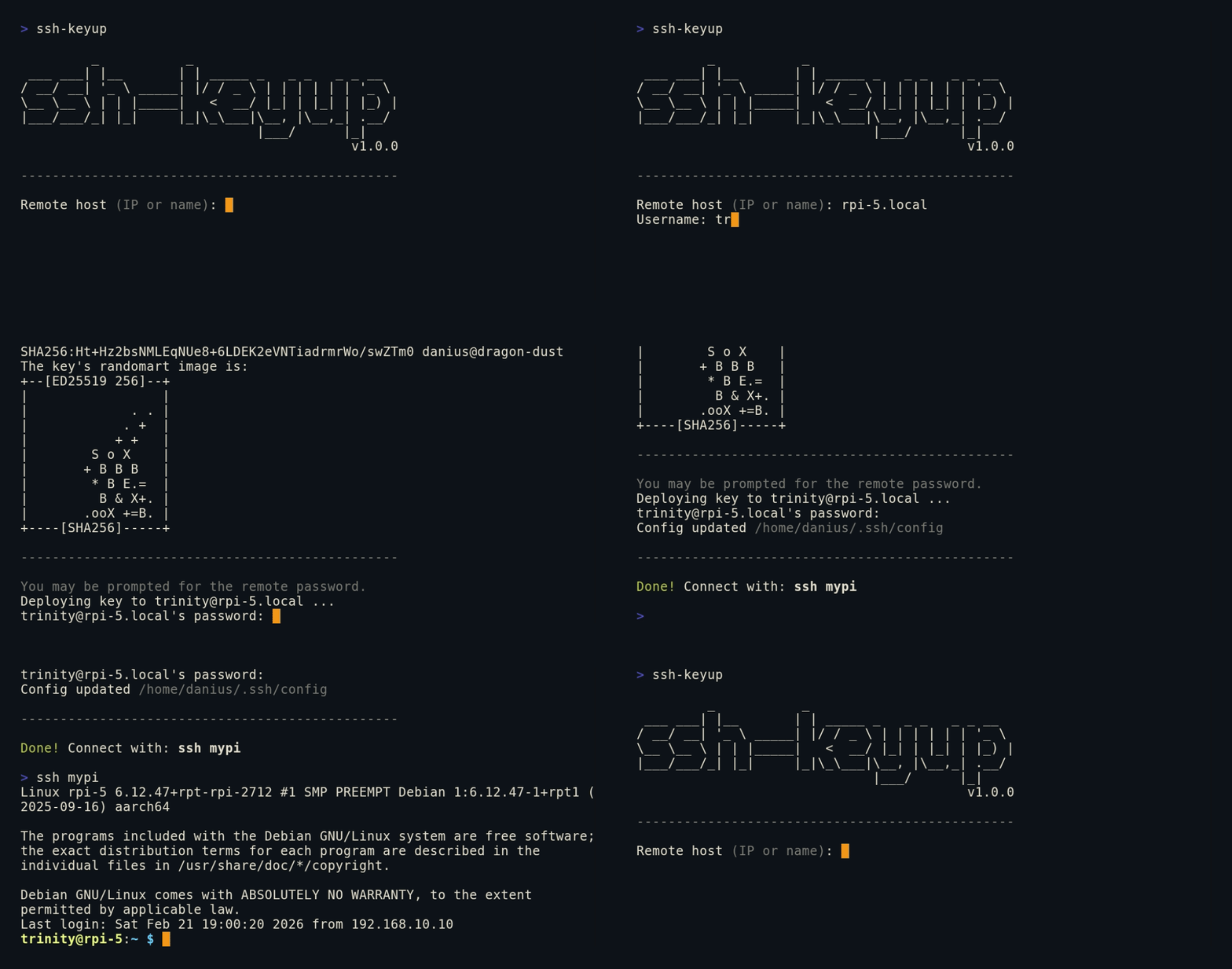
This diff represents the content of publicly available package versions that have been released to one of the supported registries. The information contained in this diff is provided for informational purposes only and reflects changes between package versions as they appear in their respective public registries.
- ssh_keyup-1.2.0/PKG-INFO +181 -0
- ssh_keyup-1.2.0/README.md +156 -0
- ssh_keyup-1.2.0/ssh_keyup.egg-info/PKG-INFO +181 -0
- {ssh_keyup-1.1.1 → ssh_keyup-1.2.0}/ssh_keyup.py +155 -37
- ssh_keyup-1.1.1/PKG-INFO +0 -132
- ssh_keyup-1.1.1/README.md +0 -107
- ssh_keyup-1.1.1/ssh_keyup.egg-info/PKG-INFO +0 -132
- {ssh_keyup-1.1.1 → ssh_keyup-1.2.0}/LICENSE +0 -0
- {ssh_keyup-1.1.1 → ssh_keyup-1.2.0}/pyproject.toml +0 -0
- {ssh_keyup-1.1.1 → ssh_keyup-1.2.0}/setup.cfg +0 -0
- {ssh_keyup-1.1.1 → ssh_keyup-1.2.0}/ssh_keyup.egg-info/SOURCES.txt +0 -0
- {ssh_keyup-1.1.1 → ssh_keyup-1.2.0}/ssh_keyup.egg-info/dependency_links.txt +0 -0
- {ssh_keyup-1.1.1 → ssh_keyup-1.2.0}/ssh_keyup.egg-info/entry_points.txt +0 -0
- {ssh_keyup-1.1.1 → ssh_keyup-1.2.0}/ssh_keyup.egg-info/top_level.txt +0 -0
ssh_keyup-1.2.0/PKG-INFO
ADDED
|
@@ -0,0 +1,181 @@
|
|
|
1
|
+
Metadata-Version: 2.4
|
|
2
|
+
Name: ssh-keyup
|
|
3
|
+
Version: 1.2.0
|
|
4
|
+
Summary: Passwordless SSH setup and ssh-copy-id alternative for Raspberry Pi, NVIDIA Jetson or any Linux device
|
|
5
|
+
Home-page: https://github.com/Kurokesu/ssh-keyup
|
|
6
|
+
Author: UAB Kurokesu
|
|
7
|
+
License: GPL-3.0-or-later
|
|
8
|
+
Project-URL: Repository, https://github.com/Kurokesu/ssh-keyup
|
|
9
|
+
Project-URL: Issues, https://github.com/Kurokesu/ssh-keyup/issues
|
|
10
|
+
Project-URL: Changelog, https://github.com/Kurokesu/ssh-keyup/releases
|
|
11
|
+
Keywords: ssh,ssh-keys,ssh-config,ssh-copy-id,passwordless-ssh,openssh,ed25519,raspberry-pi,rpi,jetson,iot,automation,vscode,remote-ssh,windows,linux
|
|
12
|
+
Classifier: Development Status :: 5 - Production/Stable
|
|
13
|
+
Classifier: Environment :: Console
|
|
14
|
+
Classifier: Intended Audience :: Developers
|
|
15
|
+
Classifier: Intended Audience :: System Administrators
|
|
16
|
+
Classifier: Operating System :: Microsoft :: Windows
|
|
17
|
+
Classifier: Operating System :: POSIX :: Linux
|
|
18
|
+
Classifier: Programming Language :: Python :: 3
|
|
19
|
+
Classifier: Topic :: System :: Systems Administration
|
|
20
|
+
Classifier: Topic :: Utilities
|
|
21
|
+
Requires-Python: >=3.8
|
|
22
|
+
Description-Content-Type: text/markdown
|
|
23
|
+
License-File: LICENSE
|
|
24
|
+
Dynamic: license-file
|
|
25
|
+
|
|
26
|
+
# ssh-keyup
|
|
27
|
+
|
|
28
|
+

|
|
29
|
+

|
|
30
|
+

|
|
31
|
+

|
|
32
|
+
|
|
33
|
+
**Set up passwordless SSH on Raspberry Pi, NVIDIA Jetson or any Linux device in one command.**
|
|
34
|
+
|
|
35
|
+
Tired of juggling `ssh-keygen`, `ssh-copy-id` (missing on Windows) and `~/.ssh/config` edits every time you set up a new device?
|
|
36
|
+
|
|
37
|
+
**`ssh-keyup`** handles all three in one interactive session.
|
|
38
|
+
|
|
39
|
+

|
|
40
|
+
|
|
41
|
+
## Quickstart
|
|
42
|
+
|
|
43
|
+
Install globally with pip:
|
|
44
|
+
|
|
45
|
+
```bash
|
|
46
|
+
pip install ssh-keyup
|
|
47
|
+
|
|
48
|
+
ssh-keyup # ready to use anywhere
|
|
49
|
+
```
|
|
50
|
+
|
|
51
|
+
> **Tip:** If `ssh-keyup` is missing or runs an old version after install, new script sits in a folder outside PATH (pip warns about this). Add that folder to PATH, or install with [pipx](https://pipx.pypa.io/) instead:
|
|
52
|
+
>
|
|
53
|
+
> `pipx install ssh-keyup`
|
|
54
|
+
|
|
55
|
+
Or run directly without installing:
|
|
56
|
+
|
|
57
|
+
```bash
|
|
58
|
+
git clone https://github.com/Kurokesu/ssh-keyup.git
|
|
59
|
+
cd ssh-keyup
|
|
60
|
+
python ssh_keyup.py # Windows
|
|
61
|
+
python3 ssh_keyup.py # Linux
|
|
62
|
+
```
|
|
63
|
+
|
|
64
|
+
Follow prompts, enter remote password once and you're done. Alias now works in anything that reads `~/.ssh/config`:
|
|
65
|
+
|
|
66
|
+
**Terminal:**
|
|
67
|
+
|
|
68
|
+
```bash
|
|
69
|
+
ssh mypi # no password, ever again
|
|
70
|
+
```
|
|
71
|
+
|
|
72
|
+
**VSCode:** [Remote - SSH](https://marketplace.visualstudio.com/items?itemName=ms-vscode-remote.remote-ssh) works out of the box. Press `Ctrl+Shift+P`, select **Remote-SSH: Connect to Host** and pick your alias for a full IDE on the device, no password:
|
|
73
|
+
|
|
74
|
+

|
|
75
|
+
|
|
76
|
+
## Usage
|
|
77
|
+
|
|
78
|
+
### Skip prompts
|
|
79
|
+
|
|
80
|
+
```bash
|
|
81
|
+
ssh-keyup pi@192.168.1.23 mypi # user, host and alias in one go
|
|
82
|
+
```
|
|
83
|
+
|
|
84
|
+
Flags (`--host`, `--user`, `--alias`) work too, see `ssh-keyup --help`.
|
|
85
|
+
|
|
86
|
+
### Set up a fleet
|
|
87
|
+
|
|
88
|
+
```bash
|
|
89
|
+
for host in 192.168.1.10 192.168.1.11 192.168.1.12; do
|
|
90
|
+
ssh-keyup pi@$host
|
|
91
|
+
done
|
|
92
|
+
```
|
|
93
|
+
|
|
94
|
+
### Manage entries
|
|
95
|
+
|
|
96
|
+
List or remove entries ssh-keyup manages:
|
|
97
|
+
|
|
98
|
+
```bash
|
|
99
|
+
ssh-keyup --list
|
|
100
|
+
ssh-keyup --remove mypi # deletes its key pair too
|
|
101
|
+
```
|
|
102
|
+
|
|
103
|
+
## Prerequisites
|
|
104
|
+
|
|
105
|
+
**Python 3.8+** and OpenSSH tools (`ssh`, `ssh-keygen`) in PATH.
|
|
106
|
+
|
|
107
|
+
- **Windows 10/11**: Python from [python.org](https://www.python.org/downloads/) or Microsoft Store. OpenSSH Client via Settings > Optional Features or [Git for Windows](https://gitforwindows.org).
|
|
108
|
+
- **Linux**: `sudo apt install python3 openssh-client` (usually pre-installed).
|
|
109
|
+
|
|
110
|
+
## How it works
|
|
111
|
+
|
|
112
|
+
```mermaid
|
|
113
|
+
flowchart LR
|
|
114
|
+
run["ssh-keyup"] --> check["check connection"]
|
|
115
|
+
check --> gen["generate ed25519 key<br/>~/.ssh/id_ed25519_mypi"]
|
|
116
|
+
gen --> deploy["deploy public key<br/>target: ~/.ssh/authorized_keys"]
|
|
117
|
+
deploy --> config["update ssh config<br/>~/.ssh/config"]
|
|
118
|
+
```
|
|
119
|
+
|
|
120
|
+
## Features
|
|
121
|
+
|
|
122
|
+
- Works on **Windows OpenSSH**, where `ssh-copy-id` does not exist
|
|
123
|
+
- **Never touches your password**. Only the public key is piped over SSH and OpenSSH prompts for the password itself
|
|
124
|
+
- One **Ed25519** key per device (`~/.ssh/id_ed25519_<alias>`), not one key reused everywhere
|
|
125
|
+
- Deploys in a **single SSH session**, one password prompt total
|
|
126
|
+
- Adds a named entry to `~/.ssh/config`, works instantly with `ssh <alias>` and VSCode Remote SSH
|
|
127
|
+
- Checks host is **reachable** first, so typos surface before keys exist
|
|
128
|
+
- Recovers from **host key mismatches** after a reflash
|
|
129
|
+
- **Entry management**, list or retire devices without leaving stale keys behind
|
|
130
|
+
- **Zero dependencies**, standard library plus system OpenSSH
|
|
131
|
+
|
|
132
|
+
## FAQ
|
|
133
|
+
|
|
134
|
+
### Why not do it by hand?
|
|
135
|
+
|
|
136
|
+
Usual commands for passwordless SSH from Windows:
|
|
137
|
+
|
|
138
|
+
```powershell
|
|
139
|
+
ssh-keygen -t ed25519
|
|
140
|
+
type $env:USERPROFILE\.ssh\id_ed25519.pub | ssh pi@raspberrypi.local "cat >> ~/.ssh/authorized_keys"
|
|
141
|
+
notepad $env:USERPROFILE\.ssh\config # then add a Host block by hand
|
|
142
|
+
```
|
|
143
|
+
|
|
144
|
+
Works once. Same key lands on every device, `~/.ssh` keeps default permissions that sshd may reject and each new device means another config edit.
|
|
145
|
+
|
|
146
|
+
### Why not ssh-copy-id?
|
|
147
|
+
|
|
148
|
+
`ssh-copy-id` appends a key to `authorized_keys` and stops there. Windows OpenSSH does not ship it at all.
|
|
149
|
+
|
|
150
|
+
| | ssh-keyup | ssh-copy-id |
|
|
151
|
+
|---|:---:|:---:|
|
|
152
|
+
| Works on Windows OpenSSH | yes | no |
|
|
153
|
+
| Ed25519 key per device | yes | no |
|
|
154
|
+
| Sets `authorized_keys` permissions | yes | yes |
|
|
155
|
+
| Writes `~/.ssh/config` alias | yes | no |
|
|
156
|
+
| Recovers from changed host key | yes | no |
|
|
157
|
+
| Entry management | yes | no |
|
|
158
|
+
|
|
159
|
+
### How do I fix "REMOTE HOST IDENTIFICATION HAS CHANGED"?
|
|
160
|
+
|
|
161
|
+
Reflashing creates a new host key, so next `ssh` refuses to connect:
|
|
162
|
+
|
|
163
|
+
```text
|
|
164
|
+
@@@@@@@@@@@@@@@@@@@@@@@@@@@@@@@@@@@@@@@@@@@@@@@@@@@@@@@@@@@
|
|
165
|
+
@ WARNING: REMOTE HOST IDENTIFICATION HAS CHANGED! @
|
|
166
|
+
@@@@@@@@@@@@@@@@@@@@@@@@@@@@@@@@@@@@@@@@@@@@@@@@@@@@@@@@@@@
|
|
167
|
+
IT IS POSSIBLE THAT SOMEONE IS DOING SOMETHING NASTY!
|
|
168
|
+
...
|
|
169
|
+
Offending ECDSA key in ~/.ssh/known_hosts:3
|
|
170
|
+
Host key verification failed.
|
|
171
|
+
```
|
|
172
|
+
|
|
173
|
+
Run `ssh-keyup` again. It detects a changed key, shows new fingerprint for confirmation, clears stale `known_hosts` entry with `ssh-keygen -R` and redeploys. Usually a reflash is behind it, but this warning can also mean a real man-in-the-middle, so `ssh-keyup` asks instead of trusting silently.
|
|
174
|
+
|
|
175
|
+
### Does `--remove` clean up entries on the device?
|
|
176
|
+
|
|
177
|
+
No. It deletes local key pair and `~/.ssh/config` entry. Line in the device's `authorized_keys` stays until removed there.
|
|
178
|
+
|
|
179
|
+
### What devices are supported?
|
|
180
|
+
|
|
181
|
+
Anything reachable over SSH: Raspberry Pi, NVIDIA Jetson, Orange Pi, VMs, servers.
|
|
@@ -0,0 +1,156 @@
|
|
|
1
|
+
# ssh-keyup
|
|
2
|
+
|
|
3
|
+

|
|
4
|
+

|
|
5
|
+

|
|
6
|
+

|
|
7
|
+
|
|
8
|
+
**Set up passwordless SSH on Raspberry Pi, NVIDIA Jetson or any Linux device in one command.**
|
|
9
|
+
|
|
10
|
+
Tired of juggling `ssh-keygen`, `ssh-copy-id` (missing on Windows) and `~/.ssh/config` edits every time you set up a new device?
|
|
11
|
+
|
|
12
|
+
**`ssh-keyup`** handles all three in one interactive session.
|
|
13
|
+
|
|
14
|
+

|
|
15
|
+
|
|
16
|
+
## Quickstart
|
|
17
|
+
|
|
18
|
+
Install globally with pip:
|
|
19
|
+
|
|
20
|
+
```bash
|
|
21
|
+
pip install ssh-keyup
|
|
22
|
+
|
|
23
|
+
ssh-keyup # ready to use anywhere
|
|
24
|
+
```
|
|
25
|
+
|
|
26
|
+
> **Tip:** If `ssh-keyup` is missing or runs an old version after install, new script sits in a folder outside PATH (pip warns about this). Add that folder to PATH, or install with [pipx](https://pipx.pypa.io/) instead:
|
|
27
|
+
>
|
|
28
|
+
> `pipx install ssh-keyup`
|
|
29
|
+
|
|
30
|
+
Or run directly without installing:
|
|
31
|
+
|
|
32
|
+
```bash
|
|
33
|
+
git clone https://github.com/Kurokesu/ssh-keyup.git
|
|
34
|
+
cd ssh-keyup
|
|
35
|
+
python ssh_keyup.py # Windows
|
|
36
|
+
python3 ssh_keyup.py # Linux
|
|
37
|
+
```
|
|
38
|
+
|
|
39
|
+
Follow prompts, enter remote password once and you're done. Alias now works in anything that reads `~/.ssh/config`:
|
|
40
|
+
|
|
41
|
+
**Terminal:**
|
|
42
|
+
|
|
43
|
+
```bash
|
|
44
|
+
ssh mypi # no password, ever again
|
|
45
|
+
```
|
|
46
|
+
|
|
47
|
+
**VSCode:** [Remote - SSH](https://marketplace.visualstudio.com/items?itemName=ms-vscode-remote.remote-ssh) works out of the box. Press `Ctrl+Shift+P`, select **Remote-SSH: Connect to Host** and pick your alias for a full IDE on the device, no password:
|
|
48
|
+
|
|
49
|
+

|
|
50
|
+
|
|
51
|
+
## Usage
|
|
52
|
+
|
|
53
|
+
### Skip prompts
|
|
54
|
+
|
|
55
|
+
```bash
|
|
56
|
+
ssh-keyup pi@192.168.1.23 mypi # user, host and alias in one go
|
|
57
|
+
```
|
|
58
|
+
|
|
59
|
+
Flags (`--host`, `--user`, `--alias`) work too, see `ssh-keyup --help`.
|
|
60
|
+
|
|
61
|
+
### Set up a fleet
|
|
62
|
+
|
|
63
|
+
```bash
|
|
64
|
+
for host in 192.168.1.10 192.168.1.11 192.168.1.12; do
|
|
65
|
+
ssh-keyup pi@$host
|
|
66
|
+
done
|
|
67
|
+
```
|
|
68
|
+
|
|
69
|
+
### Manage entries
|
|
70
|
+
|
|
71
|
+
List or remove entries ssh-keyup manages:
|
|
72
|
+
|
|
73
|
+
```bash
|
|
74
|
+
ssh-keyup --list
|
|
75
|
+
ssh-keyup --remove mypi # deletes its key pair too
|
|
76
|
+
```
|
|
77
|
+
|
|
78
|
+
## Prerequisites
|
|
79
|
+
|
|
80
|
+
**Python 3.8+** and OpenSSH tools (`ssh`, `ssh-keygen`) in PATH.
|
|
81
|
+
|
|
82
|
+
- **Windows 10/11**: Python from [python.org](https://www.python.org/downloads/) or Microsoft Store. OpenSSH Client via Settings > Optional Features or [Git for Windows](https://gitforwindows.org).
|
|
83
|
+
- **Linux**: `sudo apt install python3 openssh-client` (usually pre-installed).
|
|
84
|
+
|
|
85
|
+
## How it works
|
|
86
|
+
|
|
87
|
+
```mermaid
|
|
88
|
+
flowchart LR
|
|
89
|
+
run["ssh-keyup"] --> check["check connection"]
|
|
90
|
+
check --> gen["generate ed25519 key<br/>~/.ssh/id_ed25519_mypi"]
|
|
91
|
+
gen --> deploy["deploy public key<br/>target: ~/.ssh/authorized_keys"]
|
|
92
|
+
deploy --> config["update ssh config<br/>~/.ssh/config"]
|
|
93
|
+
```
|
|
94
|
+
|
|
95
|
+
## Features
|
|
96
|
+
|
|
97
|
+
- Works on **Windows OpenSSH**, where `ssh-copy-id` does not exist
|
|
98
|
+
- **Never touches your password**. Only the public key is piped over SSH and OpenSSH prompts for the password itself
|
|
99
|
+
- One **Ed25519** key per device (`~/.ssh/id_ed25519_<alias>`), not one key reused everywhere
|
|
100
|
+
- Deploys in a **single SSH session**, one password prompt total
|
|
101
|
+
- Adds a named entry to `~/.ssh/config`, works instantly with `ssh <alias>` and VSCode Remote SSH
|
|
102
|
+
- Checks host is **reachable** first, so typos surface before keys exist
|
|
103
|
+
- Recovers from **host key mismatches** after a reflash
|
|
104
|
+
- **Entry management**, list or retire devices without leaving stale keys behind
|
|
105
|
+
- **Zero dependencies**, standard library plus system OpenSSH
|
|
106
|
+
|
|
107
|
+
## FAQ
|
|
108
|
+
|
|
109
|
+
### Why not do it by hand?
|
|
110
|
+
|
|
111
|
+
Usual commands for passwordless SSH from Windows:
|
|
112
|
+
|
|
113
|
+
```powershell
|
|
114
|
+
ssh-keygen -t ed25519
|
|
115
|
+
type $env:USERPROFILE\.ssh\id_ed25519.pub | ssh pi@raspberrypi.local "cat >> ~/.ssh/authorized_keys"
|
|
116
|
+
notepad $env:USERPROFILE\.ssh\config # then add a Host block by hand
|
|
117
|
+
```
|
|
118
|
+
|
|
119
|
+
Works once. Same key lands on every device, `~/.ssh` keeps default permissions that sshd may reject and each new device means another config edit.
|
|
120
|
+
|
|
121
|
+
### Why not ssh-copy-id?
|
|
122
|
+
|
|
123
|
+
`ssh-copy-id` appends a key to `authorized_keys` and stops there. Windows OpenSSH does not ship it at all.
|
|
124
|
+
|
|
125
|
+
| | ssh-keyup | ssh-copy-id |
|
|
126
|
+
|---|:---:|:---:|
|
|
127
|
+
| Works on Windows OpenSSH | yes | no |
|
|
128
|
+
| Ed25519 key per device | yes | no |
|
|
129
|
+
| Sets `authorized_keys` permissions | yes | yes |
|
|
130
|
+
| Writes `~/.ssh/config` alias | yes | no |
|
|
131
|
+
| Recovers from changed host key | yes | no |
|
|
132
|
+
| Entry management | yes | no |
|
|
133
|
+
|
|
134
|
+
### How do I fix "REMOTE HOST IDENTIFICATION HAS CHANGED"?
|
|
135
|
+
|
|
136
|
+
Reflashing creates a new host key, so next `ssh` refuses to connect:
|
|
137
|
+
|
|
138
|
+
```text
|
|
139
|
+
@@@@@@@@@@@@@@@@@@@@@@@@@@@@@@@@@@@@@@@@@@@@@@@@@@@@@@@@@@@
|
|
140
|
+
@ WARNING: REMOTE HOST IDENTIFICATION HAS CHANGED! @
|
|
141
|
+
@@@@@@@@@@@@@@@@@@@@@@@@@@@@@@@@@@@@@@@@@@@@@@@@@@@@@@@@@@@
|
|
142
|
+
IT IS POSSIBLE THAT SOMEONE IS DOING SOMETHING NASTY!
|
|
143
|
+
...
|
|
144
|
+
Offending ECDSA key in ~/.ssh/known_hosts:3
|
|
145
|
+
Host key verification failed.
|
|
146
|
+
```
|
|
147
|
+
|
|
148
|
+
Run `ssh-keyup` again. It detects a changed key, shows new fingerprint for confirmation, clears stale `known_hosts` entry with `ssh-keygen -R` and redeploys. Usually a reflash is behind it, but this warning can also mean a real man-in-the-middle, so `ssh-keyup` asks instead of trusting silently.
|
|
149
|
+
|
|
150
|
+
### Does `--remove` clean up entries on the device?
|
|
151
|
+
|
|
152
|
+
No. It deletes local key pair and `~/.ssh/config` entry. Line in the device's `authorized_keys` stays until removed there.
|
|
153
|
+
|
|
154
|
+
### What devices are supported?
|
|
155
|
+
|
|
156
|
+
Anything reachable over SSH: Raspberry Pi, NVIDIA Jetson, Orange Pi, VMs, servers.
|
|
@@ -0,0 +1,181 @@
|
|
|
1
|
+
Metadata-Version: 2.4
|
|
2
|
+
Name: ssh-keyup
|
|
3
|
+
Version: 1.2.0
|
|
4
|
+
Summary: Passwordless SSH setup and ssh-copy-id alternative for Raspberry Pi, NVIDIA Jetson or any Linux device
|
|
5
|
+
Home-page: https://github.com/Kurokesu/ssh-keyup
|
|
6
|
+
Author: UAB Kurokesu
|
|
7
|
+
License: GPL-3.0-or-later
|
|
8
|
+
Project-URL: Repository, https://github.com/Kurokesu/ssh-keyup
|
|
9
|
+
Project-URL: Issues, https://github.com/Kurokesu/ssh-keyup/issues
|
|
10
|
+
Project-URL: Changelog, https://github.com/Kurokesu/ssh-keyup/releases
|
|
11
|
+
Keywords: ssh,ssh-keys,ssh-config,ssh-copy-id,passwordless-ssh,openssh,ed25519,raspberry-pi,rpi,jetson,iot,automation,vscode,remote-ssh,windows,linux
|
|
12
|
+
Classifier: Development Status :: 5 - Production/Stable
|
|
13
|
+
Classifier: Environment :: Console
|
|
14
|
+
Classifier: Intended Audience :: Developers
|
|
15
|
+
Classifier: Intended Audience :: System Administrators
|
|
16
|
+
Classifier: Operating System :: Microsoft :: Windows
|
|
17
|
+
Classifier: Operating System :: POSIX :: Linux
|
|
18
|
+
Classifier: Programming Language :: Python :: 3
|
|
19
|
+
Classifier: Topic :: System :: Systems Administration
|
|
20
|
+
Classifier: Topic :: Utilities
|
|
21
|
+
Requires-Python: >=3.8
|
|
22
|
+
Description-Content-Type: text/markdown
|
|
23
|
+
License-File: LICENSE
|
|
24
|
+
Dynamic: license-file
|
|
25
|
+
|
|
26
|
+
# ssh-keyup
|
|
27
|
+
|
|
28
|
+

|
|
29
|
+

|
|
30
|
+

|
|
31
|
+

|
|
32
|
+
|
|
33
|
+
**Set up passwordless SSH on Raspberry Pi, NVIDIA Jetson or any Linux device in one command.**
|
|
34
|
+
|
|
35
|
+
Tired of juggling `ssh-keygen`, `ssh-copy-id` (missing on Windows) and `~/.ssh/config` edits every time you set up a new device?
|
|
36
|
+
|
|
37
|
+
**`ssh-keyup`** handles all three in one interactive session.
|
|
38
|
+
|
|
39
|
+

|
|
40
|
+
|
|
41
|
+
## Quickstart
|
|
42
|
+
|
|
43
|
+
Install globally with pip:
|
|
44
|
+
|
|
45
|
+
```bash
|
|
46
|
+
pip install ssh-keyup
|
|
47
|
+
|
|
48
|
+
ssh-keyup # ready to use anywhere
|
|
49
|
+
```
|
|
50
|
+
|
|
51
|
+
> **Tip:** If `ssh-keyup` is missing or runs an old version after install, new script sits in a folder outside PATH (pip warns about this). Add that folder to PATH, or install with [pipx](https://pipx.pypa.io/) instead:
|
|
52
|
+
>
|
|
53
|
+
> `pipx install ssh-keyup`
|
|
54
|
+
|
|
55
|
+
Or run directly without installing:
|
|
56
|
+
|
|
57
|
+
```bash
|
|
58
|
+
git clone https://github.com/Kurokesu/ssh-keyup.git
|
|
59
|
+
cd ssh-keyup
|
|
60
|
+
python ssh_keyup.py # Windows
|
|
61
|
+
python3 ssh_keyup.py # Linux
|
|
62
|
+
```
|
|
63
|
+
|
|
64
|
+
Follow prompts, enter remote password once and you're done. Alias now works in anything that reads `~/.ssh/config`:
|
|
65
|
+
|
|
66
|
+
**Terminal:**
|
|
67
|
+
|
|
68
|
+
```bash
|
|
69
|
+
ssh mypi # no password, ever again
|
|
70
|
+
```
|
|
71
|
+
|
|
72
|
+
**VSCode:** [Remote - SSH](https://marketplace.visualstudio.com/items?itemName=ms-vscode-remote.remote-ssh) works out of the box. Press `Ctrl+Shift+P`, select **Remote-SSH: Connect to Host** and pick your alias for a full IDE on the device, no password:
|
|
73
|
+
|
|
74
|
+

|
|
75
|
+
|
|
76
|
+
## Usage
|
|
77
|
+
|
|
78
|
+
### Skip prompts
|
|
79
|
+
|
|
80
|
+
```bash
|
|
81
|
+
ssh-keyup pi@192.168.1.23 mypi # user, host and alias in one go
|
|
82
|
+
```
|
|
83
|
+
|
|
84
|
+
Flags (`--host`, `--user`, `--alias`) work too, see `ssh-keyup --help`.
|
|
85
|
+
|
|
86
|
+
### Set up a fleet
|
|
87
|
+
|
|
88
|
+
```bash
|
|
89
|
+
for host in 192.168.1.10 192.168.1.11 192.168.1.12; do
|
|
90
|
+
ssh-keyup pi@$host
|
|
91
|
+
done
|
|
92
|
+
```
|
|
93
|
+
|
|
94
|
+
### Manage entries
|
|
95
|
+
|
|
96
|
+
List or remove entries ssh-keyup manages:
|
|
97
|
+
|
|
98
|
+
```bash
|
|
99
|
+
ssh-keyup --list
|
|
100
|
+
ssh-keyup --remove mypi # deletes its key pair too
|
|
101
|
+
```
|
|
102
|
+
|
|
103
|
+
## Prerequisites
|
|
104
|
+
|
|
105
|
+
**Python 3.8+** and OpenSSH tools (`ssh`, `ssh-keygen`) in PATH.
|
|
106
|
+
|
|
107
|
+
- **Windows 10/11**: Python from [python.org](https://www.python.org/downloads/) or Microsoft Store. OpenSSH Client via Settings > Optional Features or [Git for Windows](https://gitforwindows.org).
|
|
108
|
+
- **Linux**: `sudo apt install python3 openssh-client` (usually pre-installed).
|
|
109
|
+
|
|
110
|
+
## How it works
|
|
111
|
+
|
|
112
|
+
```mermaid
|
|
113
|
+
flowchart LR
|
|
114
|
+
run["ssh-keyup"] --> check["check connection"]
|
|
115
|
+
check --> gen["generate ed25519 key<br/>~/.ssh/id_ed25519_mypi"]
|
|
116
|
+
gen --> deploy["deploy public key<br/>target: ~/.ssh/authorized_keys"]
|
|
117
|
+
deploy --> config["update ssh config<br/>~/.ssh/config"]
|
|
118
|
+
```
|
|
119
|
+
|
|
120
|
+
## Features
|
|
121
|
+
|
|
122
|
+
- Works on **Windows OpenSSH**, where `ssh-copy-id` does not exist
|
|
123
|
+
- **Never touches your password**. Only the public key is piped over SSH and OpenSSH prompts for the password itself
|
|
124
|
+
- One **Ed25519** key per device (`~/.ssh/id_ed25519_<alias>`), not one key reused everywhere
|
|
125
|
+
- Deploys in a **single SSH session**, one password prompt total
|
|
126
|
+
- Adds a named entry to `~/.ssh/config`, works instantly with `ssh <alias>` and VSCode Remote SSH
|
|
127
|
+
- Checks host is **reachable** first, so typos surface before keys exist
|
|
128
|
+
- Recovers from **host key mismatches** after a reflash
|
|
129
|
+
- **Entry management**, list or retire devices without leaving stale keys behind
|
|
130
|
+
- **Zero dependencies**, standard library plus system OpenSSH
|
|
131
|
+
|
|
132
|
+
## FAQ
|
|
133
|
+
|
|
134
|
+
### Why not do it by hand?
|
|
135
|
+
|
|
136
|
+
Usual commands for passwordless SSH from Windows:
|
|
137
|
+
|
|
138
|
+
```powershell
|
|
139
|
+
ssh-keygen -t ed25519
|
|
140
|
+
type $env:USERPROFILE\.ssh\id_ed25519.pub | ssh pi@raspberrypi.local "cat >> ~/.ssh/authorized_keys"
|
|
141
|
+
notepad $env:USERPROFILE\.ssh\config # then add a Host block by hand
|
|
142
|
+
```
|
|
143
|
+
|
|
144
|
+
Works once. Same key lands on every device, `~/.ssh` keeps default permissions that sshd may reject and each new device means another config edit.
|
|
145
|
+
|
|
146
|
+
### Why not ssh-copy-id?
|
|
147
|
+
|
|
148
|
+
`ssh-copy-id` appends a key to `authorized_keys` and stops there. Windows OpenSSH does not ship it at all.
|
|
149
|
+
|
|
150
|
+
| | ssh-keyup | ssh-copy-id |
|
|
151
|
+
|---|:---:|:---:|
|
|
152
|
+
| Works on Windows OpenSSH | yes | no |
|
|
153
|
+
| Ed25519 key per device | yes | no |
|
|
154
|
+
| Sets `authorized_keys` permissions | yes | yes |
|
|
155
|
+
| Writes `~/.ssh/config` alias | yes | no |
|
|
156
|
+
| Recovers from changed host key | yes | no |
|
|
157
|
+
| Entry management | yes | no |
|
|
158
|
+
|
|
159
|
+
### How do I fix "REMOTE HOST IDENTIFICATION HAS CHANGED"?
|
|
160
|
+
|
|
161
|
+
Reflashing creates a new host key, so next `ssh` refuses to connect:
|
|
162
|
+
|
|
163
|
+
```text
|
|
164
|
+
@@@@@@@@@@@@@@@@@@@@@@@@@@@@@@@@@@@@@@@@@@@@@@@@@@@@@@@@@@@
|
|
165
|
+
@ WARNING: REMOTE HOST IDENTIFICATION HAS CHANGED! @
|
|
166
|
+
@@@@@@@@@@@@@@@@@@@@@@@@@@@@@@@@@@@@@@@@@@@@@@@@@@@@@@@@@@@
|
|
167
|
+
IT IS POSSIBLE THAT SOMEONE IS DOING SOMETHING NASTY!
|
|
168
|
+
...
|
|
169
|
+
Offending ECDSA key in ~/.ssh/known_hosts:3
|
|
170
|
+
Host key verification failed.
|
|
171
|
+
```
|
|
172
|
+
|
|
173
|
+
Run `ssh-keyup` again. It detects a changed key, shows new fingerprint for confirmation, clears stale `known_hosts` entry with `ssh-keygen -R` and redeploys. Usually a reflash is behind it, but this warning can also mean a real man-in-the-middle, so `ssh-keyup` asks instead of trusting silently.
|
|
174
|
+
|
|
175
|
+
### Does `--remove` clean up entries on the device?
|
|
176
|
+
|
|
177
|
+
No. It deletes local key pair and `~/.ssh/config` entry. Line in the device's `authorized_keys` stays until removed there.
|
|
178
|
+
|
|
179
|
+
### What devices are supported?
|
|
180
|
+
|
|
181
|
+
Anything reachable over SSH: Raspberry Pi, NVIDIA Jetson, Orange Pi, VMs, servers.
|
|
@@ -9,7 +9,7 @@
|
|
|
9
9
|
# Makes modern annotation syntax runtime safe on Python 3.8
|
|
10
10
|
from __future__ import annotations
|
|
11
11
|
|
|
12
|
-
__version__ = "1.
|
|
12
|
+
__version__ = "1.2.0"
|
|
13
13
|
|
|
14
14
|
import argparse
|
|
15
15
|
import contextlib
|
|
@@ -17,6 +17,7 @@ import ipaddress
|
|
|
17
17
|
import os
|
|
18
18
|
import re
|
|
19
19
|
import shlex
|
|
20
|
+
import socket
|
|
20
21
|
import subprocess
|
|
21
22
|
import sys
|
|
22
23
|
import tempfile
|
|
@@ -31,6 +32,9 @@ else:
|
|
|
31
32
|
import termios
|
|
32
33
|
import tty
|
|
33
34
|
|
|
35
|
+
SSH_PORT = 22
|
|
36
|
+
CONNECT_TIMEOUT = 3.0
|
|
37
|
+
|
|
34
38
|
|
|
35
39
|
class CLI:
|
|
36
40
|
"""Styled terminal output and interaction. All UI in one place."""
|
|
@@ -62,11 +66,13 @@ class CLI:
|
|
|
62
66
|
S_SSH_INFO = DIM
|
|
63
67
|
S_SUCCESS = GREEN
|
|
64
68
|
S_STATUS = CYAN
|
|
69
|
+
S_FAIL = RED
|
|
65
70
|
|
|
66
71
|
STYLE_ATTRS = (
|
|
67
72
|
"BOLD", "DIM", "RESET", "GREEN", "RED", "YELLOW", "CYAN",
|
|
68
73
|
"HIDE_CUR", "SHOW_CUR", "S_BANNER", "S_VERSION", "S_SEPARATOR",
|
|
69
74
|
"S_HINT", "S_SSH_WARNING", "S_SSH_INFO", "S_SUCCESS", "S_STATUS",
|
|
75
|
+
"S_FAIL",
|
|
70
76
|
)
|
|
71
77
|
|
|
72
78
|
def __init__(self) -> None:
|
|
@@ -126,9 +132,19 @@ class CLI:
|
|
|
126
132
|
print(f"{CLI.S_SUCCESS}Done!{CLI.RESET} {msg}")
|
|
127
133
|
|
|
128
134
|
@staticmethod
|
|
129
|
-
def status(msg: str) -> None:
|
|
135
|
+
def status(msg: str, end: str = "\n") -> None:
|
|
130
136
|
"""Print a status/progress message."""
|
|
131
|
-
print(f"{CLI.S_STATUS}{msg}{CLI.RESET}")
|
|
137
|
+
print(f"{CLI.S_STATUS}{msg}{CLI.RESET}", end=end, flush=True)
|
|
138
|
+
|
|
139
|
+
@staticmethod
|
|
140
|
+
def ok(msg: str = "ok") -> None:
|
|
141
|
+
"""Finish a status line with a success result."""
|
|
142
|
+
print(f"{CLI.S_SUCCESS}{msg}{CLI.RESET}", flush=True)
|
|
143
|
+
|
|
144
|
+
@staticmethod
|
|
145
|
+
def failed(msg: str = "failed") -> None:
|
|
146
|
+
"""Finish a status line with a failure result."""
|
|
147
|
+
print(f"{CLI.S_FAIL}{msg}{CLI.RESET}", flush=True)
|
|
132
148
|
|
|
133
149
|
@staticmethod
|
|
134
150
|
def cancel(msg: str = "") -> None:
|
|
@@ -206,7 +222,7 @@ class CLI:
|
|
|
206
222
|
@staticmethod
|
|
207
223
|
def ask_yn(prompt: str, default: bool = False) -> bool:
|
|
208
224
|
"""Interactive yes/no selector with arrow keys."""
|
|
209
|
-
if not sys.stdin.isatty():
|
|
225
|
+
if not (sys.stdin.isatty() and sys.stdout.isatty()):
|
|
210
226
|
return default
|
|
211
227
|
|
|
212
228
|
sel = 0 if default else 1
|
|
@@ -313,6 +329,15 @@ class Runner:
|
|
|
313
329
|
stderr=subprocess.PIPE, **kwargs)
|
|
314
330
|
return r.returncode, (r.stderr or b"").decode(errors="replace")
|
|
315
331
|
|
|
332
|
+
def run_stdout(
|
|
333
|
+
self, cmd: list[str] | str, **kwargs,
|
|
334
|
+
) -> tuple[int, str]:
|
|
335
|
+
"""Run a command, capture stdout, return (rc, text)."""
|
|
336
|
+
args, shell = self._subprocess_args(cmd)
|
|
337
|
+
r = subprocess.run(args, shell=shell, check=False,
|
|
338
|
+
stdout=subprocess.PIPE, **kwargs)
|
|
339
|
+
return r.returncode, (r.stdout or b"").decode(errors="replace")
|
|
340
|
+
|
|
316
341
|
|
|
317
342
|
class SSHConfig:
|
|
318
343
|
"""Manage ssh-keyup entries in ~/.ssh/config."""
|
|
@@ -344,14 +369,17 @@ class SSHConfig:
|
|
|
344
369
|
@staticmethod
|
|
345
370
|
def _build_block(
|
|
346
371
|
alias: str, host: str, user: str, file_alias: str,
|
|
372
|
+
port: int = SSH_PORT,
|
|
347
373
|
) -> str:
|
|
348
374
|
"""Build the SSH config block text for a managed host entry."""
|
|
349
375
|
stamp = datetime.now(timezone.utc).astimezone().date().isoformat()
|
|
376
|
+
port_line = f" Port {port}\n" if port != SSH_PORT else ""
|
|
350
377
|
return (
|
|
351
378
|
f"#ssh-keyup:begin {alias} {stamp}\n"
|
|
352
379
|
f"Host {alias}\n"
|
|
353
380
|
f" HostName {host}\n"
|
|
354
381
|
f" User {user}\n"
|
|
382
|
+
f"{port_line}"
|
|
355
383
|
f" IdentityFile ~/.ssh/id_ed25519_{file_alias}\n"
|
|
356
384
|
f"#ssh-keyup:end {alias}\n"
|
|
357
385
|
)
|
|
@@ -457,8 +485,6 @@ class SSHConfig:
|
|
|
457
485
|
re.MULTILINE)
|
|
458
486
|
|
|
459
487
|
new_text = SSHConfig._splice_out(text, blocks[alias])
|
|
460
|
-
if new_text:
|
|
461
|
-
new_text = new_text.rstrip("\n") + "\n"
|
|
462
488
|
SSHConfig._atomic_write(ssh_config, new_text)
|
|
463
489
|
cli.msg(f"Removed '{alias}' from {ssh_config}")
|
|
464
490
|
|
|
@@ -473,7 +499,9 @@ class SSHConfig:
|
|
|
473
499
|
|
|
474
500
|
@staticmethod
|
|
475
501
|
def _atomic_write(ssh_config: Path, text: str) -> None:
|
|
476
|
-
"""Write text to SSH config atomically."""
|
|
502
|
+
"""Write text to SSH config atomically, one trailing newline."""
|
|
503
|
+
if text:
|
|
504
|
+
text = text.rstrip("\n") + "\n"
|
|
477
505
|
fd, tmp = tempfile.mkstemp(dir=ssh_config.parent, suffix=".tmp")
|
|
478
506
|
try:
|
|
479
507
|
with os.fdopen(fd, "w", encoding="utf-8", newline="\n") as f:
|
|
@@ -486,14 +514,14 @@ class SSHConfig:
|
|
|
486
514
|
@staticmethod
|
|
487
515
|
def update(
|
|
488
516
|
ssh_config: Path, alias: str, host: str, user: str,
|
|
489
|
-
file_alias: str, base_text: str,
|
|
517
|
+
file_alias: str, base_text: str, port: int = SSH_PORT,
|
|
490
518
|
) -> None:
|
|
491
519
|
"""Write or replace the SSH config entry."""
|
|
492
|
-
block = SSHConfig._build_block(alias, host, user, file_alias)
|
|
520
|
+
block = SSHConfig._build_block(alias, host, user, file_alias, port)
|
|
493
521
|
if base_text:
|
|
494
|
-
text = base_text.rstrip("\n") + "\n\n" + block
|
|
522
|
+
text = base_text.rstrip("\n") + "\n\n" + block
|
|
495
523
|
else:
|
|
496
|
-
text = block
|
|
524
|
+
text = block
|
|
497
525
|
SSHConfig._atomic_write(ssh_config, text)
|
|
498
526
|
|
|
499
527
|
|
|
@@ -542,22 +570,27 @@ class Deployer:
|
|
|
542
570
|
|
|
543
571
|
@staticmethod
|
|
544
572
|
def _ssh_cmd(runner: Runner, remote: str, install_cmd: str,
|
|
545
|
-
pub_key: str, accept_new: bool = False
|
|
573
|
+
pub_key: str, accept_new: bool = False,
|
|
574
|
+
port: int = SSH_PORT) -> tuple[int, str]:
|
|
546
575
|
"""Run the SSH deploy command."""
|
|
547
576
|
policy = "accept-new" if accept_new else "yes"
|
|
548
577
|
cmd = ["ssh"]
|
|
549
578
|
if not accept_new:
|
|
550
579
|
cmd.append("-v")
|
|
580
|
+
if port != SSH_PORT:
|
|
581
|
+
cmd.extend(["-p", str(port)])
|
|
551
582
|
cmd.extend(["-o", f"StrictHostKeyChecking={policy}",
|
|
552
583
|
remote, install_cmd])
|
|
553
584
|
return runner.run_capture(cmd, input=pub_key.encode())
|
|
554
585
|
|
|
555
586
|
@staticmethod
|
|
556
|
-
def deploy(runner: Runner, user: str, host: str, pub_path: Path
|
|
587
|
+
def deploy(runner: Runner, user: str, host: str, pub_path: Path,
|
|
588
|
+
port: int = SSH_PORT) -> bool:
|
|
557
589
|
"""Deploy the public key to the remote host in a single SSH session."""
|
|
558
590
|
remote = f"{user}@{host}"
|
|
559
591
|
pub_key = pub_path.read_text(encoding="utf-8").strip()
|
|
560
|
-
|
|
592
|
+
shown = remote if port == SSH_PORT else f"{remote}:{port}"
|
|
593
|
+
cli.status(f"Deploying key to {shown} ...")
|
|
561
594
|
|
|
562
595
|
install_cmd = (
|
|
563
596
|
"mkdir -p ~/.ssh && chmod 700 ~/.ssh && "
|
|
@@ -567,7 +600,8 @@ class Deployer:
|
|
|
567
600
|
"chmod 600 ~/.ssh/authorized_keys"
|
|
568
601
|
)
|
|
569
602
|
|
|
570
|
-
rc, stderr = Deployer._ssh_cmd(runner, remote, install_cmd, pub_key
|
|
603
|
+
rc, stderr = Deployer._ssh_cmd(runner, remote, install_cmd, pub_key,
|
|
604
|
+
port=port)
|
|
571
605
|
|
|
572
606
|
if rc != 0 and Deployer._is_host_key_changed(stderr):
|
|
573
607
|
for line in stderr.strip().splitlines():
|
|
@@ -576,9 +610,12 @@ class Deployer:
|
|
|
576
610
|
cli.msg()
|
|
577
611
|
if cli.ask_yn("Remove old host key and retry?"):
|
|
578
612
|
cli.status(f"Removing old host key for {host} ...")
|
|
579
|
-
|
|
613
|
+
# Non-default ports are keyed as [host]:port in known_hosts
|
|
614
|
+
known = host if port == SSH_PORT else f"[{host}]:{port}"
|
|
615
|
+
runner.run(["ssh-keygen", "-R", known])
|
|
580
616
|
rc, stderr = Deployer._ssh_cmd(
|
|
581
|
-
runner, remote, install_cmd, pub_key, accept_new=True
|
|
617
|
+
runner, remote, install_cmd, pub_key, accept_new=True,
|
|
618
|
+
port=port)
|
|
582
619
|
if rc != 0:
|
|
583
620
|
cli.fail(
|
|
584
621
|
"\nStill can't connect. Check host and credentials."
|
|
@@ -591,7 +628,8 @@ class Deployer:
|
|
|
591
628
|
if not Deployer._handle_unknown_host(host, stderr):
|
|
592
629
|
return False
|
|
593
630
|
rc, stderr = Deployer._ssh_cmd(
|
|
594
|
-
runner, remote, install_cmd, pub_key, accept_new=True
|
|
631
|
+
runner, remote, install_cmd, pub_key, accept_new=True,
|
|
632
|
+
port=port)
|
|
595
633
|
if rc != 0:
|
|
596
634
|
cli.fail(
|
|
597
635
|
"\nSSH connection failed. Check host and credentials."
|
|
@@ -640,6 +678,73 @@ def split_target(target: str) -> tuple[str | None, str]:
|
|
|
640
678
|
return None, target
|
|
641
679
|
|
|
642
680
|
|
|
681
|
+
def probe_port(host: str, port: int) -> tuple[str, str] | None:
|
|
682
|
+
"""Try a TCP connect, return (reason, detail) on failure."""
|
|
683
|
+
try:
|
|
684
|
+
with socket.create_connection((host, port), CONNECT_TIMEOUT):
|
|
685
|
+
return None
|
|
686
|
+
except socket.gaierror:
|
|
687
|
+
return (f"Could not resolve hostname '{host}'.",
|
|
688
|
+
"Check spelling or use an IP address instead.")
|
|
689
|
+
except ConnectionRefusedError:
|
|
690
|
+
return (f"Connection refused by {host} on port {port}.",
|
|
691
|
+
"Host is up but no SSH server is listening.")
|
|
692
|
+
except socket.timeout:
|
|
693
|
+
return (f"No response from {host} on port {port}.",
|
|
694
|
+
"Device may be off or on a different network.")
|
|
695
|
+
except OSError as ex:
|
|
696
|
+
return f"Cannot reach {host}.", str(ex)
|
|
697
|
+
|
|
698
|
+
|
|
699
|
+
def resolve_ssh_target(runner: Runner, host: str) -> tuple[str, int] | None:
|
|
700
|
+
"""Resolve host through ssh config, return effective (hostname, port)."""
|
|
701
|
+
rc, out = runner.run_stdout(["ssh", "-G", host],
|
|
702
|
+
stderr=subprocess.DEVNULL)
|
|
703
|
+
if rc != 0:
|
|
704
|
+
return None
|
|
705
|
+
hostname, port = None, None
|
|
706
|
+
for line in out.splitlines():
|
|
707
|
+
key, _, value = line.partition(" ")
|
|
708
|
+
if key == "hostname":
|
|
709
|
+
hostname = value.strip()
|
|
710
|
+
elif key == "port":
|
|
711
|
+
with contextlib.suppress(ValueError):
|
|
712
|
+
port = int(value)
|
|
713
|
+
if not hostname:
|
|
714
|
+
return None
|
|
715
|
+
return hostname, port or SSH_PORT
|
|
716
|
+
|
|
717
|
+
|
|
718
|
+
def resolve_host(runner: Runner, host: str) -> tuple[str, int]:
|
|
719
|
+
"""Resolve a typed host through ssh config to (hostname, port)."""
|
|
720
|
+
target = resolve_ssh_target(runner, host)
|
|
721
|
+
if not target:
|
|
722
|
+
return host, SSH_PORT
|
|
723
|
+
|
|
724
|
+
rhost, rport = target
|
|
725
|
+
if rhost.lower() != host.lower():
|
|
726
|
+
# Alias stops resolving once its block is rewritten
|
|
727
|
+
cli.hint(f"'{host}' resolves to {rhost} via SSH config")
|
|
728
|
+
return rhost, rport
|
|
729
|
+
|
|
730
|
+
|
|
731
|
+
def check_reachable(host: str, port: int = SSH_PORT) -> None:
|
|
732
|
+
"""Probe SSH port. On failure explain why and offer to continue."""
|
|
733
|
+
cli.status("Checking connection ... ", end="")
|
|
734
|
+
failure = probe_port(host, port)
|
|
735
|
+
if failure is None:
|
|
736
|
+
cli.ok()
|
|
737
|
+
return
|
|
738
|
+
|
|
739
|
+
cli.failed()
|
|
740
|
+
cli.warn(failure[0])
|
|
741
|
+
cli.ssh_info(failure[1])
|
|
742
|
+
cli.msg()
|
|
743
|
+
if not cli.ask_yn("Continue anyway?"):
|
|
744
|
+
cli.cancel()
|
|
745
|
+
sys.exit(0)
|
|
746
|
+
|
|
747
|
+
|
|
643
748
|
_DESCRIPTION = (
|
|
644
749
|
"Set up SSH key auth in one command.\n"
|
|
645
750
|
"Generates a per-host Ed25519 key pair, deploys it\n"
|
|
@@ -713,29 +818,34 @@ def parse_args() -> argparse.Namespace:
|
|
|
713
818
|
return args
|
|
714
819
|
|
|
715
820
|
|
|
716
|
-
def gather_input(
|
|
717
|
-
|
|
718
|
-
|
|
719
|
-
|
|
821
|
+
def gather_input(
|
|
822
|
+
args: argparse.Namespace, runner: Runner,
|
|
823
|
+
) -> tuple[str, str, str, int]:
|
|
824
|
+
"""Collect host, username, alias and port from args or prompts."""
|
|
825
|
+
typed = cli.prompt("Remote host", args.host, hint="IP or name")
|
|
826
|
+
if not typed:
|
|
720
827
|
cli.fatal("No host provided.")
|
|
721
828
|
|
|
829
|
+
host, port = resolve_host(runner, typed)
|
|
830
|
+
check_reachable(host, port)
|
|
831
|
+
|
|
722
832
|
user = cli.prompt("Username", args.user)
|
|
723
833
|
if not user:
|
|
724
834
|
cli.fatal("No username provided.")
|
|
725
835
|
|
|
726
836
|
if args.alias:
|
|
727
837
|
alias = cli.prompt("Alias", args.alias)
|
|
728
|
-
elif is_ip(
|
|
838
|
+
elif is_ip(typed):
|
|
729
839
|
alias = cli.prompt("Alias")
|
|
730
840
|
if not alias:
|
|
731
841
|
cli.fatal("No alias provided.")
|
|
732
842
|
else:
|
|
733
|
-
raw =
|
|
843
|
+
raw = typed[:-6] if typed.endswith(".local") else typed
|
|
734
844
|
alias = cli.prompt("Alias", default=sanitize_alias(raw, quiet=True))
|
|
735
845
|
|
|
736
846
|
alias = sanitize_alias(alias)
|
|
737
847
|
|
|
738
|
-
return host, user, alias
|
|
848
|
+
return host, user, alias, port
|
|
739
849
|
|
|
740
850
|
|
|
741
851
|
def generate_key(runner: Runner, key_path: Path) -> None:
|
|
@@ -777,7 +887,10 @@ def main() -> None:
|
|
|
777
887
|
cli.banner()
|
|
778
888
|
cli.separator()
|
|
779
889
|
|
|
780
|
-
|
|
890
|
+
runner = Runner()
|
|
891
|
+
runner.check()
|
|
892
|
+
|
|
893
|
+
host, user, alias, port = gather_input(args, runner)
|
|
781
894
|
file_alias = alias.replace("-", "_")
|
|
782
895
|
|
|
783
896
|
cli.separator()
|
|
@@ -786,8 +899,6 @@ def main() -> None:
|
|
|
786
899
|
ssh_config = ssh_dir / "config"
|
|
787
900
|
config_base, overwriting = SSHConfig.check_existing(ssh_config, alias)
|
|
788
901
|
|
|
789
|
-
runner = Runner()
|
|
790
|
-
runner.check()
|
|
791
902
|
ssh_dir.mkdir(parents=True, exist_ok=True)
|
|
792
903
|
|
|
793
904
|
key_path = ssh_dir / f"id_ed25519_{file_alias}"
|
|
@@ -809,21 +920,28 @@ def main() -> None:
|
|
|
809
920
|
# Remove stale entry now, otherwise deploy's ssh would resolve
|
|
810
921
|
# the typed host through its old HostName. Stays removed on
|
|
811
922
|
# deploy failure, user chose to overwrite.
|
|
812
|
-
|
|
813
|
-
|
|
814
|
-
|
|
815
|
-
|
|
816
|
-
|
|
817
|
-
|
|
818
|
-
|
|
819
|
-
|
|
923
|
+
try:
|
|
924
|
+
if overwriting:
|
|
925
|
+
try:
|
|
926
|
+
SSHConfig.remove_stale(ssh_config, config_base)
|
|
927
|
+
except OSError as ex:
|
|
928
|
+
if key_generated:
|
|
929
|
+
discard_keys(key_path, pub_path)
|
|
930
|
+
cli.fatal(f"SSH config update failed: {ex}")
|
|
931
|
+
deployed = Deployer.deploy(runner, user, host, pub_path, port)
|
|
932
|
+
except KeyboardInterrupt:
|
|
933
|
+
if key_generated:
|
|
934
|
+
cli.msg()
|
|
935
|
+
discard_keys(key_path, pub_path)
|
|
936
|
+
raise
|
|
937
|
+
if not deployed:
|
|
820
938
|
if key_generated:
|
|
821
939
|
discard_keys(key_path, pub_path)
|
|
822
940
|
sys.exit(1)
|
|
823
941
|
|
|
824
942
|
try:
|
|
825
943
|
SSHConfig.update(ssh_config, alias, host, user, file_alias,
|
|
826
|
-
config_base)
|
|
944
|
+
config_base, port)
|
|
827
945
|
except OSError as ex:
|
|
828
946
|
cli.fatal(f"Key deployed, but SSH config update failed: {ex}")
|
|
829
947
|
cli.msg(f"Config updated {ssh_config}")
|
ssh_keyup-1.1.1/PKG-INFO
DELETED
|
@@ -1,132 +0,0 @@
|
|
|
1
|
-
Metadata-Version: 2.4
|
|
2
|
-
Name: ssh-keyup
|
|
3
|
-
Version: 1.1.1
|
|
4
|
-
Summary: Passwordless SSH setup and ssh-copy-id alternative for Raspberry Pi, NVIDIA Jetson or any Linux device
|
|
5
|
-
Home-page: https://github.com/Kurokesu/ssh-keyup
|
|
6
|
-
Author: UAB Kurokesu
|
|
7
|
-
License: GPL-3.0-or-later
|
|
8
|
-
Project-URL: Repository, https://github.com/Kurokesu/ssh-keyup
|
|
9
|
-
Project-URL: Issues, https://github.com/Kurokesu/ssh-keyup/issues
|
|
10
|
-
Project-URL: Changelog, https://github.com/Kurokesu/ssh-keyup/releases
|
|
11
|
-
Keywords: ssh,ssh-keys,ssh-config,ssh-copy-id,passwordless-ssh,openssh,ed25519,raspberry-pi,rpi,jetson,iot,automation,vscode,remote-ssh,windows,linux
|
|
12
|
-
Classifier: Development Status :: 5 - Production/Stable
|
|
13
|
-
Classifier: Environment :: Console
|
|
14
|
-
Classifier: Intended Audience :: Developers
|
|
15
|
-
Classifier: Intended Audience :: System Administrators
|
|
16
|
-
Classifier: Operating System :: Microsoft :: Windows
|
|
17
|
-
Classifier: Operating System :: POSIX :: Linux
|
|
18
|
-
Classifier: Programming Language :: Python :: 3
|
|
19
|
-
Classifier: Topic :: System :: Systems Administration
|
|
20
|
-
Classifier: Topic :: Utilities
|
|
21
|
-
Requires-Python: >=3.8
|
|
22
|
-
Description-Content-Type: text/markdown
|
|
23
|
-
License-File: LICENSE
|
|
24
|
-
Dynamic: license-file
|
|
25
|
-
|
|
26
|
-
# ssh-keyup
|
|
27
|
-
|
|
28
|
-

|
|
29
|
-

|
|
30
|
-

|
|
31
|
-

|
|
32
|
-
|
|
33
|
-
**Set up passwordless SSH on Raspberry Pi, NVIDIA Jetson or any Linux device in one command.**
|
|
34
|
-
|
|
35
|
-
Tired of juggling `ssh-keygen`, `ssh-copy-id` (missing on Windows) and `~/.ssh/config` edits every time you set up a new device?
|
|
36
|
-
|
|
37
|
-
**`ssh-keyup`** handles all three in a single interactive session.
|
|
38
|
-
|
|
39
|
-
|
|
40
|
-
|
|
41
|
-
## Quickstart
|
|
42
|
-
|
|
43
|
-
Install globally with pip:
|
|
44
|
-
|
|
45
|
-
```bash
|
|
46
|
-
pip install ssh-keyup
|
|
47
|
-
|
|
48
|
-
ssh-keyup # ready to use anywhere
|
|
49
|
-
```
|
|
50
|
-
|
|
51
|
-
> [!TIP]
|
|
52
|
-
> If `ssh-keyup` is missing or runs an old version after install, the new
|
|
53
|
-
> script sits in a folder outside PATH (pip warns about this). Add that folder
|
|
54
|
-
> to PATH or use [pipx](https://pipx.pypa.io/): `pipx install ssh-keyup`.
|
|
55
|
-
|
|
56
|
-
Or run directly without installing:
|
|
57
|
-
|
|
58
|
-
```bash
|
|
59
|
-
git clone https://github.com/Kurokesu/ssh-keyup.git
|
|
60
|
-
cd ssh-keyup
|
|
61
|
-
python ssh_keyup.py # Windows
|
|
62
|
-
python3 ssh_keyup.py # Linux
|
|
63
|
-
```
|
|
64
|
-
|
|
65
|
-
Follow the prompts, enter the remote password once and you're done.
|
|
66
|
-
|
|
67
|
-
SSH from terminal:
|
|
68
|
-
|
|
69
|
-
```bash
|
|
70
|
-
ssh mypi # no password, ever again
|
|
71
|
-
```
|
|
72
|
-
|
|
73
|
-
Or open [VSCode Remote - SSH](https://marketplace.visualstudio.com/items?itemName=ms-vscode-remote.remote-ssh), your `~/.ssh/config` is already set up. Press `Ctrl+Shift+P`, select **Remote-SSH: Connect to Host**, pick your alias and get a full IDE on your remote device, no password:
|
|
74
|
-
|
|
75
|
-

|
|
76
|
-
|
|
77
|
-
Skip the prompts by passing arguments:
|
|
78
|
-
|
|
79
|
-
```bash
|
|
80
|
-
ssh-keyup pi@192.168.1.23 mypi # user, host and alias in one go
|
|
81
|
-
```
|
|
82
|
-
|
|
83
|
-
Or configure a whole fleet:
|
|
84
|
-
|
|
85
|
-
```bash
|
|
86
|
-
for host in 192.168.1.10 192.168.1.11 192.168.1.12; do
|
|
87
|
-
ssh-keyup pi@$host
|
|
88
|
-
done
|
|
89
|
-
```
|
|
90
|
-
|
|
91
|
-
Flags (`--host`, `--user`, `--alias`) work too, see `ssh-keyup --help`.
|
|
92
|
-
|
|
93
|
-
List or remove entries ssh-keyup manages:
|
|
94
|
-
|
|
95
|
-
```bash
|
|
96
|
-
ssh-keyup --list
|
|
97
|
-
ssh-keyup --remove mypi # deletes its key pair too
|
|
98
|
-
```
|
|
99
|
-
|
|
100
|
-
## Why?
|
|
101
|
-
|
|
102
|
-
```bash
|
|
103
|
-
# without ssh-keyup (repeat for every new device)
|
|
104
|
-
ssh-keygen -t ed25519 -N "" -f ~/.ssh/id_ed25519_rpi5
|
|
105
|
-
scp ~/.ssh/id_ed25519_rpi5.pub trinity@192.168.1.23:~/
|
|
106
|
-
ssh trinity@192.168.1.23 "mkdir -p ~/.ssh && chmod 700 ~/.ssh"
|
|
107
|
-
ssh trinity@192.168.1.23 "cat ~/id_ed25519_rpi5.pub >> ~/.ssh/authorized_keys && chmod 600 ~/.ssh/authorized_keys && rm ~/id_ed25519_rpi5.pub"
|
|
108
|
-
nano ~/.ssh/config # add Host entry manually
|
|
109
|
-
...
|
|
110
|
-
|
|
111
|
-
# with ssh-keyup
|
|
112
|
-
ssh-keyup
|
|
113
|
-
```
|
|
114
|
-
|
|
115
|
-
## Prerequisites
|
|
116
|
-
|
|
117
|
-
**Python 3.8+** and OpenSSH tools (`ssh`, `ssh-keygen`) must be in PATH.
|
|
118
|
-
|
|
119
|
-
- **Windows 10/11**: Install Python from [python.org](https://www.python.org/downloads/) or the Microsoft Store. OpenSSH Client is included via Settings > Optional Features or ships with [Git for Windows](https://gitforwindows.org).
|
|
120
|
-
- **Linux**: `sudo apt install python3 openssh-client` (usually pre-installed).
|
|
121
|
-
|
|
122
|
-
## Features
|
|
123
|
-
|
|
124
|
-
- Generates a per-host **Ed25519** key pair (`~/.ssh/id_ed25519_<alias>`)
|
|
125
|
-
- Deploys public key to remote host in a **single SSH session**, only one password prompt
|
|
126
|
-
- **Never touches your password**. `ssh-keyup` only pipes the public key and **SSH** handles password authentication directly through its own terminal
|
|
127
|
-
- Adds a named entry to `~/.ssh/config`, works instantly with `ssh <alias>` and VSCode Remote SSH
|
|
128
|
-
- Detects and recovers from **host key mismatches** (common after reflashing)
|
|
129
|
-
- Handles re-runs gracefully: reuses existing keys or offers regeneration, detects duplicate config entries
|
|
130
|
-
- Works with any device reachable over SSH: Raspberry Pi, NVIDIA Jetson, Orange Pi, VMs, servers
|
|
131
|
-
- **Zero Python dependencies**, standard library only. Uses system OpenSSH (`ssh`, `ssh-keygen`)
|
|
132
|
-
- Installs via `pip` or runs as a single script
|
ssh_keyup-1.1.1/README.md
DELETED
|
@@ -1,107 +0,0 @@
|
|
|
1
|
-
# ssh-keyup
|
|
2
|
-
|
|
3
|
-

|
|
4
|
-

|
|
5
|
-

|
|
6
|
-

|
|
7
|
-
|
|
8
|
-
**Set up passwordless SSH on Raspberry Pi, NVIDIA Jetson or any Linux device in one command.**
|
|
9
|
-
|
|
10
|
-
Tired of juggling `ssh-keygen`, `ssh-copy-id` (missing on Windows) and `~/.ssh/config` edits every time you set up a new device?
|
|
11
|
-
|
|
12
|
-
**`ssh-keyup`** handles all three in a single interactive session.
|
|
13
|
-
|
|
14
|
-

|
|
15
|
-
|
|
16
|
-
## Quickstart
|
|
17
|
-
|
|
18
|
-
Install globally with pip:
|
|
19
|
-
|
|
20
|
-
```bash
|
|
21
|
-
pip install ssh-keyup
|
|
22
|
-
|
|
23
|
-
ssh-keyup # ready to use anywhere
|
|
24
|
-
```
|
|
25
|
-
|
|
26
|
-
> [!TIP]
|
|
27
|
-
> If `ssh-keyup` is missing or runs an old version after install, the new
|
|
28
|
-
> script sits in a folder outside PATH (pip warns about this). Add that folder
|
|
29
|
-
> to PATH or use [pipx](https://pipx.pypa.io/): `pipx install ssh-keyup`.
|
|
30
|
-
|
|
31
|
-
Or run directly without installing:
|
|
32
|
-
|
|
33
|
-
```bash
|
|
34
|
-
git clone https://github.com/Kurokesu/ssh-keyup.git
|
|
35
|
-
cd ssh-keyup
|
|
36
|
-
python ssh_keyup.py # Windows
|
|
37
|
-
python3 ssh_keyup.py # Linux
|
|
38
|
-
```
|
|
39
|
-
|
|
40
|
-
Follow the prompts, enter the remote password once and you're done.
|
|
41
|
-
|
|
42
|
-
SSH from terminal:
|
|
43
|
-
|
|
44
|
-
```bash
|
|
45
|
-
ssh mypi # no password, ever again
|
|
46
|
-
```
|
|
47
|
-
|
|
48
|
-
Or open [VSCode Remote - SSH](https://marketplace.visualstudio.com/items?itemName=ms-vscode-remote.remote-ssh), your `~/.ssh/config` is already set up. Press `Ctrl+Shift+P`, select **Remote-SSH: Connect to Host**, pick your alias and get a full IDE on your remote device, no password:
|
|
49
|
-
|
|
50
|
-

|
|
51
|
-
|
|
52
|
-
Skip the prompts by passing arguments:
|
|
53
|
-
|
|
54
|
-
```bash
|
|
55
|
-
ssh-keyup pi@192.168.1.23 mypi # user, host and alias in one go
|
|
56
|
-
```
|
|
57
|
-
|
|
58
|
-
Or configure a whole fleet:
|
|
59
|
-
|
|
60
|
-
```bash
|
|
61
|
-
for host in 192.168.1.10 192.168.1.11 192.168.1.12; do
|
|
62
|
-
ssh-keyup pi@$host
|
|
63
|
-
done
|
|
64
|
-
```
|
|
65
|
-
|
|
66
|
-
Flags (`--host`, `--user`, `--alias`) work too, see `ssh-keyup --help`.
|
|
67
|
-
|
|
68
|
-
List or remove entries ssh-keyup manages:
|
|
69
|
-
|
|
70
|
-
```bash
|
|
71
|
-
ssh-keyup --list
|
|
72
|
-
ssh-keyup --remove mypi # deletes its key pair too
|
|
73
|
-
```
|
|
74
|
-
|
|
75
|
-
## Why?
|
|
76
|
-
|
|
77
|
-
```bash
|
|
78
|
-
# without ssh-keyup (repeat for every new device)
|
|
79
|
-
ssh-keygen -t ed25519 -N "" -f ~/.ssh/id_ed25519_rpi5
|
|
80
|
-
scp ~/.ssh/id_ed25519_rpi5.pub trinity@192.168.1.23:~/
|
|
81
|
-
ssh trinity@192.168.1.23 "mkdir -p ~/.ssh && chmod 700 ~/.ssh"
|
|
82
|
-
ssh trinity@192.168.1.23 "cat ~/id_ed25519_rpi5.pub >> ~/.ssh/authorized_keys && chmod 600 ~/.ssh/authorized_keys && rm ~/id_ed25519_rpi5.pub"
|
|
83
|
-
nano ~/.ssh/config # add Host entry manually
|
|
84
|
-
...
|
|
85
|
-
|
|
86
|
-
# with ssh-keyup
|
|
87
|
-
ssh-keyup
|
|
88
|
-
```
|
|
89
|
-
|
|
90
|
-
## Prerequisites
|
|
91
|
-
|
|
92
|
-
**Python 3.8+** and OpenSSH tools (`ssh`, `ssh-keygen`) must be in PATH.
|
|
93
|
-
|
|
94
|
-
- **Windows 10/11**: Install Python from [python.org](https://www.python.org/downloads/) or the Microsoft Store. OpenSSH Client is included via Settings > Optional Features or ships with [Git for Windows](https://gitforwindows.org).
|
|
95
|
-
- **Linux**: `sudo apt install python3 openssh-client` (usually pre-installed).
|
|
96
|
-
|
|
97
|
-
## Features
|
|
98
|
-
|
|
99
|
-
- Generates a per-host **Ed25519** key pair (`~/.ssh/id_ed25519_<alias>`)
|
|
100
|
-
- Deploys public key to remote host in a **single SSH session**, only one password prompt
|
|
101
|
-
- **Never touches your password**. `ssh-keyup` only pipes the public key and **SSH** handles password authentication directly through its own terminal
|
|
102
|
-
- Adds a named entry to `~/.ssh/config`, works instantly with `ssh <alias>` and VSCode Remote SSH
|
|
103
|
-
- Detects and recovers from **host key mismatches** (common after reflashing)
|
|
104
|
-
- Handles re-runs gracefully: reuses existing keys or offers regeneration, detects duplicate config entries
|
|
105
|
-
- Works with any device reachable over SSH: Raspberry Pi, NVIDIA Jetson, Orange Pi, VMs, servers
|
|
106
|
-
- **Zero Python dependencies**, standard library only. Uses system OpenSSH (`ssh`, `ssh-keygen`)
|
|
107
|
-
- Installs via `pip` or runs as a single script
|
|
@@ -1,132 +0,0 @@
|
|
|
1
|
-
Metadata-Version: 2.4
|
|
2
|
-
Name: ssh-keyup
|
|
3
|
-
Version: 1.1.1
|
|
4
|
-
Summary: Passwordless SSH setup and ssh-copy-id alternative for Raspberry Pi, NVIDIA Jetson or any Linux device
|
|
5
|
-
Home-page: https://github.com/Kurokesu/ssh-keyup
|
|
6
|
-
Author: UAB Kurokesu
|
|
7
|
-
License: GPL-3.0-or-later
|
|
8
|
-
Project-URL: Repository, https://github.com/Kurokesu/ssh-keyup
|
|
9
|
-
Project-URL: Issues, https://github.com/Kurokesu/ssh-keyup/issues
|
|
10
|
-
Project-URL: Changelog, https://github.com/Kurokesu/ssh-keyup/releases
|
|
11
|
-
Keywords: ssh,ssh-keys,ssh-config,ssh-copy-id,passwordless-ssh,openssh,ed25519,raspberry-pi,rpi,jetson,iot,automation,vscode,remote-ssh,windows,linux
|
|
12
|
-
Classifier: Development Status :: 5 - Production/Stable
|
|
13
|
-
Classifier: Environment :: Console
|
|
14
|
-
Classifier: Intended Audience :: Developers
|
|
15
|
-
Classifier: Intended Audience :: System Administrators
|
|
16
|
-
Classifier: Operating System :: Microsoft :: Windows
|
|
17
|
-
Classifier: Operating System :: POSIX :: Linux
|
|
18
|
-
Classifier: Programming Language :: Python :: 3
|
|
19
|
-
Classifier: Topic :: System :: Systems Administration
|
|
20
|
-
Classifier: Topic :: Utilities
|
|
21
|
-
Requires-Python: >=3.8
|
|
22
|
-
Description-Content-Type: text/markdown
|
|
23
|
-
License-File: LICENSE
|
|
24
|
-
Dynamic: license-file
|
|
25
|
-
|
|
26
|
-
# ssh-keyup
|
|
27
|
-
|
|
28
|
-

|
|
29
|
-

|
|
30
|
-

|
|
31
|
-

|
|
32
|
-
|
|
33
|
-
**Set up passwordless SSH on Raspberry Pi, NVIDIA Jetson or any Linux device in one command.**
|
|
34
|
-
|
|
35
|
-
Tired of juggling `ssh-keygen`, `ssh-copy-id` (missing on Windows) and `~/.ssh/config` edits every time you set up a new device?
|
|
36
|
-
|
|
37
|
-
**`ssh-keyup`** handles all three in a single interactive session.
|
|
38
|
-
|
|
39
|
-

|
|
40
|
-
|
|
41
|
-
## Quickstart
|
|
42
|
-
|
|
43
|
-
Install globally with pip:
|
|
44
|
-
|
|
45
|
-
```bash
|
|
46
|
-
pip install ssh-keyup
|
|
47
|
-
|
|
48
|
-
ssh-keyup # ready to use anywhere
|
|
49
|
-
```
|
|
50
|
-
|
|
51
|
-
> [!TIP]
|
|
52
|
-
> If `ssh-keyup` is missing or runs an old version after install, the new
|
|
53
|
-
> script sits in a folder outside PATH (pip warns about this). Add that folder
|
|
54
|
-
> to PATH or use [pipx](https://pipx.pypa.io/): `pipx install ssh-keyup`.
|
|
55
|
-
|
|
56
|
-
Or run directly without installing:
|
|
57
|
-
|
|
58
|
-
```bash
|
|
59
|
-
git clone https://github.com/Kurokesu/ssh-keyup.git
|
|
60
|
-
cd ssh-keyup
|
|
61
|
-
python ssh_keyup.py # Windows
|
|
62
|
-
python3 ssh_keyup.py # Linux
|
|
63
|
-
```
|
|
64
|
-
|
|
65
|
-
Follow the prompts, enter the remote password once and you're done.
|
|
66
|
-
|
|
67
|
-
SSH from terminal:
|
|
68
|
-
|
|
69
|
-
```bash
|
|
70
|
-
ssh mypi # no password, ever again
|
|
71
|
-
```
|
|
72
|
-
|
|
73
|
-
Or open [VSCode Remote - SSH](https://marketplace.visualstudio.com/items?itemName=ms-vscode-remote.remote-ssh), your `~/.ssh/config` is already set up. Press `Ctrl+Shift+P`, select **Remote-SSH: Connect to Host**, pick your alias and get a full IDE on your remote device, no password:
|
|
74
|
-
|
|
75
|
-

|
|
76
|
-
|
|
77
|
-
Skip the prompts by passing arguments:
|
|
78
|
-
|
|
79
|
-
```bash
|
|
80
|
-
ssh-keyup pi@192.168.1.23 mypi # user, host and alias in one go
|
|
81
|
-
```
|
|
82
|
-
|
|
83
|
-
Or configure a whole fleet:
|
|
84
|
-
|
|
85
|
-
```bash
|
|
86
|
-
for host in 192.168.1.10 192.168.1.11 192.168.1.12; do
|
|
87
|
-
ssh-keyup pi@$host
|
|
88
|
-
done
|
|
89
|
-
```
|
|
90
|
-
|
|
91
|
-
Flags (`--host`, `--user`, `--alias`) work too, see `ssh-keyup --help`.
|
|
92
|
-
|
|
93
|
-
List or remove entries ssh-keyup manages:
|
|
94
|
-
|
|
95
|
-
```bash
|
|
96
|
-
ssh-keyup --list
|
|
97
|
-
ssh-keyup --remove mypi # deletes its key pair too
|
|
98
|
-
```
|
|
99
|
-
|
|
100
|
-
## Why?
|
|
101
|
-
|
|
102
|
-
```bash
|
|
103
|
-
# without ssh-keyup (repeat for every new device)
|
|
104
|
-
ssh-keygen -t ed25519 -N "" -f ~/.ssh/id_ed25519_rpi5
|
|
105
|
-
scp ~/.ssh/id_ed25519_rpi5.pub trinity@192.168.1.23:~/
|
|
106
|
-
ssh trinity@192.168.1.23 "mkdir -p ~/.ssh && chmod 700 ~/.ssh"
|
|
107
|
-
ssh trinity@192.168.1.23 "cat ~/id_ed25519_rpi5.pub >> ~/.ssh/authorized_keys && chmod 600 ~/.ssh/authorized_keys && rm ~/id_ed25519_rpi5.pub"
|
|
108
|
-
nano ~/.ssh/config # add Host entry manually
|
|
109
|
-
...
|
|
110
|
-
|
|
111
|
-
# with ssh-keyup
|
|
112
|
-
ssh-keyup
|
|
113
|
-
```
|
|
114
|
-
|
|
115
|
-
## Prerequisites
|
|
116
|
-
|
|
117
|
-
**Python 3.8+** and OpenSSH tools (`ssh`, `ssh-keygen`) must be in PATH.
|
|
118
|
-
|
|
119
|
-
- **Windows 10/11**: Install Python from [python.org](https://www.python.org/downloads/) or the Microsoft Store. OpenSSH Client is included via Settings > Optional Features or ships with [Git for Windows](https://gitforwindows.org).
|
|
120
|
-
- **Linux**: `sudo apt install python3 openssh-client` (usually pre-installed).
|
|
121
|
-
|
|
122
|
-
## Features
|
|
123
|
-
|
|
124
|
-
- Generates a per-host **Ed25519** key pair (`~/.ssh/id_ed25519_<alias>`)
|
|
125
|
-
- Deploys public key to remote host in a **single SSH session**, only one password prompt
|
|
126
|
-
- **Never touches your password**. `ssh-keyup` only pipes the public key and **SSH** handles password authentication directly through its own terminal
|
|
127
|
-
- Adds a named entry to `~/.ssh/config`, works instantly with `ssh <alias>` and VSCode Remote SSH
|
|
128
|
-
- Detects and recovers from **host key mismatches** (common after reflashing)
|
|
129
|
-
- Handles re-runs gracefully: reuses existing keys or offers regeneration, detects duplicate config entries
|
|
130
|
-
- Works with any device reachable over SSH: Raspberry Pi, NVIDIA Jetson, Orange Pi, VMs, servers
|
|
131
|
-
- **Zero Python dependencies**, standard library only. Uses system OpenSSH (`ssh`, `ssh-keygen`)
|
|
132
|
-
- Installs via `pip` or runs as a single script
|
|
File without changes
|
|
File without changes
|
|
File without changes
|
|
File without changes
|
|
File without changes
|
|
File without changes
|
|
File without changes
|