ssh-keyup 1.0.0__tar.gz → 1.1.0__tar.gz
This diff represents the content of publicly available package versions that have been released to one of the supported registries. The information contained in this diff is provided for informational purposes only and reflects changes between package versions as they appear in their respective public registries.
- {ssh_keyup-1.0.0/ssh_keyup.egg-info → ssh_keyup-1.1.0}/PKG-INFO +15 -5
- {ssh_keyup-1.0.0 → ssh_keyup-1.1.0}/README.md +14 -4
- {ssh_keyup-1.0.0 → ssh_keyup-1.1.0/ssh_keyup.egg-info}/PKG-INFO +15 -5
- {ssh_keyup-1.0.0 → ssh_keyup-1.1.0}/ssh_keyup.py +178 -47
- {ssh_keyup-1.0.0 → ssh_keyup-1.1.0}/LICENSE +0 -0
- {ssh_keyup-1.0.0 → ssh_keyup-1.1.0}/pyproject.toml +0 -0
- {ssh_keyup-1.0.0 → ssh_keyup-1.1.0}/setup.cfg +0 -0
- {ssh_keyup-1.0.0 → ssh_keyup-1.1.0}/ssh_keyup.egg-info/SOURCES.txt +0 -0
- {ssh_keyup-1.0.0 → ssh_keyup-1.1.0}/ssh_keyup.egg-info/dependency_links.txt +0 -0
- {ssh_keyup-1.0.0 → ssh_keyup-1.1.0}/ssh_keyup.egg-info/entry_points.txt +0 -0
- {ssh_keyup-1.0.0 → ssh_keyup-1.1.0}/ssh_keyup.egg-info/top_level.txt +0 -0
|
@@ -1,6 +1,6 @@
|
|
|
1
1
|
Metadata-Version: 2.4
|
|
2
2
|
Name: ssh-keyup
|
|
3
|
-
Version: 1.
|
|
3
|
+
Version: 1.1.0
|
|
4
4
|
Summary: Passwordless SSH setup for Raspberry Pi, NVIDIA Jetson, or any Linux device
|
|
5
5
|
Home-page: https://github.com/Kurokesu/ssh-keyup
|
|
6
6
|
Author: UAB Kurokesu
|
|
@@ -20,6 +20,7 @@ Dynamic: license-file
|
|
|
20
20
|
|
|
21
21
|
# ssh-keyup
|
|
22
22
|
|
|
23
|
+

|
|
23
24
|

|
|
24
25
|

|
|
25
26
|

|
|
@@ -28,7 +29,7 @@ Set up passwordless SSH on Raspberry Pi, NVIDIA Jetson or any Linux device in on
|
|
|
28
29
|
|
|
29
30
|
Tired of juggling `ssh-keygen`, `ssh-copy-id` (missing on Windows) and `~/.ssh/config` edits every time you set up a new device? `ssh-keyup` handles all three in a single interactive session.
|
|
30
31
|
|
|
31
|
-

|
|
32
|
+
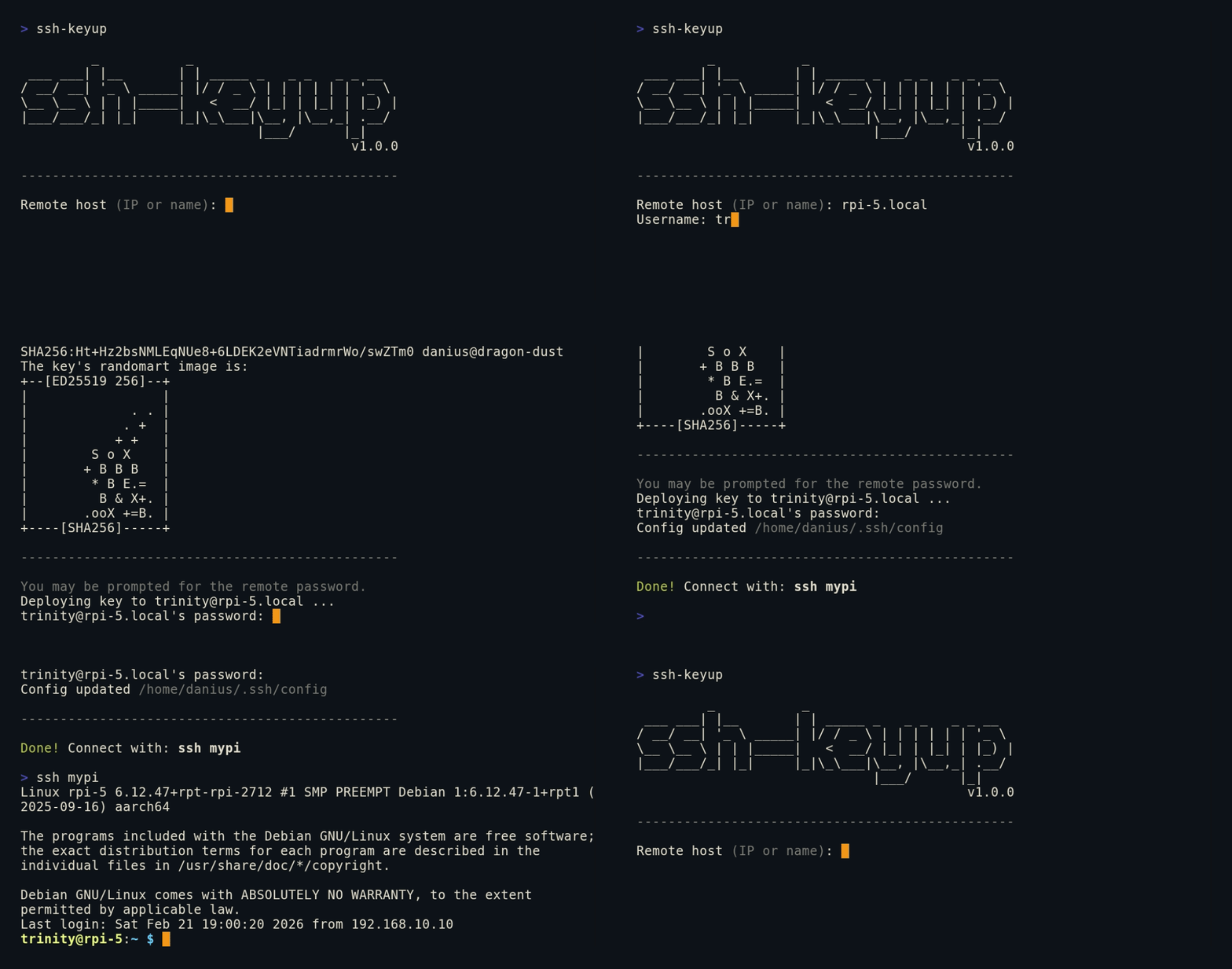
|
|
32
33
|
|
|
33
34
|
## Quickstart
|
|
34
35
|
|
|
@@ -59,22 +60,31 @@ ssh mypi # no password, ever again
|
|
|
59
60
|
|
|
60
61
|
Or open [VSCode Remote - SSH](https://marketplace.visualstudio.com/items?itemName=ms-vscode-remote.remote-ssh), your `~/.ssh/config` is already set up. Press `Ctrl+Shift+P`, select **Remote-SSH: Connect to Host**, pick your alias and get a full IDE on your remote device, no password:
|
|
61
62
|
|
|
62
|
-

|
|
63
|
+

|
|
63
64
|
|
|
64
65
|
Skip the prompts by passing arguments:
|
|
65
66
|
|
|
66
67
|
```bash
|
|
67
|
-
ssh-keyup
|
|
68
|
+
ssh-keyup pi@192.168.1.23 mypi # user, host and alias in one go
|
|
68
69
|
```
|
|
69
70
|
|
|
70
71
|
Or configure a whole fleet:
|
|
71
72
|
|
|
72
73
|
```bash
|
|
73
74
|
for host in 192.168.1.10 192.168.1.11 192.168.1.12; do
|
|
74
|
-
ssh-keyup
|
|
75
|
+
ssh-keyup pi@$host
|
|
75
76
|
done
|
|
76
77
|
```
|
|
77
78
|
|
|
79
|
+
Flags (`--host`, `--user`, `--alias`) work too, see `ssh-keyup --help`.
|
|
80
|
+
|
|
81
|
+
List or remove entries ssh-keyup manages:
|
|
82
|
+
|
|
83
|
+
```bash
|
|
84
|
+
ssh-keyup --list
|
|
85
|
+
ssh-keyup --remove mypi # deletes its key pair too
|
|
86
|
+
```
|
|
87
|
+
|
|
78
88
|
## Why?
|
|
79
89
|
|
|
80
90
|
```bash
|
|
@@ -1,5 +1,6 @@
|
|
|
1
1
|
# ssh-keyup
|
|
2
2
|
|
|
3
|
+

|
|
3
4
|

|
|
4
5
|

|
|
5
6
|

|
|
@@ -8,7 +9,7 @@ Set up passwordless SSH on Raspberry Pi, NVIDIA Jetson or any Linux device in on
|
|
|
8
9
|
|
|
9
10
|
Tired of juggling `ssh-keygen`, `ssh-copy-id` (missing on Windows) and `~/.ssh/config` edits every time you set up a new device? `ssh-keyup` handles all three in a single interactive session.
|
|
10
11
|
|
|
11
|
-

|
|
12
|
+

|
|
12
13
|
|
|
13
14
|
## Quickstart
|
|
14
15
|
|
|
@@ -39,22 +40,31 @@ ssh mypi # no password, ever again
|
|
|
39
40
|
|
|
40
41
|
Or open [VSCode Remote - SSH](https://marketplace.visualstudio.com/items?itemName=ms-vscode-remote.remote-ssh), your `~/.ssh/config` is already set up. Press `Ctrl+Shift+P`, select **Remote-SSH: Connect to Host**, pick your alias and get a full IDE on your remote device, no password:
|
|
41
42
|
|
|
42
|
-

|
|
43
|
+

|
|
43
44
|
|
|
44
45
|
Skip the prompts by passing arguments:
|
|
45
46
|
|
|
46
47
|
```bash
|
|
47
|
-
ssh-keyup
|
|
48
|
+
ssh-keyup pi@192.168.1.23 mypi # user, host and alias in one go
|
|
48
49
|
```
|
|
49
50
|
|
|
50
51
|
Or configure a whole fleet:
|
|
51
52
|
|
|
52
53
|
```bash
|
|
53
54
|
for host in 192.168.1.10 192.168.1.11 192.168.1.12; do
|
|
54
|
-
ssh-keyup
|
|
55
|
+
ssh-keyup pi@$host
|
|
55
56
|
done
|
|
56
57
|
```
|
|
57
58
|
|
|
59
|
+
Flags (`--host`, `--user`, `--alias`) work too, see `ssh-keyup --help`.
|
|
60
|
+
|
|
61
|
+
List or remove entries ssh-keyup manages:
|
|
62
|
+
|
|
63
|
+
```bash
|
|
64
|
+
ssh-keyup --list
|
|
65
|
+
ssh-keyup --remove mypi # deletes its key pair too
|
|
66
|
+
```
|
|
67
|
+
|
|
58
68
|
## Why?
|
|
59
69
|
|
|
60
70
|
```bash
|
|
@@ -1,6 +1,6 @@
|
|
|
1
1
|
Metadata-Version: 2.4
|
|
2
2
|
Name: ssh-keyup
|
|
3
|
-
Version: 1.
|
|
3
|
+
Version: 1.1.0
|
|
4
4
|
Summary: Passwordless SSH setup for Raspberry Pi, NVIDIA Jetson, or any Linux device
|
|
5
5
|
Home-page: https://github.com/Kurokesu/ssh-keyup
|
|
6
6
|
Author: UAB Kurokesu
|
|
@@ -20,6 +20,7 @@ Dynamic: license-file
|
|
|
20
20
|
|
|
21
21
|
# ssh-keyup
|
|
22
22
|
|
|
23
|
+

|
|
23
24
|

|
|
24
25
|

|
|
25
26
|

|
|
@@ -28,7 +29,7 @@ Set up passwordless SSH on Raspberry Pi, NVIDIA Jetson or any Linux device in on
|
|
|
28
29
|
|
|
29
30
|
Tired of juggling `ssh-keygen`, `ssh-copy-id` (missing on Windows) and `~/.ssh/config` edits every time you set up a new device? `ssh-keyup` handles all three in a single interactive session.
|
|
30
31
|
|
|
31
|
-

|
|
32
|
+

|
|
32
33
|
|
|
33
34
|
## Quickstart
|
|
34
35
|
|
|
@@ -59,22 +60,31 @@ ssh mypi # no password, ever again
|
|
|
59
60
|
|
|
60
61
|
Or open [VSCode Remote - SSH](https://marketplace.visualstudio.com/items?itemName=ms-vscode-remote.remote-ssh), your `~/.ssh/config` is already set up. Press `Ctrl+Shift+P`, select **Remote-SSH: Connect to Host**, pick your alias and get a full IDE on your remote device, no password:
|
|
61
62
|
|
|
62
|
-

|
|
63
|
+

|
|
63
64
|
|
|
64
65
|
Skip the prompts by passing arguments:
|
|
65
66
|
|
|
66
67
|
```bash
|
|
67
|
-
ssh-keyup
|
|
68
|
+
ssh-keyup pi@192.168.1.23 mypi # user, host and alias in one go
|
|
68
69
|
```
|
|
69
70
|
|
|
70
71
|
Or configure a whole fleet:
|
|
71
72
|
|
|
72
73
|
```bash
|
|
73
74
|
for host in 192.168.1.10 192.168.1.11 192.168.1.12; do
|
|
74
|
-
ssh-keyup
|
|
75
|
+
ssh-keyup pi@$host
|
|
75
76
|
done
|
|
76
77
|
```
|
|
77
78
|
|
|
79
|
+
Flags (`--host`, `--user`, `--alias`) work too, see `ssh-keyup --help`.
|
|
80
|
+
|
|
81
|
+
List or remove entries ssh-keyup manages:
|
|
82
|
+
|
|
83
|
+
```bash
|
|
84
|
+
ssh-keyup --list
|
|
85
|
+
ssh-keyup --remove mypi # deletes its key pair too
|
|
86
|
+
```
|
|
87
|
+
|
|
78
88
|
## Why?
|
|
79
89
|
|
|
80
90
|
```bash
|
|
@@ -6,7 +6,7 @@
|
|
|
6
6
|
#
|
|
7
7
|
# Copyright (c) 2026, UAB Kurokesu. All rights reserved.
|
|
8
8
|
|
|
9
|
-
__version__ = "1.
|
|
9
|
+
__version__ = "1.1.0"
|
|
10
10
|
|
|
11
11
|
import argparse
|
|
12
12
|
import ipaddress
|
|
@@ -19,7 +19,14 @@ import tempfile
|
|
|
19
19
|
from datetime import date
|
|
20
20
|
from pathlib import Path
|
|
21
21
|
from shutil import which
|
|
22
|
-
from typing import Dict, List, Optional, Tuple, Union
|
|
22
|
+
from typing import Dict, List, Optional, Set, Tuple, Union
|
|
23
|
+
|
|
24
|
+
if sys.platform == "win32":
|
|
25
|
+
import ctypes
|
|
26
|
+
import msvcrt
|
|
27
|
+
else:
|
|
28
|
+
import termios
|
|
29
|
+
import tty
|
|
23
30
|
|
|
24
31
|
|
|
25
32
|
class CLI:
|
|
@@ -53,29 +60,29 @@ class CLI:
|
|
|
53
60
|
S_SUCCESS = GREEN
|
|
54
61
|
S_STATUS = CYAN
|
|
55
62
|
|
|
63
|
+
STYLE_ATTRS = (
|
|
64
|
+
"BOLD", "DIM", "RESET", "GREEN", "RED", "YELLOW", "CYAN",
|
|
65
|
+
"HIDE_CUR", "SHOW_CUR", "S_BANNER", "S_VERSION", "S_SEPARATOR",
|
|
66
|
+
"S_HINT", "S_SSH_WARNING", "S_SSH_INFO", "S_SUCCESS", "S_STATUS",
|
|
67
|
+
)
|
|
68
|
+
|
|
56
69
|
def __init__(self) -> None:
|
|
57
70
|
if not sys.stdout.isatty():
|
|
58
|
-
|
|
59
|
-
|
|
60
|
-
CLI.HIDE_CUR = CLI.SHOW_CUR = ""
|
|
61
|
-
CLI.S_BANNER = CLI.S_VERSION = CLI.S_SEPARATOR = ""
|
|
62
|
-
CLI.S_HINT = CLI.S_SSH_WARNING = ""
|
|
63
|
-
CLI.S_SSH_INFO = CLI.S_SUCCESS = CLI.S_STATUS = ""
|
|
71
|
+
for attr in CLI.STYLE_ATTRS:
|
|
72
|
+
setattr(CLI, attr, "")
|
|
64
73
|
|
|
65
74
|
@staticmethod
|
|
66
75
|
def enable_ansi() -> None:
|
|
67
76
|
"""Enable ANSI escape sequences on Windows 10+."""
|
|
68
|
-
if sys.platform
|
|
69
|
-
|
|
70
|
-
|
|
71
|
-
|
|
72
|
-
|
|
73
|
-
|
|
74
|
-
|
|
75
|
-
|
|
76
|
-
|
|
77
|
-
except Exception:
|
|
78
|
-
pass
|
|
77
|
+
if sys.platform == "win32":
|
|
78
|
+
try:
|
|
79
|
+
k = ctypes.windll.kernel32
|
|
80
|
+
h = k.GetStdHandle(-11)
|
|
81
|
+
m = ctypes.c_ulong()
|
|
82
|
+
k.GetConsoleMode(h, ctypes.byref(m))
|
|
83
|
+
k.SetConsoleMode(h, m.value | 0x0004)
|
|
84
|
+
except Exception:
|
|
85
|
+
pass
|
|
79
86
|
|
|
80
87
|
@staticmethod
|
|
81
88
|
def banner() -> None:
|
|
@@ -108,7 +115,7 @@ class CLI:
|
|
|
108
115
|
@staticmethod
|
|
109
116
|
def fatal(msg: str) -> None:
|
|
110
117
|
"""Print an error message and exit."""
|
|
111
|
-
|
|
118
|
+
CLI.fail(msg)
|
|
112
119
|
sys.exit(1)
|
|
113
120
|
|
|
114
121
|
@staticmethod
|
|
@@ -167,7 +174,6 @@ class CLI:
|
|
|
167
174
|
def _read_key() -> str:
|
|
168
175
|
"""Read a single keypress."""
|
|
169
176
|
if sys.platform == "win32":
|
|
170
|
-
import msvcrt
|
|
171
177
|
ch = msvcrt.getwch()
|
|
172
178
|
if ch == "\x03":
|
|
173
179
|
raise KeyboardInterrupt
|
|
@@ -177,8 +183,6 @@ class CLI:
|
|
|
177
183
|
return {"K": "left", "M": "right"}.get(msvcrt.getwch(), "")
|
|
178
184
|
return "esc" if ch == "\x1b" else ch
|
|
179
185
|
else:
|
|
180
|
-
import termios
|
|
181
|
-
import tty
|
|
182
186
|
fd = sys.stdin.fileno()
|
|
183
187
|
old = termios.tcgetattr(fd)
|
|
184
188
|
try:
|
|
@@ -262,10 +266,10 @@ class Runner:
|
|
|
262
266
|
def __init__(self) -> None:
|
|
263
267
|
self.git_bash = Runner._find_git_bash()
|
|
264
268
|
openssh = all(which(c) for c in ("ssh", "ssh-keygen"))
|
|
265
|
-
self.mode = (
|
|
269
|
+
self.mode: Optional[str] = (
|
|
266
270
|
"native" if openssh
|
|
267
271
|
else ("gitbash" if self.git_bash else None)
|
|
268
|
-
)
|
|
272
|
+
)
|
|
269
273
|
|
|
270
274
|
def check(self) -> None:
|
|
271
275
|
"""Exit with guidance if no SSH tools are available."""
|
|
@@ -286,7 +290,8 @@ class Runner:
|
|
|
286
290
|
"""Prepare the command and shell flag for subprocess.run."""
|
|
287
291
|
if self.mode == "native":
|
|
288
292
|
return cmd, isinstance(cmd, str)
|
|
289
|
-
|
|
293
|
+
if self.git_bash is None:
|
|
294
|
+
raise RuntimeError("gitbash mode without Git Bash path")
|
|
290
295
|
sh = (cmd if isinstance(cmd, str)
|
|
291
296
|
else " ".join(shlex.quote(a) for a in cmd))
|
|
292
297
|
return [self.git_bash, "-c", sh], False
|
|
@@ -311,7 +316,7 @@ class SSHConfig:
|
|
|
311
316
|
@staticmethod
|
|
312
317
|
def _find_managed_blocks(text: str) -> Dict[str, Tuple[int, int]]:
|
|
313
318
|
"""Find ssh-keyup managed blocks in SSH config text."""
|
|
314
|
-
blocks
|
|
319
|
+
blocks: Dict[str, Tuple[int, int]] = {}
|
|
315
320
|
for m in re.finditer(
|
|
316
321
|
r"^#ssh-keyup:begin (\S+)[^\n]*\n.*?^#ssh-keyup:end \1[^\n]*\n?",
|
|
317
322
|
text, re.MULTILINE | re.DOTALL,
|
|
@@ -346,6 +351,16 @@ class SSHConfig:
|
|
|
346
351
|
f"#ssh-keyup:end {alias}\n"
|
|
347
352
|
)
|
|
348
353
|
|
|
354
|
+
@staticmethod
|
|
355
|
+
def _splice_out(text: str, span: Tuple[int, int]) -> str:
|
|
356
|
+
"""Remove a text span, collapsing surrounding blank lines."""
|
|
357
|
+
start, end = span
|
|
358
|
+
before = text[:start].rstrip("\n")
|
|
359
|
+
after = text[end:].lstrip("\n")
|
|
360
|
+
if before and after:
|
|
361
|
+
return before + "\n\n" + after
|
|
362
|
+
return before or after
|
|
363
|
+
|
|
349
364
|
@staticmethod
|
|
350
365
|
def check_existing(ssh_config: Path, alias: str) -> Tuple[str, bool]:
|
|
351
366
|
"""Check for an existing alias, prompt to overwrite."""
|
|
@@ -373,12 +388,78 @@ class SSHConfig:
|
|
|
373
388
|
cli.cancel("No changes were made.")
|
|
374
389
|
sys.exit(0)
|
|
375
390
|
|
|
391
|
+
return SSHConfig._splice_out(text, blocks[alias]), True
|
|
392
|
+
|
|
393
|
+
@staticmethod
|
|
394
|
+
def collect_entries(text: str) -> List[Dict[str, str]]:
|
|
395
|
+
"""Parse managed entries from SSH config text."""
|
|
396
|
+
entries = []
|
|
397
|
+
for m in re.finditer(
|
|
398
|
+
r"^#ssh-keyup:begin (\S+)(?: (\S+))?[^\n]*\n"
|
|
399
|
+
r"(.*?)^#ssh-keyup:end \1",
|
|
400
|
+
text, re.MULTILINE | re.DOTALL,
|
|
401
|
+
):
|
|
402
|
+
body = m.group(3)
|
|
403
|
+
|
|
404
|
+
def field(name: str) -> str:
|
|
405
|
+
fm = re.search(rf"^\s*{name}\s+(\S+)", body, re.MULTILINE)
|
|
406
|
+
return fm.group(1) if fm else "?"
|
|
407
|
+
|
|
408
|
+
entries.append({
|
|
409
|
+
"alias": m.group(1),
|
|
410
|
+
"date": m.group(2) or "?",
|
|
411
|
+
"host": field("HostName"),
|
|
412
|
+
"user": field("User"),
|
|
413
|
+
"key": field("IdentityFile"),
|
|
414
|
+
})
|
|
415
|
+
return entries
|
|
416
|
+
|
|
417
|
+
@staticmethod
|
|
418
|
+
def list_entries(ssh_config: Path) -> None:
|
|
419
|
+
"""Print managed entries as aligned columns."""
|
|
420
|
+
text = (ssh_config.read_text(encoding="utf-8")
|
|
421
|
+
if ssh_config.exists() else "")
|
|
422
|
+
entries = SSHConfig.collect_entries(text)
|
|
423
|
+
if not entries:
|
|
424
|
+
cli.msg("No entries managed by ssh-keyup.")
|
|
425
|
+
return
|
|
426
|
+
|
|
427
|
+
header = ("alias", "host", "user", "key", "added")
|
|
428
|
+
rows = [(e["alias"], e["host"], e["user"], e["key"], e["date"])
|
|
429
|
+
for e in entries]
|
|
430
|
+
widths = [max(len(row[i]) for row in rows + [header])
|
|
431
|
+
for i in range(len(header))]
|
|
432
|
+
cli.hint(" ".join(h.ljust(w) for h, w in zip(header, widths)))
|
|
433
|
+
for row in rows:
|
|
434
|
+
cli.msg(" ".join(v.ljust(w) for v, w in zip(row, widths)))
|
|
435
|
+
|
|
436
|
+
@staticmethod
|
|
437
|
+
def remove_entry(ssh_config: Path, alias: str) -> None:
|
|
438
|
+
"""Remove a managed entry and its key pair."""
|
|
439
|
+
text = (ssh_config.read_text(encoding="utf-8")
|
|
440
|
+
if ssh_config.exists() else "")
|
|
441
|
+
blocks = SSHConfig._find_managed_blocks(text)
|
|
442
|
+
if alias not in blocks:
|
|
443
|
+
cli.fatal(f"No entry '{alias}' managed by ssh-keyup.")
|
|
444
|
+
|
|
376
445
|
start, end = blocks[alias]
|
|
377
|
-
|
|
378
|
-
|
|
379
|
-
|
|
380
|
-
|
|
381
|
-
|
|
446
|
+
key_m = re.search(r"^\s*IdentityFile\s+(\S+)", text[start:end],
|
|
447
|
+
re.MULTILINE)
|
|
448
|
+
|
|
449
|
+
new_text = SSHConfig._splice_out(text, blocks[alias])
|
|
450
|
+
if new_text:
|
|
451
|
+
new_text = new_text.rstrip("\n") + "\n"
|
|
452
|
+
SSHConfig._atomic_write(ssh_config, new_text)
|
|
453
|
+
cli.msg(f"Removed '{alias}' from {ssh_config}")
|
|
454
|
+
|
|
455
|
+
if not key_m:
|
|
456
|
+
return
|
|
457
|
+
key_path = Path(key_m.group(1)).expanduser()
|
|
458
|
+
pub_path = Path(str(key_path) + ".pub")
|
|
459
|
+
if key_path.exists() or pub_path.exists():
|
|
460
|
+
key_path.unlink(missing_ok=True)
|
|
461
|
+
pub_path.unlink(missing_ok=True)
|
|
462
|
+
cli.msg(f"Deleted key pair {key_path.name}")
|
|
382
463
|
|
|
383
464
|
@staticmethod
|
|
384
465
|
def _atomic_write(ssh_config: Path, text: str) -> None:
|
|
@@ -516,7 +597,7 @@ class Deployer:
|
|
|
516
597
|
"\nSSH connection failed. Check host and credentials."
|
|
517
598
|
)
|
|
518
599
|
if stderr.strip():
|
|
519
|
-
seen = set()
|
|
600
|
+
seen: Set[str] = set()
|
|
520
601
|
for line in stderr.strip().splitlines():
|
|
521
602
|
if line not in seen and not line.startswith("debug1:"):
|
|
522
603
|
seen.add(line)
|
|
@@ -546,6 +627,14 @@ def is_ip(value: str) -> bool:
|
|
|
546
627
|
return False
|
|
547
628
|
|
|
548
629
|
|
|
630
|
+
def split_target(target: str) -> Tuple[Optional[str], str]:
|
|
631
|
+
"""Split a [user@]host target into user and host."""
|
|
632
|
+
if "@" in target:
|
|
633
|
+
user, host = target.rsplit("@", 1)
|
|
634
|
+
return (user or None), host
|
|
635
|
+
return None, target
|
|
636
|
+
|
|
637
|
+
|
|
549
638
|
_DESCRIPTION = (
|
|
550
639
|
"Set up SSH key auth in one command.\n"
|
|
551
640
|
"Generates a per-host Ed25519 key pair, deploys it\n"
|
|
@@ -555,13 +644,18 @@ _DESCRIPTION = (
|
|
|
555
644
|
_EPILOG = (
|
|
556
645
|
"examples:\n"
|
|
557
646
|
" ssh-keyup"
|
|
558
|
-
"
|
|
559
|
-
" ssh-keyup
|
|
560
|
-
"
|
|
561
|
-
" ssh-keyup
|
|
562
|
-
"
|
|
563
|
-
" ssh-keyup
|
|
564
|
-
"
|
|
647
|
+
" interactive mode\n"
|
|
648
|
+
" ssh-keyup pi@192.168.1.23 mypi"
|
|
649
|
+
" user, host and alias\n"
|
|
650
|
+
" ssh-keyup trinity@rpi-5.local"
|
|
651
|
+
" alias defaults to rpi-5\n"
|
|
652
|
+
" ssh-keyup 192.168.1.23"
|
|
653
|
+
" prompts for username and alias\n"
|
|
654
|
+
" ssh-keyup --host rpi-5 --user pi --alias mypi\n"
|
|
655
|
+
" ssh-keyup --list"
|
|
656
|
+
" show managed entries\n"
|
|
657
|
+
" ssh-keyup --remove mypi"
|
|
658
|
+
" delete a managed entry"
|
|
565
659
|
)
|
|
566
660
|
|
|
567
661
|
|
|
@@ -575,13 +669,44 @@ def parse_args() -> argparse.Namespace:
|
|
|
575
669
|
)
|
|
576
670
|
p.add_argument("--version", action="version",
|
|
577
671
|
version=f"%(prog)s {__version__}")
|
|
672
|
+
p.add_argument("target", nargs="?", metavar="[user@]host",
|
|
673
|
+
help="remote device, e.g. pi@192.168.1.23")
|
|
674
|
+
p.add_argument("alias_pos", nargs="?", metavar="alias",
|
|
675
|
+
help="friendly name for ~/.ssh/config (default: hostname)")
|
|
578
676
|
p.add_argument("--host",
|
|
579
677
|
help="IP address or hostname of the remote device")
|
|
580
678
|
p.add_argument("--user",
|
|
581
679
|
help="login username on the remote device")
|
|
582
680
|
p.add_argument("--alias",
|
|
583
681
|
help="friendly name for ~/.ssh/config (default: hostname)")
|
|
584
|
-
|
|
682
|
+
p.add_argument("--list", action="store_true",
|
|
683
|
+
help="list entries managed by ssh-keyup")
|
|
684
|
+
p.add_argument("--remove", metavar="ALIAS",
|
|
685
|
+
help="remove a managed entry from ~/.ssh/config")
|
|
686
|
+
args = p.parse_args()
|
|
687
|
+
|
|
688
|
+
if args.list and args.remove:
|
|
689
|
+
p.error("--list and --remove cannot be combined")
|
|
690
|
+
if ((args.list or args.remove)
|
|
691
|
+
and any((args.target, args.alias_pos,
|
|
692
|
+
args.host, args.user, args.alias))):
|
|
693
|
+
p.error("--list/--remove cannot be combined with setup arguments")
|
|
694
|
+
|
|
695
|
+
if args.target:
|
|
696
|
+
user, host = split_target(args.target)
|
|
697
|
+
if args.host:
|
|
698
|
+
p.error("host given both as positional and --host")
|
|
699
|
+
args.host = host
|
|
700
|
+
if user:
|
|
701
|
+
if args.user:
|
|
702
|
+
p.error("user given both as user@ prefix and --user")
|
|
703
|
+
args.user = user
|
|
704
|
+
if args.alias_pos:
|
|
705
|
+
if args.alias:
|
|
706
|
+
p.error("alias given both as positional and --alias")
|
|
707
|
+
args.alias = args.alias_pos
|
|
708
|
+
|
|
709
|
+
return args
|
|
585
710
|
|
|
586
711
|
|
|
587
712
|
def gather_input(args: argparse.Namespace) -> Tuple[str, str, str]:
|
|
@@ -609,9 +734,7 @@ def gather_input(args: argparse.Namespace) -> Tuple[str, str, str]:
|
|
|
609
734
|
return host, user, alias
|
|
610
735
|
|
|
611
736
|
|
|
612
|
-
def generate_key(
|
|
613
|
-
runner: Runner, key_path: Path, pub_path: Path, file_alias: str,
|
|
614
|
-
) -> None:
|
|
737
|
+
def generate_key(runner: Runner, key_path: Path) -> None:
|
|
615
738
|
"""Generate an Ed25519 key pair."""
|
|
616
739
|
if runner.mode == "native":
|
|
617
740
|
rc = runner.run([
|
|
@@ -619,7 +742,7 @@ def generate_key(
|
|
|
619
742
|
])
|
|
620
743
|
else:
|
|
621
744
|
rc = runner.run(
|
|
622
|
-
f"ssh-keygen -t ed25519 -N '' -f ~/.ssh/
|
|
745
|
+
f"ssh-keygen -t ed25519 -N '' -f ~/.ssh/{key_path.name}"
|
|
623
746
|
)
|
|
624
747
|
|
|
625
748
|
if rc != 0:
|
|
@@ -632,6 +755,14 @@ def main() -> None:
|
|
|
632
755
|
cli.enable_ansi()
|
|
633
756
|
args = parse_args()
|
|
634
757
|
|
|
758
|
+
ssh_config = Path.home() / ".ssh" / "config"
|
|
759
|
+
if args.list:
|
|
760
|
+
SSHConfig.list_entries(ssh_config)
|
|
761
|
+
return
|
|
762
|
+
if args.remove:
|
|
763
|
+
SSHConfig.remove_entry(ssh_config, args.remove)
|
|
764
|
+
return
|
|
765
|
+
|
|
635
766
|
cli.banner()
|
|
636
767
|
cli.separator()
|
|
637
768
|
|
|
@@ -657,10 +788,10 @@ def main() -> None:
|
|
|
657
788
|
if cli.ask_yn("Regenerate key pair?"):
|
|
658
789
|
key_path.unlink(missing_ok=True)
|
|
659
790
|
pub_path.unlink()
|
|
660
|
-
generate_key(runner, key_path
|
|
791
|
+
generate_key(runner, key_path)
|
|
661
792
|
key_generated = True
|
|
662
793
|
else:
|
|
663
|
-
generate_key(runner, key_path
|
|
794
|
+
generate_key(runner, key_path)
|
|
664
795
|
key_generated = True
|
|
665
796
|
|
|
666
797
|
cli.separator()
|
|
File without changes
|
|
File without changes
|
|
File without changes
|
|
File without changes
|
|
File without changes
|
|
File without changes
|
|
File without changes
|