sqlseed 0.2.5__tar.gz → 0.2.6__tar.gz
This diff represents the content of publicly available package versions that have been released to one of the supported registries. The information contained in this diff is provided for informational purposes only and reflects changes between package versions as they appear in their respective public registries.
- {sqlseed-0.2.5 → sqlseed-0.2.6}/.gitignore +10 -0
- {sqlseed-0.2.5 → sqlseed-0.2.6}/CHANGELOG.md +25 -0
- {sqlseed-0.2.5 → sqlseed-0.2.6}/CHANGELOG.zh-CN.md +25 -0
- {sqlseed-0.2.5 → sqlseed-0.2.6}/PKG-INFO +80 -21
- {sqlseed-0.2.5 → sqlseed-0.2.6}/README.md +78 -20
- {sqlseed-0.2.5 → sqlseed-0.2.6}/README.zh-CN.md +83 -31
- {sqlseed-0.2.5 → sqlseed-0.2.6}/pyproject.toml +1 -0
- {sqlseed-0.2.5 → sqlseed-0.2.6}/src/sqlseed/_utils/AGENTS.md +1 -0
- {sqlseed-0.2.5 → sqlseed-0.2.6}/src/sqlseed/_utils/progress.py +89 -13
- {sqlseed-0.2.5 → sqlseed-0.2.6}/LICENSE +0 -0
- {sqlseed-0.2.5 → sqlseed-0.2.6}/src/sqlseed/AGENTS.md +0 -0
- {sqlseed-0.2.5 → sqlseed-0.2.6}/src/sqlseed/__init__.py +0 -0
- {sqlseed-0.2.5 → sqlseed-0.2.6}/src/sqlseed/_utils/__init__.py +0 -0
- {sqlseed-0.2.5 → sqlseed-0.2.6}/src/sqlseed/_utils/daemon_task.py +0 -0
- {sqlseed-0.2.5 → sqlseed-0.2.6}/src/sqlseed/_utils/logger.py +0 -0
- {sqlseed-0.2.5 → sqlseed-0.2.6}/src/sqlseed/_utils/metrics.py +0 -0
- {sqlseed-0.2.5 → sqlseed-0.2.6}/src/sqlseed/_utils/paths.py +0 -0
- {sqlseed-0.2.5 → sqlseed-0.2.6}/src/sqlseed/_utils/redaction.py +0 -0
- {sqlseed-0.2.5 → sqlseed-0.2.6}/src/sqlseed/_utils/sql_safe.py +0 -0
- {sqlseed-0.2.5 → sqlseed-0.2.6}/src/sqlseed/_utils/type_checks.py +0 -0
- {sqlseed-0.2.5 → sqlseed-0.2.6}/src/sqlseed/_version.py +0 -0
- {sqlseed-0.2.5 → sqlseed-0.2.6}/src/sqlseed/config/AGENTS.md +0 -0
- {sqlseed-0.2.5 → sqlseed-0.2.6}/src/sqlseed/config/__init__.py +0 -0
- {sqlseed-0.2.5 → sqlseed-0.2.6}/src/sqlseed/config/loader.py +0 -0
- {sqlseed-0.2.5 → sqlseed-0.2.6}/src/sqlseed/config/models.py +0 -0
- {sqlseed-0.2.5 → sqlseed-0.2.6}/src/sqlseed/config/snapshot.py +0 -0
- {sqlseed-0.2.5 → sqlseed-0.2.6}/src/sqlseed/core/AGENTS.md +0 -0
- {sqlseed-0.2.5 → sqlseed-0.2.6}/src/sqlseed/core/__init__.py +0 -0
- {sqlseed-0.2.5 → sqlseed-0.2.6}/src/sqlseed/core/check_adapt.py +0 -0
- {sqlseed-0.2.5 → sqlseed-0.2.6}/src/sqlseed/core/check_parser.py +0 -0
- {sqlseed-0.2.5 → sqlseed-0.2.6}/src/sqlseed/core/column_dag.py +0 -0
- {sqlseed-0.2.5 → sqlseed-0.2.6}/src/sqlseed/core/constraints.py +0 -0
- {sqlseed-0.2.5 → sqlseed-0.2.6}/src/sqlseed/core/enrichment.py +0 -0
- {sqlseed-0.2.5 → sqlseed-0.2.6}/src/sqlseed/core/expression.py +0 -0
- {sqlseed-0.2.5 → sqlseed-0.2.6}/src/sqlseed/core/features.py +0 -0
- {sqlseed-0.2.5 → sqlseed-0.2.6}/src/sqlseed/core/mapper.py +0 -0
- {sqlseed-0.2.5 → sqlseed-0.2.6}/src/sqlseed/core/orchestrator/AGENTS.md +0 -0
- {sqlseed-0.2.5 → sqlseed-0.2.6}/src/sqlseed/core/orchestrator/__init__.py +0 -0
- {sqlseed-0.2.5 → sqlseed-0.2.6}/src/sqlseed/core/orchestrator/_common.py +0 -0
- {sqlseed-0.2.5 → sqlseed-0.2.6}/src/sqlseed/core/orchestrator/_connection.py +0 -0
- {sqlseed-0.2.5 → sqlseed-0.2.6}/src/sqlseed/core/orchestrator/_generation.py +0 -0
- {sqlseed-0.2.5 → sqlseed-0.2.6}/src/sqlseed/core/orchestrator/_query.py +0 -0
- {sqlseed-0.2.5 → sqlseed-0.2.6}/src/sqlseed/core/orchestrator/_self_ref.py +0 -0
- {sqlseed-0.2.5 → sqlseed-0.2.6}/src/sqlseed/core/orchestrator/_session.py +0 -0
- {sqlseed-0.2.5 → sqlseed-0.2.6}/src/sqlseed/core/orchestrator/_specs.py +0 -0
- {sqlseed-0.2.5 → sqlseed-0.2.6}/src/sqlseed/core/plugin_mediator.py +0 -0
- {sqlseed-0.2.5 → sqlseed-0.2.6}/src/sqlseed/core/relation.py +0 -0
- {sqlseed-0.2.5 → sqlseed-0.2.6}/src/sqlseed/core/result.py +0 -0
- {sqlseed-0.2.5 → sqlseed-0.2.6}/src/sqlseed/core/schema.py +0 -0
- {sqlseed-0.2.5 → sqlseed-0.2.6}/src/sqlseed/core/schema_fallback.py +0 -0
- {sqlseed-0.2.5 → sqlseed-0.2.6}/src/sqlseed/core/schema_metadata.py +0 -0
- {sqlseed-0.2.5 → sqlseed-0.2.6}/src/sqlseed/core/stream.py +0 -0
- {sqlseed-0.2.5 → sqlseed-0.2.6}/src/sqlseed/core/transform.py +0 -0
- {sqlseed-0.2.5 → sqlseed-0.2.6}/src/sqlseed/core/unique_adjuster.py +0 -0
- {sqlseed-0.2.5 → sqlseed-0.2.6}/src/sqlseed/database/AGENTS.md +0 -0
- {sqlseed-0.2.5 → sqlseed-0.2.6}/src/sqlseed/database/__init__.py +0 -0
- {sqlseed-0.2.5 → sqlseed-0.2.6}/src/sqlseed/database/_base_adapter.py +0 -0
- {sqlseed-0.2.5 → sqlseed-0.2.6}/src/sqlseed/database/_bulk_optimizer.py +0 -0
- {sqlseed-0.2.5 → sqlseed-0.2.6}/src/sqlseed/database/_connection_url.py +0 -0
- {sqlseed-0.2.5 → sqlseed-0.2.6}/src/sqlseed/database/_dialect.py +0 -0
- {sqlseed-0.2.5 → sqlseed-0.2.6}/src/sqlseed/database/_helpers.py +0 -0
- {sqlseed-0.2.5 → sqlseed-0.2.6}/src/sqlseed/database/_protocol.py +0 -0
- {sqlseed-0.2.5 → sqlseed-0.2.6}/src/sqlseed/database/_sqlite_schema.py +0 -0
- {sqlseed-0.2.5 → sqlseed-0.2.6}/src/sqlseed/database/_type_normalizer.py +0 -0
- {sqlseed-0.2.5 → sqlseed-0.2.6}/src/sqlseed/database/_unique_keys.py +0 -0
- {sqlseed-0.2.5 → sqlseed-0.2.6}/src/sqlseed/database/_value_normalizer.py +0 -0
- {sqlseed-0.2.5 → sqlseed-0.2.6}/src/sqlseed/database/optimizer.py +0 -0
- {sqlseed-0.2.5 → sqlseed-0.2.6}/src/sqlseed/database/raw_sqlite_adapter.py +0 -0
- {sqlseed-0.2.5 → sqlseed-0.2.6}/src/sqlseed/database/sqlalchemy_adapter.py +0 -0
- {sqlseed-0.2.5 → sqlseed-0.2.6}/src/sqlseed/generators/AGENTS.md +0 -0
- {sqlseed-0.2.5 → sqlseed-0.2.6}/src/sqlseed/generators/__init__.py +0 -0
- {sqlseed-0.2.5 → sqlseed-0.2.6}/src/sqlseed/generators/_datetime_methods.py +0 -0
- {sqlseed-0.2.5 → sqlseed-0.2.6}/src/sqlseed/generators/_datetime_utils.py +0 -0
- {sqlseed-0.2.5 → sqlseed-0.2.6}/src/sqlseed/generators/_dispatch.py +0 -0
- {sqlseed-0.2.5 → sqlseed-0.2.6}/src/sqlseed/generators/_json_helpers.py +0 -0
- {sqlseed-0.2.5 → sqlseed-0.2.6}/src/sqlseed/generators/_native_provider.py +0 -0
- {sqlseed-0.2.5 → sqlseed-0.2.6}/src/sqlseed/generators/_protocol.py +0 -0
- {sqlseed-0.2.5 → sqlseed-0.2.6}/src/sqlseed/generators/_string_helpers.py +0 -0
- {sqlseed-0.2.5 → sqlseed-0.2.6}/src/sqlseed/generators/base_provider.py +0 -0
- {sqlseed-0.2.5 → sqlseed-0.2.6}/src/sqlseed/generators/faker_provider.py +0 -0
- {sqlseed-0.2.5 → sqlseed-0.2.6}/src/sqlseed/generators/mimesis_provider.py +0 -0
- {sqlseed-0.2.5 → sqlseed-0.2.6}/src/sqlseed/generators/registry.py +0 -0
- {sqlseed-0.2.5 → sqlseed-0.2.6}/src/sqlseed/plugins/AGENTS.md +0 -0
- {sqlseed-0.2.5 → sqlseed-0.2.6}/src/sqlseed/plugins/__init__.py +0 -0
- {sqlseed-0.2.5 → sqlseed-0.2.6}/src/sqlseed/plugins/hookspecs.py +0 -0
- {sqlseed-0.2.5 → sqlseed-0.2.6}/src/sqlseed/plugins/manager.py +0 -0
- {sqlseed-0.2.5 → sqlseed-0.2.6}/src/sqlseed/py.typed +0 -0
|
@@ -59,6 +59,16 @@ dmypy.json
|
|
|
59
59
|
*.db
|
|
60
60
|
*.sqlite
|
|
61
61
|
*.sqlite3
|
|
62
|
+
# SQLite runtime sidecars
|
|
63
|
+
*.db-wal
|
|
64
|
+
*.db-shm
|
|
65
|
+
*.db-journal
|
|
66
|
+
*.sqlite-wal
|
|
67
|
+
*.sqlite-shm
|
|
68
|
+
*.sqlite-journal
|
|
69
|
+
*.sqlite3-wal
|
|
70
|
+
*.sqlite3-shm
|
|
71
|
+
*.sqlite3-journal
|
|
62
72
|
.sqlseed_cache/
|
|
63
73
|
snapshots/
|
|
64
74
|
.env
|
|
@@ -9,6 +9,31 @@ and this project adheres to [Semantic Versioning](https://semver.org/spec/v2.0.0
|
|
|
9
9
|
|
|
10
10
|
## [Unreleased]
|
|
11
11
|
|
|
12
|
+
## [0.2.6] - 2026-10-07
|
|
13
|
+
|
|
14
|
+
### Changed
|
|
15
|
+
|
|
16
|
+
- Refine Web surface hierarchy, contrast and selection motion, keeping data panels opaque and applying translucent materials to navigation and overlays. Preserve reduced-motion, reduced-transparency and unsupported-filter fallbacks.
|
|
17
|
+
- Make workbench guidance more compact, collapse the table directory on narrow screens, enlarge touch targets and keep generation status, blocking reasons and keyboard focus easier to follow. Shorten the English navigation label from Configurations to Configs without changing its page or actions.
|
|
18
|
+
- Provide English and Simplified Chinese documentation with localized navigation, refreshed package guidance and macOS setup instructions. Expand native macOS regression coverage across Apple Silicon and Intel.
|
|
19
|
+
- Retire obsolete standalone defect probes in favor of the maintained regression suite, and ignore SQLite runtime journal and shared-memory sidecars in the repository.
|
|
20
|
+
|
|
21
|
+
### Fixed
|
|
22
|
+
|
|
23
|
+
- Align dependency controls and display generation-locale labels without diagnostic prefixes. Prevent open dropdowns from throwing a `Node.contains` error on window resize.
|
|
24
|
+
- Resolve equivalent macOS SQLite path spellings to the same target without folding distinct filenames or opening an extra database descriptor.
|
|
25
|
+
- Distinguish Apple unified memory from Intel/shared or dedicated GPU memory. Report unified-memory model capacity as a heuristic budget rather than measured free VRAM or verified backend compatibility.
|
|
26
|
+
- Close AI clients, response streams and failed HTTP probes on error paths.
|
|
27
|
+
- Install all five local packages together in the quickstart environment, reject unusable virtual environments and print correctly quoted commands for the selected interpreter and shell.
|
|
28
|
+
- Distinguish AI rule-cache column sets containing separator characters. Use a versioned, unambiguous column-name hash; legacy hashes are safely invalidated and refreshed on the next suggestion request.
|
|
29
|
+
- Adapt terminal progress rendering when the output stream or encoding changes, including UTF-8 capture returning to GBK, and safely display non-ASCII descriptions in narrow terminals without replacing the original generation error.
|
|
30
|
+
- Retain ownership of a newly started Web worker if its resume acknowledgement fails, drain it before returning to maintenance, and restore the recovery page after delayed shutdown. Preserve startup diagnostics for service-only recovery without repeating the component installation.
|
|
31
|
+
|
|
32
|
+
### Compatibility
|
|
33
|
+
|
|
34
|
+
- Retain the plugin requirement for Core `>=0.2.5.dev0,<0.3`; install matching package versions. Existing Python, CLI and configuration entry points remain unchanged, while AI rule-cache entries with the old column hash are refreshed on demand.
|
|
35
|
+
- SQLite cycle appends still require existing non-NULL single-column parent keys and retain the 100,000-key source-pool limit. Ordinary acyclic appends still commit batch by batch; a later failure can leave earlier batches committed. This release does not change those generation or transaction boundaries.
|
|
36
|
+
|
|
12
37
|
## [0.2.5] - 2026-10-02
|
|
13
38
|
|
|
14
39
|
### Added
|
|
@@ -9,6 +9,31 @@
|
|
|
9
9
|
|
|
10
10
|
## [Unreleased]
|
|
11
11
|
|
|
12
|
+
## [0.2.6] - 2026-10-07
|
|
13
|
+
|
|
14
|
+
### 变更
|
|
15
|
+
|
|
16
|
+
- 优化 Web 界面的材质层级、对比度和选择动效,数据面板保持实色,导航与浮层使用半透明材质;保留减少动态效果、减少透明度及不支持背景滤镜时的降级显示。
|
|
17
|
+
- 压缩工作台流程引导,在窄屏折叠数据表目录、扩大触控区域,并改善生成状态、阻塞原因与键盘焦点的呈现。英文导航将 Configurations 简写为 Configs,页面与操作保持不变。
|
|
18
|
+
- 文档站提供英文和简体中文导航,同步包安装说明与 macOS 使用指南;扩展 Apple Silicon 和 Intel Mac 的原生回归覆盖。
|
|
19
|
+
- 用维护中的回归测试替代过期独立缺陷探针,并在仓库中忽略 SQLite 运行时日志及共享内存旁文件。
|
|
20
|
+
|
|
21
|
+
### 修复
|
|
22
|
+
|
|
23
|
+
- 对齐依赖视图控件,移除数据语言选项中误加的诊断前缀;修复下拉展开时调整窗口大小触发的 `Node.contains` 异常。
|
|
24
|
+
- 将 macOS 上指向同一 SQLite 文件的不同路径写法识别为同一目标,不混淆不同文件,也不额外打开数据库文件描述符。
|
|
25
|
+
- 正确区分 Apple 统一内存、Intel 共享显存与独立显存;统一内存的模型容量仅作为估算预算,不等同于实测可用显存或已验证的后端兼容性。
|
|
26
|
+
- 在异常路径关闭 AI 客户端、响应流和失败的 HTTP 探测。
|
|
27
|
+
- Quickstart 在同一次解析中安装五个本地包,拒绝无法使用的虚拟环境,并按实际解释器和 shell 输出正确引用的后续命令。
|
|
28
|
+
- 修复 AI 规则缓存对包含分隔符的不同列名集合判断相同的问题,改用带版本且无歧义的列名 hash;旧 hash 安全失效,在下次请求规则建议时重新生成缓存。
|
|
29
|
+
- 终端进度条在输出流或编码变化时重新选择可显示的字符,覆盖 UTF-8 捕获结束后恢复 GBK 的情况;中文描述与窄终端显示也不会因编码异常覆盖原始生成错误。
|
|
30
|
+
- Web 新业务进程启动后若恢复确认失败,继续保留其管理权,安全排空并停止后再返回维护状态,延迟退出后也会重新提供恢复页面;保留启动诊断,重试仅恢复服务,不重复安装组件。
|
|
31
|
+
|
|
32
|
+
### 兼容性
|
|
33
|
+
|
|
34
|
+
- 插件沿用 Core `>=0.2.5.dev0,<0.3` 的依赖要求,请使用匹配的包版本。Python、CLI 和配置入口保持兼容,旧列名 hash 对应的 AI 规则缓存会按需重新生成。
|
|
35
|
+
- SQLite 循环追加仍要求已有非空单列父键,来源池上限仍为 100,000 个键。普通无跨表循环的追加仍逐批提交,后续失败可能保留先前已提交的批次;本版不改变这些生成与事务边界。
|
|
36
|
+
|
|
12
37
|
## [0.2.5] - 2026-10-02
|
|
13
38
|
|
|
14
39
|
### 新增
|
|
@@ -1,6 +1,6 @@
|
|
|
1
1
|
Metadata-Version: 2.5
|
|
2
2
|
Name: sqlseed
|
|
3
|
-
Version: 0.2.
|
|
3
|
+
Version: 0.2.6
|
|
4
4
|
Summary: Offline declarative SQLite and PostgreSQL test data generation for Python
|
|
5
5
|
Project-URL: Homepage, https://github.com/sunbos/sqlseed
|
|
6
6
|
Project-URL: Documentation, https://sunbos.github.io/sqlseed/
|
|
@@ -55,6 +55,7 @@ Requires-Dist: testcontainers>=4.0; extra == 'dev'
|
|
|
55
55
|
Requires-Dist: tqdm>=4.66; extra == 'dev'
|
|
56
56
|
Provides-Extra: docs
|
|
57
57
|
Requires-Dist: mkdocs-material>=9.0; extra == 'docs'
|
|
58
|
+
Requires-Dist: mkdocs-static-i18n<2,>=1.3.1; extra == 'docs'
|
|
58
59
|
Requires-Dist: mkdocstrings[python]>=0.25; extra == 'docs'
|
|
59
60
|
Provides-Extra: mimesis
|
|
60
61
|
Requires-Dist: mimesis>=18.0; extra == 'mimesis'
|
|
@@ -83,7 +84,7 @@ Description-Content-Type: text/markdown
|
|
|
83
84
|
[](https://github.com/sunbos/sqlseed/actions/workflows/ci.yml)
|
|
84
85
|
[](https://github.com/sunbos/sqlseed/blob/main/LICENSE)
|
|
85
86
|
|
|
86
|
-
[Quick start](#quick-start) · [Web workbench](#web-workbench) · [CLI](#command-line) · [Documentation](https://sunbos.github.io/sqlseed/)
|
|
87
|
+
[Quick start](#quick-start) · [Web workbench](#web-workbench) · [CLI](#command-line) · [MCP](#mcp-tools) · [Documentation](https://sunbos.github.io/sqlseed/)
|
|
87
88
|
|
|
88
89
|
</div>
|
|
89
90
|
|
|
@@ -98,20 +99,28 @@ choices, or relationships your application needs in Python or YAML.
|
|
|
98
99
|
## Choose an entry point
|
|
99
100
|
|
|
100
101
|
Requires **Python 3.10+**. Use a virtual environment and install the package for the
|
|
101
|
-
interface you want; you do not need to install every row below.
|
|
102
|
-
|
|
102
|
+
interface you want; you do not need to install every row below. `sqlseed` is the
|
|
103
|
+
offline Core library. The other four packages provide optional interfaces and
|
|
104
|
+
capabilities, and install Core as a dependency.
|
|
103
105
|
|
|
104
|
-
This README describes version 0.2.
|
|
106
|
+
This README describes version 0.2.6. Check [Releases](https://github.com/sunbos/sqlseed/releases)
|
|
105
107
|
for publication status; the [source installation guide](https://sunbos.github.io/sqlseed/guide/#source-installation)
|
|
106
108
|
covers unpublished candidates.
|
|
107
109
|
|
|
108
|
-
|
|
|
110
|
+
| Package and purpose | Install | Start here |
|
|
109
111
|
| --- | --- | --- |
|
|
110
|
-
|
|
|
111
|
-
|
|
|
112
|
-
|
|
|
113
|
-
|
|
|
114
|
-
|
|
|
112
|
+
| **Core — `sqlseed`**: infer rules, preview, and generate data through Python or configuration files | `python -m pip install sqlseed` | [Quick start](#quick-start) |
|
|
113
|
+
| **Web — `sqlseed-web`**: edit rules, inspect relationships, preview, and review runs in a browser | `python -m pip install sqlseed-web` | [Web workbench](#web-workbench) |
|
|
114
|
+
| **CLI — `sqlseed-cli`**: inspect schema, fill tables, and save or replay configurations from a terminal | `python -m pip install sqlseed-cli` | [Command line](#command-line) |
|
|
115
|
+
| **AI — `sqlseed-ai`**: use a configured model to suggest or repair generation rules | `python -m pip install sqlseed-ai` | [AI assistance](#optional-ai-assistance) |
|
|
116
|
+
| **MCP — `mcp-server-sqlseed`**: expose rule-driven YAML generation and data filling to an MCP client | `python -m pip install mcp-server-sqlseed` | [MCP tools](#mcp-tools) |
|
|
117
|
+
|
|
118
|
+
Web and the rule-driven MCP server can each be installed without CLI or AI.
|
|
119
|
+
Installing AI also installs CLI and adds its AI commands. The Core `sqlseed[all]`
|
|
120
|
+
extra groups optional dependencies; it does not install all four packages above.
|
|
121
|
+
|
|
122
|
+
On macOS, start with the [macOS setup guide](https://sunbos.github.io/sqlseed/macos/)
|
|
123
|
+
for native Python, virtual environments, Intel dependencies, and desktop MCP paths.
|
|
115
124
|
|
|
116
125
|
Faker is included with Core and is selected explicitly in the examples below.
|
|
117
126
|
Mimesis is optional: install it with `python -m pip install 'sqlseed[mimesis]'`.
|
|
@@ -159,7 +168,7 @@ Names and email addresses are inferred from the columns. The database assigns th
|
|
|
159
168
|
primary keys. Each run appends another 100 rows; it does not clear the table.
|
|
160
169
|
Check both `result.count` and `result.errors` after generation.
|
|
161
170
|
|
|
162
|
-
|
|
171
|
+
Since version 0.2.5, `sqlseed.FillOptions(provider="faker", seed=42)`
|
|
163
172
|
can share generation settings across `fill(..., options=settings)` calls.
|
|
164
173
|
Existing individual keywords remain supported; see the
|
|
165
174
|
[Python API reference](https://sunbos.github.io/sqlseed/api/#filloptions).
|
|
@@ -215,16 +224,39 @@ python -m pip install sqlseed-web
|
|
|
215
224
|
sqlseed-web
|
|
216
225
|
```
|
|
217
226
|
|
|
218
|
-
Open **[http://127.0.0.1:8630](http://127.0.0.1:8630)
|
|
219
|
-
|
|
227
|
+
Open **[http://127.0.0.1:8630](http://127.0.0.1:8630)** and connect to an existing
|
|
228
|
+
SQLite or PostgreSQL database, such as the `demo.db` above.
|
|
229
|
+
For PostgreSQL, install the driver in the same Python environment before starting
|
|
230
|
+
the workbench: `python -m pip install 'sqlseed[postgres]'`.
|
|
220
231
|
The `sqlseed-web` command is installed with the package; no custom startup script
|
|
221
232
|
or source checkout is required.
|
|
222
233
|
|
|
223
|
-
|
|
224
|
-
|
|
225
|
-
|
|
234
|
+
Select the tables to generate, set row counts, and edit column rules. Use the
|
|
235
|
+
relationship view to inspect foreign keys and check dependencies. Preview samples
|
|
236
|
+
without writing to the database, then review the generation plan and confirm the
|
|
237
|
+
write. Save configurations for reuse and inspect the results in run history.
|
|
238
|
+
|
|
239
|
+
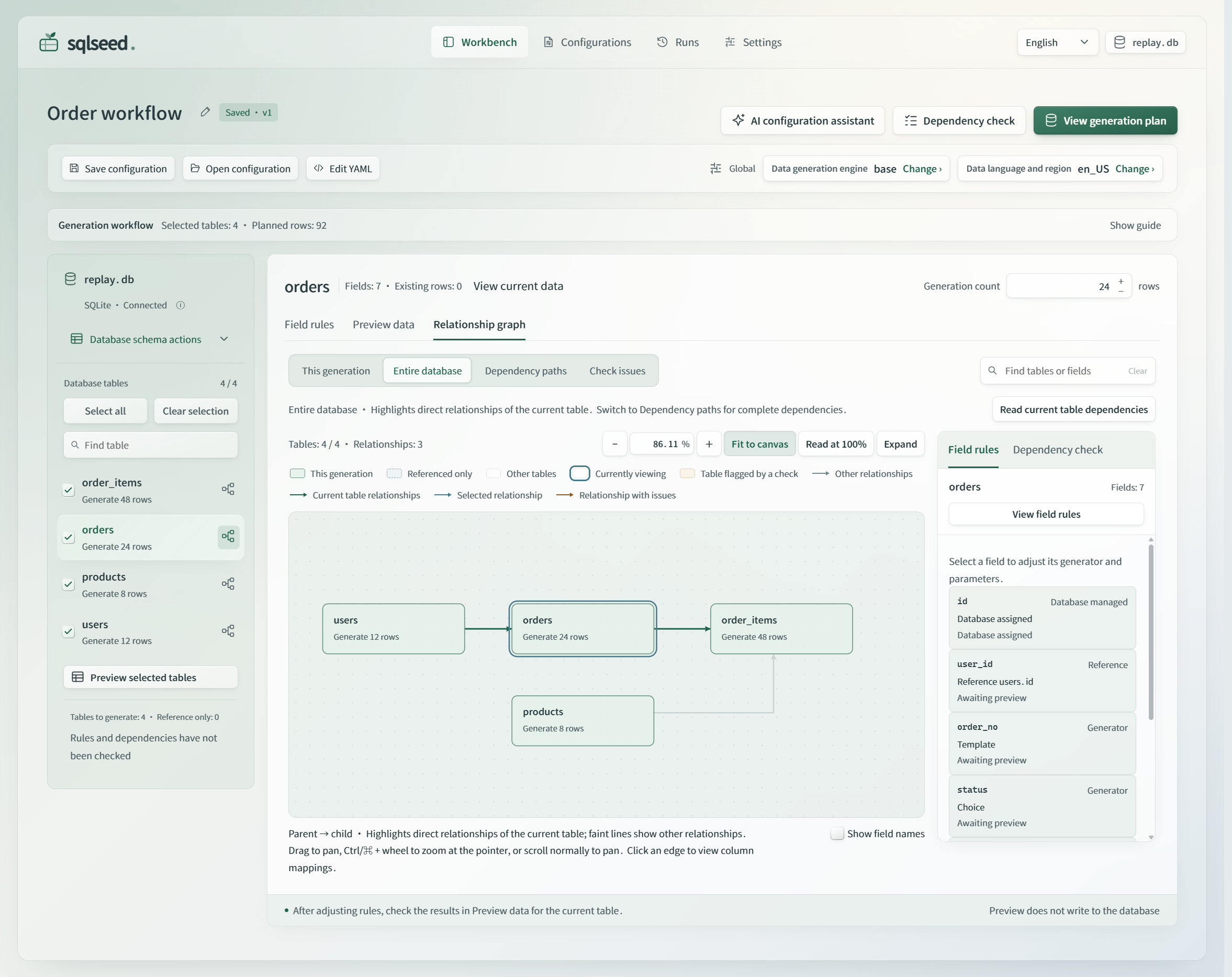
|
|
240
|
+
|
|
241
|
+
The actual 0.2.5 interface with the repository's
|
|
242
|
+
[fictional SQLite order example](https://github.com/sunbos/sqlseed/tree/main/examples/order_workflow).
|
|
243
|
+
[Open the full-size PNG](https://raw.githubusercontent.com/sunbos/sqlseed/992ba0e733d5b41f73e37b0a9d02d573d6e2bb23/docs/assets/screenshots/web-workbench-en-light.png)
|
|
244
|
+
or [see the read-only sample preview in the dark theme](https://raw.githubusercontent.com/sunbos/sqlseed/992ba0e733d5b41f73e37b0a9d02d573d6e2bb23/docs/assets/screenshots/web-workbench-en-dark.png).
|
|
245
|
+
Previewed samples are generated for inspection and are not inserted into the database.
|
|
246
|
+
|
|
247
|
+
Since version 0.2.5, the workbench offers Simplified Chinese and English from the top
|
|
226
248
|
bar. Changing the interface language keeps your edits and does not change the
|
|
227
|
-
data language and region used for generation.
|
|
249
|
+
data language and region used for generation. Light and dark themes are also available.
|
|
250
|
+
|
|
251
|
+
Manual editing, preview, and generation work without AI. To add the optional
|
|
252
|
+
configuration assistant, install AI in the same environment:
|
|
253
|
+
|
|
254
|
+
```bash
|
|
255
|
+
python -m pip install 'sqlseed-web[ai]'
|
|
256
|
+
```
|
|
257
|
+
|
|
258
|
+
Then configure a model service in settings. AI suggestions remain available for
|
|
259
|
+
review before you apply them; generation uses the rules you have confirmed.
|
|
228
260
|
See the [Web guide](https://sunbos.github.io/sqlseed/web-workbench/) for connection
|
|
229
261
|
settings, optional components, and deployment requirements.
|
|
230
262
|
|
|
@@ -240,7 +272,7 @@ sqlseed fill demo.db -t users -n 100 --provider faker --no-ai
|
|
|
240
272
|
```
|
|
241
273
|
|
|
242
274
|
Use `sqlseed --help` or `sqlseed <command> --help` for options. The CLI also supports
|
|
243
|
-
configuration templates, snapshots, and replay; see the
|
|
275
|
+
configuration templates, configuration snapshots, and replay; see the
|
|
244
276
|
[CLI reference](https://sunbos.github.io/sqlseed/guide/#cli-reference).
|
|
245
277
|
Installing Core alone provides the Python API; `sqlseed-cli` supplies the `sqlseed`
|
|
246
278
|
command.
|
|
@@ -290,8 +322,35 @@ before relying on it.
|
|
|
290
322
|
|
|
291
323
|
See the [AI command reference](https://sunbos.github.io/sqlseed/guide/#ai-suggest)
|
|
292
324
|
and [backend and validation guide](https://sunbos.github.io/sqlseed/gemma4-integration/).
|
|
293
|
-
|
|
294
|
-
|
|
325
|
+
|
|
326
|
+
## MCP tools
|
|
327
|
+
|
|
328
|
+
For rule-driven tools that need no model service, install and start the stdio server:
|
|
329
|
+
|
|
330
|
+
```bash
|
|
331
|
+
python -m pip install mcp-server-sqlseed
|
|
332
|
+
mcp-server-sqlseed
|
|
333
|
+
```
|
|
334
|
+
|
|
335
|
+
Configure your MCP client to launch `mcp-server-sqlseed` from that environment;
|
|
336
|
+
use the executable's absolute path if the client does not inherit its PATH.
|
|
337
|
+
The server provides `sqlseed_generate_yaml` to prepare rules for review and
|
|
338
|
+
`sqlseed_execute_fill` to write data to the specified existing table. Check the
|
|
339
|
+
returned `count` and `errors` after a fill.
|
|
340
|
+
|
|
341
|
+
Model-assisted tools use a separate stdio server supplied by the AI package:
|
|
342
|
+
|
|
343
|
+
```bash
|
|
344
|
+
python -m pip install 'sqlseed-ai[mcp]'
|
|
345
|
+
mcp-server-sqlseed-ai
|
|
346
|
+
```
|
|
347
|
+
|
|
348
|
+
Configure the AI backend for that process using the [AI setup guide](https://github.com/sunbos/sqlseed/blob/main/plugins/sqlseed-ai/README.md).
|
|
349
|
+
It provides AI YAML suggestions, table analysis, an analyze-and-fill tool, and
|
|
350
|
+
model/backend availability information. Installing AI does not add these tools
|
|
351
|
+
to the rule-driven server; configure both processes if you want both tool sets.
|
|
352
|
+
See [MCP setup](https://sunbos.github.io/sqlseed/guide/#mcp-server) for client
|
|
353
|
+
configuration and tool details.
|
|
295
354
|
|
|
296
355
|
## Working with your own database
|
|
297
356
|
|
|
@@ -17,7 +17,7 @@
|
|
|
17
17
|
[](https://github.com/sunbos/sqlseed/actions/workflows/ci.yml)
|
|
18
18
|
[](https://github.com/sunbos/sqlseed/blob/main/LICENSE)
|
|
19
19
|
|
|
20
|
-
[Quick start](#quick-start) · [Web workbench](#web-workbench) · [CLI](#command-line) · [Documentation](https://sunbos.github.io/sqlseed/)
|
|
20
|
+
[Quick start](#quick-start) · [Web workbench](#web-workbench) · [CLI](#command-line) · [MCP](#mcp-tools) · [Documentation](https://sunbos.github.io/sqlseed/)
|
|
21
21
|
|
|
22
22
|
</div>
|
|
23
23
|
|
|
@@ -32,20 +32,28 @@ choices, or relationships your application needs in Python or YAML.
|
|
|
32
32
|
## Choose an entry point
|
|
33
33
|
|
|
34
34
|
Requires **Python 3.10+**. Use a virtual environment and install the package for the
|
|
35
|
-
interface you want; you do not need to install every row below.
|
|
36
|
-
|
|
35
|
+
interface you want; you do not need to install every row below. `sqlseed` is the
|
|
36
|
+
offline Core library. The other four packages provide optional interfaces and
|
|
37
|
+
capabilities, and install Core as a dependency.
|
|
37
38
|
|
|
38
|
-
This README describes version 0.2.
|
|
39
|
+
This README describes version 0.2.6. Check [Releases](https://github.com/sunbos/sqlseed/releases)
|
|
39
40
|
for publication status; the [source installation guide](https://sunbos.github.io/sqlseed/guide/#source-installation)
|
|
40
41
|
covers unpublished candidates.
|
|
41
42
|
|
|
42
|
-
|
|
|
43
|
+
| Package and purpose | Install | Start here |
|
|
43
44
|
| --- | --- | --- |
|
|
44
|
-
|
|
|
45
|
-
|
|
|
46
|
-
|
|
|
47
|
-
|
|
|
48
|
-
|
|
|
45
|
+
| **Core — `sqlseed`**: infer rules, preview, and generate data through Python or configuration files | `python -m pip install sqlseed` | [Quick start](#quick-start) |
|
|
46
|
+
| **Web — `sqlseed-web`**: edit rules, inspect relationships, preview, and review runs in a browser | `python -m pip install sqlseed-web` | [Web workbench](#web-workbench) |
|
|
47
|
+
| **CLI — `sqlseed-cli`**: inspect schema, fill tables, and save or replay configurations from a terminal | `python -m pip install sqlseed-cli` | [Command line](#command-line) |
|
|
48
|
+
| **AI — `sqlseed-ai`**: use a configured model to suggest or repair generation rules | `python -m pip install sqlseed-ai` | [AI assistance](#optional-ai-assistance) |
|
|
49
|
+
| **MCP — `mcp-server-sqlseed`**: expose rule-driven YAML generation and data filling to an MCP client | `python -m pip install mcp-server-sqlseed` | [MCP tools](#mcp-tools) |
|
|
50
|
+
|
|
51
|
+
Web and the rule-driven MCP server can each be installed without CLI or AI.
|
|
52
|
+
Installing AI also installs CLI and adds its AI commands. The Core `sqlseed[all]`
|
|
53
|
+
extra groups optional dependencies; it does not install all four packages above.
|
|
54
|
+
|
|
55
|
+
On macOS, start with the [macOS setup guide](https://sunbos.github.io/sqlseed/macos/)
|
|
56
|
+
for native Python, virtual environments, Intel dependencies, and desktop MCP paths.
|
|
49
57
|
|
|
50
58
|
Faker is included with Core and is selected explicitly in the examples below.
|
|
51
59
|
Mimesis is optional: install it with `python -m pip install 'sqlseed[mimesis]'`.
|
|
@@ -93,7 +101,7 @@ Names and email addresses are inferred from the columns. The database assigns th
|
|
|
93
101
|
primary keys. Each run appends another 100 rows; it does not clear the table.
|
|
94
102
|
Check both `result.count` and `result.errors` after generation.
|
|
95
103
|
|
|
96
|
-
|
|
104
|
+
Since version 0.2.5, `sqlseed.FillOptions(provider="faker", seed=42)`
|
|
97
105
|
can share generation settings across `fill(..., options=settings)` calls.
|
|
98
106
|
Existing individual keywords remain supported; see the
|
|
99
107
|
[Python API reference](https://sunbos.github.io/sqlseed/api/#filloptions).
|
|
@@ -149,16 +157,39 @@ python -m pip install sqlseed-web
|
|
|
149
157
|
sqlseed-web
|
|
150
158
|
```
|
|
151
159
|
|
|
152
|
-
Open **[http://127.0.0.1:8630](http://127.0.0.1:8630)
|
|
153
|
-
|
|
160
|
+
Open **[http://127.0.0.1:8630](http://127.0.0.1:8630)** and connect to an existing
|
|
161
|
+
SQLite or PostgreSQL database, such as the `demo.db` above.
|
|
162
|
+
For PostgreSQL, install the driver in the same Python environment before starting
|
|
163
|
+
the workbench: `python -m pip install 'sqlseed[postgres]'`.
|
|
154
164
|
The `sqlseed-web` command is installed with the package; no custom startup script
|
|
155
165
|
or source checkout is required.
|
|
156
166
|
|
|
157
|
-
|
|
158
|
-
|
|
159
|
-
|
|
167
|
+
Select the tables to generate, set row counts, and edit column rules. Use the
|
|
168
|
+
relationship view to inspect foreign keys and check dependencies. Preview samples
|
|
169
|
+
without writing to the database, then review the generation plan and confirm the
|
|
170
|
+
write. Save configurations for reuse and inspect the results in run history.
|
|
171
|
+
|
|
172
|
+

|
|
173
|
+
|
|
174
|
+
The actual 0.2.5 interface with the repository's
|
|
175
|
+
[fictional SQLite order example](https://github.com/sunbos/sqlseed/tree/main/examples/order_workflow).
|
|
176
|
+
[Open the full-size PNG](https://raw.githubusercontent.com/sunbos/sqlseed/992ba0e733d5b41f73e37b0a9d02d573d6e2bb23/docs/assets/screenshots/web-workbench-en-light.png)
|
|
177
|
+
or [see the read-only sample preview in the dark theme](https://raw.githubusercontent.com/sunbos/sqlseed/992ba0e733d5b41f73e37b0a9d02d573d6e2bb23/docs/assets/screenshots/web-workbench-en-dark.png).
|
|
178
|
+
Previewed samples are generated for inspection and are not inserted into the database.
|
|
179
|
+
|
|
180
|
+
Since version 0.2.5, the workbench offers Simplified Chinese and English from the top
|
|
160
181
|
bar. Changing the interface language keeps your edits and does not change the
|
|
161
|
-
data language and region used for generation.
|
|
182
|
+
data language and region used for generation. Light and dark themes are also available.
|
|
183
|
+
|
|
184
|
+
Manual editing, preview, and generation work without AI. To add the optional
|
|
185
|
+
configuration assistant, install AI in the same environment:
|
|
186
|
+
|
|
187
|
+
```bash
|
|
188
|
+
python -m pip install 'sqlseed-web[ai]'
|
|
189
|
+
```
|
|
190
|
+
|
|
191
|
+
Then configure a model service in settings. AI suggestions remain available for
|
|
192
|
+
review before you apply them; generation uses the rules you have confirmed.
|
|
162
193
|
See the [Web guide](https://sunbos.github.io/sqlseed/web-workbench/) for connection
|
|
163
194
|
settings, optional components, and deployment requirements.
|
|
164
195
|
|
|
@@ -174,7 +205,7 @@ sqlseed fill demo.db -t users -n 100 --provider faker --no-ai
|
|
|
174
205
|
```
|
|
175
206
|
|
|
176
207
|
Use `sqlseed --help` or `sqlseed <command> --help` for options. The CLI also supports
|
|
177
|
-
configuration templates, snapshots, and replay; see the
|
|
208
|
+
configuration templates, configuration snapshots, and replay; see the
|
|
178
209
|
[CLI reference](https://sunbos.github.io/sqlseed/guide/#cli-reference).
|
|
179
210
|
Installing Core alone provides the Python API; `sqlseed-cli` supplies the `sqlseed`
|
|
180
211
|
command.
|
|
@@ -224,8 +255,35 @@ before relying on it.
|
|
|
224
255
|
|
|
225
256
|
See the [AI command reference](https://sunbos.github.io/sqlseed/guide/#ai-suggest)
|
|
226
257
|
and [backend and validation guide](https://sunbos.github.io/sqlseed/gemma4-integration/).
|
|
227
|
-
|
|
228
|
-
|
|
258
|
+
|
|
259
|
+
## MCP tools
|
|
260
|
+
|
|
261
|
+
For rule-driven tools that need no model service, install and start the stdio server:
|
|
262
|
+
|
|
263
|
+
```bash
|
|
264
|
+
python -m pip install mcp-server-sqlseed
|
|
265
|
+
mcp-server-sqlseed
|
|
266
|
+
```
|
|
267
|
+
|
|
268
|
+
Configure your MCP client to launch `mcp-server-sqlseed` from that environment;
|
|
269
|
+
use the executable's absolute path if the client does not inherit its PATH.
|
|
270
|
+
The server provides `sqlseed_generate_yaml` to prepare rules for review and
|
|
271
|
+
`sqlseed_execute_fill` to write data to the specified existing table. Check the
|
|
272
|
+
returned `count` and `errors` after a fill.
|
|
273
|
+
|
|
274
|
+
Model-assisted tools use a separate stdio server supplied by the AI package:
|
|
275
|
+
|
|
276
|
+
```bash
|
|
277
|
+
python -m pip install 'sqlseed-ai[mcp]'
|
|
278
|
+
mcp-server-sqlseed-ai
|
|
279
|
+
```
|
|
280
|
+
|
|
281
|
+
Configure the AI backend for that process using the [AI setup guide](https://github.com/sunbos/sqlseed/blob/main/plugins/sqlseed-ai/README.md).
|
|
282
|
+
It provides AI YAML suggestions, table analysis, an analyze-and-fill tool, and
|
|
283
|
+
model/backend availability information. Installing AI does not add these tools
|
|
284
|
+
to the rule-driven server; configure both processes if you want both tool sets.
|
|
285
|
+
See [MCP setup](https://sunbos.github.io/sqlseed/guide/#mcp-server) for client
|
|
286
|
+
configuration and tool details.
|
|
229
287
|
|
|
230
288
|
## Working with your own database
|
|
231
289
|
|
|
@@ -17,7 +17,7 @@
|
|
|
17
17
|
[](https://github.com/sunbos/sqlseed/actions/workflows/ci.yml)
|
|
18
18
|
[](https://github.com/sunbos/sqlseed/blob/main/LICENSE)
|
|
19
19
|
|
|
20
|
-
[快速开始](#快速开始) · [Web 工作台](#web-工作台) · [命令行](#命令行) · [完整文档](https://sunbos.github.io/sqlseed/)
|
|
20
|
+
[快速开始](#快速开始) · [Web 工作台](#web-工作台) · [命令行](#命令行) · [MCP](#mcp-工具) · [完整文档](https://sunbos.github.io/sqlseed/zh-CN/)
|
|
21
21
|
|
|
22
22
|
</div>
|
|
23
23
|
|
|
@@ -31,22 +31,29 @@ sqlseed 向已有数据库表中填充测试数据。它会为姓名、邮箱等
|
|
|
31
31
|
## 选择使用入口
|
|
32
32
|
|
|
33
33
|
需要 **Python 3.10+**。建议使用虚拟环境,按自己的使用方式安装对应包,
|
|
34
|
-
|
|
34
|
+
无需把下表中的包全部安装。`sqlseed` 是离线 Core 库,其余四个包提供可选入口与能力,
|
|
35
|
+
会自动安装所需的 Core。
|
|
35
36
|
|
|
36
|
-
本文对应 0.2.
|
|
37
|
-
尚未发布的候选版本按[源码安装指南](https://sunbos.github.io/sqlseed/guide/#source-installation)体验。
|
|
37
|
+
本文对应 0.2.6 版本,发布状态以 [Releases](https://github.com/sunbos/sqlseed/releases) 为准;
|
|
38
|
+
尚未发布的候选版本按[源码安装指南](https://sunbos.github.io/sqlseed/zh-CN/guide/#source-installation)体验。
|
|
38
39
|
|
|
39
|
-
|
|
|
40
|
+
| 包与用途 | 安装命令 | 从这里开始 |
|
|
40
41
|
| --- | --- | --- |
|
|
41
|
-
|
|
|
42
|
-
|
|
|
43
|
-
|
|
|
44
|
-
|
|
|
45
|
-
|
|
|
42
|
+
| **Core — `sqlseed`**:通过 Python 或配置文件推断规则、预览并生成数据 | `python -m pip install sqlseed` | [快速开始](#快速开始) |
|
|
43
|
+
| **Web — `sqlseed-web`**:在浏览器中编辑规则、查看关系、预览和查看运行结果 | `python -m pip install sqlseed-web` | [Web 工作台](#web-工作台) |
|
|
44
|
+
| **CLI — `sqlseed-cli`**:在终端检查结构、填充数据、保存和重放配置 | `python -m pip install sqlseed-cli` | [命令行](#命令行) |
|
|
45
|
+
| **AI — `sqlseed-ai`**:通过已配置的模型建议或修复生成规则 | `python -m pip install sqlseed-ai` | [可选的 AI 辅助](#可选的-ai-辅助) |
|
|
46
|
+
| **MCP — `mcp-server-sqlseed`**:向 MCP 客户端提供规则型 YAML 生成和数据填充工具 | `python -m pip install mcp-server-sqlseed` | [MCP 工具](#mcp-工具) |
|
|
47
|
+
|
|
48
|
+
Web 和规则型 MCP 均可独立安装,无需 CLI 或 AI。安装 AI 会自动安装 CLI 并增加 AI 命令。
|
|
49
|
+
`sqlseed[all]` 是 Core 的一组选装依赖,不代表安装上面的全部四个包。
|
|
50
|
+
|
|
51
|
+
macOS 用户可先阅读 [macOS 安装与开发指南](https://sunbos.github.io/sqlseed/zh-CN/macos/),
|
|
52
|
+
了解原生 Python、虚拟环境、Intel 依赖和桌面 MCP 路径配置。
|
|
46
53
|
|
|
47
54
|
Core 已包含 Faker,下面的示例会明确选择它。
|
|
48
55
|
Mimesis 是可选依赖,可通过 `python -m pip install 'sqlseed[mimesis]'` 安装。
|
|
49
|
-
旧版本用户请先看[升级指南](https://sunbos.github.io/sqlseed/
|
|
56
|
+
旧版本用户请先看[升级指南](https://sunbos.github.io/sqlseed/zh-CN/migration/)。
|
|
50
57
|
|
|
51
58
|
## 快速开始
|
|
52
59
|
|
|
@@ -88,9 +95,9 @@ print(result.count, result.errors) # 100 []
|
|
|
88
95
|
姓名和邮箱的生成规则由字段名推断,主键由数据库分配。
|
|
89
96
|
每次运行会继续追加 100 行,不会清空表。生成后应同时检查 `result.count` 和 `result.errors`。
|
|
90
97
|
|
|
91
|
-
0.2.5
|
|
98
|
+
自 0.2.5 起,可用 `sqlseed.FillOptions(provider="faker", seed=42)` 复用生成设置,
|
|
92
99
|
通过 `fill(..., options=settings)` 传入。原有单独关键字仍可使用,详见
|
|
93
|
-
[Python API 参考](https://sunbos.github.io/sqlseed/api/#filloptions)。
|
|
100
|
+
[Python API 参考](https://sunbos.github.io/sqlseed/zh-CN/api/#filloptions)。
|
|
94
101
|
|
|
95
102
|
只想查看样例、不写入数据库时,可以使用:
|
|
96
103
|
|
|
@@ -131,8 +138,8 @@ for result in sqlseed.fill_from_config("generate.yaml"):
|
|
|
131
138
|
print(result.count, result.errors)
|
|
132
139
|
```
|
|
133
140
|
|
|
134
|
-
[配置指南](https://sunbos.github.io/sqlseed/guide/#yaml-configuration)介绍了取值范围、
|
|
135
|
-
加权选择、派生列和跨表关系;完整名称与参数见[生成器参考](https://sunbos.github.io/sqlseed/guide/#generators)。
|
|
141
|
+
[配置指南](https://sunbos.github.io/sqlseed/zh-CN/guide/#yaml-configuration)介绍了取值范围、
|
|
142
|
+
加权选择、派生列和跨表关系;完整名称与参数见[生成器参考](https://sunbos.github.io/sqlseed/zh-CN/guide/#generators)。
|
|
136
143
|
|
|
137
144
|
## Web 工作台
|
|
138
145
|
|
|
@@ -141,13 +148,35 @@ python -m pip install sqlseed-web
|
|
|
141
148
|
sqlseed-web
|
|
142
149
|
```
|
|
143
150
|
|
|
144
|
-
打开 **[http://127.0.0.1:8630](http://127.0.0.1:8630)
|
|
145
|
-
|
|
151
|
+
打开 **[http://127.0.0.1:8630](http://127.0.0.1:8630)**,连接已有的 SQLite 或 PostgreSQL
|
|
152
|
+
数据库,例如上面创建的 `demo.db`。
|
|
153
|
+
使用 PostgreSQL 时,请在启动工作台前,在同一个 Python 环境中安装驱动:
|
|
154
|
+
`python -m pip install 'sqlseed[postgres]'`。
|
|
146
155
|
`sqlseed-web` 命令随安装包提供,不需要自定义启动脚本,也不需要仓库源码。
|
|
147
156
|
|
|
148
|
-
|
|
149
|
-
|
|
150
|
-
|
|
157
|
+
勾选要生成的表,设置行数并编辑字段规则;通过关系图查看外键并检查依赖。
|
|
158
|
+
先预览样例,预览不会写入数据库;再查看生成计划,确认后写入。
|
|
159
|
+
配置可以保存复用,执行结果可在运行记录中查看。
|
|
160
|
+
|
|
161
|
+
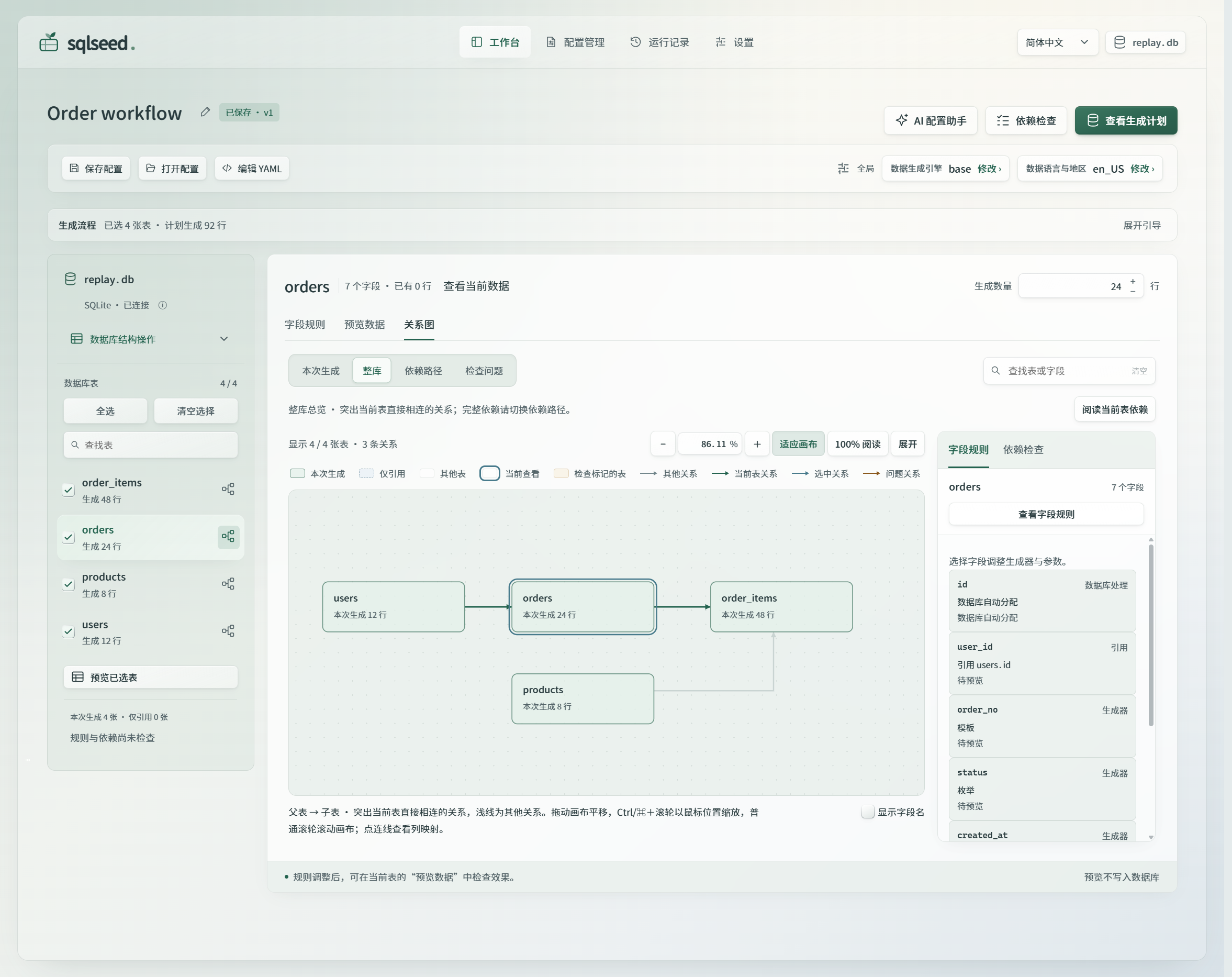
|
|
162
|
+
|
|
163
|
+
0.2.5 正式界面的实际截图,使用仓库中的
|
|
164
|
+
[虚构 SQLite 订单示例](https://github.com/sunbos/sqlseed/tree/main/examples/order_workflow)。
|
|
165
|
+
[查看原尺寸高清 PNG](https://raw.githubusercontent.com/sunbos/sqlseed/992ba0e733d5b41f73e37b0a9d02d573d6e2bb23/docs/assets/screenshots/web-workbench-zh-CN-light.png),
|
|
166
|
+
或[查看深色主题下的只读样例预览](https://raw.githubusercontent.com/sunbos/sqlseed/992ba0e733d5b41f73e37b0a9d02d573d6e2bb23/docs/assets/screenshots/web-workbench-zh-CN-dark.png)。
|
|
167
|
+
预览样例仅供检查,不会插入数据库。
|
|
168
|
+
|
|
169
|
+
自 0.2.5 起,可从顶栏切换简体中文与 English;切换界面语言保留正在编辑的内容,
|
|
170
|
+
不改变生成配置中的数据语言与地区。界面也提供浅色和深色主题。
|
|
171
|
+
|
|
172
|
+
未安装 AI 时,手动编辑、预览与生成均可使用。需要可选的配置助手时,在同一环境中安装:
|
|
173
|
+
|
|
174
|
+
```bash
|
|
175
|
+
python -m pip install 'sqlseed-web[ai]'
|
|
176
|
+
```
|
|
177
|
+
|
|
178
|
+
随后在设置中配置模型服务。AI 建议经审阅和应用后进入配置,生成时使用你已确认的规则。
|
|
179
|
+
连接设置、可选组件与部署要求见 [Web 使用指南](https://sunbos.github.io/sqlseed/zh-CN/web-workbench/)。
|
|
151
180
|
|
|
152
181
|
## 命令行
|
|
153
182
|
|
|
@@ -161,7 +190,7 @@ sqlseed fill demo.db -t users -n 100 --provider faker --no-ai
|
|
|
161
190
|
```
|
|
162
191
|
|
|
163
192
|
运行 `sqlseed --help` 或 `sqlseed <命令> --help` 查看选项。
|
|
164
|
-
|
|
193
|
+
配置模板、配置快照和重放的用法见 [CLI 参考](https://sunbos.github.io/sqlseed/zh-CN/guide/#cli-reference)。
|
|
165
194
|
只安装 Core 时提供 Python API,`sqlseed` 命令由 `sqlseed-cli` 包提供。
|
|
166
195
|
|
|
167
196
|
## PostgreSQL
|
|
@@ -187,7 +216,7 @@ print(result.count, result.errors)
|
|
|
187
216
|
```
|
|
188
217
|
|
|
189
218
|
SQLite 路径与 `url` 不能同时传入。支持的外键结构和各入口差异见
|
|
190
|
-
[支持范围](https://sunbos.github.io/sqlseed/maintainable-release/)。
|
|
219
|
+
[支持范围](https://sunbos.github.io/sqlseed/zh-CN/maintainable-release/)。
|
|
191
220
|
|
|
192
221
|
## 可选的 AI 辅助
|
|
193
222
|
|
|
@@ -204,10 +233,33 @@ SQLite 路径与 `url` 不能同时传入。支持的外键结构和各入口差
|
|
|
204
233
|
其他约束可能需要显式配置或模型建议,不能把它理解为任意 SQL CHECK 的求解器。
|
|
205
234
|
使用候选配置前,仍需审阅规则并验证实际生成的数据。
|
|
206
235
|
|
|
207
|
-
具体用法见 [AI 命令参考](https://sunbos.github.io/sqlseed/guide/#ai-suggest)和
|
|
208
|
-
[模型后端与校验说明](https://sunbos.github.io/sqlseed/
|
|
209
|
-
|
|
210
|
-
|
|
236
|
+
具体用法见 [AI 命令参考](https://sunbos.github.io/sqlseed/zh-CN/guide/#ai-suggest)和
|
|
237
|
+
[模型后端与校验说明](https://sunbos.github.io/sqlseed/zh-CN/gemma4-integration/)。
|
|
238
|
+
|
|
239
|
+
## MCP 工具
|
|
240
|
+
|
|
241
|
+
需要不调用模型的规则工具时,安装并启动 stdio 服务:
|
|
242
|
+
|
|
243
|
+
```bash
|
|
244
|
+
python -m pip install mcp-server-sqlseed
|
|
245
|
+
mcp-server-sqlseed
|
|
246
|
+
```
|
|
247
|
+
|
|
248
|
+
在 MCP 客户端中配置该环境的 `mcp-server-sqlseed` 可执行文件;客户端未继承该环境的 PATH 时,
|
|
249
|
+
使用可执行文件的绝对路径。服务提供 `sqlseed_generate_yaml` 供你准备和审阅规则,
|
|
250
|
+
以及向指定已有表写入数据的 `sqlseed_execute_fill`。填充后检查返回的 `count` 与 `errors`。
|
|
251
|
+
|
|
252
|
+
需要模型辅助工具时,使用 AI 包提供的另一个 stdio 服务:
|
|
253
|
+
|
|
254
|
+
```bash
|
|
255
|
+
python -m pip install 'sqlseed-ai[mcp]'
|
|
256
|
+
mcp-server-sqlseed-ai
|
|
257
|
+
```
|
|
258
|
+
|
|
259
|
+
按 [AI 配置指南](https://github.com/sunbos/sqlseed/blob/main/plugins/sqlseed-ai/README.zh-CN.md)
|
|
260
|
+
为该进程配置模型后端。它提供 AI YAML 建议、表分析、分析后直接填充,以及模型和后端可用性信息。
|
|
261
|
+
安装 AI 不会向规则型服务注入这些工具;需要两组工具时,在客户端分别配置两个进程。
|
|
262
|
+
客户端配置与工具详情见 [MCP 配置](https://sunbos.github.io/sqlseed/zh-CN/guide/#mcp-server)。
|
|
211
263
|
|
|
212
264
|
## 用于自己的数据库时
|
|
213
265
|
|
|
@@ -216,17 +268,17 @@ SQLite 路径与 `url` 不能同时传入。支持的外键结构和各入口差
|
|
|
216
268
|
- **保持复现条件一致。** 只有 seed 相同,并不能保证跨依赖版本、provider、配置或初始数据得到完全相同的结果。
|
|
217
269
|
|
|
218
270
|
复杂 CHECK 和复合外键的支持范围因数据库而异,具体边界与写入行为见
|
|
219
|
-
[支持与维护说明](https://sunbos.github.io/sqlseed/maintainable-release/)。
|
|
271
|
+
[支持与维护说明](https://sunbos.github.io/sqlseed/zh-CN/maintainable-release/)。
|
|
220
272
|
|
|
221
273
|
## 文档导航
|
|
222
274
|
|
|
223
275
|
| 下一步 | 文档 |
|
|
224
276
|
| --- | --- |
|
|
225
|
-
| 配置生成器、表达式与多表数据 | [用户指南](https://sunbos.github.io/sqlseed/guide/) |
|
|
226
|
-
| 使用 `fill`、`FillOptions`、`preview`、`connect`、`fill_from_config`、`load_config` | [Python API 参考](https://sunbos.github.io/sqlseed/api/) |
|
|
277
|
+
| 配置生成器、表达式与多表数据 | [用户指南](https://sunbos.github.io/sqlseed/zh-CN/guide/) |
|
|
278
|
+
| 使用 `fill`、`FillOptions`、`preview`、`connect`、`fill_from_config`、`load_config` | [Python API 参考](https://sunbos.github.io/sqlseed/zh-CN/api/) |
|
|
227
279
|
| 跑通完整的多表示例 | [订单工作流](https://github.com/sunbos/sqlseed/tree/main/examples/order_workflow) |
|
|
228
|
-
| 了解包边界和扩展 hooks | [架构文档](https://sunbos.github.io/sqlseed/
|
|
229
|
-
| 升级已有安装 | [迁移指南](https://sunbos.github.io/sqlseed/
|
|
280
|
+
| 了解包边界和扩展 hooks | [架构文档](https://sunbos.github.io/sqlseed/zh-CN/architecture/) |
|
|
281
|
+
| 升级已有安装 | [迁移指南](https://sunbos.github.io/sqlseed/zh-CN/migration/) |
|
|
230
282
|
| 查看已发布版本与变更 | [Releases](https://github.com/sunbos/sqlseed/releases) |
|
|
231
283
|
|
|
232
284
|
## 参与开发
|
|
@@ -19,6 +19,7 @@
|
|
|
19
19
|
- logger 首次使用后会缓存绑定配置;宿主应在 import 或首次使用前配置日志,不能假设后续 `configure_logging()` 会更新已缓存 logger。
|
|
20
20
|
- [metrics.py](metrics.py):`MetricsCollector` 聚合 count/total/min/max/avg;保留单次遍历与按名称过滤。
|
|
21
21
|
- [progress.py](progress.py):通过 `create_progress()` 选 backend,disabled → Null,Jupyter 且有 tqdm → notebook backend,其他环境且有 Rich → Rich;缺少对应可选库均降级为 Null,保留编码不支持时的 ASCII fallback。
|
|
22
|
+
- 输出流及其编码可能在捕获、重定向期间变化;已经创建的进度显示也需按实际输出选择安全字符,不能用首次编码检测结果覆盖后续状态或掩盖原始业务异常。
|
|
22
23
|
- tqdm 是 notebook 可选依赖,Rich 由 CLI 依赖提供;不能让缺失进度显示库破坏 core 的 import 或生成路径。
|
|
23
24
|
- `get_cache_dir()` 优先 `SQLSEED_CACHE_DIR`,否则遵循 macOS/Linux/Windows 路径约定;只返回路径,调用方负责创建目录。
|
|
24
25
|
- [daemon_task.py](daemon_task.py) 用 Future 管理单个 daemon worker 的结果与异常;超时只停止等待,不终止工作。需要在 worker 内执行的完成回调通过构造参数 `on_done` 在线程启动前注册,避免快速任务完成后回调落到调用线程。进程控制异常也必须传回等待方,不能变成 `None` 成功结果。
|
|
@@ -11,6 +11,7 @@ import builtins
|
|
|
11
11
|
import importlib
|
|
12
12
|
import sys
|
|
13
13
|
from abc import ABC, abstractmethod
|
|
14
|
+
from copy import copy
|
|
14
15
|
from functools import lru_cache
|
|
15
16
|
from importlib.util import find_spec
|
|
16
17
|
from typing import Any, Literal
|
|
@@ -35,6 +36,7 @@ except ImportError:
|
|
|
35
36
|
# ``None`` (when absent), allowing runtime ``is None`` guards and
|
|
36
37
|
# instantiation in RichProgressBackend.__init__.
|
|
37
38
|
try:
|
|
39
|
+
_GET_CONSOLE = importlib.import_module("rich").get_console
|
|
38
40
|
_rich_progress_module = importlib.import_module("rich.progress")
|
|
39
41
|
_PROGRESS_CLASS = _rich_progress_module.Progress
|
|
40
42
|
_BAR_COLUMN_CLASS = _rich_progress_module.BarColumn
|
|
@@ -43,6 +45,7 @@ try:
|
|
|
43
45
|
_TIME_REMAINING_COLUMN_CLASS = _rich_progress_module.TimeRemainingColumn
|
|
44
46
|
_TRANSFER_SPEED_COLUMN_CLASS = _rich_progress_module.TransferSpeedColumn
|
|
45
47
|
except ImportError:
|
|
48
|
+
_GET_CONSOLE = None
|
|
46
49
|
_PROGRESS_CLASS = None
|
|
47
50
|
_BAR_COLUMN_CLASS = None
|
|
48
51
|
_SPINNER_COLUMN_CLASS = None
|
|
@@ -98,18 +101,18 @@ def _is_jupyter_shell(shell: Any) -> bool:
|
|
|
98
101
|
return "IPKernelApp" in config
|
|
99
102
|
|
|
100
103
|
|
|
101
|
-
|
|
102
|
-
|
|
103
|
-
"""Check whether stdout can encode characters used by Rich progress bars.
|
|
104
|
+
def _can_render_unicode(*, encoding: str | None = None) -> bool:
|
|
105
|
+
"""Check whether the current output can encode Rich progress characters.
|
|
104
106
|
|
|
105
107
|
Rich's default ``SpinnerColumn`` uses Braille patterns (e.g. ``⠋`` U+280B)
|
|
106
108
|
and ``BarColumn`` uses block elements (``█`` U+2588, ``░`` U+2591). On
|
|
107
109
|
Windows consoles with GBK / GB2312 / Big5 encodings these characters cause
|
|
108
110
|
``UnicodeEncodeError``. This helper probes the actual encoding so that
|
|
109
|
-
|
|
111
|
+
rendering can fall back to an ASCII-safe layout. Do not cache the result:
|
|
112
|
+
stdout may be redirected or its encoding reconfigured during a run.
|
|
110
113
|
"""
|
|
111
114
|
try:
|
|
112
|
-
encoding = getattr(sys.stdout, "encoding", None) or "utf-8"
|
|
115
|
+
encoding = encoding or getattr(sys.stdout, "encoding", None) or "utf-8"
|
|
113
116
|
"\u280b\u2588\u2591".encode(encoding)
|
|
114
117
|
return True
|
|
115
118
|
except (UnicodeEncodeError, LookupError, TypeError):
|
|
@@ -184,6 +187,62 @@ class NullProgressBackend(ProgressBackend):
|
|
|
184
187
|
# ---------------------------------------------------------------------------
|
|
185
188
|
|
|
186
189
|
|
|
190
|
+
class _EncodingAwareColumn:
|
|
191
|
+
"""Select a real Rich column using the output encoding at render time."""
|
|
192
|
+
|
|
193
|
+
def __init__(self, unicode_column: Any, ascii_column: Any, *, console: Any) -> None:
|
|
194
|
+
"""Retain both layouts so later stream redirection can change the chosen column."""
|
|
195
|
+
self._unicode_column = unicode_column
|
|
196
|
+
self._ascii_column = ascii_column
|
|
197
|
+
self._console = console
|
|
198
|
+
|
|
199
|
+
def _current_column(self) -> Any:
|
|
200
|
+
"""Choose a column using the console's current encoding rather than its initial stream."""
|
|
201
|
+
if _can_render_unicode(encoding=self._console.encoding):
|
|
202
|
+
return self._unicode_column
|
|
203
|
+
return self._ascii_column
|
|
204
|
+
|
|
205
|
+
def get_table_column(self) -> Any:
|
|
206
|
+
"""Use the selected column's layout, including an empty fallback bar."""
|
|
207
|
+
column = self._current_column().get_table_column().copy()
|
|
208
|
+
if not _can_render_unicode(encoding=self._console.encoding):
|
|
209
|
+
# Rich's default truncation inserts a Unicode ellipsis, even
|
|
210
|
+
# when the actual text and spinner are entirely ASCII.
|
|
211
|
+
column.overflow = "crop"
|
|
212
|
+
return column
|
|
213
|
+
|
|
214
|
+
def __call__(self, task: Any) -> Any:
|
|
215
|
+
"""Render safely even when an existing progress changes output streams."""
|
|
216
|
+
return self._current_column()(task)
|
|
217
|
+
|
|
218
|
+
|
|
219
|
+
class _EncodingAwareDescriptionColumn:
|
|
220
|
+
"""Escape unencodable display text without changing the original task."""
|
|
221
|
+
|
|
222
|
+
def __init__(self, column: Any, *, console: Any) -> None:
|
|
223
|
+
"""Wrap the display column while leaving task descriptions available in their original form."""
|
|
224
|
+
self._column = column
|
|
225
|
+
self._console = console
|
|
226
|
+
|
|
227
|
+
def get_table_column(self) -> Any:
|
|
228
|
+
"""Keep the description column's normal Rich layout."""
|
|
229
|
+
return self._column.get_table_column()
|
|
230
|
+
|
|
231
|
+
def __call__(self, task: Any) -> Any:
|
|
232
|
+
"""Use the current output encoding, including during exception cleanup."""
|
|
233
|
+
description: str = task.description
|
|
234
|
+
encoding = self._console.encoding
|
|
235
|
+
try:
|
|
236
|
+
safe_description = description.encode(encoding, errors="backslashreplace").decode(encoding)
|
|
237
|
+
except (LookupError, TypeError):
|
|
238
|
+
safe_description = description.encode("ascii", errors="backslashreplace").decode("ascii")
|
|
239
|
+
if safe_description == description:
|
|
240
|
+
return self._column(task)
|
|
241
|
+
display_task = copy(task)
|
|
242
|
+
display_task.description = safe_description
|
|
243
|
+
return self._column(display_task)
|
|
244
|
+
|
|
245
|
+
|
|
187
246
|
class RichProgressBackend(ProgressBackend):
|
|
188
247
|
"""Rich Progress backend for terminal environments.
|
|
189
248
|
|
|
@@ -193,6 +252,8 @@ class RichProgressBackend(ProgressBackend):
|
|
|
193
252
|
(Braille spinners, block-element bars) that cannot be encoded by
|
|
194
253
|
limited console encodings such as GBK or Big5. The spinner falls back
|
|
195
254
|
to the ``"line"`` style (``|/-\\``) and the graphical bar is omitted.
|
|
255
|
+
Otherwise, columns follow the actual Rich console encoding on every render,
|
|
256
|
+
including background refreshes and changes to an already-created backend.
|
|
196
257
|
|
|
197
258
|
Raises:
|
|
198
259
|
RuntimeError: If ``rich`` is not installed. Callers should use
|
|
@@ -224,11 +285,17 @@ class RichProgressBackend(ProgressBackend):
|
|
|
224
285
|
raise RuntimeError(_not_installed)
|
|
225
286
|
if _TEXT_COLUMN_CLASS is None or _TIME_REMAINING_COLUMN_CLASS is None or _TRANSFER_SPEED_COLUMN_CLASS is None:
|
|
226
287
|
raise RuntimeError(_not_installed)
|
|
288
|
+
if _GET_CONSOLE is None:
|
|
289
|
+
raise RuntimeError(_not_installed)
|
|
227
290
|
|
|
291
|
+
console = _GET_CONSOLE()
|
|
292
|
+
description_column = _EncodingAwareDescriptionColumn(
|
|
293
|
+
_TEXT_COLUMN_CLASS("[progress.description]{task.description}"), console=console
|
|
294
|
+
)
|
|
228
295
|
if ascii_only:
|
|
229
296
|
columns: list[Any] = [
|
|
230
297
|
_SPINNER_COLUMN_CLASS("line"),
|
|
231
|
-
|
|
298
|
+
description_column,
|
|
232
299
|
_TEXT_COLUMN_CLASS("[progress.percentage]{task.percentage:>3.0f}%"),
|
|
233
300
|
_TEXT_COLUMN_CLASS("{task.completed}/{task.total}"),
|
|
234
301
|
_TRANSFER_SPEED_COLUMN_CLASS(),
|
|
@@ -236,16 +303,23 @@ class RichProgressBackend(ProgressBackend):
|
|
|
236
303
|
]
|
|
237
304
|
else:
|
|
238
305
|
columns = [
|
|
239
|
-
_SPINNER_COLUMN_CLASS(),
|
|
240
|
-
|
|
241
|
-
_BAR_COLUMN_CLASS(),
|
|
306
|
+
_EncodingAwareColumn(_SPINNER_COLUMN_CLASS(), _SPINNER_COLUMN_CLASS("line"), console=console),
|
|
307
|
+
description_column,
|
|
308
|
+
_EncodingAwareColumn(_BAR_COLUMN_CLASS(), _TEXT_COLUMN_CLASS(""), console=console),
|
|
242
309
|
_TEXT_COLUMN_CLASS("[progress.percentage]{task.percentage:>3.0f}%"),
|
|
243
310
|
_TEXT_COLUMN_CLASS("{task.completed}/{task.total}"),
|
|
244
311
|
_TRANSFER_SPEED_COLUMN_CLASS(),
|
|
245
312
|
_TIME_REMAINING_COLUMN_CLASS(),
|
|
246
313
|
]
|
|
314
|
+
safe_columns = [
|
|
315
|
+
column
|
|
316
|
+
if isinstance(column, _EncodingAwareColumn)
|
|
317
|
+
else _EncodingAwareColumn(column, column, console=console)
|
|
318
|
+
for column in columns
|
|
319
|
+
]
|
|
247
320
|
self._progress = _PROGRESS_CLASS(
|
|
248
|
-
*
|
|
321
|
+
*safe_columns,
|
|
322
|
+
console=console,
|
|
249
323
|
transient=False,
|
|
250
324
|
refresh_per_second=1,
|
|
251
325
|
)
|
|
@@ -379,7 +453,7 @@ def create_progress(*, disable: bool = False) -> ProgressBackend:
|
|
|
379
453
|
Jupyter+tqdm → TqdmNotebookBackend (native notebook widget)
|
|
380
454
|
Jupyter-tqdm → NullProgressBackend (graceful degradation)
|
|
381
455
|
Terminal+UTF8 → RichProgressBackend (rich spinner + bar)
|
|
382
|
-
Terminal+GBK → RichProgressBackend(
|
|
456
|
+
Terminal+GBK → RichProgressBackend (ASCII spinner, no bar)
|
|
383
457
|
|
|
384
458
|
The Jupyter-without-tqdm path logs a one-time warning instead of raising
|
|
385
459
|
ImportError, because progress display is a UX nicety, not a correctness
|
|
@@ -389,6 +463,8 @@ def create_progress(*, disable: bool = False) -> ProgressBackend:
|
|
|
389
463
|
Rich's default spinner (Braille patterns) and bar (block elements), the
|
|
390
464
|
factory automatically switches to an ASCII-safe layout so that Windows
|
|
391
465
|
consoles with GBK / Big5 encodings do not crash with ``UnicodeEncodeError``.
|
|
466
|
+
The layout is checked again at render time so that redirected output does
|
|
467
|
+
not inherit the encoding decision of an earlier console.
|
|
392
468
|
"""
|
|
393
469
|
if disable:
|
|
394
470
|
return NullProgressBackend()
|
|
@@ -401,7 +477,7 @@ def create_progress(*, disable: bool = False) -> ProgressBackend:
|
|
|
401
477
|
)
|
|
402
478
|
return NullProgressBackend()
|
|
403
479
|
|
|
404
|
-
if
|
|
480
|
+
if not _can_render_unicode():
|
|
405
481
|
logger.debug("Console encoding does not support Unicode progress characters — using ASCII-safe layout")
|
|
406
482
|
|
|
407
483
|
if _PROGRESS_CLASS is None:
|
|
@@ -412,4 +488,4 @@ def create_progress(*, disable: bool = False) -> ProgressBackend:
|
|
|
412
488
|
logger.debug("rich not installed — progress bars disabled. Install with: pip install sqlseed-cli")
|
|
413
489
|
return NullProgressBackend()
|
|
414
490
|
|
|
415
|
-
return RichProgressBackend(
|
|
491
|
+
return RichProgressBackend()
|
|
File without changes
|
|
File without changes
|
|
File without changes
|
|
File without changes
|
|
File without changes
|
|
File without changes
|
|
File without changes
|
|
File without changes
|
|
File without changes
|
|
File without changes
|
|
File without changes
|
|
File without changes
|
|
File without changes
|
|
File without changes
|
|
File without changes
|
|
File without changes
|
|
File without changes
|
|
File without changes
|
|
File without changes
|
|
File without changes
|
|
File without changes
|
|
File without changes
|
|
File without changes
|
|
File without changes
|
|
File without changes
|
|
File without changes
|
|
File without changes
|
|
File without changes
|
|
File without changes
|
|
File without changes
|
|
File without changes
|
|
File without changes
|
|
File without changes
|
|
File without changes
|
|
File without changes
|
|
File without changes
|
|
File without changes
|
|
File without changes
|
|
File without changes
|
|
File without changes
|
|
File without changes
|
|
File without changes
|
|
File without changes
|
|
File without changes
|
|
File without changes
|
|
File without changes
|
|
File without changes
|
|
File without changes
|
|
File without changes
|
|
File without changes
|
|
File without changes
|
|
File without changes
|
|
File without changes
|
|
File without changes
|
|
File without changes
|
|
File without changes
|
|
File without changes
|
|
File without changes
|
|
File without changes
|
|
File without changes
|
|
File without changes
|
|
File without changes
|
|
File without changes
|
|
File without changes
|
|
File without changes
|
|
File without changes
|
|
File without changes
|
|
File without changes
|
|
File without changes
|
|
File without changes
|
|
File without changes
|
|
File without changes
|
|
File without changes
|
|
File without changes
|
|
File without changes
|
|
File without changes
|
|
File without changes
|
|
File without changes
|