sqlmap-ai 2.0.0__tar.gz
This diff represents the content of publicly available package versions that have been released to one of the supported registries. The information contained in this diff is provided for informational purposes only and reflects changes between package versions as they appear in their respective public registries.
- sqlmap_ai-2.0.0/LICENSE +21 -0
- sqlmap_ai-2.0.0/PKG-INFO +415 -0
- sqlmap_ai-2.0.0/README.md +348 -0
- sqlmap_ai-2.0.0/pyproject.toml +153 -0
- sqlmap_ai-2.0.0/setup.cfg +4 -0
- sqlmap_ai-2.0.0/setup.py +292 -0
- sqlmap_ai-2.0.0/sqlmap_ai/__init__.py +30 -0
- sqlmap_ai-2.0.0/sqlmap_ai/adaptive_testing.py +779 -0
- sqlmap_ai-2.0.0/sqlmap_ai/advanced_reporting.py +746 -0
- sqlmap_ai-2.0.0/sqlmap_ai/ai_analyzer.py +216 -0
- sqlmap_ai-2.0.0/sqlmap_ai/cli.py +215 -0
- sqlmap_ai-2.0.0/sqlmap_ai/config_manager.py +424 -0
- sqlmap_ai-2.0.0/sqlmap_ai/enhanced_cli.py +770 -0
- sqlmap_ai-2.0.0/sqlmap_ai/evasion_engine.py +483 -0
- sqlmap_ai-2.0.0/sqlmap_ai/html_reporter.py +822 -0
- sqlmap_ai-2.0.0/sqlmap_ai/main.py +507 -0
- sqlmap_ai-2.0.0/sqlmap_ai/parser.py +233 -0
- sqlmap_ai-2.0.0/sqlmap_ai/runner.py +492 -0
- sqlmap_ai-2.0.0/sqlmap_ai/security_manager.py +531 -0
- sqlmap_ai-2.0.0/sqlmap_ai/templates/report_template.html +131 -0
- sqlmap_ai-2.0.0/sqlmap_ai/timeout_handler.py +41 -0
- sqlmap_ai-2.0.0/sqlmap_ai/ui.py +115 -0
- sqlmap_ai-2.0.0/sqlmap_ai.egg-info/PKG-INFO +415 -0
- sqlmap_ai-2.0.0/sqlmap_ai.egg-info/SOURCES.txt +31 -0
- sqlmap_ai-2.0.0/sqlmap_ai.egg-info/dependency_links.txt +1 -0
- sqlmap_ai-2.0.0/sqlmap_ai.egg-info/entry_points.txt +3 -0
- sqlmap_ai-2.0.0/sqlmap_ai.egg-info/requires.txt +35 -0
- sqlmap_ai-2.0.0/sqlmap_ai.egg-info/top_level.txt +2 -0
- sqlmap_ai-2.0.0/tests/test_config_manager.py +125 -0
- sqlmap_ai-2.0.0/tests/test_security_manager.py +150 -0
- sqlmap_ai-2.0.0/utils/__init__.py +6 -0
- sqlmap_ai-2.0.0/utils/ai_providers.py +509 -0
- sqlmap_ai-2.0.0/utils/groq_utils.py +75 -0
sqlmap_ai-2.0.0/LICENSE
ADDED
|
@@ -0,0 +1,21 @@
|
|
|
1
|
+
MIT License
|
|
2
|
+
|
|
3
|
+
Copyright (c) 2024
|
|
4
|
+
|
|
5
|
+
Permission is hereby granted, free of charge, to any person obtaining a copy
|
|
6
|
+
of this software and associated documentation files (the "Software"), to deal
|
|
7
|
+
in the Software without restriction, including without limitation the rights
|
|
8
|
+
to use, copy, modify, merge, publish, distribute, sublicense, and/or sell
|
|
9
|
+
copies of the Software, and to permit persons to whom the Software is
|
|
10
|
+
furnished to do so, subject to the following conditions:
|
|
11
|
+
|
|
12
|
+
The above copyright notice and this permission notice shall be included in all
|
|
13
|
+
copies or substantial portions of the Software.
|
|
14
|
+
|
|
15
|
+
THE SOFTWARE IS PROVIDED "AS IS", WITHOUT WARRANTY OF ANY KIND, EXPRESS OR
|
|
16
|
+
IMPLIED, INCLUDING BUT NOT LIMITED TO THE WARRANTIES OF MERCHANTABILITY,
|
|
17
|
+
FITNESS FOR A PARTICULAR PURPOSE AND NONINFRINGEMENT. IN NO EVENT SHALL THE
|
|
18
|
+
AUTHORS OR COPYRIGHT HOLDERS BE LIABLE FOR ANY CLAIM, DAMAGES OR OTHER
|
|
19
|
+
LIABILITY, WHETHER IN AN ACTION OF CONTRACT, TORT OR OTHERWISE, ARISING FROM,
|
|
20
|
+
OUT OF OR IN CONNECTION WITH THE SOFTWARE OR THE USE OR OTHER DEALINGS IN THE
|
|
21
|
+
SOFTWARE.
|
sqlmap_ai-2.0.0/PKG-INFO
ADDED
|
@@ -0,0 +1,415 @@
|
|
|
1
|
+
Metadata-Version: 2.4
|
|
2
|
+
Name: sqlmap-ai
|
|
3
|
+
Version: 2.0.0
|
|
4
|
+
Summary: AI-powered SQL injection testing tool with multiple AI providers
|
|
5
|
+
Home-page: https://github.com/atiilla/sqlmap-ai
|
|
6
|
+
Author: Atilla
|
|
7
|
+
Author-email: Atilla <attilla@tuta.io>
|
|
8
|
+
Maintainer-email: Atilla <attilla@tuta.io>
|
|
9
|
+
License-Expression: MIT
|
|
10
|
+
Project-URL: Homepage, https://github.com/atiilla/sqlmap-ai
|
|
11
|
+
Project-URL: Documentation, https://github.com/atiilla/sqlmap-ai#readme
|
|
12
|
+
Project-URL: Repository, https://github.com/atiilla/sqlmap-ai.git
|
|
13
|
+
Project-URL: Issues, https://github.com/atiilla/sqlmap-ai/issues
|
|
14
|
+
Keywords: sqlmap,sql-injection,security,ai,penetration-testing,cybersecurity
|
|
15
|
+
Classifier: Development Status :: 4 - Beta
|
|
16
|
+
Classifier: Intended Audience :: Information Technology
|
|
17
|
+
Classifier: Intended Audience :: System Administrators
|
|
18
|
+
Classifier: Operating System :: OS Independent
|
|
19
|
+
Classifier: Programming Language :: Python :: 3
|
|
20
|
+
Classifier: Programming Language :: Python :: 3.8
|
|
21
|
+
Classifier: Programming Language :: Python :: 3.9
|
|
22
|
+
Classifier: Programming Language :: Python :: 3.10
|
|
23
|
+
Classifier: Programming Language :: Python :: 3.11
|
|
24
|
+
Classifier: Programming Language :: Python :: 3.12
|
|
25
|
+
Classifier: Topic :: Security
|
|
26
|
+
Classifier: Topic :: System :: Systems Administration
|
|
27
|
+
Classifier: Topic :: Internet :: WWW/HTTP :: HTTP Servers
|
|
28
|
+
Classifier: Topic :: Software Development :: Testing
|
|
29
|
+
Requires-Python: >=3.8
|
|
30
|
+
Description-Content-Type: text/markdown
|
|
31
|
+
License-File: LICENSE
|
|
32
|
+
Requires-Dist: python-dotenv>=1.0.0
|
|
33
|
+
Requires-Dist: groq>=0.4.0
|
|
34
|
+
Requires-Dist: requests>=2.31.0
|
|
35
|
+
Requires-Dist: openai>=1.3.0
|
|
36
|
+
Requires-Dist: anthropic>=0.8.0
|
|
37
|
+
Requires-Dist: pyyaml>=6.0.1
|
|
38
|
+
Requires-Dist: rich>=13.0.0
|
|
39
|
+
Requires-Dist: jinja2>=3.1.2
|
|
40
|
+
Requires-Dist: cryptography>=3.4.0
|
|
41
|
+
Provides-Extra: dev
|
|
42
|
+
Requires-Dist: pytest>=7.0.0; extra == "dev"
|
|
43
|
+
Requires-Dist: pytest-asyncio>=0.21.0; extra == "dev"
|
|
44
|
+
Requires-Dist: black>=23.0.0; extra == "dev"
|
|
45
|
+
Requires-Dist: flake8>=6.0.0; extra == "dev"
|
|
46
|
+
Requires-Dist: mypy>=1.0.0; extra == "dev"
|
|
47
|
+
Provides-Extra: local-llm
|
|
48
|
+
Requires-Dist: transformers>=4.35.0; extra == "local-llm"
|
|
49
|
+
Requires-Dist: torch>=2.1.0; extra == "local-llm"
|
|
50
|
+
Provides-Extra: reporting
|
|
51
|
+
Requires-Dist: plotly>=5.0.0; extra == "reporting"
|
|
52
|
+
Requires-Dist: pandas>=2.0.0; extra == "reporting"
|
|
53
|
+
Provides-Extra: all
|
|
54
|
+
Requires-Dist: pytest>=7.0.0; extra == "all"
|
|
55
|
+
Requires-Dist: pytest-asyncio>=0.21.0; extra == "all"
|
|
56
|
+
Requires-Dist: black>=23.0.0; extra == "all"
|
|
57
|
+
Requires-Dist: flake8>=6.0.0; extra == "all"
|
|
58
|
+
Requires-Dist: mypy>=1.0.0; extra == "all"
|
|
59
|
+
Requires-Dist: transformers>=4.35.0; extra == "all"
|
|
60
|
+
Requires-Dist: torch>=2.1.0; extra == "all"
|
|
61
|
+
Requires-Dist: plotly>=5.0.0; extra == "all"
|
|
62
|
+
Requires-Dist: pandas>=2.0.0; extra == "all"
|
|
63
|
+
Dynamic: author
|
|
64
|
+
Dynamic: home-page
|
|
65
|
+
Dynamic: license-file
|
|
66
|
+
Dynamic: requires-python
|
|
67
|
+
|
|
68
|
+
# SQLMap AI Assistant
|
|
69
|
+
|
|
70
|
+
An AI-powered wrapper around SQLMap that makes SQL injection testing more accessible and automated.
|
|
71
|
+
|
|
72
|
+
## Features
|
|
73
|
+
|
|
74
|
+
- AI-assisted SQL injection testing
|
|
75
|
+
- Automated result analysis and next step suggestions
|
|
76
|
+
- User-friendly output and reporting
|
|
77
|
+
- **NEW: Adaptive step-by-step testing with DBMS-specific optimizations and WAF bypass**
|
|
78
|
+
- **NEW: Ollama support for local AI analysis**
|
|
79
|
+
|
|
80
|
+
## Quick Start
|
|
81
|
+
|
|
82
|
+
### Step 1: Install SQLMap AI
|
|
83
|
+
|
|
84
|
+
```bash
|
|
85
|
+
# Clone the repository
|
|
86
|
+
git clone https://github.com/yourusername/sqlmap-ai.git
|
|
87
|
+
cd sqlmap-ai
|
|
88
|
+
|
|
89
|
+
# Install the package
|
|
90
|
+
pip install -e .
|
|
91
|
+
|
|
92
|
+
# Run installation check (sets up SQLMap and creates config files)
|
|
93
|
+
sqlmap-ai --install-check
|
|
94
|
+
|
|
95
|
+
pip install sqlmap-ai
|
|
96
|
+
```
|
|
97
|
+
|
|
98
|
+
### Step 2: Configure AI Providers
|
|
99
|
+
|
|
100
|
+
Choose one or more AI providers to use:
|
|
101
|
+
|
|
102
|
+
#### Option A: Groq (Recommended - Fastest)
|
|
103
|
+
1. Get a free API key from [https://console.groq.com](https://console.groq.com)
|
|
104
|
+
2. Add to your `.env` file:
|
|
105
|
+
```bash
|
|
106
|
+
GROQ_API_KEY=your_groq_api_key_here
|
|
107
|
+
```
|
|
108
|
+
|
|
109
|
+
#### Option B: OpenAI
|
|
110
|
+
1. Get an API key from [https://platform.openai.com](https://platform.openai.com)
|
|
111
|
+
2. Add to your `.env` file:
|
|
112
|
+
```bash
|
|
113
|
+
OPENAI_API_KEY=your_openai_api_key_here
|
|
114
|
+
```
|
|
115
|
+
|
|
116
|
+
#### Option C: Anthropic (Claude)
|
|
117
|
+
1. Get an API key from [https://console.anthropic.com](https://console.anthropic.com)
|
|
118
|
+
2. Add to your `.env` file:
|
|
119
|
+
```bash
|
|
120
|
+
ANTHROPIC_API_KEY=your_anthropic_api_key_here
|
|
121
|
+
```
|
|
122
|
+
|
|
123
|
+
#### Option D: Ollama (Local AI - Privacy Focused)
|
|
124
|
+
1. Install Ollama: [https://ollama.ai/download](https://ollama.ai/download)
|
|
125
|
+
2. Start Ollama service:
|
|
126
|
+
```bash
|
|
127
|
+
ollama serve
|
|
128
|
+
```
|
|
129
|
+
3. Download a model:
|
|
130
|
+
```bash
|
|
131
|
+
ollama pull llama3.2
|
|
132
|
+
```
|
|
133
|
+
4. Enable in your `.env` file:
|
|
134
|
+
```bash
|
|
135
|
+
ENABLE_OLLAMA=true
|
|
136
|
+
OLLAMA_MODEL=llama3.2
|
|
137
|
+
```
|
|
138
|
+
|
|
139
|
+
### Step 3: Run Configuration Wizard
|
|
140
|
+
|
|
141
|
+
```bash
|
|
142
|
+
# Interactive setup
|
|
143
|
+
sqlmap-ai --config-wizard
|
|
144
|
+
```
|
|
145
|
+
|
|
146
|
+
This will:
|
|
147
|
+
- Check your AI provider setup
|
|
148
|
+
- Let you select Ollama models (if using Ollama)
|
|
149
|
+
- Configure security settings
|
|
150
|
+
- Set up SQLMap options
|
|
151
|
+
|
|
152
|
+
### Step 4: Test Your Setup
|
|
153
|
+
|
|
154
|
+
```bash
|
|
155
|
+
# Check if everything is working
|
|
156
|
+
sqlmap-ai --check-providers
|
|
157
|
+
|
|
158
|
+
# List available Ollama models (if using Ollama)
|
|
159
|
+
sqlmap-ai --list-ollama-models
|
|
160
|
+
```
|
|
161
|
+
|
|
162
|
+
## Usage Examples
|
|
163
|
+
|
|
164
|
+
### Basic SQL Injection Test
|
|
165
|
+
|
|
166
|
+
```bash
|
|
167
|
+
# Test a vulnerable website
|
|
168
|
+
sqlmap-ai -u "http://example.com/page.php?id=1"
|
|
169
|
+
|
|
170
|
+
# Use specific AI provider
|
|
171
|
+
sqlmap-ai -u "http://example.com/page.php?id=1" --ai-provider groq
|
|
172
|
+
```
|
|
173
|
+
|
|
174
|
+
### Advanced Testing
|
|
175
|
+
|
|
176
|
+
```bash
|
|
177
|
+
# Adaptive testing (recommended)
|
|
178
|
+
sqlmap-ai --adaptive
|
|
179
|
+
|
|
180
|
+
# Simple mode (basic SQLMap without AI)
|
|
181
|
+
sqlmap-ai --simple -u "http://example.com/page.php?id=1"
|
|
182
|
+
```
|
|
183
|
+
|
|
184
|
+
### AI Provider Selection
|
|
185
|
+
|
|
186
|
+
```bash
|
|
187
|
+
# Use Groq (fastest)
|
|
188
|
+
sqlmap-ai -u "http://example.com/page.php?id=1" --ai-provider groq
|
|
189
|
+
|
|
190
|
+
# Use Ollama (local, private)
|
|
191
|
+
sqlmap-ai -u "http://example.com/page.php?id=1" --ai-provider ollama
|
|
192
|
+
|
|
193
|
+
# Use OpenAI
|
|
194
|
+
sqlmap-ai -u "http://example.com/page.php?id=1" --ai-provider openai
|
|
195
|
+
|
|
196
|
+
# Auto-select best available
|
|
197
|
+
sqlmap-ai -u "http://example.com/page.php?id=1" --ai-provider auto
|
|
198
|
+
```
|
|
199
|
+
|
|
200
|
+
## AI Providers Comparison
|
|
201
|
+
|
|
202
|
+
| Provider | Setup | Speed | Privacy | Cost |
|
|
203
|
+
|----------|-------|-------|---------|------|
|
|
204
|
+
| **Groq** | API Key | ⚡ Fastest | Cloud | Free tier available |
|
|
205
|
+
| **OpenAI** | API Key | ⚡ Fast | Cloud | Pay per use |
|
|
206
|
+
| **Anthropic** | API Key | ⚡ Fast | Cloud | Pay per use |
|
|
207
|
+
| **Ollama** | Local install | Fast | 🔒 Local | Free |
|
|
208
|
+
|
|
209
|
+
## Configuration Files
|
|
210
|
+
|
|
211
|
+
### .env File
|
|
212
|
+
Created automatically by `sqlmap-ai --install-check`:
|
|
213
|
+
|
|
214
|
+
```bash
|
|
215
|
+
# AI Provider API Keys
|
|
216
|
+
GROQ_API_KEY=your_groq_api_key_here
|
|
217
|
+
OPENAI_API_KEY=your_openai_api_key_here
|
|
218
|
+
ANTHROPIC_API_KEY=your_anthropic_api_key_here
|
|
219
|
+
|
|
220
|
+
# Ollama Settings (if using local AI)
|
|
221
|
+
ENABLE_OLLAMA=false
|
|
222
|
+
OLLAMA_BASE_URL=http://localhost:11434
|
|
223
|
+
OLLAMA_MODEL=llama3.2
|
|
224
|
+
|
|
225
|
+
# Security Settings
|
|
226
|
+
MAX_REQUESTS_PER_MINUTE=60
|
|
227
|
+
SAFE_MODE=true
|
|
228
|
+
AUDIT_LOGGING=true
|
|
229
|
+
```
|
|
230
|
+
|
|
231
|
+
### config.yaml
|
|
232
|
+
Created automatically by `sqlmap-ai --config-wizard`:
|
|
233
|
+
|
|
234
|
+
```yaml
|
|
235
|
+
version: "2.0"
|
|
236
|
+
security:
|
|
237
|
+
safe_mode: true
|
|
238
|
+
max_requests_per_minute: 60
|
|
239
|
+
audit_logging: true
|
|
240
|
+
|
|
241
|
+
sqlmap:
|
|
242
|
+
default_timeout: 120
|
|
243
|
+
default_risk: 1
|
|
244
|
+
default_level: 1
|
|
245
|
+
default_threads: 5
|
|
246
|
+
|
|
247
|
+
ui:
|
|
248
|
+
show_banner: true
|
|
249
|
+
interactive_mode: false
|
|
250
|
+
```
|
|
251
|
+
|
|
252
|
+
## Troubleshooting
|
|
253
|
+
|
|
254
|
+
### Common Issues
|
|
255
|
+
|
|
256
|
+
**1. "No AI providers available"**
|
|
257
|
+
- Check your `.env` file has correct API keys
|
|
258
|
+
- Run `sqlmap-ai --check-providers` to verify
|
|
259
|
+
|
|
260
|
+
**2. "Ollama not detected"**
|
|
261
|
+
- Make sure Ollama is running: `ollama serve`
|
|
262
|
+
- Check if models are installed: `ollama list`
|
|
263
|
+
- Verify `.env` has `ENABLE_OLLAMA=true`
|
|
264
|
+
|
|
265
|
+
**3. "SQLMap not found"**
|
|
266
|
+
- Run `sqlmap-ai --install-check` to install SQLMap
|
|
267
|
+
- Or install manually: `pip install sqlmap`
|
|
268
|
+
|
|
269
|
+
**4. "Configuration issues"**
|
|
270
|
+
- Run `sqlmap-ai --config-wizard` to fix setup
|
|
271
|
+
- Check `sqlmap-ai --validate-config` for issues
|
|
272
|
+
|
|
273
|
+
### Getting Help
|
|
274
|
+
|
|
275
|
+
```bash
|
|
276
|
+
# Show all available commands
|
|
277
|
+
sqlmap-ai --help
|
|
278
|
+
|
|
279
|
+
# Show enhanced mode help
|
|
280
|
+
sqlmap-ai --enhanced --help
|
|
281
|
+
|
|
282
|
+
# Show simple mode help
|
|
283
|
+
sqlmap-ai --simple --help
|
|
284
|
+
```
|
|
285
|
+
|
|
286
|
+
## Advanced Features
|
|
287
|
+
|
|
288
|
+
### Adaptive Testing Mode
|
|
289
|
+
Automatically adapts testing strategy based on target:
|
|
290
|
+
|
|
291
|
+
```bash
|
|
292
|
+
sqlmap-ai --adaptive
|
|
293
|
+
```
|
|
294
|
+
|
|
295
|
+
This mode:
|
|
296
|
+
1. **Initial Assessment** - Check for SQL injection vulnerabilities
|
|
297
|
+
2. **DBMS Identification** - Detect database type
|
|
298
|
+
3. **DBMS-Specific Attacks** - Use optimized techniques
|
|
299
|
+
4. **WAF Bypass** - Automatically select tamper scripts
|
|
300
|
+
5. **Data Extraction** - Extract sensitive information
|
|
301
|
+
6. **Alternative Testing** - Test POST, cookies, headers
|
|
302
|
+
|
|
303
|
+
### Ollama Model Selection
|
|
304
|
+
|
|
305
|
+
If using Ollama, you can select different models:
|
|
306
|
+
|
|
307
|
+
```bash
|
|
308
|
+
# List available models
|
|
309
|
+
sqlmap-ai --list-ollama-models
|
|
310
|
+
|
|
311
|
+
# Interactive model selection
|
|
312
|
+
sqlmap-ai --config-wizard
|
|
313
|
+
```
|
|
314
|
+
|
|
315
|
+
Popular models:
|
|
316
|
+
- **llama3.2** - Good general performance
|
|
317
|
+
- **codellama** - Specialized for code analysis
|
|
318
|
+
- **mistral** - Fast and efficient
|
|
319
|
+
- **qwen2.5** - Good reasoning capabilities
|
|
320
|
+
|
|
321
|
+
### Result:
|
|
322
|
+
```json
|
|
323
|
+
{
|
|
324
|
+
"timestamp": 1755896586,
|
|
325
|
+
"scan_info": {
|
|
326
|
+
"vulnerable_parameters": [
|
|
327
|
+
"cat"
|
|
328
|
+
],
|
|
329
|
+
"techniques": [
|
|
330
|
+
"MySQL"
|
|
331
|
+
],
|
|
332
|
+
"databases": [],
|
|
333
|
+
"tables": [],
|
|
334
|
+
"columns": {},
|
|
335
|
+
"dbms": "back-end DBMS: MySQL >= 5.6",
|
|
336
|
+
"os": "Unknown",
|
|
337
|
+
"waf_detected": false,
|
|
338
|
+
"web_app": [],
|
|
339
|
+
"payloads": [],
|
|
340
|
+
"raw_result": "[+] the following parameters are vulnerable to SQL injection:\n Parameter: cat (GET)\n[+] back-end DBMS: back-end DBMS: MySQL >= 5.6\n[+] banner: 8.0.22-0ubuntu0.20.04.2",
|
|
341
|
+
"url": "",
|
|
342
|
+
"extracted": {}
|
|
343
|
+
},
|
|
344
|
+
"scan_history": [
|
|
345
|
+
{
|
|
346
|
+
"step": "initial_reconnaissance",
|
|
347
|
+
"command": "sqlmap -u http://testphp.vulnweb.com/listproducts.php?cat=1 --fingerprint --dbs",
|
|
348
|
+
"result": {
|
|
349
|
+
"vulnerable_parameters": [
|
|
350
|
+
"cat"
|
|
351
|
+
],
|
|
352
|
+
"techniques": [
|
|
353
|
+
"MySQL"
|
|
354
|
+
],
|
|
355
|
+
"databases": [
|
|
356
|
+
"acuart",
|
|
357
|
+
"information_schema"
|
|
358
|
+
],
|
|
359
|
+
"tables": [],
|
|
360
|
+
"columns": {},
|
|
361
|
+
"dbms": "back-end DBMS: MySQL >= 5.6",
|
|
362
|
+
"os": "Unknown",
|
|
363
|
+
"waf_detected": false,
|
|
364
|
+
"web_app": [],
|
|
365
|
+
"payloads": [],
|
|
366
|
+
"raw_result": "[+] the following parameters are vulnerable to SQL injection:\n Parameter: cat (GET)\n[+] back-end DBMS: back-end DBMS: MySQL >= 5.6\n[+] banner: 8.0.22-0ubuntu0.20.04.2\n[+] available databases [2]:\n[*] acuart\n[*] information_schema",
|
|
367
|
+
"url": "",
|
|
368
|
+
"extracted": {}
|
|
369
|
+
}
|
|
370
|
+
},
|
|
371
|
+
{
|
|
372
|
+
"step": "follow_up_scan",
|
|
373
|
+
"command": "sqlmap -u http://testphp.vulnweb.com/listproducts.php?cat=1 ['-D acuart --tables', '-D acuart --columns', '-D acuart -T users --dump']",
|
|
374
|
+
"result": {
|
|
375
|
+
"vulnerable_parameters": [
|
|
376
|
+
"cat"
|
|
377
|
+
],
|
|
378
|
+
"techniques": [
|
|
379
|
+
"MySQL"
|
|
380
|
+
],
|
|
381
|
+
"databases": [],
|
|
382
|
+
"tables": [],
|
|
383
|
+
"columns": {},
|
|
384
|
+
"dbms": "back-end DBMS: MySQL >= 5.6",
|
|
385
|
+
"os": "Unknown",
|
|
386
|
+
"waf_detected": false,
|
|
387
|
+
"web_app": [],
|
|
388
|
+
"payloads": [],
|
|
389
|
+
"raw_result": "[+] the following parameters are vulnerable to SQL injection:\n Parameter: cat (GET)\n[+] back-end DBMS: back-end DBMS: MySQL >= 5.6\n[+] banner: 8.0.22-0ubuntu0.20.04.2",
|
|
390
|
+
"url": "",
|
|
391
|
+
"extracted": {}
|
|
392
|
+
}
|
|
393
|
+
}
|
|
394
|
+
]
|
|
395
|
+
}
|
|
396
|
+
```
|
|
397
|
+
|
|
398
|
+
## Requirements
|
|
399
|
+
|
|
400
|
+
- Python 3.8+
|
|
401
|
+
- SQLMap (installed automatically)
|
|
402
|
+
- Internet connection (for cloud AI providers)
|
|
403
|
+
- 2GB+ RAM (for Ollama local models)
|
|
404
|
+
|
|
405
|
+
## License
|
|
406
|
+
|
|
407
|
+
This project is licensed under the MIT License.
|
|
408
|
+
|
|
409
|
+
## Disclaimer
|
|
410
|
+
|
|
411
|
+
This tool is intended for educational and ethical hacking purposes only. Always obtain permission before testing any system or application. The developers are not responsible for any misuse or damage caused by this tool.
|
|
412
|
+
|
|
413
|
+
## Star History
|
|
414
|
+
|
|
415
|
+
[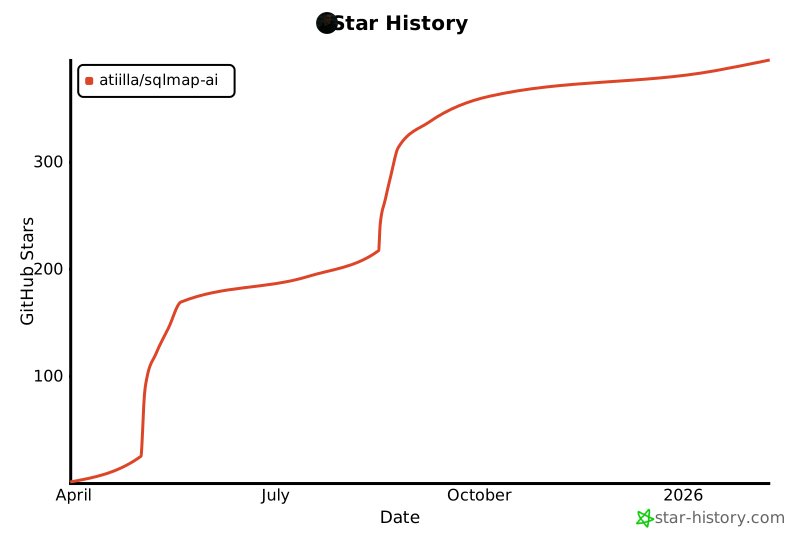](https://www.star-history.com/#atiilla/sqlmap-ai&Date)
|