splashscreen-engine 2.0.0__tar.gz
This diff represents the content of publicly available package versions that have been released to one of the supported registries. The information contained in this diff is provided for informational purposes only and reflects changes between package versions as they appear in their respective public registries.
- splashscreen_engine-2.0.0/PKG-INFO +516 -0
- splashscreen_engine-2.0.0/README.md +482 -0
- splashscreen_engine-2.0.0/setup.cfg +4 -0
- splashscreen_engine-2.0.0/setup.py +82 -0
- splashscreen_engine-2.0.0/splashscreen_engine.egg-info/PKG-INFO +516 -0
- splashscreen_engine-2.0.0/splashscreen_engine.egg-info/SOURCES.txt +8 -0
- splashscreen_engine-2.0.0/splashscreen_engine.egg-info/dependency_links.txt +1 -0
- splashscreen_engine-2.0.0/splashscreen_engine.egg-info/requires.txt +3 -0
- splashscreen_engine-2.0.0/splashscreen_engine.egg-info/top_level.txt +1 -0
- splashscreen_engine-2.0.0/splashscreen_engine.py +716 -0
|
@@ -0,0 +1,516 @@
|
|
|
1
|
+
Metadata-Version: 2.4
|
|
2
|
+
Name: splashscreen-engine
|
|
3
|
+
Version: 2.0.0
|
|
4
|
+
Summary: A module for making Splash Screens with videos, images, loading bars, text rendering, and threaded rendering support for Applications.
|
|
5
|
+
Home-page: https://github.com/NamanChhabra21/splashscreen-engine
|
|
6
|
+
Author: Naman Chhabra
|
|
7
|
+
License: MIT
|
|
8
|
+
Project-URL: Source, https://github.com/NamanChhabra21/splashscreen-engine
|
|
9
|
+
Project-URL: Issues, https://github.com/NamanChhabra21/splashscreen-engine/issues
|
|
10
|
+
Project-URL: Discussions, https://github.com/NamanChhabra21/splashscreen-engine/discussions
|
|
11
|
+
Keywords: pygame,splash-screen,loading-screen,python,gui,video,splashscreen,pygame-gui,window,animation,loading,open-cv,naman,chhabra,splash,pypi,github,screen,how to,module,api,example,documentation,README,tkinter,customtkinter,opencv-python,code,2.0.0,player,tutorial
|
|
12
|
+
Classifier: Programming Language :: Python :: 3
|
|
13
|
+
Classifier: License :: OSI Approved :: MIT License
|
|
14
|
+
Classifier: Operating System :: OS Independent
|
|
15
|
+
Classifier: Topic :: Software Development :: Libraries
|
|
16
|
+
Classifier: Topic :: Multimedia :: Video
|
|
17
|
+
Classifier: Topic :: Multimedia :: Graphics
|
|
18
|
+
Requires-Python: >=3.8
|
|
19
|
+
Description-Content-Type: text/markdown
|
|
20
|
+
Requires-Dist: pygame
|
|
21
|
+
Requires-Dist: opencv-python
|
|
22
|
+
Requires-Dist: numpy
|
|
23
|
+
Dynamic: author
|
|
24
|
+
Dynamic: classifier
|
|
25
|
+
Dynamic: description
|
|
26
|
+
Dynamic: description-content-type
|
|
27
|
+
Dynamic: home-page
|
|
28
|
+
Dynamic: keywords
|
|
29
|
+
Dynamic: license
|
|
30
|
+
Dynamic: project-url
|
|
31
|
+
Dynamic: requires-dist
|
|
32
|
+
Dynamic: requires-python
|
|
33
|
+
Dynamic: summary
|
|
34
|
+
|
|
35
|
+
# splashscreen-engine
|
|
36
|
+
A module for making Splash Screens with videos, images, loading bars, text rendering, and threaded rendering support for your Applications.
|
|
37
|
+
|
|
38
|
+
## Sample Preview
|
|
39
|
+
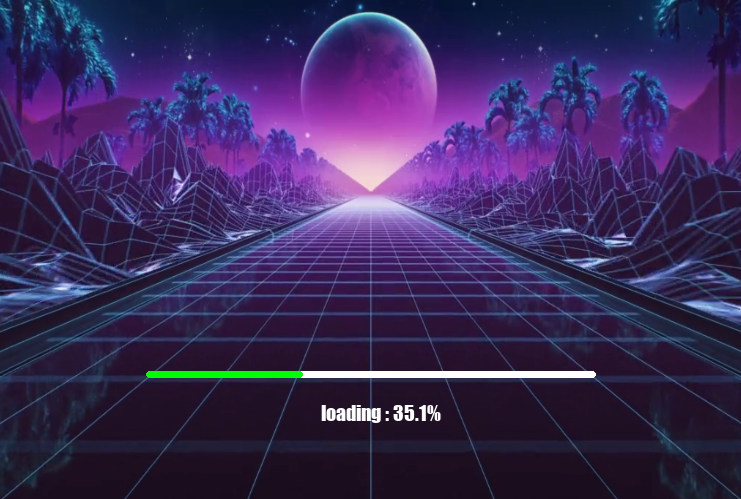
|
|
40
|
+
|
|
41
|
+
## Features
|
|
42
|
+
|
|
43
|
+
- Optional Title Bar
|
|
44
|
+
- Dynamic Window Resizing
|
|
45
|
+
- Fullscreen Support
|
|
46
|
+
- Background videos
|
|
47
|
+
- Background images
|
|
48
|
+
- Loading bars
|
|
49
|
+
- Text rendering
|
|
50
|
+
- Transparency support
|
|
51
|
+
- Threaded rendering
|
|
52
|
+
- Video looping
|
|
53
|
+
- Simple API
|
|
54
|
+
|
|
55
|
+
## Installation
|
|
56
|
+
|
|
57
|
+
```bash
|
|
58
|
+
pip install splashscreen-engine
|
|
59
|
+
```
|
|
60
|
+
OR
|
|
61
|
+
```bash
|
|
62
|
+
pip install splashscreen-engine==2.0.0
|
|
63
|
+
```
|
|
64
|
+
|
|
65
|
+
## Example
|
|
66
|
+
|
|
67
|
+
```python
|
|
68
|
+
import splashscreen_engine as splash
|
|
69
|
+
|
|
70
|
+
screen = splash.Screen()
|
|
71
|
+
screen.size(750,500)
|
|
72
|
+
|
|
73
|
+
# This Starts The Engine
|
|
74
|
+
screen.start()
|
|
75
|
+
|
|
76
|
+
# Background Video
|
|
77
|
+
video = splash.BackgroundVideo(
|
|
78
|
+
screen,
|
|
79
|
+
"exampleVid.mp4",
|
|
80
|
+
fps=30,
|
|
81
|
+
loop=True
|
|
82
|
+
)
|
|
83
|
+
|
|
84
|
+
video.play()
|
|
85
|
+
|
|
86
|
+
# Loading Bar
|
|
87
|
+
bar = splash.LoadingBar(screen,add_xy=(0,100)) # By default, position is `center` and add 100 units to y-axis
|
|
88
|
+
bar.place()
|
|
89
|
+
|
|
90
|
+
# Text `loading`
|
|
91
|
+
text = splash.Text(
|
|
92
|
+
screen,
|
|
93
|
+
"Loading...",
|
|
94
|
+
"impact",
|
|
95
|
+
20,
|
|
96
|
+
"down",
|
|
97
|
+
add_xy=(0,-80) # Place the text downward and subtract 80 units from y-axis
|
|
98
|
+
)
|
|
99
|
+
|
|
100
|
+
text.show()
|
|
101
|
+
|
|
102
|
+
# LOADING | you can add your `loading` processes here
|
|
103
|
+
|
|
104
|
+
a = 0
|
|
105
|
+
|
|
106
|
+
while not a >= 100:
|
|
107
|
+
|
|
108
|
+
a += 0.3
|
|
109
|
+
|
|
110
|
+
text.edit(
|
|
111
|
+
text=f"loading : {round(a,2)}%"
|
|
112
|
+
)
|
|
113
|
+
|
|
114
|
+
bar.set_progress(a)
|
|
115
|
+
|
|
116
|
+
screen.wait(0.05)
|
|
117
|
+
|
|
118
|
+
text.edit(
|
|
119
|
+
text="loaded : 100%"
|
|
120
|
+
)
|
|
121
|
+
|
|
122
|
+
screen.wait(3)
|
|
123
|
+
|
|
124
|
+
# Stop the splash screen after loading
|
|
125
|
+
screen.stop()
|
|
126
|
+
|
|
127
|
+
|
|
128
|
+
"""
|
|
129
|
+
if you are using pygame module in your own code,
|
|
130
|
+
use `screen.stop(quit_pygame=False)`
|
|
131
|
+
instead of `screen.stop()`
|
|
132
|
+
"""
|
|
133
|
+
|
|
134
|
+
# Main Screen Example
|
|
135
|
+
|
|
136
|
+
import tkinter # pip install tkinter -- used as main screen for example.
|
|
137
|
+
main_screen = tkinter.Tk()
|
|
138
|
+
|
|
139
|
+
main_screen.geometry("750x500")
|
|
140
|
+
|
|
141
|
+
main_text = tkinter.Label(
|
|
142
|
+
main_screen,
|
|
143
|
+
text="Your Main Screen",
|
|
144
|
+
font=("impact",40)
|
|
145
|
+
)
|
|
146
|
+
|
|
147
|
+
main_text.pack()
|
|
148
|
+
|
|
149
|
+
main_screen.mainloop()
|
|
150
|
+
```
|
|
151
|
+
|
|
152
|
+
---
|
|
153
|
+
|
|
154
|
+
## Requirements
|
|
155
|
+
These Modules are automatically installed with : `pip install splashscreen-engine`
|
|
156
|
+
- pygame
|
|
157
|
+
- opencv-python
|
|
158
|
+
- numpy
|
|
159
|
+
|
|
160
|
+
---
|
|
161
|
+
|
|
162
|
+
# Functions
|
|
163
|
+
|
|
164
|
+
### Basic Window
|
|
165
|
+
|
|
166
|
+
```python
|
|
167
|
+
import splashscreen_engine as splash
|
|
168
|
+
|
|
169
|
+
screen = splash.Screen()
|
|
170
|
+
|
|
171
|
+
screen.size(750, 500)
|
|
172
|
+
|
|
173
|
+
screen.start()
|
|
174
|
+
```
|
|
175
|
+
|
|
176
|
+
#### Stop and Delete Screen
|
|
177
|
+
|
|
178
|
+
```python
|
|
179
|
+
screen.stop()
|
|
180
|
+
|
|
181
|
+
# Use:
|
|
182
|
+
screen.stop(quit_pygame=False)
|
|
183
|
+
|
|
184
|
+
# if you are using pygame in your own application.
|
|
185
|
+
```
|
|
186
|
+
|
|
187
|
+
#### Set Size for your window
|
|
188
|
+
|
|
189
|
+
```python
|
|
190
|
+
screen.size(750,500)
|
|
191
|
+
|
|
192
|
+
# Arguments:
|
|
193
|
+
# width, height, fullscreen
|
|
194
|
+
|
|
195
|
+
# OR
|
|
196
|
+
|
|
197
|
+
screen.size(fullscreen=True)
|
|
198
|
+
```
|
|
199
|
+
|
|
200
|
+
#### Set title for your window
|
|
201
|
+
|
|
202
|
+
```python
|
|
203
|
+
screen.title("Your Title")
|
|
204
|
+
```
|
|
205
|
+
|
|
206
|
+
#### Set Background color
|
|
207
|
+
|
|
208
|
+
```python
|
|
209
|
+
screen.set_bg_color((255,0,0)) # Red
|
|
210
|
+
```
|
|
211
|
+
|
|
212
|
+
#### Get Window Size
|
|
213
|
+
|
|
214
|
+
```python
|
|
215
|
+
width,height = screen.get_size()
|
|
216
|
+
```
|
|
217
|
+
|
|
218
|
+
---
|
|
219
|
+
### Window with Title bar (optional)
|
|
220
|
+
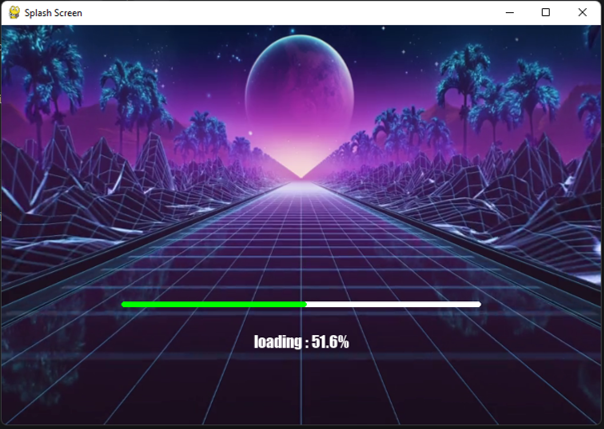
A title bar is the top bar of a window.
|
|
221
|
+
It usually contains:
|
|
222
|
+
|
|
223
|
+
- window title
|
|
224
|
+
- window icon # Coming Soon
|
|
225
|
+
- close button
|
|
226
|
+
- minimize button
|
|
227
|
+
- maximize button
|
|
228
|
+
- Note : Clicking on Maximize / Minimize button automatically resizes the screen
|
|
229
|
+
|
|
230
|
+
---
|
|
231
|
+
|
|
232
|
+
---
|
|
233
|
+
#### To create a Title Bar
|
|
234
|
+
```python
|
|
235
|
+
screen = splash.Screen(title_bar=True)
|
|
236
|
+
```
|
|
237
|
+
#### Functions for Title Bar
|
|
238
|
+
##### To Check if the user clicked on `X` button
|
|
239
|
+
```python
|
|
240
|
+
screen.is_quit()
|
|
241
|
+
```
|
|
242
|
+
##### To check if the user pressed `Esc` Key during fullscreen
|
|
243
|
+
```python
|
|
244
|
+
screen.is_escaped()
|
|
245
|
+
```
|
|
246
|
+
##### Note : These functions are only applicable when `title_bar = True` else it will raise an error.
|
|
247
|
+
---
|
|
248
|
+
### Wait Function
|
|
249
|
+
|
|
250
|
+
Instead of using `time.sleep()`,
|
|
251
|
+
you can use this function because it prevents
|
|
252
|
+
the `window not responding` issue.
|
|
253
|
+
|
|
254
|
+
```python
|
|
255
|
+
screen.wait(0.5) # Seconds
|
|
256
|
+
```
|
|
257
|
+
|
|
258
|
+
---
|
|
259
|
+
|
|
260
|
+
### Background Video
|
|
261
|
+
|
|
262
|
+
You can add a video as the background
|
|
263
|
+
of your splash screen using this function.
|
|
264
|
+
|
|
265
|
+
```python
|
|
266
|
+
video = splash.BackgroundVideo(
|
|
267
|
+
screen,
|
|
268
|
+
"exampleVid.mp4",
|
|
269
|
+
fps=30,
|
|
270
|
+
loop=True
|
|
271
|
+
)
|
|
272
|
+
|
|
273
|
+
# loop = True / False
|
|
274
|
+
# default(False)
|
|
275
|
+
|
|
276
|
+
# fps = int
|
|
277
|
+
# default(30)
|
|
278
|
+
```
|
|
279
|
+
|
|
280
|
+
#### Play video
|
|
281
|
+
|
|
282
|
+
```python
|
|
283
|
+
video.play()
|
|
284
|
+
```
|
|
285
|
+
|
|
286
|
+
#### Pause video
|
|
287
|
+
|
|
288
|
+
```python
|
|
289
|
+
video.pause()
|
|
290
|
+
```
|
|
291
|
+
|
|
292
|
+
#### Resume video
|
|
293
|
+
|
|
294
|
+
```python
|
|
295
|
+
video.resume()
|
|
296
|
+
```
|
|
297
|
+
|
|
298
|
+
#### Delete video
|
|
299
|
+
|
|
300
|
+
```python
|
|
301
|
+
video.delete()
|
|
302
|
+
```
|
|
303
|
+
|
|
304
|
+
#### Transparency
|
|
305
|
+
|
|
306
|
+
Make your video transparent.
|
|
307
|
+
|
|
308
|
+
Transparency Level:
|
|
309
|
+
`0 to 255`
|
|
310
|
+
|
|
311
|
+
Default:
|
|
312
|
+
`120`
|
|
313
|
+
|
|
314
|
+
```python
|
|
315
|
+
video.transparency(150)
|
|
316
|
+
```
|
|
317
|
+
|
|
318
|
+
#### Stop Transparency
|
|
319
|
+
|
|
320
|
+
```python
|
|
321
|
+
video.stop_transparency()
|
|
322
|
+
```
|
|
323
|
+
|
|
324
|
+
#### Stopping / Resuming Video Loops
|
|
325
|
+
|
|
326
|
+
```python
|
|
327
|
+
# Loop Video
|
|
328
|
+
video.loop = True
|
|
329
|
+
|
|
330
|
+
# Stop the Loop
|
|
331
|
+
video.stop_loop()
|
|
332
|
+
|
|
333
|
+
# OR
|
|
334
|
+
video.loop = False
|
|
335
|
+
```
|
|
336
|
+
|
|
337
|
+
#### To check whether the video is playing or stopped
|
|
338
|
+
|
|
339
|
+
```python
|
|
340
|
+
# Returns True if playing else False
|
|
341
|
+
video.playing()
|
|
342
|
+
```
|
|
343
|
+
|
|
344
|
+
---
|
|
345
|
+
|
|
346
|
+
### Background Image
|
|
347
|
+
|
|
348
|
+
You can add an image as the background
|
|
349
|
+
of your splash screen using this function.
|
|
350
|
+
|
|
351
|
+
```python
|
|
352
|
+
bg_img = splash.BackgroundImage(
|
|
353
|
+
screen,
|
|
354
|
+
"YourImage.png"
|
|
355
|
+
)
|
|
356
|
+
|
|
357
|
+
bg_img.set()
|
|
358
|
+
```
|
|
359
|
+
|
|
360
|
+
---
|
|
361
|
+
|
|
362
|
+
### Progress Bar
|
|
363
|
+
|
|
364
|
+
This function adds a progress bar.
|
|
365
|
+
|
|
366
|
+
```python
|
|
367
|
+
bar = splash.LoadingBar(
|
|
368
|
+
screen,
|
|
369
|
+
position="down",
|
|
370
|
+
add_xy=(0,-50)
|
|
371
|
+
)
|
|
372
|
+
|
|
373
|
+
# Arguments:
|
|
374
|
+
# parent, width, height,
|
|
375
|
+
# position, add_xy
|
|
376
|
+
|
|
377
|
+
bar.place()
|
|
378
|
+
|
|
379
|
+
# Arguments:
|
|
380
|
+
# colour, loading_colour
|
|
381
|
+
```
|
|
382
|
+
|
|
383
|
+
#### Available Positions
|
|
384
|
+
|
|
385
|
+
```python
|
|
386
|
+
"center"
|
|
387
|
+
"right"
|
|
388
|
+
"left"
|
|
389
|
+
"up"
|
|
390
|
+
"down"
|
|
391
|
+
```
|
|
392
|
+
|
|
393
|
+
|
|
394
|
+
|
|
395
|
+
#### Hiding the Progress Bar
|
|
396
|
+
|
|
397
|
+
```python
|
|
398
|
+
bar.hide()
|
|
399
|
+
```
|
|
400
|
+
|
|
401
|
+
#### Setting Progress
|
|
402
|
+
|
|
403
|
+
```python
|
|
404
|
+
bar.set_progress(50)
|
|
405
|
+
```
|
|
406
|
+
|
|
407
|
+
---
|
|
408
|
+
|
|
409
|
+
### Text
|
|
410
|
+
|
|
411
|
+
Adds text on the screen.
|
|
412
|
+
|
|
413
|
+
```python
|
|
414
|
+
text = splash.Text(
|
|
415
|
+
screen,
|
|
416
|
+
"Loading...",
|
|
417
|
+
"impact",
|
|
418
|
+
20,
|
|
419
|
+
position="center",
|
|
420
|
+
add_xy=(0,0)
|
|
421
|
+
)
|
|
422
|
+
|
|
423
|
+
# Arguments:
|
|
424
|
+
# parent, text, font,
|
|
425
|
+
# size, position,
|
|
426
|
+
# add_xy, colour
|
|
427
|
+
|
|
428
|
+
text.show()
|
|
429
|
+
```
|
|
430
|
+
|
|
431
|
+
#### Available Positions
|
|
432
|
+
|
|
433
|
+
```python
|
|
434
|
+
"center"
|
|
435
|
+
"right"
|
|
436
|
+
"left"
|
|
437
|
+
"up"
|
|
438
|
+
"down"
|
|
439
|
+
```
|
|
440
|
+
|
|
441
|
+
#### Show and Hide text
|
|
442
|
+
|
|
443
|
+
```python
|
|
444
|
+
# Show text
|
|
445
|
+
text.show()
|
|
446
|
+
|
|
447
|
+
# Hide text
|
|
448
|
+
text.hide()
|
|
449
|
+
```
|
|
450
|
+
|
|
451
|
+
---
|
|
452
|
+
|
|
453
|
+
#### Edit The Text | Supports Dynamic Editing
|
|
454
|
+
|
|
455
|
+
This allows you to edit the text dynamically.
|
|
456
|
+
|
|
457
|
+
Example:
|
|
458
|
+
Changing:
|
|
459
|
+
`f"Loading {i}%"`
|
|
460
|
+
inside loops.
|
|
461
|
+
|
|
462
|
+
```python
|
|
463
|
+
text.edit(
|
|
464
|
+
text = "New Loading Text Added",
|
|
465
|
+
font = "IMPACT",
|
|
466
|
+
new_size = 20,
|
|
467
|
+
position = "center",
|
|
468
|
+
add_xy = (0,0),
|
|
469
|
+
colour = (0,255,0)
|
|
470
|
+
)
|
|
471
|
+
```
|
|
472
|
+
---
|
|
473
|
+
### `add_xy` Argument
|
|
474
|
+
|
|
475
|
+
`add_xy` allows you to move objects relative to their selected position.
|
|
476
|
+
|
|
477
|
+
Structure:
|
|
478
|
+
|
|
479
|
+
```python
|
|
480
|
+
add_xy = (x,y)
|
|
481
|
+
```
|
|
482
|
+
|
|
483
|
+
| Value | Meaning |
|
|
484
|
+
|---|---|
|
|
485
|
+
| Positive `x` | Move Right |
|
|
486
|
+
| Negative `x` | Move Left |
|
|
487
|
+
| Positive `y` | Move Down |
|
|
488
|
+
| Negative `y` | Move Up |
|
|
489
|
+
|
|
490
|
+
Example:
|
|
491
|
+
|
|
492
|
+
```python
|
|
493
|
+
text = splash.Text(
|
|
494
|
+
screen,
|
|
495
|
+
"Loading...",
|
|
496
|
+
position="center",
|
|
497
|
+
add_xy=(0,-100)
|
|
498
|
+
)
|
|
499
|
+
```
|
|
500
|
+
|
|
501
|
+
This places the text:
|
|
502
|
+
- Horizontally centered
|
|
503
|
+
- 100 pixels above the center
|
|
504
|
+
|
|
505
|
+
---
|
|
506
|
+
|
|
507
|
+
## Contributing & Feedback
|
|
508
|
+
|
|
509
|
+
Discuss approaches, suggest new features,
|
|
510
|
+
report bugs, or share improvements through GitHub
|
|
511
|
+
issues and discussions.
|
|
512
|
+
|
|
513
|
+
Mail:
|
|
514
|
+
chhabranaman21@gmail.com
|
|
515
|
+
|
|
516
|
+
---
|