splashscreen-engine 2.0.0__py3-none-any.whl
This diff represents the content of publicly available package versions that have been released to one of the supported registries. The information contained in this diff is provided for informational purposes only and reflects changes between package versions as they appear in their respective public registries.
|
@@ -0,0 +1,516 @@
|
|
|
1
|
+
Metadata-Version: 2.4
|
|
2
|
+
Name: splashscreen-engine
|
|
3
|
+
Version: 2.0.0
|
|
4
|
+
Summary: A module for making Splash Screens with videos, images, loading bars, text rendering, and threaded rendering support for Applications.
|
|
5
|
+
Home-page: https://github.com/NamanChhabra21/splashscreen-engine
|
|
6
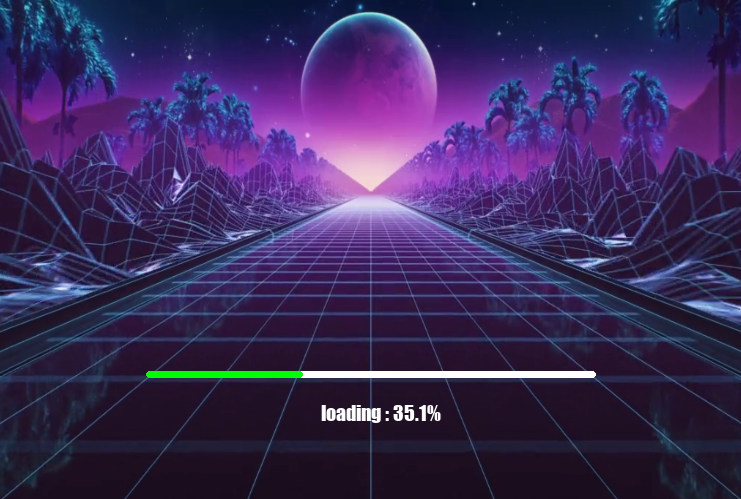
|
+
Author: Naman Chhabra
|
|
7
|
+
License: MIT
|
|
8
|
+
Project-URL: Source, https://github.com/NamanChhabra21/splashscreen-engine
|
|
9
|
+
Project-URL: Issues, https://github.com/NamanChhabra21/splashscreen-engine/issues
|
|
10
|
+
Project-URL: Discussions, https://github.com/NamanChhabra21/splashscreen-engine/discussions
|
|
11
|
+
Keywords: pygame,splash-screen,loading-screen,python,gui,video,splashscreen,pygame-gui,window,animation,loading,open-cv,naman,chhabra,splash,pypi,github,screen,how to,module,api,example,documentation,README,tkinter,customtkinter,opencv-python,code,2.0.0,player,tutorial
|
|
12
|
+
Classifier: Programming Language :: Python :: 3
|
|
13
|
+
Classifier: License :: OSI Approved :: MIT License
|
|
14
|
+
Classifier: Operating System :: OS Independent
|
|
15
|
+
Classifier: Topic :: Software Development :: Libraries
|
|
16
|
+
Classifier: Topic :: Multimedia :: Video
|
|
17
|
+
Classifier: Topic :: Multimedia :: Graphics
|
|
18
|
+
Requires-Python: >=3.8
|
|
19
|
+
Description-Content-Type: text/markdown
|
|
20
|
+
Requires-Dist: pygame
|
|
21
|
+
Requires-Dist: opencv-python
|
|
22
|
+
Requires-Dist: numpy
|
|
23
|
+
Dynamic: author
|
|
24
|
+
Dynamic: classifier
|
|
25
|
+
Dynamic: description
|
|
26
|
+
Dynamic: description-content-type
|
|
27
|
+
Dynamic: home-page
|
|
28
|
+
Dynamic: keywords
|
|
29
|
+
Dynamic: license
|
|
30
|
+
Dynamic: project-url
|
|
31
|
+
Dynamic: requires-dist
|
|
32
|
+
Dynamic: requires-python
|
|
33
|
+
Dynamic: summary
|
|
34
|
+
|
|
35
|
+
# splashscreen-engine
|
|
36
|
+
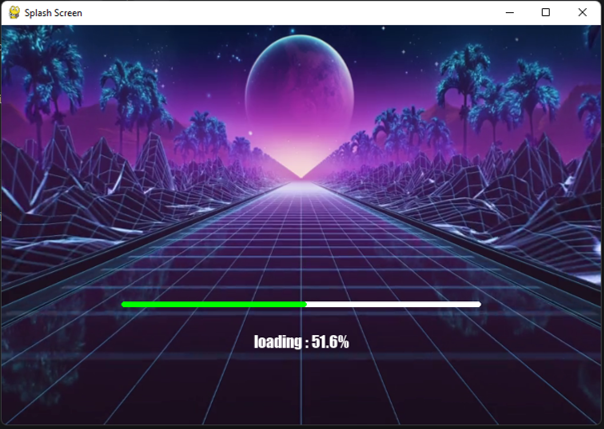
A module for making Splash Screens with videos, images, loading bars, text rendering, and threaded rendering support for your Applications.
|
|
37
|
+
|
|
38
|
+
## Sample Preview
|
|
39
|
+
|
|
40
|
+
|
|
41
|
+
## Features
|
|
42
|
+
|
|
43
|
+
- Optional Title Bar
|
|
44
|
+
- Dynamic Window Resizing
|
|
45
|
+
- Fullscreen Support
|
|
46
|
+
- Background videos
|
|
47
|
+
- Background images
|
|
48
|
+
- Loading bars
|
|
49
|
+
- Text rendering
|
|
50
|
+
- Transparency support
|
|
51
|
+
- Threaded rendering
|
|
52
|
+
- Video looping
|
|
53
|
+
- Simple API
|
|
54
|
+
|
|
55
|
+
## Installation
|
|
56
|
+
|
|
57
|
+
```bash
|
|
58
|
+
pip install splashscreen-engine
|
|
59
|
+
```
|
|
60
|
+
OR
|
|
61
|
+
```bash
|
|
62
|
+
pip install splashscreen-engine==2.0.0
|
|
63
|
+
```
|
|
64
|
+
|
|
65
|
+
## Example
|
|
66
|
+
|
|
67
|
+
```python
|
|
68
|
+
import splashscreen_engine as splash
|
|
69
|
+
|
|
70
|
+
screen = splash.Screen()
|
|
71
|
+
screen.size(750,500)
|
|
72
|
+
|
|
73
|
+
# This Starts The Engine
|
|
74
|
+
screen.start()
|
|
75
|
+
|
|
76
|
+
# Background Video
|
|
77
|
+
video = splash.BackgroundVideo(
|
|
78
|
+
screen,
|
|
79
|
+
"exampleVid.mp4",
|
|
80
|
+
fps=30,
|
|
81
|
+
loop=True
|
|
82
|
+
)
|
|
83
|
+
|
|
84
|
+
video.play()
|
|
85
|
+
|
|
86
|
+
# Loading Bar
|
|
87
|
+
bar = splash.LoadingBar(screen,add_xy=(0,100)) # By default, position is `center` and add 100 units to y-axis
|
|
88
|
+
bar.place()
|
|
89
|
+
|
|
90
|
+
# Text `loading`
|
|
91
|
+
text = splash.Text(
|
|
92
|
+
screen,
|
|
93
|
+
"Loading...",
|
|
94
|
+
"impact",
|
|
95
|
+
20,
|
|
96
|
+
"down",
|
|
97
|
+
add_xy=(0,-80) # Place the text downward and subtract 80 units from y-axis
|
|
98
|
+
)
|
|
99
|
+
|
|
100
|
+
text.show()
|
|
101
|
+
|
|
102
|
+
# LOADING | you can add your `loading` processes here
|
|
103
|
+
|
|
104
|
+
a = 0
|
|
105
|
+
|
|
106
|
+
while not a >= 100:
|
|
107
|
+
|
|
108
|
+
a += 0.3
|
|
109
|
+
|
|
110
|
+
text.edit(
|
|
111
|
+
text=f"loading : {round(a,2)}%"
|
|
112
|
+
)
|
|
113
|
+
|
|
114
|
+
bar.set_progress(a)
|
|
115
|
+
|
|
116
|
+
screen.wait(0.05)
|
|
117
|
+
|
|
118
|
+
text.edit(
|
|
119
|
+
text="loaded : 100%"
|
|
120
|
+
)
|
|
121
|
+
|
|
122
|
+
screen.wait(3)
|
|
123
|
+
|
|
124
|
+
# Stop the splash screen after loading
|
|
125
|
+
screen.stop()
|
|
126
|
+
|
|
127
|
+
|
|
128
|
+
"""
|
|
129
|
+
if you are using pygame module in your own code,
|
|
130
|
+
use `screen.stop(quit_pygame=False)`
|
|
131
|
+
instead of `screen.stop()`
|
|
132
|
+
"""
|
|
133
|
+
|
|
134
|
+
# Main Screen Example
|
|
135
|
+
|
|
136
|
+
import tkinter # pip install tkinter -- used as main screen for example.
|
|
137
|
+
main_screen = tkinter.Tk()
|
|
138
|
+
|
|
139
|
+
main_screen.geometry("750x500")
|
|
140
|
+
|
|
141
|
+
main_text = tkinter.Label(
|
|
142
|
+
main_screen,
|
|
143
|
+
text="Your Main Screen",
|
|
144
|
+
font=("impact",40)
|
|
145
|
+
)
|
|
146
|
+
|
|
147
|
+
main_text.pack()
|
|
148
|
+
|
|
149
|
+
main_screen.mainloop()
|
|
150
|
+
```
|
|
151
|
+
|
|
152
|
+
---
|
|
153
|
+
|
|
154
|
+
## Requirements
|
|
155
|
+
These Modules are automatically installed with : `pip install splashscreen-engine`
|
|
156
|
+
- pygame
|
|
157
|
+
- opencv-python
|
|
158
|
+
- numpy
|
|
159
|
+
|
|
160
|
+
---
|
|
161
|
+
|
|
162
|
+
# Functions
|
|
163
|
+
|
|
164
|
+
### Basic Window
|
|
165
|
+
|
|
166
|
+
```python
|
|
167
|
+
import splashscreen_engine as splash
|
|
168
|
+
|
|
169
|
+
screen = splash.Screen()
|
|
170
|
+
|
|
171
|
+
screen.size(750, 500)
|
|
172
|
+
|
|
173
|
+
screen.start()
|
|
174
|
+
```
|
|
175
|
+
|
|
176
|
+
#### Stop and Delete Screen
|
|
177
|
+
|
|
178
|
+
```python
|
|
179
|
+
screen.stop()
|
|
180
|
+
|
|
181
|
+
# Use:
|
|
182
|
+
screen.stop(quit_pygame=False)
|
|
183
|
+
|
|
184
|
+
# if you are using pygame in your own application.
|
|
185
|
+
```
|
|
186
|
+
|
|
187
|
+
#### Set Size for your window
|
|
188
|
+
|
|
189
|
+
```python
|
|
190
|
+
screen.size(750,500)
|
|
191
|
+
|
|
192
|
+
# Arguments:
|
|
193
|
+
# width, height, fullscreen
|
|
194
|
+
|
|
195
|
+
# OR
|
|
196
|
+
|
|
197
|
+
screen.size(fullscreen=True)
|
|
198
|
+
```
|
|
199
|
+
|
|
200
|
+
#### Set title for your window
|
|
201
|
+
|
|
202
|
+
```python
|
|
203
|
+
screen.title("Your Title")
|
|
204
|
+
```
|
|
205
|
+
|
|
206
|
+
#### Set Background color
|
|
207
|
+
|
|
208
|
+
```python
|
|
209
|
+
screen.set_bg_color((255,0,0)) # Red
|
|
210
|
+
```
|
|
211
|
+
|
|
212
|
+
#### Get Window Size
|
|
213
|
+
|
|
214
|
+
```python
|
|
215
|
+
width,height = screen.get_size()
|
|
216
|
+
```
|
|
217
|
+
|
|
218
|
+
---
|
|
219
|
+
### Window with Title bar (optional)
|
|
220
|
+
A title bar is the top bar of a window.
|
|
221
|
+
It usually contains:
|
|
222
|
+
|
|
223
|
+
- window title
|
|
224
|
+
- window icon # Coming Soon
|
|
225
|
+
- close button
|
|
226
|
+
- minimize button
|
|
227
|
+
- maximize button
|
|
228
|
+
- Note : Clicking on Maximize / Minimize button automatically resizes the screen
|
|
229
|
+
|
|
230
|
+
---
|
|
231
|
+
|
|
232
|
+
---
|
|
233
|
+
#### To create a Title Bar
|
|
234
|
+
```python
|
|
235
|
+
screen = splash.Screen(title_bar=True)
|
|
236
|
+
```
|
|
237
|
+
#### Functions for Title Bar
|
|
238
|
+
##### To Check if the user clicked on `X` button
|
|
239
|
+
```python
|
|
240
|
+
screen.is_quit()
|
|
241
|
+
```
|
|
242
|
+
##### To check if the user pressed `Esc` Key during fullscreen
|
|
243
|
+
```python
|
|
244
|
+
screen.is_escaped()
|
|
245
|
+
```
|
|
246
|
+
##### Note : These functions are only applicable when `title_bar = True` else it will raise an error.
|
|
247
|
+
---
|
|
248
|
+
### Wait Function
|
|
249
|
+
|
|
250
|
+
Instead of using `time.sleep()`,
|
|
251
|
+
you can use this function because it prevents
|
|
252
|
+
the `window not responding` issue.
|
|
253
|
+
|
|
254
|
+
```python
|
|
255
|
+
screen.wait(0.5) # Seconds
|
|
256
|
+
```
|
|
257
|
+
|
|
258
|
+
---
|
|
259
|
+
|
|
260
|
+
### Background Video
|
|
261
|
+
|
|
262
|
+
You can add a video as the background
|
|
263
|
+
of your splash screen using this function.
|
|
264
|
+
|
|
265
|
+
```python
|
|
266
|
+
video = splash.BackgroundVideo(
|
|
267
|
+
screen,
|
|
268
|
+
"exampleVid.mp4",
|
|
269
|
+
fps=30,
|
|
270
|
+
loop=True
|
|
271
|
+
)
|
|
272
|
+
|
|
273
|
+
# loop = True / False
|
|
274
|
+
# default(False)
|
|
275
|
+
|
|
276
|
+
# fps = int
|
|
277
|
+
# default(30)
|
|
278
|
+
```
|
|
279
|
+
|
|
280
|
+
#### Play video
|
|
281
|
+
|
|
282
|
+
```python
|
|
283
|
+
video.play()
|
|
284
|
+
```
|
|
285
|
+
|
|
286
|
+
#### Pause video
|
|
287
|
+
|
|
288
|
+
```python
|
|
289
|
+
video.pause()
|
|
290
|
+
```
|
|
291
|
+
|
|
292
|
+
#### Resume video
|
|
293
|
+
|
|
294
|
+
```python
|
|
295
|
+
video.resume()
|
|
296
|
+
```
|
|
297
|
+
|
|
298
|
+
#### Delete video
|
|
299
|
+
|
|
300
|
+
```python
|
|
301
|
+
video.delete()
|
|
302
|
+
```
|
|
303
|
+
|
|
304
|
+
#### Transparency
|
|
305
|
+
|
|
306
|
+
Make your video transparent.
|
|
307
|
+
|
|
308
|
+
Transparency Level:
|
|
309
|
+
`0 to 255`
|
|
310
|
+
|
|
311
|
+
Default:
|
|
312
|
+
`120`
|
|
313
|
+
|
|
314
|
+
```python
|
|
315
|
+
video.transparency(150)
|
|
316
|
+
```
|
|
317
|
+
|
|
318
|
+
#### Stop Transparency
|
|
319
|
+
|
|
320
|
+
```python
|
|
321
|
+
video.stop_transparency()
|
|
322
|
+
```
|
|
323
|
+
|
|
324
|
+
#### Stopping / Resuming Video Loops
|
|
325
|
+
|
|
326
|
+
```python
|
|
327
|
+
# Loop Video
|
|
328
|
+
video.loop = True
|
|
329
|
+
|
|
330
|
+
# Stop the Loop
|
|
331
|
+
video.stop_loop()
|
|
332
|
+
|
|
333
|
+
# OR
|
|
334
|
+
video.loop = False
|
|
335
|
+
```
|
|
336
|
+
|
|
337
|
+
#### To check whether the video is playing or stopped
|
|
338
|
+
|
|
339
|
+
```python
|
|
340
|
+
# Returns True if playing else False
|
|
341
|
+
video.playing()
|
|
342
|
+
```
|
|
343
|
+
|
|
344
|
+
---
|
|
345
|
+
|
|
346
|
+
### Background Image
|
|
347
|
+
|
|
348
|
+
You can add an image as the background
|
|
349
|
+
of your splash screen using this function.
|
|
350
|
+
|
|
351
|
+
```python
|
|
352
|
+
bg_img = splash.BackgroundImage(
|
|
353
|
+
screen,
|
|
354
|
+
"YourImage.png"
|
|
355
|
+
)
|
|
356
|
+
|
|
357
|
+
bg_img.set()
|
|
358
|
+
```
|
|
359
|
+
|
|
360
|
+
---
|
|
361
|
+
|
|
362
|
+
### Progress Bar
|
|
363
|
+
|
|
364
|
+
This function adds a progress bar.
|
|
365
|
+
|
|
366
|
+
```python
|
|
367
|
+
bar = splash.LoadingBar(
|
|
368
|
+
screen,
|
|
369
|
+
position="down",
|
|
370
|
+
add_xy=(0,-50)
|
|
371
|
+
)
|
|
372
|
+
|
|
373
|
+
# Arguments:
|
|
374
|
+
# parent, width, height,
|
|
375
|
+
# position, add_xy
|
|
376
|
+
|
|
377
|
+
bar.place()
|
|
378
|
+
|
|
379
|
+
# Arguments:
|
|
380
|
+
# colour, loading_colour
|
|
381
|
+
```
|
|
382
|
+
|
|
383
|
+
#### Available Positions
|
|
384
|
+
|
|
385
|
+
```python
|
|
386
|
+
"center"
|
|
387
|
+
"right"
|
|
388
|
+
"left"
|
|
389
|
+
"up"
|
|
390
|
+
"down"
|
|
391
|
+
```
|
|
392
|
+
|
|
393
|
+
|
|
394
|
+
|
|
395
|
+
#### Hiding the Progress Bar
|
|
396
|
+
|
|
397
|
+
```python
|
|
398
|
+
bar.hide()
|
|
399
|
+
```
|
|
400
|
+
|
|
401
|
+
#### Setting Progress
|
|
402
|
+
|
|
403
|
+
```python
|
|
404
|
+
bar.set_progress(50)
|
|
405
|
+
```
|
|
406
|
+
|
|
407
|
+
---
|
|
408
|
+
|
|
409
|
+
### Text
|
|
410
|
+
|
|
411
|
+
Adds text on the screen.
|
|
412
|
+
|
|
413
|
+
```python
|
|
414
|
+
text = splash.Text(
|
|
415
|
+
screen,
|
|
416
|
+
"Loading...",
|
|
417
|
+
"impact",
|
|
418
|
+
20,
|
|
419
|
+
position="center",
|
|
420
|
+
add_xy=(0,0)
|
|
421
|
+
)
|
|
422
|
+
|
|
423
|
+
# Arguments:
|
|
424
|
+
# parent, text, font,
|
|
425
|
+
# size, position,
|
|
426
|
+
# add_xy, colour
|
|
427
|
+
|
|
428
|
+
text.show()
|
|
429
|
+
```
|
|
430
|
+
|
|
431
|
+
#### Available Positions
|
|
432
|
+
|
|
433
|
+
```python
|
|
434
|
+
"center"
|
|
435
|
+
"right"
|
|
436
|
+
"left"
|
|
437
|
+
"up"
|
|
438
|
+
"down"
|
|
439
|
+
```
|
|
440
|
+
|
|
441
|
+
#### Show and Hide text
|
|
442
|
+
|
|
443
|
+
```python
|
|
444
|
+
# Show text
|
|
445
|
+
text.show()
|
|
446
|
+
|
|
447
|
+
# Hide text
|
|
448
|
+
text.hide()
|
|
449
|
+
```
|
|
450
|
+
|
|
451
|
+
---
|
|
452
|
+
|
|
453
|
+
#### Edit The Text | Supports Dynamic Editing
|
|
454
|
+
|
|
455
|
+
This allows you to edit the text dynamically.
|
|
456
|
+
|
|
457
|
+
Example:
|
|
458
|
+
Changing:
|
|
459
|
+
`f"Loading {i}%"`
|
|
460
|
+
inside loops.
|
|
461
|
+
|
|
462
|
+
```python
|
|
463
|
+
text.edit(
|
|
464
|
+
text = "New Loading Text Added",
|
|
465
|
+
font = "IMPACT",
|
|
466
|
+
new_size = 20,
|
|
467
|
+
position = "center",
|
|
468
|
+
add_xy = (0,0),
|
|
469
|
+
colour = (0,255,0)
|
|
470
|
+
)
|
|
471
|
+
```
|
|
472
|
+
---
|
|
473
|
+
### `add_xy` Argument
|
|
474
|
+
|
|
475
|
+
`add_xy` allows you to move objects relative to their selected position.
|
|
476
|
+
|
|
477
|
+
Structure:
|
|
478
|
+
|
|
479
|
+
```python
|
|
480
|
+
add_xy = (x,y)
|
|
481
|
+
```
|
|
482
|
+
|
|
483
|
+
| Value | Meaning |
|
|
484
|
+
|---|---|
|
|
485
|
+
| Positive `x` | Move Right |
|
|
486
|
+
| Negative `x` | Move Left |
|
|
487
|
+
| Positive `y` | Move Down |
|
|
488
|
+
| Negative `y` | Move Up |
|
|
489
|
+
|
|
490
|
+
Example:
|
|
491
|
+
|
|
492
|
+
```python
|
|
493
|
+
text = splash.Text(
|
|
494
|
+
screen,
|
|
495
|
+
"Loading...",
|
|
496
|
+
position="center",
|
|
497
|
+
add_xy=(0,-100)
|
|
498
|
+
)
|
|
499
|
+
```
|
|
500
|
+
|
|
501
|
+
This places the text:
|
|
502
|
+
- Horizontally centered
|
|
503
|
+
- 100 pixels above the center
|
|
504
|
+
|
|
505
|
+
---
|
|
506
|
+
|
|
507
|
+
## Contributing & Feedback
|
|
508
|
+
|
|
509
|
+
Discuss approaches, suggest new features,
|
|
510
|
+
report bugs, or share improvements through GitHub
|
|
511
|
+
issues and discussions.
|
|
512
|
+
|
|
513
|
+
Mail:
|
|
514
|
+
chhabranaman21@gmail.com
|
|
515
|
+
|
|
516
|
+
---
|
|
@@ -0,0 +1,5 @@
|
|
|
1
|
+
splashscreen_engine.py,sha256=zGRL7p4TYlTTrAa2S_P94DAA2KrpGCNga7uyGbo_VvQ,19089
|
|
2
|
+
splashscreen_engine-2.0.0.dist-info/METADATA,sha256=B0eLdyeKB0DsLEJLL4jtp0cgrJMQU_YEY-b8_8_-qCQ,8757
|
|
3
|
+
splashscreen_engine-2.0.0.dist-info/WHEEL,sha256=aeYiig01lYGDzBgS8HxWXOg3uV61G9ijOsup-k9o1sk,91
|
|
4
|
+
splashscreen_engine-2.0.0.dist-info/top_level.txt,sha256=ENTn_clsAt7KWt8XYkPBux-bBoKjGlX8DMIKuuKJOjw,20
|
|
5
|
+
splashscreen_engine-2.0.0.dist-info/RECORD,,
|
|
@@ -0,0 +1 @@
|
|
|
1
|
+
splashscreen_engine
|
splashscreen_engine.py
ADDED
|
@@ -0,0 +1,716 @@
|
|
|
1
|
+
import os
|
|
2
|
+
import threading
|
|
3
|
+
import time
|
|
4
|
+
|
|
5
|
+
|
|
6
|
+
os.environ['PYGAME_HIDE_SUPPORT_PROMPT'] = "hide"
|
|
7
|
+
s = '1'
|
|
8
|
+
os.environ['SDL_VIDEO_CENTERED'] = s
|
|
9
|
+
|
|
10
|
+
# Modules
|
|
11
|
+
import pygame
|
|
12
|
+
import cv2
|
|
13
|
+
pygame.init()
|
|
14
|
+
|
|
15
|
+
deleted_by_user = False
|
|
16
|
+
program_stopped = False
|
|
17
|
+
|
|
18
|
+
def avoid_lag():
|
|
19
|
+
global deleted_by_user
|
|
20
|
+
if deleted_by_user:
|
|
21
|
+
raise RuntimeError("Failed to update UI, the screen is deleted by either you or the user.")
|
|
22
|
+
pygame.event.pump()
|
|
23
|
+
|
|
24
|
+
|
|
25
|
+
|
|
26
|
+
def draw_loading_bar(screen, bars):
|
|
27
|
+
|
|
28
|
+
for bar in bars:
|
|
29
|
+
if not isinstance(bar, LoadingBar):
|
|
30
|
+
continue
|
|
31
|
+
|
|
32
|
+
if bar.visible:
|
|
33
|
+
screen_size = screen.get_size()
|
|
34
|
+
if bar.position == "center":
|
|
35
|
+
x = (screen_size[0]-bar.width)//2 + bar.add_xy[0] # Center + x , where x can be positive or negative
|
|
36
|
+
y = (screen_size[1]-bar.height) // 2 + bar.add_xy[1] # Center + y , where y can be positive or negative
|
|
37
|
+
|
|
38
|
+
elif bar.position == "right":
|
|
39
|
+
x = screen_size[0] - bar.width + bar.add_xy[0]
|
|
40
|
+
y = (screen_size[1]-bar.height) // 2 + bar.add_xy[1]
|
|
41
|
+
elif bar.position == "left":
|
|
42
|
+
x =bar.add_xy[0]
|
|
43
|
+
y = screen_size[1] // 2 + bar.add_xy[1]
|
|
44
|
+
elif bar.position == "up":
|
|
45
|
+
x = (screen_size[0]-bar.width)//2 + bar.add_xy[0]
|
|
46
|
+
y = bar.height + bar.add_xy[1]
|
|
47
|
+
elif bar.position == "down":
|
|
48
|
+
x = (screen_size[0]-bar.width)//2 + bar.add_xy[0]
|
|
49
|
+
y = screen_size[1]- bar.height + bar.add_xy[1]
|
|
50
|
+
else:
|
|
51
|
+
x,y=0,0
|
|
52
|
+
|
|
53
|
+
# OUTER BAR
|
|
54
|
+
pygame.draw.rect(
|
|
55
|
+
screen,
|
|
56
|
+
bar.colour,
|
|
57
|
+
(
|
|
58
|
+
x,y,
|
|
59
|
+
int(bar.width),
|
|
60
|
+
int(bar.height)
|
|
61
|
+
),
|
|
62
|
+
border_radius=10
|
|
63
|
+
)
|
|
64
|
+
|
|
65
|
+
# INNER LOADER
|
|
66
|
+
pygame.draw.rect(
|
|
67
|
+
screen,
|
|
68
|
+
bar.loading_colour,
|
|
69
|
+
(x,y,
|
|
70
|
+
int(
|
|
71
|
+
bar.width *
|
|
72
|
+
(bar.progress / 100)
|
|
73
|
+
),
|
|
74
|
+
int(bar.height)
|
|
75
|
+
),
|
|
76
|
+
border_radius=10
|
|
77
|
+
)
|
|
78
|
+
|
|
79
|
+
|
|
80
|
+
def draw_text(screen, texts):
|
|
81
|
+
for txt in texts:
|
|
82
|
+
if not isinstance(txt, Text):
|
|
83
|
+
continue
|
|
84
|
+
|
|
85
|
+
if txt.visible:
|
|
86
|
+
surface = txt.pg_font.render(txt.text, True, txt.colour)
|
|
87
|
+
|
|
88
|
+
screen_size = screen.get_size()
|
|
89
|
+
if txt.position == "center":
|
|
90
|
+
x = screen_size[0]//2 + txt.add_xy[0] # Center + x , where x can be positive or negative
|
|
91
|
+
y = screen_size[1] // 2 + txt.add_xy[1] # Center + y , where y can be positive or negative
|
|
92
|
+
elif txt.position == "right":
|
|
93
|
+
x = screen_size[0] - surface.get_size()[0] + txt.add_xy[0]
|
|
94
|
+
y = screen_size[1] // 2 + txt.add_xy[1]
|
|
95
|
+
elif txt.position == "left":
|
|
96
|
+
x = surface.get_size()[0] + txt.add_xy[0]
|
|
97
|
+
y = screen_size[1] // 2 + txt.add_xy[1]
|
|
98
|
+
elif txt.position == "up":
|
|
99
|
+
x = screen_size[0]//2 + txt.add_xy[0]
|
|
100
|
+
y = surface.get_size()[1] + txt.add_xy[1]
|
|
101
|
+
elif txt.position == "down":
|
|
102
|
+
x = screen_size[0]//2 + txt.add_xy[0]
|
|
103
|
+
y = screen_size[1]-surface.get_size()[1] + txt.add_xy[1]
|
|
104
|
+
else:
|
|
105
|
+
x,y=0,0
|
|
106
|
+
text_rect = surface.get_rect(center=(x,y))
|
|
107
|
+
screen.blit(surface,text_rect)
|
|
108
|
+
|
|
109
|
+
|
|
110
|
+
one_time_warning = True # A variable used for printing warning inside the size() function | Ensuring doesn't repeat printing the same
|
|
111
|
+
|
|
112
|
+
class Screen:
|
|
113
|
+
|
|
114
|
+
def __init__(self,title_bar=False):
|
|
115
|
+
# Default Height and Width
|
|
116
|
+
self.height = 500
|
|
117
|
+
self.width = 750
|
|
118
|
+
|
|
119
|
+
# Fullscreen Variable
|
|
120
|
+
self.fullscreen = False
|
|
121
|
+
|
|
122
|
+
# Screen Info
|
|
123
|
+
self.info = pygame.display.Info()
|
|
124
|
+
|
|
125
|
+
# Caption
|
|
126
|
+
self.caption = "Splash Screen"
|
|
127
|
+
|
|
128
|
+
pygame.display.set_caption(self.caption)
|
|
129
|
+
|
|
130
|
+
# Clock
|
|
131
|
+
self.clock = pygame.time.Clock()
|
|
132
|
+
|
|
133
|
+
# Running Variable
|
|
134
|
+
self.running = False
|
|
135
|
+
self.stopped = False
|
|
136
|
+
|
|
137
|
+
# Screen
|
|
138
|
+
self.screen = None
|
|
139
|
+
|
|
140
|
+
# Background Color
|
|
141
|
+
self.bgColor = (0, 0, 0)
|
|
142
|
+
|
|
143
|
+
# BACKGROUND IMAGE
|
|
144
|
+
self.current_background = None
|
|
145
|
+
|
|
146
|
+
# FOREGROUND VIDEO
|
|
147
|
+
self.foreground_video = None
|
|
148
|
+
|
|
149
|
+
# GLOBAL UI
|
|
150
|
+
self.ui_elements = []
|
|
151
|
+
|
|
152
|
+
self.title_bar = title_bar
|
|
153
|
+
self.is_escape = False
|
|
154
|
+
|
|
155
|
+
|
|
156
|
+
|
|
157
|
+
def get_size(self):
|
|
158
|
+
return self.width,self.height
|
|
159
|
+
|
|
160
|
+
def start(self):
|
|
161
|
+
|
|
162
|
+
self.running = True
|
|
163
|
+
|
|
164
|
+
# CREATING SCREEN
|
|
165
|
+
if self.fullscreen:
|
|
166
|
+
# For Full Screen
|
|
167
|
+
w, h = 0, 0
|
|
168
|
+
self.is_escape = False # Reset Escape
|
|
169
|
+
else:
|
|
170
|
+
# For Normal Window
|
|
171
|
+
w, h = self.width, self.height
|
|
172
|
+
|
|
173
|
+
if not self.title_bar:
|
|
174
|
+
# Creates window without title Bar
|
|
175
|
+
self.screen = pygame.display.set_mode((w, h), pygame.NOFRAME)
|
|
176
|
+
else:
|
|
177
|
+
# Creates window with title Bar
|
|
178
|
+
self.screen = pygame.display.set_mode((w, h),pygame.RESIZABLE)
|
|
179
|
+
|
|
180
|
+
|
|
181
|
+
self.screen.fill(self.bgColor)
|
|
182
|
+
|
|
183
|
+
pygame.display.update()
|
|
184
|
+
|
|
185
|
+
# BACKGROUND MAINLOOP
|
|
186
|
+
def mainloop():
|
|
187
|
+
global program_stopped
|
|
188
|
+
|
|
189
|
+
if not self.screen:
|
|
190
|
+
self.start()
|
|
191
|
+
|
|
192
|
+
self.running = True
|
|
193
|
+
|
|
194
|
+
while self.running and not self.stopped:
|
|
195
|
+
|
|
196
|
+
# Updates window size every time you resize
|
|
197
|
+
if self.title_bar:
|
|
198
|
+
size = pygame.display.get_window_size()
|
|
199
|
+
self.width,self.height = size[0],size[1]
|
|
200
|
+
avoid_lag()
|
|
201
|
+
|
|
202
|
+
if self.title_bar and self.fullscreen and not self.is_escape:
|
|
203
|
+
for event in pygame.event.get():
|
|
204
|
+
if event.type == pygame.QUIT:
|
|
205
|
+
|
|
206
|
+
program_stopped = True
|
|
207
|
+
if event.type == pygame.KEYDOWN:
|
|
208
|
+
if event.key == pygame.K_ESCAPE:
|
|
209
|
+
self.is_escape = True
|
|
210
|
+
break
|
|
211
|
+
|
|
212
|
+
else:
|
|
213
|
+
for event in pygame.event.get():
|
|
214
|
+
if event.type == pygame.QUIT:
|
|
215
|
+
program_stopped = True
|
|
216
|
+
|
|
217
|
+
|
|
218
|
+
|
|
219
|
+
# CLEAR SCREEN
|
|
220
|
+
self.screen.fill(self.bgColor)
|
|
221
|
+
|
|
222
|
+
# DRAW BACKGROUND IMAGE
|
|
223
|
+
if self.current_background:
|
|
224
|
+
self.screen.blit(self.current_background.image,(0, 0))
|
|
225
|
+
draw_loading_bar(self.screen,self.current_background.ui_elements)
|
|
226
|
+
draw_text(self.screen,self.current_background.ui_elements)
|
|
227
|
+
|
|
228
|
+
# DRAW FOREGROUND VIDEO
|
|
229
|
+
if self.foreground_video:
|
|
230
|
+
|
|
231
|
+
# DRAW VIDEO FRAME
|
|
232
|
+
if self.foreground_video.frame:
|
|
233
|
+
self.screen.blit(self.foreground_video.frame,(0, 0))
|
|
234
|
+
|
|
235
|
+
# DRAW VIDEO UI
|
|
236
|
+
draw_loading_bar(self.screen,self.foreground_video.ui_elements)
|
|
237
|
+
draw_text(self.screen,self.foreground_video.ui_elements)
|
|
238
|
+
|
|
239
|
+
# DRAW GLOBAL UI
|
|
240
|
+
draw_loading_bar(self.screen,self.ui_elements)
|
|
241
|
+
draw_text(self.screen,self.ui_elements)
|
|
242
|
+
pygame.display.update()
|
|
243
|
+
|
|
244
|
+
self.clock.tick(60)
|
|
245
|
+
global deleted_by_user
|
|
246
|
+
deleted_by_user = True
|
|
247
|
+
threading.Thread(target=mainloop).start() # Starts Mainloop as background process
|
|
248
|
+
|
|
249
|
+
def stop(self,quit_pygame = True):
|
|
250
|
+
|
|
251
|
+
# Stops the Window
|
|
252
|
+
self.running = False
|
|
253
|
+
self.stopped = True
|
|
254
|
+
|
|
255
|
+
# STOP VIDEO if playing
|
|
256
|
+
if self.foreground_video:
|
|
257
|
+
self.foreground_video.stop = True
|
|
258
|
+
|
|
259
|
+
# Checks if user want to quit pygame or not
|
|
260
|
+
if quit_pygame:
|
|
261
|
+
pygame.quit()
|
|
262
|
+
|
|
263
|
+
|
|
264
|
+
|
|
265
|
+
def size(self, width=750, height=500, fullscreen=False):
|
|
266
|
+
|
|
267
|
+
|
|
268
|
+
# Check if width and height is integer and more than 0
|
|
269
|
+
if (
|
|
270
|
+
not isinstance(width, int)
|
|
271
|
+
or
|
|
272
|
+
not isinstance(height, int)
|
|
273
|
+
or
|
|
274
|
+
height < 1
|
|
275
|
+
or
|
|
276
|
+
width < 1
|
|
277
|
+
):
|
|
278
|
+
raise TypeError(
|
|
279
|
+
f"Width and Height must be positive integers. Got width = {width} and height = {height}."
|
|
280
|
+
)
|
|
281
|
+
|
|
282
|
+
global one_time_warning
|
|
283
|
+
if self.running and one_time_warning:
|
|
284
|
+
print(
|
|
285
|
+
"\033[93m"
|
|
286
|
+
"[WARNING]\n"
|
|
287
|
+
"size() was called after start().\n\n"
|
|
288
|
+
"This may cause screen flickering because\n"
|
|
289
|
+
"the window needs to be recreated.\n\n"
|
|
290
|
+
"For best results, call size() before start().\n\n"
|
|
291
|
+
"This warning can be ignored if dynamic\n"
|
|
292
|
+
"window resizing is intended."
|
|
293
|
+
"\033[0m"
|
|
294
|
+
)
|
|
295
|
+
one_time_warning = False
|
|
296
|
+
|
|
297
|
+
self.fullscreen = fullscreen
|
|
298
|
+
|
|
299
|
+
if self.fullscreen:
|
|
300
|
+
self.width,self.height = 0,0
|
|
301
|
+
else:
|
|
302
|
+
self.width,self.height = width,height
|
|
303
|
+
if self.title_bar:
|
|
304
|
+
screen_mode = pygame.RESIZABLE
|
|
305
|
+
else:
|
|
306
|
+
screen_mode = pygame.NOFRAME
|
|
307
|
+
|
|
308
|
+
self.screen = pygame.display.set_mode((self.width,self.height),screen_mode)
|
|
309
|
+
|
|
310
|
+
|
|
311
|
+
|
|
312
|
+
|
|
313
|
+
|
|
314
|
+
def title(self, text="Splash Screen"):
|
|
315
|
+
|
|
316
|
+
self.caption = text.strip()
|
|
317
|
+
|
|
318
|
+
pygame.display.set_caption(self.caption)
|
|
319
|
+
|
|
320
|
+
@staticmethod
|
|
321
|
+
def wait(seconds):
|
|
322
|
+
|
|
323
|
+
if seconds <= 1:
|
|
324
|
+
|
|
325
|
+
avoid_lag()
|
|
326
|
+
|
|
327
|
+
time.sleep(seconds)
|
|
328
|
+
|
|
329
|
+
return
|
|
330
|
+
|
|
331
|
+
while seconds >= 0:
|
|
332
|
+
|
|
333
|
+
avoid_lag()
|
|
334
|
+
|
|
335
|
+
time.sleep(0.1)
|
|
336
|
+
|
|
337
|
+
seconds -= 0.1
|
|
338
|
+
|
|
339
|
+
def set_bg_color(self, color=(0, 0, 0)):
|
|
340
|
+
|
|
341
|
+
self.bgColor = color
|
|
342
|
+
|
|
343
|
+
|
|
344
|
+
def is_quit(self):
|
|
345
|
+
if not self.title_bar:
|
|
346
|
+
raise RuntimeError("`is_quit` only works if you enable Title Bar.")
|
|
347
|
+
|
|
348
|
+
return program_stopped # True if quit else False
|
|
349
|
+
def is_escaped(self):
|
|
350
|
+
if not self.title_bar:
|
|
351
|
+
raise RuntimeError("`is_escaped` only works if Title Bar is enabled.")
|
|
352
|
+
escape = self.is_escape
|
|
353
|
+
self.is_escape = False
|
|
354
|
+
return escape # True if escape else False
|
|
355
|
+
|
|
356
|
+
|
|
357
|
+
class BackgroundVideo:
|
|
358
|
+
|
|
359
|
+
def __init__(self, screen_object, path, fps=30,loop=False):
|
|
360
|
+
|
|
361
|
+
# ONLY SCREEN ALLOWED
|
|
362
|
+
if not isinstance(screen_object, Screen):
|
|
363
|
+
|
|
364
|
+
raise RuntimeError(
|
|
365
|
+
"You cannot merge backgrounds into other objects"
|
|
366
|
+
)
|
|
367
|
+
|
|
368
|
+
self.parent = screen_object
|
|
369
|
+
|
|
370
|
+
self.path = path
|
|
371
|
+
|
|
372
|
+
self.video = cv2.VideoCapture(self.path)
|
|
373
|
+
|
|
374
|
+
self.stop = False
|
|
375
|
+
|
|
376
|
+
self.is_playing = False
|
|
377
|
+
|
|
378
|
+
self.loop_thread_video = None
|
|
379
|
+
|
|
380
|
+
self.fps = fps
|
|
381
|
+
|
|
382
|
+
# Transparency
|
|
383
|
+
self.transparent = False
|
|
384
|
+
self.transparent_level = 255
|
|
385
|
+
|
|
386
|
+
# CURRENT FRAME
|
|
387
|
+
self.frame = None
|
|
388
|
+
|
|
389
|
+
# UI ELEMENTS
|
|
390
|
+
self.ui_elements = []
|
|
391
|
+
|
|
392
|
+
self.loop = loop
|
|
393
|
+
|
|
394
|
+
def play(self):
|
|
395
|
+
|
|
396
|
+
self.stop = False
|
|
397
|
+
|
|
398
|
+
self.is_playing = True
|
|
399
|
+
|
|
400
|
+
# SET FOREGROUND VIDEO
|
|
401
|
+
self.parent.foreground_video = self
|
|
402
|
+
|
|
403
|
+
if not self.video:
|
|
404
|
+
return
|
|
405
|
+
|
|
406
|
+
def thread_video():
|
|
407
|
+
|
|
408
|
+
while self.parent.running and not self.stop:
|
|
409
|
+
|
|
410
|
+
avoid_lag()
|
|
411
|
+
|
|
412
|
+
# READ FRAME
|
|
413
|
+
success, frame = self.video.read()
|
|
414
|
+
|
|
415
|
+
# VIDEO FINISHED
|
|
416
|
+
if not success:
|
|
417
|
+
|
|
418
|
+
# LOOP VIDEO
|
|
419
|
+
if self.loop:
|
|
420
|
+
|
|
421
|
+
self.video.set(
|
|
422
|
+
cv2.CAP_PROP_POS_FRAMES,
|
|
423
|
+
0
|
|
424
|
+
)
|
|
425
|
+
|
|
426
|
+
continue
|
|
427
|
+
|
|
428
|
+
# NORMAL VIDEO END
|
|
429
|
+
else:
|
|
430
|
+
|
|
431
|
+
self.is_playing = False
|
|
432
|
+
|
|
433
|
+
# REMOVE FRAME ONLY
|
|
434
|
+
self.frame = None
|
|
435
|
+
|
|
436
|
+
break
|
|
437
|
+
|
|
438
|
+
# CONVERT COLORS
|
|
439
|
+
frame = cv2.cvtColor(
|
|
440
|
+
frame,
|
|
441
|
+
cv2.COLOR_BGR2RGB
|
|
442
|
+
)
|
|
443
|
+
|
|
444
|
+
# FULLSCREEN
|
|
445
|
+
if self.parent.fullscreen:
|
|
446
|
+
|
|
447
|
+
frame = cv2.resize(
|
|
448
|
+
frame,
|
|
449
|
+
(
|
|
450
|
+
self.parent.info.current_w,
|
|
451
|
+
self.parent.info.current_h
|
|
452
|
+
)
|
|
453
|
+
)
|
|
454
|
+
|
|
455
|
+
# NORMAL WINDOW
|
|
456
|
+
else:
|
|
457
|
+
|
|
458
|
+
frame = cv2.resize(
|
|
459
|
+
frame,
|
|
460
|
+
(
|
|
461
|
+
self.parent.width,
|
|
462
|
+
self.parent.height
|
|
463
|
+
)
|
|
464
|
+
)
|
|
465
|
+
|
|
466
|
+
# CREATE SURFACE
|
|
467
|
+
surface = pygame.surfarray.make_surface(
|
|
468
|
+
frame.swapaxes(0, 1)
|
|
469
|
+
)
|
|
470
|
+
|
|
471
|
+
# TRANSPARENCY
|
|
472
|
+
if self.transparent:
|
|
473
|
+
|
|
474
|
+
surface.set_alpha(
|
|
475
|
+
self.transparent_level
|
|
476
|
+
)
|
|
477
|
+
|
|
478
|
+
# STORE FRAME
|
|
479
|
+
self.frame = surface
|
|
480
|
+
|
|
481
|
+
self.parent.clock.tick(self.fps)
|
|
482
|
+
|
|
483
|
+
self.loop_thread_video = threading.Thread(
|
|
484
|
+
target=thread_video
|
|
485
|
+
)
|
|
486
|
+
|
|
487
|
+
self.loop_thread_video.start()
|
|
488
|
+
|
|
489
|
+
def pause(self):
|
|
490
|
+
|
|
491
|
+
self.stop = True
|
|
492
|
+
|
|
493
|
+
self.is_playing = False
|
|
494
|
+
|
|
495
|
+
def resume(self):
|
|
496
|
+
|
|
497
|
+
self.stop = False
|
|
498
|
+
|
|
499
|
+
self.play()
|
|
500
|
+
|
|
501
|
+
def delete(self):
|
|
502
|
+
|
|
503
|
+
self.pause()
|
|
504
|
+
|
|
505
|
+
self.video.set(
|
|
506
|
+
cv2.CAP_PROP_POS_FRAMES,
|
|
507
|
+
0
|
|
508
|
+
)
|
|
509
|
+
|
|
510
|
+
self.frame = None
|
|
511
|
+
|
|
512
|
+
def transparency(self, level=120):
|
|
513
|
+
|
|
514
|
+
if level < 0:
|
|
515
|
+
level = 0
|
|
516
|
+
|
|
517
|
+
if level > 255:
|
|
518
|
+
level = 255
|
|
519
|
+
|
|
520
|
+
self.transparent = True
|
|
521
|
+
|
|
522
|
+
self.transparent_level = level
|
|
523
|
+
|
|
524
|
+
def stop_transparency(self):
|
|
525
|
+
|
|
526
|
+
self.transparent = False
|
|
527
|
+
|
|
528
|
+
def stop_loop(self):
|
|
529
|
+
self.loop = False
|
|
530
|
+
|
|
531
|
+
def playing(self):
|
|
532
|
+
return self.playing
|
|
533
|
+
|
|
534
|
+
|
|
535
|
+
class BackgroundImage:
|
|
536
|
+
|
|
537
|
+
def __init__(self, parent, path):
|
|
538
|
+
|
|
539
|
+
# ONLY SCREEN ALLOWED
|
|
540
|
+
if not isinstance(parent, Screen):
|
|
541
|
+
|
|
542
|
+
raise RuntimeError(
|
|
543
|
+
"You cannot merge backgrounds into other objects"
|
|
544
|
+
)
|
|
545
|
+
|
|
546
|
+
self.parent = parent
|
|
547
|
+
|
|
548
|
+
self.path = path
|
|
549
|
+
|
|
550
|
+
self.ui_elements = []
|
|
551
|
+
|
|
552
|
+
image = pygame.image.load(self.path)
|
|
553
|
+
|
|
554
|
+
# FULLSCREEN
|
|
555
|
+
if self.parent.fullscreen:
|
|
556
|
+
|
|
557
|
+
image = pygame.transform.scale(
|
|
558
|
+
image,
|
|
559
|
+
(
|
|
560
|
+
self.parent.info.current_w,
|
|
561
|
+
self.parent.info.current_h
|
|
562
|
+
)
|
|
563
|
+
)
|
|
564
|
+
|
|
565
|
+
# NORMAL WINDOW
|
|
566
|
+
else:
|
|
567
|
+
|
|
568
|
+
image = pygame.transform.scale(
|
|
569
|
+
image,
|
|
570
|
+
(
|
|
571
|
+
self.parent.width,
|
|
572
|
+
self.parent.height
|
|
573
|
+
)
|
|
574
|
+
)
|
|
575
|
+
|
|
576
|
+
self.image = image
|
|
577
|
+
|
|
578
|
+
def set(self):
|
|
579
|
+
|
|
580
|
+
self.parent.current_background = self
|
|
581
|
+
|
|
582
|
+
|
|
583
|
+
class LoadingBar:
|
|
584
|
+
|
|
585
|
+
def __init__(self, parent, width=None, height=None,position="center",add_xy = (0,0)):
|
|
586
|
+
|
|
587
|
+
check_valid_pos(position,"LoadingBar")
|
|
588
|
+
self.position = position.lower()
|
|
589
|
+
self.add_xy = add_xy # adds / subtract the value of x-axis and y-axis from the chosen position
|
|
590
|
+
|
|
591
|
+
self.parent = parent
|
|
592
|
+
|
|
593
|
+
# AUTO REGISTER
|
|
594
|
+
if hasattr(
|
|
595
|
+
self.parent,
|
|
596
|
+
"ui_elements"
|
|
597
|
+
):
|
|
598
|
+
|
|
599
|
+
self.parent.ui_elements.append(
|
|
600
|
+
self
|
|
601
|
+
)
|
|
602
|
+
|
|
603
|
+
self.screen_dimension = (
|
|
604
|
+
pygame.display.get_window_size()
|
|
605
|
+
)
|
|
606
|
+
|
|
607
|
+
# RESPONSIVE WIDTH
|
|
608
|
+
if width is None:
|
|
609
|
+
|
|
610
|
+
width = (
|
|
611
|
+
self.screen_dimension[0] * 0.6
|
|
612
|
+
)
|
|
613
|
+
|
|
614
|
+
# RESPONSIVE HEIGHT
|
|
615
|
+
if height is None:
|
|
616
|
+
|
|
617
|
+
height = (
|
|
618
|
+
self.screen_dimension[1] * 0.015
|
|
619
|
+
)
|
|
620
|
+
|
|
621
|
+
self.width = width
|
|
622
|
+
self.height = height
|
|
623
|
+
self.colour = (255, 255, 255)
|
|
624
|
+
|
|
625
|
+
self.loading_colour = (0, 255, 0)
|
|
626
|
+
|
|
627
|
+
self.visible = False
|
|
628
|
+
|
|
629
|
+
self.progress = 0
|
|
630
|
+
|
|
631
|
+
def place(
|
|
632
|
+
self,
|
|
633
|
+
colour=(255, 255, 255),
|
|
634
|
+
loading_colour=(0, 255, 0)
|
|
635
|
+
):
|
|
636
|
+
|
|
637
|
+
self.colour = colour
|
|
638
|
+
|
|
639
|
+
self.loading_colour = loading_colour
|
|
640
|
+
|
|
641
|
+
self.visible = True
|
|
642
|
+
|
|
643
|
+
def hide(self):
|
|
644
|
+
|
|
645
|
+
self.visible = False
|
|
646
|
+
|
|
647
|
+
def set_progress(self, value):
|
|
648
|
+
|
|
649
|
+
# CLAMP
|
|
650
|
+
if value < 0:
|
|
651
|
+
value = 0
|
|
652
|
+
|
|
653
|
+
if value > 100:
|
|
654
|
+
value = 100
|
|
655
|
+
|
|
656
|
+
self.progress = value
|
|
657
|
+
|
|
658
|
+
def check_valid_pos(string,object_type):
|
|
659
|
+
available_position = ["right", "left", "down", "up", "center",None]
|
|
660
|
+
if string not in available_position:
|
|
661
|
+
available_position.pop() # Remove `None` for displaying Available positions
|
|
662
|
+
raise RuntimeError(f"`{object_type}` object got unknown positional argument. Please choose from {available_position}")
|
|
663
|
+
|
|
664
|
+
class Text:
|
|
665
|
+
|
|
666
|
+
def __init__(self,parent,text="Your Text Here",font=None,size=20,position="center",add_xy = (0,0),colour=(255, 255, 255)):
|
|
667
|
+
|
|
668
|
+
check_valid_pos(position,"Text")
|
|
669
|
+
self.position = position.lower()
|
|
670
|
+
self.add_xy = add_xy # adds / subtract the value of x-axis and y-axis from the chosen position
|
|
671
|
+
|
|
672
|
+
|
|
673
|
+
self.parent = parent
|
|
674
|
+
self.text = text
|
|
675
|
+
self.font = font
|
|
676
|
+
self.size = size
|
|
677
|
+
self.position = position
|
|
678
|
+
self.colour = colour
|
|
679
|
+
# DEFAULT FONT
|
|
680
|
+
self.pg_font = pygame.font.SysFont(self.font,self.size)
|
|
681
|
+
self.visible = True
|
|
682
|
+
|
|
683
|
+
|
|
684
|
+
|
|
685
|
+
# REGISTER
|
|
686
|
+
if hasattr(self.parent, "ui_elements"):
|
|
687
|
+
self.parent.ui_elements.append(self)
|
|
688
|
+
|
|
689
|
+
def edit(self,text=None,font=None,new_size=None,position=None,add_xy=None,colour=None):
|
|
690
|
+
|
|
691
|
+
if text is not None:
|
|
692
|
+
self.text = text
|
|
693
|
+
|
|
694
|
+
if font is not None:
|
|
695
|
+
self.font = font
|
|
696
|
+
# UPDATE FONT
|
|
697
|
+
self.pg_font = pygame.font.SysFont(self.font, self.size)
|
|
698
|
+
|
|
699
|
+
if new_size is not None:
|
|
700
|
+
self.size = new_size
|
|
701
|
+
|
|
702
|
+
if position is not None:
|
|
703
|
+
self.position = position
|
|
704
|
+
|
|
705
|
+
if add_xy is not None:
|
|
706
|
+
self.add_xy = add_xy
|
|
707
|
+
|
|
708
|
+
if colour is not None:
|
|
709
|
+
self.colour = colour
|
|
710
|
+
|
|
711
|
+
def hide(self):
|
|
712
|
+
self.visible = False
|
|
713
|
+
|
|
714
|
+
def show(self):
|
|
715
|
+
self.visible = True
|
|
716
|
+
|