spiceitup 1.3.3__tar.gz → 1.3.4__tar.gz
This diff represents the content of publicly available package versions that have been released to one of the supported registries. The information contained in this diff is provided for informational purposes only and reflects changes between package versions as they appear in their respective public registries.
- spiceitup-1.3.4/MANIFEST.in +1 -0
- {spiceitup-1.3.3 → spiceitup-1.3.4}/PKG-INFO +1 -1
- {spiceitup-1.3.3 → spiceitup-1.3.4}/setup.py +2 -1
- spiceitup-1.3.4/spiceitup/__pycache__/__main__.cpython-313.pyc +0 -0
- spiceitup-1.3.4/spiceitup/__pycache__/run.cpython-313.pyc +0 -0
- spiceitup-1.3.4/spiceitup/debug.log +19 -0
- spiceitup-1.3.4/spiceitup/docs/Qt_cursors.png +0 -0
- spiceitup-1.3.4/spiceitup/docs/code_conventions.txt +38 -0
- spiceitup-1.3.4/spiceitup/docs/codimd_backup/2023_06_13.md +112 -0
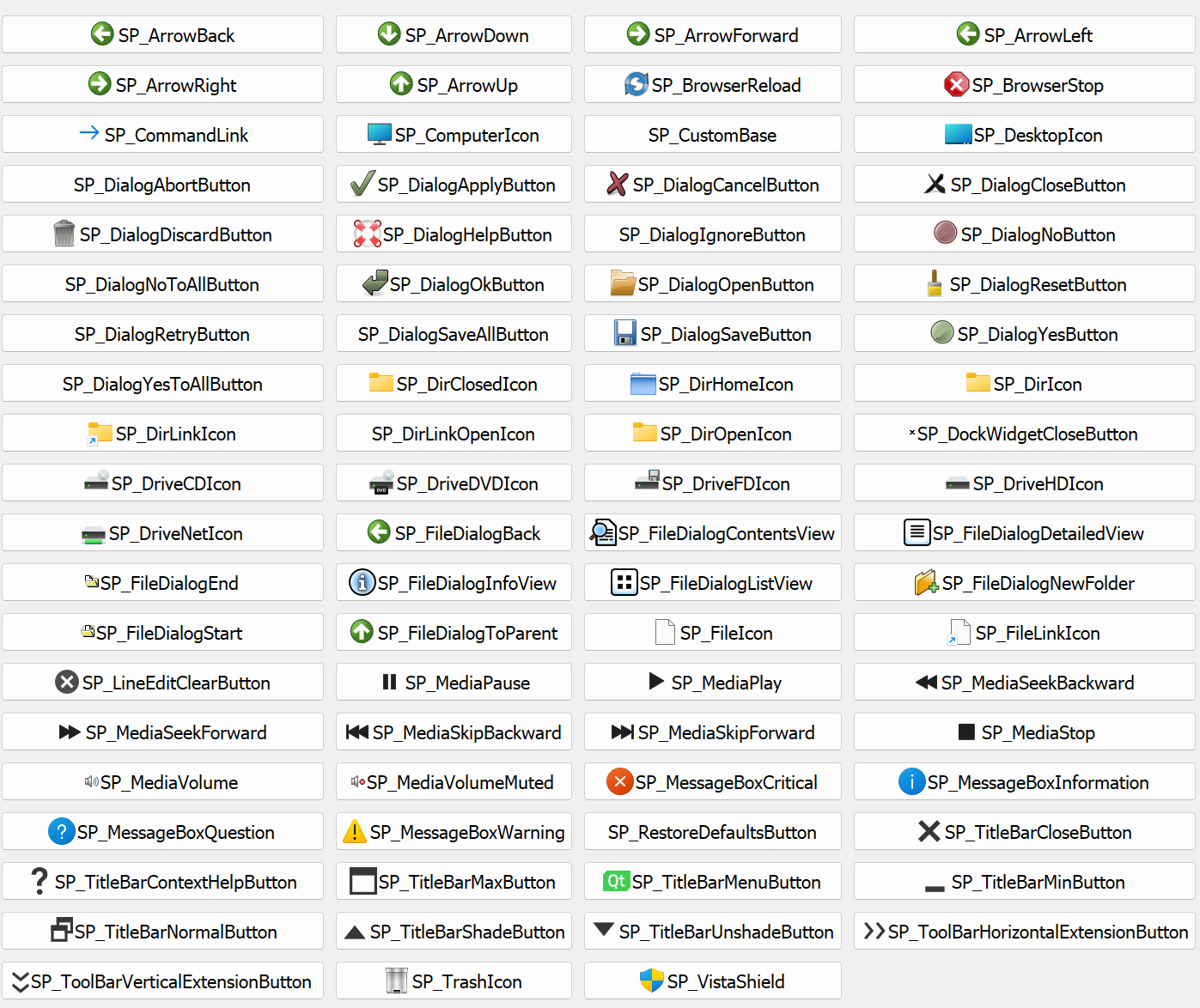
- spiceitup-1.3.4/spiceitup/docs/codimd_backup/2023_07_07.md +111 -0
- spiceitup-1.3.4/spiceitup/docs/codimd_backup/2023_09_26.md +109 -0
- spiceitup-1.3.4/spiceitup/docs/codimd_backup/2023_11_28.md +114 -0
- spiceitup-1.3.4/spiceitup/docs/codimd_backup/2024_06_26.md +110 -0
- spiceitup-1.3.4/spiceitup/docs/codimd_backup/2024_07_12.md +110 -0
- spiceitup-1.3.4/spiceitup/docs/codimd_backup/2024_08_29_TBC.md +121 -0
- spiceitup-1.3.4/spiceitup/docs/layout.drawio +1 -0
- spiceitup-1.3.4/spiceitup/docs/layout.png +0 -0
- spiceitup-1.3.4/spiceitup/docs/menu_layout.ods +0 -0
- spiceitup-1.3.4/spiceitup/docs/microsoft365_backup/SPICE_Quicklook_Tasks_20240912.xlsx +0 -0
- spiceitup-1.3.4/spiceitup/docs/microsoft365_backup/SPICE_Quicklook_Tasks_20241002.xlsx +0 -0
- spiceitup-1.3.4/spiceitup/docs/microsoft365_backup/SPICE_Quicklook_Tasks_20241007.xlsx +0 -0
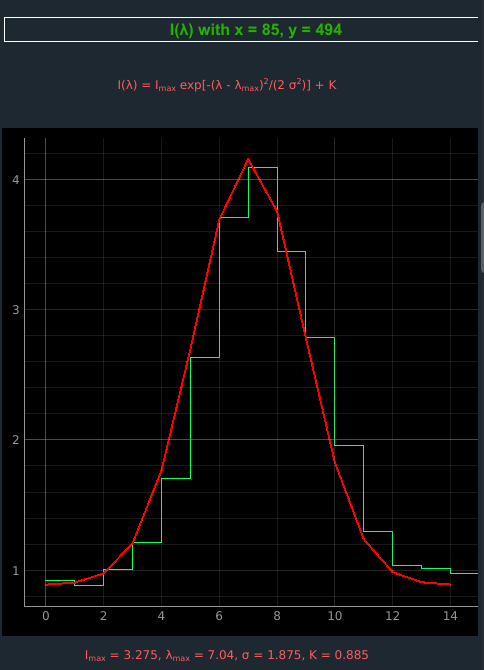
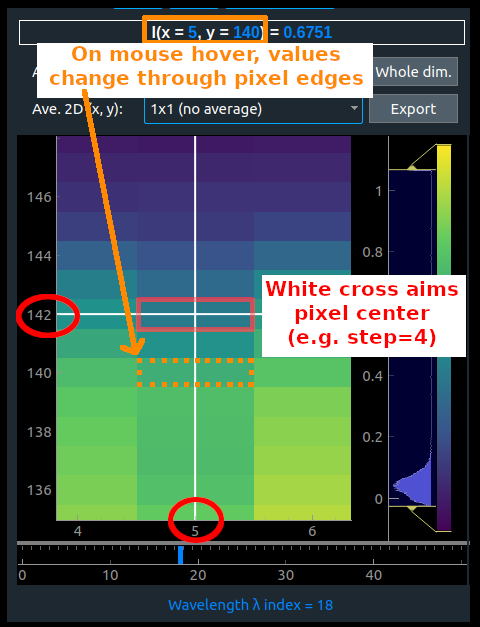
- spiceitup-1.3.4/spiceitup/docs/microsoft365_backup/SPICE_Quicklook_Tasks_20241021.xlsx +0 -0
- spiceitup-1.3.4/spiceitup/docs/microsoft365_backup/SPICE_Quicklook_Tasks_20241102.xlsx +0 -0
- spiceitup-1.3.4/spiceitup/docs/microsoft365_backup/SPICE_Quicklook_Tasks_20241118.xlsx +0 -0
- spiceitup-1.3.4/spiceitup/docs/microsoft365_backup/SPICE_Quicklook_Tasks_20241129.xlsx +0 -0
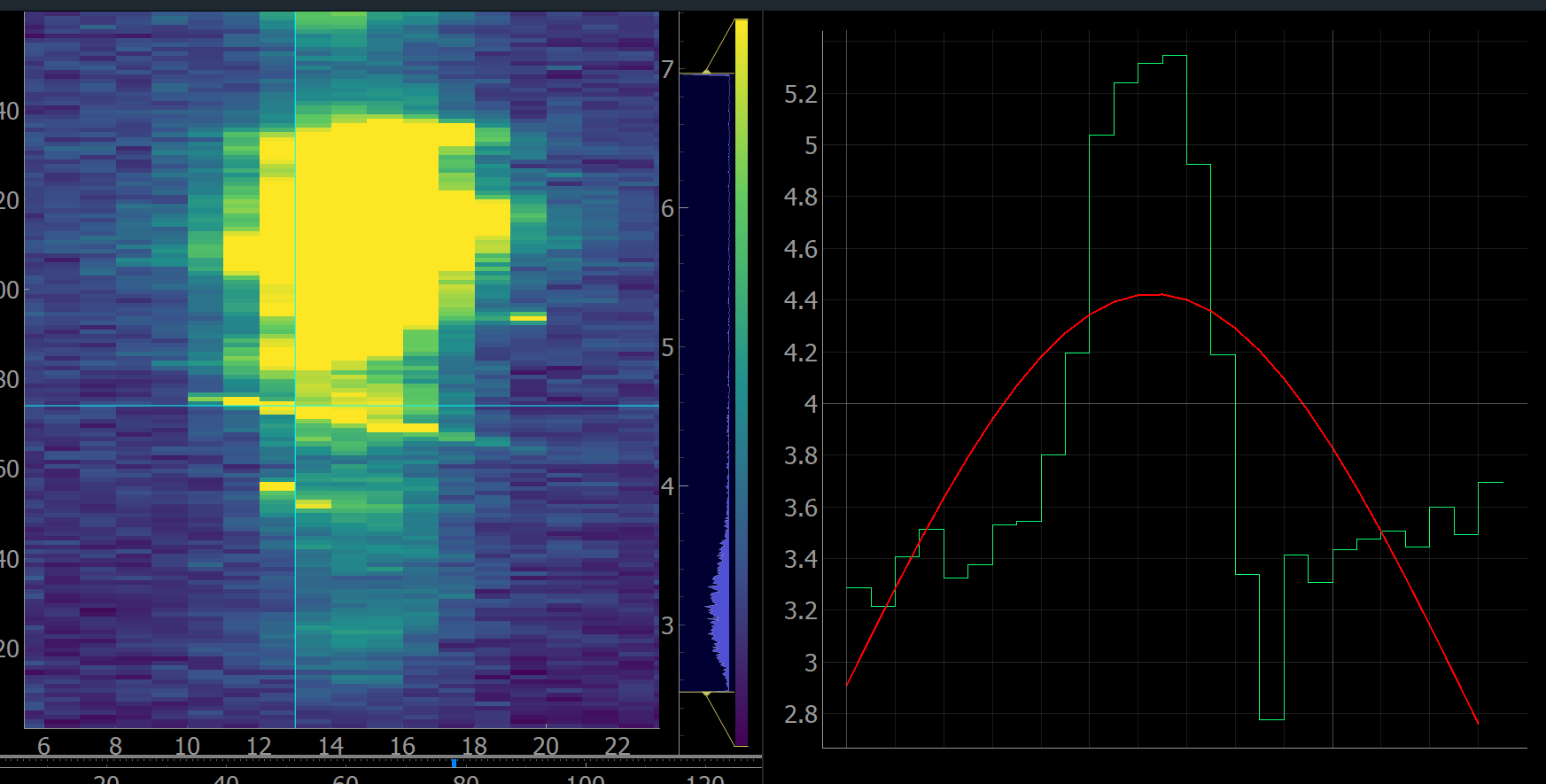
- spiceitup-1.3.4/spiceitup/docs/microsoft365_backup/SPICE_Quicklook_Tasks_20241209.xlsx +0 -0
- spiceitup-1.3.4/spiceitup/docs/microsoft365_backup/SPICE_Quicklook_Tasks_20250120.xlsx +0 -0
- spiceitup-1.3.4/spiceitup/docs/microsoft365_backup/SPICE_Quicklook_Tasks_20250123.xlsx +0 -0
- spiceitup-1.3.4/spiceitup/docs/microsoft365_backup/SPICE_Quicklook_Tasks_20250217.xlsx +0 -0
- spiceitup-1.3.4/spiceitup/docs/plots_layout.ods +0 -0
- spiceitup-1.3.4/spiceitup/docs/user_manual/fit_maps.png +0 -0
- spiceitup-1.3.4/spiceitup/docs/user_manual/screenshot_2025/1.png +0 -0
- spiceitup-1.3.4/spiceitup/docs/user_manual/screenshot_2025/2.png +0 -0
- spiceitup-1.3.4/spiceitup/docs/user_manual/screenshot_2025/3.png +0 -0
- spiceitup-1.3.4/spiceitup/docs/user_manual/screenshot_2025/4.png +0 -0
- spiceitup-1.3.4/spiceitup/docs/user_manual/screenshot_2025/5.png +0 -0
- spiceitup-1.3.4/spiceitup/docs/user_manual/screenshot_2025/6.png +0 -0
- spiceitup-1.3.4/spiceitup/docs/user_manual/screenshot_2025/7.png +0 -0
- spiceitup-1.3.4/spiceitup/docs/user_manual/screenshot_2025/8.png +0 -0
- spiceitup-1.3.4/spiceitup/docs/user_manual/screenshot_2025/9.png +0 -0
- spiceitup-1.3.4/spiceitup/docs/user_manual/screenshot_2025/Screenshot 2025-02-13 115310.png +0 -0
- spiceitup-1.3.4/spiceitup/docs/user_manual/screenshot_2025/fit_maps.png +0 -0
- spiceitup-1.3.4/spiceitup/docs/user_manual/screenshot_2025/footer.png +0 -0
- spiceitup-1.3.4/spiceitup/docs/user_manual/screenshot_2025/full.png +0 -0
- spiceitup-1.3.4/spiceitup/docs/user_manual/screenshot_2025/full.xcf +0 -0
- spiceitup-1.3.4/spiceitup/docs/user_manual/screenshot_2025/lambda.png +0 -0
- spiceitup-1.3.4/spiceitup/docs/user_manual/screenshot_2025/left_menu.png +0 -0
- spiceitup-1.3.4/spiceitup/docs/user_manual/screenshot_2025/ppt1/3D_1.png +0 -0
- spiceitup-1.3.4/spiceitup/docs/user_manual/screenshot_2025/ppt1/3D_2.png +0 -0
- spiceitup-1.3.4/spiceitup/docs/user_manual/screenshot_2025/ppt1/footer.png +0 -0
- spiceitup-1.3.4/spiceitup/docs/user_manual/screenshot_2025/ppt1/lambda.png +0 -0
- spiceitup-1.3.4/spiceitup/docs/user_manual/screenshot_2025/ppt1/lambda_y.png +0 -0
- spiceitup-1.3.4/spiceitup/docs/user_manual/screenshot_2025/ppt1/left_menu.png +0 -0
- spiceitup-1.3.4/spiceitup/docs/user_manual/screenshot_2025/ppt1/ppt1.png +0 -0
- spiceitup-1.3.4/spiceitup/docs/user_manual/screenshot_2025/ppt1/profile.png +0 -0
- spiceitup-1.3.4/spiceitup/docs/user_manual/screenshot_2025/ppt1/red_bars.png +0 -0
- spiceitup-1.3.4/spiceitup/docs/user_manual/screenshot_2025/ppt1/x.png +0 -0
- spiceitup-1.3.4/spiceitup/docs/user_manual/screenshot_2025/ppt1/x_y.png +0 -0
- spiceitup-1.3.4/spiceitup/docs/user_manual/screenshot_2025/ppt1/y.png +0 -0
- spiceitup-1.3.4/spiceitup/docs/user_manual/screenshot_2025/ppt1.pdf +0 -0
- spiceitup-1.3.4/spiceitup/docs/user_manual/screenshot_2025/ppt_screenshots.pptx +0 -0
- spiceitup-1.3.4/spiceitup/docs/user_manual/screenshot_2025/several_x_y.png +0 -0
- spiceitup-1.3.4/spiceitup/docs/user_manual/screenshot_2025/x.png +0 -0
- spiceitup-1.3.4/spiceitup/docs/user_manual/screenshot_2025/y.png +0 -0
- spiceitup-1.3.4/spiceitup/docs/user_manual/several_x_y.png +0 -0
- spiceitup-1.3.4/spiceitup/docs/user_manual/user_documentation.docx +0 -0
- spiceitup-1.3.4/spiceitup/docs/user_manual/user_documentation.pdf +0 -0
- spiceitup-1.3.4/spiceitup/docs/user_manual/user_manual.pptx +0 -0
- spiceitup-1.3.4/spiceitup/docs/user_manual/~$er_documentation.docx +0 -0
- spiceitup-1.3.4/spiceitup/docs/windows_installation.pdf +0 -0
- spiceitup-1.3.4/spiceitup/images/icon.png +0 -0
- spiceitup-1.3.4/spiceitup/images/info.png +0 -0
- spiceitup-1.3.4/spiceitup/images/info2.png +0 -0
- spiceitup-1.3.4/spiceitup/images/info_old.png +0 -0
- spiceitup-1.3.4/spiceitup/layout/__pycache__/flow_layout.cpython-313.pyc +0 -0
- spiceitup-1.3.4/spiceitup/logs/__pycache__/log.cpython-313.pyc +0 -0
- spiceitup-1.3.4/spiceitup/logs/show_debug_console.sh +5 -0
- spiceitup-1.3.4/spiceitup/main/__pycache__/footer.cpython-313.pyc +0 -0
- spiceitup-1.3.4/spiceitup/main/__pycache__/header.cpython-313.pyc +0 -0
- spiceitup-1.3.4/spiceitup/main/__pycache__/menu.cpython-313.pyc +0 -0
- spiceitup-1.3.4/spiceitup/main/__pycache__/menu_bar.cpython-313.pyc +0 -0
- spiceitup-1.3.4/spiceitup/main/__pycache__/w.cpython-313.pyc +0 -0
- spiceitup-1.3.4/spiceitup/main/__pycache__/winc.cpython-313.pyc +0 -0
- spiceitup-1.3.4/spiceitup/plot/__pycache__/plot_line.cpython-313.pyc +0 -0
- spiceitup-1.3.4/spiceitup/plot/__pycache__/plot_map.cpython-313.pyc +0 -0
- spiceitup-1.3.4/spiceitup/pres_notes.txt +4 -0
- spiceitup-1.3.4/spiceitup/processing/__pycache__/dh.cpython-313.pyc +0 -0
- spiceitup-1.3.4/spiceitup/processing/__pycache__/fit.cpython-313.pyc +0 -0
- spiceitup-1.3.4/spiceitup/processing/threads/__pycache__/run_thread.cpython-313.pyc +0 -0
- spiceitup-1.3.4/spiceitup/processing/threads/__pycache__/thread_worker.cpython-313.pyc +0 -0
- spiceitup-1.3.4/spiceitup/processing/threads/workers/__pycache__/compute_average.cpython-313.pyc +0 -0
- spiceitup-1.3.4/spiceitup/processing/threads/workers/__pycache__/generate_fit_maps.cpython-313.pyc +0 -0
- spiceitup-1.3.4/spiceitup/processing/threads/workers/__pycache__/load_plot_map.cpython-313.pyc +0 -0
- spiceitup-1.3.4/spiceitup/processing/threads/workers/__pycache__/make_process_available.cpython-313.pyc +0 -0
- spiceitup-1.3.4/spiceitup/processing/threads/workers/__pycache__/out_of_sync.cpython-313.pyc +0 -0
- spiceitup-1.3.4/spiceitup/processing/threads/workers/__pycache__/update_levels.cpython-313.pyc +0 -0
- spiceitup-1.3.4/spiceitup/processing/threads/workers/__pycache__/update_profile.cpython-313.pyc +0 -0
- spiceitup-1.3.4/spiceitup/processing/threads/workers/how_to_add_a_worker.txt +26 -0
- spiceitup-1.3.4/spiceitup/settings/__pycache__/const.cpython-313.pyc +0 -0
- spiceitup-1.3.4/spiceitup/settings/recent_files.txt +10 -0
- spiceitup-1.3.3/spiceitup/settings/states/__init__.py → spiceitup-1.3.4/spiceitup/settings/states/.gitkeep +0 -0
- spiceitup-1.3.4/spiceitup/settings/states/test.json +1 -0
- spiceitup-1.3.4/spiceitup/settings/states/test2.json +1 -0
- spiceitup-1.3.4/spiceitup/settings/states/test3.json +1 -0
- spiceitup-1.3.4/spiceitup/settings/states/weird_state.json +1 -0
- spiceitup-1.3.4/spiceitup/style/style.css +32 -0
- spiceitup-1.3.4/spiceitup/style/style_debug.css +13 -0
- spiceitup-1.3.4/spiceitup/toolbox/__pycache__/binning.cpython-313.pyc +0 -0
- spiceitup-1.3.4/spiceitup/toolbox/__pycache__/clickable_qlabel.cpython-313.pyc +0 -0
- spiceitup-1.3.4/spiceitup/toolbox/icones_claude.png +0 -0
- spiceitup-1.3.4/spiceitup/toolbox/icons.png +0 -0
- spiceitup-1.3.4/spiceitup/toolbox/images/map_x_y.png +0 -0
- spiceitup-1.3.4/spiceitup/toolbox/images/test.jpg +0 -0
- spiceitup-1.3.4/spiceitup/utils/__init__.py +0 -0
- spiceitup-1.3.4/spiceitup/utils/__pycache__/internal_utils.cpython-313.pyc +0 -0
- {spiceitup-1.3.3 → spiceitup-1.3.4}/spiceitup.egg-info/PKG-INFO +1 -1
- spiceitup-1.3.4/spiceitup.egg-info/SOURCES.txt +179 -0
- spiceitup-1.3.3/spiceitup.egg-info/SOURCES.txt +0 -67
- {spiceitup-1.3.3 → spiceitup-1.3.4}/README.md +0 -0
- {spiceitup-1.3.3 → spiceitup-1.3.4}/pyproject.toml +0 -0
- {spiceitup-1.3.3 → spiceitup-1.3.4}/setup.cfg +0 -0
- {spiceitup-1.3.3 → spiceitup-1.3.4}/spiceitup/__init__.py +0 -0
- {spiceitup-1.3.3 → spiceitup-1.3.4}/spiceitup/__main__.py +0 -0
- {spiceitup-1.3.3 → spiceitup-1.3.4}/spiceitup/docs/__init__.py +0 -0
- {spiceitup-1.3.3 → spiceitup-1.3.4}/spiceitup/images/__init__.py +0 -0
- {spiceitup-1.3.3 → spiceitup-1.3.4}/spiceitup/layout/__init__.py +0 -0
- {spiceitup-1.3.3 → spiceitup-1.3.4}/spiceitup/layout/flow_layout.py +0 -0
- {spiceitup-1.3.3 → spiceitup-1.3.4}/spiceitup/layout/flow_layout_edited.py +0 -0
- {spiceitup-1.3.3 → spiceitup-1.3.4}/spiceitup/layout/flow_layout_old.py +0 -0
- {spiceitup-1.3.3 → spiceitup-1.3.4}/spiceitup/logs/__init__.py +0 -0
- {spiceitup-1.3.3 → spiceitup-1.3.4}/spiceitup/logs/log.py +0 -0
- {spiceitup-1.3.3 → spiceitup-1.3.4}/spiceitup/main/__init__.py +0 -0
- {spiceitup-1.3.3 → spiceitup-1.3.4}/spiceitup/main/footer.py +0 -0
- {spiceitup-1.3.3 → spiceitup-1.3.4}/spiceitup/main/header.py +0 -0
- {spiceitup-1.3.3 → spiceitup-1.3.4}/spiceitup/main/menu.py +0 -0
- {spiceitup-1.3.3 → spiceitup-1.3.4}/spiceitup/main/menu_bar.py +0 -0
- {spiceitup-1.3.3 → spiceitup-1.3.4}/spiceitup/main/w.py +0 -0
- {spiceitup-1.3.3 → spiceitup-1.3.4}/spiceitup/main/winc.py +0 -0
- {spiceitup-1.3.3 → spiceitup-1.3.4}/spiceitup/plot/__init__.py +0 -0
- {spiceitup-1.3.3 → spiceitup-1.3.4}/spiceitup/plot/plot_line.py +0 -0
- {spiceitup-1.3.3 → spiceitup-1.3.4}/spiceitup/plot/plot_map.py +0 -0
- {spiceitup-1.3.3 → spiceitup-1.3.4}/spiceitup/processing/__init__.py +0 -0
- {spiceitup-1.3.3 → spiceitup-1.3.4}/spiceitup/processing/dh.py +0 -0
- {spiceitup-1.3.3 → spiceitup-1.3.4}/spiceitup/processing/fit.py +0 -0
- {spiceitup-1.3.3 → spiceitup-1.3.4}/spiceitup/processing/threads/__init__.py +0 -0
- {spiceitup-1.3.3 → spiceitup-1.3.4}/spiceitup/processing/threads/run_thread.py +0 -0
- {spiceitup-1.3.3 → spiceitup-1.3.4}/spiceitup/processing/threads/thread_worker.py +0 -0
- {spiceitup-1.3.3 → spiceitup-1.3.4}/spiceitup/processing/threads/workers/__init__.py +0 -0
- {spiceitup-1.3.3 → spiceitup-1.3.4}/spiceitup/processing/threads/workers/compute_average.py +0 -0
- {spiceitup-1.3.3 → spiceitup-1.3.4}/spiceitup/processing/threads/workers/generate_fit_maps.py +0 -0
- {spiceitup-1.3.3 → spiceitup-1.3.4}/spiceitup/processing/threads/workers/load_plot_map.py +0 -0
- {spiceitup-1.3.3 → spiceitup-1.3.4}/spiceitup/processing/threads/workers/make_process_available.py +0 -0
- {spiceitup-1.3.3 → spiceitup-1.3.4}/spiceitup/processing/threads/workers/out_of_sync.py +0 -0
- {spiceitup-1.3.3 → spiceitup-1.3.4}/spiceitup/processing/threads/workers/update_levels.py +0 -0
- {spiceitup-1.3.3 → spiceitup-1.3.4}/spiceitup/processing/threads/workers/update_profile.py +0 -0
- {spiceitup-1.3.3 → spiceitup-1.3.4}/spiceitup/run.py +0 -0
- {spiceitup-1.3.3 → spiceitup-1.3.4}/spiceitup/settings/__init__.py +0 -0
- {spiceitup-1.3.3 → spiceitup-1.3.4}/spiceitup/settings/const.py +0 -0
- {spiceitup-1.3.3/spiceitup/style → spiceitup-1.3.4/spiceitup/settings/states}/__init__.py +0 -0
- {spiceitup-1.3.3/spiceitup/toolbox → spiceitup-1.3.4/spiceitup/style}/__init__.py +0 -0
- {spiceitup-1.3.3/spiceitup/toolbox/images → spiceitup-1.3.4/spiceitup/toolbox}/__init__.py +0 -0
- {spiceitup-1.3.3 → spiceitup-1.3.4}/spiceitup/toolbox/binning.py +0 -0
- {spiceitup-1.3.3 → spiceitup-1.3.4}/spiceitup/toolbox/clickable_qlabel.py +0 -0
- {spiceitup-1.3.3 → spiceitup-1.3.4}/spiceitup/toolbox/filter2D_tests.py +0 -0
- {spiceitup-1.3.3/spiceitup/utils → spiceitup-1.3.4/spiceitup/toolbox/images}/__init__.py +0 -0
- {spiceitup-1.3.3 → spiceitup-1.3.4}/spiceitup/toolbox/level_methods.py +0 -0
- {spiceitup-1.3.3 → spiceitup-1.3.4}/spiceitup/toolbox/multithreading.py +0 -0
- {spiceitup-1.3.3 → spiceitup-1.3.4}/spiceitup/toolbox/pyqtgraph_examples.py +0 -0
- {spiceitup-1.3.3 → spiceitup-1.3.4}/spiceitup/toolbox/pyqtgraph_plot_example.py +0 -0
- {spiceitup-1.3.3 → spiceitup-1.3.4}/spiceitup/toolbox/scipy_fit.py +0 -0
- {spiceitup-1.3.3 → spiceitup-1.3.4}/spiceitup/toolbox/scipy_fit_gaussian.py +0 -0
- {spiceitup-1.3.3 → spiceitup-1.3.4}/spiceitup/toolbox/show_icons.py +0 -0
- {spiceitup-1.3.3 → spiceitup-1.3.4}/spiceitup/toolbox/signal_thread_ex.py +0 -0
- {spiceitup-1.3.3 → spiceitup-1.3.4}/spiceitup/toolbox/small_pyqtgraph.py +0 -0
- {spiceitup-1.3.3 → spiceitup-1.3.4}/spiceitup/toolbox/small_pyqtgraph2.py +0 -0
- {spiceitup-1.3.3 → spiceitup-1.3.4}/spiceitup/toolbox/test.py +0 -0
- {spiceitup-1.3.3 → spiceitup-1.3.4}/spiceitup/utils/internal_utils.py +0 -0
- {spiceitup-1.3.3 → spiceitup-1.3.4}/spiceitup/utils/special_chars.py +0 -0
- {spiceitup-1.3.3 → spiceitup-1.3.4}/spiceitup.egg-info/dependency_links.txt +0 -0
- {spiceitup-1.3.3 → spiceitup-1.3.4}/spiceitup.egg-info/entry_points.txt +0 -0
- {spiceitup-1.3.3 → spiceitup-1.3.4}/spiceitup.egg-info/requires.txt +0 -0
- {spiceitup-1.3.3 → spiceitup-1.3.4}/spiceitup.egg-info/top_level.txt +0 -0
|
@@ -0,0 +1 @@
|
|
|
1
|
+
recursive-include spiceitup *.*
|
|
@@ -13,7 +13,7 @@ def load_requirements(filename):
|
|
|
13
13
|
|
|
14
14
|
setup(
|
|
15
15
|
name='spiceitup',
|
|
16
|
-
version='1.3.
|
|
16
|
+
version='1.3.4',
|
|
17
17
|
description='Quicklook tool for level 2 SPICE imaging',
|
|
18
18
|
long_description=open('README.md').read(),
|
|
19
19
|
long_description_content_type='text/markdown',
|
|
@@ -21,6 +21,7 @@ setup(
|
|
|
21
21
|
author_email='david.picard@universite-paris-saclay.fr',
|
|
22
22
|
url='https://git.ias.u-psud.fr/spice/data_quicklook',
|
|
23
23
|
packages=find_packages(),
|
|
24
|
+
include_package_data=True,
|
|
24
25
|
install_requires=[
|
|
25
26
|
"PyQt5",
|
|
26
27
|
"sunraster",
|
|
Binary file
|
|
Binary file
|
|
@@ -0,0 +1,19 @@
|
|
|
1
|
+
2025-11-02T16:44:48 INFO: ------------------------- Application was run
|
|
2
|
+
2025-11-02T16:44:48 INFO: /home/dpicard/Documents/fits/ does not exist.
|
|
3
|
+
2025-11-02T16:44:48 INFO: warn
|
|
4
|
+
2025-11-02T16:45:12 INFO: ------------------------- Application was run
|
|
5
|
+
2025-11-02T16:45:12 INFO: /home/dpicard/Documents/fits/ does not exist.
|
|
6
|
+
2025-11-02T16:45:12 INFO: warn
|
|
7
|
+
2025-11-02T16:45:54 INFO: ------------------------- Application was run
|
|
8
|
+
2025-11-02T16:45:54 INFO: /home/dpicard/Documents/fits/ does not exist.
|
|
9
|
+
2025-11-02T16:45:54 INFO: warn
|
|
10
|
+
2025-11-02T16:47:27 INFO: ------------------------- Application was run
|
|
11
|
+
2025-11-02T16:47:27 INFO: /home/dpicard/Documents/fits/ does not exist.
|
|
12
|
+
2025-11-02T16:47:27 INFO: warn
|
|
13
|
+
2025-11-02T16:48:09 INFO: Interrupting OutOfSync (t = -2)...
|
|
14
|
+
2025-11-02T16:51:15 INFO: Interrupting OutOfSync (t = -2)...
|
|
15
|
+
2025-11-02T16:51:23 INFO: Interrupting OutOfSync (t = -2)...
|
|
16
|
+
2025-11-02T16:51:36 INFO: Interrupting OutOfSync (t = -2)...
|
|
17
|
+
2025-11-02T16:51:45 INFO: Interrupting OutOfSync (t = -2)...
|
|
18
|
+
2025-11-10T13:10:16 INFO: ------------------------- Application was run
|
|
19
|
+
2025-11-10T13:10:29 INFO: Interrupting OutOfSync (t = -2)...
|
|
Binary file
|
|
@@ -0,0 +1,38 @@
|
|
|
1
|
+
Variables: each variable which begins by a few letters and _ is a Qt object:
|
|
2
|
+
> w only is a Window object
|
|
3
|
+
> w_something for QWidget
|
|
4
|
+
> a_something for actions (like a process on button click)
|
|
5
|
+
> m_something for QMenu
|
|
6
|
+
> ma_something for a menu action QAction
|
|
7
|
+
> tb_something for a QToolBar
|
|
8
|
+
> f_something for QFrame
|
|
9
|
+
> q_something for any other Qt object like QFile, QLabel, ...
|
|
10
|
+
> k_something is a QCheckbox
|
|
11
|
+
> l_something, layouts (vbox, hbox, grid...)
|
|
12
|
+
> r_something is a QRadioButton
|
|
13
|
+
> wp_something is a PyQtGraph Widget (pg.GraphicsLayoutWidget)
|
|
14
|
+
> iv_something is an ImageView
|
|
15
|
+
> s_something is a QSlider bar
|
|
16
|
+
> c_something is a QComboBox (like html <select> lists)
|
|
17
|
+
> b_something is a QPushButton
|
|
18
|
+
> i_something is a QLineEdit (like html <input type="text" />)
|
|
19
|
+
> g_something is a QGroupBox
|
|
20
|
+
> Thw_something is a custom worker thread
|
|
21
|
+
> img_something is a QLabel containing a QPixmap (for png images)
|
|
22
|
+
> pb_something is a QProgressBar
|
|
23
|
+
> pf_something is a progress function triggered on thread signal, see run_thread.py
|
|
24
|
+
> rt_something is a RunThread object (not needed except if a progress bar must be manually updated)
|
|
25
|
+
|
|
26
|
+
> *s_something is a list (or dict) of * elements
|
|
27
|
+
with * one related letter of the QObjects previously defined
|
|
28
|
+
|
|
29
|
+
> self.something: self is only used when something is needed through the whole class, in
|
|
30
|
+
this case we "declare" it at the top of the class by
|
|
31
|
+
doing something = None (or '', [], {}, ... according to the type)
|
|
32
|
+
|
|
33
|
+
Print / logs:
|
|
34
|
+
from logs.log import Log
|
|
35
|
+
Use Log.p('Your message', msg_type)
|
|
36
|
+
with msg_type: info, warn or error (optional, default is info)
|
|
37
|
+
It will print into debug.log (actually see log_file defined in settings.py)
|
|
38
|
+
You can watch it in real time: watch -n 0.5 tail -n 110 debug.log
|
|
@@ -0,0 +1,112 @@
|
|
|
1
|
+
---
|
|
2
|
+
tags: SPICE, Qt, Quicklook
|
|
3
|
+
---
|
|
4
|
+
# 2023-06-13 Quicklook Qt meeting
|
|
5
|
+
Participants: **David, Frédéric, Éric, Alfred**
|
|
6
|
+
* [Next notes](https://codimd.math.cnrs.fr/l4T7u6INTHC3H7CXNMvuaw?both#)
|
|
7
|
+
|
|
8
|
+
## Questions
|
|
9
|
+
(You can answer here :grinning:)
|
|
10
|
+
- Do we want to suggest a **global export option**? This way you could choose which windows, plots, parameters... you want to export in one main popup. :arrow_right: ...
|
|
11
|
+
* question was about exporting all maps.
|
|
12
|
+
* Export button next to graph: call Pyqtgraph dialog (same right click) instead of direct output to PNG file with no option
|
|
13
|
+
- Value scaling
|
|
14
|
+
* Changing percentiles
|
|
15
|
+
- To discuss: **loading** heavy data **files** can show **"Force quit"** for a little while (not critical but not clean either). Data loading were already moved to threads but we can't move "display-related" processes to threads (it must be done in the main process, otherwise blackout display issues come up).
|
|
16
|
+
Pyqtgraph needs 100 ms to display a plot (even empty) which leads to e.g. for 8 windows: $0.100 \times 8 \times 6=4.8s$ :arrow_right: ...
|
|
17
|
+
- Are plots **$I(x)$ and $I(y)$** useful to show somewhere? :arrow_right: ...
|
|
18
|
+
- Could be a choice in the current I(λ) plot
|
|
19
|
+
- Should fit maps be $(t,y)$ for sit and stare? :arrow_right: ...
|
|
20
|
+
- Yes, maps are still 2D (t, y).
|
|
21
|
+
- Intensity **level values and pourcentiles** are still "disconnected", is the current behavior good enough? :arrow_right: ...
|
|
22
|
+
- Do show **"Reset zoom"** buttons for each plot or is a global button enough? :arrow_right: ...
|
|
23
|
+
- No need
|
|
24
|
+
- Is it useful to suggest to **hide processes in the footer** once they are done? :arrow_right: ...
|
|
25
|
+
- Better order them by finished status before ordering them by date
|
|
26
|
+
- Do people see all the buttons in the top menu bar? Claude's system seems to hide some of them. :arrow_right: ...
|
|
27
|
+
- Yes
|
|
28
|
+
- Linking $I(x,y)$ maps' **zoom/pane** with "fit maps" make the slider movements really slow, can we let these disconnected? :arrow_right: ...
|
|
29
|
+
- Not so bad?
|
|
30
|
+
- Next **main feature** to focus on? :arrow_right: ...
|
|
31
|
+
|
|
32
|
+
|
|
33
|
+
## Ready to be checked :checkered_flag:
|
|
34
|
+
|
|
35
|
+
- By double-cliking you can aim a $(x,y)$ or $(\lambda,y)$ position in one shot instead of moving horizontal and vertical bars
|
|
36
|
+
- OK
|
|
37
|
+
- Show thread progresses in the footer
|
|
38
|
+
- OK
|
|
39
|
+
- When moving a slider, update everything in real time (i.e. other related sliders, $I(\lambda)$ plot, ...)
|
|
40
|
+
- OK
|
|
41
|
+
- Show mouse coordinates on mouse hover (+ $I$ value)
|
|
42
|
+
- OK
|
|
43
|
+
- Add a button to reset zoom (triggers "View All")
|
|
44
|
+
- OK
|
|
45
|
+
- Fix level option especially for $log$ and $sqrt$ methods (it crashed) and prevent user to click on "Apply" twice
|
|
46
|
+
- OK
|
|
47
|
+
- Automatically reset zoom (View All) on $I(\lambda)$ each time it must be updated
|
|
48
|
+
- OK
|
|
49
|
+
- Find a way to exclude dumbbells in fit maps generation (even better: the user can now select a small region of interest thanks to the grey bars in the $I(x,y)$ map before generating it)
|
|
50
|
+
- Bars are not much visible
|
|
51
|
+
- No need to redisplay the message each time
|
|
52
|
+
- Fix: reload several data files crashed the app
|
|
53
|
+
- Working up to now
|
|
54
|
+
- Abort processes when user loads another data file (--> interrupted progress bar in the footer changes to red)
|
|
55
|
+
- OK
|
|
56
|
+
- Show more study and window details (slit, ...)
|
|
57
|
+
- Change to show all as a list
|
|
58
|
+
- Fix: moving the $y$ horizontal bar worked for the 1st window but didn't correctly for the other ones
|
|
59
|
+
- OK
|
|
60
|
+
- Add an offset $+ K$ in the gaussian fit
|
|
61
|
+
- OK
|
|
62
|
+
- But the NaNs seem to be considered as 0 for the fit and 1D fit plot, they should remain NaN. Also for the 2D map fit.
|
|
63
|
+
- Review the layout of the local level option in order to put side by side a maximum of window blocs, e.g. to view all the $I(x,y)$ maps
|
|
64
|
+
- OK
|
|
65
|
+
- Remove the $y$ slider, the $y$ value is only handled by the horizontal bars
|
|
66
|
+
- OK
|
|
67
|
+
- Show number of current running threads
|
|
68
|
+
- OK
|
|
69
|
+
- Hide ROI and Menu buttons next to maps
|
|
70
|
+
- OK
|
|
71
|
+
- Clarify $x, y, \lambda, t$ next to NAXIS values
|
|
72
|
+
- OK
|
|
73
|
+
- Do not show NaN warnings, no reason to worry, they are in the data
|
|
74
|
+
- OK
|
|
75
|
+
- Sometimes by default, the right part of the $I(x,y)$ map was not visible, "View All" is triggered after loading the maps to fix it
|
|
76
|
+
- OK
|
|
77
|
+
- Moving hardly the 3rd dimension slider of the second map shouldn't freeze the app anymore
|
|
78
|
+
- OK
|
|
79
|
+
- Fix: the fit maps titles were wrong after moving the mouse over one of it
|
|
80
|
+
- OK
|
|
81
|
+
- Add pop-ups to explain what the user can do with fit maps
|
|
82
|
+
- OK
|
|
83
|
+
|
|
84
|
+
## To do next (features)
|
|
85
|
+
- **Keep zoom and pane state after updating the maps** (checkbox, apply average, levels, ...)
|
|
86
|
+
:point_right: *This is solved by restoring ViewBox's state when maps are not "zoom-linked", find a way to make it work with "zoom-linked" maps.*
|
|
87
|
+
- **Global export option**:question:
|
|
88
|
+
- Not needed
|
|
89
|
+
- **Set relevant names in image outputs** (instead of output.png)
|
|
90
|
+
- Yes
|
|
91
|
+
- **Adapt app to Full Spectrum input files**
|
|
92
|
+
- **Show real units instead of cube indexes** (Å, ", ...)
|
|
93
|
+
- There could be a choice
|
|
94
|
+
- **Remove triangles in level histograms**
|
|
95
|
+
- Can be removed
|
|
96
|
+
- **Show a relevant message if the user doesn't load a level 2 fits file**
|
|
97
|
+
- Yes
|
|
98
|
+
- *Cf. Trello board Data quicklook*
|
|
99
|
+
|
|
100
|
+
## To do next (optimization)
|
|
101
|
+
- **Speed up data file loading**
|
|
102
|
+
:point_right: *Still show "Force quit" (for a little while) if there are a lot of windows to display but processings that are updating the display can't be moved to threads in background :warning:*
|
|
103
|
+
- **Double-check memory leak when generating window blocs**
|
|
104
|
+
- Now crashes after loading a few tens of files (in a row; only the last file is open), this is better than before, but should still be improved.
|
|
105
|
+
- **Is it not safe to use `curve_fit` in a thread?**
|
|
106
|
+
- Seems to work.
|
|
107
|
+
- **Secure menu, do not allow to change things while files are loading**
|
|
108
|
+
- **Put "Refresh plots" in a thread to avoid freezes**
|
|
109
|
+
- *Cf. Trello board Data quicklook*
|
|
110
|
+
|
|
111
|
+
## Ideas
|
|
112
|
+
*Cf. Trello board Data quicklook*
|
|
@@ -0,0 +1,111 @@
|
|
|
1
|
+
---
|
|
2
|
+
tags: SPICE, Qt, Quicklook
|
|
3
|
+
---
|
|
4
|
+
# 2023-07-07 Quicklook Qt meeting
|
|
5
|
+
Participants: **David, Frédéric, Éric, Claude, Susanna**
|
|
6
|
+
* [Previous notes](https://codimd.math.cnrs.fr/FsL3R3LRRq6sX2doKEYasQ?both#)
|
|
7
|
+
* [Next notes](https://codimd.math.cnrs.fr/pnaSH3RzQaufDrbjpBcQQw?both)
|
|
8
|
+
|
|
9
|
+
## To do
|
|
10
|
+
|
|
11
|
+
- Some icons look dark underwindows. Here is a list of standard ST icons under windows
|
|
12
|
+
|
|
13
|
+
- When loading remote data, several seconds delay before progress bar is displayed -> show progress bar before? + hourglass?
|
|
14
|
+
- Put "Plots", "Levels" and "Zoom ~~options~~" options in (QGroups?) so that there is a frame (to isolate them better).
|
|
15
|
+
- Rename "Zoom options" to "Zoom"
|
|
16
|
+
- Limit "de-zoom" to original value
|
|
17
|
+
- By default, set "lambda scaling" to 15 (not 1)
|
|
18
|
+
- To test Gaussian fits in a difficult case:
|
|
19
|
+

|
|
20
|
+
- Fits for this file work well (all windows)
|
|
21
|
+

|
|
22
|
+
- Max % textBox too small
|
|
23
|
+
- Spectral profile bars seem to be shifted compared to fit (and then to data), bars should be centered on data points. The fitted curve (in red) could be drawn with a better x-resolution than the data
|
|
24
|
+
|
|
25
|
+
- Changing scale to logarithmic or other (and pressing Apply) has no visible effect
|
|
26
|
+
- Use unicode λ and σ where possible
|
|
27
|
+
- Check the correspondence of the spatial pixel vs. spectral profile.
|
|
28
|
+
|
|
29
|
+
|
|
30
|
+
|
|
31
|
+
## Ready to be checked :checkered_flag:
|
|
32
|
+
- Set tooltips everywhere to explain what buttons and options do
|
|
33
|
+
- Force design (background white instead of low opacity on some systems)
|
|
34
|
+
- Restore (actually remove) NaN values instead of showing zeros in the $I(\lambda)$ histogram so that the gaussian fit doesn't take into account zero values, adapt fit maps calculation as well
|
|
35
|
+
- OK but restore real lambda index (lost when NaN are removed)
|
|
36
|
+
- Set 1-99 % as default levels
|
|
37
|
+
- OK
|
|
38
|
+
- Horizontal grey bars for fit maps generation were not visible enough
|
|
39
|
+
- OK but default range should be wider, and there should be no lower limit at 200px
|
|
40
|
+
- Show only once the warning about the usage of those bars
|
|
41
|
+
- OK
|
|
42
|
+
- Show all the header information with a scroll area in the message boxes (see "i" buttons) instead of using an extra "Detailed text" button (that displays plain ugly black text)
|
|
43
|
+
- OK
|
|
44
|
+
- Review titles in the left menu (Appareance --> Plots, Gradient --> Color bar, ...)
|
|
45
|
+
- OK but remove "options" in Zoom options
|
|
46
|
+
- Review text colors in order to have a global display more "understated" and avoid red text on black backgrounds
|
|
47
|
+
- Review colors for $I(\lambda)$ and fit for black and white backgrounds
|
|
48
|
+
- Move the "i" button (showing the FITS file header) from menu bar to near the data file name
|
|
49
|
+
- OK
|
|
50
|
+
- Hide ticks (colored triangles) in the level histograms
|
|
51
|
+
- OK
|
|
52
|
+
:point_right: _Pyqtgraph restore 2 ticks by default when updating maps (and when user changes map colors), we force "0 tick" each time._
|
|
53
|
+
- Folders venv, env, .venv and .venv must be git ignored
|
|
54
|
+
|
|
55
|
+
## Doing now
|
|
56
|
+
- Connect export button to pyqtgraph export menu
|
|
57
|
+
:point_right: _There is an issue with that: it works only if the right click menu was open at least once before (because it's creating useful objects for pyqtgraph to make the export menu work)_
|
|
58
|
+
- Adapt app. to Full Spectrum input files (i.e. STUDYTYP == Single Exposure): remove map x,y, gaussian fit and fit maps
|
|
59
|
+
- Add a button to cancel a running thread (partially done, only the button is missing: processes are already interrupted when another data file is loaded)
|
|
60
|
+
|
|
61
|
+
|
|
62
|
+
## Formerly checked
|
|
63
|
+
|
|
64
|
+
- By double-cliking you can aim a $(x,y)$ or $(\lambda,y)$ position in one shot instead of moving horizontal and vertical bars
|
|
65
|
+
- OK
|
|
66
|
+
- Show thread progresses in the footer
|
|
67
|
+
- OK
|
|
68
|
+
- When moving a slider, update everything in real time (i.e. other related sliders, $I(\lambda)$ plot, ...)
|
|
69
|
+
- OK
|
|
70
|
+
- Show mouse coordinates on mouse hover (+ $I$ value)
|
|
71
|
+
- OK
|
|
72
|
+
- Add a button to reset zoom (triggers "View All")
|
|
73
|
+
- OK
|
|
74
|
+
- Fix level option especially for $log$ and $sqrt$ methods (it crashed) and prevent user to click on "Apply" twice
|
|
75
|
+
- OK
|
|
76
|
+
- Automatically reset zoom (View All) on $I(\lambda)$ each time it must be updated
|
|
77
|
+
- OK
|
|
78
|
+
- Find a way to exclude dumbbells in fit maps generation (even better: the user can now select a small region of interest thanks to the grey bars in the $I(x,y)$ map before generating it)
|
|
79
|
+
- Bars are not much visible
|
|
80
|
+
- No need to redisplay the message each time
|
|
81
|
+
- Fix: reload several data files crashed the app
|
|
82
|
+
- Working up to now
|
|
83
|
+
- Abort processes when user loads another data file (--> interrupted progress bar in the footer changes to red)
|
|
84
|
+
- OK
|
|
85
|
+
- Show more study and window details (slit, ...)
|
|
86
|
+
- Change to show all as a list
|
|
87
|
+
- Fix: moving the $y$ horizontal bar worked for the 1st window but didn't correctly for the other ones
|
|
88
|
+
- OK
|
|
89
|
+
- Add an offset $+ K$ in the gaussian fit
|
|
90
|
+
- OK
|
|
91
|
+
- But the NaNs seem to be considered as 0 for the fit and 1D fit plot, they should remain NaN. Also for the 2D map fit.
|
|
92
|
+
- Review the layout of the local level option in order to put side by side a maximum of window blocs, e.g. to view all the $I(x,y)$ maps
|
|
93
|
+
- OK
|
|
94
|
+
- Remove the $y$ slider, the $y$ value is only handled by the horizontal bars
|
|
95
|
+
- OK
|
|
96
|
+
- Show number of current running threads
|
|
97
|
+
- OK
|
|
98
|
+
- Hide ROI and Menu buttons next to maps
|
|
99
|
+
- OK
|
|
100
|
+
- Clarify $x, y, \lambda, t$ next to NAXIS values
|
|
101
|
+
- OK
|
|
102
|
+
- Do not show NaN warnings, no reason to worry, they are in the data
|
|
103
|
+
- OK
|
|
104
|
+
- Sometimes by default, the right part of the $I(x,y)$ map was not visible, "View All" is triggered after loading the maps to fix it
|
|
105
|
+
- OK
|
|
106
|
+
- Moving hardly the 3rd dimension slider of the second map shouldn't freeze the app anymore
|
|
107
|
+
- OK
|
|
108
|
+
- Fix: the fit maps titles were wrong after moving the mouse over one of it
|
|
109
|
+
- OK
|
|
110
|
+
- Add pop-ups to explain what the user can do with fit maps
|
|
111
|
+
- OK
|
|
@@ -0,0 +1,109 @@
|
|
|
1
|
+
---
|
|
2
|
+
tags: SPICE, Qt, Quicklook
|
|
3
|
+
---
|
|
4
|
+
# 2023-09-26 Quicklook Qt meeting
|
|
5
|
+
Participants: **David, Frédéric, Éric, Claude, Alfred**
|
|
6
|
+
* [Previous notes](https://codimd.math.cnrs.fr/l4T7u6INTHC3H7CXNMvuaw?both#)
|
|
7
|
+
* [Next notes](https://codimd.math.cnrs.fr/qUGG2nXXQ9u0FHohWA-e8Q?both)
|
|
8
|
+
|
|
9
|
+
Name: SQKL Viewer?
|
|
10
|
+
|
|
11
|
+
## Questions
|
|
12
|
+
Questions are spotted by :question: below, please answer them when you see them...
|
|
13
|
+
|
|
14
|
+
## Ready to be checked :checkered_flag:
|
|
15
|
+
|
|
16
|
+
- Some icons looked dark under windows (from Fred's computer)
|
|
17
|
+
- OK
|
|
18
|
+
- Put "Plots", "Levels" and "Zoom" options in QGroups so that there is a frame (to isolate them better).
|
|
19
|
+
- OK
|
|
20
|
+
- When loading remote data, several seconds delay before progress bar is displayed -> show progress bar before + hourglass
|
|
21
|
+
- OK, there is a first bar appearing immediately, the loading time itself cannot be controlled and there can be no progress bar for this.
|
|
22
|
+
- Nope, marche paaaaas (on Fred's computer, Windows 11)
|
|
23
|
+
- Improve pixel accuracy in maps, see image below: (from Susanna's request)
|
|
24
|
+
|
|
25
|
+
- OK
|
|
26
|
+
- Issue: zoom is looping -> implement a max
|
|
27
|
+
- Same idea: update profile $I(\lambda)$ when the cross (white line) is moved through pixel edges, see below:
|
|
28
|
+
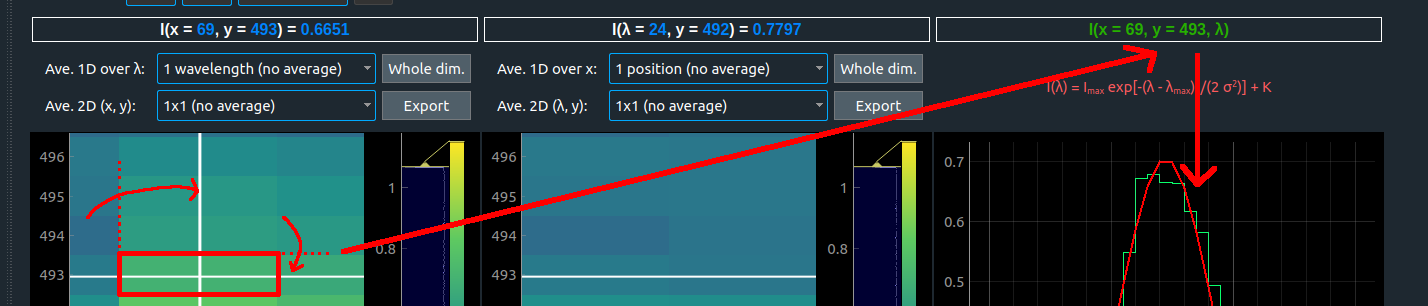
|
|
29
|
+
- OK
|
|
30
|
+
- Fix pixel value on mouse hover:
|
|
31
|
+
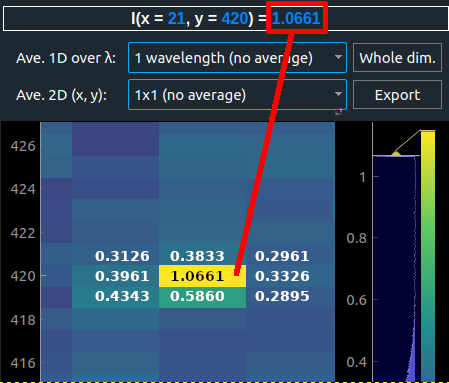
|
|
32
|
+
- OK
|
|
33
|
+
- Remove "Apply" button in global levels and add a thread that triggers when field value changes, stop previous threads if another field changed quickly or if Global radio button is checked (because local levels were potentially changed since)
|
|
34
|
+
- OK
|
|
35
|
+
- Values > 100 are not caught properly before being passed to nanpercentile()
|
|
36
|
+
- Add buttons to cancel running processes in the footer, show whether they are done or cancelled then
|
|
37
|
+
- OK gagné!
|
|
38
|
+
- Cancel stops change of levels for current window, but does not cancel already done changes
|
|
39
|
+
- Fixed: spectral profile bars seem to be shifted compared to fit
|
|
40
|
+
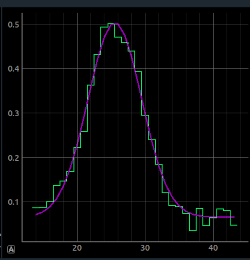
|
|
41
|
+
- OK
|
|
42
|
+
- Fit color changed to purple (fine for black or white backgrounds)
|
|
43
|
+
- Much nicer!
|
|
44
|
+
- $\lambda$ indexes are now kept in $I(\lambda)$
|
|
45
|
+

|
|
46
|
+
- OK, but force lambda range to be fixed. Range should change only when zooming.
|
|
47
|
+
- Need to display fit values & pixel values as binned (or not) data values. Need to keep 3 cubes: original, binned & 8 bits scaled.
|
|
48
|
+
- Cross in maps more visible, color black or white according to selected background
|
|
49
|
+

|
|
50
|
+
- OK
|
|
51
|
+
- Fixed: max % levels text boxes too small
|
|
52
|
+
- OK
|
|
53
|
+
- Change size policy of left part of splitter so that left panel takes always the minimum size required
|
|
54
|
+
- Bug on windows: Open file - > Cancel - > Frozen
|
|
55
|
+
- Add shortcuts for open file (Ctrl O)
|
|
56
|
+
|
|
57
|
+
- Changing scale to logarithmic or other (and pressing Apply) has no visible effect
|
|
58
|
+
:question: Code reviewed but same result, what's wrong? below:
|
|
59
|
+
|
|
60
|
+
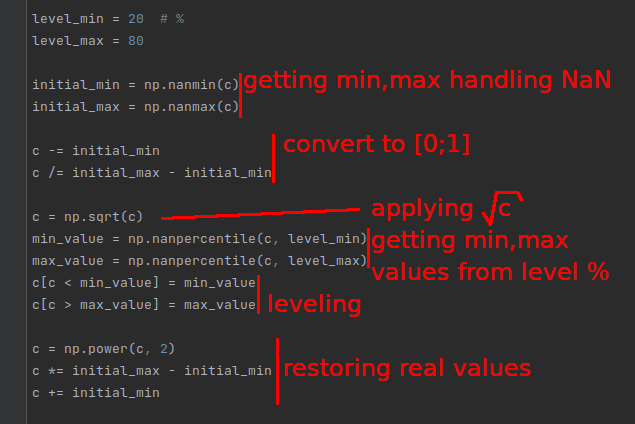
|
|
61
|
+
- Nothing wrong! Find the min max first (on orginal data), then apply stretch. Eventually use astropy.visualization AsymmetricPercentileInterval and LinearStretch / SquareRootStretch / LogStretch
|
|
62
|
+
- By default, set "lambda rescaling" to 15 (not 1)
|
|
63
|
+
- OK
|
|
64
|
+
- Limit "de-zoom" to original value
|
|
65
|
+
- OK, but apply also to profile
|
|
66
|
+
- Fred: To test Gaussian fits in a difficult case, David: I used max value, issue with barycenter if several peaks, see below
|
|
67
|
+

|
|
68
|
+
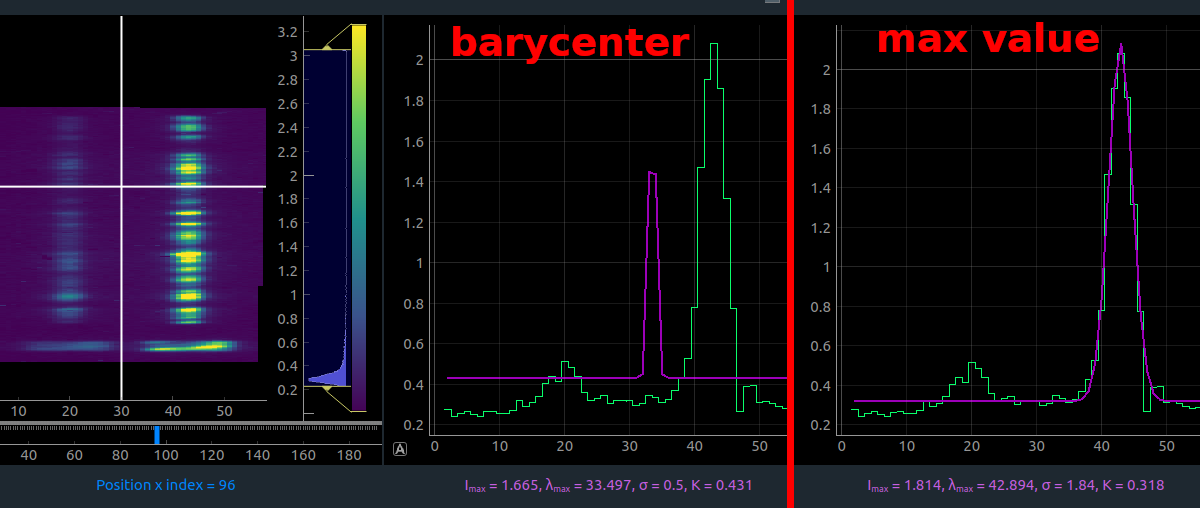
|
|
69
|
+
- OK
|
|
70
|
+
:question: David: here is a thought, can we compute $\chi^2$ and keep trying to fit with different bounds and different ways (val max, barycenter, other...) as long as $\chi^2$ is bad, we stop when $\chi^2<C$
|
|
71
|
+
- Naaaaaan
|
|
72
|
+
- but add χ² value next to fit parameterd
|
|
73
|
+
- Fred: Fits for the file below works well (all windows), David: still seems ok with the new code
|
|
74
|
+
- Great !
|
|
75
|
+

|
|
76
|
+
- Use unicode λ and σ where possible (in order to make checkbox's labels work on click) (David: done, labels on click works but we lose the subscript position for $I_{max}$ and $\lambda_{max}$)
|
|
77
|
+
- OK, remove the max
|
|
78
|
+
- Force tooltip design (background white instead of low opacity on some systems)
|
|
79
|
+
- Soom tooltips not opaque yet ...
|
|
80
|
+
- Rename "Zoom options" to "Zoom"
|
|
81
|
+
- OK
|
|
82
|
+
- Rename title above $I(\lambda)$ e.g. "$I(x=12, y=230, \lambda)$"
|
|
83
|
+
instead of "$I(\lambda)$ with $x=12, y=230$"
|
|
84
|
+
- OK
|
|
85
|
+
- Fit maps bars: default range should be wider (than y∈[200;800]), and there should be no lower limit at 200px
|
|
86
|
+
- OK
|
|
87
|
+
|
|
88
|
+
|
|
89
|
+
## Remains to do
|
|
90
|
+
- The fitted curve (in purple) could be drawn with a better x-resolution than the data
|
|
91
|
+
:question: David: I will do it next. Do we want to perform this only for the display or in every fit map calculation?
|
|
92
|
+
|
|
93
|
+

|
|
94
|
+
- Connect export button to pyqtgraph export menu
|
|
95
|
+
:point_right: *There is an issue with that: for the moment I can make it work only if the right click was done by the user first. It creates or "unlocks" some objects, required by pyqtgraph to display the export menu.*
|
|
96
|
+
- Adapt app. to Full Spectrum input files (i.e. STUDYTYP == Single Exposure): remove map x,y, gaussian fit and fit maps
|
|
97
|
+
- Review pop-ups with explanations
|
|
98
|
+
:question: Shall we replace them by a link to the user documentation instead?
|
|
99
|
+
- Sort processes in the footer (by running ones, then date)
|
|
100
|
+
|
|
101
|
+
## Other questions
|
|
102
|
+
:question: Do we want the "leveled" or original values in $I(\lambda)$?
|
|
103
|
+
- Put real values here
|
|
104
|
+
Example:
|
|
105
|
+
|
|
106
|
+
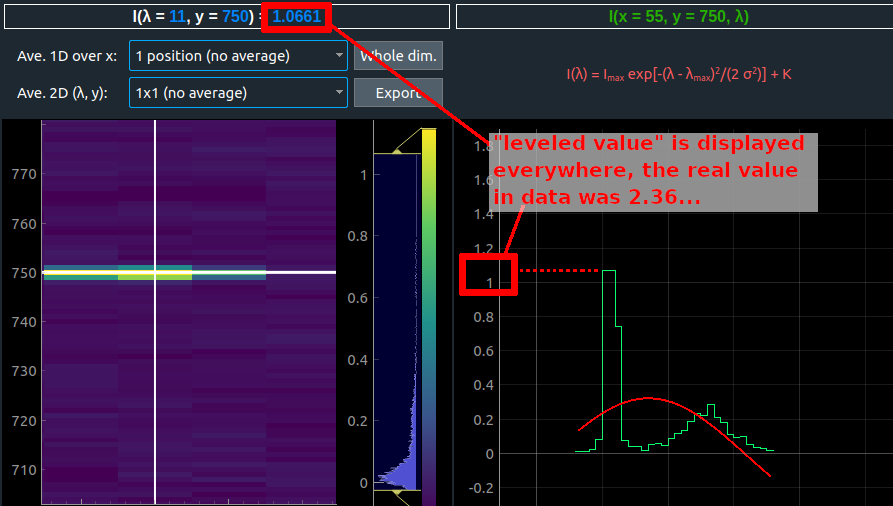
|
|
107
|
+
:question: By the way, we could also suggest to crop the left part in $I(\lambda)$ (instead/besides max level treshold) in order to compute a relevant fit in this case?
|
|
108
|
+
|
|
109
|
+
- original values
|
|
@@ -0,0 +1,114 @@
|
|
|
1
|
+
---
|
|
2
|
+
tags: SPICE, Qt, Quicklook
|
|
3
|
+
---
|
|
4
|
+
# 2023-11-28 Quicklook Qt meeting
|
|
5
|
+
Participants: **David, Frédéric, Éric, Claude, Alfred**
|
|
6
|
+
* [Previous notes](https://codimd.math.cnrs.fr/pnaSH3RzQaufDrbjpBcQQw?both)
|
|
7
|
+
* [Next notes](https://codimd.math.cnrs.fr/0Q_uJd1US4Wgux3-BN10bg?both)
|
|
8
|
+
|
|
9
|
+
## New features
|
|
10
|
+
|
|
11
|
+

|
|
12
|
+
In file history but does not exist anymore -> change error message
|
|
13
|
+
- At leat on windows, a window briefly opens at each generation of a plot.
|
|
14
|
+
|
|
15
|
+
## Suggestions
|
|
16
|
+
- change mouse cursor to arrow when hovering over cut bars
|
|
17
|
+
- For single exposure files, allow I(lambda), but without gaussian fit
|
|
18
|
+
- Bars to select the ROI are not visible when plot is zoomed. Not enough contrast.
|
|
19
|
+
|
|
20
|
+
## Ready to be checked :checkered_flag:
|
|
21
|
+
|
|
22
|
+
- (Add previous/next links in codimd pages to go through all the notes)
|
|
23
|
+
- Bug on windows: Open file - > Cancel - > Frozen
|
|
24
|
+
- OK
|
|
25
|
+
- Prevent user from loading wrong data files (e.g. level 1)
|
|
26
|
+
- OK -> see above, also check for non-existing files
|
|
27
|
+
- Disable menu when loading data (and first time app is open)
|
|
28
|
+
- OK
|
|
29
|
+
:question: Where do we upload the doc? or we could open the doc from the project itself.
|
|
30
|
+
:point_right: **Answer:** ... link to gitlab?
|
|
31
|
+
- Show hourglass when data are loading (ok on Ubuntu 22.04 and Win10)
|
|
32
|
+
- From Fred's computer Win11: OK
|
|
33
|
+
- From Eric's: OK (Ubuntu 23.04)
|
|
34
|
+
- Review english in the app, remove explanations, instead we suggest a link to the user documentation?
|
|
35
|
+
- English looks OK. Suggestion: "The grey bars are used to restrict the ROI used to generate the fit maps (e.g. to ignore dumbbells)."
|
|
36
|
+
- Use unicode λ and σ and remove $_{max}$
|
|
37
|
+
- OK
|
|
38
|
+
- Add shortcuts for open file (Ctrl+O), use Ctrl+L to load the last data file you previously loaded!
|
|
39
|
+
- OK
|
|
40
|
+
- Review behavior when changing scale to logarithmic or other in level option
|
|
41
|
+
:question: We use now the "scaled" values to display the image, are they wrong in the histogram then (next to maps)? Pyqtgraph expects 3D objects to display maps+histograms
|
|
42
|
+
:point_right: **Answer:** yes the values on the histogram axis are "wrong" (they are the scaled values), but maybe this just has to be documented? Matplotlib can handle the color bar scaling correctly, but maybe PyQtGraph can't.
|
|
43
|
+
- Show original values on mouse hover and not the binned/scaled data cube (blue text in plot titles)
|
|
44
|
+
- show the binned + linear values
|
|
45
|
+
- also change Ave 2D in smooth 2D
|
|
46
|
+
- Cancel levels: when using the Cancel button on level process, abort previous changes, no maps should update (to test it: do cancel at the end of the process let's say >50%, the first maps "already leveled" shouldn't change anymore)
|
|
47
|
+
- OK
|
|
48
|
+
- Bug detected and fixed: sometimes $I(\lambda)$ doesn't update because $I(\lambda)$.setData() was performed in a thread instead of the main process, remember we had the same kind of issue when maps became black
|
|
49
|
+
- Limit "de-zoom" to original value OK, but apply **also to profile**
|
|
50
|
+
- OK
|
|
51
|
+
- Prevent user from loading several files (especially by using Ctrl+L twice)
|
|
52
|
+
- OK
|
|
53
|
+
- Global levels: values > 100 are not caught properly before being passed to nanpercentile(), fix: thread is abort if min,max are float in [0;100]
|
|
54
|
+
- Maybe force correct value after computations are finished
|
|
55
|
+
- In $I(\lambda)$ force lambda range to be fixed. Range should change only when zooming
|
|
56
|
+
- OK
|
|
57
|
+
- The fitted curve (in purple) could be drawn with a better x-resolution than the data
|
|
58
|
+
- OK
|
|
59
|
+
- Change size policy of left part of splitter so that left panel takes always the minimum size required
|
|
60
|
+
- OK
|
|
61
|
+
- Add vertical line in profile (but not movable)
|
|
62
|
+
- OK, but could be movable too
|
|
63
|
+
- Keep zoom state in maps after applying levels or averages
|
|
64
|
+
- OK
|
|
65
|
+
- Show $\chi^2$ value next to fit parameters, :question: is this ok: $\chi^2=\sum_i \frac{(I_i-I_{fit,i})^2}{I_{fit,i}}$ with:
|
|
66
|
+
- $I_{i}$: intensity of the "i-th" wavelength value in the histogram
|
|
67
|
+
- $I_{fit,i}$: the intensity value on the fit curve for the same wavelength
|
|
68
|
+
:point_right: **Answer:** use reduced χ² (divide Χ² by number of fitting parameters - 1)
|
|
69
|
+
- Fix important issue on threads and sliders: some refreshes were useless and led to memory leaks, it should be faster now (especially on profile updates)
|
|
70
|
+
- OK
|
|
71
|
+
- Need to display fit values & pixel values as binned (or not) data values. Need to keep 3 cubes: original, binned & 8 bits scaled. **To sum up: "averaged + leveled" in images, original cube for mouse hovering, "averaged + not leveled" in profile $I(\lambda)$**
|
|
72
|
+
:question: What do we show for the profile when selected average = whole dim?
|
|
73
|
+
:point_right: limit fit when at least 4 lambda bins are available, otherwise do not show fit
|
|
74
|
+
:question: For the moment, averages are separately done for $I(x,y)$ and $I(\lambda, y)$ maps, do we have to merge the option for both maps, what is the behavior on the profile then...
|
|
75
|
+
:point_right: **Answer:** ... maybe run a single 3D smooth and keepd displays coherent. TBC.
|
|
76
|
+
- Remove export buttons, already have a right click -> Export option
|
|
77
|
+
- OK
|
|
78
|
+
- Fix tooltip design (opacity on windows)
|
|
79
|
+
- OK
|
|
80
|
+
- Show fit parameters above the profile where more space is available + fix: text was not centered when user decreased plot sizes
|
|
81
|
+
- OK
|
|
82
|
+
- Handle sit-and-stare and full spectrum studies, for full spectrum:
|
|
83
|
+
- Show/hide in the menu is locked and only $I(\lambda,y)$ is checked
|
|
84
|
+
- Lambda rescaling by default set to 1
|
|
85
|
+
|
|
86
|
+
## Remaining to do
|
|
87
|
+
- Review about popup :question: What do we want in the "about" popup? (Fred mentioned his intern's app about this)
|
|
88
|
+
:point_right: **Answer:** IAS contact, release date, Eric's phone number...?
|
|
89
|
+
- Remove "%" value display on the footer bar that is related to "Recovering data file"
|
|
90
|
+
- Sort processes in the footer (by running ones, then date)
|
|
91
|
+
- Issue: zoom is looping -> implement a max
|
|
92
|
+
- Improve fit offset hint: take 1 percentile of the map to find it
|
|
93
|
+
- Write user doc
|
|
94
|
+
- Fix fit maps for sit-and-stare, fit maps should be shown in $(t,y)$ plane not $(x,y)$
|
|
95
|
+
|
|
96
|
+
|
|
97
|
+
## New bugs
|
|
98
|
+
|
|
99
|
+
Fitting:
|
|
100
|
+
|
|
101
|
+
* Open raster (solo_L2_spice-n-ras_20220402T131536_V06_100664004-000.fits), change y fitting boundaries for N IV 765, fit Ne VIII 770. Error:
|
|
102
|
+
```
|
|
103
|
+
File "/home/eric/proposals/SO/SPICEops/visualization/data_quicklook/threads/workers/generate_fit_maps.py", line 30, in run
|
|
104
|
+
intensities = self.main.dh.cube_ready_fit[win_key][x_i, y_i, :]
|
|
105
|
+
~~~~~~~~~~~~~~~~~~~~~~~~~~~~~~~~~~~~^^^^^^^^^^^^^
|
|
106
|
+
IndexError: index 830 is out of bounds for axis 1 with size 830
|
|
107
|
+
```
|
|
108
|
+
* Actually the error is systematic, even when fitting a just-opened file (with no y boundaries changed)
|
|
109
|
+
* Then when one cancels the fit, one cannot re-try (because the fit is "already done")
|
|
110
|
+
* The warning "Before generating fit maps, you can adjust the y bounds (...)" appears systematically, even when the y bounds have already been changed
|
|
111
|
+
|
|
112
|
+
Binnning:
|
|
113
|
+
|
|
114
|
+
* Inconsistency between binning on λ and 2D filtering on (x,y)
|
|
@@ -0,0 +1,110 @@
|
|
|
1
|
+
---
|
|
2
|
+
tags: SPICE, Qt, Quicklook
|
|
3
|
+
---
|
|
4
|
+
# 2024-06-26 Quicklook Qt meeting
|
|
5
|
+
Participants: **David, Frédéric, Éric, Alfred, Salim** (medoc room)
|
|
6
|
+
* [Previous notes](https://codimd.math.cnrs.fr/qUGG2nXXQ9u0FHohWA-e8Q?both#)
|
|
7
|
+
* [Next notes](https://codimd.math.cnrs.fr/qvTgFUegT5axhR6OZ4uH4w#)
|
|
8
|
+
|
|
9
|
+
## Ready to be checked :checkered_flag:
|
|
10
|
+
|
|
11
|
+
- In file history but does not exist anymore -> change error message and delete from recent files
|
|
12
|
+

|
|
13
|
+
|
|
14
|
+
NOK on Frédéric's Windows! probably OK when interface is restarted, but need to refresh live
|
|
15
|
+
|
|
16
|
+
When it works (everyone else): the last file (opened by Ctrl+L) is still the one that is greyed out (if this one has been deleted)
|
|
17
|
+
|
|
18
|
+
* Open raster (solo_L2_spice-n-ras_20220402T131536_V06_100664004-000.fits), change y fitting boundaries for N IV 765, fit Ne VIII 770. Error:
|
|
19
|
+
```
|
|
20
|
+
File "/home/eric/proposals/SO/SPICEops/visualization/data_quicklook/threads/workers/generate_fit_maps.py", line 30, in run
|
|
21
|
+
intensities = self.main.dh.cube_ready_fit[win_key][x_i, y_i, :]
|
|
22
|
+
~~~~~~~~~~~~~~~~~~~~~~~~~~~~~~~~~~~~^^^^^^^^^^^^^
|
|
23
|
+
IndexError: index 830 is out of bounds for axis 1 with size 830
|
|
24
|
+
```
|
|
25
|
+
Actually the error is systematic, even when fitting a just-opened file (with no y boundaries changed) **David: fixed, actually occured when y size was greater than the default y bar position, e.g. in this FITS file: y size is 830 whereas default y position (the upper bar) is 1024**
|
|
26
|
+
|
|
27
|
+
OK!
|
|
28
|
+
|
|
29
|
+
- Explain where to find fit maps results once they are ready
|
|
30
|
+
|
|
31
|
+
OK! but do not show the message if the checkbox is already clicked
|
|
32
|
+
|
|
33
|
+
- Bars to select the ROI are not visible when plot is zoomed. Not enough contrast.
|
|
34
|
+
|
|
35
|
+
Now red, are visible.
|
|
36
|
+
|
|
37
|
+
- For single exposure files, allow I(lambda), but without gaussian fit (+ warn I(x,y) and fits are disabled)
|
|
38
|
+
|
|
39
|
+
OK !
|
|
40
|
+
|
|
41
|
+
|
|
42
|
+
- [previous question]:question: Where do we upload the doc? or we could open the doc from the project itself.
|
|
43
|
+
:point_right: **Answer:** ... link to gitlab?
|
|
44
|
+
|
|
45
|
+
We have to write the documentation first...
|
|
46
|
+
|
|
47
|
+
|
|
48
|
+
- [previous] Review english in the app, remove explanations, instead we suggest a link to the user documentation?
|
|
49
|
+
- English looks OK. Suggestion: "The grey bars are used to restrict the ROI used to generate the fit maps (e.g. to ignore dumbbells)."
|
|
50
|
+
- Use reduced χ² (divide Χ² by number of fitting parameters - 1)
|
|
51
|
+
- Then when one cancels the fit, one cannot re-try (because the fit is "already done")
|
|
52
|
+
- The warning "Before generating fit maps, you can adjust the y bounds (...)" appears systematically, even when the y bounds have already been changed
|
|
53
|
+
|
|
54
|
+
All gooooooood !
|
|
55
|
+
|
|
56
|
+
|
|
57
|
+
## To do next
|
|
58
|
+
|
|
59
|
+
- At least on windows, a window briefly opens at each generation of a plot.
|
|
60
|
+
|
|
61
|
+
- change mouse cursor to arrow when hovering over cut bars
|
|
62
|
+
|
|
63
|
+
We can see that the white bars are active when hovering with mouse. We could do the same for the red bars.
|
|
64
|
+
|
|
65
|
+
- Review behavior when changing scale to logarithmic or other in level option
|
|
66
|
+
:question: We use now the "scaled" values to display the image, are they wrong in the histogram then (next to maps)? Pyqtgraph expects 3D objects to display maps+histograms
|
|
67
|
+
:point_right: **Answer:** yes the values on the histogram axis are "wrong" (they are the scaled values), but maybe this just has to be documented? Matplotlib can handle the color bar scaling correctly, but maybe PyQtGraph can't.
|
|
68
|
+
- Show original values on mouse hover and not the binned/scaled data cube (blue text in plot titles)
|
|
69
|
+
- show the binned + linear values
|
|
70
|
+
- also change Ave 2D in smooth 2D
|
|
71
|
+
- Global levels: values > 100 are not caught properly before being passed to nanpercentile(), fix: thread is abort if min,max are float in [0;100]
|
|
72
|
+
- Maybe force correct value after computations are finished
|
|
73
|
+
- Add vertical line in profile (but not movable)
|
|
74
|
+
- OK, but could be movable too
|
|
75
|
+
- Need to display fit values & pixel values as binned (or not) data values. Need to keep 3 cubes: original, binned & 8 bits scaled. **To sum up: "averaged + leveled" in images, original cube for mouse hovering, "averaged + not leveled" in profile $I(\lambda)$**
|
|
76
|
+
:question: What do we show for the profile when selected average = whole dim?
|
|
77
|
+
:point_right: limit fit when at least 4 lambda bins are available, otherwise do not show fit
|
|
78
|
+
:question: For the moment, averages are separately done for $I(x,y)$ and $I(\lambda, y)$ maps, do we have to merge the option for both maps, what is the behavior on the profile then...
|
|
79
|
+
:point_right: **Answer:** ... maybe run a single 3D smooth and keepd displays coherent. TBC.
|
|
80
|
+
- Handle sit-and-stare and full spectrum studies, for full spectrum:
|
|
81
|
+
- Show/hide in the menu is locked and only $I(\lambda,y)$ is checked
|
|
82
|
+
- Lambda rescaling by default set to 1
|
|
83
|
+
|
|
84
|
+
- Review about popup :question: What do we want in the "about" popup? (Fred mentioned his intern's app about this)
|
|
85
|
+
:point_right: **Answer:** IAS contact, release date, Eric's phone number...?
|
|
86
|
+
- Remove "%" value display on the footer bar that is related to "Recovering data file"
|
|
87
|
+
- Sort processes in the footer (by running ones, then date)
|
|
88
|
+
- Issue: zoom is looping -> implement a max
|
|
89
|
+
- Improve fit offset hint: take 1 percentile of the map to find it
|
|
90
|
+
- Write user doc
|
|
91
|
+
- Fix fit maps for sit-and-stare, fit maps should be shown in $(t,y)$ plane not $(x,y)$
|
|
92
|
+
* Inconsistency between binning on λ and 2D filtering on (x,y)
|
|
93
|
+
|
|
94
|
+
|
|
95
|
+
- (Alfred) Problems with the zoom when 'Link zoom between windows': the x-lambda axis movements are not the same for both graph. Fits filenames used: solo_L2_spice-n-exp_20220407T143611_V04_100664104-000.fits
|
|
96
|
+
|
|
97
|
+
|
|
98
|
+
Reminder of the name ideas:
|
|
99
|
+
|
|
100
|
+
* Minestrone: MINimal Explorer of SPICE ...
|
|
101
|
+
* Instant SPICE
|
|
102
|
+
* Gaspacho
|
|
103
|
+
* Knorr / Maggi
|
|
104
|
+
* SPICE Peek / Peep / Glance / View / Look / Eye...
|
|
105
|
+
* SIT / SPICE IT: SPICE Imaging Tool
|
|
106
|
+
* SPICE IT UP: SPICE Imaging Tool Universal Programme
|
|
107
|
+
* SPICE up your world / SPICE invaders (SPICE Girls)
|
|
108
|
+
* SPICEX (plorer)
|
|
109
|
+
* SeeIT: SpicE Electronic/Explorer Imaging Tool
|
|
110
|
+
|