sonorus-ai 0.1.0__tar.gz
This diff represents the content of publicly available package versions that have been released to one of the supported registries. The information contained in this diff is provided for informational purposes only and reflects changes between package versions as they appear in their respective public registries.
- sonorus_ai-0.1.0/LICENSE +21 -0
- sonorus_ai-0.1.0/MANIFEST.in +5 -0
- sonorus_ai-0.1.0/PKG-INFO +187 -0
- sonorus_ai-0.1.0/README.md +155 -0
- sonorus_ai-0.1.0/pyproject.toml +54 -0
- sonorus_ai-0.1.0/requirements.txt +7 -0
- sonorus_ai-0.1.0/setup.cfg +4 -0
- sonorus_ai-0.1.0/sonorus/__init__.py +166 -0
- sonorus_ai-0.1.0/sonorus/__main__.py +3 -0
- sonorus_ai-0.1.0/sonorus/assets/gpt2.tiktoken +50256 -0
- sonorus_ai-0.1.0/sonorus/assets/mel_filters.npz +0 -0
- sonorus_ai-0.1.0/sonorus/assets/multilingual.tiktoken +50257 -0
- sonorus_ai-0.1.0/sonorus/audio.py +157 -0
- sonorus_ai-0.1.0/sonorus/decoding.py +826 -0
- sonorus_ai-0.1.0/sonorus/model.py +352 -0
- sonorus_ai-0.1.0/sonorus/normalizers/__init__.py +2 -0
- sonorus_ai-0.1.0/sonorus/normalizers/basic.py +80 -0
- sonorus_ai-0.1.0/sonorus/normalizers/english.json +1741 -0
- sonorus_ai-0.1.0/sonorus/normalizers/english.py +552 -0
- sonorus_ai-0.1.0/sonorus/timing.py +388 -0
- sonorus_ai-0.1.0/sonorus/tokenizer.py +397 -0
- sonorus_ai-0.1.0/sonorus/transcribe.py +722 -0
- sonorus_ai-0.1.0/sonorus/triton_ops.py +117 -0
- sonorus_ai-0.1.0/sonorus/utils.py +329 -0
- sonorus_ai-0.1.0/sonorus/version.py +1 -0
- sonorus_ai-0.1.0/sonorus_ai.egg-info/PKG-INFO +187 -0
- sonorus_ai-0.1.0/sonorus_ai.egg-info/SOURCES.txt +34 -0
- sonorus_ai-0.1.0/sonorus_ai.egg-info/dependency_links.txt +1 -0
- sonorus_ai-0.1.0/sonorus_ai.egg-info/entry_points.txt +3 -0
- sonorus_ai-0.1.0/sonorus_ai.egg-info/requires.txt +16 -0
- sonorus_ai-0.1.0/sonorus_ai.egg-info/top_level.txt +1 -0
- sonorus_ai-0.1.0/tests/test_audio.py +19 -0
- sonorus_ai-0.1.0/tests/test_normalizer.py +104 -0
- sonorus_ai-0.1.0/tests/test_timing.py +96 -0
- sonorus_ai-0.1.0/tests/test_tokenizer.py +34 -0
- sonorus_ai-0.1.0/tests/test_transcribe.py +42 -0
sonorus_ai-0.1.0/LICENSE
ADDED
|
@@ -0,0 +1,21 @@
|
|
|
1
|
+
MIT License
|
|
2
|
+
|
|
3
|
+
Copyright (c) 2022 OpenAI
|
|
4
|
+
|
|
5
|
+
Permission is hereby granted, free of charge, to any person obtaining a copy
|
|
6
|
+
of this software and associated documentation files (the "Software"), to deal
|
|
7
|
+
in the Software without restriction, including without limitation the rights
|
|
8
|
+
to use, copy, modify, merge, publish, distribute, sublicense, and/or sell
|
|
9
|
+
copies of the Software, and to permit persons to whom the Software is
|
|
10
|
+
furnished to do so, subject to the following conditions:
|
|
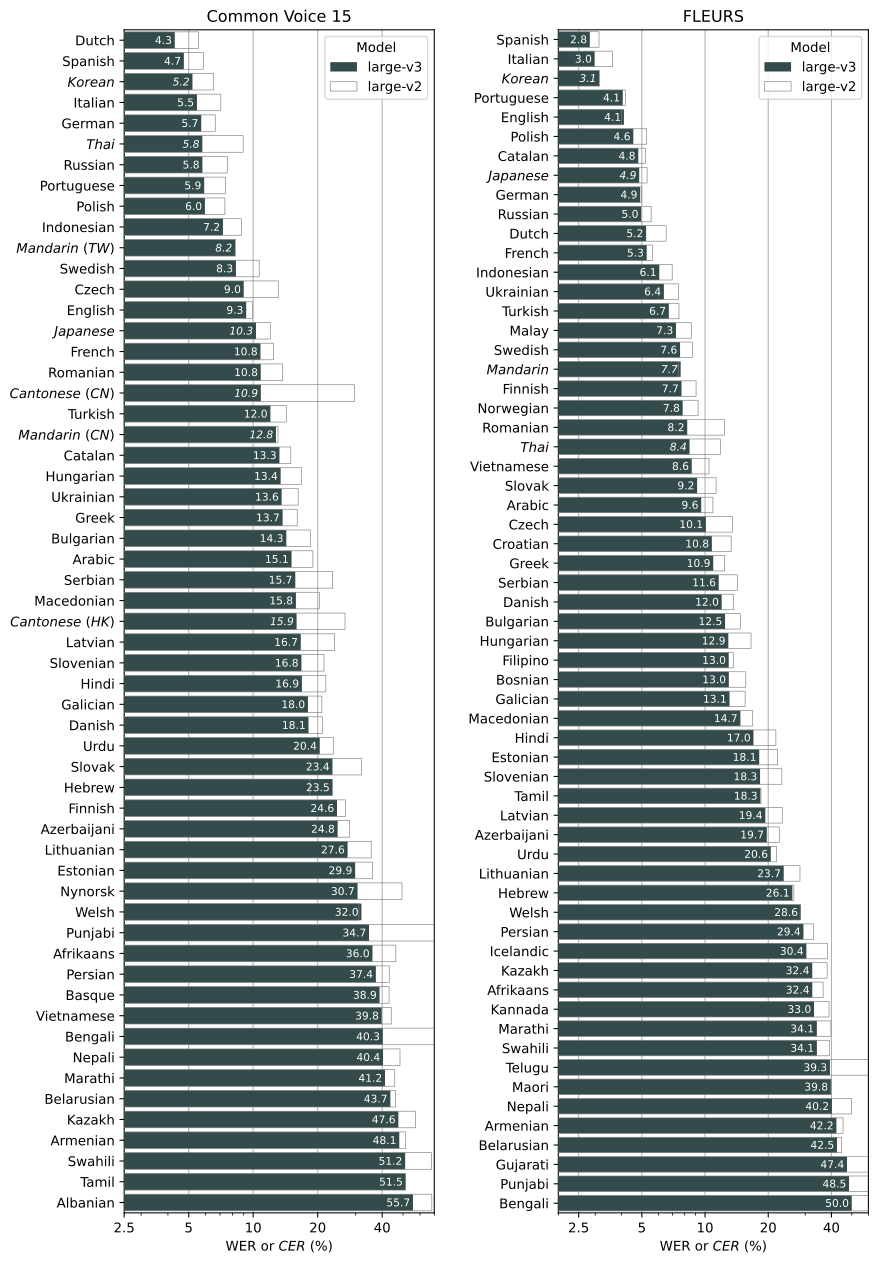
11
|
+
|
|
12
|
+
The above copyright notice and this permission notice shall be included in all
|
|
13
|
+
copies or substantial portions of the Software.
|
|
14
|
+
|
|
15
|
+
THE SOFTWARE IS PROVIDED "AS IS", WITHOUT WARRANTY OF ANY KIND, EXPRESS OR
|
|
16
|
+
IMPLIED, INCLUDING BUT NOT LIMITED TO THE WARRANTIES OF MERCHANTABILITY,
|
|
17
|
+
FITNESS FOR A PARTICULAR PURPOSE AND NONINFRINGEMENT. IN NO EVENT SHALL THE
|
|
18
|
+
AUTHORS OR COPYRIGHT HOLDERS BE LIABLE FOR ANY CLAIM, DAMAGES OR OTHER
|
|
19
|
+
LIABILITY, WHETHER IN AN ACTION OF CONTRACT, TORT OR OTHERWISE, ARISING FROM,
|
|
20
|
+
OUT OF OR IN CONNECTION WITH THE SOFTWARE OR THE USE OR OTHER DEALINGS IN THE
|
|
21
|
+
SOFTWARE.
|
|
@@ -0,0 +1,187 @@
|
|
|
1
|
+
Metadata-Version: 2.4
|
|
2
|
+
Name: sonorus-ai
|
|
3
|
+
Version: 0.1.0
|
|
4
|
+
Summary: Sonorus AI: Robust Speech Recognition and Hinglish Transcription
|
|
5
|
+
Author: Krishnanshu
|
|
6
|
+
License-Expression: MIT
|
|
7
|
+
Project-URL: Homepage, https://github.com/Krishnanshu/sonorus-ai
|
|
8
|
+
Classifier: Programming Language :: Python :: 3 :: Only
|
|
9
|
+
Classifier: Programming Language :: Python :: 3.8
|
|
10
|
+
Classifier: Programming Language :: Python :: 3.9
|
|
11
|
+
Classifier: Programming Language :: Python :: 3.10
|
|
12
|
+
Classifier: Programming Language :: Python :: 3.11
|
|
13
|
+
Classifier: Programming Language :: Python :: 3.12
|
|
14
|
+
Classifier: Programming Language :: Python :: 3.13
|
|
15
|
+
Requires-Python: >=3.8
|
|
16
|
+
Description-Content-Type: text/markdown
|
|
17
|
+
License-File: LICENSE
|
|
18
|
+
Requires-Dist: more-itertools
|
|
19
|
+
Requires-Dist: numba
|
|
20
|
+
Requires-Dist: numpy
|
|
21
|
+
Requires-Dist: tiktoken
|
|
22
|
+
Requires-Dist: torch
|
|
23
|
+
Requires-Dist: tqdm
|
|
24
|
+
Requires-Dist: triton>=2; (platform_machine == "x86_64" and sys_platform == "linux") or sys_platform == "linux2"
|
|
25
|
+
Provides-Extra: dev
|
|
26
|
+
Requires-Dist: black; extra == "dev"
|
|
27
|
+
Requires-Dist: flake8; extra == "dev"
|
|
28
|
+
Requires-Dist: isort; extra == "dev"
|
|
29
|
+
Requires-Dist: pytest; extra == "dev"
|
|
30
|
+
Requires-Dist: scipy; extra == "dev"
|
|
31
|
+
Dynamic: license-file
|
|
32
|
+
|
|
33
|
+
# Sonorus AI (sonorus-ai)
|
|
34
|
+
|
|
35
|
+
**Sonorus AI** is an enhanced, robust speech recognition library built on top of OpenAI's Whisper, featuring:
|
|
36
|
+
- **Native Hinglish Transcription:** Transcribes Hindi speech directly into clean, phonetic Roman English letters (`--language Hinglish`).
|
|
37
|
+
- **Phonetic Corrections:** Built-in vocabulary post-processing to correct common speech transliteration slips (e.g. `bina bikhar`, `mohabbat`, `guroor`).
|
|
38
|
+
- **Clean Output Organization:** Automatically organizes transcriptions into language folders (e.g. `outputs/Hindi/`, `outputs/Hinglish/`, `outputs/English/`) in `.txt` format without cluttering the project root.
|
|
39
|
+
|
|
40
|
+
## Setup
|
|
41
|
+
|
|
42
|
+
You can install Sonorus AI directly using `pip`:
|
|
43
|
+
|
|
44
|
+
```bash
|
|
45
|
+
pip install sonorus-ai
|
|
46
|
+
```
|
|
47
|
+
|
|
48
|
+
Or install in editable mode for local development:
|
|
49
|
+
|
|
50
|
+
```bash
|
|
51
|
+
pip install -e .
|
|
52
|
+
```
|
|
53
|
+
|
|
54
|
+
To update the package to the latest version of this repository, please run:
|
|
55
|
+
|
|
56
|
+
```bash
|
|
57
|
+
pip install --upgrade --no-deps --force-reinstall git+https://github.com/Krishnanshu/sonorus-ai.git
|
|
58
|
+
```
|
|
59
|
+
|
|
60
|
+
It also requires the command-line tool [`ffmpeg`](https://ffmpeg.org/) to be installed on your system, which is available from most package managers:
|
|
61
|
+
|
|
62
|
+
```bash
|
|
63
|
+
# on Ubuntu or Debian
|
|
64
|
+
sudo apt update && sudo apt install ffmpeg
|
|
65
|
+
|
|
66
|
+
# on Arch Linux
|
|
67
|
+
sudo pacman -S ffmpeg
|
|
68
|
+
|
|
69
|
+
# on MacOS using Homebrew (https://brew.sh/)
|
|
70
|
+
brew install ffmpeg
|
|
71
|
+
|
|
72
|
+
# on Windows using Chocolatey (https://chocolatey.org/)
|
|
73
|
+
choco install ffmpeg
|
|
74
|
+
|
|
75
|
+
# on Windows using Scoop (https://scoop.sh/)
|
|
76
|
+
scoop install ffmpeg
|
|
77
|
+
```
|
|
78
|
+
|
|
79
|
+
You may need [`rust`](http://rust-lang.org) installed as well, in case [tiktoken](https://github.com/openai/tiktoken) does not provide a pre-built wheel for your platform. If you see installation errors during the `pip install` command above, please follow the [Getting started page](https://www.rust-lang.org/learn/get-started) to install Rust development environment. Additionally, you may need to configure the `PATH` environment variable, e.g. `export PATH="$HOME/.cargo/bin:$PATH"`. If the installation fails with `No module named 'setuptools_rust'`, you need to install `setuptools_rust`, e.g. by running:
|
|
80
|
+
|
|
81
|
+
```bash
|
|
82
|
+
pip install setuptools-rust
|
|
83
|
+
```
|
|
84
|
+
|
|
85
|
+
## Available models and languages
|
|
86
|
+
|
|
87
|
+
There are six model sizes, four with English-only versions, offering speed and accuracy tradeoffs.
|
|
88
|
+
Below are the names of the available models and their approximate memory requirements and inference speed relative to the large model.
|
|
89
|
+
The relative speeds below are measured by transcribing English speech on a A100, and the real-world speed may vary significantly depending on many factors including the language, the speaking speed, and the available hardware.
|
|
90
|
+
|
|
91
|
+
| Size | Parameters | English-only model | Multilingual model | Required VRAM | Relative speed |
|
|
92
|
+
| :----: | :--------: | :----------------: | :----------------: | :-----------: | :------------: |
|
|
93
|
+
| tiny | 39 M | `tiny.en` | `tiny` | ~1 GB | ~10x |
|
|
94
|
+
| base | 74 M | `base.en` | `base` | ~1 GB | ~7x |
|
|
95
|
+
| small | 244 M | `small.en` | `small` | ~2 GB | ~4x |
|
|
96
|
+
| medium | 769 M | `medium.en` | `medium` | ~5 GB | ~2x |
|
|
97
|
+
| large | 1550 M | N/A | `large` | ~10 GB | 1x |
|
|
98
|
+
| turbo | 809 M | N/A | `turbo` | ~6 GB | ~8x |
|
|
99
|
+
|
|
100
|
+
The `.en` models for English-only applications tend to perform better, especially for the `tiny.en` and `base.en` models. We observed that the difference becomes less significant for the `small.en` and `medium.en` models.
|
|
101
|
+
Additionally, the `turbo` model is an optimized version of `large-v3` that offers faster transcription speed with a minimal degradation in accuracy.
|
|
102
|
+
|
|
103
|
+
Model performance varies depending on the language. The figure below shows a performance breakdown of `large-v3` and `large-v2` models by language, evaluated on the Common Voice 15 and Fleurs datasets.
|
|
104
|
+
|
|
105
|
+
|
|
106
|
+
|
|
107
|
+
## Command-line usage
|
|
108
|
+
|
|
109
|
+
Transcribe speech in audio/video files directly from your terminal using `sonorus` (or `sonorus-ai`):
|
|
110
|
+
|
|
111
|
+
```bash
|
|
112
|
+
# Transcribe Hinglish with automated phonetic correction & clean folder organization
|
|
113
|
+
sonorus "audio.mp4" --model turbo --language Hinglish
|
|
114
|
+
|
|
115
|
+
# Transcribe multiple files
|
|
116
|
+
sonorus audio.flac audio.mp3 audio.wav --model turbo
|
|
117
|
+
```
|
|
118
|
+
|
|
119
|
+
The default setting (which selects the `turbo` model) works well for transcribing English and Hinglish. However, **the `turbo` model is not trained for translation tasks**. If you need to **translate non-English speech into English**, use one of the **multilingual models** (`tiny`, `base`, `small`, `medium`, `large`) instead of `turbo`.
|
|
120
|
+
|
|
121
|
+
For example, to transcribe an audio file containing non-English speech, you can specify the language:
|
|
122
|
+
|
|
123
|
+
```bash
|
|
124
|
+
sonorus japanese.wav --language Japanese
|
|
125
|
+
```
|
|
126
|
+
|
|
127
|
+
To **translate** speech into English, use:
|
|
128
|
+
|
|
129
|
+
```bash
|
|
130
|
+
sonorus japanese.wav --model medium --language Japanese --task translate
|
|
131
|
+
```
|
|
132
|
+
|
|
133
|
+
> **Note:** The `turbo` model will return the original language even if `--task translate` is specified. Use `medium` or `large` for the best translation results.
|
|
134
|
+
|
|
135
|
+
Run the following to view all available options:
|
|
136
|
+
|
|
137
|
+
```bash
|
|
138
|
+
sonorus --help
|
|
139
|
+
```
|
|
140
|
+
|
|
141
|
+
## Python usage
|
|
142
|
+
|
|
143
|
+
Transcription can also be performed within Python:
|
|
144
|
+
|
|
145
|
+
```python
|
|
146
|
+
import sonorus
|
|
147
|
+
|
|
148
|
+
model = sonorus.load_model("turbo")
|
|
149
|
+
result = model.transcribe("audio.mp3")
|
|
150
|
+
print(result["text"])
|
|
151
|
+
```
|
|
152
|
+
|
|
153
|
+
Internally, the `transcribe()` method reads the entire file and processes the audio with a sliding 30-second window, performing autoregressive sequence-to-sequence predictions on each window.
|
|
154
|
+
|
|
155
|
+
Below is an example usage of `sonorus.detect_language()` and `sonorus.decode()` which provide lower-level access to the model:
|
|
156
|
+
|
|
157
|
+
```python
|
|
158
|
+
import sonorus
|
|
159
|
+
|
|
160
|
+
model = sonorus.load_model("turbo")
|
|
161
|
+
|
|
162
|
+
# load audio and pad/trim it to fit 30 seconds
|
|
163
|
+
audio = sonorus.load_audio("audio.mp3")
|
|
164
|
+
audio = sonorus.pad_or_trim(audio)
|
|
165
|
+
|
|
166
|
+
# make log-Mel spectrogram and move to the same device as the model
|
|
167
|
+
mel = sonorus.log_mel_spectrogram(audio, n_mels=model.dims.n_mels).to(model.device)
|
|
168
|
+
|
|
169
|
+
# detect the spoken language
|
|
170
|
+
_, probs = model.detect_language(mel)
|
|
171
|
+
print(f"Detected language: {max(probs, key=probs.get)}")
|
|
172
|
+
|
|
173
|
+
# decode the audio
|
|
174
|
+
options = sonorus.DecodingOptions()
|
|
175
|
+
result = sonorus.decode(model, mel, options)
|
|
176
|
+
|
|
177
|
+
# print the recognized text
|
|
178
|
+
print(result.text)
|
|
179
|
+
```
|
|
180
|
+
|
|
181
|
+
## More examples
|
|
182
|
+
|
|
183
|
+
Please use the [🙌 Show and tell](https://github.com/openai/whisper/discussions/categories/show-and-tell) category in Discussions for sharing more example usages of Whisper and third-party extensions such as web demos, integrations with other tools, ports for different platforms, etc.
|
|
184
|
+
|
|
185
|
+
## License
|
|
186
|
+
|
|
187
|
+
Whisper's code and model weights are released under the MIT License. See [LICENSE](https://github.com/openai/whisper/blob/main/LICENSE) for further details.
|
|
@@ -0,0 +1,155 @@
|
|
|
1
|
+
# Sonorus AI (sonorus-ai)
|
|
2
|
+
|
|
3
|
+
**Sonorus AI** is an enhanced, robust speech recognition library built on top of OpenAI's Whisper, featuring:
|
|
4
|
+
- **Native Hinglish Transcription:** Transcribes Hindi speech directly into clean, phonetic Roman English letters (`--language Hinglish`).
|
|
5
|
+
- **Phonetic Corrections:** Built-in vocabulary post-processing to correct common speech transliteration slips (e.g. `bina bikhar`, `mohabbat`, `guroor`).
|
|
6
|
+
- **Clean Output Organization:** Automatically organizes transcriptions into language folders (e.g. `outputs/Hindi/`, `outputs/Hinglish/`, `outputs/English/`) in `.txt` format without cluttering the project root.
|
|
7
|
+
|
|
8
|
+
## Setup
|
|
9
|
+
|
|
10
|
+
You can install Sonorus AI directly using `pip`:
|
|
11
|
+
|
|
12
|
+
```bash
|
|
13
|
+
pip install sonorus-ai
|
|
14
|
+
```
|
|
15
|
+
|
|
16
|
+
Or install in editable mode for local development:
|
|
17
|
+
|
|
18
|
+
```bash
|
|
19
|
+
pip install -e .
|
|
20
|
+
```
|
|
21
|
+
|
|
22
|
+
To update the package to the latest version of this repository, please run:
|
|
23
|
+
|
|
24
|
+
```bash
|
|
25
|
+
pip install --upgrade --no-deps --force-reinstall git+https://github.com/Krishnanshu/sonorus-ai.git
|
|
26
|
+
```
|
|
27
|
+
|
|
28
|
+
It also requires the command-line tool [`ffmpeg`](https://ffmpeg.org/) to be installed on your system, which is available from most package managers:
|
|
29
|
+
|
|
30
|
+
```bash
|
|
31
|
+
# on Ubuntu or Debian
|
|
32
|
+
sudo apt update && sudo apt install ffmpeg
|
|
33
|
+
|
|
34
|
+
# on Arch Linux
|
|
35
|
+
sudo pacman -S ffmpeg
|
|
36
|
+
|
|
37
|
+
# on MacOS using Homebrew (https://brew.sh/)
|
|
38
|
+
brew install ffmpeg
|
|
39
|
+
|
|
40
|
+
# on Windows using Chocolatey (https://chocolatey.org/)
|
|
41
|
+
choco install ffmpeg
|
|
42
|
+
|
|
43
|
+
# on Windows using Scoop (https://scoop.sh/)
|
|
44
|
+
scoop install ffmpeg
|
|
45
|
+
```
|
|
46
|
+
|
|
47
|
+
You may need [`rust`](http://rust-lang.org) installed as well, in case [tiktoken](https://github.com/openai/tiktoken) does not provide a pre-built wheel for your platform. If you see installation errors during the `pip install` command above, please follow the [Getting started page](https://www.rust-lang.org/learn/get-started) to install Rust development environment. Additionally, you may need to configure the `PATH` environment variable, e.g. `export PATH="$HOME/.cargo/bin:$PATH"`. If the installation fails with `No module named 'setuptools_rust'`, you need to install `setuptools_rust`, e.g. by running:
|
|
48
|
+
|
|
49
|
+
```bash
|
|
50
|
+
pip install setuptools-rust
|
|
51
|
+
```
|
|
52
|
+
|
|
53
|
+
## Available models and languages
|
|
54
|
+
|
|
55
|
+
There are six model sizes, four with English-only versions, offering speed and accuracy tradeoffs.
|
|
56
|
+
Below are the names of the available models and their approximate memory requirements and inference speed relative to the large model.
|
|
57
|
+
The relative speeds below are measured by transcribing English speech on a A100, and the real-world speed may vary significantly depending on many factors including the language, the speaking speed, and the available hardware.
|
|
58
|
+
|
|
59
|
+
| Size | Parameters | English-only model | Multilingual model | Required VRAM | Relative speed |
|
|
60
|
+
| :----: | :--------: | :----------------: | :----------------: | :-----------: | :------------: |
|
|
61
|
+
| tiny | 39 M | `tiny.en` | `tiny` | ~1 GB | ~10x |
|
|
62
|
+
| base | 74 M | `base.en` | `base` | ~1 GB | ~7x |
|
|
63
|
+
| small | 244 M | `small.en` | `small` | ~2 GB | ~4x |
|
|
64
|
+
| medium | 769 M | `medium.en` | `medium` | ~5 GB | ~2x |
|
|
65
|
+
| large | 1550 M | N/A | `large` | ~10 GB | 1x |
|
|
66
|
+
| turbo | 809 M | N/A | `turbo` | ~6 GB | ~8x |
|
|
67
|
+
|
|
68
|
+
The `.en` models for English-only applications tend to perform better, especially for the `tiny.en` and `base.en` models. We observed that the difference becomes less significant for the `small.en` and `medium.en` models.
|
|
69
|
+
Additionally, the `turbo` model is an optimized version of `large-v3` that offers faster transcription speed with a minimal degradation in accuracy.
|
|
70
|
+
|
|
71
|
+
Model performance varies depending on the language. The figure below shows a performance breakdown of `large-v3` and `large-v2` models by language, evaluated on the Common Voice 15 and Fleurs datasets.
|
|
72
|
+
|
|
73
|
+

|
|
74
|
+
|
|
75
|
+
## Command-line usage
|
|
76
|
+
|
|
77
|
+
Transcribe speech in audio/video files directly from your terminal using `sonorus` (or `sonorus-ai`):
|
|
78
|
+
|
|
79
|
+
```bash
|
|
80
|
+
# Transcribe Hinglish with automated phonetic correction & clean folder organization
|
|
81
|
+
sonorus "audio.mp4" --model turbo --language Hinglish
|
|
82
|
+
|
|
83
|
+
# Transcribe multiple files
|
|
84
|
+
sonorus audio.flac audio.mp3 audio.wav --model turbo
|
|
85
|
+
```
|
|
86
|
+
|
|
87
|
+
The default setting (which selects the `turbo` model) works well for transcribing English and Hinglish. However, **the `turbo` model is not trained for translation tasks**. If you need to **translate non-English speech into English**, use one of the **multilingual models** (`tiny`, `base`, `small`, `medium`, `large`) instead of `turbo`.
|
|
88
|
+
|
|
89
|
+
For example, to transcribe an audio file containing non-English speech, you can specify the language:
|
|
90
|
+
|
|
91
|
+
```bash
|
|
92
|
+
sonorus japanese.wav --language Japanese
|
|
93
|
+
```
|
|
94
|
+
|
|
95
|
+
To **translate** speech into English, use:
|
|
96
|
+
|
|
97
|
+
```bash
|
|
98
|
+
sonorus japanese.wav --model medium --language Japanese --task translate
|
|
99
|
+
```
|
|
100
|
+
|
|
101
|
+
> **Note:** The `turbo` model will return the original language even if `--task translate` is specified. Use `medium` or `large` for the best translation results.
|
|
102
|
+
|
|
103
|
+
Run the following to view all available options:
|
|
104
|
+
|
|
105
|
+
```bash
|
|
106
|
+
sonorus --help
|
|
107
|
+
```
|
|
108
|
+
|
|
109
|
+
## Python usage
|
|
110
|
+
|
|
111
|
+
Transcription can also be performed within Python:
|
|
112
|
+
|
|
113
|
+
```python
|
|
114
|
+
import sonorus
|
|
115
|
+
|
|
116
|
+
model = sonorus.load_model("turbo")
|
|
117
|
+
result = model.transcribe("audio.mp3")
|
|
118
|
+
print(result["text"])
|
|
119
|
+
```
|
|
120
|
+
|
|
121
|
+
Internally, the `transcribe()` method reads the entire file and processes the audio with a sliding 30-second window, performing autoregressive sequence-to-sequence predictions on each window.
|
|
122
|
+
|
|
123
|
+
Below is an example usage of `sonorus.detect_language()` and `sonorus.decode()` which provide lower-level access to the model:
|
|
124
|
+
|
|
125
|
+
```python
|
|
126
|
+
import sonorus
|
|
127
|
+
|
|
128
|
+
model = sonorus.load_model("turbo")
|
|
129
|
+
|
|
130
|
+
# load audio and pad/trim it to fit 30 seconds
|
|
131
|
+
audio = sonorus.load_audio("audio.mp3")
|
|
132
|
+
audio = sonorus.pad_or_trim(audio)
|
|
133
|
+
|
|
134
|
+
# make log-Mel spectrogram and move to the same device as the model
|
|
135
|
+
mel = sonorus.log_mel_spectrogram(audio, n_mels=model.dims.n_mels).to(model.device)
|
|
136
|
+
|
|
137
|
+
# detect the spoken language
|
|
138
|
+
_, probs = model.detect_language(mel)
|
|
139
|
+
print(f"Detected language: {max(probs, key=probs.get)}")
|
|
140
|
+
|
|
141
|
+
# decode the audio
|
|
142
|
+
options = sonorus.DecodingOptions()
|
|
143
|
+
result = sonorus.decode(model, mel, options)
|
|
144
|
+
|
|
145
|
+
# print the recognized text
|
|
146
|
+
print(result.text)
|
|
147
|
+
```
|
|
148
|
+
|
|
149
|
+
## More examples
|
|
150
|
+
|
|
151
|
+
Please use the [🙌 Show and tell](https://github.com/openai/whisper/discussions/categories/show-and-tell) category in Discussions for sharing more example usages of Whisper and third-party extensions such as web demos, integrations with other tools, ports for different platforms, etc.
|
|
152
|
+
|
|
153
|
+
## License
|
|
154
|
+
|
|
155
|
+
Whisper's code and model weights are released under the MIT License. See [LICENSE](https://github.com/openai/whisper/blob/main/LICENSE) for further details.
|
|
@@ -0,0 +1,54 @@
|
|
|
1
|
+
[build-system]
|
|
2
|
+
build-backend = "setuptools.build_meta"
|
|
3
|
+
|
|
4
|
+
requires = [ "setuptools>=61.2" ]
|
|
5
|
+
|
|
6
|
+
[project]
|
|
7
|
+
name = "sonorus-ai"
|
|
8
|
+
description = "Sonorus AI: Robust Speech Recognition and Hinglish Transcription"
|
|
9
|
+
readme.content-type = "text/markdown"
|
|
10
|
+
readme.file = "README.md"
|
|
11
|
+
license = "MIT"
|
|
12
|
+
authors = [ { name = "Krishnanshu" } ]
|
|
13
|
+
requires-python = ">=3.8"
|
|
14
|
+
classifiers = [
|
|
15
|
+
"Programming Language :: Python :: 3 :: Only",
|
|
16
|
+
"Programming Language :: Python :: 3.8",
|
|
17
|
+
"Programming Language :: Python :: 3.9",
|
|
18
|
+
"Programming Language :: Python :: 3.10",
|
|
19
|
+
"Programming Language :: Python :: 3.11",
|
|
20
|
+
"Programming Language :: Python :: 3.12",
|
|
21
|
+
"Programming Language :: Python :: 3.13",
|
|
22
|
+
]
|
|
23
|
+
dynamic = [ "version" ]
|
|
24
|
+
dependencies = [
|
|
25
|
+
"more-itertools",
|
|
26
|
+
"numba",
|
|
27
|
+
"numpy",
|
|
28
|
+
"tiktoken",
|
|
29
|
+
"torch",
|
|
30
|
+
"tqdm",
|
|
31
|
+
"triton>=2; (platform_machine=='x86_64' and sys_platform=='linux') or sys_platform=='linux2'",
|
|
32
|
+
]
|
|
33
|
+
optional-dependencies.dev = [ "black", "flake8", "isort", "pytest", "scipy" ]
|
|
34
|
+
urls = { Homepage = "https://github.com/Krishnanshu/sonorus-ai" }
|
|
35
|
+
scripts.sonorus = "sonorus.transcribe:cli"
|
|
36
|
+
scripts.sonorus-ai = "sonorus.transcribe:cli"
|
|
37
|
+
|
|
38
|
+
[tool.setuptools]
|
|
39
|
+
include-package-data = true
|
|
40
|
+
|
|
41
|
+
[tool.setuptools.dynamic]
|
|
42
|
+
version = { attr = "sonorus.version.__version__" }
|
|
43
|
+
|
|
44
|
+
[tool.setuptools.packages.find]
|
|
45
|
+
exclude = [ "tests*" ]
|
|
46
|
+
namespaces = false
|
|
47
|
+
|
|
48
|
+
[tool.black]
|
|
49
|
+
|
|
50
|
+
[tool.isort]
|
|
51
|
+
profile = "black"
|
|
52
|
+
include_trailing_comma = true
|
|
53
|
+
line_length = 88
|
|
54
|
+
multi_line_output = 3
|
|
@@ -0,0 +1,166 @@
|
|
|
1
|
+
import hashlib
|
|
2
|
+
import io
|
|
3
|
+
import os
|
|
4
|
+
import urllib
|
|
5
|
+
import warnings
|
|
6
|
+
from typing import List, Optional, Union
|
|
7
|
+
|
|
8
|
+
import torch
|
|
9
|
+
from tqdm import tqdm
|
|
10
|
+
|
|
11
|
+
from .audio import load_audio, log_mel_spectrogram, pad_or_trim
|
|
12
|
+
from .decoding import DecodingOptions, DecodingResult, decode, detect_language
|
|
13
|
+
from .model import ModelDimensions, Whisper
|
|
14
|
+
from .transcribe import transcribe
|
|
15
|
+
from .version import __version__
|
|
16
|
+
|
|
17
|
+
_MODELS = {
|
|
18
|
+
"tiny.en": "https://openaipublic.azureedge.net/main/whisper/models/d3dd57d32accea0b295c96e26691aa14d8822fac7d9d27d5dc00b4ca2826dd03/tiny.en.pt",
|
|
19
|
+
"tiny": "https://openaipublic.azureedge.net/main/whisper/models/65147644a518d12f04e32d6f3b26facc3f8dd46e5390956a9424a650c0ce22b9/tiny.pt",
|
|
20
|
+
"base.en": "https://openaipublic.azureedge.net/main/whisper/models/25a8566e1d0c1e2231d1c762132cd20e0f96a85d16145c3a00adf5d1ac670ead/base.en.pt",
|
|
21
|
+
"base": "https://openaipublic.azureedge.net/main/whisper/models/ed3a0b6b1c0edf879ad9b11b1af5a0e6ab5db9205f891f668f8b0e6c6326e34e/base.pt",
|
|
22
|
+
"small.en": "https://openaipublic.azureedge.net/main/whisper/models/f953ad0fd29cacd07d5a9eda5624af0f6bcf2258be67c92b79389873d91e0872/small.en.pt",
|
|
23
|
+
"small": "https://openaipublic.azureedge.net/main/whisper/models/9ecf779972d90ba49c06d968637d720dd632c55bbf19d441fb42bf17a411e794/small.pt",
|
|
24
|
+
"medium.en": "https://openaipublic.azureedge.net/main/whisper/models/d7440d1dc186f76616474e0ff0b3b6b879abc9d1a4926b7adfa41db2d497ab4f/medium.en.pt",
|
|
25
|
+
"medium": "https://openaipublic.azureedge.net/main/whisper/models/345ae4da62f9b3d59415adc60127b97c714f32e89e936602e85993674d08dcb1/medium.pt",
|
|
26
|
+
"large-v1": "https://openaipublic.azureedge.net/main/whisper/models/e4b87e7e0bf463eb8e6956e646f1e277e901512310def2c24bf0e11bd3c28e9a/large-v1.pt",
|
|
27
|
+
"large-v2": "https://openaipublic.azureedge.net/main/whisper/models/81f7c96c852ee8fc832187b0132e569d6c3065a3252ed18e56effd0b6a73e524/large-v2.pt",
|
|
28
|
+
"large-v3": "https://openaipublic.azureedge.net/main/whisper/models/e5b1a55b89c1367dacf97e3e19bfd829a01529dbfdeefa8caeb59b3f1b81dadb/large-v3.pt",
|
|
29
|
+
"large": "https://openaipublic.azureedge.net/main/whisper/models/e5b1a55b89c1367dacf97e3e19bfd829a01529dbfdeefa8caeb59b3f1b81dadb/large-v3.pt",
|
|
30
|
+
"large-v3-turbo": "https://openaipublic.azureedge.net/main/whisper/models/aff26ae408abcba5fbf8813c21e62b0941638c5f6eebfb145be0c9839262a19a/large-v3-turbo.pt",
|
|
31
|
+
"turbo": "https://openaipublic.azureedge.net/main/whisper/models/aff26ae408abcba5fbf8813c21e62b0941638c5f6eebfb145be0c9839262a19a/large-v3-turbo.pt",
|
|
32
|
+
}
|
|
33
|
+
|
|
34
|
+
# base85-encoded (n_layers, n_heads) boolean arrays indicating the cross-attention heads that are
|
|
35
|
+
# highly correlated to the word-level timing, i.e. the alignment between audio and text tokens.
|
|
36
|
+
_ALIGNMENT_HEADS = {
|
|
37
|
+
"tiny.en": b"ABzY8J1N>@0{>%R00Bk>$p{7v037`oCl~+#00",
|
|
38
|
+
"tiny": b"ABzY8bu8Lr0{>%RKn9Fp%m@SkK7Kt=7ytkO",
|
|
39
|
+
"base.en": b"ABzY8;40c<0{>%RzzG;p*o+Vo09|#PsxSZm00",
|
|
40
|
+
"base": b"ABzY8KQ!870{>%RzyTQH3`Q^yNP!>##QT-<FaQ7m",
|
|
41
|
+
"small.en": b"ABzY8>?_)10{>%RpeA61k&I|OI3I$65C{;;pbCHh0B{qLQ;+}v00",
|
|
42
|
+
"small": b"ABzY8DmU6=0{>%Rpa?J`kvJ6qF(V^F86#Xh7JUGMK}P<N0000",
|
|
43
|
+
"medium.en": b"ABzY8usPae0{>%R7<zz_OvQ{)4kMa0BMw6u5rT}kRKX;$NfYBv00*Hl@qhsU00",
|
|
44
|
+
"medium": b"ABzY8B0Jh+0{>%R7}kK1fFL7w6%<-Pf*t^=N)Qr&0RR9",
|
|
45
|
+
"large-v1": b"ABzY8r9j$a0{>%R7#4sLmoOs{s)o3~84-RPdcFk!JR<kSfC2yj",
|
|
46
|
+
"large-v2": b"ABzY8zd+h!0{>%R7=D0pU<_bnWW*tkYAhobTNnu$jnkEkXqp)j;w1Tzk)UH3X%SZd&fFZ2fC2yj",
|
|
47
|
+
"large-v3": b"ABzY8gWO1E0{>%R7(9S+Kn!D~%ngiGaR?*L!iJG9p-nab0JQ=-{D1-g00",
|
|
48
|
+
"large": b"ABzY8gWO1E0{>%R7(9S+Kn!D~%ngiGaR?*L!iJG9p-nab0JQ=-{D1-g00",
|
|
49
|
+
"large-v3-turbo": b"ABzY8j^C+e0{>%RARaKHP%t(lGR*)0g!tONPyhe`",
|
|
50
|
+
"turbo": b"ABzY8j^C+e0{>%RARaKHP%t(lGR*)0g!tONPyhe`",
|
|
51
|
+
}
|
|
52
|
+
|
|
53
|
+
|
|
54
|
+
def _download(url: str, root: str, in_memory: bool) -> Union[bytes, str]:
|
|
55
|
+
os.makedirs(root, exist_ok=True)
|
|
56
|
+
|
|
57
|
+
expected_sha256 = url.split("/")[-2]
|
|
58
|
+
download_target = os.path.join(root, os.path.basename(url))
|
|
59
|
+
|
|
60
|
+
if os.path.exists(download_target) and not os.path.isfile(download_target):
|
|
61
|
+
raise RuntimeError(f"{download_target} exists and is not a regular file")
|
|
62
|
+
|
|
63
|
+
if os.path.isfile(download_target):
|
|
64
|
+
with open(download_target, "rb") as f:
|
|
65
|
+
model_bytes = f.read()
|
|
66
|
+
if hashlib.sha256(model_bytes).hexdigest() == expected_sha256:
|
|
67
|
+
return model_bytes if in_memory else download_target
|
|
68
|
+
else:
|
|
69
|
+
warnings.warn(
|
|
70
|
+
f"{download_target} exists, but the SHA256 checksum does not match; re-downloading the file"
|
|
71
|
+
)
|
|
72
|
+
|
|
73
|
+
with urllib.request.urlopen(url) as source, open(download_target, "wb") as output:
|
|
74
|
+
with tqdm(
|
|
75
|
+
total=int(source.info().get("Content-Length")),
|
|
76
|
+
ncols=80,
|
|
77
|
+
unit="iB",
|
|
78
|
+
unit_scale=True,
|
|
79
|
+
unit_divisor=1024,
|
|
80
|
+
) as loop:
|
|
81
|
+
while True:
|
|
82
|
+
buffer = source.read(8192)
|
|
83
|
+
if not buffer:
|
|
84
|
+
break
|
|
85
|
+
|
|
86
|
+
output.write(buffer)
|
|
87
|
+
loop.update(len(buffer))
|
|
88
|
+
|
|
89
|
+
model_bytes = open(download_target, "rb").read()
|
|
90
|
+
if hashlib.sha256(model_bytes).hexdigest() != expected_sha256:
|
|
91
|
+
raise RuntimeError(
|
|
92
|
+
"Model has been downloaded but the SHA256 checksum does not not match. Please retry loading the model."
|
|
93
|
+
)
|
|
94
|
+
|
|
95
|
+
return model_bytes if in_memory else download_target
|
|
96
|
+
|
|
97
|
+
|
|
98
|
+
def available_models() -> List[str]:
|
|
99
|
+
"""Returns the names of available models"""
|
|
100
|
+
return list(_MODELS.keys())
|
|
101
|
+
|
|
102
|
+
|
|
103
|
+
def load_model(
|
|
104
|
+
name: str,
|
|
105
|
+
device: Optional[Union[str, torch.device]] = None,
|
|
106
|
+
download_root: str = None,
|
|
107
|
+
in_memory: bool = False,
|
|
108
|
+
) -> Whisper:
|
|
109
|
+
"""
|
|
110
|
+
Load a Whisper ASR model
|
|
111
|
+
|
|
112
|
+
Parameters
|
|
113
|
+
----------
|
|
114
|
+
name : str
|
|
115
|
+
one of the official model names listed by `whisper.available_models()`, or
|
|
116
|
+
path to a model checkpoint containing the model dimensions and the model state_dict.
|
|
117
|
+
device : Union[str, torch.device]
|
|
118
|
+
the PyTorch device to put the model into
|
|
119
|
+
download_root: str
|
|
120
|
+
path to download the model files; by default, it uses "~/.cache/whisper"
|
|
121
|
+
in_memory: bool
|
|
122
|
+
whether to preload the model weights into host memory
|
|
123
|
+
|
|
124
|
+
Returns
|
|
125
|
+
-------
|
|
126
|
+
model : Whisper
|
|
127
|
+
The Whisper ASR model instance
|
|
128
|
+
"""
|
|
129
|
+
|
|
130
|
+
if device is None:
|
|
131
|
+
device = "cuda" if torch.cuda.is_available() else "cpu"
|
|
132
|
+
if download_root is None:
|
|
133
|
+
default = os.path.join(os.path.expanduser("~"), ".cache")
|
|
134
|
+
whisper_cache = os.path.join(os.getenv("XDG_CACHE_HOME", default), "whisper")
|
|
135
|
+
sonorus_cache = os.path.join(os.getenv("XDG_CACHE_HOME", default), "sonorus")
|
|
136
|
+
if os.path.exists(whisper_cache):
|
|
137
|
+
download_root = whisper_cache
|
|
138
|
+
else:
|
|
139
|
+
download_root = sonorus_cache
|
|
140
|
+
|
|
141
|
+
if name in _MODELS:
|
|
142
|
+
checkpoint_file = _download(_MODELS[name], download_root, in_memory)
|
|
143
|
+
alignment_heads = _ALIGNMENT_HEADS[name]
|
|
144
|
+
elif os.path.isfile(name):
|
|
145
|
+
checkpoint_file = open(name, "rb").read() if in_memory else name
|
|
146
|
+
alignment_heads = None
|
|
147
|
+
else:
|
|
148
|
+
raise RuntimeError(
|
|
149
|
+
f"Model {name} not found; available models = {available_models()}"
|
|
150
|
+
)
|
|
151
|
+
|
|
152
|
+
with (
|
|
153
|
+
io.BytesIO(checkpoint_file) if in_memory else open(checkpoint_file, "rb")
|
|
154
|
+
) as fp:
|
|
155
|
+
kwargs = {"weights_only": True} if torch.__version__ >= "1.13" else {}
|
|
156
|
+
checkpoint = torch.load(fp, map_location=device, **kwargs)
|
|
157
|
+
del checkpoint_file
|
|
158
|
+
|
|
159
|
+
dims = ModelDimensions(**checkpoint["dims"])
|
|
160
|
+
model = Whisper(dims)
|
|
161
|
+
model.load_state_dict(checkpoint["model_state_dict"])
|
|
162
|
+
|
|
163
|
+
if alignment_heads is not None:
|
|
164
|
+
model.set_alignment_heads(alignment_heads)
|
|
165
|
+
|
|
166
|
+
return model.to(device)
|