solradviewer 0.1.0__tar.gz
This diff represents the content of publicly available package versions that have been released to one of the supported registries. The information contained in this diff is provided for informational purposes only and reflects changes between package versions as they appear in their respective public registries.
- solradviewer-0.1.0/MANIFEST.in +12 -0
- solradviewer-0.1.0/PKG-INFO +228 -0
- solradviewer-0.1.0/README.md +204 -0
- solradviewer-0.1.0/frontend/index.html +12 -0
- solradviewer-0.1.0/frontend/package-lock.json +1758 -0
- solradviewer-0.1.0/frontend/package.json +23 -0
- solradviewer-0.1.0/frontend/scripts/master-clock-probe.mjs +18 -0
- solradviewer-0.1.0/frontend/scripts/p4-layer-probe.mjs +37 -0
- solradviewer-0.1.0/frontend/scripts/p6-probe.mjs +31 -0
- solradviewer-0.1.0/frontend/scripts/palette-probe.mjs +37 -0
- solradviewer-0.1.0/frontend/scripts/scheduler-probe.mjs +75 -0
- solradviewer-0.1.0/frontend/src/App.css +2851 -0
- solradviewer-0.1.0/frontend/src/App.tsx +14388 -0
- solradviewer-0.1.0/frontend/src/frameScheduler.ts +932 -0
- solradviewer-0.1.0/frontend/src/main.tsx +10 -0
- solradviewer-0.1.0/frontend/src/radioColormaps.ts +117 -0
- solradviewer-0.1.0/frontend/src/timeResolution.ts +53 -0
- solradviewer-0.1.0/frontend/src/vite-env.d.ts +1 -0
- solradviewer-0.1.0/frontend/tsconfig.json +20 -0
- solradviewer-0.1.0/frontend/tsconfig.node.json +10 -0
- solradviewer-0.1.0/frontend/vite.config.ts +13 -0
- solradviewer-0.1.0/pyproject.toml +48 -0
- solradviewer-0.1.0/scripts/build-release.sh +39 -0
- solradviewer-0.1.0/scripts/check-installed.py +67 -0
- solradviewer-0.1.0/setup.cfg +4 -0
- solradviewer-0.1.0/solradviewer/__init__.py +3 -0
- solradviewer-0.1.0/solradviewer/__main__.py +7 -0
- solradviewer-0.1.0/solradviewer/backend/__init__.py +1 -0
- solradviewer-0.1.0/solradviewer/backend/app.py +2457 -0
- solradviewer-0.1.0/solradviewer/backend/data.py +8182 -0
- solradviewer-0.1.0/solradviewer/cli.py +47 -0
- solradviewer-0.1.0/solradviewer/web/assets/index-BkH_EoLT.js +256 -0
- solradviewer-0.1.0/solradviewer/web/assets/index-qOywtiCV.css +1 -0
- solradviewer-0.1.0/solradviewer/web/index.html +13 -0
- solradviewer-0.1.0/solradviewer.egg-info/PKG-INFO +228 -0
- solradviewer-0.1.0/solradviewer.egg-info/SOURCES.txt +38 -0
- solradviewer-0.1.0/solradviewer.egg-info/dependency_links.txt +1 -0
- solradviewer-0.1.0/solradviewer.egg-info/entry_points.txt +2 -0
- solradviewer-0.1.0/solradviewer.egg-info/requires.txt +15 -0
- solradviewer-0.1.0/solradviewer.egg-info/top_level.txt +1 -0
|
@@ -0,0 +1,12 @@
|
|
|
1
|
+
include README.md
|
|
2
|
+
include scripts/build-release.sh
|
|
3
|
+
include scripts/check-installed.py
|
|
4
|
+
include frontend/index.html
|
|
5
|
+
include frontend/package.json
|
|
6
|
+
include frontend/package-lock.json
|
|
7
|
+
include frontend/tsconfig.json
|
|
8
|
+
include frontend/tsconfig.node.json
|
|
9
|
+
include frontend/vite.config.ts
|
|
10
|
+
recursive-include frontend/src *
|
|
11
|
+
recursive-include frontend/scripts *.mjs
|
|
12
|
+
recursive-include solradviewer/web *
|
|
@@ -0,0 +1,228 @@
|
|
|
1
|
+
Metadata-Version: 2.4
|
|
2
|
+
Name: solradviewer
|
|
3
|
+
Version: 0.1.0
|
|
4
|
+
Summary: Interactive solar radio imaging, dynamic spectra, and context-image analysis.
|
|
5
|
+
Project-URL: Homepage, https://github.com/sageyu123/solradviewer
|
|
6
|
+
Project-URL: Repository, https://github.com/sageyu123/solradviewer
|
|
7
|
+
Project-URL: Issues, https://github.com/sageyu123/solradviewer/issues
|
|
8
|
+
Requires-Python: <3.13,>=3.10
|
|
9
|
+
Description-Content-Type: text/markdown
|
|
10
|
+
Requires-Dist: astropy<7,>=6.0
|
|
11
|
+
Requires-Dist: fastapi<1,>=0.115
|
|
12
|
+
Requires-Dist: h5py<4,>=3.10
|
|
13
|
+
Requires-Dist: matplotlib<4,>=3.8
|
|
14
|
+
Requires-Dist: numpy<2.4,>=1.26
|
|
15
|
+
Requires-Dist: pandas<3,>=2.0
|
|
16
|
+
Requires-Dist: pillow<12,>=10
|
|
17
|
+
Requires-Dist: pydantic<3,>=2
|
|
18
|
+
Requires-Dist: scipy<2,>=1.11
|
|
19
|
+
Requires-Dist: scikit-image<1,>=0.22
|
|
20
|
+
Requires-Dist: sunpy[map]<7,>=6.0
|
|
21
|
+
Requires-Dist: uvicorn[standard]<1,>=0.30
|
|
22
|
+
Provides-Extra: test
|
|
23
|
+
Requires-Dist: httpx<1,>=0.27; extra == "test"
|
|
24
|
+
|
|
25
|
+
# SolRadViewer
|
|
26
|
+
|
|
27
|
+
**Explore solar radio images, dynamic spectra, and context imagery together.**
|
|
28
|
+
|
|
29
|
+
SolRadViewer is a local browser application for time-synchronized visualization and analysis of radio and context-image sequences. Compare image layers, overlay radio contours, follow evolving features, and extract time–distance maps and source measurements. Its workflow uses `context`, `radio`, and optional `spectrogram` roles rather than being restricted to supra-arcade downflows (SADs) or a single event.
|
|
30
|
+
|
|
31
|
+
The current readers support AIA-style context images and EOVSA-format radio products. Other instruments need compatible data products or an additional reader; the broader application name does not imply universal FITS support.
|
|
32
|
+
|
|
33
|
+
|
|
34
|
+
|
|
35
|
+
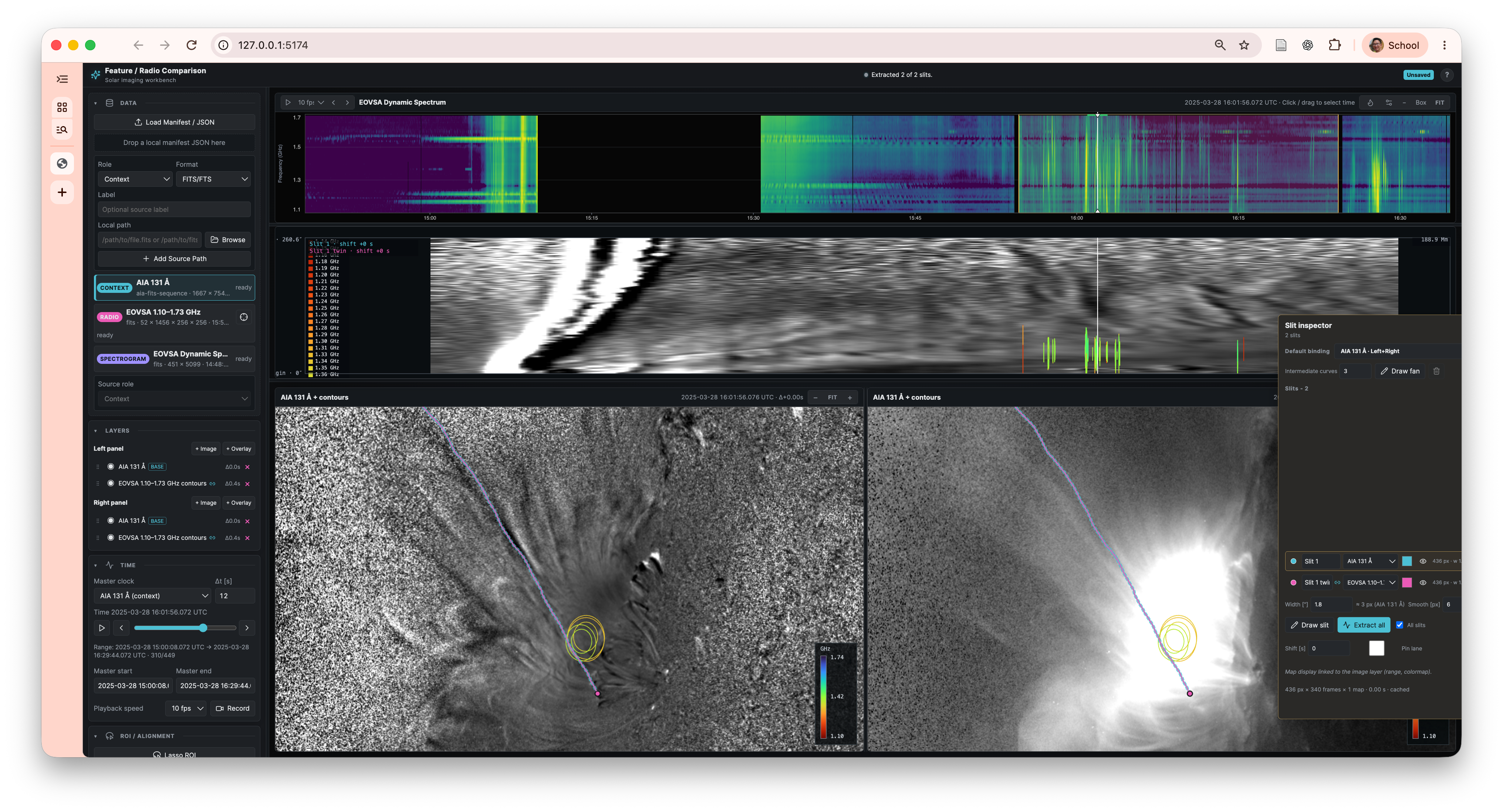
*Example workspace from the 2025-03-28 event: AIA 131 Å imagery, EOVSA radio contours and dynamic spectrum, and slit extraction. The supplied screenshot predates the SolRadViewer name. The observation files are not bundled.*
|
|
36
|
+
|
|
37
|
+
## Features
|
|
38
|
+
|
|
39
|
+
- Two image panels with configurable image layers and radio contour overlays.
|
|
40
|
+
- Synchronized playback across sources with different cadences, a frequency selector, and an interactive dynamic spectrum.
|
|
41
|
+
- Original images, subtraction, and ratios using previous frames, a base frame, or a mean image; display scaling, colormaps, and enhancement filters.
|
|
42
|
+
- Radio alignment offsets, per-channel adjustments and masks, and contour levels relative to frame or global peaks.
|
|
43
|
+
- Straight or curved slits and fan families for time–distance analysis, plus pixel light curves.
|
|
44
|
+
- Region selection, feature tracking, and radio peak/centroid extraction.
|
|
45
|
+
- Saved JSON sessions and CSV analysis exports.
|
|
46
|
+
|
|
47
|
+
## Install from PyPI
|
|
48
|
+
|
|
49
|
+
Requires **Python 3.10–3.12**. The package includes the web interface, so running a release does not require Node.js, npm, or a Git checkout.
|
|
50
|
+
|
|
51
|
+
```bash
|
|
52
|
+
python -m pip install solradviewer
|
|
53
|
+
solradviewer
|
|
54
|
+
```
|
|
55
|
+
|
|
56
|
+
Open **[http://127.0.0.1:8010](http://127.0.0.1:8010)**. The application and API share this local server. Press `Ctrl+C` to stop it. `python -m solradviewer` is equivalent, and `solradviewer --port 8020` selects another port.
|
|
57
|
+
|
|
58
|
+
Use a virtual environment to keep the science dependencies separate from other Python projects. Bring your own observation files and load a manifest through the Data panel. Save an example manifest from the links below, or use the minimal JSON example in this README.
|
|
59
|
+
|
|
60
|
+
## Run a source checkout
|
|
61
|
+
|
|
62
|
+
Requires **Python 3.10–3.12**, **Node.js 22.12+** (or Node 20.19+), npm, and Git. The launch scripts use Bash, `curl`, and `lsof`; on Windows, use WSL. Science dependencies are installed by pip.
|
|
63
|
+
|
|
64
|
+
```bash
|
|
65
|
+
git clone https://github.com/sageyu123/solradviewer.git
|
|
66
|
+
cd solradviewer
|
|
67
|
+
python3 -m venv .venv
|
|
68
|
+
source .venv/bin/activate
|
|
69
|
+
python -m pip install -e ".[test]"
|
|
70
|
+
npm install --prefix frontend
|
|
71
|
+
./run_app.sh
|
|
72
|
+
```
|
|
73
|
+
|
|
74
|
+
Open **[http://127.0.0.1:5174](http://127.0.0.1:5174)**. The backend listens on port **8010**. Press `Ctrl+C` in the launch terminal to stop both services.
|
|
75
|
+
|
|
76
|
+
To use an existing Python environment, activate it and skip virtual-environment creation. You can also select an interpreter explicitly:
|
|
77
|
+
|
|
78
|
+
```bash
|
|
79
|
+
PYTHON=/path/to/python ./run_app.sh
|
|
80
|
+
```
|
|
81
|
+
|
|
82
|
+
For a checkout on a cloud-synced drive, keeping the Python environment outside that drive can improve startup speed. Individual launchers `./run_backend.sh` and `./run_frontend.sh` are available for debugging. The combined launcher stops existing listeners on ports 8010 and 5174 before starting; choose those ports only for this app.
|
|
83
|
+
|
|
84
|
+
## Currently supported data
|
|
85
|
+
|
|
86
|
+
| Role / data | Manifest format | Required layout |
|
|
87
|
+
| --- | --- | --- |
|
|
88
|
+
| Context: AIA FITS image sequence | `aia-fits-sequence` | A directory of 2-D FITS images with solar WCS and observation timestamps. Configurable filename `pattern`, `hdu` (default 1), and `timeKey` (default `T_OBS`; date-header fallbacks are supported). |
|
|
89
|
+
| Context: AIA-style HDF5 map sequence | `hdf` | `map_sequence/map_<index>/data` datasets, each with a JSON `meta` attribute containing map metadata and an observation time. Supply `paths.intensity` and `paths.diff`; generic HDF5 arrays are not sufficient. |
|
|
90
|
+
| Radio: EOVSA all-band FITS sequence | `eovsa-fits-sequence` (examples also use `fits`) | A directory with one FITS file per time. HDU 1 contains a `(frequency, y, x)` image cube, solar WCS, and an observation time. HDU 2 contains `cfreqs` and `cdelts` in Hz. Set a filename `pattern` for your event. |
|
|
91
|
+
| Spectrogram: EOVSA dynamic spectrum | `fits` | Primary-HDU array shaped `(frequency, time)`, HDU 1 table column `FGHZ` in GHz, and HDU 2 table column `TIME` in Julian days. Optional for a session. |
|
|
92
|
+
| Session / dataset description | JSON | A manifest with source roles and local file paths, or a saved app session. JSON references science files; it does not contain them. |
|
|
93
|
+
|
|
94
|
+
A working analysis session currently requires both a supported context source and a supported radio source. The role-based UI does not yet provide arbitrary context-only, radio-only, or multi-instrument loaders. Unknown extra-source formats may appear as placeholders rather than usable image layers.
|
|
95
|
+
|
|
96
|
+
OVRO-LWA, LOFAR, VLA, Measurement Sets, CASA image directories, arbitrary FITS cubes, generic NPZ arrays, and ordinary PNG/JPEG context images do **not** have dedicated readers in this version. The example filename `ovro_lwa_20250328_cme.json` names the research event; its actual sources are AIA and EOVSA.
|
|
97
|
+
|
|
98
|
+
## Load your data
|
|
99
|
+
|
|
100
|
+
1. Save an example manifest from the links below to a private local JSON file. In a source checkout, you can copy one directly:
|
|
101
|
+
|
|
102
|
+
```bash
|
|
103
|
+
cp manifests/ovro_lwa_20250328_cme.json manifests/my-event.local.json
|
|
104
|
+
```
|
|
105
|
+
|
|
106
|
+
2. Replace every `/path/to/data/...` placeholder with a real path on the machine running the backend. Adjust patterns, labels, and event times.
|
|
107
|
+
3. Start the app and choose **Load Manifest / JSON**, or drag the JSON file into the Data panel.
|
|
108
|
+
4. Select image layers, set the time range, and inspect the radio frequencies and overlays. Draw a slit to extract a time–distance map, or select a region for tracking and source extraction.
|
|
109
|
+
5. Save a session to retain the setup, or export the analysis products.
|
|
110
|
+
|
|
111
|
+
The browser sends file paths to the local backend; it does not upload the science files. Use absolute paths for portable, unambiguous manifests. Relative paths resolve from the backend's working directory (the repository root when launched with the scripts), **not** from the JSON file's location. Shell variables inside JSON strings are not expanded.
|
|
112
|
+
|
|
113
|
+
A minimal FITS-sequence example:
|
|
114
|
+
|
|
115
|
+
```json
|
|
116
|
+
{
|
|
117
|
+
"version": 2,
|
|
118
|
+
"event": {
|
|
119
|
+
"id": "my-event",
|
|
120
|
+
"label": "My solar event"
|
|
121
|
+
},
|
|
122
|
+
"sources": [
|
|
123
|
+
{
|
|
124
|
+
"id": "context",
|
|
125
|
+
"role": "context",
|
|
126
|
+
"label": "AIA 131 Å",
|
|
127
|
+
"format": "aia-fits-sequence",
|
|
128
|
+
"paths": { "directory": "/path/to/data/aia" },
|
|
129
|
+
"pattern": "*.fits",
|
|
130
|
+
"hdu": 1,
|
|
131
|
+
"timeKey": "T_OBS"
|
|
132
|
+
},
|
|
133
|
+
{
|
|
134
|
+
"id": "radio",
|
|
135
|
+
"role": "radio",
|
|
136
|
+
"label": "Radio images",
|
|
137
|
+
"format": "eovsa-fits-sequence",
|
|
138
|
+
"paths": { "directory": "/path/to/data/radio" },
|
|
139
|
+
"pattern": "*.allbd.fits"
|
|
140
|
+
},
|
|
141
|
+
{
|
|
142
|
+
"id": "spectrum",
|
|
143
|
+
"role": "spectrogram",
|
|
144
|
+
"label": "Dynamic spectrum",
|
|
145
|
+
"format": "fits",
|
|
146
|
+
"path": "/path/to/data/spectrum.fits"
|
|
147
|
+
}
|
|
148
|
+
]
|
|
149
|
+
}
|
|
150
|
+
```
|
|
151
|
+
|
|
152
|
+
Remove the spectrogram entry if no compatible spectrum is available. For HDF5 context data, replace the context entry with:
|
|
153
|
+
|
|
154
|
+
```json
|
|
155
|
+
{
|
|
156
|
+
"id": "context",
|
|
157
|
+
"role": "context",
|
|
158
|
+
"label": "Context images",
|
|
159
|
+
"format": "hdf",
|
|
160
|
+
"paths": {
|
|
161
|
+
"intensity": "/path/to/data/intensity.h5",
|
|
162
|
+
"diff": "/path/to/data/running-ratio.h5"
|
|
163
|
+
}
|
|
164
|
+
}
|
|
165
|
+
```
|
|
166
|
+
|
|
167
|
+
Example manifests are provided for the [2022-01-18 flare](https://github.com/sageyu123/solradviewer/blob/main/manifests/eovsa_20220118_mflare.json) and [2025-03-28 event](https://github.com/sageyu123/solradviewer/blob/main/manifests/ovro_lwa_20250328_cme.json). They are templates, not downloadable or bundled datasets. The optional `seeds` field in the older flare example references a legacy tracking pickle; omit it if unused and load only trusted pickle files.
|
|
168
|
+
|
|
169
|
+
For a source checkout, automatically load a manifest at launch by passing a unique part of its filename:
|
|
170
|
+
|
|
171
|
+
```bash
|
|
172
|
+
./run_app.sh my-event
|
|
173
|
+
```
|
|
174
|
+
|
|
175
|
+
This searches `manifests/*.json`; unknown or ambiguous keys are rejected. Files in the ignored `manifests/local/` folder can be loaded through the UI.
|
|
176
|
+
|
|
177
|
+
## Local data and configuration
|
|
178
|
+
|
|
179
|
+
No personal disk mount is required. The application starts without observation files; loading a session requires your data. Set environment variables **before** starting the backend. They are not read automatically from a `.env` file.
|
|
180
|
+
|
|
181
|
+
| Variable | Default / purpose |
|
|
182
|
+
| --- | --- |
|
|
183
|
+
| `PYTHON` | Optional interpreter override for the backend launcher; otherwise it uses `.venv/bin/python` when present, then Python on `PATH`. |
|
|
184
|
+
| `SOLRADVIEWER_DATA_ROOT` | `data/EOVSA_20220118_Mflare` under the launch directory. Root for the legacy sample only; it does not rewrite paths in manifests. |
|
|
185
|
+
| `SOLRADVIEWER_OUTPUT_ROOT` | `outputs/` under the launch directory. Session exports and analysis products. |
|
|
186
|
+
| `SOLRADVIEWER_CACHE_DIR` | `~/.cache/solradviewer`. Render cache, with decoded image data in its `decoded-planes/` subdirectory. |
|
|
187
|
+
| `SOLRADVIEWER_RENDER_CACHE_BYTES` | `2147483648` (2 GiB). Render-cache budget; use `0` to disable it. |
|
|
188
|
+
| `SOLRADVIEWER_DECODED_STORE_GB` | `24` GiB. Decoded-image cache budget, allocated as data are read; use `0` to disable it. |
|
|
189
|
+
|
|
190
|
+
Existing `SAD_EOVSA_RENDER_CACHE_DIR`, `SAD_EOVSA_RENDER_CACHE_BYTES`, and `SAD_EOVSA_DECODED_STORE_GB` settings remain accepted. Byte-based `SOLRADVIEWER_DECODED_CACHE_BYTES` / `SAD_EOVSA_DECODED_CACHE_BYTES` are fallback settings when no valid GiB budget is provided.
|
|
191
|
+
|
|
192
|
+
The legacy sample action expects the 2022-01-18 files under the configured sample-data root, using the relative layout shown in its example manifest. Normal manifest loading uses the paths you provide directly.
|
|
193
|
+
|
|
194
|
+
Science data, `outputs/`, logs, local environments, `manifests/local/`, `manifests/*.local.json`, and exported `*_session_*.json` files are ignored by Git. Keep your private manifests in those locations. Saved sessions contain local paths; review them before sharing.
|
|
195
|
+
|
|
196
|
+
Exports include `feature_tracks.csv` and `radio_sources.csv` under `outputs/<session-id>/`. Legacy `sad_tracks.csv` and `eovsa_sources.csv` aliases remain for compatibility.
|
|
197
|
+
|
|
198
|
+
## Development and checks
|
|
199
|
+
|
|
200
|
+
```bash
|
|
201
|
+
python -m unittest discover -s solradviewer/backend/tests
|
|
202
|
+
npm run build --prefix frontend
|
|
203
|
+
```
|
|
204
|
+
|
|
205
|
+
Most backend checks create small synthetic data files. The original observational workflow tests skip when the optional sample dataset is unavailable. With the app running, check both services:
|
|
206
|
+
|
|
207
|
+
```bash
|
|
208
|
+
curl http://127.0.0.1:8010/api/health
|
|
209
|
+
curl http://127.0.0.1:5174/api/health
|
|
210
|
+
```
|
|
211
|
+
|
|
212
|
+
The backend uses FastAPI, NumPy/SciPy, Astropy, SunPy, and h5py; the frontend uses React, TypeScript, and Vite. Reader implementations live in [`solradviewer/backend/data.py`](https://github.com/sageyu123/solradviewer/blob/main/solradviewer/backend/data.py), and API routes in [`solradviewer/backend/app.py`](https://github.com/sageyu123/solradviewer/blob/main/solradviewer/backend/app.py).
|
|
213
|
+
|
|
214
|
+
The application, Python package, and Python/npm distributions use **SolRadViewer** / `solradviewer`. The main analysis-session class is `SolRadSession`. API routes, data formats, and saved-session fields remain compatible.
|
|
215
|
+
|
|
216
|
+
After updating an existing checkout, stop the backend, rerun `python -m pip install -e ".[test]"` in its environment, and restart with `./run_app.sh`. Custom Python scripts must use imports such as `from solradviewer.backend.data import SolRadSession`; the former Python namespace is no longer provided. See the [package migration notes](https://github.com/sageyu123/solradviewer/blob/main/docs/design/solradviewer-rename.md).
|
|
217
|
+
|
|
218
|
+
## Build a release
|
|
219
|
+
|
|
220
|
+
From a source checkout with Python and Node.js installed:
|
|
221
|
+
|
|
222
|
+
```bash
|
|
223
|
+
python -m pip install build twine
|
|
224
|
+
./scripts/build-release.sh
|
|
225
|
+
python -m twine check --strict dist/*
|
|
226
|
+
```
|
|
227
|
+
|
|
228
|
+
The build bundles the frontend into both the wheel and source distribution. Generated assets, local science data, sessions, and caches are not committed. See the [release guide](https://github.com/sageyu123/solradviewer/blob/main/docs/releasing.md) for publication steps.
|
|
@@ -0,0 +1,204 @@
|
|
|
1
|
+
# SolRadViewer
|
|
2
|
+
|
|
3
|
+
**Explore solar radio images, dynamic spectra, and context imagery together.**
|
|
4
|
+
|
|
5
|
+
SolRadViewer is a local browser application for time-synchronized visualization and analysis of radio and context-image sequences. Compare image layers, overlay radio contours, follow evolving features, and extract time–distance maps and source measurements. Its workflow uses `context`, `radio`, and optional `spectrogram` roles rather than being restricted to supra-arcade downflows (SADs) or a single event.
|
|
6
|
+
|
|
7
|
+
The current readers support AIA-style context images and EOVSA-format radio products. Other instruments need compatible data products or an additional reader; the broader application name does not imply universal FITS support.
|
|
8
|
+
|
|
9
|
+

|
|
10
|
+
|
|
11
|
+
*Example workspace from the 2025-03-28 event: AIA 131 Å imagery, EOVSA radio contours and dynamic spectrum, and slit extraction. The supplied screenshot predates the SolRadViewer name. The observation files are not bundled.*
|
|
12
|
+
|
|
13
|
+
## Features
|
|
14
|
+
|
|
15
|
+
- Two image panels with configurable image layers and radio contour overlays.
|
|
16
|
+
- Synchronized playback across sources with different cadences, a frequency selector, and an interactive dynamic spectrum.
|
|
17
|
+
- Original images, subtraction, and ratios using previous frames, a base frame, or a mean image; display scaling, colormaps, and enhancement filters.
|
|
18
|
+
- Radio alignment offsets, per-channel adjustments and masks, and contour levels relative to frame or global peaks.
|
|
19
|
+
- Straight or curved slits and fan families for time–distance analysis, plus pixel light curves.
|
|
20
|
+
- Region selection, feature tracking, and radio peak/centroid extraction.
|
|
21
|
+
- Saved JSON sessions and CSV analysis exports.
|
|
22
|
+
|
|
23
|
+
## Install from PyPI
|
|
24
|
+
|
|
25
|
+
Requires **Python 3.10–3.12**. The package includes the web interface, so running a release does not require Node.js, npm, or a Git checkout.
|
|
26
|
+
|
|
27
|
+
```bash
|
|
28
|
+
python -m pip install solradviewer
|
|
29
|
+
solradviewer
|
|
30
|
+
```
|
|
31
|
+
|
|
32
|
+
Open **[http://127.0.0.1:8010](http://127.0.0.1:8010)**. The application and API share this local server. Press `Ctrl+C` to stop it. `python -m solradviewer` is equivalent, and `solradviewer --port 8020` selects another port.
|
|
33
|
+
|
|
34
|
+
Use a virtual environment to keep the science dependencies separate from other Python projects. Bring your own observation files and load a manifest through the Data panel. Save an example manifest from the links below, or use the minimal JSON example in this README.
|
|
35
|
+
|
|
36
|
+
## Run a source checkout
|
|
37
|
+
|
|
38
|
+
Requires **Python 3.10–3.12**, **Node.js 22.12+** (or Node 20.19+), npm, and Git. The launch scripts use Bash, `curl`, and `lsof`; on Windows, use WSL. Science dependencies are installed by pip.
|
|
39
|
+
|
|
40
|
+
```bash
|
|
41
|
+
git clone https://github.com/sageyu123/solradviewer.git
|
|
42
|
+
cd solradviewer
|
|
43
|
+
python3 -m venv .venv
|
|
44
|
+
source .venv/bin/activate
|
|
45
|
+
python -m pip install -e ".[test]"
|
|
46
|
+
npm install --prefix frontend
|
|
47
|
+
./run_app.sh
|
|
48
|
+
```
|
|
49
|
+
|
|
50
|
+
Open **[http://127.0.0.1:5174](http://127.0.0.1:5174)**. The backend listens on port **8010**. Press `Ctrl+C` in the launch terminal to stop both services.
|
|
51
|
+
|
|
52
|
+
To use an existing Python environment, activate it and skip virtual-environment creation. You can also select an interpreter explicitly:
|
|
53
|
+
|
|
54
|
+
```bash
|
|
55
|
+
PYTHON=/path/to/python ./run_app.sh
|
|
56
|
+
```
|
|
57
|
+
|
|
58
|
+
For a checkout on a cloud-synced drive, keeping the Python environment outside that drive can improve startup speed. Individual launchers `./run_backend.sh` and `./run_frontend.sh` are available for debugging. The combined launcher stops existing listeners on ports 8010 and 5174 before starting; choose those ports only for this app.
|
|
59
|
+
|
|
60
|
+
## Currently supported data
|
|
61
|
+
|
|
62
|
+
| Role / data | Manifest format | Required layout |
|
|
63
|
+
| --- | --- | --- |
|
|
64
|
+
| Context: AIA FITS image sequence | `aia-fits-sequence` | A directory of 2-D FITS images with solar WCS and observation timestamps. Configurable filename `pattern`, `hdu` (default 1), and `timeKey` (default `T_OBS`; date-header fallbacks are supported). |
|
|
65
|
+
| Context: AIA-style HDF5 map sequence | `hdf` | `map_sequence/map_<index>/data` datasets, each with a JSON `meta` attribute containing map metadata and an observation time. Supply `paths.intensity` and `paths.diff`; generic HDF5 arrays are not sufficient. |
|
|
66
|
+
| Radio: EOVSA all-band FITS sequence | `eovsa-fits-sequence` (examples also use `fits`) | A directory with one FITS file per time. HDU 1 contains a `(frequency, y, x)` image cube, solar WCS, and an observation time. HDU 2 contains `cfreqs` and `cdelts` in Hz. Set a filename `pattern` for your event. |
|
|
67
|
+
| Spectrogram: EOVSA dynamic spectrum | `fits` | Primary-HDU array shaped `(frequency, time)`, HDU 1 table column `FGHZ` in GHz, and HDU 2 table column `TIME` in Julian days. Optional for a session. |
|
|
68
|
+
| Session / dataset description | JSON | A manifest with source roles and local file paths, or a saved app session. JSON references science files; it does not contain them. |
|
|
69
|
+
|
|
70
|
+
A working analysis session currently requires both a supported context source and a supported radio source. The role-based UI does not yet provide arbitrary context-only, radio-only, or multi-instrument loaders. Unknown extra-source formats may appear as placeholders rather than usable image layers.
|
|
71
|
+
|
|
72
|
+
OVRO-LWA, LOFAR, VLA, Measurement Sets, CASA image directories, arbitrary FITS cubes, generic NPZ arrays, and ordinary PNG/JPEG context images do **not** have dedicated readers in this version. The example filename `ovro_lwa_20250328_cme.json` names the research event; its actual sources are AIA and EOVSA.
|
|
73
|
+
|
|
74
|
+
## Load your data
|
|
75
|
+
|
|
76
|
+
1. Save an example manifest from the links below to a private local JSON file. In a source checkout, you can copy one directly:
|
|
77
|
+
|
|
78
|
+
```bash
|
|
79
|
+
cp manifests/ovro_lwa_20250328_cme.json manifests/my-event.local.json
|
|
80
|
+
```
|
|
81
|
+
|
|
82
|
+
2. Replace every `/path/to/data/...` placeholder with a real path on the machine running the backend. Adjust patterns, labels, and event times.
|
|
83
|
+
3. Start the app and choose **Load Manifest / JSON**, or drag the JSON file into the Data panel.
|
|
84
|
+
4. Select image layers, set the time range, and inspect the radio frequencies and overlays. Draw a slit to extract a time–distance map, or select a region for tracking and source extraction.
|
|
85
|
+
5. Save a session to retain the setup, or export the analysis products.
|
|
86
|
+
|
|
87
|
+
The browser sends file paths to the local backend; it does not upload the science files. Use absolute paths for portable, unambiguous manifests. Relative paths resolve from the backend's working directory (the repository root when launched with the scripts), **not** from the JSON file's location. Shell variables inside JSON strings are not expanded.
|
|
88
|
+
|
|
89
|
+
A minimal FITS-sequence example:
|
|
90
|
+
|
|
91
|
+
```json
|
|
92
|
+
{
|
|
93
|
+
"version": 2,
|
|
94
|
+
"event": {
|
|
95
|
+
"id": "my-event",
|
|
96
|
+
"label": "My solar event"
|
|
97
|
+
},
|
|
98
|
+
"sources": [
|
|
99
|
+
{
|
|
100
|
+
"id": "context",
|
|
101
|
+
"role": "context",
|
|
102
|
+
"label": "AIA 131 Å",
|
|
103
|
+
"format": "aia-fits-sequence",
|
|
104
|
+
"paths": { "directory": "/path/to/data/aia" },
|
|
105
|
+
"pattern": "*.fits",
|
|
106
|
+
"hdu": 1,
|
|
107
|
+
"timeKey": "T_OBS"
|
|
108
|
+
},
|
|
109
|
+
{
|
|
110
|
+
"id": "radio",
|
|
111
|
+
"role": "radio",
|
|
112
|
+
"label": "Radio images",
|
|
113
|
+
"format": "eovsa-fits-sequence",
|
|
114
|
+
"paths": { "directory": "/path/to/data/radio" },
|
|
115
|
+
"pattern": "*.allbd.fits"
|
|
116
|
+
},
|
|
117
|
+
{
|
|
118
|
+
"id": "spectrum",
|
|
119
|
+
"role": "spectrogram",
|
|
120
|
+
"label": "Dynamic spectrum",
|
|
121
|
+
"format": "fits",
|
|
122
|
+
"path": "/path/to/data/spectrum.fits"
|
|
123
|
+
}
|
|
124
|
+
]
|
|
125
|
+
}
|
|
126
|
+
```
|
|
127
|
+
|
|
128
|
+
Remove the spectrogram entry if no compatible spectrum is available. For HDF5 context data, replace the context entry with:
|
|
129
|
+
|
|
130
|
+
```json
|
|
131
|
+
{
|
|
132
|
+
"id": "context",
|
|
133
|
+
"role": "context",
|
|
134
|
+
"label": "Context images",
|
|
135
|
+
"format": "hdf",
|
|
136
|
+
"paths": {
|
|
137
|
+
"intensity": "/path/to/data/intensity.h5",
|
|
138
|
+
"diff": "/path/to/data/running-ratio.h5"
|
|
139
|
+
}
|
|
140
|
+
}
|
|
141
|
+
```
|
|
142
|
+
|
|
143
|
+
Example manifests are provided for the [2022-01-18 flare](https://github.com/sageyu123/solradviewer/blob/main/manifests/eovsa_20220118_mflare.json) and [2025-03-28 event](https://github.com/sageyu123/solradviewer/blob/main/manifests/ovro_lwa_20250328_cme.json). They are templates, not downloadable or bundled datasets. The optional `seeds` field in the older flare example references a legacy tracking pickle; omit it if unused and load only trusted pickle files.
|
|
144
|
+
|
|
145
|
+
For a source checkout, automatically load a manifest at launch by passing a unique part of its filename:
|
|
146
|
+
|
|
147
|
+
```bash
|
|
148
|
+
./run_app.sh my-event
|
|
149
|
+
```
|
|
150
|
+
|
|
151
|
+
This searches `manifests/*.json`; unknown or ambiguous keys are rejected. Files in the ignored `manifests/local/` folder can be loaded through the UI.
|
|
152
|
+
|
|
153
|
+
## Local data and configuration
|
|
154
|
+
|
|
155
|
+
No personal disk mount is required. The application starts without observation files; loading a session requires your data. Set environment variables **before** starting the backend. They are not read automatically from a `.env` file.
|
|
156
|
+
|
|
157
|
+
| Variable | Default / purpose |
|
|
158
|
+
| --- | --- |
|
|
159
|
+
| `PYTHON` | Optional interpreter override for the backend launcher; otherwise it uses `.venv/bin/python` when present, then Python on `PATH`. |
|
|
160
|
+
| `SOLRADVIEWER_DATA_ROOT` | `data/EOVSA_20220118_Mflare` under the launch directory. Root for the legacy sample only; it does not rewrite paths in manifests. |
|
|
161
|
+
| `SOLRADVIEWER_OUTPUT_ROOT` | `outputs/` under the launch directory. Session exports and analysis products. |
|
|
162
|
+
| `SOLRADVIEWER_CACHE_DIR` | `~/.cache/solradviewer`. Render cache, with decoded image data in its `decoded-planes/` subdirectory. |
|
|
163
|
+
| `SOLRADVIEWER_RENDER_CACHE_BYTES` | `2147483648` (2 GiB). Render-cache budget; use `0` to disable it. |
|
|
164
|
+
| `SOLRADVIEWER_DECODED_STORE_GB` | `24` GiB. Decoded-image cache budget, allocated as data are read; use `0` to disable it. |
|
|
165
|
+
|
|
166
|
+
Existing `SAD_EOVSA_RENDER_CACHE_DIR`, `SAD_EOVSA_RENDER_CACHE_BYTES`, and `SAD_EOVSA_DECODED_STORE_GB` settings remain accepted. Byte-based `SOLRADVIEWER_DECODED_CACHE_BYTES` / `SAD_EOVSA_DECODED_CACHE_BYTES` are fallback settings when no valid GiB budget is provided.
|
|
167
|
+
|
|
168
|
+
The legacy sample action expects the 2022-01-18 files under the configured sample-data root, using the relative layout shown in its example manifest. Normal manifest loading uses the paths you provide directly.
|
|
169
|
+
|
|
170
|
+
Science data, `outputs/`, logs, local environments, `manifests/local/`, `manifests/*.local.json`, and exported `*_session_*.json` files are ignored by Git. Keep your private manifests in those locations. Saved sessions contain local paths; review them before sharing.
|
|
171
|
+
|
|
172
|
+
Exports include `feature_tracks.csv` and `radio_sources.csv` under `outputs/<session-id>/`. Legacy `sad_tracks.csv` and `eovsa_sources.csv` aliases remain for compatibility.
|
|
173
|
+
|
|
174
|
+
## Development and checks
|
|
175
|
+
|
|
176
|
+
```bash
|
|
177
|
+
python -m unittest discover -s solradviewer/backend/tests
|
|
178
|
+
npm run build --prefix frontend
|
|
179
|
+
```
|
|
180
|
+
|
|
181
|
+
Most backend checks create small synthetic data files. The original observational workflow tests skip when the optional sample dataset is unavailable. With the app running, check both services:
|
|
182
|
+
|
|
183
|
+
```bash
|
|
184
|
+
curl http://127.0.0.1:8010/api/health
|
|
185
|
+
curl http://127.0.0.1:5174/api/health
|
|
186
|
+
```
|
|
187
|
+
|
|
188
|
+
The backend uses FastAPI, NumPy/SciPy, Astropy, SunPy, and h5py; the frontend uses React, TypeScript, and Vite. Reader implementations live in [`solradviewer/backend/data.py`](https://github.com/sageyu123/solradviewer/blob/main/solradviewer/backend/data.py), and API routes in [`solradviewer/backend/app.py`](https://github.com/sageyu123/solradviewer/blob/main/solradviewer/backend/app.py).
|
|
189
|
+
|
|
190
|
+
The application, Python package, and Python/npm distributions use **SolRadViewer** / `solradviewer`. The main analysis-session class is `SolRadSession`. API routes, data formats, and saved-session fields remain compatible.
|
|
191
|
+
|
|
192
|
+
After updating an existing checkout, stop the backend, rerun `python -m pip install -e ".[test]"` in its environment, and restart with `./run_app.sh`. Custom Python scripts must use imports such as `from solradviewer.backend.data import SolRadSession`; the former Python namespace is no longer provided. See the [package migration notes](https://github.com/sageyu123/solradviewer/blob/main/docs/design/solradviewer-rename.md).
|
|
193
|
+
|
|
194
|
+
## Build a release
|
|
195
|
+
|
|
196
|
+
From a source checkout with Python and Node.js installed:
|
|
197
|
+
|
|
198
|
+
```bash
|
|
199
|
+
python -m pip install build twine
|
|
200
|
+
./scripts/build-release.sh
|
|
201
|
+
python -m twine check --strict dist/*
|
|
202
|
+
```
|
|
203
|
+
|
|
204
|
+
The build bundles the frontend into both the wheel and source distribution. Generated assets, local science data, sessions, and caches are not committed. See the [release guide](https://github.com/sageyu123/solradviewer/blob/main/docs/releasing.md) for publication steps.
|
|
@@ -0,0 +1,12 @@
|
|
|
1
|
+
<!doctype html>
|
|
2
|
+
<html lang="en">
|
|
3
|
+
<head>
|
|
4
|
+
<meta charset="UTF-8" />
|
|
5
|
+
<meta name="viewport" content="width=device-width, initial-scale=1.0" />
|
|
6
|
+
<title>SolRadViewer — Radio and Context Imaging</title>
|
|
7
|
+
</head>
|
|
8
|
+
<body>
|
|
9
|
+
<div id="root"></div>
|
|
10
|
+
<script type="module" src="/src/main.tsx"></script>
|
|
11
|
+
</body>
|
|
12
|
+
</html>
|