snapwonders 0.1.0__tar.gz
This diff represents the content of publicly available package versions that have been released to one of the supported registries. The information contained in this diff is provided for informational purposes only and reflects changes between package versions as they appear in their respective public registries.
- snapwonders-0.1.0/.github/social-preview.jpg +0 -0
- snapwonders-0.1.0/.github/workflows/ci.yml +43 -0
- snapwonders-0.1.0/.gitignore +9 -0
- snapwonders-0.1.0/CHANGELOG.md +20 -0
- snapwonders-0.1.0/LICENSE +37 -0
- snapwonders-0.1.0/PKG-INFO +190 -0
- snapwonders-0.1.0/README.md +171 -0
- snapwonders-0.1.0/examples/.gitignore +1 -0
- snapwonders-0.1.0/examples/README.md +21 -0
- snapwonders-0.1.0/examples/WALKTHROUGH.md +86 -0
- snapwonders-0.1.0/examples/analyse.py +54 -0
- snapwonders-0.1.0/examples/assets/sample.png +0 -0
- snapwonders-0.1.0/examples/assets/secret.png +0 -0
- snapwonders-0.1.0/examples/convert.py +41 -0
- snapwonders-0.1.0/examples/hide_and_reveal.py +51 -0
- snapwonders-0.1.0/examples/sample-output/analyse-result.json +68 -0
- snapwonders-0.1.0/examples/sample-output/convert-output.webp +0 -0
- snapwonders-0.1.0/examples/sample-output/input.png +0 -0
- snapwonders-0.1.0/examples/sample-output/stego-output.webp +0 -0
- snapwonders-0.1.0/pyproject.toml +30 -0
- snapwonders-0.1.0/src/snapwonders/__init__.py +55 -0
- snapwonders-0.1.0/src/snapwonders/_base.py +125 -0
- snapwonders-0.1.0/src/snapwonders/_http.py +170 -0
- snapwonders-0.1.0/src/snapwonders/analyse.py +123 -0
- snapwonders-0.1.0/src/snapwonders/client.py +66 -0
- snapwonders-0.1.0/src/snapwonders/convert.py +119 -0
- snapwonders-0.1.0/src/snapwonders/exceptions.py +87 -0
- snapwonders-0.1.0/src/snapwonders/models.py +131 -0
- snapwonders-0.1.0/src/snapwonders/stego.py +146 -0
- snapwonders-0.1.0/src/snapwonders/tus.py +138 -0
- snapwonders-0.1.0/tests/test_smoke.py +360 -0
|
Binary file
|
|
@@ -0,0 +1,43 @@
|
|
|
1
|
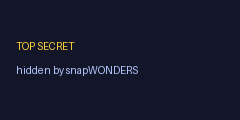
+
name: CI
|
|
2
|
+
|
|
3
|
+
# Runs on the standalone snapWONDERS-SDK-Python repo (this file becomes .github/workflows/ci.yml
|
|
4
|
+
# there after `git subtree split`). Offline tests need no API key; the integration job only
|
|
5
|
+
# runs when SNAPWONDERS_TEST_API_KEY is configured as a repository secret.
|
|
6
|
+
|
|
7
|
+
on:
|
|
8
|
+
push:
|
|
9
|
+
branches: [main]
|
|
10
|
+
pull_request:
|
|
11
|
+
workflow_dispatch:
|
|
12
|
+
|
|
13
|
+
jobs:
|
|
14
|
+
test:
|
|
15
|
+
name: Test — Python ${{ matrix.python-version }}
|
|
16
|
+
runs-on: ubuntu-latest
|
|
17
|
+
strategy:
|
|
18
|
+
fail-fast: false
|
|
19
|
+
matrix:
|
|
20
|
+
python-version: ["3.10", "3.11", "3.12", "3.13"]
|
|
21
|
+
steps:
|
|
22
|
+
- uses: actions/checkout@v4
|
|
23
|
+
- uses: actions/setup-python@v5
|
|
24
|
+
with:
|
|
25
|
+
python-version: ${{ matrix.python-version }}
|
|
26
|
+
- name: Install (with dev extras)
|
|
27
|
+
run: python -m pip install --upgrade pip && pip install -e ".[dev]"
|
|
28
|
+
- name: Offline test suite
|
|
29
|
+
run: pytest -q
|
|
30
|
+
|
|
31
|
+
build:
|
|
32
|
+
name: Build distribution
|
|
33
|
+
runs-on: ubuntu-latest
|
|
34
|
+
needs: test
|
|
35
|
+
steps:
|
|
36
|
+
- uses: actions/checkout@v4
|
|
37
|
+
- uses: actions/setup-python@v5
|
|
38
|
+
with:
|
|
39
|
+
python-version: "3.12"
|
|
40
|
+
- run: python -m pip install --upgrade pip build twine
|
|
41
|
+
- run: python -m build
|
|
42
|
+
- name: Validate package metadata
|
|
43
|
+
run: python -m twine check dist/*
|
|
@@ -0,0 +1,20 @@
|
|
|
1
|
+
# Changelog
|
|
2
|
+
|
|
3
|
+
All notable changes to the `snapwonders` Python client are documented here. The format is based on
|
|
4
|
+
[Keep a Changelog](https://keepachangelog.com/en/1.1.0/) and this project follows
|
|
5
|
+
[Semantic Versioning](https://semver.org/spec/v2.0.0.html).
|
|
6
|
+
|
|
7
|
+
## [0.1.0] — 2026
|
|
8
|
+
|
|
9
|
+
Initial release.
|
|
10
|
+
|
|
11
|
+
- Official Python client for the snapWONDERS API, covering all three product areas:
|
|
12
|
+
`client.stego` (hide & reveal), `client.analyse` (forensic media analysis), and `client.convert`
|
|
13
|
+
(media conversion).
|
|
14
|
+
- Resumable upload and the session → job → poll → download flow wrapped internally, so a whole job
|
|
15
|
+
is a single call (e.g. `client.stego.hide([...], password=...)`). One-shot helpers plus
|
|
16
|
+
step-by-step session/job control.
|
|
17
|
+
- Polling backs off with jitter and honours a server-supplied poll interval, to stay light under load.
|
|
18
|
+
- Typed exceptions (`SnapwondersError` base): `AuthError`, `ProRequiredError`, `SessionExpiredError`,
|
|
19
|
+
`RateLimitError`, `MaintenanceError`, `JobFailedError`, `TusUploadError`, `NetworkError`, `ApiError`.
|
|
20
|
+
- Minimal dependency surface: `httpx` only.
|
|
@@ -0,0 +1,37 @@
|
|
|
1
|
+
MIT License
|
|
2
|
+
|
|
3
|
+
Copyright (c) 2026 Kenneth Springer @ snapWONDERS
|
|
4
|
+
|
|
5
|
+
Permission is hereby granted, free of charge, to any person obtaining a copy
|
|
6
|
+
of this software and associated documentation files (the "Software"), to deal
|
|
7
|
+
in the Software without restriction, including without limitation the rights
|
|
8
|
+
to use, copy, modify, merge, publish, distribute, sublicense, and/or sell
|
|
9
|
+
copies of the Software, and to permit persons to whom the Software is
|
|
10
|
+
furnished to do so, subject to the following conditions:
|
|
11
|
+
|
|
12
|
+
The above copyright notice and this permission notice shall be included in all
|
|
13
|
+
copies or substantial portions of the Software.
|
|
14
|
+
|
|
15
|
+
THE SOFTWARE IS PROVIDED "AS IS", WITHOUT WARRANTY OF ANY KIND, EXPRESS OR
|
|
16
|
+
IMPLIED, INCLUDING BUT NOT LIMITED TO THE WARRANTIES OF MERCHANTABILITY,
|
|
17
|
+
FITNESS FOR A PARTICULAR PURPOSE AND NONINFRINGEMENT. IN NO EVENT SHALL THE
|
|
18
|
+
AUTHORS OR COPYRIGHT HOLDERS BE LIABLE FOR ANY CLAIM, DAMAGES OR OTHER
|
|
19
|
+
LIABILITY, WHETHER IN AN ACTION OF CONTRACT, TORT OR OTHERWISE, ARISING FROM,
|
|
20
|
+
OUT OF OR IN CONNECTION WITH THE SOFTWARE OR THE USE OR OTHER DEALINGS IN THE
|
|
21
|
+
SOFTWARE.
|
|
22
|
+
|
|
23
|
+
---
|
|
24
|
+
|
|
25
|
+
SCOPE OF THIS LICENCE
|
|
26
|
+
|
|
27
|
+
The MIT licence above applies **only** to the source code of this client library
|
|
28
|
+
(the "Software"). It grants no rights in, and says nothing about the licensing of,
|
|
29
|
+
the snapWONDERS API, service, website, data, trained models, or algorithms that
|
|
30
|
+
this library communicates with — all of which are proprietary and remain the
|
|
31
|
+
exclusive property of Kenneth Springer @ snapWONDERS.
|
|
32
|
+
|
|
33
|
+
This library merely formats HTTP requests to the snapWONDERS API; it contains none
|
|
34
|
+
of the API's implementation. Use of the snapWONDERS API requires a valid API key,
|
|
35
|
+
is subject to rate limits and plan tiers, and is governed by the snapWONDERS Terms
|
|
36
|
+
of Service (https://snapwonders.com/terms). Nothing in the MIT grant above waives
|
|
37
|
+
those terms or confers any right to access the service itself.
|
|
@@ -0,0 +1,190 @@
|
|
|
1
|
+
Metadata-Version: 2.4
|
|
2
|
+
Name: snapwonders
|
|
3
|
+
Version: 0.1.0
|
|
4
|
+
Summary: Official Python SDK for the snapWONDERS API — steganography (hide & reveal), forensic media analysis, and format conversion.
|
|
5
|
+
Project-URL: Homepage, https://snapwonders.com/developers#sdk
|
|
6
|
+
Project-URL: Documentation, https://snapwonders.com/api
|
|
7
|
+
Project-URL: Repository, https://github.com/snapWONDERS/snapWONDERS-SDK-Python
|
|
8
|
+
Project-URL: Issues, https://github.com/snapWONDERS/snapWONDERS-SDK-Python/issues
|
|
9
|
+
Project-URL: Changelog, https://github.com/snapWONDERS/snapWONDERS-SDK-Python/blob/main/CHANGELOG.md
|
|
10
|
+
Author-email: "Kenneth Springer @ snapWONDERS" <kenneth@snapwonders.com>
|
|
11
|
+
License: MIT
|
|
12
|
+
License-File: LICENSE
|
|
13
|
+
Keywords: ai-image-detection,api-client,c2pa,content-credentials,forensics,hide-and-reveal,image-conversion,image-forensics,mcp,media-analysis,snapwonders,steganography,vaultify,watermark-detection
|
|
14
|
+
Requires-Python: >=3.10
|
|
15
|
+
Requires-Dist: httpx<1.0,>=0.27
|
|
16
|
+
Provides-Extra: dev
|
|
17
|
+
Requires-Dist: pytest>=8.0; extra == 'dev'
|
|
18
|
+
Description-Content-Type: text/markdown
|
|
19
|
+
|
|
20
|
+
<p align="center">
|
|
21
|
+
<a href="https://www.snapwonders.com/" target="_blank">
|
|
22
|
+
<img src="https://raw.githubusercontent.com/snapWONDERS/snapWONDERS-SDK-Python/main/.github/social-preview.jpg" alt="snapWONDERS Python SDK" width="640" />
|
|
23
|
+
</a>
|
|
24
|
+
</p>
|
|
25
|
+
|
|
26
|
+
snapWONDERS — Expose what's hidden. Hide what's yours.
|
|
27
|
+
|
|
28
|
+
|
|
29
|
+
# snapwonders — Python client for the snapWONDERS API
|
|
30
|
+
|
|
31
|
+
The official Python client for the snapWONDERS API: steganography, forensic media analysis, and
|
|
32
|
+
format conversion. The client wraps the resumable TUS upload and the session → job → poll → download
|
|
33
|
+
choreography so that a whole job is a couple of lines.
|
|
34
|
+
|
|
35
|
+
All the snapWONDERS API services are available over the Clearnet / **Web** and Dark Web **Tor** and
|
|
36
|
+
**I2P**.
|
|
37
|
+
|
|
38
|
+
> **Status.** Initial release (`0.1.0`). Not yet published to PyPI.
|
|
39
|
+
|
|
40
|
+
|
|
41
|
+
# See it in action
|
|
42
|
+
|
|
43
|
+
Hide a secret image inside a cover — the stego output looks pixel-identical, but carries the hidden
|
|
44
|
+
file, recoverable only with the password:
|
|
45
|
+
|
|
46
|
+
| Secret (hidden inside) | Cover (input) | Stego output (carries the secret) |
|
|
47
|
+
|---|---|---|
|
|
48
|
+
|  |  |  |
|
|
49
|
+
|
|
50
|
+
The full walkthrough — steganography, forensic analysis (with a real graded result), and conversion —
|
|
51
|
+
is in **[`examples/WALKTHROUGH.md`](https://github.com/snapWONDERS/snapWONDERS-SDK-Python/blob/main/examples/WALKTHROUGH.md)**.
|
|
52
|
+
|
|
53
|
+
|
|
54
|
+
# Installation and setup
|
|
55
|
+
|
|
56
|
+
## snapWONDERS API key
|
|
57
|
+
You will need a snapWONDERS API key before you can get started:
|
|
58
|
+
|
|
59
|
+
* Sign up and create an account at [snapWONDERS sign-up](https://snapwonders.com/sign-up). If you
|
|
60
|
+
wish to create an account via Tor or I2P then you can do so by accessing snapWONDERS through the
|
|
61
|
+
Tor or I2P portals. For the dark web links visit
|
|
62
|
+
[browsing safely](https://snapwonders.com/browsing-safely).
|
|
63
|
+
* Under your account settings, generate an API key. New keys start with `sw_`. It is sent as the
|
|
64
|
+
`X-Api-Key` header on every request — keep it secret.
|
|
65
|
+
|
|
66
|
+
## Install the package
|
|
67
|
+
|
|
68
|
+
```bash
|
|
69
|
+
pip install snapwonders # once published
|
|
70
|
+
```
|
|
71
|
+
|
|
72
|
+
|
|
73
|
+
# Quickstart
|
|
74
|
+
|
|
75
|
+
```python
|
|
76
|
+
from snapwonders import Client
|
|
77
|
+
|
|
78
|
+
client = Client(api_key="sw_your_key_here") # base_url defaults to https://snapwonders.com
|
|
79
|
+
print(client.status()) # no key needed for status
|
|
80
|
+
|
|
81
|
+
# Hide a secret inside a cover image (the last file is the cover).
|
|
82
|
+
job = client.stego.hide(["secret.png", "cover.jpg"], password="Str0ng!Pass")
|
|
83
|
+
for result in job.results():
|
|
84
|
+
result.download("out/") # "out/" is a directory — the server filename is kept
|
|
85
|
+
|
|
86
|
+
# Reveal it again.
|
|
87
|
+
job = client.stego.reveal("out/cover-share.avif", password="Str0ng!Pass")
|
|
88
|
+
job.results()[0].download("recovered/")
|
|
89
|
+
```
|
|
90
|
+
|
|
91
|
+
`client.analyse` (forensic analysis) and `client.convert` (media conversion) follow the same shape —
|
|
92
|
+
one call in, results out:
|
|
93
|
+
|
|
94
|
+
```python
|
|
95
|
+
# Forensic analysis — grade each file A–F, collect the overlay assets it produced.
|
|
96
|
+
job = client.analyse.run(["photo.jpg"], face_detection=True)
|
|
97
|
+
for item in job.results():
|
|
98
|
+
print(item.filename, item.grade, item.face_count)
|
|
99
|
+
for asset in item.assets: # ELA map, face overlay, …
|
|
100
|
+
asset.download("out/")
|
|
101
|
+
|
|
102
|
+
# Convert media — the image format key is `image_format` (jpeg/png/webp/avif/heic/jxl).
|
|
103
|
+
job = client.convert.run(["photo.png"], image_format="webp")
|
|
104
|
+
job.results()[0].download("out/")
|
|
105
|
+
```
|
|
106
|
+
|
|
107
|
+
Prefer to drive each stage yourself? The step-by-step surface is public too:
|
|
108
|
+
`create_session` → `upload(path, step=…)` → `wait_for_uploads()` → `start_job(**opts)` → `wait()` →
|
|
109
|
+
`results()`.
|
|
110
|
+
|
|
111
|
+
|
|
112
|
+
# Examples
|
|
113
|
+
|
|
114
|
+
Runnable end-to-end examples live in [`examples/`](https://github.com/snapWONDERS/snapWONDERS-SDK-Python/tree/main/examples) — steganography, forensic analysis,
|
|
115
|
+
and conversion, each a self-contained script with a bundled sample image:
|
|
116
|
+
|
|
117
|
+
```bash
|
|
118
|
+
export SNAPWONDERS_API_KEY=sw_your_key_here
|
|
119
|
+
python examples/hide_and_reveal.py # hide a file in an image, then reveal it
|
|
120
|
+
python examples/analyse.py # grade an image A–F + download overlay assets
|
|
121
|
+
python examples/convert.py # JPEG → WebP
|
|
122
|
+
```
|
|
123
|
+
|
|
124
|
+
See [`examples/WALKTHROUGH.md`](https://github.com/snapWONDERS/snapWONDERS-SDK-Python/blob/main/examples/WALKTHROUGH.md) for the real input/output images and a live forensic-analysis JSON result, or [`examples/README.md`](https://github.com/snapWONDERS/snapWONDERS-SDK-Python/blob/main/examples/README.md) for how to run them.
|
|
125
|
+
|
|
126
|
+
|
|
127
|
+
# Errors
|
|
128
|
+
|
|
129
|
+
Every failure the SDK raises is a typed subclass of `SnapwondersError`, so you can branch on the
|
|
130
|
+
kind of failure rather than inspecting HTTP status codes:
|
|
131
|
+
|
|
132
|
+
| Exception | Raised when |
|
|
133
|
+
|-----------|-------------|
|
|
134
|
+
| `AuthError` | Missing, malformed, unknown, or revoked API key |
|
|
135
|
+
| `ProRequiredError` | A Pro-only option was used on a free account |
|
|
136
|
+
| `SessionExpiredError` | The 24-hour upload session window has passed |
|
|
137
|
+
| `RateLimitError` | Rate limited — carries `retry_after` when the server supplies it |
|
|
138
|
+
| `MaintenanceError` | snapWONDERS is temporarily unavailable for maintenance — carries `retry_after` |
|
|
139
|
+
| `JobFailedError` | A job finished as `failed` — carries the server's reason |
|
|
140
|
+
| `TusUploadError` | A resumable-upload step failed |
|
|
141
|
+
| `NetworkError` | The API could not be reached |
|
|
142
|
+
| `ApiError` | Any other non-2xx response |
|
|
143
|
+
|
|
144
|
+
|
|
145
|
+
# Running the tests
|
|
146
|
+
|
|
147
|
+
```bash
|
|
148
|
+
pip install -e ".[dev]"
|
|
149
|
+
pytest # offline smoke tests — no API key required
|
|
150
|
+
# integration tests need SNAPWONDERS_TEST_API_KEY set against the dev API
|
|
151
|
+
```
|
|
152
|
+
|
|
153
|
+
|
|
154
|
+
# Documentation
|
|
155
|
+
|
|
156
|
+
Useful documentation can be found at:
|
|
157
|
+
|
|
158
|
+
* The interactive Swagger UI and full endpoint reference:
|
|
159
|
+
[snapWONDERS API](https://snapwonders.com/api)
|
|
160
|
+
* A guided, step-by-step integration walkthrough:
|
|
161
|
+
[snapWONDERS Developers](https://snapwonders.com/developers)
|
|
162
|
+
|
|
163
|
+
|
|
164
|
+
# Contact
|
|
165
|
+
|
|
166
|
+
## For security concerns
|
|
167
|
+
If you have spotted any security concerns then please reach out via
|
|
168
|
+
[contacting snapWONDERS](https://snapwonders.com/contact) and set the subject to
|
|
169
|
+
**"SECURITY CONCERNS"** and provide the information about your concerns. If you wish to contact via
|
|
170
|
+
Tor or I2P then you can do so by accessing snapWONDERS through the Tor or I2P portals. For the dark
|
|
171
|
+
web links visit [browsing safely](https://snapwonders.com/browsing-safely).
|
|
172
|
+
|
|
173
|
+
## For FAQ and questions
|
|
174
|
+
It may be that your question is already answered in the [FAQ](https://snapwonders.com/faq). Be sure
|
|
175
|
+
to check the FAQ content first. Otherwise you may reach out via
|
|
176
|
+
[contacting snapWONDERS](https://snapwonders.com/contact).
|
|
177
|
+
|
|
178
|
+
## For contacting the author
|
|
179
|
+
Use this link to contact the author [Kenneth Springer](https://kennethbspringer.au/).
|
|
180
|
+
|
|
181
|
+
|
|
182
|
+
# Licence
|
|
183
|
+
|
|
184
|
+
MIT — Copyright (c) 2026 Kenneth Springer @ snapWONDERS. See [LICENSE](https://github.com/snapWONDERS/snapWONDERS-SDK-Python/blob/main/LICENSE).
|
|
185
|
+
|
|
186
|
+
**Scope.** The MIT licence covers **this client library only**. It grants no rights in the
|
|
187
|
+
snapWONDERS API, service, data, models, or algorithms it communicates with — these are **proprietary**
|
|
188
|
+
and remain the property of Kenneth Springer @ snapWONDERS. This library only sends HTTP requests to
|
|
189
|
+
the API; it contains none of its implementation. Using the API requires a valid API key and is
|
|
190
|
+
governed by the [snapWONDERS Terms of Service](https://snapwonders.com/terms).
|
|
@@ -0,0 +1,171 @@
|
|
|
1
|
+
<p align="center">
|
|
2
|
+
<a href="https://www.snapwonders.com/" target="_blank">
|
|
3
|
+
<img src="https://raw.githubusercontent.com/snapWONDERS/snapWONDERS-SDK-Python/main/.github/social-preview.jpg" alt="snapWONDERS Python SDK" width="640" />
|
|
4
|
+
</a>
|
|
5
|
+
</p>
|
|
6
|
+
|
|
7
|
+
snapWONDERS — Expose what's hidden. Hide what's yours.
|
|
8
|
+
|
|
9
|
+
|
|
10
|
+
# snapwonders — Python client for the snapWONDERS API
|
|
11
|
+
|
|
12
|
+
The official Python client for the snapWONDERS API: steganography, forensic media analysis, and
|
|
13
|
+
format conversion. The client wraps the resumable TUS upload and the session → job → poll → download
|
|
14
|
+
choreography so that a whole job is a couple of lines.
|
|
15
|
+
|
|
16
|
+
All the snapWONDERS API services are available over the Clearnet / **Web** and Dark Web **Tor** and
|
|
17
|
+
**I2P**.
|
|
18
|
+
|
|
19
|
+
> **Status.** Initial release (`0.1.0`). Not yet published to PyPI.
|
|
20
|
+
|
|
21
|
+
|
|
22
|
+
# See it in action
|
|
23
|
+
|
|
24
|
+
Hide a secret image inside a cover — the stego output looks pixel-identical, but carries the hidden
|
|
25
|
+
file, recoverable only with the password:
|
|
26
|
+
|
|
27
|
+
| Secret (hidden inside) | Cover (input) | Stego output (carries the secret) |
|
|
28
|
+
|---|---|---|
|
|
29
|
+
|  |  |  |
|
|
30
|
+
|
|
31
|
+
The full walkthrough — steganography, forensic analysis (with a real graded result), and conversion —
|
|
32
|
+
is in **[`examples/WALKTHROUGH.md`](https://github.com/snapWONDERS/snapWONDERS-SDK-Python/blob/main/examples/WALKTHROUGH.md)**.
|
|
33
|
+
|
|
34
|
+
|
|
35
|
+
# Installation and setup
|
|
36
|
+
|
|
37
|
+
## snapWONDERS API key
|
|
38
|
+
You will need a snapWONDERS API key before you can get started:
|
|
39
|
+
|
|
40
|
+
* Sign up and create an account at [snapWONDERS sign-up](https://snapwonders.com/sign-up). If you
|
|
41
|
+
wish to create an account via Tor or I2P then you can do so by accessing snapWONDERS through the
|
|
42
|
+
Tor or I2P portals. For the dark web links visit
|
|
43
|
+
[browsing safely](https://snapwonders.com/browsing-safely).
|
|
44
|
+
* Under your account settings, generate an API key. New keys start with `sw_`. It is sent as the
|
|
45
|
+
`X-Api-Key` header on every request — keep it secret.
|
|
46
|
+
|
|
47
|
+
## Install the package
|
|
48
|
+
|
|
49
|
+
```bash
|
|
50
|
+
pip install snapwonders # once published
|
|
51
|
+
```
|
|
52
|
+
|
|
53
|
+
|
|
54
|
+
# Quickstart
|
|
55
|
+
|
|
56
|
+
```python
|
|
57
|
+
from snapwonders import Client
|
|
58
|
+
|
|
59
|
+
client = Client(api_key="sw_your_key_here") # base_url defaults to https://snapwonders.com
|
|
60
|
+
print(client.status()) # no key needed for status
|
|
61
|
+
|
|
62
|
+
# Hide a secret inside a cover image (the last file is the cover).
|
|
63
|
+
job = client.stego.hide(["secret.png", "cover.jpg"], password="Str0ng!Pass")
|
|
64
|
+
for result in job.results():
|
|
65
|
+
result.download("out/") # "out/" is a directory — the server filename is kept
|
|
66
|
+
|
|
67
|
+
# Reveal it again.
|
|
68
|
+
job = client.stego.reveal("out/cover-share.avif", password="Str0ng!Pass")
|
|
69
|
+
job.results()[0].download("recovered/")
|
|
70
|
+
```
|
|
71
|
+
|
|
72
|
+
`client.analyse` (forensic analysis) and `client.convert` (media conversion) follow the same shape —
|
|
73
|
+
one call in, results out:
|
|
74
|
+
|
|
75
|
+
```python
|
|
76
|
+
# Forensic analysis — grade each file A–F, collect the overlay assets it produced.
|
|
77
|
+
job = client.analyse.run(["photo.jpg"], face_detection=True)
|
|
78
|
+
for item in job.results():
|
|
79
|
+
print(item.filename, item.grade, item.face_count)
|
|
80
|
+
for asset in item.assets: # ELA map, face overlay, …
|
|
81
|
+
asset.download("out/")
|
|
82
|
+
|
|
83
|
+
# Convert media — the image format key is `image_format` (jpeg/png/webp/avif/heic/jxl).
|
|
84
|
+
job = client.convert.run(["photo.png"], image_format="webp")
|
|
85
|
+
job.results()[0].download("out/")
|
|
86
|
+
```
|
|
87
|
+
|
|
88
|
+
Prefer to drive each stage yourself? The step-by-step surface is public too:
|
|
89
|
+
`create_session` → `upload(path, step=…)` → `wait_for_uploads()` → `start_job(**opts)` → `wait()` →
|
|
90
|
+
`results()`.
|
|
91
|
+
|
|
92
|
+
|
|
93
|
+
# Examples
|
|
94
|
+
|
|
95
|
+
Runnable end-to-end examples live in [`examples/`](https://github.com/snapWONDERS/snapWONDERS-SDK-Python/tree/main/examples) — steganography, forensic analysis,
|
|
96
|
+
and conversion, each a self-contained script with a bundled sample image:
|
|
97
|
+
|
|
98
|
+
```bash
|
|
99
|
+
export SNAPWONDERS_API_KEY=sw_your_key_here
|
|
100
|
+
python examples/hide_and_reveal.py # hide a file in an image, then reveal it
|
|
101
|
+
python examples/analyse.py # grade an image A–F + download overlay assets
|
|
102
|
+
python examples/convert.py # JPEG → WebP
|
|
103
|
+
```
|
|
104
|
+
|
|
105
|
+
See [`examples/WALKTHROUGH.md`](https://github.com/snapWONDERS/snapWONDERS-SDK-Python/blob/main/examples/WALKTHROUGH.md) for the real input/output images and a live forensic-analysis JSON result, or [`examples/README.md`](https://github.com/snapWONDERS/snapWONDERS-SDK-Python/blob/main/examples/README.md) for how to run them.
|
|
106
|
+
|
|
107
|
+
|
|
108
|
+
# Errors
|
|
109
|
+
|
|
110
|
+
Every failure the SDK raises is a typed subclass of `SnapwondersError`, so you can branch on the
|
|
111
|
+
kind of failure rather than inspecting HTTP status codes:
|
|
112
|
+
|
|
113
|
+
| Exception | Raised when |
|
|
114
|
+
|-----------|-------------|
|
|
115
|
+
| `AuthError` | Missing, malformed, unknown, or revoked API key |
|
|
116
|
+
| `ProRequiredError` | A Pro-only option was used on a free account |
|
|
117
|
+
| `SessionExpiredError` | The 24-hour upload session window has passed |
|
|
118
|
+
| `RateLimitError` | Rate limited — carries `retry_after` when the server supplies it |
|
|
119
|
+
| `MaintenanceError` | snapWONDERS is temporarily unavailable for maintenance — carries `retry_after` |
|
|
120
|
+
| `JobFailedError` | A job finished as `failed` — carries the server's reason |
|
|
121
|
+
| `TusUploadError` | A resumable-upload step failed |
|
|
122
|
+
| `NetworkError` | The API could not be reached |
|
|
123
|
+
| `ApiError` | Any other non-2xx response |
|
|
124
|
+
|
|
125
|
+
|
|
126
|
+
# Running the tests
|
|
127
|
+
|
|
128
|
+
```bash
|
|
129
|
+
pip install -e ".[dev]"
|
|
130
|
+
pytest # offline smoke tests — no API key required
|
|
131
|
+
# integration tests need SNAPWONDERS_TEST_API_KEY set against the dev API
|
|
132
|
+
```
|
|
133
|
+
|
|
134
|
+
|
|
135
|
+
# Documentation
|
|
136
|
+
|
|
137
|
+
Useful documentation can be found at:
|
|
138
|
+
|
|
139
|
+
* The interactive Swagger UI and full endpoint reference:
|
|
140
|
+
[snapWONDERS API](https://snapwonders.com/api)
|
|
141
|
+
* A guided, step-by-step integration walkthrough:
|
|
142
|
+
[snapWONDERS Developers](https://snapwonders.com/developers)
|
|
143
|
+
|
|
144
|
+
|
|
145
|
+
# Contact
|
|
146
|
+
|
|
147
|
+
## For security concerns
|
|
148
|
+
If you have spotted any security concerns then please reach out via
|
|
149
|
+
[contacting snapWONDERS](https://snapwonders.com/contact) and set the subject to
|
|
150
|
+
**"SECURITY CONCERNS"** and provide the information about your concerns. If you wish to contact via
|
|
151
|
+
Tor or I2P then you can do so by accessing snapWONDERS through the Tor or I2P portals. For the dark
|
|
152
|
+
web links visit [browsing safely](https://snapwonders.com/browsing-safely).
|
|
153
|
+
|
|
154
|
+
## For FAQ and questions
|
|
155
|
+
It may be that your question is already answered in the [FAQ](https://snapwonders.com/faq). Be sure
|
|
156
|
+
to check the FAQ content first. Otherwise you may reach out via
|
|
157
|
+
[contacting snapWONDERS](https://snapwonders.com/contact).
|
|
158
|
+
|
|
159
|
+
## For contacting the author
|
|
160
|
+
Use this link to contact the author [Kenneth Springer](https://kennethbspringer.au/).
|
|
161
|
+
|
|
162
|
+
|
|
163
|
+
# Licence
|
|
164
|
+
|
|
165
|
+
MIT — Copyright (c) 2026 Kenneth Springer @ snapWONDERS. See [LICENSE](https://github.com/snapWONDERS/snapWONDERS-SDK-Python/blob/main/LICENSE).
|
|
166
|
+
|
|
167
|
+
**Scope.** The MIT licence covers **this client library only**. It grants no rights in the
|
|
168
|
+
snapWONDERS API, service, data, models, or algorithms it communicates with — these are **proprietary**
|
|
169
|
+
and remain the property of Kenneth Springer @ snapWONDERS. This library only sends HTTP requests to
|
|
170
|
+
the API; it contains none of its implementation. Using the API requires a valid API key and is
|
|
171
|
+
governed by the [snapWONDERS Terms of Service](https://snapwonders.com/terms).
|
|
@@ -0,0 +1 @@
|
|
|
1
|
+
out/
|
|
@@ -0,0 +1,21 @@
|
|
|
1
|
+
# Examples — snapWONDERS Python SDK
|
|
2
|
+
|
|
3
|
+
Runnable, self-contained examples. Each needs an API key
|
|
4
|
+
([sign up free](https://snapwonders.com/sign-up)) in the `SNAPWONDERS_API_KEY` environment variable.
|
|
5
|
+
|
|
6
|
+
```bash
|
|
7
|
+
pip install snapwonders # or: pip install -e ..
|
|
8
|
+
export SNAPWONDERS_API_KEY=sw_your_key_here
|
|
9
|
+
|
|
10
|
+
python examples/hide_and_reveal.py # steganography: hide a file in an image, then reveal it
|
|
11
|
+
python examples/analyse.py # forensic analysis: grade an image A–F + overlay assets
|
|
12
|
+
python examples/convert.py # media conversion: JPEG → WebP
|
|
13
|
+
```
|
|
14
|
+
|
|
15
|
+
Outputs are written to `examples/out/` (git-ignored). `assets/sample.png` is a generated placeholder
|
|
16
|
+
— pass your own image to `analyse.py` (`python examples/analyse.py my-photo.jpg`) or swap the file in
|
|
17
|
+
`assets/` for richer results.
|
|
18
|
+
|
|
19
|
+
## See it in action
|
|
20
|
+
|
|
21
|
+
[**WALKTHROUGH.md**](WALKTHROUGH.md) shows the real input/output images and a real forensic analysis JSON result from running these examples.
|
|
@@ -0,0 +1,86 @@
|
|
|
1
|
+
# Walkthrough — inputs, outputs & a real analyse result
|
|
2
|
+
|
|
3
|
+
What each example actually produces, using the bundled sample image. Everything below was generated by
|
|
4
|
+
running the scripts in this folder against the live API.
|
|
5
|
+
|
|
6
|
+
> The bundled `sample.png` is an **AI-generated image that carries C2PA Content Credentials**. Analyse
|
|
7
|
+
> grades it **D** — the honest provenance metadata is a positive authenticity signal, so it scores
|
|
8
|
+
> better than an image with no provenance at all, but it is still not an original photograph. Swap
|
|
9
|
+
> `assets/sample.png` for a real photo and re-run to see a higher grade —
|
|
10
|
+
> `python examples/analyse.py your-photo.jpg`.
|
|
11
|
+
|
|
12
|
+
---
|
|
13
|
+
|
|
14
|
+
## 1. Steganography — `hide_and_reveal.py`
|
|
15
|
+
|
|
16
|
+
Hide a secret image inside a cover image. The output is **visually identical** to the cover — that is
|
|
17
|
+
the whole point — but it carries the hidden file, recoverable only with the password.
|
|
18
|
+
|
|
19
|
+
| Secret (hidden inside) | Cover (input) | Stego output (carries the secret) |
|
|
20
|
+
|---|---|---|
|
|
21
|
+
|  |  |  |
|
|
22
|
+
|
|
23
|
+
`reveal()` with the same password extracts the secret back out. The stego output is a **lossless**
|
|
24
|
+
image (here WebP) — re-encoding it to a lossy format would destroy the hidden data.
|
|
25
|
+
|
|
26
|
+
---
|
|
27
|
+
|
|
28
|
+
## 2. Forensic analysis — `analyse.py`
|
|
29
|
+
|
|
30
|
+
`client.analyse.run([...])` grades each file, returns the forensic **verdicts**, and gives
|
|
31
|
+
downloadable overlays.
|
|
32
|
+
|
|
33
|
+
The full response is [`sample-output/analyse-result.json`](sample-output/analyse-result.json).
|
|
34
|
+
Abridged:
|
|
35
|
+
|
|
36
|
+
```jsonc
|
|
37
|
+
[
|
|
38
|
+
{
|
|
39
|
+
"name": "sample.png",
|
|
40
|
+
"grade": "D",
|
|
41
|
+
"face_count": 0,
|
|
42
|
+
"text_region_count": 0,
|
|
43
|
+
"watermark_flagged": false,
|
|
44
|
+
"verdicts": {
|
|
45
|
+
"ai_generation": { "verdict": "possible_aigc" },
|
|
46
|
+
"c2pa": { "verdict": "valid", "applicable": true, "has_manifest": true, "trusted": true },
|
|
47
|
+
"camera_fingerprint": { "matched": true, "encoder_name": "Adobe Photoshop",
|
|
48
|
+
"encoder_family": "adobe", "quality_level": 90 },
|
|
49
|
+
"findings": [
|
|
50
|
+
{ "label": "Declared AI-generated (C2PA Content Credentials)", "severity": "info" },
|
|
51
|
+
{ "label": "No camera capture metadata present", "severity": "medium" },
|
|
52
|
+
{ "label": "Noise pattern inconsistent with a single capture", "severity": "high" }
|
|
53
|
+
]
|
|
54
|
+
},
|
|
55
|
+
"assets": [
|
|
56
|
+
{ "asset_id": "…", "category": "forensic_noise_map", "mime_type": "image/jpeg",
|
|
57
|
+
"file_size": 298396, "download_path": "/api/analyse/asset/…" }
|
|
58
|
+
]
|
|
59
|
+
}
|
|
60
|
+
]
|
|
61
|
+
```
|
|
62
|
+
|
|
63
|
+
- **`verdicts`** — the curated, user-safe forensic verdicts (mirrors what the web report shows, never
|
|
64
|
+
internal data): `ai_generation.verdict`, `c2pa.{verdict,applicable,has_manifest,trusted}`,
|
|
65
|
+
`camera_fingerprint.{matched,encoder_name,encoder_family,quality_level}` (the device match itself,
|
|
66
|
+
never any underlying signature), and `findings[].{label,severity}`. In the SDK: `item.verdicts`.
|
|
67
|
+
- **`grade`** — overall A–F forensic grade (`D` here — see the note at the top). The grade also
|
|
68
|
+
factors in C2PA/provenance, which is why this AI sample scores `D` rather than `F`.
|
|
69
|
+
- **`assets`** — downloadable overlay maps (`asset.download(...)`); each has a relative `download_path`.
|
|
70
|
+
|
|
71
|
+
---
|
|
72
|
+
|
|
73
|
+
## 3. Conversion — `convert.py`
|
|
74
|
+
|
|
75
|
+
`client.convert.run([...], image_format="webp")` re-encodes media. Input → output:
|
|
76
|
+
|
|
77
|
+
| Input (`sample.png`) | Output (`webp`) |
|
|
78
|
+
|---|---|
|
|
79
|
+
|  |  |
|
|
80
|
+
|
|
81
|
+
Formats: `image_format` = `jpeg` `png` `webp` `avif` `heic` `jxl`; video uses `video_format`.
|
|
82
|
+
|
|
83
|
+
---
|
|
84
|
+
|
|
85
|
+
*Regenerate every artifact in `sample-output/` by running the three example scripts with a valid
|
|
86
|
+
`SNAPWONDERS_API_KEY`.*
|
|
@@ -0,0 +1,54 @@
|
|
|
1
|
+
#
|
|
2
|
+
# snapWONDERS API — Python SDK example
|
|
3
|
+
#
|
|
4
|
+
# Copyright (c) 2026 Kenneth Springer @ snapWONDERS. MIT Licensed — see LICENSE.
|
|
5
|
+
# Author: Kenneth Springer @ snapWONDERS <kenneth@snapwonders.com> (https://kennethbspringer.au)
|
|
6
|
+
#
|
|
7
|
+
# Forensic analysis: grade an image A–F and download the overlay assets it produces.
|
|
8
|
+
# Run: SNAPWONDERS_API_KEY=sw_... python examples/analyse.py [path/to/image.jpg]
|
|
9
|
+
#
|
|
10
|
+
|
|
11
|
+
import os
|
|
12
|
+
import sys
|
|
13
|
+
from pathlib import Path
|
|
14
|
+
|
|
15
|
+
from snapwonders import Client
|
|
16
|
+
|
|
17
|
+
HERE = Path(__file__).parent
|
|
18
|
+
OUT = HERE / "out" / "analyse"
|
|
19
|
+
|
|
20
|
+
|
|
21
|
+
def main() -> None:
|
|
22
|
+
key = os.environ.get("SNAPWONDERS_API_KEY")
|
|
23
|
+
if not key:
|
|
24
|
+
raise SystemExit("Set SNAPWONDERS_API_KEY (get one at https://snapwonders.com/sign-up)")
|
|
25
|
+
|
|
26
|
+
image = sys.argv[1] if len(sys.argv) > 1 else str(HERE / "assets" / "sample.png")
|
|
27
|
+
client = Client(api_key=key)
|
|
28
|
+
|
|
29
|
+
print(f"Analysing {image} …")
|
|
30
|
+
job = client.analyse.run([image], face_detection=True)
|
|
31
|
+
print(f" status: {job.status}")
|
|
32
|
+
|
|
33
|
+
for item in job.results():
|
|
34
|
+
print(f"\n {item.filename}")
|
|
35
|
+
print(f" grade : {item.grade}")
|
|
36
|
+
print(f" faces : {item.face_count}")
|
|
37
|
+
print(f" text regions : {item.text_region_count}")
|
|
38
|
+
print(f" watermark : {item.watermark_flagged}")
|
|
39
|
+
v = item.verdicts
|
|
40
|
+
if v:
|
|
41
|
+
print(f" AI generation : {(v.get('ai_generation') or {}).get('verdict')}")
|
|
42
|
+
print(f" C2PA : {(v.get('c2pa') or {}).get('verdict')}")
|
|
43
|
+
print(f" camera match : {(v.get('camera_fingerprint') or {}).get('encoder_name')}")
|
|
44
|
+
for finding in v.get("findings", []):
|
|
45
|
+
print(f" finding : {finding.get('label')} ({finding.get('severity')})")
|
|
46
|
+
for asset in item.assets: # e.g. ELA map, face overlay
|
|
47
|
+
path = asset.download(str(OUT) + "/")
|
|
48
|
+
print(f" asset : {asset.name} → {path}")
|
|
49
|
+
|
|
50
|
+
print("\nDone. See", OUT)
|
|
51
|
+
|
|
52
|
+
|
|
53
|
+
if __name__ == "__main__":
|
|
54
|
+
main()
|
|
Binary file
|
|
Binary file
|