sightglass 0.2.0__tar.gz
This diff represents the content of publicly available package versions that have been released to one of the supported registries. The information contained in this diff is provided for informational purposes only and reflects changes between package versions as they appear in their respective public registries.
- sightglass-0.2.0/LICENSE +21 -0
- sightglass-0.2.0/PKG-INFO +510 -0
- sightglass-0.2.0/README.md +479 -0
- sightglass-0.2.0/pyproject.toml +85 -0
- sightglass-0.2.0/setup.cfg +4 -0
- sightglass-0.2.0/src/sightglass/GUIDE.md +332 -0
- sightglass-0.2.0/src/sightglass/__init__.py +117 -0
- sightglass-0.2.0/src/sightglass/__main__.py +7 -0
- sightglass-0.2.0/src/sightglass/cli.py +336 -0
- sightglass-0.2.0/src/sightglass/client.py +225 -0
- sightglass-0.2.0/src/sightglass/decoders.py +314 -0
- sightglass-0.2.0/src/sightglass/demo.py +99 -0
- sightglass-0.2.0/src/sightglass/elements.py +628 -0
- sightglass-0.2.0/src/sightglass/formatting.py +172 -0
- sightglass-0.2.0/src/sightglass/launch/__init__.py +168 -0
- sightglass-0.2.0/src/sightglass/launch/__main__.py +44 -0
- sightglass-0.2.0/src/sightglass/launch/ground.py +96 -0
- sightglass-0.2.0/src/sightglass/launch/mission.py +43 -0
- sightglass-0.2.0/src/sightglass/launch/page.html +185 -0
- sightglass-0.2.0/src/sightglass/launch/screen.py +649 -0
- sightglass-0.2.0/src/sightglass/launch/static/fonts/B612-Bold.woff2 +0 -0
- sightglass-0.2.0/src/sightglass/launch/static/fonts/B612-LICENSE.txt +93 -0
- sightglass-0.2.0/src/sightglass/launch/static/fonts/B612-Regular.woff2 +0 -0
- sightglass-0.2.0/src/sightglass/launch/static/page.css +1363 -0
- sightglass-0.2.0/src/sightglass/launch/vehicle.py +213 -0
- sightglass-0.2.0/src/sightglass/launch/weather.py +59 -0
- sightglass-0.2.0/src/sightglass/monitor.py +658 -0
- sightglass-0.2.0/src/sightglass/plc.py +866 -0
- sightglass-0.2.0/src/sightglass/signals.py +178 -0
- sightglass-0.2.0/src/sightglass/sources/__init__.py +1 -0
- sightglass-0.2.0/src/sightglass/sources/_thread.py +61 -0
- sightglass-0.2.0/src/sightglass/sources/ads.py +680 -0
- sightglass-0.2.0/src/sightglass/sources/serialport.py +113 -0
- sightglass-0.2.0/src/sightglass/sources/simulated.py +29 -0
- sightglass-0.2.0/src/sightglass/sources/stdin.py +89 -0
- sightglass-0.2.0/src/sightglass/sources/zeromq.py +95 -0
- sightglass-0.2.0/src/sightglass/terminal.py +133 -0
- sightglass-0.2.0/src/sightglass/web/__init__.py +409 -0
- sightglass-0.2.0/src/sightglass/web/static/auto.html +320 -0
- sightglass-0.2.0/src/sightglass/web/static/fonts/DSEG-LICENSE.txt +95 -0
- sightglass-0.2.0/src/sightglass/web/static/fonts/DSEG14Modern-Bold.ttf +0 -0
- sightglass-0.2.0/src/sightglass/web/static/fonts/DSEG14Modern-Regular.ttf +0 -0
- sightglass-0.2.0/src/sightglass/web/static/fonts/DSEG7ModernMini-Regular.ttf +0 -0
- sightglass-0.2.0/src/sightglass/web/static/fonts/Micro5-LICENSE.txt +93 -0
- sightglass-0.2.0/src/sightglass/web/static/fonts/Micro5-latin.woff2 +0 -0
- sightglass-0.2.0/src/sightglass/web/static/fonts/Silkscreen-LICENSE.txt +93 -0
- sightglass-0.2.0/src/sightglass/web/static/fonts/Silkscreen-latin.woff2 +0 -0
- sightglass-0.2.0/src/sightglass/web/static/fonts/VT323-LICENSE.txt +93 -0
- sightglass-0.2.0/src/sightglass/web/static/fonts/VT323-latin.woff2 +0 -0
- sightglass-0.2.0/src/sightglass/web/static/panel.css +134 -0
- sightglass-0.2.0/src/sightglass/web/static/sightglass.js +255 -0
- sightglass-0.2.0/src/sightglass/web/static/signals.css +459 -0
- sightglass-0.2.0/src/sightglass/web/static/signals.js +361 -0
- sightglass-0.2.0/src/sightglass/web/static/terminal.css +228 -0
- sightglass-0.2.0/src/sightglass.egg-info/PKG-INFO +510 -0
- sightglass-0.2.0/src/sightglass.egg-info/SOURCES.txt +72 -0
- sightglass-0.2.0/src/sightglass.egg-info/dependency_links.txt +1 -0
- sightglass-0.2.0/src/sightglass.egg-info/entry_points.txt +2 -0
- sightglass-0.2.0/src/sightglass.egg-info/requires.txt +15 -0
- sightglass-0.2.0/src/sightglass.egg-info/top_level.txt +1 -0
- sightglass-0.2.0/tests/test_ads.py +426 -0
- sightglass-0.2.0/tests/test_browser.py +412 -0
- sightglass-0.2.0/tests/test_cli.py +262 -0
- sightglass-0.2.0/tests/test_client.py +108 -0
- sightglass-0.2.0/tests/test_decoders.py +148 -0
- sightglass-0.2.0/tests/test_docs.py +109 -0
- sightglass-0.2.0/tests/test_elements.py +229 -0
- sightglass-0.2.0/tests/test_formatting.py +92 -0
- sightglass-0.2.0/tests/test_launch.py +137 -0
- sightglass-0.2.0/tests/test_monitor.py +419 -0
- sightglass-0.2.0/tests/test_outputs.py +433 -0
- sightglass-0.2.0/tests/test_plc.py +359 -0
- sightglass-0.2.0/tests/test_signals.py +138 -0
- sightglass-0.2.0/tests/test_sources.py +269 -0
sightglass-0.2.0/LICENSE
ADDED
|
@@ -0,0 +1,21 @@
|
|
|
1
|
+
MIT License
|
|
2
|
+
|
|
3
|
+
Copyright (c) 2024 Matthew Davidson
|
|
4
|
+
|
|
5
|
+
Permission is hereby granted, free of charge, to any person obtaining a copy
|
|
6
|
+
of this software and associated documentation files (the "Software"), to deal
|
|
7
|
+
in the Software without restriction, including without limitation the rights
|
|
8
|
+
to use, copy, modify, merge, publish, distribute, sublicense, and/or sell
|
|
9
|
+
copies of the Software, and to permit persons to whom the Software is
|
|
10
|
+
furnished to do so, subject to the following conditions:
|
|
11
|
+
|
|
12
|
+
The above copyright notice and this permission notice shall be included in all
|
|
13
|
+
copies or substantial portions of the Software.
|
|
14
|
+
|
|
15
|
+
THE SOFTWARE IS PROVIDED "AS IS", WITHOUT WARRANTY OF ANY KIND, EXPRESS OR
|
|
16
|
+
IMPLIED, INCLUDING BUT NOT LIMITED TO THE WARRANTIES OF MERCHANTABILITY,
|
|
17
|
+
FITNESS FOR A PARTICULAR PURPOSE AND NONINFRINGEMENT. IN NO EVENT SHALL THE
|
|
18
|
+
AUTHORS OR COPYRIGHT HOLDERS BE LIABLE FOR ANY CLAIM, DAMAGES OR OTHER
|
|
19
|
+
LIABILITY, WHETHER IN AN ACTION OF CONTRACT, TORT OR OTHERWISE, ARISING FROM,
|
|
20
|
+
OUT OF OR IN CONNECTION WITH THE SOFTWARE OR THE USE OR OTHER DEALINGS IN THE
|
|
21
|
+
SOFTWARE.
|
|
@@ -0,0 +1,510 @@
|
|
|
1
|
+
Metadata-Version: 2.4
|
|
2
|
+
Name: sightglass
|
|
3
|
+
Version: 0.2.0
|
|
4
|
+
Summary: Live dashboards for a running program, a device, or anything that can make an HTTP request.
|
|
5
|
+
Author-email: Matthew Davidson <matthew@davidson.engineering>
|
|
6
|
+
License-Expression: MIT
|
|
7
|
+
Project-URL: Repository, https://github.com/davidson-engineering/sightglass
|
|
8
|
+
Classifier: Development Status :: 3 - Alpha
|
|
9
|
+
Classifier: Framework :: AsyncIO
|
|
10
|
+
Classifier: Operating System :: OS Independent
|
|
11
|
+
Classifier: Programming Language :: Python :: 3
|
|
12
|
+
Classifier: Programming Language :: Python :: 3.11
|
|
13
|
+
Classifier: Programming Language :: Python :: 3.12
|
|
14
|
+
Classifier: Programming Language :: Python :: 3.13
|
|
15
|
+
Classifier: Programming Language :: Python :: 3.14
|
|
16
|
+
Classifier: Topic :: System :: Monitoring
|
|
17
|
+
Requires-Python: >=3.11
|
|
18
|
+
Description-Content-Type: text/markdown
|
|
19
|
+
License-File: LICENSE
|
|
20
|
+
Provides-Extra: serial
|
|
21
|
+
Requires-Dist: pyserial>=3.5; extra == "serial"
|
|
22
|
+
Provides-Extra: zmq
|
|
23
|
+
Requires-Dist: pyzmq>=26; extra == "zmq"
|
|
24
|
+
Provides-Extra: ads
|
|
25
|
+
Requires-Dist: pyads>=3.5.2; extra == "ads"
|
|
26
|
+
Provides-Extra: web
|
|
27
|
+
Requires-Dist: aiohttp>=3.10; extra == "web"
|
|
28
|
+
Provides-Extra: all
|
|
29
|
+
Requires-Dist: sightglass[ads,serial,web,zmq]; extra == "all"
|
|
30
|
+
Dynamic: license-file
|
|
31
|
+
|
|
32
|
+
# Sightglass
|
|
33
|
+
|
|
34
|
+
Live dashboards for a running program, a microcontroller, or anything that
|
|
35
|
+
can make an HTTP request. Send values by name and they appear in the browser
|
|
36
|
+
(or the terminal) as they change: a window onto a running system, like the
|
|
37
|
+
sight glass on a tank.
|
|
38
|
+
|
|
39
|
+
|
|
40
|
+
|
|
41
|
+
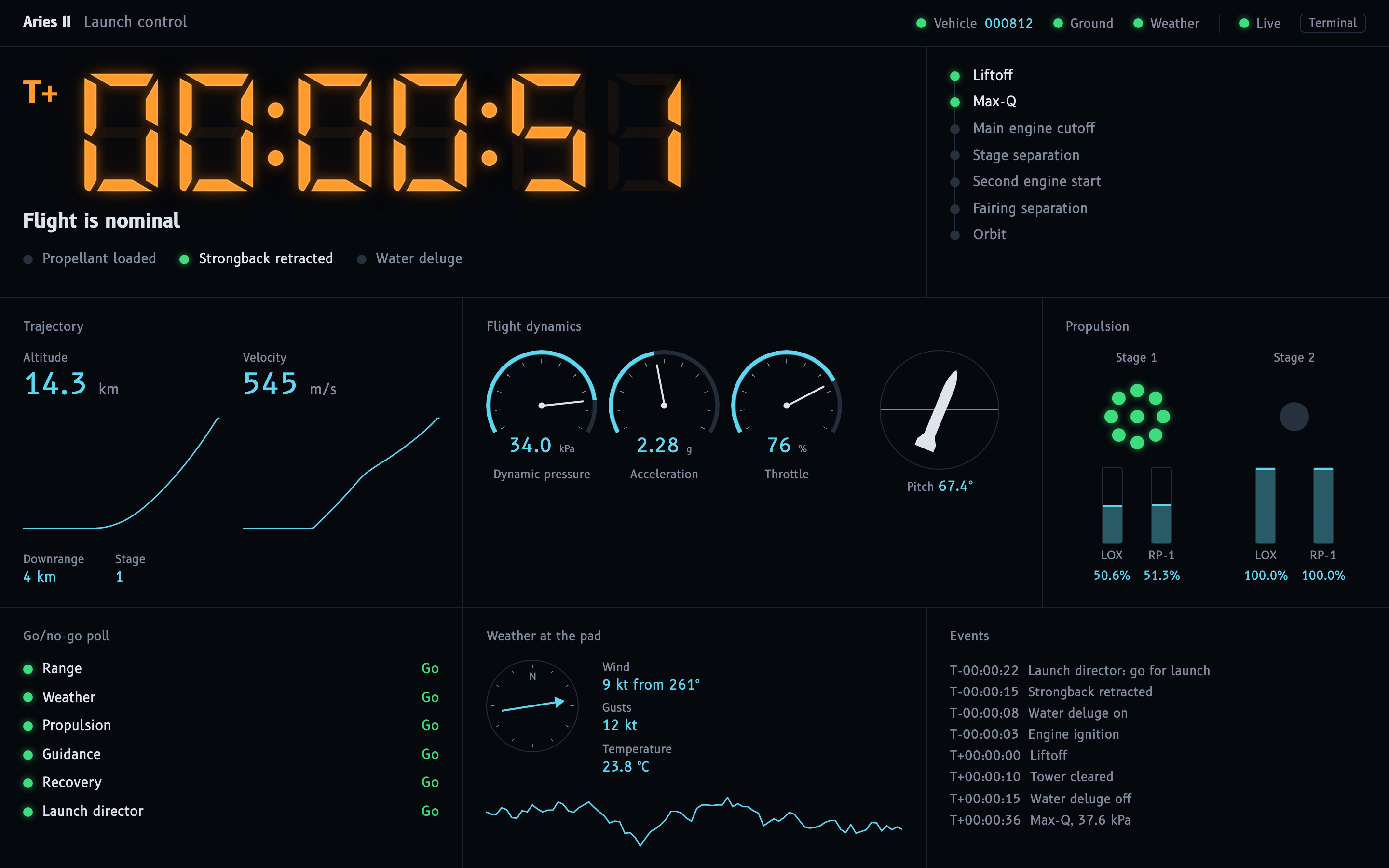
That's the launch control demo; run it with one command:
|
|
42
|
+
|
|
43
|
+
```bash
|
|
44
|
+
uvx --from "sightglass[web]" sightglass --demo launch --open
|
|
45
|
+
```
|
|
46
|
+
|
|
47
|
+
It's a plain HTML page fed live by three separate programs: an in-process
|
|
48
|
+
source, another process using `Client`, and plain HTTP posts. Its gauges,
|
|
49
|
+
tanks and lamps are drawn by CSS from the values; the page has no JavaScript
|
|
50
|
+
of its own. The source is in [src/sightglass/launch/](https://github.com/davidson-engineering/sightglass/tree/main/src/sightglass/launch).
|
|
51
|
+
|
|
52
|
+
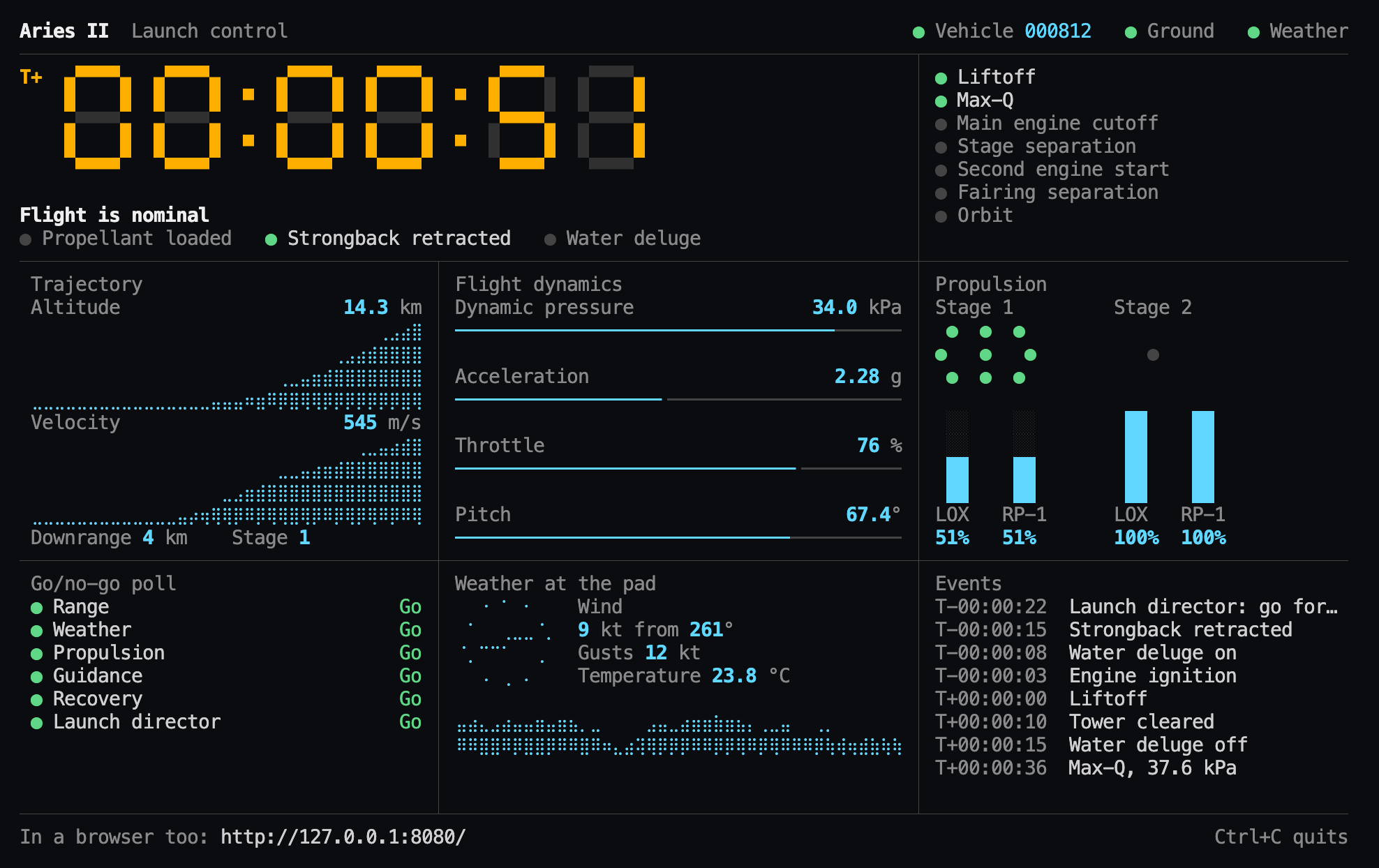
Add `--theme terminal` for a phosphor-terminal look ([themes](#themes)), or
|
|
53
|
+
`--terminal` and the same launch is drawn in the terminal as well, laid out by
|
|
54
|
+
a screen function of its own ([screen.py](https://github.com/davidson-engineering/sightglass/blob/main/src/sightglass/launch/screen.py)):
|
|
55
|
+
|
|
56
|
+
|
|
57
|
+
|
|
58
|
+
- **One line to start.** `start()` serves a dashboard in the background and
|
|
59
|
+
prints its address; `monitor.set("progress", 5)` works from any thread, and
|
|
60
|
+
elements appear the first time you use them.
|
|
61
|
+
- **No code needed.** Pipe a program into `sightglass`, `curl` values to it,
|
|
62
|
+
or point it at a serial port, a ZeroMQ socket or a Beckhoff PLC.
|
|
63
|
+
- **Any language.** `POST /update` with JSON or `key=value` lines.
|
|
64
|
+
- **Keeps up with fast devices.** Serial and ZeroMQ are read on background
|
|
65
|
+
threads and drained completely, so the display never falls behind and a
|
|
66
|
+
stalled device can't freeze it.
|
|
67
|
+
- **Honest about staleness.** Pages reconnect by themselves, show how old the
|
|
68
|
+
data is, and dim values while disconnected or (optionally) when a source
|
|
69
|
+
goes quiet; a page fed by several sources can show which one stopped.
|
|
70
|
+
- **Plain HTML dashboards.** Mark any element `data-bind="<id>"` and it stays
|
|
71
|
+
live; CSS can turn values into gauges, levels and lamps, like the panel
|
|
72
|
+
above. Otherwise a clean generic page is generated.
|
|
73
|
+
- **See what actually arrives.** Press `` ` `` on any dashboard page for the
|
|
74
|
+
[signals panel](#signals-panel): every id received, its value as sent and a
|
|
75
|
+
chart of its last minute, so a misspelt id or a feed that stopped is obvious.
|
|
76
|
+
|
|
77
|
+
## Install
|
|
78
|
+
|
|
79
|
+
Requires Python 3.11+.
|
|
80
|
+
|
|
81
|
+
```bash
|
|
82
|
+
pip install "sightglass[web]" # add serial, zmq, ads, or use [all]
|
|
83
|
+
```
|
|
84
|
+
|
|
85
|
+
Try it: `sightglass --demo launch --open` runs the page above;
|
|
86
|
+
`sightglass --demo --open` shows every kind of display on the generic page.
|
|
87
|
+
|
|
88
|
+
## Quick start
|
|
89
|
+
|
|
90
|
+
### From inside a Python program
|
|
91
|
+
|
|
92
|
+
```python
|
|
93
|
+
import time
|
|
94
|
+
|
|
95
|
+
from sightglass import start
|
|
96
|
+
|
|
97
|
+
monitor = start() # prints "Dashboard: http://127.0.0.1:8080/"
|
|
98
|
+
|
|
99
|
+
for i in range(1, 101):
|
|
100
|
+
time.sleep(0.1) # your work
|
|
101
|
+
monitor.set("progress", i)
|
|
102
|
+
monitor.set("status", "running" if i < 100 else "done")
|
|
103
|
+
```
|
|
104
|
+
|
|
105
|
+
`set()` returns immediately and is safe from any thread. Each new id becomes
|
|
106
|
+
an element (a lamp for `True`/`False`, text otherwise; ids like `"job.rate"`
|
|
107
|
+
are grouped under `job`). Long floats are shortened to 6 significant digits.
|
|
108
|
+
The dashboard stops when your program exits, or call `monitor.stop()`.
|
|
109
|
+
|
|
110
|
+
### Without writing code
|
|
111
|
+
|
|
112
|
+
```bash
|
|
113
|
+
# Pipe a program: lines like "progress=5 status=running" or JSON objects
|
|
114
|
+
# become values; everything else is printed as usual.
|
|
115
|
+
my_program | sightglass
|
|
116
|
+
|
|
117
|
+
# Push values from anything: shell scripts, cron jobs, other languages.
|
|
118
|
+
sightglass &
|
|
119
|
+
curl -d 'temperature=21.5 status=ok' http://127.0.0.1:8080/update
|
|
120
|
+
curl -d '{"job": {"progress": 5}}' http://127.0.0.1:8080/update
|
|
121
|
+
curl http://127.0.0.1:8080/values # what the dashboard shows, as JSON
|
|
122
|
+
|
|
123
|
+
# Read a device.
|
|
124
|
+
sightglass --serial auto --csv temperature,humidity
|
|
125
|
+
sightglass --zmq tcp://localhost:5556
|
|
126
|
+
sightglass --ads 5.12.34.56.1.1 --vars 'MAIN.*' # a Beckhoff PLC
|
|
127
|
+
```
|
|
128
|
+
|
|
129
|
+
`sightglass --help` lists every option, including `--terminal` to draw in the
|
|
130
|
+
terminal instead of the browser (its log messages then go to
|
|
131
|
+
`sightglass.log`).
|
|
132
|
+
|
|
133
|
+
### From a separate Python program
|
|
134
|
+
|
|
135
|
+
The client uses only the standard library, so the program sending values
|
|
136
|
+
doesn't need the dashboard's dependencies:
|
|
137
|
+
|
|
138
|
+
```python
|
|
139
|
+
from sightglass import Client
|
|
140
|
+
|
|
141
|
+
dashboard = Client() # http://127.0.0.1:8080
|
|
142
|
+
dashboard.set("progress", 5)
|
|
143
|
+
dashboard.update({"rate": 18.6, "status": "running"})
|
|
144
|
+
```
|
|
145
|
+
|
|
146
|
+
Updates are sent in order in the background. If the dashboard isn't running
|
|
147
|
+
yet they're kept and retried, and anything pending is sent when your program
|
|
148
|
+
exits, so even a two-line script's values arrive. Pass `token=` if the
|
|
149
|
+
dashboard was given one. For one message,
|
|
150
|
+
`from sightglass.client import send` and `send({"status": "done"})`.
|
|
151
|
+
|
|
152
|
+
## Choosing how values look
|
|
153
|
+
|
|
154
|
+
Declare elements for bars, charts, units and number formats. Anything you
|
|
155
|
+
don't declare still appears as text.
|
|
156
|
+
|
|
157
|
+
```python
|
|
158
|
+
from sightglass import Monitor, ProgressBar, Sparkline, TextFormat
|
|
159
|
+
|
|
160
|
+
monitor = Monitor()
|
|
161
|
+
monitor.add(
|
|
162
|
+
ProgressBar("progress", total=500, label="Progress"),
|
|
163
|
+
Sparkline("rate", label="Items/s", format=TextFormat(precision=1)),
|
|
164
|
+
)
|
|
165
|
+
monitor.start()
|
|
166
|
+
```
|
|
167
|
+
|
|
168
|
+
| Element | Shows | Update with |
|
|
169
|
+
| --- | --- | --- |
|
|
170
|
+
| `TextElement` | a value, optionally scaled and number-formatted | any value |
|
|
171
|
+
| `Sparkline` | a number and a chart of its recent history (`interval=1`: one point a second, for longer spans of fast values) | a number |
|
|
172
|
+
| `ProgressBar` | a filling bar from 0 to `total` | a number |
|
|
173
|
+
| `RangeBar` | a marker on a min to max track | a number |
|
|
174
|
+
| `IndicatorLamp` | on/off | `True`/`False`, `1`/`0`, `on`/`off` |
|
|
175
|
+
| `MachineState` | named on/off states packed into one integer | an integer (bit 0 = first state) |
|
|
176
|
+
| `Coordinate` | a multi-axis position | a list, or per axis: `"<id>.x"` |
|
|
177
|
+
| `Table` | a grid of cells | per cell: `"<id>.<row>.<column>"` |
|
|
178
|
+
| `LogMonitor` | the latest messages | a string |
|
|
179
|
+
|
|
180
|
+
Multi-part elements take updates to a field, addressed as `"<id>.<field>"`.
|
|
181
|
+
`monitor.add_group("X", [...])` adds copies of elements under a heading with
|
|
182
|
+
ids `X.<id>`, so one list can serve several axes.
|
|
183
|
+
|
|
184
|
+
`TextFormat(width, precision, force_sign, padding)` formats numbers:
|
|
185
|
+
`TextFormat(width=10, precision=3, force_sign=True, padding="0")` turns `27.31`
|
|
186
|
+
into `+00027.310`. `Style(fg, bg, bold, dim)` adds colour in the terminal:
|
|
187
|
+
a colour name, or one of xterm's 256 colour numbers (`Style(fg=214)` is amber).
|
|
188
|
+
|
|
189
|
+
For a fixed, curated dashboard use `Monitor(strict=True)`: unknown ids are
|
|
190
|
+
then rejected and logged (once per id) instead of creating elements.
|
|
191
|
+
`max_elements` (default 500) stops a noisy link creating elements without end.
|
|
192
|
+
|
|
193
|
+
## Running
|
|
194
|
+
|
|
195
|
+
| Call | Runs |
|
|
196
|
+
| --- | --- |
|
|
197
|
+
| `monitor.start(sources=..., outputs=...)` | in a background thread; returns once the dashboard is up (setup errors such as a busy port are raised here) |
|
|
198
|
+
| `monitor.serve(sources=..., outputs=...)` | in the foreground until Ctrl+C, then returns quietly |
|
|
199
|
+
| `await monitor.run(sources=..., outputs=...)` | inside your own asyncio program |
|
|
200
|
+
|
|
201
|
+
`outputs` defaults to a `WebDashboard()` for `start()` and `serve()`. The
|
|
202
|
+
monitor can also be used as a context manager: `with monitor.start(): ...`.
|
|
203
|
+
|
|
204
|
+
## Devices and other sources
|
|
205
|
+
|
|
206
|
+
```python
|
|
207
|
+
from sightglass import CsvDecoder, Monitor, SerialSource
|
|
208
|
+
|
|
209
|
+
monitor = Monitor()
|
|
210
|
+
# The device prints one line per sample: "21.5,48,OK"
|
|
211
|
+
device = SerialSource(
|
|
212
|
+
"auto", 115200, decoder=CsvDecoder(["temperature", "humidity", "status"])
|
|
213
|
+
)
|
|
214
|
+
monitor.serve(sources=[device])
|
|
215
|
+
```
|
|
216
|
+
|
|
217
|
+
| Source | Reads |
|
|
218
|
+
| --- | --- |
|
|
219
|
+
| `SerialSource(port, baudrate, decoder=...)` | a serial port (`"auto"` picks the first USB device); waits for it and reconnects |
|
|
220
|
+
| `ZmqSource(endpoint, pattern="sub")` | ZeroMQ PUB/SUB (a publisher that binds `endpoint`) |
|
|
221
|
+
| `ZmqSource(endpoint, pattern="pull")` | ZeroMQ PUSH/PULL: binds `endpoint`; unlike PUB/SUB, nothing sent before the monitor starts is lost |
|
|
222
|
+
| `AdsSource(target, variables)` | a Beckhoff TwinCAT PLC over ADS ([below](#beckhoff-twincat-plcs-ads)); can also write to it |
|
|
223
|
+
| `StdinSource()` | piped standard input, as `sightglass` does |
|
|
224
|
+
| `SimulatedSource(fn, rate)` | `fn(seconds)` called `rate` times a second, for demos and tests |
|
|
225
|
+
|
|
226
|
+
| Decoder | Wire format |
|
|
227
|
+
| --- | --- |
|
|
228
|
+
| `KeyValueDecoder()` | `X.velocity 1.5`, or `key=value` pairs: `progress=5 status="two words"` |
|
|
229
|
+
| `CsvDecoder(keys)` | `1.5,-2.0,OK`, values in the order of `keys` |
|
|
230
|
+
| `JsonDecoder()` | `{"X": {"velocity": 1.5}}` per line; nesting addresses groups and fields |
|
|
231
|
+
| `BinaryFrameDecoder(names, scale=1000)` | the binary frame protocol below |
|
|
232
|
+
|
|
233
|
+
#### Binary frame protocol
|
|
234
|
+
|
|
235
|
+
For firmware where text is too slow or too large:
|
|
236
|
+
|
|
237
|
+
```
|
|
238
|
+
0xAA | id | type | value | n | param_1 ... param_n | 0xFF
|
|
239
|
+
```
|
|
240
|
+
|
|
241
|
+
- `type 0x01`: `value` is a little-endian int32, divided by `scale` (1000 by default).
|
|
242
|
+
- `type 0x02`: `value` is a NUL-terminated UTF-8 string (up to 255 bytes).
|
|
243
|
+
- `id` and the params are single bytes, translated through `names`
|
|
244
|
+
(`{1: "X", 10: "velocity"}`). The update key is the id's name followed by the
|
|
245
|
+
params' names, so id `X` with param `velocity` updates `"X.velocity"`.
|
|
246
|
+
|
|
247
|
+
Corrupt frames are skipped and decoding resumes at the next `0xAA`.
|
|
248
|
+
|
|
249
|
+
### Beckhoff TwinCAT PLCs (ADS)
|
|
250
|
+
|
|
251
|
+
Install the `ads` extra (`pip install "sightglass[web,ads]"`), then give
|
|
252
|
+
`sightglass` the PLC's AMS net id and the variables to show; `*` matches any
|
|
253
|
+
characters:
|
|
254
|
+
|
|
255
|
+
```bash
|
|
256
|
+
sightglass --ads 5.12.34.56.1.1 --vars 'MAIN.*,GVL.fTemperature'
|
|
257
|
+
```
|
|
258
|
+
|
|
259
|
+
All the variables are read in one ADS request every 0.1 s and shown under
|
|
260
|
+
their PLC names. Structs and arrays become one value per member
|
|
261
|
+
(`MAIN.stAxis.fPosition`, `GVL.aTemps[1]`), BOOLs become lamps, and the
|
|
262
|
+
variables are looked up again whenever a new program is downloaded.
|
|
263
|
+
|
|
264
|
+
For a lasting dashboard, describe the PLC in an interface file, with the
|
|
265
|
+
types pasted from the PLC project ([examples/plc.toml](https://github.com/davidson-engineering/sightglass/blob/main/examples/plc.toml) is
|
|
266
|
+
a commented one):
|
|
267
|
+
|
|
268
|
+
```toml
|
|
269
|
+
target = "5.12.34.56.1.1:851"
|
|
270
|
+
types = """
|
|
271
|
+
TYPE ST_Axis :
|
|
272
|
+
STRUCT
|
|
273
|
+
fPosition : LREAL;
|
|
274
|
+
bEnabled : BOOL;
|
|
275
|
+
END_STRUCT
|
|
276
|
+
END_TYPE
|
|
277
|
+
"""
|
|
278
|
+
|
|
279
|
+
[variables]
|
|
280
|
+
"MAIN.stAxis1" = "ST_Axis" # one value per member
|
|
281
|
+
"GVL.fTemperature" = {} # the PLC says what it is
|
|
282
|
+
"MAIN.*" = {} # every plain top-level variable in MAIN
|
|
283
|
+
"GVL.nSetpoint" = { write = true } # may be written: see below
|
|
284
|
+
```
|
|
285
|
+
|
|
286
|
+
`sightglass --ads plc.toml` reads it. `types` takes struct, enum and alias
|
|
287
|
+
declarations as TwinCAT writes them, comments, initial values and
|
|
288
|
+
`{attribute 'pack_mode' := '1'}` included. Structs are laid out in memory as
|
|
289
|
+
TwinCAT 3 does, and each variable's size is checked against the PLC's, so a
|
|
290
|
+
declaration that doesn't match is reported rather than shown as wrong values.
|
|
291
|
+
Declared enums are shown by name. From Python:
|
|
292
|
+
|
|
293
|
+
```python
|
|
294
|
+
from sightglass import AdsSource, Monitor
|
|
295
|
+
|
|
296
|
+
plc = AdsSource("5.12.34.56.1.1", ["MAIN.*", "GVL.fTemperature"])
|
|
297
|
+
# or AdsSource.from_file("plc.toml")
|
|
298
|
+
Monitor().serve(sources=[plc])
|
|
299
|
+
```
|
|
300
|
+
|
|
301
|
+
**Writing.** Values sent to a variable marked `write = true` (with curl,
|
|
302
|
+
`Client` or `monitor.set`) are written to the PLC, and the dashboard shows
|
|
303
|
+
what the PLC reads back. Nothing is written unless all of these hold:
|
|
304
|
+
|
|
305
|
+
- the variable is marked `write = true`;
|
|
306
|
+
- `sightglass` was started with `--allow-writes` (`allow_writes=True`);
|
|
307
|
+
- the environment variable `SIGHTGLASS_ALLOW_WRITES` is `1`;
|
|
308
|
+
- the request has the dashboard's token: values for a PLC are refused over
|
|
309
|
+
HTTP from a dashboard without `--token`.
|
|
310
|
+
|
|
311
|
+
```bash
|
|
312
|
+
export SIGHTGLASS_ALLOW_WRITES=1
|
|
313
|
+
sightglass --ads plc.toml --allow-writes --token change-me
|
|
314
|
+
curl -H 'Authorization: Bearer change-me' -d 'GVL.nSetpoint=75' http://127.0.0.1:8080/update
|
|
315
|
+
```
|
|
316
|
+
|
|
317
|
+
Each value is checked against its type, then against the type the PLC itself
|
|
318
|
+
gives the variable, and a request is all or nothing. A write that is refused
|
|
319
|
+
gets 403 (not allowed), 400 (doesn't fit) or 409 (the PLC refused it or isn't
|
|
320
|
+
connected), and is never retried, so a setpoint can't arrive late.
|
|
321
|
+
|
|
322
|
+
**Connecting.** On Linux and macOS, pyads talks to the PLC directly, and the
|
|
323
|
+
PLC needs a static route back to this machine: its IP address, and an AMS net
|
|
324
|
+
id of that address followed by `.1.1` (sightglass prints both if the PLC
|
|
325
|
+
doesn't answer). Add it in TwinCAT, or with pyads' `add_route_to_plc`. On
|
|
326
|
+
Windows, pyads goes through TwinCAT's own ADS router: install TwinCAT (XAE,
|
|
327
|
+
XAR or the TC1000 ADS setup) and add the route there.
|
|
328
|
+
|
|
329
|
+
## Outputs
|
|
330
|
+
|
|
331
|
+
**`WebDashboard(page=None, static_dir=None, host="127.0.0.1", port=8080, title="Monitor", theme="classic", token=None, stale_after=None)`**
|
|
332
|
+
serves `page` (or the generic page), streams values over a WebSocket, accepts
|
|
333
|
+
`POST /update` and returns the current values as JSON from `GET /values`. `stale_after=2` dims values when no data has arrived
|
|
334
|
+
for 2 seconds, for sources that should update continuously. `theme` sets the
|
|
335
|
+
pages' look until a viewer switches ([themes](#themes)). Your own page
|
|
336
|
+
loads `/_sightglass/sightglass.js` and marks up elements:
|
|
337
|
+
|
|
338
|
+
```html
|
|
339
|
+
<link rel="stylesheet" href="/_sightglass/panel.css">
|
|
340
|
+
|
|
341
|
+
<span data-bind="temperature"></span> <!-- text -->
|
|
342
|
+
<div class="led" data-bind="machine.estop" data-mode="state"></div> <!-- data-state="on"/"off" -->
|
|
343
|
+
<div class="bar" data-bind="X.velocity.ratio" data-mode="width"></div> <!-- width: 0-100% -->
|
|
344
|
+
<div data-bind="rate.values" data-mode="sparkline"></div> <!-- line chart -->
|
|
345
|
+
<div class="dial" data-bind="pressure.ratio" data-mode="var"></div> <!-- CSS variable --value -->
|
|
346
|
+
<span data-bind="wind" data-stale-after="3"></span> <!-- data-stale="true" once quiet -->
|
|
347
|
+
|
|
348
|
+
<!-- A segment display: data-ghost draws the unlit segments. -->
|
|
349
|
+
<div class="lcd">
|
|
350
|
+
<span class="lcd-field" data-ghost="~~~~~~.~~~"><span data-bind="position_x"></span></span>
|
|
351
|
+
</div>
|
|
352
|
+
|
|
353
|
+
<script src="/_sightglass/sightglass.js"></script>
|
|
354
|
+
```
|
|
355
|
+
|
|
356
|
+
`data-mode="var"` sets the CSS variable `--value` to the number, so CSS alone
|
|
357
|
+
can draw a needle (`rotate: calc(var(--value) * 270deg)`) or a fill level
|
|
358
|
+
(`height: calc(var(--value) * 100%)`). `data-stale-after="<seconds>"` marks an
|
|
359
|
+
element `data-stale="true"` while its value hasn't arrived for that long, so a
|
|
360
|
+
page fed by several sources can show which one has gone quiet
|
|
361
|
+
(`stale_after` does this for the page as a whole).
|
|
362
|
+
|
|
363
|
+
Object values are flattened, so a `RangeBar` binds as `<id>.text` and
|
|
364
|
+
`<id>.ratio`, a `Sparkline` as `<id>.text` and `<id>.values`, and a
|
|
365
|
+
`MachineState` as `<id>.<state>`. `panel.css` provides the segment display
|
|
366
|
+
(`.lcd`, `.lcd-field`) and LED (`.led`, `.led-red`, `.led-amber`) styles.
|
|
367
|
+
Files in `static_dir` are served under `/static/`.
|
|
368
|
+
|
|
369
|
+
#### Signals panel
|
|
370
|
+
|
|
371
|
+
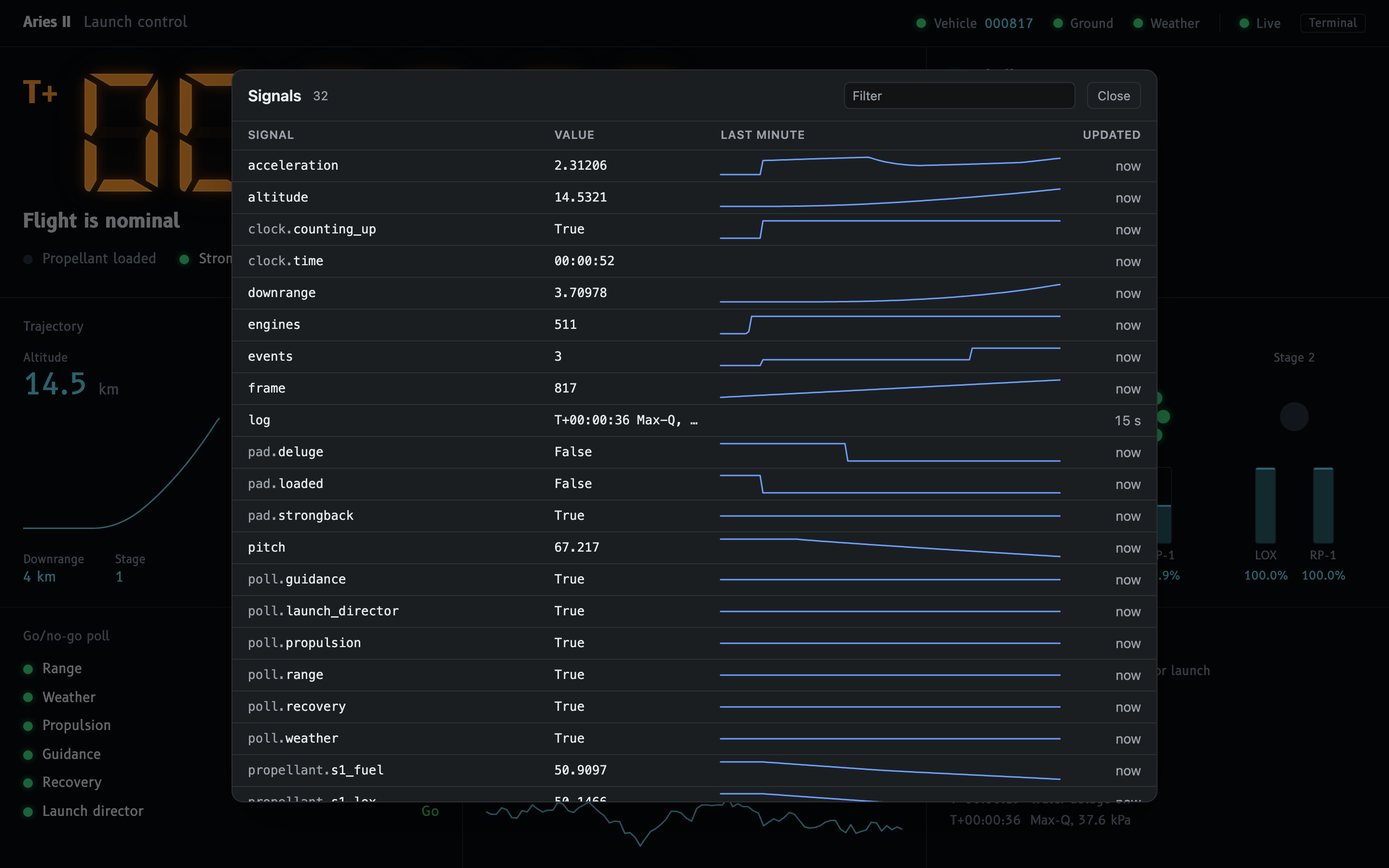
Every page that loads `sightglass.js` (the generic page, the launch demo,
|
|
372
|
+
yours) has a panel for checking what a feed sends: press `` ` `` (or click
|
|
373
|
+
**Signals** on the generic page, or an element of yours marked
|
|
374
|
+
`data-signals-open`). It lists every id the dashboard has accepted, its latest
|
|
375
|
+
value as sent (before an element scales or formats it), how long ago it
|
|
376
|
+
arrived, and a chart of its last minute. The charts share one time axis, so
|
|
377
|
+
what changed together lines up; the line reaches the lowest and highest value
|
|
378
|
+
of each half second, so a fast swing isn't lost, and booleans and on/off chart
|
|
379
|
+
as steps. Type to filter by id; `` ` `` or Escape closes it. It streams over a
|
|
380
|
+
WebSocket of its own (`/ws/signals`) only while open.
|
|
381
|
+
|
|
382
|
+
|
|
383
|
+
|
|
384
|
+
#### Themes
|
|
385
|
+
|
|
386
|
+
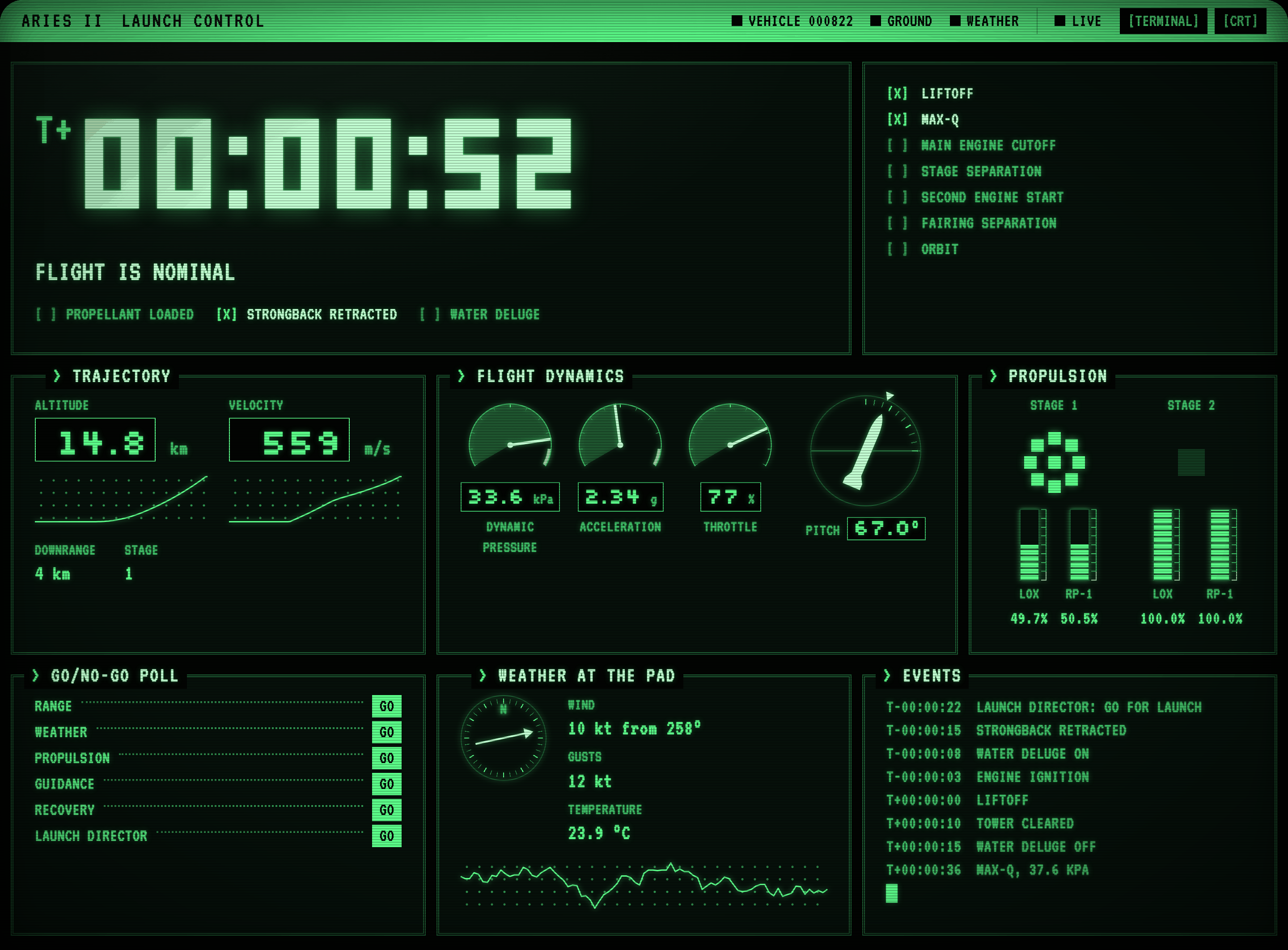
The generic page and the launch demo come in two themes: **classic**, and
|
|
387
|
+
**terminal**, a phosphor-green terminal whose instruments borrow from an early
|
|
388
|
+
glass cockpit's CRTs: gauges with filled sectors, caution bands and red limits,
|
|
389
|
+
boxed readouts, scales, and a red X over anything whose data has stopped. Its
|
|
390
|
+
CRT effects, on a switch of their own, are still (glow, scanlines, the tube's
|
|
391
|
+
rounded corners and glass) and moving (a power-on that draws each panel
|
|
392
|
+
and types its name, the refresh rolling down the screen, a faint flicker); the
|
|
393
|
+
moving ones are left out for anyone whose system asks for reduced motion.
|
|
394
|
+
|
|
395
|
+
|
|
396
|
+
|
|
397
|
+
`--theme terminal` or `WebDashboard(theme="terminal")` sets the default; a
|
|
398
|
+
switch on the page lets each viewer change it, and their browser remembers.
|
|
399
|
+
Your own page can offer both:
|
|
400
|
+
|
|
401
|
+
```html
|
|
402
|
+
<head>
|
|
403
|
+
<script src="/_sightglass/theme.js"></script> <!-- html[data-theme], html[data-crt] -->
|
|
404
|
+
<link rel="stylesheet" href="/_sightglass/terminal.css"> <!-- fonts, --crt-* colours, CRT effects -->
|
|
405
|
+
</head>
|
|
406
|
+
|
|
407
|
+
<button data-theme-switch>Terminal</button> <!-- aria-pressed while the terminal theme is on -->
|
|
408
|
+
<button data-crt-switch>CRT</button>
|
|
409
|
+
```
|
|
410
|
+
|
|
411
|
+
then style it under `html[data-theme="terminal"]` with the `--crt-*` colours
|
|
412
|
+
(`--crt-fg`, `--crt-dim`, `--crt-bright`, `--crt-amber`, ...) and fonts:
|
|
413
|
+
`--crt-font` (VT323) for text, and two pixel fonts for numbers,
|
|
414
|
+
`--crt-display-font` (Micro 5) for a big display like a clock and
|
|
415
|
+
`--crt-readout-font` (Silkscreen) for readings. Pixel fonts are sharp only at
|
|
416
|
+
whole pixels: give Micro 5 multiples of 11px and Silkscreen multiples of 8px.
|
|
417
|
+
`terminal.css` draws the CRT effects over any page; for the power-on, give
|
|
418
|
+
your panels its keyframes, `crt-draw` (drawn top to bottom, with `steps()`)
|
|
419
|
+
and `crt-type` (typed in), inside
|
|
420
|
+
`@media (prefers-reduced-motion: no-preference)`. `theme.js` sets the theme
|
|
421
|
+
before anything is drawn, so the page never flashes the other one.
|
|
422
|
+
|
|
423
|
+
**`TerminalDisplay(width=60, fps=30, screen=None)`** draws a full-screen view
|
|
424
|
+
in the terminal's alternate screen. Log to a file while it runs; anything
|
|
425
|
+
printed to the terminal gets drawn over. By default it lists every element;
|
|
426
|
+
for a layout of your own, the terminal's counterpart of a custom page, pass
|
|
427
|
+
`screen`: a function of `(monitor, width, height)` that returns the whole
|
|
428
|
+
frame for a terminal that size, reading values from the elements
|
|
429
|
+
(`monitor["rate"].text`) and colouring them with `Style`. A screen is redrawn
|
|
430
|
+
at least once a second, so it can show how old values are
|
|
431
|
+
(`monitor.ages()`). The launch demo's `screen.py` is a full example.
|
|
432
|
+
|
|
433
|
+
### Network access and security
|
|
434
|
+
|
|
435
|
+
The dashboard listens on `127.0.0.1` by default, so only the same machine can
|
|
436
|
+
see it. With `host="0.0.0.0"` (or `--host 0.0.0.0`) anyone who can reach the
|
|
437
|
+
port can view the values and, unless you set `token`, post updates. Viewing
|
|
438
|
+
has no authentication and traffic is not encrypted: on untrusted networks,
|
|
439
|
+
reach the dashboard through an SSH tunnel or a reverse proxy with TLS and
|
|
440
|
+
authentication.
|
|
441
|
+
|
|
442
|
+
Values for a device (a PLC variable marked `write = true`) are only accepted
|
|
443
|
+
from programs that send the token. The token crosses the network as plain
|
|
444
|
+
text unless the dashboard is behind TLS, so a dashboard that can write to a
|
|
445
|
+
PLC from other machines needs the tunnel or proxy too.
|
|
446
|
+
|
|
447
|
+
## Examples
|
|
448
|
+
|
|
449
|
+
[examples/](https://github.com/davidson-engineering/sightglass/blob/main/examples/README.md) is a gallery where each example shows one way
|
|
450
|
+
to feed a dashboard and runs with a single command, with nothing to clone or
|
|
451
|
+
install beyond [uv](https://docs.astral.sh/uv/):
|
|
452
|
+
|
|
453
|
+
| Example | Shows | |
|
|
454
|
+
| --- | --- | --- |
|
|
455
|
+
| Demo | every kind of display | `uvx --from "sightglass[web]" sightglass --demo --open` |
|
|
456
|
+
| Launch control | the page above: a custom panel fed by three programs | [run](https://github.com/davidson-engineering/sightglass/blob/main/examples/README.md#the-showcase-launch-control) |
|
|
457
|
+
| 1. Hello | a Python program with `start()` and `set()` | [run](https://github.com/davidson-engineering/sightglass/blob/main/examples/README.md#1-hello-dashboard) |
|
|
458
|
+
| 2. System monitor | this computer, live: charts, bars, a table | [run](https://github.com/davidson-engineering/sightglass/blob/main/examples/README.md#2-system-monitor) |
|
|
459
|
+
| 3. From the shell | any language, over HTTP with curl | [run](https://github.com/davidson-engineering/sightglass/blob/main/examples/README.md#3-from-the-shell) |
|
|
460
|
+
| 4. Pipe | a program's printed output | [run](https://github.com/davidson-engineering/sightglass/blob/main/examples/README.md#4-pipe-a-programs-output) |
|
|
461
|
+
| 5. Many processes | several programs, one dashboard, with `Client` | [run](https://github.com/davidson-engineering/sightglass/blob/main/examples/README.md#5-many-processes-one-dashboard) |
|
|
462
|
+
| 6. Docker | deployed as a service, fed over the network | [run](https://github.com/davidson-engineering/sightglass/blob/main/examples/README.md#6-deploy-with-docker) |
|
|
463
|
+
| 7. Terminal | drawn in the terminal | [run](https://github.com/davidson-engineering/sightglass/blob/main/examples/README.md#7-in-the-terminal) |
|
|
464
|
+
| 8. Custom panel | a segment-display panel, over serial | [run](https://github.com/davidson-engineering/sightglass/blob/main/examples/README.md#8-a-custom-panel-and-a-serial-device) |
|
|
465
|
+
| 9. Beckhoff PLC | a TwinCAT PLC over ADS, from an interface file | [run](https://github.com/davidson-engineering/sightglass/blob/main/examples/README.md#9-a-beckhoff-plc-over-ads) |
|
|
466
|
+
|
|
467
|
+
## Extending
|
|
468
|
+
|
|
469
|
+
- **Element:** subclass `Element` and implement `update(value)`,
|
|
470
|
+
`to_json()` (what the browser receives) and `render(width)` (terminal text).
|
|
471
|
+
Override `update_field` to accept `"<id>.<field>"` updates.
|
|
472
|
+
- **Wire format:** subclass `LineDecoder` and implement
|
|
473
|
+
`decode_line(line) -> {id: value}`, raising `DecodeError` for bad input; or
|
|
474
|
+
subclass `Decoder` for binary formats.
|
|
475
|
+
- **Source:** any object with an async generator method `updates()` that
|
|
476
|
+
yields lists of `{id: value}` mappings. A source that can also write to its
|
|
477
|
+
device adds `claims(id)` (true for its ids) and `async def write(update)`,
|
|
478
|
+
raising `WriteError`; values sent to its ids then go to `write()` (see
|
|
479
|
+
`Source` in `monitor.py`).
|
|
480
|
+
- **Output:** any object with `async def run(monitor)`, and optionally
|
|
481
|
+
`async def start(monitor)` for setup that can fail and
|
|
482
|
+
`async def flush(monitor)` to deliver the last values before
|
|
483
|
+
`Monitor.stop()` shuts down. Use
|
|
484
|
+
`await monitor.wait_for_change(version)` and
|
|
485
|
+
`monitor.changes_since(version)` to react to new data, and
|
|
486
|
+
`monitor.ages()` for how long ago each element was updated.
|
|
487
|
+
|
|
488
|
+
## For AI coding agents
|
|
489
|
+
|
|
490
|
+
`sightglass --guide` prints a concise, recipe-first guide to building and
|
|
491
|
+
deploying monitors, written for coding agents (it is also imported by this
|
|
492
|
+
repository's `CLAUDE.md`). To make it discoverable in another project, add a
|
|
493
|
+
line like this to that project's `CLAUDE.md` or `AGENTS.md`:
|
|
494
|
+
|
|
495
|
+
```markdown
|
|
496
|
+
- Live dashboards for this project: `sightglass`; run `sightglass --guide` before building one.
|
|
497
|
+
```
|
|
498
|
+
|
|
499
|
+
See [CONTRIBUTING.md](https://github.com/davidson-engineering/sightglass/blob/main/CONTRIBUTING.md) for development and releases.
|
|
500
|
+
|
|
501
|
+
## License
|
|
502
|
+
|
|
503
|
+
MIT. The bundled DSEG fonts are © keshikan, licensed under the SIL Open Font
|
|
504
|
+
License 1.1 (`src/sightglass/web/static/fonts/DSEG-LICENSE.txt`). The launch
|
|
505
|
+
control example's B612 fonts are © The B612 Project Authors, under the same
|
|
506
|
+
license (`src/sightglass/launch/static/fonts/B612-LICENSE.txt`), as are the
|
|
507
|
+
terminal theme's VT323, © The VT323 Project Authors, Micro 5, © The Soft Type
|
|
508
|
+
Project Authors, and Silkscreen, © The Silkscreen Project Authors
|
|
509
|
+
(`VT323-LICENSE.txt`, `Micro5-LICENSE.txt` and `Silkscreen-LICENSE.txt` in
|
|
510
|
+
`src/sightglass/web/static/fonts/`).
|