shelfline 0.1.0__tar.gz
This diff represents the content of publicly available package versions that have been released to one of the supported registries. The information contained in this diff is provided for informational purposes only and reflects changes between package versions as they appear in their respective public registries.
- shelfline-0.1.0/LICENSE +21 -0
- shelfline-0.1.0/PKG-INFO +364 -0
- shelfline-0.1.0/README.md +326 -0
- shelfline-0.1.0/pyproject.toml +63 -0
- shelfline-0.1.0/setup.cfg +4 -0
- shelfline-0.1.0/src/shelfline/__init__.py +1 -0
- shelfline-0.1.0/src/shelfline/__main__.py +58 -0
- shelfline-0.1.0/src/shelfline/app.py +129 -0
- shelfline-0.1.0/src/shelfline/catalog/__init__.py +10 -0
- shelfline-0.1.0/src/shelfline/catalog/client.py +36 -0
- shelfline-0.1.0/src/shelfline/catalog/models.py +39 -0
- shelfline-0.1.0/src/shelfline/catalog/parser.py +135 -0
- shelfline-0.1.0/src/shelfline/config.py +227 -0
- shelfline-0.1.0/src/shelfline/credentials.py +97 -0
- shelfline-0.1.0/src/shelfline/downloads.py +106 -0
- shelfline-0.1.0/src/shelfline/library.py +491 -0
- shelfline-0.1.0/src/shelfline/reader.py +330 -0
- shelfline-0.1.0/src/shelfline/services.py +258 -0
- shelfline-0.1.0/src/shelfline/tui/__init__.py +30 -0
- shelfline-0.1.0/src/shelfline/tui/app.tcss +260 -0
- shelfline-0.1.0/src/shelfline/tui/layout.py +51 -0
- shelfline-0.1.0/src/shelfline/tui/reader.py +328 -0
- shelfline-0.1.0/src/shelfline/tui/screens.py +758 -0
- shelfline-0.1.0/src/shelfline/tui/theme.py +38 -0
- shelfline-0.1.0/src/shelfline/tui/widgets.py +843 -0
- shelfline-0.1.0/src/shelfline.egg-info/PKG-INFO +364 -0
- shelfline-0.1.0/src/shelfline.egg-info/SOURCES.txt +47 -0
- shelfline-0.1.0/src/shelfline.egg-info/dependency_links.txt +1 -0
- shelfline-0.1.0/src/shelfline.egg-info/entry_points.txt +2 -0
- shelfline-0.1.0/src/shelfline.egg-info/requires.txt +12 -0
- shelfline-0.1.0/src/shelfline.egg-info/top_level.txt +1 -0
- shelfline-0.1.0/tests/test_catalog_client.py +58 -0
- shelfline-0.1.0/tests/test_catalog_parser.py +164 -0
- shelfline-0.1.0/tests/test_cli.py +122 -0
- shelfline-0.1.0/tests/test_config.py +448 -0
- shelfline-0.1.0/tests/test_credentials.py +127 -0
- shelfline-0.1.0/tests/test_cross_platform.py +37 -0
- shelfline-0.1.0/tests/test_downloads.py +171 -0
- shelfline-0.1.0/tests/test_library.py +247 -0
- shelfline-0.1.0/tests/test_library_search.py +113 -0
- shelfline-0.1.0/tests/test_package.py +21 -0
- shelfline-0.1.0/tests/test_reader.py +299 -0
- shelfline-0.1.0/tests/test_reader_screen.py +665 -0
- shelfline-0.1.0/tests/test_reading_progress.py +222 -0
- shelfline-0.1.0/tests/test_services.py +520 -0
- shelfline-0.1.0/tests/test_tui_flows.py +1531 -0
- shelfline-0.1.0/tests/test_tui_shell.py +46 -0
- shelfline-0.1.0/tests/test_tui_smoke.py +263 -0
- shelfline-0.1.0/tests/test_tui_theme.py +27 -0
shelfline-0.1.0/LICENSE
ADDED
|
@@ -0,0 +1,21 @@
|
|
|
1
|
+
MIT License
|
|
2
|
+
|
|
3
|
+
Copyright (c) 2026 nikhilsahoo
|
|
4
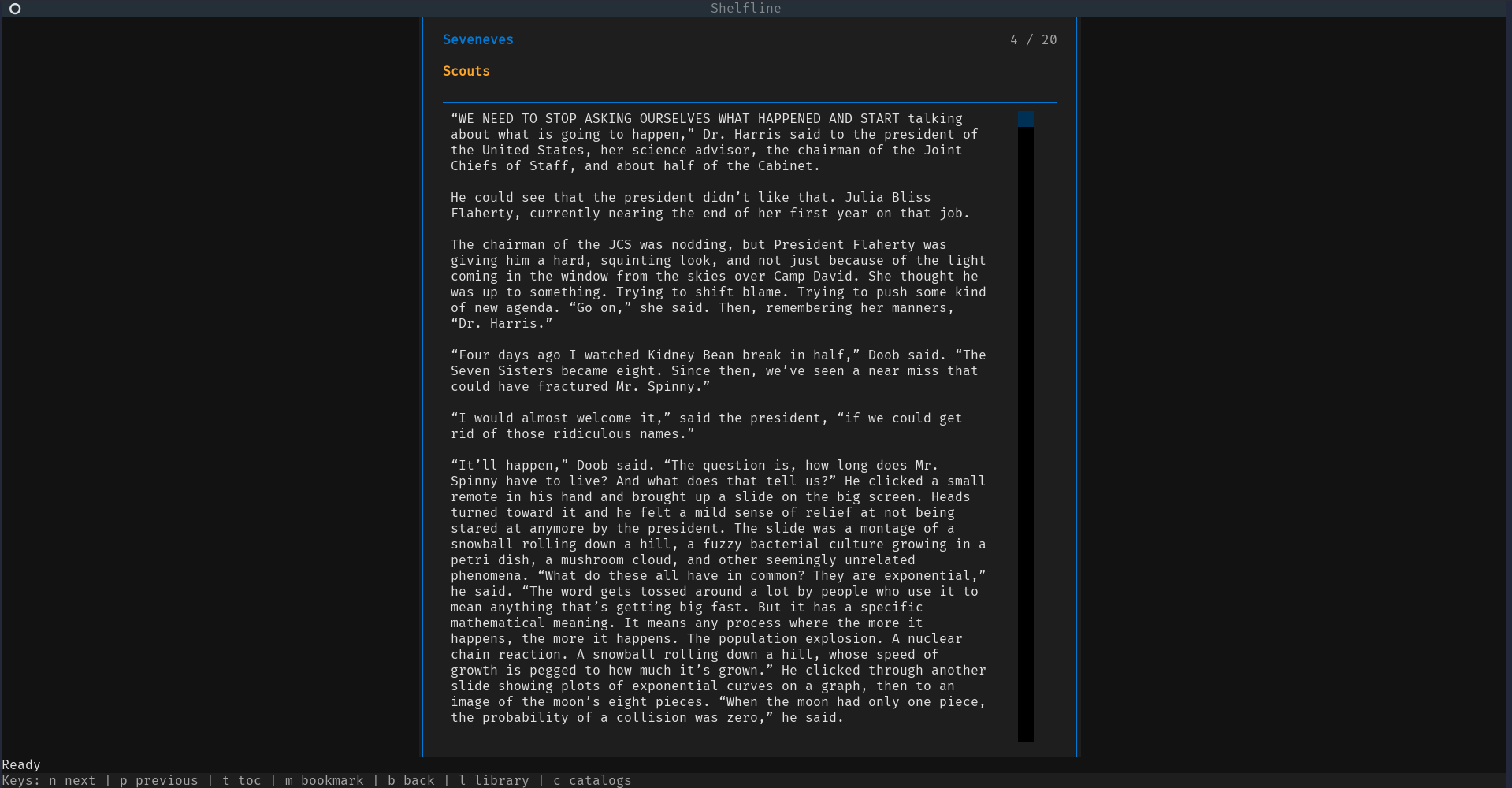
|
+
|
|
5
|
+
Permission is hereby granted, free of charge, to any person obtaining a copy
|
|
6
|
+
of this software and associated documentation files (the "Software"), to deal
|
|
7
|
+
in the Software without restriction, including without limitation the rights
|
|
8
|
+
to use, copy, modify, merge, publish, distribute, sublicense, and/or sell
|
|
9
|
+
copies of the Software, and to permit persons to whom the Software is
|
|
10
|
+
furnished to do so, subject to the following conditions:
|
|
11
|
+
|
|
12
|
+
The above copyright notice and this permission notice shall be included in all
|
|
13
|
+
copies or substantial portions of the Software.
|
|
14
|
+
|
|
15
|
+
THE SOFTWARE IS PROVIDED "AS IS", WITHOUT WARRANTY OF ANY KIND, EXPRESS OR
|
|
16
|
+
IMPLIED, INCLUDING BUT NOT LIMITED TO THE WARRANTIES OF MERCHANTABILITY,
|
|
17
|
+
FITNESS FOR A PARTICULAR PURPOSE AND NONINFRINGEMENT. IN NO EVENT SHALL THE
|
|
18
|
+
AUTHORS OR COPYRIGHT HOLDERS BE LIABLE FOR ANY CLAIM, DAMAGES OR OTHER
|
|
19
|
+
LIABILITY, WHETHER IN AN ACTION OF CONTRACT, TORT OR OTHERWISE, ARISING FROM,
|
|
20
|
+
OUT OF OR IN CONNECTION WITH THE SOFTWARE OR THE USE OR OTHER DEALINGS IN THE
|
|
21
|
+
SOFTWARE.
|
shelfline-0.1.0/PKG-INFO
ADDED
|
@@ -0,0 +1,364 @@
|
|
|
1
|
+
Metadata-Version: 2.4
|
|
2
|
+
Name: shelfline
|
|
3
|
+
Version: 0.1.0
|
|
4
|
+
Summary: Terminal OPDS catalog browser and book downloader
|
|
5
|
+
Author: nikhilsahoo
|
|
6
|
+
License-Expression: MIT
|
|
7
|
+
Project-URL: Homepage, https://github.com/nikhilsahoo/shelfline
|
|
8
|
+
Project-URL: Repository, https://github.com/nikhilsahoo/shelfline
|
|
9
|
+
Project-URL: Issues, https://github.com/nikhilsahoo/shelfline/issues
|
|
10
|
+
Keywords: opds,epub,tui,textual,calibre-web,ebook,terminal
|
|
11
|
+
Classifier: Development Status :: 3 - Alpha
|
|
12
|
+
Classifier: Environment :: Console
|
|
13
|
+
Classifier: Intended Audience :: End Users/Desktop
|
|
14
|
+
Classifier: Operating System :: OS Independent
|
|
15
|
+
Classifier: Programming Language :: Python :: 3
|
|
16
|
+
Classifier: Programming Language :: Python :: 3.11
|
|
17
|
+
Classifier: Programming Language :: Python :: 3.12
|
|
18
|
+
Classifier: Programming Language :: Python :: 3 :: Only
|
|
19
|
+
Classifier: Topic :: Internet :: WWW/HTTP :: Indexing/Search
|
|
20
|
+
Classifier: Topic :: Software Development :: User Interfaces
|
|
21
|
+
Classifier: Topic :: Terminals
|
|
22
|
+
Classifier: Topic :: Utilities
|
|
23
|
+
Requires-Python: >=3.11
|
|
24
|
+
Description-Content-Type: text/markdown
|
|
25
|
+
License-File: LICENSE
|
|
26
|
+
Requires-Dist: ebooklib>=0.18
|
|
27
|
+
Requires-Dist: feedparser>=6.0.11
|
|
28
|
+
Requires-Dist: httpx>=0.27
|
|
29
|
+
Requires-Dist: keyring>=25.0
|
|
30
|
+
Requires-Dist: rich>=13.7
|
|
31
|
+
Requires-Dist: textual>=0.80
|
|
32
|
+
Requires-Dist: textual-image>=0.8
|
|
33
|
+
Provides-Extra: dev
|
|
34
|
+
Requires-Dist: pytest>=9.0.3; extra == "dev"
|
|
35
|
+
Requires-Dist: pytest-asyncio>=0.23; extra == "dev"
|
|
36
|
+
Requires-Dist: pytest-httpx>=0.30; extra == "dev"
|
|
37
|
+
Dynamic: license-file
|
|
38
|
+
|
|
39
|
+
# Shelfline
|
|
40
|
+
|
|
41
|
+
Shelfline is a terminal bookshelf for OPDS catalogs: browse Calibre-Web and
|
|
42
|
+
other OPDS 1.x libraries, download books, manage a local library, and read
|
|
43
|
+
EPUBs from the terminal.
|
|
44
|
+
|
|
45
|
+
The app is catalog-first: add an OPDS catalog, browse folders and book entries,
|
|
46
|
+
download one book at a time, then read supported EPUB text directly inside the
|
|
47
|
+
terminal.
|
|
48
|
+
|
|
49
|
+
## Who Shelfline Is For
|
|
50
|
+
|
|
51
|
+
- Calibre-Web users who browse their library through OPDS.
|
|
52
|
+
- Self-hosters with private OPDS book catalogs.
|
|
53
|
+
- Terminal-first readers who want keyboard-first download, library, and EPUB
|
|
54
|
+
reading workflows.
|
|
55
|
+
- People managing local ebook collections across Windows and Linux.
|
|
56
|
+
|
|
57
|
+
## Screenshots
|
|
58
|
+
|
|
59
|
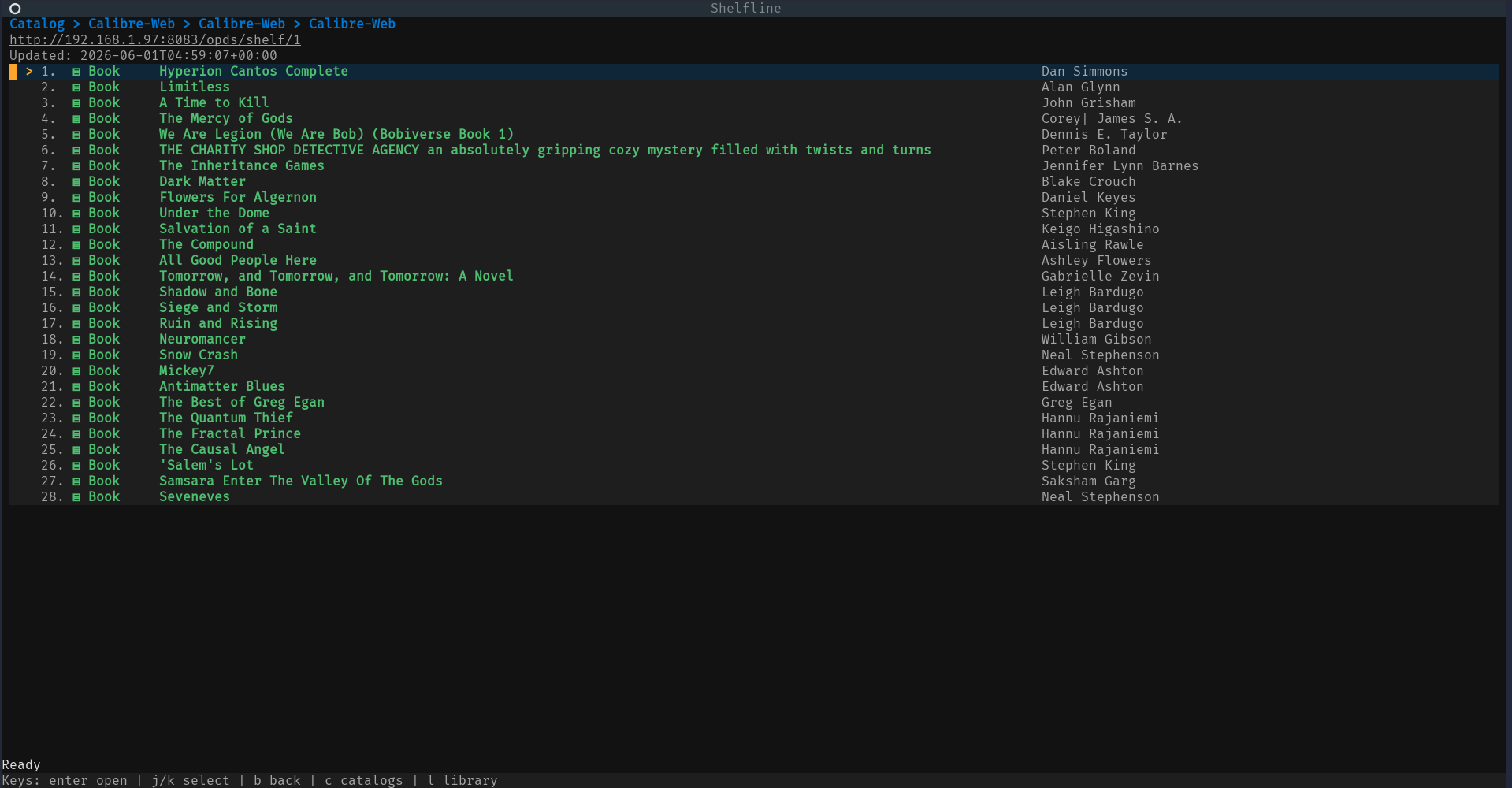
+
OPDS catalog book listing from Calibre-Web, showing authors and the current
|
|
60
|
+
selection:
|
|
61
|
+
|
|
62
|
+
|
|
63
|
+
|
|
64
|
+
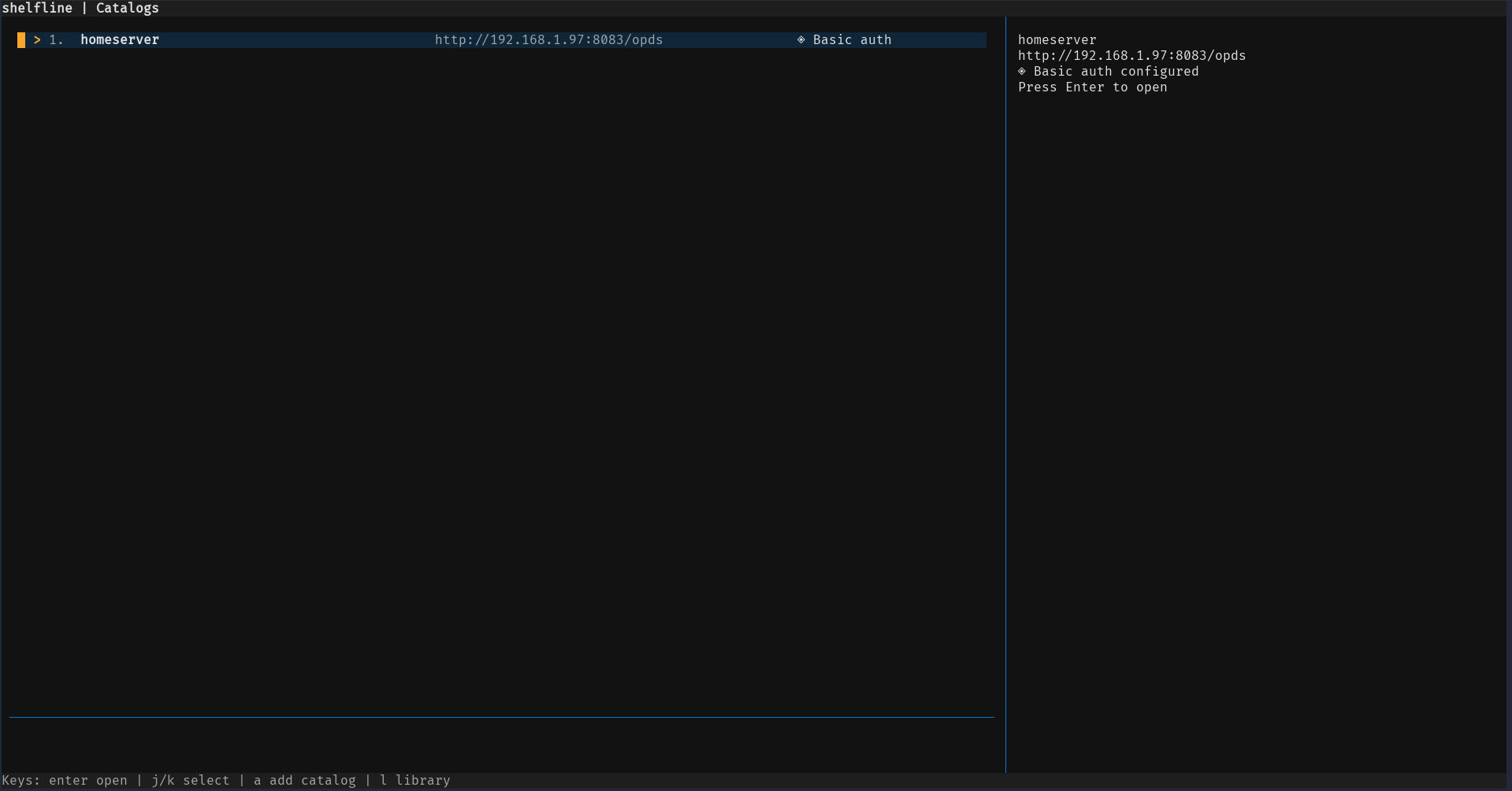
Saved catalog selector with the catalog detail pane:
|
|
65
|
+
|
|
66
|
+
|
|
67
|
+
|
|
68
|
+
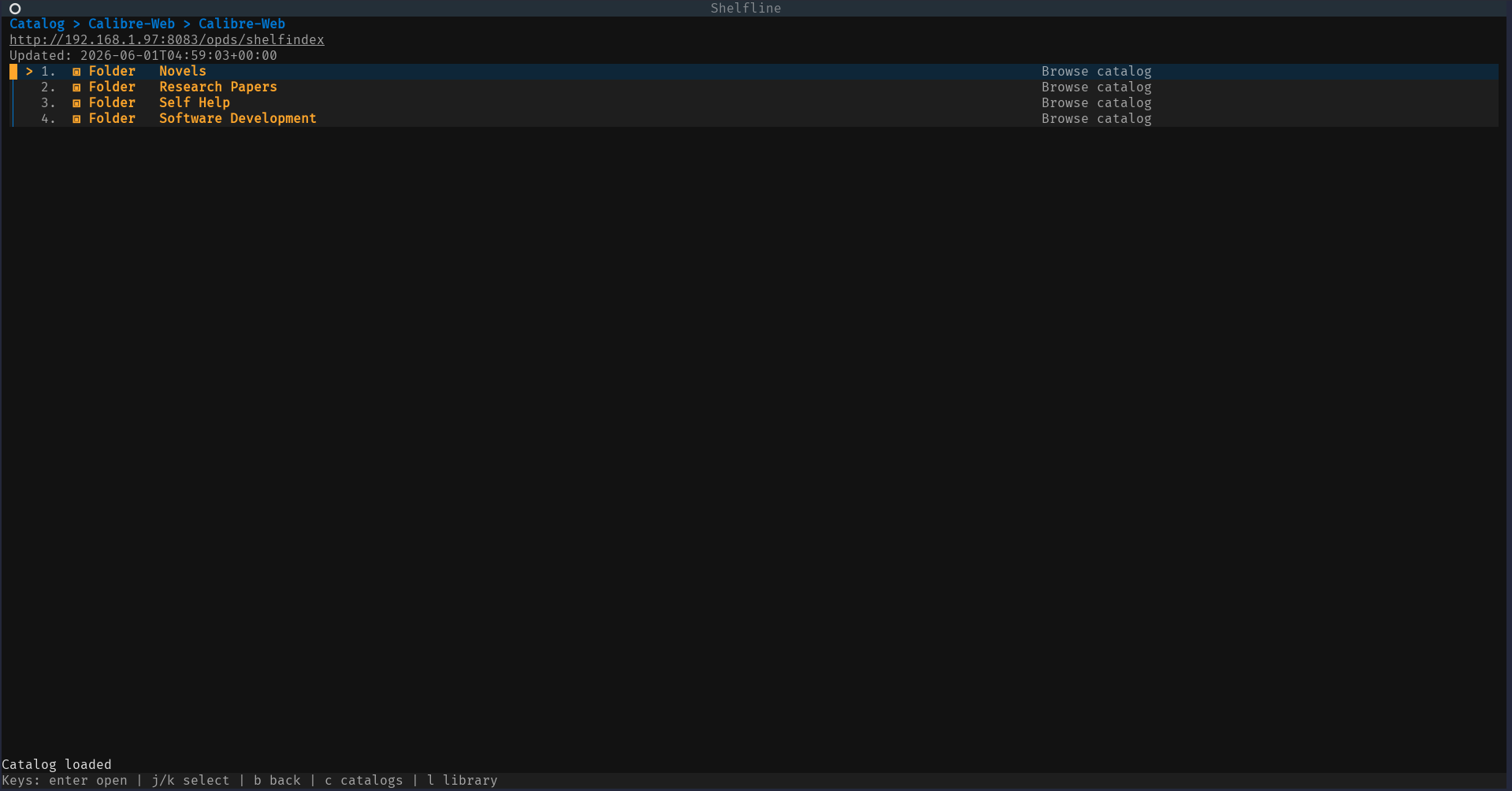
OPDS folder and group navigation:
|
|
69
|
+
|
|
70
|
+
|
|
71
|
+
|
|
72
|
+
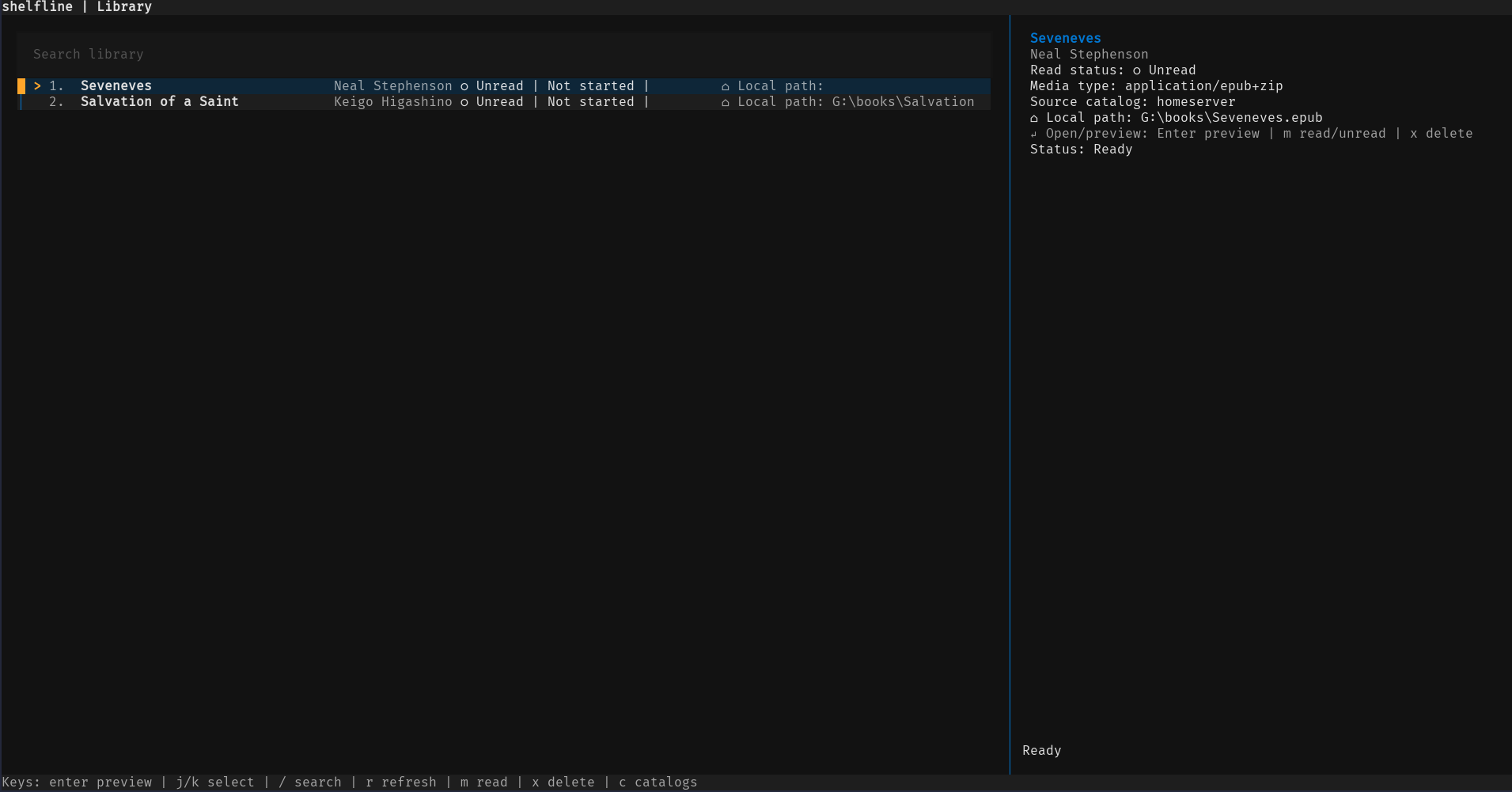
Local library with book details:
|
|
73
|
+
|
|
74
|
+
|
|
75
|
+
|
|
76
|
+
EPUB reader view:
|
|
77
|
+
|
|
78
|
+
|
|
79
|
+
|
|
80
|
+
## Capabilities
|
|
81
|
+
|
|
82
|
+
- Browse OPDS 1.x Atom catalogs, including nested folders/groups.
|
|
83
|
+
- Access public catalogs and catalogs protected with HTTP Basic Auth.
|
|
84
|
+
- Add and edit saved catalog details through a human-editable JSON config file.
|
|
85
|
+
- Download EPUB, PDF, DjVu, CBR, CBZ, and other acquisition formats.
|
|
86
|
+
- Track downloaded books in a local library.
|
|
87
|
+
- Search downloaded books by title and author.
|
|
88
|
+
- Mark books read/unread.
|
|
89
|
+
- Delete downloaded books from the library.
|
|
90
|
+
- Show known-total download progress as percentage/bytes and unknown totals with
|
|
91
|
+
a byte counter.
|
|
92
|
+
- Show busy indicators while the app waits on catalog, refresh, navigation, and
|
|
93
|
+
download-related outgoing calls.
|
|
94
|
+
- Show title/author metadata in catalog and library detail views, with text
|
|
95
|
+
fallback behavior where cover display is unavailable.
|
|
96
|
+
- Preview and read EPUB text in the terminal.
|
|
97
|
+
- Navigate EPUB sections, open a table of contents with `t`, and jump to a
|
|
98
|
+
selected section.
|
|
99
|
+
- Save and resume EPUB reading progress for library-backed books.
|
|
100
|
+
- Add/remove local EPUB bookmarks at the current section.
|
|
101
|
+
- Store catalog metadata in JSON and local book state/cache in SQLite.
|
|
102
|
+
- Resolve Basic Auth passwords from an OS keyring reference where configured,
|
|
103
|
+
with a JSON password fallback for portable or headless setups.
|
|
104
|
+
|
|
105
|
+
## Requirements
|
|
106
|
+
|
|
107
|
+
- Python 3.11 or newer.
|
|
108
|
+
- Windows or Linux. macOS should work where the Python dependencies support it,
|
|
109
|
+
but Windows and Linux are the primary targets.
|
|
110
|
+
- A terminal that can run Textual applications.
|
|
111
|
+
- Network access to any OPDS catalogs you want to browse.
|
|
112
|
+
- An existing local directory to use as the book download/library path.
|
|
113
|
+
|
|
114
|
+
Python package dependencies are declared in `pyproject.toml`:
|
|
115
|
+
|
|
116
|
+
- `textual`
|
|
117
|
+
- `rich`
|
|
118
|
+
- `httpx`
|
|
119
|
+
- `feedparser`
|
|
120
|
+
- `ebooklib`
|
|
121
|
+
- `keyring`
|
|
122
|
+
- `textual-image`
|
|
123
|
+
|
|
124
|
+
Development and test dependencies are available through the `dev` extra.
|
|
125
|
+
|
|
126
|
+
## Installation Status
|
|
127
|
+
|
|
128
|
+
Shelfline is always installable from source. PyPI and `pipx` availability
|
|
129
|
+
follows published releases; release notes live in
|
|
130
|
+
[docs/release.md](https://github.com/nikhilsahoo/shelfline/blob/main/docs/release.md).
|
|
131
|
+
|
|
132
|
+
## Installation From Source
|
|
133
|
+
|
|
134
|
+
Installing from a source checkout is the recommended path today.
|
|
135
|
+
|
|
136
|
+
Clone the repository, install the package in editable mode, then run Shelfline:
|
|
137
|
+
|
|
138
|
+
Windows PowerShell:
|
|
139
|
+
|
|
140
|
+
```powershell
|
|
141
|
+
git clone https://github.com/nikhilsahoo/shelfline.git
|
|
142
|
+
cd shelfline
|
|
143
|
+
python -m pip install -e ".[dev]"
|
|
144
|
+
shelfline
|
|
145
|
+
```
|
|
146
|
+
|
|
147
|
+
Linux shell:
|
|
148
|
+
|
|
149
|
+
```shell
|
|
150
|
+
git clone https://github.com/nikhilsahoo/shelfline.git
|
|
151
|
+
cd shelfline
|
|
152
|
+
python -m pip install -e '.[dev]'
|
|
153
|
+
shelfline
|
|
154
|
+
```
|
|
155
|
+
|
|
156
|
+
Run the app from an editable checkout with either the console script or module
|
|
157
|
+
entrypoint:
|
|
158
|
+
|
|
159
|
+
```powershell
|
|
160
|
+
shelfline
|
|
161
|
+
python -m shelfline
|
|
162
|
+
```
|
|
163
|
+
|
|
164
|
+
## Configuration
|
|
165
|
+
|
|
166
|
+
Use `--config` to point at a specific JSON config file:
|
|
167
|
+
|
|
168
|
+
```powershell
|
|
169
|
+
python -m shelfline --config .\config.json
|
|
170
|
+
shelfline --config C:\Users\you\AppData\Roaming\shelfline\config.json
|
|
171
|
+
```
|
|
172
|
+
|
|
173
|
+
Without `--config`, Shelfline looks for a config file at:
|
|
174
|
+
|
|
175
|
+
- Windows: `%APPDATA%\shelfline\config.json`
|
|
176
|
+
- Linux/macOS with `XDG_CONFIG_HOME`: `$XDG_CONFIG_HOME/shelfline/config.json`
|
|
177
|
+
- Linux/macOS fallback: `~/.config/shelfline/config.json`
|
|
178
|
+
|
|
179
|
+
If the config file is missing, the app opens the setup screen and asks for an
|
|
180
|
+
existing library/download directory.
|
|
181
|
+
|
|
182
|
+
Example config:
|
|
183
|
+
|
|
184
|
+
```json
|
|
185
|
+
{
|
|
186
|
+
"library_path": "C:/Users/you/Books/shelfline",
|
|
187
|
+
"catalogs": [
|
|
188
|
+
{
|
|
189
|
+
"name": "Public OPDS",
|
|
190
|
+
"url": "https://example.test/opds"
|
|
191
|
+
},
|
|
192
|
+
{
|
|
193
|
+
"name": "Private Library",
|
|
194
|
+
"url": "https://library.example.test/opds",
|
|
195
|
+
"auth": {
|
|
196
|
+
"username": "reader@example.test",
|
|
197
|
+
"password": "change-me"
|
|
198
|
+
}
|
|
199
|
+
}
|
|
200
|
+
],
|
|
201
|
+
"preferences": {}
|
|
202
|
+
}
|
|
203
|
+
```
|
|
204
|
+
|
|
205
|
+
### Credentials
|
|
206
|
+
|
|
207
|
+
Catalog metadata remains in JSON. Basic Auth usernames remain visible in JSON.
|
|
208
|
+
Passwords can be resolved from the OS keyring when the catalog config uses a
|
|
209
|
+
`password_ref`. JSON `auth.password` remains supported as an explicit fallback
|
|
210
|
+
for editable config files, headless environments, and portable setups where
|
|
211
|
+
keyring access is unavailable.
|
|
212
|
+
|
|
213
|
+
Use `password_ref` to point at a keyring service/reference:
|
|
214
|
+
|
|
215
|
+
```json
|
|
216
|
+
{
|
|
217
|
+
"library_path": "C:/Users/you/Books/shelfline",
|
|
218
|
+
"catalogs": [
|
|
219
|
+
{
|
|
220
|
+
"name": "Private Library",
|
|
221
|
+
"url": "https://library.example.test/opds",
|
|
222
|
+
"auth": {
|
|
223
|
+
"username": "reader@example.test",
|
|
224
|
+
"password_ref": "shelfline:Private%20Library"
|
|
225
|
+
}
|
|
226
|
+
}
|
|
227
|
+
],
|
|
228
|
+
"preferences": {}
|
|
229
|
+
}
|
|
230
|
+
```
|
|
231
|
+
|
|
232
|
+
The JSON fallback remains valid:
|
|
233
|
+
|
|
234
|
+
```json
|
|
235
|
+
{
|
|
236
|
+
"auth": {
|
|
237
|
+
"username": "reader@example.test",
|
|
238
|
+
"password": "change-me"
|
|
239
|
+
}
|
|
240
|
+
}
|
|
241
|
+
```
|
|
242
|
+
|
|
243
|
+
## Usage
|
|
244
|
+
|
|
245
|
+
Common keys:
|
|
246
|
+
|
|
247
|
+
- `c`: show catalogs.
|
|
248
|
+
- `a`: add a catalog.
|
|
249
|
+
- `l`: show library.
|
|
250
|
+
- `j` / `down`: move selection down.
|
|
251
|
+
- `k` / `up`: move selection up.
|
|
252
|
+
- `enter`: open selected item.
|
|
253
|
+
- `b`: go back from screens that support back navigation.
|
|
254
|
+
- `d`: download the selected acquisition from an entry screen.
|
|
255
|
+
- `m`: mark a library book read/unread, or add/remove a reader bookmark.
|
|
256
|
+
- `x`: delete a library book.
|
|
257
|
+
- `r`: refresh the library.
|
|
258
|
+
- `q`: quit.
|
|
259
|
+
|
|
260
|
+
Catalog feeds show breadcrumbs for nested OPDS folders and label rows as folder,
|
|
261
|
+
book, or entry rows with terminal-friendly glyphs. Download status screens show
|
|
262
|
+
percentage and byte progress where the server reports a content length and an
|
|
263
|
+
indeterminate byte counter otherwise.
|
|
264
|
+
|
|
265
|
+
### Library
|
|
266
|
+
|
|
267
|
+
- `l`: open the local library.
|
|
268
|
+
- `/`: focus the library search box.
|
|
269
|
+
- `enter`: apply the current search while the search box is active, or open the
|
|
270
|
+
selected book otherwise.
|
|
271
|
+
- `j` / `down`: move to the next book.
|
|
272
|
+
- `k` / `up`: move to the previous book.
|
|
273
|
+
- `r`: refresh the library, preserving the current search when one is active.
|
|
274
|
+
- `m`: mark the selected book read/unread.
|
|
275
|
+
- `x`: delete the selected book and clear its saved progress/bookmarks.
|
|
276
|
+
|
|
277
|
+
Library rows show title, authors, read state, media type, source catalog, and
|
|
278
|
+
local file path. Search matches downloaded book titles and authors from the
|
|
279
|
+
local SQLite library metadata.
|
|
280
|
+
|
|
281
|
+
### EPUB Reader
|
|
282
|
+
|
|
283
|
+
- `n`: next EPUB section.
|
|
284
|
+
- `p`: previous EPUB section.
|
|
285
|
+
- `t`: open the table of contents.
|
|
286
|
+
- `enter`: jump to the selected table-of-contents entry while the TOC is open.
|
|
287
|
+
- `m`: add a bookmark at the current section, or remove an existing bookmark at
|
|
288
|
+
the same section and position.
|
|
289
|
+
- `b`: back to the previous screen.
|
|
290
|
+
- `c`: show catalogs.
|
|
291
|
+
- `l`: show library.
|
|
292
|
+
- `q`: quit.
|
|
293
|
+
|
|
294
|
+
Opening a downloaded EPUB from the library starts the reader. When the reader
|
|
295
|
+
moves between sections or jumps through the table of contents, Shelfline saves
|
|
296
|
+
reading progress to the local SQLite state database. Reopening the same
|
|
297
|
+
library-backed EPUB resumes at the saved section. If progress cannot be loaded
|
|
298
|
+
or saved, the reader keeps working and shows a recoverable status message.
|
|
299
|
+
|
|
300
|
+
Bookmarks are local-only. Pressing `m` in the reader adds a bookmark labeled
|
|
301
|
+
with the current section heading. Pressing `m` again at the same section and
|
|
302
|
+
position removes the existing bookmark.
|
|
303
|
+
|
|
304
|
+
## Storage
|
|
305
|
+
|
|
306
|
+
- JSON config stores the user-selected library path, saved catalogs, and
|
|
307
|
+
editable preferences.
|
|
308
|
+
- SQLite local state stores downloaded book metadata, feed cache, reading
|
|
309
|
+
progress, bookmarks, and read/unread state.
|
|
310
|
+
- Downloaded files are stored in the configured library path.
|
|
311
|
+
- Keyring-backed credentials can be resolved through the operating system
|
|
312
|
+
keyring backend when a catalog uses `auth.password_ref`.
|
|
313
|
+
|
|
314
|
+
### Renaming from epub-tui
|
|
315
|
+
|
|
316
|
+
Shelfline does not automatically migrate old epub-tui data yet. Previous config
|
|
317
|
+
files used `%APPDATA%\epub-tui\config.json`,
|
|
318
|
+
`$XDG_CONFIG_HOME/epub-tui/config.json`, or `~/.config/epub-tui/config.json`;
|
|
319
|
+
new config paths use `shelfline` instead. The old local state DB was under the
|
|
320
|
+
configured library path at `.epub-tui/state.db`; the new state DB is
|
|
321
|
+
`.shelfline/state.db`. Old keyring references used the `epub-tui:` prefix, and
|
|
322
|
+
new references use `shelfline:`.
|
|
323
|
+
|
|
324
|
+
To preserve catalog config, reading progress, bookmarks, and local metadata,
|
|
325
|
+
users can manually copy or move the config file and state DB. Password
|
|
326
|
+
references may need to be updated or re-saved in the keyring.
|
|
327
|
+
|
|
328
|
+
## Verification
|
|
329
|
+
|
|
330
|
+
Run the full test suite and CLI smoke check before merging or releasing:
|
|
331
|
+
|
|
332
|
+
```powershell
|
|
333
|
+
python -m pytest -v
|
|
334
|
+
python -m shelfline --help
|
|
335
|
+
```
|
|
336
|
+
|
|
337
|
+
Manual smoke checklist for an interactive terminal and test OPDS catalog:
|
|
338
|
+
|
|
339
|
+
- First-run setup accepts an existing library/download directory.
|
|
340
|
+
- Add OPDS catalog works.
|
|
341
|
+
- Basic Auth catalog works with a configured keyring password reference or the
|
|
342
|
+
documented JSON password fallback.
|
|
343
|
+
- Browse nested OPDS folders.
|
|
344
|
+
- Open a book detail page.
|
|
345
|
+
- Download an EPUB.
|
|
346
|
+
- Open Library.
|
|
347
|
+
- Search Library.
|
|
348
|
+
- Mark a book read/unread.
|
|
349
|
+
- Open an EPUB reader from the library.
|
|
350
|
+
- Navigate reader sections with `n` and `p`.
|
|
351
|
+
- Open the reader table of contents with `t` and jump to another section.
|
|
352
|
+
- Close and reopen the EPUB, confirming progress resumes at the saved section.
|
|
353
|
+
- Add a bookmark with `m`, then press `m` again at the same section to remove it.
|
|
354
|
+
- Trigger a duplicate download error and confirm the error remains visible.
|
|
355
|
+
|
|
356
|
+
## TODO
|
|
357
|
+
|
|
358
|
+
- Add OPDS 2.x support.
|
|
359
|
+
- Add OAuth or browser-based authentication.
|
|
360
|
+
- Render downloaded PDF, DjVu, CBR, and CBZ files in the terminal.
|
|
361
|
+
- Render cover images with terminal graphics instead of text-only fallback.
|
|
362
|
+
- Add queued or multi-file downloads.
|
|
363
|
+
- Improve EPUB rendering beyond text-focused, section-based reading.
|
|
364
|
+
- Add annotations, sync, and full-text book search.
|