sharedserver 0.1.0__tar.gz → 0.3.0__tar.gz
This diff represents the content of publicly available package versions that have been released to one of the supported registries. The information contained in this diff is provided for informational purposes only and reflects changes between package versions as they appear in their respective public registries.
- sharedserver-0.3.0/MANIFEST.in +5 -0
- sharedserver-0.3.0/PKG-INFO +183 -0
- sharedserver-0.3.0/README.md +144 -0
- sharedserver-0.3.0/README_zh.md +146 -0
- sharedserver-0.3.0/docs/assets/demo.gif +0 -0
- sharedserver-0.3.0/docs/assets/terminal.png +0 -0
- sharedserver-0.3.0/docs/assets/terminal.svg +14 -0
- sharedserver-0.3.0/docs/promotion-review.md +116 -0
- sharedserver-0.3.0/docs/releasing.md +25 -0
- sharedserver-0.3.0/docs/vnext-implementation.md +50 -0
- sharedserver-0.3.0/docs/vnext-review.md +93 -0
- {sharedserver-0.1.0 → sharedserver-0.3.0}/pyproject.toml +5 -1
- sharedserver-0.3.0/scripts/browser_smoke.cjs +105 -0
- sharedserver-0.3.0/scripts/browser_vnext.cjs +167 -0
- sharedserver-0.3.0/scripts/render_demo.py +32 -0
- sharedserver-0.3.0/sharedserver.example.yaml +47 -0
- {sharedserver-0.1.0 → sharedserver-0.3.0}/src/sharedserver/__init__.py +1 -1
- sharedserver-0.3.0/src/sharedserver/access.py +118 -0
- sharedserver-0.3.0/src/sharedserver/archives.py +29 -0
- sharedserver-0.3.0/src/sharedserver/cli.py +196 -0
- {sharedserver-0.1.0 → sharedserver-0.3.0}/src/sharedserver/clipboard.py +15 -1
- sharedserver-0.3.0/src/sharedserver/config.py +240 -0
- {sharedserver-0.1.0 → sharedserver-0.3.0}/src/sharedserver/file_manager.py +72 -19
- {sharedserver-0.1.0 → sharedserver-0.3.0}/src/sharedserver/models.py +10 -1
- {sharedserver-0.1.0 → sharedserver-0.3.0}/src/sharedserver/security.py +8 -0
- sharedserver-0.3.0/src/sharedserver/server.py +296 -0
- {sharedserver-0.1.0 → sharedserver-0.3.0}/src/sharedserver/static/app.css +23 -0
- sharedserver-0.3.0/src/sharedserver/static/app.js +627 -0
- {sharedserver-0.1.0 → sharedserver-0.3.0}/src/sharedserver/templates/index.html +33 -7
- sharedserver-0.3.0/src/sharedserver/tls.py +61 -0
- sharedserver-0.3.0/src/sharedserver/websocket.py +92 -0
- sharedserver-0.3.0/src/sharedserver.egg-info/PKG-INFO +183 -0
- {sharedserver-0.1.0 → sharedserver-0.3.0}/src/sharedserver.egg-info/SOURCES.txt +20 -1
- {sharedserver-0.1.0 → sharedserver-0.3.0}/src/sharedserver.egg-info/requires.txt +6 -0
- sharedserver-0.3.0/tests/test_access.py +119 -0
- sharedserver-0.3.0/tests/test_cli.py +97 -0
- {sharedserver-0.1.0 → sharedserver-0.3.0}/tests/test_config.py +9 -0
- {sharedserver-0.1.0 → sharedserver-0.3.0}/tests/test_project_language.py +2 -2
- {sharedserver-0.1.0 → sharedserver-0.3.0}/tests/test_server.py +3 -3
- sharedserver-0.3.0/tests/test_tls.py +62 -0
- sharedserver-0.3.0/tests/test_upload_stream.py +59 -0
- sharedserver-0.3.0/tests/test_vnext.py +200 -0
- sharedserver-0.3.0/tests/test_websocket.py +44 -0
- sharedserver-0.1.0/MANIFEST.in +0 -2
- sharedserver-0.1.0/PKG-INFO +0 -177
- sharedserver-0.1.0/README.md +0 -143
- sharedserver-0.1.0/sharedserver.example.yaml +0 -32
- sharedserver-0.1.0/src/sharedserver/cli.py +0 -76
- sharedserver-0.1.0/src/sharedserver/config.py +0 -151
- sharedserver-0.1.0/src/sharedserver/server.py +0 -142
- sharedserver-0.1.0/src/sharedserver/static/app.js +0 -358
- sharedserver-0.1.0/src/sharedserver/websocket.py +0 -57
- sharedserver-0.1.0/src/sharedserver.egg-info/PKG-INFO +0 -177
- sharedserver-0.1.0/tests/test_cli.py +0 -26
- {sharedserver-0.1.0 → sharedserver-0.3.0}/LICENSE +0 -0
- {sharedserver-0.1.0 → sharedserver-0.3.0}/setup.cfg +0 -0
- {sharedserver-0.1.0 → sharedserver-0.3.0}/src/sharedserver/__main__.py +0 -0
- {sharedserver-0.1.0 → sharedserver-0.3.0}/src/sharedserver.egg-info/dependency_links.txt +0 -0
- {sharedserver-0.1.0 → sharedserver-0.3.0}/src/sharedserver.egg-info/entry_points.txt +0 -0
- {sharedserver-0.1.0 → sharedserver-0.3.0}/src/sharedserver.egg-info/top_level.txt +0 -0
- {sharedserver-0.1.0 → sharedserver-0.3.0}/tests/test_clipboard.py +0 -0
- {sharedserver-0.1.0 → sharedserver-0.3.0}/tests/test_security.py +0 -0
|
@@ -0,0 +1,183 @@
|
|
|
1
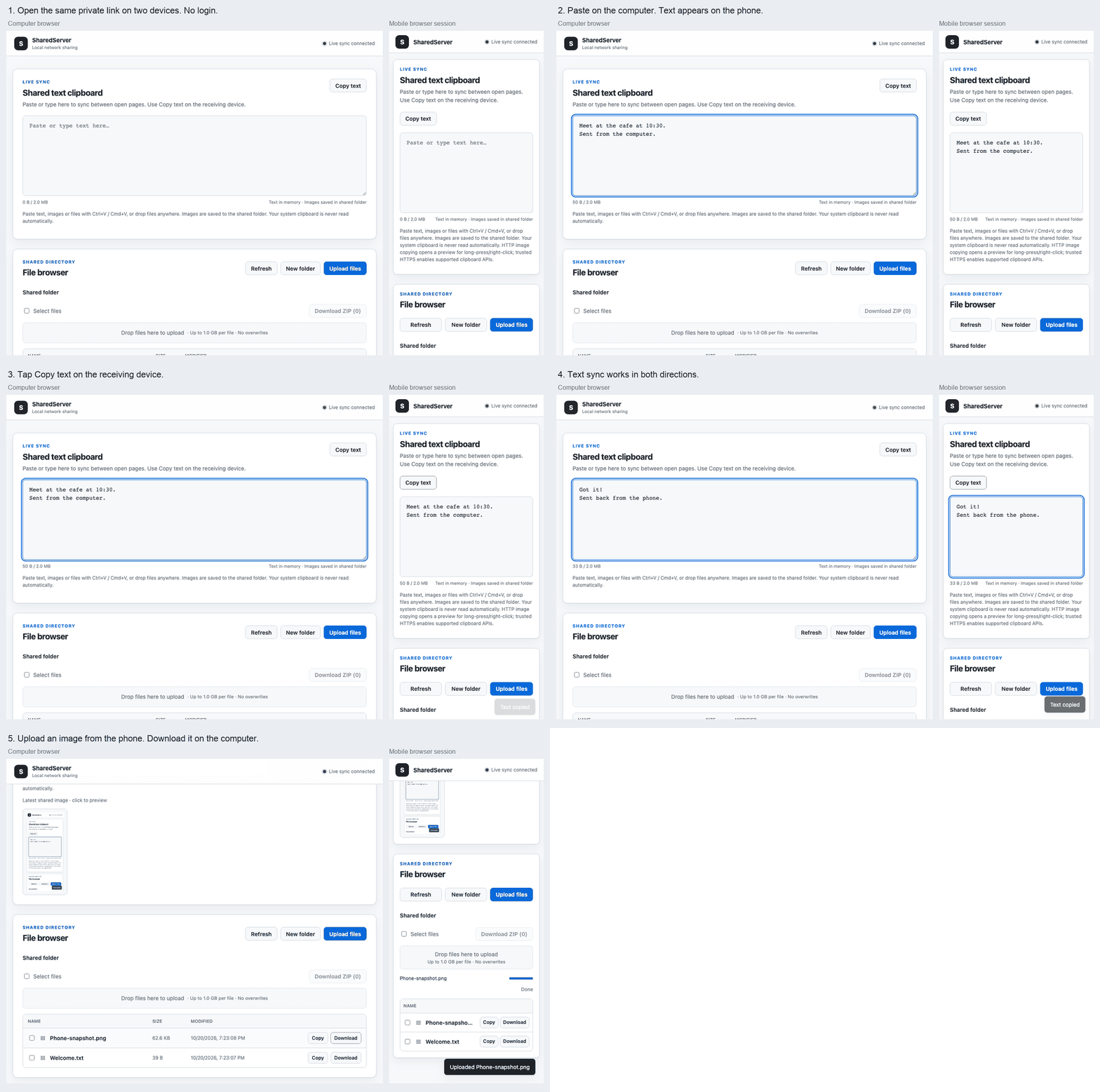
|
+
Metadata-Version: 2.4
|
|
2
|
+
Name: sharedserver
|
|
3
|
+
Version: 0.3.0
|
|
4
|
+
Summary: Zero-configuration LAN file sharing and real-time text clipboard
|
|
5
|
+
Author: Kyi Wong
|
|
6
|
+
License-Expression: MIT
|
|
7
|
+
Project-URL: Homepage, https://github.com/NihaoKangkang/sharedserver
|
|
8
|
+
Project-URL: Repository, https://github.com/NihaoKangkang/sharedserver
|
|
9
|
+
Project-URL: Issues, https://github.com/NihaoKangkang/sharedserver/issues
|
|
10
|
+
Keywords: file-sharing,clipboard,lan,fastapi,websocket
|
|
11
|
+
Classifier: Development Status :: 3 - Alpha
|
|
12
|
+
Classifier: Environment :: Web Environment
|
|
13
|
+
Classifier: Framework :: FastAPI
|
|
14
|
+
Classifier: Operating System :: OS Independent
|
|
15
|
+
Classifier: Programming Language :: Python :: 3
|
|
16
|
+
Classifier: Programming Language :: Python :: 3.10
|
|
17
|
+
Classifier: Programming Language :: Python :: 3.11
|
|
18
|
+
Classifier: Programming Language :: Python :: 3.12
|
|
19
|
+
Classifier: Programming Language :: Python :: 3.13
|
|
20
|
+
Classifier: Topic :: Internet :: WWW/HTTP :: HTTP Servers
|
|
21
|
+
Requires-Python: >=3.10
|
|
22
|
+
Description-Content-Type: text/markdown
|
|
23
|
+
License-File: LICENSE
|
|
24
|
+
Requires-Dist: fastapi<1,>=0.115
|
|
25
|
+
Requires-Dist: starlette<2,>=0.49.1
|
|
26
|
+
Requires-Dist: ifaddr<1,>=0.2
|
|
27
|
+
Requires-Dist: PyYAML<7,>=6
|
|
28
|
+
Requires-Dist: qrcode<9,>=8
|
|
29
|
+
Requires-Dist: uvicorn<1,>=0.30
|
|
30
|
+
Requires-Dist: websockets<17,>=13
|
|
31
|
+
Provides-Extra: https
|
|
32
|
+
Requires-Dist: cryptography<52,>=43; extra == "https"
|
|
33
|
+
Provides-Extra: dev
|
|
34
|
+
Requires-Dist: build<2,>=1.2; extra == "dev"
|
|
35
|
+
Requires-Dist: httpx2<3,>=2; extra == "dev"
|
|
36
|
+
Requires-Dist: pytest<9,>=8; extra == "dev"
|
|
37
|
+
Requires-Dist: twine<7,>=5; extra == "dev"
|
|
38
|
+
Dynamic: license-file
|
|
39
|
+
|
|
40
|
+
# SharedServer
|
|
41
|
+
|
|
42
|
+
[English](https://github.com/NihaoKangkang/sharedserver/blob/main/README.md) · [简体中文](https://github.com/NihaoKangkang/sharedserver/blob/main/README_zh.md)
|
|
43
|
+
|
|
44
|
+
[](https://pypi.org/project/sharedserver/)
|
|
45
|
+
[](https://pypi.org/project/sharedserver/)
|
|
46
|
+
[](https://github.com/NihaoKangkang/sharedserver/blob/main/LICENSE)
|
|
47
|
+
[](https://github.com/NihaoKangkang/sharedserver/actions/workflows/ci.yml)
|
|
48
|
+
|
|
49
|
+
**Scan to move files, share text and images between browsers, or transfer from a headless terminal. No login by default.**
|
|
50
|
+
|
|
51
|
+
## Start in seconds
|
|
52
|
+
|
|
53
|
+
Run inside a **dedicated transfer folder** on trusted Wi-Fi:
|
|
54
|
+
|
|
55
|
+
```bash
|
|
56
|
+
uvx sharedserver
|
|
57
|
+
# Or run without a permanent installation:
|
|
58
|
+
pipx run sharedserver
|
|
59
|
+
# Or install normally:
|
|
60
|
+
python -m pip install sharedserver
|
|
61
|
+
sharedserver
|
|
62
|
+
```
|
|
63
|
+
|
|
64
|
+
Scan the terminal QR code on your phone. Both devices need the same network. Keep the terminal open and press **Ctrl+C** when finished. Python 3.10+ is required. [Install uv](https://docs.astral.sh/uv/getting-started/installation/) or [pipx](https://pipx.pypa.io/stable/installation/) separately if needed.
|
|
65
|
+
|
|
66
|
+
**Default access is open to every reachable device.** Use `sharedserver --token` for a private QR link, and share only the folder you intend to expose.
|
|
67
|
+
|
|
68
|
+
|
|
69
|
+
|
|
70
|
+
The short demo uses a desktop and a mobile-sized Chromium session, including ordinary LAN HTTP. It is not a physical iOS/Android certification.
|
|
71
|
+
|
|
72
|
+
## Files, text and images
|
|
73
|
+
|
|
74
|
+
- Upload from the file picker, paste images/files with **Ctrl+V / Cmd+V**, or drag files anywhere onto the page. Uploads show percentage, average speed and estimated remaining time.
|
|
75
|
+
- Paste text anywhere outside another input to fill the shared text box. Full mode synchronizes edits live; receiving devices choose **Copy text**.
|
|
76
|
+
- Uploaded supported images appear on connected pages. Use **Copy image** in a trusted secure context; otherwise a preview opens for long-press/right-click copying or saving. Files stay in the shared folder; this does not automatically read or write the OS clipboard.
|
|
77
|
+
- Select up to **200 files in the current folder** and choose **Download ZIP**. ZIPs are staged on disk and downloaded natively, without buffering the archive into browser memory.
|
|
78
|
+
- Downloads support **HTTP Range**, including resume and HEAD requests. Uploads stream in chunks and never silently overwrite a file. Add `--rename-on-conflict` to keep both copies as `name (1).ext`.
|
|
79
|
+
- Text is limited to **2 MiB of UTF-8** by default. Full/readonly text is kept in memory; drop-only submissions are saved as unique `text_*.txt` files. Images are files, not large WebSocket messages.
|
|
80
|
+
|
|
81
|
+
## Access modes
|
|
82
|
+
|
|
83
|
+
| Mode | Browse / download / ZIP | Upload files | Read shared text/images | Submit text/images |
|
|
84
|
+
| --- | --- | --- | --- | --- |
|
|
85
|
+
| `--mode full` (default) | Yes | Yes | Yes | Yes |
|
|
86
|
+
| `--mode readonly` | Yes | No | Yes | No |
|
|
87
|
+
| `--mode droponly` | No | Yes, inbox root | No history | Text via **Submit text**, images via upload |
|
|
88
|
+
|
|
89
|
+
Drop-only users cannot create folders or read earlier submissions through HTTP or WebSocket. The operator reads collected files directly on the host. Duplicate text submissions are saved separately.
|
|
90
|
+
|
|
91
|
+
The legacy `--read-only` switch still means **file writes off, text editable**. Use `--mode readonly` to lock text too. It cannot be combined with `--mode droponly`.
|
|
92
|
+
|
|
93
|
+
## CLI reference
|
|
94
|
+
|
|
95
|
+
| Option | Default | Purpose |
|
|
96
|
+
| --- | --- | --- |
|
|
97
|
+
| `[port]` | `8000` | Original positional port, still supported |
|
|
98
|
+
| `-p, --port PORT` | Config or `8000` | Named port; cannot be combined with positional port |
|
|
99
|
+
| `-b, --bind, --host HOST` | `0.0.0.0` | Bind address; `127.0.0.1` limits access to this computer |
|
|
100
|
+
| `-d, --directory PATH` | Current directory | Shared root |
|
|
101
|
+
| `-c, --config PATH` | Auto-load `sharedserver.yaml` if present | YAML configuration |
|
|
102
|
+
| `--mode full\|readonly\|droponly` | `full` | HTTP, WebSocket and UI permissions |
|
|
103
|
+
| `--read-only / --no-read-only` | Off | Legacy file-only protection |
|
|
104
|
+
| `--max-size, --max-upload-size MB` | `1024` | Per-file limit in MiB; explicit `0` means unlimited |
|
|
105
|
+
| `--rename-on-conflict` | Off | Append a number instead of returning `409 Conflict` |
|
|
106
|
+
| `--token` | Off | Generate a strong random token in the QR link |
|
|
107
|
+
| `--pin PIN` | Off | 4–6 ASCII digits in `?pin=...`; choose PIN or token |
|
|
108
|
+
| `--random-url` | Off | Serve only under a random `/s/<secret>/` prefix |
|
|
109
|
+
| `--auth USER:PASS` | Off | Optional HTTP Basic Auth; can combine with a link or PIN |
|
|
110
|
+
| `--https` | Off | Temporary self-signed certificate, valid for one day |
|
|
111
|
+
| `--qr / --no-qr` | On in interactive terminals | Force / suppress QR output |
|
|
112
|
+
| `--version`, `-h / --help` | — | Version / help |
|
|
113
|
+
|
|
114
|
+
Examples:
|
|
115
|
+
|
|
116
|
+
```bash
|
|
117
|
+
sharedserver -p 8080 -d ~/Transfer --token
|
|
118
|
+
sharedserver --mode readonly --random-url
|
|
119
|
+
sharedserver --mode droponly --pin 123456 --rename-on-conflict
|
|
120
|
+
sharedserver --max-size 0 --rename-on-conflict
|
|
121
|
+
python -m sharedserver 8080 --host 127.0.0.1
|
|
122
|
+
```
|
|
123
|
+
|
|
124
|
+
For secrets that should not appear in process arguments, use **`SHAREDSERVER_AUTH`** (`username:password`) or **`SHAREDSERVER_TOKEN`** (16–256 printable ASCII characters without whitespace). CLI overrides the environment, which overrides YAML; `--token` generates a new token. Tokens/PINs bootstrap an HttpOnly, SameSite browser session and disappear from the URL. Sessions expire at restart. Basic Auth uses the browser's built-in prompt; no account database is created. PINs allow five failed attempts per client address per minute, with bounded tracking; strong token links are preferable to short PINs. Random paths and secrets are omitted from request access logs when protection is enabled.
|
|
125
|
+
|
|
126
|
+
### HTTPS and clipboard trust
|
|
127
|
+
|
|
128
|
+
`--https` generates a fresh certificate and key in a private, hidden temporary directory, then removes them on exit. It uses installed OpenSSL, or the optional `cryptography` extra:
|
|
129
|
+
|
|
130
|
+
```bash
|
|
131
|
+
python -m pip install 'sharedserver[https]'
|
|
132
|
+
sharedserver --https --token
|
|
133
|
+
# Run temporarily with HTTPS support:
|
|
134
|
+
uvx --from 'sharedserver[https]' sharedserver --https
|
|
135
|
+
```
|
|
136
|
+
|
|
137
|
+
**Self-signed HTTPS does not automatically establish device trust.** The program never installs a root certificate, changes browser security, or bypasses a certificate warning. Image clipboard access still depends on certificate trust, browser support and permissions. A new certificate is generated on each run. For ordinary HTTP, text-copy fallback and image preview/download remain available. See [MDN secure contexts](https://developer.mozilla.org/en-US/docs/Web/Security/Defenses/Secure_Contexts).
|
|
138
|
+
|
|
139
|
+
## Headless / curl cheat sheet
|
|
140
|
+
|
|
141
|
+
These commands use the default full mode without access protection:
|
|
142
|
+
|
|
143
|
+
```bash
|
|
144
|
+
# Upload a file; PUT is the supported curl upload interface (not multipart -F).
|
|
145
|
+
curl --fail --upload-file ./report.pdf http://192.168.1.23:8000/upload/report.pdf
|
|
146
|
+
# Download, or resume a partial download.
|
|
147
|
+
curl --fail -o report.pdf 'http://192.168.1.23:8000/api/download?path=report.pdf'
|
|
148
|
+
curl --fail -C - -o report.pdf 'http://192.168.1.23:8000/api/download?path=report.pdf'
|
|
149
|
+
# Read, save or update UTF-8 shared text. Inspect text before executing anything.
|
|
150
|
+
curl --fail --silent http://192.168.1.23:8000/api/clipboard/raw
|
|
151
|
+
curl --fail --silent http://192.168.1.23:8000/api/clipboard/raw > clipboard.txt
|
|
152
|
+
curl --fail --data-binary 'hello world' http://192.168.1.23:8000/api/clipboard/raw
|
|
153
|
+
# Download selected files as a ZIP.
|
|
154
|
+
curl --fail -H 'Content-Type: application/json' -d '{"paths":["one.txt","two.txt"]}' \
|
|
155
|
+
-o selected.zip http://192.168.1.23:8000/api/zip
|
|
156
|
+
```
|
|
157
|
+
|
|
158
|
+
Use the **complete printed base URL** for `--random-url`: endpoints then live under `/s/<secret>/api/...` and `/s/<secret>/upload/...`. Token clients send `Authorization: Bearer <token>`; PIN clients append `?pin=<pin>`; Basic clients use `curl --user username` to prompt for the password. With Basic plus token, use Basic credentials plus `?token=...` (one Authorization header cannot carry both). For HTTPS use a CA/certificate you have verified with curl's `--cacert`; the examples do not disable certificate verification. curl/Wget upload clients receive `OK: filename uploaded` with HTTP 201. Other API clients receive JSON.
|
|
159
|
+
|
|
160
|
+
## Configuration and troubleshooting
|
|
161
|
+
|
|
162
|
+
See [sharedserver.example.yaml](https://github.com/NihaoKangkang/sharedserver/blob/main/sharedserver.example.yaml). CLI values override YAML. Relative shared roots resolve from the config file's directory. Copy-format allowlists replace defaults, case-insensitively. Active HTML/SVG/JS/XML types are never served as inline images, even through a custom allowlist. Default image preview formats are PNG, JPEG and WebP, with signature checks. Other formats remain downloadable as attachments.
|
|
163
|
+
|
|
164
|
+
If a phone cannot connect, check same Wi-Fi, guest-device isolation, and the host firewall. With a VPN or multiple adapters, choose the correct address explicitly: `sharedserver -b 192.168.1.23`. Use another port if 8000 is busy, and `--qr` for redirected terminal output. If the executable is missing, try `python -m sharedserver` with the same Python used to install it. For externally managed Python installations, use uvx/pipx or the [PyPA virtual environment guide](https://packaging.python.org/en/latest/guides/installing-using-pip-and-virtual-environments/).
|
|
165
|
+
|
|
166
|
+
## Security and development
|
|
167
|
+
|
|
168
|
+
Share a dedicated directory on a trusted network and stop the process when finished. Basic/PIN/token/path protection controls access; **HTTP does not encrypt traffic**. This is not a public-internet hosting service. Hidden paths, symlinks, special files and the active config are blocked. Paths are resolved under the shared root; MIME sniffing is disabled and downloads are attachments. Names/text use DOM `textContent`, not HTML interpolation. Upload and archive work uses bounded chunks and disk staging. The shared directory must be controlled by its owner; untrusted local path replacement is outside the threat model.
|
|
169
|
+
|
|
170
|
+
```bash
|
|
171
|
+
git clone https://github.com/NihaoKangkang/sharedserver.git
|
|
172
|
+
cd sharedserver
|
|
173
|
+
python -m venv .venv
|
|
174
|
+
# Activate the virtual environment with your shell, then:
|
|
175
|
+
python -m pip install -e '.[dev,https]'
|
|
176
|
+
python -m pytest
|
|
177
|
+
python -m build
|
|
178
|
+
python -m twine check dist/*
|
|
179
|
+
```
|
|
180
|
+
|
|
181
|
+
CI tests Linux/macOS/Windows on Python 3.10–3.14, packaged assets, and two Chromium suites. Browser reproduction: `npm install --no-save playwright`, `npx playwright install chromium`, then `SHARED_PYTHON=.venv/bin/python node scripts/browser_vnext.cjs` (shell environment syntax varies). `LAN_SMOKE=1` additionally tests a real LAN HTTP address. [Release runbook](https://github.com/NihaoKangkang/sharedserver/blob/main/docs/releasing.md).
|
|
182
|
+
|
|
183
|
+
[MIT license](https://github.com/NihaoKangkang/sharedserver/blob/main/LICENSE) · [Report an issue](https://github.com/NihaoKangkang/sharedserver/issues)
|
|
@@ -0,0 +1,144 @@
|
|
|
1
|
+
# SharedServer
|
|
2
|
+
|
|
3
|
+
[English](https://github.com/NihaoKangkang/sharedserver/blob/main/README.md) · [简体中文](https://github.com/NihaoKangkang/sharedserver/blob/main/README_zh.md)
|
|
4
|
+
|
|
5
|
+
[](https://pypi.org/project/sharedserver/)
|
|
6
|
+
[](https://pypi.org/project/sharedserver/)
|
|
7
|
+
[](https://github.com/NihaoKangkang/sharedserver/blob/main/LICENSE)
|
|
8
|
+
[](https://github.com/NihaoKangkang/sharedserver/actions/workflows/ci.yml)
|
|
9
|
+
|
|
10
|
+
**Scan to move files, share text and images between browsers, or transfer from a headless terminal. No login by default.**
|
|
11
|
+
|
|
12
|
+
## Start in seconds
|
|
13
|
+
|
|
14
|
+
Run inside a **dedicated transfer folder** on trusted Wi-Fi:
|
|
15
|
+
|
|
16
|
+
```bash
|
|
17
|
+
uvx sharedserver
|
|
18
|
+
# Or run without a permanent installation:
|
|
19
|
+
pipx run sharedserver
|
|
20
|
+
# Or install normally:
|
|
21
|
+
python -m pip install sharedserver
|
|
22
|
+
sharedserver
|
|
23
|
+
```
|
|
24
|
+
|
|
25
|
+
Scan the terminal QR code on your phone. Both devices need the same network. Keep the terminal open and press **Ctrl+C** when finished. Python 3.10+ is required. [Install uv](https://docs.astral.sh/uv/getting-started/installation/) or [pipx](https://pipx.pypa.io/stable/installation/) separately if needed.
|
|
26
|
+
|
|
27
|
+
**Default access is open to every reachable device.** Use `sharedserver --token` for a private QR link, and share only the folder you intend to expose.
|
|
28
|
+
|
|
29
|
+

|
|
30
|
+
|
|
31
|
+
The short demo uses a desktop and a mobile-sized Chromium session, including ordinary LAN HTTP. It is not a physical iOS/Android certification.
|
|
32
|
+
|
|
33
|
+
## Files, text and images
|
|
34
|
+
|
|
35
|
+
- Upload from the file picker, paste images/files with **Ctrl+V / Cmd+V**, or drag files anywhere onto the page. Uploads show percentage, average speed and estimated remaining time.
|
|
36
|
+
- Paste text anywhere outside another input to fill the shared text box. Full mode synchronizes edits live; receiving devices choose **Copy text**.
|
|
37
|
+
- Uploaded supported images appear on connected pages. Use **Copy image** in a trusted secure context; otherwise a preview opens for long-press/right-click copying or saving. Files stay in the shared folder; this does not automatically read or write the OS clipboard.
|
|
38
|
+
- Select up to **200 files in the current folder** and choose **Download ZIP**. ZIPs are staged on disk and downloaded natively, without buffering the archive into browser memory.
|
|
39
|
+
- Downloads support **HTTP Range**, including resume and HEAD requests. Uploads stream in chunks and never silently overwrite a file. Add `--rename-on-conflict` to keep both copies as `name (1).ext`.
|
|
40
|
+
- Text is limited to **2 MiB of UTF-8** by default. Full/readonly text is kept in memory; drop-only submissions are saved as unique `text_*.txt` files. Images are files, not large WebSocket messages.
|
|
41
|
+
|
|
42
|
+
## Access modes
|
|
43
|
+
|
|
44
|
+
| Mode | Browse / download / ZIP | Upload files | Read shared text/images | Submit text/images |
|
|
45
|
+
| --- | --- | --- | --- | --- |
|
|
46
|
+
| `--mode full` (default) | Yes | Yes | Yes | Yes |
|
|
47
|
+
| `--mode readonly` | Yes | No | Yes | No |
|
|
48
|
+
| `--mode droponly` | No | Yes, inbox root | No history | Text via **Submit text**, images via upload |
|
|
49
|
+
|
|
50
|
+
Drop-only users cannot create folders or read earlier submissions through HTTP or WebSocket. The operator reads collected files directly on the host. Duplicate text submissions are saved separately.
|
|
51
|
+
|
|
52
|
+
The legacy `--read-only` switch still means **file writes off, text editable**. Use `--mode readonly` to lock text too. It cannot be combined with `--mode droponly`.
|
|
53
|
+
|
|
54
|
+
## CLI reference
|
|
55
|
+
|
|
56
|
+
| Option | Default | Purpose |
|
|
57
|
+
| --- | --- | --- |
|
|
58
|
+
| `[port]` | `8000` | Original positional port, still supported |
|
|
59
|
+
| `-p, --port PORT` | Config or `8000` | Named port; cannot be combined with positional port |
|
|
60
|
+
| `-b, --bind, --host HOST` | `0.0.0.0` | Bind address; `127.0.0.1` limits access to this computer |
|
|
61
|
+
| `-d, --directory PATH` | Current directory | Shared root |
|
|
62
|
+
| `-c, --config PATH` | Auto-load `sharedserver.yaml` if present | YAML configuration |
|
|
63
|
+
| `--mode full\|readonly\|droponly` | `full` | HTTP, WebSocket and UI permissions |
|
|
64
|
+
| `--read-only / --no-read-only` | Off | Legacy file-only protection |
|
|
65
|
+
| `--max-size, --max-upload-size MB` | `1024` | Per-file limit in MiB; explicit `0` means unlimited |
|
|
66
|
+
| `--rename-on-conflict` | Off | Append a number instead of returning `409 Conflict` |
|
|
67
|
+
| `--token` | Off | Generate a strong random token in the QR link |
|
|
68
|
+
| `--pin PIN` | Off | 4–6 ASCII digits in `?pin=...`; choose PIN or token |
|
|
69
|
+
| `--random-url` | Off | Serve only under a random `/s/<secret>/` prefix |
|
|
70
|
+
| `--auth USER:PASS` | Off | Optional HTTP Basic Auth; can combine with a link or PIN |
|
|
71
|
+
| `--https` | Off | Temporary self-signed certificate, valid for one day |
|
|
72
|
+
| `--qr / --no-qr` | On in interactive terminals | Force / suppress QR output |
|
|
73
|
+
| `--version`, `-h / --help` | — | Version / help |
|
|
74
|
+
|
|
75
|
+
Examples:
|
|
76
|
+
|
|
77
|
+
```bash
|
|
78
|
+
sharedserver -p 8080 -d ~/Transfer --token
|
|
79
|
+
sharedserver --mode readonly --random-url
|
|
80
|
+
sharedserver --mode droponly --pin 123456 --rename-on-conflict
|
|
81
|
+
sharedserver --max-size 0 --rename-on-conflict
|
|
82
|
+
python -m sharedserver 8080 --host 127.0.0.1
|
|
83
|
+
```
|
|
84
|
+
|
|
85
|
+
For secrets that should not appear in process arguments, use **`SHAREDSERVER_AUTH`** (`username:password`) or **`SHAREDSERVER_TOKEN`** (16–256 printable ASCII characters without whitespace). CLI overrides the environment, which overrides YAML; `--token` generates a new token. Tokens/PINs bootstrap an HttpOnly, SameSite browser session and disappear from the URL. Sessions expire at restart. Basic Auth uses the browser's built-in prompt; no account database is created. PINs allow five failed attempts per client address per minute, with bounded tracking; strong token links are preferable to short PINs. Random paths and secrets are omitted from request access logs when protection is enabled.
|
|
86
|
+
|
|
87
|
+
### HTTPS and clipboard trust
|
|
88
|
+
|
|
89
|
+
`--https` generates a fresh certificate and key in a private, hidden temporary directory, then removes them on exit. It uses installed OpenSSL, or the optional `cryptography` extra:
|
|
90
|
+
|
|
91
|
+
```bash
|
|
92
|
+
python -m pip install 'sharedserver[https]'
|
|
93
|
+
sharedserver --https --token
|
|
94
|
+
# Run temporarily with HTTPS support:
|
|
95
|
+
uvx --from 'sharedserver[https]' sharedserver --https
|
|
96
|
+
```
|
|
97
|
+
|
|
98
|
+
**Self-signed HTTPS does not automatically establish device trust.** The program never installs a root certificate, changes browser security, or bypasses a certificate warning. Image clipboard access still depends on certificate trust, browser support and permissions. A new certificate is generated on each run. For ordinary HTTP, text-copy fallback and image preview/download remain available. See [MDN secure contexts](https://developer.mozilla.org/en-US/docs/Web/Security/Defenses/Secure_Contexts).
|
|
99
|
+
|
|
100
|
+
## Headless / curl cheat sheet
|
|
101
|
+
|
|
102
|
+
These commands use the default full mode without access protection:
|
|
103
|
+
|
|
104
|
+
```bash
|
|
105
|
+
# Upload a file; PUT is the supported curl upload interface (not multipart -F).
|
|
106
|
+
curl --fail --upload-file ./report.pdf http://192.168.1.23:8000/upload/report.pdf
|
|
107
|
+
# Download, or resume a partial download.
|
|
108
|
+
curl --fail -o report.pdf 'http://192.168.1.23:8000/api/download?path=report.pdf'
|
|
109
|
+
curl --fail -C - -o report.pdf 'http://192.168.1.23:8000/api/download?path=report.pdf'
|
|
110
|
+
# Read, save or update UTF-8 shared text. Inspect text before executing anything.
|
|
111
|
+
curl --fail --silent http://192.168.1.23:8000/api/clipboard/raw
|
|
112
|
+
curl --fail --silent http://192.168.1.23:8000/api/clipboard/raw > clipboard.txt
|
|
113
|
+
curl --fail --data-binary 'hello world' http://192.168.1.23:8000/api/clipboard/raw
|
|
114
|
+
# Download selected files as a ZIP.
|
|
115
|
+
curl --fail -H 'Content-Type: application/json' -d '{"paths":["one.txt","two.txt"]}' \
|
|
116
|
+
-o selected.zip http://192.168.1.23:8000/api/zip
|
|
117
|
+
```
|
|
118
|
+
|
|
119
|
+
Use the **complete printed base URL** for `--random-url`: endpoints then live under `/s/<secret>/api/...` and `/s/<secret>/upload/...`. Token clients send `Authorization: Bearer <token>`; PIN clients append `?pin=<pin>`; Basic clients use `curl --user username` to prompt for the password. With Basic plus token, use Basic credentials plus `?token=...` (one Authorization header cannot carry both). For HTTPS use a CA/certificate you have verified with curl's `--cacert`; the examples do not disable certificate verification. curl/Wget upload clients receive `OK: filename uploaded` with HTTP 201. Other API clients receive JSON.
|
|
120
|
+
|
|
121
|
+
## Configuration and troubleshooting
|
|
122
|
+
|
|
123
|
+
See [sharedserver.example.yaml](https://github.com/NihaoKangkang/sharedserver/blob/main/sharedserver.example.yaml). CLI values override YAML. Relative shared roots resolve from the config file's directory. Copy-format allowlists replace defaults, case-insensitively. Active HTML/SVG/JS/XML types are never served as inline images, even through a custom allowlist. Default image preview formats are PNG, JPEG and WebP, with signature checks. Other formats remain downloadable as attachments.
|
|
124
|
+
|
|
125
|
+
If a phone cannot connect, check same Wi-Fi, guest-device isolation, and the host firewall. With a VPN or multiple adapters, choose the correct address explicitly: `sharedserver -b 192.168.1.23`. Use another port if 8000 is busy, and `--qr` for redirected terminal output. If the executable is missing, try `python -m sharedserver` with the same Python used to install it. For externally managed Python installations, use uvx/pipx or the [PyPA virtual environment guide](https://packaging.python.org/en/latest/guides/installing-using-pip-and-virtual-environments/).
|
|
126
|
+
|
|
127
|
+
## Security and development
|
|
128
|
+
|
|
129
|
+
Share a dedicated directory on a trusted network and stop the process when finished. Basic/PIN/token/path protection controls access; **HTTP does not encrypt traffic**. This is not a public-internet hosting service. Hidden paths, symlinks, special files and the active config are blocked. Paths are resolved under the shared root; MIME sniffing is disabled and downloads are attachments. Names/text use DOM `textContent`, not HTML interpolation. Upload and archive work uses bounded chunks and disk staging. The shared directory must be controlled by its owner; untrusted local path replacement is outside the threat model.
|
|
130
|
+
|
|
131
|
+
```bash
|
|
132
|
+
git clone https://github.com/NihaoKangkang/sharedserver.git
|
|
133
|
+
cd sharedserver
|
|
134
|
+
python -m venv .venv
|
|
135
|
+
# Activate the virtual environment with your shell, then:
|
|
136
|
+
python -m pip install -e '.[dev,https]'
|
|
137
|
+
python -m pytest
|
|
138
|
+
python -m build
|
|
139
|
+
python -m twine check dist/*
|
|
140
|
+
```
|
|
141
|
+
|
|
142
|
+
CI tests Linux/macOS/Windows on Python 3.10–3.14, packaged assets, and two Chromium suites. Browser reproduction: `npm install --no-save playwright`, `npx playwright install chromium`, then `SHARED_PYTHON=.venv/bin/python node scripts/browser_vnext.cjs` (shell environment syntax varies). `LAN_SMOKE=1` additionally tests a real LAN HTTP address. [Release runbook](https://github.com/NihaoKangkang/sharedserver/blob/main/docs/releasing.md).
|
|
143
|
+
|
|
144
|
+
[MIT license](https://github.com/NihaoKangkang/sharedserver/blob/main/LICENSE) · [Report an issue](https://github.com/NihaoKangkang/sharedserver/issues)
|
|
@@ -0,0 +1,146 @@
|
|
|
1
|
+
# SharedServer
|
|
2
|
+
|
|
3
|
+
[English](https://github.com/NihaoKangkang/sharedserver/blob/main/README.md) · [简体中文](https://github.com/NihaoKangkang/sharedserver/blob/main/README_zh.md)
|
|
4
|
+
|
|
5
|
+
[](https://pypi.org/project/sharedserver/)
|
|
6
|
+
[](https://pypi.org/project/sharedserver/)
|
|
7
|
+
[](https://github.com/NihaoKangkang/sharedserver/blob/main/LICENSE)
|
|
8
|
+
[](https://github.com/NihaoKangkang/sharedserver/actions/workflows/ci.yml)
|
|
9
|
+
|
|
10
|
+
**扫码跨设备传文件、在网页间共享图文,也能从无图形界面的终端传输。默认无需登录。**
|
|
11
|
+
|
|
12
|
+
## 快速启动
|
|
13
|
+
|
|
14
|
+
在可信 Wi-Fi 下,进入一个**专用传输文件夹**,运行:
|
|
15
|
+
|
|
16
|
+
```bash
|
|
17
|
+
uvx sharedserver
|
|
18
|
+
# 或者临时运行,不永久安装:
|
|
19
|
+
pipx run sharedserver
|
|
20
|
+
# 也可以常规安装:
|
|
21
|
+
python -m pip install sharedserver
|
|
22
|
+
sharedserver
|
|
23
|
+
```
|
|
24
|
+
|
|
25
|
+
手机扫描终端二维码即可打开网页。两台设备需要处于同一网络。使用期间保持终端打开,结束后按 **Ctrl+C**。需要 Python 3.10+;如尚未安装,可先安装 [uv](https://docs.astral.sh/uv/getting-started/installation/) 或 [pipx](https://pipx.pypa.io/stable/installation/)。
|
|
26
|
+
|
|
27
|
+
**默认所有能连接到服务的设备都能访问。** 可用 `sharedserver --token` 生成私密扫码链接,只共享你确实想公开的目录。
|
|
28
|
+
|
|
29
|
+

|
|
30
|
+
|
|
31
|
+
演示使用桌面和手机尺寸的 Chromium 浏览器会话,包含普通局域网 HTTP 场景,不代表已完成真实 iPhone/Android 认证测试。
|
|
32
|
+
|
|
33
|
+
## 文件与图文共享
|
|
34
|
+
|
|
35
|
+
- 点击上传、用 **Ctrl+V / Cmd+V** 粘贴图片或文件,或将文件拖到页面任意位置。上传显示百分比、平均速度和预计剩余时间。
|
|
36
|
+
- 在其他输入框之外粘贴文字,可填入共享文本区。完整模式下修改实时同步;接收端点击 **Copy text** 复制。
|
|
37
|
+
- 支持的图片上传后会出现在其他已打开的页面中。可信安全上下文可使用 **Copy image**;否则打开预览,可长按/右键复制或保存。不会自动监控或写入操作系统剪贴板。
|
|
38
|
+
- 可选择当前文件夹内最多 **200 个文件**,点击 **Download ZIP**。服务端临时打包到磁盘,由浏览器原生下载,不把整个压缩包读进浏览器内存。
|
|
39
|
+
- 下载支持 **HTTP Range**、断点续传和 HEAD。上传采用分块写入,默认冲突返回 `409`,不会静默覆盖;加上 `--rename-on-conflict` 会保存为 `文件名 (1).扩展名`。
|
|
40
|
+
- 共享文本默认上限为 **2 MiB UTF-8 字节**。完整/只读模式的文本仅在内存中保存;收集箱文本提交为唯一的 `text_*.txt` 文件。图片保存到共享目录,WebSocket 只传路径信息。
|
|
41
|
+
|
|
42
|
+
## 权限模式
|
|
43
|
+
|
|
44
|
+
| 模式 | 浏览、下载、ZIP | 上传文件 | 读取共享图文 | 提交图文 |
|
|
45
|
+
| --- | --- | --- | --- | --- |
|
|
46
|
+
| `--mode full`(默认) | 允许 | 允许 | 允许 | 允许 |
|
|
47
|
+
| `--mode readonly` | 允许 | 禁止 | 允许 | 禁止 |
|
|
48
|
+
| `--mode droponly` | 禁止 | 仅收集箱根目录 | 不显示历史 | 文字点击 **Submit text**;图片通过上传提交 |
|
|
49
|
+
|
|
50
|
+
收集箱模式不能创建目录,也不能通过 HTTP 或 WebSocket 读取历史提交。服务主机的操作者直接查看收集目录;相同文字的重复提交也会分别保存。
|
|
51
|
+
|
|
52
|
+
为兼容旧版,`--read-only` 仍只禁止**文件写入**,文字可以编辑。需要同时锁定文字请使用 `--mode readonly`。不要将旧开关与 `--mode droponly` 混用。
|
|
53
|
+
|
|
54
|
+
## 完整参数表
|
|
55
|
+
|
|
56
|
+
| 参数 | 默认值 | 作用 |
|
|
57
|
+
| --- | --- | --- |
|
|
58
|
+
| `[port]` | `8000` | 保留原有位置端口写法 |
|
|
59
|
+
| `-p, --port PORT` | 配置值或 `8000` | 指定端口,不能与位置端口同时使用 |
|
|
60
|
+
| `-b, --bind, --host HOST` | `0.0.0.0` | 绑定地址;`127.0.0.1` 仅本机可访问 |
|
|
61
|
+
| `-d, --directory PATH` | 当前目录 | 共享根目录 |
|
|
62
|
+
| `-c, --config PATH` | 有则自动读取 `sharedserver.yaml` | YAML 配置文件 |
|
|
63
|
+
| `--mode full\|readonly\|droponly` | `full` | 同时约束 HTTP、WebSocket 与页面操作 |
|
|
64
|
+
| `--read-only / --no-read-only` | 关闭 | 旧版“仅文件只读”开关 |
|
|
65
|
+
| `--max-size, --max-upload-size MB` | `1024` | 单文件上限,单位 MiB;显式设为 `0` 表示不限 |
|
|
66
|
+
| `--rename-on-conflict` | 关闭 | 重名追加序号,不覆盖原文件 |
|
|
67
|
+
| `--token` | 关闭 | 生成高强度随机访问令牌并放进二维码 |
|
|
68
|
+
| `--pin PIN` | 关闭 | 4–6 位 ASCII 数字,通过 `?pin=...` 访问;与 token 二选一 |
|
|
69
|
+
| `--random-url` | 关闭 | 仅在随机 `/s/<secret>/` 路径下提供服务 |
|
|
70
|
+
| `--auth USER:PASS` | 关闭 | 可选 HTTP Basic Auth,可与私密链接/PIN 叠加 |
|
|
71
|
+
| `--https` | 关闭 | 临时自签名 HTTPS 证书,有效期一天 |
|
|
72
|
+
| `--qr / --no-qr` | 交互终端默认显示 | 强制显示或隐藏二维码 |
|
|
73
|
+
| `--version`, `-h / --help` | — | 版本与帮助 |
|
|
74
|
+
|
|
75
|
+
```bash
|
|
76
|
+
sharedserver -p 8080 -d ~/Transfer --token
|
|
77
|
+
sharedserver --mode readonly --random-url
|
|
78
|
+
sharedserver --mode droponly --pin 123456 --rename-on-conflict
|
|
79
|
+
sharedserver --max-size 0 --rename-on-conflict
|
|
80
|
+
python -m sharedserver 8080 --host 127.0.0.1
|
|
81
|
+
```
|
|
82
|
+
|
|
83
|
+
不想让密码出现在进程参数中,可以设置环境变量 **`SHAREDSERVER_AUTH`**(`用户名:密码`)或 **`SHAREDSERVER_TOKEN`**(16–256 个无空白的可打印 ASCII 字符)。优先级为 CLI > 环境变量 > YAML;`--token` 每次生成新令牌。Token/PIN 首次访问后换取 HttpOnly、SameSite 会话 Cookie,并从地址栏移除,重启会让会话失效。Basic Auth 使用浏览器内置认证提示,不创建用户数据库。
|
|
84
|
+
|
|
85
|
+
PIN 每个客户端地址每分钟最多允许五次失败尝试,跟踪记录有固定数量上限;短 PIN 强度有限,优先使用强随机 token。启用保护时抑制请求访问日志,避免泄露随机路径和查询令牌。
|
|
86
|
+
|
|
87
|
+
## HTTPS 与浏览器信任
|
|
88
|
+
|
|
89
|
+
`--https` 在隐藏的私有临时目录中生成证书和密钥,退出时删除。可使用已安装的 OpenSSL,或安装可选依赖:
|
|
90
|
+
|
|
91
|
+
```bash
|
|
92
|
+
python -m pip install 'sharedserver[https]'
|
|
93
|
+
sharedserver --https --token
|
|
94
|
+
# 临时运行并启用 HTTPS 支持:
|
|
95
|
+
uvx --from 'sharedserver[https]' sharedserver --https
|
|
96
|
+
```
|
|
97
|
+
|
|
98
|
+
**自签名 HTTPS 不会自动让设备信任证书。** 程序不会安装根证书、修改浏览器安全设置或绕过证书警告。图片剪贴板仍取决于证书信任、浏览器支持及权限。每次运行都会生成新证书。普通 HTTP 下仍可降级复制文字、预览和下载图片。可参考 [MDN 安全上下文说明](https://developer.mozilla.org/en-US/docs/Web/Security/Defenses/Secure_Contexts)。
|
|
99
|
+
|
|
100
|
+
## 无头终端 / curl 速查
|
|
101
|
+
|
|
102
|
+
以下示例使用默认完整模式,未开启访问保护:
|
|
103
|
+
|
|
104
|
+
```bash
|
|
105
|
+
# 上传文件:支持 PUT,不使用 multipart -F 接口。
|
|
106
|
+
curl --fail --upload-file ./report.pdf http://192.168.1.23:8000/upload/report.pdf
|
|
107
|
+
# 下载与断点续传。
|
|
108
|
+
curl --fail -o report.pdf 'http://192.168.1.23:8000/api/download?path=report.pdf'
|
|
109
|
+
curl --fail -C - -o report.pdf 'http://192.168.1.23:8000/api/download?path=report.pdf'
|
|
110
|
+
# 读取、保存和推送 UTF-8 文本;执行文字前应先确认其内容。
|
|
111
|
+
curl --fail --silent http://192.168.1.23:8000/api/clipboard/raw
|
|
112
|
+
curl --fail --silent http://192.168.1.23:8000/api/clipboard/raw > clipboard.txt
|
|
113
|
+
curl --fail --data-binary 'hello world' http://192.168.1.23:8000/api/clipboard/raw
|
|
114
|
+
# 将选中的文件打包为 ZIP。
|
|
115
|
+
curl --fail -H 'Content-Type: application/json' -d '{"paths":["one.txt","two.txt"]}' \
|
|
116
|
+
-o selected.zip http://192.168.1.23:8000/api/zip
|
|
117
|
+
```
|
|
118
|
+
|
|
119
|
+
使用 `--random-url` 时,必须保留终端打印的完整基础路径,例如 `/s/<secret>/api/...` 和 `/s/<secret>/upload/...`。Token 客户端带 `Authorization: Bearer <token>`;PIN 客户端带 `?pin=<pin>`;Basic Auth 可用 `curl --user 用户名` 交互输入密码。Basic 与 token 叠加时,用 Basic 加 `?token=...`,一个 Authorization 请求头无法同时放两种认证。
|
|
120
|
+
|
|
121
|
+
HTTPS 应使用已核实的证书/CA 配合 curl `--cacert`,示例不会禁用证书验证。curl/Wget 上传成功返回 HTTP 201 和 `OK: filename uploaded`;其他 API 客户端返回 JSON。
|
|
122
|
+
|
|
123
|
+
## 配置、排错与安全边界
|
|
124
|
+
|
|
125
|
+
参见 [sharedserver.example.yaml](https://github.com/NihaoKangkang/sharedserver/blob/main/sharedserver.example.yaml)。CLI 覆盖 YAML;相对共享路径从配置文件所在目录计算。自定义复制扩展名列表替换默认列表,忽略大小写。HTML、SVG、JS、XML 等主动内容不会作为图片内联预览,即使写进自定义图片白名单。默认图片格式为 PNG/JPEG/WebP,并校验文件签名;其他文件通过附件下载。
|
|
126
|
+
|
|
127
|
+
连不上时,检查同一 Wi-Fi、访客网络设备隔离和主机防火墙。VPN/多网卡可显式指定 `sharedserver -b 192.168.1.23`。端口被占用可换端口;重定向终端输出时可加 `--qr`。找不到命令时,使用安装时同一个 Python 执行 `python -m sharedserver`。系统限制全局 pip 安装时,可用 uvx/pipx 或 [PyPA 虚拟环境指南](https://packaging.python.org/en/latest/guides/installing-using-pip-and-virtual-environments/)。
|
|
128
|
+
|
|
129
|
+
**HTTP 不加密传输。** Basic/PIN/token/随机路径提供访问控制,不适合把这个临时局域网工具直接暴露到公网。共享目录内的隐藏路径、符号链接、特殊文件和正在使用的配置文件被屏蔽;路径限制在共享根目录内;下载强制附件,响应禁用 MIME 嗅探。页面通过 `textContent` 渲染名称与文字。文件传输使用分块读写和磁盘暂存。共享目录应由你控制,不支持在不可信本机进程持续替换文件路径的环境下提供隔离保证。
|
|
130
|
+
|
|
131
|
+
## 开发
|
|
132
|
+
|
|
133
|
+
```bash
|
|
134
|
+
git clone https://github.com/NihaoKangkang/sharedserver.git
|
|
135
|
+
cd sharedserver
|
|
136
|
+
python -m venv .venv
|
|
137
|
+
# 使用对应 shell 激活虚拟环境,然后:
|
|
138
|
+
python -m pip install -e '.[dev,https]'
|
|
139
|
+
python -m pytest
|
|
140
|
+
python -m build
|
|
141
|
+
python -m twine check dist/*
|
|
142
|
+
```
|
|
143
|
+
|
|
144
|
+
CI 覆盖 Linux/macOS/Windows、Python 3.10–3.14、安装包资源和两组 Chromium 测试。浏览器测试可安装 `npm install --no-save playwright`、`npx playwright install chromium` 后,设置 `SHARED_PYTHON=.venv/bin/python` 并运行 `node scripts/browser_vnext.cjs`;不同 shell 设置环境变量的语法不同。额外设置 `LAN_SMOKE=1` 可验证实际内网 IP 的 HTTP 场景。参见[发布流程](https://github.com/NihaoKangkang/sharedserver/blob/main/docs/releasing.md)。
|
|
145
|
+
|
|
146
|
+
[MIT 许可证](https://github.com/NihaoKangkang/sharedserver/blob/main/LICENSE) · [反馈问题](https://github.com/NihaoKangkang/sharedserver/issues)
|
|
Binary file
|
|
Binary file
|
|
@@ -0,0 +1,14 @@
|
|
|
1
|
+
<svg xmlns="http://www.w3.org/2000/svg" width="920" height="350" viewBox="0 0 920 350" role="img" aria-label="Example terminal output: sharedserver prints a LAN link and QR code">
|
|
2
|
+
<rect width="920" height="350" rx="14" fill="#0d1117"/>
|
|
3
|
+
<g font-family="monospace" font-size="17" fill="#e6edf3">
|
|
4
|
+
<text x="28" y="42" fill="#58a6ff">$ sharedserver</text>
|
|
5
|
+
<text x="28" y="84">SharedServer 0.2.0</text>
|
|
6
|
+
<text x="28" y="114">Sharing: /Users/you/Transfer</text>
|
|
7
|
+
<text x="28" y="154">Local: http://127.0.0.1:8000/</text>
|
|
8
|
+
<text x="28" y="184" fill="#7ee787">LAN: http://192.168.1.23:8000/</text>
|
|
9
|
+
<text x="28" y="224" fill="#e3b341">Trusted Wi-Fi only. Try --token for a private link.</text>
|
|
10
|
+
<text x="28" y="264">Scan with your phone on the same Wi-Fi.</text>
|
|
11
|
+
<text x="28" y="302" fill="#8d96a0">Example address · Ctrl+C to stop</text>
|
|
12
|
+
</g>
|
|
13
|
+
<g transform="translate(690 54)"><rect width="165" height="165" fill="white"/><g fill="black"><rect x="20" y="20" width="5" height="5"/><rect x="25" y="20" width="5" height="5"/><rect x="30" y="20" width="5" height="5"/><rect x="35" y="20" width="5" height="5"/><rect x="40" y="20" width="5" height="5"/><rect x="45" y="20" width="5" height="5"/><rect x="50" y="20" width="5" height="5"/><rect x="70" y="20" width="5" height="5"/><rect x="75" y="20" width="5" height="5"/><rect x="80" y="20" width="5" height="5"/><rect x="90" y="20" width="5" height="5"/><rect x="110" y="20" width="5" height="5"/><rect x="115" y="20" width="5" height="5"/><rect x="120" y="20" width="5" height="5"/><rect x="125" y="20" width="5" height="5"/><rect x="130" y="20" width="5" height="5"/><rect x="135" y="20" width="5" height="5"/><rect x="140" y="20" width="5" height="5"/><rect x="20" y="25" width="5" height="5"/><rect x="50" y="25" width="5" height="5"/><rect x="60" y="25" width="5" height="5"/><rect x="70" y="25" width="5" height="5"/><rect x="100" y="25" width="5" height="5"/><rect x="110" y="25" width="5" height="5"/><rect x="140" y="25" width="5" height="5"/><rect x="20" y="30" width="5" height="5"/><rect x="30" y="30" width="5" height="5"/><rect x="35" y="30" width="5" height="5"/><rect x="40" y="30" width="5" height="5"/><rect x="50" y="30" width="5" height="5"/><rect x="60" y="30" width="5" height="5"/><rect x="65" y="30" width="5" height="5"/><rect x="95" y="30" width="5" height="5"/><rect x="110" y="30" width="5" height="5"/><rect x="120" y="30" width="5" height="5"/><rect x="125" y="30" width="5" height="5"/><rect x="130" y="30" width="5" height="5"/><rect x="140" y="30" width="5" height="5"/><rect x="20" y="35" width="5" height="5"/><rect x="30" y="35" width="5" height="5"/><rect x="35" y="35" width="5" height="5"/><rect x="40" y="35" width="5" height="5"/><rect x="50" y="35" width="5" height="5"/><rect x="60" y="35" width="5" height="5"/><rect x="75" y="35" width="5" height="5"/><rect x="80" y="35" width="5" height="5"/><rect x="90" y="35" width="5" height="5"/><rect x="95" y="35" width="5" height="5"/><rect x="110" y="35" width="5" height="5"/><rect x="120" y="35" width="5" height="5"/><rect x="125" y="35" width="5" height="5"/><rect x="130" y="35" width="5" height="5"/><rect x="140" y="35" width="5" height="5"/><rect x="20" y="40" width="5" height="5"/><rect x="30" y="40" width="5" height="5"/><rect x="35" y="40" width="5" height="5"/><rect x="40" y="40" width="5" height="5"/><rect x="50" y="40" width="5" height="5"/><rect x="75" y="40" width="5" height="5"/><rect x="80" y="40" width="5" height="5"/><rect x="95" y="40" width="5" height="5"/><rect x="110" y="40" width="5" height="5"/><rect x="120" y="40" width="5" height="5"/><rect x="125" y="40" width="5" height="5"/><rect x="130" y="40" width="5" height="5"/><rect x="140" y="40" width="5" height="5"/><rect x="20" y="45" width="5" height="5"/><rect x="50" y="45" width="5" height="5"/><rect x="80" y="45" width="5" height="5"/><rect x="95" y="45" width="5" height="5"/><rect x="100" y="45" width="5" height="5"/><rect x="110" y="45" width="5" height="5"/><rect x="140" y="45" width="5" height="5"/><rect x="20" y="50" width="5" height="5"/><rect x="25" y="50" width="5" height="5"/><rect x="30" y="50" width="5" height="5"/><rect x="35" y="50" width="5" height="5"/><rect x="40" y="50" width="5" height="5"/><rect x="45" y="50" width="5" height="5"/><rect x="50" y="50" width="5" height="5"/><rect x="60" y="50" width="5" height="5"/><rect x="70" y="50" width="5" height="5"/><rect x="80" y="50" width="5" height="5"/><rect x="90" y="50" width="5" height="5"/><rect x="100" y="50" width="5" height="5"/><rect x="110" y="50" width="5" height="5"/><rect x="115" y="50" width="5" height="5"/><rect x="120" y="50" width="5" height="5"/><rect x="125" y="50" width="5" height="5"/><rect x="130" y="50" width="5" height="5"/><rect x="135" y="50" width="5" height="5"/><rect x="140" y="50" width="5" height="5"/><rect x="60" y="55" width="5" height="5"/><rect x="65" y="55" width="5" height="5"/><rect x="75" y="55" width="5" height="5"/><rect x="80" y="55" width="5" height="5"/><rect x="100" y="55" width="5" height="5"/><rect x="20" y="60" width="5" height="5"/><rect x="50" y="60" width="5" height="5"/><rect x="60" y="60" width="5" height="5"/><rect x="70" y="60" width="5" height="5"/><rect x="80" y="60" width="5" height="5"/><rect x="95" y="60" width="5" height="5"/><rect x="105" y="60" width="5" height="5"/><rect x="110" y="60" width="5" height="5"/><rect x="125" y="60" width="5" height="5"/><rect x="130" y="60" width="5" height="5"/><rect x="135" y="60" width="5" height="5"/><rect x="25" y="65" width="5" height="5"/><rect x="30" y="65" width="5" height="5"/><rect x="35" y="65" width="5" height="5"/><rect x="40" y="65" width="5" height="5"/><rect x="45" y="65" width="5" height="5"/><rect x="55" y="65" width="5" height="5"/><rect x="65" y="65" width="5" height="5"/><rect x="75" y="65" width="5" height="5"/><rect x="100" y="65" width="5" height="5"/><rect x="105" y="65" width="5" height="5"/><rect x="110" y="65" width="5" height="5"/><rect x="115" y="65" width="5" height="5"/><rect x="120" y="65" width="5" height="5"/><rect x="125" y="65" width="5" height="5"/><rect x="130" y="65" width="5" height="5"/><rect x="135" y="65" width="5" height="5"/><rect x="20" y="70" width="5" height="5"/><rect x="25" y="70" width="5" height="5"/><rect x="30" y="70" width="5" height="5"/><rect x="40" y="70" width="5" height="5"/><rect x="50" y="70" width="5" height="5"/><rect x="55" y="70" width="5" height="5"/><rect x="60" y="70" width="5" height="5"/><rect x="75" y="70" width="5" height="5"/><rect x="90" y="70" width="5" height="5"/><rect x="95" y="70" width="5" height="5"/><rect x="100" y="70" width="5" height="5"/><rect x="105" y="70" width="5" height="5"/><rect x="120" y="70" width="5" height="5"/><rect x="125" y="70" width="5" height="5"/><rect x="135" y="70" width="5" height="5"/><rect x="140" y="70" width="5" height="5"/><rect x="20" y="75" width="5" height="5"/><rect x="30" y="75" width="5" height="5"/><rect x="40" y="75" width="5" height="5"/><rect x="65" y="75" width="5" height="5"/><rect x="70" y="75" width="5" height="5"/><rect x="80" y="75" width="5" height="5"/><rect x="85" y="75" width="5" height="5"/><rect x="90" y="75" width="5" height="5"/><rect x="105" y="75" width="5" height="5"/><rect x="115" y="75" width="5" height="5"/><rect x="125" y="75" width="5" height="5"/><rect x="140" y="75" width="5" height="5"/><rect x="20" y="80" width="5" height="5"/><rect x="25" y="80" width="5" height="5"/><rect x="35" y="80" width="5" height="5"/><rect x="40" y="80" width="5" height="5"/><rect x="50" y="80" width="5" height="5"/><rect x="55" y="80" width="5" height="5"/><rect x="65" y="80" width="5" height="5"/><rect x="75" y="80" width="5" height="5"/><rect x="80" y="80" width="5" height="5"/><rect x="85" y="80" width="5" height="5"/><rect x="90" y="80" width="5" height="5"/><rect x="105" y="80" width="5" height="5"/><rect x="115" y="80" width="5" height="5"/><rect x="120" y="80" width="5" height="5"/><rect x="140" y="80" width="5" height="5"/><rect x="20" y="85" width="5" height="5"/><rect x="25" y="85" width="5" height="5"/><rect x="30" y="85" width="5" height="5"/><rect x="65" y="85" width="5" height="5"/><rect x="70" y="85" width="5" height="5"/><rect x="100" y="85" width="5" height="5"/><rect x="105" y="85" width="5" height="5"/><rect x="135" y="85" width="5" height="5"/><rect x="20" y="90" width="5" height="5"/><rect x="30" y="90" width="5" height="5"/><rect x="50" y="90" width="5" height="5"/><rect x="60" y="90" width="5" height="5"/><rect x="65" y="90" width="5" height="5"/><rect x="75" y="90" width="5" height="5"/><rect x="80" y="90" width="5" height="5"/><rect x="100" y="90" width="5" height="5"/><rect x="110" y="90" width="5" height="5"/><rect x="120" y="90" width="5" height="5"/><rect x="125" y="90" width="5" height="5"/><rect x="135" y="90" width="5" height="5"/><rect x="140" y="90" width="5" height="5"/><rect x="20" y="95" width="5" height="5"/><rect x="30" y="95" width="5" height="5"/><rect x="35" y="95" width="5" height="5"/><rect x="40" y="95" width="5" height="5"/><rect x="45" y="95" width="5" height="5"/><rect x="60" y="95" width="5" height="5"/><rect x="75" y="95" width="5" height="5"/><rect x="90" y="95" width="5" height="5"/><rect x="95" y="95" width="5" height="5"/><rect x="105" y="95" width="5" height="5"/><rect x="110" y="95" width="5" height="5"/><rect x="120" y="95" width="5" height="5"/><rect x="130" y="95" width="5" height="5"/><rect x="140" y="95" width="5" height="5"/><rect x="20" y="100" width="5" height="5"/><rect x="30" y="100" width="5" height="5"/><rect x="40" y="100" width="5" height="5"/><rect x="50" y="100" width="5" height="5"/><rect x="55" y="100" width="5" height="5"/><rect x="65" y="100" width="5" height="5"/><rect x="70" y="100" width="5" height="5"/><rect x="75" y="100" width="5" height="5"/><rect x="95" y="100" width="5" height="5"/><rect x="100" y="100" width="5" height="5"/><rect x="105" y="100" width="5" height="5"/><rect x="110" y="100" width="5" height="5"/><rect x="115" y="100" width="5" height="5"/><rect x="120" y="100" width="5" height="5"/><rect x="125" y="100" width="5" height="5"/><rect x="130" y="100" width="5" height="5"/><rect x="60" y="105" width="5" height="5"/><rect x="65" y="105" width="5" height="5"/><rect x="70" y="105" width="5" height="5"/><rect x="80" y="105" width="5" height="5"/><rect x="85" y="105" width="5" height="5"/><rect x="100" y="105" width="5" height="5"/><rect x="120" y="105" width="5" height="5"/><rect x="20" y="110" width="5" height="5"/><rect x="25" y="110" width="5" height="5"/><rect x="30" y="110" width="5" height="5"/><rect x="35" y="110" width="5" height="5"/><rect x="40" y="110" width="5" height="5"/><rect x="45" y="110" width="5" height="5"/><rect x="50" y="110" width="5" height="5"/><rect x="65" y="110" width="5" height="5"/><rect x="70" y="110" width="5" height="5"/><rect x="75" y="110" width="5" height="5"/><rect x="95" y="110" width="5" height="5"/><rect x="100" y="110" width="5" height="5"/><rect x="110" y="110" width="5" height="5"/><rect x="120" y="110" width="5" height="5"/><rect x="125" y="110" width="5" height="5"/><rect x="130" y="110" width="5" height="5"/><rect x="140" y="110" width="5" height="5"/><rect x="20" y="115" width="5" height="5"/><rect x="50" y="115" width="5" height="5"/><rect x="80" y="115" width="5" height="5"/><rect x="85" y="115" width="5" height="5"/><rect x="95" y="115" width="5" height="5"/><rect x="100" y="115" width="5" height="5"/><rect x="120" y="115" width="5" height="5"/><rect x="130" y="115" width="5" height="5"/><rect x="140" y="115" width="5" height="5"/><rect x="20" y="120" width="5" height="5"/><rect x="30" y="120" width="5" height="5"/><rect x="35" y="120" width="5" height="5"/><rect x="40" y="120" width="5" height="5"/><rect x="50" y="120" width="5" height="5"/><rect x="65" y="120" width="5" height="5"/><rect x="70" y="120" width="5" height="5"/><rect x="80" y="120" width="5" height="5"/><rect x="90" y="120" width="5" height="5"/><rect x="100" y="120" width="5" height="5"/><rect x="105" y="120" width="5" height="5"/><rect x="110" y="120" width="5" height="5"/><rect x="115" y="120" width="5" height="5"/><rect x="120" y="120" width="5" height="5"/><rect x="125" y="120" width="5" height="5"/><rect x="130" y="120" width="5" height="5"/><rect x="135" y="120" width="5" height="5"/><rect x="140" y="120" width="5" height="5"/><rect x="20" y="125" width="5" height="5"/><rect x="30" y="125" width="5" height="5"/><rect x="35" y="125" width="5" height="5"/><rect x="40" y="125" width="5" height="5"/><rect x="50" y="125" width="5" height="5"/><rect x="70" y="125" width="5" height="5"/><rect x="90" y="125" width="5" height="5"/><rect x="115" y="125" width="5" height="5"/><rect x="125" y="125" width="5" height="5"/><rect x="140" y="125" width="5" height="5"/><rect x="20" y="130" width="5" height="5"/><rect x="30" y="130" width="5" height="5"/><rect x="35" y="130" width="5" height="5"/><rect x="40" y="130" width="5" height="5"/><rect x="50" y="130" width="5" height="5"/><rect x="65" y="130" width="5" height="5"/><rect x="70" y="130" width="5" height="5"/><rect x="75" y="130" width="5" height="5"/><rect x="80" y="130" width="5" height="5"/><rect x="100" y="130" width="5" height="5"/><rect x="105" y="130" width="5" height="5"/><rect x="110" y="130" width="5" height="5"/><rect x="115" y="130" width="5" height="5"/><rect x="120" y="130" width="5" height="5"/><rect x="130" y="130" width="5" height="5"/><rect x="140" y="130" width="5" height="5"/><rect x="20" y="135" width="5" height="5"/><rect x="50" y="135" width="5" height="5"/><rect x="65" y="135" width="5" height="5"/><rect x="70" y="135" width="5" height="5"/><rect x="75" y="135" width="5" height="5"/><rect x="90" y="135" width="5" height="5"/><rect x="100" y="135" width="5" height="5"/><rect x="110" y="135" width="5" height="5"/><rect x="115" y="135" width="5" height="5"/><rect x="120" y="135" width="5" height="5"/><rect x="125" y="135" width="5" height="5"/><rect x="130" y="135" width="5" height="5"/><rect x="140" y="135" width="5" height="5"/><rect x="20" y="140" width="5" height="5"/><rect x="25" y="140" width="5" height="5"/><rect x="30" y="140" width="5" height="5"/><rect x="35" y="140" width="5" height="5"/><rect x="40" y="140" width="5" height="5"/><rect x="45" y="140" width="5" height="5"/><rect x="50" y="140" width="5" height="5"/><rect x="60" y="140" width="5" height="5"/><rect x="85" y="140" width="5" height="5"/><rect x="90" y="140" width="5" height="5"/><rect x="100" y="140" width="5" height="5"/><rect x="110" y="140" width="5" height="5"/><rect x="120" y="140" width="5" height="5"/><rect x="125" y="140" width="5" height="5"/><rect x="140" y="140" width="5" height="5"/></g></g>
|
|
14
|
+
</svg>
|