sharedserver 0.1.0__tar.gz → 0.2.0__tar.gz
This diff represents the content of publicly available package versions that have been released to one of the supported registries. The information contained in this diff is provided for informational purposes only and reflects changes between package versions as they appear in their respective public registries.
- sharedserver-0.2.0/MANIFEST.in +4 -0
- sharedserver-0.2.0/PKG-INFO +157 -0
- sharedserver-0.2.0/README.md +122 -0
- sharedserver-0.2.0/docs/assets/demo.gif +0 -0
- sharedserver-0.2.0/docs/assets/terminal.png +0 -0
- sharedserver-0.2.0/docs/assets/terminal.svg +14 -0
- sharedserver-0.2.0/docs/promotion-review.md +116 -0
- sharedserver-0.2.0/docs/releasing.md +27 -0
- {sharedserver-0.1.0 → sharedserver-0.2.0}/pyproject.toml +2 -1
- sharedserver-0.2.0/scripts/browser_smoke.cjs +105 -0
- sharedserver-0.2.0/scripts/render_demo.py +32 -0
- {sharedserver-0.1.0 → sharedserver-0.2.0}/sharedserver.example.yaml +5 -0
- {sharedserver-0.1.0 → sharedserver-0.2.0}/src/sharedserver/__init__.py +1 -1
- sharedserver-0.2.0/src/sharedserver/access.py +75 -0
- sharedserver-0.2.0/src/sharedserver/cli.py +135 -0
- {sharedserver-0.1.0 → sharedserver-0.2.0}/src/sharedserver/config.py +32 -2
- {sharedserver-0.1.0 → sharedserver-0.2.0}/src/sharedserver/file_manager.py +32 -5
- {sharedserver-0.1.0 → sharedserver-0.2.0}/src/sharedserver/models.py +2 -1
- {sharedserver-0.1.0 → sharedserver-0.2.0}/src/sharedserver/security.py +8 -0
- {sharedserver-0.1.0 → sharedserver-0.2.0}/src/sharedserver/server.py +45 -16
- {sharedserver-0.1.0 → sharedserver-0.2.0}/src/sharedserver/static/app.css +4 -0
- {sharedserver-0.1.0 → sharedserver-0.2.0}/src/sharedserver/static/app.js +98 -15
- {sharedserver-0.1.0 → sharedserver-0.2.0}/src/sharedserver/templates/index.html +7 -4
- sharedserver-0.2.0/src/sharedserver/websocket.py +61 -0
- sharedserver-0.2.0/src/sharedserver.egg-info/PKG-INFO +157 -0
- {sharedserver-0.1.0 → sharedserver-0.2.0}/src/sharedserver.egg-info/SOURCES.txt +12 -1
- {sharedserver-0.1.0 → sharedserver-0.2.0}/src/sharedserver.egg-info/requires.txt +1 -0
- sharedserver-0.2.0/tests/test_access.py +119 -0
- sharedserver-0.2.0/tests/test_cli.py +63 -0
- {sharedserver-0.1.0 → sharedserver-0.2.0}/tests/test_config.py +9 -0
- {sharedserver-0.1.0 → sharedserver-0.2.0}/tests/test_server.py +3 -3
- sharedserver-0.2.0/tests/test_upload_stream.py +31 -0
- sharedserver-0.2.0/tests/test_websocket.py +44 -0
- sharedserver-0.1.0/MANIFEST.in +0 -2
- sharedserver-0.1.0/PKG-INFO +0 -177
- sharedserver-0.1.0/README.md +0 -143
- sharedserver-0.1.0/src/sharedserver/cli.py +0 -76
- sharedserver-0.1.0/src/sharedserver/websocket.py +0 -57
- sharedserver-0.1.0/src/sharedserver.egg-info/PKG-INFO +0 -177
- sharedserver-0.1.0/tests/test_cli.py +0 -26
- {sharedserver-0.1.0 → sharedserver-0.2.0}/LICENSE +0 -0
- {sharedserver-0.1.0 → sharedserver-0.2.0}/setup.cfg +0 -0
- {sharedserver-0.1.0 → sharedserver-0.2.0}/src/sharedserver/__main__.py +0 -0
- {sharedserver-0.1.0 → sharedserver-0.2.0}/src/sharedserver/clipboard.py +0 -0
- {sharedserver-0.1.0 → sharedserver-0.2.0}/src/sharedserver.egg-info/dependency_links.txt +0 -0
- {sharedserver-0.1.0 → sharedserver-0.2.0}/src/sharedserver.egg-info/entry_points.txt +0 -0
- {sharedserver-0.1.0 → sharedserver-0.2.0}/src/sharedserver.egg-info/top_level.txt +0 -0
- {sharedserver-0.1.0 → sharedserver-0.2.0}/tests/test_clipboard.py +0 -0
- {sharedserver-0.1.0 → sharedserver-0.2.0}/tests/test_project_language.py +0 -0
- {sharedserver-0.1.0 → sharedserver-0.2.0}/tests/test_security.py +0 -0
|
@@ -0,0 +1,157 @@
|
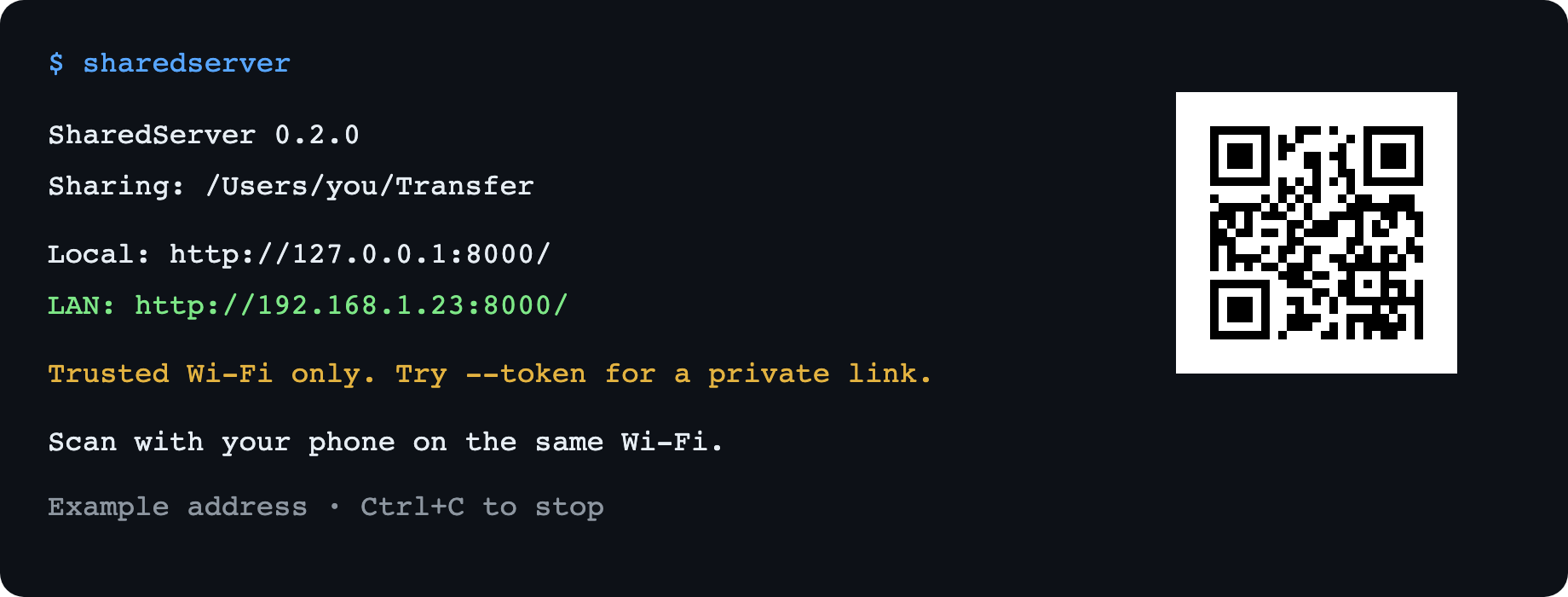
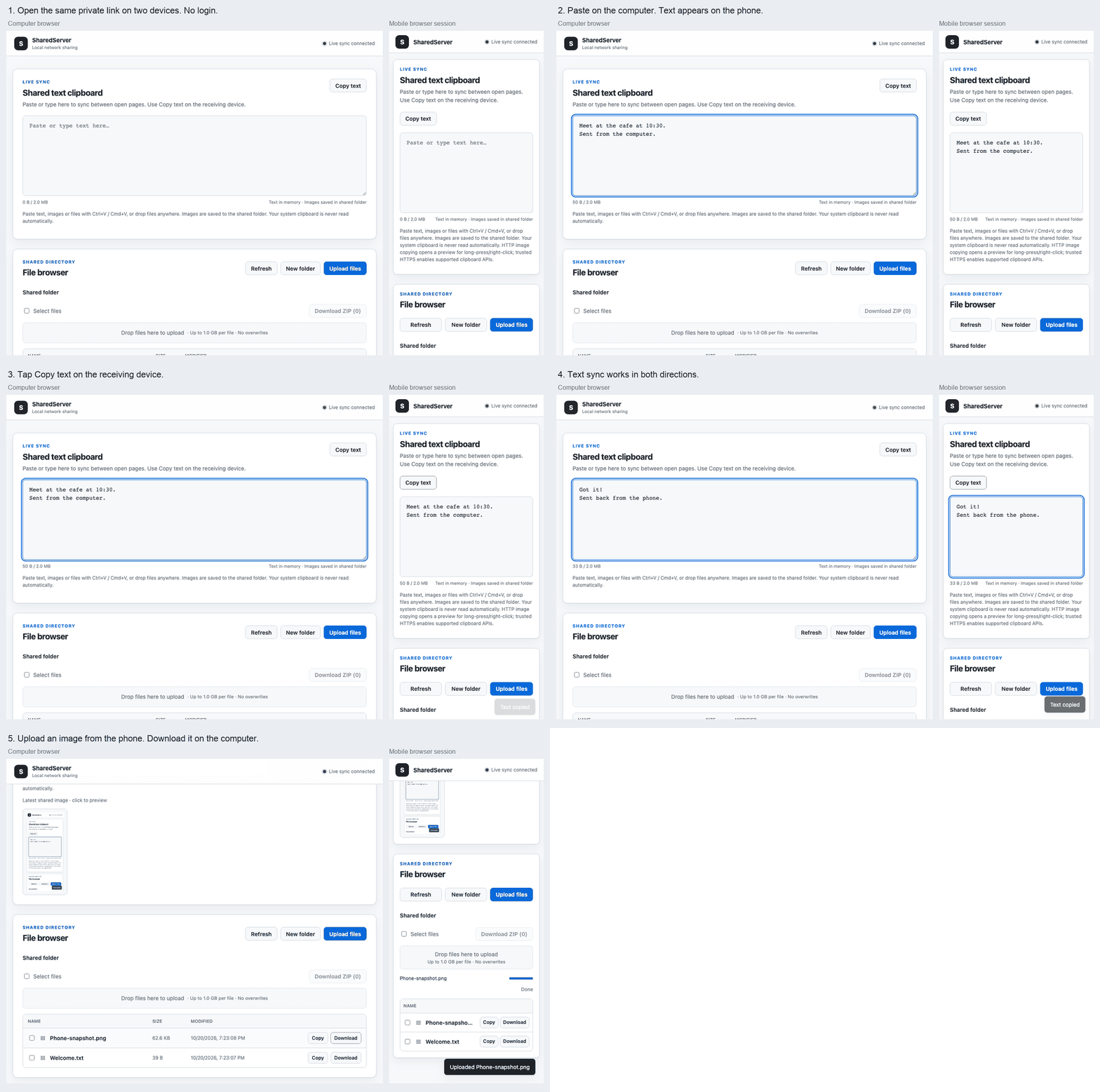
|
|
1
|
+
Metadata-Version: 2.4
|
|
2
|
+
Name: sharedserver
|
|
3
|
+
Version: 0.2.0
|
|
4
|
+
Summary: Zero-configuration LAN file sharing and real-time text clipboard
|
|
5
|
+
Author: Kyi Wong
|
|
6
|
+
License-Expression: MIT
|
|
7
|
+
Project-URL: Homepage, https://github.com/NihaoKangkang/sharedserver
|
|
8
|
+
Project-URL: Repository, https://github.com/NihaoKangkang/sharedserver
|
|
9
|
+
Project-URL: Issues, https://github.com/NihaoKangkang/sharedserver/issues
|
|
10
|
+
Keywords: file-sharing,clipboard,lan,fastapi,websocket
|
|
11
|
+
Classifier: Development Status :: 3 - Alpha
|
|
12
|
+
Classifier: Environment :: Web Environment
|
|
13
|
+
Classifier: Framework :: FastAPI
|
|
14
|
+
Classifier: Operating System :: OS Independent
|
|
15
|
+
Classifier: Programming Language :: Python :: 3
|
|
16
|
+
Classifier: Programming Language :: Python :: 3.10
|
|
17
|
+
Classifier: Programming Language :: Python :: 3.11
|
|
18
|
+
Classifier: Programming Language :: Python :: 3.12
|
|
19
|
+
Classifier: Programming Language :: Python :: 3.13
|
|
20
|
+
Classifier: Topic :: Internet :: WWW/HTTP :: HTTP Servers
|
|
21
|
+
Requires-Python: >=3.10
|
|
22
|
+
Description-Content-Type: text/markdown
|
|
23
|
+
License-File: LICENSE
|
|
24
|
+
Requires-Dist: fastapi<1,>=0.115
|
|
25
|
+
Requires-Dist: PyYAML<7,>=6
|
|
26
|
+
Requires-Dist: qrcode<9,>=8
|
|
27
|
+
Requires-Dist: uvicorn<1,>=0.30
|
|
28
|
+
Requires-Dist: websockets<17,>=13
|
|
29
|
+
Provides-Extra: dev
|
|
30
|
+
Requires-Dist: build<2,>=1.2; extra == "dev"
|
|
31
|
+
Requires-Dist: httpx2<3,>=2; extra == "dev"
|
|
32
|
+
Requires-Dist: pytest<9,>=8; extra == "dev"
|
|
33
|
+
Requires-Dist: twine<7,>=5; extra == "dev"
|
|
34
|
+
Dynamic: license-file
|
|
35
|
+
|
|
36
|
+
# SharedServer
|
|
37
|
+
|
|
38
|
+
**Like `http.server`, with uploads, a live text clipboard, and a QR code for your phone.**
|
|
39
|
+
|
|
40
|
+
Share files and text between devices on the same Wi-Fi. No accounts, no login, no cloud.
|
|
41
|
+
|
|
42
|
+
```bash
|
|
43
|
+
python -m pip install sharedserver
|
|
44
|
+
sharedserver
|
|
45
|
+
```
|
|
46
|
+
|
|
47
|
+
Run from a dedicated transfer folder, scan the terminal QR code, and open the page on your phone. Keep the terminal open; press **Ctrl+C** when you are done. Python 3.10+ required.
|
|
48
|
+
|
|
49
|
+
> The default share is open to every device that can reach it. Use trusted Wi-Fi. For a private QR link with no login screen, run `sharedserver --token`.
|
|
50
|
+
|
|
51
|
+
|
|
52
|
+
|
|
53
|
+
|
|
54
|
+
|
|
55
|
+
*12-second demo with a desktop browser and a mobile-sized browser session using a LAN HTTP address. Paste text on one device, copy it on the other, then upload an image back. The terminal preview uses an example address.*
|
|
56
|
+
|
|
57
|
+
## Three things, one command
|
|
58
|
+
|
|
59
|
+
- **Files:** browse folders, upload from your phone or drag files from your desktop, and download. Existing files are never overwritten.
|
|
60
|
+
- **Text:** paste into the shared text box and other open pages update live. Select **Copy text** on the receiving device.
|
|
61
|
+
- **Scan to connect:** the terminal prints a QR code automatically. Your phone needs only a browser and the same network.
|
|
62
|
+
|
|
63
|
+
SharedServer synchronizes text **between browser pages**. It does not monitor or automatically read your operating system clipboard. There is no native clipboard dependency, so missing `xclip` or Wayland tools cannot break file sharing.
|
|
64
|
+
|
|
65
|
+
## Useful options
|
|
66
|
+
|
|
67
|
+
```bash
|
|
68
|
+
sharedserver --token # Generate a fresh private QR link
|
|
69
|
+
sharedserver --read-only # Downloads and text sync; no file writes
|
|
70
|
+
sharedserver --token --read-only # Combine the two
|
|
71
|
+
sharedserver 8080 -d ~/Downloads # Choose a port and folder
|
|
72
|
+
sharedserver --host 127.0.0.1 # This computer only
|
|
73
|
+
sharedserver --no-qr # Hide the QR code
|
|
74
|
+
sharedserver --qr # Force QR output, even when redirected
|
|
75
|
+
python -m sharedserver 8080 # Also works as a Python module
|
|
76
|
+
```
|
|
77
|
+
|
|
78
|
+
| Option | Default | Purpose |
|
|
79
|
+
| --- | --- | --- |
|
|
80
|
+
| `port` | `8000` | Listening port |
|
|
81
|
+
| `--host HOST` | `0.0.0.0` | Bind address; a specific address is reflected in the printed link |
|
|
82
|
+
| `-d, --directory PATH` | Current folder | Folder to share |
|
|
83
|
+
| `-c, --config PATH` | Auto-load `sharedserver.yaml`, if present | YAML configuration |
|
|
84
|
+
| `--max-upload-size MB` | `1024` | Per-file upload limit in MiB |
|
|
85
|
+
| `--token` | Off | Generate a random access token, included in the URL and QR code |
|
|
86
|
+
| `--read-only / --no-read-only` | Off | Disable / enable uploads and folder creation; shared text stays editable |
|
|
87
|
+
| `--qr / --no-qr` | On in interactive terminals | Show / hide terminal QR code |
|
|
88
|
+
| `--version` | — | Installed version |
|
|
89
|
+
|
|
90
|
+
For a reusable private link, set `SHAREDSERVER_TOKEN` to a random token of 16–256 printable ASCII characters with no whitespace. The environment overrides YAML; `--token` generates a fresh token and overrides both. Avoid putting tokens in shell arguments, screenshots, or public issue reports.
|
|
91
|
+
|
|
92
|
+
A private link opens the page directly, sets an HttpOnly, SameSite session cookie, and redirects to a clean URL. Downloads and WebSockets use that session. Restarting the server expires browser sessions. Direct API clients can send `Authorization: Bearer <token>`. Server access logging is suppressed in token mode to keep the link out of request logs.
|
|
93
|
+
|
|
94
|
+
## Configuration
|
|
95
|
+
|
|
96
|
+
No config file is required. See [sharedserver.example.yaml](https://github.com/NihaoKangkang/sharedserver/blob/main/sharedserver.example.yaml) for an example:
|
|
97
|
+
|
|
98
|
+
```yaml
|
|
99
|
+
server:
|
|
100
|
+
host: 0.0.0.0
|
|
101
|
+
port: 8000
|
|
102
|
+
share:
|
|
103
|
+
directory: ./
|
|
104
|
+
max_upload_size: 1073741824 # 1 GiB per file
|
|
105
|
+
read_only: false
|
|
106
|
+
clipboard:
|
|
107
|
+
max_text_size: 2097152 # 2 MiB of UTF-8 text, in the box and copied text files
|
|
108
|
+
```
|
|
109
|
+
|
|
110
|
+
CLI arguments override YAML values. Relative folder paths in YAML are resolved from the configuration file's folder. Custom `clipboard.text_extensions` and `clipboard.image_extensions` replace the default copy allowlists; matching is case-insensitive.
|
|
111
|
+
|
|
112
|
+
Text copy defaults: `.txt .md .json .xml .yaml .yml .csv .log .py .js .html .css .java .c .cpp`.
|
|
113
|
+
|
|
114
|
+
Image copy defaults: `.png .jpg .jpeg .webp`. Other formats are download-only.
|
|
115
|
+
|
|
116
|
+
## If your phone cannot connect
|
|
117
|
+
|
|
118
|
+
1. Put both devices on the same Wi-Fi. Guest networks may isolate devices even on the same router.
|
|
119
|
+
2. Allow Python through your computer's firewall for the private network.
|
|
120
|
+
3. If a VPN or multiple network adapters select the wrong IP, bind explicitly: `sharedserver --host 192.168.1.23`. The QR code then uses that address.
|
|
121
|
+
4. If port 8000 is busy, use `sharedserver 8080`.
|
|
122
|
+
5. A QR code is printed only in interactive terminals by default. Use `--qr` to force it, or open the printed link manually.
|
|
123
|
+
|
|
124
|
+
If your shell cannot find `sharedserver`, try `python -m sharedserver` with the same Python used to install it. On a system that blocks global `pip` installs, follow the [PyPA virtual environment guide](https://packaging.python.org/en/latest/guides/installing-using-pip-and-virtual-environments/) first, or use `pipx install sharedserver` if you already have pipx.
|
|
125
|
+
|
|
126
|
+
Text copying includes a fallback for ordinary HTTP LAN pages. Image copying requires browser support and a secure context (HTTPS or localhost); downloading works without clipboard permission. Shared text is plain text only, up to **2 MiB of UTF-8** by default. Upload images and large files through the file browser instead.
|
|
127
|
+
|
|
128
|
+
## Security and scope
|
|
129
|
+
|
|
130
|
+
This is a temporary LAN tool. Share a dedicated folder and stop the server after use. Token links control access; HTTP does not encrypt traffic. Do not expose SharedServer directly to the public internet.
|
|
131
|
+
|
|
132
|
+
- Without a token, every reachable device can read files, upload files, create folders, and edit shared text. Read-only mode disables file writes only.
|
|
133
|
+
- Hidden files and folders (including `.env` and `.git`), symlinks, special files, and the active configuration file are excluded. Other visible files inside the shared folder are shared.
|
|
134
|
+
- Paths are checked against the shared root. Traversal, absolute paths, and symlink paths are rejected. Upload names are sanitized for common desktop platforms.
|
|
135
|
+
- Uploads are size-limited as they stream, staged in a hidden temporary file, and published without overwriting. Interrupted uploads clean up the temporary file.
|
|
136
|
+
- HTTP and WebSocket requests validate browser origin and reject unrecognized hostnames to reduce cross-site requests and DNS rebinding. IP addresses, localhost, the computer hostname / `.local` name, and the explicitly configured bind hostname are supported.
|
|
137
|
+
- Text is kept only in process memory. Duplicate updates do not rebroadcast, and acknowledgements do not replace the sender's newer edits. Reconnecting pages preserve unsent drafts until you choose to send them. Simultaneous edits use the last server-accepted update; this is not a collaborative document editor.
|
|
138
|
+
- The shared folder must be controlled by its owner. Do not let untrusted local processes replace paths while the server is running.
|
|
139
|
+
|
|
140
|
+
QR codes make manual discovery unnecessary. mDNS browsing is not available to ordinary browser pages; SharedServer needs no discovery daemon, multicast setup, or extra phone app.
|
|
141
|
+
|
|
142
|
+
## Development
|
|
143
|
+
|
|
144
|
+
```bash
|
|
145
|
+
git clone https://github.com/NihaoKangkang/sharedserver.git
|
|
146
|
+
cd sharedserver
|
|
147
|
+
python -m venv .venv
|
|
148
|
+
# Activate .venv with the command for your shell, then:
|
|
149
|
+
pip install -e ".[dev]"
|
|
150
|
+
python -m pytest
|
|
151
|
+
python -m build
|
|
152
|
+
python -m twine check dist/*
|
|
153
|
+
```
|
|
154
|
+
|
|
155
|
+
CI runs on Linux, macOS, and Windows with Python 3.10–3.14. A published GitHub Release builds, tests, validates, and publishes distributions using PyPI Trusted Publishing. Configure the `pypi` environment and trusted publisher in your PyPI account before publishing. Match the release tag to the package version (`v0.2.0`).
|
|
156
|
+
|
|
157
|
+
[MIT license](https://github.com/NihaoKangkang/sharedserver/blob/main/LICENSE) · [Report an issue](https://github.com/NihaoKangkang/sharedserver/issues)
|
|
@@ -0,0 +1,122 @@
|
|
|
1
|
+
# SharedServer
|
|
2
|
+
|
|
3
|
+
**Like `http.server`, with uploads, a live text clipboard, and a QR code for your phone.**
|
|
4
|
+
|
|
5
|
+
Share files and text between devices on the same Wi-Fi. No accounts, no login, no cloud.
|
|
6
|
+
|
|
7
|
+
```bash
|
|
8
|
+
python -m pip install sharedserver
|
|
9
|
+
sharedserver
|
|
10
|
+
```
|
|
11
|
+
|
|
12
|
+
Run from a dedicated transfer folder, scan the terminal QR code, and open the page on your phone. Keep the terminal open; press **Ctrl+C** when you are done. Python 3.10+ required.
|
|
13
|
+
|
|
14
|
+
> The default share is open to every device that can reach it. Use trusted Wi-Fi. For a private QR link with no login screen, run `sharedserver --token`.
|
|
15
|
+
|
|
16
|
+

|
|
17
|
+
|
|
18
|
+

|
|
19
|
+
|
|
20
|
+
*12-second demo with a desktop browser and a mobile-sized browser session using a LAN HTTP address. Paste text on one device, copy it on the other, then upload an image back. The terminal preview uses an example address.*
|
|
21
|
+
|
|
22
|
+
## Three things, one command
|
|
23
|
+
|
|
24
|
+
- **Files:** browse folders, upload from your phone or drag files from your desktop, and download. Existing files are never overwritten.
|
|
25
|
+
- **Text:** paste into the shared text box and other open pages update live. Select **Copy text** on the receiving device.
|
|
26
|
+
- **Scan to connect:** the terminal prints a QR code automatically. Your phone needs only a browser and the same network.
|
|
27
|
+
|
|
28
|
+
SharedServer synchronizes text **between browser pages**. It does not monitor or automatically read your operating system clipboard. There is no native clipboard dependency, so missing `xclip` or Wayland tools cannot break file sharing.
|
|
29
|
+
|
|
30
|
+
## Useful options
|
|
31
|
+
|
|
32
|
+
```bash
|
|
33
|
+
sharedserver --token # Generate a fresh private QR link
|
|
34
|
+
sharedserver --read-only # Downloads and text sync; no file writes
|
|
35
|
+
sharedserver --token --read-only # Combine the two
|
|
36
|
+
sharedserver 8080 -d ~/Downloads # Choose a port and folder
|
|
37
|
+
sharedserver --host 127.0.0.1 # This computer only
|
|
38
|
+
sharedserver --no-qr # Hide the QR code
|
|
39
|
+
sharedserver --qr # Force QR output, even when redirected
|
|
40
|
+
python -m sharedserver 8080 # Also works as a Python module
|
|
41
|
+
```
|
|
42
|
+
|
|
43
|
+
| Option | Default | Purpose |
|
|
44
|
+
| --- | --- | --- |
|
|
45
|
+
| `port` | `8000` | Listening port |
|
|
46
|
+
| `--host HOST` | `0.0.0.0` | Bind address; a specific address is reflected in the printed link |
|
|
47
|
+
| `-d, --directory PATH` | Current folder | Folder to share |
|
|
48
|
+
| `-c, --config PATH` | Auto-load `sharedserver.yaml`, if present | YAML configuration |
|
|
49
|
+
| `--max-upload-size MB` | `1024` | Per-file upload limit in MiB |
|
|
50
|
+
| `--token` | Off | Generate a random access token, included in the URL and QR code |
|
|
51
|
+
| `--read-only / --no-read-only` | Off | Disable / enable uploads and folder creation; shared text stays editable |
|
|
52
|
+
| `--qr / --no-qr` | On in interactive terminals | Show / hide terminal QR code |
|
|
53
|
+
| `--version` | — | Installed version |
|
|
54
|
+
|
|
55
|
+
For a reusable private link, set `SHAREDSERVER_TOKEN` to a random token of 16–256 printable ASCII characters with no whitespace. The environment overrides YAML; `--token` generates a fresh token and overrides both. Avoid putting tokens in shell arguments, screenshots, or public issue reports.
|
|
56
|
+
|
|
57
|
+
A private link opens the page directly, sets an HttpOnly, SameSite session cookie, and redirects to a clean URL. Downloads and WebSockets use that session. Restarting the server expires browser sessions. Direct API clients can send `Authorization: Bearer <token>`. Server access logging is suppressed in token mode to keep the link out of request logs.
|
|
58
|
+
|
|
59
|
+
## Configuration
|
|
60
|
+
|
|
61
|
+
No config file is required. See [sharedserver.example.yaml](https://github.com/NihaoKangkang/sharedserver/blob/main/sharedserver.example.yaml) for an example:
|
|
62
|
+
|
|
63
|
+
```yaml
|
|
64
|
+
server:
|
|
65
|
+
host: 0.0.0.0
|
|
66
|
+
port: 8000
|
|
67
|
+
share:
|
|
68
|
+
directory: ./
|
|
69
|
+
max_upload_size: 1073741824 # 1 GiB per file
|
|
70
|
+
read_only: false
|
|
71
|
+
clipboard:
|
|
72
|
+
max_text_size: 2097152 # 2 MiB of UTF-8 text, in the box and copied text files
|
|
73
|
+
```
|
|
74
|
+
|
|
75
|
+
CLI arguments override YAML values. Relative folder paths in YAML are resolved from the configuration file's folder. Custom `clipboard.text_extensions` and `clipboard.image_extensions` replace the default copy allowlists; matching is case-insensitive.
|
|
76
|
+
|
|
77
|
+
Text copy defaults: `.txt .md .json .xml .yaml .yml .csv .log .py .js .html .css .java .c .cpp`.
|
|
78
|
+
|
|
79
|
+
Image copy defaults: `.png .jpg .jpeg .webp`. Other formats are download-only.
|
|
80
|
+
|
|
81
|
+
## If your phone cannot connect
|
|
82
|
+
|
|
83
|
+
1. Put both devices on the same Wi-Fi. Guest networks may isolate devices even on the same router.
|
|
84
|
+
2. Allow Python through your computer's firewall for the private network.
|
|
85
|
+
3. If a VPN or multiple network adapters select the wrong IP, bind explicitly: `sharedserver --host 192.168.1.23`. The QR code then uses that address.
|
|
86
|
+
4. If port 8000 is busy, use `sharedserver 8080`.
|
|
87
|
+
5. A QR code is printed only in interactive terminals by default. Use `--qr` to force it, or open the printed link manually.
|
|
88
|
+
|
|
89
|
+
If your shell cannot find `sharedserver`, try `python -m sharedserver` with the same Python used to install it. On a system that blocks global `pip` installs, follow the [PyPA virtual environment guide](https://packaging.python.org/en/latest/guides/installing-using-pip-and-virtual-environments/) first, or use `pipx install sharedserver` if you already have pipx.
|
|
90
|
+
|
|
91
|
+
Text copying includes a fallback for ordinary HTTP LAN pages. Image copying requires browser support and a secure context (HTTPS or localhost); downloading works without clipboard permission. Shared text is plain text only, up to **2 MiB of UTF-8** by default. Upload images and large files through the file browser instead.
|
|
92
|
+
|
|
93
|
+
## Security and scope
|
|
94
|
+
|
|
95
|
+
This is a temporary LAN tool. Share a dedicated folder and stop the server after use. Token links control access; HTTP does not encrypt traffic. Do not expose SharedServer directly to the public internet.
|
|
96
|
+
|
|
97
|
+
- Without a token, every reachable device can read files, upload files, create folders, and edit shared text. Read-only mode disables file writes only.
|
|
98
|
+
- Hidden files and folders (including `.env` and `.git`), symlinks, special files, and the active configuration file are excluded. Other visible files inside the shared folder are shared.
|
|
99
|
+
- Paths are checked against the shared root. Traversal, absolute paths, and symlink paths are rejected. Upload names are sanitized for common desktop platforms.
|
|
100
|
+
- Uploads are size-limited as they stream, staged in a hidden temporary file, and published without overwriting. Interrupted uploads clean up the temporary file.
|
|
101
|
+
- HTTP and WebSocket requests validate browser origin and reject unrecognized hostnames to reduce cross-site requests and DNS rebinding. IP addresses, localhost, the computer hostname / `.local` name, and the explicitly configured bind hostname are supported.
|
|
102
|
+
- Text is kept only in process memory. Duplicate updates do not rebroadcast, and acknowledgements do not replace the sender's newer edits. Reconnecting pages preserve unsent drafts until you choose to send them. Simultaneous edits use the last server-accepted update; this is not a collaborative document editor.
|
|
103
|
+
- The shared folder must be controlled by its owner. Do not let untrusted local processes replace paths while the server is running.
|
|
104
|
+
|
|
105
|
+
QR codes make manual discovery unnecessary. mDNS browsing is not available to ordinary browser pages; SharedServer needs no discovery daemon, multicast setup, or extra phone app.
|
|
106
|
+
|
|
107
|
+
## Development
|
|
108
|
+
|
|
109
|
+
```bash
|
|
110
|
+
git clone https://github.com/NihaoKangkang/sharedserver.git
|
|
111
|
+
cd sharedserver
|
|
112
|
+
python -m venv .venv
|
|
113
|
+
# Activate .venv with the command for your shell, then:
|
|
114
|
+
pip install -e ".[dev]"
|
|
115
|
+
python -m pytest
|
|
116
|
+
python -m build
|
|
117
|
+
python -m twine check dist/*
|
|
118
|
+
```
|
|
119
|
+
|
|
120
|
+
CI runs on Linux, macOS, and Windows with Python 3.10–3.14. A published GitHub Release builds, tests, validates, and publishes distributions using PyPI Trusted Publishing. Configure the `pypi` environment and trusted publisher in your PyPI account before publishing. Match the release tag to the package version (`v0.2.0`).
|
|
121
|
+
|
|
122
|
+
[MIT license](https://github.com/NihaoKangkang/sharedserver/blob/main/LICENSE) · [Report an issue](https://github.com/NihaoKangkang/sharedserver/issues)
|
|
Binary file
|
|
Binary file
|
|
@@ -0,0 +1,14 @@
|
|
|
1
|
+
<svg xmlns="http://www.w3.org/2000/svg" width="920" height="350" viewBox="0 0 920 350" role="img" aria-label="Example terminal output: sharedserver prints a LAN link and QR code">
|
|
2
|
+
<rect width="920" height="350" rx="14" fill="#0d1117"/>
|
|
3
|
+
<g font-family="monospace" font-size="17" fill="#e6edf3">
|
|
4
|
+
<text x="28" y="42" fill="#58a6ff">$ sharedserver</text>
|
|
5
|
+
<text x="28" y="84">SharedServer 0.2.0</text>
|
|
6
|
+
<text x="28" y="114">Sharing: /Users/you/Transfer</text>
|
|
7
|
+
<text x="28" y="154">Local: http://127.0.0.1:8000/</text>
|
|
8
|
+
<text x="28" y="184" fill="#7ee787">LAN: http://192.168.1.23:8000/</text>
|
|
9
|
+
<text x="28" y="224" fill="#e3b341">Trusted Wi-Fi only. Try --token for a private link.</text>
|
|
10
|
+
<text x="28" y="264">Scan with your phone on the same Wi-Fi.</text>
|
|
11
|
+
<text x="28" y="302" fill="#8d96a0">Example address · Ctrl+C to stop</text>
|
|
12
|
+
</g>
|
|
13
|
+
<g transform="translate(690 54)"><rect width="165" height="165" fill="white"/><g fill="black"><rect x="20" y="20" width="5" height="5"/><rect x="25" y="20" width="5" height="5"/><rect x="30" y="20" width="5" height="5"/><rect x="35" y="20" width="5" height="5"/><rect x="40" y="20" width="5" height="5"/><rect x="45" y="20" width="5" height="5"/><rect x="50" y="20" width="5" height="5"/><rect x="70" y="20" width="5" height="5"/><rect x="75" y="20" width="5" height="5"/><rect x="80" y="20" width="5" height="5"/><rect x="90" y="20" width="5" height="5"/><rect x="110" y="20" width="5" height="5"/><rect x="115" y="20" width="5" height="5"/><rect x="120" y="20" width="5" height="5"/><rect x="125" y="20" width="5" height="5"/><rect x="130" y="20" width="5" height="5"/><rect x="135" y="20" width="5" height="5"/><rect x="140" y="20" width="5" height="5"/><rect x="20" y="25" width="5" height="5"/><rect x="50" y="25" width="5" height="5"/><rect x="60" y="25" width="5" height="5"/><rect x="70" y="25" width="5" height="5"/><rect x="100" y="25" width="5" height="5"/><rect x="110" y="25" width="5" height="5"/><rect x="140" y="25" width="5" height="5"/><rect x="20" y="30" width="5" height="5"/><rect x="30" y="30" width="5" height="5"/><rect x="35" y="30" width="5" height="5"/><rect x="40" y="30" width="5" height="5"/><rect x="50" y="30" width="5" height="5"/><rect x="60" y="30" width="5" height="5"/><rect x="65" y="30" width="5" height="5"/><rect x="95" y="30" width="5" height="5"/><rect x="110" y="30" width="5" height="5"/><rect x="120" y="30" width="5" height="5"/><rect x="125" y="30" width="5" height="5"/><rect x="130" y="30" width="5" height="5"/><rect x="140" y="30" width="5" height="5"/><rect x="20" y="35" width="5" height="5"/><rect x="30" y="35" width="5" height="5"/><rect x="35" y="35" width="5" height="5"/><rect x="40" y="35" width="5" height="5"/><rect x="50" y="35" width="5" height="5"/><rect x="60" y="35" width="5" height="5"/><rect x="75" y="35" width="5" height="5"/><rect x="80" y="35" width="5" height="5"/><rect x="90" y="35" width="5" height="5"/><rect x="95" y="35" width="5" height="5"/><rect x="110" y="35" width="5" height="5"/><rect x="120" y="35" width="5" height="5"/><rect x="125" y="35" width="5" height="5"/><rect x="130" y="35" width="5" height="5"/><rect x="140" y="35" width="5" height="5"/><rect x="20" y="40" width="5" height="5"/><rect x="30" y="40" width="5" height="5"/><rect x="35" y="40" width="5" height="5"/><rect x="40" y="40" width="5" height="5"/><rect x="50" y="40" width="5" height="5"/><rect x="75" y="40" width="5" height="5"/><rect x="80" y="40" width="5" height="5"/><rect x="95" y="40" width="5" height="5"/><rect x="110" y="40" width="5" height="5"/><rect x="120" y="40" width="5" height="5"/><rect x="125" y="40" width="5" height="5"/><rect x="130" y="40" width="5" height="5"/><rect x="140" y="40" width="5" height="5"/><rect x="20" y="45" width="5" height="5"/><rect x="50" y="45" width="5" height="5"/><rect x="80" y="45" width="5" height="5"/><rect x="95" y="45" width="5" height="5"/><rect x="100" y="45" width="5" height="5"/><rect x="110" y="45" width="5" height="5"/><rect x="140" y="45" width="5" height="5"/><rect x="20" y="50" width="5" height="5"/><rect x="25" y="50" width="5" height="5"/><rect x="30" y="50" width="5" height="5"/><rect x="35" y="50" width="5" height="5"/><rect x="40" y="50" width="5" height="5"/><rect x="45" y="50" width="5" height="5"/><rect x="50" y="50" width="5" height="5"/><rect x="60" y="50" width="5" height="5"/><rect x="70" y="50" width="5" height="5"/><rect x="80" y="50" width="5" height="5"/><rect x="90" y="50" width="5" height="5"/><rect x="100" y="50" width="5" height="5"/><rect x="110" y="50" width="5" height="5"/><rect x="115" y="50" width="5" height="5"/><rect x="120" y="50" width="5" height="5"/><rect x="125" y="50" width="5" height="5"/><rect x="130" y="50" width="5" height="5"/><rect x="135" y="50" width="5" height="5"/><rect x="140" y="50" width="5" height="5"/><rect x="60" y="55" width="5" height="5"/><rect x="65" y="55" width="5" height="5"/><rect x="75" y="55" width="5" height="5"/><rect x="80" y="55" width="5" height="5"/><rect x="100" y="55" width="5" height="5"/><rect x="20" y="60" width="5" height="5"/><rect x="50" y="60" width="5" height="5"/><rect x="60" y="60" width="5" height="5"/><rect x="70" y="60" width="5" height="5"/><rect x="80" y="60" width="5" height="5"/><rect x="95" y="60" width="5" height="5"/><rect x="105" y="60" width="5" height="5"/><rect x="110" y="60" width="5" height="5"/><rect x="125" y="60" width="5" height="5"/><rect x="130" y="60" width="5" height="5"/><rect x="135" y="60" width="5" height="5"/><rect x="25" y="65" width="5" height="5"/><rect x="30" y="65" width="5" height="5"/><rect x="35" y="65" width="5" height="5"/><rect x="40" y="65" width="5" height="5"/><rect x="45" y="65" width="5" height="5"/><rect x="55" y="65" width="5" height="5"/><rect x="65" y="65" width="5" height="5"/><rect x="75" y="65" width="5" height="5"/><rect x="100" y="65" width="5" height="5"/><rect x="105" y="65" width="5" height="5"/><rect x="110" y="65" width="5" height="5"/><rect x="115" y="65" width="5" height="5"/><rect x="120" y="65" width="5" height="5"/><rect x="125" y="65" width="5" height="5"/><rect x="130" y="65" width="5" height="5"/><rect x="135" y="65" width="5" height="5"/><rect x="20" y="70" width="5" height="5"/><rect x="25" y="70" width="5" height="5"/><rect x="30" y="70" width="5" height="5"/><rect x="40" y="70" width="5" height="5"/><rect x="50" y="70" width="5" height="5"/><rect x="55" y="70" width="5" height="5"/><rect x="60" y="70" width="5" height="5"/><rect x="75" y="70" width="5" height="5"/><rect x="90" y="70" width="5" height="5"/><rect x="95" y="70" width="5" height="5"/><rect x="100" y="70" width="5" height="5"/><rect x="105" y="70" width="5" height="5"/><rect x="120" y="70" width="5" height="5"/><rect x="125" y="70" width="5" height="5"/><rect x="135" y="70" width="5" height="5"/><rect x="140" y="70" width="5" height="5"/><rect x="20" y="75" width="5" height="5"/><rect x="30" y="75" width="5" height="5"/><rect x="40" y="75" width="5" height="5"/><rect x="65" y="75" width="5" height="5"/><rect x="70" y="75" width="5" height="5"/><rect x="80" y="75" width="5" height="5"/><rect x="85" y="75" width="5" height="5"/><rect x="90" y="75" width="5" height="5"/><rect x="105" y="75" width="5" height="5"/><rect x="115" y="75" width="5" height="5"/><rect x="125" y="75" width="5" height="5"/><rect x="140" y="75" width="5" height="5"/><rect x="20" y="80" width="5" height="5"/><rect x="25" y="80" width="5" height="5"/><rect x="35" y="80" width="5" height="5"/><rect x="40" y="80" width="5" height="5"/><rect x="50" y="80" width="5" height="5"/><rect x="55" y="80" width="5" height="5"/><rect x="65" y="80" width="5" height="5"/><rect x="75" y="80" width="5" height="5"/><rect x="80" y="80" width="5" height="5"/><rect x="85" y="80" width="5" height="5"/><rect x="90" y="80" width="5" height="5"/><rect x="105" y="80" width="5" height="5"/><rect x="115" y="80" width="5" height="5"/><rect x="120" y="80" width="5" height="5"/><rect x="140" y="80" width="5" height="5"/><rect x="20" y="85" width="5" height="5"/><rect x="25" y="85" width="5" height="5"/><rect x="30" y="85" width="5" height="5"/><rect x="65" y="85" width="5" height="5"/><rect x="70" y="85" width="5" height="5"/><rect x="100" y="85" width="5" height="5"/><rect x="105" y="85" width="5" height="5"/><rect x="135" y="85" width="5" height="5"/><rect x="20" y="90" width="5" height="5"/><rect x="30" y="90" width="5" height="5"/><rect x="50" y="90" width="5" height="5"/><rect x="60" y="90" width="5" height="5"/><rect x="65" y="90" width="5" height="5"/><rect x="75" y="90" width="5" height="5"/><rect x="80" y="90" width="5" height="5"/><rect x="100" y="90" width="5" height="5"/><rect x="110" y="90" width="5" height="5"/><rect x="120" y="90" width="5" height="5"/><rect x="125" y="90" width="5" height="5"/><rect x="135" y="90" width="5" height="5"/><rect x="140" y="90" width="5" height="5"/><rect x="20" y="95" width="5" height="5"/><rect x="30" y="95" width="5" height="5"/><rect x="35" y="95" width="5" height="5"/><rect x="40" y="95" width="5" height="5"/><rect x="45" y="95" width="5" height="5"/><rect x="60" y="95" width="5" height="5"/><rect x="75" y="95" width="5" height="5"/><rect x="90" y="95" width="5" height="5"/><rect x="95" y="95" width="5" height="5"/><rect x="105" y="95" width="5" height="5"/><rect x="110" y="95" width="5" height="5"/><rect x="120" y="95" width="5" height="5"/><rect x="130" y="95" width="5" height="5"/><rect x="140" y="95" width="5" height="5"/><rect x="20" y="100" width="5" height="5"/><rect x="30" y="100" width="5" height="5"/><rect x="40" y="100" width="5" height="5"/><rect x="50" y="100" width="5" height="5"/><rect x="55" y="100" width="5" height="5"/><rect x="65" y="100" width="5" height="5"/><rect x="70" y="100" width="5" height="5"/><rect x="75" y="100" width="5" height="5"/><rect x="95" y="100" width="5" height="5"/><rect x="100" y="100" width="5" height="5"/><rect x="105" y="100" width="5" height="5"/><rect x="110" y="100" width="5" height="5"/><rect x="115" y="100" width="5" height="5"/><rect x="120" y="100" width="5" height="5"/><rect x="125" y="100" width="5" height="5"/><rect x="130" y="100" width="5" height="5"/><rect x="60" y="105" width="5" height="5"/><rect x="65" y="105" width="5" height="5"/><rect x="70" y="105" width="5" height="5"/><rect x="80" y="105" width="5" height="5"/><rect x="85" y="105" width="5" height="5"/><rect x="100" y="105" width="5" height="5"/><rect x="120" y="105" width="5" height="5"/><rect x="20" y="110" width="5" height="5"/><rect x="25" y="110" width="5" height="5"/><rect x="30" y="110" width="5" height="5"/><rect x="35" y="110" width="5" height="5"/><rect x="40" y="110" width="5" height="5"/><rect x="45" y="110" width="5" height="5"/><rect x="50" y="110" width="5" height="5"/><rect x="65" y="110" width="5" height="5"/><rect x="70" y="110" width="5" height="5"/><rect x="75" y="110" width="5" height="5"/><rect x="95" y="110" width="5" height="5"/><rect x="100" y="110" width="5" height="5"/><rect x="110" y="110" width="5" height="5"/><rect x="120" y="110" width="5" height="5"/><rect x="125" y="110" width="5" height="5"/><rect x="130" y="110" width="5" height="5"/><rect x="140" y="110" width="5" height="5"/><rect x="20" y="115" width="5" height="5"/><rect x="50" y="115" width="5" height="5"/><rect x="80" y="115" width="5" height="5"/><rect x="85" y="115" width="5" height="5"/><rect x="95" y="115" width="5" height="5"/><rect x="100" y="115" width="5" height="5"/><rect x="120" y="115" width="5" height="5"/><rect x="130" y="115" width="5" height="5"/><rect x="140" y="115" width="5" height="5"/><rect x="20" y="120" width="5" height="5"/><rect x="30" y="120" width="5" height="5"/><rect x="35" y="120" width="5" height="5"/><rect x="40" y="120" width="5" height="5"/><rect x="50" y="120" width="5" height="5"/><rect x="65" y="120" width="5" height="5"/><rect x="70" y="120" width="5" height="5"/><rect x="80" y="120" width="5" height="5"/><rect x="90" y="120" width="5" height="5"/><rect x="100" y="120" width="5" height="5"/><rect x="105" y="120" width="5" height="5"/><rect x="110" y="120" width="5" height="5"/><rect x="115" y="120" width="5" height="5"/><rect x="120" y="120" width="5" height="5"/><rect x="125" y="120" width="5" height="5"/><rect x="130" y="120" width="5" height="5"/><rect x="135" y="120" width="5" height="5"/><rect x="140" y="120" width="5" height="5"/><rect x="20" y="125" width="5" height="5"/><rect x="30" y="125" width="5" height="5"/><rect x="35" y="125" width="5" height="5"/><rect x="40" y="125" width="5" height="5"/><rect x="50" y="125" width="5" height="5"/><rect x="70" y="125" width="5" height="5"/><rect x="90" y="125" width="5" height="5"/><rect x="115" y="125" width="5" height="5"/><rect x="125" y="125" width="5" height="5"/><rect x="140" y="125" width="5" height="5"/><rect x="20" y="130" width="5" height="5"/><rect x="30" y="130" width="5" height="5"/><rect x="35" y="130" width="5" height="5"/><rect x="40" y="130" width="5" height="5"/><rect x="50" y="130" width="5" height="5"/><rect x="65" y="130" width="5" height="5"/><rect x="70" y="130" width="5" height="5"/><rect x="75" y="130" width="5" height="5"/><rect x="80" y="130" width="5" height="5"/><rect x="100" y="130" width="5" height="5"/><rect x="105" y="130" width="5" height="5"/><rect x="110" y="130" width="5" height="5"/><rect x="115" y="130" width="5" height="5"/><rect x="120" y="130" width="5" height="5"/><rect x="130" y="130" width="5" height="5"/><rect x="140" y="130" width="5" height="5"/><rect x="20" y="135" width="5" height="5"/><rect x="50" y="135" width="5" height="5"/><rect x="65" y="135" width="5" height="5"/><rect x="70" y="135" width="5" height="5"/><rect x="75" y="135" width="5" height="5"/><rect x="90" y="135" width="5" height="5"/><rect x="100" y="135" width="5" height="5"/><rect x="110" y="135" width="5" height="5"/><rect x="115" y="135" width="5" height="5"/><rect x="120" y="135" width="5" height="5"/><rect x="125" y="135" width="5" height="5"/><rect x="130" y="135" width="5" height="5"/><rect x="140" y="135" width="5" height="5"/><rect x="20" y="140" width="5" height="5"/><rect x="25" y="140" width="5" height="5"/><rect x="30" y="140" width="5" height="5"/><rect x="35" y="140" width="5" height="5"/><rect x="40" y="140" width="5" height="5"/><rect x="45" y="140" width="5" height="5"/><rect x="50" y="140" width="5" height="5"/><rect x="60" y="140" width="5" height="5"/><rect x="85" y="140" width="5" height="5"/><rect x="90" y="140" width="5" height="5"/><rect x="100" y="140" width="5" height="5"/><rect x="110" y="140" width="5" height="5"/><rect x="120" y="140" width="5" height="5"/><rect x="125" y="140" width="5" height="5"/><rect x="140" y="140" width="5" height="5"/></g></g>
|
|
14
|
+
</svg>
|
|
@@ -0,0 +1,116 @@
|
|
|
1
|
+
# SharedServer promotion and first-use review
|
|
2
|
+
|
|
3
|
+
Checked: **2026-10-20 (Asia/Shanghai)**. Scope: the uncommitted working tree on `feat/scan-share-security`, package version 0.2.0. This is a review of a development version, not an announcement of a published release. No source files were changed and nothing was published.
|
|
4
|
+
|
|
5
|
+
## Decision
|
|
6
|
+
|
|
7
|
+
The positioning is credible: **a temporary LAN file server with uploads, a browser-to-browser text box, and terminal QR access**. Keep that narrow promise. Default login-free access, optional token links, file-only read-only mode, and Python 3.10+ match the implementation. There is no need to add accounts, discovery services, cloud relays, or a native clipboard bridge to make this promotable.
|
|
8
|
+
|
|
9
|
+
**Follow-up review, same date:** the main chat implemented the development-version notice, absolute image URLs with a PNG terminal preview, installation recovery guidance, a release checklist, LAN-HTTP smoke coverage, and a better default IPv4 candidate selection. I reread those changes and independently reran the suite: **32 passed**. The main chat reports the LAN smoke passed; I inspected its assertions rather than independently repeating that browser run. There is no newly identified P0 source-code defect. The remaining P0 items are release gates, already tracked in `docs/releasing.md`; the remaining small edits are below.
|
|
10
|
+
|
|
11
|
+
## Prioritized actions
|
|
12
|
+
|
|
13
|
+
| Priority | Finding and evidence | Concrete action and acceptance check |
|
|
14
|
+
| --- | --- | --- |
|
|
15
|
+
| P0 release gate; documentation fixed | **Published package versus development checkout.** The live [PyPI project](https://pypi.org/project/sharedserver/) and JSON API returned **0.1.0**, uploaded 2026-07-21. README now explicitly says the new features belong to unreleased 0.2.0 and gives `python -m pip install .`. | Follow `docs/releasing.md` before promoting 0.2.0: merge/CI, authorized release, then a clean PyPI install confirming version and new switches. One easy final edit: put the preview notice **before** the initial package install block, so readers see it before copying the old-release command. |
|
|
16
|
+
| P0 release gate; image paths fixed | **Public asset availability.** README now uses absolute raw GitHub URLs for terminal PNG and demo GIF and explains that they become available after merge. This fixes the original relative-image problem at source level; it does not make an unpublished asset public. | After merge, confirm both URLs return image content and visually check the package description. `twine check` alone does not prove URL availability. This gate is already in `docs/releasing.md`. Small remaining link edit: change `[sharedserver.example.yaml](sharedserver.example.yaml)` and `[MIT license](LICENSE)` to absolute repository URLs too, since PyPI is not a repository checkout. |
|
|
17
|
+
| P1 small README edit | **The default-access notice still follows both large images.** The initial command shares the current folder with every reachable device. The terminal warning is correct, but users choose their folder before seeing it. | Move the existing trusted-Wi-Fi / optional `--token` note before the screenshots, next to the first-use command, and add “use a dedicated transfer folder.” This needs no behavior change or extra tests. |
|
|
18
|
+
| P2 optional polish; recovery guidance added | **Installation recovery now exists.** README explains `python -m sharedserver`, virtual environments and optional pipx. It still assumes readers know how to create/activate a venv. [PyPA explains managed-environment behavior](https://packaging.python.org/en/latest/specifications/externally-managed-environments/). | A short link near installation to an explicit Windows/macOS/Linux venv recipe would improve beginner recovery. This is no longer a launch blocker. Interpreter-bound `python -m pip` in the first block would also reduce ambiguity. |
|
|
19
|
+
|
|
20
|
+
**Small follow-up, not a launch blocker:** HTTP LAN pages still show an image “Copy” button although its handler immediately says copying is unavailable. Hide/disable that action when the required clipboard capability is absent, with “Download” remaining obvious. The page-level help already explains the limitation; this would prevent a predictable failed tap. Text-copy fallback must remain available.
|
|
21
|
+
|
|
22
|
+
## What was verified
|
|
23
|
+
|
|
24
|
+
Read `README.md`, demo assets, `pyproject.toml`, `MANIFEST.in`, CLI/config/access/security/file/server/WebSocket code, HTML/CSS/JS, both CI workflows, browser smoke, release checklist, and relevant tests. Independently ran `.venv312/bin/python -m pytest -q -p no:cacheprovider`: initially 28 passed; after follow-up changes, **32 passed**. CLI help contains the documented new switches.
|
|
25
|
+
|
|
26
|
+
| Claim | Finding |
|
|
27
|
+
| --- | --- |
|
|
28
|
+
| Zero application configuration; no login by default | Default config binds `0.0.0.0:8000`, shares the current folder, and accepts requests without a token. Existing `sharedserver.yaml` is auto-loaded, as documented. “Zero configuration” should not imply firewall/VPN/guest-network setup never matters. |
|
|
29
|
+
| Optional private QR link | `--token` generates a random token; private root links establish an HttpOnly, SameSite session cookie and redirect to `/`. Assets, API, downloads and WebSockets are guarded; tests cover denied access and restart expiry. A link is a bearer secret, **not traffic encryption**. README states that HTTP is unencrypted. |
|
|
30
|
+
| Read-only | Upload and directory creation are rejected server-side and hidden in the UI. Shared text remains editable. The CLI/README explain this accurately. Never shorten the claim to “read-only server.” |
|
|
31
|
+
| Text clipboard | Manual paste/type into the browser box, live WebSocket sync, user-triggered Copy. No automatic OS clipboard read. README and UI now make the boundary clear. Image upload is supported; image clipboard copying is a separate browser capability. |
|
|
32
|
+
| Mobile upload and QR | A standard multiple-file input and upload progress exist. QR defaults to interactive terminals; `--qr` forces it. Explicit IPv4 bind is reflected in its URL. SVG is an illustrative QR/address, not a live invitation to the viewer's server. |
|
|
33
|
+
| Python / platforms | Metadata requires Python >=3.10. CI **configuration** covers Linux/macOS/Windows and Python 3.10–3.14; that is not evidence that remote CI already passed. Main chat separately reports 3.12 and 3.15 tests passing. |
|
|
34
|
+
| Publishing | A published GitHub Release triggers tests/build/Twine validation, then a separate Trusted Publishing job in the `pypi` environment. Tag/version equality is checked. The PyPI trusted-publisher account settings and environment protection cannot be established by reading YAML. |
|
|
35
|
+
|
|
36
|
+
### Demo and browser evidence limits
|
|
37
|
+
|
|
38
|
+
The initially reviewed `demo.gif` was 1110×736, five frames, approximately 12 seconds and 282 KiB. I extracted and inspected its opening and final frames: clean desktop/mobile composition, legible captions, live text and uploaded filename visible. Main chat subsequently regenerated the demo using the LAN-HTTP path and added a scroll to show the phone file list; I have reviewed the updated script and caption, not re-inspected every regenerated frame. Keeping the “mobile-sized browser session” caption is honest. The terminal preview clearly labels its address as an example.
|
|
39
|
+
|
|
40
|
+
The original `scripts/browser_smoke.cjs` uses two Chromium contexts at `127.0.0.1`, grants clipboard permissions, injects a screenshot through `setInputFiles`, and verifies uploaded bytes on disk. This proves useful browser behavior but not a physical phone camera scan, native photo picker, Safari behavior, or ordinary HTTP LAN clipboard restrictions. Its final caption mentions downloading; the script does not actually click a download.
|
|
41
|
+
|
|
42
|
+
**Follow-up:** main chat reports successful `LAN_SMOKE=1` over an actual private IPv4 address. The script now explicitly asserts `window.isSecureContext === false` in the phone context. This closes the missing HTTP-context coverage; file upload, sync and reconnect also pass according to the main chat. **Evidence limit remains:** Copy checks the success toast after the real fallback runs, not a read-back of the OS clipboard. Do not describe this as an assertion of clipboard contents. Optional strengthening: read the clipboard through the trusted localhost context and compare the expected string after the LAN-page click. The smoke still does not click a browser download. API tests cover downloaded bytes; these are distinct claims.
|
|
43
|
+
|
|
44
|
+
`docs/releasing.md` correctly records physical-phone verification as outstanding. Before saying “tested on iPhone/Android,” manually check scan → browser → paste/copy → photo upload → desktop Refresh/download on those devices. This is a focused release check, not a request to build a browser lab. The revised IP chooser improves the VPN case but cannot identify the correct network in every multi-adapter setup; keep the explicit `--host` troubleshooting step.
|
|
45
|
+
|
|
46
|
+
README already covers guest isolation, firewall, wrong adapter/VPN, occupied port, and non-interactive QR. These are good first-failure instructions. File lists refresh explicitly; only text is live-synced. Do not advertise automatic file-list synchronization, resumable transfers, internet sharing, end-to-end encryption, or per-user permissions.
|
|
47
|
+
|
|
48
|
+
## Position and channels
|
|
49
|
+
|
|
50
|
+
The most defensible distinction is the **combination** of familiar Python launch, temporary directory sharing, a browser text scratchpad, and a phone browser. Do not claim QR/upload alone is novel: [miniserve](https://github.com/svenstaro/miniserve) already documents both, plus authentication/TLS. [copyparty](https://github.com/9001/copyparty) has a much broader file-server feature set, resumable uploads and multiple installation paths. [croc](https://github.com/schollz/croc) documents encrypted transfers and relay support, including a browser client. SharedServer should compete on its focused workflow, not unmeasured speed, security superlatives, or “the only app-free solution.”
|
|
51
|
+
|
|
52
|
+
Recommended order: finish the small README edits → complete `docs/releasing.md` and publish only when separately authorized → verify fresh package and public images → one V2EX introduction and an r/Python showcase-thread comment → assess genuine user problems before broader posting. For r/selfhosted, use a new-project thread first. Collect actionable reports with OS, browser, Python version, install/start command **without tokens**, and the failing step. There is no need to add analytics to the server.
|
|
53
|
+
|
|
54
|
+
### Community rules checked on 2026-10-20
|
|
55
|
+
|
|
56
|
+
- **V2EX:** [分享创造](https://www.v2ex.com/go/create) explicitly welcomes members' own new work. [Site rules](https://www.v2ex.com/about) stress original work, civility and avoiding spam. This is a suitable original open-source project introduction; do not post repeated promotional duplicates or request stars/upvotes. No account eligibility was checked.
|
|
57
|
+
- **r/Python:** The [current sidebar rules](https://www.reddit.com/r/Python/) say **“No showcase posts”** and direct showcases to the monthly showcase or daily threads. Older rules about showcase flairs/sections remain in the sidebar; do not interpret those as permission for a standalone post. Use the [currently linked Showcase Thread](https://www.reddit.com/r/Python/comments/1wxjay5/showcase_thread/), rechecking the pinned thread when posting. Include description, Python relevance and source; the draft uses the requested What/Target/Comparison structure.
|
|
58
|
+
- **r/selfhosted:** [Rules](https://www.reddit.com/r/selfhosted/) require relevant English content and usable, documented promoted software, discourage excessive self-promotion, and restrict projects younger than three months to the current New Project Megathread. The [15 Oct thread](https://www.reddit.com/r/selfhosted/comments/1x6ywou/new_project_megathread_week_of_15_oct_2026/) is currently linked. Public PyPI presence is dated July 21, so **do not assume three months have elapsed on October 20**; an earlier public commit would need evidence. Local author timestamps are insufficient. The [moderator update](https://www.reddit.com/r/selfhosted/comments/1sey9ch/quarter_2_update_revisiting_rules_again/) also discusses AI involvement disclosure: answer any bot prompt truthfully and recheck current flair instructions. Do not claim “production ready” just to meet a rule while the package is classified Alpha.
|
|
59
|
+
|
|
60
|
+
## Reviewable drafts — do not publish automatically
|
|
61
|
+
|
|
62
|
+
**Release condition for all drafts:** these describe 0.2.0 after it is publicly available and verified. Until then, change the opening to “0.2.0 development preview” and replace package commands with a verified public source install; do not send readers to 0.1.0 expecting the new switches. Links below identify the repository, not a claim that the current branch is published.
|
|
63
|
+
|
|
64
|
+
### V2EX / 分享创造
|
|
65
|
+
|
|
66
|
+
Title: **SharedServer:像 http.server 一样启动,手机扫码传文件,也能共享一段文字**
|
|
67
|
+
|
|
68
|
+
我做了一个临时局域网共享工具 SharedServer,MIT 开源,用 Python 3.10+ 运行。适合电脑和手机在同一 Wi-Fi 下临时传文件,或者把一段文字从一个设备送到另一个设备。
|
|
69
|
+
|
|
70
|
+
在准备共享的文件夹中运行:
|
|
71
|
+
|
|
72
|
+
```bash
|
|
73
|
+
python -m pip install sharedserver
|
|
74
|
+
sharedserver
|
|
75
|
+
```
|
|
76
|
+
|
|
77
|
+
手机扫终端二维码,在浏览器里下载文件、上传照片或文件;网页文本框中的内容会同步到其他已打开页面,接收设备点 Copy text 即可复制。手机不需要安装配套 App,也不会自动读取系统剪贴板。
|
|
78
|
+
|
|
79
|
+
默认无登录,所有能连到服务的设备都能访问,所以请使用可信 Wi-Fi 和专门的传输目录。`sharedserver --token` 可生成无需登录页的私密扫码链接;`--read-only` 禁止文件写入,文字仍可编辑。HTTP 不加密,不适合直接暴露公网。用完 Ctrl+C 关闭。
|
|
80
|
+
|
|
81
|
+
源码、短演示和连接排错:[GitHub](https://github.com/NihaoKangkang/sharedserver)。如果试用时卡住,欢迎告诉我系统、浏览器和具体步骤;请不要贴出带 token 的链接。
|
|
82
|
+
|
|
83
|
+
### r/Python — comment in the current Showcase Thread
|
|
84
|
+
|
|
85
|
+
**SharedServer: temporary LAN files and browser text sharing from a Python command**
|
|
86
|
+
|
|
87
|
+
**What My Project Does:** I maintain SharedServer, an MIT-licensed Python 3.10+ CLI. Run it in a transfer folder and scan the terminal QR on another device. Its browser page supports uploads, downloads and a live plain-text box. The Python backend uses FastAPI and WebSockets; it does not read the OS clipboard automatically.
|
|
88
|
+
|
|
89
|
+
```bash
|
|
90
|
+
python -m pip install sharedserver
|
|
91
|
+
sharedserver
|
|
92
|
+
```
|
|
93
|
+
|
|
94
|
+
**Target Audience:** People moving a file or a text snippet between devices on trusted Wi-Fi. This is a temporary LAN utility. Default access is open to reachable devices; `--token` adds a private link without a login screen. `--read-only` disables file writes while leaving shared text editable. HTTP traffic is unencrypted.
|
|
95
|
+
|
|
96
|
+
**Comparison:** miniserve already handles quick HTTP file sharing and QR access, and copyparty offers many more server features. SharedServer focuses on combining folder transfers with an in-page text scratchpad in a Python CLI.
|
|
97
|
+
|
|
98
|
+
[Source and demo](https://github.com/NihaoKangkang/sharedserver). Feedback on installation and the phone-browser workflow would be useful; include OS/browser and omit token links from reports.
|
|
99
|
+
|
|
100
|
+
### r/selfhosted — comment in the current New Project Megathread
|
|
101
|
+
|
|
102
|
+
**SharedServer — a temporary LAN drop folder and shared text box (MIT, Python 3.10+)**
|
|
103
|
+
|
|
104
|
+
I'm the maintainer. SharedServer runs on your own computer and serves files plus an in-memory text box to browsers on your LAN. It is useful when you want to move a photo, document or short text snippet between devices without creating accounts or running a persistent cloud service.
|
|
105
|
+
|
|
106
|
+
Run `python -m pip install sharedserver`, then `sharedserver` inside a dedicated transfer folder. Scan its terminal QR from a phone browser. The page supports uploads, folder browsing and downloads; text updates between open pages. Other file lists update with Refresh.
|
|
107
|
+
|
|
108
|
+
Default access is open to every reachable device. `sharedserver --token` creates a private link; `--read-only` disables uploads and folder creation but keeps text editable. This remains an alpha LAN utility: HTTP is not encrypted, and it should not be exposed directly to the internet. Stop it with Ctrl+C after use.
|
|
109
|
+
|
|
110
|
+
[Source, demo and setup](https://github.com/NihaoKangkang/sharedserver). I would appreciate concrete install or mobile-browser failure reports. AI assistance was used for this promotion review and draft; the maintainer should describe the actual development involvement accurately if asked by the thread or bot.
|
|
111
|
+
|
|
112
|
+
## Final implementation follow-up
|
|
113
|
+
|
|
114
|
+
The main chat applied the remaining small edits after this review: the development notice now precedes the install block, the default-access note and dedicated-folder advice precede the images, YAML/license links use absolute GitHub URLs, and installation recovery links to PyPA's virtual-environment guide. Unsupported image-copy actions are hidden while downloads remain available.
|
|
115
|
+
|
|
116
|
+
The strengthened LAN-HTTP browser smoke now reads the copied text back through the trusted localhost context and compares the exact string. It also clicks the browser download link and compares downloaded image bytes. These checks passed. Final unit runs on Python 3.12 and 3.15 each passed **36 tests**. Physical-phone, remote-CI, and published-package checks remain release gates; no community posts or PyPI release were made.
|
|
@@ -0,0 +1,27 @@
|
|
|
1
|
+
# Release checklist for 0.2.0
|
|
2
|
+
|
|
3
|
+
The changes in this branch are a development preview. They have not been published to PyPI.
|
|
4
|
+
|
|
5
|
+
1. Merge the reviewed changes after CI is green. CI covers Python 3.10–3.14 on Linux, macOS, and Windows, plus a Chromium browser smoke test. Local checks cover Python 3.12 and 3.15 and Chromium over both localhost and a LAN HTTP IP; this is not a physical iOS / Android test.
|
|
6
|
+
2. Confirm the README images at `raw.githubusercontent.com/NihaoKangkang/sharedserver/main/docs/assets/` load publicly after merge. Images use absolute URLs for PyPI. The source SVG and rendered PNG are included.
|
|
7
|
+
3. Test on a physical phone on the same Wi-Fi: scan the terminal QR code, copy text in both directions, upload a photo, and download it. Repeat with `--token` and check the URL is cleaned. Try `--read-only` and confirm file writes are unavailable.
|
|
8
|
+
4. Configure the PyPI trusted publisher for this repository's `publish.yml` workflow and the `pypi` GitHub environment. No API token needs to be committed.
|
|
9
|
+
5. Remove the development-preview paragraph and preview-only image-availability sentence from the README. Verify `pyproject.toml` and `sharedserver.__version__` both say `0.2.0`.
|
|
10
|
+
6. Run `python -m pytest`, `python -m build`, and `python -m twine check dist/*`. Install the wheel in a clean environment and check the packaged web UI. Verify the source distribution includes demo assets and scripts.
|
|
11
|
+
7. Publish a GitHub Release tagged `v0.2.0`. The existing release workflow verifies the version tag, tests, builds, and publishes using Trusted Publishing. Do not publish a version that already exists on PyPI.
|
|
12
|
+
8. From another clean environment, install `sharedserver==0.2.0` from PyPI. Check `sharedserver --version`, `--token`, `--read-only`, and `--qr`. Inspect PyPI's README images.
|
|
13
|
+
9. Only then use the community drafts in `promotion-review.md`. Recheck the current community rules and disclose authorship. Do not describe this tool as automatic OS clipboard synchronization.
|
|
14
|
+
|
|
15
|
+
## Reproduce the short demo
|
|
16
|
+
|
|
17
|
+
Install optional media tools separately from the application:
|
|
18
|
+
|
|
19
|
+
```bash
|
|
20
|
+
pip install Pillow
|
|
21
|
+
npm install --no-save playwright
|
|
22
|
+
npx playwright install chromium
|
|
23
|
+
SHARED_PYTHON=.venv/bin/python CAPTURE_DEMO=1 LAN_SMOKE=1 node scripts/browser_smoke.cjs
|
|
24
|
+
python scripts/render_demo.py
|
|
25
|
+
```
|
|
26
|
+
|
|
27
|
+
`LAN_SMOKE=1` uses the printed LAN IP in the mobile browser context and asserts that it is an ordinary HTTP context. Omit it for a localhost-only CI run. On Windows, set these environment variables using your shell's syntax. The smoke test creates and removes its own temporary share; captures contain synthetic text and a browser screenshot uploaded as a PNG.
|
|
@@ -4,7 +4,7 @@ build-backend = "setuptools.build_meta"
|
|
|
4
4
|
|
|
5
5
|
[project]
|
|
6
6
|
name = "sharedserver"
|
|
7
|
-
version = "0.
|
|
7
|
+
version = "0.2.0"
|
|
8
8
|
description = "Zero-configuration LAN file sharing and real-time text clipboard"
|
|
9
9
|
readme = "README.md"
|
|
10
10
|
requires-python = ">=3.10"
|
|
@@ -27,6 +27,7 @@ classifiers = [
|
|
|
27
27
|
dependencies = [
|
|
28
28
|
"fastapi>=0.115,<1",
|
|
29
29
|
"PyYAML>=6,<7",
|
|
30
|
+
"qrcode>=8,<9",
|
|
30
31
|
"uvicorn>=0.30,<1",
|
|
31
32
|
"websockets>=13,<17",
|
|
32
33
|
]
|