sessionview 0.3.2__tar.gz → 0.4.0__tar.gz
This diff represents the content of publicly available package versions that have been released to one of the supported registries. The information contained in this diff is provided for informational purposes only and reflects changes between package versions as they appear in their respective public registries.
- {sessionview-0.3.2 → sessionview-0.4.0}/PKG-INFO +118 -35
- {sessionview-0.3.2 → sessionview-0.4.0}/README.md +117 -34
- {sessionview-0.3.2 → sessionview-0.4.0}/bin/sessionview +3 -1
- {sessionview-0.3.2 → sessionview-0.4.0}/bin/sessionview-app-install +3 -2
- {sessionview-0.3.2 → sessionview-0.4.0}/bin/sessionview-autostart +2 -2
- {sessionview-0.3.2 → sessionview-0.4.0}/bin/sessionview-config +65 -22
- {sessionview-0.3.2 → sessionview-0.4.0}/bin/sessionview-frame +18 -7
- {sessionview-0.3.2 → sessionview-0.4.0}/bin/sessionview-from +2 -2
- {sessionview-0.3.2 → sessionview-0.4.0}/bin/sessionview-install +28 -6
- {sessionview-0.3.2 → sessionview-0.4.0}/bin/sessionview-messages +19 -9
- {sessionview-0.3.2 → sessionview-0.4.0}/bin/sessionview-session +6 -6
- sessionview-0.4.0/bin/sessionview-show +787 -0
- {sessionview-0.3.2 → sessionview-0.4.0}/bin/sessionview-terminal +1 -1
- {sessionview-0.3.2 → sessionview-0.4.0}/bin/sessionview-usermail +1 -1
- {sessionview-0.3.2 → sessionview-0.4.0}/bin/tmux-send-agent +4 -3
- {sessionview-0.3.2 → sessionview-0.4.0}/bin/tmux-sidebar +486 -75
- {sessionview-0.3.2 → sessionview-0.4.0}/config/README.md +11 -10
- {sessionview-0.3.2 → sessionview-0.4.0}/config/config.json +6 -6
- {sessionview-0.3.2 → sessionview-0.4.0}/docs/configuration.md +18 -11
- {sessionview-0.3.2 → sessionview-0.4.0}/docs/dependencies.md +8 -8
- sessionview-0.4.0/docs/images/agent-pane-menu.png +0 -0
- sessionview-0.4.0/docs/images/sidebar-agent-menu.png +0 -0
- {sessionview-0.3.2 → sessionview-0.4.0}/docs/sessionview.md +15 -2
- {sessionview-0.3.2 → sessionview-0.4.0}/docs/settings.md +5 -5
- sessionview-0.4.0/lib/pane-menu.sh +56 -0
- {sessionview-0.3.2 → sessionview-0.4.0}/lib/sessionview-config-screen +5 -5
- {sessionview-0.3.2 → sessionview-0.4.0}/macos/SessionView.applescript +28 -2
- {sessionview-0.3.2 → sessionview-0.4.0}/pyproject.toml +5 -7
- sessionview-0.4.0/src/sessionview/__init__.py +25 -0
- sessionview-0.4.0/tmux/agent-menu.conf +100 -0
- sessionview-0.3.2/src/sessionview/__init__.py +0 -26
- sessionview-0.3.2/tmux/agent-menu.conf +0 -33
- {sessionview-0.3.2 → sessionview-0.4.0}/.gitignore +0 -0
- {sessionview-0.3.2 → sessionview-0.4.0}/LICENSE +0 -0
- {sessionview-0.3.2 → sessionview-0.4.0}/bin/sessionview-newtab +0 -0
- {sessionview-0.3.2 → sessionview-0.4.0}/bin/sessionview-send +0 -0
- {sessionview-0.3.2 → sessionview-0.4.0}/bin/sessionview-sidebar-toggle +0 -0
- {sessionview-0.3.2 → sessionview-0.4.0}/changelog.d/README.md +0 -0
- {sessionview-0.3.2 → sessionview-0.4.0}/config/keys.md +0 -0
- {sessionview-0.3.2 → sessionview-0.4.0}/config/neomuttrc +0 -0
- {sessionview-0.3.2 → sessionview-0.4.0}/docs/decisions/state-and-log-home.md +0 -0
- {sessionview-0.3.2 → sessionview-0.4.0}/lib/client.sh +0 -0
- {sessionview-0.3.2 → sessionview-0.4.0}/lib/landing.sh +0 -0
- {sessionview-0.3.2 → sessionview-0.4.0}/lib/python.sh +0 -0
- {sessionview-0.3.2 → sessionview-0.4.0}/lib/state.sh +0 -0
- {sessionview-0.3.2 → sessionview-0.4.0}/macos/dreamcatcher.icns +0 -0
- {sessionview-0.3.2 → sessionview-0.4.0}/plugins/session/plugin.toml +0 -0
- {sessionview-0.3.2 → sessionview-0.4.0}/plugins/session/start-agent +0 -0
- {sessionview-0.3.2 → sessionview-0.4.0}/plugins/taskmaster/plugin.toml +0 -0
- {sessionview-0.3.2 → sessionview-0.4.0}/plugins/taskmaster/tasks-tab +0 -0
- {sessionview-0.3.2 → sessionview-0.4.0}/plugins/voicemode/plugin.toml +0 -0
- {sessionview-0.3.2 → sessionview-0.4.0}/plugins/voicemode/speak +0 -0
- {sessionview-0.3.2 → sessionview-0.4.0}/skills/tmux/SKILL.md +0 -0
- {sessionview-0.3.2 → sessionview-0.4.0}/skills/tmux/scripts/tmux-peek +0 -0
- {sessionview-0.3.2 → sessionview-0.4.0}/skills/tmux/scripts/tmux-show +0 -0
- {sessionview-0.3.2 → sessionview-0.4.0}/skills/tmux/scripts/tmux-type +0 -0
- {sessionview-0.3.2 → sessionview-0.4.0}/skills/tmux/scripts/tmux-where +0 -0
- {sessionview-0.3.2 → sessionview-0.4.0}/tmux/frame.conf +0 -0
- {sessionview-0.3.2 → sessionview-0.4.0}/tmux/tabs-top.conf +0 -0
|
@@ -1,6 +1,6 @@
|
|
|
1
1
|
Metadata-Version: 2.5
|
|
2
2
|
Name: sessionview
|
|
3
|
-
Version: 0.
|
|
3
|
+
Version: 0.4.0
|
|
4
4
|
Summary: A sidebar for tmux: your projects (sessions) and your agents, here and on remote hosts.
|
|
5
5
|
Project-URL: Homepage, https://github.com/sessionkit/sessionview
|
|
6
6
|
Project-URL: Repository, https://github.com/sessionkit/sessionview
|
|
@@ -33,9 +33,9 @@ attached, else the newest. Only when tmux has no session at all does
|
|
|
33
33
|
sessionview make one, named `main`.
|
|
34
34
|
`sessionview NAME` attaches the session NAME instead, which must exist.
|
|
35
35
|
In any tmux client, `prefix H` opens the same sidebar as a popup.
|
|
36
|
-
Every verb, its form and an example: [the sessionview command](docs/sessionview.md).
|
|
36
|
+
Every verb, its form and an example: [the sessionview command](https://github.com/sessionkit/sessionview/blob/HEAD/docs/sessionview.md).
|
|
37
37
|
|
|
38
|
-
Read [SPEC.md](SPEC.md) first: what sessionview is, the rules of the view, the
|
|
38
|
+
Read [SPEC.md](https://github.com/sessionkit/sessionview/blob/HEAD/SPEC.md) first: what sessionview is, the rules of the view, the
|
|
39
39
|
contract with `session`, the plugin manifest, config, known limits.
|
|
40
40
|
This repo is the **reference implementation**: session integrates from
|
|
41
41
|
the spec; this stays comparable and runnable.
|
|
@@ -48,7 +48,7 @@ the spec; this stays comparable and runnable.
|
|
|
48
48
|
- [ ] Windows
|
|
49
49
|
|
|
50
50
|
The direct dependencies and the tools a user meets, what needs each one,
|
|
51
|
-
and how to upgrade it: [dependencies](docs/dependencies.md).
|
|
51
|
+
and how to upgrade it: [dependencies](https://github.com/sessionkit/sessionview/blob/HEAD/docs/dependencies.md).
|
|
52
52
|
|
|
53
53
|
## Features
|
|
54
54
|
|
|
@@ -73,7 +73,8 @@ Grouped by component, named in the terms a comparison matrix would use.
|
|
|
73
73
|
|
|
74
74
|
- *Overflow menu* — three dots `⋯` at the right of the selected session
|
|
75
75
|
open its menu (rename, new tab, config, settings, start an agent,
|
|
76
|
-
close). Right-click opens
|
|
76
|
+
close). Right-click opens a row's menu on any row: a project's is this
|
|
77
|
+
one, an agent's is the [agent menu](#agent-menu).
|
|
77
78
|
- *Light dismiss* — a click outside an open menu closes it, and so does
|
|
78
79
|
a click into the main pane (focus leaves the sidebar).
|
|
79
80
|
- *Keyboard* — ↑↓ / j k move, the letter or enter picks, esc closes.
|
|
@@ -102,6 +103,38 @@ agents, or the menu): the names `session start` knows, pinned ones first.
|
|
|
102
103
|
list it asks `Which agent? (a name, or "no" to never ask again)`. `n` or
|
|
103
104
|
`no` means never; `autostart_agent` in Settings changes it later.
|
|
104
105
|
|
|
106
|
+
### Agent menu
|
|
107
|
+
|
|
108
|
+
A menu on one agent: send it a word, or act on its pane. There are two,
|
|
109
|
+
in two places.
|
|
110
|
+
|
|
111
|
+
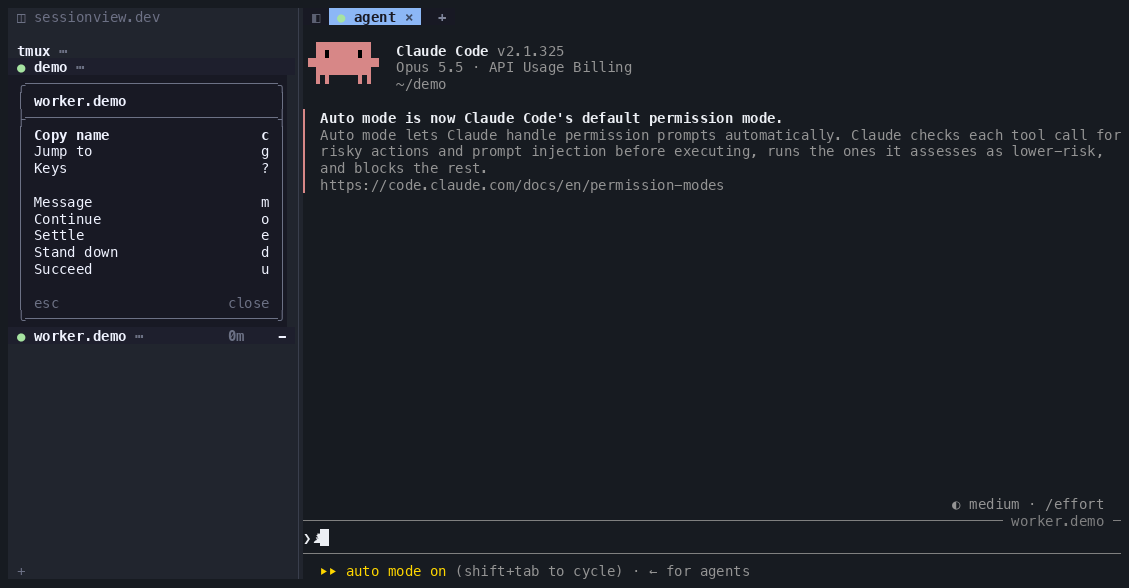
- *In the sidebar* — right-click an agent's row, or the `⋯` on the
|
|
112
|
+
selected agent row. The sidebar draws it, and it is always there:
|
|
113
|
+
no setting. *Copy name*, *Jump to* (greyed when the agent has no pane
|
|
114
|
+
to go to) and *Keys*; then the agent verbs from the plugins:
|
|
115
|
+
*Message* (asks for the text), *Continue*, *Settle*, *Stand down* and
|
|
116
|
+
*Succeed* (the last two ask first). With voicemode installed, *Speak*
|
|
117
|
+
comes last; it is greyed for an agent that runs without voice. Each of
|
|
118
|
+
these verbs mails that agent.
|
|
119
|
+
|
|
120
|
+
|
|
121
|
+
|
|
122
|
+
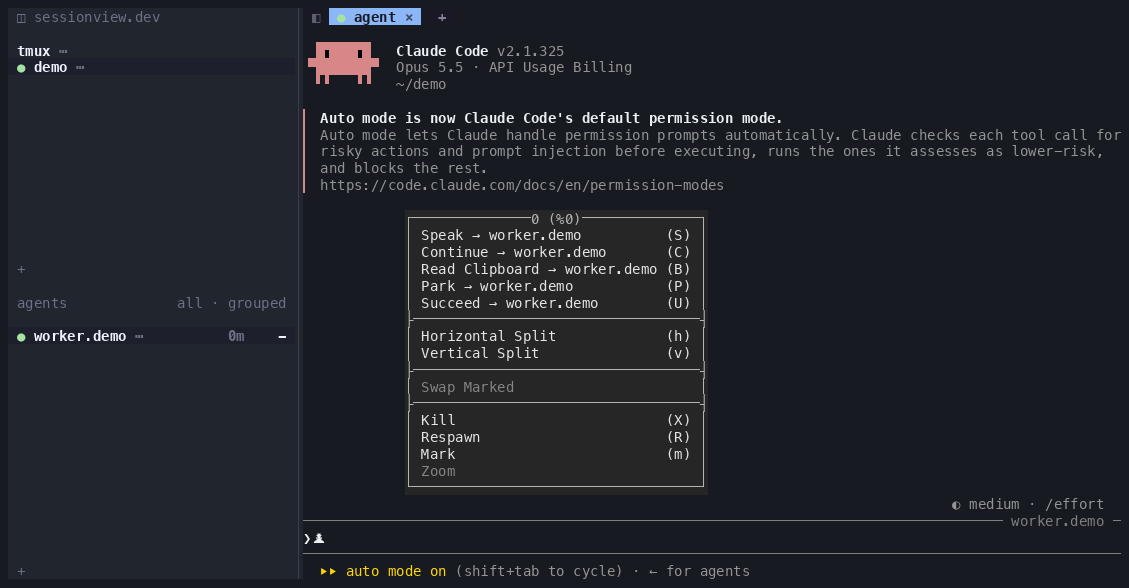
- *On the agent's own pane* (opt-in) — right-click, or Option +
|
|
123
|
+
right-click, the pane an agent runs in. tmux draws it. *Speak*,
|
|
124
|
+
*Continue*, *Read Clipboard*, *Park* and *Succeed*, each followed by the
|
|
125
|
+
agent's name and each a mail to it, sit on top of tmux's own pane menu
|
|
126
|
+
(splits, swap, *Kill*, *Respawn*, *Mark*, *Zoom*). It opens even when the
|
|
127
|
+
program in the pane uses the mouse, as Claude Code does. *Kill* on a
|
|
128
|
+
remote tab kills nothing and says on the bar which host the agent runs
|
|
129
|
+
on. Turn it on with `sessionview-config set pane_menu true`; it is off by
|
|
130
|
+
default because it replaces your own tmux right-click bindings. Details
|
|
131
|
+
in [Keys and clicks](#keys-and-clicks).
|
|
132
|
+
|
|
133
|
+
|
|
134
|
+
|
|
135
|
+
Which right-click reaches which menu, and when you need Option: [Right-click
|
|
136
|
+
and Option](#right-click-and-option).
|
|
137
|
+
|
|
105
138
|
**Settings** — every setting, its default, its note and where its value
|
|
106
139
|
comes from, in a small screen (project menu → Settings); the rows come
|
|
107
140
|
from the template, so a new key needs no second edit.
|
|
@@ -121,6 +154,45 @@ reporting and focus reporting from the terminal; anything that gives
|
|
|
121
154
|
tmux those should work, but only the three above have been driven by
|
|
122
155
|
hand. Blink Shell on iPad is wanted and not yet connecting.
|
|
123
156
|
|
|
157
|
+
### Right-click and Option
|
|
158
|
+
|
|
159
|
+
A right-click passes two places before a menu opens: your terminal, then
|
|
160
|
+
tmux.
|
|
161
|
+
|
|
162
|
+
1. **The terminal** has to report the click to tmux. That is mouse
|
|
163
|
+
reporting, which sessionview needs on. In Terminal.app it is
|
|
164
|
+
View > Allow Mouse Reporting, and Apple's guide says each new window
|
|
165
|
+
has it on. If your terminal shows its own context menu, the click
|
|
166
|
+
stopped there and tmux never saw it. Some terminals turn mouse
|
|
167
|
+
reporting off while a modifier key is held. iTerm2's documentation
|
|
168
|
+
says Option does this, so in iTerm2 an Option + right-click may open
|
|
169
|
+
iTerm2's menu instead of reaching tmux. How each terminal above handles
|
|
170
|
+
a plain right-click and an Option + right-click has not been measured
|
|
171
|
+
yet.
|
|
172
|
+
2. **tmux** decides what a click that reached it does. Over a program
|
|
173
|
+
that uses the mouse, as Claude Code does, tmux hands a plain
|
|
174
|
+
right-click to the program and keeps Option + right-click for its own
|
|
175
|
+
menu. sessionview changes that only for agents:
|
|
176
|
+
|
|
177
|
+
| you right-click | plain right-click | Option + right-click |
|
|
178
|
+
| --- | --- | --- |
|
|
179
|
+
| an agent's row in the sidebar | the sidebar's agent menu | the frame's own tmux menu, no agent items |
|
|
180
|
+
| an agent's pane, `pane_menu` on | the agent pane menu | the agent pane menu |
|
|
181
|
+
| another pane, its program uses the mouse | goes to the program | tmux's pane menu, no agent items |
|
|
182
|
+
| another pane, its program does not | tmux's pane menu | tmux's pane menu |
|
|
183
|
+
|
|
184
|
+
With `pane_menu` off, every pane keeps tmux's own right-clicks, and the
|
|
185
|
+
agent menu is in the sidebar only. In session view, an Option +
|
|
186
|
+
right-click on a pane then opens the frame's own tmux menu, for the
|
|
187
|
+
frame pane that holds your tmux, and your tmux never sees the click:
|
|
188
|
+
the frame passes it through to yours only with `pane_menu` on.
|
|
189
|
+
|
|
190
|
+
So Option + right-click is what you need for your tmux's own menu over a
|
|
191
|
+
program that uses the mouse, such as Claude Code in a pane that is not an
|
|
192
|
+
agent's; in session view that takes `pane_menu` on. For an agent, a plain
|
|
193
|
+
right-click is enough: on its sidebar row always, and on its pane with
|
|
194
|
+
`pane_menu` on.
|
|
195
|
+
|
|
124
196
|
## Layout
|
|
125
197
|
|
|
126
198
|
bin/tmux-sidebar the view, the clicks, the menus (Python 3.11+, stdlib)
|
|
@@ -144,7 +216,7 @@ hand. Blink Shell on iPad is wanted and not yet connecting.
|
|
|
144
216
|
Paths resolve from the checkout (`SESSIONVIEW_ROOT`); state lives in
|
|
145
217
|
`~/.sessionkit/view/state` (`SESSIONVIEW_STATE`) and the log in
|
|
146
218
|
`~/.sessionkit/view/log` (`SESSIONVIEW_LOG`). Its direct dependencies:
|
|
147
|
-
[dependencies](docs/dependencies.md).
|
|
219
|
+
[dependencies](https://github.com/sessionkit/sessionview/blob/HEAD/docs/dependencies.md).
|
|
148
220
|
|
|
149
221
|
## Install
|
|
150
222
|
|
|
@@ -153,9 +225,9 @@ From PyPI:
|
|
|
153
225
|
uv tool install sessionview
|
|
154
226
|
sessionview install
|
|
155
227
|
|
|
156
|
-
That puts
|
|
157
|
-
`sessionview
|
|
158
|
-
requirement and links nothing.
|
|
228
|
+
That puts one command, `sessionview`, on PATH; every other tool is a verb
|
|
229
|
+
of it, such as `sessionview config`. `sessionview install` then checks
|
|
230
|
+
every requirement and links nothing.
|
|
159
231
|
|
|
160
232
|
From a checkout:
|
|
161
233
|
|
|
@@ -200,7 +272,7 @@ window is busy, so the app opens its own and you get two.
|
|
|
200
272
|
|
|
201
273
|
Full screen on click is off by default; turn it on with
|
|
202
274
|
|
|
203
|
-
sessionview
|
|
275
|
+
sessionview config set fullscreen true
|
|
204
276
|
|
|
205
277
|
On Terminal.app that needs Accessibility permission for SessionView
|
|
206
278
|
(System Settings > Privacy & Security > Accessibility) -- the app asks
|
|
@@ -220,14 +292,15 @@ cache, and it touches no shell startup file and nothing in `~/.claude`.
|
|
|
220
292
|
nothing. Everything else below appears only when you run the verb named
|
|
221
293
|
beside it. Each line says what puts it there and what takes it away.
|
|
222
294
|
|
|
223
|
-
- **PATH:** `~/.local/bin/sessionview`, `
|
|
224
|
-
|
|
225
|
-
|
|
226
|
-
your PATH, and edits no shell file. `uv tool uninstall` removes them.
|
|
295
|
+
- **PATH:** `~/.local/bin/sessionview`, or in `UV_TOOL_BIN_DIR` when
|
|
296
|
+
that is set. uv says so if the folder is not on your PATH, and edits no
|
|
297
|
+
shell file. `uv tool uninstall` removes it.
|
|
227
298
|
From a checkout instead, `bin/sessionview-install` (or `make install`)
|
|
228
299
|
links the checkout's `bin/sessionview*` tools and `tmux-sidebar` into
|
|
229
300
|
`~/.local/bin`, or into `PREFIX/bin` when `PREFIX` is set, and makes
|
|
230
|
-
nothing else.
|
|
301
|
+
nothing else. It links no config, session or messages tool: you type
|
|
302
|
+
those as `sessionview config`, `sessionview session` and
|
|
303
|
+
`sessionview messages`. [Uninstall](#uninstall) has the line that deletes them.
|
|
231
304
|
- **The program:** `~/.local/share/uv/tools/sessionview/`, its own
|
|
232
305
|
Python environment, or in `UV_TOOL_DIR`. sessionview has no Python
|
|
233
306
|
dependencies: the environment holds sessionview and the files it ships
|
|
@@ -285,7 +358,9 @@ beside it. Each line says what puts it there and what takes it away.
|
|
|
285
358
|
- **Services (launchd agents):** none. sessionview runs no daemon and
|
|
286
359
|
writes nothing in `~/Library/LaunchAgents/`. While a frame is open it
|
|
287
360
|
runs a tmux server of its own, `sessionview-frame`, beside yours; the
|
|
288
|
-
server exits when the last frame closes.
|
|
361
|
+
server exits when the last frame closes. With `pane_menu` on, an
|
|
362
|
+
Option + right-click on that server's pane that holds your tmux goes
|
|
363
|
+
through to yours.
|
|
289
364
|
- **Plugin and skills, optional:** `claude plugin marketplace add` and
|
|
290
365
|
`claude plugin install` ([Install](#install)). Claude Code names the
|
|
291
366
|
marketplace and the plugin in `~/.claude/settings.json`
|
|
@@ -301,8 +376,8 @@ beside it. Each line says what puts it there and what takes it away.
|
|
|
301
376
|
- **Settings:** the install writes none.
|
|
302
377
|
`~/.sessionkit/view/settings/view.json` is made from the shipped
|
|
303
378
|
template the first time anything reads your settings: `sessionview`,
|
|
304
|
-
or a `sessionview
|
|
305
|
-
`sessionview
|
|
379
|
+
or a `sessionview config` verb such as `get` (`path` only prints it).
|
|
380
|
+
`sessionview config set` writes it. `SESSIONVIEW_CONFIG` names another
|
|
306
381
|
file instead. `~/.sessionkit/view/settings/neomuttrc` is there only if
|
|
307
382
|
you write it.
|
|
308
383
|
- **Your tmux server, while it runs:** a frame binds keys on the tmux
|
|
@@ -310,9 +385,10 @@ beside it. Each line says what puts it there and what takes it away.
|
|
|
310
385
|
mouse bindings on the status line (`MouseDown1Status`,
|
|
311
386
|
`MouseDown1StatusRight`, `MouseDrag1Status`). It gives each session it
|
|
312
387
|
opens the sessionview look, with options set on that session only.
|
|
313
|
-
With `pane_menu` on, it also binds
|
|
314
|
-
(`MouseDown3Pane`
|
|
315
|
-
|
|
388
|
+
With `pane_menu` on, it also binds both right-clicks in a pane
|
|
389
|
+
(`MouseDown3Pane`, and `M-MouseDown3Pane` for Option + right-click),
|
|
390
|
+
in place of yours, and sets two global `@sessionview_agent_menu_`
|
|
391
|
+
options. Nothing is written to
|
|
316
392
|
`~/.tmux.conf`: these last until that tmux server exits.
|
|
317
393
|
- **Outside these folders, only on a verb:** with `fullscreen` on, the
|
|
318
394
|
Dock app on Terminal.app needs the Accessibility permission you grant
|
|
@@ -367,22 +443,29 @@ keep theirs beside it in `~/.sessionkit/`.
|
|
|
367
443
|
|
|
368
444
|
## Keys and clicks
|
|
369
445
|
|
|
370
|
-
- sidebar: click a project or seat → go there; right-click
|
|
371
|
-
on the selected
|
|
372
|
-
|
|
446
|
+
- sidebar: click a project or seat → go there; right-click a project or
|
|
447
|
+
seat, or the `⋯` on the selected row → its menu (a seat's is the
|
|
448
|
+
[agent menu](#agent-menu)); `+` between the lists → a session
|
|
449
|
+
picker (type to filter, ↑↓, enter; each project shows its eggs, `^g`
|
|
450
|
+
shows only the ones with eggs, space or `^a` marks rows and enter opens
|
|
451
|
+
every marked one); `+` at the bottom → start an
|
|
373
452
|
agent; the store name → that store's session and store view, its `⋯`
|
|
374
453
|
(or `s`) → Switch store, right-click → Kick; `all · grouped` on the agents
|
|
375
|
-
heading are toggles; drag the border to resize; `q` reloads, `Q`
|
|
454
|
+
heading are toggles (the first cycles all / store / project); drag the border to resize; `q` reloads, `Q`
|
|
376
455
|
quits, esc backs out of any view
|
|
377
456
|
- tab bar: `◧` at the far left hides/shows the sidebar; click selects,
|
|
378
457
|
drag reorders, `+` new tab (the picker); a close `×`, on by default;
|
|
379
458
|
`tmux set -g @sessionview_tab_close 0` turns it off
|
|
380
459
|
- menu: ↑↓ / j k move, the letter or enter picks, esc or a click
|
|
381
460
|
anywhere else closes
|
|
382
|
-
- agent panes (opt-in): right-click an agent's
|
|
383
|
-
Read Clipboard, Park or Succeed; each mails
|
|
384
|
-
|
|
385
|
-
|
|
461
|
+
- agent panes (opt-in): right-click or Option + right-click an agent's
|
|
462
|
+
pane for Speak, Continue, Read Clipboard, Park or Succeed; each mails
|
|
463
|
+
that agent. It opens even on an agent whose program uses the mouse, as
|
|
464
|
+
Claude Code does. An agent's pane is one whose title is
|
|
465
|
+
`<glyph> <address>`. On a remote tab Kill kills nothing and says on
|
|
466
|
+
the bar which host the agent runs on. Turn it on with
|
|
467
|
+
`sessionview config set pane_menu true`. It replaces your own tmux
|
|
468
|
+
right-click menus, which is why it is off by default. Using tmux without session view? Add
|
|
386
469
|
`source-file -q /path/to/sessionview/tmux/agent-menu.conf` to
|
|
387
470
|
`~/.tmux.conf` and reload.
|
|
388
471
|
|
|
@@ -394,11 +477,11 @@ The look follows herdr's; its colours were matched from herdr's own window.
|
|
|
394
477
|
`config/config.json` holds every key and its default.
|
|
395
478
|
`~/.sessionkit/view/settings/view.json` is yours, made from it on first
|
|
396
479
|
use; a store's and a project's `.sessionview` come after it.
|
|
397
|
-
`sessionview
|
|
398
|
-
`sessionview
|
|
480
|
+
`sessionview config set KEY VALUE` writes yours, and
|
|
481
|
+
`sessionview config dump --where` names the file behind each key.
|
|
399
482
|
An older install's settings are never read. Moving them is one step,
|
|
400
|
-
in [Upgrading from 0.1.0](docs/configuration.md#upgrading-from-010).
|
|
401
|
-
Until then sessionview makes nothing and refuses: `sessionview
|
|
483
|
+
in [Upgrading from 0.1.0](https://github.com/sessionkit/sessionview/blob/HEAD/docs/configuration.md#upgrading-from-010).
|
|
484
|
+
Until then sessionview makes nothing and refuses: `sessionview config`
|
|
402
485
|
exits 3 and prints the move to run, and the sidebar shows the same
|
|
403
486
|
message. If the old file is left beside the new one, it uses the new one
|
|
404
487
|
and warns you to remove the old one.
|
|
@@ -414,9 +497,9 @@ The look follows herdr's; its colours were matched from herdr's own window.
|
|
|
414
497
|
- sessionview does not read the kit's settings cascade today, only these.
|
|
415
498
|
|
|
416
499
|
Every file, variable and tmux option is in
|
|
417
|
-
[Configuration](docs/configuration.md),
|
|
500
|
+
[Configuration](https://github.com/sessionkit/sessionview/blob/HEAD/docs/configuration.md),
|
|
418
501
|
and every key in
|
|
419
|
-
[Settings](docs/settings.md).
|
|
502
|
+
[Settings](https://github.com/sessionkit/sessionview/blob/HEAD/docs/settings.md).
|
|
420
503
|
|
|
421
504
|
## Logs
|
|
422
505
|
|
|
@@ -16,9 +16,9 @@ attached, else the newest. Only when tmux has no session at all does
|
|
|
16
16
|
sessionview make one, named `main`.
|
|
17
17
|
`sessionview NAME` attaches the session NAME instead, which must exist.
|
|
18
18
|
In any tmux client, `prefix H` opens the same sidebar as a popup.
|
|
19
|
-
Every verb, its form and an example: [the sessionview command](docs/sessionview.md).
|
|
19
|
+
Every verb, its form and an example: [the sessionview command](https://github.com/sessionkit/sessionview/blob/HEAD/docs/sessionview.md).
|
|
20
20
|
|
|
21
|
-
Read [SPEC.md](SPEC.md) first: what sessionview is, the rules of the view, the
|
|
21
|
+
Read [SPEC.md](https://github.com/sessionkit/sessionview/blob/HEAD/SPEC.md) first: what sessionview is, the rules of the view, the
|
|
22
22
|
contract with `session`, the plugin manifest, config, known limits.
|
|
23
23
|
This repo is the **reference implementation**: session integrates from
|
|
24
24
|
the spec; this stays comparable and runnable.
|
|
@@ -31,7 +31,7 @@ the spec; this stays comparable and runnable.
|
|
|
31
31
|
- [ ] Windows
|
|
32
32
|
|
|
33
33
|
The direct dependencies and the tools a user meets, what needs each one,
|
|
34
|
-
and how to upgrade it: [dependencies](docs/dependencies.md).
|
|
34
|
+
and how to upgrade it: [dependencies](https://github.com/sessionkit/sessionview/blob/HEAD/docs/dependencies.md).
|
|
35
35
|
|
|
36
36
|
## Features
|
|
37
37
|
|
|
@@ -56,7 +56,8 @@ Grouped by component, named in the terms a comparison matrix would use.
|
|
|
56
56
|
|
|
57
57
|
- *Overflow menu* — three dots `⋯` at the right of the selected session
|
|
58
58
|
open its menu (rename, new tab, config, settings, start an agent,
|
|
59
|
-
close). Right-click opens
|
|
59
|
+
close). Right-click opens a row's menu on any row: a project's is this
|
|
60
|
+
one, an agent's is the [agent menu](#agent-menu).
|
|
60
61
|
- *Light dismiss* — a click outside an open menu closes it, and so does
|
|
61
62
|
a click into the main pane (focus leaves the sidebar).
|
|
62
63
|
- *Keyboard* — ↑↓ / j k move, the letter or enter picks, esc closes.
|
|
@@ -85,6 +86,38 @@ agents, or the menu): the names `session start` knows, pinned ones first.
|
|
|
85
86
|
list it asks `Which agent? (a name, or "no" to never ask again)`. `n` or
|
|
86
87
|
`no` means never; `autostart_agent` in Settings changes it later.
|
|
87
88
|
|
|
89
|
+
### Agent menu
|
|
90
|
+
|
|
91
|
+
A menu on one agent: send it a word, or act on its pane. There are two,
|
|
92
|
+
in two places.
|
|
93
|
+
|
|
94
|
+
- *In the sidebar* — right-click an agent's row, or the `⋯` on the
|
|
95
|
+
selected agent row. The sidebar draws it, and it is always there:
|
|
96
|
+
no setting. *Copy name*, *Jump to* (greyed when the agent has no pane
|
|
97
|
+
to go to) and *Keys*; then the agent verbs from the plugins:
|
|
98
|
+
*Message* (asks for the text), *Continue*, *Settle*, *Stand down* and
|
|
99
|
+
*Succeed* (the last two ask first). With voicemode installed, *Speak*
|
|
100
|
+
comes last; it is greyed for an agent that runs without voice. Each of
|
|
101
|
+
these verbs mails that agent.
|
|
102
|
+
|
|
103
|
+

|
|
104
|
+
|
|
105
|
+
- *On the agent's own pane* (opt-in) — right-click, or Option +
|
|
106
|
+
right-click, the pane an agent runs in. tmux draws it. *Speak*,
|
|
107
|
+
*Continue*, *Read Clipboard*, *Park* and *Succeed*, each followed by the
|
|
108
|
+
agent's name and each a mail to it, sit on top of tmux's own pane menu
|
|
109
|
+
(splits, swap, *Kill*, *Respawn*, *Mark*, *Zoom*). It opens even when the
|
|
110
|
+
program in the pane uses the mouse, as Claude Code does. *Kill* on a
|
|
111
|
+
remote tab kills nothing and says on the bar which host the agent runs
|
|
112
|
+
on. Turn it on with `sessionview-config set pane_menu true`; it is off by
|
|
113
|
+
default because it replaces your own tmux right-click bindings. Details
|
|
114
|
+
in [Keys and clicks](#keys-and-clicks).
|
|
115
|
+
|
|
116
|
+

|
|
117
|
+
|
|
118
|
+
Which right-click reaches which menu, and when you need Option: [Right-click
|
|
119
|
+
and Option](#right-click-and-option).
|
|
120
|
+
|
|
88
121
|
**Settings** — every setting, its default, its note and where its value
|
|
89
122
|
comes from, in a small screen (project menu → Settings); the rows come
|
|
90
123
|
from the template, so a new key needs no second edit.
|
|
@@ -104,6 +137,45 @@ reporting and focus reporting from the terminal; anything that gives
|
|
|
104
137
|
tmux those should work, but only the three above have been driven by
|
|
105
138
|
hand. Blink Shell on iPad is wanted and not yet connecting.
|
|
106
139
|
|
|
140
|
+
### Right-click and Option
|
|
141
|
+
|
|
142
|
+
A right-click passes two places before a menu opens: your terminal, then
|
|
143
|
+
tmux.
|
|
144
|
+
|
|
145
|
+
1. **The terminal** has to report the click to tmux. That is mouse
|
|
146
|
+
reporting, which sessionview needs on. In Terminal.app it is
|
|
147
|
+
View > Allow Mouse Reporting, and Apple's guide says each new window
|
|
148
|
+
has it on. If your terminal shows its own context menu, the click
|
|
149
|
+
stopped there and tmux never saw it. Some terminals turn mouse
|
|
150
|
+
reporting off while a modifier key is held. iTerm2's documentation
|
|
151
|
+
says Option does this, so in iTerm2 an Option + right-click may open
|
|
152
|
+
iTerm2's menu instead of reaching tmux. How each terminal above handles
|
|
153
|
+
a plain right-click and an Option + right-click has not been measured
|
|
154
|
+
yet.
|
|
155
|
+
2. **tmux** decides what a click that reached it does. Over a program
|
|
156
|
+
that uses the mouse, as Claude Code does, tmux hands a plain
|
|
157
|
+
right-click to the program and keeps Option + right-click for its own
|
|
158
|
+
menu. sessionview changes that only for agents:
|
|
159
|
+
|
|
160
|
+
| you right-click | plain right-click | Option + right-click |
|
|
161
|
+
| --- | --- | --- |
|
|
162
|
+
| an agent's row in the sidebar | the sidebar's agent menu | the frame's own tmux menu, no agent items |
|
|
163
|
+
| an agent's pane, `pane_menu` on | the agent pane menu | the agent pane menu |
|
|
164
|
+
| another pane, its program uses the mouse | goes to the program | tmux's pane menu, no agent items |
|
|
165
|
+
| another pane, its program does not | tmux's pane menu | tmux's pane menu |
|
|
166
|
+
|
|
167
|
+
With `pane_menu` off, every pane keeps tmux's own right-clicks, and the
|
|
168
|
+
agent menu is in the sidebar only. In session view, an Option +
|
|
169
|
+
right-click on a pane then opens the frame's own tmux menu, for the
|
|
170
|
+
frame pane that holds your tmux, and your tmux never sees the click:
|
|
171
|
+
the frame passes it through to yours only with `pane_menu` on.
|
|
172
|
+
|
|
173
|
+
So Option + right-click is what you need for your tmux's own menu over a
|
|
174
|
+
program that uses the mouse, such as Claude Code in a pane that is not an
|
|
175
|
+
agent's; in session view that takes `pane_menu` on. For an agent, a plain
|
|
176
|
+
right-click is enough: on its sidebar row always, and on its pane with
|
|
177
|
+
`pane_menu` on.
|
|
178
|
+
|
|
107
179
|
## Layout
|
|
108
180
|
|
|
109
181
|
bin/tmux-sidebar the view, the clicks, the menus (Python 3.11+, stdlib)
|
|
@@ -127,7 +199,7 @@ hand. Blink Shell on iPad is wanted and not yet connecting.
|
|
|
127
199
|
Paths resolve from the checkout (`SESSIONVIEW_ROOT`); state lives in
|
|
128
200
|
`~/.sessionkit/view/state` (`SESSIONVIEW_STATE`) and the log in
|
|
129
201
|
`~/.sessionkit/view/log` (`SESSIONVIEW_LOG`). Its direct dependencies:
|
|
130
|
-
[dependencies](docs/dependencies.md).
|
|
202
|
+
[dependencies](https://github.com/sessionkit/sessionview/blob/HEAD/docs/dependencies.md).
|
|
131
203
|
|
|
132
204
|
## Install
|
|
133
205
|
|
|
@@ -136,9 +208,9 @@ From PyPI:
|
|
|
136
208
|
uv tool install sessionview
|
|
137
209
|
sessionview install
|
|
138
210
|
|
|
139
|
-
That puts
|
|
140
|
-
`sessionview
|
|
141
|
-
requirement and links nothing.
|
|
211
|
+
That puts one command, `sessionview`, on PATH; every other tool is a verb
|
|
212
|
+
of it, such as `sessionview config`. `sessionview install` then checks
|
|
213
|
+
every requirement and links nothing.
|
|
142
214
|
|
|
143
215
|
From a checkout:
|
|
144
216
|
|
|
@@ -183,7 +255,7 @@ window is busy, so the app opens its own and you get two.
|
|
|
183
255
|
|
|
184
256
|
Full screen on click is off by default; turn it on with
|
|
185
257
|
|
|
186
|
-
sessionview
|
|
258
|
+
sessionview config set fullscreen true
|
|
187
259
|
|
|
188
260
|
On Terminal.app that needs Accessibility permission for SessionView
|
|
189
261
|
(System Settings > Privacy & Security > Accessibility) -- the app asks
|
|
@@ -203,14 +275,15 @@ cache, and it touches no shell startup file and nothing in `~/.claude`.
|
|
|
203
275
|
nothing. Everything else below appears only when you run the verb named
|
|
204
276
|
beside it. Each line says what puts it there and what takes it away.
|
|
205
277
|
|
|
206
|
-
- **PATH:** `~/.local/bin/sessionview`, `
|
|
207
|
-
|
|
208
|
-
|
|
209
|
-
your PATH, and edits no shell file. `uv tool uninstall` removes them.
|
|
278
|
+
- **PATH:** `~/.local/bin/sessionview`, or in `UV_TOOL_BIN_DIR` when
|
|
279
|
+
that is set. uv says so if the folder is not on your PATH, and edits no
|
|
280
|
+
shell file. `uv tool uninstall` removes it.
|
|
210
281
|
From a checkout instead, `bin/sessionview-install` (or `make install`)
|
|
211
282
|
links the checkout's `bin/sessionview*` tools and `tmux-sidebar` into
|
|
212
283
|
`~/.local/bin`, or into `PREFIX/bin` when `PREFIX` is set, and makes
|
|
213
|
-
nothing else.
|
|
284
|
+
nothing else. It links no config, session or messages tool: you type
|
|
285
|
+
those as `sessionview config`, `sessionview session` and
|
|
286
|
+
`sessionview messages`. [Uninstall](#uninstall) has the line that deletes them.
|
|
214
287
|
- **The program:** `~/.local/share/uv/tools/sessionview/`, its own
|
|
215
288
|
Python environment, or in `UV_TOOL_DIR`. sessionview has no Python
|
|
216
289
|
dependencies: the environment holds sessionview and the files it ships
|
|
@@ -268,7 +341,9 @@ beside it. Each line says what puts it there and what takes it away.
|
|
|
268
341
|
- **Services (launchd agents):** none. sessionview runs no daemon and
|
|
269
342
|
writes nothing in `~/Library/LaunchAgents/`. While a frame is open it
|
|
270
343
|
runs a tmux server of its own, `sessionview-frame`, beside yours; the
|
|
271
|
-
server exits when the last frame closes.
|
|
344
|
+
server exits when the last frame closes. With `pane_menu` on, an
|
|
345
|
+
Option + right-click on that server's pane that holds your tmux goes
|
|
346
|
+
through to yours.
|
|
272
347
|
- **Plugin and skills, optional:** `claude plugin marketplace add` and
|
|
273
348
|
`claude plugin install` ([Install](#install)). Claude Code names the
|
|
274
349
|
marketplace and the plugin in `~/.claude/settings.json`
|
|
@@ -284,8 +359,8 @@ beside it. Each line says what puts it there and what takes it away.
|
|
|
284
359
|
- **Settings:** the install writes none.
|
|
285
360
|
`~/.sessionkit/view/settings/view.json` is made from the shipped
|
|
286
361
|
template the first time anything reads your settings: `sessionview`,
|
|
287
|
-
or a `sessionview
|
|
288
|
-
`sessionview
|
|
362
|
+
or a `sessionview config` verb such as `get` (`path` only prints it).
|
|
363
|
+
`sessionview config set` writes it. `SESSIONVIEW_CONFIG` names another
|
|
289
364
|
file instead. `~/.sessionkit/view/settings/neomuttrc` is there only if
|
|
290
365
|
you write it.
|
|
291
366
|
- **Your tmux server, while it runs:** a frame binds keys on the tmux
|
|
@@ -293,9 +368,10 @@ beside it. Each line says what puts it there and what takes it away.
|
|
|
293
368
|
mouse bindings on the status line (`MouseDown1Status`,
|
|
294
369
|
`MouseDown1StatusRight`, `MouseDrag1Status`). It gives each session it
|
|
295
370
|
opens the sessionview look, with options set on that session only.
|
|
296
|
-
With `pane_menu` on, it also binds
|
|
297
|
-
(`MouseDown3Pane`
|
|
298
|
-
|
|
371
|
+
With `pane_menu` on, it also binds both right-clicks in a pane
|
|
372
|
+
(`MouseDown3Pane`, and `M-MouseDown3Pane` for Option + right-click),
|
|
373
|
+
in place of yours, and sets two global `@sessionview_agent_menu_`
|
|
374
|
+
options. Nothing is written to
|
|
299
375
|
`~/.tmux.conf`: these last until that tmux server exits.
|
|
300
376
|
- **Outside these folders, only on a verb:** with `fullscreen` on, the
|
|
301
377
|
Dock app on Terminal.app needs the Accessibility permission you grant
|
|
@@ -350,22 +426,29 @@ keep theirs beside it in `~/.sessionkit/`.
|
|
|
350
426
|
|
|
351
427
|
## Keys and clicks
|
|
352
428
|
|
|
353
|
-
- sidebar: click a project or seat → go there; right-click
|
|
354
|
-
on the selected
|
|
355
|
-
|
|
429
|
+
- sidebar: click a project or seat → go there; right-click a project or
|
|
430
|
+
seat, or the `⋯` on the selected row → its menu (a seat's is the
|
|
431
|
+
[agent menu](#agent-menu)); `+` between the lists → a session
|
|
432
|
+
picker (type to filter, ↑↓, enter; each project shows its eggs, `^g`
|
|
433
|
+
shows only the ones with eggs, space or `^a` marks rows and enter opens
|
|
434
|
+
every marked one); `+` at the bottom → start an
|
|
356
435
|
agent; the store name → that store's session and store view, its `⋯`
|
|
357
436
|
(or `s`) → Switch store, right-click → Kick; `all · grouped` on the agents
|
|
358
|
-
heading are toggles; drag the border to resize; `q` reloads, `Q`
|
|
437
|
+
heading are toggles (the first cycles all / store / project); drag the border to resize; `q` reloads, `Q`
|
|
359
438
|
quits, esc backs out of any view
|
|
360
439
|
- tab bar: `◧` at the far left hides/shows the sidebar; click selects,
|
|
361
440
|
drag reorders, `+` new tab (the picker); a close `×`, on by default;
|
|
362
441
|
`tmux set -g @sessionview_tab_close 0` turns it off
|
|
363
442
|
- menu: ↑↓ / j k move, the letter or enter picks, esc or a click
|
|
364
443
|
anywhere else closes
|
|
365
|
-
- agent panes (opt-in): right-click an agent's
|
|
366
|
-
Read Clipboard, Park or Succeed; each mails
|
|
367
|
-
|
|
368
|
-
|
|
444
|
+
- agent panes (opt-in): right-click or Option + right-click an agent's
|
|
445
|
+
pane for Speak, Continue, Read Clipboard, Park or Succeed; each mails
|
|
446
|
+
that agent. It opens even on an agent whose program uses the mouse, as
|
|
447
|
+
Claude Code does. An agent's pane is one whose title is
|
|
448
|
+
`<glyph> <address>`. On a remote tab Kill kills nothing and says on
|
|
449
|
+
the bar which host the agent runs on. Turn it on with
|
|
450
|
+
`sessionview config set pane_menu true`. It replaces your own tmux
|
|
451
|
+
right-click menus, which is why it is off by default. Using tmux without session view? Add
|
|
369
452
|
`source-file -q /path/to/sessionview/tmux/agent-menu.conf` to
|
|
370
453
|
`~/.tmux.conf` and reload.
|
|
371
454
|
|
|
@@ -377,11 +460,11 @@ The look follows herdr's; its colours were matched from herdr's own window.
|
|
|
377
460
|
`config/config.json` holds every key and its default.
|
|
378
461
|
`~/.sessionkit/view/settings/view.json` is yours, made from it on first
|
|
379
462
|
use; a store's and a project's `.sessionview` come after it.
|
|
380
|
-
`sessionview
|
|
381
|
-
`sessionview
|
|
463
|
+
`sessionview config set KEY VALUE` writes yours, and
|
|
464
|
+
`sessionview config dump --where` names the file behind each key.
|
|
382
465
|
An older install's settings are never read. Moving them is one step,
|
|
383
|
-
in [Upgrading from 0.1.0](docs/configuration.md#upgrading-from-010).
|
|
384
|
-
Until then sessionview makes nothing and refuses: `sessionview
|
|
466
|
+
in [Upgrading from 0.1.0](https://github.com/sessionkit/sessionview/blob/HEAD/docs/configuration.md#upgrading-from-010).
|
|
467
|
+
Until then sessionview makes nothing and refuses: `sessionview config`
|
|
385
468
|
exits 3 and prints the move to run, and the sidebar shows the same
|
|
386
469
|
message. If the old file is left beside the new one, it uses the new one
|
|
387
470
|
and warns you to remove the old one.
|
|
@@ -397,9 +480,9 @@ The look follows herdr's; its colours were matched from herdr's own window.
|
|
|
397
480
|
- sessionview does not read the kit's settings cascade today, only these.
|
|
398
481
|
|
|
399
482
|
Every file, variable and tmux option is in
|
|
400
|
-
[Configuration](docs/configuration.md),
|
|
483
|
+
[Configuration](https://github.com/sessionkit/sessionview/blob/HEAD/docs/configuration.md),
|
|
401
484
|
and every key in
|
|
402
|
-
[Settings](docs/settings.md).
|
|
485
|
+
[Settings](https://github.com/sessionkit/sessionview/blob/HEAD/docs/settings.md).
|
|
403
486
|
|
|
404
487
|
## Logs
|
|
405
488
|
|
|
@@ -12,6 +12,8 @@
|
|
|
12
12
|
# sessionview config settings: no verb opens the screen (get/set/list ...)
|
|
13
13
|
# sessionview session NAME open a project session with its standard tabs
|
|
14
14
|
# sessionview messages PROJECT a project's mail, read-only, in NeoMutt
|
|
15
|
+
# sessionview show FILE bring FILE to the front: the frame moves to its
|
|
16
|
+
# server, session, window and pane, and its Neovim shows it
|
|
15
17
|
# sessionview install check requirements (--app: the macOS Dock app)
|
|
16
18
|
# sessionview autostart --status which agent starts when sessionview opens
|
|
17
19
|
# sessionview terminal the terminal sessionview opens in (--why: how chosen)
|
|
@@ -58,7 +60,7 @@ version() {
|
|
|
58
60
|
case "${1:-}" in
|
|
59
61
|
-h|--help|help) usage; exit 0;;
|
|
60
62
|
--version) version; exit;;
|
|
61
|
-
config|session|messages|install|autostart|terminal|usermail|from|sidebar-toggle)
|
|
63
|
+
config|session|messages|install|autostart|terminal|usermail|from|sidebar-toggle|show)
|
|
62
64
|
export SESSIONVIEW_ROOT; sub="$1"; shift; exec "$SESSIONVIEW_ROOT/bin/sessionview-$sub" "$@";;
|
|
63
65
|
sidebar)
|
|
64
66
|
case "${2:-}" in -h|--help) export SESSIONVIEW_ROOT; exec "$SESSIONVIEW_ROOT/bin/tmux-sidebar" "$2";; esac
|
|
@@ -76,8 +76,9 @@ echo "drag it to your Dock; one click opens sessionview in your preferred termin
|
|
|
76
76
|
# The ad-hoc signature is a fresh identity every build, and macOS keys TCC
|
|
77
77
|
# permissions to it -- so a rebuild silently revokes the Accessibility tick
|
|
78
78
|
# that `fullscreen` needs on Terminal.app. Say so, every time, rather than
|
|
79
|
-
# letting it look like the feature broke.
|
|
80
|
-
|
|
79
|
+
# letting it look like the feature broke. The config tool is asked BY PATH, in
|
|
80
|
+
# this checkout: it is not on PATH, and SESSIONVIEW_ROOT may be unset here.
|
|
81
|
+
if [ "$("$ROOT/bin/sessionview-config" get fullscreen 2>/dev/null)" = "true" ]; then
|
|
81
82
|
echo
|
|
82
83
|
echo "note: fullscreen is on, and this REBUILD resets its Accessibility permission."
|
|
83
84
|
echo " System Settings > Privacy & Security > Accessibility > turn SessionView back on."
|
|
@@ -82,8 +82,8 @@ want() {
|
|
|
82
82
|
fi
|
|
83
83
|
}
|
|
84
84
|
|
|
85
|
-
# Remember the answer in the home layer (`sessionview
|
|
86
|
-
# `sessionview
|
|
85
|
+
# Remember the answer in the home layer (`sessionview config path`) through
|
|
86
|
+
# `sessionview config set`, the one writer: it writes this key and nothing
|
|
87
87
|
# else, via a temp file and a rename.
|
|
88
88
|
remember() { "$CFG" set autostart_agent "$1"; }
|
|
89
89
|
|