sdf-xarray 0.7.0__tar.gz → 0.7.1__tar.gz
This diff represents the content of publicly available package versions that have been released to one of the supported registries. The information contained in this diff is provided for informational purposes only and reflects changes between package versions as they appear in their respective public registries.
- {sdf_xarray-0.7.0 → sdf_xarray-0.7.1}/.readthedocs.yaml +1 -1
- {sdf_xarray-0.7.0 → sdf_xarray-0.7.1}/PKG-INFO +1 -1
- {sdf_xarray-0.7.0 → sdf_xarray-0.7.1}/docs/api.md +0 -2
- {sdf_xarray-0.7.0 → sdf_xarray-0.7.1}/docs/conf.py +2 -1
- {sdf_xarray-0.7.0 → sdf_xarray-0.7.1}/docs/index.md +18 -4
- sdf_xarray-0.7.1/docs/installation.md +135 -0
- {sdf_xarray-0.7.0 → sdf_xarray-0.7.1}/docs/known_issues.md +4 -0
- sdf_xarray-0.7.0/docs/key_functionality.md → sdf_xarray-0.7.1/docs/loading_data.md +62 -161
- sdf_xarray-0.7.1/docs/understanding_datasets.md +157 -0
- sdf_xarray-0.7.1/docs/why_sdf_xarray.md +13 -0
- {sdf_xarray-0.7.0 → sdf_xarray-0.7.1}/pyproject.toml +1 -0
- {sdf_xarray-0.7.0 → sdf_xarray-0.7.1}/src/sdf_xarray/__init__.py +2 -2
- sdf_xarray-0.7.1/src/sdf_xarray/_version.py +24 -0
- {sdf_xarray-0.7.0 → sdf_xarray-0.7.1}/src/sdf_xarray/dataarray_accessor.py +6 -1
- {sdf_xarray-0.7.0 → sdf_xarray-0.7.1}/src/sdf_xarray/plotting.py +2 -7
- {sdf_xarray-0.7.0 → sdf_xarray-0.7.1}/uv.lock +240 -0
- sdf_xarray-0.7.0/docs/getting_started.md +0 -61
- sdf_xarray-0.7.0/src/sdf_xarray/_version.py +0 -34
- {sdf_xarray-0.7.0 → sdf_xarray-0.7.1}/.github/workflows/build_publish.yml +0 -0
- {sdf_xarray-0.7.0 → sdf_xarray-0.7.1}/.github/workflows/lint.yml +0 -0
- {sdf_xarray-0.7.0 → sdf_xarray-0.7.1}/.github/workflows/tests.yml +0 -0
- {sdf_xarray-0.7.0 → sdf_xarray-0.7.1}/.gitignore +0 -0
- {sdf_xarray-0.7.0 → sdf_xarray-0.7.1}/.gitmodules +0 -0
- {sdf_xarray-0.7.0 → sdf_xarray-0.7.1}/CITATION.cff +0 -0
- {sdf_xarray-0.7.0 → sdf_xarray-0.7.1}/CMakeLists.txt +0 -0
- {sdf_xarray-0.7.0 → sdf_xarray-0.7.1}/CONTRIBUTING.md +0 -0
- {sdf_xarray-0.7.0 → sdf_xarray-0.7.1}/LICENCE +0 -0
- {sdf_xarray-0.7.0 → sdf_xarray-0.7.1}/README.md +0 -0
- {sdf_xarray-0.7.0 → sdf_xarray-0.7.1}/docs/.gitignore +0 -0
- {sdf_xarray-0.7.0 → sdf_xarray-0.7.1}/docs/_static/BEAM.png +0 -0
- {sdf_xarray-0.7.0 → sdf_xarray-0.7.1}/docs/_static/PlasmaFAIR.svg +0 -0
- {sdf_xarray-0.7.0 → sdf_xarray-0.7.1}/docs/_static/force_render_dark_xarray_objects.css +0 -0
- {sdf_xarray-0.7.0 → sdf_xarray-0.7.1}/docs/_static/sdf-xarray-logo-dark.svg +0 -0
- {sdf_xarray-0.7.0 → sdf_xarray-0.7.1}/docs/_static/sdf-xarray-logo-light.svg +0 -0
- {sdf_xarray-0.7.0 → sdf_xarray-0.7.1}/docs/_templates/custom-class-template.rst +0 -0
- {sdf_xarray-0.7.0 → sdf_xarray-0.7.1}/docs/_templates/custom-module-template.rst +0 -0
- {sdf_xarray-0.7.0 → sdf_xarray-0.7.1}/docs/animation.md +0 -0
- {sdf_xarray-0.7.0 → sdf_xarray-0.7.1}/docs/contributing.md +0 -0
- {sdf_xarray-0.7.0 → sdf_xarray-0.7.1}/docs/make.bat +0 -0
- {sdf_xarray-0.7.0 → sdf_xarray-0.7.1}/docs/unit_conversion.md +0 -0
- {sdf_xarray-0.7.0 → sdf_xarray-0.7.1}/src/sdf_xarray/csdf.pxd +0 -0
- {sdf_xarray-0.7.0 → sdf_xarray-0.7.1}/src/sdf_xarray/dataset_accessor.py +0 -0
- {sdf_xarray-0.7.0 → sdf_xarray-0.7.1}/src/sdf_xarray/download.py +0 -0
- {sdf_xarray-0.7.0 → sdf_xarray-0.7.1}/src/sdf_xarray/sdf_interface.pyx +0 -0
- {sdf_xarray-0.7.0 → sdf_xarray-0.7.1}/tests/test_cython.py +0 -0
- {sdf_xarray-0.7.0 → sdf_xarray-0.7.1}/tests/test_dataset.py +0 -0
- {sdf_xarray-0.7.0 → sdf_xarray-0.7.1}/tests/test_datatree.py +0 -0
- {sdf_xarray-0.7.0 → sdf_xarray-0.7.1}/tests/test_epoch_dataarray_accessor.py +0 -0
- {sdf_xarray-0.7.0 → sdf_xarray-0.7.1}/tests/test_epoch_dataset_accessor.py +0 -0
|
@@ -1,6 +1,6 @@
|
|
|
1
1
|
Metadata-Version: 2.4
|
|
2
2
|
Name: sdf-xarray
|
|
3
|
-
Version: 0.7.
|
|
3
|
+
Version: 0.7.1
|
|
4
4
|
Summary: Provides a backend for xarray to read SDF files as created by the EPOCH plasma PIC code.
|
|
5
5
|
Author-Email: Peter Hill <peter.hill@york.ac.uk>, Joel Adams <joel.adams@york.ac.uk>, Shaun Doherty <shaun.doherty@york.ac.uk>, Chris Herdman <chris.herdman@york.ac.uk>, Liam Pattinson <liam.pattinson@york.ac.uk>, Sviatoslav Shekhanov <sviatoslav.shekhanov@york.ac.uk>
|
|
6
6
|
License-Expression: BSD-3-Clause
|
|
@@ -33,7 +33,7 @@ main_release = ".".join(release.split(".")[:3])
|
|
|
33
33
|
dev_release = release.split(".")[-1]
|
|
34
34
|
|
|
35
35
|
# Set html title manually for nicer formatting
|
|
36
|
-
html_title = f"{project} {main_release}
|
|
36
|
+
html_title = f"{project} {main_release} documentation"
|
|
37
37
|
|
|
38
38
|
# -- General configuration ---------------------------------------------------
|
|
39
39
|
# https://www.sphinx-doc.org/en/master/usage/configuration.html#general-configuration
|
|
@@ -50,6 +50,7 @@ extensions = [
|
|
|
50
50
|
"myst_nb",
|
|
51
51
|
"sphinx_copybutton",
|
|
52
52
|
"sphinx_togglebutton",
|
|
53
|
+
"sphinx_design",
|
|
53
54
|
]
|
|
54
55
|
|
|
55
56
|
source_suffix = {".rst": "restructuredtext", ".md": "myst-nb"}
|
|
@@ -7,13 +7,27 @@ plasma PIC code.
|
|
|
7
7
|
`sdf-xarray` uses the [SDF-C](https://github.com/epochpic/SDF_C) library.
|
|
8
8
|
|
|
9
9
|
```{toctree}
|
|
10
|
-
:caption: '
|
|
10
|
+
:caption: 'Getting Started'
|
|
11
11
|
:maxdepth: 1
|
|
12
12
|
|
|
13
|
-
|
|
14
|
-
|
|
15
|
-
|
|
13
|
+
installation.md
|
|
14
|
+
why_sdf_xarray.md
|
|
15
|
+
```
|
|
16
|
+
|
|
17
|
+
```{toctree}
|
|
18
|
+
:caption: 'User Guide'
|
|
19
|
+
:maxdepth: 1
|
|
20
|
+
|
|
21
|
+
loading_data.md
|
|
22
|
+
understanding_datasets.md
|
|
16
23
|
unit_conversion.md
|
|
24
|
+
animation.md
|
|
25
|
+
```
|
|
26
|
+
|
|
27
|
+
```{toctree}
|
|
28
|
+
:caption: 'Development'
|
|
29
|
+
:maxdepth: 1
|
|
30
|
+
|
|
17
31
|
known_issues.md
|
|
18
32
|
contributing.md
|
|
19
33
|
```
|
|
@@ -0,0 +1,135 @@
|
|
|
1
|
+
# Installation
|
|
2
|
+
|
|
3
|
+
```{important}
|
|
4
|
+
To install this package, ensure that you are using one of the supported Python
|
|
5
|
+
versions [](https://github.com/epochpic/sdf-xarray)
|
|
6
|
+
```
|
|
7
|
+
|
|
8
|
+
There are several ways in which you can install <project:#sdf_xarray>. If you are unfamiliar with Python, [follow the guide below](#new-to-python). If you are already familiar with Python and `pip` then you can install this using the following.
|
|
9
|
+
|
|
10
|
+
Install sdf-xarray from PyPI with:
|
|
11
|
+
|
|
12
|
+
```bash
|
|
13
|
+
pip install sdf-xarray
|
|
14
|
+
```
|
|
15
|
+
|
|
16
|
+
or download this code locally:
|
|
17
|
+
|
|
18
|
+
```bash
|
|
19
|
+
git clone --recursive https://github.com/epochpic/sdf-xarray.git
|
|
20
|
+
cd sdf-xarray
|
|
21
|
+
pip install .
|
|
22
|
+
```
|
|
23
|
+
|
|
24
|
+
## New to Python?
|
|
25
|
+
|
|
26
|
+
### Installing uv
|
|
27
|
+
|
|
28
|
+
We recommend [installing uv](https://docs.astral.sh/uv/getting-started/installation/) which is a command line tool that can install both Python versions and packages. This tool is widely used in the Python community and is significantly faster than other tools that do the same.
|
|
29
|
+
|
|
30
|
+
`````{tab-set}
|
|
31
|
+
````{tab-item} Linux/MacOS
|
|
32
|
+
```bash
|
|
33
|
+
curl -LsSf https://astral.sh/uv/install.sh | sh
|
|
34
|
+
```
|
|
35
|
+
````
|
|
36
|
+
|
|
37
|
+
````{tab-item} Windows
|
|
38
|
+
```powershell
|
|
39
|
+
powershell -ExecutionPolicy ByPass -c "irm https://astral.sh/uv/install.ps1 | iex"
|
|
40
|
+
```
|
|
41
|
+
You might need to change the [execution policy](https://learn.microsoft.com/en-us/powershell/module/microsoft.powershell.core/about/about_execution_policies?view=powershell-7.4#powershell-execution-policies) to allow running a script from the internet.
|
|
42
|
+
````
|
|
43
|
+
`````
|
|
44
|
+
|
|
45
|
+
You can then check `uv` is correctly installed by running:
|
|
46
|
+
|
|
47
|
+
```bash
|
|
48
|
+
uv --version
|
|
49
|
+
```
|
|
50
|
+
|
|
51
|
+
### Installing Python
|
|
52
|
+
|
|
53
|
+
If Python is already installed on your system then `uv` will detect and use it. If you don't have python already installed on your machine you can use `uv` to install it:
|
|
54
|
+
|
|
55
|
+
```console
|
|
56
|
+
uv python install 3.14
|
|
57
|
+
```
|
|
58
|
+
Once installed, it should be possible to run Python using
|
|
59
|
+
|
|
60
|
+
```bash
|
|
61
|
+
python3.14 --version
|
|
62
|
+
```
|
|
63
|
+
|
|
64
|
+
### Setting up a virtual environment
|
|
65
|
+
|
|
66
|
+
Now that you've installed `uv` and have a supported Python version you need to create a [virtual environment](https://docs.astral.sh/uv/reference/cli/#uv-venv). You need to do this because Python doesn't allow you to install libraries globally on your system. From a folder of your choosing run the following command to create a subfolder called `.venv` containing all the Python libraries you install.
|
|
67
|
+
|
|
68
|
+
```bash
|
|
69
|
+
uv venv
|
|
70
|
+
```
|
|
71
|
+
|
|
72
|
+
Depending on your operating system you'll need to follow the activation command that appears after running `uv venv`. This will tell Python to use the libraries installed in this package.
|
|
73
|
+
|
|
74
|
+
### Installing sdf-xarray
|
|
75
|
+
|
|
76
|
+
Finally we can install <project:#sdf_xarray> to the `venv` using the following command. Any additional packages that can be installed using `pip` can also be installed using this method.
|
|
77
|
+
|
|
78
|
+
```bash
|
|
79
|
+
uv pip install sdf-xarray
|
|
80
|
+
```
|
|
81
|
+
|
|
82
|
+
### Getting an error about a missing `CMAKE_C_COMPILER`?
|
|
83
|
+
|
|
84
|
+
Are you getting an error that looks like this?
|
|
85
|
+
|
|
86
|
+
```bash
|
|
87
|
+
$ uv pip install sdf-xarray
|
|
88
|
+
Resolved 16 packages in 293ms
|
|
89
|
+
x Failed to build `sdf-xarray==0.7.0`
|
|
90
|
+
|-> The build backend returned an error
|
|
91
|
+
`-> Call to `scikit_build_core.build.build_wheel` failed (exit status: 1)
|
|
92
|
+
|
|
93
|
+
[stdout]
|
|
94
|
+
*** scikit-build-core 0.12.2 using CMake 4.3.1 (wheel)
|
|
95
|
+
*** Configuring CMake...
|
|
96
|
+
loading initial cache file /tmp/tmp8ch254_2/build/CMakeInit.txt
|
|
97
|
+
-- Configuring incomplete, errors occurred!
|
|
98
|
+
|
|
99
|
+
[stderr]
|
|
100
|
+
CMake Error at
|
|
101
|
+
/nix/tmp/debug-tools/.cache/uv/builds-v0/.tmpa3v1oF/lib/python3.14/site-packages/cmake/data/share/cmake-4.3/Modules/CMakeDetermineCCompiler.cmake:48
|
|
102
|
+
(message):
|
|
103
|
+
Could not find the compiler specified in the environment variable CC:
|
|
104
|
+
|
|
105
|
+
cc -pthread.
|
|
106
|
+
Call Stack (most recent call first):
|
|
107
|
+
CMakeLists.txt:3 (project)
|
|
108
|
+
|
|
109
|
+
|
|
110
|
+
CMake Error: CMAKE_C_COMPILER not set, after EnableLanguage
|
|
111
|
+
|
|
112
|
+
*** CMake configuration failed
|
|
113
|
+
|
|
114
|
+
hint: This usually indicates a problem with the package or the build environment.
|
|
115
|
+
```
|
|
116
|
+
|
|
117
|
+
Don't panic, this error means you've not installed a `C` compiler onto your computer.
|
|
118
|
+
|
|
119
|
+
````{tab-set}
|
|
120
|
+
```{tab-item} Linux
|
|
121
|
+
If you're on a fresh or recent Linux install then there's a good chance you might be missing a it, you can remedy this by running `sudo apt install build-essential` on Debian-based Linux systems such as Ubuntu.
|
|
122
|
+
```
|
|
123
|
+
|
|
124
|
+
```{tab-item} MacOS
|
|
125
|
+
Make sure you've installed the [Command Line Tools package](https://developer.apple.com/documentation/xcode/installing-the-command-line-tools/#Install-the-Command-Line-Tools-package-in-Terminal).
|
|
126
|
+
```
|
|
127
|
+
|
|
128
|
+
```{tab-item} Windows
|
|
129
|
+
If you've encountered this error then I have no idea... But I strongly recommending installing [Windows Subsystem for Linux](https://learn.microsoft.com/en-us/windows/wsl/install) and running a mini Ubuntu install on your machine instead of fighting windows.
|
|
130
|
+
```
|
|
131
|
+
````
|
|
132
|
+
|
|
133
|
+
### How do I run my Python scripts?
|
|
134
|
+
|
|
135
|
+
As long as you've "activated" your `venv` you can run a Python script from anywhere on your computer.
|
|
@@ -9,3 +9,7 @@ handles coordinates, causing it to infer an excessively large array shape that
|
|
|
9
9
|
requests far more memory than is needed. Due to the significant architectural
|
|
10
10
|
changes required for a fix, the maintainers do not plan to resolve this. The
|
|
11
11
|
recommended solution is to load the files individually or in smaller batches.
|
|
12
|
+
- [Issue #112](https://github.com/epochpic/sdf-xarray/issues/112) Due to the
|
|
13
|
+
way [cylindrical EPOCH](https://github.com/epochpic/cylindrical_epoch) sets up
|
|
14
|
+
grids we can't currently load it's SDF files. If there is enough interest in this
|
|
15
|
+
we will attempt to find a solution otherwise it shall remain low priority.
|
|
@@ -4,19 +4,48 @@ kernelspec:
|
|
|
4
4
|
name: python3
|
|
5
5
|
---
|
|
6
6
|
|
|
7
|
-
#
|
|
7
|
+
# Loading SDF Files
|
|
8
8
|
|
|
9
|
-
|
|
10
|
-
|
|
11
|
-
|
|
12
|
-
|
|
9
|
+
There are two main ways to load [EPOCH SDF files](https://epochpic.github.io/documentation/visualising_output.html)
|
|
10
|
+
into <inv:#xarray> objects; using the dedicated <project:#sdf_xarray> functions or
|
|
11
|
+
using the standard <inv:#xarray> interface with our custom engine.
|
|
12
|
+
|
|
13
|
+
The <project:#sdf_xarray> functions are wrappers designed specifically for SDF data, providing the most
|
|
14
|
+
straightforward experience:
|
|
15
|
+
|
|
16
|
+
- **Single files**: Use <project:#sdf_xarray.open_dataset> or <project:#sdf_xarray.open_datatree>
|
|
17
|
+
- **Multiple files**: Use <project:#sdf_xarray.open_mfdataset> or <project:#sdf_xarray.open_mfdatatree>
|
|
18
|
+
- **Raw files**: use <project:#sdf_xarray.sdf_interface.SDFFile>
|
|
19
|
+
|
|
20
|
+
If you prefer using the native <inv:#xarray> functions, you can use the <inv:#xarray.open_dataset>,
|
|
21
|
+
<inv:#xarray.open_datatree> and <inv:#xarray.open_mfdataset>. Strangely there is no function in
|
|
22
|
+
<inv:#xarray> for `xarray.open_mfdatatree`.
|
|
23
|
+
|
|
24
|
+
These functions should all work out of the box as long as <project:#sdf_xarray> is installed on your
|
|
25
|
+
system. If you are having issues reading files, you might need to pass the parameter
|
|
26
|
+
`engine=sdf_engine` when calling any of the above xarray functions.
|
|
27
|
+
|
|
28
|
+
```{important}
|
|
29
|
+
When loading SDF files, variables related to `boundaries`, `cpu` and `output file`
|
|
30
|
+
are excluded as they are problematic. If you wish to load these variables in see
|
|
31
|
+
<project:#loading-raw-files>.
|
|
13
32
|
```
|
|
14
33
|
|
|
15
|
-
|
|
34
|
+
````{note}
|
|
35
|
+
All code examples shown here are visualised using [Jupyter notebooks](https://jupyter.org/)
|
|
36
|
+
so that you can interactively explore the datasets. To do this on your machine
|
|
37
|
+
make sure that you have the necessary dependencies installed:
|
|
38
|
+
|
|
39
|
+
```bash
|
|
40
|
+
uv pip install "sdf-xarray[jupyter]"
|
|
41
|
+
```
|
|
42
|
+
````
|
|
16
43
|
|
|
17
|
-
|
|
44
|
+
## Loading single files
|
|
18
45
|
|
|
19
46
|
```{code-cell} ipython3
|
|
47
|
+
import sdf_xarray as sdfxr
|
|
48
|
+
|
|
20
49
|
sdfxr.open_dataset("tutorial_dataset_1d/0010.sdf")
|
|
21
50
|
```
|
|
22
51
|
|
|
@@ -25,22 +54,26 @@ hierarchically into `groups` (for example grouping related quantities such as th
|
|
|
25
54
|
components of the electric and magnetic fields) while keeping each item as a <inv:#xarray.Dataset>.
|
|
26
55
|
|
|
27
56
|
```{code-cell} ipython3
|
|
57
|
+
import sdf_xarray as sdfxr
|
|
58
|
+
|
|
28
59
|
sdfxr.open_datatree("tutorial_dataset_1d/0010.sdf")
|
|
29
60
|
```
|
|
30
61
|
|
|
31
62
|
(loading-raw-files)=
|
|
32
63
|
|
|
33
|
-
|
|
64
|
+
## Loading raw files
|
|
34
65
|
|
|
35
66
|
If you wish to load data directly from the `SDF.C` library and ignore
|
|
36
67
|
the <inv:#xarray> interface layer.
|
|
37
68
|
|
|
38
69
|
```{code-cell} ipython3
|
|
70
|
+
import sdf_xarray as sdfxr
|
|
71
|
+
|
|
39
72
|
raw_ds = sdfxr.SDFFile("tutorial_dataset_1d/0010.sdf")
|
|
40
73
|
raw_ds.variables.keys()
|
|
41
74
|
```
|
|
42
75
|
|
|
43
|
-
|
|
76
|
+
## Loading multiple files
|
|
44
77
|
|
|
45
78
|
Multiple files can be loaded using one of two methods. The first of which
|
|
46
79
|
is by using the <project:#sdf_xarray.open_mfdataset>.
|
|
@@ -53,15 +86,19 @@ function or following our implmentation in [](#loading-sparse-data).
|
|
|
53
86
|
```
|
|
54
87
|
|
|
55
88
|
```{code-cell} ipython3
|
|
89
|
+
import sdf_xarray as sdfxr
|
|
90
|
+
|
|
56
91
|
sdfxr.open_mfdataset("tutorial_dataset_1d/*.sdf")
|
|
57
92
|
```
|
|
58
93
|
|
|
59
|
-
Alternatively, files can be loaded using <inv:#xarray.open_mfdataset
|
|
94
|
+
Alternatively, files can be loaded using <inv:#xarray.open_mfdataset>. However, when loading in
|
|
60
95
|
all the files we have do some processing of the data so that we can correctly align it along
|
|
61
96
|
the time dimension; This is done via the `preprocess` parameter utilising the
|
|
62
97
|
<project:#sdf_xarray.SDFPreprocess> function.
|
|
63
98
|
|
|
64
99
|
```{code-cell} ipython3
|
|
100
|
+
import xarray as xr
|
|
101
|
+
|
|
65
102
|
xr.open_mfdataset(
|
|
66
103
|
"tutorial_dataset_1d/*.sdf",
|
|
67
104
|
join="outer",
|
|
@@ -75,10 +112,12 @@ hierarchically into `groups` (for example grouping related quantities such as th
|
|
|
75
112
|
components of the electric and magnetic fields) while keeping each item as a <inv:#xarray.Dataset>.
|
|
76
113
|
|
|
77
114
|
```{code-cell} ipython3
|
|
115
|
+
import sdf_xarray as sdfxr
|
|
116
|
+
|
|
78
117
|
sdfxr.open_mfdatatree("tutorial_dataset_1d/*.sdf")
|
|
79
118
|
```
|
|
80
119
|
|
|
81
|
-
|
|
120
|
+
## Loading sparse data
|
|
82
121
|
|
|
83
122
|
When dealing with sparse data (where different variables are saved at different,
|
|
84
123
|
non-overlapping time steps) you can optimize memory usage by loading the data with
|
|
@@ -89,10 +128,12 @@ significantly reduces memory consumption, though it requires more deliberate han
|
|
|
89
128
|
if you need to compare variables that exist on these different time coordinates.
|
|
90
129
|
|
|
91
130
|
```{code-cell} ipython3
|
|
131
|
+
import sdf_xarray as sdfxr
|
|
132
|
+
|
|
92
133
|
sdfxr.open_mfdataset("tutorial_dataset_1d/*.sdf", separate_times=True)
|
|
93
134
|
```
|
|
94
135
|
|
|
95
|
-
|
|
136
|
+
## Loading particle data
|
|
96
137
|
|
|
97
138
|
```{warning}
|
|
98
139
|
It is **not recommended** to use <inv:#xarray.open_mfdataset> or
|
|
@@ -116,10 +157,12 @@ Pass `keep_particles=True` as a keyword argument to
|
|
|
116
157
|
multiple files).
|
|
117
158
|
|
|
118
159
|
```{code-cell} ipython3
|
|
160
|
+
import sdf_xarray as sdfxr
|
|
161
|
+
|
|
119
162
|
sdfxr.open_dataset("tutorial_dataset_1d/0010.sdf", keep_particles=True)
|
|
120
163
|
```
|
|
121
164
|
|
|
122
|
-
|
|
165
|
+
## Loading specific variables
|
|
123
166
|
|
|
124
167
|
When loading datasets containing several (`>10`) coordinates/dimensions
|
|
125
168
|
using <project:#sdf_xarray.open_mfdataset>, <inv:#xarray> may struggle to locate
|
|
@@ -132,12 +175,14 @@ and the relevant coordinates/dimensions, significantly reducing memory
|
|
|
132
175
|
consumption.
|
|
133
176
|
|
|
134
177
|
```{code-cell} ipython3
|
|
178
|
+
import sdf_xarray as sdfxr
|
|
179
|
+
|
|
135
180
|
sdfxr.open_mfdataset("tutorial_dataset_1d/*.sdf", data_vars=["Electric_Field_Ex"])
|
|
136
181
|
```
|
|
137
182
|
|
|
138
183
|
(loading-input-deck)=
|
|
139
184
|
|
|
140
|
-
|
|
185
|
+
## Loading the input.deck
|
|
141
186
|
|
|
142
187
|
When loading SDF files, <project:#sdf_xarray> will attempt to automatically load
|
|
143
188
|
the `input.deck` file used to initialise the simulation from the same
|
|
@@ -165,157 +210,13 @@ An example of loading a deck can be seen below
|
|
|
165
210
|
|
|
166
211
|
import json
|
|
167
212
|
from IPython.display import Code
|
|
213
|
+
import sdf_xarray as sdfxr
|
|
168
214
|
|
|
169
|
-
ds =
|
|
215
|
+
ds = sdfxr.open_dataset("tutorial_dataset_1d/0010.sdf")
|
|
170
216
|
# The results are accessible by calling
|
|
171
217
|
deck = ds.attrs["deck"]
|
|
172
218
|
|
|
173
219
|
# Some prettification to make it looks nice in jupyter notebooks
|
|
174
220
|
json_str = json.dumps(deck, indent=4)
|
|
175
221
|
Code(json_str, language='json')
|
|
176
|
-
```
|
|
177
|
-
|
|
178
|
-
## Data interaction examples
|
|
179
|
-
|
|
180
|
-
When loading in either a single dataset or a group of datasets you
|
|
181
|
-
can access the following methods to explore the dataset:
|
|
182
|
-
|
|
183
|
-
- `ds.variables` to list variables. (e.g. Electric Field, Magnetic
|
|
184
|
-
Field, Particle Count)
|
|
185
|
-
- `ds.coords` for accessing coordinates/dimensions. (e.g. x-axis,
|
|
186
|
-
y-axis, time)
|
|
187
|
-
- `ds.attrs` for metadata attached to the dataset. (e.g. filename,
|
|
188
|
-
step, time)
|
|
189
|
-
|
|
190
|
-
It is important to note here that <inv:#xarray> lazily loads the data
|
|
191
|
-
meaning that it only explicitly loads the results your currently
|
|
192
|
-
looking at when you call `.values`
|
|
193
|
-
|
|
194
|
-
```{code-cell} ipython3
|
|
195
|
-
ds = sdfxr.open_mfdataset("tutorial_dataset_1d/*.sdf")
|
|
196
|
-
|
|
197
|
-
ds["Electric_Field_Ex"]
|
|
198
|
-
```
|
|
199
|
-
|
|
200
|
-
On top of accessing variables, you can plot these datasets using
|
|
201
|
-
[`xarray.DataArray.epoch.plot`](project:#sdf_xarray.dataarray_accessor.EpochAccessor.plot).
|
|
202
|
-
This is a custom <project:#sdf-xarray> plotting routine that builds on top of
|
|
203
|
-
<inv:#xarray.DataArray.plot>, so you keep the familiar <inv:#xarray> plotting
|
|
204
|
-
behaviour while using <project:#sdf-xarray> conveniences (see
|
|
205
|
-
[here](project:#sdf_xarray.dataarray_accessor.EpochAccessor.plot) for details).
|
|
206
|
-
Under the hood, plotting is still handled by <inv:#matplotlib>, which means you
|
|
207
|
-
can use the full <inv:#matplotlib> API to customise your figure.
|
|
208
|
-
|
|
209
|
-
```{code-cell} ipython3
|
|
210
|
-
# This is discretized in both space and time
|
|
211
|
-
ds["Electric_Field_Ex"].epoch.plot()
|
|
212
|
-
plt.title("Electric field along the x-axis")
|
|
213
|
-
plt.show()
|
|
214
|
-
```
|
|
215
|
-
|
|
216
|
-
When loading a multi-file dataset using <project:#sdf_xarray.open_mfdataset>, a
|
|
217
|
-
time dimension is automatically added to the resulting <inv:#xarray.Dataset>.
|
|
218
|
-
This dimension represents all the recorded simulation steps and allows
|
|
219
|
-
for easy indexing. To quickly determine the number of time steps available,
|
|
220
|
-
you can check the size of the time dimension.
|
|
221
|
-
|
|
222
|
-
```{code-cell} ipython3
|
|
223
|
-
# This corresponds to the number of individual SDF files loaded
|
|
224
|
-
print(f"There are a total of {ds['time'].size} time steps")
|
|
225
|
-
|
|
226
|
-
# You can look up the actual simulation time for any given index
|
|
227
|
-
sim_time = ds['time'].values[20]
|
|
228
|
-
print(f"The time at the 20th simulation step is {sim_time:.2e} s")
|
|
229
|
-
```
|
|
230
|
-
|
|
231
|
-
You can select and extract a single simulation snapshot using the integer
|
|
232
|
-
index of the time step with the <inv:#xarray.Dataset.isel> function. This can be
|
|
233
|
-
done by passsing the index to the `time` parameter (e.g., `time=0` for
|
|
234
|
-
the first snapshot).
|
|
235
|
-
|
|
236
|
-
```{code-cell} ipython3
|
|
237
|
-
ds["Electric_Field_Ex"].isel(time=20)
|
|
238
|
-
```
|
|
239
|
-
|
|
240
|
-
We can also use the <inv:#xarray.Dataset.sel> function if you wish to pass a
|
|
241
|
-
value intead of an index.
|
|
242
|
-
|
|
243
|
-
```{tip}
|
|
244
|
-
If you know roughly what time you wish to select but not the exact value
|
|
245
|
-
you can use the parameter `method="nearest"`.
|
|
246
|
-
```
|
|
247
|
-
|
|
248
|
-
```{code-cell} ipython3
|
|
249
|
-
ds["Electric_Field_Ex"].sel(time=sim_time)
|
|
250
|
-
```
|
|
251
|
-
|
|
252
|
-
## Visualisation on HPCs
|
|
253
|
-
|
|
254
|
-
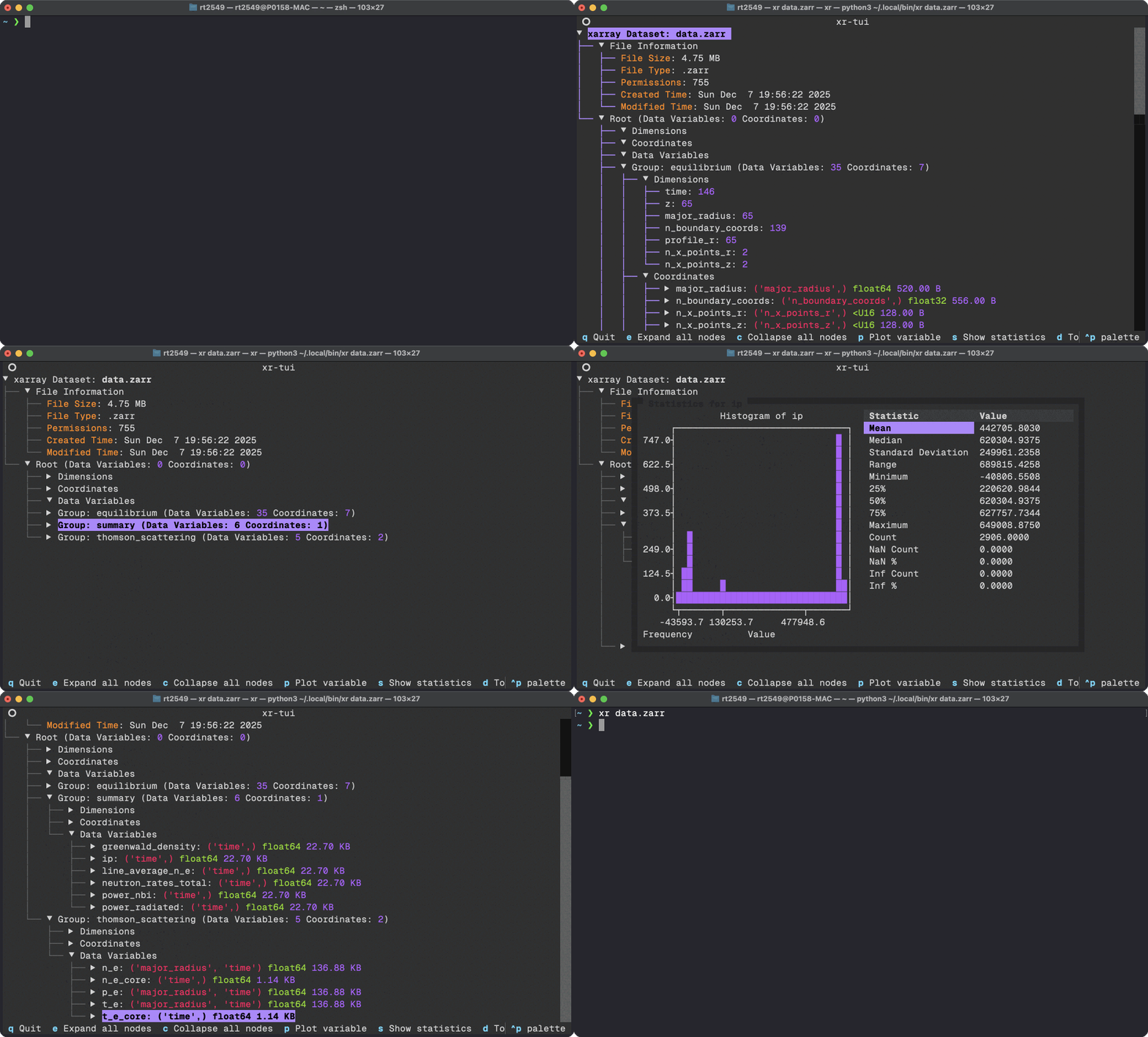
In many cases you will be running EPOCH simulations via a HPC cluster and your
|
|
255
|
-
subsequent SDF files will probably be rather large and cumbersome to interact with
|
|
256
|
-
via traditional Jupyter notebooks. In some cases your HPC may outright block the
|
|
257
|
-
use of Jupyter notebooks entirely. To circumvent this issue you can use a Terminal
|
|
258
|
-
User Interface (TUI) which renders the contents of SDF files directly in a Terminal
|
|
259
|
-
and allows for you to do some simple data analysis and visualisation. To do this we
|
|
260
|
-
shall leverage the [xr-tui](https://github.com/samueljackson92/xr-tui) package
|
|
261
|
-
which can be installed to either a venv or globally using:
|
|
262
|
-
|
|
263
|
-
```bash
|
|
264
|
-
pipx install xr-tui sdf-xarray
|
|
265
|
-
```
|
|
266
|
-
|
|
267
|
-
or if you are using `uv`
|
|
268
|
-
|
|
269
|
-
```bash
|
|
270
|
-
uv tool install xr-tui --with sdf-xarray
|
|
271
|
-
```
|
|
272
|
-
|
|
273
|
-
Once installed you can visualise SDF files by simply writing in the command line
|
|
274
|
-
|
|
275
|
-
```bash
|
|
276
|
-
xr path/to/simulation/0000.sdf
|
|
277
|
-
# OR
|
|
278
|
-
xr path/to/simulation/*.sdf
|
|
279
|
-
```
|
|
280
|
-
|
|
281
|
-
Below is an example gif of how this interfacing looks as seen on
|
|
282
|
-
[xr-tui](https://github.com/samueljackson92/xr-tui) `README.md`:
|
|
283
|
-
|
|
284
|
-
|
|
285
|
-
|
|
286
|
-
## Manipulating data
|
|
287
|
-
|
|
288
|
-
These datasets can also be easily manipulated the same way as you
|
|
289
|
-
would with `numpy` arrays.
|
|
290
|
-
|
|
291
|
-
```{code-cell} ipython3
|
|
292
|
-
ds["Laser_Absorption_Fraction_in_Simulation"] = (
|
|
293
|
-
(ds["Total_Particle_Energy_in_Simulation"] - ds["Total_Particle_Energy_in_Simulation"][0])
|
|
294
|
-
/ ds["Absorption_Total_Laser_Energy_Injected"]
|
|
295
|
-
) * 100
|
|
296
|
-
|
|
297
|
-
# We can also manipulate the units and other attributes
|
|
298
|
-
ds["Laser_Absorption_Fraction_in_Simulation"].attrs["units"] = "%"
|
|
299
|
-
ds["Laser_Absorption_Fraction_in_Simulation"].attrs["long_name"] = "Laser Absorption Fraction"
|
|
300
|
-
|
|
301
|
-
ds["Laser_Absorption_Fraction_in_Simulation"].epoch.plot()
|
|
302
|
-
plt.title("Laser absorption fraction in simulation")
|
|
303
|
-
plt.show()
|
|
304
|
-
```
|
|
305
|
-
|
|
306
|
-
You can also call the [`xarray.DataArray.epoch.plot`](project:#sdf_xarray.dataarray_accessor.EpochAccessor.plot) function on several variables with
|
|
307
|
-
labels by delaying the call to `plt.show()`.
|
|
308
|
-
|
|
309
|
-
```{code-cell} ipython3
|
|
310
|
-
ds["Total_Particle_Energy_Electron"].epoch.plot(label="Electron")
|
|
311
|
-
ds["Total_Particle_Energy_Ion"].epoch.plot(label="Ion")
|
|
312
|
-
plt.title("Particle Energy in Simulation per Species")
|
|
313
|
-
plt.legend()
|
|
314
|
-
plt.show()
|
|
315
|
-
```
|
|
316
|
-
|
|
317
|
-
```{code-cell} ipython3
|
|
318
|
-
print(f"Total laser energy injected: {ds["Absorption_Total_Laser_Energy_Injected"][-1].values:.1e} J")
|
|
319
|
-
print(f"Total particle energy absorbed: {ds["Total_Particle_Energy_in_Simulation"][-1].values:.1e} J")
|
|
320
|
-
print(f"The laser absorption fraction: {ds["Laser_Absorption_Fraction_in_Simulation"][-1].values:.1f} %")
|
|
321
|
-
```
|
|
222
|
+
```
|