scriptmonkey 1.0.0__tar.gz → 1.0.2__tar.gz
This diff represents the content of publicly available package versions that have been released to one of the supported registries. The information contained in this diff is provided for informational purposes only and reflects changes between package versions as they appear in their respective public registries.
- {scriptmonkey-1.0.0 → scriptmonkey-1.0.2}/PKG-INFO +7 -1
- {scriptmonkey-1.0.0 → scriptmonkey-1.0.2}/README.md +6 -0
- {scriptmonkey-1.0.0 → scriptmonkey-1.0.2}/scriptmonkey/core.py +112 -58
- {scriptmonkey-1.0.0 → scriptmonkey-1.0.2}/scriptmonkey.egg-info/PKG-INFO +7 -1
- {scriptmonkey-1.0.0 → scriptmonkey-1.0.2}/setup.py +2 -2
- {scriptmonkey-1.0.0 → scriptmonkey-1.0.2}/scriptmonkey/__init__.py +0 -0
- {scriptmonkey-1.0.0 → scriptmonkey-1.0.2}/scriptmonkey/__main__.py +0 -0
- {scriptmonkey-1.0.0 → scriptmonkey-1.0.2}/scriptmonkey/file_handler.py +0 -0
- {scriptmonkey-1.0.0 → scriptmonkey-1.0.2}/scriptmonkey/openai_client/__init__.py +0 -0
- {scriptmonkey-1.0.0 → scriptmonkey-1.0.2}/scriptmonkey/openai_client/basemodels.py +0 -0
- {scriptmonkey-1.0.0 → scriptmonkey-1.0.2}/scriptmonkey/openai_client/client.py +0 -0
- {scriptmonkey-1.0.0 → scriptmonkey-1.0.2}/scriptmonkey/openai_client/prompting.py +0 -0
- {scriptmonkey-1.0.0 → scriptmonkey-1.0.2}/scriptmonkey/openai_client/prompts/fix_error.txt +0 -0
- {scriptmonkey-1.0.0 → scriptmonkey-1.0.2}/scriptmonkey/openai_client/prompts/project_description.txt +0 -0
- {scriptmonkey-1.0.0 → scriptmonkey-1.0.2}/scriptmonkey.egg-info/SOURCES.txt +0 -0
- {scriptmonkey-1.0.0 → scriptmonkey-1.0.2}/scriptmonkey.egg-info/dependency_links.txt +0 -0
- {scriptmonkey-1.0.0 → scriptmonkey-1.0.2}/scriptmonkey.egg-info/entry_points.txt +0 -0
- {scriptmonkey-1.0.0 → scriptmonkey-1.0.2}/scriptmonkey.egg-info/requires.txt +0 -0
- {scriptmonkey-1.0.0 → scriptmonkey-1.0.2}/scriptmonkey.egg-info/top_level.txt +0 -0
- {scriptmonkey-1.0.0 → scriptmonkey-1.0.2}/setup.cfg +0 -0
|
@@ -1,6 +1,6 @@
|
|
|
1
1
|
Metadata-Version: 2.1
|
|
2
2
|
Name: scriptmonkey
|
|
3
|
-
Version: 1.0.
|
|
3
|
+
Version: 1.0.2
|
|
4
4
|
Summary: A Python package that generates complex Python projects and fixes errors in your code using OpenAI's GPT API.
|
|
5
5
|
Home-page: https://github.com/lukerbs/ScriptMonkey
|
|
6
6
|
Author: Luke Kerbs
|
|
@@ -30,6 +30,12 @@ ScriptMonkey is an AI-powered Python package that reimagines how projects are bu
|
|
|
30
30
|
- **Code Auto-Correction**: Automatically updates your Python files with the fixes.
|
|
31
31
|
- **Cross-IDE Compatibility**: Works with any IDE or code editor.
|
|
32
32
|
|
|
33
|
+
## 🚀 Watch the Demo
|
|
34
|
+
|
|
35
|
+
[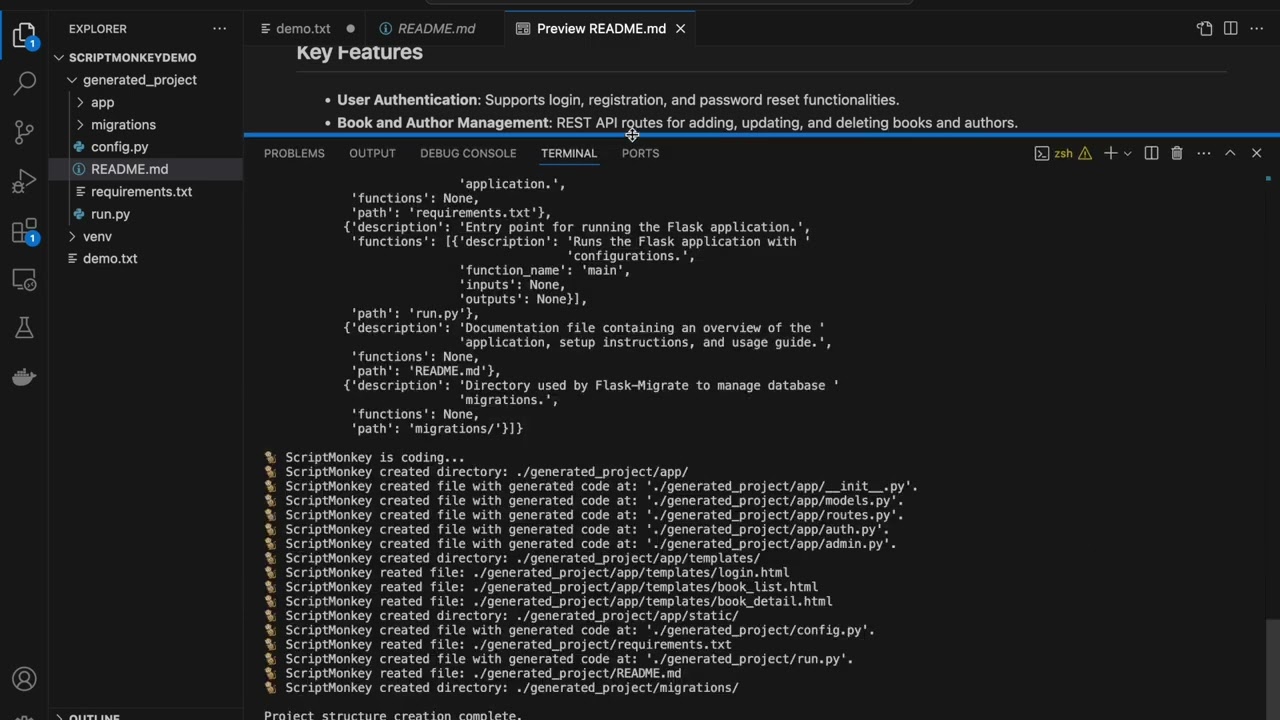](https://youtu.be/2zoCDlf0Zf8)
|
|
36
|
+
|
|
37
|
+
Click the image above or watch the video directly on [YouTube](https://youtu.be/2zoCDlf0Zf8).
|
|
38
|
+
|
|
33
39
|
## Installation
|
|
34
40
|
|
|
35
41
|
To install ScriptMonkey, simply run:
|
|
@@ -11,6 +11,12 @@ ScriptMonkey is an AI-powered Python package that reimagines how projects are bu
|
|
|
11
11
|
- **Code Auto-Correction**: Automatically updates your Python files with the fixes.
|
|
12
12
|
- **Cross-IDE Compatibility**: Works with any IDE or code editor.
|
|
13
13
|
|
|
14
|
+
## 🚀 Watch the Demo
|
|
15
|
+
|
|
16
|
+
[](https://youtu.be/2zoCDlf0Zf8)
|
|
17
|
+
|
|
18
|
+
Click the image above or watch the video directly on [YouTube](https://youtu.be/2zoCDlf0Zf8).
|
|
19
|
+
|
|
14
20
|
## Installation
|
|
15
21
|
|
|
16
22
|
To install ScriptMonkey, simply run:
|
|
@@ -1,6 +1,13 @@
|
|
|
1
1
|
import sys
|
|
2
2
|
import traceback
|
|
3
|
-
from .openai_client import
|
|
3
|
+
from .openai_client import (
|
|
4
|
+
chatgpt_json,
|
|
5
|
+
chatgpt,
|
|
6
|
+
ScriptMonkeyResponse,
|
|
7
|
+
ProjectStructureResponse,
|
|
8
|
+
ProjectFile,
|
|
9
|
+
default_prompts,
|
|
10
|
+
)
|
|
4
11
|
from .openai_client.prompting import load_prompt
|
|
5
12
|
from .file_handler import read_file, write_file
|
|
6
13
|
import platform
|
|
@@ -13,11 +20,13 @@ from pprint import pprint
|
|
|
13
20
|
import os
|
|
14
21
|
import platform
|
|
15
22
|
|
|
23
|
+
|
|
16
24
|
def get_platform():
|
|
17
25
|
os_name = platform.system()
|
|
18
26
|
os_version = platform.release()
|
|
19
27
|
return f"# Operating System: {os_name}, Version: {os_version}\n\n"
|
|
20
28
|
|
|
29
|
+
|
|
21
30
|
class Spinner:
|
|
22
31
|
def __init__(self, message="Processing"):
|
|
23
32
|
self.spinner = itertools.cycle(["⠋", "⠙", "⠹", "⠸", "⠼", "⠴", "⠦", "⠧", "⠇", "⠏"])
|
|
@@ -41,6 +50,7 @@ class Spinner:
|
|
|
41
50
|
self.stop_running.set()
|
|
42
51
|
self.spin_thread.join()
|
|
43
52
|
|
|
53
|
+
|
|
44
54
|
def codemonkey_exception_handler(exc_type, exc_value, exc_traceback):
|
|
45
55
|
if issubclass(exc_type, KeyboardInterrupt):
|
|
46
56
|
sys.__excepthook__(exc_type, exc_value, exc_traceback)
|
|
@@ -77,37 +87,40 @@ def run():
|
|
|
77
87
|
|
|
78
88
|
# - - - - - API KEY MANAGEMENT - - - - -
|
|
79
89
|
|
|
90
|
+
|
|
80
91
|
def save_api_key(api_key: str):
|
|
81
92
|
"""Save the OpenAI API key to the configuration file and environment variable."""
|
|
82
|
-
with open(CONFIG_FILE,
|
|
93
|
+
with open(CONFIG_FILE, "w") as file:
|
|
83
94
|
file.write(api_key)
|
|
84
|
-
os.environ[
|
|
95
|
+
os.environ["OPENAI_API_KEY"] = api_key
|
|
85
96
|
print(f"✅ OpenAI API key saved to {CONFIG_FILE}.")
|
|
86
97
|
|
|
98
|
+
|
|
87
99
|
def get_openai_api_key() -> str:
|
|
88
100
|
"""Retrieve the OpenAI API key from environment or configuration file."""
|
|
89
|
-
api_key = os.getenv(
|
|
90
|
-
|
|
101
|
+
api_key = os.getenv("OPENAI_API_KEY")
|
|
102
|
+
|
|
91
103
|
if not api_key:
|
|
92
104
|
# Check for API key in the configuration file
|
|
93
105
|
if os.path.exists(CONFIG_FILE):
|
|
94
|
-
with open(CONFIG_FILE,
|
|
106
|
+
with open(CONFIG_FILE, "r") as file:
|
|
95
107
|
api_key = file.read().strip()
|
|
96
108
|
|
|
97
109
|
# Prompt user for API key if not found
|
|
98
110
|
if not api_key:
|
|
99
111
|
print("🐒 ScriptMonkey requires an OpenAI API key to function.")
|
|
100
112
|
api_key = getpass.getpass("Please enter your OpenAI API key (input hidden): ")
|
|
101
|
-
|
|
113
|
+
|
|
102
114
|
if api_key:
|
|
103
115
|
save_api_key(api_key)
|
|
104
|
-
|
|
116
|
+
|
|
105
117
|
if not api_key:
|
|
106
118
|
print("❌ No API key provided. Exiting ScriptMonkey.")
|
|
107
119
|
sys.exit(1)
|
|
108
|
-
|
|
120
|
+
|
|
109
121
|
return api_key
|
|
110
122
|
|
|
123
|
+
|
|
111
124
|
def update_api_key():
|
|
112
125
|
"""Prompt the user to update the OpenAI API key."""
|
|
113
126
|
api_key = getpass.getpass("Enter the new OpenAI API key (input hidden): ")
|
|
@@ -117,8 +130,10 @@ def update_api_key():
|
|
|
117
130
|
else:
|
|
118
131
|
print("❌ No API key provided. The API key was not updated.")
|
|
119
132
|
|
|
133
|
+
|
|
120
134
|
# - - - - - NEW FEATURES - - - - -
|
|
121
135
|
|
|
136
|
+
|
|
122
137
|
def get_multiline_input_with_editor() -> str:
|
|
123
138
|
"""
|
|
124
139
|
Opens the user's default text editor for entering multi-line input.
|
|
@@ -127,17 +142,17 @@ def get_multiline_input_with_editor() -> str:
|
|
|
127
142
|
"""
|
|
128
143
|
with tempfile.NamedTemporaryFile(suffix=".txt") as temp_file:
|
|
129
144
|
# Detect the editor from the environment or default based on the OS
|
|
130
|
-
editor = os.environ.get(
|
|
145
|
+
editor = os.environ.get("EDITOR")
|
|
131
146
|
|
|
132
147
|
# If no editor is set, choose a default based on the platform
|
|
133
148
|
if not editor:
|
|
134
|
-
if platform.system() ==
|
|
135
|
-
editor =
|
|
149
|
+
if platform.system() == "Windows":
|
|
150
|
+
editor = "notepad"
|
|
136
151
|
else:
|
|
137
|
-
editor =
|
|
152
|
+
editor = "nano" # Default for Unix-like systems
|
|
138
153
|
|
|
139
154
|
# Adjust instructions based on the detected editor
|
|
140
|
-
if
|
|
155
|
+
if "vim" in editor.lower():
|
|
141
156
|
instructions = (
|
|
142
157
|
"!# 🐒 Welcome to ScriptMonkey's project generator!\n"
|
|
143
158
|
"!# Please describe your project in detail below.\n"
|
|
@@ -145,21 +160,21 @@ def get_multiline_input_with_editor() -> str:
|
|
|
145
160
|
"!# type ':wq' to save and exit.\n"
|
|
146
161
|
"!# (Lines starting with '!#' will be ignored.)\n\n"
|
|
147
162
|
)
|
|
148
|
-
elif
|
|
163
|
+
elif "nano" in editor.lower():
|
|
149
164
|
instructions = (
|
|
150
165
|
"!# 🐒 Welcome to ScriptMonkey's project generator!\n"
|
|
151
166
|
"!# Please describe your project in detail below.\n"
|
|
152
167
|
"!# When you're done, press 'Ctrl+O' to save and 'Ctrl+X' to exit.\n"
|
|
153
168
|
"!# (Lines starting with '!#' will be ignored.)\n\n"
|
|
154
169
|
)
|
|
155
|
-
elif
|
|
170
|
+
elif "notepad" in editor.lower():
|
|
156
171
|
instructions = (
|
|
157
172
|
"!# 🐒 Welcome to ScriptMonkey's project generator!\n"
|
|
158
173
|
"!# Please describe your project in detail below.\n"
|
|
159
174
|
"!# When you're done, save and close the Notepad window.\n"
|
|
160
175
|
"!# (Lines starting with '!#' will be ignored.)\n\n"
|
|
161
176
|
)
|
|
162
|
-
elif
|
|
177
|
+
elif "code" in editor.lower():
|
|
163
178
|
instructions = (
|
|
164
179
|
"!# 🐒 Welcome to ScriptMonkey's project generator!\n"
|
|
165
180
|
"!# Please describe your project in detail below.\n"
|
|
@@ -175,7 +190,7 @@ def get_multiline_input_with_editor() -> str:
|
|
|
175
190
|
)
|
|
176
191
|
|
|
177
192
|
# Write the instructions to the temporary file
|
|
178
|
-
temp_file.write(instructions.encode(
|
|
193
|
+
temp_file.write(instructions.encode("utf-8"))
|
|
179
194
|
temp_file.flush()
|
|
180
195
|
|
|
181
196
|
# Open the temporary file in the detected editor
|
|
@@ -183,11 +198,12 @@ def get_multiline_input_with_editor() -> str:
|
|
|
183
198
|
|
|
184
199
|
# Read the user's input, ignoring lines starting with '!#'
|
|
185
200
|
temp_file.seek(0)
|
|
186
|
-
user_input = temp_file.read().decode(
|
|
201
|
+
user_input = temp_file.read().decode("utf-8")
|
|
187
202
|
user_input = "\n".join(line for line in user_input.splitlines() if not line.startswith("!#"))
|
|
188
203
|
|
|
189
204
|
return user_input.strip()
|
|
190
205
|
|
|
206
|
+
|
|
191
207
|
def generate_project_structure(description: str) -> ProjectStructureResponse:
|
|
192
208
|
"""Generates the project structure based on the user's project description using OpenAI."""
|
|
193
209
|
instructions = (
|
|
@@ -206,57 +222,93 @@ def generate_project_structure(description: str) -> ProjectStructureResponse:
|
|
|
206
222
|
|
|
207
223
|
# Call the chatgpt_json function to get structured project plan
|
|
208
224
|
project_structure = chatgpt_json(
|
|
209
|
-
instructions=instructions,
|
|
210
|
-
content=description,
|
|
211
|
-
response_format=ProjectStructureResponse
|
|
225
|
+
instructions=instructions, content=description, response_format=ProjectStructureResponse
|
|
212
226
|
)
|
|
213
|
-
|
|
227
|
+
|
|
214
228
|
return project_structure
|
|
215
229
|
|
|
216
|
-
|
|
217
|
-
|
|
218
|
-
|
|
219
|
-
|
|
230
|
+
|
|
231
|
+
def create_project_structure(
|
|
232
|
+
project_structure_response: dict, project_description: str, base_directory: str = "./generated_project"
|
|
233
|
+
):
|
|
234
|
+
"""Creates the directories and files for the project and generates code content for all file types."""
|
|
235
|
+
# Extract the list of project files for context
|
|
236
|
+
project_files = project_structure_response["files"]
|
|
237
|
+
|
|
238
|
+
# Iterate through each file in the project structure
|
|
239
|
+
for project_file in project_files:
|
|
240
|
+
file_path = os.path.join(base_directory, project_file["path"].lstrip("/"))
|
|
220
241
|
|
|
221
242
|
# Check if it's a directory or file (directories end with '/')
|
|
222
|
-
if file_path.endswith(
|
|
243
|
+
if file_path.endswith("/"):
|
|
223
244
|
os.makedirs(file_path, exist_ok=True)
|
|
224
245
|
print(f"🐒 ScriptMonkey created directory: {file_path}")
|
|
225
246
|
else:
|
|
226
247
|
os.makedirs(os.path.dirname(file_path), exist_ok=True)
|
|
227
248
|
|
|
228
|
-
#
|
|
229
|
-
|
|
230
|
-
|
|
231
|
-
|
|
232
|
-
|
|
233
|
-
|
|
234
|
-
|
|
235
|
-
|
|
236
|
-
print(f"File already exists, skipping: {file_path}")
|
|
249
|
+
# Generate content for all files, including Python, HTML, JSON, CSS, etc.
|
|
250
|
+
generated_content = generate_code_for_file(project_file, project_description, project_files)
|
|
251
|
+
|
|
252
|
+
# Write the generated content to the file if it doesn't already exist
|
|
253
|
+
if not os.path.exists(file_path):
|
|
254
|
+
with open(file_path, "w") as f:
|
|
255
|
+
f.write(generated_content)
|
|
256
|
+
print(f"🐒 ScriptMonkey created file with generated content at: '{file_path}'.")
|
|
237
257
|
else:
|
|
238
|
-
|
|
239
|
-
if not os.path.exists(file_path):
|
|
240
|
-
with open(file_path, 'w') as f:
|
|
241
|
-
pass # Create an empty file for non-code files
|
|
242
|
-
print(f"🐒 ScriptMonkey reated file: {file_path}")
|
|
243
|
-
else:
|
|
244
|
-
print(f"File already exists, skipping: {file_path}")
|
|
258
|
+
print(f"File already exists, skipping: {file_path}")
|
|
245
259
|
|
|
246
260
|
|
|
247
|
-
def
|
|
248
|
-
"""
|
|
261
|
+
def gather_project_context(project_description: str, project_files: list) -> str:
|
|
262
|
+
"""
|
|
263
|
+
Gathers a summary of the project goal and all existing files with their key functions or classes.
|
|
264
|
+
|
|
265
|
+
Args:
|
|
266
|
+
project_description (str): A high-level description of the project's purpose and goals.
|
|
267
|
+
project_files (list): List of project file descriptions.
|
|
268
|
+
|
|
269
|
+
Returns:
|
|
270
|
+
str: A summary of the project goal and existing modules, classes, and functions.
|
|
271
|
+
"""
|
|
272
|
+
context = f"Project Goal: {project_description}\n\n"
|
|
273
|
+
context += "Project Context:\n"
|
|
274
|
+
for file in project_files:
|
|
275
|
+
if file["functions"]:
|
|
276
|
+
context += f"- In '{file['path']}', the following functions are defined:\n"
|
|
277
|
+
for function in file["functions"]:
|
|
278
|
+
context += f" - {function['function_name']}: {function['description']} (Inputs: {function['inputs']}, Outputs: {function['outputs']})\n"
|
|
279
|
+
else:
|
|
280
|
+
context += f"- '{file['path']}' is defined with no specific functions listed.\n"
|
|
281
|
+
return context
|
|
282
|
+
|
|
283
|
+
|
|
284
|
+
def generate_code_for_file(file_description: dict, project_description: str, project_files: list) -> str:
|
|
285
|
+
"""
|
|
286
|
+
Generates code content for a given file based on its description using the chatgpt() function.
|
|
287
|
+
|
|
288
|
+
Args:
|
|
289
|
+
file_description (dict): The description of the file for which code is being generated.
|
|
290
|
+
project_description (str): A high-level description of the project's purpose and goals.
|
|
291
|
+
project_files (list): List of all project files for context.
|
|
292
|
+
|
|
293
|
+
Returns:
|
|
294
|
+
str: The generated Python code.
|
|
295
|
+
"""
|
|
296
|
+
# Gather context about the project goal and other files
|
|
297
|
+
context = gather_project_context(project_description, project_files)
|
|
298
|
+
|
|
249
299
|
# Prepare instructions for OpenAI to generate code based on the file description
|
|
250
300
|
instructions = (
|
|
251
|
-
"Write the complete Python code
|
|
252
|
-
"
|
|
301
|
+
"Write the complete Python code for the following file, considering the context of the entire project. "
|
|
302
|
+
"Use relevant imports and cross-file references where necessary. Do not add extra commentary or explanation."
|
|
303
|
+
"\nEnsure the code follows PEP8 standards, includes type hints, and contains relevant docstrings."
|
|
253
304
|
f"\n\nFile Description: {file_description['description']}"
|
|
305
|
+
f"\n\n{context}\n"
|
|
254
306
|
)
|
|
255
307
|
|
|
256
308
|
# Check if the file has functions to include in the code
|
|
257
|
-
if file_description.get(
|
|
309
|
+
if file_description.get("functions"):
|
|
258
310
|
instructions += "\n\nFunctions:\n"
|
|
259
|
-
for function in file_description[
|
|
311
|
+
for function in file_description["functions"]:
|
|
260
312
|
instructions += (
|
|
261
313
|
f"- {function['function_name']}: {function['description']} "
|
|
262
314
|
f"(Inputs: {function['inputs']}, Outputs: {function['outputs']})\n"
|
|
@@ -264,13 +316,14 @@ def generate_code_for_file(file_description: dict) -> str:
|
|
|
264
316
|
|
|
265
317
|
# Call the chatgpt function to generate the code
|
|
266
318
|
generated_code = chatgpt(prompt=instructions)
|
|
267
|
-
|
|
319
|
+
|
|
268
320
|
# Strip out any unintended extra explanations that might still slip through
|
|
269
321
|
if "```python" in generated_code:
|
|
270
322
|
generated_code = generated_code.split("```python")[1].split("```")[0].strip()
|
|
271
|
-
|
|
323
|
+
|
|
272
324
|
return generated_code
|
|
273
325
|
|
|
326
|
+
|
|
274
327
|
def generate_readme(description: str, project_structure: dict) -> str:
|
|
275
328
|
"""Generates a README.md content based on the project description and structure."""
|
|
276
329
|
instructions = (
|
|
@@ -287,9 +340,8 @@ def generate_readme(description: str, project_structure: dict) -> str:
|
|
|
287
340
|
return readme_content
|
|
288
341
|
|
|
289
342
|
|
|
290
|
-
# Example usage
|
|
291
343
|
def main():
|
|
292
|
-
if len(sys.argv) > 1 and sys.argv[1] ==
|
|
344
|
+
if len(sys.argv) > 1 and sys.argv[1] == "--set-api-key":
|
|
293
345
|
update_api_key()
|
|
294
346
|
else:
|
|
295
347
|
print(f"\n- - 🐒 WELCOME TO SCRIPT MONKEY 🐒 - - -\n")
|
|
@@ -299,7 +351,9 @@ def main():
|
|
|
299
351
|
# Step 1: Get multi-line project description from user
|
|
300
352
|
project_description = get_multiline_input_with_editor()
|
|
301
353
|
if not project_description:
|
|
302
|
-
print(
|
|
354
|
+
print(
|
|
355
|
+
f"\nNo Project Description Provided (Tip: Did you save before closing the editor?).\n🐒 Quitting ScriptMonkey..."
|
|
356
|
+
)
|
|
303
357
|
exit()
|
|
304
358
|
print(f"Project Description: {project_description}")
|
|
305
359
|
|
|
@@ -310,12 +364,12 @@ def main():
|
|
|
310
364
|
|
|
311
365
|
# Step 3: Create the project structure (directories and files) on the filesystem
|
|
312
366
|
print(f"\n🐒 ScriptMonkey is coding...")
|
|
313
|
-
create_project_structure(project_structure)
|
|
367
|
+
create_project_structure(project_structure_response=project_structure, project_description=project_description)
|
|
314
368
|
print("\nProject structure creation complete.")
|
|
315
369
|
|
|
316
370
|
# Step 4: Generate the README.md content based on the project description and structure
|
|
317
371
|
readme_content = generate_readme(project_description, project_structure)
|
|
318
372
|
readme_path = "./generated_project/README.md"
|
|
319
|
-
with open(readme_path,
|
|
373
|
+
with open(readme_path, "w") as readme_file:
|
|
320
374
|
readme_file.write(readme_content)
|
|
321
|
-
print(f"🐒 ScriptMonkey wrote a README.md file at: '{readme_path}'")
|
|
375
|
+
print(f"🐒 ScriptMonkey wrote a README.md file at: '{readme_path}'")
|
|
@@ -1,6 +1,6 @@
|
|
|
1
1
|
Metadata-Version: 2.1
|
|
2
2
|
Name: scriptmonkey
|
|
3
|
-
Version: 1.0.
|
|
3
|
+
Version: 1.0.2
|
|
4
4
|
Summary: A Python package that generates complex Python projects and fixes errors in your code using OpenAI's GPT API.
|
|
5
5
|
Home-page: https://github.com/lukerbs/ScriptMonkey
|
|
6
6
|
Author: Luke Kerbs
|
|
@@ -30,6 +30,12 @@ ScriptMonkey is an AI-powered Python package that reimagines how projects are bu
|
|
|
30
30
|
- **Code Auto-Correction**: Automatically updates your Python files with the fixes.
|
|
31
31
|
- **Cross-IDE Compatibility**: Works with any IDE or code editor.
|
|
32
32
|
|
|
33
|
+
## 🚀 Watch the Demo
|
|
34
|
+
|
|
35
|
+
[](https://youtu.be/2zoCDlf0Zf8)
|
|
36
|
+
|
|
37
|
+
Click the image above or watch the video directly on [YouTube](https://youtu.be/2zoCDlf0Zf8).
|
|
38
|
+
|
|
33
39
|
## Installation
|
|
34
40
|
|
|
35
41
|
To install ScriptMonkey, simply run:
|
|
@@ -2,7 +2,7 @@ from setuptools import setup, find_packages
|
|
|
2
2
|
|
|
3
3
|
setup(
|
|
4
4
|
name="scriptmonkey",
|
|
5
|
-
version="1.0.
|
|
5
|
+
version="1.0.2",
|
|
6
6
|
description="A Python package that generates complex Python projects and fixes errors in your code using OpenAI's GPT API.",
|
|
7
7
|
long_description=open("README.md", "r").read(),
|
|
8
8
|
long_description_content_type="text/markdown",
|
|
@@ -48,4 +48,4 @@ setup(
|
|
|
48
48
|
],
|
|
49
49
|
package_data={"scriptmonkey.openai_client": ["prompts/*.txt"]},
|
|
50
50
|
include_package_data=True,
|
|
51
|
-
)
|
|
51
|
+
)
|
|
File without changes
|
|
File without changes
|
|
File without changes
|
|
File without changes
|
|
File without changes
|
|
File without changes
|
|
File without changes
|
|
File without changes
|
{scriptmonkey-1.0.0 → scriptmonkey-1.0.2}/scriptmonkey/openai_client/prompts/project_description.txt
RENAMED
|
File without changes
|
|
File without changes
|
|
File without changes
|
|
File without changes
|
|
File without changes
|
|
File without changes
|
|
File without changes
|