scikit-gmsh 0.1.dev0__tar.gz → 0.2.0__tar.gz
This diff represents the content of publicly available package versions that have been released to one of the supported registries. The information contained in this diff is provided for informational purposes only and reflects changes between package versions as they appear in their respective public registries.
- scikit-gmsh-0.2.0/PKG-INFO +139 -0
- scikit-gmsh-0.2.0/README.md +124 -0
- {scikit-gmsh-0.1.dev0 → scikit-gmsh-0.2.0}/pyproject.toml +16 -2
- {scikit-gmsh-0.1.dev0 → scikit-gmsh-0.2.0}/setup.py +2 -0
- scikit-gmsh-0.2.0/src/scikit_gmsh.egg-info/PKG-INFO +139 -0
- {scikit-gmsh-0.1.dev0 → scikit-gmsh-0.2.0}/src/scikit_gmsh.egg-info/SOURCES.txt +0 -1
- {scikit-gmsh-0.1.dev0 → scikit-gmsh-0.2.0}/src/scikit_gmsh.egg-info/requires.txt +1 -0
- scikit-gmsh-0.2.0/src/skgmsh/__init__.py +400 -0
- scikit-gmsh-0.2.0/tests/test_skgmsh.py +76 -0
- scikit-gmsh-0.1.dev0/AUTHORS.md +0 -22
- scikit-gmsh-0.1.dev0/PKG-INFO +0 -142
- scikit-gmsh-0.1.dev0/README.md +0 -127
- scikit-gmsh-0.1.dev0/src/scikit_gmsh.egg-info/PKG-INFO +0 -142
- scikit-gmsh-0.1.dev0/src/skgmsh/__init__.py +0 -367
- scikit-gmsh-0.1.dev0/tests/test_skgmsh.py +0 -48
- {scikit-gmsh-0.1.dev0 → scikit-gmsh-0.2.0}/LICENSE +0 -0
- {scikit-gmsh-0.1.dev0 → scikit-gmsh-0.2.0}/setup.cfg +0 -0
- {scikit-gmsh-0.1.dev0 → scikit-gmsh-0.2.0}/src/scikit_gmsh.egg-info/dependency_links.txt +0 -0
- {scikit-gmsh-0.1.dev0 → scikit-gmsh-0.2.0}/src/scikit_gmsh.egg-info/top_level.txt +0 -0
|
@@ -0,0 +1,139 @@
|
|
|
1
|
+
Metadata-Version: 2.1
|
|
2
|
+
Name: scikit-gmsh
|
|
3
|
+
Version: 0.2.0
|
|
4
|
+
Requires-Python: >=3.9
|
|
5
|
+
Description-Content-Type: text/markdown
|
|
6
|
+
License-File: LICENSE
|
|
7
|
+
Requires-Dist: gmsh<4.12.3
|
|
8
|
+
Requires-Dist: meshio<5.3.6
|
|
9
|
+
Requires-Dist: pygmsh<7.1.18
|
|
10
|
+
Requires-Dist: pyvista
|
|
11
|
+
Requires-Dist: scooby<0.9.3
|
|
12
|
+
Requires-Dist: shapely<2.0.6
|
|
13
|
+
Provides-Extra: test
|
|
14
|
+
Requires-Dist: pytest==8.0.0; extra == "test"
|
|
15
|
+
|
|
16
|
+
<h1 align="center">
|
|
17
|
+
<a href="https://github.com/pyvista/scikit-gmsh#--------">
|
|
18
|
+
<img src="https://raw.githubusercontent.com/pyvista/scikit-gmsh/main/docs/_static/logo.svg"
|
|
19
|
+
alt="scikit-gmsh"
|
|
20
|
+
width="200"></a>
|
|
21
|
+
</h1>
|
|
22
|
+
|
|
23
|
+
> Scikit for Gmsh to generate 3D finite element mesh.
|
|
24
|
+
|
|
25
|
+
[](https://scikit-gmsh.readthedocs.io/en/latest/reference/about.html#contributors)
|
|
26
|
+
[](https://github.com/pyvista/scikit-gmsh/issues)
|
|
27
|
+
[](https://scikit-gmsh.readthedocs.io/en/latest/?badge=latest)
|
|
28
|
+
[](https://github.com/pyvista/scikit-gmsh/stargazers)
|
|
29
|
+
[](https://www.gnu.org/licenses/gpl-3.0)
|
|
30
|
+
|
|
31
|
+
The `scikit-gmsh` package provides a simple interface to the `gmsh` library.
|
|
32
|
+
The library has following main objectives:
|
|
33
|
+
|
|
34
|
+
1. Provide an intuitive, object-oriented API for mesh creation.
|
|
35
|
+
1. Integrate seamlessly with other libraries in the [scientific Python ecosystem](https://www.scipy.org/about.html).
|
|
36
|
+
|
|
37
|
+
Contributions are _very welcome_ .
|
|
38
|
+
This project is released with a [Contributor Code of Conduct](CODE_OF_CONDUCT.md).
|
|
39
|
+
By participating in this project, We want you to know that you agree to follow its terms.
|
|
40
|
+
|
|
41
|
+
Enjoying scikit-gmsh? Show your support with a [GitHub star](https://github.com/pyvista/scikit-gmsh) — it’s a simple click that means the world to us and helps others discover it, too! ⭐️
|
|
42
|
+
|
|
43
|
+
## Installation
|
|
44
|
+
|
|
45
|
+
[](https://pypi.org/project/scikit-gmsh/)
|
|
46
|
+
|
|
47
|
+
```shell
|
|
48
|
+
pip install scikit-gmsh
|
|
49
|
+
```
|
|
50
|
+
|
|
51
|
+
## Usage
|
|
52
|
+
|
|
53
|
+
```python
|
|
54
|
+
import skgmsh as sg
|
|
55
|
+
```
|
|
56
|
+
|
|
57
|
+
Now, let's define geometry.
|
|
58
|
+
|
|
59
|
+
```python
|
|
60
|
+
shell = [(0, 0, 0), (0, 10, 0), (10, 10, 0), (10, 0, 0), (0, 0, 0)]
|
|
61
|
+
holes = [[(2, 2, 0), (2, 4, 0), (4, 4, 0), (4, 2, 0), (2, 2, 0)]]
|
|
62
|
+
```
|
|
63
|
+
|
|
64
|
+
We can then generate a 2D mesh.
|
|
65
|
+
|
|
66
|
+
```python
|
|
67
|
+
alg = sg.Delaunay2D(shell=shell, holes=holes)
|
|
68
|
+
mesh = alg.mesh
|
|
69
|
+
```
|
|
70
|
+
|
|
71
|
+
To visualize the model, we can use PyVista.
|
|
72
|
+
|
|
73
|
+
```python
|
|
74
|
+
mesh.plot(show_edges=True, cpos="xy")
|
|
75
|
+
```
|
|
76
|
+
|
|
77
|
+
<p align="center">
|
|
78
|
+
<img src="https://raw.githubusercontent.com/pyvista/scikit-gmsh/main/docs/_static/frontal_delaunay_2d_01.png" align="center" width=400 >
|
|
79
|
+
</p>
|
|
80
|
+
|
|
81
|
+
If you want to set the cell size, you can do so.
|
|
82
|
+
|
|
83
|
+
```python
|
|
84
|
+
alg.cell_size = 0.5
|
|
85
|
+
alg.mesh.plot(show_edges=True, cpos="xy")
|
|
86
|
+
```
|
|
87
|
+
|
|
88
|
+
<p align="center">
|
|
89
|
+
<img src="https://raw.githubusercontent.com/pyvista/scikit-gmsh/main/docs/_static/frontal_delaunay_2d_02.png" align="center" width=400 >
|
|
90
|
+
</p>
|
|
91
|
+
|
|
92
|
+
We can also generate a 3D mesh.
|
|
93
|
+
|
|
94
|
+
```python
|
|
95
|
+
source = pv.Cube()
|
|
96
|
+
delaunay_3d = sg.Delaunay3D(edge_source=source, target_sizes=0.2)
|
|
97
|
+
```
|
|
98
|
+
|
|
99
|
+
```python
|
|
100
|
+
plotter = pv.Plotter()
|
|
101
|
+
_ = plotter.add_mesh(
|
|
102
|
+
delaunay_3d.mesh,
|
|
103
|
+
show_edges=True,
|
|
104
|
+
line_width=1,
|
|
105
|
+
color="aliceblue",
|
|
106
|
+
lighting=False,
|
|
107
|
+
edge_color="gray",
|
|
108
|
+
)
|
|
109
|
+
_ = plotter.add_mesh(edge_source.extract_all_edges(), line_width=4, color="gray")
|
|
110
|
+
_ = plotter.add_box_axes()
|
|
111
|
+
plotter.show()
|
|
112
|
+
```
|
|
113
|
+
|
|
114
|
+
<p align="center">
|
|
115
|
+
<img src="https://raw.githubusercontent.com/pyvista/scikit-gmsh/main/docs/_static/delaunay_3d_01.png" align="center" width=400 >
|
|
116
|
+
</p>
|
|
117
|
+
|
|
118
|
+
We can clip a mesh by a plane by specifying the origin and normal.
|
|
119
|
+
See [clip_with_surface_example](https://docs.pyvista.org/examples/01-filter/clipping-with-surface#clip-with-surface-example) for more examples using this filter.
|
|
120
|
+
|
|
121
|
+
```python
|
|
122
|
+
clipped = delaunay_3d.mesh.clip(
|
|
123
|
+
origin=(0.0, 0.0, 0.0), normal=(0.0, 0.0, 1.0), crinkle=True
|
|
124
|
+
)
|
|
125
|
+
```
|
|
126
|
+
|
|
127
|
+
<p align="center">
|
|
128
|
+
<img src="https://raw.githubusercontent.com/pyvista/scikit-gmsh/main/docs/_static/delaunay_3d_02.png" align="center" width=400 >
|
|
129
|
+
</p>
|
|
130
|
+
|
|
131
|
+
## License
|
|
132
|
+
|
|
133
|
+
[](https://www.gnu.org/licenses/gpl-3.0)
|
|
134
|
+
|
|
135
|
+
This software is published under the [GPLv3 license](https://www.gnu.org/licenses/gpl-3.0.en.html).
|
|
136
|
+
|
|
137
|
+
## Star History
|
|
138
|
+
|
|
139
|
+
[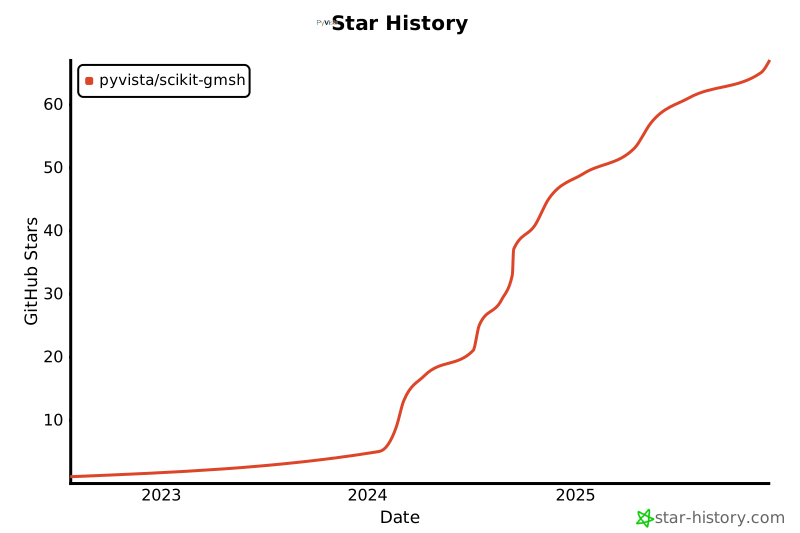](https://star-history.com/#pyvista/scikit-gmsh&Date)
|
|
@@ -0,0 +1,124 @@
|
|
|
1
|
+
<h1 align="center">
|
|
2
|
+
<a href="https://github.com/pyvista/scikit-gmsh#--------">
|
|
3
|
+
<img src="https://raw.githubusercontent.com/pyvista/scikit-gmsh/main/docs/_static/logo.svg"
|
|
4
|
+
alt="scikit-gmsh"
|
|
5
|
+
width="200"></a>
|
|
6
|
+
</h1>
|
|
7
|
+
|
|
8
|
+
> Scikit for Gmsh to generate 3D finite element mesh.
|
|
9
|
+
|
|
10
|
+
[](https://scikit-gmsh.readthedocs.io/en/latest/reference/about.html#contributors)
|
|
11
|
+
[](https://github.com/pyvista/scikit-gmsh/issues)
|
|
12
|
+
[](https://scikit-gmsh.readthedocs.io/en/latest/?badge=latest)
|
|
13
|
+
[](https://github.com/pyvista/scikit-gmsh/stargazers)
|
|
14
|
+
[](https://www.gnu.org/licenses/gpl-3.0)
|
|
15
|
+
|
|
16
|
+
The `scikit-gmsh` package provides a simple interface to the `gmsh` library.
|
|
17
|
+
The library has following main objectives:
|
|
18
|
+
|
|
19
|
+
1. Provide an intuitive, object-oriented API for mesh creation.
|
|
20
|
+
1. Integrate seamlessly with other libraries in the [scientific Python ecosystem](https://www.scipy.org/about.html).
|
|
21
|
+
|
|
22
|
+
Contributions are _very welcome_ .
|
|
23
|
+
This project is released with a [Contributor Code of Conduct](CODE_OF_CONDUCT.md).
|
|
24
|
+
By participating in this project, We want you to know that you agree to follow its terms.
|
|
25
|
+
|
|
26
|
+
Enjoying scikit-gmsh? Show your support with a [GitHub star](https://github.com/pyvista/scikit-gmsh) — it’s a simple click that means the world to us and helps others discover it, too! ⭐️
|
|
27
|
+
|
|
28
|
+
## Installation
|
|
29
|
+
|
|
30
|
+
[](https://pypi.org/project/scikit-gmsh/)
|
|
31
|
+
|
|
32
|
+
```shell
|
|
33
|
+
pip install scikit-gmsh
|
|
34
|
+
```
|
|
35
|
+
|
|
36
|
+
## Usage
|
|
37
|
+
|
|
38
|
+
```python
|
|
39
|
+
import skgmsh as sg
|
|
40
|
+
```
|
|
41
|
+
|
|
42
|
+
Now, let's define geometry.
|
|
43
|
+
|
|
44
|
+
```python
|
|
45
|
+
shell = [(0, 0, 0), (0, 10, 0), (10, 10, 0), (10, 0, 0), (0, 0, 0)]
|
|
46
|
+
holes = [[(2, 2, 0), (2, 4, 0), (4, 4, 0), (4, 2, 0), (2, 2, 0)]]
|
|
47
|
+
```
|
|
48
|
+
|
|
49
|
+
We can then generate a 2D mesh.
|
|
50
|
+
|
|
51
|
+
```python
|
|
52
|
+
alg = sg.Delaunay2D(shell=shell, holes=holes)
|
|
53
|
+
mesh = alg.mesh
|
|
54
|
+
```
|
|
55
|
+
|
|
56
|
+
To visualize the model, we can use PyVista.
|
|
57
|
+
|
|
58
|
+
```python
|
|
59
|
+
mesh.plot(show_edges=True, cpos="xy")
|
|
60
|
+
```
|
|
61
|
+
|
|
62
|
+
<p align="center">
|
|
63
|
+
<img src="https://raw.githubusercontent.com/pyvista/scikit-gmsh/main/docs/_static/frontal_delaunay_2d_01.png" align="center" width=400 >
|
|
64
|
+
</p>
|
|
65
|
+
|
|
66
|
+
If you want to set the cell size, you can do so.
|
|
67
|
+
|
|
68
|
+
```python
|
|
69
|
+
alg.cell_size = 0.5
|
|
70
|
+
alg.mesh.plot(show_edges=True, cpos="xy")
|
|
71
|
+
```
|
|
72
|
+
|
|
73
|
+
<p align="center">
|
|
74
|
+
<img src="https://raw.githubusercontent.com/pyvista/scikit-gmsh/main/docs/_static/frontal_delaunay_2d_02.png" align="center" width=400 >
|
|
75
|
+
</p>
|
|
76
|
+
|
|
77
|
+
We can also generate a 3D mesh.
|
|
78
|
+
|
|
79
|
+
```python
|
|
80
|
+
source = pv.Cube()
|
|
81
|
+
delaunay_3d = sg.Delaunay3D(edge_source=source, target_sizes=0.2)
|
|
82
|
+
```
|
|
83
|
+
|
|
84
|
+
```python
|
|
85
|
+
plotter = pv.Plotter()
|
|
86
|
+
_ = plotter.add_mesh(
|
|
87
|
+
delaunay_3d.mesh,
|
|
88
|
+
show_edges=True,
|
|
89
|
+
line_width=1,
|
|
90
|
+
color="aliceblue",
|
|
91
|
+
lighting=False,
|
|
92
|
+
edge_color="gray",
|
|
93
|
+
)
|
|
94
|
+
_ = plotter.add_mesh(edge_source.extract_all_edges(), line_width=4, color="gray")
|
|
95
|
+
_ = plotter.add_box_axes()
|
|
96
|
+
plotter.show()
|
|
97
|
+
```
|
|
98
|
+
|
|
99
|
+
<p align="center">
|
|
100
|
+
<img src="https://raw.githubusercontent.com/pyvista/scikit-gmsh/main/docs/_static/delaunay_3d_01.png" align="center" width=400 >
|
|
101
|
+
</p>
|
|
102
|
+
|
|
103
|
+
We can clip a mesh by a plane by specifying the origin and normal.
|
|
104
|
+
See [clip_with_surface_example](https://docs.pyvista.org/examples/01-filter/clipping-with-surface#clip-with-surface-example) for more examples using this filter.
|
|
105
|
+
|
|
106
|
+
```python
|
|
107
|
+
clipped = delaunay_3d.mesh.clip(
|
|
108
|
+
origin=(0.0, 0.0, 0.0), normal=(0.0, 0.0, 1.0), crinkle=True
|
|
109
|
+
)
|
|
110
|
+
```
|
|
111
|
+
|
|
112
|
+
<p align="center">
|
|
113
|
+
<img src="https://raw.githubusercontent.com/pyvista/scikit-gmsh/main/docs/_static/delaunay_3d_02.png" align="center" width=400 >
|
|
114
|
+
</p>
|
|
115
|
+
|
|
116
|
+
## License
|
|
117
|
+
|
|
118
|
+
[](https://www.gnu.org/licenses/gpl-3.0)
|
|
119
|
+
|
|
120
|
+
This software is published under the [GPLv3 license](https://www.gnu.org/licenses/gpl-3.0.en.html).
|
|
121
|
+
|
|
122
|
+
## Star History
|
|
123
|
+
|
|
124
|
+
[](https://star-history.com/#pyvista/scikit-gmsh&Date)
|
|
@@ -5,7 +5,8 @@ requires = [
|
|
|
5
5
|
'pygmsh<7.1.18',
|
|
6
6
|
'pyvista',
|
|
7
7
|
'scooby<0.9.3',
|
|
8
|
-
'setuptools<69.0.4'
|
|
8
|
+
'setuptools<69.0.4',
|
|
9
|
+
'shapely<2.0.6'
|
|
9
10
|
]
|
|
10
11
|
build-backend = 'setuptools.build_meta'
|
|
11
12
|
|
|
@@ -20,7 +21,8 @@ dependencies = [
|
|
|
20
21
|
'meshio<5.3.6',
|
|
21
22
|
'pygmsh<7.1.18',
|
|
22
23
|
'pyvista',
|
|
23
|
-
'scooby<0.9.3'
|
|
24
|
+
'scooby<0.9.3',
|
|
25
|
+
'shapely<2.0.6'
|
|
24
26
|
]
|
|
25
27
|
requires-python = '>=3.9'
|
|
26
28
|
|
|
@@ -66,10 +68,22 @@ ignore = [
|
|
|
66
68
|
"ISC001"
|
|
67
69
|
]
|
|
68
70
|
|
|
71
|
+
[tool.ruff.lint.isort]
|
|
72
|
+
# Sort by name, don't cluster "from" vs "import"
|
|
73
|
+
force-sort-within-sections = true
|
|
74
|
+
# Combines "as" imports on the same line
|
|
75
|
+
combine-as-imports = true
|
|
76
|
+
required-imports = ["from __future__ import annotations"]
|
|
77
|
+
force-single-line = true
|
|
78
|
+
|
|
69
79
|
[tool.ruff.lint.per-file-ignores]
|
|
70
80
|
"docs/**" = ["INP001"]
|
|
71
81
|
"tests/**" = ["INP001", "S101"]
|
|
72
82
|
|
|
83
|
+
[tool.ruff.lint.pyupgrade]
|
|
84
|
+
# Preserve types, even if a file imports `from __future__ import annotations`.
|
|
85
|
+
keep-runtime-typing = true
|
|
86
|
+
|
|
73
87
|
[tool.setuptools.dynamic]
|
|
74
88
|
version = {attr = 'skgmsh.__version__'}
|
|
75
89
|
readme = {file = "README.md", content-type = "text/markdown"}
|
|
@@ -0,0 +1,139 @@
|
|
|
1
|
+
Metadata-Version: 2.1
|
|
2
|
+
Name: scikit-gmsh
|
|
3
|
+
Version: 0.2.0
|
|
4
|
+
Requires-Python: >=3.9
|
|
5
|
+
Description-Content-Type: text/markdown
|
|
6
|
+
License-File: LICENSE
|
|
7
|
+
Requires-Dist: gmsh<4.12.3
|
|
8
|
+
Requires-Dist: meshio<5.3.6
|
|
9
|
+
Requires-Dist: pygmsh<7.1.18
|
|
10
|
+
Requires-Dist: pyvista
|
|
11
|
+
Requires-Dist: scooby<0.9.3
|
|
12
|
+
Requires-Dist: shapely<2.0.6
|
|
13
|
+
Provides-Extra: test
|
|
14
|
+
Requires-Dist: pytest==8.0.0; extra == "test"
|
|
15
|
+
|
|
16
|
+
<h1 align="center">
|
|
17
|
+
<a href="https://github.com/pyvista/scikit-gmsh#--------">
|
|
18
|
+
<img src="https://raw.githubusercontent.com/pyvista/scikit-gmsh/main/docs/_static/logo.svg"
|
|
19
|
+
alt="scikit-gmsh"
|
|
20
|
+
width="200"></a>
|
|
21
|
+
</h1>
|
|
22
|
+
|
|
23
|
+
> Scikit for Gmsh to generate 3D finite element mesh.
|
|
24
|
+
|
|
25
|
+
[](https://scikit-gmsh.readthedocs.io/en/latest/reference/about.html#contributors)
|
|
26
|
+
[](https://github.com/pyvista/scikit-gmsh/issues)
|
|
27
|
+
[](https://scikit-gmsh.readthedocs.io/en/latest/?badge=latest)
|
|
28
|
+
[](https://github.com/pyvista/scikit-gmsh/stargazers)
|
|
29
|
+
[](https://www.gnu.org/licenses/gpl-3.0)
|
|
30
|
+
|
|
31
|
+
The `scikit-gmsh` package provides a simple interface to the `gmsh` library.
|
|
32
|
+
The library has following main objectives:
|
|
33
|
+
|
|
34
|
+
1. Provide an intuitive, object-oriented API for mesh creation.
|
|
35
|
+
1. Integrate seamlessly with other libraries in the [scientific Python ecosystem](https://www.scipy.org/about.html).
|
|
36
|
+
|
|
37
|
+
Contributions are _very welcome_ .
|
|
38
|
+
This project is released with a [Contributor Code of Conduct](CODE_OF_CONDUCT.md).
|
|
39
|
+
By participating in this project, We want you to know that you agree to follow its terms.
|
|
40
|
+
|
|
41
|
+
Enjoying scikit-gmsh? Show your support with a [GitHub star](https://github.com/pyvista/scikit-gmsh) — it’s a simple click that means the world to us and helps others discover it, too! ⭐️
|
|
42
|
+
|
|
43
|
+
## Installation
|
|
44
|
+
|
|
45
|
+
[](https://pypi.org/project/scikit-gmsh/)
|
|
46
|
+
|
|
47
|
+
```shell
|
|
48
|
+
pip install scikit-gmsh
|
|
49
|
+
```
|
|
50
|
+
|
|
51
|
+
## Usage
|
|
52
|
+
|
|
53
|
+
```python
|
|
54
|
+
import skgmsh as sg
|
|
55
|
+
```
|
|
56
|
+
|
|
57
|
+
Now, let's define geometry.
|
|
58
|
+
|
|
59
|
+
```python
|
|
60
|
+
shell = [(0, 0, 0), (0, 10, 0), (10, 10, 0), (10, 0, 0), (0, 0, 0)]
|
|
61
|
+
holes = [[(2, 2, 0), (2, 4, 0), (4, 4, 0), (4, 2, 0), (2, 2, 0)]]
|
|
62
|
+
```
|
|
63
|
+
|
|
64
|
+
We can then generate a 2D mesh.
|
|
65
|
+
|
|
66
|
+
```python
|
|
67
|
+
alg = sg.Delaunay2D(shell=shell, holes=holes)
|
|
68
|
+
mesh = alg.mesh
|
|
69
|
+
```
|
|
70
|
+
|
|
71
|
+
To visualize the model, we can use PyVista.
|
|
72
|
+
|
|
73
|
+
```python
|
|
74
|
+
mesh.plot(show_edges=True, cpos="xy")
|
|
75
|
+
```
|
|
76
|
+
|
|
77
|
+
<p align="center">
|
|
78
|
+
<img src="https://raw.githubusercontent.com/pyvista/scikit-gmsh/main/docs/_static/frontal_delaunay_2d_01.png" align="center" width=400 >
|
|
79
|
+
</p>
|
|
80
|
+
|
|
81
|
+
If you want to set the cell size, you can do so.
|
|
82
|
+
|
|
83
|
+
```python
|
|
84
|
+
alg.cell_size = 0.5
|
|
85
|
+
alg.mesh.plot(show_edges=True, cpos="xy")
|
|
86
|
+
```
|
|
87
|
+
|
|
88
|
+
<p align="center">
|
|
89
|
+
<img src="https://raw.githubusercontent.com/pyvista/scikit-gmsh/main/docs/_static/frontal_delaunay_2d_02.png" align="center" width=400 >
|
|
90
|
+
</p>
|
|
91
|
+
|
|
92
|
+
We can also generate a 3D mesh.
|
|
93
|
+
|
|
94
|
+
```python
|
|
95
|
+
source = pv.Cube()
|
|
96
|
+
delaunay_3d = sg.Delaunay3D(edge_source=source, target_sizes=0.2)
|
|
97
|
+
```
|
|
98
|
+
|
|
99
|
+
```python
|
|
100
|
+
plotter = pv.Plotter()
|
|
101
|
+
_ = plotter.add_mesh(
|
|
102
|
+
delaunay_3d.mesh,
|
|
103
|
+
show_edges=True,
|
|
104
|
+
line_width=1,
|
|
105
|
+
color="aliceblue",
|
|
106
|
+
lighting=False,
|
|
107
|
+
edge_color="gray",
|
|
108
|
+
)
|
|
109
|
+
_ = plotter.add_mesh(edge_source.extract_all_edges(), line_width=4, color="gray")
|
|
110
|
+
_ = plotter.add_box_axes()
|
|
111
|
+
plotter.show()
|
|
112
|
+
```
|
|
113
|
+
|
|
114
|
+
<p align="center">
|
|
115
|
+
<img src="https://raw.githubusercontent.com/pyvista/scikit-gmsh/main/docs/_static/delaunay_3d_01.png" align="center" width=400 >
|
|
116
|
+
</p>
|
|
117
|
+
|
|
118
|
+
We can clip a mesh by a plane by specifying the origin and normal.
|
|
119
|
+
See [clip_with_surface_example](https://docs.pyvista.org/examples/01-filter/clipping-with-surface#clip-with-surface-example) for more examples using this filter.
|
|
120
|
+
|
|
121
|
+
```python
|
|
122
|
+
clipped = delaunay_3d.mesh.clip(
|
|
123
|
+
origin=(0.0, 0.0, 0.0), normal=(0.0, 0.0, 1.0), crinkle=True
|
|
124
|
+
)
|
|
125
|
+
```
|
|
126
|
+
|
|
127
|
+
<p align="center">
|
|
128
|
+
<img src="https://raw.githubusercontent.com/pyvista/scikit-gmsh/main/docs/_static/delaunay_3d_02.png" align="center" width=400 >
|
|
129
|
+
</p>
|
|
130
|
+
|
|
131
|
+
## License
|
|
132
|
+
|
|
133
|
+
[](https://www.gnu.org/licenses/gpl-3.0)
|
|
134
|
+
|
|
135
|
+
This software is published under the [GPLv3 license](https://www.gnu.org/licenses/gpl-3.0.en.html).
|
|
136
|
+
|
|
137
|
+
## Star History
|
|
138
|
+
|
|
139
|
+
[](https://star-history.com/#pyvista/scikit-gmsh&Date)
|