scgraph 2.3.0__tar.gz → 2.4.0__tar.gz
This diff represents the content of publicly available package versions that have been released to one of the supported registries. The information contained in this diff is provided for informational purposes only and reflects changes between package versions as they appear in their respective public registries.
- {scgraph-2.3.0/scgraph.egg-info → scgraph-2.4.0}/PKG-INFO +68 -4
- {scgraph-2.3.0 → scgraph-2.4.0}/README.md +65 -2
- {scgraph-2.3.0 → scgraph-2.4.0}/pyproject.toml +1 -1
- scgraph-2.4.0/scgraph/__init__.py +358 -0
- scgraph-2.4.0/scgraph/cache.py +79 -0
- {scgraph-2.3.0 → scgraph-2.4.0}/scgraph/core.py +26 -26
- scgraph-2.4.0/scgraph/grid.py +421 -0
- scgraph-2.4.0/scgraph/helpers/__init__.py +0 -0
- scgraph-2.4.0/scgraph/helpers/shape_mover_utils.py +319 -0
- scgraph-2.4.0/scgraph/spanning.py +123 -0
- {scgraph-2.3.0 → scgraph-2.4.0}/scgraph/utils.py +5 -5
- {scgraph-2.3.0 → scgraph-2.4.0/scgraph.egg-info}/PKG-INFO +68 -4
- {scgraph-2.3.0 → scgraph-2.4.0}/scgraph.egg-info/SOURCES.txt +6 -1
- {scgraph-2.3.0 → scgraph-2.4.0}/setup.cfg +1 -1
- scgraph-2.3.0/scgraph/__init__.py +0 -1
- {scgraph-2.3.0 → scgraph-2.4.0}/LICENSE +0 -0
- {scgraph-2.3.0 → scgraph-2.4.0}/scgraph/geographs/__init__.py +0 -0
- {scgraph-2.3.0 → scgraph-2.4.0}/scgraph/geographs/marnet.py +0 -0
- {scgraph-2.3.0 → scgraph-2.4.0}/scgraph/geographs/north_america_rail.py +0 -0
- {scgraph-2.3.0 → scgraph-2.4.0}/scgraph/geographs/oak_ridge_maritime.py +0 -0
- {scgraph-2.3.0 → scgraph-2.4.0}/scgraph/geographs/us_freeway.py +0 -0
- {scgraph-2.3.0 → scgraph-2.4.0}/scgraph.egg-info/dependency_links.txt +0 -0
- {scgraph-2.3.0 → scgraph-2.4.0}/scgraph.egg-info/top_level.txt +0 -0
|
@@ -1,6 +1,6 @@
|
|
|
1
|
-
Metadata-Version: 2.
|
|
1
|
+
Metadata-Version: 2.4
|
|
2
2
|
Name: scgraph
|
|
3
|
-
Version: 2.
|
|
3
|
+
Version: 2.4.0
|
|
4
4
|
Summary: Determine an approximate route between two points on earth.
|
|
5
5
|
Author-email: Connor Makowski <conmak@mit.edu>
|
|
6
6
|
Project-URL: Homepage, https://github.com/connor-makowski/scgraph
|
|
@@ -12,10 +12,12 @@ Classifier: Operating System :: OS Independent
|
|
|
12
12
|
Requires-Python: >=3.10
|
|
13
13
|
Description-Content-Type: text/markdown
|
|
14
14
|
License-File: LICENSE
|
|
15
|
+
Dynamic: license-file
|
|
15
16
|
|
|
16
17
|
# scgraph
|
|
17
18
|
[](https://badge.fury.io/py/scgraph)
|
|
18
19
|
[](https://opensource.org/licenses/MIT)
|
|
20
|
+
[](https://pypi.org/project/scgraph/)
|
|
19
21
|
|
|
20
22
|
Supply chain graph package for Python
|
|
21
23
|
|
|
@@ -52,14 +54,16 @@ Low Level: https://connor-makowski.github.io/scgraph/scgraph/core.html
|
|
|
52
54
|
- Antimeridian support
|
|
53
55
|
- Arbitrary start and end points
|
|
54
56
|
- Arbitrary network data sets
|
|
57
|
+
- Grid based graphs
|
|
58
|
+
- Cached shortest path calculations for very fast repetative calculations to or from the same point in a graph.
|
|
59
|
+
- Note: Geographs are not yet supported for this feature
|
|
55
60
|
|
|
56
61
|
|
|
57
|
-
|
|
58
62
|
## Setup
|
|
59
63
|
|
|
60
64
|
Make sure you have Python 3.10.x (or higher) installed on your system. You can download it [here](https://www.python.org/downloads/).
|
|
61
65
|
|
|
62
|
-
Support for python3.6-
|
|
66
|
+
Note: Support for python3.6-python3.9 is available up to version 2.2.0.
|
|
63
67
|
|
|
64
68
|
## Installation
|
|
65
69
|
|
|
@@ -141,6 +145,49 @@ For more examples including viewing the output on a map, see the [example notebo
|
|
|
141
145
|
- Use: `from scgraph_data.world_highways import world_highways_geograph`
|
|
142
146
|
- See: [scgraph_data](https://github.com/connor-makowski/scgraph_data) for more information and all available geographs.
|
|
143
147
|
|
|
148
|
+
## GridGraph usage
|
|
149
|
+
|
|
150
|
+
Example:
|
|
151
|
+
- Create a grid of 20x100 cells.
|
|
152
|
+
- This creates a grid based graph with connections to all 8 neighbors for each grid item.
|
|
153
|
+
- Each grid item has 4 cardinal connections at length 1 and 4 diagonal connections at length sqrt(2)
|
|
154
|
+
- Create a wall from (10,5) to (10,99).
|
|
155
|
+
- This would foce any path to go to the bottom of the graph to get around the wall.
|
|
156
|
+
- Get the shortest path between (2,10) and (18,10)
|
|
157
|
+
- Note: The length of this path should be 16 without the wall and 20.9704 with the wall.
|
|
158
|
+
|
|
159
|
+
```py
|
|
160
|
+
from scgraph import GridGraph
|
|
161
|
+
|
|
162
|
+
x_size = 20
|
|
163
|
+
y_size = 20
|
|
164
|
+
blocks = [(10, i) for i in range(5, y_size)]
|
|
165
|
+
|
|
166
|
+
# Create the GridGraph object
|
|
167
|
+
gridGraph = GridGraph(
|
|
168
|
+
x_size=x_size,
|
|
169
|
+
y_size=y_size,
|
|
170
|
+
blocks=blocks,
|
|
171
|
+
add_exterior_walls=True,
|
|
172
|
+
)
|
|
173
|
+
|
|
174
|
+
# Solve the shortest path between two points
|
|
175
|
+
output = gridGraph.get_shortest_path(
|
|
176
|
+
origin_node={"x": 2, "y": 10},
|
|
177
|
+
destination_node={"x": 18, "y": 10},
|
|
178
|
+
# Optional: Specify the output coodinate format (default is 'list_of_dicts)
|
|
179
|
+
output_coordinate_path="list_of_lists",
|
|
180
|
+
# Optional: Cache the origin point spanning_tree for faster calculations on future calls
|
|
181
|
+
cache=True,
|
|
182
|
+
# Optional: Specify the node to cache the spanning tree for (default is the origin node)
|
|
183
|
+
# Note: This first call will be slower, but future calls using this origin node will be substantially faster
|
|
184
|
+
cache_for="origin",
|
|
185
|
+
)
|
|
186
|
+
|
|
187
|
+
print(output)
|
|
188
|
+
#=> {'length': 20.9704, 'coordinate_path': [[2, 10], [3, 9], [4, 8], [5, 8], [6, 7], [7, 6], [8, 5], [9, 4], [10, 4], [11, 4], [12, 5], [13, 6], [14, 7], [15, 7], [16, 8], [17, 9], [18, 10]]}
|
|
189
|
+
```
|
|
190
|
+
|
|
144
191
|
## Advanced Usage
|
|
145
192
|
|
|
146
193
|
Using `scgraph_data` geographs:
|
|
@@ -305,5 +352,22 @@ print(output)
|
|
|
305
352
|
|
|
306
353
|
```
|
|
307
354
|
|
|
355
|
+
# Development
|
|
356
|
+
## Running Tests, Prettifying Code, and Updating Docs
|
|
357
|
+
|
|
358
|
+
Make sure Docker is installed and running on a Unix system (Linux, MacOS, WSL2).
|
|
359
|
+
|
|
360
|
+
- Create a docker container and drop into a shell
|
|
361
|
+
- `./run.sh`
|
|
362
|
+
- Run all tests (see ./utils/test.sh)
|
|
363
|
+
- `./run.sh test`
|
|
364
|
+
- Prettify the code (see ./utils/prettify.sh)
|
|
365
|
+
- `./run.sh prettify`
|
|
366
|
+
- Update the docs (see ./utils/docs.sh)
|
|
367
|
+
- `./run.sh docs`
|
|
368
|
+
|
|
369
|
+
- Note: You can and should modify the `Dockerfile` to test different python versions.
|
|
370
|
+
|
|
371
|
+
|
|
308
372
|
## Attributions and Thanks
|
|
309
373
|
Originally inspired by [searoute](https://github.com/genthalili/searoute-py) including the use of one of their [datasets](https://github.com/genthalili/searoute-py/blob/main/searoute/data/marnet_densified_v2_old.geojson) that has been modified to work properly with this package.
|
|
@@ -1,6 +1,7 @@
|
|
|
1
1
|
# scgraph
|
|
2
2
|
[](https://badge.fury.io/py/scgraph)
|
|
3
3
|
[](https://opensource.org/licenses/MIT)
|
|
4
|
+
[](https://pypi.org/project/scgraph/)
|
|
4
5
|
|
|
5
6
|
Supply chain graph package for Python
|
|
6
7
|
|
|
@@ -37,14 +38,16 @@ Low Level: https://connor-makowski.github.io/scgraph/scgraph/core.html
|
|
|
37
38
|
- Antimeridian support
|
|
38
39
|
- Arbitrary start and end points
|
|
39
40
|
- Arbitrary network data sets
|
|
41
|
+
- Grid based graphs
|
|
42
|
+
- Cached shortest path calculations for very fast repetative calculations to or from the same point in a graph.
|
|
43
|
+
- Note: Geographs are not yet supported for this feature
|
|
40
44
|
|
|
41
45
|
|
|
42
|
-
|
|
43
46
|
## Setup
|
|
44
47
|
|
|
45
48
|
Make sure you have Python 3.10.x (or higher) installed on your system. You can download it [here](https://www.python.org/downloads/).
|
|
46
49
|
|
|
47
|
-
Support for python3.6-
|
|
50
|
+
Note: Support for python3.6-python3.9 is available up to version 2.2.0.
|
|
48
51
|
|
|
49
52
|
## Installation
|
|
50
53
|
|
|
@@ -126,6 +129,49 @@ For more examples including viewing the output on a map, see the [example notebo
|
|
|
126
129
|
- Use: `from scgraph_data.world_highways import world_highways_geograph`
|
|
127
130
|
- See: [scgraph_data](https://github.com/connor-makowski/scgraph_data) for more information and all available geographs.
|
|
128
131
|
|
|
132
|
+
## GridGraph usage
|
|
133
|
+
|
|
134
|
+
Example:
|
|
135
|
+
- Create a grid of 20x100 cells.
|
|
136
|
+
- This creates a grid based graph with connections to all 8 neighbors for each grid item.
|
|
137
|
+
- Each grid item has 4 cardinal connections at length 1 and 4 diagonal connections at length sqrt(2)
|
|
138
|
+
- Create a wall from (10,5) to (10,99).
|
|
139
|
+
- This would foce any path to go to the bottom of the graph to get around the wall.
|
|
140
|
+
- Get the shortest path between (2,10) and (18,10)
|
|
141
|
+
- Note: The length of this path should be 16 without the wall and 20.9704 with the wall.
|
|
142
|
+
|
|
143
|
+
```py
|
|
144
|
+
from scgraph import GridGraph
|
|
145
|
+
|
|
146
|
+
x_size = 20
|
|
147
|
+
y_size = 20
|
|
148
|
+
blocks = [(10, i) for i in range(5, y_size)]
|
|
149
|
+
|
|
150
|
+
# Create the GridGraph object
|
|
151
|
+
gridGraph = GridGraph(
|
|
152
|
+
x_size=x_size,
|
|
153
|
+
y_size=y_size,
|
|
154
|
+
blocks=blocks,
|
|
155
|
+
add_exterior_walls=True,
|
|
156
|
+
)
|
|
157
|
+
|
|
158
|
+
# Solve the shortest path between two points
|
|
159
|
+
output = gridGraph.get_shortest_path(
|
|
160
|
+
origin_node={"x": 2, "y": 10},
|
|
161
|
+
destination_node={"x": 18, "y": 10},
|
|
162
|
+
# Optional: Specify the output coodinate format (default is 'list_of_dicts)
|
|
163
|
+
output_coordinate_path="list_of_lists",
|
|
164
|
+
# Optional: Cache the origin point spanning_tree for faster calculations on future calls
|
|
165
|
+
cache=True,
|
|
166
|
+
# Optional: Specify the node to cache the spanning tree for (default is the origin node)
|
|
167
|
+
# Note: This first call will be slower, but future calls using this origin node will be substantially faster
|
|
168
|
+
cache_for="origin",
|
|
169
|
+
)
|
|
170
|
+
|
|
171
|
+
print(output)
|
|
172
|
+
#=> {'length': 20.9704, 'coordinate_path': [[2, 10], [3, 9], [4, 8], [5, 8], [6, 7], [7, 6], [8, 5], [9, 4], [10, 4], [11, 4], [12, 5], [13, 6], [14, 7], [15, 7], [16, 8], [17, 9], [18, 10]]}
|
|
173
|
+
```
|
|
174
|
+
|
|
129
175
|
## Advanced Usage
|
|
130
176
|
|
|
131
177
|
Using `scgraph_data` geographs:
|
|
@@ -290,5 +336,22 @@ print(output)
|
|
|
290
336
|
|
|
291
337
|
```
|
|
292
338
|
|
|
339
|
+
# Development
|
|
340
|
+
## Running Tests, Prettifying Code, and Updating Docs
|
|
341
|
+
|
|
342
|
+
Make sure Docker is installed and running on a Unix system (Linux, MacOS, WSL2).
|
|
343
|
+
|
|
344
|
+
- Create a docker container and drop into a shell
|
|
345
|
+
- `./run.sh`
|
|
346
|
+
- Run all tests (see ./utils/test.sh)
|
|
347
|
+
- `./run.sh test`
|
|
348
|
+
- Prettify the code (see ./utils/prettify.sh)
|
|
349
|
+
- `./run.sh prettify`
|
|
350
|
+
- Update the docs (see ./utils/docs.sh)
|
|
351
|
+
- `./run.sh docs`
|
|
352
|
+
|
|
353
|
+
- Note: You can and should modify the `Dockerfile` to test different python versions.
|
|
354
|
+
|
|
355
|
+
|
|
293
356
|
## Attributions and Thanks
|
|
294
357
|
Originally inspired by [searoute](https://github.com/genthalili/searoute-py) including the use of one of their [datasets](https://github.com/genthalili/searoute-py/blob/main/searoute/data/marnet_densified_v2_old.geojson) that has been modified to work properly with this package.
|
|
@@ -12,7 +12,7 @@ build-backend = "setuptools.build_meta"
|
|
|
12
12
|
|
|
13
13
|
[project]
|
|
14
14
|
name = "scgraph"
|
|
15
|
-
version = "2.
|
|
15
|
+
version = "2.4.0"
|
|
16
16
|
description = "Determine an approximate route between two points on earth."
|
|
17
17
|
authors = [
|
|
18
18
|
{name="Connor Makowski", email="conmak@mit.edu"}
|
|
@@ -0,0 +1,358 @@
|
|
|
1
|
+
"""
|
|
2
|
+
# scgraph
|
|
3
|
+
[](https://badge.fury.io/py/scgraph)
|
|
4
|
+
[](https://opensource.org/licenses/MIT)
|
|
5
|
+
[](https://pypi.org/project/scgraph/)
|
|
6
|
+
|
|
7
|
+
Supply chain graph package for Python
|
|
8
|
+
|
|
9
|
+
|
|
10
|
+
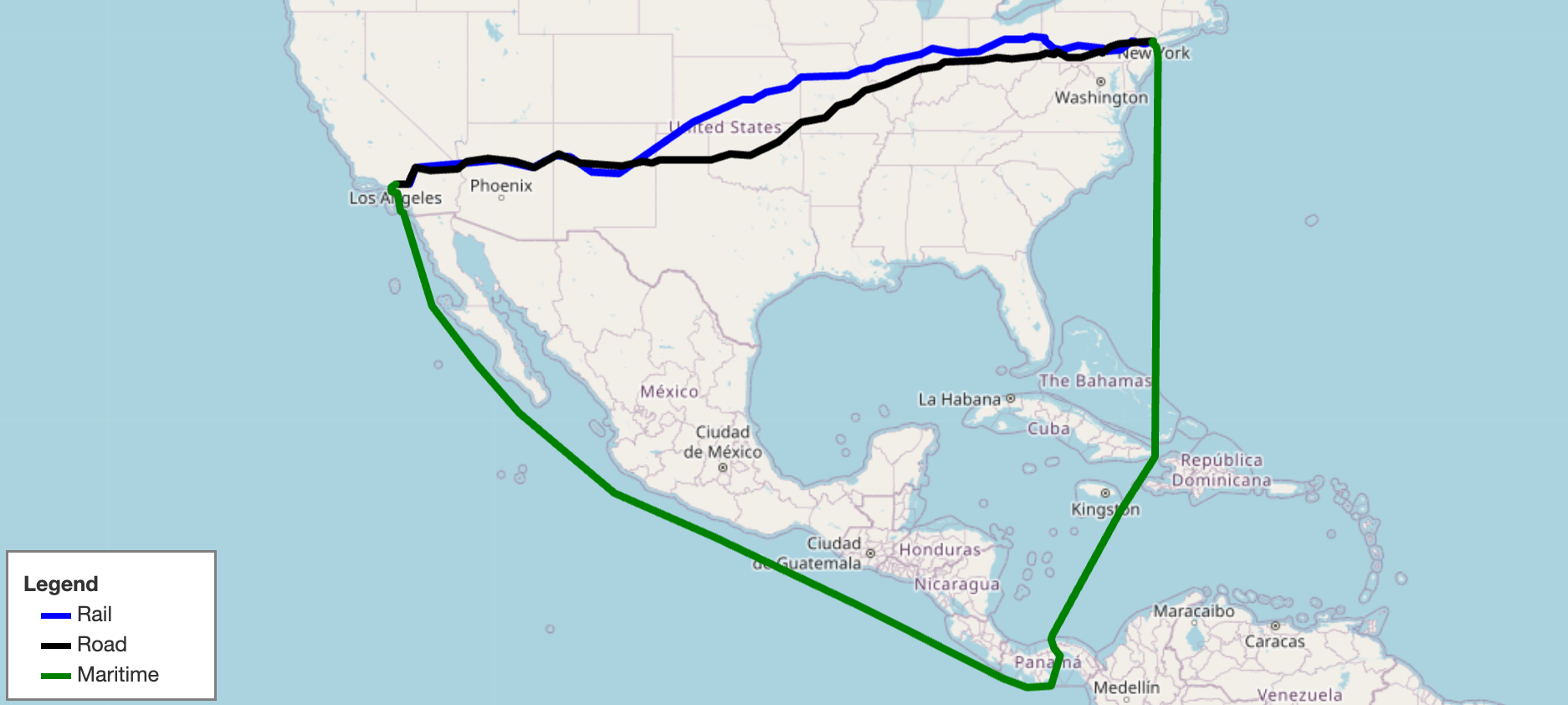
|
|
11
|
+
|
|
12
|
+
## Documentation
|
|
13
|
+
|
|
14
|
+
Getting Started: https://github.com/connor-makowski/scgraph
|
|
15
|
+
|
|
16
|
+
Low Level: https://connor-makowski.github.io/scgraph/scgraph/core.html
|
|
17
|
+
|
|
18
|
+
|
|
19
|
+
## Key Features
|
|
20
|
+
|
|
21
|
+
- Calculate the shortest path between two points on earth using a latitude / longitude pair
|
|
22
|
+
- Inputs:
|
|
23
|
+
- A latitude / longitude pair for the origin
|
|
24
|
+
- A latitude / longitude pair for the destination
|
|
25
|
+
- Calculation:
|
|
26
|
+
- Algorithms:
|
|
27
|
+
- Dijkstra's algorithm (Modified for sparse networks)
|
|
28
|
+
- Modified to support sparse network data structures
|
|
29
|
+
- Makowski's Modified Sparse Dijkstra algorithm
|
|
30
|
+
- Modified for O(n) performance on particularly sparse networks
|
|
31
|
+
- Possible future support for other algorithms
|
|
32
|
+
- Distances:
|
|
33
|
+
- Uses the [haversine formula](https://en.wikipedia.org/wiki/Haversine_formula) to calculate the distance between two points on earth
|
|
34
|
+
- Returns:
|
|
35
|
+
- `path`:
|
|
36
|
+
- A list of dictionaries (`latitude` and `longitude`) that make up the shortest path
|
|
37
|
+
- `length`:
|
|
38
|
+
- The distance in kilometers between the two points
|
|
39
|
+
- Antimeridian support
|
|
40
|
+
- Arbitrary start and end points
|
|
41
|
+
- Arbitrary network data sets
|
|
42
|
+
- Grid based graphs
|
|
43
|
+
- Cached shortest path calculations for very fast repetative calculations to or from the same point in a graph.
|
|
44
|
+
- Note: Geographs are not yet supported for this feature
|
|
45
|
+
|
|
46
|
+
|
|
47
|
+
## Setup
|
|
48
|
+
|
|
49
|
+
Make sure you have Python 3.10.x (or higher) installed on your system. You can download it [here](https://www.python.org/downloads/).
|
|
50
|
+
|
|
51
|
+
Note: Support for python3.6-python3.9 is available up to version 2.2.0.
|
|
52
|
+
|
|
53
|
+
## Installation
|
|
54
|
+
|
|
55
|
+
```
|
|
56
|
+
pip install scgraph
|
|
57
|
+
```
|
|
58
|
+
|
|
59
|
+
## Use with Google Colab
|
|
60
|
+
|
|
61
|
+
- [Getting Started](https://colab.research.google.com/github/connor-makowski/scgraph/blob/main/examples/getting_started.ipynb)
|
|
62
|
+
- [Creating A Multi Path Geojson](https://colab.research.google.com/github/connor-makowski/scgraph/blob/main/examples/multi_path_geojson.ipynb)
|
|
63
|
+
- [Modifying A Geograph](https://colab.research.google.com/github/connor-makowski/scgraph/blob/main/examples/geograph_modifications.ipynb)
|
|
64
|
+
|
|
65
|
+
|
|
66
|
+
# Getting Started
|
|
67
|
+
|
|
68
|
+
## Basic Usage
|
|
69
|
+
|
|
70
|
+
Get the shortest path between two points on earth using a latitude / longitude pair
|
|
71
|
+
In this case, calculate the shortest maritime path between Shanghai, China and Savannah, Georgia, USA.
|
|
72
|
+
|
|
73
|
+
```py
|
|
74
|
+
# Use a maritime network geograph
|
|
75
|
+
from scgraph.geographs.marnet import marnet_geograph
|
|
76
|
+
|
|
77
|
+
# Get the shortest path between
|
|
78
|
+
output = marnet_geograph.get_shortest_path(
|
|
79
|
+
origin_node={"latitude": 31.23,"longitude": 121.47},
|
|
80
|
+
destination_node={"latitude": 32.08,"longitude": -81.09},
|
|
81
|
+
output_units='km'
|
|
82
|
+
)
|
|
83
|
+
print('Length: ',output['length']) #=> Length: 19596.4653
|
|
84
|
+
```
|
|
85
|
+
|
|
86
|
+
In the above example, the `output` variable is a dictionary with three keys: `length` and `coordinate_path`.
|
|
87
|
+
|
|
88
|
+
- `length`: The distance between the passed origin and destination when traversing the graph along the shortest path
|
|
89
|
+
- Notes:
|
|
90
|
+
- This will be in the units specified by the `output_units` parameter.
|
|
91
|
+
- `output_units` options:
|
|
92
|
+
- `km` (kilometers - default)
|
|
93
|
+
- `m` (meters)
|
|
94
|
+
- `mi` (miles)
|
|
95
|
+
- `ft` (feet)
|
|
96
|
+
- `coordinate_path`: A list of lists [`latitude`,`longitude`] that make up the shortest path
|
|
97
|
+
|
|
98
|
+
For more examples including viewing the output on a map, see the [example notebook](https://colab.research.google.com/github/connor-makowski/scgraph/blob/main/examples/getting_started.ipynb).
|
|
99
|
+
|
|
100
|
+
## Included GeoGraphs
|
|
101
|
+
|
|
102
|
+
- marnet_geograph:
|
|
103
|
+
- What: A maritime network data set from searoute
|
|
104
|
+
- Use: `from scgraph.geographs.marnet import marnet_geograph`
|
|
105
|
+
- Attribution: [searoute](https://github.com/genthalili/searoute-py)
|
|
106
|
+
- Length Measurement: Kilometers
|
|
107
|
+
- [Marnet Picture](https://raw.githubusercontent.com/connor-makowski/scgraph/main/static/marnet.png)
|
|
108
|
+
- oak_ridge_maritime_geograph:
|
|
109
|
+
- What: A maritime data set from the Oak Ridge National Laboratory campus
|
|
110
|
+
- Use: `from scgraph.geographs.oak_ridge_maritime import oak_ridge_maritime_geograph`
|
|
111
|
+
- Attribution: [Oak Ridge National Laboratory](https://www.ornl.gov/) with data from [Geocommons](http://geocommons.com/datasets?id=25)
|
|
112
|
+
- Length Measurement: Kilometers
|
|
113
|
+
- [Oak Ridge Maritime Picture](https://raw.githubusercontent.com/connor-makowski/scgraph/main/static/oak_ridge_maritime.png)
|
|
114
|
+
- north_america_rail_geograph:
|
|
115
|
+
- What: Class 1 Rail network for North America
|
|
116
|
+
- Use: `from scgraph.geographs.north_america_rail import north_america_rail_geograph`
|
|
117
|
+
- Attribution: [U.S. Department of Transportation: ArcGIS Online](https://geodata.bts.gov/datasets/usdot::north-american-rail-network-lines-class-i-freight-railroads-view/about)
|
|
118
|
+
- Length Measurement: Kilometers
|
|
119
|
+
- [North America Rail Picture](https://raw.githubusercontent.com/connor-makowski/scgraph/main/static/north_america_rail.png)
|
|
120
|
+
- us_freeway_geograph:
|
|
121
|
+
- What: Freeway network for the United States
|
|
122
|
+
- Use: `from scgraph.geographs.us_freeway import us_freeway_geograph`
|
|
123
|
+
- Attribution: [U.S. Department of Transportation: ArcGIS Online](https://hub.arcgis.com/datasets/esri::usa-freeway-system-over-1500k/about)
|
|
124
|
+
- Length Measurement: Kilometers
|
|
125
|
+
- [US Freeway Picture](https://raw.githubusercontent.com/connor-makowski/scgraph/main/static/us_freeway.png)
|
|
126
|
+
- `scgraph_data` geographs:
|
|
127
|
+
- What: Additional geographs are available in the `scgraph_data` package
|
|
128
|
+
- Note: These include larger geographs like the world highways geograph and world railways geograph.
|
|
129
|
+
- Installation: `pip install scgraph_data`
|
|
130
|
+
- Use: `from scgraph_data.world_highways import world_highways_geograph`
|
|
131
|
+
- See: [scgraph_data](https://github.com/connor-makowski/scgraph_data) for more information and all available geographs.
|
|
132
|
+
|
|
133
|
+
## GridGraph usage
|
|
134
|
+
|
|
135
|
+
Example:
|
|
136
|
+
- Create a grid of 20x100 cells.
|
|
137
|
+
- This creates a grid based graph with connections to all 8 neighbors for each grid item.
|
|
138
|
+
- Each grid item has 4 cardinal connections at length 1 and 4 diagonal connections at length sqrt(2)
|
|
139
|
+
- Create a wall from (10,5) to (10,99).
|
|
140
|
+
- This would foce any path to go to the bottom of the graph to get around the wall.
|
|
141
|
+
- Get the shortest path between (2,10) and (18,10)
|
|
142
|
+
- Note: The length of this path should be 16 without the wall and 20.9704 with the wall.
|
|
143
|
+
|
|
144
|
+
```py
|
|
145
|
+
from scgraph import GridGraph
|
|
146
|
+
|
|
147
|
+
x_size = 20
|
|
148
|
+
y_size = 20
|
|
149
|
+
blocks = [(10, i) for i in range(5, y_size)]
|
|
150
|
+
|
|
151
|
+
# Create the GridGraph object
|
|
152
|
+
gridGraph = GridGraph(
|
|
153
|
+
x_size=x_size,
|
|
154
|
+
y_size=y_size,
|
|
155
|
+
blocks=blocks,
|
|
156
|
+
add_exterior_walls=True,
|
|
157
|
+
)
|
|
158
|
+
|
|
159
|
+
# Solve the shortest path between two points
|
|
160
|
+
output = gridGraph.get_shortest_path(
|
|
161
|
+
origin_node={"x": 2, "y": 10},
|
|
162
|
+
destination_node={"x": 18, "y": 10},
|
|
163
|
+
# Optional: Specify the output coodinate format (default is 'list_of_dicts)
|
|
164
|
+
output_coordinate_path="list_of_lists",
|
|
165
|
+
# Optional: Cache the origin point spanning_tree for faster calculations on future calls
|
|
166
|
+
cache=True,
|
|
167
|
+
# Optional: Specify the node to cache the spanning tree for (default is the origin node)
|
|
168
|
+
# Note: This first call will be slower, but future calls using this origin node will be substantially faster
|
|
169
|
+
cache_for="origin",
|
|
170
|
+
)
|
|
171
|
+
|
|
172
|
+
print(output)
|
|
173
|
+
#=> {'length': 20.9704, 'coordinate_path': [[2, 10], [3, 9], [4, 8], [5, 8], [6, 7], [7, 6], [8, 5], [9, 4], [10, 4], [11, 4], [12, 5], [13, 6], [14, 7], [15, 7], [16, 8], [17, 9], [18, 10]]}
|
|
174
|
+
```
|
|
175
|
+
|
|
176
|
+
## Advanced Usage
|
|
177
|
+
|
|
178
|
+
Using `scgraph_data` geographs:
|
|
179
|
+
- Note: Make sure to install the `scgraph_data` package before using these geographs
|
|
180
|
+
```py
|
|
181
|
+
from scgraph_data.world_railways import world_railways_geograph
|
|
182
|
+
|
|
183
|
+
# Get the shortest path between Kalamazoo Michigan and Detroit Michigan by Train
|
|
184
|
+
output = world_railways_geograph.get_shortest_path(
|
|
185
|
+
origin_node={"latitude": 42.29,"longitude": -85.58},
|
|
186
|
+
destination_node={"latitude": 42.33,"longitude": -83.05}
|
|
187
|
+
)
|
|
188
|
+
```
|
|
189
|
+
|
|
190
|
+
Get a geojson line path of an output for easy visualization:
|
|
191
|
+
- Note: `mapshaper.org` and `geojson.io` are good tools for visualizing geojson files
|
|
192
|
+
```py
|
|
193
|
+
from scgraph.geographs.marnet import marnet_geograph
|
|
194
|
+
from scgraph.utils import get_line_path
|
|
195
|
+
|
|
196
|
+
# Get the shortest sea path between Sri Lanka and Somalia
|
|
197
|
+
output = marnet_geograph.get_shortest_path(
|
|
198
|
+
origin_node={"latitude": 7.87,"longitude": 80.77},
|
|
199
|
+
destination_node={"latitude": 5.15,"longitude": 46.20}
|
|
200
|
+
)
|
|
201
|
+
# Write the output to a geojson file
|
|
202
|
+
get_line_path(output, filename='output.geojson')
|
|
203
|
+
```
|
|
204
|
+
|
|
205
|
+
Modify an existing geograph: See the notebook [here](https://colab.research.google.com/github/connor-makowski/scgraph/blob/main/examples/geograph_modifications.ipynb)
|
|
206
|
+
|
|
207
|
+
|
|
208
|
+
You can specify your own custom graphs for direct access to the solving algorithms. This requires the use of the low level `Graph` class
|
|
209
|
+
|
|
210
|
+
```py
|
|
211
|
+
from scgraph import Graph
|
|
212
|
+
|
|
213
|
+
# Define an arbitrary graph
|
|
214
|
+
# See the graph definitions here:
|
|
215
|
+
# https://connor-makowski.github.io/scgraph/scgraph/core.html#GeoGraph
|
|
216
|
+
graph = [
|
|
217
|
+
{1: 5, 2: 1},
|
|
218
|
+
{0: 5, 2: 2, 3: 1},
|
|
219
|
+
{0: 1, 1: 2, 3: 4, 4: 8},
|
|
220
|
+
{1: 1, 2: 4, 4: 3, 5: 6},
|
|
221
|
+
{2: 8, 3: 3},
|
|
222
|
+
{3: 6}
|
|
223
|
+
]
|
|
224
|
+
|
|
225
|
+
# Optional: Validate your graph
|
|
226
|
+
Graph.validate_graph(graph=graph)
|
|
227
|
+
|
|
228
|
+
# Get the shortest path between idx 0 and idx 5
|
|
229
|
+
output = Graph.dijkstra_makowski(graph=graph, origin_id=0, destination_id=5)
|
|
230
|
+
#=> {'path': [0, 2, 1, 3, 5], 'length': 10}
|
|
231
|
+
```
|
|
232
|
+
|
|
233
|
+
You can also use a slightly higher level `GeoGraph` class to work with latitude / longitude pairs
|
|
234
|
+
|
|
235
|
+
```py
|
|
236
|
+
from scgraph import GeoGraph
|
|
237
|
+
|
|
238
|
+
# Define nodes
|
|
239
|
+
# See the nodes definitions here:
|
|
240
|
+
# https://connor-makowski.github.io/scgraph/scgraph/core.html#GeoGraph
|
|
241
|
+
nodes = [
|
|
242
|
+
# London
|
|
243
|
+
[51.5074, -0.1278],
|
|
244
|
+
# Paris
|
|
245
|
+
[48.8566, 2.3522],
|
|
246
|
+
# Berlin
|
|
247
|
+
[52.5200, 13.4050],
|
|
248
|
+
# Rome
|
|
249
|
+
[41.9028, 12.4964],
|
|
250
|
+
# Madrid
|
|
251
|
+
[40.4168, -3.7038],
|
|
252
|
+
# Lisbon
|
|
253
|
+
[38.7223, -9.1393]
|
|
254
|
+
]
|
|
255
|
+
# Define a graph
|
|
256
|
+
# See the graph definitions here:
|
|
257
|
+
# https://connor-makowski.github.io/scgraph/scgraph/core.html#GeoGraph
|
|
258
|
+
graph = [
|
|
259
|
+
# From London
|
|
260
|
+
{
|
|
261
|
+
# To Paris
|
|
262
|
+
1: 311,
|
|
263
|
+
},
|
|
264
|
+
# From Paris
|
|
265
|
+
{
|
|
266
|
+
# To London
|
|
267
|
+
0: 311,
|
|
268
|
+
# To Berlin
|
|
269
|
+
2: 878,
|
|
270
|
+
# To Rome
|
|
271
|
+
3: 1439,
|
|
272
|
+
# To Madrid
|
|
273
|
+
4: 1053
|
|
274
|
+
},
|
|
275
|
+
# From Berlin
|
|
276
|
+
{
|
|
277
|
+
# To Paris
|
|
278
|
+
1: 878,
|
|
279
|
+
# To Rome
|
|
280
|
+
3: 1181,
|
|
281
|
+
},
|
|
282
|
+
# From Rome
|
|
283
|
+
{
|
|
284
|
+
# To Paris
|
|
285
|
+
1: 1439,
|
|
286
|
+
# To Berlin
|
|
287
|
+
2: 1181,
|
|
288
|
+
},
|
|
289
|
+
# From Madrid
|
|
290
|
+
{
|
|
291
|
+
# To Paris
|
|
292
|
+
1: 1053,
|
|
293
|
+
# To Lisbon
|
|
294
|
+
5: 623
|
|
295
|
+
},
|
|
296
|
+
# From Lisbon
|
|
297
|
+
{
|
|
298
|
+
# To Madrid
|
|
299
|
+
4: 623
|
|
300
|
+
}
|
|
301
|
+
]
|
|
302
|
+
|
|
303
|
+
# Create a GeoGraph object
|
|
304
|
+
my_geograph = GeoGraph(nodes=nodes, graph=graph)
|
|
305
|
+
|
|
306
|
+
# Optional: Validate your graph
|
|
307
|
+
my_geograph.validate_graph()
|
|
308
|
+
|
|
309
|
+
# Optional: Validate your nodes
|
|
310
|
+
my_geograph.validate_nodes()
|
|
311
|
+
|
|
312
|
+
# Get the shortest path between two points
|
|
313
|
+
# In this case, Birmingham England and Zaragoza Spain
|
|
314
|
+
# Since Birmingham and Zaragoza are not in the graph,
|
|
315
|
+
# the algorithm will add them into the graph.
|
|
316
|
+
# See: https://connor-makowski.github.io/scgraph/scgraph/core.html#GeoGraph.get_shortest_path
|
|
317
|
+
# Expected output would be to go from
|
|
318
|
+
# Birmingham -> London -> Paris -> Madrid -> Zaragoza
|
|
319
|
+
|
|
320
|
+
output = my_geograph.get_shortest_path(
|
|
321
|
+
# Birmingham England
|
|
322
|
+
origin_node = {'latitude': 52.4862, 'longitude': -1.8904},
|
|
323
|
+
# Zaragoza Spain
|
|
324
|
+
destination_node = {'latitude': 41.6488, 'longitude': -0.8891}
|
|
325
|
+
)
|
|
326
|
+
print(output)
|
|
327
|
+
# {
|
|
328
|
+
# 'length': 1799.4323,
|
|
329
|
+
# 'coordinate_path': [
|
|
330
|
+
# [52.4862, -1.8904],
|
|
331
|
+
# [51.5074, -0.1278],
|
|
332
|
+
# [48.8566, 2.3522],
|
|
333
|
+
# [40.4168, -3.7038],
|
|
334
|
+
# [41.6488, -0.8891]
|
|
335
|
+
# ]
|
|
336
|
+
# }
|
|
337
|
+
|
|
338
|
+
```
|
|
339
|
+
|
|
340
|
+
# Development
|
|
341
|
+
## Running Tests, Prettifying Code, and Updating Docs
|
|
342
|
+
|
|
343
|
+
Make sure Docker is installed and running on a Unix system (Linux, MacOS, WSL2).
|
|
344
|
+
|
|
345
|
+
- Create a docker container and drop into a shell
|
|
346
|
+
- `./run.sh`
|
|
347
|
+
- Run all tests (see ./utils/test.sh)
|
|
348
|
+
- `./run.sh test`
|
|
349
|
+
- Prettify the code (see ./utils/prettify.sh)
|
|
350
|
+
- `./run.sh prettify`
|
|
351
|
+
- Update the docs (see ./utils/docs.sh)
|
|
352
|
+
- `./run.sh docs`
|
|
353
|
+
|
|
354
|
+
- Note: You can and should modify the `Dockerfile` to test different python versions.
|
|
355
|
+
|
|
356
|
+
|
|
357
|
+
## Attributions and Thanks
|
|
358
|
+
Originally inspired by [searoute](https://github.com/genthalili/searoute-py) including the use of one of their [datasets](https://github.com/genthalili/searoute-py/blob/main/searoute/data/marnet_densified_v2_old.geojson) that has been modified to work properly with this package."""
|
|
@@ -0,0 +1,79 @@
|
|
|
1
|
+
from .spanning import SpanningTree
|
|
2
|
+
from .core import Graph
|
|
3
|
+
|
|
4
|
+
|
|
5
|
+
class CacheGraph:
|
|
6
|
+
"""
|
|
7
|
+
A class allowing a graph to cache spanning trees to quickly compute shortest paths between nodes.
|
|
8
|
+
This is useful for speeding up the computation of shortest when origins or destinations are often the same.
|
|
9
|
+
"""
|
|
10
|
+
|
|
11
|
+
def __init__(self, graph: list[dict]):
|
|
12
|
+
"""
|
|
13
|
+
Initialize the CacheGraph with a graph.
|
|
14
|
+
|
|
15
|
+
Requires:
|
|
16
|
+
|
|
17
|
+
- graph:
|
|
18
|
+
- Type: list of dictionaries
|
|
19
|
+
- See: https://connor-makowski.github.io/scgraph/scgraph/core.html#GeoGraph
|
|
20
|
+
- Note: The graph must be symmetric for the CacheGraph to work based on how it takes advantage of spanning trees.
|
|
21
|
+
|
|
22
|
+
- Note: Take care when caching spanning trees to avoid memory issues. It is recommend to only cache for nodes that will be used often.
|
|
23
|
+
"""
|
|
24
|
+
Graph.validate_graph(graph, check_connected=False, check_symmetry=True)
|
|
25
|
+
self.graph = graph
|
|
26
|
+
self.cache = {}
|
|
27
|
+
|
|
28
|
+
def get_shortest_path(
|
|
29
|
+
self,
|
|
30
|
+
origin_id: int,
|
|
31
|
+
destination_id: int,
|
|
32
|
+
cache: bool = True,
|
|
33
|
+
cache_for: str = "origin",
|
|
34
|
+
):
|
|
35
|
+
"""
|
|
36
|
+
Function:
|
|
37
|
+
|
|
38
|
+
- Get the shortest path between two nodes in the graph attempting to use a cached spanning tree if available
|
|
39
|
+
- If a cached spanning tree is not available, it will compute the spanning tree and cache it for future use if specified by `cache`
|
|
40
|
+
|
|
41
|
+
Requires:
|
|
42
|
+
|
|
43
|
+
- origin_id: The id of the origin node
|
|
44
|
+
- destination_id: The id of the destination node
|
|
45
|
+
|
|
46
|
+
Optional:
|
|
47
|
+
|
|
48
|
+
- cache: Whether to cache the spanning tree for future use
|
|
49
|
+
- Default: True
|
|
50
|
+
- cache_for: Whether to cache the spanning tree for the origin or destination node
|
|
51
|
+
- Default: 'origin'
|
|
52
|
+
- Options: 'origin', 'destination'
|
|
53
|
+
|
|
54
|
+
"""
|
|
55
|
+
spanning_tree = self.cache.get(
|
|
56
|
+
origin_id, self.cache.get(destination_id, None)
|
|
57
|
+
)
|
|
58
|
+
# Only calculate the full spanning tree if the cached tree is not available
|
|
59
|
+
# and cache is True, otherwise using dijkstra_makowski is faster since it
|
|
60
|
+
# terminates the spanning tree calculation when the destination is reached
|
|
61
|
+
if spanning_tree is None and cache:
|
|
62
|
+
print("Calculating spanning tree and caching it")
|
|
63
|
+
spanning_id = origin_id if cache_for == "origin" else destination_id
|
|
64
|
+
spanning_tree = SpanningTree.makowskis_spanning_tree(
|
|
65
|
+
graph=self.graph, node_id=spanning_id
|
|
66
|
+
)
|
|
67
|
+
self.cache[spanning_id] = spanning_tree
|
|
68
|
+
# If the spanning_tree is not None, use it to get the path
|
|
69
|
+
if spanning_tree is not None:
|
|
70
|
+
return SpanningTree.get_path(
|
|
71
|
+
origin_id=origin_id,
|
|
72
|
+
destionation_id=destination_id,
|
|
73
|
+
spanning_tree=spanning_tree,
|
|
74
|
+
)
|
|
75
|
+
return Graph.dijkstra_makowski(
|
|
76
|
+
graph=self.graph,
|
|
77
|
+
origin_id=origin_id,
|
|
78
|
+
destination_id=destination_id,
|
|
79
|
+
)
|