sceps 0.1.0__tar.gz
This diff represents the content of publicly available package versions that have been released to one of the supported registries. The information contained in this diff is provided for informational purposes only and reflects changes between package versions as they appear in their respective public registries.
- sceps-0.1.0/LICENSE +21 -0
- sceps-0.1.0/PKG-INFO +141 -0
- sceps-0.1.0/README.md +104 -0
- sceps-0.1.0/pyproject.toml +63 -0
- sceps-0.1.0/sceps/__init__.py +22 -0
- sceps-0.1.0/sceps/cli/__init__.py +14 -0
- sceps-0.1.0/sceps/cli/aggregate.py +402 -0
- sceps-0.1.0/sceps/cli/cluster_neighborhood.py +122 -0
- sceps-0.1.0/sceps/cli/corr.py +292 -0
- sceps-0.1.0/sceps/cli/run.py +63 -0
- sceps-0.1.0/sceps/estimation.py +555 -0
- sceps-0.1.0/sceps/neighborhood.py +262 -0
- sceps-0.1.0/sceps/scdata.py +296 -0
- sceps-0.1.0/sceps/sceps_core.py +364 -0
- sceps-0.1.0/sceps/stats_test.py +182 -0
- sceps-0.1.0/sceps/utils.py +363 -0
- sceps-0.1.0/sceps.egg-info/PKG-INFO +141 -0
- sceps-0.1.0/sceps.egg-info/SOURCES.txt +21 -0
- sceps-0.1.0/sceps.egg-info/dependency_links.txt +1 -0
- sceps-0.1.0/sceps.egg-info/entry_points.txt +5 -0
- sceps-0.1.0/sceps.egg-info/requires.txt +14 -0
- sceps-0.1.0/sceps.egg-info/top_level.txt +1 -0
- sceps-0.1.0/setup.cfg +4 -0
sceps-0.1.0/LICENSE
ADDED
|
@@ -0,0 +1,21 @@
|
|
|
1
|
+
MIT License
|
|
2
|
+
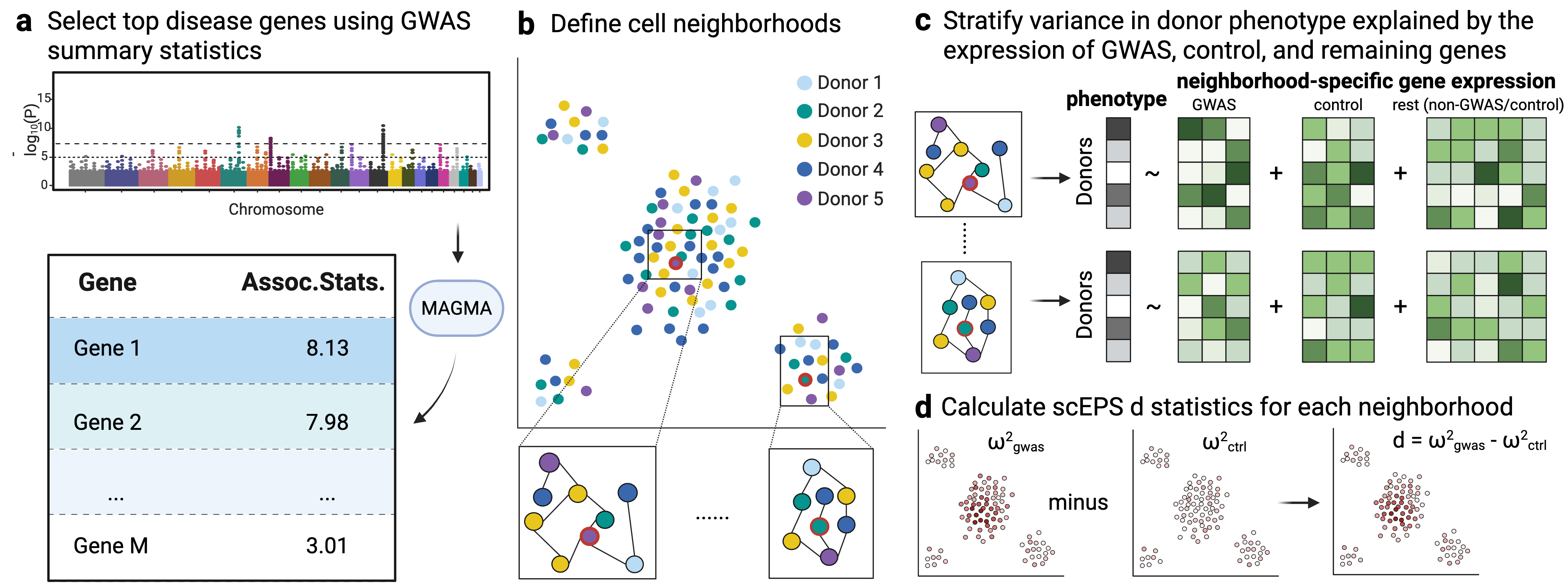
|
|
3
|
+
Copyright (c) 2026 Genentech, Inc.
|
|
4
|
+
|
|
5
|
+
Permission is hereby granted, free of charge, to any person obtaining a copy
|
|
6
|
+
of this software and associated documentation files (the "Software"), to deal
|
|
7
|
+
in the Software without restriction, including without limitation the rights
|
|
8
|
+
to use, copy, modify, merge, publish, distribute, sublicense, and/or sell
|
|
9
|
+
copies of the Software, and to permit persons to whom the Software is
|
|
10
|
+
furnished to do so, subject to the following conditions:
|
|
11
|
+
|
|
12
|
+
The above copyright notice and this permission notice shall be included in all
|
|
13
|
+
copies or substantial portions of the Software.
|
|
14
|
+
|
|
15
|
+
THE SOFTWARE IS PROVIDED "AS IS", WITHOUT WARRANTY OF ANY KIND, EXPRESS OR
|
|
16
|
+
IMPLIED, INCLUDING BUT NOT LIMITED TO THE WARRANTIES OF MERCHANTABILITY,
|
|
17
|
+
FITNESS FOR A PARTICULAR PURPOSE AND NONINFRINGEMENT. IN NO EVENT SHALL THE
|
|
18
|
+
AUTHORS OR COPYRIGHT HOLDERS BE LIABLE FOR ANY CLAIM, DAMAGES OR OTHER
|
|
19
|
+
LIABILITY, WHETHER IN AN ACTION OF CONTRACT, TORT OR OTHERWISE, ARISING FROM,
|
|
20
|
+
OUT OF OR IN CONNECTION WITH THE SOFTWARE OR THE USE OR OTHER DEALINGS IN THE
|
|
21
|
+
SOFTWARE.
|
sceps-0.1.0/PKG-INFO
ADDED
|
@@ -0,0 +1,141 @@
|
|
|
1
|
+
Metadata-Version: 2.4
|
|
2
|
+
Name: sceps
|
|
3
|
+
Version: 0.1.0
|
|
4
|
+
Summary: Integrate GWAS and single-cell disease cell atlas data to identify disease-associated cell neighborhoods
|
|
5
|
+
Author: Genentech, Inc.
|
|
6
|
+
License-Expression: MIT
|
|
7
|
+
Project-URL: Homepage, https://github.com/Genentech/sceps
|
|
8
|
+
Project-URL: Documentation, https://github.com/Genentech/sceps/wiki
|
|
9
|
+
Project-URL: Repository, https://github.com/Genentech/sceps
|
|
10
|
+
Project-URL: Issues, https://github.com/Genentech/sceps/issues
|
|
11
|
+
Keywords: single-cell,GWAS,genetics,transcriptomics,scRNA-seq
|
|
12
|
+
Classifier: Development Status :: 4 - Beta
|
|
13
|
+
Classifier: Intended Audience :: Science/Research
|
|
14
|
+
Classifier: Programming Language :: Python :: 3
|
|
15
|
+
Classifier: Programming Language :: Python :: 3.9
|
|
16
|
+
Classifier: Programming Language :: Python :: 3.10
|
|
17
|
+
Classifier: Programming Language :: Python :: 3.11
|
|
18
|
+
Classifier: Programming Language :: Python :: 3.12
|
|
19
|
+
Classifier: Topic :: Scientific/Engineering :: Bio-Informatics
|
|
20
|
+
Requires-Python: >=3.9
|
|
21
|
+
Description-Content-Type: text/markdown
|
|
22
|
+
License-File: LICENSE
|
|
23
|
+
Requires-Dist: numpy<3,>=1.23
|
|
24
|
+
Requires-Dist: pandas<3,>=1.5
|
|
25
|
+
Requires-Dist: scipy<2,>=1.9
|
|
26
|
+
Requires-Dist: anndata<1,>=0.10
|
|
27
|
+
Requires-Dist: scanpy<2,>=1.10
|
|
28
|
+
Requires-Dist: scikit-learn<2,>=1.1
|
|
29
|
+
Requires-Dist: statsmodels<1,>=0.13
|
|
30
|
+
Requires-Dist: tqdm>=4.60
|
|
31
|
+
Requires-Dist: packaging>=20
|
|
32
|
+
Requires-Dist: matplotlib>=3.6
|
|
33
|
+
Requires-Dist: seaborn>=0.12
|
|
34
|
+
Provides-Extra: preprocess
|
|
35
|
+
Requires-Dist: harmonypy>=0.0.9; extra == "preprocess"
|
|
36
|
+
Dynamic: license-file
|
|
37
|
+
|
|
38
|
+
# scEPS
|
|
39
|
+
**scEPS** (single-cell Expression exPlainability Statistics)
|
|
40
|
+
|
|
41
|
+
This repo contains the code of the method, **scEPS**, for integrating GWAS and single-cell disease cell atlas data to identify disease-associated cell neighborhoods. scEPS calculates a $d$ statistic at each cell neighborhood, representing the difference between the variance in disease explained by variations in the expression of each GWAS vs. each mean-expression matched control gene. An illustration of the scEPS method is shown below:
|
|
42
|
+
|
|
43
|
+
|
|
44
|
+
|
|
45
|
+
# Reference
|
|
46
|
+
|
|
47
|
+
The current draft of the manuscript is available [here](https://www.medrxiv.org/content/10.64898/2026.06.26.26356714v1). The code we used to create the figures in the manuscript is available [here](https://github.com/Genentech/sceps_manuscript). We also implemented [CNA*](https://github.com/Genentech/cna_star), a simple extension of [CNA](https://github.com/immunogenomics/cna), for estimating the variance in disease attributable to variations in cell abundance at each cell neighborhood.
|
|
48
|
+
|
|
49
|
+
We also provide a web UI for visualizing the results in the scEPS manuscript [here](https://scepsresultexplorer.streamlit.app/).
|
|
50
|
+
|
|
51
|
+
# Manual
|
|
52
|
+
We provide a detailed manual of scEPS in the [Wiki page](https://github.com/Genentech/sceps/wiki).
|
|
53
|
+
|
|
54
|
+
# Installation
|
|
55
|
+
|
|
56
|
+
## Option 1: using pip
|
|
57
|
+
|
|
58
|
+
The easiest way to install scEPS is from [PyPI](https://pypi.org/project/sceps/):
|
|
59
|
+
```shell
|
|
60
|
+
pip install sceps
|
|
61
|
+
```
|
|
62
|
+
|
|
63
|
+
This installs the `sceps` Python package along with the four command-line tools described under [Usage](#usage).
|
|
64
|
+
|
|
65
|
+
## Option 2: using Anaconda or Miniforge
|
|
66
|
+
scEPS may also be installed into a dedicated environment through [Anaconda](https://www.anaconda.com/download) or [Miniforge](https://github.com/conda-forge/miniforge). To do this, please first install Anaconda or Miniforge on your machine. You may then install scEPS using the following commands:
|
|
67
|
+
``` shell
|
|
68
|
+
git clone git@github.com:Genentech/sceps.git
|
|
69
|
+
cd sceps
|
|
70
|
+
conda env create -f sceps.yml
|
|
71
|
+
conda activate sceps
|
|
72
|
+
pip install .
|
|
73
|
+
```
|
|
74
|
+
|
|
75
|
+
The `sceps.yml` file installs the dependencies through conda; the final `pip install .` installs scEPS itself and its command-line tools. Use `pip install -e .` instead if you intend to modify the scEPS source.
|
|
76
|
+
|
|
77
|
+
## Option 3: manually install required packages
|
|
78
|
+
|
|
79
|
+
The user may also manually install the required packages to run scEPS. scEPS requires Python 3.9 or newer and the following packages:
|
|
80
|
+
|
|
81
|
+
| Package | Minimum | Version pinned in `sceps.yml` |
|
|
82
|
+
| --- | --- | --- |
|
|
83
|
+
| [numpy](https://numpy.org/) | 1.23 | 1.26.2 |
|
|
84
|
+
| [pandas](https://pandas.pydata.org/) | 1.5 | 1.5.3 |
|
|
85
|
+
| [scipy](https://scipy.org/) | 1.9 | 1.13.1 |
|
|
86
|
+
| [anndata](https://anndata.readthedocs.io/) | 0.10 | 0.10.7 |
|
|
87
|
+
| [scanpy](https://scanpy.readthedocs.io/) | 1.10 | 1.10.3 |
|
|
88
|
+
| [scikit-learn](https://scikit-learn.org/) | 1.1 | 1.3.2 |
|
|
89
|
+
| [statsmodels](https://www.statsmodels.org/) | 0.13 | 0.14.5 |
|
|
90
|
+
| [tqdm](https://tqdm.github.io/) | 4.60 | 4.67.1 |
|
|
91
|
+
| [packaging](https://packaging.pypa.io/) | 20 | 25.0 |
|
|
92
|
+
| [matplotlib](https://matplotlib.org/) | 3.6 | 3.9.4 |
|
|
93
|
+
| [seaborn](https://seaborn.pydata.org/) | 0.12 | 0.13.2 |
|
|
94
|
+
|
|
95
|
+
These can be installed with a single command:
|
|
96
|
+
```shell
|
|
97
|
+
conda install -c conda-forge python=3.9 numpy=1.26.2 pandas=1.5.3 scipy=1.13.1 \
|
|
98
|
+
anndata=0.10.7 scanpy=1.10.3 scikit-learn=1.3.2 statsmodels=0.14.5 \
|
|
99
|
+
tqdm=4.67.1 packaging=25.0 matplotlib-base=3.9.4 seaborn=0.13.2
|
|
100
|
+
```
|
|
101
|
+
|
|
102
|
+
The pinned versions are those used for the analyses in the manuscript, and `sceps.yml` reproduces that environment exactly. The minimums are the floors declared in `pyproject.toml`; scEPS has also been verified to reproduce identical output on numpy 2.x, pandas 2.x, anndata 0.12 and scanpy 1.11.
|
|
103
|
+
|
|
104
|
+
The optional preprocessing helper script `misc/preprocess_scdata.py` additionally requires [harmonypy](https://github.com/slowkow/harmonypy) for batch integration. This is also available as an extra:
|
|
105
|
+
```shell
|
|
106
|
+
pip install "sceps[preprocess]"
|
|
107
|
+
```
|
|
108
|
+
|
|
109
|
+
Once the required packages to run scEPS are installed, the user may then install scEPS using:
|
|
110
|
+
```shell
|
|
111
|
+
git clone git@github.com:Genentech/sceps.git
|
|
112
|
+
cd sceps
|
|
113
|
+
pip install --no-deps .
|
|
114
|
+
```
|
|
115
|
+
|
|
116
|
+
# Usage
|
|
117
|
+
|
|
118
|
+
Installing scEPS provides four command-line tools, corresponding to the four steps of the scEPS workflow:
|
|
119
|
+
|
|
120
|
+
| Command | Purpose |
|
|
121
|
+
| --- | --- |
|
|
122
|
+
| `sceps` | Estimate scEPS statistics for individual cell neighborhoods |
|
|
123
|
+
| `sceps-cluster-neighborhood` | Define approximately independent cell neighborhood blocks |
|
|
124
|
+
| `sceps-aggregate` | Aggregate scEPS statistics across cell types and across all cells |
|
|
125
|
+
| `sceps-corr` | Correlate scEPS statistics with gene expression |
|
|
126
|
+
|
|
127
|
+
Pass `--help` to any of them for the full list of options, e.g. `sceps --help`. A detailed description of each step is available in the [Wiki page](https://github.com/Genentech/sceps/wiki).
|
|
128
|
+
|
|
129
|
+
scEPS can also be driven from Python rather than the command line:
|
|
130
|
+
```python
|
|
131
|
+
from sceps.sceps_core import *
|
|
132
|
+
```
|
|
133
|
+
See [misc/run_sceps_from_python.py](https://github.com/Genentech/sceps/blob/master/misc/run_sceps_from_python.py) for a worked example.
|
|
134
|
+
|
|
135
|
+
# Testing scEPS
|
|
136
|
+
|
|
137
|
+
We provide examples script to test the scEPS workflow [here](https://github.com/Genentech/sceps/tree/master/test).
|
|
138
|
+
|
|
139
|
+
# Contact
|
|
140
|
+
|
|
141
|
+
Please create a GitHub issue if you experience any issue with running scEPS.
|
sceps-0.1.0/README.md
ADDED
|
@@ -0,0 +1,104 @@
|
|
|
1
|
+
# scEPS
|
|
2
|
+
**scEPS** (single-cell Expression exPlainability Statistics)
|
|
3
|
+
|
|
4
|
+
This repo contains the code of the method, **scEPS**, for integrating GWAS and single-cell disease cell atlas data to identify disease-associated cell neighborhoods. scEPS calculates a $d$ statistic at each cell neighborhood, representing the difference between the variance in disease explained by variations in the expression of each GWAS vs. each mean-expression matched control gene. An illustration of the scEPS method is shown below:
|
|
5
|
+
|
|
6
|
+

|
|
7
|
+
|
|
8
|
+
# Reference
|
|
9
|
+
|
|
10
|
+
The current draft of the manuscript is available [here](https://www.medrxiv.org/content/10.64898/2026.06.26.26356714v1). The code we used to create the figures in the manuscript is available [here](https://github.com/Genentech/sceps_manuscript). We also implemented [CNA*](https://github.com/Genentech/cna_star), a simple extension of [CNA](https://github.com/immunogenomics/cna), for estimating the variance in disease attributable to variations in cell abundance at each cell neighborhood.
|
|
11
|
+
|
|
12
|
+
We also provide a web UI for visualizing the results in the scEPS manuscript [here](https://scepsresultexplorer.streamlit.app/).
|
|
13
|
+
|
|
14
|
+
# Manual
|
|
15
|
+
We provide a detailed manual of scEPS in the [Wiki page](https://github.com/Genentech/sceps/wiki).
|
|
16
|
+
|
|
17
|
+
# Installation
|
|
18
|
+
|
|
19
|
+
## Option 1: using pip
|
|
20
|
+
|
|
21
|
+
The easiest way to install scEPS is from [PyPI](https://pypi.org/project/sceps/):
|
|
22
|
+
```shell
|
|
23
|
+
pip install sceps
|
|
24
|
+
```
|
|
25
|
+
|
|
26
|
+
This installs the `sceps` Python package along with the four command-line tools described under [Usage](#usage).
|
|
27
|
+
|
|
28
|
+
## Option 2: using Anaconda or Miniforge
|
|
29
|
+
scEPS may also be installed into a dedicated environment through [Anaconda](https://www.anaconda.com/download) or [Miniforge](https://github.com/conda-forge/miniforge). To do this, please first install Anaconda or Miniforge on your machine. You may then install scEPS using the following commands:
|
|
30
|
+
``` shell
|
|
31
|
+
git clone git@github.com:Genentech/sceps.git
|
|
32
|
+
cd sceps
|
|
33
|
+
conda env create -f sceps.yml
|
|
34
|
+
conda activate sceps
|
|
35
|
+
pip install .
|
|
36
|
+
```
|
|
37
|
+
|
|
38
|
+
The `sceps.yml` file installs the dependencies through conda; the final `pip install .` installs scEPS itself and its command-line tools. Use `pip install -e .` instead if you intend to modify the scEPS source.
|
|
39
|
+
|
|
40
|
+
## Option 3: manually install required packages
|
|
41
|
+
|
|
42
|
+
The user may also manually install the required packages to run scEPS. scEPS requires Python 3.9 or newer and the following packages:
|
|
43
|
+
|
|
44
|
+
| Package | Minimum | Version pinned in `sceps.yml` |
|
|
45
|
+
| --- | --- | --- |
|
|
46
|
+
| [numpy](https://numpy.org/) | 1.23 | 1.26.2 |
|
|
47
|
+
| [pandas](https://pandas.pydata.org/) | 1.5 | 1.5.3 |
|
|
48
|
+
| [scipy](https://scipy.org/) | 1.9 | 1.13.1 |
|
|
49
|
+
| [anndata](https://anndata.readthedocs.io/) | 0.10 | 0.10.7 |
|
|
50
|
+
| [scanpy](https://scanpy.readthedocs.io/) | 1.10 | 1.10.3 |
|
|
51
|
+
| [scikit-learn](https://scikit-learn.org/) | 1.1 | 1.3.2 |
|
|
52
|
+
| [statsmodels](https://www.statsmodels.org/) | 0.13 | 0.14.5 |
|
|
53
|
+
| [tqdm](https://tqdm.github.io/) | 4.60 | 4.67.1 |
|
|
54
|
+
| [packaging](https://packaging.pypa.io/) | 20 | 25.0 |
|
|
55
|
+
| [matplotlib](https://matplotlib.org/) | 3.6 | 3.9.4 |
|
|
56
|
+
| [seaborn](https://seaborn.pydata.org/) | 0.12 | 0.13.2 |
|
|
57
|
+
|
|
58
|
+
These can be installed with a single command:
|
|
59
|
+
```shell
|
|
60
|
+
conda install -c conda-forge python=3.9 numpy=1.26.2 pandas=1.5.3 scipy=1.13.1 \
|
|
61
|
+
anndata=0.10.7 scanpy=1.10.3 scikit-learn=1.3.2 statsmodels=0.14.5 \
|
|
62
|
+
tqdm=4.67.1 packaging=25.0 matplotlib-base=3.9.4 seaborn=0.13.2
|
|
63
|
+
```
|
|
64
|
+
|
|
65
|
+
The pinned versions are those used for the analyses in the manuscript, and `sceps.yml` reproduces that environment exactly. The minimums are the floors declared in `pyproject.toml`; scEPS has also been verified to reproduce identical output on numpy 2.x, pandas 2.x, anndata 0.12 and scanpy 1.11.
|
|
66
|
+
|
|
67
|
+
The optional preprocessing helper script `misc/preprocess_scdata.py` additionally requires [harmonypy](https://github.com/slowkow/harmonypy) for batch integration. This is also available as an extra:
|
|
68
|
+
```shell
|
|
69
|
+
pip install "sceps[preprocess]"
|
|
70
|
+
```
|
|
71
|
+
|
|
72
|
+
Once the required packages to run scEPS are installed, the user may then install scEPS using:
|
|
73
|
+
```shell
|
|
74
|
+
git clone git@github.com:Genentech/sceps.git
|
|
75
|
+
cd sceps
|
|
76
|
+
pip install --no-deps .
|
|
77
|
+
```
|
|
78
|
+
|
|
79
|
+
# Usage
|
|
80
|
+
|
|
81
|
+
Installing scEPS provides four command-line tools, corresponding to the four steps of the scEPS workflow:
|
|
82
|
+
|
|
83
|
+
| Command | Purpose |
|
|
84
|
+
| --- | --- |
|
|
85
|
+
| `sceps` | Estimate scEPS statistics for individual cell neighborhoods |
|
|
86
|
+
| `sceps-cluster-neighborhood` | Define approximately independent cell neighborhood blocks |
|
|
87
|
+
| `sceps-aggregate` | Aggregate scEPS statistics across cell types and across all cells |
|
|
88
|
+
| `sceps-corr` | Correlate scEPS statistics with gene expression |
|
|
89
|
+
|
|
90
|
+
Pass `--help` to any of them for the full list of options, e.g. `sceps --help`. A detailed description of each step is available in the [Wiki page](https://github.com/Genentech/sceps/wiki).
|
|
91
|
+
|
|
92
|
+
scEPS can also be driven from Python rather than the command line:
|
|
93
|
+
```python
|
|
94
|
+
from sceps.sceps_core import *
|
|
95
|
+
```
|
|
96
|
+
See [misc/run_sceps_from_python.py](https://github.com/Genentech/sceps/blob/master/misc/run_sceps_from_python.py) for a worked example.
|
|
97
|
+
|
|
98
|
+
# Testing scEPS
|
|
99
|
+
|
|
100
|
+
We provide examples script to test the scEPS workflow [here](https://github.com/Genentech/sceps/tree/master/test).
|
|
101
|
+
|
|
102
|
+
# Contact
|
|
103
|
+
|
|
104
|
+
Please create a GitHub issue if you experience any issue with running scEPS.
|
|
@@ -0,0 +1,63 @@
|
|
|
1
|
+
[build-system]
|
|
2
|
+
requires = ["setuptools>=77"]
|
|
3
|
+
build-backend = "setuptools.build_meta"
|
|
4
|
+
|
|
5
|
+
[project]
|
|
6
|
+
name = "sceps"
|
|
7
|
+
version = "0.1.0"
|
|
8
|
+
description = "Integrate GWAS and single-cell disease cell atlas data to identify disease-associated cell neighborhoods"
|
|
9
|
+
readme = "README.md"
|
|
10
|
+
requires-python = ">=3.9"
|
|
11
|
+
license = "MIT"
|
|
12
|
+
license-files = ["LICENSE"]
|
|
13
|
+
authors = [{ name = "Genentech, Inc." }]
|
|
14
|
+
keywords = ["single-cell", "GWAS", "genetics", "transcriptomics", "scRNA-seq"]
|
|
15
|
+
classifiers = [
|
|
16
|
+
"Development Status :: 4 - Beta",
|
|
17
|
+
"Intended Audience :: Science/Research",
|
|
18
|
+
"Programming Language :: Python :: 3",
|
|
19
|
+
"Programming Language :: Python :: 3.9",
|
|
20
|
+
"Programming Language :: Python :: 3.10",
|
|
21
|
+
"Programming Language :: Python :: 3.11",
|
|
22
|
+
"Programming Language :: Python :: 3.12",
|
|
23
|
+
"Topic :: Scientific/Engineering :: Bio-Informatics",
|
|
24
|
+
]
|
|
25
|
+
|
|
26
|
+
# Lower bounds are the versions scEPS has been tested against; majors are capped
|
|
27
|
+
# because this is an analysis tool rather than a library, so a breaking upstream
|
|
28
|
+
# release should fail at resolution time and not halfway through a long run.
|
|
29
|
+
dependencies = [
|
|
30
|
+
"numpy>=1.23,<3",
|
|
31
|
+
"pandas>=1.5,<3",
|
|
32
|
+
"scipy>=1.9,<2",
|
|
33
|
+
"anndata>=0.10,<1",
|
|
34
|
+
"scanpy>=1.10,<2",
|
|
35
|
+
"scikit-learn>=1.1,<2",
|
|
36
|
+
"statsmodels>=0.13,<1",
|
|
37
|
+
"tqdm>=4.60",
|
|
38
|
+
"packaging>=20",
|
|
39
|
+
# Imported by sceps/estimation.py. scanpy depends on both as well, but scEPS
|
|
40
|
+
# imports them directly, so they are declared directly.
|
|
41
|
+
"matplotlib>=3.6",
|
|
42
|
+
"seaborn>=0.12",
|
|
43
|
+
]
|
|
44
|
+
|
|
45
|
+
[project.optional-dependencies]
|
|
46
|
+
# Only needed by the misc/preprocess_scdata.py helper (sce.pp.harmony_integrate).
|
|
47
|
+
preprocess = ["harmonypy>=0.0.9"]
|
|
48
|
+
|
|
49
|
+
[project.urls]
|
|
50
|
+
Homepage = "https://github.com/Genentech/sceps"
|
|
51
|
+
Documentation = "https://github.com/Genentech/sceps/wiki"
|
|
52
|
+
Repository = "https://github.com/Genentech/sceps"
|
|
53
|
+
Issues = "https://github.com/Genentech/sceps/issues"
|
|
54
|
+
|
|
55
|
+
[project.scripts]
|
|
56
|
+
sceps = "sceps.cli.run:main"
|
|
57
|
+
sceps-cluster-neighborhood = "sceps.cli.cluster_neighborhood:main"
|
|
58
|
+
sceps-aggregate = "sceps.cli.aggregate:main"
|
|
59
|
+
sceps-corr = "sceps.cli.corr:main"
|
|
60
|
+
|
|
61
|
+
[tool.setuptools.packages.find]
|
|
62
|
+
# Ship only the importable package; test/, misc/ and img/ stay out of the wheel.
|
|
63
|
+
include = ["sceps*"]
|
|
@@ -0,0 +1,22 @@
|
|
|
1
|
+
"""scEPS (single-cell Expression exPlainability Statistics).
|
|
2
|
+
|
|
3
|
+
Integrates GWAS and single-cell disease cell atlas data to identify
|
|
4
|
+
disease-associated cell neighborhoods.
|
|
5
|
+
|
|
6
|
+
The Python API lives in :mod:`sceps.sceps_core`::
|
|
7
|
+
|
|
8
|
+
from sceps.sceps_core import *
|
|
9
|
+
|
|
10
|
+
Nothing heavyweight is imported here on purpose: the console scripts in
|
|
11
|
+
``sceps.cli`` import this package first, and pulling scanpy in at this point
|
|
12
|
+
would slow down ``--help`` for every command.
|
|
13
|
+
"""
|
|
14
|
+
|
|
15
|
+
from importlib.metadata import PackageNotFoundError, version
|
|
16
|
+
|
|
17
|
+
try:
|
|
18
|
+
__version__ = version("sceps")
|
|
19
|
+
except PackageNotFoundError: # running from a source tree without an install
|
|
20
|
+
__version__ = "0.0.0.dev0"
|
|
21
|
+
|
|
22
|
+
__all__ = ["__version__"]
|
|
@@ -0,0 +1,14 @@
|
|
|
1
|
+
"""Command-line entry points for scEPS.
|
|
2
|
+
|
|
3
|
+
Each module here exposes a ``main()`` that is wired to a console script in
|
|
4
|
+
``pyproject.toml``:
|
|
5
|
+
|
|
6
|
+
============================== ==============================
|
|
7
|
+
command module
|
|
8
|
+
============================== ==============================
|
|
9
|
+
``sceps`` :mod:`sceps.cli.run`
|
|
10
|
+
``sceps-cluster-neighborhood`` :mod:`sceps.cli.cluster_neighborhood`
|
|
11
|
+
``sceps-aggregate`` :mod:`sceps.cli.aggregate`
|
|
12
|
+
``sceps-corr`` :mod:`sceps.cli.corr`
|
|
13
|
+
============================== ==============================
|
|
14
|
+
"""
|