s3view 0.1.0__tar.gz
This diff represents the content of publicly available package versions that have been released to one of the supported registries. The information contained in this diff is provided for informational purposes only and reflects changes between package versions as they appear in their respective public registries.
- s3view-0.1.0/LICENSE +21 -0
- s3view-0.1.0/PKG-INFO +300 -0
- s3view-0.1.0/README.md +257 -0
- s3view-0.1.0/pyproject.toml +52 -0
- s3view-0.1.0/s3view/__init__.py +3 -0
- s3view-0.1.0/s3view/__main__.py +4 -0
- s3view-0.1.0/s3view/_deps.py +41 -0
- s3view-0.1.0/s3view/asdfview.py +331 -0
- s3view-0.1.0/s3view/cli.py +109 -0
- s3view-0.1.0/s3view/config.py +67 -0
- s3view-0.1.0/s3view/fitsview.py +337 -0
- s3view-0.1.0/s3view/s3client.py +327 -0
- s3view-0.1.0/s3view/server.py +469 -0
- s3view-0.1.0/s3view/static/app.js +969 -0
- s3view-0.1.0/s3view/static/index.html +69 -0
- s3view-0.1.0/s3view/static/style.css +221 -0
- s3view-0.1.0/s3view/thumbs.py +118 -0
- s3view-0.1.0/s3view.egg-info/PKG-INFO +300 -0
- s3view-0.1.0/s3view.egg-info/SOURCES.txt +26 -0
- s3view-0.1.0/s3view.egg-info/dependency_links.txt +1 -0
- s3view-0.1.0/s3view.egg-info/entry_points.txt +2 -0
- s3view-0.1.0/s3view.egg-info/requires.txt +26 -0
- s3view-0.1.0/s3view.egg-info/top_level.txt +1 -0
- s3view-0.1.0/setup.cfg +4 -0
- s3view-0.1.0/tests/test_asdfview.py +123 -0
- s3view-0.1.0/tests/test_fitsview.py +186 -0
- s3view-0.1.0/tests/test_helpers.py +82 -0
- s3view-0.1.0/tests/test_server.py +219 -0
s3view-0.1.0/LICENSE
ADDED
|
@@ -0,0 +1,21 @@
|
|
|
1
|
+
MIT License
|
|
2
|
+
|
|
3
|
+
Copyright (c) 2026 Luke Bouma
|
|
4
|
+
|
|
5
|
+
Permission is hereby granted, free of charge, to any person obtaining a copy
|
|
6
|
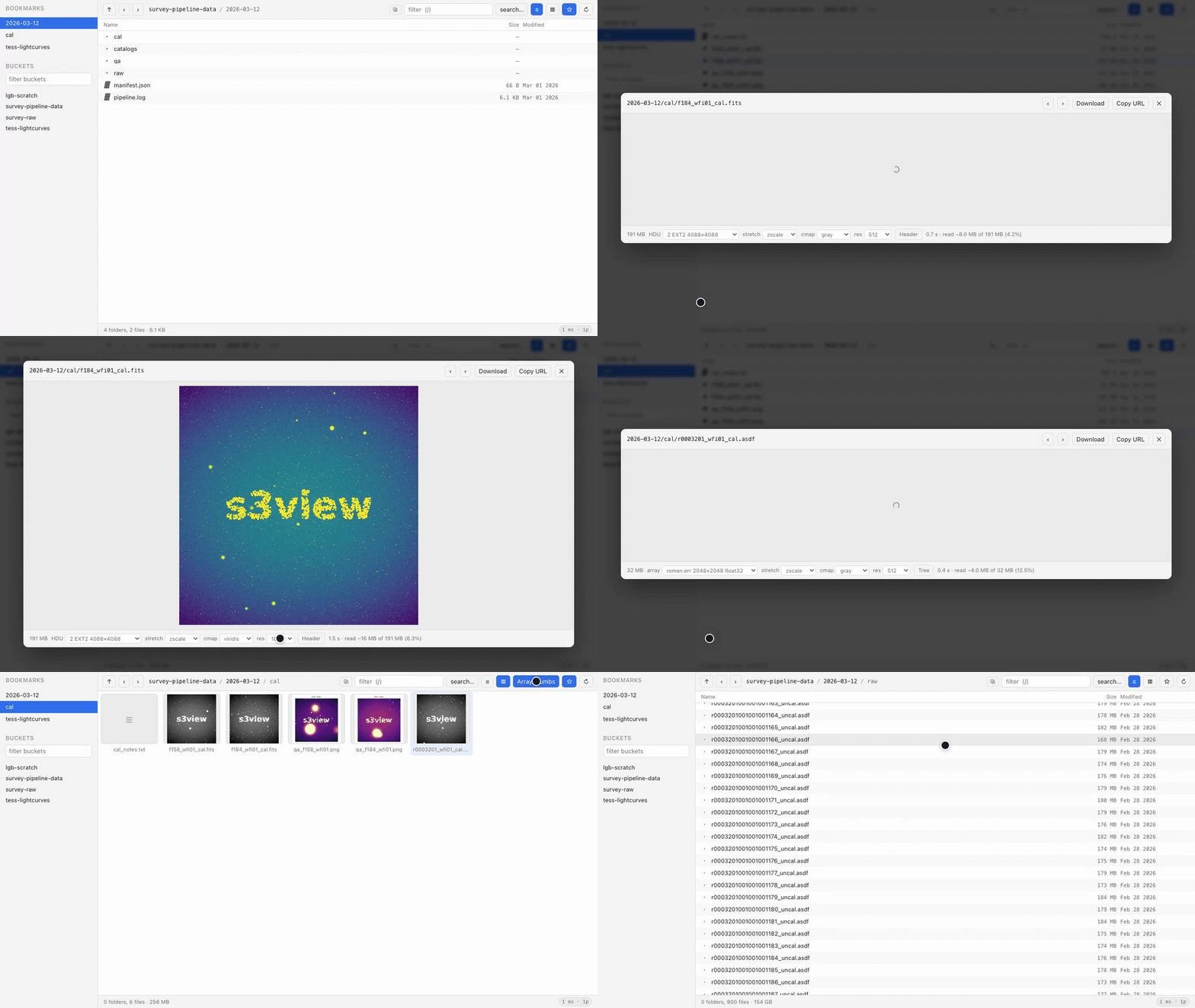
+
of this software and associated documentation files (the "Software"), to deal
|
|
7
|
+
in the Software without restriction, including without limitation the rights
|
|
8
|
+
to use, copy, modify, merge, publish, distribute, sublicense, and/or sell
|
|
9
|
+
copies of the Software, and to permit persons to whom the Software is
|
|
10
|
+
furnished to do so, subject to the following conditions:
|
|
11
|
+
|
|
12
|
+
The above copyright notice and this permission notice shall be included in all
|
|
13
|
+
copies or substantial portions of the Software.
|
|
14
|
+
|
|
15
|
+
THE SOFTWARE IS PROVIDED "AS IS", WITHOUT WARRANTY OF ANY KIND, EXPRESS OR
|
|
16
|
+
IMPLIED, INCLUDING BUT NOT LIMITED TO THE WARRANTIES OF MERCHANTABILITY,
|
|
17
|
+
FITNESS FOR A PARTICULAR PURPOSE AND NONINFRINGEMENT. IN NO EVENT SHALL THE
|
|
18
|
+
AUTHORS OR COPYRIGHT HOLDERS BE LIABLE FOR ANY CLAIM, DAMAGES OR OTHER
|
|
19
|
+
LIABILITY, WHETHER IN AN ACTION OF CONTRACT, TORT OR OTHERWISE, ARISING FROM,
|
|
20
|
+
OUT OF OR IN CONNECTION WITH THE SOFTWARE OR THE USE OR OTHER DEALINGS IN THE
|
|
21
|
+
SOFTWARE.
|
s3view-0.1.0/PKG-INFO
ADDED
|
@@ -0,0 +1,300 @@
|
|
|
1
|
+
Metadata-Version: 2.4
|
|
2
|
+
Name: s3view
|
|
3
|
+
Version: 0.1.0
|
|
4
|
+
Summary: Fast, lightweight S3 browser with true video streaming and remote FITS/ASDF previews
|
|
5
|
+
Author-email: Luke Bouma <bouma.luke@gmail.com>
|
|
6
|
+
License-Expression: MIT
|
|
7
|
+
Project-URL: Homepage, https://github.com/lgbouma/s3view
|
|
8
|
+
Project-URL: Repository, https://github.com/lgbouma/s3view
|
|
9
|
+
Project-URL: Issues, https://github.com/lgbouma/s3view/issues
|
|
10
|
+
Keywords: s3,astronomy,fits,asdf,quicklook,streaming,browser
|
|
11
|
+
Classifier: Development Status :: 4 - Beta
|
|
12
|
+
Classifier: Environment :: Web Environment
|
|
13
|
+
Classifier: Intended Audience :: Science/Research
|
|
14
|
+
Classifier: Operating System :: OS Independent
|
|
15
|
+
Classifier: Programming Language :: Python :: 3
|
|
16
|
+
Classifier: Topic :: Scientific/Engineering :: Astronomy
|
|
17
|
+
Classifier: Topic :: System :: Filesystems
|
|
18
|
+
Requires-Python: >=3.10
|
|
19
|
+
Description-Content-Type: text/markdown
|
|
20
|
+
License-File: LICENSE
|
|
21
|
+
Requires-Dist: botocore>=1.29
|
|
22
|
+
Provides-Extra: images
|
|
23
|
+
Requires-Dist: pillow; extra == "images"
|
|
24
|
+
Provides-Extra: fits
|
|
25
|
+
Requires-Dist: astropy; extra == "fits"
|
|
26
|
+
Requires-Dist: numpy; extra == "fits"
|
|
27
|
+
Provides-Extra: asdf
|
|
28
|
+
Requires-Dist: pyyaml; extra == "asdf"
|
|
29
|
+
Requires-Dist: numpy; extra == "asdf"
|
|
30
|
+
Provides-Extra: all
|
|
31
|
+
Requires-Dist: pillow; extra == "all"
|
|
32
|
+
Requires-Dist: astropy; extra == "all"
|
|
33
|
+
Requires-Dist: numpy; extra == "all"
|
|
34
|
+
Requires-Dist: pyyaml; extra == "all"
|
|
35
|
+
Requires-Dist: matplotlib; extra == "all"
|
|
36
|
+
Provides-Extra: test
|
|
37
|
+
Requires-Dist: pytest; extra == "test"
|
|
38
|
+
Requires-Dist: pillow; extra == "test"
|
|
39
|
+
Requires-Dist: astropy; extra == "test"
|
|
40
|
+
Requires-Dist: numpy; extra == "test"
|
|
41
|
+
Requires-Dist: pyyaml; extra == "test"
|
|
42
|
+
Dynamic: license-file
|
|
43
|
+
|
|
44
|
+
# s3view
|
|
45
|
+
|
|
46
|
+
[](https://github.com/lgbouma/s3view/actions/workflows/ci.yml)
|
|
47
|
+
[](https://www.python.org/)
|
|
48
|
+
[](LICENSE)
|
|
49
|
+
|
|
50
|
+
A fast, lightweight S3 browser for astronomy. It behaves like a file
|
|
51
|
+
manager — click through prefixes, preview things, hit space bar — but it
|
|
52
|
+
**streams instead of downloading**.
|
|
53
|
+
|
|
54
|
+
Compatible with: FITS, ASDF, movies, standard image formats, PDFs, standard
|
|
55
|
+
text formats.
|
|
56
|
+
|
|
57
|
+
Run from command line:
|
|
58
|
+
```
|
|
59
|
+
s3view # open your default location
|
|
60
|
+
s3view s3://bucket/prefix/ # open somewhere specific
|
|
61
|
+
s3view --set-start s3://bucket/prefix/ # remember that as the default
|
|
62
|
+
```
|
|
63
|
+
|
|
64
|
+
It starts a local server, opens your browser and prints a URL. `Ctrl-C` quits.
|
|
65
|
+
On first run, with nothing configured, it lists your buckets and lets you pick.
|
|
66
|
+
|
|
67
|
+
|
|
68
|
+
|
|
69
|
+
## Installation
|
|
70
|
+
|
|
71
|
+
```bash
|
|
72
|
+
uv tool install 's3view[all]'
|
|
73
|
+
```
|
|
74
|
+
|
|
75
|
+
One command, no clone, and nothing added to the environments you work in.
|
|
76
|
+
`[all]` brings the preview stack with it — astropy, numpy, Pillow, matplotlib,
|
|
77
|
+
PyYAML — so every feature is on from the first run. Python 3.10+; no boto3, no
|
|
78
|
+
web framework, no build step, no `npm install`.
|
|
79
|
+
|
|
80
|
+
To try it without installing anything at all:
|
|
81
|
+
|
|
82
|
+
```bash
|
|
83
|
+
uvx 's3view[all]' s3://bucket/prefix/
|
|
84
|
+
```
|
|
85
|
+
|
|
86
|
+
Or use whichever packaging tool you already have:
|
|
87
|
+
|
|
88
|
+
```bash
|
|
89
|
+
pipx install 's3view[all]'
|
|
90
|
+
pip install 's3view[all]'
|
|
91
|
+
```
|
|
92
|
+
|
|
93
|
+
Leave the `[all]` off for a minimal install. `botocore` is the only hard
|
|
94
|
+
dependency; everything the extras would have added degrades gracefully, and
|
|
95
|
+
s3view tells you at launch what is live (`thumbnails:on fits:on`). The one
|
|
96
|
+
combination to avoid is an isolated install *without* the extras: a `pipx` or
|
|
97
|
+
`uv tool` environment cannot see the astropy and Pillow in your normal
|
|
98
|
+
environment, so FITS, ASDF and thumbnails quietly switch off.
|
|
99
|
+
|
|
100
|
+
### Running from a checkout
|
|
101
|
+
|
|
102
|
+
For development, or if you would rather s3view used the scientific stack you
|
|
103
|
+
have already built than carry its own copy of it:
|
|
104
|
+
|
|
105
|
+
```bash
|
|
106
|
+
git clone git@github.com:lgbouma/s3view.git /my/preferred/dir/s3view
|
|
107
|
+
echo 'export PATH="/my/preferred/dir/s3view/bin:$PATH"' >> ~/.bashrc # or ~/.zshrc
|
|
108
|
+
exec $SHELL
|
|
109
|
+
```
|
|
110
|
+
|
|
111
|
+
`bin/s3view` runs the checkout under whichever `python3` is first on your PATH.
|
|
112
|
+
That is the point — it inherits your stack — but it also means that environment
|
|
113
|
+
needs `botocore`, and a per-project virtualenv frequently does not even when
|
|
114
|
+
your usual environment does. If the wrong interpreter wins, name the right one:
|
|
115
|
+
|
|
116
|
+
```bash
|
|
117
|
+
export S3VIEW_PYTHON="$HOME/envs/astro/bin/python"
|
|
118
|
+
```
|
|
119
|
+
|
|
120
|
+
`pip install -e /my/preferred/dir/s3view` is the same idea with a console
|
|
121
|
+
script instead of a PATH entry, and edits still take effect immediately.
|
|
122
|
+
|
|
123
|
+
### Optional dependencies
|
|
124
|
+
|
|
125
|
+
Everything below degrades gracefully, and the launch banner says which of them
|
|
126
|
+
are live.
|
|
127
|
+
|
|
128
|
+
| package | enables |
|
|
129
|
+
|---|---|
|
|
130
|
+
| `pillow` | image thumbnails, and previews of formats browsers cannot decode |
|
|
131
|
+
| `numpy` | any array preview at all |
|
|
132
|
+
| `astropy` | FITS previews (zscale in particular) |
|
|
133
|
+
| `pyyaml` | ASDF previews |
|
|
134
|
+
| `matplotlib` | colormaps beyond grayscale |
|
|
135
|
+
|
|
136
|
+
### Credentials and endpoints
|
|
137
|
+
|
|
138
|
+
Standard botocore resolution: environment variables, `~/.aws/credentials`,
|
|
139
|
+
`AWS_PROFILE`, SSO, instance roles. Override per run with `--profile` and
|
|
140
|
+
`--region`. Non-AWS S3-compatible stores work via `--endpoint-url` (MinIO,
|
|
141
|
+
Ceph, Cloudflare R2, Wasabi).
|
|
142
|
+
|
|
143
|
+
**Buckets you can read but do not own.** S3's `ListBuckets` returns only the
|
|
144
|
+
buckets owned by the calling account. A bucket shared with you cross-account
|
|
145
|
+
through a bucket policy is fully readable yet never appears in that list — a
|
|
146
|
+
common arrangement for shared project data. s3view therefore adds any bucket it
|
|
147
|
+
knows you can reach (bookmarked, or the one you are in) to the sidebar and marks
|
|
148
|
+
it with a `·`. To reach one for the first time, either pass it on the command
|
|
149
|
+
line or press `⌘L` and type the `s3://` path, then bookmark it with ☆.
|
|
150
|
+
|
|
151
|
+
## What it previews
|
|
152
|
+
|
|
153
|
+
| type | how |
|
|
154
|
+
|---|---|
|
|
155
|
+
| **FITS** (`.fits`, `.fit`, `.fts`, `.fz`) | strided ranged reads; HDU picker, stretch, colormap, resolution, full header text |
|
|
156
|
+
| **ASDF** (`.asdf`) | same, driven by the YAML tree and block index; pick any named array (`roman.data`, `roman.err`, `roman.dq`, …) and read the tree |
|
|
157
|
+
| mp4 / mov / webm / m4v | streamed from S3 by range request, with a running "~X MB transferred" readout |
|
|
158
|
+
| png / jpg / gif / webp / tif | presigned direct load; server-side thumbnail for formats the browser cannot decode |
|
|
159
|
+
| txt / json / yaml / cfg / param / log / py / csv | first 256 KB via one ranged read |
|
|
160
|
+
| pdf | presigned, in an iframe |
|
|
161
|
+
| anything else | metadata plus a download link |
|
|
162
|
+
|
|
163
|
+
Array previews share one interface: choose the HDU or array, a stretch
|
|
164
|
+
(`zscale`, `asinh`, `log`, `99.5%`, `minmax`), a colormap, and a resolution from
|
|
165
|
+
256 to 1024 px. The footer always reports what it actually read — e.g.
|
|
166
|
+
`2.1 s · read ~8.4 MB of 191 MB (4.2%)` — so the cost is never hidden from you.
|
|
167
|
+
|
|
168
|
+
Containers the browser cannot decode (mkv, avi) offer **Open in player**, which
|
|
169
|
+
hands the presigned URL to IINA or VLC — still streaming, never downloading.
|
|
170
|
+
|
|
171
|
+
## Configuration
|
|
172
|
+
|
|
173
|
+
`~/.config/s3view/config.json`, written on first run. Set `start` to open
|
|
174
|
+
somewhere by default:
|
|
175
|
+
|
|
176
|
+
```json
|
|
177
|
+
{
|
|
178
|
+
"start": "s3://your-bucket/your/prefix/",
|
|
179
|
+
"bookmarks": [
|
|
180
|
+
{"name": "your-prefix", "uri": "s3://your-bucket/your/prefix/"}
|
|
181
|
+
],
|
|
182
|
+
"profile": null,
|
|
183
|
+
"region": null,
|
|
184
|
+
"endpoint_url": null,
|
|
185
|
+
"page_size": 1000,
|
|
186
|
+
"presign_expires": 3600,
|
|
187
|
+
"external_player": "IINA"
|
|
188
|
+
}
|
|
189
|
+
```
|
|
190
|
+
|
|
191
|
+
`start` accepts any `s3://bucket/prefix/`; leave it `null` for the bucket picker.
|
|
192
|
+
`s3view --set-start s3://bucket/prefix/` writes it for you, and ☆ manages
|
|
193
|
+
bookmarks. No bucket names are baked into the source.
|
|
194
|
+
|
|
195
|
+
## Security
|
|
196
|
+
|
|
197
|
+
The server binds `127.0.0.1` only, and every API call requires a token generated
|
|
198
|
+
fresh at startup and carried in the URL it opens. Without this, any web page you
|
|
199
|
+
happened to have open could quietly read your buckets through localhost.
|
|
200
|
+
Requests arriving with a foreign `Origin` header are rejected.
|
|
201
|
+
|
|
202
|
+
Presigned URLs default to one-hour expiry and are minted only for objects you
|
|
203
|
+
actually open. **Copy URL** puts one on your clipboard deliberately — treat it
|
|
204
|
+
as a password for that object until it expires.
|
|
205
|
+
|
|
206
|
+
## Development
|
|
207
|
+
|
|
208
|
+
```bash
|
|
209
|
+
pip install -e ".[test]"
|
|
210
|
+
pytest
|
|
211
|
+
```
|
|
212
|
+
|
|
213
|
+
The suite needs **no AWS credentials and no network**. It builds synthetic FITS
|
|
214
|
+
and ASDF files in memory and serves them through a fake S3 that records every
|
|
215
|
+
ranged read, so the tests can assert on *how much* was fetched — the property
|
|
216
|
+
the whole program exists to protect. Both the contiguous and strided read paths
|
|
217
|
+
are exercised and checked against each other for identical pixels.
|
|
218
|
+
|
|
219
|
+
CI runs on Python 3.10–3.13 on Linux plus macOS, and a separate job installs
|
|
220
|
+
*only* botocore to prove the optional dependencies really do degrade gracefully
|
|
221
|
+
rather than crashing.
|
|
222
|
+
|
|
223
|
+
### Releasing
|
|
224
|
+
|
|
225
|
+
Version lives in one place, `s3view/__init__.py`; `pyproject.toml` reads it
|
|
226
|
+
from there. To cut a release, bump it, commit, then:
|
|
227
|
+
|
|
228
|
+
```bash
|
|
229
|
+
git tag v0.1.1 && git push origin v0.1.1
|
|
230
|
+
```
|
|
231
|
+
|
|
232
|
+
The `release` workflow builds the sdist and wheel, refuses the tag if it
|
|
233
|
+
disagrees with `s3view.__version__`, installs the wheel into a clean
|
|
234
|
+
environment and starts the CLI from it, then uploads to PyPI through [trusted
|
|
235
|
+
publishing](https://docs.pypi.org/trusted-publishers/) — there is no API token
|
|
236
|
+
anywhere in the repository or its secrets. Running the workflow by hand
|
|
237
|
+
(`workflow_dispatch`) does everything except the upload, which is the way to
|
|
238
|
+
rehearse a release: PyPI never allows a version number to be reused, even after
|
|
239
|
+
the file is deleted.
|
|
240
|
+
|
|
241
|
+
To re-record the README animation (needs `playwright` and `ffmpeg`, neither of
|
|
242
|
+
them a runtime dependency):
|
|
243
|
+
|
|
244
|
+
```bash
|
|
245
|
+
pip install playwright && playwright install chromium
|
|
246
|
+
python tools/record_demo.py # -> docs/demo.gif
|
|
247
|
+
```
|
|
248
|
+
|
|
249
|
+
## Why it is fast
|
|
250
|
+
|
|
251
|
+
**Video and audio never pass through this program.** The page is handed a
|
|
252
|
+
short-lived presigned S3 URL and the browser's own media stack range-requests it
|
|
253
|
+
directly, so seeking is cheap no matter how large the file. Measured from inside
|
|
254
|
+
the browser against a 731 MB mp4, on a ~2.4 MB/s link:
|
|
255
|
+
|
|
256
|
+
| request | result |
|
|
257
|
+
|---|---|
|
|
258
|
+
| first 64 KB | `206`, 717 ms |
|
|
259
|
+
| 64 KB from the **middle** | `206`, 321 ms |
|
|
260
|
+
| 64 KB from the **end** | `206`, 251 ms |
|
|
261
|
+
|
|
262
|
+
**Array images are read by byte range, not downloaded.** Both FITS and ASDF are
|
|
263
|
+
self-describing: a small ranged read of the metadata is enough to compute the
|
|
264
|
+
exact byte offset of every row of every array. s3view then fetches only the rows
|
|
265
|
+
the preview needs, in parallel, and bins the columns it already has in memory.
|
|
266
|
+
For a 200 MB, 4088×4088 float32 detector frame:
|
|
267
|
+
|
|
268
|
+
| preview | bytes read | time |
|
|
269
|
+
|---|---|---|
|
|
270
|
+
| 256 px | 4.2 MB (2.2%) | ~1.3 s |
|
|
271
|
+
| 512 px | 8.4 MB (4.2%) | ~2.1 s |
|
|
272
|
+
| 1024 px | 16.7 MB (8.7%) | ~3.8 s |
|
|
273
|
+
| downloading it instead | 200 MB | ~90 s |
|
|
274
|
+
|
|
275
|
+
Ranged reads bypass botocore's request machinery: the object is presigned once
|
|
276
|
+
and every range is pulled over a pooled HTTPS connection, because signing 512
|
|
277
|
+
separate requests costs more CPU than the transfer costs bandwidth.
|
|
278
|
+
|
|
279
|
+
**Listings are paginated and virtualized.** A prefix of 1000 objects renders
|
|
280
|
+
about 60 DOM nodes; the next page is prefetched in the background while you read
|
|
281
|
+
the current one. A prefix holding 187 GB across 1000 files opens as fast as an
|
|
282
|
+
empty one.
|
|
283
|
+
|
|
284
|
+
**Thumbnails are lazy and rate-limited.** Only tiles actually on screen are
|
|
285
|
+
requested, three at a time, cached on disk under `~/.cache/s3view`. Array
|
|
286
|
+
thumbnails in gallery view cost megabytes each, so they sit behind a toggle.
|
|
287
|
+
|
|
288
|
+
## Known limitations
|
|
289
|
+
|
|
290
|
+
- Array previews sample rows rather than averaging them vertically, so a
|
|
291
|
+
decimated view of a crowded field aliases. Columns *are* averaged. Raise the
|
|
292
|
+
resolution to sample more rows.
|
|
293
|
+
- ASDF blocks compressed with `lz4` or `blosc` cannot be read by range and are
|
|
294
|
+
not supported; uncompressed, `zlib` and `bzip2` blocks are.
|
|
295
|
+
- `GetBucketLocation` is frequently denied on cross-account buckets, so the
|
|
296
|
+
region is taken from the `x-amz-bucket-region` header on HeadBucket instead.
|
|
297
|
+
If both are denied, s3view falls back to your configured default region.
|
|
298
|
+
- Chrome will not load video in a hidden or background tab; if a movie sits on a
|
|
299
|
+
spinner, bring the window to the front.
|
|
300
|
+
- Read-only. There is no upload, rename, or delete.
|
s3view-0.1.0/README.md
ADDED
|
@@ -0,0 +1,257 @@
|
|
|
1
|
+
# s3view
|
|
2
|
+
|
|
3
|
+
[](https://github.com/lgbouma/s3view/actions/workflows/ci.yml)
|
|
4
|
+
[](https://www.python.org/)
|
|
5
|
+
[](LICENSE)
|
|
6
|
+
|
|
7
|
+
A fast, lightweight S3 browser for astronomy. It behaves like a file
|
|
8
|
+
manager — click through prefixes, preview things, hit space bar — but it
|
|
9
|
+
**streams instead of downloading**.
|
|
10
|
+
|
|
11
|
+
Compatible with: FITS, ASDF, movies, standard image formats, PDFs, standard
|
|
12
|
+
text formats.
|
|
13
|
+
|
|
14
|
+
Run from command line:
|
|
15
|
+
```
|
|
16
|
+
s3view # open your default location
|
|
17
|
+
s3view s3://bucket/prefix/ # open somewhere specific
|
|
18
|
+
s3view --set-start s3://bucket/prefix/ # remember that as the default
|
|
19
|
+
```
|
|
20
|
+
|
|
21
|
+
It starts a local server, opens your browser and prints a URL. `Ctrl-C` quits.
|
|
22
|
+
On first run, with nothing configured, it lists your buckets and lets you pick.
|
|
23
|
+
|
|
24
|
+

|
|
25
|
+
|
|
26
|
+
## Installation
|
|
27
|
+
|
|
28
|
+
```bash
|
|
29
|
+
uv tool install 's3view[all]'
|
|
30
|
+
```
|
|
31
|
+
|
|
32
|
+
One command, no clone, and nothing added to the environments you work in.
|
|
33
|
+
`[all]` brings the preview stack with it — astropy, numpy, Pillow, matplotlib,
|
|
34
|
+
PyYAML — so every feature is on from the first run. Python 3.10+; no boto3, no
|
|
35
|
+
web framework, no build step, no `npm install`.
|
|
36
|
+
|
|
37
|
+
To try it without installing anything at all:
|
|
38
|
+
|
|
39
|
+
```bash
|
|
40
|
+
uvx 's3view[all]' s3://bucket/prefix/
|
|
41
|
+
```
|
|
42
|
+
|
|
43
|
+
Or use whichever packaging tool you already have:
|
|
44
|
+
|
|
45
|
+
```bash
|
|
46
|
+
pipx install 's3view[all]'
|
|
47
|
+
pip install 's3view[all]'
|
|
48
|
+
```
|
|
49
|
+
|
|
50
|
+
Leave the `[all]` off for a minimal install. `botocore` is the only hard
|
|
51
|
+
dependency; everything the extras would have added degrades gracefully, and
|
|
52
|
+
s3view tells you at launch what is live (`thumbnails:on fits:on`). The one
|
|
53
|
+
combination to avoid is an isolated install *without* the extras: a `pipx` or
|
|
54
|
+
`uv tool` environment cannot see the astropy and Pillow in your normal
|
|
55
|
+
environment, so FITS, ASDF and thumbnails quietly switch off.
|
|
56
|
+
|
|
57
|
+
### Running from a checkout
|
|
58
|
+
|
|
59
|
+
For development, or if you would rather s3view used the scientific stack you
|
|
60
|
+
have already built than carry its own copy of it:
|
|
61
|
+
|
|
62
|
+
```bash
|
|
63
|
+
git clone git@github.com:lgbouma/s3view.git /my/preferred/dir/s3view
|
|
64
|
+
echo 'export PATH="/my/preferred/dir/s3view/bin:$PATH"' >> ~/.bashrc # or ~/.zshrc
|
|
65
|
+
exec $SHELL
|
|
66
|
+
```
|
|
67
|
+
|
|
68
|
+
`bin/s3view` runs the checkout under whichever `python3` is first on your PATH.
|
|
69
|
+
That is the point — it inherits your stack — but it also means that environment
|
|
70
|
+
needs `botocore`, and a per-project virtualenv frequently does not even when
|
|
71
|
+
your usual environment does. If the wrong interpreter wins, name the right one:
|
|
72
|
+
|
|
73
|
+
```bash
|
|
74
|
+
export S3VIEW_PYTHON="$HOME/envs/astro/bin/python"
|
|
75
|
+
```
|
|
76
|
+
|
|
77
|
+
`pip install -e /my/preferred/dir/s3view` is the same idea with a console
|
|
78
|
+
script instead of a PATH entry, and edits still take effect immediately.
|
|
79
|
+
|
|
80
|
+
### Optional dependencies
|
|
81
|
+
|
|
82
|
+
Everything below degrades gracefully, and the launch banner says which of them
|
|
83
|
+
are live.
|
|
84
|
+
|
|
85
|
+
| package | enables |
|
|
86
|
+
|---|---|
|
|
87
|
+
| `pillow` | image thumbnails, and previews of formats browsers cannot decode |
|
|
88
|
+
| `numpy` | any array preview at all |
|
|
89
|
+
| `astropy` | FITS previews (zscale in particular) |
|
|
90
|
+
| `pyyaml` | ASDF previews |
|
|
91
|
+
| `matplotlib` | colormaps beyond grayscale |
|
|
92
|
+
|
|
93
|
+
### Credentials and endpoints
|
|
94
|
+
|
|
95
|
+
Standard botocore resolution: environment variables, `~/.aws/credentials`,
|
|
96
|
+
`AWS_PROFILE`, SSO, instance roles. Override per run with `--profile` and
|
|
97
|
+
`--region`. Non-AWS S3-compatible stores work via `--endpoint-url` (MinIO,
|
|
98
|
+
Ceph, Cloudflare R2, Wasabi).
|
|
99
|
+
|
|
100
|
+
**Buckets you can read but do not own.** S3's `ListBuckets` returns only the
|
|
101
|
+
buckets owned by the calling account. A bucket shared with you cross-account
|
|
102
|
+
through a bucket policy is fully readable yet never appears in that list — a
|
|
103
|
+
common arrangement for shared project data. s3view therefore adds any bucket it
|
|
104
|
+
knows you can reach (bookmarked, or the one you are in) to the sidebar and marks
|
|
105
|
+
it with a `·`. To reach one for the first time, either pass it on the command
|
|
106
|
+
line or press `⌘L` and type the `s3://` path, then bookmark it with ☆.
|
|
107
|
+
|
|
108
|
+
## What it previews
|
|
109
|
+
|
|
110
|
+
| type | how |
|
|
111
|
+
|---|---|
|
|
112
|
+
| **FITS** (`.fits`, `.fit`, `.fts`, `.fz`) | strided ranged reads; HDU picker, stretch, colormap, resolution, full header text |
|
|
113
|
+
| **ASDF** (`.asdf`) | same, driven by the YAML tree and block index; pick any named array (`roman.data`, `roman.err`, `roman.dq`, …) and read the tree |
|
|
114
|
+
| mp4 / mov / webm / m4v | streamed from S3 by range request, with a running "~X MB transferred" readout |
|
|
115
|
+
| png / jpg / gif / webp / tif | presigned direct load; server-side thumbnail for formats the browser cannot decode |
|
|
116
|
+
| txt / json / yaml / cfg / param / log / py / csv | first 256 KB via one ranged read |
|
|
117
|
+
| pdf | presigned, in an iframe |
|
|
118
|
+
| anything else | metadata plus a download link |
|
|
119
|
+
|
|
120
|
+
Array previews share one interface: choose the HDU or array, a stretch
|
|
121
|
+
(`zscale`, `asinh`, `log`, `99.5%`, `minmax`), a colormap, and a resolution from
|
|
122
|
+
256 to 1024 px. The footer always reports what it actually read — e.g.
|
|
123
|
+
`2.1 s · read ~8.4 MB of 191 MB (4.2%)` — so the cost is never hidden from you.
|
|
124
|
+
|
|
125
|
+
Containers the browser cannot decode (mkv, avi) offer **Open in player**, which
|
|
126
|
+
hands the presigned URL to IINA or VLC — still streaming, never downloading.
|
|
127
|
+
|
|
128
|
+
## Configuration
|
|
129
|
+
|
|
130
|
+
`~/.config/s3view/config.json`, written on first run. Set `start` to open
|
|
131
|
+
somewhere by default:
|
|
132
|
+
|
|
133
|
+
```json
|
|
134
|
+
{
|
|
135
|
+
"start": "s3://your-bucket/your/prefix/",
|
|
136
|
+
"bookmarks": [
|
|
137
|
+
{"name": "your-prefix", "uri": "s3://your-bucket/your/prefix/"}
|
|
138
|
+
],
|
|
139
|
+
"profile": null,
|
|
140
|
+
"region": null,
|
|
141
|
+
"endpoint_url": null,
|
|
142
|
+
"page_size": 1000,
|
|
143
|
+
"presign_expires": 3600,
|
|
144
|
+
"external_player": "IINA"
|
|
145
|
+
}
|
|
146
|
+
```
|
|
147
|
+
|
|
148
|
+
`start` accepts any `s3://bucket/prefix/`; leave it `null` for the bucket picker.
|
|
149
|
+
`s3view --set-start s3://bucket/prefix/` writes it for you, and ☆ manages
|
|
150
|
+
bookmarks. No bucket names are baked into the source.
|
|
151
|
+
|
|
152
|
+
## Security
|
|
153
|
+
|
|
154
|
+
The server binds `127.0.0.1` only, and every API call requires a token generated
|
|
155
|
+
fresh at startup and carried in the URL it opens. Without this, any web page you
|
|
156
|
+
happened to have open could quietly read your buckets through localhost.
|
|
157
|
+
Requests arriving with a foreign `Origin` header are rejected.
|
|
158
|
+
|
|
159
|
+
Presigned URLs default to one-hour expiry and are minted only for objects you
|
|
160
|
+
actually open. **Copy URL** puts one on your clipboard deliberately — treat it
|
|
161
|
+
as a password for that object until it expires.
|
|
162
|
+
|
|
163
|
+
## Development
|
|
164
|
+
|
|
165
|
+
```bash
|
|
166
|
+
pip install -e ".[test]"
|
|
167
|
+
pytest
|
|
168
|
+
```
|
|
169
|
+
|
|
170
|
+
The suite needs **no AWS credentials and no network**. It builds synthetic FITS
|
|
171
|
+
and ASDF files in memory and serves them through a fake S3 that records every
|
|
172
|
+
ranged read, so the tests can assert on *how much* was fetched — the property
|
|
173
|
+
the whole program exists to protect. Both the contiguous and strided read paths
|
|
174
|
+
are exercised and checked against each other for identical pixels.
|
|
175
|
+
|
|
176
|
+
CI runs on Python 3.10–3.13 on Linux plus macOS, and a separate job installs
|
|
177
|
+
*only* botocore to prove the optional dependencies really do degrade gracefully
|
|
178
|
+
rather than crashing.
|
|
179
|
+
|
|
180
|
+
### Releasing
|
|
181
|
+
|
|
182
|
+
Version lives in one place, `s3view/__init__.py`; `pyproject.toml` reads it
|
|
183
|
+
from there. To cut a release, bump it, commit, then:
|
|
184
|
+
|
|
185
|
+
```bash
|
|
186
|
+
git tag v0.1.1 && git push origin v0.1.1
|
|
187
|
+
```
|
|
188
|
+
|
|
189
|
+
The `release` workflow builds the sdist and wheel, refuses the tag if it
|
|
190
|
+
disagrees with `s3view.__version__`, installs the wheel into a clean
|
|
191
|
+
environment and starts the CLI from it, then uploads to PyPI through [trusted
|
|
192
|
+
publishing](https://docs.pypi.org/trusted-publishers/) — there is no API token
|
|
193
|
+
anywhere in the repository or its secrets. Running the workflow by hand
|
|
194
|
+
(`workflow_dispatch`) does everything except the upload, which is the way to
|
|
195
|
+
rehearse a release: PyPI never allows a version number to be reused, even after
|
|
196
|
+
the file is deleted.
|
|
197
|
+
|
|
198
|
+
To re-record the README animation (needs `playwright` and `ffmpeg`, neither of
|
|
199
|
+
them a runtime dependency):
|
|
200
|
+
|
|
201
|
+
```bash
|
|
202
|
+
pip install playwright && playwright install chromium
|
|
203
|
+
python tools/record_demo.py # -> docs/demo.gif
|
|
204
|
+
```
|
|
205
|
+
|
|
206
|
+
## Why it is fast
|
|
207
|
+
|
|
208
|
+
**Video and audio never pass through this program.** The page is handed a
|
|
209
|
+
short-lived presigned S3 URL and the browser's own media stack range-requests it
|
|
210
|
+
directly, so seeking is cheap no matter how large the file. Measured from inside
|
|
211
|
+
the browser against a 731 MB mp4, on a ~2.4 MB/s link:
|
|
212
|
+
|
|
213
|
+
| request | result |
|
|
214
|
+
|---|---|
|
|
215
|
+
| first 64 KB | `206`, 717 ms |
|
|
216
|
+
| 64 KB from the **middle** | `206`, 321 ms |
|
|
217
|
+
| 64 KB from the **end** | `206`, 251 ms |
|
|
218
|
+
|
|
219
|
+
**Array images are read by byte range, not downloaded.** Both FITS and ASDF are
|
|
220
|
+
self-describing: a small ranged read of the metadata is enough to compute the
|
|
221
|
+
exact byte offset of every row of every array. s3view then fetches only the rows
|
|
222
|
+
the preview needs, in parallel, and bins the columns it already has in memory.
|
|
223
|
+
For a 200 MB, 4088×4088 float32 detector frame:
|
|
224
|
+
|
|
225
|
+
| preview | bytes read | time |
|
|
226
|
+
|---|---|---|
|
|
227
|
+
| 256 px | 4.2 MB (2.2%) | ~1.3 s |
|
|
228
|
+
| 512 px | 8.4 MB (4.2%) | ~2.1 s |
|
|
229
|
+
| 1024 px | 16.7 MB (8.7%) | ~3.8 s |
|
|
230
|
+
| downloading it instead | 200 MB | ~90 s |
|
|
231
|
+
|
|
232
|
+
Ranged reads bypass botocore's request machinery: the object is presigned once
|
|
233
|
+
and every range is pulled over a pooled HTTPS connection, because signing 512
|
|
234
|
+
separate requests costs more CPU than the transfer costs bandwidth.
|
|
235
|
+
|
|
236
|
+
**Listings are paginated and virtualized.** A prefix of 1000 objects renders
|
|
237
|
+
about 60 DOM nodes; the next page is prefetched in the background while you read
|
|
238
|
+
the current one. A prefix holding 187 GB across 1000 files opens as fast as an
|
|
239
|
+
empty one.
|
|
240
|
+
|
|
241
|
+
**Thumbnails are lazy and rate-limited.** Only tiles actually on screen are
|
|
242
|
+
requested, three at a time, cached on disk under `~/.cache/s3view`. Array
|
|
243
|
+
thumbnails in gallery view cost megabytes each, so they sit behind a toggle.
|
|
244
|
+
|
|
245
|
+
## Known limitations
|
|
246
|
+
|
|
247
|
+
- Array previews sample rows rather than averaging them vertically, so a
|
|
248
|
+
decimated view of a crowded field aliases. Columns *are* averaged. Raise the
|
|
249
|
+
resolution to sample more rows.
|
|
250
|
+
- ASDF blocks compressed with `lz4` or `blosc` cannot be read by range and are
|
|
251
|
+
not supported; uncompressed, `zlib` and `bzip2` blocks are.
|
|
252
|
+
- `GetBucketLocation` is frequently denied on cross-account buckets, so the
|
|
253
|
+
region is taken from the `x-amz-bucket-region` header on HeadBucket instead.
|
|
254
|
+
If both are denied, s3view falls back to your configured default region.
|
|
255
|
+
- Chrome will not load video in a hidden or background tab; if a movie sits on a
|
|
256
|
+
spinner, bring the window to the front.
|
|
257
|
+
- Read-only. There is no upload, rename, or delete.
|
|
@@ -0,0 +1,52 @@
|
|
|
1
|
+
[build-system]
|
|
2
|
+
requires = ["setuptools>=77"] # PEP 639 license expressions
|
|
3
|
+
build-backend = "setuptools.build_meta"
|
|
4
|
+
|
|
5
|
+
[project]
|
|
6
|
+
name = "s3view"
|
|
7
|
+
dynamic = ["version"] # single source: s3view/__init__.py
|
|
8
|
+
description = "Fast, lightweight S3 browser with true video streaming and remote FITS/ASDF previews"
|
|
9
|
+
readme = "README.md"
|
|
10
|
+
requires-python = ">=3.10"
|
|
11
|
+
license = "MIT"
|
|
12
|
+
license-files = ["LICENSE"]
|
|
13
|
+
authors = [{ name = "Luke Bouma", email = "bouma.luke@gmail.com" }]
|
|
14
|
+
keywords = ["s3", "astronomy", "fits", "asdf", "quicklook", "streaming", "browser"]
|
|
15
|
+
classifiers = [
|
|
16
|
+
"Development Status :: 4 - Beta",
|
|
17
|
+
"Environment :: Web Environment",
|
|
18
|
+
"Intended Audience :: Science/Research",
|
|
19
|
+
"Operating System :: OS Independent",
|
|
20
|
+
"Programming Language :: Python :: 3",
|
|
21
|
+
"Topic :: Scientific/Engineering :: Astronomy",
|
|
22
|
+
"Topic :: System :: Filesystems",
|
|
23
|
+
]
|
|
24
|
+
dependencies = ["botocore>=1.29"]
|
|
25
|
+
|
|
26
|
+
[project.urls]
|
|
27
|
+
Homepage = "https://github.com/lgbouma/s3view"
|
|
28
|
+
Repository = "https://github.com/lgbouma/s3view"
|
|
29
|
+
Issues = "https://github.com/lgbouma/s3view/issues"
|
|
30
|
+
|
|
31
|
+
[project.optional-dependencies]
|
|
32
|
+
images = ["pillow"]
|
|
33
|
+
fits = ["astropy", "numpy"]
|
|
34
|
+
asdf = ["pyyaml", "numpy"]
|
|
35
|
+
all = ["pillow", "astropy", "numpy", "pyyaml", "matplotlib"]
|
|
36
|
+
test = ["pytest", "pillow", "astropy", "numpy", "pyyaml"]
|
|
37
|
+
|
|
38
|
+
[project.scripts]
|
|
39
|
+
s3view = "s3view.cli:main"
|
|
40
|
+
|
|
41
|
+
[tool.setuptools.dynamic]
|
|
42
|
+
version = { attr = "s3view.__version__" }
|
|
43
|
+
|
|
44
|
+
[tool.setuptools.packages.find]
|
|
45
|
+
include = ["s3view*"]
|
|
46
|
+
|
|
47
|
+
[tool.setuptools.package-data]
|
|
48
|
+
s3view = ["static/*"]
|
|
49
|
+
|
|
50
|
+
[tool.pytest.ini_options]
|
|
51
|
+
testpaths = ["tests"]
|
|
52
|
+
addopts = "-q"
|
|
@@ -0,0 +1,41 @@
|
|
|
1
|
+
"""The one hard dependency, checked with an explanation instead of a traceback.
|
|
2
|
+
|
|
3
|
+
Optional dependencies degrade quietly and report themselves in the startup
|
|
4
|
+
banner. botocore cannot degrade -- there is no browsing without it -- so its
|
|
5
|
+
absence gets a message. The usual cause is a shadowed interpreter: s3view run
|
|
6
|
+
from a checkout picks up whichever python3 is first on PATH, which is often a
|
|
7
|
+
project virtualenv rather than the environment that has botocore.
|
|
8
|
+
"""
|
|
9
|
+
|
|
10
|
+
import sys
|
|
11
|
+
|
|
12
|
+
_MISSING = """\
|
|
13
|
+
s3view needs botocore, and the interpreter running it does not have it:
|
|
14
|
+
|
|
15
|
+
{exe}
|
|
16
|
+
|
|
17
|
+
Any one of these fixes it:
|
|
18
|
+
|
|
19
|
+
* Install s3view as a self-contained tool. This is the recommended route:
|
|
20
|
+
it brings its own dependencies and cannot be shadowed.
|
|
21
|
+
|
|
22
|
+
uv tool install 's3view[all]'
|
|
23
|
+
|
|
24
|
+
* Add botocore to the interpreter above.
|
|
25
|
+
|
|
26
|
+
{exe} -m pip install botocore
|
|
27
|
+
|
|
28
|
+
* If you run s3view from a checkout, point it at an interpreter that
|
|
29
|
+
already has botocore.
|
|
30
|
+
|
|
31
|
+
export S3VIEW_PYTHON=/path/to/python
|
|
32
|
+
"""
|
|
33
|
+
|
|
34
|
+
|
|
35
|
+
def require_botocore():
|
|
36
|
+
"""Exit with an explanation if botocore is not importable."""
|
|
37
|
+
try:
|
|
38
|
+
import botocore # noqa: F401
|
|
39
|
+
except ImportError:
|
|
40
|
+
sys.stderr.write(_MISSING.format(exe=sys.executable))
|
|
41
|
+
raise SystemExit(1)
|