robotframework-robotlog2db 1.5.3__tar.gz → 1.5.4__tar.gz
This diff represents the content of publicly available package versions that have been released to one of the supported registries. The information contained in this diff is provided for informational purposes only and reflects changes between package versions as they appear in their respective public registries.
- {robotframework-robotlog2db-1.5.3 → robotframework-robotlog2db-1.5.4}/PKG-INFO +18 -27
- {robotframework-robotlog2db-1.5.3 → robotframework-robotlog2db-1.5.4}/RobotLog2DB/RobotLog2DB.pdf +0 -0
- {robotframework-robotlog2db-1.5.3 → robotframework-robotlog2db-1.5.4}/RobotLog2DB/version.py +2 -2
- {robotframework-robotlog2db-1.5.3 → robotframework-robotlog2db-1.5.4}/RobotLog2DB/xsd/robot.xsd +16 -0
- {robotframework-robotlog2db-1.5.3 → robotframework-robotlog2db-1.5.4}/robotframework_robotlog2db.egg-info/PKG-INFO +18 -27
- {robotframework-robotlog2db-1.5.3 → robotframework-robotlog2db-1.5.4}/README.rst +0 -0
- {robotframework-robotlog2db-1.5.3 → robotframework-robotlog2db-1.5.4}/RobotLog2DB/__init__.py +0 -0
- {robotframework-robotlog2db-1.5.3 → robotframework-robotlog2db-1.5.4}/RobotLog2DB/__main__.py +0 -0
- {robotframework-robotlog2db-1.5.3 → robotframework-robotlog2db-1.5.4}/RobotLog2DB/robotlog2db.py +0 -0
- {robotframework-robotlog2db-1.5.3 → robotframework-robotlog2db-1.5.4}/robotframework_robotlog2db.egg-info/SOURCES.txt +0 -0
- {robotframework-robotlog2db-1.5.3 → robotframework-robotlog2db-1.5.4}/robotframework_robotlog2db.egg-info/dependency_links.txt +0 -0
- {robotframework-robotlog2db-1.5.3 → robotframework-robotlog2db-1.5.4}/robotframework_robotlog2db.egg-info/entry_points.txt +0 -0
- {robotframework-robotlog2db-1.5.3 → robotframework-robotlog2db-1.5.4}/robotframework_robotlog2db.egg-info/requires.txt +0 -0
- {robotframework-robotlog2db-1.5.3 → robotframework-robotlog2db-1.5.4}/robotframework_robotlog2db.egg-info/top_level.txt +0 -0
- {robotframework-robotlog2db-1.5.3 → robotframework-robotlog2db-1.5.4}/setup.cfg +0 -0
- {robotframework-robotlog2db-1.5.3 → robotframework-robotlog2db-1.5.4}/setup.py +0 -0
|
@@ -1,6 +1,6 @@
|
|
|
1
1
|
Metadata-Version: 2.1
|
|
2
2
|
Name: robotframework-robotlog2db
|
|
3
|
-
Version: 1.5.
|
|
3
|
+
Version: 1.5.4
|
|
4
4
|
Summary: Imports robot result(s) to TestResultWebApp database
|
|
5
5
|
Home-page: https://github.com/test-fullautomation/robotframework-robotlog2db
|
|
6
6
|
Author: Tran Duy Ngoan
|
|
@@ -16,11 +16,9 @@ Classifier: Topic :: Software Development
|
|
|
16
16
|
Requires-Python: >=3.0
|
|
17
17
|
Description-Content-Type: text/markdown
|
|
18
18
|
|
|
19
|
-
RobotLog2DB
|
|
20
|
-
===========
|
|
19
|
+
# RobotLog2DB
|
|
21
20
|
|
|
22
|
-
Table of Contents
|
|
23
|
-
-----------------
|
|
21
|
+
## Table of Contents
|
|
24
22
|
|
|
25
23
|
- [Getting Started](#getting-started)
|
|
26
24
|
- [How to install](#how-to-install)
|
|
@@ -34,8 +32,7 @@ Table of Contents
|
|
|
34
32
|
- [Contributors](#contributors)
|
|
35
33
|
- [License](#license)
|
|
36
34
|
|
|
37
|
-
Getting Started
|
|
38
|
-
---------------
|
|
35
|
+
## Getting Started
|
|
39
36
|
|
|
40
37
|
**RobotLog2DB** is a command-line tool that enables you to import [Robot
|
|
41
38
|
Framework XML
|
|
@@ -54,7 +51,7 @@ Python 3.
|
|
|
54
51
|
|
|
55
52
|
1. Installation via PyPi (recommended for users)
|
|
56
53
|
|
|
57
|
-
```
|
|
54
|
+
```
|
|
58
55
|
pip install robotframework-robotlog2db
|
|
59
56
|
```
|
|
60
57
|
|
|
@@ -66,7 +63,7 @@ Python 3.
|
|
|
66
63
|
- Clone the **robotframework-robotlog2db** repository to your
|
|
67
64
|
machine.
|
|
68
65
|
|
|
69
|
-
```
|
|
66
|
+
```
|
|
70
67
|
git clone https://github.com/test-fullautomation/robotframework-robotlog2db.git
|
|
71
68
|
```
|
|
72
69
|
|
|
@@ -81,7 +78,7 @@ Python 3.
|
|
|
81
78
|
packages you can find in the file `requirements.txt` in the
|
|
82
79
|
repository root folder. Use pip to install them:
|
|
83
80
|
|
|
84
|
-
```
|
|
81
|
+
```
|
|
85
82
|
pip install -r ./requirements.txt
|
|
86
83
|
```
|
|
87
84
|
|
|
@@ -100,7 +97,7 @@ Python 3.
|
|
|
100
97
|
to find **LaTeX**. This is defined in the **GenPackageDoc**
|
|
101
98
|
configuration file
|
|
102
99
|
|
|
103
|
-
```
|
|
100
|
+
```
|
|
104
101
|
packagedoc\packagedoc_config.json
|
|
105
102
|
```
|
|
106
103
|
|
|
@@ -112,7 +109,7 @@ Python 3.
|
|
|
112
109
|
|
|
113
110
|
- Use the following command to install **RobotLog2DB**:
|
|
114
111
|
|
|
115
|
-
```
|
|
112
|
+
```
|
|
116
113
|
python setup.py install
|
|
117
114
|
```
|
|
118
115
|
|
|
@@ -123,8 +120,7 @@ be available (under *Scripts* folder of Python on Windows and
|
|
|
123
120
|
In case above location is added to **PATH** environment variable then
|
|
124
121
|
you can run it directly as operation system\'s command.
|
|
125
122
|
|
|
126
|
-
Usage
|
|
127
|
-
-----
|
|
123
|
+
## Usage
|
|
128
124
|
|
|
129
125
|
**RobotLog2DB** requires the Robot Framework result file(s) which
|
|
130
126
|
contains the output result in XML format (default name is `output.xml`)
|
|
@@ -174,8 +170,7 @@ Besides the executable file, you can also run tool as a Python module
|
|
|
174
170
|
|
|
175
171
|
python -m RobotLog2DB <resultxmlfile> <server> <user> <password> <database>
|
|
176
172
|
|
|
177
|
-
Example
|
|
178
|
-
-------
|
|
173
|
+
## Example
|
|
179
174
|
|
|
180
175
|
In order the import the Robot Framework result(s) to TestResultWebApp\'s
|
|
181
176
|
database, we need the Robot Framework result file (`output.xml`).
|
|
@@ -218,9 +213,9 @@ for importing into TestResultWebApp\'s database:
|
|
|
218
213
|
> library within Suite Setup.
|
|
219
214
|
>
|
|
220
215
|
> - project
|
|
221
|
-
> -
|
|
222
|
-
> -
|
|
223
|
-
> -
|
|
216
|
+
> - version_sw
|
|
217
|
+
> - version_hw
|
|
218
|
+
> - version_test
|
|
224
219
|
> - machine
|
|
225
220
|
> - tester
|
|
226
221
|
> - testtool
|
|
@@ -259,22 +254,19 @@ Datatable view:
|
|
|
259
254
|
|
|
260
255
|
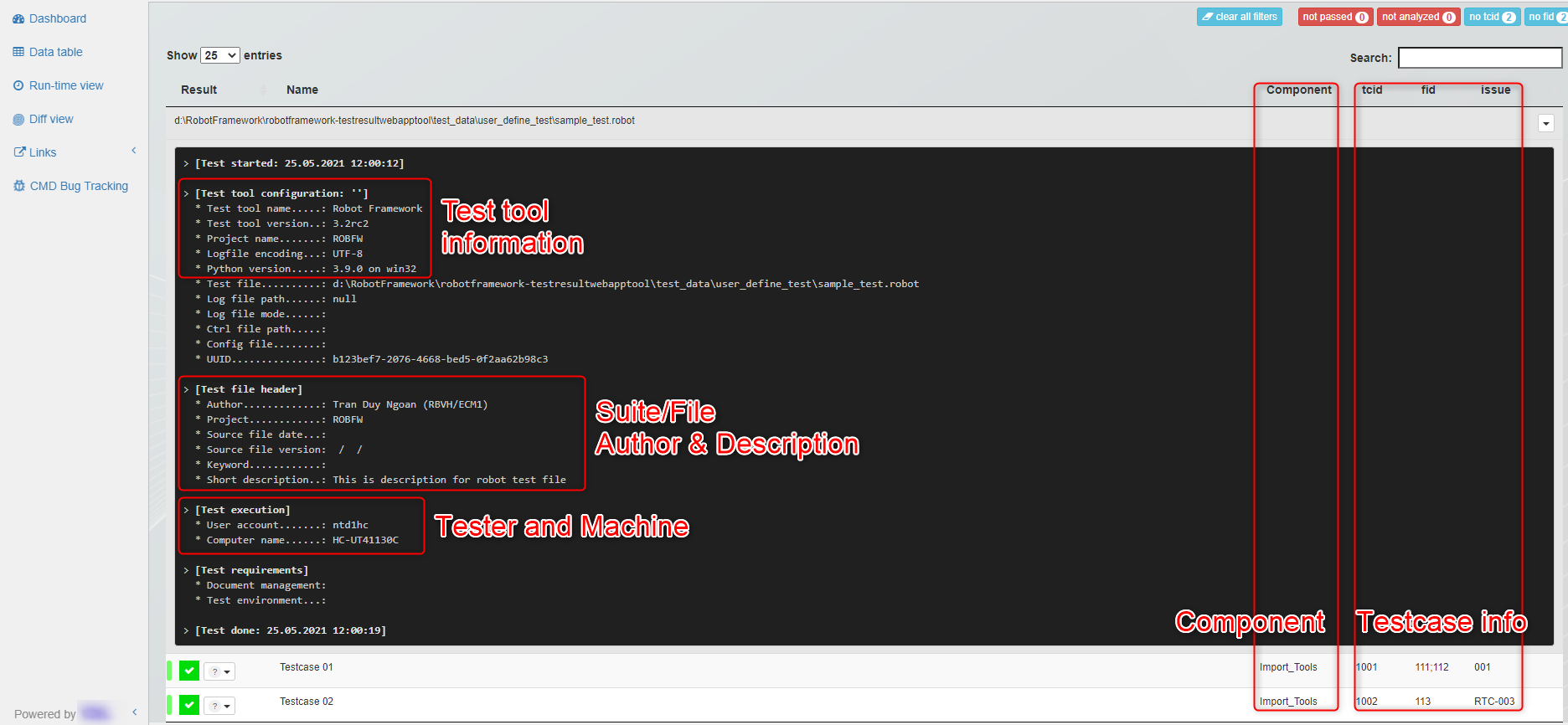
|
|
261
256
|
|
|
262
|
-
Contribution
|
|
263
|
-
------------
|
|
257
|
+
## Contribution
|
|
264
258
|
|
|
265
259
|
We are always searching support and you are cordially invited to help to
|
|
266
260
|
improve **RobotLog2DB** tool.
|
|
267
261
|
|
|
268
|
-
Sourcecode Documentation
|
|
269
|
-
------------------------
|
|
262
|
+
## Sourcecode Documentation
|
|
270
263
|
|
|
271
264
|
To understand more detail about the tool\'s features, parameters and how
|
|
272
265
|
Robot Framework testcase information will be displayed on
|
|
273
266
|
TestResultWebApp, please refer to [RobotLog2DB tool's
|
|
274
267
|
Documentation](https://github.com/test-fullautomation/robotframework-robotlog2db/blob/develop/RobotLog2DB/RobotLog2DB.pdf).
|
|
275
268
|
|
|
276
|
-
Feedback
|
|
277
|
-
--------
|
|
269
|
+
## Feedback
|
|
278
270
|
|
|
279
271
|
Please feel free to give any feedback to us via
|
|
280
272
|
|
|
@@ -283,8 +275,7 @@ Email to: [Thomas Pollerspöck](mailto:Thomas.Pollerspoeck@de.bosch.com)
|
|
|
283
275
|
Issue tracking: [RobotLog2DB
|
|
284
276
|
Issues](https://github.com/test-fullautomation/robotframework-robotlog2db/issues)
|
|
285
277
|
|
|
286
|
-
About
|
|
287
|
-
-----
|
|
278
|
+
## About
|
|
288
279
|
|
|
289
280
|
### Maintainers
|
|
290
281
|
|
{robotframework-robotlog2db-1.5.3 → robotframework-robotlog2db-1.5.4}/RobotLog2DB/RobotLog2DB.pdf
RENAMED
|
Binary file
|
{robotframework-robotlog2db-1.5.3 → robotframework-robotlog2db-1.5.4}/RobotLog2DB/xsd/robot.xsd
RENAMED
|
@@ -72,6 +72,7 @@
|
|
|
72
72
|
<xs:complexType name="Test">
|
|
73
73
|
<xs:choice maxOccurs="unbounded">
|
|
74
74
|
<xs:element name="kw" type="Keyword" minOccurs="0" maxOccurs="unbounded" />
|
|
75
|
+
<xs:element name="thread" type="Thread" minOccurs="0" maxOccurs="unbounded" />
|
|
75
76
|
<xs:element name="for" type="For" minOccurs="0" maxOccurs="unbounded" />
|
|
76
77
|
<xs:element name="if" type="If" minOccurs="0" maxOccurs="unbounded" />
|
|
77
78
|
<xs:element name="try" type="Try" minOccurs="0" maxOccurs="unbounded" />
|
|
@@ -93,6 +94,7 @@
|
|
|
93
94
|
<xs:complexType name="Keyword">
|
|
94
95
|
<xs:choice maxOccurs="unbounded">
|
|
95
96
|
<xs:element name="kw" type="Keyword" minOccurs="0" maxOccurs="unbounded" />
|
|
97
|
+
<xs:element name="thread" type="Thread" minOccurs="0" maxOccurs="unbounded" />
|
|
96
98
|
<xs:element name="for" type="For" minOccurs="0" maxOccurs="unbounded" />
|
|
97
99
|
<xs:element name="if" type="If" minOccurs="0" maxOccurs="unbounded" />
|
|
98
100
|
<xs:element name="try" type="Try" minOccurs="0" maxOccurs="unbounded" />
|
|
@@ -122,12 +124,22 @@
|
|
|
122
124
|
<xs:enumeration value="TEARDOWN" />
|
|
123
125
|
</xs:restriction>
|
|
124
126
|
</xs:simpleType>
|
|
127
|
+
<xs:complexType name="Thread">
|
|
128
|
+
<xs:choice maxOccurs="unbounded">
|
|
129
|
+
<xs:element name="kw" type="Keyword" minOccurs="0" maxOccurs="unbounded" />
|
|
130
|
+
<xs:element name="msg" type="Message" minOccurs="0" maxOccurs="unbounded" />
|
|
131
|
+
<xs:element name="status" type="Status" />
|
|
132
|
+
</xs:choice>
|
|
133
|
+
<xs:attribute name="name" type="xs:string" />
|
|
134
|
+
<xs:attribute name="daemon" type="xs:string" />
|
|
135
|
+
</xs:complexType>
|
|
125
136
|
<xs:complexType name="For">
|
|
126
137
|
<xs:choice maxOccurs="unbounded">
|
|
127
138
|
<xs:element name="var" type="xs:string" minOccurs="0" maxOccurs="unbounded" /> <!-- Loop variables -->
|
|
128
139
|
<xs:element name="value" type="xs:string" minOccurs="0" maxOccurs="unbounded" /> <!-- Loop values -->
|
|
129
140
|
<xs:element name="iter" type="ForIteration" minOccurs="0" maxOccurs="unbounded" />
|
|
130
141
|
<xs:element name="kw" type="Keyword" minOccurs="0" maxOccurs="unbounded" />
|
|
142
|
+
<xs:element name="thread" type="Thread" minOccurs="0" maxOccurs="unbounded" />
|
|
131
143
|
<xs:element name="msg" type="Message" minOccurs="0" maxOccurs="unbounded" />
|
|
132
144
|
<xs:element name="status" type="Status" />
|
|
133
145
|
</xs:choice>
|
|
@@ -149,6 +161,7 @@
|
|
|
149
161
|
<!-- Loop variables with iteration specific values. -->
|
|
150
162
|
<xs:element name="var" type="ForIterationVariable" minOccurs="0" maxOccurs="unbounded" />
|
|
151
163
|
<xs:element name="kw" type="Keyword" minOccurs="0" maxOccurs="unbounded" />
|
|
164
|
+
<xs:element name="thread" type="Thread" minOccurs="0" maxOccurs="unbounded" />
|
|
152
165
|
<xs:element name="for" type="For" minOccurs="0" maxOccurs="unbounded" />
|
|
153
166
|
<xs:element name="if" type="If" minOccurs="0" maxOccurs="unbounded" />
|
|
154
167
|
<xs:element name="try" type="Try" minOccurs="0" maxOccurs="unbounded" />
|
|
@@ -179,6 +192,7 @@
|
|
|
179
192
|
<xs:complexType name="IfBranch">
|
|
180
193
|
<xs:choice maxOccurs="unbounded">
|
|
181
194
|
<xs:element name="kw" type="Keyword" minOccurs="0" maxOccurs="unbounded" />
|
|
195
|
+
<xs:element name="thread" type="Thread" minOccurs="0" maxOccurs="unbounded" />
|
|
182
196
|
<xs:element name="for" type="For" minOccurs="0" maxOccurs="unbounded" />
|
|
183
197
|
<xs:element name="if" type="If" minOccurs="0" maxOccurs="unbounded" />
|
|
184
198
|
<xs:element name="try" type="Try" minOccurs="0" maxOccurs="unbounded" />
|
|
@@ -212,6 +226,7 @@
|
|
|
212
226
|
<xs:choice maxOccurs="unbounded">
|
|
213
227
|
<xs:element name="pattern" type="xs:string" minOccurs="0" maxOccurs="unbounded" />
|
|
214
228
|
<xs:element name="kw" type="Keyword" minOccurs="0" maxOccurs="unbounded" />
|
|
229
|
+
<xs:element name="thread" type="Thread" minOccurs="0" maxOccurs="unbounded" />
|
|
215
230
|
<xs:element name="for" type="For" minOccurs="0" maxOccurs="unbounded" />
|
|
216
231
|
<xs:element name="if" type="If" minOccurs="0" maxOccurs="unbounded" />
|
|
217
232
|
<xs:element name="try" type="Try" minOccurs="0" maxOccurs="unbounded" />
|
|
@@ -251,6 +266,7 @@
|
|
|
251
266
|
<xs:complexType name="WhileIteration">
|
|
252
267
|
<xs:choice maxOccurs="unbounded">
|
|
253
268
|
<xs:element name="kw" type="Keyword" minOccurs="0" maxOccurs="unbounded" />
|
|
269
|
+
<xs:element name="thread" type="Thread" minOccurs="0" maxOccurs="unbounded" />
|
|
254
270
|
<xs:element name="for" type="For" minOccurs="0" maxOccurs="unbounded" />
|
|
255
271
|
<xs:element name="if" type="If" minOccurs="0" maxOccurs="unbounded" />
|
|
256
272
|
<xs:element name="try" type="Try" minOccurs="0" maxOccurs="unbounded" />
|
|
@@ -1,6 +1,6 @@
|
|
|
1
1
|
Metadata-Version: 2.1
|
|
2
2
|
Name: robotframework-robotlog2db
|
|
3
|
-
Version: 1.5.
|
|
3
|
+
Version: 1.5.4
|
|
4
4
|
Summary: Imports robot result(s) to TestResultWebApp database
|
|
5
5
|
Home-page: https://github.com/test-fullautomation/robotframework-robotlog2db
|
|
6
6
|
Author: Tran Duy Ngoan
|
|
@@ -16,11 +16,9 @@ Classifier: Topic :: Software Development
|
|
|
16
16
|
Requires-Python: >=3.0
|
|
17
17
|
Description-Content-Type: text/markdown
|
|
18
18
|
|
|
19
|
-
RobotLog2DB
|
|
20
|
-
===========
|
|
19
|
+
# RobotLog2DB
|
|
21
20
|
|
|
22
|
-
Table of Contents
|
|
23
|
-
-----------------
|
|
21
|
+
## Table of Contents
|
|
24
22
|
|
|
25
23
|
- [Getting Started](#getting-started)
|
|
26
24
|
- [How to install](#how-to-install)
|
|
@@ -34,8 +32,7 @@ Table of Contents
|
|
|
34
32
|
- [Contributors](#contributors)
|
|
35
33
|
- [License](#license)
|
|
36
34
|
|
|
37
|
-
Getting Started
|
|
38
|
-
---------------
|
|
35
|
+
## Getting Started
|
|
39
36
|
|
|
40
37
|
**RobotLog2DB** is a command-line tool that enables you to import [Robot
|
|
41
38
|
Framework XML
|
|
@@ -54,7 +51,7 @@ Python 3.
|
|
|
54
51
|
|
|
55
52
|
1. Installation via PyPi (recommended for users)
|
|
56
53
|
|
|
57
|
-
```
|
|
54
|
+
```
|
|
58
55
|
pip install robotframework-robotlog2db
|
|
59
56
|
```
|
|
60
57
|
|
|
@@ -66,7 +63,7 @@ Python 3.
|
|
|
66
63
|
- Clone the **robotframework-robotlog2db** repository to your
|
|
67
64
|
machine.
|
|
68
65
|
|
|
69
|
-
```
|
|
66
|
+
```
|
|
70
67
|
git clone https://github.com/test-fullautomation/robotframework-robotlog2db.git
|
|
71
68
|
```
|
|
72
69
|
|
|
@@ -81,7 +78,7 @@ Python 3.
|
|
|
81
78
|
packages you can find in the file `requirements.txt` in the
|
|
82
79
|
repository root folder. Use pip to install them:
|
|
83
80
|
|
|
84
|
-
```
|
|
81
|
+
```
|
|
85
82
|
pip install -r ./requirements.txt
|
|
86
83
|
```
|
|
87
84
|
|
|
@@ -100,7 +97,7 @@ Python 3.
|
|
|
100
97
|
to find **LaTeX**. This is defined in the **GenPackageDoc**
|
|
101
98
|
configuration file
|
|
102
99
|
|
|
103
|
-
```
|
|
100
|
+
```
|
|
104
101
|
packagedoc\packagedoc_config.json
|
|
105
102
|
```
|
|
106
103
|
|
|
@@ -112,7 +109,7 @@ Python 3.
|
|
|
112
109
|
|
|
113
110
|
- Use the following command to install **RobotLog2DB**:
|
|
114
111
|
|
|
115
|
-
```
|
|
112
|
+
```
|
|
116
113
|
python setup.py install
|
|
117
114
|
```
|
|
118
115
|
|
|
@@ -123,8 +120,7 @@ be available (under *Scripts* folder of Python on Windows and
|
|
|
123
120
|
In case above location is added to **PATH** environment variable then
|
|
124
121
|
you can run it directly as operation system\'s command.
|
|
125
122
|
|
|
126
|
-
Usage
|
|
127
|
-
-----
|
|
123
|
+
## Usage
|
|
128
124
|
|
|
129
125
|
**RobotLog2DB** requires the Robot Framework result file(s) which
|
|
130
126
|
contains the output result in XML format (default name is `output.xml`)
|
|
@@ -174,8 +170,7 @@ Besides the executable file, you can also run tool as a Python module
|
|
|
174
170
|
|
|
175
171
|
python -m RobotLog2DB <resultxmlfile> <server> <user> <password> <database>
|
|
176
172
|
|
|
177
|
-
Example
|
|
178
|
-
-------
|
|
173
|
+
## Example
|
|
179
174
|
|
|
180
175
|
In order the import the Robot Framework result(s) to TestResultWebApp\'s
|
|
181
176
|
database, we need the Robot Framework result file (`output.xml`).
|
|
@@ -218,9 +213,9 @@ for importing into TestResultWebApp\'s database:
|
|
|
218
213
|
> library within Suite Setup.
|
|
219
214
|
>
|
|
220
215
|
> - project
|
|
221
|
-
> -
|
|
222
|
-
> -
|
|
223
|
-
> -
|
|
216
|
+
> - version_sw
|
|
217
|
+
> - version_hw
|
|
218
|
+
> - version_test
|
|
224
219
|
> - machine
|
|
225
220
|
> - tester
|
|
226
221
|
> - testtool
|
|
@@ -259,22 +254,19 @@ Datatable view:
|
|
|
259
254
|
|
|
260
255
|

|
|
261
256
|
|
|
262
|
-
Contribution
|
|
263
|
-
------------
|
|
257
|
+
## Contribution
|
|
264
258
|
|
|
265
259
|
We are always searching support and you are cordially invited to help to
|
|
266
260
|
improve **RobotLog2DB** tool.
|
|
267
261
|
|
|
268
|
-
Sourcecode Documentation
|
|
269
|
-
------------------------
|
|
262
|
+
## Sourcecode Documentation
|
|
270
263
|
|
|
271
264
|
To understand more detail about the tool\'s features, parameters and how
|
|
272
265
|
Robot Framework testcase information will be displayed on
|
|
273
266
|
TestResultWebApp, please refer to [RobotLog2DB tool's
|
|
274
267
|
Documentation](https://github.com/test-fullautomation/robotframework-robotlog2db/blob/develop/RobotLog2DB/RobotLog2DB.pdf).
|
|
275
268
|
|
|
276
|
-
Feedback
|
|
277
|
-
--------
|
|
269
|
+
## Feedback
|
|
278
270
|
|
|
279
271
|
Please feel free to give any feedback to us via
|
|
280
272
|
|
|
@@ -283,8 +275,7 @@ Email to: [Thomas Pollerspöck](mailto:Thomas.Pollerspoeck@de.bosch.com)
|
|
|
283
275
|
Issue tracking: [RobotLog2DB
|
|
284
276
|
Issues](https://github.com/test-fullautomation/robotframework-robotlog2db/issues)
|
|
285
277
|
|
|
286
|
-
About
|
|
287
|
-
-----
|
|
278
|
+
## About
|
|
288
279
|
|
|
289
280
|
### Maintainers
|
|
290
281
|
|
|
File without changes
|
{robotframework-robotlog2db-1.5.3 → robotframework-robotlog2db-1.5.4}/RobotLog2DB/__init__.py
RENAMED
|
File without changes
|
{robotframework-robotlog2db-1.5.3 → robotframework-robotlog2db-1.5.4}/RobotLog2DB/__main__.py
RENAMED
|
File without changes
|
{robotframework-robotlog2db-1.5.3 → robotframework-robotlog2db-1.5.4}/RobotLog2DB/robotlog2db.py
RENAMED
|
File without changes
|
|
File without changes
|
|
File without changes
|
|
File without changes
|
|
File without changes
|
|
File without changes
|
|
File without changes
|
|
File without changes
|