riggen 0.2.1.dev0__tar.gz → 0.5.0__tar.gz
This diff represents the content of publicly available package versions that have been released to one of the supported registries. The information contained in this diff is provided for informational purposes only and reflects changes between package versions as they appear in their respective public registries.
- {riggen-0.2.1.dev0 → riggen-0.5.0}/Cargo.lock +6 -6
- {riggen-0.2.1.dev0 → riggen-0.5.0}/Cargo.toml +1 -1
- {riggen-0.2.1.dev0 → riggen-0.5.0}/PKG-INFO +15 -7
- {riggen-0.2.1.dev0 → riggen-0.5.0}/README.md +14 -6
- {riggen-0.2.1.dev0 → riggen-0.5.0}/LICENSE-APACHE +0 -0
- {riggen-0.2.1.dev0 → riggen-0.5.0}/LICENSE-MIT +0 -0
- {riggen-0.2.1.dev0 → riggen-0.5.0}/crates/riggen-core/Cargo.toml +0 -0
- {riggen-0.2.1.dev0 → riggen-0.5.0}/crates/riggen-core/src/command.rs +0 -0
- {riggen-0.2.1.dev0 → riggen-0.5.0}/crates/riggen-core/src/file.rs +0 -0
- {riggen-0.2.1.dev0 → riggen-0.5.0}/crates/riggen-core/src/fk.rs +0 -0
- {riggen-0.2.1.dev0 → riggen-0.5.0}/crates/riggen-core/src/history.rs +0 -0
- {riggen-0.2.1.dev0 → riggen-0.5.0}/crates/riggen-core/src/ids.rs +0 -0
- {riggen-0.2.1.dev0 → riggen-0.5.0}/crates/riggen-core/src/inertial.rs +0 -0
- {riggen-0.2.1.dev0 → riggen-0.5.0}/crates/riggen-core/src/lib.rs +0 -0
- {riggen-0.2.1.dev0 → riggen-0.5.0}/crates/riggen-core/src/pose.rs +0 -0
- {riggen-0.2.1.dev0 → riggen-0.5.0}/crates/riggen-core/src/robot.rs +0 -0
- {riggen-0.2.1.dev0 → riggen-0.5.0}/crates/riggen-core/src/validate.rs +0 -0
- {riggen-0.2.1.dev0 → riggen-0.5.0}/crates/riggen-export/Cargo.toml +0 -0
- {riggen-0.2.1.dev0 → riggen-0.5.0}/crates/riggen-export/src/export.rs +0 -0
- {riggen-0.2.1.dev0 → riggen-0.5.0}/crates/riggen-export/src/fk_samples.rs +0 -0
- {riggen-0.2.1.dev0 → riggen-0.5.0}/crates/riggen-export/src/import.rs +0 -0
- {riggen-0.2.1.dev0 → riggen-0.5.0}/crates/riggen-export/src/lib.rs +0 -0
- {riggen-0.2.1.dev0 → riggen-0.5.0}/crates/riggen-export/src/mesh_store.rs +0 -0
- {riggen-0.2.1.dev0 → riggen-0.5.0}/crates/riggen-export/src/mjcf.rs +0 -0
- {riggen-0.2.1.dev0 → riggen-0.5.0}/crates/riggen-export/src/mjcf_compose.rs +0 -0
- {riggen-0.2.1.dev0 → riggen-0.5.0}/crates/riggen-export/src/mjcf_in.rs +0 -0
- {riggen-0.2.1.dev0 → riggen-0.5.0}/crates/riggen-export/src/resolve.rs +0 -0
- {riggen-0.2.1.dev0 → riggen-0.5.0}/crates/riggen-export/src/sdf.rs +0 -0
- {riggen-0.2.1.dev0 → riggen-0.5.0}/crates/riggen-export/src/test_util.rs +0 -0
- {riggen-0.2.1.dev0 → riggen-0.5.0}/crates/riggen-export/src/urdf.rs +0 -0
- {riggen-0.2.1.dev0 → riggen-0.5.0}/crates/riggen-export/src/urdf_in.rs +0 -0
- {riggen-0.2.1.dev0 → riggen-0.5.0}/crates/riggen-export/src/xml.rs +0 -0
- {riggen-0.2.1.dev0 → riggen-0.5.0}/crates/riggen-mesh/Cargo.toml +0 -0
- {riggen-0.2.1.dev0 → riggen-0.5.0}/crates/riggen-mesh/src/aabb.rs +0 -0
- {riggen-0.2.1.dev0 → riggen-0.5.0}/crates/riggen-mesh/src/decomp.rs +0 -0
- {riggen-0.2.1.dev0 → riggen-0.5.0}/crates/riggen-mesh/src/error.rs +0 -0
- {riggen-0.2.1.dev0 → riggen-0.5.0}/crates/riggen-mesh/src/feature.rs +0 -0
- {riggen-0.2.1.dev0 → riggen-0.5.0}/crates/riggen-mesh/src/fit.rs +0 -0
- {riggen-0.2.1.dev0 → riggen-0.5.0}/crates/riggen-mesh/src/hull.rs +0 -0
- {riggen-0.2.1.dev0 → riggen-0.5.0}/crates/riggen-mesh/src/lib.rs +0 -0
- {riggen-0.2.1.dev0 → riggen-0.5.0}/crates/riggen-mesh/src/mass.rs +0 -0
- {riggen-0.2.1.dev0 → riggen-0.5.0}/crates/riggen-mesh/src/msh.rs +0 -0
- {riggen-0.2.1.dev0 → riggen-0.5.0}/crates/riggen-mesh/src/obj.rs +0 -0
- {riggen-0.2.1.dev0 → riggen-0.5.0}/crates/riggen-mesh/src/ray.rs +0 -0
- {riggen-0.2.1.dev0 → riggen-0.5.0}/crates/riggen-mesh/src/stl.rs +0 -0
- {riggen-0.2.1.dev0 → riggen-0.5.0}/crates/riggen-mesh/src/tri_mesh.rs +0 -0
- {riggen-0.2.1.dev0 → riggen-0.5.0}/crates/riggen-py/Cargo.toml +0 -0
- {riggen-0.2.1.dev0 → riggen-0.5.0}/crates/riggen-py/src/doc.rs +0 -0
- {riggen-0.2.1.dev0 → riggen-0.5.0}/crates/riggen-py/src/errors.rs +0 -0
- {riggen-0.2.1.dev0 → riggen-0.5.0}/crates/riggen-py/src/lib.rs +0 -0
- {riggen-0.2.1.dev0 → riggen-0.5.0}/crates/riggen-py/src/robot.rs +0 -0
- {riggen-0.2.1.dev0 → riggen-0.5.0}/pyproject.toml +0 -0
- {riggen-0.2.1.dev0 → riggen-0.5.0}/python/riggen/__init__.py +0 -0
- {riggen-0.2.1.dev0 → riggen-0.5.0}/python/riggen/__main__.py +0 -0
- {riggen-0.2.1.dev0 → riggen-0.5.0}/python/riggen/_riggen.pyi +0 -0
- {riggen-0.2.1.dev0 → riggen-0.5.0}/python/riggen/errors.py +0 -0
- {riggen-0.2.1.dev0 → riggen-0.5.0}/python/riggen/py.typed +0 -0
- {riggen-0.2.1.dev0 → riggen-0.5.0}/python/riggen/robot.py +0 -0
- {riggen-0.2.1.dev0 → riggen-0.5.0}/python/riggen/show.py +0 -0
|
@@ -3223,7 +3223,7 @@ version = "0.0.1"
|
|
|
3223
3223
|
|
|
3224
3224
|
[[package]]
|
|
3225
3225
|
name = "riggen-app"
|
|
3226
|
-
version = "0.
|
|
3226
|
+
version = "0.5.0"
|
|
3227
3227
|
dependencies = [
|
|
3228
3228
|
"console_error_panic_hook",
|
|
3229
3229
|
"eframe",
|
|
@@ -3250,7 +3250,7 @@ dependencies = [
|
|
|
3250
3250
|
|
|
3251
3251
|
[[package]]
|
|
3252
3252
|
name = "riggen-core"
|
|
3253
|
-
version = "0.
|
|
3253
|
+
version = "0.5.0"
|
|
3254
3254
|
dependencies = [
|
|
3255
3255
|
"riggen-mesh",
|
|
3256
3256
|
"serde",
|
|
@@ -3259,7 +3259,7 @@ dependencies = [
|
|
|
3259
3259
|
|
|
3260
3260
|
[[package]]
|
|
3261
3261
|
name = "riggen-export"
|
|
3262
|
-
version = "0.
|
|
3262
|
+
version = "0.5.0"
|
|
3263
3263
|
dependencies = [
|
|
3264
3264
|
"quick-xml 0.36.2",
|
|
3265
3265
|
"riggen-core",
|
|
@@ -3271,7 +3271,7 @@ dependencies = [
|
|
|
3271
3271
|
|
|
3272
3272
|
[[package]]
|
|
3273
3273
|
name = "riggen-mesh"
|
|
3274
|
-
version = "0.
|
|
3274
|
+
version = "0.5.0"
|
|
3275
3275
|
dependencies = [
|
|
3276
3276
|
"glam 0.30.10",
|
|
3277
3277
|
"parry3d-f64",
|
|
@@ -3281,7 +3281,7 @@ dependencies = [
|
|
|
3281
3281
|
|
|
3282
3282
|
[[package]]
|
|
3283
3283
|
name = "riggen-py"
|
|
3284
|
-
version = "0.
|
|
3284
|
+
version = "0.5.0"
|
|
3285
3285
|
dependencies = [
|
|
3286
3286
|
"pyo3",
|
|
3287
3287
|
"riggen-core",
|
|
@@ -3293,7 +3293,7 @@ dependencies = [
|
|
|
3293
3293
|
|
|
3294
3294
|
[[package]]
|
|
3295
3295
|
name = "riggen-viewport"
|
|
3296
|
-
version = "0.
|
|
3296
|
+
version = "0.5.0"
|
|
3297
3297
|
dependencies = [
|
|
3298
3298
|
"bytemuck",
|
|
3299
3299
|
"egui",
|
|
@@ -1,6 +1,6 @@
|
|
|
1
1
|
Metadata-Version: 2.4
|
|
2
2
|
Name: riggen
|
|
3
|
-
Version: 0.
|
|
3
|
+
Version: 0.5.0
|
|
4
4
|
Classifier: Development Status :: 3 - Alpha
|
|
5
5
|
Classifier: Intended Audience :: Science/Research
|
|
6
6
|
Classifier: Topic :: Scientific/Engineering
|
|
@@ -29,7 +29,7 @@ Project-URL: Repository, https://github.com/Divelix/riggen
|
|
|
29
29
|
Drop meshes in, get a simulation-ready MJCF, URDF or SDF out — in a
|
|
30
30
|
window, or from ten lines of Python.
|
|
31
31
|
|
|
32
|
-
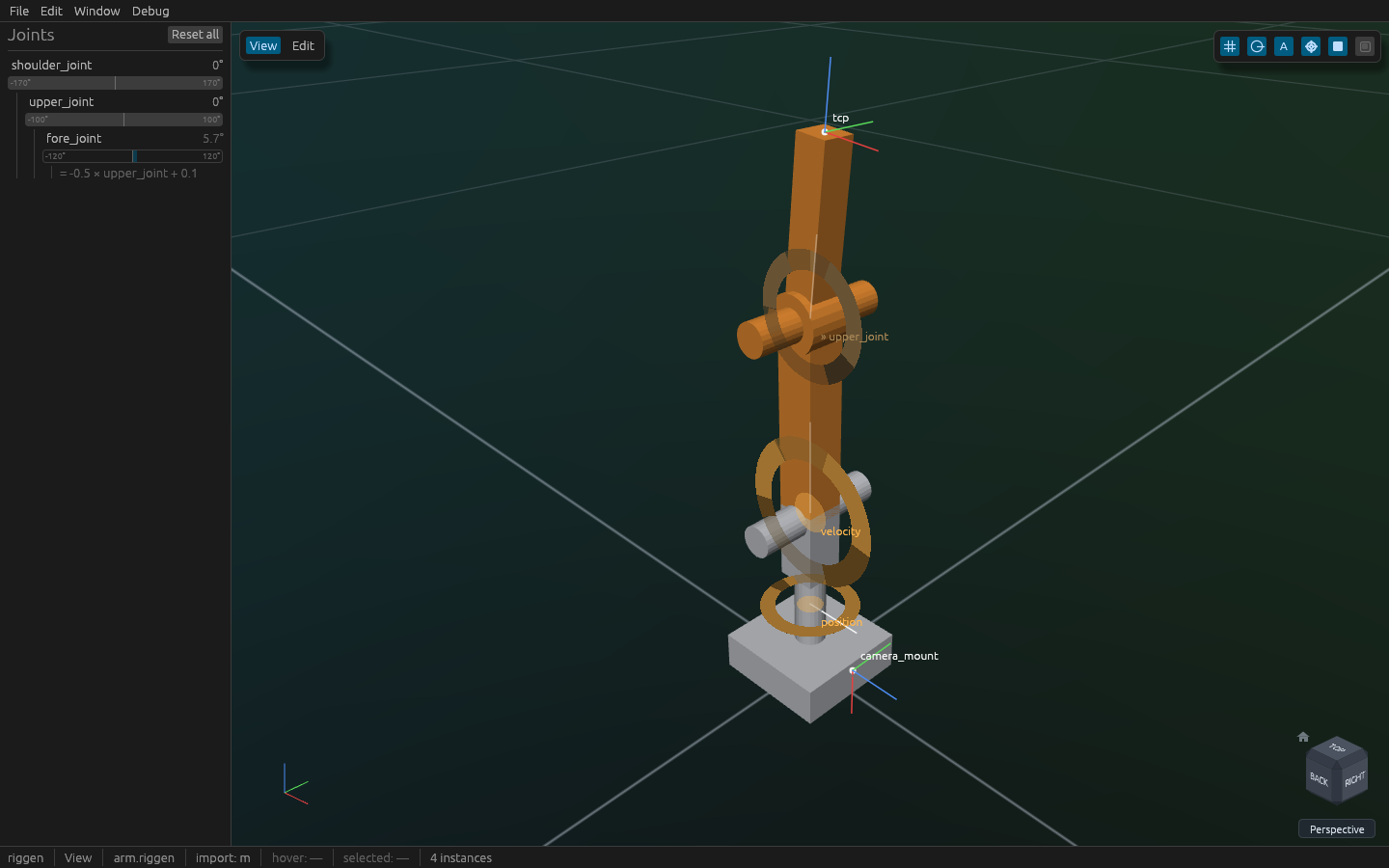
|
|
32
|
+

|
|
33
33
|
|
|
34
34
|
## Try it in the browser
|
|
35
35
|
|
|
@@ -64,11 +64,19 @@ without a wheel, `pip install` builds the SDK from source with `cargo` on
|
|
|
64
64
|
tree on the left, the viewport with the robot. Drag with the left
|
|
65
65
|
button to orbit and with the right to pan (shift+left pans too, for a
|
|
66
66
|
trackpad; the middle button orbits and shift+middle pans), zoom with the
|
|
67
|
-
wheel, `Home` to frame everything. The
|
|
68
|
-
|
|
69
|
-
|
|
70
|
-
the
|
|
71
|
-
|
|
67
|
+
wheel, `Home` to frame everything. The **ViewCube** in the bottom-right
|
|
68
|
+
says which way you are looking: click a face, edge or corner to fly to
|
|
69
|
+
that view, drag it to orbit, click the house to frame everything, and
|
|
70
|
+
the button under it switches perspective and orthographic. `W A S D E Q`
|
|
71
|
+
walk the camera *into* the assembly — the point it orbits around comes
|
|
72
|
+
with you, so a joint buried in a shell can be put in front of you and
|
|
73
|
+
then turned around locally. The arm stands on a **ground grid** at
|
|
74
|
+
z = 0, so a part at the origin reads as resting on something. The six
|
|
75
|
+
buttons top-right are the **visibility row**: ground, joints, joint
|
|
76
|
+
names, frames, links, collision geometry. Switching one off takes it
|
|
77
|
+
out of the picture *and* out of the cursor's reach, so with joints off
|
|
78
|
+
you get the robot and nothing else — the status bar says what is
|
|
79
|
+
hidden.
|
|
72
80
|
2. Pose it: drag a joint's bar in the tree, or turn the wheel over it —
|
|
73
81
|
or over the joint's glyph in the viewport, which steps it by 5° (1°
|
|
74
82
|
with shift) instead of zooming. A click on a glyph selects the joint;
|
|
@@ -7,7 +7,7 @@
|
|
|
7
7
|
Drop meshes in, get a simulation-ready MJCF, URDF or SDF out — in a
|
|
8
8
|
window, or from ten lines of Python.
|
|
9
9
|
|
|
10
|
-

|
|
10
|
+

|
|
11
11
|
|
|
12
12
|
## Try it in the browser
|
|
13
13
|
|
|
@@ -42,11 +42,19 @@ without a wheel, `pip install` builds the SDK from source with `cargo` on
|
|
|
42
42
|
tree on the left, the viewport with the robot. Drag with the left
|
|
43
43
|
button to orbit and with the right to pan (shift+left pans too, for a
|
|
44
44
|
trackpad; the middle button orbits and shift+middle pans), zoom with the
|
|
45
|
-
wheel, `Home` to frame everything. The
|
|
46
|
-
|
|
47
|
-
|
|
48
|
-
the
|
|
49
|
-
|
|
45
|
+
wheel, `Home` to frame everything. The **ViewCube** in the bottom-right
|
|
46
|
+
says which way you are looking: click a face, edge or corner to fly to
|
|
47
|
+
that view, drag it to orbit, click the house to frame everything, and
|
|
48
|
+
the button under it switches perspective and orthographic. `W A S D E Q`
|
|
49
|
+
walk the camera *into* the assembly — the point it orbits around comes
|
|
50
|
+
with you, so a joint buried in a shell can be put in front of you and
|
|
51
|
+
then turned around locally. The arm stands on a **ground grid** at
|
|
52
|
+
z = 0, so a part at the origin reads as resting on something. The six
|
|
53
|
+
buttons top-right are the **visibility row**: ground, joints, joint
|
|
54
|
+
names, frames, links, collision geometry. Switching one off takes it
|
|
55
|
+
out of the picture *and* out of the cursor's reach, so with joints off
|
|
56
|
+
you get the robot and nothing else — the status bar says what is
|
|
57
|
+
hidden.
|
|
50
58
|
2. Pose it: drag a joint's bar in the tree, or turn the wheel over it —
|
|
51
59
|
or over the joint's glyph in the viewport, which steps it by 5° (1°
|
|
52
60
|
with shift) instead of zooming. A click on a glyph selects the joint;
|
|
File without changes
|
|
File without changes
|
|
File without changes
|
|
File without changes
|
|
File without changes
|
|
File without changes
|
|
File without changes
|
|
File without changes
|
|
File without changes
|
|
File without changes
|
|
File without changes
|
|
File without changes
|
|
File without changes
|
|
File without changes
|
|
File without changes
|
|
File without changes
|
|
File without changes
|
|
File without changes
|
|
File without changes
|
|
File without changes
|
|
File without changes
|
|
File without changes
|
|
File without changes
|
|
File without changes
|
|
File without changes
|
|
File without changes
|
|
File without changes
|
|
File without changes
|
|
File without changes
|
|
File without changes
|
|
File without changes
|
|
File without changes
|
|
File without changes
|
|
File without changes
|
|
File without changes
|
|
File without changes
|
|
File without changes
|
|
File without changes
|
|
File without changes
|
|
File without changes
|
|
File without changes
|
|
File without changes
|
|
File without changes
|
|
File without changes
|
|
File without changes
|
|
File without changes
|
|
File without changes
|
|
File without changes
|
|
File without changes
|
|
File without changes
|
|
File without changes
|
|
File without changes
|
|
File without changes
|
|
File without changes
|
|
File without changes
|