remotedesktop 1.1.0__tar.gz → 1.3.0__tar.gz
This diff represents the content of publicly available package versions that have been released to one of the supported registries. The information contained in this diff is provided for informational purposes only and reflects changes between package versions as they appear in their respective public registries.
- {remotedesktop-1.1.0 → remotedesktop-1.3.0}/CLAUDE.md +9 -6
- {remotedesktop-1.1.0 → remotedesktop-1.3.0}/PKG-INFO +23 -20
- remotedesktop-1.3.0/docs/media/client-demo.gif +0 -0
- remotedesktop-1.3.0/docs/media/server-demo.gif +0 -0
- {remotedesktop-1.1.0 → remotedesktop-1.3.0}/readme.md +22 -19
- {remotedesktop-1.1.0 → remotedesktop-1.3.0}/src/remotedesktop/__init__.py +1 -1
- {remotedesktop-1.1.0 → remotedesktop-1.3.0}/src/remotedesktop/app.py +446 -57
- remotedesktop-1.3.0/src/remotedesktop/client.py +214 -0
- {remotedesktop-1.1.0 → remotedesktop-1.3.0}/src/remotedesktop/clipboard.py +9 -1
- remotedesktop-1.3.0/src/remotedesktop/preferences.py +140 -0
- {remotedesktop-1.1.0 → remotedesktop-1.3.0}/src/remotedesktop/server.py +55 -32
- {remotedesktop-1.1.0 → remotedesktop-1.3.0}/src/remotedesktop/sharing.py +43 -3
- {remotedesktop-1.1.0 → remotedesktop-1.3.0}/src/remotedesktop/viewer.py +55 -2
- remotedesktop-1.3.0/src/remotedesktop/window_state.py +38 -0
- {remotedesktop-1.1.0 → remotedesktop-1.3.0}/tests/test_clipboard.py +21 -0
- {remotedesktop-1.1.0 → remotedesktop-1.3.0}/tests/test_input.py +80 -0
- remotedesktop-1.3.0/tests/test_main_window.py +1071 -0
- {remotedesktop-1.1.0 → remotedesktop-1.3.0}/tests/test_preferences.py +38 -0
- {remotedesktop-1.1.0 → remotedesktop-1.3.0}/tests/test_sharing.py +22 -0
- {remotedesktop-1.1.0 → remotedesktop-1.3.0}/tests/test_sharing_tab.py +65 -8
- remotedesktop-1.3.0/tests/test_window_state.py +56 -0
- {remotedesktop-1.1.0 → remotedesktop-1.3.0}/tools/make_demo_gifs.py +6 -3
- remotedesktop-1.1.0/docs/media/client-demo.gif +0 -0
- remotedesktop-1.1.0/docs/media/server-demo.gif +0 -0
- remotedesktop-1.1.0/src/remotedesktop/client.py +0 -110
- remotedesktop-1.1.0/src/remotedesktop/preferences.py +0 -76
- remotedesktop-1.1.0/src/remotedesktop/window_state.py +0 -24
- remotedesktop-1.1.0/tests/test_main_window.py +0 -556
- remotedesktop-1.1.0/tests/test_window_state.py +0 -28
- {remotedesktop-1.1.0 → remotedesktop-1.3.0}/.github/workflows/ci.yml +0 -0
- {remotedesktop-1.1.0 → remotedesktop-1.3.0}/.github/workflows/release.yml +0 -0
- {remotedesktop-1.1.0 → remotedesktop-1.3.0}/.gitignore +0 -0
- {remotedesktop-1.1.0 → remotedesktop-1.3.0}/LICENSE +0 -0
- {remotedesktop-1.1.0 → remotedesktop-1.3.0}/pyproject.toml +0 -0
- {remotedesktop-1.1.0 → remotedesktop-1.3.0}/run.bat +0 -0
- {remotedesktop-1.1.0 → remotedesktop-1.3.0}/run_claude.bat +0 -0
- {remotedesktop-1.1.0 → remotedesktop-1.3.0}/scripts/make_coverage_badge.py +0 -0
- {remotedesktop-1.1.0 → remotedesktop-1.3.0}/scripts/make_venv.bat +0 -0
- {remotedesktop-1.1.0 → remotedesktop-1.3.0}/src/remotedesktop/__main__.py +0 -0
- {remotedesktop-1.1.0 → remotedesktop-1.3.0}/src/remotedesktop/about.py +0 -0
- {remotedesktop-1.1.0 → remotedesktop-1.3.0}/src/remotedesktop/autostart.py +0 -0
- {remotedesktop-1.1.0 → remotedesktop-1.3.0}/src/remotedesktop/compat.py +0 -0
- {remotedesktop-1.1.0 → remotedesktop-1.3.0}/src/remotedesktop/config.py +0 -0
- {remotedesktop-1.1.0 → remotedesktop-1.3.0}/src/remotedesktop/db.py +0 -0
- {remotedesktop-1.1.0 → remotedesktop-1.3.0}/src/remotedesktop/discovery.py +0 -0
- {remotedesktop-1.1.0 → remotedesktop-1.3.0}/src/remotedesktop/dxgi.py +0 -0
- {remotedesktop-1.1.0 → remotedesktop-1.3.0}/src/remotedesktop/frames.py +0 -0
- {remotedesktop-1.1.0 → remotedesktop-1.3.0}/src/remotedesktop/icon.py +0 -0
- {remotedesktop-1.1.0 → remotedesktop-1.3.0}/src/remotedesktop/input_injection.py +0 -0
- {remotedesktop-1.1.0 → remotedesktop-1.3.0}/src/remotedesktop/inventory.py +0 -0
- {remotedesktop-1.1.0 → remotedesktop-1.3.0}/src/remotedesktop/logs.py +0 -0
- {remotedesktop-1.1.0 → remotedesktop-1.3.0}/src/remotedesktop/modal_loop.py +0 -0
- {remotedesktop-1.1.0 → remotedesktop-1.3.0}/src/remotedesktop/performance.py +0 -0
- {remotedesktop-1.1.0 → remotedesktop-1.3.0}/src/remotedesktop/protocol.py +0 -0
- {remotedesktop-1.1.0 → remotedesktop-1.3.0}/src/remotedesktop/single_instance.py +0 -0
- {remotedesktop-1.1.0 → remotedesktop-1.3.0}/src/remotedesktop/tls.py +0 -0
- {remotedesktop-1.1.0 → remotedesktop-1.3.0}/tests/conftest.py +0 -0
- {remotedesktop-1.1.0 → remotedesktop-1.3.0}/tests/test_about.py +0 -0
- {remotedesktop-1.1.0 → remotedesktop-1.3.0}/tests/test_autostart.py +0 -0
- {remotedesktop-1.1.0 → remotedesktop-1.3.0}/tests/test_compat.py +0 -0
- {remotedesktop-1.1.0 → remotedesktop-1.3.0}/tests/test_config.py +0 -0
- {remotedesktop-1.1.0 → remotedesktop-1.3.0}/tests/test_discovery.py +0 -0
- {remotedesktop-1.1.0 → remotedesktop-1.3.0}/tests/test_dxgi.py +0 -0
- {remotedesktop-1.1.0 → remotedesktop-1.3.0}/tests/test_frames.py +0 -0
- {remotedesktop-1.1.0 → remotedesktop-1.3.0}/tests/test_icon.py +0 -0
- {remotedesktop-1.1.0 → remotedesktop-1.3.0}/tests/test_input_injection.py +0 -0
- {remotedesktop-1.1.0 → remotedesktop-1.3.0}/tests/test_inventory.py +0 -0
- {remotedesktop-1.1.0 → remotedesktop-1.3.0}/tests/test_logs.py +0 -0
- {remotedesktop-1.1.0 → remotedesktop-1.3.0}/tests/test_modal_loop.py +0 -0
- {remotedesktop-1.1.0 → remotedesktop-1.3.0}/tests/test_performance.py +0 -0
- {remotedesktop-1.1.0 → remotedesktop-1.3.0}/tests/test_protocol.py +0 -0
- {remotedesktop-1.1.0 → remotedesktop-1.3.0}/tests/test_single_instance.py +0 -0
- {remotedesktop-1.1.0 → remotedesktop-1.3.0}/tests/test_smoke.py +0 -0
- {remotedesktop-1.1.0 → remotedesktop-1.3.0}/tests/test_tls.py +0 -0
- {remotedesktop-1.1.0 → remotedesktop-1.3.0}/uv.lock +0 -0
|
@@ -6,7 +6,7 @@ This file provides guidance to Claude Code (claude.ai/code) when working with co
|
|
|
6
6
|
|
|
7
7
|
A Python remote desktop GUI application (PySide6) for Windows computers on the same LAN, per `readme.md`:
|
|
8
8
|
|
|
9
|
-
- **One app, both roles**: every instance can view other computers, and opts in to *sharing* its own screen via a
|
|
9
|
+
- **One app, both roles**: every instance can view other computers, and opts in to *sharing* its own screen via a three-state Screen sharing choice in Preferences — Not shared / view only / full control (persisted; a viewing-only instance binds no ports and creates no TLS credentials). Only one instance runs per user session — a second launch activates the first (`single_instance.py`).
|
|
10
10
|
- **Autodiscovery and connection** of sharing computers on the LAN.
|
|
11
11
|
- **In scope:** desktop screen, keyboard, mouse, and clipboard.
|
|
12
12
|
- **Out of scope:** shared drives, devices, and multimedia (e.g., audio). Smooth playback of fast-changing full-screen content (video, games) is a non-goal: the screen transfer is lossless and optimized for mostly-static desktop work, not for video bandwidth.
|
|
@@ -48,22 +48,25 @@ Managed with `uv` (hatchling build backend, src layout):
|
|
|
48
48
|
## Architecture
|
|
49
49
|
|
|
50
50
|
- One PySide6 GUI app: `src/remotedesktop/app.py` (`MainWindow` + `main()`, wired to the `remotedesktop` GUI script in `pyproject.toml`; `__main__.py` makes `python -m remotedesktop` work — the in-app Restart relaunches that). `client.py` holds the viewing-role widgets (`DiscoveryPanel`, `ServerSession`), `server.py` the sharing-role widgets (`SharingTab`, `ViewersTable`) — neither has a window or entry point of its own anymore.
|
|
51
|
-
- **The
|
|
51
|
+
- **The sharing lifecycle** (`server.py` `SharingTab`) lives on the "Connections" tab, a 2×2 QGridLayout of QGroupBox sections: "Sharing this computer" (the `SharingTab`: summary + viewers table), "Servers on LAN" (client-role inventory, Forget), "Clients on LAN" (server-role inventory, Revoke), and "Connection log" (the log pane + both get-log buttons). **The mode itself is chosen in Preferences**: a three-state radio group (`preferences.py`, `sharingModeChanged` signal) wired by `MainWindow` to `SharingTab.set_mode("off"/"view"/"control")` — `server.py` exposes `SHARING_MODE_*` constants and `load_sharing_mode(settings)`, persisted as the two legacy keys `server_enabled` + `allow_remote_input` so old installs migrate for free. View ↔ control switches apply live (`ShareServer.set_input_allowed`) without dropping viewers; off/on tears down / creates the `ShareServer` + `DiscoveryResponder` (a fresh `ShareServer` per enable; `close()` leaves teardown state), so a viewing-only instance binds no ports and never creates TLS credentials (loaded lazily on first enable). The host window calls `restore_sharing()` after wiring `statusMessage`/`peerEvent`/`sharingChanged`, so no startup status message is emitted before anyone listens. `serving` is mode-on AND actually listening. `revoke_client` works even while not sharing (direct `PairedClients.revoke`). The Restart app button also lives in Preferences (`preferences_tab.restart_button` → `MainWindow._restart_app`).
|
|
52
52
|
- **Tray + lifecycle** (`app.py`): while sharing, closing the window hides to a `QSystemTrayIcon` (menu: Show / Restart / Quit) and sharing continues; not sharing → close quits. `main()` sets `setQuitOnLastWindowClosed(False)`, so **every exit path must reach `QApplication.quit()`** (plain close, tray Quit, restart). `tray_available=` is injectable — tests always pass an explicit value and never call `isSystemTrayAvailable()`. `--minimized` (used by the autostart registration) starts hidden in the tray when sharing is on. `single_instance.py` (`SingleInstance`, QLocalServer-based) enforces one instance per user session; a second launch tells the first to `bring_to_front()` and exits. `autostart.py` registers `remotedesktop.exe --minimized` under HKCU Run value `"remotedesktop"` and migrates the pre-1.0 `"remotedesktop-server"` value at startup (`migrate_legacy`).
|
|
53
|
-
- The remote desktop view is a widget, `ViewerWidget` in `src/remotedesktop/viewer.py`. Screen display and keyboard/mouse/clipboard forwarding belong in this widget, not in the window. **Multiple simultaneous server connections**: each is a `ServerSession` in `client.py` (its own `ShareClient` + `ViewerWidget`), shown as a closable tab at the front of `MainWindow`'s central `QTabWidget`, titled with the server's reported hostname (fixed tabs get their close buttons stripped). Sessions are keyed by `host:port`; activating an already-known server reconnects in its existing tab, activating a connected one just focuses it. The window title lists the connected server names and a "— sharing" suffix while serving (`_update_window_title`)
|
|
53
|
+
- The remote desktop view is a widget, `ViewerWidget` in `src/remotedesktop/viewer.py`. Screen display and keyboard/mouse/clipboard forwarding belong in this widget, not in the window. **Multiple simultaneous server connections**: each is a `ServerSession` in `client.py` (its own `ShareClient` + `ViewerWidget`, hosted in a `QScrollArea` tab page — `session.page` is the tab widget, `session.viewer` the viewer), shown as a closable tab at the front of `MainWindow`'s central `QTabWidget`, titled with the server's reported hostname (fixed tabs get their close buttons stripped). Fit mode is `widgetResizable(True)`; **View → Actual size** flips the page to non-resizable and the viewer sizes itself to `frame / devicePixelRatio` (1:1 device pixels, the no-resample paint branch; input mapping unchanged because the frame fills the widget). Sessions are keyed by `host:port`; activating an already-known server reconnects in its existing tab, activating a connected one just focuses it. The window title lists the connected server names and a "— sharing" suffix while serving (`_update_window_title`); the status bar's message area follows the currently selected session tab (`status_text` per session) and a permanent right-side label shows "Sharing — N viewer(s)" whenever sharing is on (driven by `SharingTab.viewerCountChanged`). The `ClipboardSync`, inventories, and Connection log are shared across sessions; `client_performance.reset()` is only called when no *other* session is connected (resetting detaches every stream). Per-session status log lines are prefixed `[name]`.
|
|
54
|
+
- **Auto-reconnect** (`app.py`): a session that *was connected* and drops retries `client.connect_to` with exponential backoff (base `reconnect_base_seconds=2.0` kwarg — tests inject ~0.05 — doubling to a 30 s cap), driven by a per-session single-shot QTimer. `ShareClient.connectionFailed` exists because **Qt emits `disconnected` only for sockets that reached ConnectedState** — refused/unreachable attempts fire `errorOccurred` with the socket back in UnconnectedState. The active-timer guard dedupes the errorOccurred+disconnected double-fire. Denial cancels until a manual activation; tab close/forget/quit cancel; retries bypass `_connect_session` on purpose (no perf reset, no tab steal, no inventory attempt spam). **Open session tabs persist** (`open_sessions` JSON in Settings, written on connect/rename/close) and are restored + reconnected at startup with `auto_reconnect` pre-armed, so a not-yet-available server is retried on the backoff loop; deliberately closed tabs are not restored. While no session exists, a non-closable "Server" placeholder tab (instructions) sits at index 0 and swaps with the first session's tab.
|
|
55
|
+
- **Menus & shortcuts contract** (`app.py` `_build_menus`, `viewer.py`): File/View/Help menu bar; shortcuts Ctrl+W (close session tab), Ctrl+Q (quit), F5 (rescan), F11 (fullscreen). While a viewer shows a frame it **accepts `ShortcutOverride`** so every key forwards to the remote machine — **F11 is the single reserved local key**. Shortcut actions are also `addAction`-ed on the window so they fire with the menu bar hidden (fullscreen). Keep every menu/action as an attribute — PySide6 gives Python ownership of `addMenu`/`addAction` (and `QAction.menu()`) wrappers, and a GC'd local deletes the C++ object. Fullscreen hides menu/status bars, dock, and tab bar and restores them (including pre-fullscreen dock visibility) on exit; `closeEvent` exits fullscreen before persisting layout. Window geometry AND dock layout persist (`window_state.save_state`/`restore_state`, key `main_window_state`; the dock needs its objectName).
|
|
56
|
+
- **Privacy toggles**: Preferences' "Sync clipboard" checkbox (`clipboard_sync_enabled`, default on) drives `ClipboardSync.enabled` — while off, local copies aren't sent and peer payloads aren't applied. View-only sharing is the "view" mode of the Screen sharing radios (`ShareServer.set_input_allowed` — a server-side drop, no wire change, that releases held input when switched off). Quitting with ≥1 viewer connected asks for confirmation (declining resets `_quitting`); restart shuts sharing down first so it never double-prompts.
|
|
54
57
|
- **Two `PerformanceMonitor`s, never one**: `MainWindow.client_performance` (viewing sessions) and `server_performance` (the SharingTab's viewers). `ShareServer.close()` resets its monitor, so sharing a monitor across roles would wipe the other role's graphs. The Performance tab has "Viewing"/"Sharing" sub-tabs (`MainWindow.performance_pages`); `PreferencesTab` takes the list of monitors and applies the history-window setting to all.
|
|
55
|
-
- **Autodiscovery** (`src/remotedesktop/discovery.py`) is a stdlib-only UDP probe/response protocol, deliberately not mDNS: the client broadcasts a JSON probe to `DISCOVERY_PORT` (48653) and servers reply with `{name, port}`; datagrams with the wrong magic/version/type are dropped. A sharing instance runs a `DiscoveryResponder` thread while sharing is enabled; the `DiscoveryPanel` (dock in `MainWindow`) calls the blocking `discover_servers()` on a worker thread and delivers results to the GUI via a queued signal. `DEFAULT_CONNECT_PORT` is 48654. An instance that shares and scans discovers itself — `DiscoveryPanel`'s `is_self=` callable labels that entry "(this computer)" (never hidden).
|
|
58
|
+
- **Autodiscovery** (`src/remotedesktop/discovery.py`) is a stdlib-only UDP probe/response protocol, deliberately not mDNS: the client broadcasts a JSON probe to `DISCOVERY_PORT` (48653) and servers reply with `{name, port}`; datagrams with the wrong magic/version/type are dropped. A sharing instance runs a `DiscoveryResponder` thread while sharing is enabled; the `DiscoveryPanel` (dock in `MainWindow`) calls the blocking `discover_servers()` on a worker thread and delivers results to the GUI via a queued signal. With `auto_scan=True` (the app; tests default to False and never broadcast) it scans **once at startup only** — further scans happen only on manual Refresh/F5 (deliberately no periodic background scanning; the user asked for this), guarded against overlapping scans and preserving the selection across repopulation; it also has a Connect button, a right-click Connect menu, and an empty-state hint. The "(this computer)" entry is not connectable (Connect disabled, activation swallowed, plus a `MainWindow._on_server_activated` guard). `DEFAULT_CONNECT_PORT` is 48654. An instance that shares and scans discovers itself — `DiscoveryPanel`'s `is_self=` callable labels that entry "(this computer)" (never hidden).
|
|
56
59
|
- Discovery tests run over loopback with ephemeral ports (`bind_host`/`discovery_port`/`broadcast_hosts` parameters exist for this), so they never touch the real LAN or fixed ports.
|
|
57
60
|
- **Screen sharing** (`sharing.py` + `protocol.py` + `frames.py`) runs entirely on the Qt event loop — no threads or locks. `MessageStream` frames messages over a QTcpSocket (4-byte length + kind byte; JSON control messages, full frames, or inter-frame deltas; malformed input aborts the socket). `ShareServer` owns one QTimer that grabs the primary screen at full resolution via `_capture()` (a seam tests override to drive deterministic frame content) and fans out to all clients, skipping clients whose send buffer is backlogged; the timer only runs while clients are connected. Capture is DXGI desktop duplication (`dxgi.py`, hand-rolled ctypes COM — ~10 ms per changed 4K frame, ~0 when idle, and "unchanged" is signalled by returning the same QImage object so the diff is skipped) with automatic fallback to `QScreen.grabWindow` (~96 ms) whenever duplication is unavailable or lost (secure desktop, RDP, display-mode change, CI); unit tests fake the duplication (`FakeDuplication` in `tests/test_dxgi.py`) and the real-hardware test skips where DXGI is unavailable. **Frame transfer is lossless and inter-frame compressed** (`frames.py`): consecutive captures are diffed in 64-row bands (memoryview compares), and only changed bands ship as PNG in a delta payload the client patches onto its previous frame; an unchanged screen sends nothing. Full PNG keyframes go to clients that just joined, just recovered from a send backlog, or requested one (a `{"type": "keyframe"}` message — sent when a delta fails to apply, so desync self-heals). The capability is negotiated via `"delta": true` in the client hello; clients without it (0.5.0) get full JPEG frames every tick because they force-decode frames as JPEG — never send them PNG. Each variant (legacy JPEG / keyframe PNG / delta) is encoded at most once per tick and shared across clients. `ShareClient` decodes/patches to QImage for the viewer, which displays it scaled with a cached `SmoothTransformation` copy (full resolution is always delivered; scaling happens client-side only).
|
|
58
61
|
- **All persistence is one SQLite database** (`db.py`): `db.connect(path)` opens the DB and ensures every table (`settings`, `paired_clients`, `known_servers`, and the inventory tables). The file lives at `config.default_db_path()` — `platformdirs.user_data_dir("remotedesktop")` (`%LOCALAPPDATA%\remotedesktop\remotedesktop.db` on Windows). **Use `platformdirs` for any new data location; don't hardcode `%APPDATA%`.** Every store (`Settings`, `PairedClients`, `KnownServers`, `ConnectionInventory`) takes a `sqlite3.Connection`; the app opens one connection and shares it. `MainWindow` takes a `connection=` keyword so tests inject a temp-file DB and never touch the real one (see `tests/test_main_window.py` / `test_sharing_tab.py`). Tests pass `db.connect(tmp_path/"x.db")` (or omit for in-memory), and use **separate DB files per simulated machine**.
|
|
59
62
|
- **Trust model plumbing** (`config.py`): the client has a stable UUID identity (`load_client_identity`, in the `settings` table) and the server maps each approved client-id to a token (`PairedClients`). `ShareServer` takes an `approve_client(client_id, name) -> bool` callback; `SharingTab` implements it as a modal stay-on-top QMessageBox. Tests inject stores backed by a temp DB and explicit identities so they never touch real data or prompt.
|
|
60
63
|
- **Status/debug logging is a feature**: `ShareServer`, `ShareClient`, `SharingTab`, and `DiscoveryPanel` emit human-readable `status`/`statusMessage` signals for every connection phase, shown in the window's timestamped "Connection log" pane. When adding connection behavior, emit a status message for each new phase or failure path — there's a test asserting the server's phase messages. Everything the pane shows is also written to a rotating debug log file (`logs.py`; `logs.init_logging("remotedesktop")` is called only by `app.main()`, under `platformdirs.user_log_dir("remotedesktop")` — `%LOCALAPPDATA%\remotedesktop\Logs\remotedesktop.log` on Windows; pre-1.0 `client.log`/`server.log` files just age out). Lower-level detail (socket state changes, protocol aborts, frame-drop/backlog, discovery datagram drops) goes straight to `logging.getLogger("remotedesktop.*")` at debug/warning level — silent failure paths should log there even when a status message would be too noisy. Library code and tests never call `init_logging`; without a handler those loggers are no-ops.
|
|
61
|
-
- **Connection inventory** (`inventory.py`): the
|
|
64
|
+
- **Connection inventory** (`inventory.py`): the Connections tab has two grouped tables ("Clients on LAN" for the sharing role, "Servers on LAN" for the viewing role), each backed by its own `ConnectionInventory` — one `PeerRecord` per peer with attempts count, current state, first/last seen. The sharing side is driven by `ShareServer.peerEvent` (a structured `{key, event, name, address, detail}` signal emitted alongside the status strings at each phase — keep both in sync when adding phases), forwarded through `SharingTab.peerEvent`. The viewing side is driven by `MainWindow`'s own handlers (discovered servers from `DiscoveryPanel.serversFound`, plus attempt/connected/denied/disconnected). Server peers key by client-id; client peers key by `host:port`. **Persisted in SQLite** and reloaded on startup, so it survives restarts.
|
|
62
65
|
- **Revoking access**: `InventoryTab` takes an optional `(action_label, action_callback)`; each row gets its own button labeled `action_label` (in the trailing stretch column) whose callback receives that row's peer key. "Clients on LAN" wires "Revoke" → `SharingTab.revoke_client(client_id)` (via `ShareServer.revoke_client` while sharing — removes the token via `PairedClients.revoke`, disconnects any live stream with a `denied: access revoked`, and `_drop` emits a "revoked" peer event; a `_revoked` set distinguishes it from a plain disconnect — or directly via `PairedClients.revoke` while not sharing). "Servers on LAN" wires "Forget" → `KnownServers.forget(key)` + disconnect + `ConnectionInventory.remove(key)`. **Both delete the peer's row from the table and the DB outright** (`MainWindow._record_server_peer` turns a "revoked" event into a `remove`); a rescan or new connection attempt records the peer afresh. After either, the next connection needs a fresh approval. The roles use *separate tables* (`server_peers` / `client_peers`, selected via the `table=` arg) so they don't commingle; `peers` is the default table used by tests. `ConnectionInventory` never lets a DB error break connectivity (load/save are wrapped).
|
|
63
66
|
- Sharing tests drive real sockets on the GUI thread by pumping `qapp.processEvents()` until a condition holds (see `pump()` in `tests/test_sharing.py`). Use the `make_server`/`make_client` helpers there and the session-scoped `credentials` fixture (one generated cert reused across tests — generating per test is ~100ms each). Tests exercise the real pairing flow (auto-approve), so there is no "pre-approve" shortcut anymore.
|
|
64
67
|
- **Input forwarding**: `ViewerWidget` captures mouse/keyboard events and emits `inputEvent` dicts with coordinates normalized 0..1 over the *displayed* frame rect (letterboxing is reversed via `_display_rect()`; events outside the frame are dropped). Keys carry the client's `nativeVirtualKey()` — since both ends are Windows, the server injects that VK directly with no key-translation table. The client sends these as `{"type": "input", ...}`; `ShareServer` only injects input from streams that completed the hello/approval handshake.
|
|
65
68
|
- **Modal-loop pump** (`modal_loop.py`): a Windows title-bar drag (or click-and-hold) puts the window's thread into a native modal move/size loop where Qt's dispatcher stops — for a sharing instance this deadlocked when a *remote* click grabbed the window's own title bar (the mouse-up sat unread on the socket). `MainWindow.nativeEvent` feeds `ModalLoopPump`, which runs a native `SetTimer` from `WM_NCLBUTTONDOWN` (a press-and-hold that never moves blocks in DefWindowProc's click tracking without ever sending `WM_ENTERSIZEMOVE`) until `WM_CAPTURECHANGED`/`WM_EXITSIZEMOVE`, whose callback pumps Qt events (user input excluded). The caption buttons (min/max/close) are the exception — their tracking loop dispatches only mouse messages, so no timer can pump inside it; the pump instead performs those via its `caption_action` callback on press and consumes the message (nativeEvent must return True when `handle_native_event` does), so DefWindowProc's button tracking never starts. Tests inject a fake `timers` backend — never let them create real Win32 timers.
|
|
66
|
-
- **Log exchange**: either side can fetch the peer's debug log over the connection (`{"type": "log_request"}` → `{"type": "log", "text": ...}`, admitted streams only). `ShareServer`/`ShareClient` take a `log_provider=` callable (the app passes `logs.read_log_tail("remotedesktop")`, capped at `logs.TAIL_BYTES`); a missing provider/file answers with a placeholder rather than hanging the requester. The Connection log tab has both buttons — "Get server log" asks the server of the current session tab, "Get client log" asks the most recently admitted viewer; the reply opens a `logs.PeerLogDialog`.
|
|
69
|
+
- **Log exchange**: either side can fetch the peer's debug log over the connection (`{"type": "log_request"}` → `{"type": "log", "text": ...}`, admitted streams only). `ShareServer`/`ShareClient` take a `log_provider=` callable (the app passes `logs.read_log_tail("remotedesktop")`, capped at `logs.TAIL_BYTES`); a missing provider/file answers with a placeholder rather than hanging the requester. The Connection log group on the Connections tab has both buttons — "Get server log" asks the server of the current session tab, "Get client log" asks the most recently admitted viewer; the reply opens a `logs.PeerLogDialog`.
|
|
67
70
|
- **Injection is isolated behind `InputInjector`** (`input_injection.py`, Windows `SendInput` via ctypes; inert stub off-Windows). ShareServer takes an `injector=` param so tests pass a recording fake — **never let tests construct a real `InputInjector`, or they will move the host's actual mouse/keyboard.** Normalized 0..1 coords map directly to SendInput's 0..65535 absolute range over the primary monitor.
|
|
68
71
|
- **Transport is TLS + a token handshake** (`tls.py`, `sharing.py`, `config.py`). The Qt SSL backend here is Windows **schannel** (no OpenSSL); it does complete server-side TLS with a `cryptography`-generated self-signed cert loaded from PEM (verified), but be wary of schannel-specific quirks if you change the config. The server persists a self-signed cert/key under the config dir (`tls.load_or_create_credentials`; `ShareServer(credentials=...)`, or ephemeral if omitted). The client connects with `connectToHostEncrypted`, ignores the expected self-signed cert errors (`PeerVerifyMode.VerifyNone`), and pins the cert fingerprint **softly** — a change is logged but does *not* block the connection (robustness over strict security, per the trusted-LAN intent). Authentication: on first connect the server user approves and the server issues a random token (`PairedClients.pair`, stored server-side by client-id; client stores it in `KnownServers` keyed by `host:port` with the fingerprint). On reconnect the client sends the token in its hello and is admitted with no prompt; a missing/invalid token just falls back to re-approval (never hard-fails). **Do not reintroduce hard cert-pinning or challenge-response** — the user explicitly wanted robust connections over maximum security.
|
|
69
72
|
- **Performance monitoring** (`performance.py` + `preferences.py`): `PerformanceMonitor` is an opt-in collaborator (`performance=` on `ShareServer`/`ShareClient`, the `clipboard=` pattern — plain sharing tests leave it off). While admitted streams are attached, a 1 s QTimer samples `MessageStream.bytes_sent/bytes_received` counters into rolling `MetricSeries` (bandwidth, aggregated across streams via per-stream baselines) and pings **every** attached stream (each ping id maps to its stream; a pong is honored only on the stream it was sent to). The graphs' RTT series follow only the *active* (most recently admitted) stream; per-stream send/recv/RTT snapshots come from `metrics_for(stream)` and feed the Server tab's `ViewersTable` (`server.py`; it takes the monitor and follows the current ShareServer via `set_share_server`, empty when None), which joins them with `ShareServer.viewers()` — identity fields (`user`/`host`/`os`) that the client hello reports (`_client_details()`; missing on old clients, shown as dashes). The ping is: `{"type": "ping", "id", "rtt"}` / `{"type": "pong", "id"}` — each side measures its own RTT and piggybacks it on its next ping so both ends graph both directions; peers without the feature ignore pings harmlessly (RTT graphs show "no data"). Ping/pong is admitted-streams-only on the server, like input/clipboard. The "Performance" tab (`PerformanceTab`, custom QPainter graphs, one per role sub-tab) schedules **no paint work while hidden** (gated on `isVisible()`, repaint on `showEvent`); the "Preferences" tab's history-window setting persists via the `Settings` store (`performance_window_seconds`, default 120). The monitor's timer runs only while streams are attached; all timing is `time.monotonic()` with an injectable `clock=` for tests — never monkeypatch `time.monotonic` (the test `pump()` helper depends on it).
|
|
@@ -1,6 +1,6 @@
|
|
|
1
1
|
Metadata-Version: 2.4
|
|
2
2
|
Name: remotedesktop
|
|
3
|
-
Version: 1.
|
|
3
|
+
Version: 1.3.0
|
|
4
4
|
Summary: Remote desktop app for Windows computers on the same LAN, with autodiscovery. View other computers and optionally share this one — screen, keyboard, mouse, and clipboard, without RDP or Microsoft authentication.
|
|
5
5
|
Project-URL: Homepage, https://github.com/jamesabel/remotedesktop
|
|
6
6
|
Project-URL: Repository, https://github.com/jamesabel/remotedesktop
|
|
@@ -31,11 +31,11 @@ Description-Content-Type: text/markdown
|
|
|
31
31
|
|
|
32
32
|
**Lossless, low-latency remote desktop for Windows computers on your LAN — one app, pure Python, zero configuration.**
|
|
33
33
|
|
|
34
|
-
Run the same app on every computer.
|
|
35
|
-
|
|
36
|
-
every other instance's *Servers* panel: the first
|
|
37
|
-
with one click on the shared computer, and from then
|
|
38
|
-
instantly. View several computers at once — each in its own tab — while
|
|
34
|
+
Run the same app on every computer. Turn on *Screen sharing* (view only or
|
|
35
|
+
full control) in Preferences on the ones you want to reach, and they appear
|
|
36
|
+
automatically in every other instance's *Servers* panel: the first
|
|
37
|
+
connection is approved with one click on the shared computer, and from then
|
|
38
|
+
on it reconnects instantly. View several computers at once — each in its own tab — while
|
|
39
39
|
optionally sharing your own screen at the same time; closing the window
|
|
40
40
|
while sharing keeps serving from the system tray. The screen stream is
|
|
41
41
|
pixel-exact at full resolution — built for documents, code, and terminals
|
|
@@ -60,25 +60,28 @@ time with live statistics.
|
|
|
60
60
|
|
|
61
61
|
|
|
62
62
|
|
|
63
|
-
|
|
64
|
-
|
|
65
|
-
|
|
66
|
-
mean/min/max/p99/jitter over the
|
|
67
|
-
of servers seen and clients paired
|
|
63
|
+
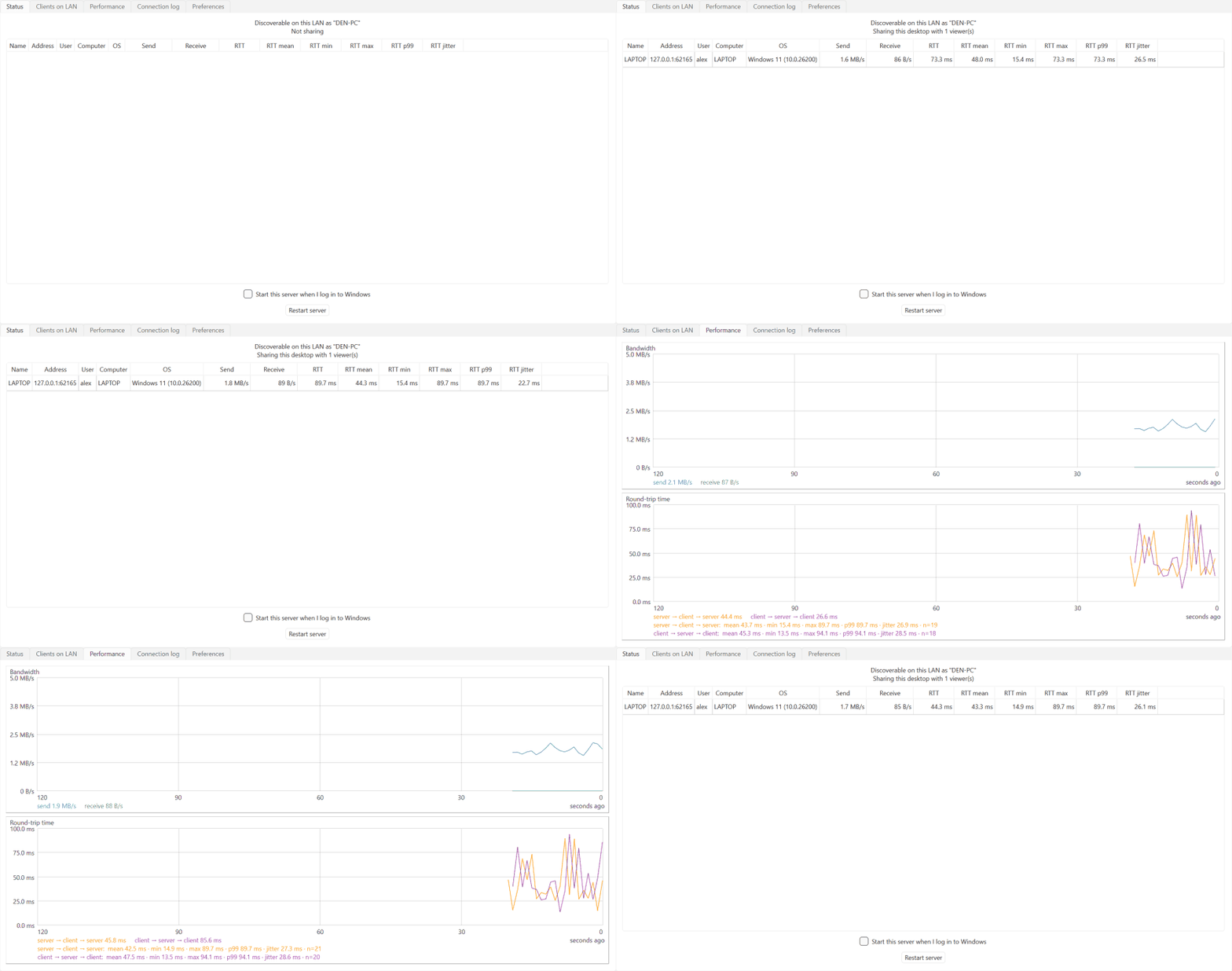
Sharing is turned on in Preferences (*view only* or *full control*). The
|
|
64
|
+
*Connections* tab then shows everything in one place: every connected
|
|
65
|
+
viewer — who they are (login name, computer, OS) and how the connection is
|
|
66
|
+
doing (bandwidth, round-trip time with mean/min/max/p99/jitter over the
|
|
67
|
+
recent window) — the history of servers seen and clients paired with
|
|
68
|
+
one-click *Forget* / *Revoke*, and the live connection log.
|
|
68
69
|
|
|
69
70
|
## Features
|
|
70
71
|
|
|
71
|
-
- 🧩 **One app, both roles** — every install can view other computers and share its own screen at the same time; sharing is
|
|
72
|
-
- 🔍 **Autodiscovery** — sharing computers announce themselves over UDP; the app lists every one on the LAN, no addresses to type.
|
|
72
|
+
- 🧩 **One app, both roles** — every install can view other computers and share its own screen at the same time; sharing is a three-state choice in Preferences (*Not shared* / *view only* / *full control*), and only one instance runs per computer (launching it again just raises the existing window).
|
|
73
|
+
- 🔍 **Autodiscovery** — sharing computers announce themselves over UDP; the app lists every one on the LAN at startup, no addresses to type (press *Refresh* or F5 to rescan).
|
|
73
74
|
- 🗂️ **Multiple computers at once** — view and control several computers simultaneously, each in its own tab named for that computer; the window title shows who you're connected to, even minimized.
|
|
74
75
|
- 🖥️ **Lossless screen sharing** — pixel-exact at full resolution, DXGI desktop-duplication capture (~10 ms per 4K frame), and inter-frame delta compression: an unchanged screen sends nothing.
|
|
75
|
-
- ⌨️🖱️ **Full input control** — mouse, wheel, and keyboard forwarding that is safe against interruptions: anything still held down is released on the server if the viewer loses focus or disconnects, so no stuck keys.
|
|
76
|
-
-
|
|
76
|
+
- ⌨️🖱️ **Full input control** — mouse, wheel, and keyboard forwarding that is safe against interruptions: anything still held down is released on the server if the viewer loses focus or disconnects, so no stuck keys. Prefer eyes-only? Choose *Shared — viewers can watch only* and sharing becomes view-only, switchable live.
|
|
77
|
+
- 🖼️ **View your way** — each connection scales to fit or shows the remote screen at 1:1 pixels with panning, and F11 goes full screen. While you type into a remote session every key is forwarded — F11 is the one key that stays local.
|
|
78
|
+
- 📋 **Two-way clipboard** — text and images copied on either machine appear on the other; a Preferences toggle turns syncing off entirely.
|
|
77
79
|
- 🔒 **TLS + approve-once pairing** — every connection is encrypted; the server user approves a new client once, after which it reconnects with a stored token and no prompt.
|
|
78
80
|
- 📊 **Built-in performance monitoring** — live bandwidth and round-trip-time graphs with window statistics (mean/min/max/p99/jitter), plus a per-viewer table on the server.
|
|
79
|
-
- 🔁 **Robust connections** — dead connections are detected
|
|
81
|
+
- 🔁 **Robust connections** — dead connections are detected within seconds, and dropped sessions reconnect automatically with backoff; a server restart heals by itself, no clicks needed. Connections that were open when the app closed are restored on the next start.
|
|
80
82
|
- 🚀 **Hands-off operation** — optional start-at-login (per-user, no admin rights), close-to-tray while sharing (the screen stays available with the window closed), and a *Restart app* button usable from the remote session itself, so you can update the software without visiting the machine.
|
|
81
|
-
- 🗃️ **Persistent peer inventory** —
|
|
83
|
+
- 🗃️ **Persistent peer inventory** — a SQLite-backed history of every peer seen on the LAN, with one-click *Revoke* / *Forget*.
|
|
84
|
+
- 🧭 **Desktop-app niceties** — a real menu bar with standard shortcuts, a status-bar sharing indicator, a confirmation before quitting with viewers connected, and window/panel layout that persists across restarts.
|
|
82
85
|
|
|
83
86
|
In scope: screen, keyboard, mouse, and clipboard. Out of scope: shared
|
|
84
87
|
drives, devices, and audio — and smooth playback of fast-changing
|
|
@@ -103,8 +106,8 @@ it prepares the environment on first use and launches the app.
|
|
|
103
106
|
## Quick start
|
|
104
107
|
|
|
105
108
|
1. Run `remotedesktop` on both computers.
|
|
106
|
-
2. On the computer to share, open
|
|
107
|
-
|
|
109
|
+
2. On the computer to share, open *Preferences* and set *Screen sharing*
|
|
110
|
+
to one of the *Shared* modes.
|
|
108
111
|
3. On the viewing computer, the shared computer appears in the *Servers*
|
|
109
112
|
panel — double-click it.
|
|
110
113
|
4. Approve the connection in the dialog that pops up on the shared
|
|
@@ -124,7 +127,7 @@ certificates are trusted on first use and a changed fingerprint is logged
|
|
|
124
127
|
rather than blocking the connection, favoring reliable reconnection over
|
|
125
128
|
strict certificate checking. Unapproved clients are limited to small
|
|
126
129
|
handshake messages until the user at the shared computer admits them;
|
|
127
|
-
access can be revoked at any time from the *
|
|
130
|
+
access can be revoked at any time from the *Connections* tab. There is
|
|
128
131
|
no dependency
|
|
129
132
|
on Windows RDP or any Microsoft-based authentication.
|
|
130
133
|
|
|
Binary file
|
|
Binary file
|
|
@@ -8,11 +8,11 @@
|
|
|
8
8
|
|
|
9
9
|
**Lossless, low-latency remote desktop for Windows computers on your LAN — one app, pure Python, zero configuration.**
|
|
10
10
|
|
|
11
|
-
Run the same app on every computer.
|
|
12
|
-
|
|
13
|
-
every other instance's *Servers* panel: the first
|
|
14
|
-
with one click on the shared computer, and from then
|
|
15
|
-
instantly. View several computers at once — each in its own tab — while
|
|
11
|
+
Run the same app on every computer. Turn on *Screen sharing* (view only or
|
|
12
|
+
full control) in Preferences on the ones you want to reach, and they appear
|
|
13
|
+
automatically in every other instance's *Servers* panel: the first
|
|
14
|
+
connection is approved with one click on the shared computer, and from then
|
|
15
|
+
on it reconnects instantly. View several computers at once — each in its own tab — while
|
|
16
16
|
optionally sharing your own screen at the same time; closing the window
|
|
17
17
|
while sharing keeps serving from the system tray. The screen stream is
|
|
18
18
|
pixel-exact at full resolution — built for documents, code, and terminals
|
|
@@ -37,25 +37,28 @@ time with live statistics.
|
|
|
37
37
|
|
|
38
38
|

|
|
39
39
|
|
|
40
|
-
|
|
41
|
-
|
|
42
|
-
|
|
43
|
-
mean/min/max/p99/jitter over the
|
|
44
|
-
of servers seen and clients paired
|
|
40
|
+
Sharing is turned on in Preferences (*view only* or *full control*). The
|
|
41
|
+
*Connections* tab then shows everything in one place: every connected
|
|
42
|
+
viewer — who they are (login name, computer, OS) and how the connection is
|
|
43
|
+
doing (bandwidth, round-trip time with mean/min/max/p99/jitter over the
|
|
44
|
+
recent window) — the history of servers seen and clients paired with
|
|
45
|
+
one-click *Forget* / *Revoke*, and the live connection log.
|
|
45
46
|
|
|
46
47
|
## Features
|
|
47
48
|
|
|
48
|
-
- 🧩 **One app, both roles** — every install can view other computers and share its own screen at the same time; sharing is
|
|
49
|
-
- 🔍 **Autodiscovery** — sharing computers announce themselves over UDP; the app lists every one on the LAN, no addresses to type.
|
|
49
|
+
- 🧩 **One app, both roles** — every install can view other computers and share its own screen at the same time; sharing is a three-state choice in Preferences (*Not shared* / *view only* / *full control*), and only one instance runs per computer (launching it again just raises the existing window).
|
|
50
|
+
- 🔍 **Autodiscovery** — sharing computers announce themselves over UDP; the app lists every one on the LAN at startup, no addresses to type (press *Refresh* or F5 to rescan).
|
|
50
51
|
- 🗂️ **Multiple computers at once** — view and control several computers simultaneously, each in its own tab named for that computer; the window title shows who you're connected to, even minimized.
|
|
51
52
|
- 🖥️ **Lossless screen sharing** — pixel-exact at full resolution, DXGI desktop-duplication capture (~10 ms per 4K frame), and inter-frame delta compression: an unchanged screen sends nothing.
|
|
52
|
-
- ⌨️🖱️ **Full input control** — mouse, wheel, and keyboard forwarding that is safe against interruptions: anything still held down is released on the server if the viewer loses focus or disconnects, so no stuck keys.
|
|
53
|
-
-
|
|
53
|
+
- ⌨️🖱️ **Full input control** — mouse, wheel, and keyboard forwarding that is safe against interruptions: anything still held down is released on the server if the viewer loses focus or disconnects, so no stuck keys. Prefer eyes-only? Choose *Shared — viewers can watch only* and sharing becomes view-only, switchable live.
|
|
54
|
+
- 🖼️ **View your way** — each connection scales to fit or shows the remote screen at 1:1 pixels with panning, and F11 goes full screen. While you type into a remote session every key is forwarded — F11 is the one key that stays local.
|
|
55
|
+
- 📋 **Two-way clipboard** — text and images copied on either machine appear on the other; a Preferences toggle turns syncing off entirely.
|
|
54
56
|
- 🔒 **TLS + approve-once pairing** — every connection is encrypted; the server user approves a new client once, after which it reconnects with a stored token and no prompt.
|
|
55
57
|
- 📊 **Built-in performance monitoring** — live bandwidth and round-trip-time graphs with window statistics (mean/min/max/p99/jitter), plus a per-viewer table on the server.
|
|
56
|
-
- 🔁 **Robust connections** — dead connections are detected
|
|
58
|
+
- 🔁 **Robust connections** — dead connections are detected within seconds, and dropped sessions reconnect automatically with backoff; a server restart heals by itself, no clicks needed. Connections that were open when the app closed are restored on the next start.
|
|
57
59
|
- 🚀 **Hands-off operation** — optional start-at-login (per-user, no admin rights), close-to-tray while sharing (the screen stays available with the window closed), and a *Restart app* button usable from the remote session itself, so you can update the software without visiting the machine.
|
|
58
|
-
- 🗃️ **Persistent peer inventory** —
|
|
60
|
+
- 🗃️ **Persistent peer inventory** — a SQLite-backed history of every peer seen on the LAN, with one-click *Revoke* / *Forget*.
|
|
61
|
+
- 🧭 **Desktop-app niceties** — a real menu bar with standard shortcuts, a status-bar sharing indicator, a confirmation before quitting with viewers connected, and window/panel layout that persists across restarts.
|
|
59
62
|
|
|
60
63
|
In scope: screen, keyboard, mouse, and clipboard. Out of scope: shared
|
|
61
64
|
drives, devices, and audio — and smooth playback of fast-changing
|
|
@@ -80,8 +83,8 @@ it prepares the environment on first use and launches the app.
|
|
|
80
83
|
## Quick start
|
|
81
84
|
|
|
82
85
|
1. Run `remotedesktop` on both computers.
|
|
83
|
-
2. On the computer to share, open
|
|
84
|
-
|
|
86
|
+
2. On the computer to share, open *Preferences* and set *Screen sharing*
|
|
87
|
+
to one of the *Shared* modes.
|
|
85
88
|
3. On the viewing computer, the shared computer appears in the *Servers*
|
|
86
89
|
panel — double-click it.
|
|
87
90
|
4. Approve the connection in the dialog that pops up on the shared
|
|
@@ -101,7 +104,7 @@ certificates are trusted on first use and a changed fingerprint is logged
|
|
|
101
104
|
rather than blocking the connection, favoring reliable reconnection over
|
|
102
105
|
strict certificate checking. Unapproved clients are limited to small
|
|
103
106
|
handshake messages until the user at the shared computer admits them;
|
|
104
|
-
access can be revoked at any time from the *
|
|
107
|
+
access can be revoked at any time from the *Connections* tab. There is
|
|
105
108
|
no dependency
|
|
106
109
|
on Windows RDP or any Microsoft-based authentication.
|
|
107
110
|
|