remotedesktop 0.18.0__tar.gz → 0.20.0__tar.gz
This diff represents the content of publicly available package versions that have been released to one of the supported registries. The information contained in this diff is provided for informational purposes only and reflects changes between package versions as they appear in their respective public registries.
- {remotedesktop-0.18.0 → remotedesktop-0.20.0}/CLAUDE.md +2 -2
- {remotedesktop-0.18.0 → remotedesktop-0.20.0}/PKG-INFO +75 -4
- {remotedesktop-0.18.0 → remotedesktop-0.20.0}/pyproject.toml +6 -0
- {remotedesktop-0.18.0 → remotedesktop-0.20.0}/readme.md +70 -3
- {remotedesktop-0.18.0 → remotedesktop-0.20.0}/src/remotedesktop/__init__.py +1 -1
- remotedesktop-0.20.0/src/remotedesktop/about.py +71 -0
- remotedesktop-0.20.0/src/remotedesktop/client.py +452 -0
- remotedesktop-0.20.0/src/remotedesktop/compat.py +38 -0
- {remotedesktop-0.18.0 → remotedesktop-0.20.0}/src/remotedesktop/server.py +18 -5
- {remotedesktop-0.18.0 → remotedesktop-0.20.0}/src/remotedesktop/sharing.py +32 -3
- remotedesktop-0.20.0/tests/test_about.py +36 -0
- {remotedesktop-0.18.0 → remotedesktop-0.20.0}/tests/test_client_window.py +122 -18
- remotedesktop-0.20.0/tests/test_compat.py +29 -0
- {remotedesktop-0.18.0 → remotedesktop-0.20.0}/tests/test_performance.py +3 -0
- {remotedesktop-0.18.0 → remotedesktop-0.20.0}/tests/test_server_window.py +51 -4
- {remotedesktop-0.18.0 → remotedesktop-0.20.0}/tests/test_sharing.py +26 -0
- {remotedesktop-0.18.0 → remotedesktop-0.20.0}/tests/test_smoke.py +2 -2
- {remotedesktop-0.18.0 → remotedesktop-0.20.0}/tools/make_demo_gifs.py +1 -1
- {remotedesktop-0.18.0 → remotedesktop-0.20.0}/uv.lock +11 -0
- remotedesktop-0.18.0/src/remotedesktop/client.py +0 -305
- {remotedesktop-0.18.0 → remotedesktop-0.20.0}/.github/workflows/ci.yml +0 -0
- {remotedesktop-0.18.0 → remotedesktop-0.20.0}/.gitignore +0 -0
- {remotedesktop-0.18.0 → remotedesktop-0.20.0}/LICENSE +0 -0
- {remotedesktop-0.18.0 → remotedesktop-0.20.0}/docs/media/client-demo.gif +0 -0
- {remotedesktop-0.18.0 → remotedesktop-0.20.0}/docs/media/server-demo.gif +0 -0
- {remotedesktop-0.18.0 → remotedesktop-0.20.0}/run_claude.bat +0 -0
- {remotedesktop-0.18.0 → remotedesktop-0.20.0}/run_client.bat +0 -0
- {remotedesktop-0.18.0 → remotedesktop-0.20.0}/run_server.bat +0 -0
- {remotedesktop-0.18.0 → remotedesktop-0.20.0}/scripts/make_coverage_badge.py +0 -0
- {remotedesktop-0.18.0 → remotedesktop-0.20.0}/scripts/make_venv.bat +0 -0
- {remotedesktop-0.18.0 → remotedesktop-0.20.0}/src/remotedesktop/autostart.py +0 -0
- {remotedesktop-0.18.0 → remotedesktop-0.20.0}/src/remotedesktop/clipboard.py +0 -0
- {remotedesktop-0.18.0 → remotedesktop-0.20.0}/src/remotedesktop/config.py +0 -0
- {remotedesktop-0.18.0 → remotedesktop-0.20.0}/src/remotedesktop/db.py +0 -0
- {remotedesktop-0.18.0 → remotedesktop-0.20.0}/src/remotedesktop/discovery.py +0 -0
- {remotedesktop-0.18.0 → remotedesktop-0.20.0}/src/remotedesktop/dxgi.py +0 -0
- {remotedesktop-0.18.0 → remotedesktop-0.20.0}/src/remotedesktop/frames.py +0 -0
- {remotedesktop-0.18.0 → remotedesktop-0.20.0}/src/remotedesktop/icon.py +0 -0
- {remotedesktop-0.18.0 → remotedesktop-0.20.0}/src/remotedesktop/input_injection.py +0 -0
- {remotedesktop-0.18.0 → remotedesktop-0.20.0}/src/remotedesktop/inventory.py +0 -0
- {remotedesktop-0.18.0 → remotedesktop-0.20.0}/src/remotedesktop/logs.py +0 -0
- {remotedesktop-0.18.0 → remotedesktop-0.20.0}/src/remotedesktop/modal_loop.py +0 -0
- {remotedesktop-0.18.0 → remotedesktop-0.20.0}/src/remotedesktop/performance.py +0 -0
- {remotedesktop-0.18.0 → remotedesktop-0.20.0}/src/remotedesktop/preferences.py +0 -0
- {remotedesktop-0.18.0 → remotedesktop-0.20.0}/src/remotedesktop/protocol.py +0 -0
- {remotedesktop-0.18.0 → remotedesktop-0.20.0}/src/remotedesktop/tls.py +0 -0
- {remotedesktop-0.18.0 → remotedesktop-0.20.0}/src/remotedesktop/viewer.py +0 -0
- {remotedesktop-0.18.0 → remotedesktop-0.20.0}/src/remotedesktop/window_state.py +0 -0
- {remotedesktop-0.18.0 → remotedesktop-0.20.0}/tests/conftest.py +0 -0
- {remotedesktop-0.18.0 → remotedesktop-0.20.0}/tests/test_autostart.py +0 -0
- {remotedesktop-0.18.0 → remotedesktop-0.20.0}/tests/test_clipboard.py +0 -0
- {remotedesktop-0.18.0 → remotedesktop-0.20.0}/tests/test_config.py +0 -0
- {remotedesktop-0.18.0 → remotedesktop-0.20.0}/tests/test_discovery.py +0 -0
- {remotedesktop-0.18.0 → remotedesktop-0.20.0}/tests/test_dxgi.py +0 -0
- {remotedesktop-0.18.0 → remotedesktop-0.20.0}/tests/test_frames.py +0 -0
- {remotedesktop-0.18.0 → remotedesktop-0.20.0}/tests/test_icon.py +0 -0
- {remotedesktop-0.18.0 → remotedesktop-0.20.0}/tests/test_input.py +0 -0
- {remotedesktop-0.18.0 → remotedesktop-0.20.0}/tests/test_input_injection.py +0 -0
- {remotedesktop-0.18.0 → remotedesktop-0.20.0}/tests/test_inventory.py +0 -0
- {remotedesktop-0.18.0 → remotedesktop-0.20.0}/tests/test_logs.py +0 -0
- {remotedesktop-0.18.0 → remotedesktop-0.20.0}/tests/test_modal_loop.py +0 -0
- {remotedesktop-0.18.0 → remotedesktop-0.20.0}/tests/test_preferences.py +0 -0
- {remotedesktop-0.18.0 → remotedesktop-0.20.0}/tests/test_protocol.py +0 -0
- {remotedesktop-0.18.0 → remotedesktop-0.20.0}/tests/test_tls.py +0 -0
- {remotedesktop-0.18.0 → remotedesktop-0.20.0}/tests/test_window_state.py +0 -0
|
@@ -36,7 +36,7 @@ Managed with `uv` (hatchling build backend, src layout):
|
|
|
36
36
|
## Architecture
|
|
37
37
|
|
|
38
38
|
- Both apps are PySide6 GUI applications. `src/remotedesktop/client.py` (`ClientWindow`) and `src/remotedesktop/server.py` (`ServerWindow`) hold the app entry points; `main()` in each is wired to the `remotedesktop-client` / `remotedesktop-server` GUI scripts in `pyproject.toml`.
|
|
39
|
-
- The client-side remote desktop view is a widget, `ViewerWidget` in `src/remotedesktop/viewer.py
|
|
39
|
+
- The client-side remote desktop view is a widget, `ViewerWidget` in `src/remotedesktop/viewer.py`. Screen display and keyboard/mouse/clipboard forwarding belong in this widget, not in the window. **The client supports multiple simultaneous server connections**: each is a `ServerSession` in `client.py` (its own `ShareClient` + `ViewerWidget`), shown as a closable tab at the front of `ClientWindow`'s central `QTabWidget`, titled with the server's reported hostname (fixed tabs get their close buttons stripped). Sessions are keyed by `host:port`; activating an already-known server reconnects in its existing tab, activating a connected one just focuses it. The window title lists the connected server names (`_update_window_title`), and the status bar follows the currently selected session tab (`status_text` per session). The `PerformanceMonitor`, `ClipboardSync`, inventory, and Connection log are shared across sessions — the monitor aggregates all attached streams, and `performance.reset()` is only called when no *other* session is connected (resetting detaches every stream). Per-session status log lines are prefixed `[name]`.
|
|
40
40
|
- **Autodiscovery** (`src/remotedesktop/discovery.py`) is a stdlib-only UDP probe/response protocol, deliberately not mDNS: the client broadcasts a JSON probe to `DISCOVERY_PORT` (48653) and servers reply with `{name, port}`; datagrams with the wrong magic/version/type are dropped. The server runs a `DiscoveryResponder` thread while its window is open; the client's `DiscoveryPanel` (dock in `ClientWindow`) calls the blocking `discover_servers()` on a worker thread and delivers results to the GUI via a queued signal. `DEFAULT_CONNECT_PORT` (48654) is reserved for the future desktop connection.
|
|
41
41
|
- Discovery tests run over loopback with ephemeral ports (`bind_host`/`discovery_port`/`broadcast_hosts` parameters exist for this), so they never touch the real LAN or fixed ports.
|
|
42
42
|
- **Screen sharing** (`sharing.py` + `protocol.py` + `frames.py`) runs entirely on the Qt event loop — no threads or locks. `MessageStream` frames messages over a QTcpSocket (4-byte length + kind byte; JSON control messages, full frames, or inter-frame deltas; malformed input aborts the socket). `ShareServer` owns one QTimer that grabs the primary screen at full resolution via `_capture()` (a seam tests override to drive deterministic frame content) and fans out to all clients, skipping clients whose send buffer is backlogged; the timer only runs while clients are connected. Capture is DXGI desktop duplication (`dxgi.py`, hand-rolled ctypes COM — ~10 ms per changed 4K frame, ~0 when idle, and "unchanged" is signalled by returning the same QImage object so the diff is skipped) with automatic fallback to `QScreen.grabWindow` (~96 ms) whenever duplication is unavailable or lost (secure desktop, RDP, display-mode change, CI); unit tests fake the duplication (`FakeDuplication` in `tests/test_dxgi.py`) and the real-hardware test skips where DXGI is unavailable. **Frame transfer is lossless and inter-frame compressed** (`frames.py`): consecutive captures are diffed in 64-row bands (memoryview compares), and only changed bands ship as PNG in a delta payload the client patches onto its previous frame; an unchanged screen sends nothing. Full PNG keyframes go to clients that just joined, just recovered from a send backlog, or requested one (a `{"type": "keyframe"}` message — sent when a delta fails to apply, so desync self-heals). The capability is negotiated via `"delta": true` in the client hello; clients without it (0.5.0) get full JPEG frames every tick because they force-decode frames as JPEG — never send them PNG. Each variant (legacy JPEG / keyframe PNG / delta) is encoded at most once per tick and shared across clients. `ShareClient` decodes/patches to QImage for the viewer, which displays it scaled with a cached `SmoothTransformation` copy (full resolution is always delivered; scaling happens client-side only).
|
|
@@ -53,7 +53,7 @@ Managed with `uv` (hatchling build backend, src layout):
|
|
|
53
53
|
- **Transport is TLS + a token handshake** (`tls.py`, `sharing.py`, `config.py`). The Qt SSL backend here is Windows **schannel** (no OpenSSL); it does complete server-side TLS with a `cryptography`-generated self-signed cert loaded from PEM (verified), but be wary of schannel-specific quirks if you change the config. The server persists a self-signed cert/key under the config dir (`tls.load_or_create_credentials`; `ShareServer(credentials=...)`, or ephemeral if omitted). The client connects with `connectToHostEncrypted`, ignores the expected self-signed cert errors (`PeerVerifyMode.VerifyNone`), and pins the cert fingerprint **softly** — a change is logged but does *not* block the connection (robustness over strict security, per the trusted-LAN intent). Authentication: on first connect the server user approves and the server issues a random token (`PairedClients.pair`, stored server-side by client-id; client stores it in `KnownServers` keyed by `host:port` with the fingerprint). On reconnect the client sends the token in its hello and is admitted with no prompt; a missing/invalid token just falls back to re-approval (never hard-fails). **Do not reintroduce hard cert-pinning or challenge-response** — the user explicitly wanted robust connections over maximum security.
|
|
54
54
|
- **Performance monitoring** (`performance.py` + `preferences.py`): `PerformanceMonitor` is an opt-in collaborator (`performance=` on `ShareServer`/`ShareClient`, the `clipboard=` pattern — plain sharing tests leave it off). While admitted streams are attached, a 1 s QTimer samples `MessageStream.bytes_sent/bytes_received` counters into rolling `MetricSeries` (bandwidth, aggregated across streams via per-stream baselines) and pings **every** attached stream (each ping id maps to its stream; a pong is honored only on the stream it was sent to). The graphs' RTT series follow only the *active* (most recently admitted) stream; per-stream send/recv/RTT snapshots come from `metrics_for(stream)` and feed the server's Status-tab `ViewersTable` (`server.py`), which joins them with `ShareServer.viewers()` — identity fields (`user`/`host`/`os`) that the client hello reports (`_client_details()`; missing on old clients, shown as dashes). The ping is: `{"type": "ping", "id", "rtt"}` / `{"type": "pong", "id"}` — each side measures its own RTT and piggybacks it on its next ping so both ends graph both directions; peers without the feature ignore pings harmlessly (RTT graphs show "no data"). Ping/pong is admitted-streams-only on the server, like input/clipboard. Both windows have a "Performance" tab (`PerformanceTab`, custom QPainter graphs) that schedules **no paint work while hidden** (gated on `isVisible()`, repaint on `showEvent`) and a "Preferences" tab whose history-window setting persists via the `Settings` store (`performance_window_seconds`, default 120). The monitor's timer runs only while streams are attached; all timing is `time.monotonic()` with an injectable `clock=` for tests — never monkeypatch `time.monotonic` (the test `pump()` helper depends on it).
|
|
55
55
|
- **Clipboard sync is bidirectional** (`clipboard.py` `ClipboardSync`): client copy → server and server copy → all clients, as `{"type": "clipboard", "text"/"image_png"}` messages. It's opt-in — `ShareServer`/`ShareClient` take a `clipboard=` param and do nothing with clipboard if it's None, so only the GUIs (and clipboard tests) enable it; **plain sharing/input tests must leave it off to avoid touching the real OS clipboard.** Echo/loop prevention is by *content signature*, not just a guard flag, because Windows fires `QClipboard.dataChanged` asynchronously (after a flag would be cleared); image signatures hash canonical RGBA pixels so a re-encoded PNG round trip doesn't loop. Server only accepts clipboard from streams past the approval handshake. Tests use a `FakeClipboard(QObject)` with a `changed` signal and recording `apply()` so two independent clipboards exist in one process.
|
|
56
|
-
- The package version lives only in `src/remotedesktop/__init__.py` (`__version__`); hatchling reads it from there (`[tool.hatch.version]`), so bump it in that one place.
|
|
56
|
+
- The package version lives only in `src/remotedesktop/__init__.py` (`__version__`); hatchling reads it from there (`[tool.hatch.version]`), so bump it in that one place. **Versioning is strict semver** (`compat.py`, using the `semver` package): major = client/server compatibility contract, minor = backward-compatible features, patch = bug fixes — bump the major when the wire protocol or behavior breaks older peers. Both sides compare majors on every connection (hello/welcome carry `app_version`) and show a strong warning on mismatch (server status log + ⚠ in the viewers table's Version column; client log + non-modal dialog + status-bar marker) but never block the connection. Peers too old to report a version produce no warning.
|
|
57
57
|
- Widget tests need a `QApplication`; use the session-scoped `qapp` fixture in `tests/conftest.py`.
|
|
58
58
|
|
|
59
59
|
## Environment Notes
|
|
@@ -1,7 +1,10 @@
|
|
|
1
1
|
Metadata-Version: 2.4
|
|
2
2
|
Name: remotedesktop
|
|
3
|
-
Version: 0.
|
|
3
|
+
Version: 0.20.0
|
|
4
4
|
Summary: Remote desktop client/server for Windows computers on the same LAN, with autodiscovery. Provides screen, keyboard, mouse, and clipboard sharing without RDP or Microsoft authentication.
|
|
5
|
+
Project-URL: Homepage, https://github.com/jamesabel/remotedesktop
|
|
6
|
+
Project-URL: Repository, https://github.com/jamesabel/remotedesktop
|
|
7
|
+
Project-URL: PyPI, https://pypi.org/project/remotedesktop/
|
|
5
8
|
Author-email: James Abel <j@abel.co>
|
|
6
9
|
License-Expression: MIT
|
|
7
10
|
License-File: LICENSE
|
|
@@ -15,6 +18,7 @@ Requires-Python: >=3.14
|
|
|
15
18
|
Requires-Dist: cryptography>=49.0.0
|
|
16
19
|
Requires-Dist: platformdirs>=4.10.0
|
|
17
20
|
Requires-Dist: pyside6>=6.11.1
|
|
21
|
+
Requires-Dist: semver>=3.0
|
|
18
22
|
Description-Content-Type: text/markdown
|
|
19
23
|
|
|
20
24
|
# Remote Desktop
|
|
@@ -43,9 +47,11 @@ Microsoft accounts, no cloud: just two apps and your LAN.
|
|
|
43
47
|
|
|
44
48
|
|
|
45
49
|
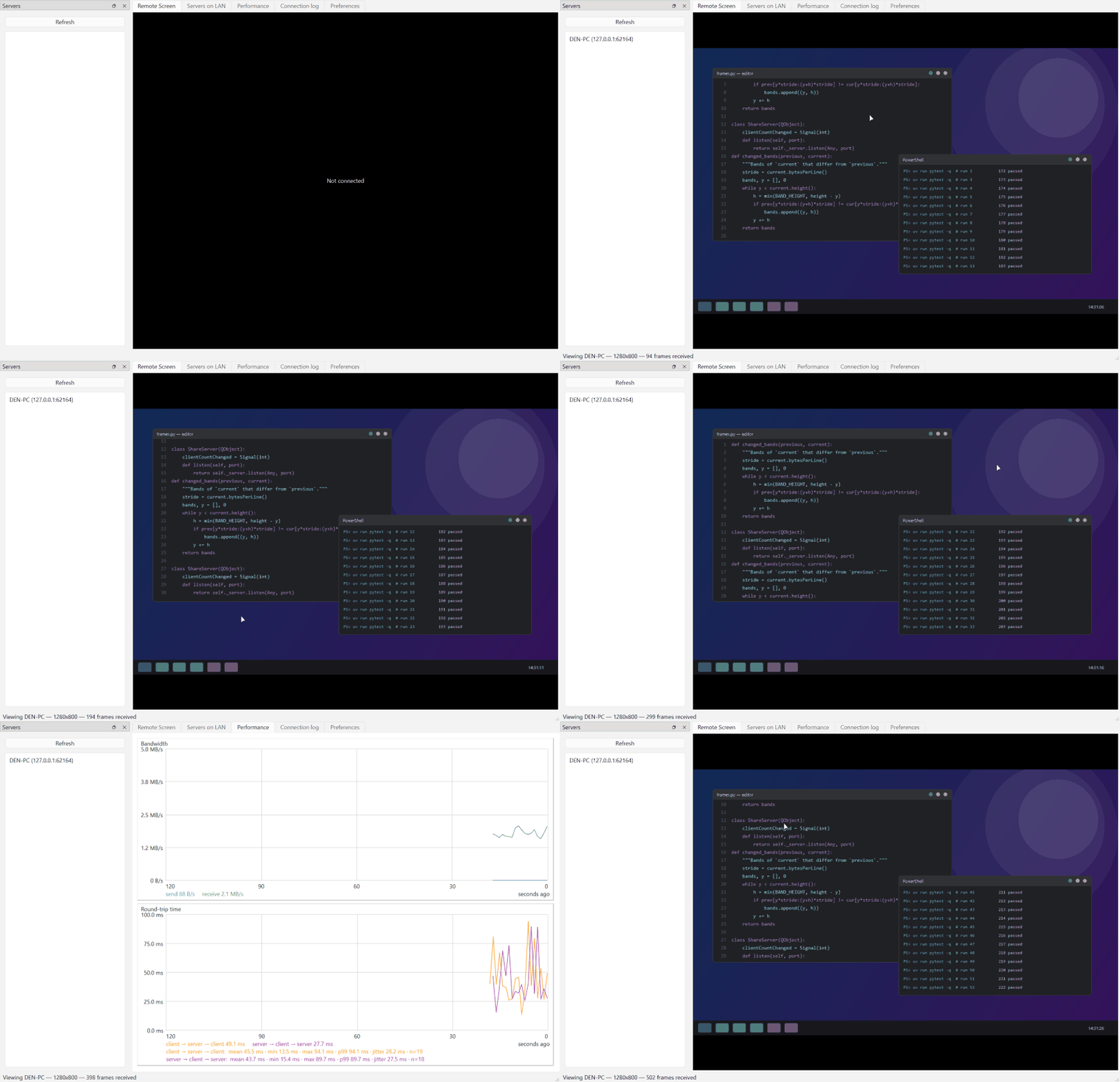
The client discovers the server on the LAN, connects, and streams its
|
|
46
|
-
desktop live in
|
|
47
|
-
and keyboard control the remote machine.
|
|
48
|
-
|
|
50
|
+
desktop live in a tab named after that computer — click into the view and
|
|
51
|
+
your mouse and keyboard control the remote machine. Connect to several
|
|
52
|
+
servers at once and each gets its own tab; the window title lists every
|
|
53
|
+
connected computer. The *Performance* tab graphs bandwidth and round-trip
|
|
54
|
+
time with live statistics.
|
|
49
55
|
|
|
50
56
|
### Server
|
|
51
57
|
|
|
@@ -58,6 +64,7 @@ time with mean/min/max/p99/jitter over the recent window).
|
|
|
58
64
|
## Features
|
|
59
65
|
|
|
60
66
|
- 🔍 **Autodiscovery** — servers announce themselves over UDP; the client lists every server on the LAN, no addresses to type.
|
|
67
|
+
- 🗂️ **Multiple servers at once** — one client can view and control several servers simultaneously, each in its own tab named for that computer; the window title shows who you're connected to, even minimized.
|
|
61
68
|
- 🖥️ **Lossless screen sharing** — pixel-exact at full resolution, DXGI desktop-duplication capture (~10 ms per 4K frame), and inter-frame delta compression: an unchanged screen sends nothing.
|
|
62
69
|
- ⌨️🖱️ **Full input control** — mouse, wheel, and keyboard forwarding that is safe against interruptions: anything still held down is released on the server if the viewer loses focus or disconnects, so no stuck keys.
|
|
63
70
|
- 📋 **Two-way clipboard** — text and images copied on either machine appear on the other.
|
|
@@ -111,6 +118,70 @@ handshake messages until the server user admits them; access can be revoked
|
|
|
111
118
|
at any time from the server's *Clients on LAN* tab. There is no dependency
|
|
112
119
|
on Windows RDP or any Microsoft-based authentication.
|
|
113
120
|
|
|
121
|
+
## How it works
|
|
122
|
+
|
|
123
|
+
All of this is pure Python — the GUIs are PySide6 (Qt), and the two places
|
|
124
|
+
that need to talk to Windows directly (screen capture and input injection)
|
|
125
|
+
call the Win32/COM APIs through `ctypes`, so there are no native extensions
|
|
126
|
+
to compile.
|
|
127
|
+
|
|
128
|
+
**Screen capture.** The server grabs the desktop with the **DXGI desktop
|
|
129
|
+
duplication API**, driven directly through `ctypes` COM calls. Desktop
|
|
130
|
+
duplication is the mechanism Windows provides for exactly this job: the
|
|
131
|
+
compositor hands over a GPU texture of the screen and tells you whether
|
|
132
|
+
anything changed, so a changed 4K frame costs about 10 ms to read back and
|
|
133
|
+
an idle screen costs essentially nothing. When duplication is unavailable
|
|
134
|
+
or gets lost — the secure desktop (UAC/logon screen), an RDP session, a
|
|
135
|
+
display-mode change — the server transparently falls back to Qt's
|
|
136
|
+
`QScreen.grabWindow` (~96 ms per frame) and keeps retrying duplication in
|
|
137
|
+
the background.
|
|
138
|
+
|
|
139
|
+
**Screen transfer.** Frames are captured at up to 30 fps and compared with
|
|
140
|
+
the previous capture in 64-row bands; only the bands that changed are
|
|
141
|
+
encoded — losslessly, as PNG — and sent as a delta the client patches onto
|
|
142
|
+
its last frame. An unchanged screen sends nothing at all. Full PNG
|
|
143
|
+
keyframes go to clients that just connected, fell behind (a client whose
|
|
144
|
+
socket backlog grows gets frames dropped, then a fresh keyframe once it
|
|
145
|
+
catches up), or asked for one because a delta failed to apply — so a
|
|
146
|
+
desynced stream heals itself. The frame always travels at the server's
|
|
147
|
+
full resolution; scaling to the viewer window happens on the client.
|
|
148
|
+
|
|
149
|
+
**Input injection.** The client's viewer widget captures your mouse and
|
|
150
|
+
keyboard events, maps mouse positions to coordinates normalized 0..1 over
|
|
151
|
+
the displayed frame (so window size and letterboxing don't matter), and
|
|
152
|
+
sends them as small JSON messages. The server injects them with the Win32
|
|
153
|
+
**`SendInput`** API: normalized coordinates map onto SendInput's 0..65535
|
|
154
|
+
absolute coordinate space over the primary monitor, and keystrokes carry
|
|
155
|
+
the client's native virtual-key codes, which are injected as-is — both
|
|
156
|
+
ends are Windows, so no key translation is needed. The server only injects
|
|
157
|
+
input from clients that have passed the approval handshake, and anything
|
|
158
|
+
still held down (a dragged button, a modifier key) is released
|
|
159
|
+
automatically if the viewer disconnects or loses focus.
|
|
160
|
+
|
|
161
|
+
**Clipboard.** Both sides watch their local clipboard via Qt and forward
|
|
162
|
+
copies (text, or images as PNG) over the same connection. Echo loops are
|
|
163
|
+
prevented by content signature — an image is hashed by its canonical
|
|
164
|
+
pixels, so a PNG that makes a round trip through the OS clipboard and
|
|
165
|
+
comes back re-encoded is still recognized and not sent again.
|
|
166
|
+
|
|
167
|
+
**Transport.** Each client talks to the server over a single TCP
|
|
168
|
+
connection: TLS via the Windows schannel backend with a self-signed
|
|
169
|
+
certificate the server generates and keeps, then simple length-prefixed
|
|
170
|
+
messages on top — JSON for control (hello/welcome, input, clipboard,
|
|
171
|
+
ping/pong for the round-trip-time graphs, log exchange) and binary
|
|
172
|
+
payloads for frames and deltas. Discovery is a UDP broadcast probe that
|
|
173
|
+
every server answers with its name and port (see below).
|
|
174
|
+
|
|
175
|
+
## Versioning
|
|
176
|
+
|
|
177
|
+
The apps follow [semantic versioning](https://semver.org): the **major**
|
|
178
|
+
version is the client/server compatibility contract (same major →
|
|
179
|
+
guaranteed to interoperate), **minor** versions add backward-compatible
|
|
180
|
+
features, **patch** versions fix bugs. On every connection each side
|
|
181
|
+
compares its major version with the peer's; a mismatch shows a strong
|
|
182
|
+
warning in both GUIs — connecting is still allowed, but the experience is
|
|
183
|
+
not guaranteed. Keep both computers on the same version for best results.
|
|
184
|
+
|
|
114
185
|
## Requirements
|
|
115
186
|
|
|
116
187
|
- Windows
|
|
@@ -18,8 +18,14 @@ dependencies = [
|
|
|
18
18
|
"cryptography>=49.0.0",
|
|
19
19
|
"platformdirs>=4.10.0",
|
|
20
20
|
"pyside6>=6.11.1",
|
|
21
|
+
"semver>=3.0",
|
|
21
22
|
]
|
|
22
23
|
|
|
24
|
+
[project.urls]
|
|
25
|
+
Homepage = "https://github.com/jamesabel/remotedesktop"
|
|
26
|
+
Repository = "https://github.com/jamesabel/remotedesktop"
|
|
27
|
+
PyPI = "https://pypi.org/project/remotedesktop/"
|
|
28
|
+
|
|
23
29
|
[project.gui-scripts]
|
|
24
30
|
remotedesktop-client = "remotedesktop.client:main"
|
|
25
31
|
remotedesktop-server = "remotedesktop.server:main"
|
|
@@ -24,9 +24,11 @@ Microsoft accounts, no cloud: just two apps and your LAN.
|
|
|
24
24
|

|
|
25
25
|
|
|
26
26
|
The client discovers the server on the LAN, connects, and streams its
|
|
27
|
-
desktop live in
|
|
28
|
-
and keyboard control the remote machine.
|
|
29
|
-
|
|
27
|
+
desktop live in a tab named after that computer — click into the view and
|
|
28
|
+
your mouse and keyboard control the remote machine. Connect to several
|
|
29
|
+
servers at once and each gets its own tab; the window title lists every
|
|
30
|
+
connected computer. The *Performance* tab graphs bandwidth and round-trip
|
|
31
|
+
time with live statistics.
|
|
30
32
|
|
|
31
33
|
### Server
|
|
32
34
|
|
|
@@ -39,6 +41,7 @@ time with mean/min/max/p99/jitter over the recent window).
|
|
|
39
41
|
## Features
|
|
40
42
|
|
|
41
43
|
- 🔍 **Autodiscovery** — servers announce themselves over UDP; the client lists every server on the LAN, no addresses to type.
|
|
44
|
+
- 🗂️ **Multiple servers at once** — one client can view and control several servers simultaneously, each in its own tab named for that computer; the window title shows who you're connected to, even minimized.
|
|
42
45
|
- 🖥️ **Lossless screen sharing** — pixel-exact at full resolution, DXGI desktop-duplication capture (~10 ms per 4K frame), and inter-frame delta compression: an unchanged screen sends nothing.
|
|
43
46
|
- ⌨️🖱️ **Full input control** — mouse, wheel, and keyboard forwarding that is safe against interruptions: anything still held down is released on the server if the viewer loses focus or disconnects, so no stuck keys.
|
|
44
47
|
- 📋 **Two-way clipboard** — text and images copied on either machine appear on the other.
|
|
@@ -92,6 +95,70 @@ handshake messages until the server user admits them; access can be revoked
|
|
|
92
95
|
at any time from the server's *Clients on LAN* tab. There is no dependency
|
|
93
96
|
on Windows RDP or any Microsoft-based authentication.
|
|
94
97
|
|
|
98
|
+
## How it works
|
|
99
|
+
|
|
100
|
+
All of this is pure Python — the GUIs are PySide6 (Qt), and the two places
|
|
101
|
+
that need to talk to Windows directly (screen capture and input injection)
|
|
102
|
+
call the Win32/COM APIs through `ctypes`, so there are no native extensions
|
|
103
|
+
to compile.
|
|
104
|
+
|
|
105
|
+
**Screen capture.** The server grabs the desktop with the **DXGI desktop
|
|
106
|
+
duplication API**, driven directly through `ctypes` COM calls. Desktop
|
|
107
|
+
duplication is the mechanism Windows provides for exactly this job: the
|
|
108
|
+
compositor hands over a GPU texture of the screen and tells you whether
|
|
109
|
+
anything changed, so a changed 4K frame costs about 10 ms to read back and
|
|
110
|
+
an idle screen costs essentially nothing. When duplication is unavailable
|
|
111
|
+
or gets lost — the secure desktop (UAC/logon screen), an RDP session, a
|
|
112
|
+
display-mode change — the server transparently falls back to Qt's
|
|
113
|
+
`QScreen.grabWindow` (~96 ms per frame) and keeps retrying duplication in
|
|
114
|
+
the background.
|
|
115
|
+
|
|
116
|
+
**Screen transfer.** Frames are captured at up to 30 fps and compared with
|
|
117
|
+
the previous capture in 64-row bands; only the bands that changed are
|
|
118
|
+
encoded — losslessly, as PNG — and sent as a delta the client patches onto
|
|
119
|
+
its last frame. An unchanged screen sends nothing at all. Full PNG
|
|
120
|
+
keyframes go to clients that just connected, fell behind (a client whose
|
|
121
|
+
socket backlog grows gets frames dropped, then a fresh keyframe once it
|
|
122
|
+
catches up), or asked for one because a delta failed to apply — so a
|
|
123
|
+
desynced stream heals itself. The frame always travels at the server's
|
|
124
|
+
full resolution; scaling to the viewer window happens on the client.
|
|
125
|
+
|
|
126
|
+
**Input injection.** The client's viewer widget captures your mouse and
|
|
127
|
+
keyboard events, maps mouse positions to coordinates normalized 0..1 over
|
|
128
|
+
the displayed frame (so window size and letterboxing don't matter), and
|
|
129
|
+
sends them as small JSON messages. The server injects them with the Win32
|
|
130
|
+
**`SendInput`** API: normalized coordinates map onto SendInput's 0..65535
|
|
131
|
+
absolute coordinate space over the primary monitor, and keystrokes carry
|
|
132
|
+
the client's native virtual-key codes, which are injected as-is — both
|
|
133
|
+
ends are Windows, so no key translation is needed. The server only injects
|
|
134
|
+
input from clients that have passed the approval handshake, and anything
|
|
135
|
+
still held down (a dragged button, a modifier key) is released
|
|
136
|
+
automatically if the viewer disconnects or loses focus.
|
|
137
|
+
|
|
138
|
+
**Clipboard.** Both sides watch their local clipboard via Qt and forward
|
|
139
|
+
copies (text, or images as PNG) over the same connection. Echo loops are
|
|
140
|
+
prevented by content signature — an image is hashed by its canonical
|
|
141
|
+
pixels, so a PNG that makes a round trip through the OS clipboard and
|
|
142
|
+
comes back re-encoded is still recognized and not sent again.
|
|
143
|
+
|
|
144
|
+
**Transport.** Each client talks to the server over a single TCP
|
|
145
|
+
connection: TLS via the Windows schannel backend with a self-signed
|
|
146
|
+
certificate the server generates and keeps, then simple length-prefixed
|
|
147
|
+
messages on top — JSON for control (hello/welcome, input, clipboard,
|
|
148
|
+
ping/pong for the round-trip-time graphs, log exchange) and binary
|
|
149
|
+
payloads for frames and deltas. Discovery is a UDP broadcast probe that
|
|
150
|
+
every server answers with its name and port (see below).
|
|
151
|
+
|
|
152
|
+
## Versioning
|
|
153
|
+
|
|
154
|
+
The apps follow [semantic versioning](https://semver.org): the **major**
|
|
155
|
+
version is the client/server compatibility contract (same major →
|
|
156
|
+
guaranteed to interoperate), **minor** versions add backward-compatible
|
|
157
|
+
features, **patch** versions fix bugs. On every connection each side
|
|
158
|
+
compares its major version with the peer's; a mismatch shows a strong
|
|
159
|
+
warning in both GUIs — connecting is still allowed, but the experience is
|
|
160
|
+
not guaranteed. Keep both computers on the same version for best results.
|
|
161
|
+
|
|
95
162
|
## Requirements
|
|
96
163
|
|
|
97
164
|
- Windows
|
|
@@ -0,0 +1,71 @@
|
|
|
1
|
+
"""The "About" tab, shared by the client and server windows.
|
|
2
|
+
|
|
3
|
+
Shows the same metadata the PyPI page shows — summary, author, license,
|
|
4
|
+
Python requirement, links — read from the installed package's metadata via
|
|
5
|
+
importlib.metadata, with static fallbacks so the tab still renders in odd
|
|
6
|
+
environments (the version always comes from `remotedesktop.__version__`,
|
|
7
|
+
the single source hatchling packages)."""
|
|
8
|
+
|
|
9
|
+
from importlib import metadata
|
|
10
|
+
|
|
11
|
+
from PySide6.QtCore import Qt
|
|
12
|
+
from PySide6.QtWidgets import QLabel, QVBoxLayout, QWidget
|
|
13
|
+
|
|
14
|
+
from remotedesktop import __version__, icon
|
|
15
|
+
|
|
16
|
+
_HOMEPAGE = "https://github.com/jamesabel/remotedesktop"
|
|
17
|
+
_PYPI = "https://pypi.org/project/remotedesktop/"
|
|
18
|
+
_FALLBACKS = {
|
|
19
|
+
"Summary": (
|
|
20
|
+
"Remote desktop client/server for Windows computers on the same LAN, "
|
|
21
|
+
"with autodiscovery. Provides screen, keyboard, mouse, and clipboard "
|
|
22
|
+
"sharing without RDP or Microsoft authentication."
|
|
23
|
+
),
|
|
24
|
+
"Author-email": "James Abel <j@abel.co>",
|
|
25
|
+
"License-Expression": "MIT",
|
|
26
|
+
"Requires-Python": ">=3.14",
|
|
27
|
+
}
|
|
28
|
+
|
|
29
|
+
|
|
30
|
+
def _field(name: str) -> str:
|
|
31
|
+
try:
|
|
32
|
+
value = metadata.metadata("remotedesktop").get(name)
|
|
33
|
+
except metadata.PackageNotFoundError:
|
|
34
|
+
value = None
|
|
35
|
+
return str(value) if value else _FALLBACKS.get(name, "")
|
|
36
|
+
|
|
37
|
+
|
|
38
|
+
class AboutTab(QWidget):
|
|
39
|
+
"""Package metadata as a rich-text page with clickable links."""
|
|
40
|
+
|
|
41
|
+
def __init__(self, parent: QWidget | None = None) -> None:
|
|
42
|
+
super().__init__(parent)
|
|
43
|
+
author = _field("Author-email").replace("<", "<").replace(">", ">")
|
|
44
|
+
body = QLabel(
|
|
45
|
+
f"""
|
|
46
|
+
<h2 style="margin-bottom:2px">Remote Desktop {__version__}</h2>
|
|
47
|
+
<p>{_field("Summary")}</p>
|
|
48
|
+
<table cellspacing="4">
|
|
49
|
+
<tr><td><b>Author</b></td><td>{author}</td></tr>
|
|
50
|
+
<tr><td><b>License</b></td><td>{_field("License-Expression")}</td></tr>
|
|
51
|
+
<tr><td><b>Python</b></td><td>{_field("Requires-Python")}</td></tr>
|
|
52
|
+
<tr><td><b>Package</b></td><td>remotedesktop</td></tr>
|
|
53
|
+
</table>
|
|
54
|
+
<p>
|
|
55
|
+
<a href="{_HOMEPAGE}">GitHub</a> ·
|
|
56
|
+
<a href="{_PYPI}">PyPI</a>
|
|
57
|
+
</p>
|
|
58
|
+
"""
|
|
59
|
+
)
|
|
60
|
+
body.setTextFormat(Qt.TextFormat.RichText)
|
|
61
|
+
body.setOpenExternalLinks(True)
|
|
62
|
+
body.setWordWrap(True)
|
|
63
|
+
body.setTextInteractionFlags(
|
|
64
|
+
Qt.TextInteractionFlag.TextBrowserInteraction
|
|
65
|
+
)
|
|
66
|
+
logo = QLabel()
|
|
67
|
+
logo.setPixmap(icon.app_icon("client").pixmap(48, 48))
|
|
68
|
+
layout = QVBoxLayout(self)
|
|
69
|
+
layout.addWidget(logo)
|
|
70
|
+
layout.addWidget(body)
|
|
71
|
+
layout.addStretch(1)
|