remotedesktop 0.16.0__tar.gz → 0.18.0__tar.gz
This diff represents the content of publicly available package versions that have been released to one of the supported registries. The information contained in this diff is provided for informational purposes only and reflects changes between package versions as they appear in their respective public registries.
- {remotedesktop-0.16.0 → remotedesktop-0.18.0}/CLAUDE.md +1 -1
- remotedesktop-0.18.0/PKG-INFO +148 -0
- remotedesktop-0.18.0/docs/media/client-demo.gif +0 -0
- remotedesktop-0.18.0/docs/media/server-demo.gif +0 -0
- {remotedesktop-0.16.0 → remotedesktop-0.18.0}/pyproject.toml +47 -46
- remotedesktop-0.18.0/readme.md +129 -0
- {remotedesktop-0.16.0 → remotedesktop-0.18.0}/src/remotedesktop/__init__.py +1 -1
- {remotedesktop-0.16.0 → remotedesktop-0.18.0}/src/remotedesktop/modal_loop.py +52 -8
- {remotedesktop-0.16.0 → remotedesktop-0.18.0}/src/remotedesktop/server.py +20 -4
- {remotedesktop-0.16.0 → remotedesktop-0.18.0}/tests/test_modal_loop.py +45 -1
- {remotedesktop-0.16.0 → remotedesktop-0.18.0}/tests/test_server_window.py +27 -0
- remotedesktop-0.18.0/tools/make_demo_gifs.py +293 -0
- {remotedesktop-0.16.0 → remotedesktop-0.18.0}/uv.lock +384 -332
- remotedesktop-0.16.0/PKG-INFO +0 -137
- remotedesktop-0.16.0/readme.md +0 -118
- {remotedesktop-0.16.0 → remotedesktop-0.18.0}/.github/workflows/ci.yml +0 -0
- {remotedesktop-0.16.0 → remotedesktop-0.18.0}/.gitignore +0 -0
- {remotedesktop-0.16.0 → remotedesktop-0.18.0}/LICENSE +0 -0
- {remotedesktop-0.16.0 → remotedesktop-0.18.0}/run_claude.bat +0 -0
- {remotedesktop-0.16.0 → remotedesktop-0.18.0}/run_client.bat +0 -0
- {remotedesktop-0.16.0 → remotedesktop-0.18.0}/run_server.bat +0 -0
- {remotedesktop-0.16.0 → remotedesktop-0.18.0}/scripts/make_coverage_badge.py +0 -0
- {remotedesktop-0.16.0 → remotedesktop-0.18.0}/scripts/make_venv.bat +0 -0
- {remotedesktop-0.16.0 → remotedesktop-0.18.0}/src/remotedesktop/autostart.py +0 -0
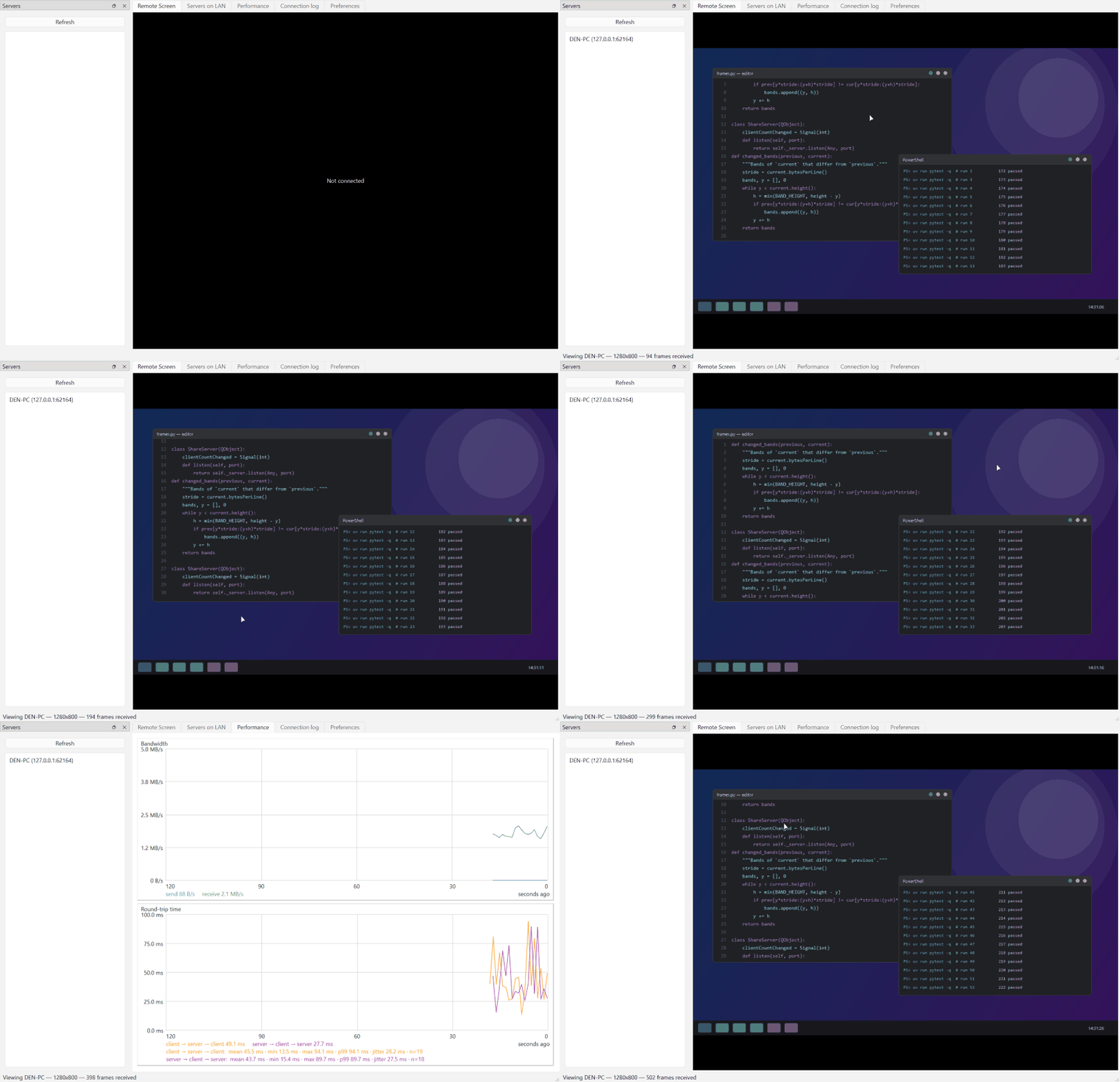
- {remotedesktop-0.16.0 → remotedesktop-0.18.0}/src/remotedesktop/client.py +0 -0
- {remotedesktop-0.16.0 → remotedesktop-0.18.0}/src/remotedesktop/clipboard.py +0 -0
- {remotedesktop-0.16.0 → remotedesktop-0.18.0}/src/remotedesktop/config.py +0 -0
- {remotedesktop-0.16.0 → remotedesktop-0.18.0}/src/remotedesktop/db.py +0 -0
- {remotedesktop-0.16.0 → remotedesktop-0.18.0}/src/remotedesktop/discovery.py +0 -0
- {remotedesktop-0.16.0 → remotedesktop-0.18.0}/src/remotedesktop/dxgi.py +0 -0
- {remotedesktop-0.16.0 → remotedesktop-0.18.0}/src/remotedesktop/frames.py +0 -0
- {remotedesktop-0.16.0 → remotedesktop-0.18.0}/src/remotedesktop/icon.py +0 -0
- {remotedesktop-0.16.0 → remotedesktop-0.18.0}/src/remotedesktop/input_injection.py +0 -0
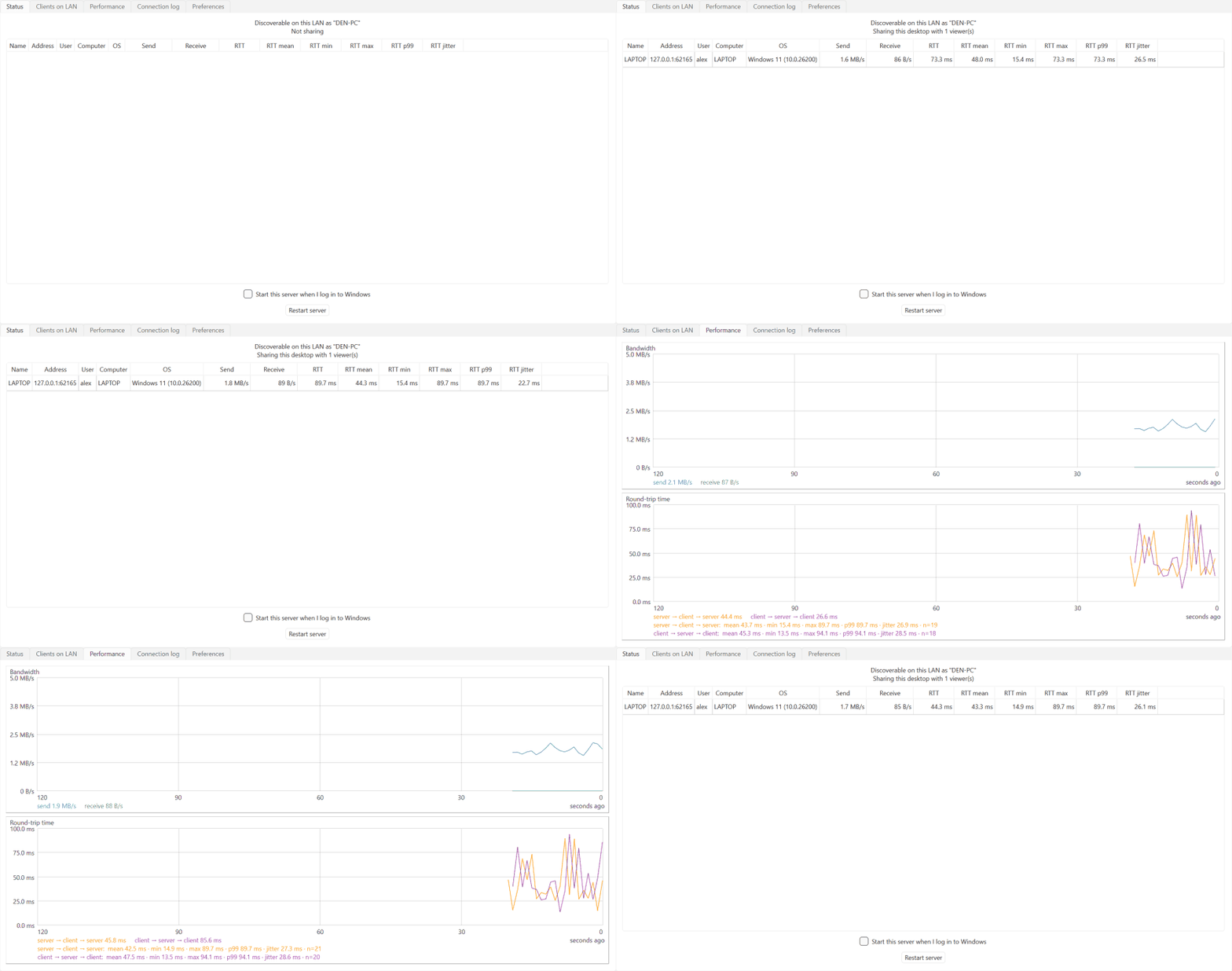
- {remotedesktop-0.16.0 → remotedesktop-0.18.0}/src/remotedesktop/inventory.py +0 -0
- {remotedesktop-0.16.0 → remotedesktop-0.18.0}/src/remotedesktop/logs.py +0 -0
- {remotedesktop-0.16.0 → remotedesktop-0.18.0}/src/remotedesktop/performance.py +0 -0
- {remotedesktop-0.16.0 → remotedesktop-0.18.0}/src/remotedesktop/preferences.py +0 -0
- {remotedesktop-0.16.0 → remotedesktop-0.18.0}/src/remotedesktop/protocol.py +0 -0
- {remotedesktop-0.16.0 → remotedesktop-0.18.0}/src/remotedesktop/sharing.py +0 -0
- {remotedesktop-0.16.0 → remotedesktop-0.18.0}/src/remotedesktop/tls.py +0 -0
- {remotedesktop-0.16.0 → remotedesktop-0.18.0}/src/remotedesktop/viewer.py +0 -0
- {remotedesktop-0.16.0 → remotedesktop-0.18.0}/src/remotedesktop/window_state.py +0 -0
- {remotedesktop-0.16.0 → remotedesktop-0.18.0}/tests/conftest.py +0 -0
- {remotedesktop-0.16.0 → remotedesktop-0.18.0}/tests/test_autostart.py +0 -0
- {remotedesktop-0.16.0 → remotedesktop-0.18.0}/tests/test_client_window.py +0 -0
- {remotedesktop-0.16.0 → remotedesktop-0.18.0}/tests/test_clipboard.py +0 -0
- {remotedesktop-0.16.0 → remotedesktop-0.18.0}/tests/test_config.py +0 -0
- {remotedesktop-0.16.0 → remotedesktop-0.18.0}/tests/test_discovery.py +0 -0
- {remotedesktop-0.16.0 → remotedesktop-0.18.0}/tests/test_dxgi.py +0 -0
- {remotedesktop-0.16.0 → remotedesktop-0.18.0}/tests/test_frames.py +0 -0
- {remotedesktop-0.16.0 → remotedesktop-0.18.0}/tests/test_icon.py +0 -0
- {remotedesktop-0.16.0 → remotedesktop-0.18.0}/tests/test_input.py +0 -0
- {remotedesktop-0.16.0 → remotedesktop-0.18.0}/tests/test_input_injection.py +0 -0
- {remotedesktop-0.16.0 → remotedesktop-0.18.0}/tests/test_inventory.py +0 -0
- {remotedesktop-0.16.0 → remotedesktop-0.18.0}/tests/test_logs.py +0 -0
- {remotedesktop-0.16.0 → remotedesktop-0.18.0}/tests/test_performance.py +0 -0
- {remotedesktop-0.16.0 → remotedesktop-0.18.0}/tests/test_preferences.py +0 -0
- {remotedesktop-0.16.0 → remotedesktop-0.18.0}/tests/test_protocol.py +0 -0
- {remotedesktop-0.16.0 → remotedesktop-0.18.0}/tests/test_sharing.py +0 -0
- {remotedesktop-0.16.0 → remotedesktop-0.18.0}/tests/test_smoke.py +0 -0
- {remotedesktop-0.16.0 → remotedesktop-0.18.0}/tests/test_tls.py +0 -0
- {remotedesktop-0.16.0 → remotedesktop-0.18.0}/tests/test_window_state.py +0 -0
|
@@ -47,7 +47,7 @@ Managed with `uv` (hatchling build backend, src layout):
|
|
|
47
47
|
- **Revoking access**: `InventoryTab` takes an optional `(action_label, action_callback)`; the callback gets the selected peer's key. The server's tab wires "Revoke access" → `ShareServer.revoke_client(client_id)` (removes the token via `PairedClients.revoke`, disconnects any live stream with a `denied: access revoked`, and `_drop` reports state "revoked"; a `_revoked` set distinguishes it from a plain disconnect). The client's tab wires "Forget server" → `KnownServers.forget(key)` + disconnect. After either, the next connection needs a fresh approval. Server and client each use a *separate table* (`server_peers` / `client_peers`, selected via the `table=` arg) so a machine running both apps doesn't commingle them; `peers` is the default table used by tests. `ConnectionInventory` never lets a DB error break connectivity (load/save are wrapped).
|
|
48
48
|
- Sharing tests drive real sockets on the GUI thread by pumping `qapp.processEvents()` until a condition holds (see `pump()` in `tests/test_sharing.py`). Use the `make_server`/`make_client` helpers there and the session-scoped `credentials` fixture (one generated cert reused across tests — generating per test is ~100ms each). Tests exercise the real pairing flow (auto-approve), so there is no "pre-approve" shortcut anymore.
|
|
49
49
|
- **Input forwarding**: `ViewerWidget` captures mouse/keyboard events and emits `inputEvent` dicts with coordinates normalized 0..1 over the *displayed* frame rect (letterboxing is reversed via `_display_rect()`; events outside the frame are dropped). Keys carry the client's `nativeVirtualKey()` — since both ends are Windows, the server injects that VK directly with no key-translation table. The client sends these as `{"type": "input", ...}`; `ShareServer` only injects input from streams that completed the hello/approval handshake.
|
|
50
|
-
- **Modal-loop pump** (`modal_loop.py`): a Windows title-bar drag (or click-and-hold) puts the window's thread into a native modal move/size loop where Qt's dispatcher stops — for the server this deadlocked when a *remote* click grabbed the server window's own title bar (the mouse-up sat unread on the socket). `ServerWindow.nativeEvent` feeds `ModalLoopPump`, which runs a native `SetTimer` from `WM_NCLBUTTONDOWN` (a press-and-hold that never moves blocks in DefWindowProc's click tracking without ever sending `WM_ENTERSIZEMOVE`) until `WM_CAPTURECHANGED`/`WM_EXITSIZEMOVE`, whose callback pumps Qt events (user input excluded). Tests inject a fake `timers` backend — never let them create real Win32 timers.
|
|
50
|
+
- **Modal-loop pump** (`modal_loop.py`): a Windows title-bar drag (or click-and-hold) puts the window's thread into a native modal move/size loop where Qt's dispatcher stops — for the server this deadlocked when a *remote* click grabbed the server window's own title bar (the mouse-up sat unread on the socket). `ServerWindow.nativeEvent` feeds `ModalLoopPump`, which runs a native `SetTimer` from `WM_NCLBUTTONDOWN` (a press-and-hold that never moves blocks in DefWindowProc's click tracking without ever sending `WM_ENTERSIZEMOVE`) until `WM_CAPTURECHANGED`/`WM_EXITSIZEMOVE`, whose callback pumps Qt events (user input excluded). The caption buttons (min/max/close) are the exception — their tracking loop dispatches only mouse messages, so no timer can pump inside it; the pump instead performs those via its `caption_action` callback on press and consumes the message (nativeEvent must return True when `handle_native_event` does), so DefWindowProc's button tracking never starts. Tests inject a fake `timers` backend — never let them create real Win32 timers.
|
|
51
51
|
- **Log exchange**: either side can fetch the peer's debug log over the connection (`{"type": "log_request"}` → `{"type": "log", "text": ...}`, admitted streams only). `ShareServer`/`ShareClient` take a `log_provider=` callable (the windows pass `logs.read_log_tail("server"/"client")`, capped at `logs.TAIL_BYTES`); a missing provider/file answers with a placeholder rather than hanging the requester. Both windows have a "Get client log"/"Get server log" button in the Connection log tab; the reply opens a `logs.PeerLogDialog`. The server requests from the most recently admitted stream.
|
|
52
52
|
- **Injection is isolated behind `InputInjector`** (`input_injection.py`, Windows `SendInput` via ctypes; inert stub off-Windows). ShareServer takes an `injector=` param so tests pass a recording fake — **never let tests construct a real `InputInjector`, or they will move the host's actual mouse/keyboard.** Normalized 0..1 coords map directly to SendInput's 0..65535 absolute range over the primary monitor.
|
|
53
53
|
- **Transport is TLS + a token handshake** (`tls.py`, `sharing.py`, `config.py`). The Qt SSL backend here is Windows **schannel** (no OpenSSL); it does complete server-side TLS with a `cryptography`-generated self-signed cert loaded from PEM (verified), but be wary of schannel-specific quirks if you change the config. The server persists a self-signed cert/key under the config dir (`tls.load_or_create_credentials`; `ShareServer(credentials=...)`, or ephemeral if omitted). The client connects with `connectToHostEncrypted`, ignores the expected self-signed cert errors (`PeerVerifyMode.VerifyNone`), and pins the cert fingerprint **softly** — a change is logged but does *not* block the connection (robustness over strict security, per the trusted-LAN intent). Authentication: on first connect the server user approves and the server issues a random token (`PairedClients.pair`, stored server-side by client-id; client stores it in `KnownServers` keyed by `host:port` with the fingerprint). On reconnect the client sends the token in its hello and is admitted with no prompt; a missing/invalid token just falls back to re-approval (never hard-fails). **Do not reintroduce hard cert-pinning or challenge-response** — the user explicitly wanted robust connections over maximum security.
|
|
@@ -0,0 +1,148 @@
|
|
|
1
|
+
Metadata-Version: 2.4
|
|
2
|
+
Name: remotedesktop
|
|
3
|
+
Version: 0.18.0
|
|
4
|
+
Summary: Remote desktop client/server for Windows computers on the same LAN, with autodiscovery. Provides screen, keyboard, mouse, and clipboard sharing without RDP or Microsoft authentication.
|
|
5
|
+
Author-email: James Abel <j@abel.co>
|
|
6
|
+
License-Expression: MIT
|
|
7
|
+
License-File: LICENSE
|
|
8
|
+
Classifier: Development Status :: 2 - Pre-Alpha
|
|
9
|
+
Classifier: Environment :: Win32 (MS Windows)
|
|
10
|
+
Classifier: Intended Audience :: End Users/Desktop
|
|
11
|
+
Classifier: Operating System :: Microsoft :: Windows
|
|
12
|
+
Classifier: Programming Language :: Python :: 3
|
|
13
|
+
Classifier: Topic :: System :: Networking
|
|
14
|
+
Requires-Python: >=3.14
|
|
15
|
+
Requires-Dist: cryptography>=49.0.0
|
|
16
|
+
Requires-Dist: platformdirs>=4.10.0
|
|
17
|
+
Requires-Dist: pyside6>=6.11.1
|
|
18
|
+
Description-Content-Type: text/markdown
|
|
19
|
+
|
|
20
|
+
# Remote Desktop
|
|
21
|
+
|
|
22
|
+
[](https://github.com/jamesabel/remotedesktop/actions/workflows/ci.yml)
|
|
23
|
+

|
|
24
|
+
[](https://pypi.org/project/remotedesktop/)
|
|
25
|
+

|
|
26
|
+

|
|
27
|
+
|
|
28
|
+
**Lossless, low-latency remote desktop for Windows computers on your LAN — pure Python, zero configuration.**
|
|
29
|
+
|
|
30
|
+
Run the server on the computer you want to reach and the client anywhere else
|
|
31
|
+
on the network: the server is discovered automatically, the first connection
|
|
32
|
+
is approved with one click on the server side, and from then on the client
|
|
33
|
+
reconnects instantly whenever the server is running. The screen stream is
|
|
34
|
+
pixel-exact at full resolution — built for documents, code, and terminals
|
|
35
|
+
rather than video — captured with DXGI desktop duplication and delta-compressed
|
|
36
|
+
so only the parts of the screen that changed are sent. No Windows RDP, no
|
|
37
|
+
Microsoft accounts, no cloud: just two apps and your LAN.
|
|
38
|
+
|
|
39
|
+
## See it in action
|
|
40
|
+
|
|
41
|
+
### Client
|
|
42
|
+
|
|
43
|
+
|
|
44
|
+
|
|
45
|
+
The client discovers the server on the LAN, connects, and streams its
|
|
46
|
+
desktop live in the *Remote Screen* tab — click into the view and your mouse
|
|
47
|
+
and keyboard control the remote machine. The *Performance* tab graphs
|
|
48
|
+
bandwidth and round-trip time with live statistics.
|
|
49
|
+
|
|
50
|
+
### Server
|
|
51
|
+
|
|
52
|
+
|
|
53
|
+
|
|
54
|
+
The server's *Status* tab shows every connected viewer — who they are (login
|
|
55
|
+
name, computer, OS) and how the connection is doing (bandwidth, round-trip
|
|
56
|
+
time with mean/min/max/p99/jitter over the recent window).
|
|
57
|
+
|
|
58
|
+
## Features
|
|
59
|
+
|
|
60
|
+
- 🔍 **Autodiscovery** — servers announce themselves over UDP; the client lists every server on the LAN, no addresses to type.
|
|
61
|
+
- 🖥️ **Lossless screen sharing** — pixel-exact at full resolution, DXGI desktop-duplication capture (~10 ms per 4K frame), and inter-frame delta compression: an unchanged screen sends nothing.
|
|
62
|
+
- ⌨️🖱️ **Full input control** — mouse, wheel, and keyboard forwarding that is safe against interruptions: anything still held down is released on the server if the viewer loses focus or disconnects, so no stuck keys.
|
|
63
|
+
- 📋 **Two-way clipboard** — text and images copied on either machine appear on the other.
|
|
64
|
+
- 🔒 **TLS + approve-once pairing** — every connection is encrypted; the server user approves a new client once, after which it reconnects with a stored token and no prompt.
|
|
65
|
+
- 📊 **Built-in performance monitoring** — live bandwidth and round-trip-time graphs with window statistics (mean/min/max/p99/jitter), plus a per-viewer table on the server.
|
|
66
|
+
- 🔁 **Robust connections** — dead connections are detected and dropped within seconds, and approved clients reconnect automatically without ceremony.
|
|
67
|
+
- 🚀 **Hands-off operation** — optional start-at-login (per-user, no admin rights) and a *Restart server* button usable from the remote session itself, so you can update the software without visiting the machine.
|
|
68
|
+
- 🗃️ **Persistent peer inventory** — both apps keep a SQLite-backed history of every peer seen on the LAN, with one-click *revoke access* / *forget server*.
|
|
69
|
+
|
|
70
|
+
In scope: screen, keyboard, mouse, and clipboard. Out of scope: shared
|
|
71
|
+
drives, devices, and audio — and smooth playback of fast-changing
|
|
72
|
+
full-screen content (video, games) is a non-goal; the stream is optimized
|
|
73
|
+
for mostly-static desktop work.
|
|
74
|
+
|
|
75
|
+
## Installation
|
|
76
|
+
|
|
77
|
+
```
|
|
78
|
+
pip install remotedesktop
|
|
79
|
+
```
|
|
80
|
+
|
|
81
|
+
or, with [uv](https://docs.astral.sh/uv/):
|
|
82
|
+
|
|
83
|
+
```
|
|
84
|
+
uv tool install remotedesktop
|
|
85
|
+
```
|
|
86
|
+
|
|
87
|
+
Or run straight from a clone of this repository: double-click
|
|
88
|
+
`run_server.bat` on the computer to be shared and `run_client.bat` on the
|
|
89
|
+
viewing computer — each prepares the environment on first use and launches
|
|
90
|
+
the app.
|
|
91
|
+
|
|
92
|
+
## Quick start
|
|
93
|
+
|
|
94
|
+
1. On the computer to share, run `remotedesktop-server`.
|
|
95
|
+
2. On the viewing computer, run `remotedesktop-client` — the server appears
|
|
96
|
+
in its *Servers* panel; double-click it.
|
|
97
|
+
3. Approve the connection in the dialog that pops up on the server. That's
|
|
98
|
+
it — future connections from that client need no approval.
|
|
99
|
+
|
|
100
|
+
From a terminal in a clone of this repo, the same apps run with
|
|
101
|
+
`uv run remotedesktop-server` and `uv run remotedesktop-client`.
|
|
102
|
+
|
|
103
|
+
## Security model
|
|
104
|
+
|
|
105
|
+
Connections are TLS-encrypted with a self-signed certificate the server
|
|
106
|
+
generates once and keeps. The trust model is tuned for a **trusted LAN**:
|
|
107
|
+
certificates are trusted on first use and a changed fingerprint is logged
|
|
108
|
+
rather than blocking the connection, favoring reliable reconnection over
|
|
109
|
+
strict certificate checking. Unapproved clients are limited to small
|
|
110
|
+
handshake messages until the server user admits them; access can be revoked
|
|
111
|
+
at any time from the server's *Clients on LAN* tab. There is no dependency
|
|
112
|
+
on Windows RDP or any Microsoft-based authentication.
|
|
113
|
+
|
|
114
|
+
## Requirements
|
|
115
|
+
|
|
116
|
+
- Windows
|
|
117
|
+
- Python 3.14+
|
|
118
|
+
|
|
119
|
+
## How discovery works
|
|
120
|
+
|
|
121
|
+
The client broadcasts a small JSON probe over UDP (port 48653); each server
|
|
122
|
+
on the LAN replies with its hostname and connection port. Windows Firewall
|
|
123
|
+
must allow Python to receive inbound UDP on that port for a server to be
|
|
124
|
+
discoverable from other machines.
|
|
125
|
+
|
|
126
|
+
## Development
|
|
127
|
+
|
|
128
|
+
```
|
|
129
|
+
uv sync # set up the environment
|
|
130
|
+
uv run pytest # run the tests
|
|
131
|
+
```
|
|
132
|
+
|
|
133
|
+
Run the tests from PowerShell or cmd, not Git Bash: Git Bash puts Git's
|
|
134
|
+
MinGW OpenSSL DLLs on `PATH`, which Qt's TLS backend loads and crashes on.
|
|
135
|
+
From PowerShell, Qt uses the Windows schannel backend as intended.
|
|
136
|
+
|
|
137
|
+
The demo GIFs above are generated — entirely from synthetic data — by
|
|
138
|
+
`uv run python tools/make_demo_gifs.py`.
|
|
139
|
+
|
|
140
|
+
### The `badges` branch
|
|
141
|
+
|
|
142
|
+
The coverage badge above is served from the `badges` branch
|
|
143
|
+
(`raw.githubusercontent.com/.../badges/coverage.svg`). CI regenerates the
|
|
144
|
+
SVG after each test run on `master` and force-pushes it there as a single
|
|
145
|
+
orphan commit. It lives on its own branch because `master` only accepts
|
|
146
|
+
pull requests (a repository ruleset), so CI cannot commit to it directly;
|
|
147
|
+
keeping the badge in the repo avoids depending on an external coverage
|
|
148
|
+
service. The branch is generated output — never branch from it or merge it.
|
|
Binary file
|
|
Binary file
|
|
@@ -1,46 +1,47 @@
|
|
|
1
|
-
[project]
|
|
2
|
-
name = "remotedesktop"
|
|
3
|
-
dynamic = ["version"]
|
|
4
|
-
description = "Remote desktop client/server for Windows computers on the same LAN, with autodiscovery. Provides screen, keyboard, mouse, and clipboard sharing without RDP or Microsoft authentication."
|
|
5
|
-
readme = "readme.md"
|
|
6
|
-
license = "MIT"
|
|
7
|
-
authors = [{ name = "James Abel", email = "j@abel.co" }]
|
|
8
|
-
requires-python = ">=3.14"
|
|
9
|
-
classifiers = [
|
|
10
|
-
"Development Status :: 2 - Pre-Alpha",
|
|
11
|
-
"Environment :: Win32 (MS Windows)",
|
|
12
|
-
"Intended Audience :: End Users/Desktop",
|
|
13
|
-
"Operating System :: Microsoft :: Windows",
|
|
14
|
-
"Programming Language :: Python :: 3",
|
|
15
|
-
"Topic :: System :: Networking",
|
|
16
|
-
]
|
|
17
|
-
dependencies = [
|
|
18
|
-
"cryptography>=49.0.0",
|
|
19
|
-
"platformdirs>=4.10.0",
|
|
20
|
-
"pyside6>=6.11.1",
|
|
21
|
-
]
|
|
22
|
-
|
|
23
|
-
[project.gui-scripts]
|
|
24
|
-
remotedesktop-client = "remotedesktop.client:main"
|
|
25
|
-
remotedesktop-server = "remotedesktop.server:main"
|
|
26
|
-
|
|
27
|
-
[dependency-groups]
|
|
28
|
-
dev = [
|
|
29
|
-
"
|
|
30
|
-
"pytest
|
|
31
|
-
|
|
32
|
-
|
|
33
|
-
|
|
34
|
-
|
|
35
|
-
|
|
36
|
-
|
|
37
|
-
|
|
38
|
-
|
|
39
|
-
|
|
40
|
-
|
|
41
|
-
|
|
42
|
-
|
|
43
|
-
|
|
44
|
-
|
|
45
|
-
#
|
|
46
|
-
|
|
1
|
+
[project]
|
|
2
|
+
name = "remotedesktop"
|
|
3
|
+
dynamic = ["version"]
|
|
4
|
+
description = "Remote desktop client/server for Windows computers on the same LAN, with autodiscovery. Provides screen, keyboard, mouse, and clipboard sharing without RDP or Microsoft authentication."
|
|
5
|
+
readme = "readme.md"
|
|
6
|
+
license = "MIT"
|
|
7
|
+
authors = [{ name = "James Abel", email = "j@abel.co" }]
|
|
8
|
+
requires-python = ">=3.14"
|
|
9
|
+
classifiers = [
|
|
10
|
+
"Development Status :: 2 - Pre-Alpha",
|
|
11
|
+
"Environment :: Win32 (MS Windows)",
|
|
12
|
+
"Intended Audience :: End Users/Desktop",
|
|
13
|
+
"Operating System :: Microsoft :: Windows",
|
|
14
|
+
"Programming Language :: Python :: 3",
|
|
15
|
+
"Topic :: System :: Networking",
|
|
16
|
+
]
|
|
17
|
+
dependencies = [
|
|
18
|
+
"cryptography>=49.0.0",
|
|
19
|
+
"platformdirs>=4.10.0",
|
|
20
|
+
"pyside6>=6.11.1",
|
|
21
|
+
]
|
|
22
|
+
|
|
23
|
+
[project.gui-scripts]
|
|
24
|
+
remotedesktop-client = "remotedesktop.client:main"
|
|
25
|
+
remotedesktop-server = "remotedesktop.server:main"
|
|
26
|
+
|
|
27
|
+
[dependency-groups]
|
|
28
|
+
dev = [
|
|
29
|
+
"pillow>=12.3.0",
|
|
30
|
+
"pytest>=8",
|
|
31
|
+
"pytest-cov>=7.1.0",
|
|
32
|
+
]
|
|
33
|
+
|
|
34
|
+
[build-system]
|
|
35
|
+
requires = ["hatchling"]
|
|
36
|
+
build-backend = "hatchling.build"
|
|
37
|
+
|
|
38
|
+
[tool.hatch.version]
|
|
39
|
+
path = "src/remotedesktop/__init__.py"
|
|
40
|
+
|
|
41
|
+
[tool.pytest.ini_options]
|
|
42
|
+
testpaths = ["tests"]
|
|
43
|
+
|
|
44
|
+
[tool.ty.environment]
|
|
45
|
+
# The app targets Windows (SendInput via ctypes.windll); type-check as such
|
|
46
|
+
# even when ty runs on a Linux CI runner.
|
|
47
|
+
python-platform = "win32"
|
|
@@ -0,0 +1,129 @@
|
|
|
1
|
+
# Remote Desktop
|
|
2
|
+
|
|
3
|
+
[](https://github.com/jamesabel/remotedesktop/actions/workflows/ci.yml)
|
|
4
|
+

|
|
5
|
+
[](https://pypi.org/project/remotedesktop/)
|
|
6
|
+

|
|
7
|
+

|
|
8
|
+
|
|
9
|
+
**Lossless, low-latency remote desktop for Windows computers on your LAN — pure Python, zero configuration.**
|
|
10
|
+
|
|
11
|
+
Run the server on the computer you want to reach and the client anywhere else
|
|
12
|
+
on the network: the server is discovered automatically, the first connection
|
|
13
|
+
is approved with one click on the server side, and from then on the client
|
|
14
|
+
reconnects instantly whenever the server is running. The screen stream is
|
|
15
|
+
pixel-exact at full resolution — built for documents, code, and terminals
|
|
16
|
+
rather than video — captured with DXGI desktop duplication and delta-compressed
|
|
17
|
+
so only the parts of the screen that changed are sent. No Windows RDP, no
|
|
18
|
+
Microsoft accounts, no cloud: just two apps and your LAN.
|
|
19
|
+
|
|
20
|
+
## See it in action
|
|
21
|
+
|
|
22
|
+
### Client
|
|
23
|
+
|
|
24
|
+

|
|
25
|
+
|
|
26
|
+
The client discovers the server on the LAN, connects, and streams its
|
|
27
|
+
desktop live in the *Remote Screen* tab — click into the view and your mouse
|
|
28
|
+
and keyboard control the remote machine. The *Performance* tab graphs
|
|
29
|
+
bandwidth and round-trip time with live statistics.
|
|
30
|
+
|
|
31
|
+
### Server
|
|
32
|
+
|
|
33
|
+

|
|
34
|
+
|
|
35
|
+
The server's *Status* tab shows every connected viewer — who they are (login
|
|
36
|
+
name, computer, OS) and how the connection is doing (bandwidth, round-trip
|
|
37
|
+
time with mean/min/max/p99/jitter over the recent window).
|
|
38
|
+
|
|
39
|
+
## Features
|
|
40
|
+
|
|
41
|
+
- 🔍 **Autodiscovery** — servers announce themselves over UDP; the client lists every server on the LAN, no addresses to type.
|
|
42
|
+
- 🖥️ **Lossless screen sharing** — pixel-exact at full resolution, DXGI desktop-duplication capture (~10 ms per 4K frame), and inter-frame delta compression: an unchanged screen sends nothing.
|
|
43
|
+
- ⌨️🖱️ **Full input control** — mouse, wheel, and keyboard forwarding that is safe against interruptions: anything still held down is released on the server if the viewer loses focus or disconnects, so no stuck keys.
|
|
44
|
+
- 📋 **Two-way clipboard** — text and images copied on either machine appear on the other.
|
|
45
|
+
- 🔒 **TLS + approve-once pairing** — every connection is encrypted; the server user approves a new client once, after which it reconnects with a stored token and no prompt.
|
|
46
|
+
- 📊 **Built-in performance monitoring** — live bandwidth and round-trip-time graphs with window statistics (mean/min/max/p99/jitter), plus a per-viewer table on the server.
|
|
47
|
+
- 🔁 **Robust connections** — dead connections are detected and dropped within seconds, and approved clients reconnect automatically without ceremony.
|
|
48
|
+
- 🚀 **Hands-off operation** — optional start-at-login (per-user, no admin rights) and a *Restart server* button usable from the remote session itself, so you can update the software without visiting the machine.
|
|
49
|
+
- 🗃️ **Persistent peer inventory** — both apps keep a SQLite-backed history of every peer seen on the LAN, with one-click *revoke access* / *forget server*.
|
|
50
|
+
|
|
51
|
+
In scope: screen, keyboard, mouse, and clipboard. Out of scope: shared
|
|
52
|
+
drives, devices, and audio — and smooth playback of fast-changing
|
|
53
|
+
full-screen content (video, games) is a non-goal; the stream is optimized
|
|
54
|
+
for mostly-static desktop work.
|
|
55
|
+
|
|
56
|
+
## Installation
|
|
57
|
+
|
|
58
|
+
```
|
|
59
|
+
pip install remotedesktop
|
|
60
|
+
```
|
|
61
|
+
|
|
62
|
+
or, with [uv](https://docs.astral.sh/uv/):
|
|
63
|
+
|
|
64
|
+
```
|
|
65
|
+
uv tool install remotedesktop
|
|
66
|
+
```
|
|
67
|
+
|
|
68
|
+
Or run straight from a clone of this repository: double-click
|
|
69
|
+
`run_server.bat` on the computer to be shared and `run_client.bat` on the
|
|
70
|
+
viewing computer — each prepares the environment on first use and launches
|
|
71
|
+
the app.
|
|
72
|
+
|
|
73
|
+
## Quick start
|
|
74
|
+
|
|
75
|
+
1. On the computer to share, run `remotedesktop-server`.
|
|
76
|
+
2. On the viewing computer, run `remotedesktop-client` — the server appears
|
|
77
|
+
in its *Servers* panel; double-click it.
|
|
78
|
+
3. Approve the connection in the dialog that pops up on the server. That's
|
|
79
|
+
it — future connections from that client need no approval.
|
|
80
|
+
|
|
81
|
+
From a terminal in a clone of this repo, the same apps run with
|
|
82
|
+
`uv run remotedesktop-server` and `uv run remotedesktop-client`.
|
|
83
|
+
|
|
84
|
+
## Security model
|
|
85
|
+
|
|
86
|
+
Connections are TLS-encrypted with a self-signed certificate the server
|
|
87
|
+
generates once and keeps. The trust model is tuned for a **trusted LAN**:
|
|
88
|
+
certificates are trusted on first use and a changed fingerprint is logged
|
|
89
|
+
rather than blocking the connection, favoring reliable reconnection over
|
|
90
|
+
strict certificate checking. Unapproved clients are limited to small
|
|
91
|
+
handshake messages until the server user admits them; access can be revoked
|
|
92
|
+
at any time from the server's *Clients on LAN* tab. There is no dependency
|
|
93
|
+
on Windows RDP or any Microsoft-based authentication.
|
|
94
|
+
|
|
95
|
+
## Requirements
|
|
96
|
+
|
|
97
|
+
- Windows
|
|
98
|
+
- Python 3.14+
|
|
99
|
+
|
|
100
|
+
## How discovery works
|
|
101
|
+
|
|
102
|
+
The client broadcasts a small JSON probe over UDP (port 48653); each server
|
|
103
|
+
on the LAN replies with its hostname and connection port. Windows Firewall
|
|
104
|
+
must allow Python to receive inbound UDP on that port for a server to be
|
|
105
|
+
discoverable from other machines.
|
|
106
|
+
|
|
107
|
+
## Development
|
|
108
|
+
|
|
109
|
+
```
|
|
110
|
+
uv sync # set up the environment
|
|
111
|
+
uv run pytest # run the tests
|
|
112
|
+
```
|
|
113
|
+
|
|
114
|
+
Run the tests from PowerShell or cmd, not Git Bash: Git Bash puts Git's
|
|
115
|
+
MinGW OpenSSL DLLs on `PATH`, which Qt's TLS backend loads and crashes on.
|
|
116
|
+
From PowerShell, Qt uses the Windows schannel backend as intended.
|
|
117
|
+
|
|
118
|
+
The demo GIFs above are generated — entirely from synthetic data — by
|
|
119
|
+
`uv run python tools/make_demo_gifs.py`.
|
|
120
|
+
|
|
121
|
+
### The `badges` branch
|
|
122
|
+
|
|
123
|
+
The coverage badge above is served from the `badges` branch
|
|
124
|
+
(`raw.githubusercontent.com/.../badges/coverage.svg`). CI regenerates the
|
|
125
|
+
SVG after each test run on `master` and force-pushes it there as a single
|
|
126
|
+
orphan commit. It lives on its own branch because `master` only accepts
|
|
127
|
+
pull requests (a repository ruleset), so CI cannot commit to it directly;
|
|
128
|
+
keeping the badge in the repo avoids depending on an external coverage
|
|
129
|
+
service. The branch is generated output — never branch from it or merge it.
|
|
@@ -17,9 +17,18 @@ callback pumps Qt events (user input excluded) every few milliseconds. A
|
|
|
17
17
|
side benefit: screen sharing keeps streaming while the local user drags
|
|
18
18
|
the server window.
|
|
19
19
|
|
|
20
|
+
The caption buttons (minimize/maximize/close) are the exception: their
|
|
21
|
+
tracking loop dispatches only mouse messages, so no timer — and therefore
|
|
22
|
+
no pump — can run inside it, and a remote click on the server's own
|
|
23
|
+
minimize button deadlocked just like the title-bar drag once did. Those
|
|
24
|
+
presses are instead handled here directly (`caption_action` callback) and
|
|
25
|
+
the message is consumed, so DefWindowProc's button tracking never starts:
|
|
26
|
+
the action happens on press, for local and remote clicks alike.
|
|
27
|
+
|
|
20
28
|
Feed every message from the window's `nativeEvent` to
|
|
21
|
-
`handle_native_event
|
|
22
|
-
`timers` backend so no
|
|
29
|
+
`handle_native_event` and consume the message when it returns True; the
|
|
30
|
+
pump is inert off Windows. Tests inject a fake `timers` backend so no
|
|
31
|
+
native timer is ever created.
|
|
23
32
|
"""
|
|
24
33
|
|
|
25
34
|
import ctypes
|
|
@@ -33,9 +42,15 @@ from PySide6.QtCore import QCoreApplication, QEventLoop
|
|
|
33
42
|
_log = logging.getLogger("remotedesktop.modal_loop")
|
|
34
43
|
|
|
35
44
|
WM_NCLBUTTONDOWN = 0x00A1
|
|
45
|
+
WM_NCLBUTTONUP = 0x00A2
|
|
36
46
|
WM_CAPTURECHANGED = 0x0215
|
|
37
47
|
WM_ENTERSIZEMOVE = 0x0231
|
|
38
48
|
WM_EXITSIZEMOVE = 0x0232
|
|
49
|
+
# WM_NCLBUTTONDOWN/-UP hit-test codes for the caption buttons.
|
|
50
|
+
HTMINBUTTON = 8
|
|
51
|
+
HTMAXBUTTON = 9
|
|
52
|
+
HTCLOSE = 20
|
|
53
|
+
_CAPTION_BUTTONS = (HTMINBUTTON, HTMAXBUTTON, HTCLOSE)
|
|
39
54
|
_TIMER_ID = 0x5244 # arbitrary but stable; scoped to the window's hwnd
|
|
40
55
|
_TIMER_INTERVAL_MS = 15 # comfortably under the 33 ms capture tick
|
|
41
56
|
|
|
@@ -65,21 +80,49 @@ class _NativeTimers:
|
|
|
65
80
|
|
|
66
81
|
class ModalLoopPump:
|
|
67
82
|
"""Runs a native timer that pumps Qt events while a window of ours sits
|
|
68
|
-
in the modal move/size loop
|
|
69
|
-
|
|
70
|
-
|
|
83
|
+
in the modal move/size loop, and short-circuits caption-button clicks
|
|
84
|
+
(whose tracking loop the timer cannot penetrate) to `caption_action`."""
|
|
85
|
+
|
|
86
|
+
def __init__(
|
|
87
|
+
self,
|
|
88
|
+
*,
|
|
89
|
+
pump: Callable[[], None] | None = None,
|
|
90
|
+
caption_action: Callable[[int], None] | None = None,
|
|
91
|
+
timers=None,
|
|
92
|
+
) -> None:
|
|
71
93
|
self._pump = pump if pump is not None else _pump_qt
|
|
94
|
+
self._caption_action = caption_action
|
|
72
95
|
if timers is None and sys.platform == "win32":
|
|
73
96
|
timers = _NativeTimers(self._on_timer)
|
|
74
97
|
self._timers = timers # None: inert (non-Windows)
|
|
75
98
|
self._hwnd: int | None = None
|
|
76
99
|
self._pumping = False
|
|
77
100
|
|
|
78
|
-
def handle_native_event(self, event_type, message) ->
|
|
79
|
-
"""Call from QWidget.nativeEvent with its arguments verbatim.
|
|
101
|
+
def handle_native_event(self, event_type, message) -> bool:
|
|
102
|
+
"""Call from QWidget.nativeEvent with its arguments verbatim.
|
|
103
|
+
|
|
104
|
+
Returns True when the message was handled here and must be consumed
|
|
105
|
+
(returned True from nativeEvent) instead of reaching DefWindowProc.
|
|
106
|
+
"""
|
|
80
107
|
if self._timers is None or bytes(event_type) != b"windows_generic_MSG":
|
|
81
|
-
return
|
|
108
|
+
return False
|
|
82
109
|
msg = wintypes.MSG.from_address(int(message))
|
|
110
|
+
# Minimize/maximize/close presses must never reach DefWindowProc:
|
|
111
|
+
# its caption-button tracking loop dispatches only mouse messages,
|
|
112
|
+
# so no timer can pump Qt inside it, and a remote press deadlocks
|
|
113
|
+
# exactly like the title-bar drag once did. Perform the action on
|
|
114
|
+
# press and swallow the message (the matching -UP too).
|
|
115
|
+
if (
|
|
116
|
+
self._caption_action is not None
|
|
117
|
+
and msg.message in (WM_NCLBUTTONDOWN, WM_NCLBUTTONUP)
|
|
118
|
+
and msg.wParam in _CAPTION_BUTTONS
|
|
119
|
+
):
|
|
120
|
+
if msg.message == WM_NCLBUTTONDOWN:
|
|
121
|
+
_log.debug(
|
|
122
|
+
"Caption button %d pressed — handled without native tracking", msg.wParam
|
|
123
|
+
)
|
|
124
|
+
self._caption_action(int(msg.wParam))
|
|
125
|
+
return True
|
|
83
126
|
# WM_ENTERSIZEMOVE alone is not enough: a press-and-hold on the title
|
|
84
127
|
# bar that never moves blocks the thread inside DefWindowProc's click
|
|
85
128
|
# tracking WITHOUT ever sending WM_ENTERSIZEMOVE, so the pump must
|
|
@@ -90,6 +133,7 @@ class ModalLoopPump:
|
|
|
90
133
|
self._enter(msg.hWnd or 0)
|
|
91
134
|
elif msg.message in (WM_CAPTURECHANGED, WM_EXITSIZEMOVE):
|
|
92
135
|
self._exit()
|
|
136
|
+
return False
|
|
93
137
|
|
|
94
138
|
def _enter(self, hwnd: int) -> None:
|
|
95
139
|
if self._hwnd == hwnd: # NCLBUTTONDOWN then ENTERSIZEMOVE: already armed
|
|
@@ -7,7 +7,7 @@ import sqlite3
|
|
|
7
7
|
import sys
|
|
8
8
|
import time
|
|
9
9
|
|
|
10
|
-
from PySide6.QtCore import QProcess, Qt
|
|
10
|
+
from PySide6.QtCore import QProcess, Qt, QTimer
|
|
11
11
|
from PySide6.QtGui import QCloseEvent, QShowEvent
|
|
12
12
|
from PySide6.QtWidgets import (
|
|
13
13
|
QAbstractItemView,
|
|
@@ -37,7 +37,7 @@ from remotedesktop.discovery import (
|
|
|
37
37
|
)
|
|
38
38
|
from remotedesktop.inventory import ConnectionInventory, InventoryTab
|
|
39
39
|
from remotedesktop.logs import PeerLogDialog, read_log_tail
|
|
40
|
-
from remotedesktop.modal_loop import ModalLoopPump
|
|
40
|
+
from remotedesktop.modal_loop import HTCLOSE, HTMAXBUTTON, HTMINBUTTON, ModalLoopPump
|
|
41
41
|
from remotedesktop.performance import PerformanceMonitor, PerformanceTab, format_ms, format_rate
|
|
42
42
|
from remotedesktop.preferences import PreferencesTab, load_performance_window_seconds
|
|
43
43
|
from remotedesktop.sharing import ShareServer
|
|
@@ -167,7 +167,9 @@ class ServerWindow(QMainWindow):
|
|
|
167
167
|
# drag — including one driven by an injected remote click), Qt stops
|
|
168
168
|
# running; the pump keeps sockets and timers serviced so a remote
|
|
169
169
|
# mouse-up can still arrive and end the drag instead of deadlocking.
|
|
170
|
-
|
|
170
|
+
# Caption-button presses (minimize/maximize/close) are handled by
|
|
171
|
+
# the pump directly — their native tracking loop cannot be pumped.
|
|
172
|
+
self._modal_pump = ModalLoopPump(caption_action=self._on_caption_button)
|
|
171
173
|
self.restart_button = QPushButton("Restart server")
|
|
172
174
|
self.restart_button.setToolTip(
|
|
173
175
|
"Relaunch this app (e.g. after updating the software). It can be "
|
|
@@ -339,8 +341,22 @@ class ServerWindow(QMainWindow):
|
|
|
339
341
|
title = f'Log from client "{client_name}"' if client_name else "Log from client"
|
|
340
342
|
PeerLogDialog(title, text, self).show()
|
|
341
343
|
|
|
344
|
+
def _on_caption_button(self, hit_code: int) -> None:
|
|
345
|
+
# Deferred: the action (especially close) must not run inside the
|
|
346
|
+
# native message handler that reported the press.
|
|
347
|
+
if hit_code == HTMINBUTTON:
|
|
348
|
+
action = self.showMinimized
|
|
349
|
+
elif hit_code == HTMAXBUTTON:
|
|
350
|
+
action = self.showNormal if self.isMaximized() else self.showMaximized
|
|
351
|
+
elif hit_code == HTCLOSE:
|
|
352
|
+
action = self.close
|
|
353
|
+
else:
|
|
354
|
+
return
|
|
355
|
+
QTimer.singleShot(0, action)
|
|
356
|
+
|
|
342
357
|
def nativeEvent(self, event_type, message):
|
|
343
|
-
self._modal_pump.handle_native_event(event_type, message)
|
|
358
|
+
if self._modal_pump.handle_native_event(event_type, message):
|
|
359
|
+
return True, 0
|
|
344
360
|
return super().nativeEvent(event_type, message)
|
|
345
361
|
|
|
346
362
|
def _ask_approval(self, client_id: str, client_name: str) -> bool:
|
|
@@ -8,10 +8,13 @@ import ctypes
|
|
|
8
8
|
from ctypes import wintypes
|
|
9
9
|
|
|
10
10
|
from remotedesktop.modal_loop import (
|
|
11
|
+
HTMAXBUTTON,
|
|
12
|
+
HTMINBUTTON,
|
|
11
13
|
WM_CAPTURECHANGED,
|
|
12
14
|
WM_ENTERSIZEMOVE,
|
|
13
15
|
WM_EXITSIZEMOVE,
|
|
14
16
|
WM_NCLBUTTONDOWN,
|
|
17
|
+
WM_NCLBUTTONUP,
|
|
15
18
|
ModalLoopPump,
|
|
16
19
|
)
|
|
17
20
|
|
|
@@ -27,14 +30,19 @@ class FakeTimers:
|
|
|
27
30
|
self.calls.append(("stop", hwnd))
|
|
28
31
|
|
|
29
32
|
|
|
30
|
-
def native_message(message_id, hwnd=0xBEEF):
|
|
33
|
+
def native_message(message_id, hwnd=0xBEEF, wparam=0):
|
|
31
34
|
"""A wintypes.MSG whose address stands in for Qt's nativeEvent pointer."""
|
|
32
35
|
msg = wintypes.MSG()
|
|
33
36
|
msg.hWnd = hwnd
|
|
34
37
|
msg.message = message_id
|
|
38
|
+
msg.wParam = wparam
|
|
35
39
|
return msg
|
|
36
40
|
|
|
37
41
|
|
|
42
|
+
def send(pump, msg):
|
|
43
|
+
return pump.handle_native_event(b"windows_generic_MSG", ctypes.addressof(msg))
|
|
44
|
+
|
|
45
|
+
|
|
38
46
|
def test_enter_and_exit_bound_the_timer():
|
|
39
47
|
timers = FakeTimers()
|
|
40
48
|
pump = ModalLoopPump(pump=lambda: None, timers=timers)
|
|
@@ -102,6 +110,42 @@ def test_capture_change_without_press_is_ignored():
|
|
|
102
110
|
assert timers.calls == []
|
|
103
111
|
|
|
104
112
|
|
|
113
|
+
def test_caption_button_press_is_consumed_and_dispatched():
|
|
114
|
+
# Min/max/close tracking cannot be pumped (it dispatches only mouse
|
|
115
|
+
# messages), so the press must be handled directly and swallowed —
|
|
116
|
+
# the native tracking loop must never start.
|
|
117
|
+
timers = FakeTimers()
|
|
118
|
+
actions = []
|
|
119
|
+
pump = ModalLoopPump(pump=lambda: None, caption_action=actions.append, timers=timers)
|
|
120
|
+
assert send(pump, native_message(WM_NCLBUTTONDOWN, wparam=HTMINBUTTON)) is True
|
|
121
|
+
assert actions == [HTMINBUTTON]
|
|
122
|
+
assert timers.calls == [] # no tracking, so nothing to pump
|
|
123
|
+
assert send(pump, native_message(WM_NCLBUTTONUP, wparam=HTMINBUTTON)) is True
|
|
124
|
+
assert actions == [HTMINBUTTON] # the release performs nothing extra
|
|
125
|
+
assert send(pump, native_message(WM_NCLBUTTONDOWN, wparam=HTMAXBUTTON)) is True
|
|
126
|
+
assert actions == [HTMINBUTTON, HTMAXBUTTON]
|
|
127
|
+
|
|
128
|
+
|
|
129
|
+
def test_title_bar_press_still_arms_the_pump_not_the_caption_action():
|
|
130
|
+
timers = FakeTimers()
|
|
131
|
+
actions = []
|
|
132
|
+
pump = ModalLoopPump(pump=lambda: None, caption_action=actions.append, timers=timers)
|
|
133
|
+
# HTCAPTION (2): a title-bar press is not a caption button — the pump
|
|
134
|
+
# arms as before and the message passes through to DefWindowProc.
|
|
135
|
+
assert send(pump, native_message(WM_NCLBUTTONDOWN, wparam=2)) is False
|
|
136
|
+
assert actions == []
|
|
137
|
+
assert timers.calls == [("start", 0xBEEF)]
|
|
138
|
+
|
|
139
|
+
|
|
140
|
+
def test_caption_buttons_pass_through_without_a_caption_action():
|
|
141
|
+
timers = FakeTimers()
|
|
142
|
+
pump = ModalLoopPump(pump=lambda: None, timers=timers)
|
|
143
|
+
# No handler installed: behave exactly as before (arm the pump, don't
|
|
144
|
+
# consume) so the buttons keep working for pump users without one.
|
|
145
|
+
assert send(pump, native_message(WM_NCLBUTTONDOWN, wparam=HTMINBUTTON)) is False
|
|
146
|
+
assert timers.calls == [("start", 0xBEEF)]
|
|
147
|
+
|
|
148
|
+
|
|
105
149
|
def test_timer_callback_pumps_but_never_reentrantly():
|
|
106
150
|
pumped = []
|
|
107
151
|
pump = ModalLoopPump(pump=lambda: pumped.append(True) or pump._on_timer(), timers=FakeTimers())
|