rdp-kit-client 20261129.1__tar.gz
This diff represents the content of publicly available package versions that have been released to one of the supported registries. The information contained in this diff is provided for informational purposes only and reflects changes between package versions as they appear in their respective public registries.
- rdp_kit_client-20261129.1/.gitignore +28 -0
- rdp_kit_client-20261129.1/.gitleaksignore +3 -0
- rdp_kit_client-20261129.1/LICENSE +202 -0
- rdp_kit_client-20261129.1/PKG-INFO +224 -0
- rdp_kit_client-20261129.1/README.md +202 -0
- rdp_kit_client-20261129.1/client.lock +10 -0
- rdp_kit_client-20261129.1/docs/screenshot.png +0 -0
- rdp_kit_client-20261129.1/docs/server.md +109 -0
- rdp_kit_client-20261129.1/notes.md +9 -0
- rdp_kit_client-20261129.1/pyproject.toml +50 -0
- rdp_kit_client-20261129.1/scripts/bundle_client.py +201 -0
- rdp_kit_client-20261129.1/scripts/client_bump.py +180 -0
- rdp_kit_client-20261129.1/scripts/dispatch_and_wait.sh +25 -0
- rdp_kit_client-20261129.1/scripts/screenshot.py +73 -0
- rdp_kit_client-20261129.1/src/rdp_kit_client/COMMIT +1 -0
- rdp_kit_client-20261129.1/src/rdp_kit_client/RELEASE_NOTES.md +430 -0
- rdp_kit_client-20261129.1/src/rdp_kit_client/__init__.py +8 -0
- rdp_kit_client-20261129.1/src/rdp_kit_client/__main__.py +3 -0
- rdp_kit_client-20261129.1/src/rdp_kit_client/about.py +197 -0
- rdp_kit_client-20261129.1/src/rdp_kit_client/app.py +2810 -0
- rdp_kit_client-20261129.1/src/rdp_kit_client/credentials.py +228 -0
- rdp_kit_client-20261129.1/src/rdp_kit_client/i18n.py +880 -0
- rdp_kit_client-20261129.1/src/rdp_kit_client/names.py +85 -0
- rdp_kit_client-20261129.1/src/rdp_kit_client/start.py +60 -0
- rdp_kit_client-20261129.1/src/rdp_kit_client/supervise.py +142 -0
- rdp_kit_client-20261129.1/tests/conftest.py +177 -0
- rdp_kit_client-20261129.1/tests/helpers.py +134 -0
- rdp_kit_client-20261129.1/tests/test_about.py +210 -0
- rdp_kit_client-20261129.1/tests/test_alias.py +61 -0
- rdp_kit_client-20261129.1/tests/test_args.py +433 -0
- rdp_kit_client-20261129.1/tests/test_bundle_client.py +215 -0
- rdp_kit_client-20261129.1/tests/test_client_bump.py +166 -0
- rdp_kit_client-20261129.1/tests/test_contain.py +142 -0
- rdp_kit_client-20261129.1/tests/test_credentials.py +97 -0
- rdp_kit_client-20261129.1/tests/test_hooks.py +198 -0
- rdp_kit_client-20261129.1/tests/test_i18n.py +143 -0
- rdp_kit_client-20261129.1/tests/test_keyring_ui.py +264 -0
- rdp_kit_client-20261129.1/tests/test_no_monitor.py +70 -0
- rdp_kit_client-20261129.1/tests/test_real_client.py +56 -0
- rdp_kit_client-20261129.1/tests/test_real_keyring.py +56 -0
- rdp_kit_client-20261129.1/tests/test_release_notes.py +38 -0
- rdp_kit_client-20261129.1/tests/test_rename.py +153 -0
- rdp_kit_client-20261129.1/tests/test_start.py +127 -0
- rdp_kit_client-20261129.1/tests/test_ui.py +991 -0
- rdp_kit_client-20261129.1/tests/test_unsaved.py +345 -0
- rdp_kit_client-20261129.1/tests/test_version.py +66 -0
- rdp_kit_client-20261129.1/uv.lock +497 -0
|
@@ -0,0 +1,28 @@
|
|
|
1
|
+
# Python
|
|
2
|
+
__pycache__/
|
|
3
|
+
*.py[cod]
|
|
4
|
+
*.egg-info/
|
|
5
|
+
.eggs/
|
|
6
|
+
|
|
7
|
+
# Build output
|
|
8
|
+
build/
|
|
9
|
+
dist/
|
|
10
|
+
|
|
11
|
+
# Virtual environments
|
|
12
|
+
.venv/
|
|
13
|
+
venv/
|
|
14
|
+
env/
|
|
15
|
+
|
|
16
|
+
# Tooling caches
|
|
17
|
+
.pytest_cache/
|
|
18
|
+
.ruff_cache/
|
|
19
|
+
.mypy_cache/
|
|
20
|
+
.coverage
|
|
21
|
+
htmlcov/
|
|
22
|
+
|
|
23
|
+
# Editors and OS files
|
|
24
|
+
.vscode/
|
|
25
|
+
.idea/
|
|
26
|
+
*.swp
|
|
27
|
+
.DS_Store
|
|
28
|
+
Thumbs.db
|
|
@@ -0,0 +1,202 @@
|
|
|
1
|
+
|
|
2
|
+
Apache License
|
|
3
|
+
Version 2.0, January 2004
|
|
4
|
+
http://www.apache.org/licenses/
|
|
5
|
+
|
|
6
|
+
TERMS AND CONDITIONS FOR USE, REPRODUCTION, AND DISTRIBUTION
|
|
7
|
+
|
|
8
|
+
1. Definitions.
|
|
9
|
+
|
|
10
|
+
"License" shall mean the terms and conditions for use, reproduction,
|
|
11
|
+
and distribution as defined by Sections 1 through 9 of this document.
|
|
12
|
+
|
|
13
|
+
"Licensor" shall mean the copyright owner or entity authorized by
|
|
14
|
+
the copyright owner that is granting the License.
|
|
15
|
+
|
|
16
|
+
"Legal Entity" shall mean the union of the acting entity and all
|
|
17
|
+
other entities that control, are controlled by, or are under common
|
|
18
|
+
control with that entity. For the purposes of this definition,
|
|
19
|
+
"control" means (i) the power, direct or indirect, to cause the
|
|
20
|
+
direction or management of such entity, whether by contract or
|
|
21
|
+
otherwise, or (ii) ownership of fifty percent (50%) or more of the
|
|
22
|
+
outstanding shares, or (iii) beneficial ownership of such entity.
|
|
23
|
+
|
|
24
|
+
"You" (or "Your") shall mean an individual or Legal Entity
|
|
25
|
+
exercising permissions granted by this License.
|
|
26
|
+
|
|
27
|
+
"Source" form shall mean the preferred form for making modifications,
|
|
28
|
+
including but not limited to software source code, documentation
|
|
29
|
+
source, and configuration files.
|
|
30
|
+
|
|
31
|
+
"Object" form shall mean any form resulting from mechanical
|
|
32
|
+
transformation or translation of a Source form, including but
|
|
33
|
+
not limited to compiled object code, generated documentation,
|
|
34
|
+
and conversions to other media types.
|
|
35
|
+
|
|
36
|
+
"Work" shall mean the work of authorship, whether in Source or
|
|
37
|
+
Object form, made available under the License, as indicated by a
|
|
38
|
+
copyright notice that is included in or attached to the work
|
|
39
|
+
(an example is provided in the Appendix below).
|
|
40
|
+
|
|
41
|
+
"Derivative Works" shall mean any work, whether in Source or Object
|
|
42
|
+
form, that is based on (or derived from) the Work and for which the
|
|
43
|
+
editorial revisions, annotations, elaborations, or other modifications
|
|
44
|
+
represent, as a whole, an original work of authorship. For the purposes
|
|
45
|
+
of this License, Derivative Works shall not include works that remain
|
|
46
|
+
separable from, or merely link (or bind by name) to the interfaces of,
|
|
47
|
+
the Work and Derivative Works thereof.
|
|
48
|
+
|
|
49
|
+
"Contribution" shall mean any work of authorship, including
|
|
50
|
+
the original version of the Work and any modifications or additions
|
|
51
|
+
to that Work or Derivative Works thereof, that is intentionally
|
|
52
|
+
submitted to Licensor for inclusion in the Work by the copyright owner
|
|
53
|
+
or by an individual or Legal Entity authorized to submit on behalf of
|
|
54
|
+
the copyright owner. For the purposes of this definition, "submitted"
|
|
55
|
+
means any form of electronic, verbal, or written communication sent
|
|
56
|
+
to the Licensor or its representatives, including but not limited to
|
|
57
|
+
communication on electronic mailing lists, source code control systems,
|
|
58
|
+
and issue tracking systems that are managed by, or on behalf of, the
|
|
59
|
+
Licensor for the purpose of discussing and improving the Work, but
|
|
60
|
+
excluding communication that is conspicuously marked or otherwise
|
|
61
|
+
designated in writing by the copyright owner as "Not a Contribution."
|
|
62
|
+
|
|
63
|
+
"Contributor" shall mean Licensor and any individual or Legal Entity
|
|
64
|
+
on behalf of whom a Contribution has been received by Licensor and
|
|
65
|
+
subsequently incorporated within the Work.
|
|
66
|
+
|
|
67
|
+
2. Grant of Copyright License. Subject to the terms and conditions of
|
|
68
|
+
this License, each Contributor hereby grants to You a perpetual,
|
|
69
|
+
worldwide, non-exclusive, no-charge, royalty-free, irrevocable
|
|
70
|
+
copyright license to reproduce, prepare Derivative Works of,
|
|
71
|
+
publicly display, publicly perform, sublicense, and distribute the
|
|
72
|
+
Work and such Derivative Works in Source or Object form.
|
|
73
|
+
|
|
74
|
+
3. Grant of Patent License. Subject to the terms and conditions of
|
|
75
|
+
this License, each Contributor hereby grants to You a perpetual,
|
|
76
|
+
worldwide, non-exclusive, no-charge, royalty-free, irrevocable
|
|
77
|
+
(except as stated in this section) patent license to make, have made,
|
|
78
|
+
use, offer to sell, sell, import, and otherwise transfer the Work,
|
|
79
|
+
where such license applies only to those patent claims licensable
|
|
80
|
+
by such Contributor that are necessarily infringed by their
|
|
81
|
+
Contribution(s) alone or by combination of their Contribution(s)
|
|
82
|
+
with the Work to which such Contribution(s) was submitted. If You
|
|
83
|
+
institute patent litigation against any entity (including a
|
|
84
|
+
cross-claim or counterclaim in a lawsuit) alleging that the Work
|
|
85
|
+
or a Contribution incorporated within the Work constitutes direct
|
|
86
|
+
or contributory patent infringement, then any patent licenses
|
|
87
|
+
granted to You under this License for that Work shall terminate
|
|
88
|
+
as of the date such litigation is filed.
|
|
89
|
+
|
|
90
|
+
4. Redistribution. You may reproduce and distribute copies of the
|
|
91
|
+
Work or Derivative Works thereof in any medium, with or without
|
|
92
|
+
modifications, and in Source or Object form, provided that You
|
|
93
|
+
meet the following conditions:
|
|
94
|
+
|
|
95
|
+
(a) You must give any other recipients of the Work or
|
|
96
|
+
Derivative Works a copy of this License; and
|
|
97
|
+
|
|
98
|
+
(b) You must cause any modified files to carry prominent notices
|
|
99
|
+
stating that You changed the files; and
|
|
100
|
+
|
|
101
|
+
(c) You must retain, in the Source form of any Derivative Works
|
|
102
|
+
that You distribute, all copyright, patent, trademark, and
|
|
103
|
+
attribution notices from the Source form of the Work,
|
|
104
|
+
excluding those notices that do not pertain to any part of
|
|
105
|
+
the Derivative Works; and
|
|
106
|
+
|
|
107
|
+
(d) If the Work includes a "NOTICE" text file as part of its
|
|
108
|
+
distribution, then any Derivative Works that You distribute must
|
|
109
|
+
include a readable copy of the attribution notices contained
|
|
110
|
+
within such NOTICE file, excluding those notices that do not
|
|
111
|
+
pertain to any part of the Derivative Works, in at least one
|
|
112
|
+
of the following places: within a NOTICE text file distributed
|
|
113
|
+
as part of the Derivative Works; within the Source form or
|
|
114
|
+
documentation, if provided along with the Derivative Works; or,
|
|
115
|
+
within a display generated by the Derivative Works, if and
|
|
116
|
+
wherever such third-party notices normally appear. The contents
|
|
117
|
+
of the NOTICE file are for informational purposes only and
|
|
118
|
+
do not modify the License. You may add Your own attribution
|
|
119
|
+
notices within Derivative Works that You distribute, alongside
|
|
120
|
+
or as an addendum to the NOTICE text from the Work, provided
|
|
121
|
+
that such additional attribution notices cannot be construed
|
|
122
|
+
as modifying the License.
|
|
123
|
+
|
|
124
|
+
You may add Your own copyright statement to Your modifications and
|
|
125
|
+
may provide additional or different license terms and conditions
|
|
126
|
+
for use, reproduction, or distribution of Your modifications, or
|
|
127
|
+
for any such Derivative Works as a whole, provided Your use,
|
|
128
|
+
reproduction, and distribution of the Work otherwise complies with
|
|
129
|
+
the conditions stated in this License.
|
|
130
|
+
|
|
131
|
+
5. Submission of Contributions. Unless You explicitly state otherwise,
|
|
132
|
+
any Contribution intentionally submitted for inclusion in the Work
|
|
133
|
+
by You to the Licensor shall be under the terms and conditions of
|
|
134
|
+
this License, without any additional terms or conditions.
|
|
135
|
+
Notwithstanding the above, nothing herein shall supersede or modify
|
|
136
|
+
the terms of any separate license agreement you may have executed
|
|
137
|
+
with Licensor regarding such Contributions.
|
|
138
|
+
|
|
139
|
+
6. Trademarks. This License does not grant permission to use the trade
|
|
140
|
+
names, trademarks, service marks, or product names of the Licensor,
|
|
141
|
+
except as required for reasonable and customary use in describing the
|
|
142
|
+
origin of the Work and reproducing the content of the NOTICE file.
|
|
143
|
+
|
|
144
|
+
7. Disclaimer of Warranty. Unless required by applicable law or
|
|
145
|
+
agreed to in writing, Licensor provides the Work (and each
|
|
146
|
+
Contributor provides its Contributions) on an "AS IS" BASIS,
|
|
147
|
+
WITHOUT WARRANTIES OR CONDITIONS OF ANY KIND, either express or
|
|
148
|
+
implied, including, without limitation, any warranties or conditions
|
|
149
|
+
of TITLE, NON-INFRINGEMENT, MERCHANTABILITY, or FITNESS FOR A
|
|
150
|
+
PARTICULAR PURPOSE. You are solely responsible for determining the
|
|
151
|
+
appropriateness of using or redistributing the Work and assume any
|
|
152
|
+
risks associated with Your exercise of permissions under this License.
|
|
153
|
+
|
|
154
|
+
8. Limitation of Liability. In no event and under no legal theory,
|
|
155
|
+
whether in tort (including negligence), contract, or otherwise,
|
|
156
|
+
unless required by applicable law (such as deliberate and grossly
|
|
157
|
+
negligent acts) or agreed to in writing, shall any Contributor be
|
|
158
|
+
liable to You for damages, including any direct, indirect, special,
|
|
159
|
+
incidental, or consequential damages of any character arising as a
|
|
160
|
+
result of this License or out of the use or inability to use the
|
|
161
|
+
Work (including but not limited to damages for loss of goodwill,
|
|
162
|
+
work stoppage, computer failure or malfunction, or any and all
|
|
163
|
+
other commercial damages or losses), even if such Contributor
|
|
164
|
+
has been advised of the possibility of such damages.
|
|
165
|
+
|
|
166
|
+
9. Accepting Warranty or Additional Liability. While redistributing
|
|
167
|
+
the Work or Derivative Works thereof, You may choose to offer,
|
|
168
|
+
and charge a fee for, acceptance of support, warranty, indemnity,
|
|
169
|
+
or other liability obligations and/or rights consistent with this
|
|
170
|
+
License. However, in accepting such obligations, You may act only
|
|
171
|
+
on Your own behalf and on Your sole responsibility, not on behalf
|
|
172
|
+
of any other Contributor, and only if You agree to indemnify,
|
|
173
|
+
defend, and hold each Contributor harmless for any liability
|
|
174
|
+
incurred by, or claims asserted against, such Contributor by reason
|
|
175
|
+
of your accepting any such warranty or additional liability.
|
|
176
|
+
|
|
177
|
+
END OF TERMS AND CONDITIONS
|
|
178
|
+
|
|
179
|
+
APPENDIX: How to apply the Apache License to your work.
|
|
180
|
+
|
|
181
|
+
To apply the Apache License to your work, attach the following
|
|
182
|
+
boilerplate notice, with the fields enclosed by brackets "[]"
|
|
183
|
+
replaced with your own identifying information. (Don't include
|
|
184
|
+
the brackets!) The text should be enclosed in the appropriate
|
|
185
|
+
comment syntax for the file format. We also recommend that a
|
|
186
|
+
file or class name and description of purpose be included on the
|
|
187
|
+
same "printed page" as the copyright notice for easier
|
|
188
|
+
identification within third-party archives.
|
|
189
|
+
|
|
190
|
+
Copyright [yyyy] [name of copyright owner]
|
|
191
|
+
|
|
192
|
+
Licensed under the Apache License, Version 2.0 (the "License");
|
|
193
|
+
you may not use this file except in compliance with the License.
|
|
194
|
+
You may obtain a copy of the License at
|
|
195
|
+
|
|
196
|
+
http://www.apache.org/licenses/LICENSE-2.0
|
|
197
|
+
|
|
198
|
+
Unless required by applicable law or agreed to in writing, software
|
|
199
|
+
distributed under the License is distributed on an "AS IS" BASIS,
|
|
200
|
+
WITHOUT WARRANTIES OR CONDITIONS OF ANY KIND, either express or implied.
|
|
201
|
+
See the License for the specific language governing permissions and
|
|
202
|
+
limitations under the License.
|
|
@@ -0,0 +1,224 @@
|
|
|
1
|
+
Metadata-Version: 2.5
|
|
2
|
+
Name: rdp-kit-client
|
|
3
|
+
Version: 20261129.1
|
|
4
|
+
Summary: A small cross-platform Tkinter launcher for the FreeRDP 3 SDL remote desktop client
|
|
5
|
+
Project-URL: Homepage, https://github.com/congzhangzh/rdp-kit-client
|
|
6
|
+
Project-URL: Issues, https://github.com/congzhangzh/rdp-kit-client/issues
|
|
7
|
+
Author-email: Cong Zhang <lucien.c.zhang@gmail.com>
|
|
8
|
+
License-Expression: Apache-2.0
|
|
9
|
+
License-File: LICENSE
|
|
10
|
+
Keywords: freerdp,launcher,rdp,remote desktop,tkinter
|
|
11
|
+
Classifier: Development Status :: 3 - Alpha
|
|
12
|
+
Classifier: Environment :: MacOS X
|
|
13
|
+
Classifier: Environment :: Win32 (MS Windows)
|
|
14
|
+
Classifier: Environment :: X11 Applications
|
|
15
|
+
Classifier: Intended Audience :: End Users/Desktop
|
|
16
|
+
Classifier: Operating System :: OS Independent
|
|
17
|
+
Classifier: Programming Language :: Python :: 3
|
|
18
|
+
Classifier: Topic :: System :: Networking
|
|
19
|
+
Requires-Python: >=3.10
|
|
20
|
+
Requires-Dist: keyring>=25
|
|
21
|
+
Description-Content-Type: text/markdown
|
|
22
|
+
|
|
23
|
+
# RDP Kit Client
|
|
24
|
+
|
|
25
|
+
**Remote desktops, low cost and high performance: [FreeRDP](https://www.freerdp.com/) 3 on Linux, Windows and macOS, in one command.**
|
|
26
|
+
|
|
27
|
+
```bash
|
|
28
|
+
uvx rdp-kit-client
|
|
29
|
+
```
|
|
30
|
+
|
|
31
|
+
*Formerly **freerdp-tk** (renamed 2026-11-28). `uvx freerdp-tk` and an installed `freerdp-tk`
|
|
32
|
+
still work: that package now installs RDP Kit Client of the same version, and says the new
|
|
33
|
+
name once. Your saved connections, settings and passwords come along on the first start
|
|
34
|
+
([where the old ones stay](#where-things-are-kept)).*
|
|
35
|
+
|
|
36
|
+
- **Low cost:** free and open source (Apache-2.0), no account, no subscription. The wheel brings the FreeRDP client, Python with Tkinter and the keyring package, so there is nothing else to install.
|
|
37
|
+
- **High performance:** FreeRDP 3's SDL client, with AV1 and AV2 (H.264 through the system on macOS and Windows). Tick *Show live stats* and the session shows its codec, frames per second, bandwidth and round trip.
|
|
38
|
+
- **Made for everyday use:** saved connections, passwords in the system keyring, SSH tunnels built in, several sessions at once.
|
|
39
|
+
- **Or in a browser:** [FreeRDP Web](https://congzhangzh.github.io/freerdp-web/) runs the same FreeRDP, compiled to WebAssembly, with nothing to install.
|
|
40
|
+
|
|
41
|
+
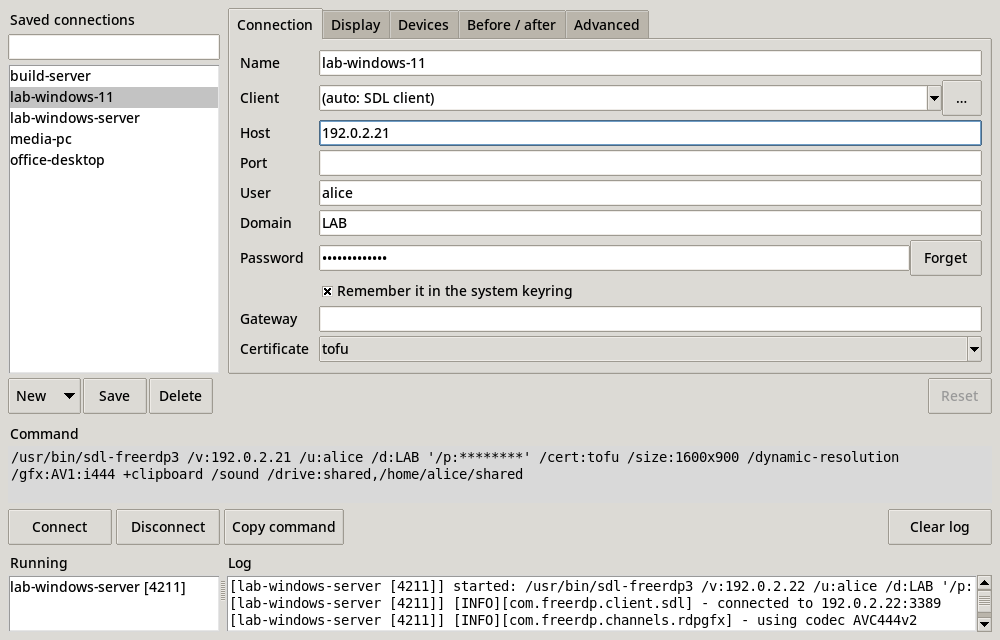
|
|
42
|
+
|
|
43
|
+
- **Saved connections:** a list you can filter. Double-click one to connect, or select several and connect them all at once.
|
|
44
|
+
- **Changes stay visible:** what you changed lights up, on its label, on its tab and in the list, until you save it. *Reset* goes back to what is saved, and moving on to another connection, or closing the window, asks whether to save or discard. *New* starts an empty connection or a copy of this one.
|
|
45
|
+
- **Finds the client for you:** "(auto)" takes the client that came with RDP Kit Client, then the first FreeRDP 3 SDL client on your `PATH` (`sdl-freerdp`, `sdl-freerdp3`, `sdl3-freerdp`), then one in a local build tree, passing over any that is not FreeRDP 3 or does not start. On `PATH`, its order decides, whatever the names: a release that puts its own `bin/` first gets its own client, not the system's. The SDL client is the one FreeRDP actively develops, and the same on Linux, Windows and macOS. You can still pick another FreeRDP 3 program with *…*.
|
|
46
|
+
- **Form instead of flags:** display, monitors (*List…* asks the client which ones it sees, then you tick them; the remote desktop gets them as separate screens, or as one big screen with `/span`), graphics codec (including AV1 and AV2), clipboard, sound, microphone, drive sharing, log level, plus a box for extra arguments.
|
|
47
|
+
- **Live command preview:** shows the exact command line, with the password hidden, and copies it for you.
|
|
48
|
+
- **Session log:** runs several sessions at once and shows each client's output.
|
|
49
|
+
- **Four languages:** English, 中文 (Chinese), 日本語 (Japanese) and Français (French). The window starts in the system's language; the button beside *Clear log* picks another one, from the next start, and `RDP_KIT_CLIENT_LANG=fr` sets one for a single run. The log stays in English, so it can be searched and pasted into a bug report.
|
|
50
|
+
|
|
51
|
+
## The codecs, as they are
|
|
52
|
+
|
|
53
|
+
| Codec | 4:4:4 | 4:2:0 | Linux | Windows | macOS |
|
|
54
|
+
|---|---|---|---|---|---|
|
|
55
|
+
| AV1 | yes | yes | yes | yes | yes |
|
|
56
|
+
| AV2 | yes | yes | yes | yes | yes |
|
|
57
|
+
| H.264 (AVC444, AVC420) | yes | yes | no: the bundled client carries no H.264 decoder | yes, through Media Foundation | yes, through VideoToolbox |
|
|
58
|
+
| H.265 | — | — | not yet: no bundled client decodes it | not yet | not yet |
|
|
59
|
+
|
|
60
|
+
Pick one under *Display → Graphics codec* and the client offers only that one; *(default)* lets the server choose.
|
|
61
|
+
*Show live stats* shows which codec runs.
|
|
62
|
+
|
|
63
|
+
## The other side
|
|
64
|
+
|
|
65
|
+
[rdp-release-kit](https://github.com/congzhangzh/rdp-release-kit) is the all-in-one: the same FreeRDP as a shadow
|
|
66
|
+
server for Linux, Windows and macOS hosts, xrdp packages, this client and the browser one.
|
|
67
|
+
**[How to install the shadow server](docs/server.md)** on Linux, Windows and macOS.
|
|
68
|
+
|
|
69
|
+
## Built on FreeRDP
|
|
70
|
+
|
|
71
|
+
RDP Kit Client runs [FreeRDP](https://github.com/FreeRDP/FreeRDP), the FreeRDP project's work. The bundled client
|
|
72
|
+
comes from [our fork](https://github.com/congzhangzh/FreeRDP): upstream master plus our commits on their way
|
|
73
|
+
upstream. *About* shows the exact upstream commit it is based on and how many commits are ours.
|
|
74
|
+
|
|
75
|
+
## Install
|
|
76
|
+
|
|
77
|
+
```bash
|
|
78
|
+
uvx rdp-kit-client # run it once, without installing
|
|
79
|
+
uv tool install rdp-kit-client # or install it: then just rdp-kit-client (pipx install rdp-kit-client works too)
|
|
80
|
+
```
|
|
81
|
+
|
|
82
|
+
That is all: the wheel for your platform carries the FreeRDP SDL client, one program of about 25 MB.
|
|
83
|
+
|
|
84
|
+
| Platform | Client in the wheel |
|
|
85
|
+
|----------|---------------------|
|
|
86
|
+
| Linux x86_64, aarch64 | yes, with glibc 2.34 or newer (RHEL 9, Debian 12, Ubuntu 22.04, Fedora 35 and newer) and PulseAudio's `libpulse.so.0`, which every desktop has (else `sudo apt install libpulse0`) |
|
|
87
|
+
| macOS 12 and newer, Apple Silicon | yes |
|
|
88
|
+
| Windows 10 and 11, x86_64 and ARM64 | yes |
|
|
89
|
+
| Anything else (an Intel Mac, musl, an older glibc, a BSD) | no: the same RDP Kit Client without a client, see below |
|
|
90
|
+
|
|
91
|
+
Auto takes the wheel's client first: it is the one this release was tested with, and a distribution's client is often older (no AV1). A client you installed yourself is one pick away under *Connection → Client*, and auto falls back to it when the wheel has no client, or its client is not FreeRDP 3 or does not start. To install one, or where no wheel has a client:
|
|
92
|
+
|
|
93
|
+
| Platform | Client |
|
|
94
|
+
|----------|--------|
|
|
95
|
+
| Debian / Ubuntu | `sudo apt install freerdp3-sdl` |
|
|
96
|
+
| Fedora | `sudo dnf install freerdp` |
|
|
97
|
+
| macOS | `brew install freerdp` |
|
|
98
|
+
| Windows | a FreeRDP 3 build containing `sdl-freerdp.exe`, on your `PATH` |
|
|
99
|
+
|
|
100
|
+
**About that client:** it is a portable build from [rdp-release-kit](https://github.com/congzhangzh/rdp-release-kit), unofficial and a preview: FreeRDP's master plus open pull requests, with AV1, AV2 and Opus. `client.lock` pins the release and its SHA-256. It decodes H.264 through the system on macOS (VideoToolbox) and Windows (Media Foundation). On Linux it has no H.264, since it carries neither OpenH264 nor FFmpeg: leave the codec on its default, pick *AV1*, *AV2* or *progressive*, or use a client of your own. AV1 and AV2 need a client built with them, such as this one; a distribution's FreeRDP refuses them ("Command line parsing failed at 'gfx'"). `rdp_kit_client/client/` in the installed package holds its `MANIFEST` (what it was built from) and `licenses/`, one folder per component.
|
|
101
|
+
|
|
102
|
+
**Tk:** the window needs a Python with Tk. The Pythons that `uv` installs include it; a Linux system Python often does not (`sudo apt install python3-tk`, `sudo dnf install python3-tkinter`). `uv` takes the system Python when there is one, so:
|
|
103
|
+
|
|
104
|
+
- started by `uvx`, RDP Kit Client notices a Python without Tk and starts again with uv's own Python (it downloads one the first time); `uvx --managed-python rdp-kit-client` goes there directly;
|
|
105
|
+
- installed with `uv tool install`, use `uv tool install --managed-python rdp-kit-client` on such a system;
|
|
106
|
+
- anywhere else, it says what to install and exits.
|
|
107
|
+
|
|
108
|
+
On Linux, the Tk in uv's Pythons draws with the X core fonts (it is built without Xft), which often lack `…` and `•`: RDP Kit Client then shows `...` and `*` instead.
|
|
109
|
+
|
|
110
|
+
## Passwords
|
|
111
|
+
|
|
112
|
+
- **Saved in the system keyring, never in a file.** With *Remember it in the system keyring* ticked (the default), the password goes to the system's own store: Credential Manager on Windows, the Keychain on macOS, the Secret Service (GNOME Keyring, KeePassXC) or KWallet on Linux. From then on a double-click connects without asking. The connections file only keeps whether the box is ticked.
|
|
113
|
+
- The password dialog has the same box: untick it, and the password stays in memory only, until the window closes. *Forget* removes a saved password. Deleting a connection removes its password too, unless another saved connection logs in to the same account.
|
|
114
|
+
- **A rejected password is asked for again.** When the client exits because the server turned the password down (exit codes 132, 134, 154 and 159 of the SDL client), RDP Kit Client asks for another one and connects again; with the box ticked, the new password replaces the saved one. A locked, expired or disabled account is not asked again, since another password would not help.
|
|
115
|
+
- An entry is named after the account it logs in to, `rdp-kit-client/<domain\user>@<host>:<port>`, not after the connection. Renaming a connection keeps its password, and two connections to one account share it.
|
|
116
|
+
- **No usable keyring** (on Linux: no Secret Service or KWallet, or no D-Bus session, as over plain SSH): the box is greyed out with the reason, and passwords are asked for and kept in memory only. RDP Kit Client never falls back to a file. A locked keyring is unlocked through the system's own prompt; if that fails or is cancelled, RDP Kit Client asks for the password instead. The keyring is used from a thread of its own, so a slow one (an unlock prompt, a Secret Service that D-Bus takes two minutes to give up on) never freezes the window.
|
|
117
|
+
- **What the keyring protects:** the password on disk, and from the other users of the computer. A program that runs as you can usually read it: Credential Manager and an unlocked Secret Service hand it to any process of your session, while the Keychain asks you first unless the program is on the entry's access list.
|
|
118
|
+
- All arguments are passed to the client through standard input (`/args-from:stdin`), so the password never appears in the process list (`ps`, Task Manager). FreeRDP 2 has no such option, so RDP Kit Client refuses to start a FreeRDP 2 client rather than put the password on its command line.
|
|
119
|
+
|
|
120
|
+
## Before and after commands (SSH tunnels and more)
|
|
121
|
+
|
|
122
|
+
The *Before / after* tab runs your own commands around a session:
|
|
123
|
+
|
|
124
|
+
- **Before connecting:** runs to the end before the client starts; if it fails, the client does not start. Tick *Keep it running during the session* for a command that stays up beside the session, such as a tunnel.
|
|
125
|
+
- **Then wait until:** holds the client back until whatever the command started is ready, whether the command ran to its end or keeps running:
|
|
126
|
+
- *a port answers*, for `host:port`, such as `127.0.0.1:%L`.
|
|
127
|
+
- *the output shows*, for a regular expression matched against each line of the before command's output, such as `listening on .*%L`. A placeholder here stands for its literal value. Lines only arrive once the program writes them, and many programs hold back their output when it goes to a pipe.
|
|
128
|
+
- *seconds have passed*, for a fixed pause, when nothing can be checked.
|
|
129
|
+
- **Give up after:** the seconds the whole before step may take, from the start of the command; then the client does not start, and a command that was to run to its end is stopped. Left empty, a port or output wait gives up after 30 seconds and the command itself has no limit. A fixed pause always lasts as long as asked.
|
|
130
|
+
- **Stop it when the session ends:** ends the before command and everything it started, also if RDP Kit Client itself crashes or is killed:
|
|
131
|
+
- **Linux:** a small supervisor runs the command as a *child subreaper*, so even daemons that fork twice and leave the process group stay under it. Each is sent SIGTERM, then SIGKILL after 3 seconds.
|
|
132
|
+
- **Windows:** the command runs in a job object that the system closes, and with it everything inside, when RDP Kit Client lets go of it.
|
|
133
|
+
- **macOS:** the same supervisor, but macOS has no subreaper: a daemon that forks twice and leaves the process group survives.
|
|
134
|
+
- **After disconnecting:** runs once the session is over, however it ended.
|
|
135
|
+
- **Client proxy:** passed to the client as `/proxy:`.
|
|
136
|
+
|
|
137
|
+
Placeholders work in all of these and in the extra arguments: `%h` host, `%p` port, `%u` user, `%L` a free local port picked for this session, `%%` a percent sign.
|
|
138
|
+
|
|
139
|
+
**Fill in: SSH tunnel…** sets it all up for the common case. It asks for a jump host and fills in:
|
|
140
|
+
|
|
141
|
+
```
|
|
142
|
+
before: ssh -N -D 127.0.0.1:%L -o ExitOnForwardFailure=yes -o BatchMode=yes me@bastion
|
|
143
|
+
wait until: 127.0.0.1:%L
|
|
144
|
+
proxy: socks5://127.0.0.1:%L
|
|
145
|
+
```
|
|
146
|
+
|
|
147
|
+
The RDP server then only has to be reachable from the jump host, and the client still connects by its real name, so the certificate check is unchanged. ssh runs without a terminal, so it must log in with a key or an agent, and it must already know the jump host's key (connect once with `ssh` in a terminal).
|
|
148
|
+
|
|
149
|
+
For the kit's [shadow server](docs/server.md), which listens on 127.0.0.1:3388 on every OS, use the server itself as the jump host, `127.0.0.1` as the *Host* and 3388 as the *Port*: an empty *Port* means RDP's usual 3389.
|
|
150
|
+
|
|
151
|
+
## Hotkeys
|
|
152
|
+
|
|
153
|
+
The SDL client takes a few keys for itself: a modifier plus *Enter* (fullscreen), *R* (resizable), *G* (grab the keyboard), *M* (minimize), *I* (show or hide the stats overlay: codec, frames per second, bandwidth, round trip) and *D* (disconnect). Its own default modifier is Right Shift, so a capital D typed with the right Shift key would end the session.
|
|
154
|
+
|
|
155
|
+
So when RDP Kit Client starts and the client's settings file does not exist yet, it writes one that moves the modifier to Right Alt + Right Shift (Right Option + Right Shift on a Mac):
|
|
156
|
+
|
|
157
|
+
```json
|
|
158
|
+
{ "SDL_KeyModMask": ["KMOD_RALT", "KMOD_RSHIFT"] }
|
|
159
|
+
```
|
|
160
|
+
|
|
161
|
+
The file is `sdl-freerdp.json` in `~/.config/freerdp/` (Linux, macOS; `$XDG_CONFIG_HOME` if set) or `%APPDATA%\freerdp\` (Windows). It belongs to the client, so it holds for every session of an SDL client on that account, also without RDP Kit Client. An existing file is never changed, so a file without `SDL_KeyModMask` keeps Right Shift. To change the keys, edit the file; deleting it only brings this one back. A user file also takes precedence over a system-wide `SDL_KeyModMask`.
|
|
162
|
+
|
|
163
|
+
## Where things are kept
|
|
164
|
+
|
|
165
|
+
| What | Where |
|
|
166
|
+
|------|-------|
|
|
167
|
+
| Saved connections | `~/.config/rdp-kit-client/profiles.json` (Linux), `~/Library/Application Support/rdp-kit-client/` (macOS), `%APPDATA%\rdp-kit-client\` (Windows) |
|
|
168
|
+
| Extra FreeRDP source trees to search for built clients | `RDP_KIT_CLIENT_TREES`, separated like `PATH`. `~/projects/FreeRDP` is always searched. |
|
|
169
|
+
| What freerdp-tk (the old name) kept | Copied on the first start of RDP Kit Client, and left as it was: the folder `~/.config/freerdp-tk/` (Linux), `~/Library/Application Support/freerdp-tk/` (macOS), `%APPDATA%\freerdp-tk\` (Windows), and the keyring entries `freerdp-tk/<domain\user>@<host>:<port>` (a saved password is copied under the new name the first time it is used). Remove them by hand once you no longer run an older freerdp-tk. The old variables `FREERDP_TK_TREES` and `FREERDP_TK_LANG` still work. |
|
|
170
|
+
|
|
171
|
+
## Limitation
|
|
172
|
+
|
|
173
|
+
The client runs without a terminal, so it cannot ask questions while connecting, such as whether to trust a new certificate. Pick a certificate policy (`tofu`, `ignore` or `deny`) on the Connection tab instead. The default, `tofu`, trusts a server's certificate the first time you connect.
|
|
174
|
+
|
|
175
|
+
## Development
|
|
176
|
+
|
|
177
|
+
```bash
|
|
178
|
+
uv run --with-editable . python -m rdp_kit_client # run from the checkout
|
|
179
|
+
uv build # build the sdist and wheel into dist/
|
|
180
|
+
```
|
|
181
|
+
|
|
182
|
+
The screenshot above is rendered from demo data in a virtual X server, so no real hosts end up in it. Regenerate it after changing the UI:
|
|
183
|
+
|
|
184
|
+
```bash
|
|
185
|
+
xvfb-run -s "-screen 0 1400x1000x24" \
|
|
186
|
+
uv run --with pillow --with-editable . python scripts/screenshot.py docs/screenshot.png
|
|
187
|
+
```
|
|
188
|
+
|
|
189
|
+
### Releasing to PyPI
|
|
190
|
+
|
|
191
|
+
Releases are published by GitHub Actions through [trusted publishing](https://docs.pypi.org/trusted-publishers/), so no API token is needed. The version is taken from the git tag.
|
|
192
|
+
|
|
193
|
+
One-time setup:
|
|
194
|
+
1. On PyPI, open *Your projects → Publishing → Add a new pending publisher* and enter: project `rdp-kit-client`, owner `congzhangzh`, repository `rdp-kit-client`, workflow `release.yml`, environment `pypi`.
|
|
195
|
+
The old name `freerdp-tk` (the alias in `alias/`, published by the same run) needs the same
|
|
196
|
+
publisher on its own project page, with the repository `rdp-kit-client`.
|
|
197
|
+
2. On GitHub, create an environment named `pypi` (*Settings → Environments*).
|
|
198
|
+
|
|
199
|
+
Each release after that:
|
|
200
|
+
|
|
201
|
+
1. In `src/rdp_kit_client/RELEASE_NOTES.md`, rename the section "Unreleased" to the release's version, commit and push to `main`, and wait until its tests pass.
|
|
202
|
+
2. Tag that commit and push the tag:
|
|
203
|
+
|
|
204
|
+
```bash
|
|
205
|
+
git tag 20261107.1 # yyyymmdd.index, the index counting that day's releases from 1
|
|
206
|
+
git push origin 20261107.1
|
|
207
|
+
```
|
|
208
|
+
|
|
209
|
+
Only a tag of this form starts the release; the tests run on every push to `main`. The release waits for the tests of its commit and stops, before anything is published, when they failed or when the notes have no section for its version. A tag whose release failed stays as it is: fix it and tag the next index.
|
|
210
|
+
|
|
211
|
+
The workflow builds the package, adds the client to one wheel per platform (`scripts/bundle_client.py`), checks on a runner of each platform that the wheel installs and its client starts, and then uploads them all to PyPI, with the plain wheel and the sdist. Then it makes the GitHub release, with that version's notes and the same files. The window shows the version in its title, and the notes under *About*.
|
|
212
|
+
|
|
213
|
+
**A new client by itself.** When an [rdp-release-kit](https://github.com/congzhangzh/rdp-release-kit) release has passed all its checks, demos included, the kit sends a `kit-release` event, and `client-bump.yml` takes it from there: it pins that release in `client.lock` (`scripts/bundle_client.py --pin`), adds an "Under the hood" line under *Unreleased*, runs the tests, the real-client test with the new client too, and pushes to `main`, where `test.yml` runs on every platform. When nothing but such bumps has come since the last release, it goes on: it dates the notes, tests that commit too, tags the next `yyyymmdd.index` and starts the release. Anything else waiting since the last release (a change to the window, say) keeps the tag for a person. It can be started by hand too (*Actions → client-bump → Run workflow*, with the kit release and its FreeRDP version).
|
|
214
|
+
|
|
215
|
+
To move to a newer client, pin a release of rdp-release-kit, with the FreeRDP version it
|
|
216
|
+
carries (its release notes say it), and commit `client.lock`:
|
|
217
|
+
|
|
218
|
+
```bash
|
|
219
|
+
python scripts/bundle_client.py --pin 20261106.3 --freerdp 20261106.1
|
|
220
|
+
```
|
|
221
|
+
|
|
222
|
+
## License
|
|
223
|
+
|
|
224
|
+
Apache-2.0, the same license as FreeRDP.
|