quickdbd-cli 0.1.6__tar.gz → 0.1.8__tar.gz
This diff represents the content of publicly available package versions that have been released to one of the supported registries. The information contained in this diff is provided for informational purposes only and reflects changes between package versions as they appear in their respective public registries.
- quickdbd_cli-0.1.8/PKG-INFO +465 -0
- quickdbd_cli-0.1.8/README.md +437 -0
- {quickdbd_cli-0.1.6 → quickdbd_cli-0.1.8}/pyproject.toml +1 -1
- quickdbd_cli-0.1.8/src/quickdbd_cli/__init__.py +1 -0
- {quickdbd_cli-0.1.6 → quickdbd_cli-0.1.8}/src/quickdbd_cli/assets/render.js +5 -4
- {quickdbd_cli-0.1.6 → quickdbd_cli-0.1.8}/src/quickdbd_cli/assets/style.css +11 -0
- {quickdbd_cli-0.1.6 → quickdbd_cli-0.1.8}/src/quickdbd_cli/assets/viewer.js +29 -2
- {quickdbd_cli-0.1.6 → quickdbd_cli-0.1.8}/src/quickdbd_cli/cli.py +9 -2
- {quickdbd_cli-0.1.6 → quickdbd_cli-0.1.8}/src/quickdbd_cli/dbt.py +35 -4
- {quickdbd_cli-0.1.6 → quickdbd_cli-0.1.8}/src/quickdbd_cli/html.py +2 -1
- {quickdbd_cli-0.1.6 → quickdbd_cli-0.1.8}/src/quickdbd_cli/measure.py +10 -4
- {quickdbd_cli-0.1.6 → quickdbd_cli-0.1.8}/src/quickdbd_cli/model.py +3 -0
- {quickdbd_cli-0.1.6 → quickdbd_cli-0.1.8}/src/quickdbd_cli/parser.py +48 -1
- quickdbd_cli-0.1.8/src/quickdbd_cli/tags.py +95 -0
- {quickdbd_cli-0.1.6 → quickdbd_cli-0.1.8}/tests/test_dbt.py +73 -0
- {quickdbd_cli-0.1.6 → quickdbd_cli-0.1.8}/tests/test_select.py +3 -3
- quickdbd_cli-0.1.8/tests/test_tags.py +196 -0
- quickdbd_cli-0.1.6/PKG-INFO +0 -255
- quickdbd_cli-0.1.6/README.md +0 -227
- quickdbd_cli-0.1.6/src/quickdbd_cli/__init__.py +0 -1
- {quickdbd_cli-0.1.6 → quickdbd_cli-0.1.8}/.gitignore +0 -0
- {quickdbd_cli-0.1.6 → quickdbd_cli-0.1.8}/LICENSE +0 -0
- {quickdbd_cli-0.1.6 → quickdbd_cli-0.1.8}/NOTICE +0 -0
- {quickdbd_cli-0.1.6 → quickdbd_cli-0.1.8}/examples/quickdbd-sample.txt +0 -0
- {quickdbd_cli-0.1.6 → quickdbd_cli-0.1.8}/examples/synthetic/finance.txt +0 -0
- {quickdbd_cli-0.1.6 → quickdbd_cli-0.1.8}/examples/synthetic/hr.txt +0 -0
- {quickdbd_cli-0.1.6 → quickdbd_cli-0.1.8}/examples/synthetic/inventory.txt +0 -0
- {quickdbd_cli-0.1.6 → quickdbd_cli-0.1.8}/examples/synthetic/marketing.txt +0 -0
- {quickdbd_cli-0.1.6 → quickdbd_cli-0.1.8}/examples/synthetic/qdbd.layout.json +0 -0
- {quickdbd_cli-0.1.6 → quickdbd_cli-0.1.8}/examples/synthetic/sales.txt +0 -0
- {quickdbd_cli-0.1.6 → quickdbd_cli-0.1.8}/scripts/gen_font_metrics.py +0 -0
- {quickdbd_cli-0.1.6 → quickdbd_cli-0.1.8}/scripts/gen_schema.py +0 -0
- {quickdbd_cli-0.1.6 → quickdbd_cli-0.1.8}/scripts/release.sh +0 -0
- {quickdbd_cli-0.1.6 → quickdbd_cli-0.1.8}/src/quickdbd_cli/__main__.py +0 -0
- {quickdbd_cli-0.1.6 → quickdbd_cli-0.1.8}/src/quickdbd_cli/assets/Inter-Bold.ttf +0 -0
- {quickdbd_cli-0.1.6 → quickdbd_cli-0.1.8}/src/quickdbd_cli/assets/Inter-Bold.woff2 +0 -0
- {quickdbd_cli-0.1.6 → quickdbd_cli-0.1.8}/src/quickdbd_cli/assets/Inter-LICENSE.txt +0 -0
- {quickdbd_cli-0.1.6 → quickdbd_cli-0.1.8}/src/quickdbd_cli/assets/Inter-Regular.ttf +0 -0
- {quickdbd_cli-0.1.6 → quickdbd_cli-0.1.8}/src/quickdbd_cli/assets/Inter-Regular.woff2 +0 -0
- {quickdbd_cli-0.1.6 → quickdbd_cli-0.1.8}/src/quickdbd_cli/assets/editor.js +0 -0
- {quickdbd_cli-0.1.6 → quickdbd_cli-0.1.8}/src/quickdbd_cli/assets/elk-LICENSE.md +0 -0
- {quickdbd_cli-0.1.6 → quickdbd_cli-0.1.8}/src/quickdbd_cli/assets/elk.bundled.js +0 -0
- {quickdbd_cli-0.1.6 → quickdbd_cli-0.1.8}/src/quickdbd_cli/assets/font-metrics.json +0 -0
- {quickdbd_cli-0.1.6 → quickdbd_cli-0.1.8}/src/quickdbd_cli/diff.py +0 -0
- {quickdbd_cli-0.1.6 → quickdbd_cli-0.1.8}/src/quickdbd_cli/export.py +0 -0
- {quickdbd_cli-0.1.6 → quickdbd_cli-0.1.8}/src/quickdbd_cli/jsrt.py +0 -0
- {quickdbd_cli-0.1.6 → quickdbd_cli-0.1.8}/src/quickdbd_cli/layout.py +0 -0
- {quickdbd_cli-0.1.6 → quickdbd_cli-0.1.8}/src/quickdbd_cli/project.py +0 -0
- {quickdbd_cli-0.1.6 → quickdbd_cli-0.1.8}/src/quickdbd_cli/serve.py +0 -0
- {quickdbd_cli-0.1.6 → quickdbd_cli-0.1.8}/tests/fixtures/jaffle/LICENSE +0 -0
- {quickdbd_cli-0.1.6 → quickdbd_cli-0.1.8}/tests/fixtures/jaffle/README.md +0 -0
- {quickdbd_cli-0.1.6 → quickdbd_cli-0.1.8}/tests/fixtures/jaffle/catalog.json +0 -0
- {quickdbd_cli-0.1.6 → quickdbd_cli-0.1.8}/tests/fixtures/jaffle/manifest.json +0 -0
- {quickdbd_cli-0.1.6 → quickdbd_cli-0.1.8}/tests/test_diff.py +0 -0
- {quickdbd_cli-0.1.6 → quickdbd_cli-0.1.8}/tests/test_parser.py +0 -0
- {quickdbd_cli-0.1.6 → quickdbd_cli-0.1.8}/tests/test_path.py +0 -0
- {quickdbd_cli-0.1.6 → quickdbd_cli-0.1.8}/tests/test_pipeline.py +0 -0
- {quickdbd_cli-0.1.6 → quickdbd_cli-0.1.8}/tests/test_serve.py +0 -0
|
@@ -0,0 +1,465 @@
|
|
|
1
|
+
Metadata-Version: 2.5
|
|
2
|
+
Name: quickdbd-cli
|
|
3
|
+
Version: 0.1.8
|
|
4
|
+
Summary: Compile QuickDBD-syntax schema files into interactive HTML ER diagrams, with no table limit.
|
|
5
|
+
Project-URL: Homepage, https://github.com/MarkPhamm/quickdbd-cli
|
|
6
|
+
Author: Minh (Mark) Pham
|
|
7
|
+
License-Expression: Apache-2.0
|
|
8
|
+
License-File: LICENSE
|
|
9
|
+
License-File: NOTICE
|
|
10
|
+
License-File: src/quickdbd_cli/assets/Inter-LICENSE.txt
|
|
11
|
+
License-File: src/quickdbd_cli/assets/elk-LICENSE.md
|
|
12
|
+
Keywords: database,diagram,erd,quickdbd,schema
|
|
13
|
+
Classifier: Environment :: Console
|
|
14
|
+
Classifier: Programming Language :: Python :: 3
|
|
15
|
+
Classifier: Topic :: Database
|
|
16
|
+
Classifier: Topic :: Software Development :: Documentation
|
|
17
|
+
Requires-Python: >=3.11
|
|
18
|
+
Requires-Dist: mini-racer>=0.14
|
|
19
|
+
Requires-Dist: resvg-py>=0.5
|
|
20
|
+
Provides-Extra: dev
|
|
21
|
+
Requires-Dist: fonttools>=4.50; extra == 'dev'
|
|
22
|
+
Requires-Dist: pytest>=8; extra == 'dev'
|
|
23
|
+
Requires-Dist: ruff>=0.6; extra == 'dev'
|
|
24
|
+
Provides-Extra: docs
|
|
25
|
+
Requires-Dist: mkdocs-material<10,>=9.5; extra == 'docs'
|
|
26
|
+
Requires-Dist: mkdocs<2,>=1.6; extra == 'docs'
|
|
27
|
+
Description-Content-Type: text/markdown
|
|
28
|
+
|
|
29
|
+
# qdbd: QuickDBD diagrams from the command line
|
|
30
|
+
|
|
31
|
+
`qdbd` turns [QuickDBD](https://www.quickdatabasediagrams.com)-syntax `.txt` schemas, or a dbt project, into **interactive ER diagrams** with **no table limit**. The diagrams stay readable at 200+ tables.
|
|
32
|
+
|
|
33
|
+
<p>
|
|
34
|
+
<a href="https://markphamm.github.io/quickdbd-cli/demo/"><b>▶ Live demo (200 tables)</b></a> ·
|
|
35
|
+
<a href="https://markphamm.github.io/quickdbd-cli/demo/jaffle/"><b>▶ dbt demo (jaffle_shop)</b></a> ·
|
|
36
|
+
<a href="https://markphamm.github.io/quickdbd-cli/"><b>📖 Docs</b></a> ·
|
|
37
|
+
<a href="https://pypi.org/project/quickdbd-cli/">PyPI</a>
|
|
38
|
+
</p>
|
|
39
|
+
|
|
40
|
+
[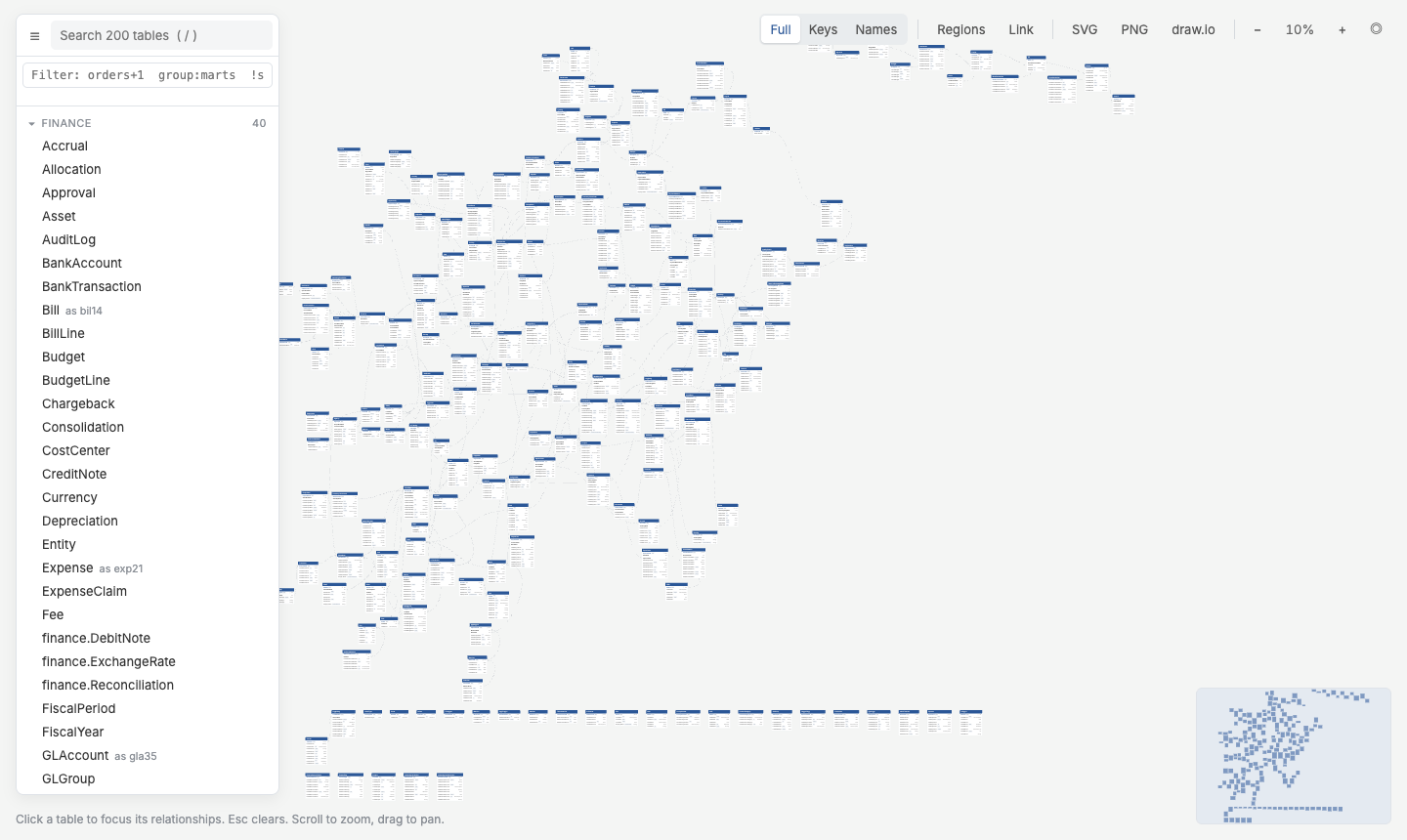](https://markphamm.github.io/quickdbd-cli/demo/)
|
|
41
|
+
|
|
42
|
+
Not affiliated with QuickDBD. It reads the same text syntax, so schemas can be copied back and forth between the two.
|
|
43
|
+
|
|
44
|
+
---
|
|
45
|
+
|
|
46
|
+
**Contents**
|
|
47
|
+
|
|
48
|
+
1. [Install](#1-install)
|
|
49
|
+
2. [Quick start: your first diagram in 5 minutes](#2-quick-start-your-first-diagram-in-5-minutes)
|
|
50
|
+
3. [Working with schema files](#3-working-with-schema-files)
|
|
51
|
+
4. [Exploring a diagram](#4-exploring-a-diagram)
|
|
52
|
+
5. [dbt projects](#5-dbt-projects)
|
|
53
|
+
6. [Reviewing schema changes](#6-reviewing-schema-changes)
|
|
54
|
+
7. [CI and automation](#7-ci-and-automation)
|
|
55
|
+
8. [Command reference](#8-command-reference)
|
|
56
|
+
9. [Development](#9-development)
|
|
57
|
+
|
|
58
|
+
---
|
|
59
|
+
|
|
60
|
+
## 1. Install
|
|
61
|
+
|
|
62
|
+
```bash
|
|
63
|
+
pipx install quickdbd-cli # or: pip install quickdbd-cli / uv tool install quickdbd-cli
|
|
64
|
+
qdbd --version
|
|
65
|
+
```
|
|
66
|
+
|
|
67
|
+
- **Requirements:** Python 3.11+. Nothing else: no Graphviz, Node or browser. Layout uses [ELK](https://eclipse.dev/elk/) running in an embedded JavaScript engine.
|
|
68
|
+
- **Try it without installing:** prefix any command with `uvx --from quickdbd-cli`, e.g. `uvx --from quickdbd-cli qdbd build schema.txt -o schema.html`.
|
|
69
|
+
- **`qdbd: command not found`?** `pip install` put the script in a directory that isn't on your `PATH`. Use `pipx`, or run `python -m pip show -f quickdbd-cli` to find it.
|
|
70
|
+
|
|
71
|
+
## 2. Quick start: your first diagram in 5 minutes
|
|
72
|
+
|
|
73
|
+
### 2.1 Write (or paste) a schema
|
|
74
|
+
|
|
75
|
+
Save this as `schema.txt`. If you already have a schema in QuickDBD, copy it from the editor and paste it in unchanged.
|
|
76
|
+
|
|
77
|
+
```text
|
|
78
|
+
Customer
|
|
79
|
+
-
|
|
80
|
+
CustomerId PK int
|
|
81
|
+
Name string
|
|
82
|
+
Email string UNIQUE
|
|
83
|
+
|
|
84
|
+
Order as o
|
|
85
|
+
----
|
|
86
|
+
OrderId PK int
|
|
87
|
+
CustomerId int FK >- Customer.CustomerId
|
|
88
|
+
OrderDate datetime
|
|
89
|
+
Total decimal(10,2)
|
|
90
|
+
```
|
|
91
|
+
|
|
92
|
+
A table is a name, a line of dashes, then one column per line. `FK >- Customer.CustomerId` means *many orders → one customer*. See the [syntax cheat sheet](#31-syntax-cheat-sheet).
|
|
93
|
+
|
|
94
|
+
### 2.2 Check it
|
|
95
|
+
|
|
96
|
+
```bash
|
|
97
|
+
qdbd check schema.txt
|
|
98
|
+
```
|
|
99
|
+
|
|
100
|
+
```text
|
|
101
|
+
No errors found. Good job!
|
|
102
|
+
```
|
|
103
|
+
|
|
104
|
+
Errors print as `schema.txt:12: error: …` (QuickDBD's own messages) and exit with code 1.
|
|
105
|
+
|
|
106
|
+
### 2.3 Edit it live
|
|
107
|
+
|
|
108
|
+
```bash
|
|
109
|
+
qdbd serve schema.txt
|
|
110
|
+
```
|
|
111
|
+
|
|
112
|
+
A browser tab opens with the diagram and an editor pane.
|
|
113
|
+
|
|
114
|
+
- **Edit** in the pane (it autosaves after 1 s) or in your own editor. The diagram reloads on save.
|
|
115
|
+
- **Drag tables** to arrange them. Positions are saved to `schema.layout.json`; commit it next to the schema.
|
|
116
|
+
- **Stop** with `Ctrl+C`.
|
|
117
|
+
|
|
118
|
+
### 2.4 Build a page to share
|
|
119
|
+
|
|
120
|
+
```bash
|
|
121
|
+
qdbd build schema.txt -o schema.html
|
|
122
|
+
```
|
|
123
|
+
|
|
124
|
+
`schema.html` is a single self-contained file. Open it locally, email it, attach it to a ticket, or publish it on GitHub Pages ([7.1](#71-github-action)).
|
|
125
|
+
|
|
126
|
+
### 2.5 Export an image
|
|
127
|
+
|
|
128
|
+
```bash
|
|
129
|
+
qdbd export schema.txt -o schema.png # whole diagram (.png, .svg or .drawio)
|
|
130
|
+
qdbd export schema.txt --focus Order --depth 1 -o order.svg # one table and its neighbours
|
|
131
|
+
```
|
|
132
|
+
|
|
133
|
+
`.drawio` files open in [diagrams.net](https://app.diagrams.net) as editable ER shapes.
|
|
134
|
+
|
|
135
|
+
## 3. Working with schema files
|
|
136
|
+
|
|
137
|
+
### 3.1 Syntax cheat sheet
|
|
138
|
+
|
|
139
|
+
```text
|
|
140
|
+
# A comment above a table or column becomes its tooltip
|
|
141
|
+
"Sales Order" as so # quote names with spaces or dots; "as" adds an alias
|
|
142
|
+
--------------
|
|
143
|
+
Id PK int IDENTITY
|
|
144
|
+
CustomerId int FK >- Customer.Id
|
|
145
|
+
Status varchar(20) default=new INDEX
|
|
146
|
+
Notes text NULL # columns are NOT NULL unless marked NULL
|
|
147
|
+
```
|
|
148
|
+
|
|
149
|
+
| Column keyword | Meaning |
|
|
150
|
+
|---|---|
|
|
151
|
+
| `PK` | primary key (several `PK` columns make a composite key) |
|
|
152
|
+
| `FK >- Table.Column` | foreign key with a relationship |
|
|
153
|
+
| `NULL` / `NULLABLE` | nullable |
|
|
154
|
+
| `UNIQUE`, `INDEX` | unique key, index |
|
|
155
|
+
| `IDENTITY` / `AUTOINCREMENT` | auto-generated |
|
|
156
|
+
| `default=value` | default value |
|
|
157
|
+
|
|
158
|
+
| Relationship | Meaning (left → right) |
|
|
159
|
+
|---|---|
|
|
160
|
+
| `-` | one to one |
|
|
161
|
+
| `-<` / `>-` | one to many / many to one |
|
|
162
|
+
| `>-<` | many to many |
|
|
163
|
+
| `-0` / `0-` / `0-0` | involving zero-or-one |
|
|
164
|
+
| `-0<` / `>0-` | involving zero-or-many |
|
|
165
|
+
|
|
166
|
+
Full reference: [Schema Syntax](https://markphamm.github.io/quickdbd-cli/syntax/).
|
|
167
|
+
|
|
168
|
+
### 3.2 One folder, many files
|
|
169
|
+
|
|
170
|
+
Big schemas are easier to manage split into files. Point any command at a folder and every `*.txt` under it (recursively) becomes **one** diagram:
|
|
171
|
+
|
|
172
|
+
```text
|
|
173
|
+
schema/
|
|
174
|
+
├── sales.txt # Order, OrderLine, Invoice …
|
|
175
|
+
├── customers.txt # Customer, Address …
|
|
176
|
+
└── products.txt
|
|
177
|
+
```
|
|
178
|
+
|
|
179
|
+
```bash
|
|
180
|
+
qdbd build schema/ -o schema.html
|
|
181
|
+
```
|
|
182
|
+
|
|
183
|
+
- Foreign keys can point at tables in other files.
|
|
184
|
+
- Each file becomes a group in the sidebar and can be shaded as a **region**.
|
|
185
|
+
- `--by-group` arranges the tables so each file's tables sit together.
|
|
186
|
+
|
|
187
|
+
### 3.3 Table positions
|
|
188
|
+
|
|
189
|
+
| Situation | What happens |
|
|
190
|
+
|---|---|
|
|
191
|
+
| First build | Tables are auto-arranged by their relationships |
|
|
192
|
+
| You drag tables in `qdbd serve` | Positions are saved to the layout file |
|
|
193
|
+
| You add a new table later | It's placed next to the tables it's related to. Nothing else moves |
|
|
194
|
+
| Schema pasted from QuickDBD with a `[layout]` section | Those positions are used for tables the layout file doesn't cover |
|
|
195
|
+
| You want a fresh arrangement | `qdbd layout PATH --reset` |
|
|
196
|
+
|
|
197
|
+
Where the layout file goes:
|
|
198
|
+
|
|
199
|
+
- `schema.txt` → `schema.layout.json`
|
|
200
|
+
- a folder → `<folder>/qdbd.layout.json`
|
|
201
|
+
- anywhere else: `--layout FILE`
|
|
202
|
+
|
|
203
|
+
`qdbd build` never writes the layout file, so CI builds leave your working tree clean. More: [Table Positions](https://markphamm.github.io/quickdbd-cli/layout/).
|
|
204
|
+
|
|
205
|
+
### 3.4 Tags and colours
|
|
206
|
+
|
|
207
|
+
Give tables a role and a header colour. Tags are comments, so the file still pastes into QuickDBD.
|
|
208
|
+
|
|
209
|
+
```text
|
|
210
|
+
# @color gold #b8860b # optional: pick a tag's colour
|
|
211
|
+
|
|
212
|
+
# @tag: gold, pii
|
|
213
|
+
customers
|
|
214
|
+
-
|
|
215
|
+
customer_id PK int
|
|
216
|
+
|
|
217
|
+
dim_date # tagged "dim" automatically from its name
|
|
218
|
+
-
|
|
219
|
+
date_key PK int
|
|
220
|
+
```
|
|
221
|
+
|
|
222
|
+
A table's tags come from the first source that has any:
|
|
223
|
+
|
|
224
|
+
1. an explicit `# @tag:` comment;
|
|
225
|
+
2. its name: `dim_*` → dim, `fct_*` / `fact_*` → fact, `stg_*` → staging, `int_*` → intermediate, `raw_*` / `src_*` → raw;
|
|
226
|
+
3. dbt tags, written as `# @dbt-tags:` by `qdbd import dbt`.
|
|
227
|
+
|
|
228
|
+
The header takes the colour of the first tag. In the page, a chip per tag under the filter box shows only that tag, and the selector `tag:fact` works everywhere. More: [Tags and Colours](https://markphamm.github.io/quickdbd-cli/tags/).
|
|
229
|
+
|
|
230
|
+
### 3.5 Differences from QuickDBD
|
|
231
|
+
|
|
232
|
+
`qdbd` accepts a few things QuickDBD rejects, and prints a warning for each:
|
|
233
|
+
|
|
234
|
+
- tab characters
|
|
235
|
+
- a space inside a type: `decimal(10, 2)`
|
|
236
|
+
- an explicit `NOT NULL`
|
|
237
|
+
- indented table names
|
|
238
|
+
- `[layout]` entries for tables that don't exist
|
|
239
|
+
|
|
240
|
+
`qdbd check --strict` turns these warnings into errors, so a file that passes will paste into QuickDBD cleanly. Also, `default=` values keep their case, where QuickDBD lowercases them.
|
|
241
|
+
|
|
242
|
+
## 4. Exploring a diagram
|
|
243
|
+
|
|
244
|
+
Every page from `build` or `serve` works the same way. A full tour is in [Reading the Diagram](https://markphamm.github.io/quickdbd-cli/reading-the-diagram/).
|
|
245
|
+
|
|
246
|
+
### 4.1 Page tour
|
|
247
|
+
|
|
248
|
+
|
|
249
|
+
|
|
250
|
+
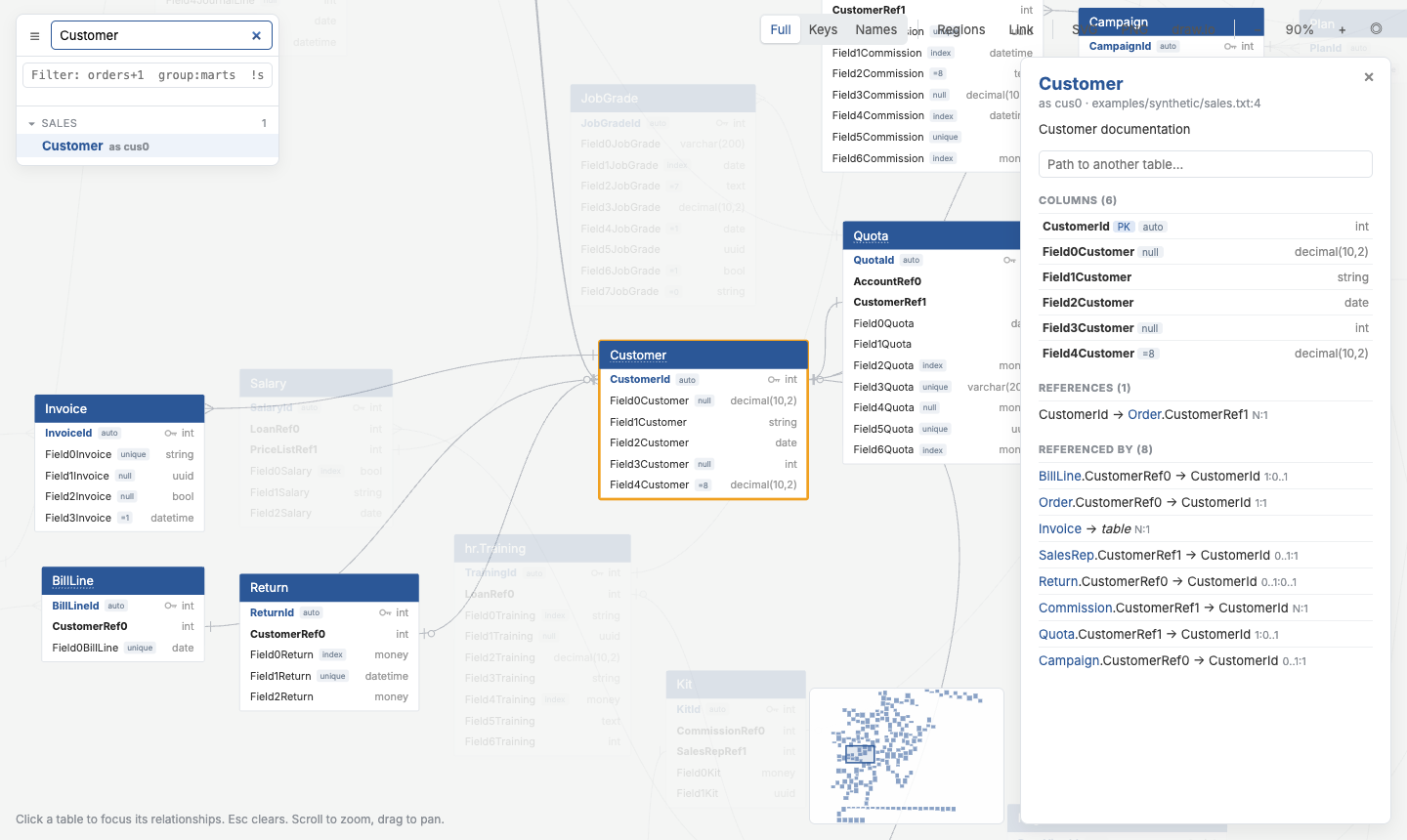
| Part | What you can do |
|
|
251
|
+
|---|---|
|
|
252
|
+
| **Explorer** (left) | Tables grouped by file. Press `/` to search; Enter jumps to the best match |
|
|
253
|
+
| **Canvas** | Drag tables, drag empty space to pan, scroll to zoom. Hover a column to highlight its relationships |
|
|
254
|
+
| **Details panel** (right) | Click a table: columns, doc comments, *References* / *Referenced by*, path finder |
|
|
255
|
+
| **Toolbar** (top right) | Collapse tables (Full / Keys / Names), Regions, **Link**, SVG / PNG / draw.io download, zoom |
|
|
256
|
+
| **Minimap** (bottom right) | Click or drag to move around |
|
|
257
|
+
|
|
258
|
+
**Link** copies a URL to exactly what you're looking at: the filter, selected table, path, collapse mode and zoom. Send it to a teammate.
|
|
259
|
+
|
|
260
|
+
### 4.2 Filter with selectors
|
|
261
|
+
|
|
262
|
+
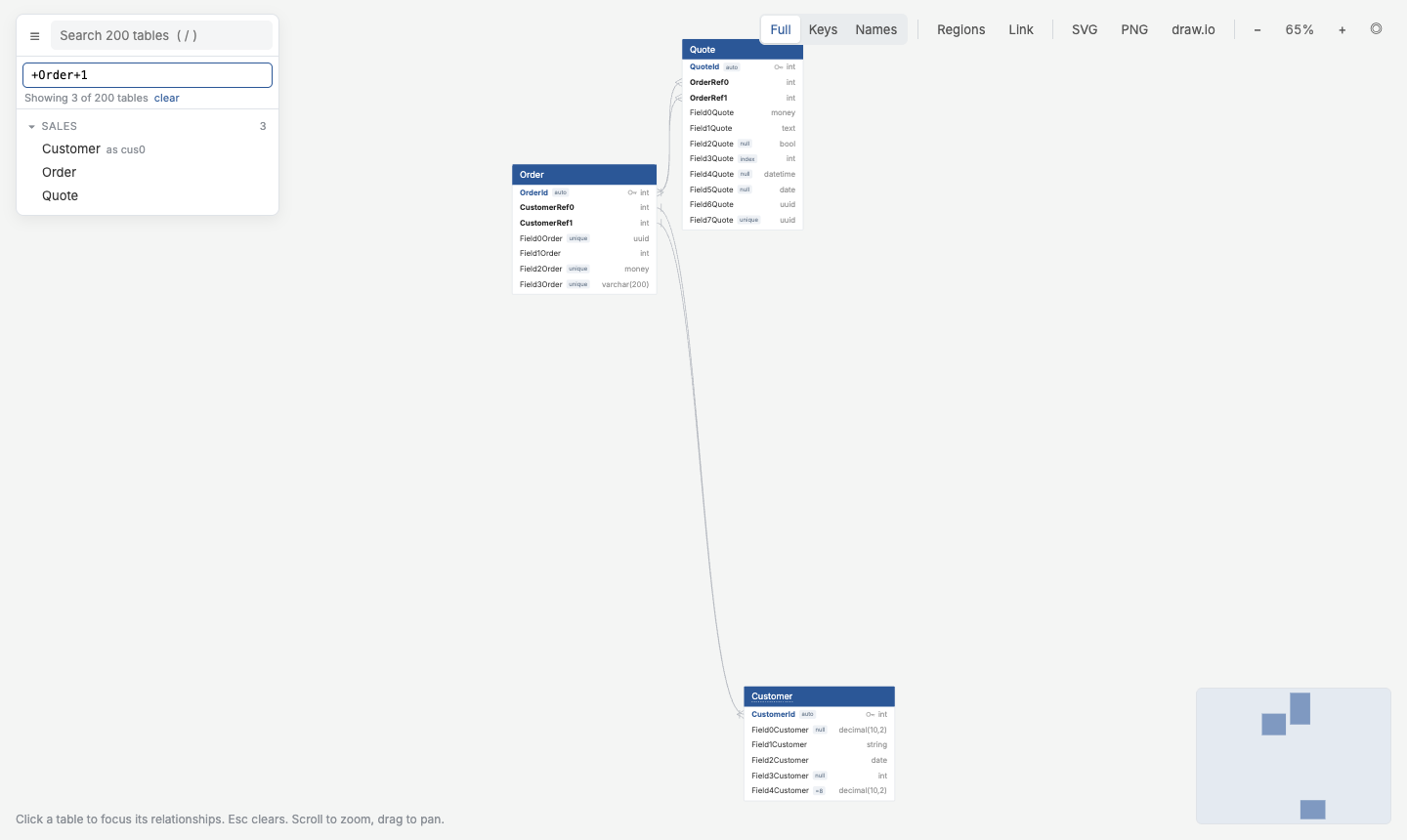
The explorer's filter box takes dbt-style selectors that follow **relationships** (not lineage). The same selectors work as `-s/--select` and `--exclude` on `build` and `export`.
|
|
263
|
+
|
|
264
|
+
| Selector | Tables |
|
|
265
|
+
|---|---|
|
|
266
|
+
| `orders`, `stg_*` | by name or alias (glob, case-insensitive) |
|
|
267
|
+
| `+orders` / `orders+` | `orders` and what it references / what references it |
|
|
268
|
+
| `+orders+1` | one hop in both directions |
|
|
269
|
+
| `group:marts`, `file:core.txt` | a folder or a file |
|
|
270
|
+
| `col:customer_id` | tables with a matching column |
|
|
271
|
+
| `tag:fact` | tables with a matching tag ([3.4](#34-tags-and-colours)) |
|
|
272
|
+
| `a b` / `a,b` / `!a` | union / intersection / exclude |
|
|
273
|
+
|
|
274
|
+
```bash
|
|
275
|
+
qdbd build erd/ -s 'group:marts' --exclude '*_tmp' -o marts.html
|
|
276
|
+
qdbd export erd/ -s '+orders+1' -o orders.png
|
|
277
|
+
```
|
|
278
|
+
|
|
279
|
+
|
|
280
|
+
|
|
281
|
+
More: [Selecting Tables](https://markphamm.github.io/quickdbd-cli/selectors/).
|
|
282
|
+
|
|
283
|
+
### 4.3 Find how two tables join
|
|
284
|
+
|
|
285
|
+
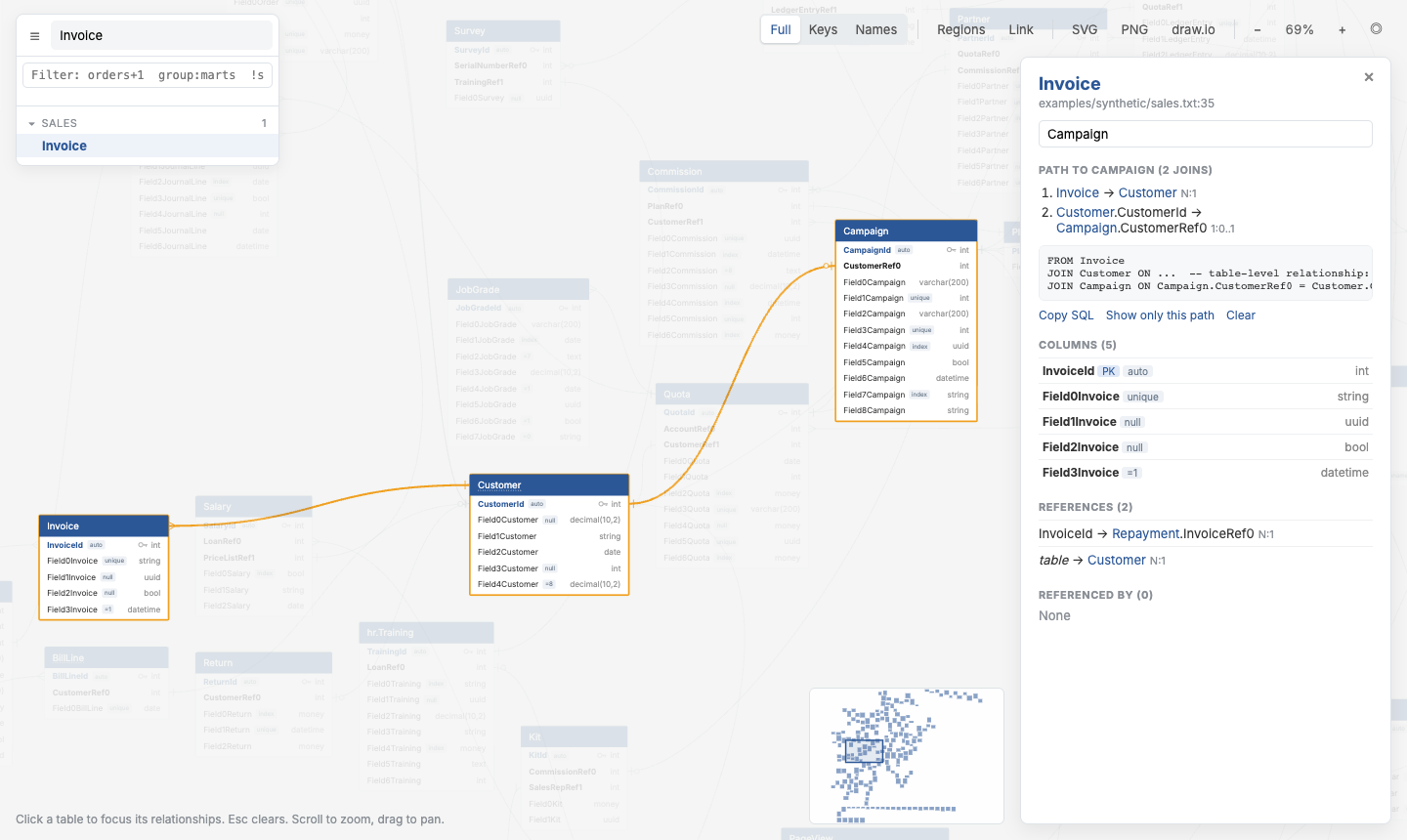
In a table's details panel, type another table's name. The shortest join path is highlighted on the canvas, with a ready-to-paste SQL `JOIN`. From the terminal:
|
|
286
|
+
|
|
287
|
+
```bash
|
|
288
|
+
qdbd path schema/ --from Invoice --to Campaign
|
|
289
|
+
```
|
|
290
|
+
|
|
291
|
+
|
|
292
|
+
|
|
293
|
+
## 5. dbt projects
|
|
294
|
+
|
|
295
|
+
### 5.1 Generate the schema from dbt
|
|
296
|
+
|
|
297
|
+
```bash
|
|
298
|
+
cd your-dbt-project
|
|
299
|
+
dbt docs generate # writes target/manifest.json + catalog.json
|
|
300
|
+
qdbd import dbt target/ -o erd/ --infer-fks # one .txt per dbt folder
|
|
301
|
+
qdbd build erd/ --by-group -o erd.html # open erd.html
|
|
302
|
+
```
|
|
303
|
+
|
|
304
|
+
`dbt docs generate` is what supplies column names and types for models without documented columns. Without it, many tables show up with no columns and `qdbd` prints a hint.
|
|
305
|
+
|
|
306
|
+
See it on a real project: the [jaffle_shop demo](https://markphamm.github.io/quickdbd-cli/demo/jaffle/) and the [step-by-step walkthrough](https://markphamm.github.io/quickdbd-cli/example/).
|
|
307
|
+
|
|
308
|
+
### 5.2 What gets imported
|
|
309
|
+
|
|
310
|
+
| In the diagram | Comes from |
|
|
311
|
+
|---|---|
|
|
312
|
+
| Tables | your project's models, seeds and snapshots, plus sources |
|
|
313
|
+
| Primary keys | `primary_key` constraints, or a column with both `unique` and `not_null` tests |
|
|
314
|
+
| Relationships | `relationships` tests (incl. dbt_utils `relationships_where`) and `foreign_key` constraints |
|
|
315
|
+
| Column types | `catalog.json` |
|
|
316
|
+
| Tooltips | model and column descriptions |
|
|
317
|
+
| Header colours | dbt `tags` (unless the name or an explicit `# @tag` says otherwise) |
|
|
318
|
+
|
|
319
|
+
Useful options: `--select 'marts.*'` (repeatable), `--no-sources`, `--package all`, `-o schema.txt` for a single file.
|
|
320
|
+
|
|
321
|
+
### 5.3 Infer missing relationships
|
|
322
|
+
|
|
323
|
+
Most dbt projects don't declare every foreign key. `--infer-fks` links columns like `customer_id` to the table they name (`dim_customers`, `stg_shop__customers`, …) when no relationship is declared. Ambiguous matches are skipped, never guessed.
|
|
324
|
+
|
|
325
|
+
### 5.4 Keep it in sync
|
|
326
|
+
|
|
327
|
+
Re-run the import whenever models change. It overwrites the generated `.txt` files. Your dragged positions survive, because the layout file is keyed by table name. In CI, `--check` fails if the committed files are out of date ([7.2](#72-dbt-projects-in-ci)).
|
|
328
|
+
|
|
329
|
+
More: [dbt Import](https://markphamm.github.io/quickdbd-cli/dbt/).
|
|
330
|
+
|
|
331
|
+
## 6. Reviewing schema changes
|
|
332
|
+
|
|
333
|
+
### 6.1 See what changed
|
|
334
|
+
|
|
335
|
+
```bash
|
|
336
|
+
qdbd diff old.txt new.txt # two versions
|
|
337
|
+
qdbd diff --base origin/main erd/ # a git branch vs your working tree
|
|
338
|
+
qdbd diff --base origin/main erd/ --format markdown -o diff.md # for a PR comment
|
|
339
|
+
```
|
|
340
|
+
|
|
341
|
+
It reports tables, columns (added, removed, type and flag changes) and relationships added or removed. `--format json` is also available, and `--exit-code` exits 1 when anything changed.
|
|
342
|
+
|
|
343
|
+
### 6.2 Highlight changes in the diagram
|
|
344
|
+
|
|
345
|
+
```bash
|
|
346
|
+
qdbd build erd/ --diff-base origin/main -o erd.html
|
|
347
|
+
```
|
|
348
|
+
|
|
349
|
+
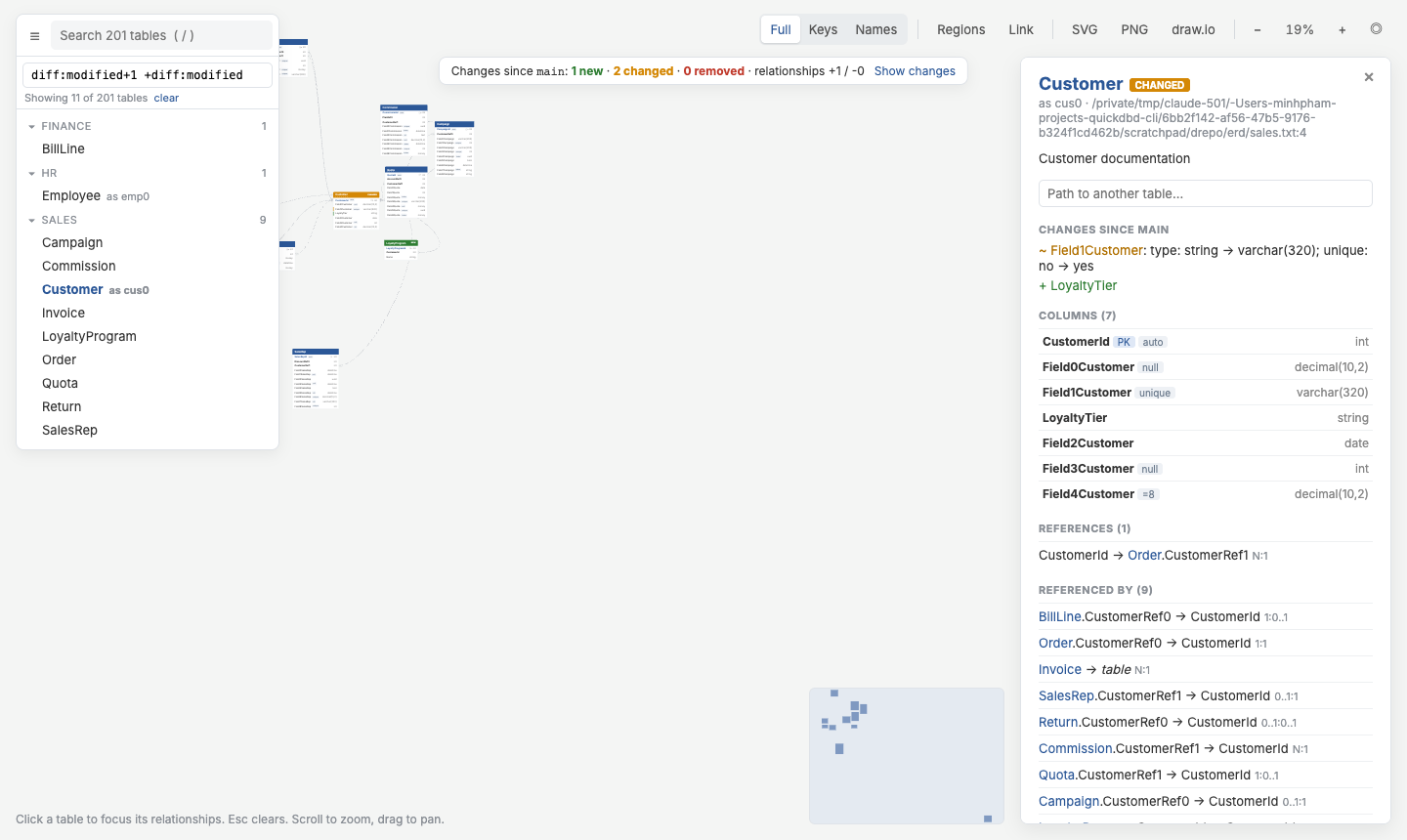
New tables are green and changed tables amber, with a bar on each changed column. A banner summarises the changes, and **Show changes** filters to them plus their neighbours. The selector `diff:modified+1` does the same from the CLI.
|
|
350
|
+
|
|
351
|
+
|
|
352
|
+
|
|
353
|
+
More: [Schema Diffs](https://markphamm.github.io/quickdbd-cli/diffs/).
|
|
354
|
+
|
|
355
|
+
## 7. CI and automation
|
|
356
|
+
|
|
357
|
+
### 7.1 GitHub Action
|
|
358
|
+
|
|
359
|
+
Checks the schema and builds the diagram. On pull requests it also posts **one** schema-diff comment (updated on every push) and uploads the diagram with the changes highlighted.
|
|
360
|
+
|
|
361
|
+
```yaml
|
|
362
|
+
# .github/workflows/erd.yml
|
|
363
|
+
name: ERD
|
|
364
|
+
on: [pull_request, push]
|
|
365
|
+
jobs:
|
|
366
|
+
erd:
|
|
367
|
+
runs-on: ubuntu-latest
|
|
368
|
+
permissions: { contents: read, pull-requests: write }
|
|
369
|
+
steps:
|
|
370
|
+
- uses: actions/checkout@v4
|
|
371
|
+
- uses: MarkPhamm/quickdbd-cli@v0.1.8
|
|
372
|
+
with:
|
|
373
|
+
path: erd/ # schema file(s) or folder(s)
|
|
374
|
+
output: site/index.html
|
|
375
|
+
```
|
|
376
|
+
|
|
377
|
+
| Input | Default | |
|
|
378
|
+
|---|---|---|
|
|
379
|
+
| `path` | `erd/` | schema files or folders |
|
|
380
|
+
| `output` | `erd/index.html` | where to write the HTML |
|
|
381
|
+
| `check` / `strict` | `true` / `false` | fail on errors / also on QuickDBD-compatibility warnings |
|
|
382
|
+
| `comment` | `true` | post the diff comment on PRs |
|
|
383
|
+
| `select` | | selector for the diagram, e.g. `group:marts` |
|
|
384
|
+
| `qdbd-version` | `latest` | PyPI version |
|
|
385
|
+
|
|
386
|
+
Outputs: `html`, `changed`, `diff-file`. To publish the diagram on GitHub Pages, add `actions/upload-pages-artifact` + `actions/deploy-pages`; this repo's [`erd.yml`](https://github.com/MarkPhamm/quickdbd-cli/blob/main/.github/workflows/erd.yml) does that for the live demo. All inputs: [GitHub Action](https://markphamm.github.io/quickdbd-cli/github-action/).
|
|
387
|
+
|
|
388
|
+
### 7.2 dbt projects in CI
|
|
389
|
+
|
|
390
|
+
Run your dbt setup first, then let the action generate the schema:
|
|
391
|
+
|
|
392
|
+
```yaml
|
|
393
|
+
# … dbt deps && dbt build && dbt docs generate
|
|
394
|
+
- uses: MarkPhamm/quickdbd-cli@v0.1.8
|
|
395
|
+
with:
|
|
396
|
+
dbt-manifest: target/
|
|
397
|
+
dbt-args: --infer-fks
|
|
398
|
+
path: erd/
|
|
399
|
+
output: site/index.html
|
|
400
|
+
```
|
|
401
|
+
|
|
402
|
+
Commit `erd/` so pull requests can be compared with `main`. Set `dbt-check: true` to fail the job when the committed files are out of date instead of regenerating them. Walkthrough: [Automate in CI](https://markphamm.github.io/quickdbd-cli/example/ci/).
|
|
403
|
+
|
|
404
|
+
### 7.3 pre-commit
|
|
405
|
+
|
|
406
|
+
```yaml
|
|
407
|
+
repos:
|
|
408
|
+
- repo: https://github.com/MarkPhamm/quickdbd-cli
|
|
409
|
+
rev: v0.1.8
|
|
410
|
+
hooks:
|
|
411
|
+
- id: qdbd-check
|
|
412
|
+
files: ^erd/.*\.txt$
|
|
413
|
+
```
|
|
414
|
+
|
|
415
|
+
### 7.4 GitLab CI (or any CI)
|
|
416
|
+
|
|
417
|
+
```yaml
|
|
418
|
+
erd:
|
|
419
|
+
image: python:3.12
|
|
420
|
+
script:
|
|
421
|
+
- pip install quickdbd-cli
|
|
422
|
+
- qdbd check erd/
|
|
423
|
+
- qdbd build erd/ -o public/index.html
|
|
424
|
+
artifacts:
|
|
425
|
+
paths: [public/index.html]
|
|
426
|
+
```
|
|
427
|
+
|
|
428
|
+
Builds are deterministic (no timestamps or randomness), so the output only changes when the schema does.
|
|
429
|
+
|
|
430
|
+
## 8. Command reference
|
|
431
|
+
|
|
432
|
+
```bash
|
|
433
|
+
qdbd check PATH... [--strict] # validate
|
|
434
|
+
qdbd serve PATH... [--port 8765] # live editor + drag to arrange
|
|
435
|
+
qdbd build PATH... -o diagram.html # interactive HTML
|
|
436
|
+
qdbd export PATH... -o out.png|.svg|.drawio [--focus T --depth 1]
|
|
437
|
+
qdbd layout PATH... [--reset] # (re)write the layout file
|
|
438
|
+
qdbd path PATH... --from A --to B # shortest join path + SQL JOIN
|
|
439
|
+
qdbd diff OLD NEW | --base REF PATH... # schema changes
|
|
440
|
+
qdbd import dbt target/ -o erd/ [--infer-fks] # schema files from dbt
|
|
441
|
+
```
|
|
442
|
+
|
|
443
|
+
`PATH` is a `.txt` file or a folder (read recursively). Run `qdbd COMMAND --help` for every option, or see [The qdbd CLI](https://markphamm.github.io/quickdbd-cli/cli/).
|
|
444
|
+
|
|
445
|
+
## 9. Development
|
|
446
|
+
|
|
447
|
+
```bash
|
|
448
|
+
uv venv && uv pip install -e ".[dev,docs]"
|
|
449
|
+
.venv/bin/pytest # full suite
|
|
450
|
+
.venv/bin/ruff check src tests scripts && .venv/bin/ruff format src tests scripts
|
|
451
|
+
.venv/bin/mkdocs serve # docs site at localhost:8000
|
|
452
|
+
.venv/bin/qdbd serve examples/synthetic # 200-table playground
|
|
453
|
+
```
|
|
454
|
+
|
|
455
|
+
More: [Local Development](https://markphamm.github.io/quickdbd-cli/development/). The design notes are in [`docs/superpowers/specs/`](docs/superpowers/specs/2026-10-17-qdbd-design.md).
|
|
456
|
+
|
|
457
|
+
### 9.1 Releasing
|
|
458
|
+
|
|
459
|
+
1. Put PyPI credentials in `.env` (gitignored): `TWINE_USERNAME=__token__` and `TWINE_PASSWORD=pypi-…`.
|
|
460
|
+
2. Bump `version` in `pyproject.toml` and `src/quickdbd_cli/__init__.py`, then merge.
|
|
461
|
+
3. Run `PATH="$PWD/.venv/bin:$PATH" scripts/release.sh`. It builds, uploads to PyPI, tags `vX.Y.Z` and creates the GitHub release.
|
|
462
|
+
|
|
463
|
+
## License
|
|
464
|
+
|
|
465
|
+
Apache-2.0. Bundled third-party files (ELK, Inter) are listed in [NOTICE](https://github.com/MarkPhamm/quickdbd-cli/blob/main/NOTICE).
|