q3dviewer 1.1.4__tar.gz → 1.1.6__tar.gz
This diff represents the content of publicly available package versions that have been released to one of the supported registries. The information contained in this diff is provided for informational purposes only and reflects changes between package versions as they appear in their respective public registries.
- q3dviewer-1.1.6/PKG-INFO +235 -0
- q3dviewer-1.1.6/q3dviewer/Qt/__init__.py +68 -0
- q3dviewer-1.1.6/q3dviewer/__init__.py +14 -0
- {q3dviewer-1.1.4 → q3dviewer-1.1.6}/q3dviewer/base_glwidget.py +4 -3
- {q3dviewer-1.1.4 → q3dviewer-1.1.6}/q3dviewer/base_item.py +2 -3
- q3dviewer-1.1.6/q3dviewer/custom_items/__init__.py +9 -0
- {q3dviewer-1.1.4 → q3dviewer-1.1.6}/q3dviewer/custom_items/axis_item.py +1 -2
- {q3dviewer-1.1.4 → q3dviewer-1.1.6}/q3dviewer/custom_items/cloud_io_item.py +9 -1
- {q3dviewer-1.1.4 → q3dviewer-1.1.6}/q3dviewer/custom_items/cloud_item.py +16 -13
- {q3dviewer-1.1.4 → q3dviewer-1.1.6}/q3dviewer/custom_items/frame_item.py +3 -3
- {q3dviewer-1.1.4 → q3dviewer-1.1.6}/q3dviewer/custom_items/gaussian_item.py +2 -2
- {q3dviewer-1.1.4 → q3dviewer-1.1.6}/q3dviewer/custom_items/grid_item.py +2 -2
- {q3dviewer-1.1.4 → q3dviewer-1.1.6}/q3dviewer/custom_items/image_item.py +2 -1
- {q3dviewer-1.1.4 → q3dviewer-1.1.6}/q3dviewer/custom_items/line_item.py +2 -2
- {q3dviewer-1.1.4 → q3dviewer-1.1.6}/q3dviewer/custom_items/text_item.py +6 -8
- {q3dviewer-1.1.4 → q3dviewer-1.1.6}/q3dviewer/glwidget.py +4 -6
- {q3dviewer-1.1.4 → q3dviewer-1.1.6}/q3dviewer/tools/cloud_viewer.py +2 -2
- {q3dviewer-1.1.4 → q3dviewer-1.1.6}/q3dviewer/tools/example_viewer.py +1 -1
- {q3dviewer-1.1.4 → q3dviewer-1.1.6}/q3dviewer/tools/film_maker.py +9 -8
- {q3dviewer-1.1.4 → q3dviewer-1.1.6}/q3dviewer/tools/lidar_calib.py +9 -8
- {q3dviewer-1.1.4 → q3dviewer-1.1.6}/q3dviewer/tools/lidar_cam_calib.py +9 -7
- q3dviewer-1.1.6/q3dviewer/utils/__init__.py +2 -0
- {q3dviewer-1.1.4 → q3dviewer-1.1.6}/q3dviewer/utils/cloud_io.py +21 -10
- q3dviewer-1.1.6/q3dviewer/utils/helpers.py +97 -0
- {q3dviewer-1.1.4 → q3dviewer-1.1.6}/q3dviewer/utils/maths.py +0 -58
- {q3dviewer-1.1.4 → q3dviewer-1.1.6}/q3dviewer/utils/range_slider.py +28 -9
- {q3dviewer-1.1.4 → q3dviewer-1.1.6}/q3dviewer/viewer.py +1 -1
- q3dviewer-1.1.6/q3dviewer.egg-info/PKG-INFO +235 -0
- {q3dviewer-1.1.4 → q3dviewer-1.1.6}/q3dviewer.egg-info/SOURCES.txt +2 -1
- {q3dviewer-1.1.4 → q3dviewer-1.1.6}/q3dviewer.egg-info/entry_points.txt +0 -1
- {q3dviewer-1.1.4 → q3dviewer-1.1.6}/setup.py +1 -1
- q3dviewer-1.1.4/PKG-INFO +0 -225
- q3dviewer-1.1.4/pyproject.toml +0 -26
- q3dviewer-1.1.4/q3dviewer/__init__.py +0 -5
- q3dviewer-1.1.4/q3dviewer/custom_items/__init__.py +0 -9
- q3dviewer-1.1.4/q3dviewer/utils/__init__.py +0 -4
- q3dviewer-1.1.4/q3dviewer.egg-info/PKG-INFO +0 -225
- {q3dviewer-1.1.4 → q3dviewer-1.1.6}/LICENSE +0 -0
- {q3dviewer-1.1.4 → q3dviewer-1.1.6}/README.md +0 -0
- {q3dviewer-1.1.4 → q3dviewer-1.1.6}/q3dviewer/shaders/cloud_frag.glsl +0 -0
- {q3dviewer-1.1.4 → q3dviewer-1.1.6}/q3dviewer/shaders/cloud_vert.glsl +0 -0
- {q3dviewer-1.1.4 → q3dviewer-1.1.6}/q3dviewer/shaders/gau_frag.glsl +0 -0
- {q3dviewer-1.1.4 → q3dviewer-1.1.6}/q3dviewer/shaders/gau_prep.glsl +0 -0
- {q3dviewer-1.1.4 → q3dviewer-1.1.6}/q3dviewer/shaders/gau_vert.glsl +0 -0
- {q3dviewer-1.1.4 → q3dviewer-1.1.6}/q3dviewer/shaders/sort_by_key.glsl +0 -0
- {q3dviewer-1.1.4 → q3dviewer-1.1.6}/q3dviewer/tools/__init__.py +0 -0
- {q3dviewer-1.1.4 → q3dviewer-1.1.6}/q3dviewer/tools/gaussian_viewer.py +0 -0
- {q3dviewer-1.1.4 → q3dviewer-1.1.6}/q3dviewer/tools/ros_viewer.py +0 -0
- {q3dviewer-1.1.4 → q3dviewer-1.1.6}/q3dviewer/utils/convert_ros_msg.py +0 -0
- {q3dviewer-1.1.4 → q3dviewer-1.1.6}/q3dviewer/utils/gl_helper.py +0 -0
- {q3dviewer-1.1.4 → q3dviewer-1.1.6}/q3dviewer.egg-info/dependency_links.txt +0 -0
- {q3dviewer-1.1.4 → q3dviewer-1.1.6}/q3dviewer.egg-info/requires.txt +6 -6
- {q3dviewer-1.1.4 → q3dviewer-1.1.6}/q3dviewer.egg-info/top_level.txt +0 -0
- {q3dviewer-1.1.4 → q3dviewer-1.1.6}/setup.cfg +0 -0
q3dviewer-1.1.6/PKG-INFO
ADDED
|
@@ -0,0 +1,235 @@
|
|
|
1
|
+
Metadata-Version: 2.1
|
|
2
|
+
Name: q3dviewer
|
|
3
|
+
Version: 1.1.6
|
|
4
|
+
Summary: A library designed for quickly deploying a 3D viewer.
|
|
5
|
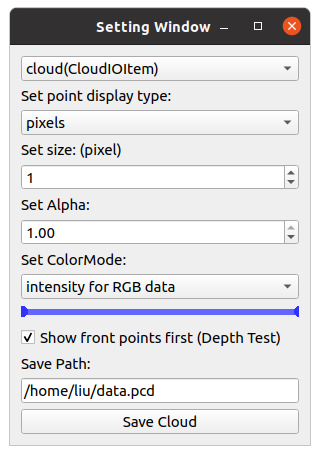
+
Home-page: https://github.com/scomup/q3dviewer
|
|
6
|
+
Author: Liu Yang
|
|
7
|
+
Classifier: Programming Language :: Python :: 3
|
|
8
|
+
Classifier: License :: OSI Approved :: MIT License
|
|
9
|
+
Classifier: Operating System :: OS Independent
|
|
10
|
+
Description-Content-Type: text/markdown
|
|
11
|
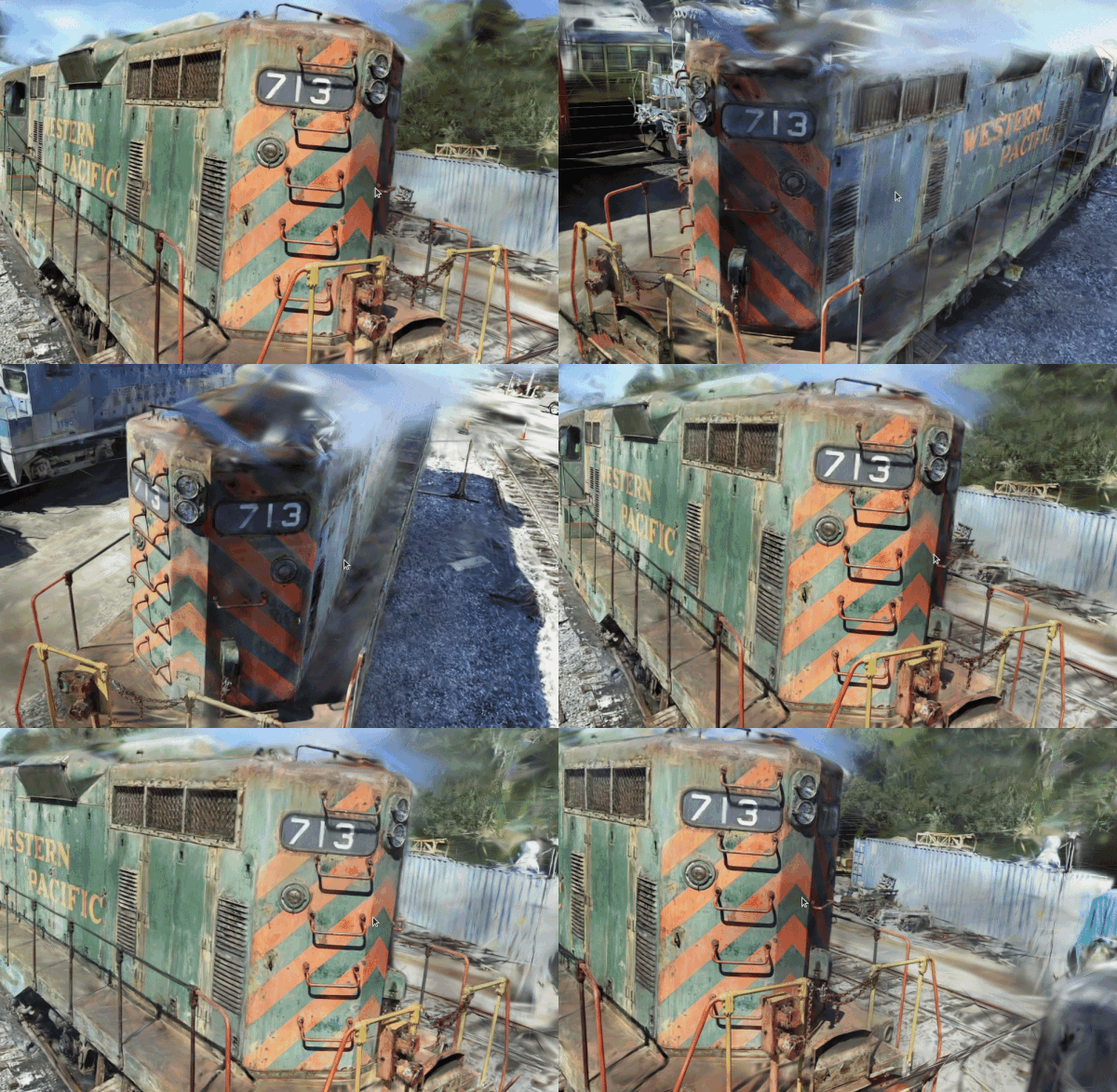
+
License-File: LICENSE
|
|
12
|
+
Requires-Dist: numpy
|
|
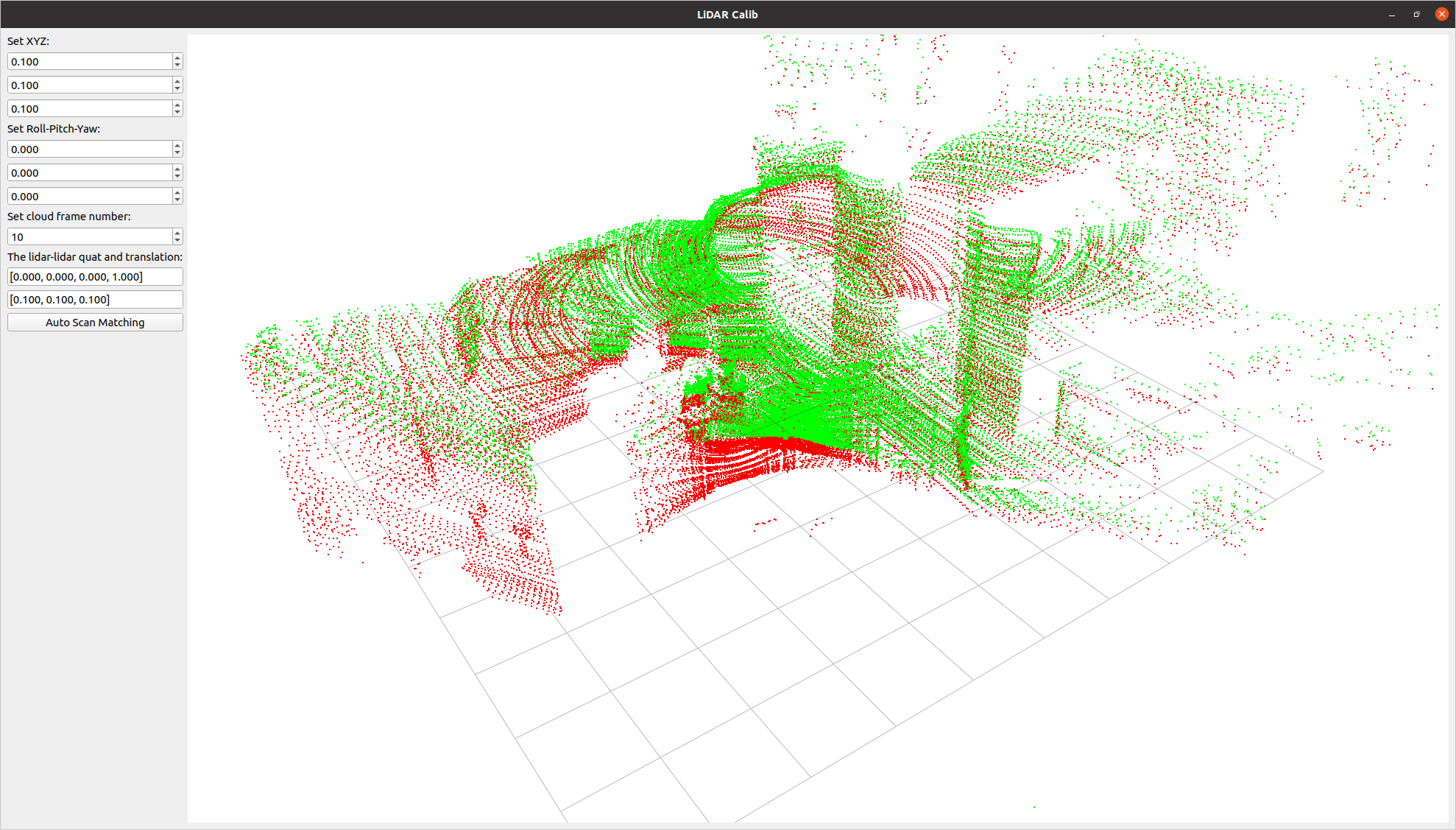
13
|
+
Requires-Dist: pyside6
|
|
14
|
+
Requires-Dist: PyOpenGL
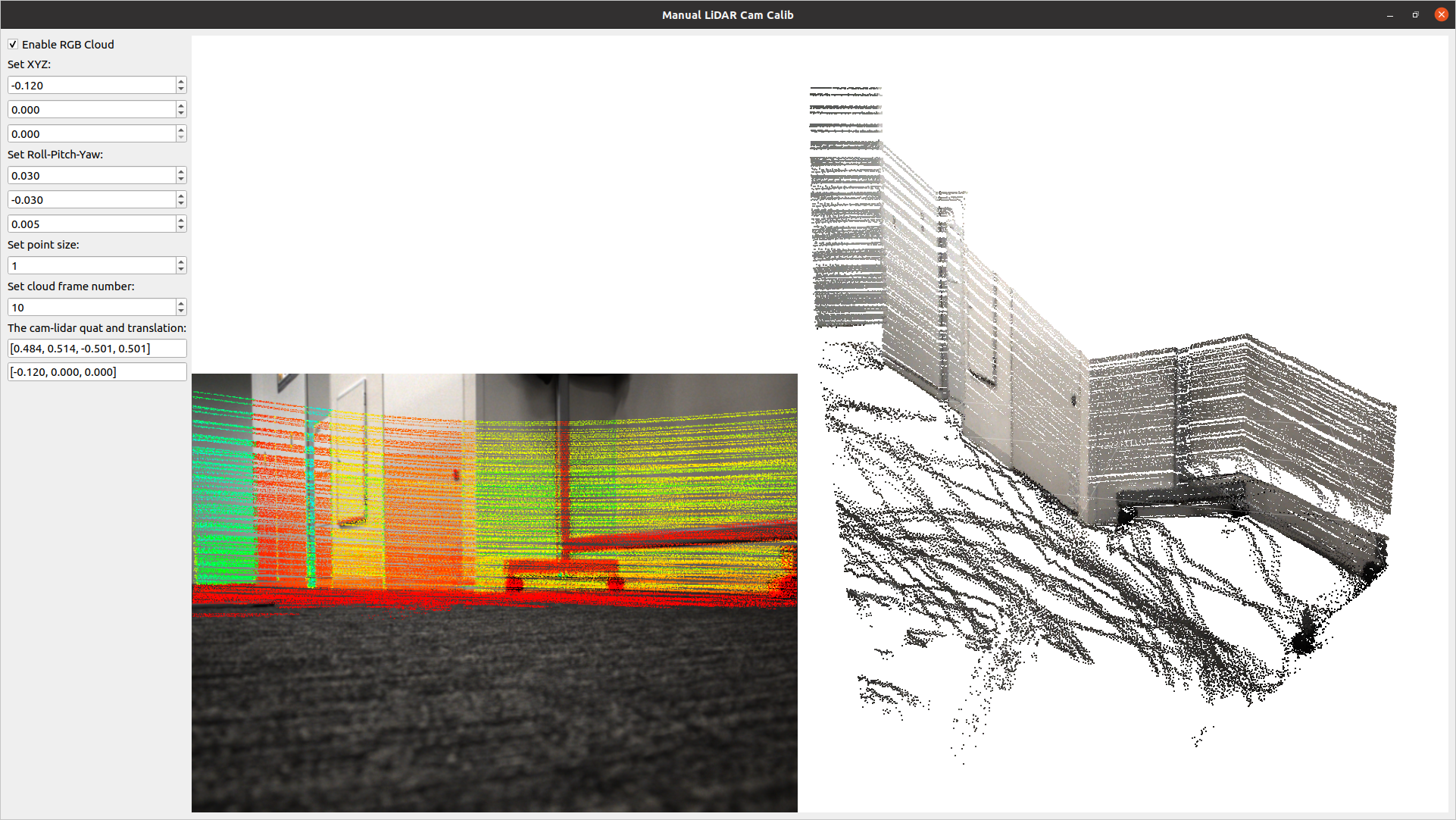
|
|
15
|
+
Requires-Dist: meshio
|
|
16
|
+
Requires-Dist: pypcd4
|
|
17
|
+
Requires-Dist: pye57
|
|
18
|
+
Requires-Dist: laspy
|
|
19
|
+
Requires-Dist: imageio
|
|
20
|
+
Requires-Dist: imageio[ffmpeg]
|
|
21
|
+
Requires-Dist: matplotlib
|
|
22
|
+
|
|
23
|
+
|
|
24
|
+

|
|
25
|
+
|
|
26
|
+
[](https://opensource.org/licenses/MIT)
|
|
27
|
+
[](https://badge.fury.io/py/q3dviewer)
|
|
28
|
+
|
|
29
|
+
`q3dviewer` is a library designed for quickly deploying a 3D viewer. It is based on Qt (PySide6) and provides efficient OpenGL items for displaying 3D objects (e.g., point clouds, cameras, and 3D Gaussians). You can use it to visualize your 3D data or set up an efficient viewer application. It is inspired by PyQtGraph but focuses more on efficient 3D rendering.
|
|
30
|
+
|
|
31
|
+
|
|
32
|
+
To show how to use `q3dviewer` as a library, we also provide some [very useful tools](#tools).
|
|
33
|
+
|
|
34
|
+
|
|
35
|
+
## Installation
|
|
36
|
+
|
|
37
|
+
To install `q3dviewer`, execute the following command in your terminal on either Linux or Windows:
|
|
38
|
+
|
|
39
|
+
```bash
|
|
40
|
+
pip install q3dviewer
|
|
41
|
+
```
|
|
42
|
+
|
|
43
|
+
### Note for Windows Users
|
|
44
|
+
|
|
45
|
+
- Ensure that you have a Python 3 environment set up:
|
|
46
|
+
- Download and install Python 3 from the [official Python website](https://www.python.org/downloads/).
|
|
47
|
+
- During installation, make sure to check the "Add Python to PATH" option.
|
|
48
|
+
|
|
49
|
+
### Note for Linux Users
|
|
50
|
+
|
|
51
|
+
If you encounter an error related to loading the shared library `libxcb-cursor.so.0` on Ubuntu 20.04 or 22.04, please install `libxcb-cursor0`:
|
|
52
|
+
|
|
53
|
+
```bash
|
|
54
|
+
sudo apt-get install libxcb-cursor0
|
|
55
|
+
```
|
|
56
|
+
|
|
57
|
+
## Tools
|
|
58
|
+
|
|
59
|
+
Once installed, you can directly use the following tools:
|
|
60
|
+
|
|
61
|
+
### 1. Cloud Viewer
|
|
62
|
+
|
|
63
|
+
A tool for visualizing point cloud files (LAS, PCD, PLY, E57). Launch it by executing the following command in your terminal:
|
|
64
|
+
|
|
65
|
+
```sh
|
|
66
|
+
cloud_viewer
|
|
67
|
+
```
|
|
68
|
+
|
|
69
|
+
*Alternatively*, if the path is not set (though it's not recommended):
|
|
70
|
+
|
|
71
|
+
```sh
|
|
72
|
+
python3 -m q3dviewer.tools.cloud_viewer
|
|
73
|
+
```
|
|
74
|
+
|
|
75
|
+
**Basic Operations**
|
|
76
|
+
* Load files: Drag and drop point cloud files onto the window (multiple files are OK).
|
|
77
|
+
* `M` key: Display the visualization settings screen for point clouds, background color, etc.
|
|
78
|
+
* `Left mouse button` & `W, A, S, D` keys: Move the viewpoint on the horizontal plane.
|
|
79
|
+
* `Z, X` keys: Move in the direction the screen is facing.
|
|
80
|
+
* `Right mouse button` & `Arrow` keys: Rotate the viewpoint while keeping the screen center unchanged.
|
|
81
|
+
* `Shift` + `Right mouse button` & `Arrow` keys: Rotate the viewpoint while keeping the camera position unchanged.
|
|
82
|
+
|
|
83
|
+
For example, you can download and view point clouds of Tokyo in LAS format from the following link:
|
|
84
|
+
|
|
85
|
+
[Tokyo Point Clouds](https://www.geospatial.jp/ckan/dataset/tokyopc-23ku-2024/resource/7807d6d1-29f3-4b36-b0c8-f7aa0ea2cff3)
|
|
86
|
+
|
|
87
|
+

|
|
88
|
+
|
|
89
|
+
Press `M` on your keyboard to display a menu on the screen, where you can modify visualization settings for each item. For example, you can adjust various settings such as shape, size, color, and transparency for `CloudItem`.
|
|
90
|
+
|
|
91
|
+
|
|
92
|
+
|
|
93
|
+
### 2. ROS Viewer
|
|
94
|
+
|
|
95
|
+
A high-performance SLAM viewer compatible with ROS, serving as an alternative to RVIZ.
|
|
96
|
+
|
|
97
|
+
```sh
|
|
98
|
+
roscore &
|
|
99
|
+
ros_viewer
|
|
100
|
+
```
|
|
101
|
+
|
|
102
|
+
### 3. Film Maker
|
|
103
|
+
|
|
104
|
+
Would you like to create a video from point cloud data? With Film Maker, you can easily create videos with simple operations. Just edit keyframes using the user-friendly GUI, and the software will automatically interpolate the keyframes to generate the video.
|
|
105
|
+
|
|
106
|
+
```sh
|
|
107
|
+
film_maker
|
|
108
|
+
```
|
|
109
|
+
|
|
110
|
+
**Basic Operations**
|
|
111
|
+
* File loading & viewpoint movement: Same as Cloud_Viewer
|
|
112
|
+
* Space key to add a keyframe.
|
|
113
|
+
* Delete key to remove a keyframe.
|
|
114
|
+
* Play button: Automatically play the video (pressing again will stop playback)
|
|
115
|
+
* Record checkbox: When checked, actions will be automatically recorded during playback
|
|
116
|
+
|
|
117
|
+
Film Maker GUI:
|
|
118
|
+
|
|
119
|
+

|
|
120
|
+
|
|
121
|
+
The demo video demonstrating how to use Film Maker utilizes the [cloud data of Kyobashi Station Area](https://www.geospatial.jp/ckan/dataset/kyoubasiekisyuuhen_las) located in Osaka, Japan.
|
|
122
|
+
|
|
123
|
+
### 4. Gaussian Viewer
|
|
124
|
+
|
|
125
|
+
A simple viewer for 3D Gaussians. See [EasyGaussianSplatting](https://github.com/scomup/EasyGaussianSplatting) for more information.
|
|
126
|
+
|
|
127
|
+
```sh
|
|
128
|
+
gaussian_viewer # Drag and drop your Gaussian file onto the window
|
|
129
|
+
```
|
|
130
|
+
|
|
131
|
+
|
|
132
|
+
|
|
133
|
+
### 5. LiDAR-LiDAR Calibration Tools
|
|
134
|
+
|
|
135
|
+
A tool to compute the relative pose between two LiDARs. It allows for both manual adjustment in the settings screen and automatic calibration.
|
|
136
|
+
|
|
137
|
+
```sh
|
|
138
|
+
lidar_calib --lidar0=/YOUR_LIDAR0_TOPIC --lidar1=/YOUR_LIDAR1_TOPIC
|
|
139
|
+
```
|
|
140
|
+
|
|
141
|
+
|
|
142
|
+
|
|
143
|
+
### 6. LiDAR-Camera Calibration Tools
|
|
144
|
+
|
|
145
|
+
A tool for calculating the relative pose between a LiDAR and a camera. It allows for manual adjustment in the settings screen and real-time verification of LiDAR point projection onto images.
|
|
146
|
+
|
|
147
|
+
```sh
|
|
148
|
+
lidar_cam_calib --lidar=/YOUR_LIDAR_TOPIC --camera=/YOUR_CAMERA_TOPIC --camera_info=/YOUR_CAMERA_INFO_TOPIC
|
|
149
|
+
```
|
|
150
|
+
|
|
151
|
+
|
|
152
|
+
|
|
153
|
+
## Using as a Library
|
|
154
|
+
|
|
155
|
+
Using the examples above, you can easily customize and develop your own 3D viewer with `q3dviewer`. Below is a coding example.
|
|
156
|
+
|
|
157
|
+
### Custom 3D Viewer
|
|
158
|
+
|
|
159
|
+
```python
|
|
160
|
+
#!/usr/bin/env python3
|
|
161
|
+
|
|
162
|
+
import q3dviewer as q3d # Import q3dviewer
|
|
163
|
+
|
|
164
|
+
def main():
|
|
165
|
+
# Create a Qt application
|
|
166
|
+
app = q3d.QApplication([])
|
|
167
|
+
|
|
168
|
+
# Create various 3D items
|
|
169
|
+
axis_item = q3d.AxisItem(size=0.5, width=5)
|
|
170
|
+
grid_item = q3d.GridItem(size=10, spacing=1)
|
|
171
|
+
|
|
172
|
+
# Create a viewer
|
|
173
|
+
viewer = q3d.Viewer(name='example')
|
|
174
|
+
|
|
175
|
+
# Add items to the viewer
|
|
176
|
+
viewer.add_items({
|
|
177
|
+
'grid': grid_item,
|
|
178
|
+
'axis': axis_item,
|
|
179
|
+
})
|
|
180
|
+
|
|
181
|
+
# Show the viewer & run the Qt application
|
|
182
|
+
viewer.show()
|
|
183
|
+
app.exec()
|
|
184
|
+
|
|
185
|
+
if __name__ == '__main__':
|
|
186
|
+
main()
|
|
187
|
+
```
|
|
188
|
+
|
|
189
|
+
`q3dviewer` provides the following 3D items:
|
|
190
|
+
|
|
191
|
+
- **AxisItem**: Displays coordinate axes or the origin position.
|
|
192
|
+
- **CloudItem**: Displays point clouds.
|
|
193
|
+
- **CloudIOItem**: Displays point clouds with input/output capabilities.
|
|
194
|
+
- **GaussianItem**: Displays 3D Gaussians.
|
|
195
|
+
- **GridItem**: Displays grids.
|
|
196
|
+
- **ImageItem**: Displays 2D images.
|
|
197
|
+
- **Text2DItem**: Displays 2D text.
|
|
198
|
+
- **LineItem**: Displays lines or trajectories.
|
|
199
|
+
|
|
200
|
+
### Developing Custom Items
|
|
201
|
+
|
|
202
|
+
In addition to the standard 3D items provided, you can visualize custom 3D items with simple coding. Below is a sample:
|
|
203
|
+
|
|
204
|
+
```python
|
|
205
|
+
from OpenGL.GL import *
|
|
206
|
+
import numpy as np
|
|
207
|
+
import q3dviewer as q3d
|
|
208
|
+
from PySide6.QtWidgets import QLabel, QSpinBox
|
|
209
|
+
|
|
210
|
+
class YourItem(q3d.BaseItem):
|
|
211
|
+
def __init__(self):
|
|
212
|
+
super(YourItem, self).__init__()
|
|
213
|
+
# Necessary initialization
|
|
214
|
+
|
|
215
|
+
def add_setting(self, layout):
|
|
216
|
+
# Initialize the settings screen
|
|
217
|
+
label = QLabel("Add your setting:")
|
|
218
|
+
layout.addWidget(label)
|
|
219
|
+
box = QSpinBox()
|
|
220
|
+
layout.addWidget(box)
|
|
221
|
+
|
|
222
|
+
def set_data(self, data):
|
|
223
|
+
# Obtain the data you want to visualize
|
|
224
|
+
pass
|
|
225
|
+
|
|
226
|
+
def initialize_gl(self):
|
|
227
|
+
# OpenGL initialization settings (if needed)
|
|
228
|
+
pass
|
|
229
|
+
|
|
230
|
+
def paint(self):
|
|
231
|
+
# Visualize 3D objects using OpenGL
|
|
232
|
+
pass
|
|
233
|
+
```
|
|
234
|
+
|
|
235
|
+
Enjoy using `q3dviewer`!
|
|
@@ -0,0 +1,68 @@
|
|
|
1
|
+
#!/usr/bin/env python3
|
|
2
|
+
|
|
3
|
+
"""
|
|
4
|
+
Copyright 2024 Panasonic Advanced Technology Development Co.,Ltd. (Liu Yang)
|
|
5
|
+
Distributed under MIT license. See LICENSE for more information.
|
|
6
|
+
"""
|
|
7
|
+
|
|
8
|
+
"""
|
|
9
|
+
You can use the following code to set the Q3D_QT_IMPL environment variable
|
|
10
|
+
# tested for PyQt5, PySide2 and PySide6
|
|
11
|
+
# -------------------------------
|
|
12
|
+
in your python script before importing QT:
|
|
13
|
+
import os
|
|
14
|
+
os.environ['Q3D_QT_IMPL'] = 'PySide6'
|
|
15
|
+
or in your bash:
|
|
16
|
+
export Q3D_QT_IMPL=PyQt5
|
|
17
|
+
# -------------------------------
|
|
18
|
+
"""
|
|
19
|
+
|
|
20
|
+
import importlib.util
|
|
21
|
+
import builtins
|
|
22
|
+
import sys
|
|
23
|
+
import os
|
|
24
|
+
|
|
25
|
+
|
|
26
|
+
Q3D_QT_IMPL = os.environ.get('Q3D_QT_IMPL')
|
|
27
|
+
Q3D_DEBUG = os.environ.get('Q3D_DEBUG')
|
|
28
|
+
|
|
29
|
+
if Q3D_QT_IMPL not in ['PyQt5', 'PySide2', 'PySide6']:
|
|
30
|
+
Q3D_QT_IMPL = None
|
|
31
|
+
|
|
32
|
+
if Q3D_QT_IMPL is None:
|
|
33
|
+
if importlib.util.find_spec('PyQt5') is not None:
|
|
34
|
+
Q3D_QT_IMPL = 'PyQt5'
|
|
35
|
+
elif importlib.util.find_spec('PySide6') is not None:
|
|
36
|
+
Q3D_QT_IMPL = 'PySide6'
|
|
37
|
+
else:
|
|
38
|
+
raise ImportError('No Qt binding found. Please install PySide6.')
|
|
39
|
+
|
|
40
|
+
|
|
41
|
+
def import_module(name):
|
|
42
|
+
module = builtins.__import__(f'{Q3D_QT_IMPL}.{name}').__dict__[name]
|
|
43
|
+
sys.modules[f'{__name__}.{name}'] = module
|
|
44
|
+
|
|
45
|
+
|
|
46
|
+
def load_qt():
|
|
47
|
+
if Q3D_DEBUG is not None:
|
|
48
|
+
print(f'Using {Q3D_QT_IMPL} as Qt binding.')
|
|
49
|
+
|
|
50
|
+
# register common Qt modules
|
|
51
|
+
modules = ['QtCore', 'QtGui', 'QtWidgets']
|
|
52
|
+
for name in modules:
|
|
53
|
+
import_module(name)
|
|
54
|
+
# register OpenGL modules for PySide6
|
|
55
|
+
if Q3D_QT_IMPL == 'PySide6':
|
|
56
|
+
import_module('QtOpenGLWidgets')
|
|
57
|
+
sys.modules[f'{__name__}.QtWidgets'].QOpenGLWidget = sys.modules[f'{__name__}.QtOpenGLWidgets'].QOpenGLWidget
|
|
58
|
+
# make PyQt5 and PySide6 modules compatible
|
|
59
|
+
if Q3D_QT_IMPL == 'PyQt5':
|
|
60
|
+
sys.modules[f'{__name__}.QtCore'].Signal = sys.modules[f'{__name__}.QtCore'].pyqtSignal
|
|
61
|
+
sys.modules[f'{__name__}.QtCore'].Slot = sys.modules[f'{__name__}.QtCore'].pyqtSlot
|
|
62
|
+
sys.modules[f'{__name__}.QtCore'].Property = sys.modules[f'{__name__}.QtCore'].pyqtProperty
|
|
63
|
+
# Handle exec() for PySide2
|
|
64
|
+
if Q3D_QT_IMPL == 'PySide2':
|
|
65
|
+
sys.modules[f'{__name__}.QtWidgets'].QApplication.exec = sys.modules[f'{__name__}.QtWidgets'].QApplication.exec_
|
|
66
|
+
|
|
67
|
+
|
|
68
|
+
load_qt()
|
|
@@ -0,0 +1,14 @@
|
|
|
1
|
+
import time
|
|
2
|
+
t1 = time.time()
|
|
3
|
+
from q3dviewer.custom_items import *
|
|
4
|
+
t2 = time.time()
|
|
5
|
+
from q3dviewer.glwidget import *
|
|
6
|
+
from q3dviewer.viewer import *
|
|
7
|
+
from q3dviewer.base_item import *
|
|
8
|
+
from q3dviewer.base_glwidget import *
|
|
9
|
+
t3 = time.time()
|
|
10
|
+
|
|
11
|
+
from q3dviewer.Qt import Q3D_DEBUG
|
|
12
|
+
if Q3D_DEBUG:
|
|
13
|
+
print("Import custom items: ", t2 - t1)
|
|
14
|
+
print("Import base q3dviewer: ", t3 - t2)
|
|
@@ -6,13 +6,14 @@ Distributed under MIT license. See LICENSE for more information.
|
|
|
6
6
|
from OpenGL.GL import *
|
|
7
7
|
from math import radians, tan
|
|
8
8
|
import numpy as np
|
|
9
|
-
from
|
|
9
|
+
from q3dviewer.Qt import QtCore, QtGui
|
|
10
10
|
from q3dviewer.utils.maths import frustum, euler_to_matrix, makeT
|
|
11
|
+
from q3dviewer.Qt.QtWidgets import QOpenGLWidget
|
|
11
12
|
|
|
12
13
|
|
|
13
|
-
class BaseGLWidget(
|
|
14
|
+
class BaseGLWidget(QOpenGLWidget):
|
|
14
15
|
def __init__(self, parent=None):
|
|
15
|
-
|
|
16
|
+
QOpenGLWidget.__init__(self, parent)
|
|
16
17
|
self.setFocusPolicy(QtCore.Qt.FocusPolicy.ClickFocus)
|
|
17
18
|
self.reset()
|
|
18
19
|
self._fov = 60
|
|
@@ -2,11 +2,10 @@
|
|
|
2
2
|
Copyright 2024 Panasonic Advanced Technology Development Co.,Ltd. (Liu Yang)
|
|
3
3
|
Distributed under MIT license. See LICENSE for more information.
|
|
4
4
|
"""
|
|
5
|
+
from q3dviewer.Qt.QtCore import QObject
|
|
5
6
|
|
|
6
|
-
from PySide6 import QtCore
|
|
7
|
-
import numpy as np
|
|
8
7
|
|
|
9
|
-
class BaseItem(
|
|
8
|
+
class BaseItem(QObject):
|
|
10
9
|
_next_id = 0
|
|
11
10
|
|
|
12
11
|
def __init__(self):
|
|
@@ -0,0 +1,9 @@
|
|
|
1
|
+
from q3dviewer.custom_items.axis_item import AxisItem
|
|
2
|
+
from q3dviewer.custom_items.cloud_item import CloudItem
|
|
3
|
+
from q3dviewer.custom_items.cloud_io_item import CloudIOItem
|
|
4
|
+
from q3dviewer.custom_items.gaussian_item import GaussianItem
|
|
5
|
+
from q3dviewer.custom_items.frame_item import FrameItem
|
|
6
|
+
from q3dviewer.custom_items.grid_item import GridItem
|
|
7
|
+
from q3dviewer.custom_items.text_item import Text2DItem
|
|
8
|
+
from q3dviewer.custom_items.image_item import ImageItem
|
|
9
|
+
from q3dviewer.custom_items.line_item import LineItem
|
|
@@ -2,11 +2,10 @@
|
|
|
2
2
|
Copyright 2024 Panasonic Advanced Technology Development Co.,Ltd. (Liu Yang)
|
|
3
3
|
Distributed under MIT license. See LICENSE for more information.
|
|
4
4
|
"""
|
|
5
|
-
|
|
6
5
|
from q3dviewer.base_item import BaseItem
|
|
7
6
|
from OpenGL.GL import *
|
|
8
7
|
import numpy as np
|
|
9
|
-
from
|
|
8
|
+
from q3dviewer.Qt.QtWidgets import QDoubleSpinBox
|
|
10
9
|
|
|
11
10
|
|
|
12
11
|
class AxisItem(BaseItem):
|
|
@@ -6,7 +6,7 @@ Distributed under MIT license. See LICENSE for more information.
|
|
|
6
6
|
from q3dviewer.custom_items.cloud_item import CloudItem
|
|
7
7
|
from pathlib import Path
|
|
8
8
|
import os
|
|
9
|
-
from
|
|
9
|
+
from q3dviewer.Qt.QtWidgets import QPushButton, QLabel, QLineEdit, QMessageBox
|
|
10
10
|
from q3dviewer.utils.cloud_io import save_pcd, save_ply, save_e57, save_las, load_pcd, load_ply, load_e57, load_las
|
|
11
11
|
|
|
12
12
|
class CloudIOItem(CloudItem):
|
|
@@ -38,12 +38,16 @@ class CloudIOItem(CloudItem):
|
|
|
38
38
|
cloud = self.buff[:self.valid_buff_top]
|
|
39
39
|
func = None
|
|
40
40
|
if self.save_path.endswith(".pcd"):
|
|
41
|
+
from q3dviewer.utils.cloud_io import save_pcd
|
|
41
42
|
func = save_pcd
|
|
42
43
|
elif self.save_path.endswith(".ply"):
|
|
44
|
+
from q3dviewer.utils.cloud_io import save_ply
|
|
43
45
|
func = save_ply
|
|
44
46
|
elif self.save_path.endswith(".e57"):
|
|
47
|
+
from q3dviewer.utils.cloud_io import save_e57
|
|
45
48
|
func = save_e57
|
|
46
49
|
elif self.save_path.endswith(".las"):
|
|
50
|
+
from q3dviewer.utils.cloud_io import save_las
|
|
47
51
|
func = save_las
|
|
48
52
|
elif self.save_path.endswith(".tif") or self.save_path.endswith(".tiff"):
|
|
49
53
|
print("Do not support save as tif type!")
|
|
@@ -61,12 +65,16 @@ class CloudIOItem(CloudItem):
|
|
|
61
65
|
def load(self, file, append=False):
|
|
62
66
|
# print("Try to load %s ..." % file)
|
|
63
67
|
if file.endswith(".pcd"):
|
|
68
|
+
from q3dviewer.utils.cloud_io import load_pcd
|
|
64
69
|
cloud = load_pcd(file)
|
|
65
70
|
elif file.endswith(".ply"):
|
|
71
|
+
from q3dviewer.utils.cloud_io import load_ply
|
|
66
72
|
cloud = load_ply(file)
|
|
67
73
|
elif file.endswith(".e57"):
|
|
74
|
+
from q3dviewer.utils.cloud_io import load_e57
|
|
68
75
|
cloud = load_e57(file)
|
|
69
76
|
elif file.endswith(".las"):
|
|
77
|
+
from q3dviewer.utils.cloud_io import load_las
|
|
70
78
|
cloud = load_las(file)
|
|
71
79
|
else:
|
|
72
80
|
print("Not supported file type.")
|
|
@@ -7,13 +7,15 @@ Distributed under MIT license. See LICENSE for more information.
|
|
|
7
7
|
import numpy as np
|
|
8
8
|
from q3dviewer.base_item import BaseItem
|
|
9
9
|
from OpenGL.GL import *
|
|
10
|
+
from OpenGL.GL import shaders
|
|
11
|
+
|
|
10
12
|
import threading
|
|
11
13
|
import os
|
|
12
|
-
from
|
|
13
|
-
QComboBox, QCheckBox
|
|
14
|
-
from OpenGL.GL import shaders
|
|
15
|
-
from q3dviewer.utils import *
|
|
14
|
+
from q3dviewer.Qt.QtWidgets import QLabel, QLineEdit, QDoubleSpinBox, QComboBox, QCheckBox
|
|
16
15
|
from q3dviewer.utils.range_slider import RangeSlider
|
|
16
|
+
from q3dviewer.utils import set_uniform
|
|
17
|
+
from q3dviewer.utils import text_to_rgba
|
|
18
|
+
from q3dviewer.Qt import Q3D_DEBUG
|
|
17
19
|
|
|
18
20
|
|
|
19
21
|
# draw points with color (x, y, z, color)
|
|
@@ -131,10 +133,9 @@ class CloudItem(BaseItem):
|
|
|
131
133
|
if color_mode in {'FLAT', 'RGB', 'I'}:
|
|
132
134
|
try:
|
|
133
135
|
self.combo_color.setCurrentIndex(self.mode_table[color_mode])
|
|
134
|
-
except
|
|
135
|
-
|
|
136
|
-
|
|
137
|
-
pass
|
|
136
|
+
except:
|
|
137
|
+
self.color_mode = self.mode_table[color_mode]
|
|
138
|
+
self.need_update_setting = True
|
|
138
139
|
else:
|
|
139
140
|
print(f"Invalid color mode: {color_mode}")
|
|
140
141
|
|
|
@@ -144,14 +145,15 @@ class CloudItem(BaseItem):
|
|
|
144
145
|
self.box_size.setPrefix("Set size (pixel): ")
|
|
145
146
|
self.box_size.setDecimals(0)
|
|
146
147
|
self.box_size.setSingleStep(1)
|
|
147
|
-
self.
|
|
148
|
-
self.size
|
|
148
|
+
self.size = np.ceil(self.size)
|
|
149
|
+
self.box_size.setValue(self.size)
|
|
149
150
|
else:
|
|
150
151
|
self.box_size.setPrefix("Set size (meter): ")
|
|
151
152
|
self.box_size.setDecimals(2)
|
|
152
153
|
self.box_size.setSingleStep(0.01)
|
|
153
|
-
self.
|
|
154
|
-
|
|
154
|
+
if self.size >= 1:
|
|
155
|
+
self.size = self.size * 0.01
|
|
156
|
+
self.box_size.setValue(self.size)
|
|
155
157
|
self.need_update_setting = True
|
|
156
158
|
|
|
157
159
|
def set_alpha(self, alpha):
|
|
@@ -238,7 +240,8 @@ class CloudItem(BaseItem):
|
|
|
238
240
|
buff_capacity = self.buff.shape[0]
|
|
239
241
|
while (new_buff_top > buff_capacity):
|
|
240
242
|
buff_capacity += self.CAPACITY
|
|
241
|
-
|
|
243
|
+
if Q3D_DEBUG is not None:
|
|
244
|
+
print("[Cloud Item] Update capacity to %d" % buff_capacity)
|
|
242
245
|
new_buff = np.empty((buff_capacity), self.data_type)
|
|
243
246
|
new_buff[:self.add_buff_loc] = self.buff[:self.add_buff_loc]
|
|
244
247
|
new_buff[self.add_buff_loc:new_buff_top] = self.wait_add_data
|
|
@@ -4,11 +4,11 @@ Distributed under MIT license. See LICENSE for more information.
|
|
|
4
4
|
"""
|
|
5
5
|
|
|
6
6
|
from q3dviewer.base_item import BaseItem
|
|
7
|
-
from OpenGL.GL import *
|
|
8
7
|
import numpy as np
|
|
8
|
+
from OpenGL.GL import *
|
|
9
9
|
from OpenGL.GL import shaders
|
|
10
|
-
from q3dviewer.utils import
|
|
11
|
-
|
|
10
|
+
from q3dviewer.utils import set_uniform
|
|
11
|
+
from q3dviewer.utils import text_to_rgba
|
|
12
12
|
|
|
13
13
|
# Vertex and Fragment shader source code
|
|
14
14
|
vertex_shader_source = """
|
|
@@ -8,9 +8,9 @@ from q3dviewer.base_item import BaseItem
|
|
|
8
8
|
from OpenGL.GL import *
|
|
9
9
|
import numpy as np
|
|
10
10
|
import os
|
|
11
|
-
from
|
|
11
|
+
from q3dviewer.Qt.QtWidgets import QComboBox, QLabel
|
|
12
12
|
from OpenGL.GL import shaders
|
|
13
|
-
from q3dviewer.utils import
|
|
13
|
+
from q3dviewer.utils import set_uniform
|
|
14
14
|
|
|
15
15
|
|
|
16
16
|
def div_round_up(x, y):
|
|
@@ -5,9 +5,9 @@ Distributed under MIT license. See LICENSE for more information.
|
|
|
5
5
|
|
|
6
6
|
from q3dviewer.base_item import BaseItem
|
|
7
7
|
from OpenGL.GL import *
|
|
8
|
-
from
|
|
8
|
+
from q3dviewer.Qt.QtWidgets import QDoubleSpinBox
|
|
9
9
|
import numpy as np
|
|
10
|
-
from q3dviewer.utils
|
|
10
|
+
from q3dviewer.utils import text_to_rgba
|
|
11
11
|
|
|
12
12
|
|
|
13
13
|
class GridItem(BaseItem):
|
|
@@ -5,9 +5,10 @@ Distributed under MIT license. See LICENSE for more information.
|
|
|
5
5
|
|
|
6
6
|
from q3dviewer.base_item import BaseItem
|
|
7
7
|
from OpenGL.GL import *
|
|
8
|
+
|
|
8
9
|
import numpy as np
|
|
9
10
|
from OpenGL.GL import shaders
|
|
10
|
-
from
|
|
11
|
+
from q3dviewer.Qt.QtWidgets import QSpinBox, QCheckBox
|
|
11
12
|
|
|
12
13
|
|
|
13
14
|
# Vertex and Fragment shader source code
|
|
@@ -7,8 +7,8 @@ from q3dviewer.base_item import BaseItem
|
|
|
7
7
|
from OpenGL.GL import *
|
|
8
8
|
import numpy as np
|
|
9
9
|
import threading
|
|
10
|
-
from
|
|
11
|
-
from q3dviewer.utils
|
|
10
|
+
from q3dviewer.Qt.QtWidgets import QLabel, QLineEdit, QDoubleSpinBox
|
|
11
|
+
from q3dviewer.utils import text_to_rgba
|
|
12
12
|
|
|
13
13
|
|
|
14
14
|
class LineItem(BaseItem):
|
|
@@ -3,10 +3,9 @@ Copyright 2024 Panasonic Advanced Technology Development Co.,Ltd. (Liu Yang)
|
|
|
3
3
|
Distributed under MIT license. See LICENSE for more information.
|
|
4
4
|
"""
|
|
5
5
|
|
|
6
|
-
from
|
|
6
|
+
from q3dviewer.Qt import QtCore, QtGui
|
|
7
7
|
from q3dviewer.base_item import BaseItem
|
|
8
|
-
from
|
|
9
|
-
from q3dviewer.utils.maths import text_to_rgba
|
|
8
|
+
from q3dviewer.utils import text_to_rgba
|
|
10
9
|
|
|
11
10
|
|
|
12
11
|
class Text2DItem(BaseItem):
|
|
@@ -16,12 +15,12 @@ class Text2DItem(BaseItem):
|
|
|
16
15
|
"""All keyword arguments are passed to set_data()"""
|
|
17
16
|
BaseItem.__init__(self)
|
|
18
17
|
self.pos = (20, 50)
|
|
19
|
-
try:
|
|
20
|
-
self.rgb = text_to_rgba(self.color)
|
|
21
|
-
except ValueError:
|
|
22
|
-
raise ValueError("Invalid color format. Use mathplotlib color format.")
|
|
23
18
|
self.text = ''
|
|
24
19
|
self.font = QtGui.QFont('Helvetica', 16)
|
|
20
|
+
|
|
21
|
+
self.rgb = text_to_rgba('w')
|
|
22
|
+
if 'pos' in kwds:
|
|
23
|
+
self.pos = kwds['pos']
|
|
25
24
|
self.set_data(**kwds)
|
|
26
25
|
|
|
27
26
|
def set_data(self, **kwds):
|
|
@@ -47,7 +46,6 @@ class Text2DItem(BaseItem):
|
|
|
47
46
|
def set_color(self, color):
|
|
48
47
|
try:
|
|
49
48
|
self.rgb = text_to_rgba(color)
|
|
50
|
-
self.color = color
|
|
51
49
|
except ValueError:
|
|
52
50
|
print("Invalid color format. Use mathplotlib color format.")
|
|
53
51
|
|
|
@@ -3,13 +3,11 @@ Copyright 2024 Panasonic Advanced Technology Development Co.,Ltd. (Liu Yang)
|
|
|
3
3
|
Distributed under MIT license. See LICENSE for more information.
|
|
4
4
|
"""
|
|
5
5
|
|
|
6
|
-
from
|
|
7
|
-
from
|
|
8
|
-
from
|
|
9
|
-
from OpenGL.GL import *
|
|
10
|
-
import numpy as np
|
|
6
|
+
from q3dviewer.Qt import QtCore
|
|
7
|
+
from q3dviewer.Qt.QtWidgets import QWidget, QComboBox, QVBoxLayout, QLabel, QLineEdit, QCheckBox, QGroupBox
|
|
8
|
+
from q3dviewer.Qt.QtGui import QKeyEvent
|
|
11
9
|
from q3dviewer.base_glwidget import BaseGLWidget
|
|
12
|
-
from q3dviewer.utils
|
|
10
|
+
from q3dviewer.utils import text_to_rgba
|
|
13
11
|
|
|
14
12
|
class SettingWindow(QWidget):
|
|
15
13
|
def __init__(self):
|
|
@@ -7,8 +7,8 @@ Distributed under MIT license. See LICENSE for more information.
|
|
|
7
7
|
|
|
8
8
|
import numpy as np
|
|
9
9
|
import q3dviewer as q3d
|
|
10
|
-
from
|
|
11
|
-
from
|
|
10
|
+
from q3dviewer.Qt.QtWidgets import QVBoxLayout, QProgressBar, QDialog, QLabel
|
|
11
|
+
from q3dviewer.Qt.QtCore import QThread, Signal
|
|
12
12
|
|
|
13
13
|
|
|
14
14
|
class ProgressDialog(QDialog):
|
|
@@ -7,22 +7,23 @@ Distributed under MIT license. See LICENSE for more information.
|
|
|
7
7
|
|
|
8
8
|
import numpy as np
|
|
9
9
|
import q3dviewer as q3d
|
|
10
|
-
from
|
|
11
|
-
from
|
|
12
|
-
from q3dviewer.
|
|
13
|
-
from
|
|
14
|
-
from PySide6.QtGui import QKeyEvent
|
|
10
|
+
from q3dviewer.Qt.QtWidgets import QVBoxLayout, QListWidget, QListWidgetItem, QPushButton, QDoubleSpinBox, QCheckBox, QLineEdit, QMessageBox, QLabel, QHBoxLayout, QDockWidget, QWidget, QComboBox
|
|
11
|
+
from q3dviewer.Qt.QtCore import QTimer
|
|
12
|
+
from q3dviewer.Qt.QtGui import QKeyEvent
|
|
13
|
+
from q3dviewer.Qt import QtCore
|
|
15
14
|
from q3dviewer import GLWidget
|
|
15
|
+
from q3dviewer.tools.cloud_viewer import ProgressDialog, FileLoaderThread
|
|
16
|
+
|
|
16
17
|
import imageio.v2 as imageio
|
|
17
18
|
import os
|
|
18
|
-
|
|
19
|
+
from q3dviewer.utils.maths import matrix_to_euler, interpolate_pose
|
|
19
20
|
|
|
20
21
|
def recover_center_euler(Twc, dist):
|
|
21
22
|
Rwc = Twc[:3, :3] # Extract rotation
|
|
22
23
|
twc = Twc[:3, 3] # Extract translation
|
|
23
24
|
tco = np.array([0, 0, dist]) # Camera frame origin
|
|
24
25
|
two = twc - Rwc @ tco # Compute center
|
|
25
|
-
euler =
|
|
26
|
+
euler = matrix_to_euler(Rwc)
|
|
26
27
|
return two, euler
|
|
27
28
|
|
|
28
29
|
|
|
@@ -247,7 +248,7 @@ class CMMViewer(q3d.Viewer):
|
|
|
247
248
|
for j in range(num_steps):
|
|
248
249
|
self.frames.append([i, current_frame.Twc])
|
|
249
250
|
next_frame = self.key_frames[i + 1]
|
|
250
|
-
Ts =
|
|
251
|
+
Ts = interpolate_pose(current_frame.Twc, next_frame.Twc,
|
|
251
252
|
current_frame.lin_vel,
|
|
252
253
|
current_frame.ang_vel,
|
|
253
254
|
dt)
|