pyvale 2025.5.2__tar.gz → 2025.7.0__tar.gz
This diff represents the content of publicly available package versions that have been released to one of the supported registries. The information contained in this diff is provided for informational purposes only and reflects changes between package versions as they appear in their respective public registries.
Potentially problematic release.
This version of pyvale might be problematic. Click here for more details.
- {pyvale-2025.5.2/src/pyvale.egg-info → pyvale-2025.7.0}/PKG-INFO +12 -57
- {pyvale-2025.5.2 → pyvale-2025.7.0}/README.md +8 -56
- {pyvale-2025.5.2 → pyvale-2025.7.0}/pyproject.toml +6 -2
- pyvale-2025.7.0/setup.py +60 -0
- {pyvale-2025.5.2 → pyvale-2025.7.0}/src/pyvale/__init__.py +12 -0
- {pyvale-2025.5.2 → pyvale-2025.7.0}/src/pyvale/blendercalibrationdata.py +3 -1
- {pyvale-2025.5.2 → pyvale-2025.7.0}/src/pyvale/blenderscene.py +7 -5
- {pyvale-2025.5.2 → pyvale-2025.7.0}/src/pyvale/blendertools.py +27 -5
- {pyvale-2025.5.2 → pyvale-2025.7.0}/src/pyvale/camera.py +1 -0
- {pyvale-2025.5.2 → pyvale-2025.7.0}/src/pyvale/cameradata.py +3 -0
- pyvale-2025.7.0/src/pyvale/camerasensor.py +147 -0
- {pyvale-2025.5.2 → pyvale-2025.7.0}/src/pyvale/camerastereo.py +4 -4
- {pyvale-2025.5.2 → pyvale-2025.7.0}/src/pyvale/cameratools.py +23 -61
- pyvale-2025.7.0/src/pyvale/cython/rastercyth.c +32516 -0
- {pyvale-2025.5.2 → pyvale-2025.7.0}/src/pyvale/cython/rastercyth.py +71 -26
- pyvale-2025.7.0/src/pyvale/data/plate_hole_def0000.tiff +0 -0
- pyvale-2025.7.0/src/pyvale/data/plate_hole_def0001.tiff +0 -0
- pyvale-2025.7.0/src/pyvale/data/plate_hole_ref0000.tiff +0 -0
- pyvale-2025.7.0/src/pyvale/data/plate_rigid_def0000.tiff +0 -0
- pyvale-2025.7.0/src/pyvale/data/plate_rigid_def0001.tiff +0 -0
- pyvale-2025.7.0/src/pyvale/data/plate_rigid_ref0000.tiff +0 -0
- {pyvale-2025.5.2 → pyvale-2025.7.0}/src/pyvale/dataset.py +96 -6
- pyvale-2025.7.0/src/pyvale/dic/cpp/dicbruteforce.cpp +370 -0
- pyvale-2025.7.0/src/pyvale/dic/cpp/dicfourier.cpp +648 -0
- pyvale-2025.7.0/src/pyvale/dic/cpp/dicinterpolator.cpp +559 -0
- pyvale-2025.7.0/src/pyvale/dic/cpp/dicmain.cpp +215 -0
- pyvale-2025.7.0/src/pyvale/dic/cpp/dicoptimizer.cpp +675 -0
- pyvale-2025.7.0/src/pyvale/dic/cpp/dicrg.cpp +137 -0
- pyvale-2025.7.0/src/pyvale/dic/cpp/dicscanmethod.cpp +677 -0
- pyvale-2025.7.0/src/pyvale/dic/cpp/dicsmooth.cpp +138 -0
- pyvale-2025.7.0/src/pyvale/dic/cpp/dicstrain.cpp +383 -0
- pyvale-2025.7.0/src/pyvale/dic/cpp/dicutil.cpp +563 -0
- pyvale-2025.7.0/src/pyvale/dic2d.py +164 -0
- pyvale-2025.7.0/src/pyvale/dicchecks.py +476 -0
- pyvale-2025.7.0/src/pyvale/dicdataimport.py +247 -0
- pyvale-2025.7.0/src/pyvale/dicregionofinterest.py +887 -0
- pyvale-2025.7.0/src/pyvale/dicresults.py +55 -0
- pyvale-2025.7.0/src/pyvale/dicspecklegenerator.py +238 -0
- pyvale-2025.7.0/src/pyvale/dicspecklequality.py +305 -0
- pyvale-2025.7.0/src/pyvale/dicstrain.py +387 -0
- pyvale-2025.7.0/src/pyvale/dicstrainresults.py +37 -0
- {pyvale-2025.5.2 → pyvale-2025.7.0}/src/pyvale/errorintegrator.py +10 -8
- pyvale-2025.7.0/src/pyvale/examples/basics/ex1_1_basicscalars_therm2d.py +142 -0
- pyvale-2025.7.0/src/pyvale/examples/basics/ex1_2_sensormodel_therm2d.py +150 -0
- pyvale-2025.7.0/src/pyvale/examples/basics/ex1_3_customsens_therm3d.py +220 -0
- pyvale-2025.7.0/src/pyvale/examples/basics/ex1_4_basicerrors_therm3d.py +157 -0
- pyvale-2025.7.0/src/pyvale/examples/basics/ex1_5_fielderrs_therm3d.py +172 -0
- pyvale-2025.7.0/src/pyvale/examples/basics/ex1_6_caliberrs_therm2d.py +128 -0
- pyvale-2025.7.0/src/pyvale/examples/basics/ex1_7_spatavg_therm2d.py +127 -0
- pyvale-2025.7.0/src/pyvale/examples/basics/ex2_1_basicvectors_disp2d.py +113 -0
- pyvale-2025.7.0/src/pyvale/examples/basics/ex2_2_vectorsens_disp2d.py +117 -0
- pyvale-2025.7.0/src/pyvale/examples/basics/ex2_3_sensangle_disp2d.py +138 -0
- pyvale-2025.7.0/src/pyvale/examples/basics/ex2_4_chainfielderrs_disp2d.py +197 -0
- pyvale-2025.7.0/src/pyvale/examples/basics/ex2_5_vectorfields3d_disp3d.py +111 -0
- pyvale-2025.7.0/src/pyvale/examples/basics/ex3_1_basictensors_strain2d.py +114 -0
- pyvale-2025.7.0/src/pyvale/examples/basics/ex3_2_tensorsens2d_strain2d.py +113 -0
- pyvale-2025.7.0/src/pyvale/examples/basics/ex3_3_tensorsens3d_strain3d.py +194 -0
- pyvale-2025.7.0/src/pyvale/examples/basics/ex4_1_expsim2d_thermmech2d.py +177 -0
- pyvale-2025.7.0/src/pyvale/examples/basics/ex4_2_expsim3d_thermmech3d.py +270 -0
- pyvale-2025.7.0/src/pyvale/examples/dic/ex1_region_of_interest.py +98 -0
- pyvale-2025.7.0/src/pyvale/examples/dic/ex2_plate_with_hole.py +149 -0
- pyvale-2025.7.0/src/pyvale/examples/dic/ex3_plate_with_hole_strain.py +93 -0
- pyvale-2025.7.0/src/pyvale/examples/dic/ex4_dic_blender.py +95 -0
- pyvale-2025.7.0/src/pyvale/examples/dic/ex5_dic_challenge.py +102 -0
- {pyvale-2025.5.2 → pyvale-2025.7.0}/src/pyvale/examples/imagedef2d/ex_imagedef2d_todisk.py +4 -2
- pyvale-2025.7.0/src/pyvale/examples/renderblender/ex1_1_blenderscene.py +168 -0
- pyvale-2025.7.0/src/pyvale/examples/renderblender/ex1_2_blenderdeformed.py +170 -0
- pyvale-2025.7.0/src/pyvale/examples/renderblender/ex2_1_stereoscene.py +195 -0
- pyvale-2025.7.0/src/pyvale/examples/renderblender/ex2_2_stereodeformed.py +204 -0
- pyvale-2025.7.0/src/pyvale/examples/renderblender/ex3_1_blendercalibration.py +175 -0
- {pyvale-2025.5.2 → pyvale-2025.7.0}/src/pyvale/examples/renderrasterisation/ex_rastenp.py +74 -35
- {pyvale-2025.5.2 → pyvale-2025.7.0}/src/pyvale/examples/renderrasterisation/ex_rastercyth_oneframe.py +6 -13
- {pyvale-2025.5.2 → pyvale-2025.7.0}/src/pyvale/examples/renderrasterisation/ex_rastercyth_static_cypara.py +2 -2
- {pyvale-2025.5.2 → pyvale-2025.7.0}/src/pyvale/examples/renderrasterisation/ex_rastercyth_static_pypara.py +2 -4
- {pyvale-2025.5.2 → pyvale-2025.7.0}/src/pyvale/imagedef2d.py +3 -2
- pyvale-2025.7.0/src/pyvale/imagetools.py +137 -0
- {pyvale-2025.5.2 → pyvale-2025.7.0}/src/pyvale/rastercy.py +34 -4
- pyvale-2025.7.0/src/pyvale/rasternp.py +627 -0
- pyvale-2025.7.0/src/pyvale/rasteropts.py +58 -0
- pyvale-2025.7.0/src/pyvale/renderer.py +47 -0
- {pyvale-2025.5.2 → pyvale-2025.7.0}/src/pyvale/rendermesh.py +52 -62
- pyvale-2025.7.0/src/pyvale/renderscene.py +51 -0
- {pyvale-2025.5.2 → pyvale-2025.7.0}/src/pyvale/sensorarrayfactory.py +2 -2
- {pyvale-2025.5.2 → pyvale-2025.7.0}/src/pyvale/sensortools.py +19 -35
- {pyvale-2025.5.2 → pyvale-2025.7.0}/src/pyvale/simcases/case21.i +1 -1
- {pyvale-2025.5.2 → pyvale-2025.7.0}/src/pyvale/simcases/run_1case.py +8 -0
- {pyvale-2025.5.2 → pyvale-2025.7.0}/src/pyvale/simtools.py +2 -2
- pyvale-2025.7.0/src/pyvale/visualsimplotter.py +180 -0
- {pyvale-2025.5.2 → pyvale-2025.7.0/src/pyvale.egg-info}/PKG-INFO +12 -57
- {pyvale-2025.5.2 → pyvale-2025.7.0}/src/pyvale.egg-info/SOURCES.txt +38 -2
- {pyvale-2025.5.2 → pyvale-2025.7.0}/src/pyvale.egg-info/requires.txt +3 -0
- pyvale-2025.5.2/src/pyvale/examples/basics/ex1_1_basicscalars_therm2d.py +0 -131
- pyvale-2025.5.2/src/pyvale/examples/basics/ex1_2_sensormodel_therm2d.py +0 -158
- pyvale-2025.5.2/src/pyvale/examples/basics/ex1_3_customsens_therm3d.py +0 -216
- pyvale-2025.5.2/src/pyvale/examples/basics/ex1_4_basicerrors_therm3d.py +0 -153
- pyvale-2025.5.2/src/pyvale/examples/basics/ex1_5_fielderrs_therm3d.py +0 -168
- pyvale-2025.5.2/src/pyvale/examples/basics/ex1_6_caliberrs_therm2d.py +0 -133
- pyvale-2025.5.2/src/pyvale/examples/basics/ex1_7_spatavg_therm2d.py +0 -123
- pyvale-2025.5.2/src/pyvale/examples/basics/ex2_1_basicvectors_disp2d.py +0 -112
- pyvale-2025.5.2/src/pyvale/examples/basics/ex2_2_vectorsens_disp2d.py +0 -111
- pyvale-2025.5.2/src/pyvale/examples/basics/ex2_3_sensangle_disp2d.py +0 -139
- pyvale-2025.5.2/src/pyvale/examples/basics/ex2_4_chainfielderrs_disp2d.py +0 -196
- pyvale-2025.5.2/src/pyvale/examples/basics/ex2_5_vectorfields3d_disp3d.py +0 -109
- pyvale-2025.5.2/src/pyvale/examples/basics/ex3_1_basictensors_strain2d.py +0 -114
- pyvale-2025.5.2/src/pyvale/examples/basics/ex3_2_tensorsens2d_strain2d.py +0 -111
- pyvale-2025.5.2/src/pyvale/examples/basics/ex3_3_tensorsens3d_strain3d.py +0 -182
- pyvale-2025.5.2/src/pyvale/examples/basics/ex4_1_expsim2d_thermmech2d.py +0 -171
- pyvale-2025.5.2/src/pyvale/examples/basics/ex4_2_expsim3d_thermmech3d.py +0 -252
- pyvale-2025.5.2/src/pyvale/examples/renderblender/ex1_1_blenderscene.py +0 -121
- pyvale-2025.5.2/src/pyvale/examples/renderblender/ex1_2_blenderdeformed.py +0 -119
- pyvale-2025.5.2/src/pyvale/examples/renderblender/ex2_1_stereoscene.py +0 -128
- pyvale-2025.5.2/src/pyvale/examples/renderblender/ex2_2_stereodeformed.py +0 -131
- pyvale-2025.5.2/src/pyvale/examples/renderblender/ex3_1_blendercalibration.py +0 -120
- pyvale-2025.5.2/src/pyvale/examples/visualisation/ex1_1_plot_traces.py +0 -102
- pyvale-2025.5.2/src/pyvale/examples/visualisation/ex2_1_animate_sim.py +0 -89
- pyvale-2025.5.2/src/pyvale/rasternp.py +0 -603
- {pyvale-2025.5.2 → pyvale-2025.7.0}/LICENSE +0 -0
- {pyvale-2025.5.2 → pyvale-2025.7.0}/setup.cfg +0 -0
- {pyvale-2025.5.2 → pyvale-2025.7.0}/src/pyvale/analyticmeshgen.py +0 -0
- {pyvale-2025.5.2 → pyvale-2025.7.0}/src/pyvale/analyticsimdatafactory.py +0 -0
- {pyvale-2025.5.2 → pyvale-2025.7.0}/src/pyvale/analyticsimdatagenerator.py +0 -0
- {pyvale-2025.5.2 → pyvale-2025.7.0}/src/pyvale/blenderlightdata.py +0 -0
- {pyvale-2025.5.2 → pyvale-2025.7.0}/src/pyvale/blendermaterialdata.py +0 -0
- {pyvale-2025.5.2 → pyvale-2025.7.0}/src/pyvale/blenderrenderdata.py +0 -0
- {pyvale-2025.5.2 → pyvale-2025.7.0}/src/pyvale/cameradata2d.py +0 -0
- {pyvale-2025.5.2 → pyvale-2025.7.0}/src/pyvale/data/__init__.py +0 -0
- {pyvale-2025.5.2 → pyvale-2025.7.0}/src/pyvale/data/cal_target.tiff +0 -0
- {pyvale-2025.5.2 → pyvale-2025.7.0}/src/pyvale/data/case00_HEX20_out.e +0 -0
- {pyvale-2025.5.2 → pyvale-2025.7.0}/src/pyvale/data/case00_HEX27_out.e +0 -0
- {pyvale-2025.5.2 → pyvale-2025.7.0}/src/pyvale/data/case00_HEX8_out.e +0 -0
- {pyvale-2025.5.2 → pyvale-2025.7.0}/src/pyvale/data/case00_TET10_out.e +0 -0
- {pyvale-2025.5.2 → pyvale-2025.7.0}/src/pyvale/data/case00_TET14_out.e +0 -0
- {pyvale-2025.5.2 → pyvale-2025.7.0}/src/pyvale/data/case00_TET4_out.e +0 -0
- {pyvale-2025.5.2 → pyvale-2025.7.0}/src/pyvale/data/case13_out.e +0 -0
- {pyvale-2025.5.2 → pyvale-2025.7.0}/src/pyvale/data/case16_out.e +0 -0
- {pyvale-2025.5.2 → pyvale-2025.7.0}/src/pyvale/data/case17_out.e +0 -0
- {pyvale-2025.5.2 → pyvale-2025.7.0}/src/pyvale/data/case18_1_out.e +0 -0
- {pyvale-2025.5.2 → pyvale-2025.7.0}/src/pyvale/data/case18_2_out.e +0 -0
- {pyvale-2025.5.2 → pyvale-2025.7.0}/src/pyvale/data/case18_3_out.e +0 -0
- {pyvale-2025.5.2 → pyvale-2025.7.0}/src/pyvale/data/case25_out.e +0 -0
- {pyvale-2025.5.2 → pyvale-2025.7.0}/src/pyvale/data/case26_out.e +0 -0
- {pyvale-2025.5.2 → pyvale-2025.7.0}/src/pyvale/data/optspeckle_2464x2056px_spec5px_8bit_gblur1px.tiff +0 -0
- {pyvale-2025.5.2 → pyvale-2025.7.0}/src/pyvale/errorcalculator.py +0 -0
- {pyvale-2025.5.2 → pyvale-2025.7.0}/src/pyvale/errordriftcalc.py +0 -0
- {pyvale-2025.5.2 → pyvale-2025.7.0}/src/pyvale/errorrand.py +0 -0
- {pyvale-2025.5.2 → pyvale-2025.7.0}/src/pyvale/errorsyscalib.py +0 -0
- {pyvale-2025.5.2 → pyvale-2025.7.0}/src/pyvale/errorsysdep.py +0 -0
- {pyvale-2025.5.2 → pyvale-2025.7.0}/src/pyvale/errorsysfield.py +0 -0
- {pyvale-2025.5.2 → pyvale-2025.7.0}/src/pyvale/errorsysindep.py +0 -0
- {pyvale-2025.5.2 → pyvale-2025.7.0}/src/pyvale/examples/__init__.py +0 -0
- {pyvale-2025.5.2 → pyvale-2025.7.0}/src/pyvale/examples/genanalyticdata/ex1_1_scalarvisualisation.py +0 -0
- {pyvale-2025.5.2 → pyvale-2025.7.0}/src/pyvale/examples/genanalyticdata/ex1_2_scalarcasebuild.py +0 -0
- {pyvale-2025.5.2 → pyvale-2025.7.0}/src/pyvale/examples/genanalyticdata/ex2_1_analyticsensors.py +0 -0
- {pyvale-2025.5.2 → pyvale-2025.7.0}/src/pyvale/experimentsimulator.py +0 -0
- {pyvale-2025.5.2 → pyvale-2025.7.0}/src/pyvale/field.py +0 -0
- {pyvale-2025.5.2 → pyvale-2025.7.0}/src/pyvale/fieldconverter.py +0 -0
- {pyvale-2025.5.2 → pyvale-2025.7.0}/src/pyvale/fieldsampler.py +0 -0
- {pyvale-2025.5.2 → pyvale-2025.7.0}/src/pyvale/fieldscalar.py +0 -0
- {pyvale-2025.5.2 → pyvale-2025.7.0}/src/pyvale/fieldtensor.py +0 -0
- {pyvale-2025.5.2 → pyvale-2025.7.0}/src/pyvale/fieldtransform.py +0 -0
- {pyvale-2025.5.2 → pyvale-2025.7.0}/src/pyvale/fieldvector.py +0 -0
- {pyvale-2025.5.2 → pyvale-2025.7.0}/src/pyvale/generatorsrandom.py +0 -0
- {pyvale-2025.5.2 → pyvale-2025.7.0}/src/pyvale/integratorfactory.py +0 -0
- {pyvale-2025.5.2 → pyvale-2025.7.0}/src/pyvale/integratorquadrature.py +0 -0
- {pyvale-2025.5.2 → pyvale-2025.7.0}/src/pyvale/integratorrectangle.py +0 -0
- {pyvale-2025.5.2 → pyvale-2025.7.0}/src/pyvale/integratorspatial.py +0 -0
- {pyvale-2025.5.2 → pyvale-2025.7.0}/src/pyvale/integratortype.py +0 -0
- {pyvale-2025.5.2 → pyvale-2025.7.0}/src/pyvale/output.py +0 -0
- {pyvale-2025.5.2 → pyvale-2025.7.0}/src/pyvale/pyvaleexceptions.py +0 -0
- {pyvale-2025.5.2 → pyvale-2025.7.0}/src/pyvale/raster.py +0 -0
- {pyvale-2025.5.2 → pyvale-2025.7.0}/src/pyvale/sensorarray.py +0 -0
- {pyvale-2025.5.2 → pyvale-2025.7.0}/src/pyvale/sensorarraypoint.py +0 -0
- {pyvale-2025.5.2 → pyvale-2025.7.0}/src/pyvale/sensordata.py +0 -0
- {pyvale-2025.5.2 → pyvale-2025.7.0}/src/pyvale/sensordescriptor.py +0 -0
- {pyvale-2025.5.2 → pyvale-2025.7.0}/src/pyvale/simcases/case00_HEX20.i +0 -0
- {pyvale-2025.5.2 → pyvale-2025.7.0}/src/pyvale/simcases/case00_HEX27.i +0 -0
- {pyvale-2025.5.2 → pyvale-2025.7.0}/src/pyvale/simcases/case00_HEX8.i +0 -0
- {pyvale-2025.5.2 → pyvale-2025.7.0}/src/pyvale/simcases/case00_TET10.i +0 -0
- {pyvale-2025.5.2 → pyvale-2025.7.0}/src/pyvale/simcases/case00_TET14.i +0 -0
- {pyvale-2025.5.2 → pyvale-2025.7.0}/src/pyvale/simcases/case00_TET4.i +0 -0
- {pyvale-2025.5.2 → pyvale-2025.7.0}/src/pyvale/simcases/case01.i +0 -0
- {pyvale-2025.5.2 → pyvale-2025.7.0}/src/pyvale/simcases/case02.i +0 -0
- {pyvale-2025.5.2 → pyvale-2025.7.0}/src/pyvale/simcases/case03.i +0 -0
- {pyvale-2025.5.2 → pyvale-2025.7.0}/src/pyvale/simcases/case04.i +0 -0
- {pyvale-2025.5.2 → pyvale-2025.7.0}/src/pyvale/simcases/case05.i +0 -0
- {pyvale-2025.5.2 → pyvale-2025.7.0}/src/pyvale/simcases/case06.i +0 -0
- {pyvale-2025.5.2 → pyvale-2025.7.0}/src/pyvale/simcases/case07.geo +0 -0
- {pyvale-2025.5.2 → pyvale-2025.7.0}/src/pyvale/simcases/case07.i +0 -0
- {pyvale-2025.5.2 → pyvale-2025.7.0}/src/pyvale/simcases/case08.geo +0 -0
- {pyvale-2025.5.2 → pyvale-2025.7.0}/src/pyvale/simcases/case08.i +0 -0
- {pyvale-2025.5.2 → pyvale-2025.7.0}/src/pyvale/simcases/case09.geo +0 -0
- {pyvale-2025.5.2 → pyvale-2025.7.0}/src/pyvale/simcases/case09.i +0 -0
- {pyvale-2025.5.2 → pyvale-2025.7.0}/src/pyvale/simcases/case10.geo +0 -0
- {pyvale-2025.5.2 → pyvale-2025.7.0}/src/pyvale/simcases/case10.i +0 -0
- {pyvale-2025.5.2 → pyvale-2025.7.0}/src/pyvale/simcases/case11.geo +0 -0
- {pyvale-2025.5.2 → pyvale-2025.7.0}/src/pyvale/simcases/case11.i +0 -0
- {pyvale-2025.5.2 → pyvale-2025.7.0}/src/pyvale/simcases/case12.geo +0 -0
- {pyvale-2025.5.2 → pyvale-2025.7.0}/src/pyvale/simcases/case12.i +0 -0
- {pyvale-2025.5.2 → pyvale-2025.7.0}/src/pyvale/simcases/case13.i +0 -0
- {pyvale-2025.5.2 → pyvale-2025.7.0}/src/pyvale/simcases/case14.i +0 -0
- {pyvale-2025.5.2 → pyvale-2025.7.0}/src/pyvale/simcases/case15.geo +0 -0
- {pyvale-2025.5.2 → pyvale-2025.7.0}/src/pyvale/simcases/case15.i +0 -0
- {pyvale-2025.5.2 → pyvale-2025.7.0}/src/pyvale/simcases/case16.geo +0 -0
- {pyvale-2025.5.2 → pyvale-2025.7.0}/src/pyvale/simcases/case16.i +0 -0
- {pyvale-2025.5.2 → pyvale-2025.7.0}/src/pyvale/simcases/case17.geo +0 -0
- {pyvale-2025.5.2 → pyvale-2025.7.0}/src/pyvale/simcases/case17.i +0 -0
- {pyvale-2025.5.2 → pyvale-2025.7.0}/src/pyvale/simcases/case18.i +0 -0
- {pyvale-2025.5.2 → pyvale-2025.7.0}/src/pyvale/simcases/case18_1.i +0 -0
- {pyvale-2025.5.2 → pyvale-2025.7.0}/src/pyvale/simcases/case18_2.i +0 -0
- {pyvale-2025.5.2 → pyvale-2025.7.0}/src/pyvale/simcases/case18_3.i +0 -0
- {pyvale-2025.5.2 → pyvale-2025.7.0}/src/pyvale/simcases/case19.geo +0 -0
- {pyvale-2025.5.2 → pyvale-2025.7.0}/src/pyvale/simcases/case19.i +0 -0
- {pyvale-2025.5.2 → pyvale-2025.7.0}/src/pyvale/simcases/case20.geo +0 -0
- {pyvale-2025.5.2 → pyvale-2025.7.0}/src/pyvale/simcases/case20.i +0 -0
- {pyvale-2025.5.2 → pyvale-2025.7.0}/src/pyvale/simcases/case21.geo +0 -0
- {pyvale-2025.5.2 → pyvale-2025.7.0}/src/pyvale/simcases/case22.geo +0 -0
- {pyvale-2025.5.2 → pyvale-2025.7.0}/src/pyvale/simcases/case22.i +0 -0
- {pyvale-2025.5.2 → pyvale-2025.7.0}/src/pyvale/simcases/case23.geo +0 -0
- {pyvale-2025.5.2 → pyvale-2025.7.0}/src/pyvale/simcases/case23.i +0 -0
- {pyvale-2025.5.2 → pyvale-2025.7.0}/src/pyvale/simcases/case24.geo +0 -0
- {pyvale-2025.5.2 → pyvale-2025.7.0}/src/pyvale/simcases/case24.i +0 -0
- {pyvale-2025.5.2 → pyvale-2025.7.0}/src/pyvale/simcases/case25.geo +0 -0
- {pyvale-2025.5.2 → pyvale-2025.7.0}/src/pyvale/simcases/case25.i +0 -0
- {pyvale-2025.5.2 → pyvale-2025.7.0}/src/pyvale/simcases/case26.geo +0 -0
- {pyvale-2025.5.2 → pyvale-2025.7.0}/src/pyvale/simcases/case26.i +0 -0
- {pyvale-2025.5.2 → pyvale-2025.7.0}/src/pyvale/simcases/run_all_cases.py +0 -0
- {pyvale-2025.5.2 → pyvale-2025.7.0}/src/pyvale/simcases/run_build_case.py +0 -0
- {pyvale-2025.5.2 → pyvale-2025.7.0}/src/pyvale/simcases/run_example_cases.py +0 -0
- {pyvale-2025.5.2 → pyvale-2025.7.0}/src/pyvale/visualexpplotter.py +0 -0
- {pyvale-2025.5.2 → pyvale-2025.7.0}/src/pyvale/visualimagedef.py +0 -0
- {pyvale-2025.5.2 → pyvale-2025.7.0}/src/pyvale/visualimages.py +0 -0
- {pyvale-2025.5.2 → pyvale-2025.7.0}/src/pyvale/visualopts.py +0 -0
- {pyvale-2025.5.2 → pyvale-2025.7.0}/src/pyvale/visualsimanimator.py +0 -0
- {pyvale-2025.5.2 → pyvale-2025.7.0}/src/pyvale/visualsimsensors.py +0 -0
- {pyvale-2025.5.2 → pyvale-2025.7.0}/src/pyvale/visualtools.py +0 -0
- {pyvale-2025.5.2 → pyvale-2025.7.0}/src/pyvale/visualtraceplotter.py +0 -0
- {pyvale-2025.5.2 → pyvale-2025.7.0}/src/pyvale.egg-info/dependency_links.txt +0 -0
- {pyvale-2025.5.2 → pyvale-2025.7.0}/src/pyvale.egg-info/top_level.txt +0 -0
|
@@ -1,6 +1,6 @@
|
|
|
1
1
|
Metadata-Version: 2.4
|
|
2
2
|
Name: pyvale
|
|
3
|
-
Version: 2025.
|
|
3
|
+
Version: 2025.7.0
|
|
4
4
|
Summary: An all-in-one package for sensor simulation, sensor uncertainty quantification, sensor placement optimisation and simulation calibration or validation.
|
|
5
5
|
Author-email: "scepticalrabbit et al." <thescepticalrabbit@gmail.com>
|
|
6
6
|
License: MIT License
|
|
@@ -46,17 +46,24 @@ Requires-Dist: Cython>=3.0.0
|
|
|
46
46
|
Requires-Dist: bpy>=4.2.0
|
|
47
47
|
Requires-Dist: pyyaml>=6.0.2
|
|
48
48
|
Requires-Dist: pytest>=8.3.5
|
|
49
|
+
Requires-Dist: pybind11>=2.13.6
|
|
50
|
+
Requires-Dist: pyqtgraph>=0.13.7
|
|
51
|
+
Requires-Dist: opencv-python<=4.9.0.80
|
|
49
52
|
Dynamic: license-file
|
|
50
53
|
|
|
51
54
|
# pyvale
|
|
52
|
-
|
|
55
|
+
|
|
56
|
+
|
|
57
|
+
The python validation engine (`pyvale`) is you virtual engineering laboratory: An all-in-one package for sensor simulation, sensor uncertainty quantification, sensor placement optimisation and simulation calibration/validation. Used to simulate experimental data from an input multi-physics simulation by explicitly modelling sensors with realistic uncertainties. Useful for experimental design, sensor placement optimisation, testing simulation validation metrics and virtually testing digital shadows/twins.
|
|
58
|
+
|
|
59
|
+
We provide dedicated tools for simulation and uncertainty quantification of imaging sensors including digital image correlation (DIC) and infra-red thermography (IRT). Check out the [documentation](https://computer-aided-validation-laboratory.github.io/pyvale/index.html) to get started with some of our examples.
|
|
53
60
|
|
|
54
61
|
## Quick Demo: Simulating Point Sensors
|
|
55
62
|
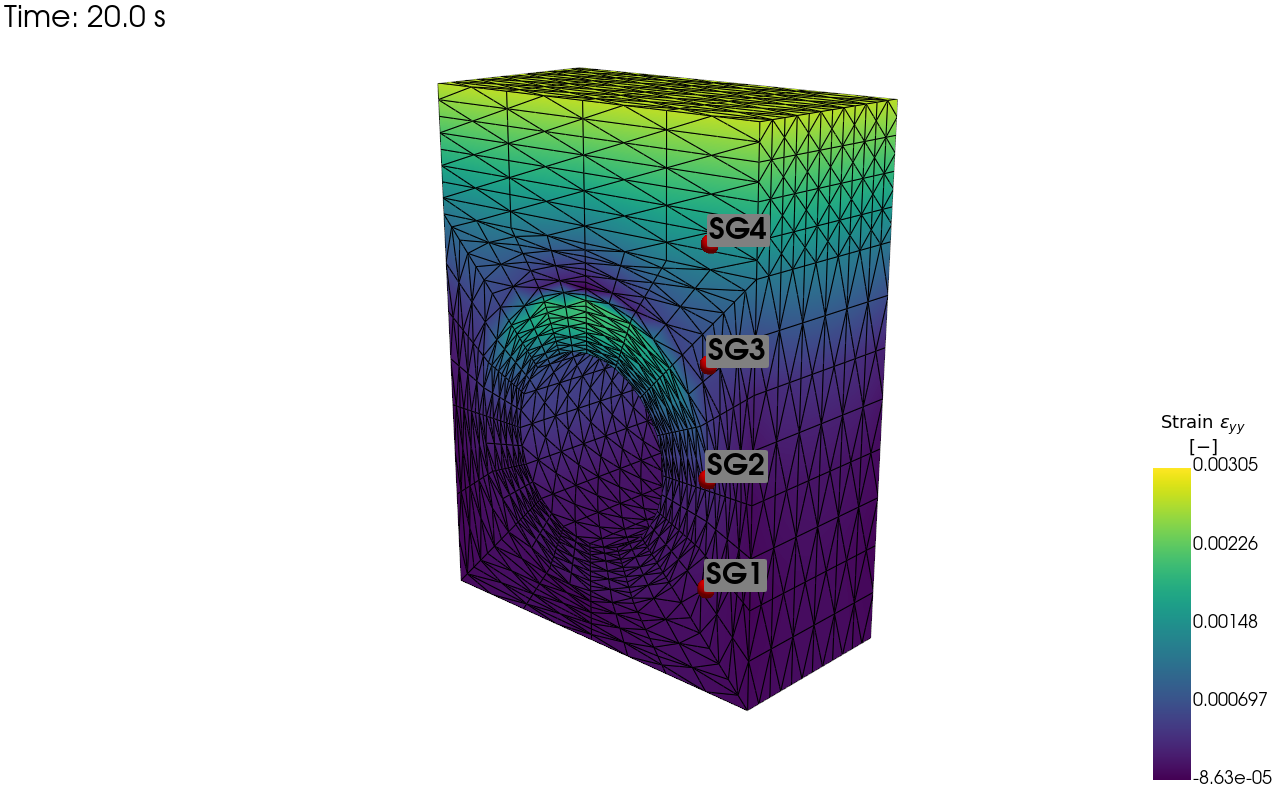
Here we demonstrate how `pyvale` can be used to simulate thermocouples and strain gauges applied to a [MOOSE](https://mooseframework.inl.gov/index.html) thermo-mechanical simulation of a fusion divertor armour heatsink. The figures below show visualisations of the virtual thermocouple and strain gauge locations on the simualtion mesh as well as time traces for each sensor over a series of simulated experiments.
|
|
56
63
|
|
|
57
64
|
The code to run the simulated experiments and produce the output shown here comes from [this example](https://computer-aided-validation-laboratory.github.io/pyvale/examples/point/ex4_2.html). You can find more examples and details of `pyvale` python API in the `pyvale` [documentation](https://computer-aided-validation-laboratory.github.io/pyvale/index.html).
|
|
58
65
|
|
|
59
|
-
|||
|
|
60
67
|
|--|--|
|
|
61
68
|
|*Visualisation of the thermcouple locations.*|*Visualisation of the strain gauge locations.*|
|
|
62
69
|
|
|
@@ -71,71 +78,19 @@ The code to run the simulated experiments and produce the output shown here come
|
|
|
71
78
|
pip install pyvale
|
|
72
79
|
```
|
|
73
80
|
|
|
74
|
-
|
|
75
|
-
### Managing Python Versions
|
|
76
|
-
To be compatible with `bpy` (the Blender python interface), `pyvale` uses python 3.11. To install python 3.11 without corrupting your operating systems python installation first add the deadsnakes repository to apt:
|
|
77
|
-
```shell
|
|
78
|
-
sudo add-apt-repository ppa:deadsnakes/ppa
|
|
79
|
-
sudo apt update && sudo apt upgrade -y
|
|
80
|
-
```
|
|
81
|
-
|
|
82
|
-
Install python 3.11:
|
|
83
|
-
```shell
|
|
84
|
-
sudo apt install python3.11
|
|
85
|
-
```
|
|
86
|
-
|
|
87
|
-
Add `venv` to your python 3.11 install:
|
|
88
|
-
```shell
|
|
89
|
-
sudo apt install python3.11-venv
|
|
90
|
-
```
|
|
91
|
-
|
|
92
|
-
Check your python 3.11 install is working using the following command which should open an interactive python interpreter:
|
|
93
|
-
```shell
|
|
94
|
-
python3.11
|
|
95
|
-
```
|
|
96
|
-
|
|
97
|
-
### Virtual Environment
|
|
98
|
-
|
|
99
|
-
We recommend installing `pyvale` in a virtual environment using `venv` or `pyvale` can be installed into an existing environment of your choice. To create a specific virtual environment for `pyvale` navigate to the directory you want to install the environment and use:
|
|
100
|
-
|
|
101
|
-
```shell
|
|
102
|
-
python3.11 -m venv .pyvale-env
|
|
103
|
-
source .pyvale-env/bin/activate
|
|
104
|
-
```
|
|
105
|
-
|
|
106
|
-
### Standard Installation
|
|
107
|
-
`pyvale` can be installed from pypi. Ensure you virtual environment is activated and run:
|
|
108
|
-
```shell
|
|
109
|
-
pip install pyvale
|
|
110
|
-
```
|
|
111
|
-
|
|
112
|
-
### Developer Installation
|
|
113
|
-
|
|
114
|
-
Clone `pyvale` to your local system along with submodules using
|
|
115
|
-
```shell
|
|
116
|
-
git clone --recurse-submodules git@github.com:Computer-Aided-Validation-Laboratory/pyvale.git
|
|
117
|
-
```
|
|
118
|
-
|
|
119
|
-
`cd` to the root directory of `pyvale`. Ensure you virtual environment is activated and run the following commmand from the `pyvale` directory:
|
|
120
|
-
```shell
|
|
121
|
-
pip install -e .
|
|
122
|
-
pip install -e ./dependencies/mooseherder
|
|
123
|
-
```
|
|
124
|
-
|
|
125
|
-
### Running Physics Simulations with MOOSE
|
|
126
|
-
`pyvale` come pre-packaged with example `moose` physics simulation outputs (as *.e exodus files) to demonstrate its functionality. If you need to run additional simulation cases we recommend `proteus` (https://github.com/aurora-multiphysics/proteus) which has build scripts for common linux distributions.
|
|
81
|
+
We recommend installing `pyvale` into a virtual environment of your choice as `pyvale` requires python 3.11. If you need help setting up your virtual environment and installing `pyvale` head over to the [installation guide](https://computer-aided-validation-laboratory.github.io/pyvale/install.html) in our docs.
|
|
127
82
|
|
|
128
83
|
## Contributors
|
|
129
84
|
The Computer Aided Validation Team at UKAEA:
|
|
130
85
|
- Lloyd Fletcher ([ScepticalRabbit](https://github.com/ScepticalRabbit)), UK Atomic Energy Authority
|
|
131
86
|
- Joel Hirst ([JoelPhys](https://github.com/JoelPhys)), UK Atomic Energy Authority
|
|
132
|
-
- John Charlton ([coolmule0](https://github.com/coolmule0)), UK Atomic Energy Authority
|
|
133
87
|
- Lorna Sibson ([lornasibson](https://github.com/lornasibson)), UK Atomic Energy Authority
|
|
134
88
|
- Megan Sampson ([meganasampson](https://github.com/meganasampson)), UK Atomic Energy Authority
|
|
135
89
|
- Michael Atkinson ([mikesmic](https://github.com/mikesmic)), UK Atomic Energy Authority
|
|
136
90
|
- Adel Tayeb ([3adelTayeb](https://github.com/3adelTayeb)), UK Atomic Energy Authority
|
|
137
91
|
- Alex Marsh ([alexmarsh2](https://github.com/alexmarsh2)), UK Atomic Energy Authority
|
|
138
92
|
- Rory Spencer ([fusmatrs](https://github.com/orgs/Computer-Aided-Validation-Laboratory/people/fusmatrs)), UK Atomic Energy Authority
|
|
93
|
+
- John Charlton ([coolmule0](https://github.com/coolmule0)), UK Atomic Energy Authority
|
|
139
94
|
|
|
140
95
|
|
|
141
96
|
|
|
@@ -1,12 +1,16 @@
|
|
|
1
1
|
# pyvale
|
|
2
|
-
|
|
2
|
+

|
|
3
|
+
|
|
4
|
+
The python validation engine (`pyvale`) is you virtual engineering laboratory: An all-in-one package for sensor simulation, sensor uncertainty quantification, sensor placement optimisation and simulation calibration/validation. Used to simulate experimental data from an input multi-physics simulation by explicitly modelling sensors with realistic uncertainties. Useful for experimental design, sensor placement optimisation, testing simulation validation metrics and virtually testing digital shadows/twins.
|
|
5
|
+
|
|
6
|
+
We provide dedicated tools for simulation and uncertainty quantification of imaging sensors including digital image correlation (DIC) and infra-red thermography (IRT). Check out the [documentation](https://computer-aided-validation-laboratory.github.io/pyvale/index.html) to get started with some of our examples.
|
|
3
7
|
|
|
4
8
|
## Quick Demo: Simulating Point Sensors
|
|
5
9
|
Here we demonstrate how `pyvale` can be used to simulate thermocouples and strain gauges applied to a [MOOSE](https://mooseframework.inl.gov/index.html) thermo-mechanical simulation of a fusion divertor armour heatsink. The figures below show visualisations of the virtual thermocouple and strain gauge locations on the simualtion mesh as well as time traces for each sensor over a series of simulated experiments.
|
|
6
10
|
|
|
7
11
|
The code to run the simulated experiments and produce the output shown here comes from [this example](https://computer-aided-validation-laboratory.github.io/pyvale/examples/point/ex4_2.html). You can find more examples and details of `pyvale` python API in the `pyvale` [documentation](https://computer-aided-validation-laboratory.github.io/pyvale/index.html).
|
|
8
12
|
|
|
9
|
-
|||
|
|
10
14
|
|--|--|
|
|
11
15
|
|*Visualisation of the thermcouple locations.*|*Visualisation of the strain gauge locations.*|
|
|
12
16
|
|
|
@@ -21,71 +25,19 @@ The code to run the simulated experiments and produce the output shown here come
|
|
|
21
25
|
pip install pyvale
|
|
22
26
|
```
|
|
23
27
|
|
|
24
|
-
|
|
25
|
-
### Managing Python Versions
|
|
26
|
-
To be compatible with `bpy` (the Blender python interface), `pyvale` uses python 3.11. To install python 3.11 without corrupting your operating systems python installation first add the deadsnakes repository to apt:
|
|
27
|
-
```shell
|
|
28
|
-
sudo add-apt-repository ppa:deadsnakes/ppa
|
|
29
|
-
sudo apt update && sudo apt upgrade -y
|
|
30
|
-
```
|
|
31
|
-
|
|
32
|
-
Install python 3.11:
|
|
33
|
-
```shell
|
|
34
|
-
sudo apt install python3.11
|
|
35
|
-
```
|
|
36
|
-
|
|
37
|
-
Add `venv` to your python 3.11 install:
|
|
38
|
-
```shell
|
|
39
|
-
sudo apt install python3.11-venv
|
|
40
|
-
```
|
|
41
|
-
|
|
42
|
-
Check your python 3.11 install is working using the following command which should open an interactive python interpreter:
|
|
43
|
-
```shell
|
|
44
|
-
python3.11
|
|
45
|
-
```
|
|
46
|
-
|
|
47
|
-
### Virtual Environment
|
|
48
|
-
|
|
49
|
-
We recommend installing `pyvale` in a virtual environment using `venv` or `pyvale` can be installed into an existing environment of your choice. To create a specific virtual environment for `pyvale` navigate to the directory you want to install the environment and use:
|
|
50
|
-
|
|
51
|
-
```shell
|
|
52
|
-
python3.11 -m venv .pyvale-env
|
|
53
|
-
source .pyvale-env/bin/activate
|
|
54
|
-
```
|
|
55
|
-
|
|
56
|
-
### Standard Installation
|
|
57
|
-
`pyvale` can be installed from pypi. Ensure you virtual environment is activated and run:
|
|
58
|
-
```shell
|
|
59
|
-
pip install pyvale
|
|
60
|
-
```
|
|
61
|
-
|
|
62
|
-
### Developer Installation
|
|
63
|
-
|
|
64
|
-
Clone `pyvale` to your local system along with submodules using
|
|
65
|
-
```shell
|
|
66
|
-
git clone --recurse-submodules git@github.com:Computer-Aided-Validation-Laboratory/pyvale.git
|
|
67
|
-
```
|
|
68
|
-
|
|
69
|
-
`cd` to the root directory of `pyvale`. Ensure you virtual environment is activated and run the following commmand from the `pyvale` directory:
|
|
70
|
-
```shell
|
|
71
|
-
pip install -e .
|
|
72
|
-
pip install -e ./dependencies/mooseherder
|
|
73
|
-
```
|
|
74
|
-
|
|
75
|
-
### Running Physics Simulations with MOOSE
|
|
76
|
-
`pyvale` come pre-packaged with example `moose` physics simulation outputs (as *.e exodus files) to demonstrate its functionality. If you need to run additional simulation cases we recommend `proteus` (https://github.com/aurora-multiphysics/proteus) which has build scripts for common linux distributions.
|
|
28
|
+
We recommend installing `pyvale` into a virtual environment of your choice as `pyvale` requires python 3.11. If you need help setting up your virtual environment and installing `pyvale` head over to the [installation guide](https://computer-aided-validation-laboratory.github.io/pyvale/install.html) in our docs.
|
|
77
29
|
|
|
78
30
|
## Contributors
|
|
79
31
|
The Computer Aided Validation Team at UKAEA:
|
|
80
32
|
- Lloyd Fletcher ([ScepticalRabbit](https://github.com/ScepticalRabbit)), UK Atomic Energy Authority
|
|
81
33
|
- Joel Hirst ([JoelPhys](https://github.com/JoelPhys)), UK Atomic Energy Authority
|
|
82
|
-
- John Charlton ([coolmule0](https://github.com/coolmule0)), UK Atomic Energy Authority
|
|
83
34
|
- Lorna Sibson ([lornasibson](https://github.com/lornasibson)), UK Atomic Energy Authority
|
|
84
35
|
- Megan Sampson ([meganasampson](https://github.com/meganasampson)), UK Atomic Energy Authority
|
|
85
36
|
- Michael Atkinson ([mikesmic](https://github.com/mikesmic)), UK Atomic Energy Authority
|
|
86
37
|
- Adel Tayeb ([3adelTayeb](https://github.com/3adelTayeb)), UK Atomic Energy Authority
|
|
87
38
|
- Alex Marsh ([alexmarsh2](https://github.com/alexmarsh2)), UK Atomic Energy Authority
|
|
88
39
|
- Rory Spencer ([fusmatrs](https://github.com/orgs/Computer-Aided-Validation-Laboratory/people/fusmatrs)), UK Atomic Energy Authority
|
|
40
|
+
- John Charlton ([coolmule0](https://github.com/coolmule0)), UK Atomic Energy Authority
|
|
89
41
|
|
|
90
42
|
|
|
91
43
|
|
|
@@ -1,10 +1,11 @@
|
|
|
1
1
|
[build-system]
|
|
2
|
-
requires = ["setuptools>=61.0", "wheel", "Cython", "numpy"
|
|
2
|
+
requires = ["setuptools>=61.0", "wheel", "Cython>=3.0.0", "numpy<2.0.0",
|
|
3
|
+
"pybind11>=2.13.6"]
|
|
3
4
|
build-backend = "setuptools.build_meta"
|
|
4
5
|
|
|
5
6
|
[project]
|
|
6
7
|
name = "pyvale"
|
|
7
|
-
version = "2025.
|
|
8
|
+
version = "2025.7.0"
|
|
8
9
|
description = "An all-in-one package for sensor simulation, sensor uncertainty quantification, sensor placement optimisation and simulation calibration or validation."
|
|
9
10
|
authors = [
|
|
10
11
|
{ name = "scepticalrabbit et al.", email = "thescepticalrabbit@gmail.com" },
|
|
@@ -30,6 +31,9 @@ dependencies = [
|
|
|
30
31
|
"bpy>=4.2.0",
|
|
31
32
|
"pyyaml>=6.0.2",
|
|
32
33
|
"pytest>=8.3.5",
|
|
34
|
+
"pybind11>=2.13.6",
|
|
35
|
+
"pyqtgraph>=0.13.7",
|
|
36
|
+
"opencv-python<=4.9.0.80"
|
|
33
37
|
]
|
|
34
38
|
|
|
35
39
|
[project.urls]
|
pyvale-2025.7.0/setup.py
ADDED
|
@@ -0,0 +1,60 @@
|
|
|
1
|
+
from setuptools import setup, Extension
|
|
2
|
+
from Cython.Build import cythonize
|
|
3
|
+
import numpy
|
|
4
|
+
import sys
|
|
5
|
+
from glob import glob
|
|
6
|
+
import pybind11
|
|
7
|
+
|
|
8
|
+
|
|
9
|
+
debug_mode = '--debug' in sys.argv
|
|
10
|
+
if debug_mode:
|
|
11
|
+
sys.argv.remove('--debug')
|
|
12
|
+
|
|
13
|
+
# check if we are on windows
|
|
14
|
+
is_windows = sys.platform.startswith("win")
|
|
15
|
+
if is_windows:
|
|
16
|
+
openmp_flag = '/openmp'
|
|
17
|
+
cpp_std_flag = '/std:c++17'
|
|
18
|
+
compile_flags = [cpp_std_flag, openmp_flag]
|
|
19
|
+
if debug_mode:
|
|
20
|
+
compile_flags += ['/Od', '/Zi']
|
|
21
|
+
else:
|
|
22
|
+
compile_flags += ['/O2']
|
|
23
|
+
link_flags = []
|
|
24
|
+
else:
|
|
25
|
+
openmp_flag = '-fopenmp'
|
|
26
|
+
cpp_std_flag = '-std=c++17'
|
|
27
|
+
compile_flags = [cpp_std_flag, openmp_flag]
|
|
28
|
+
if debug_mode:
|
|
29
|
+
compile_flags += ['-O0', '-g']
|
|
30
|
+
link_flags = [openmp_flag, '-g']
|
|
31
|
+
else:
|
|
32
|
+
compile_flags += ['-O3']
|
|
33
|
+
link_flags = [openmp_flag]
|
|
34
|
+
|
|
35
|
+
|
|
36
|
+
ext_cython = Extension(
|
|
37
|
+
"pyvale.cython.rastercyth",
|
|
38
|
+
["src/pyvale/cython/rastercyth.py"],
|
|
39
|
+
include_dirs=[numpy.get_include()],
|
|
40
|
+
extra_compile_args=[openmp_flag],
|
|
41
|
+
extra_link_args=[openmp_flag],
|
|
42
|
+
)
|
|
43
|
+
|
|
44
|
+
|
|
45
|
+
|
|
46
|
+
ext_dic = Extension(
|
|
47
|
+
'pyvale.dic2dcpp',
|
|
48
|
+
sorted(glob("src/pyvale/dic/cpp/dic*.cpp")),
|
|
49
|
+
language="c++",
|
|
50
|
+
include_dirs=[pybind11.get_include()],
|
|
51
|
+
extra_compile_args=compile_flags,
|
|
52
|
+
extra_link_args=link_flags,
|
|
53
|
+
)
|
|
54
|
+
|
|
55
|
+
ext_modules = cythonize([ext_cython], annotate=True) + [ext_dic]
|
|
56
|
+
|
|
57
|
+
setup(
|
|
58
|
+
ext_modules=cythonize(ext_modules,
|
|
59
|
+
annotate=True),
|
|
60
|
+
)
|
|
@@ -46,6 +46,7 @@ from pyvale.camerastereo import *
|
|
|
46
46
|
import pyvale.cython.rastercyth as rastercyth
|
|
47
47
|
from pyvale.rastercy import *
|
|
48
48
|
|
|
49
|
+
from pyvale.renderscene import *
|
|
49
50
|
from pyvale.rendermesh import *
|
|
50
51
|
from pyvale.rasternp import *
|
|
51
52
|
|
|
@@ -87,3 +88,14 @@ from pyvale.simtools import *
|
|
|
87
88
|
from pyvale.output import *
|
|
88
89
|
from pyvale.pyvaleexceptions import *
|
|
89
90
|
|
|
91
|
+
from pyvale.experimentsimulator import *
|
|
92
|
+
|
|
93
|
+
from pyvale.dicspecklegenerator import *
|
|
94
|
+
from pyvale.dicspecklequality import *
|
|
95
|
+
from pyvale.dicregionofinterest import *
|
|
96
|
+
from pyvale.dic2d import *
|
|
97
|
+
from pyvale.dicdataimport import *
|
|
98
|
+
from pyvale.dicresults import *
|
|
99
|
+
from pyvale.dic2dcpp import *
|
|
100
|
+
from pyvale.dicstrain import *
|
|
101
|
+
from pyvale.dicchecks import *
|
|
@@ -13,7 +13,7 @@ from pyvale.simtools import SimTools
|
|
|
13
13
|
from pyvale.blendermaterialdata import BlenderMaterialData
|
|
14
14
|
from pyvale.blenderrenderdata import RenderData, RenderEngine
|
|
15
15
|
from pyvale.camerastereo import CameraStereo
|
|
16
|
-
from pyvale.rendermesh import
|
|
16
|
+
from pyvale.rendermesh import RenderMesh
|
|
17
17
|
from pyvale.pyvaleexceptions import BlenderError
|
|
18
18
|
|
|
19
19
|
|
|
@@ -94,12 +94,14 @@ class BlenderScene():
|
|
|
94
94
|
new_cam.dof.use_dof = True
|
|
95
95
|
new_cam.dof.aperture_fstop = cam_data.fstop
|
|
96
96
|
|
|
97
|
+
new_cam.clip_end = ((cam_data.pos_world[2] - cam_data.roi_cent_world[2])
|
|
98
|
+
+ 100)
|
|
99
|
+
|
|
97
100
|
bpy.context.scene.camera = camera
|
|
98
101
|
return camera
|
|
99
102
|
|
|
100
103
|
def add_stereo_system(self, stereo_system: CameraStereo) -> tuple[bpy.data.objects,
|
|
101
104
|
bpy.data.objects]:
|
|
102
|
-
# TODO: Correct docstring
|
|
103
105
|
"""A method to add a stereo camera system within Blender, given an
|
|
104
106
|
instance of the CameraStereo class (that describes a stereo system).
|
|
105
107
|
|
|
@@ -152,7 +154,7 @@ class BlenderScene():
|
|
|
152
154
|
return light_ob
|
|
153
155
|
|
|
154
156
|
def add_part(self,
|
|
155
|
-
render_mesh:
|
|
157
|
+
render_mesh: RenderMesh,
|
|
156
158
|
sim_spat_dim: int) -> bpy.data.objects:
|
|
157
159
|
"""A method to add a part mesh into Blender, given a RenderMeshData object.
|
|
158
160
|
This is done by taking the mesh information from the RenderMeshData
|
|
@@ -258,7 +260,7 @@ class BlenderScene():
|
|
|
258
260
|
BlenderTools.uv_unwrap_part(part, mm_px_resolution, cal)
|
|
259
261
|
|
|
260
262
|
def _debug_deform(self,
|
|
261
|
-
render_mesh:
|
|
263
|
+
render_mesh: RenderMesh,
|
|
262
264
|
sim_spat_dim:int,
|
|
263
265
|
part: bpy.data.objects) -> None:
|
|
264
266
|
"""A method to deform the Blender mesh object using the simulation results.
|
|
@@ -371,7 +373,7 @@ class BlenderScene():
|
|
|
371
373
|
bpy.ops.render.render(write_still=True)
|
|
372
374
|
|
|
373
375
|
def render_deformed_images(self,
|
|
374
|
-
render_mesh:
|
|
376
|
+
render_mesh: RenderMesh,
|
|
375
377
|
sim_spat_dim: int,
|
|
376
378
|
render_data:RenderData,
|
|
377
379
|
part: bpy.data.objects,
|
|
@@ -332,7 +332,9 @@ class BlenderTools:
|
|
|
332
332
|
A dataclass containing the parameters needed to render the images
|
|
333
333
|
calibration_data : CalibrationData
|
|
334
334
|
A dataclass containing the parameters by which to move the calibration
|
|
335
|
-
target. These inclcude the plungle depth and rotation angle.
|
|
335
|
+
target. These inclcude the plungle depth and rotation angle. It also
|
|
336
|
+
inlcludes optional x and y limits for the movement of the calibration
|
|
337
|
+
target (if None they will be initialised from the FOV).
|
|
336
338
|
part : bpy.data.objects
|
|
337
339
|
The Blender part object, in this instance the calibration target.
|
|
338
340
|
|
|
@@ -371,15 +373,17 @@ class BlenderTools:
|
|
|
371
373
|
plunge = calibration_data.plunge_lims[0] + calibration_data.plunge_step * ii
|
|
372
374
|
# Plunge
|
|
373
375
|
(FOV_x, FOV_y) = CameraTools.blender_FOV(render_data.cam_data[0])
|
|
374
|
-
x_limit = int(round((FOV_x / 2) - (part.dimensions[0] / 2)))
|
|
375
376
|
|
|
376
|
-
|
|
377
|
+
if calibration_data.x_limit is None:
|
|
378
|
+
calibration_data.x_limit = int(round((FOV_x / 2) - (part.dimensions[0] / 2)))
|
|
379
|
+
if calibration_data.y_limit is None:
|
|
380
|
+
calibration_data.y_limit = int(round((FOV_y / 2) - (part.dimensions[1] / 2)))
|
|
377
381
|
|
|
378
382
|
for x in np.arange(-1, 2):
|
|
379
|
-
x *= x_limit
|
|
383
|
+
x *= calibration_data.x_limit
|
|
380
384
|
# Move in x-dir
|
|
381
385
|
for y in np.arange(-1, 2):
|
|
382
|
-
y *= y_limit
|
|
386
|
+
y *= calibration_data.y_limit
|
|
383
387
|
# Move in y-dir
|
|
384
388
|
part.location = ((x, y, plunge))
|
|
385
389
|
part.location[2] = plunge
|
|
@@ -415,6 +419,24 @@ class BlenderTools:
|
|
|
415
419
|
print('Total number of calibration images = ' + str(render_counter))
|
|
416
420
|
return render_counter
|
|
417
421
|
|
|
422
|
+
def check_for_GPU() -> bool:
|
|
423
|
+
"""A method to check whether the machine has a GPU or not.
|
|
424
|
+
|
|
425
|
+
Returns
|
|
426
|
+
-------
|
|
427
|
+
bool
|
|
428
|
+
Returns True if a GPU is present, returns False if only a CPU is
|
|
429
|
+
present.
|
|
430
|
+
"""
|
|
431
|
+
accepted_gpus = ["CUDA", "OPTIX", "HIP", "METAL", "ONEAPI"]
|
|
432
|
+
cycles_prefs = bpy.context.preferences.addons["cycles"].preferences
|
|
433
|
+
cycles_prefs.refresh_devices()
|
|
434
|
+
for device in cycles_prefs.devices:
|
|
435
|
+
print(f"Name: {device.name}, Type: {device.type}, Use: {device.use}")
|
|
436
|
+
if device.type in accepted_gpus:
|
|
437
|
+
return True
|
|
438
|
+
return False
|
|
439
|
+
|
|
418
440
|
|
|
419
441
|
|
|
420
442
|
|
|
@@ -25,6 +25,8 @@ class CameraData:
|
|
|
25
25
|
focal_length: float | None = 50.0
|
|
26
26
|
sub_samp: int = 2
|
|
27
27
|
|
|
28
|
+
bits: int = 16
|
|
29
|
+
|
|
28
30
|
back_face_removal: bool = True
|
|
29
31
|
|
|
30
32
|
k1: float = 0.0
|
|
@@ -40,6 +42,7 @@ class CameraData:
|
|
|
40
42
|
sensor_size: np.ndarray = field(init=False)
|
|
41
43
|
image_dims: np.ndarray = field(init=False)
|
|
42
44
|
image_dist: float = field(init=False)
|
|
45
|
+
|
|
43
46
|
cam_to_world_mat: np.ndarray = field(init=False)
|
|
44
47
|
world_to_cam_mat: np.ndarray = field(init=False)
|
|
45
48
|
|
|
@@ -0,0 +1,147 @@
|
|
|
1
|
+
# ==============================================================================
|
|
2
|
+
# pyvale: the python validation engine
|
|
3
|
+
# License: MIT
|
|
4
|
+
# Copyright (C) 2025 The Computer Aided Validation Team
|
|
5
|
+
# ==============================================================================
|
|
6
|
+
|
|
7
|
+
"""
|
|
8
|
+
NOTE: This module is a feature under developement.
|
|
9
|
+
"""
|
|
10
|
+
|
|
11
|
+
import numpy as np
|
|
12
|
+
from pyvale.field import IField
|
|
13
|
+
from pyvale.sensorarray import ISensorArray
|
|
14
|
+
from pyvale.errorintegrator import ErrIntegrator
|
|
15
|
+
from pyvale.sensordescriptor import SensorDescriptor
|
|
16
|
+
from pyvale.fieldsampler import sample_field_with_sensor_data
|
|
17
|
+
from pyvale.cameradata2d import CameraData2D
|
|
18
|
+
from pyvale.cameratools import CameraTools
|
|
19
|
+
|
|
20
|
+
|
|
21
|
+
|
|
22
|
+
class CameraBasic2D(ISensorArray):
|
|
23
|
+
__slots__ = ("_cam_data","_field","_error_integrator","_descriptor",
|
|
24
|
+
"_sensor_data","_truth","_measurements")
|
|
25
|
+
|
|
26
|
+
def __init__(self,
|
|
27
|
+
cam_data: CameraData2D,
|
|
28
|
+
field: IField,
|
|
29
|
+
descriptor: SensorDescriptor | None = None,
|
|
30
|
+
) -> None:
|
|
31
|
+
|
|
32
|
+
self._cam_data = cam_data
|
|
33
|
+
self._field = field
|
|
34
|
+
self._error_integrator = None
|
|
35
|
+
|
|
36
|
+
self._descriptor = SensorDescriptor()
|
|
37
|
+
if descriptor is not None:
|
|
38
|
+
self._descriptor = descriptor
|
|
39
|
+
|
|
40
|
+
self._sensor_data = CameraTools.build_sensor_data_from_camera_2d(self._cam_data)
|
|
41
|
+
|
|
42
|
+
self._truth = None
|
|
43
|
+
self._measurements = None
|
|
44
|
+
|
|
45
|
+
#---------------------------------------------------------------------------
|
|
46
|
+
# Accessors
|
|
47
|
+
def get_sample_times(self) -> np.ndarray:
|
|
48
|
+
if self._sensor_data.sample_times is None:
|
|
49
|
+
#shape=(n_time_steps,)
|
|
50
|
+
return self._field.get_time_steps()
|
|
51
|
+
|
|
52
|
+
#shape=(n_time_steps,)
|
|
53
|
+
return self._sensor_data.sample_times
|
|
54
|
+
|
|
55
|
+
def get_measurement_shape(self) -> tuple[int,int,int]:
|
|
56
|
+
return (self._sensor_data.positions.shape[0],
|
|
57
|
+
len(self._field.get_all_components()),
|
|
58
|
+
self.get_sample_times().shape[0])
|
|
59
|
+
|
|
60
|
+
def get_image_measurements_shape(self) -> tuple[int,int,int,int]:
|
|
61
|
+
return (self._cam_data.num_pixels[1],
|
|
62
|
+
self._cam_data.num_pixels[0],
|
|
63
|
+
len(self._field.get_all_components()),
|
|
64
|
+
self.get_sample_times().shape[0])
|
|
65
|
+
|
|
66
|
+
def get_field(self) -> IField:
|
|
67
|
+
return self._field
|
|
68
|
+
|
|
69
|
+
def get_descriptor(self) -> SensorDescriptor:
|
|
70
|
+
return self._descriptor
|
|
71
|
+
|
|
72
|
+
#---------------------------------------------------------------------------
|
|
73
|
+
# Truth calculation from simulation
|
|
74
|
+
def calc_truth_values(self) -> np.ndarray:
|
|
75
|
+
self._truth = sample_field_with_sensor_data(self._field,
|
|
76
|
+
self._sensor_data)
|
|
77
|
+
#shape=(n_pixels,n_field_comps,n_time_steps)
|
|
78
|
+
return self._truth
|
|
79
|
+
|
|
80
|
+
def get_truth(self) -> np.ndarray:
|
|
81
|
+
if self._truth is None:
|
|
82
|
+
self._truth = self.calc_truth_values()
|
|
83
|
+
#shape=(n_pixels,n_field_comps,n_time_steps)
|
|
84
|
+
return self._truth
|
|
85
|
+
|
|
86
|
+
#---------------------------------------------------------------------------
|
|
87
|
+
# Errors
|
|
88
|
+
def set_error_integrator(self, err_int: ErrIntegrator) -> None:
|
|
89
|
+
self._error_integrator = err_int
|
|
90
|
+
|
|
91
|
+
def get_errors_systematic(self) -> np.ndarray | None:
|
|
92
|
+
if self._error_integrator is None:
|
|
93
|
+
return None
|
|
94
|
+
|
|
95
|
+
#shape=(n_pixels,n_field_comps,n_time_steps)
|
|
96
|
+
return self._error_integrator.get_errs_systematic()
|
|
97
|
+
|
|
98
|
+
def get_errors_random(self) -> np.ndarray | None:
|
|
99
|
+
if self._error_integrator is None:
|
|
100
|
+
return None
|
|
101
|
+
|
|
102
|
+
#shape=(n_pixels,n_field_comps,n_time_steps)
|
|
103
|
+
return self._error_integrator.get_errs_random()
|
|
104
|
+
|
|
105
|
+
def get_errors_total(self) -> np.ndarray | None:
|
|
106
|
+
if self._error_integrator is None:
|
|
107
|
+
return None
|
|
108
|
+
|
|
109
|
+
#shape=(n_pixels,n_field_comps,n_time_steps)
|
|
110
|
+
return self._error_integrator.get_errs_total()
|
|
111
|
+
|
|
112
|
+
#---------------------------------------------------------------------------
|
|
113
|
+
# Measurements
|
|
114
|
+
def calc_measurements(self) -> np.ndarray:
|
|
115
|
+
if self._error_integrator is None:
|
|
116
|
+
self._measurements = self.get_truth()
|
|
117
|
+
else:
|
|
118
|
+
self._measurements = self.get_truth() + \
|
|
119
|
+
self._error_integrator.calc_errors_from_chain(self.get_truth())
|
|
120
|
+
|
|
121
|
+
#shape=(n_pixels,n_field_comps,n_time_steps)
|
|
122
|
+
return self._measurements
|
|
123
|
+
|
|
124
|
+
def get_measurements(self) -> np.ndarray:
|
|
125
|
+
if self._measurements is None:
|
|
126
|
+
self._measurements = self.calc_measurements()
|
|
127
|
+
|
|
128
|
+
#shape=(n_pixels,n_field_comps,n_time_steps)
|
|
129
|
+
return self._measurements
|
|
130
|
+
|
|
131
|
+
#---------------------------------------------------------------------------
|
|
132
|
+
# Images
|
|
133
|
+
def calc_measurement_images(self) -> np.ndarray:
|
|
134
|
+
#shape=(n_pixels,n_field_comps,n_time_steps)
|
|
135
|
+
self._measurements = self.calc_measurements()
|
|
136
|
+
image_shape = self.get_image_measurements_shape()
|
|
137
|
+
#shape=(n_pixels_y,n_pixels_x,n_field_comps,n_time_steps)
|
|
138
|
+
return np.reshape(self._measurements,image_shape)
|
|
139
|
+
|
|
140
|
+
def get_measurement_images(self) -> np.ndarray:
|
|
141
|
+
self._measurements = self.get_measurements()
|
|
142
|
+
image_shape = self.get_image_measurements_shape()
|
|
143
|
+
#shape=(n_pixels_y,n_pixels_x,n_field_comps,n_time_steps)
|
|
144
|
+
return np.reshape(self._measurements,image_shape)
|
|
145
|
+
|
|
146
|
+
|
|
147
|
+
|
|
@@ -62,10 +62,10 @@ class CameraStereo:
|
|
|
62
62
|
An instance of the CameraStereo class, given the specified parameters.
|
|
63
63
|
"""
|
|
64
64
|
calib_params = yaml.safe_load(calib_path.read_text())
|
|
65
|
-
pixels_num_cam0 = np.array([calib_params['Cam0_Cx [pixels]']*2,
|
|
66
|
-
calib_params['Cam0_Cy [pixels]']*2])
|
|
67
|
-
pixels_num_cam1 = np.array([calib_params['Cam1_Cx [pixels]']*2,
|
|
68
|
-
calib_params['Cam1_Cy [pixels]']*2])
|
|
65
|
+
pixels_num_cam0 = np.array([int(calib_params['Cam0_Cx [pixels]']*2),
|
|
66
|
+
int(calib_params['Cam0_Cy [pixels]']*2)])
|
|
67
|
+
pixels_num_cam1 = np.array([int(calib_params['Cam1_Cx [pixels]']*2),
|
|
68
|
+
int(calib_params['Cam1_Cy [pixels]']*2)])
|
|
69
69
|
pixels_size = focal_length / calib_params["Cam0_Fx [pixels]"]
|
|
70
70
|
stereo_rotation = Rotation.from_euler("xyz", ([calib_params['Theta [deg]'],
|
|
71
71
|
calib_params['Phi [deg]'],
|