pyvale 2025.4.0__tar.gz
This diff represents the content of publicly available package versions that have been released to one of the supported registries. The information contained in this diff is provided for informational purposes only and reflects changes between package versions as they appear in their respective public registries.
- pyvale-2025.4.0/LICENSE +21 -0
- pyvale-2025.4.0/PKG-INFO +140 -0
- pyvale-2025.4.0/README.md +92 -0
- pyvale-2025.4.0/pyproject.toml +42 -0
- pyvale-2025.4.0/setup.cfg +4 -0
- pyvale-2025.4.0/src/pyvale/__init__.py +75 -0
- pyvale-2025.4.0/src/pyvale/core/__init__.py +7 -0
- pyvale-2025.4.0/src/pyvale/core/analyticmeshgen.py +59 -0
- pyvale-2025.4.0/src/pyvale/core/analyticsimdatafactory.py +63 -0
- pyvale-2025.4.0/src/pyvale/core/analyticsimdatagenerator.py +160 -0
- pyvale-2025.4.0/src/pyvale/core/camera.py +146 -0
- pyvale-2025.4.0/src/pyvale/core/cameradata.py +64 -0
- pyvale-2025.4.0/src/pyvale/core/cameradata2d.py +82 -0
- pyvale-2025.4.0/src/pyvale/core/cameratools.py +328 -0
- pyvale-2025.4.0/src/pyvale/core/cython/rastercyth.c +32267 -0
- pyvale-2025.4.0/src/pyvale/core/cython/rastercyth.py +636 -0
- pyvale-2025.4.0/src/pyvale/core/dataset.py +250 -0
- pyvale-2025.4.0/src/pyvale/core/errorcalculator.py +112 -0
- pyvale-2025.4.0/src/pyvale/core/errordriftcalc.py +146 -0
- pyvale-2025.4.0/src/pyvale/core/errorintegrator.py +339 -0
- pyvale-2025.4.0/src/pyvale/core/errorrand.py +614 -0
- pyvale-2025.4.0/src/pyvale/core/errorsysdep.py +331 -0
- pyvale-2025.4.0/src/pyvale/core/errorsysfield.py +407 -0
- pyvale-2025.4.0/src/pyvale/core/errorsysindep.py +905 -0
- pyvale-2025.4.0/src/pyvale/core/experimentsimulator.py +99 -0
- pyvale-2025.4.0/src/pyvale/core/field.py +136 -0
- pyvale-2025.4.0/src/pyvale/core/fieldconverter.py +154 -0
- pyvale-2025.4.0/src/pyvale/core/fieldsampler.py +112 -0
- pyvale-2025.4.0/src/pyvale/core/fieldscalar.py +167 -0
- pyvale-2025.4.0/src/pyvale/core/fieldtensor.py +221 -0
- pyvale-2025.4.0/src/pyvale/core/fieldtransform.py +384 -0
- pyvale-2025.4.0/src/pyvale/core/fieldvector.py +215 -0
- pyvale-2025.4.0/src/pyvale/core/generatorsrandom.py +528 -0
- pyvale-2025.4.0/src/pyvale/core/imagedef2d.py +566 -0
- pyvale-2025.4.0/src/pyvale/core/integratorfactory.py +241 -0
- pyvale-2025.4.0/src/pyvale/core/integratorquadrature.py +192 -0
- pyvale-2025.4.0/src/pyvale/core/integratorrectangle.py +88 -0
- pyvale-2025.4.0/src/pyvale/core/integratorspatial.py +90 -0
- pyvale-2025.4.0/src/pyvale/core/integratortype.py +44 -0
- pyvale-2025.4.0/src/pyvale/core/optimcheckfuncs.py +153 -0
- pyvale-2025.4.0/src/pyvale/core/raster.py +31 -0
- pyvale-2025.4.0/src/pyvale/core/rastercy.py +76 -0
- pyvale-2025.4.0/src/pyvale/core/rasternp.py +604 -0
- pyvale-2025.4.0/src/pyvale/core/rendermesh.py +156 -0
- pyvale-2025.4.0/src/pyvale/core/sensorarray.py +179 -0
- pyvale-2025.4.0/src/pyvale/core/sensorarrayfactory.py +210 -0
- pyvale-2025.4.0/src/pyvale/core/sensorarraypoint.py +280 -0
- pyvale-2025.4.0/src/pyvale/core/sensordata.py +72 -0
- pyvale-2025.4.0/src/pyvale/core/sensordescriptor.py +101 -0
- pyvale-2025.4.0/src/pyvale/core/sensortools.py +143 -0
- pyvale-2025.4.0/src/pyvale/core/visualexpplotter.py +151 -0
- pyvale-2025.4.0/src/pyvale/core/visualimagedef.py +71 -0
- pyvale-2025.4.0/src/pyvale/core/visualimages.py +75 -0
- pyvale-2025.4.0/src/pyvale/core/visualopts.py +180 -0
- pyvale-2025.4.0/src/pyvale/core/visualsimanimator.py +83 -0
- pyvale-2025.4.0/src/pyvale/core/visualsimplotter.py +182 -0
- pyvale-2025.4.0/src/pyvale/core/visualtools.py +81 -0
- pyvale-2025.4.0/src/pyvale/core/visualtraceplotter.py +256 -0
- pyvale-2025.4.0/src/pyvale/data/__init__.py +7 -0
- pyvale-2025.4.0/src/pyvale/data/case13_out.e +0 -0
- pyvale-2025.4.0/src/pyvale/data/case16_out.e +0 -0
- pyvale-2025.4.0/src/pyvale/data/case17_out.e +0 -0
- pyvale-2025.4.0/src/pyvale/data/case18_1_out.e +0 -0
- pyvale-2025.4.0/src/pyvale/data/case18_2_out.e +0 -0
- pyvale-2025.4.0/src/pyvale/data/case18_3_out.e +0 -0
- pyvale-2025.4.0/src/pyvale/data/case25_out.e +0 -0
- pyvale-2025.4.0/src/pyvale/data/case26_out.e +0 -0
- pyvale-2025.4.0/src/pyvale/data/optspeckle_2464x2056px_spec5px_8bit_gblur1px.tiff +0 -0
- pyvale-2025.4.0/src/pyvale/examples/__init__.py +7 -0
- pyvale-2025.4.0/src/pyvale/examples/analyticdatagen/__init__.py +7 -0
- pyvale-2025.4.0/src/pyvale/examples/analyticdatagen/ex1_1_scalarvisualisation.py +38 -0
- pyvale-2025.4.0/src/pyvale/examples/analyticdatagen/ex1_2_scalarcasebuild.py +46 -0
- pyvale-2025.4.0/src/pyvale/examples/analyticdatagen/ex2_1_analyticsensors.py +83 -0
- pyvale-2025.4.0/src/pyvale/examples/ex1_1_thermal2d.py +89 -0
- pyvale-2025.4.0/src/pyvale/examples/ex1_2_thermal2d.py +111 -0
- pyvale-2025.4.0/src/pyvale/examples/ex1_3_thermal2d.py +113 -0
- pyvale-2025.4.0/src/pyvale/examples/ex1_4_thermal2d.py +89 -0
- pyvale-2025.4.0/src/pyvale/examples/ex1_5_thermal2d.py +105 -0
- pyvale-2025.4.0/src/pyvale/examples/ex2_1_thermal3d .py +87 -0
- pyvale-2025.4.0/src/pyvale/examples/ex2_2_thermal3d.py +51 -0
- pyvale-2025.4.0/src/pyvale/examples/ex2_3_thermal3d.py +109 -0
- pyvale-2025.4.0/src/pyvale/examples/ex3_1_displacement2d.py +47 -0
- pyvale-2025.4.0/src/pyvale/examples/ex3_2_displacement2d.py +79 -0
- pyvale-2025.4.0/src/pyvale/examples/ex3_3_displacement2d.py +104 -0
- pyvale-2025.4.0/src/pyvale/examples/ex3_4_displacement2d.py +105 -0
- pyvale-2025.4.0/src/pyvale/examples/ex4_1_strain2d.py +57 -0
- pyvale-2025.4.0/src/pyvale/examples/ex4_2_strain2d.py +79 -0
- pyvale-2025.4.0/src/pyvale/examples/ex4_3_strain2d.py +100 -0
- pyvale-2025.4.0/src/pyvale/examples/ex5_1_multiphysics2d.py +78 -0
- pyvale-2025.4.0/src/pyvale/examples/ex6_1_multiphysics2d_expsim.py +118 -0
- pyvale-2025.4.0/src/pyvale/examples/ex6_2_multiphysics3d_expsim.py +158 -0
- pyvale-2025.4.0/src/pyvale/examples/features/__init__.py +7 -0
- pyvale-2025.4.0/src/pyvale/examples/features/ex_animation_tools_3dmonoblock.py +83 -0
- pyvale-2025.4.0/src/pyvale/examples/features/ex_area_avg.py +89 -0
- pyvale-2025.4.0/src/pyvale/examples/features/ex_calibration_error.py +108 -0
- pyvale-2025.4.0/src/pyvale/examples/features/ex_chain_field_errs.py +141 -0
- pyvale-2025.4.0/src/pyvale/examples/features/ex_field_errs.py +78 -0
- pyvale-2025.4.0/src/pyvale/examples/features/ex_sensor_single_angle_batch.py +110 -0
- pyvale-2025.4.0/src/pyvale/examples/imagedef2d/ex_imagedef2d_todisk.py +86 -0
- pyvale-2025.4.0/src/pyvale/examples/rasterisation/ex_rastenp.py +154 -0
- pyvale-2025.4.0/src/pyvale/examples/rasterisation/ex_rastercyth_oneframe.py +220 -0
- pyvale-2025.4.0/src/pyvale/examples/rasterisation/ex_rastercyth_static_cypara.py +194 -0
- pyvale-2025.4.0/src/pyvale/examples/rasterisation/ex_rastercyth_static_pypara.py +193 -0
- pyvale-2025.4.0/src/pyvale/simcases/case00_HEX20.i +242 -0
- pyvale-2025.4.0/src/pyvale/simcases/case00_HEX27.i +242 -0
- pyvale-2025.4.0/src/pyvale/simcases/case00_TET10.i +242 -0
- pyvale-2025.4.0/src/pyvale/simcases/case00_TET14.i +242 -0
- pyvale-2025.4.0/src/pyvale/simcases/case01.i +101 -0
- pyvale-2025.4.0/src/pyvale/simcases/case02.i +156 -0
- pyvale-2025.4.0/src/pyvale/simcases/case03.i +136 -0
- pyvale-2025.4.0/src/pyvale/simcases/case04.i +181 -0
- pyvale-2025.4.0/src/pyvale/simcases/case05.i +234 -0
- pyvale-2025.4.0/src/pyvale/simcases/case06.i +305 -0
- pyvale-2025.4.0/src/pyvale/simcases/case07.geo +135 -0
- pyvale-2025.4.0/src/pyvale/simcases/case07.i +87 -0
- pyvale-2025.4.0/src/pyvale/simcases/case08.geo +144 -0
- pyvale-2025.4.0/src/pyvale/simcases/case08.i +153 -0
- pyvale-2025.4.0/src/pyvale/simcases/case09.geo +204 -0
- pyvale-2025.4.0/src/pyvale/simcases/case09.i +87 -0
- pyvale-2025.4.0/src/pyvale/simcases/case10.geo +204 -0
- pyvale-2025.4.0/src/pyvale/simcases/case10.i +257 -0
- pyvale-2025.4.0/src/pyvale/simcases/case11.geo +337 -0
- pyvale-2025.4.0/src/pyvale/simcases/case11.i +147 -0
- pyvale-2025.4.0/src/pyvale/simcases/case12.geo +388 -0
- pyvale-2025.4.0/src/pyvale/simcases/case12.i +329 -0
- pyvale-2025.4.0/src/pyvale/simcases/case13.i +140 -0
- pyvale-2025.4.0/src/pyvale/simcases/case14.i +159 -0
- pyvale-2025.4.0/src/pyvale/simcases/case15.geo +337 -0
- pyvale-2025.4.0/src/pyvale/simcases/case15.i +150 -0
- pyvale-2025.4.0/src/pyvale/simcases/case16.geo +391 -0
- pyvale-2025.4.0/src/pyvale/simcases/case16.i +357 -0
- pyvale-2025.4.0/src/pyvale/simcases/case17.geo +135 -0
- pyvale-2025.4.0/src/pyvale/simcases/case17.i +144 -0
- pyvale-2025.4.0/src/pyvale/simcases/case18.i +254 -0
- pyvale-2025.4.0/src/pyvale/simcases/case18_1.i +254 -0
- pyvale-2025.4.0/src/pyvale/simcases/case18_2.i +254 -0
- pyvale-2025.4.0/src/pyvale/simcases/case18_3.i +254 -0
- pyvale-2025.4.0/src/pyvale/simcases/case19.geo +252 -0
- pyvale-2025.4.0/src/pyvale/simcases/case19.i +99 -0
- pyvale-2025.4.0/src/pyvale/simcases/case20.geo +252 -0
- pyvale-2025.4.0/src/pyvale/simcases/case20.i +250 -0
- pyvale-2025.4.0/src/pyvale/simcases/case21.geo +74 -0
- pyvale-2025.4.0/src/pyvale/simcases/case21.i +155 -0
- pyvale-2025.4.0/src/pyvale/simcases/case22.geo +82 -0
- pyvale-2025.4.0/src/pyvale/simcases/case22.i +140 -0
- pyvale-2025.4.0/src/pyvale/simcases/case23.geo +164 -0
- pyvale-2025.4.0/src/pyvale/simcases/case23.i +140 -0
- pyvale-2025.4.0/src/pyvale/simcases/case24.geo +79 -0
- pyvale-2025.4.0/src/pyvale/simcases/case24.i +123 -0
- pyvale-2025.4.0/src/pyvale/simcases/case25.geo +82 -0
- pyvale-2025.4.0/src/pyvale/simcases/case25.i +140 -0
- pyvale-2025.4.0/src/pyvale/simcases/case26.geo +166 -0
- pyvale-2025.4.0/src/pyvale/simcases/case26.i +140 -0
- pyvale-2025.4.0/src/pyvale/simcases/run_1case.py +61 -0
- pyvale-2025.4.0/src/pyvale/simcases/run_all_cases.py +69 -0
- pyvale-2025.4.0/src/pyvale/simcases/run_build_case.py +64 -0
- pyvale-2025.4.0/src/pyvale/simcases/run_example_cases.py +69 -0
- pyvale-2025.4.0/src/pyvale.egg-info/PKG-INFO +140 -0
- pyvale-2025.4.0/src/pyvale.egg-info/SOURCES.txt +160 -0
- pyvale-2025.4.0/src/pyvale.egg-info/dependency_links.txt +1 -0
- pyvale-2025.4.0/src/pyvale.egg-info/requires.txt +15 -0
- pyvale-2025.4.0/src/pyvale.egg-info/top_level.txt +1 -0
pyvale-2025.4.0/LICENSE
ADDED
|
@@ -0,0 +1,21 @@
|
|
|
1
|
+
MIT License
|
|
2
|
+
|
|
3
|
+
Copyright (C) 2025 The Computer Aided Validation Team at UKAEA
|
|
4
|
+
|
|
5
|
+
Permission is hereby granted, free of charge, to any person obtaining a copy
|
|
6
|
+
of this software and associated documentation files (the "Software"), to deal
|
|
7
|
+
in the Software without restriction, including without limitation the rights
|
|
8
|
+
to use, copy, modify, merge, publish, distribute, sublicense, and/or sell
|
|
9
|
+
copies of the Software, and to permit persons to whom the Software is
|
|
10
|
+
furnished to do so, subject to the following conditions:
|
|
11
|
+
|
|
12
|
+
The above copyright notice and this permission notice shall be included in all
|
|
13
|
+
copies or substantial portions of the Software.
|
|
14
|
+
|
|
15
|
+
THE SOFTWARE IS PROVIDED "AS IS", WITHOUT WARRANTY OF ANY KIND, EXPRESS OR
|
|
16
|
+
IMPLIED, INCLUDING BUT NOT LIMITED TO THE WARRANTIES OF MERCHANTABILITY,
|
|
17
|
+
FITNESS FOR A PARTICULAR PURPOSE AND NONINFRINGEMENT. IN NO EVENT SHALL THE
|
|
18
|
+
AUTHORS OR COPYRIGHT HOLDERS BE LIABLE FOR ANY CLAIM, DAMAGES OR OTHER
|
|
19
|
+
LIABILITY, WHETHER IN AN ACTION OF CONTRACT, TORT OR OTHERWISE, ARISING FROM,
|
|
20
|
+
OUT OF OR IN CONNECTION WITH THE SOFTWARE OR THE USE OR OTHER DEALINGS IN THE
|
|
21
|
+
SOFTWARE.
|
pyvale-2025.4.0/PKG-INFO
ADDED
|
@@ -0,0 +1,140 @@
|
|
|
1
|
+
Metadata-Version: 2.4
|
|
2
|
+
Name: pyvale
|
|
3
|
+
Version: 2025.4.0
|
|
4
|
+
Summary: An all-in-one package for sensor simulation, sensor uncertainty quantification, sensor placement optimisation and simulation calibration or validation.
|
|
5
|
+
Author-email: "scepticalrabbit et al." <thescepticalrabbit@gmail.com>
|
|
6
|
+
License: MIT License
|
|
7
|
+
|
|
8
|
+
Copyright (C) 2025 The Computer Aided Validation Team at UKAEA
|
|
9
|
+
|
|
10
|
+
Permission is hereby granted, free of charge, to any person obtaining a copy
|
|
11
|
+
of this software and associated documentation files (the "Software"), to deal
|
|
12
|
+
in the Software without restriction, including without limitation the rights
|
|
13
|
+
to use, copy, modify, merge, publish, distribute, sublicense, and/or sell
|
|
14
|
+
copies of the Software, and to permit persons to whom the Software is
|
|
15
|
+
furnished to do so, subject to the following conditions:
|
|
16
|
+
|
|
17
|
+
The above copyright notice and this permission notice shall be included in all
|
|
18
|
+
copies or substantial portions of the Software.
|
|
19
|
+
|
|
20
|
+
THE SOFTWARE IS PROVIDED "AS IS", WITHOUT WARRANTY OF ANY KIND, EXPRESS OR
|
|
21
|
+
IMPLIED, INCLUDING BUT NOT LIMITED TO THE WARRANTIES OF MERCHANTABILITY,
|
|
22
|
+
FITNESS FOR A PARTICULAR PURPOSE AND NONINFRINGEMENT. IN NO EVENT SHALL THE
|
|
23
|
+
AUTHORS OR COPYRIGHT HOLDERS BE LIABLE FOR ANY CLAIM, DAMAGES OR OTHER
|
|
24
|
+
LIABILITY, WHETHER IN AN ACTION OF CONTRACT, TORT OR OTHERWISE, ARISING FROM,
|
|
25
|
+
OUT OF OR IN CONNECTION WITH THE SOFTWARE OR THE USE OR OTHER DEALINGS IN THE
|
|
26
|
+
SOFTWARE.
|
|
27
|
+
Project-URL: Repository, https://github.com/Digital-Validation-Laboratory/pyvale
|
|
28
|
+
Project-URL: Issue Tracker, https://github.com/Digital-Validation-Laboratory/pyvale/issues
|
|
29
|
+
Requires-Python: ==3.11.*
|
|
30
|
+
Description-Content-Type: text/markdown
|
|
31
|
+
License-File: LICENSE
|
|
32
|
+
Requires-Dist: mooseherder>=0.1.0
|
|
33
|
+
Requires-Dist: numpy<2.0.0
|
|
34
|
+
Requires-Dist: scipy>=1.14.0
|
|
35
|
+
Requires-Dist: netCDF4>=1.6.5
|
|
36
|
+
Requires-Dist: pyvista>=0.43.3
|
|
37
|
+
Requires-Dist: matplotlib>=3.8
|
|
38
|
+
Requires-Dist: shapely>=2.0.4
|
|
39
|
+
Requires-Dist: sympy>=1.13.0
|
|
40
|
+
Requires-Dist: PyQT6>=6.7.1
|
|
41
|
+
Requires-Dist: imageio>=2.36.1
|
|
42
|
+
Requires-Dist: imageio-ffmpeg>=0.5.1
|
|
43
|
+
Requires-Dist: numba>=0.59.1
|
|
44
|
+
Requires-Dist: pymoo>=0.6.1.3
|
|
45
|
+
Requires-Dist: Cython>=3.0.0
|
|
46
|
+
Requires-Dist: bpy>=4.2.0
|
|
47
|
+
Dynamic: license-file
|
|
48
|
+
|
|
49
|
+
# pyvale
|
|
50
|
+
The python validation engine (`pyvale`): An all-in-one package for sensor simulation, sensor uncertainty quantification, sensor placement optimisation and simulation calibration/validation. Used to simulate experimental data from an input multi-physics simulation by explicitly modelling sensors with realistic uncertainties. Useful for experimental design, sensor placement optimisation, testing simulation validation metrics and virtually testing digital shadows/twins.
|
|
51
|
+
|
|
52
|
+
## Quick Demo: Simulating Point Sensors
|
|
53
|
+
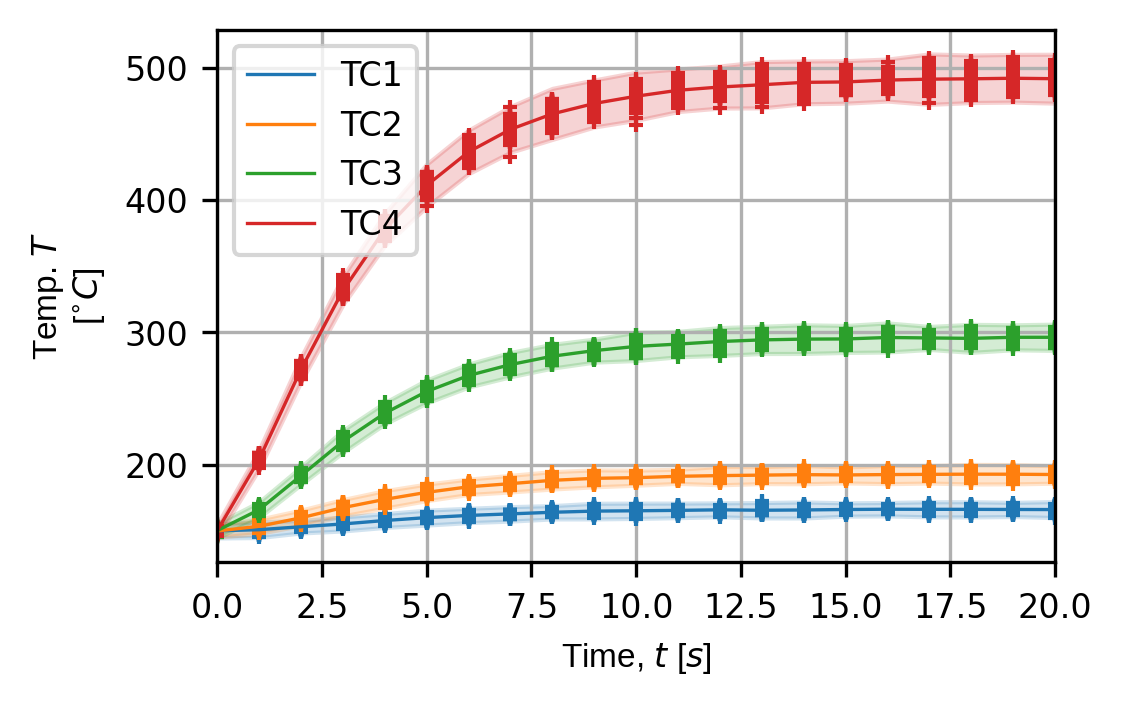
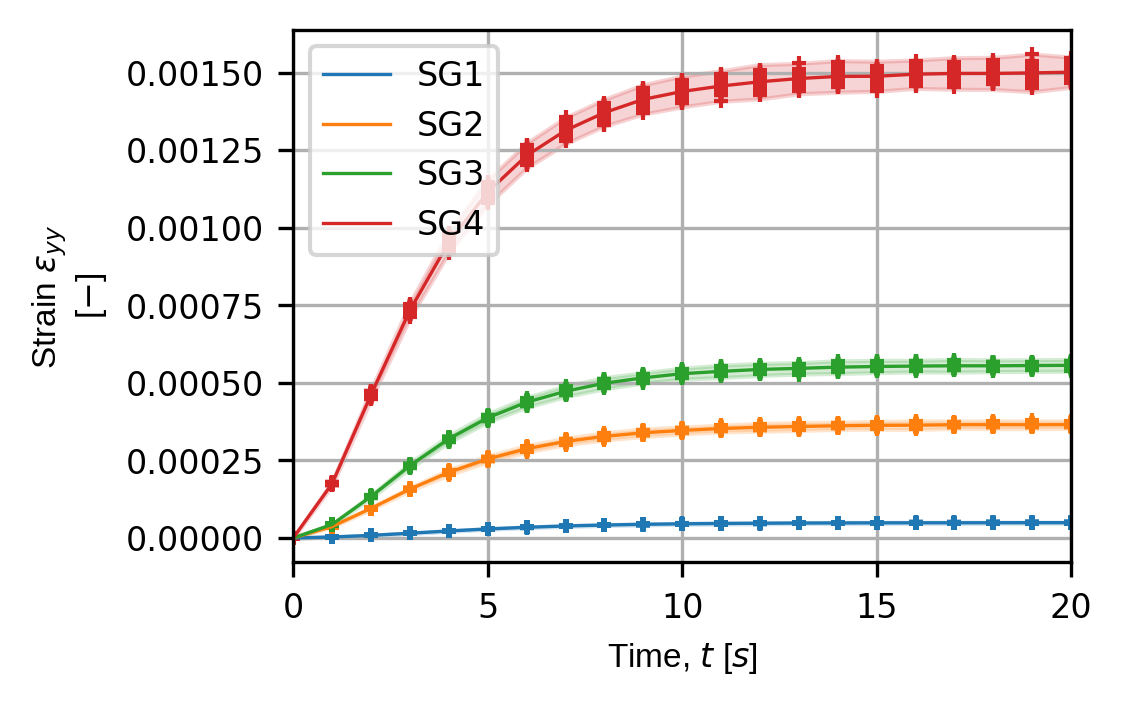
Here we demonstrate how `pyvale` can be used to simulate thermocouples and strain gauges applied to a [MOOSE](https://mooseframework.inl.gov/index.html) thermo-mechanical simulation of a fusion divertor armour heatsink. The figures below show visualisations of the virtual thermocouple and strain gauge locations on the simualtion mesh as well as time traces for each sensor over a series of simulated experiments. The code to run the simulated experiments and produce the output shown here comes from [this example](https://github.com/Computer-Aided-Validation-Laboratory/pyvale/blob/main/src/pyvale/examples/ex6_2_multiphysics3d_expsim.py).
|
|
54
|
+
|
|
55
|
+
|||
|
|
56
|
+
|--|--|
|
|
57
|
+
|*Visualisation of the thermcouple locations.*|*Visualisation of the strain gauge locations.*|
|
|
58
|
+
|
|
59
|
+
|||
|
|
60
|
+
|--|--|
|
|
61
|
+
|*Thermocouples time traces over a series of simulated experiments.*|*Strain gauge time traces over a series of simulated experiments.*|
|
|
62
|
+
|
|
63
|
+
|
|
64
|
+
## Quick Install
|
|
65
|
+
`pyvale` can be installed from pypi:
|
|
66
|
+
```shell
|
|
67
|
+
pip install pyvale
|
|
68
|
+
```
|
|
69
|
+
|
|
70
|
+
## Detailed Install: Ubuntu
|
|
71
|
+
### Managing Python Versions
|
|
72
|
+
To be compatible with `bpy` (the Blender python interface), `pyvale` uses python 3.11. To install python 3.11 without corrupting your operating systems python installation first add the deadsnakes repository to apt:
|
|
73
|
+
```shell
|
|
74
|
+
sudo add-apt-repository ppa:deadsnakes/ppa
|
|
75
|
+
sudo apt update && sudo apt upgrade -y
|
|
76
|
+
```
|
|
77
|
+
|
|
78
|
+
Install python 3.11:
|
|
79
|
+
```shell
|
|
80
|
+
sudo apt install python3.11
|
|
81
|
+
```
|
|
82
|
+
|
|
83
|
+
Add `venv` to your python 3.11 install:
|
|
84
|
+
```shell
|
|
85
|
+
sudo apt install python3.11-venv
|
|
86
|
+
```
|
|
87
|
+
|
|
88
|
+
Check your python 3.11 install is working using the following command which should open an interactive python interpreter:
|
|
89
|
+
```shell
|
|
90
|
+
python3.11
|
|
91
|
+
```
|
|
92
|
+
|
|
93
|
+
### Virtual Environment
|
|
94
|
+
|
|
95
|
+
We recommend installing `pyvale` in a virtual environment using `venv` or `pyvale` can be installed into an existing environment of your choice. To create a specific virtual environment for `pyvale` navigate to the directory you want to install the environment and use:
|
|
96
|
+
|
|
97
|
+
```shell
|
|
98
|
+
python3.11 -m venv .pyvale-env
|
|
99
|
+
source .pyvale-env/bin/activate
|
|
100
|
+
```
|
|
101
|
+
|
|
102
|
+
### Standard Installation
|
|
103
|
+
`pyvale` can be installed from pypi. Ensure you virtual environment is activated and run:
|
|
104
|
+
```shell
|
|
105
|
+
pip install pyvale
|
|
106
|
+
```
|
|
107
|
+
|
|
108
|
+
### Developer Installation
|
|
109
|
+
|
|
110
|
+
Clone `pyvale` to your local system along with submodules using
|
|
111
|
+
```shell
|
|
112
|
+
git clone --recurse-submodules git@github.com:Computer-Aided-Validation-Laboratory/pyvale.git
|
|
113
|
+
```
|
|
114
|
+
|
|
115
|
+
`cd` to the root directory of `pyvale`. Ensure you virtual environment is activated and run the following commmand from the `pyvale` directory:
|
|
116
|
+
```shell
|
|
117
|
+
pip install -e .
|
|
118
|
+
pip install -e ./dependencies/mooseherder
|
|
119
|
+
```
|
|
120
|
+
|
|
121
|
+
### MOOSE
|
|
122
|
+
`pyvale` come pre-packaged with example `moose` physics simulation outputs (as *.e exodus files) to demonstrate its functionality. If you need to run additional simulation cases we recommend `proteus` (https://github.com/aurora-multiphysics/proteus) which has build scripts for common linux distributions.
|
|
123
|
+
|
|
124
|
+
## Getting Started
|
|
125
|
+
The examples folder in "pyvale/examples" includes a sequence of examples of increasing complexity that demonstrate the functionality of `pyvale`.
|
|
126
|
+
|
|
127
|
+
## Contributors
|
|
128
|
+
The Computer Aided Validation Team at UKAEA:
|
|
129
|
+
- Lloyd Fletcher (ScepticalRabbit), UK Atomic Energy Authority
|
|
130
|
+
- John Charlton (coolmule0), UK Atomic Energy Authority
|
|
131
|
+
- Joel Hirst (JoelPhys), UK Atomic Energy Authority
|
|
132
|
+
- Lorna Sibson (lornasibson), UK Atomic Energy Authority
|
|
133
|
+
- Adel Tayeb (3adelTayeb), UK Atomic Energy Authority
|
|
134
|
+
- Alex Marsh (alexmarsh2), UK Atomic Energy Authority
|
|
135
|
+
- Rory Spencer (fusmatrs), UK Atomic Energy Authority
|
|
136
|
+
|
|
137
|
+
|
|
138
|
+
|
|
139
|
+
|
|
140
|
+
|
|
@@ -0,0 +1,92 @@
|
|
|
1
|
+
# pyvale
|
|
2
|
+
The python validation engine (`pyvale`): An all-in-one package for sensor simulation, sensor uncertainty quantification, sensor placement optimisation and simulation calibration/validation. Used to simulate experimental data from an input multi-physics simulation by explicitly modelling sensors with realistic uncertainties. Useful for experimental design, sensor placement optimisation, testing simulation validation metrics and virtually testing digital shadows/twins.
|
|
3
|
+
|
|
4
|
+
## Quick Demo: Simulating Point Sensors
|
|
5
|
+
Here we demonstrate how `pyvale` can be used to simulate thermocouples and strain gauges applied to a [MOOSE](https://mooseframework.inl.gov/index.html) thermo-mechanical simulation of a fusion divertor armour heatsink. The figures below show visualisations of the virtual thermocouple and strain gauge locations on the simualtion mesh as well as time traces for each sensor over a series of simulated experiments. The code to run the simulated experiments and produce the output shown here comes from [this example](https://github.com/Computer-Aided-Validation-Laboratory/pyvale/blob/main/src/pyvale/examples/ex6_2_multiphysics3d_expsim.py).
|
|
6
|
+
|
|
7
|
+
|||
|
|
8
|
+
|--|--|
|
|
9
|
+
|*Visualisation of the thermcouple locations.*|*Visualisation of the strain gauge locations.*|
|
|
10
|
+
|
|
11
|
+
|||
|
|
12
|
+
|--|--|
|
|
13
|
+
|*Thermocouples time traces over a series of simulated experiments.*|*Strain gauge time traces over a series of simulated experiments.*|
|
|
14
|
+
|
|
15
|
+
|
|
16
|
+
## Quick Install
|
|
17
|
+
`pyvale` can be installed from pypi:
|
|
18
|
+
```shell
|
|
19
|
+
pip install pyvale
|
|
20
|
+
```
|
|
21
|
+
|
|
22
|
+
## Detailed Install: Ubuntu
|
|
23
|
+
### Managing Python Versions
|
|
24
|
+
To be compatible with `bpy` (the Blender python interface), `pyvale` uses python 3.11. To install python 3.11 without corrupting your operating systems python installation first add the deadsnakes repository to apt:
|
|
25
|
+
```shell
|
|
26
|
+
sudo add-apt-repository ppa:deadsnakes/ppa
|
|
27
|
+
sudo apt update && sudo apt upgrade -y
|
|
28
|
+
```
|
|
29
|
+
|
|
30
|
+
Install python 3.11:
|
|
31
|
+
```shell
|
|
32
|
+
sudo apt install python3.11
|
|
33
|
+
```
|
|
34
|
+
|
|
35
|
+
Add `venv` to your python 3.11 install:
|
|
36
|
+
```shell
|
|
37
|
+
sudo apt install python3.11-venv
|
|
38
|
+
```
|
|
39
|
+
|
|
40
|
+
Check your python 3.11 install is working using the following command which should open an interactive python interpreter:
|
|
41
|
+
```shell
|
|
42
|
+
python3.11
|
|
43
|
+
```
|
|
44
|
+
|
|
45
|
+
### Virtual Environment
|
|
46
|
+
|
|
47
|
+
We recommend installing `pyvale` in a virtual environment using `venv` or `pyvale` can be installed into an existing environment of your choice. To create a specific virtual environment for `pyvale` navigate to the directory you want to install the environment and use:
|
|
48
|
+
|
|
49
|
+
```shell
|
|
50
|
+
python3.11 -m venv .pyvale-env
|
|
51
|
+
source .pyvale-env/bin/activate
|
|
52
|
+
```
|
|
53
|
+
|
|
54
|
+
### Standard Installation
|
|
55
|
+
`pyvale` can be installed from pypi. Ensure you virtual environment is activated and run:
|
|
56
|
+
```shell
|
|
57
|
+
pip install pyvale
|
|
58
|
+
```
|
|
59
|
+
|
|
60
|
+
### Developer Installation
|
|
61
|
+
|
|
62
|
+
Clone `pyvale` to your local system along with submodules using
|
|
63
|
+
```shell
|
|
64
|
+
git clone --recurse-submodules git@github.com:Computer-Aided-Validation-Laboratory/pyvale.git
|
|
65
|
+
```
|
|
66
|
+
|
|
67
|
+
`cd` to the root directory of `pyvale`. Ensure you virtual environment is activated and run the following commmand from the `pyvale` directory:
|
|
68
|
+
```shell
|
|
69
|
+
pip install -e .
|
|
70
|
+
pip install -e ./dependencies/mooseherder
|
|
71
|
+
```
|
|
72
|
+
|
|
73
|
+
### MOOSE
|
|
74
|
+
`pyvale` come pre-packaged with example `moose` physics simulation outputs (as *.e exodus files) to demonstrate its functionality. If you need to run additional simulation cases we recommend `proteus` (https://github.com/aurora-multiphysics/proteus) which has build scripts for common linux distributions.
|
|
75
|
+
|
|
76
|
+
## Getting Started
|
|
77
|
+
The examples folder in "pyvale/examples" includes a sequence of examples of increasing complexity that demonstrate the functionality of `pyvale`.
|
|
78
|
+
|
|
79
|
+
## Contributors
|
|
80
|
+
The Computer Aided Validation Team at UKAEA:
|
|
81
|
+
- Lloyd Fletcher (ScepticalRabbit), UK Atomic Energy Authority
|
|
82
|
+
- John Charlton (coolmule0), UK Atomic Energy Authority
|
|
83
|
+
- Joel Hirst (JoelPhys), UK Atomic Energy Authority
|
|
84
|
+
- Lorna Sibson (lornasibson), UK Atomic Energy Authority
|
|
85
|
+
- Adel Tayeb (3adelTayeb), UK Atomic Energy Authority
|
|
86
|
+
- Alex Marsh (alexmarsh2), UK Atomic Energy Authority
|
|
87
|
+
- Rory Spencer (fusmatrs), UK Atomic Energy Authority
|
|
88
|
+
|
|
89
|
+
|
|
90
|
+
|
|
91
|
+
|
|
92
|
+
|
|
@@ -0,0 +1,42 @@
|
|
|
1
|
+
[build-system]
|
|
2
|
+
requires = ["setuptools>=61.0", "wheel"]
|
|
3
|
+
build-backend = "setuptools.build_meta"
|
|
4
|
+
|
|
5
|
+
[project]
|
|
6
|
+
name = "pyvale"
|
|
7
|
+
version = "2025.4.0"
|
|
8
|
+
description = "An all-in-one package for sensor simulation, sensor uncertainty quantification, sensor placement optimisation and simulation calibration or validation."
|
|
9
|
+
authors = [
|
|
10
|
+
{ name = "scepticalrabbit et al.", email = "thescepticalrabbit@gmail.com" },
|
|
11
|
+
]
|
|
12
|
+
license = { file = "LICENSE" }
|
|
13
|
+
readme = "README.md"
|
|
14
|
+
requires-python = "==3.11.*"
|
|
15
|
+
dependencies = [
|
|
16
|
+
"mooseherder>=0.1.0",
|
|
17
|
+
"numpy<2.0.0",
|
|
18
|
+
"scipy>=1.14.0",
|
|
19
|
+
"netCDF4>=1.6.5",
|
|
20
|
+
"pyvista>=0.43.3",
|
|
21
|
+
"matplotlib>=3.8",
|
|
22
|
+
"shapely>=2.0.4",
|
|
23
|
+
"sympy>=1.13.0",
|
|
24
|
+
"PyQT6>=6.7.1",
|
|
25
|
+
"imageio>=2.36.1",
|
|
26
|
+
"imageio-ffmpeg>=0.5.1",
|
|
27
|
+
"numba>=0.59.1",
|
|
28
|
+
"pymoo>=0.6.1.3",
|
|
29
|
+
"Cython>=3.0.0",
|
|
30
|
+
"bpy>=4.2.0",
|
|
31
|
+
]
|
|
32
|
+
|
|
33
|
+
[project.urls]
|
|
34
|
+
"Repository" = "https://github.com/Digital-Validation-Laboratory/pyvale"
|
|
35
|
+
"Issue Tracker" = "https://github.com/Digital-Validation-Laboratory/pyvale/issues"
|
|
36
|
+
|
|
37
|
+
[tool.setuptools.package-data]
|
|
38
|
+
"pyvale.data" = ["*.e","*.tiff"]
|
|
39
|
+
"pyvale.simcases" = ["*.i","*.geo"]
|
|
40
|
+
|
|
41
|
+
[tool.setuptools.packages.find]
|
|
42
|
+
where = ["src"]
|
|
@@ -0,0 +1,75 @@
|
|
|
1
|
+
"""
|
|
2
|
+
`pyvale`: the python validation engine. Used to simulate experimental data from
|
|
3
|
+
an input multi-physics simulation by explicitly modelling sensors with realistic
|
|
4
|
+
uncertainties. Useful for experimental design, sensor placement optimisation,
|
|
5
|
+
testing simulation validation metrics and testing digital shadows/twins.
|
|
6
|
+
"""
|
|
7
|
+
|
|
8
|
+
"""
|
|
9
|
+
================================================================================
|
|
10
|
+
pyvale: the python validation engine
|
|
11
|
+
License: MIT
|
|
12
|
+
Copyright (C) 2025 The Computer Aided Validation Team
|
|
13
|
+
================================================================================
|
|
14
|
+
"""
|
|
15
|
+
# NOTE: this simplifies and decouples how the user calls pyvale from the
|
|
16
|
+
# underlying project structure: the user should be able to use 'pyvale.'
|
|
17
|
+
# and access everything in one layer without multiple import dots
|
|
18
|
+
|
|
19
|
+
from pyvale.core.dataset import *
|
|
20
|
+
|
|
21
|
+
from pyvale.core.field import *
|
|
22
|
+
from pyvale.core.fieldscalar import *
|
|
23
|
+
from pyvale.core.fieldvector import *
|
|
24
|
+
from pyvale.core.fieldtensor import *
|
|
25
|
+
from pyvale.core.fieldconverter import *
|
|
26
|
+
from pyvale.core.fieldtransform import *
|
|
27
|
+
|
|
28
|
+
from pyvale.core.integratorspatial import *
|
|
29
|
+
from pyvale.core.integratorquadrature import *
|
|
30
|
+
from pyvale.core.integratorrectangle import *
|
|
31
|
+
from pyvale.core.integratorfactory import *
|
|
32
|
+
|
|
33
|
+
from pyvale.core.sensordescriptor import *
|
|
34
|
+
from pyvale.core.sensortools import *
|
|
35
|
+
from pyvale.core.sensorarray import *
|
|
36
|
+
from pyvale.core.sensorarrayfactory import *
|
|
37
|
+
from pyvale.core.sensorarraypoint import *
|
|
38
|
+
from pyvale.core.sensordata import *
|
|
39
|
+
|
|
40
|
+
from pyvale.core.camera import *
|
|
41
|
+
from pyvale.core.cameradata import *
|
|
42
|
+
from pyvale.core.cameradata2d import *
|
|
43
|
+
from pyvale.core.cameratools import *
|
|
44
|
+
|
|
45
|
+
import pyvale.core.cython.rastercyth as rastercyth
|
|
46
|
+
from pyvale.core.rastercy import *
|
|
47
|
+
|
|
48
|
+
from pyvale.core.rendermesh import *
|
|
49
|
+
from pyvale.core.rasternp import *
|
|
50
|
+
|
|
51
|
+
from pyvale.core.imagedef2d import *
|
|
52
|
+
|
|
53
|
+
from pyvale.core.errorintegrator import *
|
|
54
|
+
from pyvale.core.errorrand import *
|
|
55
|
+
from pyvale.core.errorsysindep import *
|
|
56
|
+
from pyvale.core.errorsysdep import *
|
|
57
|
+
from pyvale.core.errorsysfield import *
|
|
58
|
+
from pyvale.core.errordriftcalc import *
|
|
59
|
+
|
|
60
|
+
from pyvale.core.generatorsrandom import *
|
|
61
|
+
|
|
62
|
+
from pyvale.core.visualopts import *
|
|
63
|
+
from pyvale.core.visualtools import *
|
|
64
|
+
from pyvale.core.visualsimplotter import *
|
|
65
|
+
from pyvale.core.visualsimanimator import *
|
|
66
|
+
from pyvale.core.visualexpplotter import *
|
|
67
|
+
from pyvale.core.visualtraceplotter import *
|
|
68
|
+
from pyvale.core.visualimages import *
|
|
69
|
+
from pyvale.core.visualimagedef import *
|
|
70
|
+
|
|
71
|
+
from pyvale.core.analyticmeshgen import *
|
|
72
|
+
from pyvale.core.analyticsimdatagenerator import *
|
|
73
|
+
from pyvale.core.analyticsimdatafactory import *
|
|
74
|
+
|
|
75
|
+
from pyvale.core.experimentsimulator import *
|
|
@@ -0,0 +1,7 @@
|
|
|
1
|
+
"""
|
|
2
|
+
================================================================================
|
|
3
|
+
pyvale: the python validation engine
|
|
4
|
+
License: MIT
|
|
5
|
+
Copyright (C) 2025 The Computer Aided Validation Team
|
|
6
|
+
================================================================================
|
|
7
|
+
"""
|
|
@@ -0,0 +1,59 @@
|
|
|
1
|
+
"""
|
|
2
|
+
================================================================================
|
|
3
|
+
pyvale: the python validation engine
|
|
4
|
+
License: MIT
|
|
5
|
+
Copyright (C) 2025 The Computer Aided Validation Team
|
|
6
|
+
================================================================================
|
|
7
|
+
"""
|
|
8
|
+
import numpy as np
|
|
9
|
+
|
|
10
|
+
# NOTE: This module is a feature under developement.
|
|
11
|
+
|
|
12
|
+
def rectangle_mesh_2d(leng_x: float,
|
|
13
|
+
leng_y: float,
|
|
14
|
+
n_elem_x: int,
|
|
15
|
+
n_elem_y: int) -> tuple[np.ndarray,np.ndarray]:
|
|
16
|
+
|
|
17
|
+
n_elems = n_elem_x*n_elem_y
|
|
18
|
+
n_node_x = n_elem_x+1
|
|
19
|
+
n_node_y = n_elem_y+1
|
|
20
|
+
nodes_per_elem = 4
|
|
21
|
+
|
|
22
|
+
coord_x = np.linspace(0,leng_x,n_node_x)
|
|
23
|
+
coord_y = np.linspace(0,leng_y,n_node_y)
|
|
24
|
+
(coord_grid_x,coord_grid_y) = np.meshgrid(coord_x,coord_y)
|
|
25
|
+
|
|
26
|
+
coord_x = np.atleast_2d(coord_grid_x.flatten()).T
|
|
27
|
+
coord_y = np.atleast_2d(coord_grid_y.flatten()).T
|
|
28
|
+
coord_z = np.zeros_like(coord_x)
|
|
29
|
+
coords = np.hstack((coord_x,coord_y,coord_z))
|
|
30
|
+
|
|
31
|
+
connect = np.zeros((n_elems,nodes_per_elem)).astype(np.int64)
|
|
32
|
+
row = 1
|
|
33
|
+
nn = 0
|
|
34
|
+
for ee in range(n_elems):
|
|
35
|
+
nn += 1
|
|
36
|
+
if nn >= row*n_node_x:
|
|
37
|
+
row += 1
|
|
38
|
+
nn += 1
|
|
39
|
+
|
|
40
|
+
connect[ee,:] = np.array([nn,nn+1,nn+n_node_x+1,nn+n_node_x])
|
|
41
|
+
connect = connect.T
|
|
42
|
+
|
|
43
|
+
return (coords,connect)
|
|
44
|
+
|
|
45
|
+
|
|
46
|
+
def fill_dims(coord_x: np.ndarray,
|
|
47
|
+
coord_y: np.ndarray,
|
|
48
|
+
time: np.ndarray) -> tuple[np.ndarray,np.ndarray,np.ndarray]:
|
|
49
|
+
|
|
50
|
+
full_x = np.repeat(np.atleast_2d(coord_x).T,
|
|
51
|
+
time.shape[0],
|
|
52
|
+
axis=1)
|
|
53
|
+
full_y = np.repeat(np.atleast_2d(coord_y).T,
|
|
54
|
+
time.shape[0],
|
|
55
|
+
axis=1)
|
|
56
|
+
full_time = np.repeat(np.atleast_2d(time),
|
|
57
|
+
coord_x.shape[0],
|
|
58
|
+
axis=0)
|
|
59
|
+
return (full_x,full_y,full_time)
|
|
@@ -0,0 +1,63 @@
|
|
|
1
|
+
"""
|
|
2
|
+
================================================================================
|
|
3
|
+
pyvale: the python validation engine
|
|
4
|
+
License: MIT
|
|
5
|
+
Copyright (C) 2025 The Computer Aided Validation Team
|
|
6
|
+
================================================================================
|
|
7
|
+
"""
|
|
8
|
+
import numpy as np
|
|
9
|
+
import sympy
|
|
10
|
+
import mooseherder as mh
|
|
11
|
+
from pyvale.core.analyticsimdatagenerator import (AnalyticCaseData2D,
|
|
12
|
+
AnalyticSimDataGenerator)
|
|
13
|
+
|
|
14
|
+
# NOTE: This module is a feature under developement.
|
|
15
|
+
|
|
16
|
+
def standard_case_2d() -> AnalyticCaseData2D:
|
|
17
|
+
case_data = AnalyticCaseData2D()
|
|
18
|
+
case_data.length_x = 10.0
|
|
19
|
+
case_data.length_y = 7.5
|
|
20
|
+
n_elem_mult = 10
|
|
21
|
+
case_data.num_elem_x = 4*n_elem_mult
|
|
22
|
+
case_data.num_elem_y = 3*n_elem_mult
|
|
23
|
+
case_data.time_steps = np.linspace(0.0,1.0,11)
|
|
24
|
+
return case_data
|
|
25
|
+
|
|
26
|
+
|
|
27
|
+
class AnalyticCaseFactory:
|
|
28
|
+
|
|
29
|
+
@staticmethod
|
|
30
|
+
def scalar_linear_2d() -> tuple[mh.SimData,AnalyticSimDataGenerator]:
|
|
31
|
+
|
|
32
|
+
case_data = standard_case_2d()
|
|
33
|
+
(sym_y,sym_x,sym_t) = sympy.symbols("y,x,t")
|
|
34
|
+
case_data.funcs_x = (20.0/case_data.length_x * sym_x,)
|
|
35
|
+
case_data.funcs_y = (10.0/case_data.length_y * sym_y,)
|
|
36
|
+
case_data.funcs_t = (sym_t,)
|
|
37
|
+
case_data.offsets_space = (20.0,)
|
|
38
|
+
case_data.offsets_time = (0.0,)
|
|
39
|
+
|
|
40
|
+
data_gen = AnalyticSimDataGenerator(case_data)
|
|
41
|
+
|
|
42
|
+
sim_data = data_gen.generate_sim_data()
|
|
43
|
+
|
|
44
|
+
return (sim_data,data_gen)
|
|
45
|
+
|
|
46
|
+
@staticmethod
|
|
47
|
+
def scalar_quadratic_2d() -> tuple[mh.SimData,AnalyticSimDataGenerator]:
|
|
48
|
+
|
|
49
|
+
case_data = standard_case_2d()
|
|
50
|
+
(sym_y,sym_x,sym_t) = sympy.symbols("y,x,t")
|
|
51
|
+
case_data.funcs_x = (sym_x*(sym_x - case_data.length_x),)
|
|
52
|
+
case_data.funcs_y = (sym_y*(sym_y - case_data.length_y),)
|
|
53
|
+
case_data.funcs_t = (sym_t,)
|
|
54
|
+
|
|
55
|
+
data_gen = AnalyticSimDataGenerator(case_data)
|
|
56
|
+
|
|
57
|
+
sim_data = data_gen.generate_sim_data()
|
|
58
|
+
|
|
59
|
+
return (sim_data,data_gen)
|
|
60
|
+
|
|
61
|
+
|
|
62
|
+
|
|
63
|
+
|
|
@@ -0,0 +1,160 @@
|
|
|
1
|
+
"""
|
|
2
|
+
================================================================================
|
|
3
|
+
pyvale: the python validation engine
|
|
4
|
+
License: MIT
|
|
5
|
+
Copyright (C) 2025 The Computer Aided Validation Team
|
|
6
|
+
================================================================================
|
|
7
|
+
"""
|
|
8
|
+
from dataclasses import dataclass
|
|
9
|
+
import numpy as np
|
|
10
|
+
import sympy
|
|
11
|
+
import mooseherder as mh
|
|
12
|
+
from pyvale.core.analyticmeshgen import rectangle_mesh_2d, fill_dims
|
|
13
|
+
|
|
14
|
+
# NOTE: This module is a feature under developement.
|
|
15
|
+
|
|
16
|
+
@dataclass
|
|
17
|
+
class AnalyticCaseData2D:
|
|
18
|
+
length_x: float = 10.0
|
|
19
|
+
length_y: float = 7.5
|
|
20
|
+
num_elem_x: int = 4
|
|
21
|
+
num_elem_y: int = 3
|
|
22
|
+
time_steps: np.ndarray | None = None
|
|
23
|
+
field_keys: tuple[str,...] = ('scalar',)
|
|
24
|
+
funcs_x: tuple[sympy.Expr,...] | None = None
|
|
25
|
+
funcs_y: tuple[sympy.Expr,...] | None = None
|
|
26
|
+
funcs_t: tuple[sympy.Expr,...] | None = None
|
|
27
|
+
symbols: tuple[sympy.Symbol,...] = (sympy.Symbol("y"),
|
|
28
|
+
sympy.Symbol("x"),
|
|
29
|
+
sympy.Symbol("t"))
|
|
30
|
+
offsets_space: tuple[float,...] = (0.0,)
|
|
31
|
+
offsets_time: tuple[float,...] = (0.0,)
|
|
32
|
+
nodes_per_elem: int = 4
|
|
33
|
+
|
|
34
|
+
|
|
35
|
+
class AnalyticSimDataGenerator:
|
|
36
|
+
def __init__(self, case_data: AnalyticCaseData2D
|
|
37
|
+
) -> None:
|
|
38
|
+
|
|
39
|
+
self._case_data = case_data
|
|
40
|
+
(self._coords,self._connect) = rectangle_mesh_2d(case_data.length_x,
|
|
41
|
+
case_data.length_y,
|
|
42
|
+
case_data.num_elem_x,
|
|
43
|
+
case_data.num_elem_y)
|
|
44
|
+
|
|
45
|
+
self._field_sym_funcs = dict()
|
|
46
|
+
self._field_lam_funcs = dict()
|
|
47
|
+
for ii,kk in enumerate(case_data.field_keys):
|
|
48
|
+
self._field_sym_funcs[kk] = ((case_data.funcs_x[ii] *
|
|
49
|
+
case_data.funcs_y[ii] +
|
|
50
|
+
case_data.offsets_space[ii]) *
|
|
51
|
+
(case_data.funcs_t[ii] +
|
|
52
|
+
case_data.offsets_time[ii]))
|
|
53
|
+
|
|
54
|
+
self._field_lam_funcs[kk] = sympy.lambdify(case_data.symbols,
|
|
55
|
+
self._field_sym_funcs[kk],
|
|
56
|
+
'numpy')
|
|
57
|
+
self._field_eval = dict()
|
|
58
|
+
|
|
59
|
+
|
|
60
|
+
def evaluate_field_truth(self,
|
|
61
|
+
field_key: str,
|
|
62
|
+
coords: np.ndarray,
|
|
63
|
+
time_steps: np.ndarray | None = None) -> np.ndarray:
|
|
64
|
+
|
|
65
|
+
if time_steps is None:
|
|
66
|
+
time_steps = self._case_data.time_steps
|
|
67
|
+
|
|
68
|
+
(x_eval,y_eval,t_eval) = fill_dims(coords[:,0],
|
|
69
|
+
coords[:,1],
|
|
70
|
+
time_steps)
|
|
71
|
+
|
|
72
|
+
field_vals = self._field_lam_funcs[field_key](y_eval,
|
|
73
|
+
x_eval,
|
|
74
|
+
t_eval)
|
|
75
|
+
return field_vals
|
|
76
|
+
|
|
77
|
+
|
|
78
|
+
def evaluate_all_fields_truth(self,
|
|
79
|
+
coords: np.ndarray,
|
|
80
|
+
time_steps: np.ndarray | None = None) -> np.ndarray:
|
|
81
|
+
|
|
82
|
+
if time_steps is None:
|
|
83
|
+
time_steps = self._case_data.time_steps
|
|
84
|
+
|
|
85
|
+
(x_eval,y_eval,t_eval) = fill_dims(coords[:,0],
|
|
86
|
+
coords[:,1],
|
|
87
|
+
time_steps)
|
|
88
|
+
|
|
89
|
+
eval_comps = dict()
|
|
90
|
+
for kk in self._case_data.field_keys:
|
|
91
|
+
eval_comps[kk] = self._field_lam_funcs[kk](y_eval,
|
|
92
|
+
x_eval,
|
|
93
|
+
t_eval)
|
|
94
|
+
return eval_comps
|
|
95
|
+
|
|
96
|
+
|
|
97
|
+
def evaluate_field_at_nodes(self, field_key: str) -> np.ndarray:
|
|
98
|
+
(x_eval,y_eval,t_eval) = fill_dims(self._coords[:,0],
|
|
99
|
+
self._coords[:,1],
|
|
100
|
+
self._case_data.time_steps)
|
|
101
|
+
|
|
102
|
+
self._field_eval[field_key] = self._field_lam_funcs[field_key](y_eval,
|
|
103
|
+
x_eval,
|
|
104
|
+
t_eval)
|
|
105
|
+
return self._field_eval[field_key]
|
|
106
|
+
|
|
107
|
+
def evaluate_all_fields_at_nodes(self) -> dict[str,np.ndarray]:
|
|
108
|
+
(x_eval,y_eval,t_eval) = fill_dims(self._coords[:,0],
|
|
109
|
+
self._coords[:,1],
|
|
110
|
+
self._case_data.time_steps)
|
|
111
|
+
eval_comps = dict()
|
|
112
|
+
for kk in self._case_data.field_keys:
|
|
113
|
+
eval_comps[kk] = self._field_lam_funcs[kk](y_eval,
|
|
114
|
+
x_eval,
|
|
115
|
+
t_eval)
|
|
116
|
+
self._field_eval = eval_comps
|
|
117
|
+
return self._field_eval
|
|
118
|
+
|
|
119
|
+
|
|
120
|
+
def generate_sim_data(self) -> mh.SimData:
|
|
121
|
+
|
|
122
|
+
sim_data = mh.SimData()
|
|
123
|
+
sim_data.num_spat_dims = 2
|
|
124
|
+
sim_data.time = self._case_data.time_steps
|
|
125
|
+
sim_data.coords = self._coords
|
|
126
|
+
sim_data.connect = {'connect1': self._connect}
|
|
127
|
+
|
|
128
|
+
if not self._field_eval:
|
|
129
|
+
self.evaluate_all_fields_at_nodes()
|
|
130
|
+
sim_data.node_vars = self._field_eval
|
|
131
|
+
|
|
132
|
+
return sim_data
|
|
133
|
+
|
|
134
|
+
|
|
135
|
+
def get_visualisation_grid(self,
|
|
136
|
+
field_key: str | None = None,
|
|
137
|
+
time_step: int = -1
|
|
138
|
+
) -> tuple[np.ndarray,np.ndarray,np.ndarray]:
|
|
139
|
+
|
|
140
|
+
if field_key is None:
|
|
141
|
+
field_key = self._case_data.field_keys[0]
|
|
142
|
+
|
|
143
|
+
grid_shape = (self._case_data.num_elem_y+1,
|
|
144
|
+
self._case_data.num_elem_x+1)
|
|
145
|
+
|
|
146
|
+
grid_x = np.atleast_2d(self._coords[:,0]).T.reshape(grid_shape)
|
|
147
|
+
grid_y = np.atleast_2d(self._coords[:,1]).T.reshape(grid_shape)
|
|
148
|
+
|
|
149
|
+
if not self._field_eval:
|
|
150
|
+
self.evaluate_all_fields_at_nodes()
|
|
151
|
+
|
|
152
|
+
scalar_grid = np.reshape(self._field_eval[field_key][:,time_step],grid_shape)
|
|
153
|
+
|
|
154
|
+
return (grid_x,grid_y,scalar_grid)
|
|
155
|
+
|
|
156
|
+
|
|
157
|
+
|
|
158
|
+
|
|
159
|
+
|
|
160
|
+
|