pytrendy 1.2.0.dev4__tar.gz → 1.2.0.dev5__tar.gz
This diff represents the content of publicly available package versions that have been released to one of the supported registries. The information contained in this diff is provided for informational purposes only and reflects changes between package versions as they appear in their respective public registries.
- {pytrendy-1.2.0.dev4 → pytrendy-1.2.0.dev5}/PKG-INFO +39 -8
- {pytrendy-1.2.0.dev4 → pytrendy-1.2.0.dev5}/README.md +27 -2
- {pytrendy-1.2.0.dev4 → pytrendy-1.2.0.dev5}/pyproject.toml +30 -3
- {pytrendy-1.2.0.dev4 → pytrendy-1.2.0.dev5}/pytrendy/__init__.py +4 -4
- {pytrendy-1.2.0.dev4 → pytrendy-1.2.0.dev5}/pytrendy/detect_trends.py +1 -1
- {pytrendy-1.2.0.dev4 → pytrendy-1.2.0.dev5}/pytrendy/io/plot_pytrendy.py +1 -1
- {pytrendy-1.2.0.dev4 → pytrendy-1.2.0.dev5}/pytrendy/io/results_pytrendy.py +1 -1
- {pytrendy-1.2.0.dev4 → pytrendy-1.2.0.dev5}/pytrendy/post_processing/__init__.py +3 -3
- {pytrendy-1.2.0.dev4 → pytrendy-1.2.0.dev5}/pytrendy/post_processing/segments_analyse.py +2 -2
- {pytrendy-1.2.0.dev4 → pytrendy-1.2.0.dev5}/pytrendy/post_processing/segments_refine/artifact_cleanup.py +1 -1
- {pytrendy-1.2.0.dev4 → pytrendy-1.2.0.dev5}/pytrendy/post_processing/segments_refine/update_neighbours.py +1 -1
- {pytrendy-1.2.0.dev4 → pytrendy-1.2.0.dev5}/pytrendy/process_signals.py +22 -13
- {pytrendy-1.2.0.dev4 → pytrendy-1.2.0.dev5}/LICENSE +0 -0
- {pytrendy-1.2.0.dev4 → pytrendy-1.2.0.dev5}/pytrendy/io/__init__.py +0 -0
- {pytrendy-1.2.0.dev4 → pytrendy-1.2.0.dev5}/pytrendy/io/data/classes_signals.csv +0 -0
- {pytrendy-1.2.0.dev4 → pytrendy-1.2.0.dev5}/pytrendy/io/data/series_synthetic.csv +0 -0
- {pytrendy-1.2.0.dev4 → pytrendy-1.2.0.dev5}/pytrendy/io/data_loader.py +0 -0
- {pytrendy-1.2.0.dev4 → pytrendy-1.2.0.dev5}/pytrendy/post_processing/segments_get.py +0 -0
- {pytrendy-1.2.0.dev4 → pytrendy-1.2.0.dev5}/pytrendy/post_processing/segments_refine/__init__.py +0 -0
- {pytrendy-1.2.0.dev4 → pytrendy-1.2.0.dev5}/pytrendy/post_processing/segments_refine/abrupt_shaving.py +0 -0
- {pytrendy-1.2.0.dev4 → pytrendy-1.2.0.dev5}/pytrendy/post_processing/segments_refine/gradual_expand_contract.py +0 -0
- {pytrendy-1.2.0.dev4 → pytrendy-1.2.0.dev5}/pytrendy/post_processing/segments_refine/segment_grouping.py +0 -0
- {pytrendy-1.2.0.dev4 → pytrendy-1.2.0.dev5}/pytrendy/post_processing/segments_refine/trend_classify.py +0 -0
- {pytrendy-1.2.0.dev4 → pytrendy-1.2.0.dev5}/pytrendy/simpledtw.py +0 -0
|
@@ -1,6 +1,6 @@
|
|
|
1
1
|
Metadata-Version: 2.4
|
|
2
2
|
Name: pytrendy
|
|
3
|
-
Version: 1.2.0.
|
|
3
|
+
Version: 1.2.0.dev5
|
|
4
4
|
Summary: Trend Detection in Python. Applicable for real-world industry use cases in time series.
|
|
5
5
|
License: MIT License
|
|
6
6
|
|
|
@@ -24,21 +24,25 @@ License: MIT License
|
|
|
24
24
|
OUT OF OR IN CONNECTION WITH THE SOFTWARE OR THE USE OR OTHER DEALINGS IN THE
|
|
25
25
|
SOFTWARE.
|
|
26
26
|
License-File: LICENSE
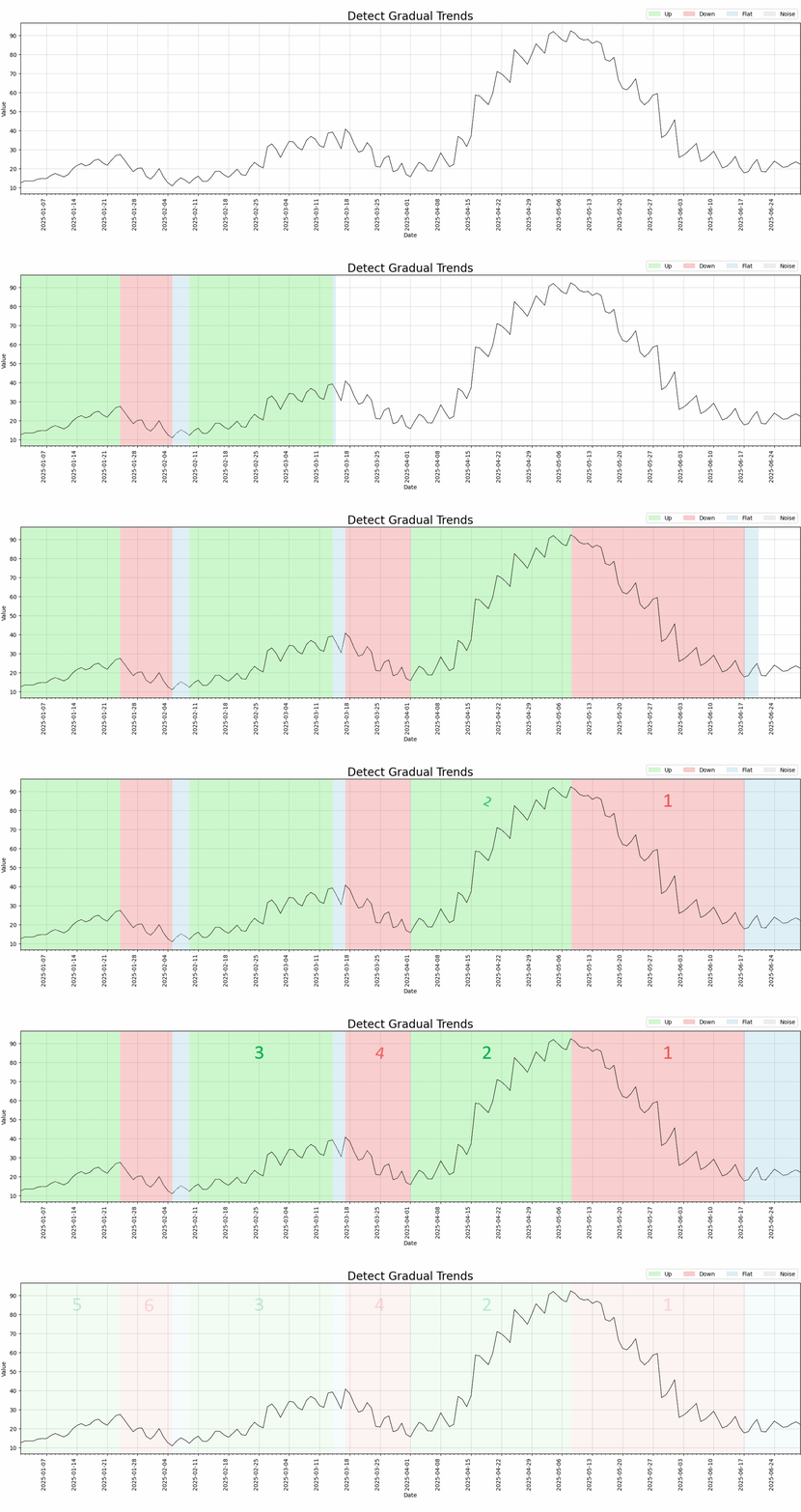
|
|
27
|
+
Keywords: trend detection,time series,time series analysis,signal processing,uptrend,downtrend,changepoint detection,trend classification,stock analysis,marketing analytics,causal inference
|
|
27
28
|
Author: Russell Sammut Bonnici
|
|
28
29
|
Author-email: r.sammutbonnici@gmail.com
|
|
29
30
|
Maintainer: Russell Sammut Bonnici
|
|
30
31
|
Maintainer-email: r.sammutbonnici@gmail.com
|
|
31
32
|
Requires-Python: >=3.10
|
|
32
|
-
Classifier:
|
|
33
|
-
Classifier:
|
|
33
|
+
Classifier: Development Status :: 4 - Beta
|
|
34
|
+
Classifier: License :: OSI Approved :: MIT License
|
|
34
35
|
Classifier: Programming Language :: Python :: 3.10
|
|
35
36
|
Classifier: Programming Language :: Python :: 3.11
|
|
36
37
|
Classifier: Programming Language :: Python :: 3.12
|
|
37
|
-
Classifier:
|
|
38
|
-
Classifier:
|
|
38
|
+
Classifier: Topic :: Scientific/Engineering :: Information Analysis
|
|
39
|
+
Classifier: Topic :: Office/Business :: Financial
|
|
40
|
+
Classifier: Intended Audience :: Science/Research
|
|
41
|
+
Classifier: Intended Audience :: Developers
|
|
42
|
+
Classifier: Operating System :: OS Independent
|
|
39
43
|
Provides-Extra: dev
|
|
40
44
|
Provides-Extra: docs
|
|
41
|
-
Requires-Dist: matplotlib
|
|
45
|
+
Requires-Dist: matplotlib (==3.10.8)
|
|
42
46
|
Requires-Dist: mkdocs (>=1.6,<2) ; extra == "docs"
|
|
43
47
|
Requires-Dist: mkdocs-api-autonav (==0.4.0) ; extra == "docs"
|
|
44
48
|
Requires-Dist: mkdocs-jupyterlite (==0.4.1) ; extra == "docs"
|
|
@@ -52,6 +56,8 @@ Requires-Dist: pytest-cov ; extra == "dev"
|
|
|
52
56
|
Requires-Dist: pytest-mpl ; extra == "dev"
|
|
53
57
|
Requires-Dist: pytest-timeout ; extra == "dev"
|
|
54
58
|
Requires-Dist: scipy
|
|
59
|
+
Project-URL: Documentation, https://russellsb.github.io/pytrendy/main/
|
|
60
|
+
Project-URL: Homepage, https://russellsb.github.io/pytrendy/main/
|
|
55
61
|
Project-URL: Repository, https://github.com/RussellSB/pytrendy
|
|
56
62
|
Description-Content-Type: text/markdown
|
|
57
63
|
|
|
@@ -71,10 +77,18 @@ Description-Content-Type: text/markdown
|
|
|
71
77
|
[](https://pepy.tech/project/pytrendy)
|
|
72
78
|
</div>
|
|
73
79
|
|
|
74
|
-
PyTrendy is a robust solution for identifying and
|
|
80
|
+
PyTrendy is a robust solution for identifying and analysing trends in time series. Unlike other trend detection packages, it is robust to noisy and flat segments, and handles gradual and abrupt trend cases with high precision. It aims to be the best package for trend detection in Python.
|
|
75
81
|
|
|
76
82
|
**Read more in the documentation:** [russellsb.github.io/pytrendy/main](https://russellsb.github.io/pytrendy/main/)
|
|
77
83
|
|
|
84
|
+
## Why PyTrendy?
|
|
85
|
+
|
|
86
|
+
Most time series tools give you either a "trend component" (via decomposition) or "changepoints" (the moments of shift). PyTrendy is built for **labelled segment analysis**, answering *what trends existed, how strong were they, and when did they start and end?*
|
|
87
|
+
|
|
88
|
+
- **Beyond step changes** - `ruptures` is the gold standard for abrupt shifts, but it doesn't handle gradual slope changes (digital marketing, stocks, energy). PyTrendy detects both in a single run.
|
|
89
|
+
- **The flat/noise problem** - closest peers (`pytrendseries`, `trendet`, `tstrends`) over-fit trends on flat or noisy periods. PyTrendy's signal-processing and post-processing logic ensures trends are only detected when they are precise and valid.
|
|
90
|
+
- **Strategic value** - where dozens of time series interact, knowing how they align or confound at specific times is invaluable for experiment design.
|
|
91
|
+
|
|
78
92
|
## Features
|
|
79
93
|
|
|
80
94
|
|
|
@@ -118,8 +132,25 @@ time_index
|
|
|
118
132
|
6 Down 2025-03-18 2025-04-01 14 -22.721861 4 gradual
|
|
119
133
|
7 Up 2025-04-02 2025-05-08 36 72.611833 2 gradual
|
|
120
134
|
8 Down 2025-05-09 2025-06-17 39 -73.253968 1 gradual
|
|
121
|
-
9 Flat 2025-06-18 2025-06-30 12 3.910534 8
|
|
135
|
+
9 Flat 2025-06-18 2025-06-30 12 3.910534 8 NaN
|
|
122
136
|
-------------------------------------------------------------------------------
|
|
123
137
|
```
|
|
124
138
|
|
|
139
|
+
Explore the strongest uptrends:
|
|
140
|
+
```py
|
|
141
|
+
results.filter_segments(direction='Up', sort_by='change_rank')[:3]
|
|
142
|
+
```
|
|
143
|
+
|
|
144
|
+
| time_index | direction | start | end | trend_class | change | pct_change | days | total_change | SNR | change_rank |
|
|
145
|
+
|---|---|---|---|---|---|---|---|---|---|---|
|
|
146
|
+
| 7 | Up | 2025-04-02 | 2025-05-08 | gradual | 72.61 | 367.50% | 36 | 72.61 | 21.70 | 2 |
|
|
147
|
+
| 4 | Up | 2025-02-10 | 2025-03-14 | gradual | 24.63 | 169.22% | 32 | 24.63 | 18.87 | 3 |
|
|
148
|
+
| 1 | Up | 2025-01-02 | 2025-01-24 | gradual | 14.01 | 104.41% | 22 | 14.01 | 22.21 | 5 |
|
|
149
|
+
|
|
150
|
+
`filter_segments` ranks segments by magnitude (`change_rank`). See the [API reference](https://russellsb.github.io/pytrendy/main/reference/pytrendy/io/results_pytrendy/#pytrendy.io.results_pytrendy.PyTrendyResults.filter_segments) for all filter and sort options.
|
|
151
|
+
|
|
152
|
+
For the full per-segment metrics table, use `results.df`.
|
|
153
|
+
|
|
154
|
+
For more examples on interpreting the results, see [Gradual trend fundamentals](https://russellsb.github.io/pytrendy/main/examples/fundamentals/gradual/).
|
|
155
|
+
|
|
125
156
|
|
|
@@ -14,10 +14,18 @@
|
|
|
14
14
|
[](https://pepy.tech/project/pytrendy)
|
|
15
15
|
</div>
|
|
16
16
|
|
|
17
|
-
PyTrendy is a robust solution for identifying and
|
|
17
|
+
PyTrendy is a robust solution for identifying and analysing trends in time series. Unlike other trend detection packages, it is robust to noisy and flat segments, and handles gradual and abrupt trend cases with high precision. It aims to be the best package for trend detection in Python.
|
|
18
18
|
|
|
19
19
|
**Read more in the documentation:** [russellsb.github.io/pytrendy/main](https://russellsb.github.io/pytrendy/main/)
|
|
20
20
|
|
|
21
|
+
## Why PyTrendy?
|
|
22
|
+
|
|
23
|
+
Most time series tools give you either a "trend component" (via decomposition) or "changepoints" (the moments of shift). PyTrendy is built for **labelled segment analysis**, answering *what trends existed, how strong were they, and when did they start and end?*
|
|
24
|
+
|
|
25
|
+
- **Beyond step changes** - `ruptures` is the gold standard for abrupt shifts, but it doesn't handle gradual slope changes (digital marketing, stocks, energy). PyTrendy detects both in a single run.
|
|
26
|
+
- **The flat/noise problem** - closest peers (`pytrendseries`, `trendet`, `tstrends`) over-fit trends on flat or noisy periods. PyTrendy's signal-processing and post-processing logic ensures trends are only detected when they are precise and valid.
|
|
27
|
+
- **Strategic value** - where dozens of time series interact, knowing how they align or confound at specific times is invaluable for experiment design.
|
|
28
|
+
|
|
21
29
|
## Features
|
|
22
30
|
|
|
23
31
|

|
|
@@ -61,7 +69,24 @@ time_index
|
|
|
61
69
|
6 Down 2025-03-18 2025-04-01 14 -22.721861 4 gradual
|
|
62
70
|
7 Up 2025-04-02 2025-05-08 36 72.611833 2 gradual
|
|
63
71
|
8 Down 2025-05-09 2025-06-17 39 -73.253968 1 gradual
|
|
64
|
-
9 Flat 2025-06-18 2025-06-30 12 3.910534 8
|
|
72
|
+
9 Flat 2025-06-18 2025-06-30 12 3.910534 8 NaN
|
|
65
73
|
-------------------------------------------------------------------------------
|
|
66
74
|
```
|
|
67
75
|
|
|
76
|
+
Explore the strongest uptrends:
|
|
77
|
+
```py
|
|
78
|
+
results.filter_segments(direction='Up', sort_by='change_rank')[:3]
|
|
79
|
+
```
|
|
80
|
+
|
|
81
|
+
| time_index | direction | start | end | trend_class | change | pct_change | days | total_change | SNR | change_rank |
|
|
82
|
+
|---|---|---|---|---|---|---|---|---|---|---|
|
|
83
|
+
| 7 | Up | 2025-04-02 | 2025-05-08 | gradual | 72.61 | 367.50% | 36 | 72.61 | 21.70 | 2 |
|
|
84
|
+
| 4 | Up | 2025-02-10 | 2025-03-14 | gradual | 24.63 | 169.22% | 32 | 24.63 | 18.87 | 3 |
|
|
85
|
+
| 1 | Up | 2025-01-02 | 2025-01-24 | gradual | 14.01 | 104.41% | 22 | 14.01 | 22.21 | 5 |
|
|
86
|
+
|
|
87
|
+
`filter_segments` ranks segments by magnitude (`change_rank`). See the [API reference](https://russellsb.github.io/pytrendy/main/reference/pytrendy/io/results_pytrendy/#pytrendy.io.results_pytrendy.PyTrendyResults.filter_segments) for all filter and sort options.
|
|
88
|
+
|
|
89
|
+
For the full per-segment metrics table, use `results.df`.
|
|
90
|
+
|
|
91
|
+
For more examples on interpreting the results, see [Gradual trend fundamentals](https://russellsb.github.io/pytrendy/main/examples/fundamentals/gradual/).
|
|
92
|
+
|
|
@@ -1,6 +1,6 @@
|
|
|
1
1
|
[project]
|
|
2
2
|
name = "pytrendy"
|
|
3
|
-
version = "1.2.0.
|
|
3
|
+
version = "1.2.0.dev5"
|
|
4
4
|
description = "Trend Detection in Python. Applicable for real-world industry use cases in time series."
|
|
5
5
|
authors = [
|
|
6
6
|
{ name = "Russell Sammut Bonnici", email = "r.sammutbonnici@gmail.com" },
|
|
@@ -17,7 +17,32 @@ dependencies = [
|
|
|
17
17
|
"numpy",
|
|
18
18
|
"pandas",
|
|
19
19
|
"scipy",
|
|
20
|
-
"matplotlib"
|
|
20
|
+
"matplotlib==3.10.8"
|
|
21
|
+
]
|
|
22
|
+
keywords = [
|
|
23
|
+
"trend detection",
|
|
24
|
+
"time series",
|
|
25
|
+
"time series analysis",
|
|
26
|
+
"signal processing",
|
|
27
|
+
"uptrend",
|
|
28
|
+
"downtrend",
|
|
29
|
+
"changepoint detection",
|
|
30
|
+
"trend classification",
|
|
31
|
+
"stock analysis",
|
|
32
|
+
"marketing analytics",
|
|
33
|
+
"causal inference"
|
|
34
|
+
]
|
|
35
|
+
classifiers = [
|
|
36
|
+
"Development Status :: 4 - Beta",
|
|
37
|
+
"License :: OSI Approved :: MIT License",
|
|
38
|
+
"Programming Language :: Python :: 3.10",
|
|
39
|
+
"Programming Language :: Python :: 3.11",
|
|
40
|
+
"Programming Language :: Python :: 3.12",
|
|
41
|
+
"Topic :: Scientific/Engineering :: Information Analysis",
|
|
42
|
+
"Topic :: Office/Business :: Financial",
|
|
43
|
+
"Intended Audience :: Science/Research",
|
|
44
|
+
"Intended Audience :: Developers",
|
|
45
|
+
"Operating System :: OS Independent"
|
|
21
46
|
]
|
|
22
47
|
|
|
23
48
|
[project.optional-dependencies]
|
|
@@ -37,7 +62,9 @@ docs = [
|
|
|
37
62
|
]
|
|
38
63
|
|
|
39
64
|
[project.urls]
|
|
40
|
-
|
|
65
|
+
Homepage = "https://russellsb.github.io/pytrendy/main/"
|
|
66
|
+
Documentation = "https://russellsb.github.io/pytrendy/main/"
|
|
67
|
+
Repository = "https://github.com/RussellSB/pytrendy"
|
|
41
68
|
|
|
42
69
|
[tool.setuptools.packages.find]
|
|
43
70
|
where = ["."]
|
|
@@ -8,7 +8,7 @@ apply classification heuristics, and access structured results for downstream an
|
|
|
8
8
|
|
|
9
9
|
---
|
|
10
10
|
|
|
11
|
-
This package is
|
|
11
|
+
This package is organised into the following modules:
|
|
12
12
|
|
|
13
13
|
# 1. [detect_trends](detect_trends)
|
|
14
14
|
|
|
@@ -50,8 +50,8 @@ Designed for both exploratory workflows and programmatic integration, this modul
|
|
|
50
50
|
|
|
51
51
|
# 3. [post_processing](post_processing)
|
|
52
52
|
|
|
53
|
-
The `post_processing` module provides utilities for refining, classifying, and
|
|
54
|
-
It transforms raw detections into interpretable, ranked structures by adjusting boundaries,
|
|
53
|
+
The `post_processing` module provides utilities for refining, classifying, and analysing trend segments.
|
|
54
|
+
It transforms raw detections into interpretable, ranked structures by adjusting boundaries, labelling temporal behaviour, and computing signal metrics.
|
|
55
55
|
This module ensures that the output is analytically robust and ready for downstream use.
|
|
56
56
|
|
|
57
57
|
## 3.1 [segments_get](post_processing/segments_get)
|
|
@@ -72,7 +72,7 @@ This module ensures that the output is analytically robust and ready for downstr
|
|
|
72
72
|
|
|
73
73
|
## 3.3 [segments_analyse](post_processing/segments_analyse)
|
|
74
74
|
|
|
75
|
-
- Computes metrics for each segment, comparing pretreatment vs post-treatment
|
|
75
|
+
- Computes metrics for each segment, comparing pretreatment vs post-treatment behaviour.
|
|
76
76
|
- Includes absolute and percent change, duration, and cumulative movement.
|
|
77
77
|
- Calculates signal-to-noise ratio (SNR) and assigns a change rank.
|
|
78
78
|
- Enables filtering and prioritization of significant trends.
|
|
@@ -33,7 +33,7 @@ def detect_trends(df: pd.DataFrame, date_col: str, value_col: str, plot=True, me
|
|
|
33
33
|
date_col (str):
|
|
34
34
|
Name of the column representing timestamps. This column is converted to datetime and set as the index.
|
|
35
35
|
value_col (str):
|
|
36
|
-
Name of the column containing the primary signal to
|
|
36
|
+
Name of the column containing the primary signal to analyse for trend detection.
|
|
37
37
|
plot (bool, optional):
|
|
38
38
|
If `True`, generates a matplotlib plot showing the detected trend segments over the original signal.
|
|
39
39
|
Defaults to `True`.
|
|
@@ -27,7 +27,7 @@ def plot_pytrendy(df: pd.DataFrame, value_col: str, segments_enhanced: list[dict
|
|
|
27
27
|
The figure object containing the plot. Can be displayed with `plt.show()` or saved.
|
|
28
28
|
"""
|
|
29
29
|
|
|
30
|
-
# Define
|
|
30
|
+
# Define colours
|
|
31
31
|
color_map = {
|
|
32
32
|
'Up': 'lightgreen',
|
|
33
33
|
'Down': 'lightcoral',
|
|
@@ -7,7 +7,7 @@ import math
|
|
|
7
7
|
|
|
8
8
|
class PyTrendyResults:
|
|
9
9
|
"""
|
|
10
|
-
Wrapper class for accessing and
|
|
10
|
+
Wrapper class for accessing and analysing detected trend segments.
|
|
11
11
|
|
|
12
12
|
This class provides utilities for summarizing, filtering, and exporting trend segments
|
|
13
13
|
detected by the `detect_trends` pipeline. It encapsulates both raw segment data and
|
|
@@ -20,7 +20,7 @@ Applies minimum length constraints to ensure meaningful segments are retained:
|
|
|
20
20
|
|
|
21
21
|
## 2. Segment Refinement Package
|
|
22
22
|
|
|
23
|
-
The segment refinement functionality is
|
|
23
|
+
The segment refinement functionality is organised under the `segments_refine` package:
|
|
24
24
|
|
|
25
25
|
### [segments_refine](segments_refine)
|
|
26
26
|
Main orchestration module with `refine_segments()` function that coordinates the full post-processing pipeline.
|
|
@@ -28,7 +28,7 @@ Main orchestration module with `refine_segments()` function that coordinates the
|
|
|
28
28
|
The `segments_refine` package contains focused sub-modules:
|
|
29
29
|
|
|
30
30
|
### [segments_refine.update_neighbours](segments_refine/update_neighbours)
|
|
31
|
-
Helper functions for adjusting segment boundaries when
|
|
31
|
+
Helper functions for adjusting segment boundaries when neighbouring segments are updated:
|
|
32
32
|
- `update_prev_segment`: Adjusts the end of the previous segment
|
|
33
33
|
- `update_next_segment`: Adjusts the start of the next segment
|
|
34
34
|
|
|
@@ -50,7 +50,7 @@ Helper functions for adjusting segment boundaries when neighboring segments are
|
|
|
50
50
|
|
|
51
51
|
|
|
52
52
|
## 3. [segments_analyse](segments_analyse)
|
|
53
|
-
Adds quantitative descriptors to each segment, comparing pretreatment vs post-treatment
|
|
53
|
+
Adds quantitative descriptors to each segment, comparing pretreatment vs post-treatment behaviour.
|
|
54
54
|
|
|
55
55
|
Metrics include:
|
|
56
56
|
|
|
@@ -7,7 +7,7 @@ def analyse_segments(df: pd.DataFrame, value_col: str, segments: list[dict]) ->
|
|
|
7
7
|
"""
|
|
8
8
|
Enhances trend segments with quantitative metrics and rankings.
|
|
9
9
|
|
|
10
|
-
This function compares signal
|
|
10
|
+
This function compares signal behaviour before and after each trend period to characterize
|
|
11
11
|
the magnitude and clarity of change.
|
|
12
12
|
|
|
13
13
|
It computes descriptors that reflect how the signal
|
|
@@ -32,7 +32,7 @@ def analyse_segments(df: pd.DataFrame, value_col: str, segments: list[dict]) ->
|
|
|
32
32
|
df (pd.DataFrame):
|
|
33
33
|
Time series DataFrame containing signal, noise, and smoothed columns.
|
|
34
34
|
value_col (str):
|
|
35
|
-
Name of the column containing the signal to
|
|
35
|
+
Name of the column containing the signal to analyse.
|
|
36
36
|
segments (list):
|
|
37
37
|
List of segment dictionaries with `'start'`, `'end'`, and `'direction'`.
|
|
38
38
|
|
|
@@ -16,7 +16,7 @@ def clean_artifacts(df: pd.DataFrame, value_col: str, segments_refined: list[dic
|
|
|
16
16
|
|
|
17
17
|
Args:
|
|
18
18
|
segments_refined (list): List of segment dictionaries potentially with artifacts from post-processing.
|
|
19
|
-
method_params (dict): Optional parameters for cleanup
|
|
19
|
+
method_params (dict): Optional parameters for cleanup behaviour. Supported keys:
|
|
20
20
|
|
|
21
21
|
- **abrupt_padding** (`int`): Padding window in days used by abrupt refinement; included for pipeline consistency. Defaults to `0`.
|
|
22
22
|
- **avoid_noise** (`bool`): Whether to avoid noisy segments in trend detection. Defaults to `True`.
|
|
@@ -54,7 +54,7 @@ def process_signals(df: pd.DataFrame, value_col: str, method_params: dict, debug
|
|
|
54
54
|
THRESHOLD_NOISE = 2.5 # Sensitivity to detecting noise (recommended 0-10)
|
|
55
55
|
THRESHOLD_SMOOTH = 0.001 # Sensitivity to detecting trends as fraction of iqr
|
|
56
56
|
|
|
57
|
-
# 1. Noise detection via SNR.
|
|
57
|
+
# 1. Noise detection via SNR.
|
|
58
58
|
# 1.1 Compute the SNR
|
|
59
59
|
df['signal'] = df[value_col].rolling(window=WINDOW_NOISE, center=True, min_periods=1).mean()
|
|
60
60
|
df['noise'] = df[value_col] - df['signal']
|
|
@@ -63,13 +63,22 @@ def process_signals(df: pd.DataFrame, value_col: str, method_params: dict, debug
|
|
|
63
63
|
# 1.2 Define noise flag when SNR & not all zero
|
|
64
64
|
df['noise_flag'] = 0
|
|
65
65
|
df.loc[(df['snr'] <= THRESHOLD_NOISE), 'noise_flag'] = 1
|
|
66
|
-
|
|
67
|
-
#
|
|
66
|
+
|
|
67
|
+
# Skip noise detection when user opts out.
|
|
68
|
+
if not method_params['avoid_noise']:
|
|
69
|
+
df['noise_flag'] = 0
|
|
70
|
+
|
|
71
|
+
# Suppress false noise on zero-baseline leading edge: the centred rolling mean
|
|
72
|
+
# sees the abrupt jump before the value moves, producing signal≈noise. When
|
|
73
|
+
# value=0 and previous=0, we are inside a run of zeros — not noise.
|
|
74
|
+
df.loc[(df[value_col] == 0) & (df[value_col].shift(1) == 0) & (df['signal'] != 0), 'noise_flag'] = 0
|
|
75
|
+
|
|
76
|
+
# 1.4 Double check & refresh noise flag. Distinguish noise from abrupt change.
|
|
68
77
|
df['noise_flag_diff'] = df['noise_flag'].diff()
|
|
69
78
|
noise_starts = df.loc[df['noise_flag_diff'] == 1].index
|
|
70
79
|
noise_ends = df.loc[df['noise_flag_diff'] == -1].index
|
|
71
|
-
|
|
72
|
-
# 1.
|
|
80
|
+
|
|
81
|
+
# 1.4.1 Construct noise segments list based on flag_diff
|
|
73
82
|
noise_segments = []
|
|
74
83
|
for noise_start in noise_starts: # Loops from first start onwards
|
|
75
84
|
after_ends = [end for end in noise_ends if end > noise_start]
|
|
@@ -86,8 +95,8 @@ def process_signals(df: pd.DataFrame, value_col: str, method_params: dict, debug
|
|
|
86
95
|
noise_start = max(noise_end - pd.Timedelta(days=1), df.index[0])
|
|
87
96
|
noise_segments.insert(0, dict(start=noise_start, end=noise_end))
|
|
88
97
|
|
|
89
|
-
# 1.
|
|
90
|
-
if len(noise_segments) <= 1:
|
|
98
|
+
# 1.4.2 Group noise segments if within a close enough distance of each other
|
|
99
|
+
if len(noise_segments) <= 1:
|
|
91
100
|
noise_segments_grouped = noise_segments
|
|
92
101
|
else: # only try group logic if > 1 segments to group
|
|
93
102
|
noise_segments_grouped = []
|
|
@@ -103,13 +112,13 @@ def process_signals(df: pd.DataFrame, value_col: str, method_params: dict, debug
|
|
|
103
112
|
noise_segments_grouped.append(seg)
|
|
104
113
|
prev_seg = seg.copy()
|
|
105
114
|
|
|
106
|
-
# 1.
|
|
115
|
+
# 1.4.3 Update noise flag to larger groupings, so segments continuous to then refine
|
|
107
116
|
if noise_segments_grouped != noise_segments:
|
|
108
117
|
df.loc[:, 'noise_flag'] = 0
|
|
109
118
|
for seg in noise_segments_grouped:
|
|
110
119
|
df.loc[seg['start']:seg['end'], 'noise_flag'] = 1
|
|
111
|
-
|
|
112
|
-
# 1.
|
|
120
|
+
|
|
121
|
+
# 1.4.4 Refine the noise segments early
|
|
113
122
|
for segment in noise_segments_grouped:
|
|
114
123
|
|
|
115
124
|
width = (pd.to_datetime(segment['end']) - pd.to_datetime(segment['start'])).days
|
|
@@ -137,7 +146,7 @@ def process_signals(df: pd.DataFrame, value_col: str, method_params: dict, debug
|
|
|
137
146
|
ts_max = df.loc[start:end, value_col].abs().idxmax()
|
|
138
147
|
|
|
139
148
|
# Define center as 30% - 70% of window.
|
|
140
|
-
center_start = (start + (0.3 * width_padded)).floor('D')
|
|
149
|
+
center_start = (start + (0.3 * width_padded)).floor('D')
|
|
141
150
|
center_end = (start + (0.7 * width_padded)).floor('D')
|
|
142
151
|
is_central = ts_max >= center_start and ts_max <= center_end
|
|
143
152
|
|
|
@@ -146,7 +155,7 @@ def process_signals(df: pd.DataFrame, value_col: str, method_params: dict, debug
|
|
|
146
155
|
df_left = df.loc[:ts_max+pd.Timedelta(days=1)].copy()
|
|
147
156
|
df_left['diff'] = df_left[value_col].diff(periods=-1).shift(-2)
|
|
148
157
|
lowers = df_left.loc[df_left['diff'] > 0]
|
|
149
|
-
if len(lowers) > 0:
|
|
158
|
+
if len(lowers) > 0:
|
|
150
159
|
noise_start = lowers.index[-1]
|
|
151
160
|
df.loc[start:noise_start, 'noise_flag'] = 0
|
|
152
161
|
|
|
@@ -164,7 +173,7 @@ def process_signals(df: pd.DataFrame, value_col: str, method_params: dict, debug
|
|
|
164
173
|
df['value_cleaned'] = df['value_cleaned'].ffill().bfill()
|
|
165
174
|
|
|
166
175
|
# 3. Flat detection using rolling std of savgol filter.
|
|
167
|
-
# with leading and trailing to cater for periods
|
|
176
|
+
# with leading and trailing to cater for periods centred windows doesnt cover
|
|
168
177
|
df['smoothed'] = savgol_filter(df['value_cleaned'], window_length=WINDOW_SMOOTH, polyorder=1)
|
|
169
178
|
df['smoothed_std'] = df['smoothed'].rolling(WINDOW_FLAT, center=True).std()
|
|
170
179
|
df['smoothed_std_leading'] = df['smoothed'].iloc[::-1].rolling(window=WINDOW_FLAT).std().iloc[::-1]
|
|
File without changes
|
|
File without changes
|
|
File without changes
|
|
File without changes
|
|
File without changes
|
|
File without changes
|
{pytrendy-1.2.0.dev4 → pytrendy-1.2.0.dev5}/pytrendy/post_processing/segments_refine/__init__.py
RENAMED
|
File without changes
|
|
File without changes
|
|
File without changes
|
|
File without changes
|
|
File without changes
|
|
File without changes
|