pytktable 0.1.0__tar.gz → 0.2.0__tar.gz
This diff represents the content of publicly available package versions that have been released to one of the supported registries. The information contained in this diff is provided for informational purposes only and reflects changes between package versions as they appear in their respective public registries.
- {pytktable-0.1.0 → pytktable-0.2.0}/PKG-INFO +27 -1
- pytktable-0.2.0/README.md +60 -0
- {pytktable-0.1.0 → pytktable-0.2.0}/pyproject.toml +8 -1
- {pytktable-0.1.0 → pytktable-0.2.0}/tktable/__main__.py +4 -1
- pytktable-0.2.0/tktable/array_var.py +63 -0
- pytktable-0.2.0/tktable/py.typed +0 -0
- pytktable-0.2.0/tktable/table.py +572 -0
- pytktable-0.1.0/README.md +0 -35
- pytktable-0.1.0/tktable/array_var.py +0 -64
- pytktable-0.1.0/tktable/table.py +0 -486
- {pytktable-0.1.0 → pytktable-0.2.0}/LICENSE.md +0 -0
- {pytktable-0.1.0 → pytktable-0.2.0}/tktable/__init__.py +0 -0
- {pytktable-0.1.0 → pytktable-0.2.0}/tktable/utils.py +0 -0
|
@@ -1,6 +1,6 @@
|
|
|
1
1
|
Metadata-Version: 2.4
|
|
2
2
|
Name: pytktable
|
|
3
|
-
Version: 0.
|
|
3
|
+
Version: 0.2.0
|
|
4
4
|
Summary: A spreadsheet-like table widget for tkinter, wrapping the Tcl/Tk Tktable extension.
|
|
5
5
|
License-Expression: BSD-2-Clause
|
|
6
6
|
License-File: LICENSE.md
|
|
@@ -27,6 +27,7 @@ Classifier: Programming Language :: Python :: 3.12
|
|
|
27
27
|
Classifier: Programming Language :: Python :: 3.13
|
|
28
28
|
Classifier: Programming Language :: Python :: 3.14
|
|
29
29
|
Classifier: Programming Language :: Python :: 3.15
|
|
30
|
+
Classifier: Typing :: Typed
|
|
30
31
|
Project-URL: Documentation, https://nbro.github.io/tktable/
|
|
31
32
|
Project-URL: Repository, https://github.com/nbro/tktable
|
|
32
33
|
Project-URL: changelog, https://github.com/nbro/tktable/blob/main/CHANGELOG.md
|
|
@@ -44,8 +45,33 @@ Description-Content-Type: text/markdown
|
|
|
44
45
|
A spreadsheet-like table widget for tkinter, wrapping the Tcl/Tk
|
|
45
46
|
[Tktable](https://wiki.tcl-lang.org/page/Tktable) extension.
|
|
46
47
|
|
|
48
|
+
> ⚠️ **Important:** pytktable is only the Python wrapper. The table widget itself is
|
|
49
|
+
> [Tktable](https://wiki.tcl-lang.org/page/Tktable), an extension for Tcl/Tk written in C, which
|
|
50
|
+
> `pip install pytktable` does not install. Install Tktable first, following the
|
|
51
|
+
> [installation instructions](https://nbro.github.io/tktable/installation/) for your OS, then run
|
|
52
|
+
> `python -m tktable` to check that it works.
|
|
53
|
+
|
|
47
54
|
The wrapper was originally written by [Guilherme Polo](https://github.com/gpip).
|
|
48
55
|
|
|
56
|
+
|
|
57
|
+
|
|
58
|
+
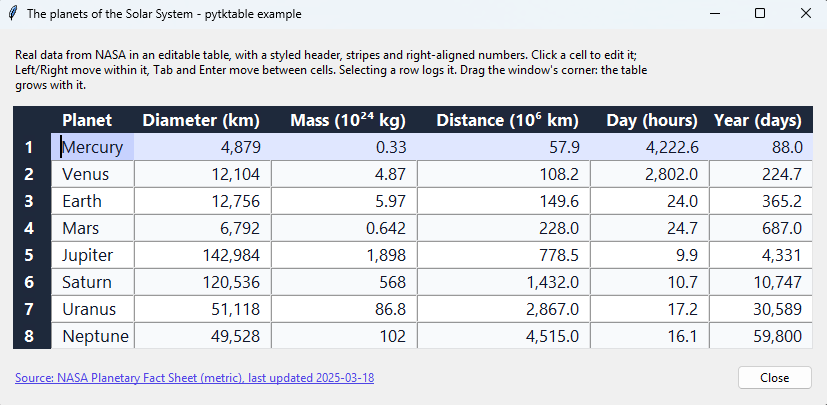
The [example](https://nbro.github.io/tktable/usage.html) above shows the planets of the Solar
|
|
59
|
+
System, from NASA's Planetary Fact Sheet (screenshot taken on Windows 11).
|
|
60
|
+
|
|
61
|
+
## Features
|
|
62
|
+
|
|
63
|
+
- Spreadsheet-like tables with title rows and columns, editable cells, and keyboard navigation.
|
|
64
|
+
- Cell values kept in an `ArrayVar` (a Tcl array), or computed on demand by a callback.
|
|
65
|
+
- Styling with tags: colors, fonts, alignment and relief, for single cells, rows or columns.
|
|
66
|
+
- Merged cells (spans), embedded widgets, and resizable rows and columns.
|
|
67
|
+
- Cells that flash when their value changes, with a color of your choice.
|
|
68
|
+
- Selection of cells, rows or columns; inserting and deleting rows and columns.
|
|
69
|
+
- Callbacks when the active cell changes, to compute cell values, to validate edits, and to
|
|
70
|
+
format the selection when it is copied.
|
|
71
|
+
- Works on Linux, macOS and Windows, with Python 3.11 or later and Tcl/Tk 8.6 or 9.0, once
|
|
72
|
+
Tcl/Tk (usually bundled with Python) and the Tktable extension are [installed](https://nbro.github.io/tktable/installation/).
|
|
73
|
+
- `python -m tktable` checks that Tktable can be found and loaded.
|
|
74
|
+
|
|
49
75
|
## Installation
|
|
50
76
|
|
|
51
77
|
```sh
|
|
@@ -0,0 +1,60 @@
|
|
|
1
|
+
# pytktable
|
|
2
|
+
|
|
3
|
+
[](https://pypi.org/project/pytktable/)
|
|
4
|
+
[](https://pypi.org/project/pytktable/)
|
|
5
|
+
[](https://github.com/nbro/tktable/actions/workflows/tests.yml)
|
|
6
|
+
[](https://nbro.github.io/tktable/)
|
|
7
|
+
[](LICENSE.md)
|
|
8
|
+
|
|
9
|
+
A spreadsheet-like table widget for tkinter, wrapping the Tcl/Tk
|
|
10
|
+
[Tktable](https://wiki.tcl-lang.org/page/Tktable) extension.
|
|
11
|
+
|
|
12
|
+
> ⚠️ **Important:** pytktable is only the Python wrapper. The table widget itself is
|
|
13
|
+
> [Tktable](https://wiki.tcl-lang.org/page/Tktable), an extension for Tcl/Tk written in C, which
|
|
14
|
+
> `pip install pytktable` does not install. Install Tktable first, following the
|
|
15
|
+
> [installation instructions](https://nbro.github.io/tktable/installation/) for your OS, then run
|
|
16
|
+
> `python -m tktable` to check that it works.
|
|
17
|
+
|
|
18
|
+
The wrapper was originally written by [Guilherme Polo](https://github.com/gpip).
|
|
19
|
+
|
|
20
|
+

|
|
21
|
+
|
|
22
|
+
The [example](https://nbro.github.io/tktable/usage.html) above shows the planets of the Solar
|
|
23
|
+
System, from NASA's Planetary Fact Sheet (screenshot taken on Windows 11).
|
|
24
|
+
|
|
25
|
+
## Features
|
|
26
|
+
|
|
27
|
+
- Spreadsheet-like tables with title rows and columns, editable cells, and keyboard navigation.
|
|
28
|
+
- Cell values kept in an `ArrayVar` (a Tcl array), or computed on demand by a callback.
|
|
29
|
+
- Styling with tags: colors, fonts, alignment and relief, for single cells, rows or columns.
|
|
30
|
+
- Merged cells (spans), embedded widgets, and resizable rows and columns.
|
|
31
|
+
- Cells that flash when their value changes, with a color of your choice.
|
|
32
|
+
- Selection of cells, rows or columns; inserting and deleting rows and columns.
|
|
33
|
+
- Callbacks when the active cell changes, to compute cell values, to validate edits, and to
|
|
34
|
+
format the selection when it is copied.
|
|
35
|
+
- Works on Linux, macOS and Windows, with Python 3.11 or later and Tcl/Tk 8.6 or 9.0, once
|
|
36
|
+
Tcl/Tk (usually bundled with Python) and the Tktable extension are [installed](https://nbro.github.io/tktable/installation/).
|
|
37
|
+
- `python -m tktable` checks that Tktable can be found and loaded.
|
|
38
|
+
|
|
39
|
+
## Installation
|
|
40
|
+
|
|
41
|
+
```sh
|
|
42
|
+
pip install pytktable
|
|
43
|
+
```
|
|
44
|
+
|
|
45
|
+
It is imported as `tktable` (`from tktable import Table`). It also needs the Tktable extension,
|
|
46
|
+
which `pip` does not install: see [Installation](https://nbro.github.io/tktable/installation/)
|
|
47
|
+
for how to install it on your OS, and run `python -m tktable` to check that it works.
|
|
48
|
+
|
|
49
|
+
## Documentation
|
|
50
|
+
|
|
51
|
+
<https://nbro.github.io/tktable/>: usage, API reference, development and releasing.
|
|
52
|
+
|
|
53
|
+
## License
|
|
54
|
+
|
|
55
|
+
[BSD 2-Clause](LICENSE.md).
|
|
56
|
+
|
|
57
|
+
Copyright (c) 2008, Guilherme Polo\
|
|
58
|
+
Copyright (c) 2016-2026, nbro
|
|
59
|
+
|
|
60
|
+
See the [changelog](CHANGELOG.md) for what changed in this fork.
|
|
@@ -4,7 +4,7 @@
|
|
|
4
4
|
|
|
5
5
|
[project]
|
|
6
6
|
name = "pytktable"
|
|
7
|
-
version = "0.
|
|
7
|
+
version = "0.2.0"
|
|
8
8
|
description = "A spreadsheet-like table widget for tkinter, wrapping the Tcl/Tk Tktable extension."
|
|
9
9
|
readme = "README.md"
|
|
10
10
|
requires-python = ">=3.11"
|
|
@@ -36,6 +36,7 @@ classifiers = [
|
|
|
36
36
|
"Programming Language :: Python :: 3.13",
|
|
37
37
|
"Programming Language :: Python :: 3.14",
|
|
38
38
|
"Programming Language :: Python :: 3.15",
|
|
39
|
+
"Typing :: Typed",
|
|
39
40
|
]
|
|
40
41
|
dependencies = []
|
|
41
42
|
|
|
@@ -84,6 +85,11 @@ line_length = 100
|
|
|
84
85
|
[tool.mypy]
|
|
85
86
|
python_version = "3.11"
|
|
86
87
|
files = ["tktable"]
|
|
88
|
+
# Every function in the library must have type hints (#21).
|
|
89
|
+
disallow_untyped_defs = true
|
|
90
|
+
disallow_incomplete_defs = true
|
|
91
|
+
check_untyped_defs = true
|
|
92
|
+
warn_return_any = false
|
|
87
93
|
warn_unused_ignores = true
|
|
88
94
|
warn_redundant_casts = true
|
|
89
95
|
|
|
@@ -119,6 +125,7 @@ check_lock = { cmd = "poetry check --lock", help = "Check that poetry.lock is co
|
|
|
119
125
|
check_types = { cmd = "mypy", help = "Run type checks" }
|
|
120
126
|
check_style = { cmd = "pylint tktable tests examples", help = "Run style checks" }
|
|
121
127
|
build = { cmd = "poetry build", help = "Build the sdist and wheel into dist/" }
|
|
128
|
+
update_example_data = { cmd = "python examples/data/update_planets.py", help = "Download the example's planets data from NASA again" }
|
|
122
129
|
clean = { cmd = "git clean -fdX dist docs/_build .pytest_cache .mypy_cache .coverage tktable tests examples", help = "Remove build and test artifacts, including the built docs" }
|
|
123
130
|
|
|
124
131
|
[tool.poe.tasks.format]
|
|
@@ -32,7 +32,10 @@ def main() -> int:
|
|
|
32
32
|
print(f"Tcl: {interp.call('info', 'patchlevel')}")
|
|
33
33
|
print(f"{TKTABLE_LIBRARY_ENV_VAR}: {os.environ.get(TKTABLE_LIBRARY_ENV_VAR, '(not set)')}")
|
|
34
34
|
versions = find_tktable(interp)
|
|
35
|
-
|
|
35
|
+
# One folder per line, as plain text (Tcl 9 returns them as "path objects").
|
|
36
|
+
print("auto_path:")
|
|
37
|
+
for folder in interp.tk.splitlist(interp.call("set", "auto_path")):
|
|
38
|
+
print(f" {folder}")
|
|
36
39
|
if not versions:
|
|
37
40
|
print("Tktable: NOT FOUND")
|
|
38
41
|
print("See https://nbro.github.io/tktable/installation/")
|
|
@@ -0,0 +1,63 @@
|
|
|
1
|
+
"""ArrayVar, a tkinter variable for Tcl arrays, which a Table can store its cells in."""
|
|
2
|
+
|
|
3
|
+
import tkinter
|
|
4
|
+
from typing import Any
|
|
5
|
+
|
|
6
|
+
from tktable.utils import _setup_master
|
|
7
|
+
|
|
8
|
+
|
|
9
|
+
class ArrayVar(tkinter.Variable):
|
|
10
|
+
"""A Tcl array, the usual store for a Table's cells (its variable option).
|
|
11
|
+
|
|
12
|
+
A Tcl array is an associative array, so this class supports some dict operations: cells are
|
|
13
|
+
keyed by "row,col" indices, e.g. ``cells["0,1"] = "Hello"``.
|
|
14
|
+
"""
|
|
15
|
+
|
|
16
|
+
# Tkinter.Variable.__init__ is not called on purpose, so the array has no default value.
|
|
17
|
+
def __init__( # pylint: disable=super-init-not-called
|
|
18
|
+
self, master: tkinter.Misc | None = None, name: str | None = None
|
|
19
|
+
) -> None:
|
|
20
|
+
self._master = _setup_master(master)
|
|
21
|
+
self._tk = self._master.tk
|
|
22
|
+
self._name = name or f"PY_VAR{id(self)}"
|
|
23
|
+
|
|
24
|
+
def __del__(self) -> None:
|
|
25
|
+
if bool(self._tk.call("info", "exists", self._name)):
|
|
26
|
+
self._tk.globalunsetvar(self._name)
|
|
27
|
+
|
|
28
|
+
def __len__(self) -> int:
|
|
29
|
+
return int(self._tk.call("array", "size", str(self)))
|
|
30
|
+
|
|
31
|
+
def __getitem__(self, key: str) -> Any:
|
|
32
|
+
return self.get(key)
|
|
33
|
+
|
|
34
|
+
def __setitem__(self, key: str, value: Any) -> None:
|
|
35
|
+
self.set(**{str(key): value})
|
|
36
|
+
|
|
37
|
+
def names(self) -> tuple[str, ...]:
|
|
38
|
+
"""Return the keys (indices) of the array."""
|
|
39
|
+
return tuple(
|
|
40
|
+
str(name) for name in self._tk.splitlist(self._tk.call("array", "names", self._name))
|
|
41
|
+
)
|
|
42
|
+
|
|
43
|
+
def get(self, key: str | None = None) -> Any:
|
|
44
|
+
"""Return the value at key, or all the array as a dict if key is None."""
|
|
45
|
+
if key is None:
|
|
46
|
+
# splitlist: tkinter may return the Tcl list as a Tcl_Obj, which can't be sliced.
|
|
47
|
+
flatten_pairs = self._tk.splitlist(self._tk.call("array", "get", str(self)))
|
|
48
|
+
return dict(zip(flatten_pairs[::2], flatten_pairs[1::2]))
|
|
49
|
+
return self._tk.globalgetvar(str(self), str(key))
|
|
50
|
+
|
|
51
|
+
# Unlike tkinter.Variable.set(value), this sets several keys at once.
|
|
52
|
+
def set(self, **kw: Any) -> None: # type: ignore[override] # pylint: disable=arguments-differ
|
|
53
|
+
"""Set the values of the given keys, e.g. ``set(**{"0,0": "a", "0,1": "b"})``."""
|
|
54
|
+
flattened = tuple(item for pair in kw.items() for item in pair)
|
|
55
|
+
self._tk.call("array", "set", str(self), flattened)
|
|
56
|
+
|
|
57
|
+
def unset(self, pattern: str | None = None) -> None:
|
|
58
|
+
"""Unsets all of the elements in the array. If pattern is given, only
|
|
59
|
+
the elements that match pattern are unset."""
|
|
60
|
+
if pattern is None:
|
|
61
|
+
self._tk.call("array", "unset", str(self))
|
|
62
|
+
else:
|
|
63
|
+
self._tk.call("array", "unset", str(self), pattern)
|
|
File without changes
|