pyscopegui 0.1.0__tar.gz
This diff represents the content of publicly available package versions that have been released to one of the supported registries. The information contained in this diff is provided for informational purposes only and reflects changes between package versions as they appear in their respective public registries.
- pyscopegui-0.1.0/LICENSE +202 -0
- pyscopegui-0.1.0/NOTICE +26 -0
- pyscopegui-0.1.0/PKG-INFO +120 -0
- pyscopegui-0.1.0/PYPI.md +78 -0
- pyscopegui-0.1.0/README.md +121 -0
- pyscopegui-0.1.0/pyproject.toml +104 -0
- pyscopegui-0.1.0/pyscopegui/__init__.py +6 -0
- pyscopegui-0.1.0/pyscopegui/__main__.py +216 -0
- pyscopegui-0.1.0/pyscopegui/backends/__init__.py +67 -0
- pyscopegui-0.1.0/pyscopegui/backends/base.py +195 -0
- pyscopegui-0.1.0/pyscopegui/backends/demo.py +114 -0
- pyscopegui-0.1.0/pyscopegui/backends/picoscope2000.py +1275 -0
- pyscopegui-0.1.0/pyscopegui/backends/rigol1000z.py +744 -0
- pyscopegui-0.1.0/pyscopegui/core/__init__.py +2 -0
- pyscopegui-0.1.0/pyscopegui/core/acquire.py +274 -0
- pyscopegui-0.1.0/pyscopegui/core/capture.py +216 -0
- pyscopegui-0.1.0/pyscopegui/core/checkout.py +134 -0
- pyscopegui-0.1.0/pyscopegui/core/context.py +53 -0
- pyscopegui-0.1.0/pyscopegui/core/events.py +73 -0
- pyscopegui-0.1.0/pyscopegui/core/excepthook.py +111 -0
- pyscopegui-0.1.0/pyscopegui/core/installation.py +137 -0
- pyscopegui-0.1.0/pyscopegui/core/layout.py +73 -0
- pyscopegui-0.1.0/pyscopegui/core/packages.py +105 -0
- pyscopegui-0.1.0/pyscopegui/core/paths.py +50 -0
- pyscopegui-0.1.0/pyscopegui/core/session.py +113 -0
- pyscopegui-0.1.0/pyscopegui/core/settings.py +44 -0
- pyscopegui-0.1.0/pyscopegui/core/shortcut.py +154 -0
- pyscopegui-0.1.0/pyscopegui/core/updates.py +195 -0
- pyscopegui-0.1.0/pyscopegui/core/worker.py +66 -0
- pyscopegui-0.1.0/pyscopegui/help/__init__.py +132 -0
- pyscopegui-0.1.0/pyscopegui/help/about.md +47 -0
- pyscopegui-0.1.0/pyscopegui/help/changelog.md +57 -0
- pyscopegui-0.1.0/pyscopegui/help/event-log.md +31 -0
- pyscopegui-0.1.0/pyscopegui/help/files.md +45 -0
- pyscopegui-0.1.0/pyscopegui/help/instruments.md +134 -0
- pyscopegui-0.1.0/pyscopegui/help/main-window.png +0 -0
- pyscopegui-0.1.0/pyscopegui/help/manual.md +22 -0
- pyscopegui-0.1.0/pyscopegui/help/panes.md +64 -0
- pyscopegui-0.1.0/pyscopegui/help/picoscope.md +186 -0
- pyscopegui-0.1.0/pyscopegui/help/plot.md +100 -0
- pyscopegui-0.1.0/pyscopegui/help/rigol.md +92 -0
- pyscopegui-0.1.0/pyscopegui/resources/__init__.py +10 -0
- pyscopegui-0.1.0/pyscopegui/resources/pyscopegui.ico +0 -0
- pyscopegui-0.1.0/pyscopegui/resources/pyscopegui.png +0 -0
- pyscopegui-0.1.0/pyscopegui/resources/pyscopegui.svg +16 -0
- pyscopegui-0.1.0/pyscopegui/resources/pyscopegui_small.svg +9 -0
- pyscopegui-0.1.0/pyscopegui/ui/__init__.py +2 -0
- pyscopegui-0.1.0/pyscopegui/ui/detached.py +85 -0
- pyscopegui-0.1.0/pyscopegui/ui/event_colours.py +66 -0
- pyscopegui-0.1.0/pyscopegui/ui/fonts.py +75 -0
- pyscopegui-0.1.0/pyscopegui/ui/help_menu.py +620 -0
- pyscopegui-0.1.0/pyscopegui/ui/instrument_bar.py +136 -0
- pyscopegui-0.1.0/pyscopegui/ui/instrument_view.py +269 -0
- pyscopegui-0.1.0/pyscopegui/ui/main_window.py +890 -0
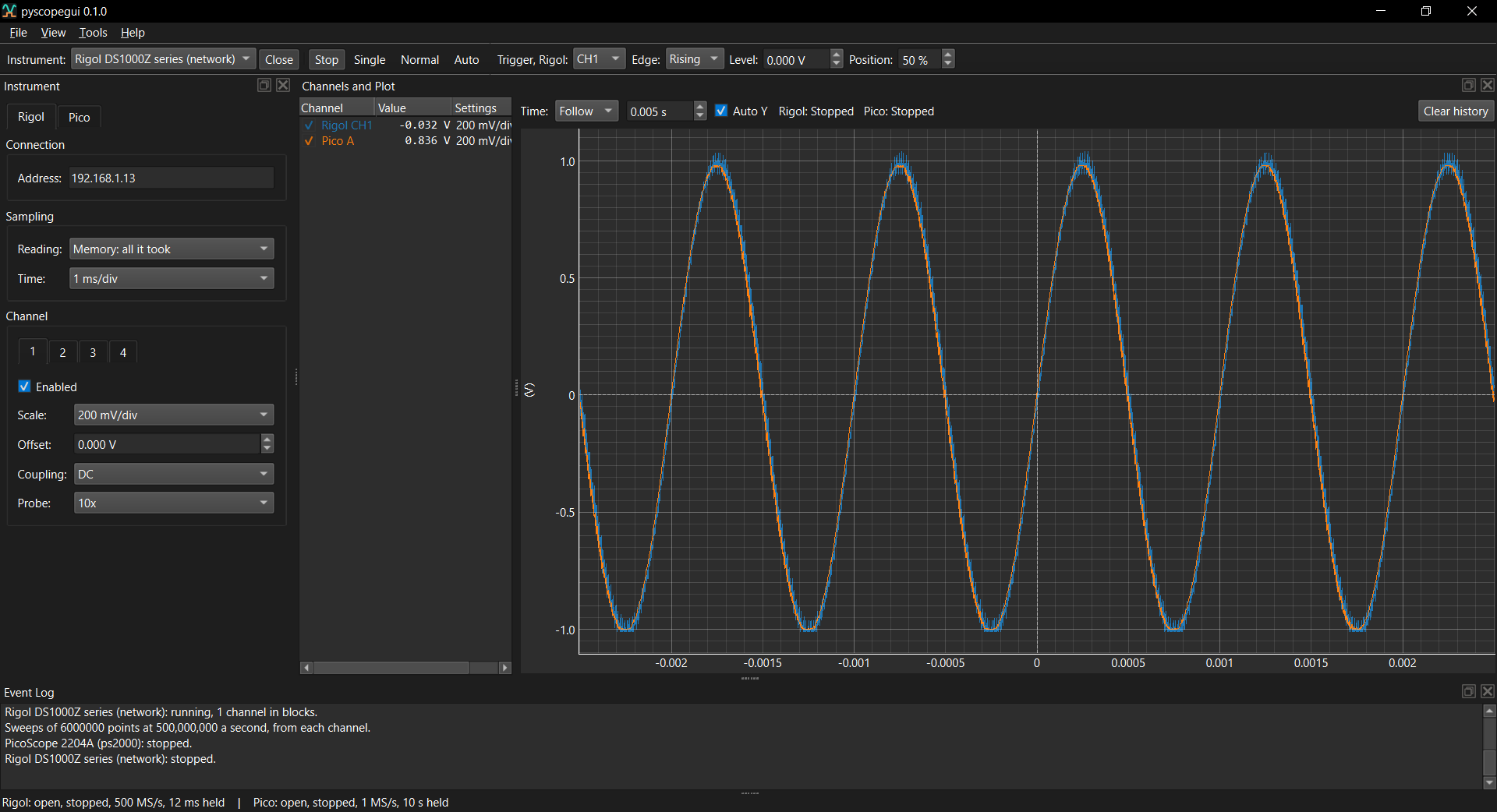
- pyscopegui-0.1.0/pyscopegui/ui/messages.py +78 -0
- pyscopegui-0.1.0/pyscopegui/ui/pane_bar.py +92 -0
- pyscopegui-0.1.0/pyscopegui/ui/panes.py +1010 -0
- pyscopegui-0.1.0/pyscopegui/ui/persist.py +131 -0
- pyscopegui-0.1.0/pyscopegui/ui/scope_view.py +622 -0
- pyscopegui-0.1.0/pyscopegui/ui/spin.py +52 -0
- pyscopegui-0.1.0/pyscopegui/ui/theme.py +85 -0
- pyscopegui-0.1.0/pyscopegui/ui/trigger_bar.py +200 -0
- pyscopegui-0.1.0/pyscopegui.egg-info/PKG-INFO +120 -0
- pyscopegui-0.1.0/pyscopegui.egg-info/SOURCES.txt +91 -0
- pyscopegui-0.1.0/pyscopegui.egg-info/dependency_links.txt +1 -0
- pyscopegui-0.1.0/pyscopegui.egg-info/entry_points.txt +2 -0
- pyscopegui-0.1.0/pyscopegui.egg-info/requires.txt +9 -0
- pyscopegui-0.1.0/pyscopegui.egg-info/top_level.txt +1 -0
- pyscopegui-0.1.0/setup.cfg +4 -0
- pyscopegui-0.1.0/tests/test_acquire.py +222 -0
- pyscopegui-0.1.0/tests/test_backends.py +79 -0
- pyscopegui-0.1.0/tests/test_build_version.py +68 -0
- pyscopegui-0.1.0/tests/test_capture.py +147 -0
- pyscopegui-0.1.0/tests/test_changelog.py +96 -0
- pyscopegui-0.1.0/tests/test_checkout.py +103 -0
- pyscopegui-0.1.0/tests/test_headers.py +84 -0
- pyscopegui-0.1.0/tests/test_help.py +697 -0
- pyscopegui-0.1.0/tests/test_icon.py +72 -0
- pyscopegui-0.1.0/tests/test_installation.py +107 -0
- pyscopegui-0.1.0/tests/test_instrument_view.py +285 -0
- pyscopegui-0.1.0/tests/test_issue_templates.py +85 -0
- pyscopegui-0.1.0/tests/test_main_window.py +267 -0
- pyscopegui-0.1.0/tests/test_packages.py +77 -0
- pyscopegui-0.1.0/tests/test_packaging.py +99 -0
- pyscopegui-0.1.0/tests/test_picoscope2000.py +1040 -0
- pyscopegui-0.1.0/tests/test_readme.py +150 -0
- pyscopegui-0.1.0/tests/test_rigol1000z.py +503 -0
- pyscopegui-0.1.0/tests/test_selftest.py +32 -0
- pyscopegui-0.1.0/tests/test_several.py +382 -0
- pyscopegui-0.1.0/tests/test_spin.py +106 -0
- pyscopegui-0.1.0/tests/test_sweeps.py +236 -0
- pyscopegui-0.1.0/tests/test_theme.py +146 -0
- pyscopegui-0.1.0/tests/test_trigger_view.py +256 -0
pyscopegui-0.1.0/LICENSE
ADDED
|
@@ -0,0 +1,202 @@
|
|
|
1
|
+
|
|
2
|
+
Apache License
|
|
3
|
+
Version 2.0, January 2004
|
|
4
|
+
http://www.apache.org/licenses/
|
|
5
|
+
|
|
6
|
+
TERMS AND CONDITIONS FOR USE, REPRODUCTION, AND DISTRIBUTION
|
|
7
|
+
|
|
8
|
+
1. Definitions.
|
|
9
|
+
|
|
10
|
+
"License" shall mean the terms and conditions for use, reproduction,
|
|
11
|
+
and distribution as defined by Sections 1 through 9 of this document.
|
|
12
|
+
|
|
13
|
+
"Licensor" shall mean the copyright owner or entity authorized by
|
|
14
|
+
the copyright owner that is granting the License.
|
|
15
|
+
|
|
16
|
+
"Legal Entity" shall mean the union of the acting entity and all
|
|
17
|
+
other entities that control, are controlled by, or are under common
|
|
18
|
+
control with that entity. For the purposes of this definition,
|
|
19
|
+
"control" means (i) the power, direct or indirect, to cause the
|
|
20
|
+
direction or management of such entity, whether by contract or
|
|
21
|
+
otherwise, or (ii) ownership of fifty percent (50%) or more of the
|
|
22
|
+
outstanding shares, or (iii) beneficial ownership of such entity.
|
|
23
|
+
|
|
24
|
+
"You" (or "Your") shall mean an individual or Legal Entity
|
|
25
|
+
exercising permissions granted by this License.
|
|
26
|
+
|
|
27
|
+
"Source" form shall mean the preferred form for making modifications,
|
|
28
|
+
including but not limited to software source code, documentation
|
|
29
|
+
source, and configuration files.
|
|
30
|
+
|
|
31
|
+
"Object" form shall mean any form resulting from mechanical
|
|
32
|
+
transformation or translation of a Source form, including but
|
|
33
|
+
not limited to compiled object code, generated documentation,
|
|
34
|
+
and conversions to other media types.
|
|
35
|
+
|
|
36
|
+
"Work" shall mean the work of authorship, whether in Source or
|
|
37
|
+
Object form, made available under the License, as indicated by a
|
|
38
|
+
copyright notice that is included in or attached to the work
|
|
39
|
+
(an example is provided in the Appendix below).
|
|
40
|
+
|
|
41
|
+
"Derivative Works" shall mean any work, whether in Source or Object
|
|
42
|
+
form, that is based on (or derived from) the Work and for which the
|
|
43
|
+
editorial revisions, annotations, elaborations, or other modifications
|
|
44
|
+
represent, as a whole, an original work of authorship. For the purposes
|
|
45
|
+
of this License, Derivative Works shall not include works that remain
|
|
46
|
+
separable from, or merely link (or bind by name) to the interfaces of,
|
|
47
|
+
the Work and Derivative Works thereof.
|
|
48
|
+
|
|
49
|
+
"Contribution" shall mean any work of authorship, including
|
|
50
|
+
the original version of the Work and any modifications or additions
|
|
51
|
+
to that Work or Derivative Works thereof, that is intentionally
|
|
52
|
+
submitted to Licensor for inclusion in the Work by the copyright owner
|
|
53
|
+
or by an individual or Legal Entity authorized to submit on behalf of
|
|
54
|
+
the copyright owner. For the purposes of this definition, "submitted"
|
|
55
|
+
means any form of electronic, verbal, or written communication sent
|
|
56
|
+
to the Licensor or its representatives, including but not limited to
|
|
57
|
+
communication on electronic mailing lists, source code control systems,
|
|
58
|
+
and issue tracking systems that are managed by, or on behalf of, the
|
|
59
|
+
Licensor for the purpose of discussing and improving the Work, but
|
|
60
|
+
excluding communication that is conspicuously marked or otherwise
|
|
61
|
+
designated in writing by the copyright owner as "Not a Contribution."
|
|
62
|
+
|
|
63
|
+
"Contributor" shall mean Licensor and any individual or Legal Entity
|
|
64
|
+
on behalf of whom a Contribution has been received by Licensor and
|
|
65
|
+
subsequently incorporated within the Work.
|
|
66
|
+
|
|
67
|
+
2. Grant of Copyright License. Subject to the terms and conditions of
|
|
68
|
+
this License, each Contributor hereby grants to You a perpetual,
|
|
69
|
+
worldwide, non-exclusive, no-charge, royalty-free, irrevocable
|
|
70
|
+
copyright license to reproduce, prepare Derivative Works of,
|
|
71
|
+
publicly display, publicly perform, sublicense, and distribute the
|
|
72
|
+
Work and such Derivative Works in Source or Object form.
|
|
73
|
+
|
|
74
|
+
3. Grant of Patent License. Subject to the terms and conditions of
|
|
75
|
+
this License, each Contributor hereby grants to You a perpetual,
|
|
76
|
+
worldwide, non-exclusive, no-charge, royalty-free, irrevocable
|
|
77
|
+
(except as stated in this section) patent license to make, have made,
|
|
78
|
+
use, offer to sell, sell, import, and otherwise transfer the Work,
|
|
79
|
+
where such license applies only to those patent claims licensable
|
|
80
|
+
by such Contributor that are necessarily infringed by their
|
|
81
|
+
Contribution(s) alone or by combination of their Contribution(s)
|
|
82
|
+
with the Work to which such Contribution(s) was submitted. If You
|
|
83
|
+
institute patent litigation against any entity (including a
|
|
84
|
+
cross-claim or counterclaim in a lawsuit) alleging that the Work
|
|
85
|
+
or a Contribution incorporated within the Work constitutes direct
|
|
86
|
+
or contributory patent infringement, then any patent licenses
|
|
87
|
+
granted to You under this License for that Work shall terminate
|
|
88
|
+
as of the date such litigation is filed.
|
|
89
|
+
|
|
90
|
+
4. Redistribution. You may reproduce and distribute copies of the
|
|
91
|
+
Work or Derivative Works thereof in any medium, with or without
|
|
92
|
+
modifications, and in Source or Object form, provided that You
|
|
93
|
+
meet the following conditions:
|
|
94
|
+
|
|
95
|
+
(a) You must give any other recipients of the Work or
|
|
96
|
+
Derivative Works a copy of this License; and
|
|
97
|
+
|
|
98
|
+
(b) You must cause any modified files to carry prominent notices
|
|
99
|
+
stating that You changed the files; and
|
|
100
|
+
|
|
101
|
+
(c) You must retain, in the Source form of any Derivative Works
|
|
102
|
+
that You distribute, all copyright, patent, trademark, and
|
|
103
|
+
attribution notices from the Source form of the Work,
|
|
104
|
+
excluding those notices that do not pertain to any part of
|
|
105
|
+
the Derivative Works; and
|
|
106
|
+
|
|
107
|
+
(d) If the Work includes a "NOTICE" text file as part of its
|
|
108
|
+
distribution, then any Derivative Works that You distribute must
|
|
109
|
+
include a readable copy of the attribution notices contained
|
|
110
|
+
within such NOTICE file, excluding those notices that do not
|
|
111
|
+
pertain to any part of the Derivative Works, in at least one
|
|
112
|
+
of the following places: within a NOTICE text file distributed
|
|
113
|
+
as part of the Derivative Works; within the Source form or
|
|
114
|
+
documentation, if provided along with the Derivative Works; or,
|
|
115
|
+
within a display generated by the Derivative Works, if and
|
|
116
|
+
wherever such third-party notices normally appear. The contents
|
|
117
|
+
of the NOTICE file are for informational purposes only and
|
|
118
|
+
do not modify the License. You may add Your own attribution
|
|
119
|
+
notices within Derivative Works that You distribute, alongside
|
|
120
|
+
or as an addendum to the NOTICE text from the Work, provided
|
|
121
|
+
that such additional attribution notices cannot be construed
|
|
122
|
+
as modifying the License.
|
|
123
|
+
|
|
124
|
+
You may add Your own copyright statement to Your modifications and
|
|
125
|
+
may provide additional or different license terms and conditions
|
|
126
|
+
for use, reproduction, or distribution of Your modifications, or
|
|
127
|
+
for any such Derivative Works as a whole, provided Your use,
|
|
128
|
+
reproduction, and distribution of the Work otherwise complies with
|
|
129
|
+
the conditions stated in this License.
|
|
130
|
+
|
|
131
|
+
5. Submission of Contributions. Unless You explicitly state otherwise,
|
|
132
|
+
any Contribution intentionally submitted for inclusion in the Work
|
|
133
|
+
by You to the Licensor shall be under the terms and conditions of
|
|
134
|
+
this License, without any additional terms or conditions.
|
|
135
|
+
Notwithstanding the above, nothing herein shall supersede or modify
|
|
136
|
+
the terms of any separate license agreement you may have executed
|
|
137
|
+
with Licensor regarding such Contributions.
|
|
138
|
+
|
|
139
|
+
6. Trademarks. This License does not grant permission to use the trade
|
|
140
|
+
names, trademarks, service marks, or product names of the Licensor,
|
|
141
|
+
except as required for reasonable and customary use in describing the
|
|
142
|
+
origin of the Work and reproducing the content of the NOTICE file.
|
|
143
|
+
|
|
144
|
+
7. Disclaimer of Warranty. Unless required by applicable law or
|
|
145
|
+
agreed to in writing, Licensor provides the Work (and each
|
|
146
|
+
Contributor provides its Contributions) on an "AS IS" BASIS,
|
|
147
|
+
WITHOUT WARRANTIES OR CONDITIONS OF ANY KIND, either express or
|
|
148
|
+
implied, including, without limitation, any warranties or conditions
|
|
149
|
+
of TITLE, NON-INFRINGEMENT, MERCHANTABILITY, or FITNESS FOR A
|
|
150
|
+
PARTICULAR PURPOSE. You are solely responsible for determining the
|
|
151
|
+
appropriateness of using or redistributing the Work and assume any
|
|
152
|
+
risks associated with Your exercise of permissions under this License.
|
|
153
|
+
|
|
154
|
+
8. Limitation of Liability. In no event and under no legal theory,
|
|
155
|
+
whether in tort (including negligence), contract, or otherwise,
|
|
156
|
+
unless required by applicable law (such as deliberate and grossly
|
|
157
|
+
negligent acts) or agreed to in writing, shall any Contributor be
|
|
158
|
+
liable to You for damages, including any direct, indirect, special,
|
|
159
|
+
incidental, or consequential damages of any character arising as a
|
|
160
|
+
result of this License or out of the use or inability to use the
|
|
161
|
+
Work (including but not limited to damages for loss of goodwill,
|
|
162
|
+
work stoppage, computer failure or malfunction, or any and all
|
|
163
|
+
other commercial damages or losses), even if such Contributor
|
|
164
|
+
has been advised of the possibility of such damages.
|
|
165
|
+
|
|
166
|
+
9. Accepting Warranty or Additional Liability. While redistributing
|
|
167
|
+
the Work or Derivative Works thereof, You may choose to offer,
|
|
168
|
+
and charge a fee for, acceptance of support, warranty, indemnity,
|
|
169
|
+
or other liability obligations and/or rights consistent with this
|
|
170
|
+
License. However, in accepting such obligations, You may act only
|
|
171
|
+
on Your own behalf and on Your sole responsibility, not on behalf
|
|
172
|
+
of any other Contributor, and only if You agree to indemnify,
|
|
173
|
+
defend, and hold each Contributor harmless for any liability
|
|
174
|
+
incurred by, or claims asserted against, such Contributor by reason
|
|
175
|
+
of your accepting any such warranty or additional liability.
|
|
176
|
+
|
|
177
|
+
END OF TERMS AND CONDITIONS
|
|
178
|
+
|
|
179
|
+
APPENDIX: How to apply the Apache License to your work.
|
|
180
|
+
|
|
181
|
+
To apply the Apache License to your work, attach the following
|
|
182
|
+
boilerplate notice, with the fields enclosed by brackets "[]"
|
|
183
|
+
replaced with your own identifying information. (Don't include
|
|
184
|
+
the brackets!) The text should be enclosed in the appropriate
|
|
185
|
+
comment syntax for the file format. We also recommend that a
|
|
186
|
+
file or class name and description of purpose be included on the
|
|
187
|
+
same "printed page" as the copyright notice for easier
|
|
188
|
+
identification within third-party archives.
|
|
189
|
+
|
|
190
|
+
Copyright [yyyy] [name of copyright owner]
|
|
191
|
+
|
|
192
|
+
Licensed under the Apache License, Version 2.0 (the "License");
|
|
193
|
+
you may not use this file except in compliance with the License.
|
|
194
|
+
You may obtain a copy of the License at
|
|
195
|
+
|
|
196
|
+
http://www.apache.org/licenses/LICENSE-2.0
|
|
197
|
+
|
|
198
|
+
Unless required by applicable law or agreed to in writing, software
|
|
199
|
+
distributed under the License is distributed on an "AS IS" BASIS,
|
|
200
|
+
WITHOUT WARRANTIES OR CONDITIONS OF ANY KIND, either express or implied.
|
|
201
|
+
See the License for the specific language governing permissions and
|
|
202
|
+
limitations under the License.
|
pyscopegui-0.1.0/NOTICE
ADDED
|
@@ -0,0 +1,26 @@
|
|
|
1
|
+
pyscopegui
|
|
2
|
+
Copyright 2026 davhodg
|
|
3
|
+
|
|
4
|
+
Licensed under the Apache License, Version 2.0 (the "License"); you may not use
|
|
5
|
+
this file except in compliance with the License. You may obtain a copy of the
|
|
6
|
+
License in the LICENSE file, or at http://www.apache.org/licenses/LICENSE-2.0
|
|
7
|
+
|
|
8
|
+
This product includes software developed by third parties, each used unmodified
|
|
9
|
+
under its own licence and installed as a separate package:
|
|
10
|
+
|
|
11
|
+
PySide6-Essentials, shiboken6 LGPL-3.0 https://www.qt.io/qt-for-python
|
|
12
|
+
(Qt for Python; the GPL-only add-on modules are not installed at all)
|
|
13
|
+
pyqtgraph MIT https://www.pyqtgraph.org
|
|
14
|
+
numpy BSD-3-Clause https://numpy.org
|
|
15
|
+
Python PSF-2.0 https://www.python.org
|
|
16
|
+
|
|
17
|
+
The LGPL-licensed components are dynamically linked and separately replaceable;
|
|
18
|
+
their sources are available from the projects listed above. Only LGPL Qt
|
|
19
|
+
modules are used -- the GPL-only Qt modules (Qt Charts, Qt Data Visualization,
|
|
20
|
+
Qt Graphs, Qt Virtual Keyboard) are deliberately not used.
|
|
21
|
+
|
|
22
|
+
Instrument makers' libraries (the PicoScope SDK and others) are not distributed
|
|
23
|
+
with pyscopegui; a back end loads the maker's own at run time.
|
|
24
|
+
|
|
25
|
+
Development note: pyscopegui is developed with the assistance of Anthropic's
|
|
26
|
+
Claude.
|
|
@@ -0,0 +1,120 @@
|
|
|
1
|
+
Metadata-Version: 2.4
|
|
2
|
+
Name: pyscopegui
|
|
3
|
+
Version: 0.1.0
|
|
4
|
+
Summary: Oscilloscopes and logic analysers in one view: analog and logic channels from separate instruments, on one time axis
|
|
5
|
+
Author: davhodg
|
|
6
|
+
License-Expression: Apache-2.0
|
|
7
|
+
Project-URL: Homepage, https://github.com/davhodg/pyscopegui
|
|
8
|
+
Project-URL: Documentation, https://github.com/davhodg/pyscopegui/blob/master/pyscopegui/help/manual.md
|
|
9
|
+
Project-URL: Repository, https://github.com/davhodg/pyscopegui
|
|
10
|
+
Project-URL: Issues, https://github.com/davhodg/pyscopegui/issues
|
|
11
|
+
Project-URL: Discussions, https://github.com/davhodg/pyscopegui/discussions
|
|
12
|
+
Project-URL: Releases, https://github.com/davhodg/pyscopegui/releases
|
|
13
|
+
Project-URL: Changelog, https://github.com/davhodg/pyscopegui/blob/master/pyscopegui/help/changelog.md
|
|
14
|
+
Keywords: oscilloscope,logic analyzer,logic analyser,mixed signal,PicoScope,Rigol,DS1054Z,SCPI,test and measurement,embedded,Qt
|
|
15
|
+
Classifier: Development Status :: 3 - Alpha
|
|
16
|
+
Classifier: Intended Audience :: Developers
|
|
17
|
+
Classifier: Intended Audience :: Science/Research
|
|
18
|
+
Classifier: Natural Language :: English
|
|
19
|
+
Classifier: Operating System :: Microsoft :: Windows
|
|
20
|
+
Classifier: Operating System :: POSIX :: Linux
|
|
21
|
+
Classifier: Programming Language :: Python :: 3
|
|
22
|
+
Classifier: Programming Language :: Python :: 3 :: Only
|
|
23
|
+
Classifier: Programming Language :: Python :: 3.12
|
|
24
|
+
Classifier: Programming Language :: Python :: 3.13
|
|
25
|
+
Classifier: Programming Language :: Python :: 3.14
|
|
26
|
+
Classifier: Topic :: Scientific/Engineering
|
|
27
|
+
Classifier: Topic :: Software Development :: Embedded Systems
|
|
28
|
+
Classifier: Topic :: System :: Hardware
|
|
29
|
+
Requires-Python: >=3.12
|
|
30
|
+
Description-Content-Type: text/markdown
|
|
31
|
+
License-File: LICENSE
|
|
32
|
+
License-File: NOTICE
|
|
33
|
+
Requires-Dist: PySide6-Essentials>=6.8
|
|
34
|
+
Requires-Dist: pyqtgraph>=0.13
|
|
35
|
+
Requires-Dist: numpy>=1.26
|
|
36
|
+
Provides-Extra: dev
|
|
37
|
+
Requires-Dist: pytest; extra == "dev"
|
|
38
|
+
Requires-Dist: pytest-xdist; extra == "dev"
|
|
39
|
+
Requires-Dist: ruff==0.16.*; extra == "dev"
|
|
40
|
+
Requires-Dist: trove-classifiers; extra == "dev"
|
|
41
|
+
Dynamic: license-file
|
|
42
|
+
|
|
43
|
+
<p align="center">
|
|
44
|
+
<img src="https://raw.githubusercontent.com/davhodg/pyscopegui/master/pyscopegui/resources/pyscopegui.png" alt="pyscopegui icon: an analog trace above two logic traces on one time axis" width="128">
|
|
45
|
+
</p>
|
|
46
|
+
|
|
47
|
+
# pyscopegui
|
|
48
|
+
|
|
49
|
+
[](https://github.com/davhodg/pyscopegui/actions/workflows/ci.yml)
|
|
50
|
+
[](https://github.com/davhodg/pyscopegui/releases)
|
|
51
|
+
[](https://pypi.org/project/pyscopegui/)
|
|
52
|
+

|
|
53
|
+

|
|
54
|
+

|
|
55
|
+
|
|
56
|
+
Oscilloscopes and logic analysers in one view: analog and logic channels from separate instruments, on one time axis.
|
|
57
|
+
|
|
58
|
+
|
|
59
|
+
|
|
60
|
+
**This is an early version.**
|
|
61
|
+
|
|
62
|
+
## Install and run
|
|
63
|
+
|
|
64
|
+
To install it:
|
|
65
|
+
|
|
66
|
+
```
|
|
67
|
+
pip install pyscopegui
|
|
68
|
+
```
|
|
69
|
+
|
|
70
|
+
To run it:
|
|
71
|
+
|
|
72
|
+
```
|
|
73
|
+
pyscopegui
|
|
74
|
+
```
|
|
75
|
+
|
|
76
|
+
To update it:
|
|
77
|
+
|
|
78
|
+
```
|
|
79
|
+
pip install --upgrade pyscopegui
|
|
80
|
+
```
|
|
81
|
+
|
|
82
|
+
Python 3.12 or newer, on Windows or Linux. `python -m pyscopegui` starts it too.
|
|
83
|
+
|
|
84
|
+
On Linux, Qt needs a system library to draw the window, and Debian, Ubuntu, Linux Mint and the like often leave it out:
|
|
85
|
+
|
|
86
|
+
```
|
|
87
|
+
sudo apt install libxcb-cursor0
|
|
88
|
+
```
|
|
89
|
+
|
|
90
|
+
## What it does
|
|
91
|
+
|
|
92
|
+
- **Channels and Plot**: analog channels on one plot and digital channels in lanes under it, on the same time axis. Drag or zoom either and both move.
|
|
93
|
+
- **Several instruments at once**: open one, choose another and open that too. Each has its own trigger, and nought on the time axis is each one's trigger, so two instruments triggered by the same edge line up.
|
|
94
|
+
- **The same settings on every scope**: volts a division, probe and coupling, whichever maker's it is.
|
|
95
|
+
- **Open and Close**, and a scope's own **Stop, Single, Normal and Auto**, with a trigger on any channel: rising or falling, at a level, placed anywhere in the plot.
|
|
96
|
+
- **Deep captures stay quick**: what is drawn is cut down to a lowest and a highest per column of the screen, so a spike narrower than a pixel is still drawn.
|
|
97
|
+
- **Panes** that dock, float, detach into windows of their own and pin on top, with the arrangement remembered.
|
|
98
|
+
- **Light and dark** themes, or whichever the system is set to.
|
|
99
|
+
|
|
100
|
+
The [manual](https://github.com/davhodg/pyscopegui/blob/master/pyscopegui/help/manual.md) covers each of these, and is also under **Help > Documentation** in the application.
|
|
101
|
+
|
|
102
|
+
## Instruments
|
|
103
|
+
|
|
104
|
+
- **Demo signals**: two analog and four digital channels, with no hardware.
|
|
105
|
+
- **PicoScope 2204A**, and the other scopes on Pico's `ps2000` driver (2202, 2203, 2204, 2205, 2205A): both channels, streamed continuously at up to 1 MS/s, or read in short blocks at up to 100 MS/s around the scope's own trigger, and the scope's signal generator. Pico's library is not included: install the PicoSDK from [picotech.com/downloads](https://www.picotech.com/downloads).
|
|
106
|
+
- **Rigol DS1000Z series** (DS1054Z, DS1074Z, DS1104Z, and the Plus, -S and MSO models), over the network: the four analog channels, a sweep at a time around the scope's own trigger, read from its screen or its whole memory. Nothing of Rigol's needs installing.
|
|
107
|
+
|
|
108
|
+
## More
|
|
109
|
+
|
|
110
|
+
- [Source, issues and releases](https://github.com/davhodg/pyscopegui)
|
|
111
|
+
- [Standalone Windows installer](https://github.com/davhodg/pyscopegui/releases)
|
|
112
|
+
- [Questions and ideas](https://github.com/davhodg/pyscopegui/discussions)
|
|
113
|
+
- [Manual](https://github.com/davhodg/pyscopegui/blob/master/pyscopegui/help/manual.md)
|
|
114
|
+
- [Changelog](https://github.com/davhodg/pyscopegui/blob/master/pyscopegui/help/changelog.md)
|
|
115
|
+
|
|
116
|
+
## Safety notice and licence
|
|
117
|
+
|
|
118
|
+
pyscopegui shows what instruments connected to real equipment measure. A scope's ground clip is connected to the computer's ground unless the scope or its USB connection is isolated, and clipping it to a point that is not at ground can damage the equipment, the scope and the computer. Know what you are connecting to before you connect.
|
|
119
|
+
|
|
120
|
+
pyscopegui is provided under the Apache License 2.0, without warranty of any kind.
|
pyscopegui-0.1.0/PYPI.md
ADDED
|
@@ -0,0 +1,78 @@
|
|
|
1
|
+
<p align="center">
|
|
2
|
+
<img src="https://raw.githubusercontent.com/davhodg/pyscopegui/master/pyscopegui/resources/pyscopegui.png" alt="pyscopegui icon: an analog trace above two logic traces on one time axis" width="128">
|
|
3
|
+
</p>
|
|
4
|
+
|
|
5
|
+
# pyscopegui
|
|
6
|
+
|
|
7
|
+
[](https://github.com/davhodg/pyscopegui/actions/workflows/ci.yml)
|
|
8
|
+
[](https://github.com/davhodg/pyscopegui/releases)
|
|
9
|
+
[](https://pypi.org/project/pyscopegui/)
|
|
10
|
+

|
|
11
|
+

|
|
12
|
+

|
|
13
|
+
|
|
14
|
+
Oscilloscopes and logic analysers in one view: analog and logic channels from separate instruments, on one time axis.
|
|
15
|
+
|
|
16
|
+

|
|
17
|
+
|
|
18
|
+
**This is an early version.**
|
|
19
|
+
|
|
20
|
+
## Install and run
|
|
21
|
+
|
|
22
|
+
To install it:
|
|
23
|
+
|
|
24
|
+
```
|
|
25
|
+
pip install pyscopegui
|
|
26
|
+
```
|
|
27
|
+
|
|
28
|
+
To run it:
|
|
29
|
+
|
|
30
|
+
```
|
|
31
|
+
pyscopegui
|
|
32
|
+
```
|
|
33
|
+
|
|
34
|
+
To update it:
|
|
35
|
+
|
|
36
|
+
```
|
|
37
|
+
pip install --upgrade pyscopegui
|
|
38
|
+
```
|
|
39
|
+
|
|
40
|
+
Python 3.12 or newer, on Windows or Linux. `python -m pyscopegui` starts it too.
|
|
41
|
+
|
|
42
|
+
On Linux, Qt needs a system library to draw the window, and Debian, Ubuntu, Linux Mint and the like often leave it out:
|
|
43
|
+
|
|
44
|
+
```
|
|
45
|
+
sudo apt install libxcb-cursor0
|
|
46
|
+
```
|
|
47
|
+
|
|
48
|
+
## What it does
|
|
49
|
+
|
|
50
|
+
- **Channels and Plot**: analog channels on one plot and digital channels in lanes under it, on the same time axis. Drag or zoom either and both move.
|
|
51
|
+
- **Several instruments at once**: open one, choose another and open that too. Each has its own trigger, and nought on the time axis is each one's trigger, so two instruments triggered by the same edge line up.
|
|
52
|
+
- **The same settings on every scope**: volts a division, probe and coupling, whichever maker's it is.
|
|
53
|
+
- **Open and Close**, and a scope's own **Stop, Single, Normal and Auto**, with a trigger on any channel: rising or falling, at a level, placed anywhere in the plot.
|
|
54
|
+
- **Deep captures stay quick**: what is drawn is cut down to a lowest and a highest per column of the screen, so a spike narrower than a pixel is still drawn.
|
|
55
|
+
- **Panes** that dock, float, detach into windows of their own and pin on top, with the arrangement remembered.
|
|
56
|
+
- **Light and dark** themes, or whichever the system is set to.
|
|
57
|
+
|
|
58
|
+
The [manual](https://github.com/davhodg/pyscopegui/blob/master/pyscopegui/help/manual.md) covers each of these, and is also under **Help > Documentation** in the application.
|
|
59
|
+
|
|
60
|
+
## Instruments
|
|
61
|
+
|
|
62
|
+
- **Demo signals**: two analog and four digital channels, with no hardware.
|
|
63
|
+
- **PicoScope 2204A**, and the other scopes on Pico's `ps2000` driver (2202, 2203, 2204, 2205, 2205A): both channels, streamed continuously at up to 1 MS/s, or read in short blocks at up to 100 MS/s around the scope's own trigger, and the scope's signal generator. Pico's library is not included: install the PicoSDK from [picotech.com/downloads](https://www.picotech.com/downloads).
|
|
64
|
+
- **Rigol DS1000Z series** (DS1054Z, DS1074Z, DS1104Z, and the Plus, -S and MSO models), over the network: the four analog channels, a sweep at a time around the scope's own trigger, read from its screen or its whole memory. Nothing of Rigol's needs installing.
|
|
65
|
+
|
|
66
|
+
## More
|
|
67
|
+
|
|
68
|
+
- [Source, issues and releases](https://github.com/davhodg/pyscopegui)
|
|
69
|
+
- [Standalone Windows installer](https://github.com/davhodg/pyscopegui/releases)
|
|
70
|
+
- [Questions and ideas](https://github.com/davhodg/pyscopegui/discussions)
|
|
71
|
+
- [Manual](https://github.com/davhodg/pyscopegui/blob/master/pyscopegui/help/manual.md)
|
|
72
|
+
- [Changelog](https://github.com/davhodg/pyscopegui/blob/master/pyscopegui/help/changelog.md)
|
|
73
|
+
|
|
74
|
+
## Safety notice and licence
|
|
75
|
+
|
|
76
|
+
pyscopegui shows what instruments connected to real equipment measure. A scope's ground clip is connected to the computer's ground unless the scope or its USB connection is isolated, and clipping it to a point that is not at ground can damage the equipment, the scope and the computer. Know what you are connecting to before you connect.
|
|
77
|
+
|
|
78
|
+
pyscopegui is provided under the Apache License 2.0, without warranty of any kind.
|
|
@@ -0,0 +1,121 @@
|
|
|
1
|
+
<p align="center">
|
|
2
|
+
<img src="pyscopegui/resources/pyscopegui.png" alt="pyscopegui icon: an analog trace above two logic traces on one time axis" width="128">
|
|
3
|
+
</p>
|
|
4
|
+
|
|
5
|
+
# pyscopegui
|
|
6
|
+
|
|
7
|
+
[](https://github.com/davhodg/pyscopegui/actions/workflows/ci.yml)
|
|
8
|
+
[](https://github.com/davhodg/pyscopegui/releases)
|
|
9
|
+
[](https://pypi.org/project/pyscopegui/)
|
|
10
|
+

|
|
11
|
+

|
|
12
|
+

|
|
13
|
+
|
|
14
|
+
Oscilloscopes and logic analysers in one view: analog and logic channels from separate instruments, on one time axis. Apache-2.0.
|
|
15
|
+
|
|
16
|
+

|
|
17
|
+
|
|
18
|
+
**This is an early version.** The window, the panes, the build and the installer are in place, with a built-in demo that needs no hardware and back ends for the PicoScope 2204A and the Rigol DS1000Z series.
|
|
19
|
+
|
|
20
|
+
## What it does
|
|
21
|
+
|
|
22
|
+
- **Channels and Plot**: analog channels on one plot and digital channels in lanes under it, on the same time axis. Drag or zoom either and both move.
|
|
23
|
+
- **Auto Y**, on to start with, fits the voltage axis to the signal; unticked, the axis is the range the channels are set to, as on a scope's screen.
|
|
24
|
+
- **Deep captures stay quick**: the last ten seconds of every channel are held, or up to ten minutes if you ask, and what is drawn is cut down to a lowest and a highest per column of the screen, so a spike narrower than a pixel is still drawn.
|
|
25
|
+
- **Open and Close**, and a scope's own **Stop, Single, Normal and Auto**, with a trigger on any channel: rising or falling, at a level, placed anywhere in the plot.
|
|
26
|
+
- **Several instruments at once**: open one, choose another and open that too. Each has its own trigger, and nought on the time axis is each one's trigger, so two instruments triggered by the same edge line up.
|
|
27
|
+
- **Instrument** pane: the settings of whichever instrument is chosen, built from what its back end says it has. A scope's channels are set one at a time, and how every channel is set is read beside its name in the plot's list: click one there to change it.
|
|
28
|
+
- **The same settings on every scope**: volts a division, probe and coupling, whichever maker's it is.
|
|
29
|
+
- **Panes** that dock, float, detach into windows of their own and pin on top, with the arrangement remembered. More than one plot can be open at once.
|
|
30
|
+
- **Event Log**: everything the application has to say, with warnings and errors in their own colours.
|
|
31
|
+
- **Light and dark** themes, or whichever the system is set to.
|
|
32
|
+
|
|
33
|
+
Full details are in [the manual](pyscopegui/help/manual.md), which is also under **Help > Documentation** in the application. What each version added, changed and fixed is in [the changelog](pyscopegui/help/changelog.md), which is part of the manual too.
|
|
34
|
+
|
|
35
|
+
## Instruments
|
|
36
|
+
|
|
37
|
+
- **Demo signals**: two analog and four digital channels, with no hardware.
|
|
38
|
+
- **PicoScope 2204A**, and the other scopes on Pico's `ps2000` driver (2202, 2203, 2204, 2205, 2205A): both channels, streamed continuously at up to 1 MS/s, or read in short blocks at up to 100 MS/s around the scope's own trigger.
|
|
39
|
+
- **Rigol DS1000Z series** (DS1054Z, DS1074Z, DS1104Z, and the Plus, -S and MSO models), over the network: the four analog channels, a sweep at a time around the scope's own trigger, read from its screen or its whole memory. The logic inputs and signal generator that some models have are not used yet. Nothing of Rigol's needs installing.
|
|
40
|
+
|
|
41
|
+
Pico's library is not bundled. Install the PicoSDK from [picotech.com/downloads](https://www.picotech.com/downloads). If Pico's own PicoScope 7 is running, close it first, since only one program can have the scope open.
|
|
42
|
+
|
|
43
|
+
The **Instrument** pane sets the scope up: sample rate, and each channel's scale in volts a division, probe, coupling and whether it is read at all. The scope is opened once and kept open, so starting, stopping and changing a setting are quick.
|
|
44
|
+
|
|
45
|
+
The pane also drives the scope's **signal generator** output: off, sine, square or triangle, with frequency, peak-to-peak amplitude and offset. It is off until you choose a waveform, and changes take effect while the scope runs, with a short gap in the plot while it is set.
|
|
46
|
+
|
|
47
|
+
## Installing
|
|
48
|
+
|
|
49
|
+
There are three options:
|
|
50
|
+
|
|
51
|
+
1. **With pip** -- from [PyPI](https://pypi.org/project/pyscopegui/), into whichever Python environment you choose. Python 3.12 or newer is needed.
|
|
52
|
+
|
|
53
|
+
To install it:
|
|
54
|
+
|
|
55
|
+
```
|
|
56
|
+
pip install pyscopegui
|
|
57
|
+
```
|
|
58
|
+
|
|
59
|
+
To run it:
|
|
60
|
+
|
|
61
|
+
```
|
|
62
|
+
pyscopegui
|
|
63
|
+
```
|
|
64
|
+
|
|
65
|
+
To update it:
|
|
66
|
+
|
|
67
|
+
```
|
|
68
|
+
pip install --upgrade pyscopegui
|
|
69
|
+
```
|
|
70
|
+
|
|
71
|
+
It is an ordinary Python package with an ordinary entry point, so the choice of environment is yours.
|
|
72
|
+
|
|
73
|
+
2. **The Windows installer** -- `pyscopegui-<version>-setup.exe` from the [releases page](https://github.com/davhodg/pyscopegui/releases). Nothing else is needed: **not even Python.** It installs a self-contained application, offers a desktop shortcut, and uninstalls cleanly.
|
|
74
|
+
|
|
75
|
+
It asks first who it is for: **everybody who uses the computer**, which needs administrator rights, or **only you**, which does not.
|
|
76
|
+
|
|
77
|
+
3. **From a Git clone** -- clone the repository, then double-click `pyscopegui.cmd` (Windows) or run `./pyscopegui.sh` (Linux). This is the way to have the latest changes before they are released, or to contribute. Python 3.12 or newer must be on the PATH.
|
|
78
|
+
|
|
79
|
+
The first run sets itself up: it creates a *virtual environment* -- a folder called `.venv` holding its own copy of Python and only the libraries pyscopegui needs, so nothing else on the machine is touched -- and downloads a couple of hundred megabytes into it. That takes a few minutes once; every later start is immediate, and deleting `.venv` undoes the whole thing. If `uv` is installed it is used instead of pip.
|
|
80
|
+
|
|
81
|
+
**On Linux**, however pyscopegui is installed, Qt needs a system library to draw the window, and Debian, Ubuntu, Linux Mint and the like often leave it out:
|
|
82
|
+
|
|
83
|
+
```
|
|
84
|
+
sudo apt install libxcb-cursor0
|
|
85
|
+
```
|
|
86
|
+
|
|
87
|
+
pyscopegui names any that are missing as it starts.
|
|
88
|
+
|
|
89
|
+
**Where your own files are kept** is the same whichever way it was installed: `%APPDATA%\pyscopegui` on Windows and `~/.config/pyscopegui` on Linux. Upgrading and uninstalling leave that folder alone.
|
|
90
|
+
|
|
91
|
+
## Supported systems
|
|
92
|
+
|
|
93
|
+
**Windows and Linux**, on **Python 3.12 or newer**. The CI workflow runs the tests on both on every push. The installer is for Windows only.
|
|
94
|
+
|
|
95
|
+
## Built with
|
|
96
|
+
|
|
97
|
+
pyscopegui is Apache-2.0 and is a pure-Python application on top of these packages, each used unmodified under its own licence. The LGPL components stay separate, replaceable packages, as the LGPL requires.
|
|
98
|
+
|
|
99
|
+
| Package | Used for | Licence |
|
|
100
|
+
|---------|----------|---------|
|
|
101
|
+
| [Python](https://www.python.org) | Runtime | PSF-2.0 |
|
|
102
|
+
| [PySide6-Essentials](https://www.qt.io/qt-for-python) | GUI toolkit (Qt for Python) | LGPL-3.0 (used under LGPL) |
|
|
103
|
+
| [shiboken6](https://www.qt.io/qt-for-python) | Qt binding runtime used by PySide6 | LGPL-3.0 (used under LGPL) |
|
|
104
|
+
| [pyqtgraph](https://www.pyqtgraph.org) | Plotting | MIT |
|
|
105
|
+
| [numpy](https://numpy.org) | Sample arrays | BSD-3-Clause (with 0BSD / MIT / Zlib / CC0 parts) |
|
|
106
|
+
|
|
107
|
+
Only LGPL Qt modules are used (QtCore, QtGui, QtWidgets). pyscopegui depends on **PySide6-Essentials** rather than the full PySide6, so the GPL-only add-on modules (Qt Charts, Qt Data Visualization and the rest) are never installed.
|
|
108
|
+
|
|
109
|
+
## Contributing
|
|
110
|
+
|
|
111
|
+
See [CONTRIBUTING.md](CONTRIBUTING.md): setting up, running the tests, and building the Windows installer. Everyone taking part is asked to follow the [code of conduct](CODE_OF_CONDUCT.md), and security problems go through [SECURITY.md](SECURITY.md).
|
|
112
|
+
|
|
113
|
+
## Safety notice
|
|
114
|
+
|
|
115
|
+
pyscopegui shows what instruments connected to real equipment measure. A scope's ground clip is connected to the computer's ground unless the scope or its USB connection is isolated, and clipping it to a point that is not at ground can damage the equipment, the scope and the computer. Know what you are connecting to before you connect.
|
|
116
|
+
|
|
117
|
+
## Licence
|
|
118
|
+
|
|
119
|
+
pyscopegui is free software, provided under the Apache License 2.0, without warranty of any kind; see [LICENSE](LICENSE) and [NOTICE](NOTICE).
|
|
120
|
+
|
|
121
|
+
Development has made use of Anthropic's Claude.
|
|
@@ -0,0 +1,104 @@
|
|
|
1
|
+
[build-system]
|
|
2
|
+
requires = ["setuptools>=68"]
|
|
3
|
+
build-backend = "setuptools.build_meta"
|
|
4
|
+
|
|
5
|
+
[project]
|
|
6
|
+
name = "pyscopegui"
|
|
7
|
+
# From __version__ in pyscopegui/__init__.py, the one copy -- read without
|
|
8
|
+
# importing the package. The installer takes it from there too.
|
|
9
|
+
dynamic = ["version"]
|
|
10
|
+
# The same words as the README and the repository open with.
|
|
11
|
+
description = "Oscilloscopes and logic analysers in one view: analog and logic channels from separate instruments, on one time axis"
|
|
12
|
+
# The page PyPI shows: the README's pictures and links are relative to the
|
|
13
|
+
# repository, and PyPI can follow neither.
|
|
14
|
+
readme = "PYPI.md"
|
|
15
|
+
license = "Apache-2.0"
|
|
16
|
+
license-files = ["LICENSE", "NOTICE"]
|
|
17
|
+
requires-python = ">=3.12"
|
|
18
|
+
authors = [{ name = "davhodg" }]
|
|
19
|
+
# What PyPI shows as tags, and searches on.
|
|
20
|
+
keywords = [
|
|
21
|
+
"oscilloscope", "logic analyzer", "logic analyser", "mixed signal", "PicoScope",
|
|
22
|
+
"Rigol", "DS1054Z", "SCPI", "test and measurement", "embedded", "Qt",
|
|
23
|
+
]
|
|
24
|
+
# Checked against the official list by tests/test_readme.py: PyPI refuses an
|
|
25
|
+
# upload with a classifier it does not know, which is the last step of a
|
|
26
|
+
# release. No licence classifier: the licence expression above replaces them,
|
|
27
|
+
# and setuptools refuses both.
|
|
28
|
+
classifiers = [
|
|
29
|
+
"Development Status :: 3 - Alpha",
|
|
30
|
+
"Intended Audience :: Developers",
|
|
31
|
+
"Intended Audience :: Science/Research",
|
|
32
|
+
"Natural Language :: English",
|
|
33
|
+
"Operating System :: Microsoft :: Windows",
|
|
34
|
+
"Operating System :: POSIX :: Linux",
|
|
35
|
+
"Programming Language :: Python :: 3",
|
|
36
|
+
"Programming Language :: Python :: 3 :: Only",
|
|
37
|
+
"Programming Language :: Python :: 3.12",
|
|
38
|
+
"Programming Language :: Python :: 3.13",
|
|
39
|
+
"Programming Language :: Python :: 3.14",
|
|
40
|
+
"Topic :: Scientific/Engineering",
|
|
41
|
+
"Topic :: Software Development :: Embedded Systems",
|
|
42
|
+
"Topic :: System :: Hardware",
|
|
43
|
+
]
|
|
44
|
+
dependencies = [
|
|
45
|
+
# Essentials, not the full PySide6: the "addons" wheel is the rest of Qt
|
|
46
|
+
# (3D, Charts, Multimedia, WebEngine), which pyscopegui never imports, and
|
|
47
|
+
# the GPL-only modules live there too. 6.8 for choosing light or dark
|
|
48
|
+
# (QStyleHints.setColorScheme).
|
|
49
|
+
"PySide6-Essentials>=6.8",
|
|
50
|
+
"pyqtgraph>=0.13",
|
|
51
|
+
"numpy>=1.26",
|
|
52
|
+
]
|
|
53
|
+
|
|
54
|
+
[project.urls]
|
|
55
|
+
Homepage = "https://github.com/davhodg/pyscopegui"
|
|
56
|
+
Documentation = "https://github.com/davhodg/pyscopegui/blob/master/pyscopegui/help/manual.md"
|
|
57
|
+
Repository = "https://github.com/davhodg/pyscopegui"
|
|
58
|
+
Issues = "https://github.com/davhodg/pyscopegui/issues"
|
|
59
|
+
Discussions = "https://github.com/davhodg/pyscopegui/discussions"
|
|
60
|
+
Releases = "https://github.com/davhodg/pyscopegui/releases"
|
|
61
|
+
Changelog = "https://github.com/davhodg/pyscopegui/blob/master/pyscopegui/help/changelog.md"
|
|
62
|
+
|
|
63
|
+
[project.optional-dependencies]
|
|
64
|
+
# Pinned ruff: a new one must not break the build.
|
|
65
|
+
dev = [
|
|
66
|
+
"pytest",
|
|
67
|
+
"pytest-xdist",
|
|
68
|
+
"ruff==0.16.*",
|
|
69
|
+
# The official list of classifiers, for the test that checks ours against it.
|
|
70
|
+
"trove-classifiers",
|
|
71
|
+
]
|
|
72
|
+
|
|
73
|
+
# gui-scripts, not scripts: on Windows the launcher pip makes for a script is a
|
|
74
|
+
# console program, so the window would open with a console behind it. Elsewhere
|
|
75
|
+
# the two are the same. `python -m pyscopegui` is still there for a console.
|
|
76
|
+
[project.gui-scripts]
|
|
77
|
+
pyscopegui = "pyscopegui.__main__:main"
|
|
78
|
+
|
|
79
|
+
[tool.setuptools.dynamic]
|
|
80
|
+
version = { attr = "pyscopegui.__version__" }
|
|
81
|
+
|
|
82
|
+
[tool.setuptools.packages.find]
|
|
83
|
+
include = ["pyscopegui*"]
|
|
84
|
+
|
|
85
|
+
# Without this a wheel carries only the .py files. Whole folders rather than a
|
|
86
|
+
# list of extensions, so the next thing put in resources or help ships without anyone
|
|
87
|
+
# having to remember this. tests/test_packaging.py checks that every non-Python
|
|
88
|
+
# file under pyscopegui/ is covered by a pattern here.
|
|
89
|
+
[tool.setuptools.package-data]
|
|
90
|
+
"pyscopegui.resources" = ["*"]
|
|
91
|
+
"pyscopegui.help" = ["*"]
|
|
92
|
+
|
|
93
|
+
[tool.ruff]
|
|
94
|
+
line-length = 100
|
|
95
|
+
# Matches requires-python: ruff formats to the newest syntax the floor allows,
|
|
96
|
+
# and the code must stay parseable on the oldest Python we support.
|
|
97
|
+
target-version = "py312"
|
|
98
|
+
|
|
99
|
+
[tool.ruff.lint]
|
|
100
|
+
select = ["E", "F", "I", "UP", "B", "N", "RUF"]
|
|
101
|
+
ignore = [
|
|
102
|
+
"N802", # Qt overrides must be camelCase (rowCount, closeEvent, ...)
|
|
103
|
+
"B008", # QModelIndex() as a default argument is the standard Qt signature
|
|
104
|
+
]
|