pycvr 0.1.0__tar.gz
This diff represents the content of publicly available package versions that have been released to one of the supported registries. The information contained in this diff is provided for informational purposes only and reflects changes between package versions as they appear in their respective public registries.
- pycvr-0.1.0/CHANGELOG.md +35 -0
- pycvr-0.1.0/LICENSE +21 -0
- pycvr-0.1.0/MANIFEST.in +4 -0
- pycvr-0.1.0/PKG-INFO +357 -0
- pycvr-0.1.0/README.md +320 -0
- pycvr-0.1.0/examples/basic.py +36 -0
- pycvr-0.1.0/examples/sample.py +30 -0
- pycvr-0.1.0/examples/to_gif.py +27 -0
- pycvr-0.1.0/pyproject.toml +61 -0
- pycvr-0.1.0/setup.cfg +4 -0
- pycvr-0.1.0/src/cvr/__init__.py +34 -0
- pycvr-0.1.0/src/cvr/__main__.py +5 -0
- pycvr-0.1.0/src/cvr/cli.py +189 -0
- pycvr-0.1.0/src/cvr/encoders.py +130 -0
- pycvr-0.1.0/src/cvr/fonts.py +121 -0
- pycvr-0.1.0/src/cvr/gui/__init__.py +5 -0
- pycvr-0.1.0/src/cvr/gui/__main__.py +5 -0
- pycvr-0.1.0/src/cvr/gui/app.py +1049 -0
- pycvr-0.1.0/src/cvr/gui/settings.py +69 -0
- pycvr-0.1.0/src/cvr/gui/widgets.py +232 -0
- pycvr-0.1.0/src/cvr/highlight.py +205 -0
- pycvr-0.1.0/src/cvr/palette.py +237 -0
- pycvr-0.1.0/src/cvr/players.py +141 -0
- pycvr-0.1.0/src/cvr/py.typed +0 -0
- pycvr-0.1.0/src/cvr/renderer.py +650 -0
- pycvr-0.1.0/src/cvr/themes.py +220 -0
- pycvr-0.1.0/src/pycvr.egg-info/PKG-INFO +357 -0
- pycvr-0.1.0/src/pycvr.egg-info/SOURCES.txt +37 -0
- pycvr-0.1.0/src/pycvr.egg-info/dependency_links.txt +1 -0
- pycvr-0.1.0/src/pycvr.egg-info/entry_points.txt +5 -0
- pycvr-0.1.0/src/pycvr.egg-info/requires.txt +10 -0
- pycvr-0.1.0/src/pycvr.egg-info/top_level.txt +1 -0
- pycvr-0.1.0/tests/conftest.py +37 -0
- pycvr-0.1.0/tests/test_cli.py +40 -0
- pycvr-0.1.0/tests/test_gui.py +29 -0
- pycvr-0.1.0/tests/test_highlight.py +42 -0
- pycvr-0.1.0/tests/test_palette.py +76 -0
- pycvr-0.1.0/tests/test_renderer.py +139 -0
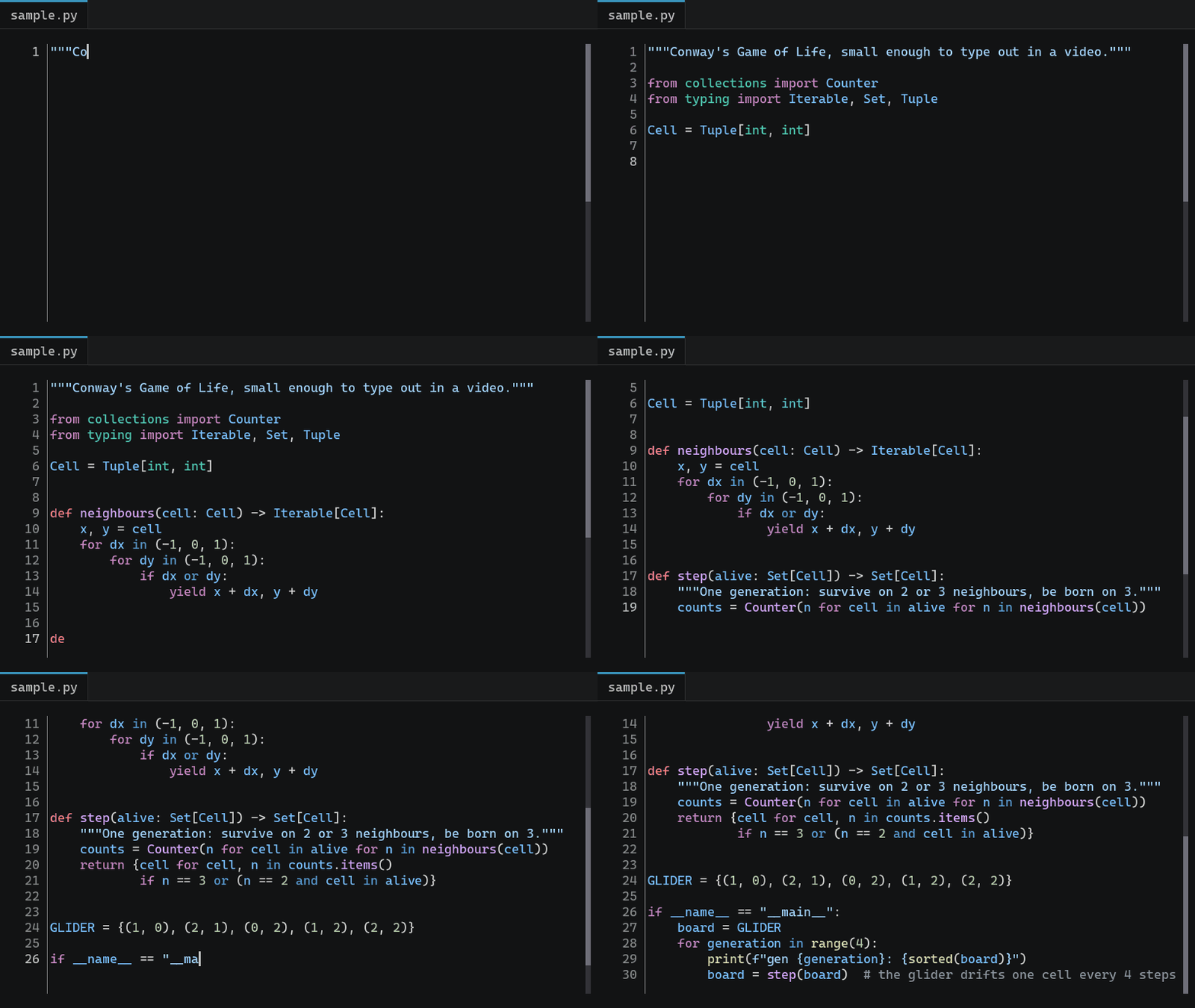
- pycvr-0.1.0/tests/test_themes.py +64 -0
pycvr-0.1.0/CHANGELOG.md
ADDED
|
@@ -0,0 +1,35 @@
|
|
|
1
|
+
# Changelog
|
|
2
|
+
|
|
3
|
+
## 0.1.0 (2026-10-24)
|
|
4
|
+
|
|
5
|
+
First release as an installable package. The rendered frames are pixel for pixel what the single
|
|
6
|
+
`CVR.py` produced, apart from the line number and highlighting changes below.
|
|
7
|
+
|
|
8
|
+
### Added
|
|
9
|
+
|
|
10
|
+
* `pip install` support, with a `cvr` command line tool and a `cvr-gui` launcher.
|
|
11
|
+
* A Python API: `cvr.render()`, `cvr.Renderer`, `cvr.load_theme()`, `cvr.list_themes()` and
|
|
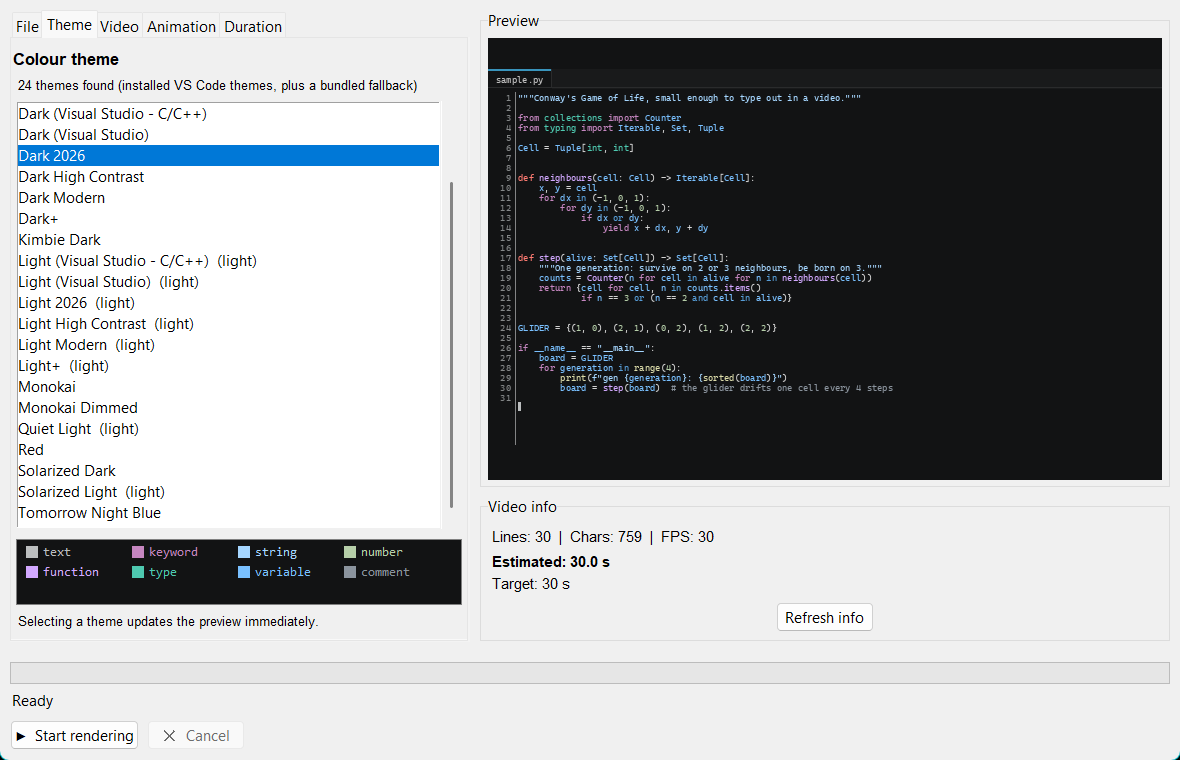
12
|
+
`cvr.Palette`.
|
|
13
|
+
* `Renderer.frames()` yields each frame as a numpy array, for GIFs or your own pipeline.
|
|
14
|
+
* Render from a string with `source=` and pick the lexer with `language=`.
|
|
15
|
+
* `Palette.replace()` and hex strings for custom colours.
|
|
16
|
+
* Tests and a GitHub Actions workflow.
|
|
17
|
+
|
|
18
|
+
### Changed
|
|
19
|
+
|
|
20
|
+
* The code is split into modules under `src/cvr/`. `python CVR.py` still opens the app.
|
|
21
|
+
* ffmpeg now comes with the package through `imageio-ffmpeg`, so exact theme colours work without
|
|
22
|
+
installing anything else. OpenCV is optional (`pip install pycvr[opencv]`).
|
|
23
|
+
* App settings live in the user config folder (`%APPDATA%\cvr`, `~/Library/Application Support/cvr`
|
|
24
|
+
or `~/.config/cvr`). An existing `typewriter_settings.json` is picked up on first launch.
|
|
25
|
+
* Line numbers appear as each line is typed, instead of the whole gutter being numbered from
|
|
26
|
+
the first frame.
|
|
27
|
+
* The preview uses the same highlighter as the render, so their colours agree.
|
|
28
|
+
* A failed render shows the reason in the app instead of pointing at the console.
|
|
29
|
+
* A failed or interrupted render deletes its partial file.
|
|
30
|
+
|
|
31
|
+
### Fixed
|
|
32
|
+
|
|
33
|
+
* A file that started with blank lines was highlighted one line out, because Pygments dropped the
|
|
34
|
+
leading newlines.
|
|
35
|
+
* Text the highlighter could not place fell back to Dark+ grey instead of the theme's foreground.
|
pycvr-0.1.0/LICENSE
ADDED
|
@@ -0,0 +1,21 @@
|
|
|
1
|
+
MIT License
|
|
2
|
+
|
|
3
|
+
Copyright (c) 2026 Anish Bhattarai
|
|
4
|
+
|
|
5
|
+
Permission is hereby granted, free of charge, to any person obtaining a copy
|
|
6
|
+
of this software and associated documentation files (the "Software"), to deal
|
|
7
|
+
in the Software without restriction, including without limitation the rights
|
|
8
|
+
to use, copy, modify, merge, publish, distribute, sublicense, and/or sell
|
|
9
|
+
copies of the Software, and to permit persons to whom the Software is
|
|
10
|
+
furnished to do so, subject to the following conditions:
|
|
11
|
+
|
|
12
|
+
The above copyright notice and this permission notice shall be included in all
|
|
13
|
+
copies or substantial portions of the Software.
|
|
14
|
+
|
|
15
|
+
THE SOFTWARE IS PROVIDED "AS IS", WITHOUT WARRANTY OF ANY KIND, EXPRESS OR
|
|
16
|
+
IMPLIED, INCLUDING BUT NOT LIMITED TO THE WARRANTIES OF MERCHANTABILITY,
|
|
17
|
+
FITNESS FOR A PARTICULAR PURPOSE AND NONINFRINGEMENT. IN NO EVENT SHALL THE
|
|
18
|
+
AUTHORS OR COPYRIGHT HOLDERS BE LIABLE FOR ANY CLAIM, DAMAGES OR OTHER
|
|
19
|
+
LIABILITY, WHETHER IN AN ACTION OF CONTRACT, TORT OR OTHERWISE, ARISING FROM,
|
|
20
|
+
OUT OF OR IN CONNECTION WITH THE SOFTWARE OR THE USE OR OTHER DEALINGS IN THE
|
|
21
|
+
SOFTWARE.
|
pycvr-0.1.0/MANIFEST.in
ADDED
pycvr-0.1.0/PKG-INFO
ADDED
|
@@ -0,0 +1,357 @@
|
|
|
1
|
+
Metadata-Version: 2.4
|
|
2
|
+
Name: pycvr
|
|
3
|
+
Version: 0.1.0
|
|
4
|
+
Summary: Turn source code into a typewriter-style video, rendered in your real VS Code colour theme.
|
|
5
|
+
Author: Anish Bhattarai
|
|
6
|
+
License-Expression: MIT
|
|
7
|
+
Project-URL: Homepage, https://github.com/anishbhattarai-asm/CVR
|
|
8
|
+
Project-URL: Source, https://github.com/anishbhattarai-asm/CVR
|
|
9
|
+
Project-URL: Changelog, https://github.com/anishbhattarai-asm/CVR/blob/main/CHANGELOG.md
|
|
10
|
+
Project-URL: Issues, https://github.com/anishbhattarai-asm/CVR/issues
|
|
11
|
+
Keywords: code,video,typewriter,vscode,theme,syntax-highlighting,animation
|
|
12
|
+
Classifier: Development Status :: 4 - Beta
|
|
13
|
+
Classifier: Environment :: Console
|
|
14
|
+
Classifier: Environment :: X11 Applications
|
|
15
|
+
Classifier: Environment :: Win32 (MS Windows)
|
|
16
|
+
Classifier: Environment :: MacOS X
|
|
17
|
+
Classifier: Intended Audience :: Developers
|
|
18
|
+
Classifier: Intended Audience :: Education
|
|
19
|
+
Classifier: Operating System :: OS Independent
|
|
20
|
+
Classifier: Programming Language :: Python :: 3
|
|
21
|
+
Classifier: Programming Language :: Python :: 3 :: Only
|
|
22
|
+
Classifier: Topic :: Multimedia :: Video
|
|
23
|
+
Classifier: Topic :: Software Development :: Documentation
|
|
24
|
+
Classifier: Typing :: Typed
|
|
25
|
+
Requires-Python: >=3.9
|
|
26
|
+
Description-Content-Type: text/markdown
|
|
27
|
+
License-File: LICENSE
|
|
28
|
+
Requires-Dist: numpy>=1.21
|
|
29
|
+
Requires-Dist: pillow>=9.2
|
|
30
|
+
Requires-Dist: pygments>=2.10
|
|
31
|
+
Requires-Dist: imageio-ffmpeg>=0.4.7
|
|
32
|
+
Provides-Extra: opencv
|
|
33
|
+
Requires-Dist: opencv-python>=4.5; extra == "opencv"
|
|
34
|
+
Provides-Extra: dev
|
|
35
|
+
Requires-Dist: pytest>=7; extra == "dev"
|
|
36
|
+
Dynamic: license-file
|
|
37
|
+
|
|
38
|
+
# CVR
|
|
39
|
+
|
|
40
|
+
Turn a source file into a typewriter style video, rendered in your real VS Code colour theme.
|
|
41
|
+
|
|
42
|
+
|
|
43
|
+
|
|
44
|
+
CVR reads the themes VS Code has installed on your machine, resolves their colours the same way
|
|
45
|
+
VS Code does, and paints every frame with them. The result is a video that looks like your editor,
|
|
46
|
+
not like an approximation of it.
|
|
47
|
+
|
|
48
|
+
Use it three ways: a desktop app with a live preview, a `cvr` command for scripts and batch jobs,
|
|
49
|
+
or a Python library you can build on.
|
|
50
|
+
|
|
51
|
+
## Features
|
|
52
|
+
|
|
53
|
+
* Reads installed VS Code themes straight from disk. Every built in theme plus anything a theme
|
|
54
|
+
extension contributes, or any theme json you point it at.
|
|
55
|
+
* Colours resolved from the theme json, including the `include` chain and TextMate scope
|
|
56
|
+
precedence, so `keyword.control`, `entity.name.function` and the rest land on the exact values
|
|
57
|
+
VS Code uses.
|
|
58
|
+
* Syntax highlighting through Pygments for any language it can lex.
|
|
59
|
+
* Editor tab across the top showing the file name, drawn in the theme tab colours.
|
|
60
|
+
* Fixed target duration. Ask for 30 seconds and the video is 30 seconds, no matter how long the
|
|
61
|
+
file is.
|
|
62
|
+
* Instant indentation, the way an editor indents, instead of typing leading spaces one at a time.
|
|
63
|
+
* Line numbers, cursor blink, smooth scrolling that follows the cursor, and a scrollbar.
|
|
64
|
+
* Exact theme colours in the output, with ffmpeg bundled so there is nothing else to install.
|
|
65
|
+
* Frames available as numpy arrays, so you can make GIFs or feed your own pipeline.
|
|
66
|
+
|
|
67
|
+
## Install
|
|
68
|
+
|
|
69
|
+
Python 3.9 or newer.
|
|
70
|
+
|
|
71
|
+
```
|
|
72
|
+
pip install pycvr
|
|
73
|
+
```
|
|
74
|
+
|
|
75
|
+
The package is called `pycvr` on PyPI; you import it as `cvr` and run it as `cvr`.
|
|
76
|
+
|
|
77
|
+
For the latest code from GitHub instead:
|
|
78
|
+
|
|
79
|
+
```
|
|
80
|
+
pip install git+https://github.com/anishbhattarai-asm/CVR
|
|
81
|
+
```
|
|
82
|
+
|
|
83
|
+
Or from a clone, which also lets you run the app without installing:
|
|
84
|
+
|
|
85
|
+
```
|
|
86
|
+
git clone https://github.com/anishbhattarai-asm/CVR
|
|
87
|
+
cd CVR
|
|
88
|
+
pip install .
|
|
89
|
+
```
|
|
90
|
+
|
|
91
|
+
This pulls in numpy, Pillow, Pygments and `imageio-ffmpeg`, which ships an ffmpeg binary. An
|
|
92
|
+
ffmpeg already on your `PATH` is used first.
|
|
93
|
+
|
|
94
|
+
The app needs Tkinter. It ships with Python on Windows and macOS. On Debian or Ubuntu install it
|
|
95
|
+
with `sudo apt install python3-tk`. The command line tool and the library work without it.
|
|
96
|
+
|
|
97
|
+
## Quick start
|
|
98
|
+
|
|
99
|
+
### The app
|
|
100
|
+
|
|
101
|
+
```
|
|
102
|
+
cvr
|
|
103
|
+
```
|
|
104
|
+
|
|
105
|
+
`cvr-gui` does the same without a console window, and from a clone without installing,
|
|
106
|
+
`pip install -r requirements.txt` then `python CVR.py`.
|
|
107
|
+
|
|
108
|
+
|
|
109
|
+
|
|
110
|
+
1. **File**: pick the source file and where the video should go.
|
|
111
|
+
2. **Theme**: choose a colour theme. The preview updates as you select.
|
|
112
|
+
3. **Video**: resolution, frame rate, font size, line numbers, file name tab, colour accuracy.
|
|
113
|
+
4. **Animation**: typing speed, cursor behaviour, scrolling, instant indentation.
|
|
114
|
+
5. **Duration**: set a target length, or drive it with the per character and per line delays.
|
|
115
|
+
|
|
116
|
+
Press **Start rendering**. Progress and an estimate appear at the bottom, and **Cancel** stops it.
|
|
117
|
+
When the render is done a notification appears in the corner; click it to play the video in the
|
|
118
|
+
player of your choice.
|
|
119
|
+
|
|
120
|
+
### The command line
|
|
121
|
+
|
|
122
|
+
```
|
|
123
|
+
cvr render app.py # app_typewriter.mp4, your VS Code theme
|
|
124
|
+
cvr render app.py -o demo.mp4 -t "Dark Modern" -d 30
|
|
125
|
+
cvr render main.rs -r 1920x1080 --fps 60 --font-size 28
|
|
126
|
+
cvr render notes.txt --language python --style typewriter --open
|
|
127
|
+
cvr themes # list installed themes, * marks the default
|
|
128
|
+
cvr themes light
|
|
129
|
+
```
|
|
130
|
+
|
|
131
|
+
| Option | Default | |
|
|
132
|
+
|---|---|---|
|
|
133
|
+
| `-o`, `--output PATH` | `FILE_typewriter.mp4` | Where to write the video. |
|
|
134
|
+
| `-t`, `--theme NAME` | the theme VS Code is set to | An installed theme's name (case does not matter) or a theme json path. |
|
|
135
|
+
| `-d`, `--duration SECONDS` | none | Fixed length. Without it, the delays decide. |
|
|
136
|
+
| `-r`, `--resolution WxH` | `1280x720` | Frame size. |
|
|
137
|
+
| `--fps N` | `30` | Frames per second. |
|
|
138
|
+
| `--font PATH`, `--font-size PX` | system monospace, `18` | Font file and size. |
|
|
139
|
+
| `--style` | `smooth` | `smooth`, `fast`, or `typewriter` (slower, underline cursor). |
|
|
140
|
+
| `--char-delay`, `--line-delay` | `0.05`, `0.30` | Seconds after each character and each line. |
|
|
141
|
+
| `--language NAME` | from the file name | Pygments lexer name. |
|
|
142
|
+
| `--no-line-numbers`, `--no-tab`, `--no-cursor`, `--no-blink` | | Hide parts of the editor. |
|
|
143
|
+
| `--no-follow`, `--no-smooth-scroll` | | Change how the view scrolls. |
|
|
144
|
+
| `--no-highlight` | | Plain text. |
|
|
145
|
+
| `--type-indent` | | Type leading spaces instead of indenting instantly. |
|
|
146
|
+
| `--compatible` | | Video Windows Media Player can open. See [Colour accuracy](#colour-accuracy). |
|
|
147
|
+
| `--open` | | Play the video when it is done. |
|
|
148
|
+
| `-q`, `--quiet` / `-v`, `--verbose` | | No progress bar / print timing details. |
|
|
149
|
+
|
|
150
|
+
`python -m cvr` works anywhere `cvr` does.
|
|
151
|
+
|
|
152
|
+
### Python
|
|
153
|
+
|
|
154
|
+
```python
|
|
155
|
+
import cvr
|
|
156
|
+
|
|
157
|
+
cvr.render("app.py", "app.mp4", theme="Monokai", duration=20)
|
|
158
|
+
```
|
|
159
|
+
|
|
160
|
+
## Python API
|
|
161
|
+
|
|
162
|
+
### `cvr.render()`
|
|
163
|
+
|
|
164
|
+
```python
|
|
165
|
+
cvr.render(code_path=None, output_path=None, *, theme=None, duration=None,
|
|
166
|
+
source=None, language=None, progress=None, cancel=None, **options) -> str
|
|
167
|
+
```
|
|
168
|
+
|
|
169
|
+
Renders and returns the path of the video.
|
|
170
|
+
|
|
171
|
+
* `theme` is an installed theme's name, a theme json path, a `cvr.Palette`, or `None` for the
|
|
172
|
+
theme VS Code is currently set to (falling back to the bundled Dark+).
|
|
173
|
+
* `duration` fixes the length in seconds. Leave it out to let the delays decide.
|
|
174
|
+
* `source` renders a string instead of reading `code_path`. `code_path` can still be given to set
|
|
175
|
+
the tab label and pick the lexer.
|
|
176
|
+
* `language` picks the Pygments lexer by name, such as `"python"` or `"rust"`.
|
|
177
|
+
* `progress(percent, total, status, eta_seconds)` is called as frames are written. `total` is
|
|
178
|
+
always 100.
|
|
179
|
+
* `cancel` is a `threading.Event` (anything with `is_set()`). Setting it stops the render and
|
|
180
|
+
deletes the partial file.
|
|
181
|
+
* Everything else goes to `cvr.Renderer`.
|
|
182
|
+
|
|
183
|
+
It raises `cvr.RenderError` when the render fails, `cvr.RenderCancelled` when it is cancelled,
|
|
184
|
+
`LookupError` for a theme that is not installed, and `FileNotFoundError` for a missing source file.
|
|
185
|
+
|
|
186
|
+
```python
|
|
187
|
+
import threading
|
|
188
|
+
import cvr
|
|
189
|
+
|
|
190
|
+
stop = threading.Event()
|
|
191
|
+
|
|
192
|
+
def show(percent, _total, status, eta):
|
|
193
|
+
print(f"\r{percent:5.1f}% {status} ETA {eta:.0f}s", end="")
|
|
194
|
+
|
|
195
|
+
cvr.render(source='print("hello")\n', language="python", output_path="hello.mp4",
|
|
196
|
+
duration=5, progress=show, cancel=stop)
|
|
197
|
+
```
|
|
198
|
+
|
|
199
|
+
### `cvr.Renderer`
|
|
200
|
+
|
|
201
|
+
The class behind `render()`. Construction reads and lays out the code; nothing is written until
|
|
202
|
+
you call `render()`.
|
|
203
|
+
|
|
204
|
+
```python
|
|
205
|
+
r = cvr.Renderer("app.py", "app.mp4", palette=cvr.load_theme("Dark Modern"),
|
|
206
|
+
resolution=(1920, 1080), fps=60, font_size=28)
|
|
207
|
+
print(r.estimated_duration(), "seconds,", r.total_frames(), "frames")
|
|
208
|
+
r.render() # returns the path, or False with the reason in r.error
|
|
209
|
+
```
|
|
210
|
+
|
|
211
|
+
| Option | Default | |
|
|
212
|
+
|---|---|---|
|
|
213
|
+
| `code_path` | | Source file. `str` or `pathlib.Path`. |
|
|
214
|
+
| `output_path` | `<name>_typewriter.mp4` in the current folder | Video to write. |
|
|
215
|
+
| `palette` | bundled Dark+ | A `cvr.Palette`. |
|
|
216
|
+
| `resolution` | `(1280, 720)` | Frame size in pixels. |
|
|
217
|
+
| `fps` | `30` | Frames per second. |
|
|
218
|
+
| `font_path` | system monospace | A TrueType font file. The default is the first one found of Cascadia Code or Consolas on Windows, Courier New or Menlo on macOS, Liberation Mono or DejaVu Sans Mono on Linux. |
|
|
219
|
+
| `font_size` | `18` | In pixels. |
|
|
220
|
+
| `char_delay` | `0.05` | Seconds after each typed character. |
|
|
221
|
+
| `line_delay` | `0.30` | Seconds after each line. |
|
|
222
|
+
| `target_duration` | `0` | Fixed length in seconds. Scales both delays and keeps their ratio. `0` turns it off. |
|
|
223
|
+
| `animation_type` | `"smooth"` | `"smooth"` uses the delays above. `"fast"` and `"typewriter"` replace them with presets; `"typewriter"` also draws an underline cursor. |
|
|
224
|
+
| `show_line_numbers` | `True` | Line number gutter. |
|
|
225
|
+
| `show_filename_bar` | `True` | Editor tab with the file name. |
|
|
226
|
+
| `show_cursor`, `cursor_blink` | `True`, `True` | The cursor, and whether it blinks. |
|
|
227
|
+
| `follow_cursor`, `smooth_scroll` | `True`, `True` | Scroll to keep the cursor in view, gliding rather than jumping. |
|
|
228
|
+
| `syntax_highlighting` | `True` | `False` draws everything in the foreground colour. |
|
|
229
|
+
| `instant_indent` | `True` | Indentation appears at once instead of being typed. |
|
|
230
|
+
| `exact_colour` | `True` | H.264 4:4:4 with untouched colours. See [Colour accuracy](#colour-accuracy). |
|
|
231
|
+
| `source` | `None` | Code as a string. |
|
|
232
|
+
| `language` | `None` | Pygments lexer name. |
|
|
233
|
+
|
|
234
|
+
### Frames
|
|
235
|
+
|
|
236
|
+
`Renderer.frames()` yields every frame in order as an RGB `uint8` numpy array of shape
|
|
237
|
+
`(height, width, 3)`, so you can write a GIF, add an overlay, or hand them to another library.
|
|
238
|
+
`create_frame(line, char)` draws a single frame on its own.
|
|
239
|
+
|
|
240
|
+
```python
|
|
241
|
+
from PIL import Image
|
|
242
|
+
import cvr
|
|
243
|
+
|
|
244
|
+
r = cvr.Renderer("app.py", palette=cvr.load_theme(), resolution=(800, 450),
|
|
245
|
+
fps=20, target_duration=10)
|
|
246
|
+
frames = [Image.fromarray(f) for f in r.frames()]
|
|
247
|
+
frames[0].save("app.gif", save_all=True, append_images=frames[1:], duration=50, loop=0)
|
|
248
|
+
```
|
|
249
|
+
|
|
250
|
+
[`examples/to_gif.py`](https://github.com/anishbhattarai-asm/CVR/blob/main/examples/to_gif.py) is the script that made the GIF at the top of this page.
|
|
251
|
+
|
|
252
|
+
### Themes and palettes
|
|
253
|
+
|
|
254
|
+
```python
|
|
255
|
+
cvr.list_themes() # [ThemeInfo(label, path), ...] for every installed theme
|
|
256
|
+
cvr.default_theme() # the one VS Code is set to
|
|
257
|
+
cvr.find_theme("monokai") # ThemeInfo or None; ignores case
|
|
258
|
+
cvr.load_theme("Solarized Dark") # Palette; also takes a json path, or None for the default
|
|
259
|
+
|
|
260
|
+
pal = cvr.Palette.from_file("my-theme.json")
|
|
261
|
+
pal = cvr.load_theme().replace(bg="#000000", cursor="#FFCC00")
|
|
262
|
+
cvr.DEFAULT_PALETTE # the bundled Dark+, no VS Code needed
|
|
263
|
+
```
|
|
264
|
+
|
|
265
|
+
A `Palette` holds every colour the renderer uses as an RGB tuple: `bg`, `fg`, `comment`,
|
|
266
|
+
`string`, `number`, `keyword_ctrl`, `storage`, `function`, `type_`, `variable`, the gutter, the
|
|
267
|
+
cursor, the tab colours and a few more. `Palette.FIELDS` lists them all. Any of them can be passed
|
|
268
|
+
as a `"#RRGGBB"` string.
|
|
269
|
+
|
|
270
|
+
Light themes are labelled with a `(light)` suffix, as in the app's list.
|
|
271
|
+
|
|
272
|
+
### Logging
|
|
273
|
+
|
|
274
|
+
The library reports through the standard `logging` module under the `cvr` logger and prints
|
|
275
|
+
nothing by itself. `logging.basicConfig(level=logging.INFO)` shows the timing each render settles
|
|
276
|
+
on.
|
|
277
|
+
|
|
278
|
+
[`examples/basic.py`](https://github.com/anishbhattarai-asm/CVR/blob/main/examples/basic.py) walks through the common cases.
|
|
279
|
+
|
|
280
|
+
## Colour accuracy
|
|
281
|
+
|
|
282
|
+
H.264 stores colour as YUV, and converting RGB to YUV and back costs a level or two on the dark
|
|
283
|
+
tones a code theme is built from. The **Exact theme colours** option in the Video tab (`--compatible`
|
|
284
|
+
on the command line, `exact_colour` in Python) controls the trade off.
|
|
285
|
+
|
|
286
|
+
**On**, the default. Colours match the preview exactly and coloured text edges stay sharp. Plays
|
|
287
|
+
in VLC, mpv and browsers.
|
|
288
|
+
|
|
289
|
+
**Off**. Colours land about one level off on dark tones. Plays in everything, including Windows
|
|
290
|
+
Media Player.
|
|
291
|
+
|
|
292
|
+
Windows Media Player cannot open H.264 4:4:4 and reports "unsupported encoding settings". Turn the
|
|
293
|
+
option off if you need a file it will play.
|
|
294
|
+
|
|
295
|
+
Both modes need ffmpeg, which `imageio-ffmpeg` provides. If neither it nor a system ffmpeg is
|
|
296
|
+
available, CVR falls back to OpenCV (`pip install "pycvr[opencv]"`), which shifts
|
|
297
|
+
dark tones slightly.
|
|
298
|
+
|
|
299
|
+
## How theme loading works
|
|
300
|
+
|
|
301
|
+
1. Find every VS Code extension folder, both the bundled ones next to the VS Code install and the
|
|
302
|
+
ones under your user profile.
|
|
303
|
+
2. Read each `package.json`, collect what `contributes.themes` declares, and resolve any localised
|
|
304
|
+
label through `package.nls.json`.
|
|
305
|
+
3. Parse the chosen theme, which is json with comments and trailing commas, and follow its
|
|
306
|
+
`include` chain so a theme built on another inherits correctly.
|
|
307
|
+
4. Resolve TextMate scopes with VS Code rules: the longest matching selector wins, and a later
|
|
308
|
+
rule beats an earlier one at the same specificity.
|
|
309
|
+
5. Map Pygments token types onto the resolved colours.
|
|
310
|
+
|
|
311
|
+
Identifier colouring is the one place this cannot be exact. VS Code colours identifiers with
|
|
312
|
+
semantic tokens from a language server, while CVR uses a lexer. Structural tokens such as
|
|
313
|
+
keywords, strings, numbers, comments, functions and classes match, but the odd identifier can land
|
|
314
|
+
on a different role.
|
|
315
|
+
|
|
316
|
+
Without VS Code installed, `cvr themes` lists only the bundled Dark+ palette, and any theme json
|
|
317
|
+
you have can still be loaded by path.
|
|
318
|
+
|
|
319
|
+
## Settings
|
|
320
|
+
|
|
321
|
+
The app remembers its choices in `settings.json` under `%APPDATA%\cvr` on Windows,
|
|
322
|
+
`~/Library/Application Support/cvr` on macOS, and `~/.config/cvr` on Linux. Set `CVR_SETTINGS` to
|
|
323
|
+
use another file. A `typewriter_settings.json` from an older version is read on first launch and
|
|
324
|
+
carried over.
|
|
325
|
+
|
|
326
|
+
## Project layout
|
|
327
|
+
|
|
328
|
+
```
|
|
329
|
+
src/cvr/
|
|
330
|
+
__init__.py public API
|
|
331
|
+
renderer.py Renderer, render(), timing
|
|
332
|
+
palette.py Palette and theme json parsing
|
|
333
|
+
themes.py finding installed VS Code themes
|
|
334
|
+
highlight.py Pygments tokens to theme colours
|
|
335
|
+
fonts.py font lookup and text measuring
|
|
336
|
+
encoders.py ffmpeg and OpenCV video writers
|
|
337
|
+
players.py finding installed video players
|
|
338
|
+
cli.py the cvr command
|
|
339
|
+
gui/ the Tkinter app: app.py, widgets.py, settings.py
|
|
340
|
+
tests/ pytest suite
|
|
341
|
+
examples/ library examples
|
|
342
|
+
CVR.py runs the app from a clone without installing
|
|
343
|
+
```
|
|
344
|
+
|
|
345
|
+
## Development
|
|
346
|
+
|
|
347
|
+
```
|
|
348
|
+
pip install -e ".[dev]"
|
|
349
|
+
pytest
|
|
350
|
+
```
|
|
351
|
+
|
|
352
|
+
The tests render small videos, so they need ffmpeg, which the install provides. Tests that need
|
|
353
|
+
Tkinter or OpenCV are skipped when those are missing.
|
|
354
|
+
|
|
355
|
+
## Licence
|
|
356
|
+
|
|
357
|
+
MIT. See [LICENSE](https://github.com/anishbhattarai-asm/CVR/blob/main/LICENSE).
|