py-tbparse 0.2.0__tar.gz → 0.4.0__tar.gz
This diff represents the content of publicly available package versions that have been released to one of the supported registries. The information contained in this diff is provided for informational purposes only and reflects changes between package versions as they appear in their respective public registries.
- {py_tbparse-0.2.0 → py_tbparse-0.4.0}/AGENTS.md +21 -11
- {py_tbparse-0.2.0 → py_tbparse-0.4.0}/LICENSE +1 -1
- py_tbparse-0.4.0/PKG-INFO +250 -0
- py_tbparse-0.4.0/README.md +214 -0
- py_tbparse-0.4.0/docs/gui-field-renames.png +0 -0
- {py_tbparse-0.2.0/twbparser_py → py_tbparse-0.4.0/py_tbparse}/__init__.py +35 -1
- {py_tbparse-0.2.0/twbparser_py → py_tbparse-0.4.0/py_tbparse}/_tables.py +26 -0
- py_tbparse-0.4.0/py_tbparse/cli.py +436 -0
- {py_tbparse-0.2.0/twbparser_py → py_tbparse-0.4.0/py_tbparse}/parser.py +29 -0
- py_tbparse-0.4.0/py_tbparse/rename.py +759 -0
- py_tbparse-0.4.0/py_tbparse/templates.py +855 -0
- py_tbparse-0.4.0/py_tbparse/usage.py +166 -0
- {py_tbparse-0.2.0/twbparser_py → py_tbparse-0.4.0/py_tbparse}/webgui.py +211 -15
- py_tbparse-0.4.0/py_tbparse.egg-info/PKG-INFO +250 -0
- {py_tbparse-0.2.0 → py_tbparse-0.4.0}/py_tbparse.egg-info/SOURCES.txt +31 -21
- py_tbparse-0.4.0/py_tbparse.egg-info/entry_points.txt +3 -0
- py_tbparse-0.4.0/py_tbparse.egg-info/top_level.txt +1 -0
- {py_tbparse-0.2.0 → py_tbparse-0.4.0}/pyproject.toml +5 -5
- {py_tbparse-0.2.0 → py_tbparse-0.4.0}/tests/test_batch.py +1 -1
- {py_tbparse-0.2.0 → py_tbparse-0.4.0}/tests/test_calculated_fields.py +1 -1
- {py_tbparse-0.2.0 → py_tbparse-0.4.0}/tests/test_clean.py +1 -1
- {py_tbparse-0.2.0 → py_tbparse-0.4.0}/tests/test_cli.py +1 -1
- py_tbparse-0.4.0/tests/test_corpus.py +84 -0
- {py_tbparse-0.2.0 → py_tbparse-0.4.0}/tests/test_dashboards.py +2 -2
- {py_tbparse-0.2.0 → py_tbparse-0.4.0}/tests/test_datasources.py +2 -2
- {py_tbparse-0.2.0 → py_tbparse-0.4.0}/tests/test_diff.py +1 -1
- {py_tbparse-0.2.0 → py_tbparse-0.4.0}/tests/test_fields.py +1 -1
- {py_tbparse-0.2.0 → py_tbparse-0.4.0}/tests/test_graph.py +1 -1
- {py_tbparse-0.2.0 → py_tbparse-0.4.0}/tests/test_gui_browser.py +72 -1
- {py_tbparse-0.2.0 → py_tbparse-0.4.0}/tests/test_joins.py +1 -1
- {py_tbparse-0.2.0 → py_tbparse-0.4.0}/tests/test_parser.py +2 -2
- py_tbparse-0.4.0/tests/test_public_workbooks.py +49 -0
- {py_tbparse-0.2.0 → py_tbparse-0.4.0}/tests/test_published.py +1 -1
- {py_tbparse-0.2.0 → py_tbparse-0.4.0}/tests/test_relationships.py +3 -3
- py_tbparse-0.4.0/tests/test_rename.py +386 -0
- py_tbparse-0.4.0/tests/test_rename_all.py +215 -0
- py_tbparse-0.4.0/tests/test_rename_mapping.py +68 -0
- {py_tbparse-0.2.0 → py_tbparse-0.4.0}/tests/test_sql.py +1 -1
- py_tbparse-0.4.0/tests/test_templates.py +415 -0
- {py_tbparse-0.2.0 → py_tbparse-0.4.0}/tests/test_validators.py +2 -2
- {py_tbparse-0.2.0 → py_tbparse-0.4.0}/tests/test_version.py +3 -3
- {py_tbparse-0.2.0 → py_tbparse-0.4.0}/tests/test_webgui.py +105 -2
- {py_tbparse-0.2.0 → py_tbparse-0.4.0}/tests/test_xml.py +2 -2
- py_tbparse-0.2.0/PKG-INFO +0 -150
- py_tbparse-0.2.0/README.md +0 -114
- py_tbparse-0.2.0/py_tbparse.egg-info/PKG-INFO +0 -150
- py_tbparse-0.2.0/py_tbparse.egg-info/entry_points.txt +0 -3
- py_tbparse-0.2.0/py_tbparse.egg-info/top_level.txt +0 -1
- py_tbparse-0.2.0/twbparser_py/cli.py +0 -207
- {py_tbparse-0.2.0 → py_tbparse-0.4.0}/MANIFEST.in +0 -0
- {py_tbparse-0.2.0 → py_tbparse-0.4.0}/docs/gui-overview.png +0 -0
- {py_tbparse-0.2.0/twbparser_py → py_tbparse-0.4.0/py_tbparse}/_clean.py +0 -0
- {py_tbparse-0.2.0/twbparser_py → py_tbparse-0.4.0/py_tbparse}/_xml.py +0 -0
- {py_tbparse-0.2.0/twbparser_py → py_tbparse-0.4.0/py_tbparse}/batch.py +0 -0
- {py_tbparse-0.2.0/twbparser_py → py_tbparse-0.4.0/py_tbparse}/calculated_fields.py +0 -0
- {py_tbparse-0.2.0/twbparser_py → py_tbparse-0.4.0/py_tbparse}/dashboards.py +0 -0
- {py_tbparse-0.2.0/twbparser_py → py_tbparse-0.4.0/py_tbparse}/datasources.py +0 -0
- {py_tbparse-0.2.0/twbparser_py → py_tbparse-0.4.0/py_tbparse}/diff.py +0 -0
- {py_tbparse-0.2.0/twbparser_py → py_tbparse-0.4.0/py_tbparse}/fields.py +0 -0
- {py_tbparse-0.2.0/twbparser_py → py_tbparse-0.4.0/py_tbparse}/graph.py +0 -0
- {py_tbparse-0.2.0/twbparser_py → py_tbparse-0.4.0/py_tbparse}/joins.py +0 -0
- {py_tbparse-0.2.0/twbparser_py → py_tbparse-0.4.0/py_tbparse}/published.py +0 -0
- {py_tbparse-0.2.0/twbparser_py → py_tbparse-0.4.0/py_tbparse}/py.typed +0 -0
- {py_tbparse-0.2.0/twbparser_py → py_tbparse-0.4.0/py_tbparse}/relationships.py +0 -0
- {py_tbparse-0.2.0/twbparser_py → py_tbparse-0.4.0/py_tbparse}/sql.py +0 -0
- {py_tbparse-0.2.0/twbparser_py → py_tbparse-0.4.0/py_tbparse}/validators.py +0 -0
- {py_tbparse-0.2.0 → py_tbparse-0.4.0}/py_tbparse.egg-info/dependency_links.txt +0 -0
- {py_tbparse-0.2.0 → py_tbparse-0.4.0}/py_tbparse.egg-info/requires.txt +0 -0
- {py_tbparse-0.2.0 → py_tbparse-0.4.0}/setup.cfg +0 -0
- {py_tbparse-0.2.0 → py_tbparse-0.4.0}/tests/conftest.py +0 -0
- {py_tbparse-0.2.0 → py_tbparse-0.4.0}/tests/fixtures/test_for_wenjie.twb +0 -0
- {py_tbparse-0.2.0 → py_tbparse-0.4.0}/tests/fixtures/test_for_zip.twbx +0 -0
|
@@ -2,7 +2,7 @@
|
|
|
2
2
|
|
|
3
3
|
## What this is
|
|
4
4
|
|
|
5
|
-
`
|
|
5
|
+
`py_tbparse` is a native Python port of the R package
|
|
6
6
|
[`twbparser`](https://github.com/PrigasG/twbparser) (mirrored at
|
|
7
7
|
`DDSNA/twbparser`): it parses Tableau `.twb`/`.twbx` workbook files into
|
|
8
8
|
`pandas` DataFrames. Pure `lxml` XML parsing — no R runtime, no `rpy2`.
|
|
@@ -14,14 +14,15 @@ type="join">` and 2020.2+ `<relationships>`), inferred relationships,
|
|
|
14
14
|
dashboards/dashboard-sheets, `validate_relationships`, custom/initial SQL,
|
|
15
15
|
and published-source detection. **Not yet ported** (v2): formatting,
|
|
16
16
|
tooltips, colors, axes, sorts, dashboard layout/actions, analytics
|
|
17
|
-
helpers (calc complexity,
|
|
17
|
+
helpers (calc complexity, replication brief), and the
|
|
18
18
|
Shiny-inspector equivalent.
|
|
19
19
|
|
|
20
20
|
Also added, with no R equivalent (Python-native extras -- see "Non-R
|
|
21
21
|
modules" below): Graphviz DOT export of the relationship graph
|
|
22
22
|
(replaces the R package's igraph/ggraph-based plotting with a
|
|
23
23
|
dependency-free alternative), workbook-to-workbook diff, folder/batch
|
|
24
|
-
analysis across many workbooks,
|
|
24
|
+
analysis across many workbooks, field renaming, field usage, workbook
|
|
25
|
+
templates, and Jupyter rich display.
|
|
25
26
|
|
|
26
27
|
## Setup
|
|
27
28
|
|
|
@@ -37,7 +38,7 @@ python3 -m venv .venv
|
|
|
37
38
|
```bash
|
|
38
39
|
.venv/bin/python -m pytest -q # run the full test suite
|
|
39
40
|
.venv/bin/python -m pytest -q tests/test_joins.py # single file
|
|
40
|
-
.venv/bin/python -m py_compile
|
|
41
|
+
.venv/bin/python -m py_compile py_tbparse/*.py # syntax check
|
|
41
42
|
```
|
|
42
43
|
|
|
43
44
|
Browser (GUI) tests need a one-time setup; without it they skip and the
|
|
@@ -58,19 +59,19 @@ via `from __future__ import annotations`).
|
|
|
58
59
|
|
|
59
60
|
```bash
|
|
60
61
|
.venv/bin/pip install -e ".[dev]" # build + twine
|
|
61
|
-
rm -rf dist build
|
|
62
|
+
rm -rf dist build py_tbparse.egg-info
|
|
62
63
|
.venv/bin/python -m build # produces dist/*.whl and dist/*.tar.gz
|
|
63
64
|
.venv/bin/twine check dist/* # validates metadata/README rendering
|
|
64
65
|
```
|
|
65
66
|
|
|
66
67
|
Version is single-sourced from `pyproject.toml`'s `[project].version`;
|
|
67
|
-
`
|
|
68
|
+
`py_tbparse.__version__` reads it back via `importlib.metadata` at
|
|
68
69
|
runtime (see `__init__.py`), so don't hardcode a second copy.
|
|
69
70
|
|
|
70
71
|
Before bumping the version for a release: bump `version` in
|
|
71
72
|
`pyproject.toml`, then rebuild and smoke-test the wheel in a
|
|
72
|
-
throwaway venv (`pip install dist/*.whl`, run `
|
|
73
|
-
`
|
|
73
|
+
throwaway venv (`pip install dist/*.whl`, run `py-tbparse --help` and
|
|
74
|
+
`py-tbparse-gui --help`, run pytest against an extracted sdist) — this
|
|
74
75
|
catches packaging bugs (missing files, wrong entry points) that an
|
|
75
76
|
editable install won't.
|
|
76
77
|
|
|
@@ -88,7 +89,7 @@ Publishers" settings page before the first release, and needs a
|
|
|
88
89
|
|
|
89
90
|
## Architecture
|
|
90
91
|
|
|
91
|
-
Each `
|
|
92
|
+
Each `py_tbparse/*.py` module is a direct port of one R source file in
|
|
92
93
|
the upstream package, function-for-function:
|
|
93
94
|
|
|
94
95
|
| Python module | Ported from (R) | Notes |
|
|
@@ -120,10 +121,13 @@ beyond the R package's scope:
|
|
|
120
121
|
| Python module | What it is |
|
|
121
122
|
|---|---|
|
|
122
123
|
| `_tables.py` | Name → `TwbParser`-accessor registry shared by `cli.py`, `webgui.py`, `diff.py`, and `batch.py`. Adding a new extractor to `TwbParser`? Add it here too so it's automatically available everywhere else. |
|
|
123
|
-
| `cli.py` | `
|
|
124
|
-
| `webgui.py` | `
|
|
124
|
+
| `cli.py` | `py-tbparse` command-line entry point, plus the `diff`/`batch`/`rename`/`template` subcommands (dispatched on `sys.argv[1]` before the normal single-workbook argparse parser runs) |
|
|
125
|
+
| `webgui.py` | `py-tbparse-gui`: stdlib-only (`http.server` + vanilla JS) local browser GUI, no GUI toolkit dependency. Loosely fills the role of the R package's `run_twbparser_app`/Shiny inspector. |
|
|
125
126
|
| `graph.py` | `to_dot()`: Graphviz DOT export of joins/relationships (+ optional inferred, as dashed edges). Replaces the R package's igraph/ggraph-based `plot_dependency_graph`/`plot_relationship_graph` with a dependency-free text format any Graphviz-compatible tool can render. |
|
|
126
127
|
| `diff.py` | `diff_tables()`/`diff_workbooks()`: row-level added/removed diff between two workbooks' same-named table, via `_tables.TABLE_SPECS`. No "changed" classification without a natural key — a changed row shows as one removed + one added row. |
|
|
128
|
+
| `rename.py` | `suggest_field_renames()` (clean-name suggestions, optionally matched against a "before" reference), `suggest_renames()` (the same for every kind of object: field, parameter, worksheet, dashboard, datasource, folder, hierarchy; adds a `kind` column), `load_rename_mapping()` (read an edited CSV back), `compare_field_schemas()` (fields with no counterpart across a datasource switch) and `apply_field_renames()`/`build_renamed_workbook()` (write a copy with captions set; never overwrites). Also the `field-renames` and `report-renames` tables in `_tables.py`. A worksheet/dashboard rename must rewrite every reference (`_SHEET_REFERENCES`); if you learn of another place Tableau writes a sheet name, add it there. |
|
|
129
|
+
| `usage.py` | `field_usage()`: for every field, the worksheets, dashboards and calculations that use it, followed through calculations, groups/sets and bins (the `field-usage` table). Python-native rather than a port of the R package's field-usage helper. |
|
|
130
|
+
| `templates.py` | Workbook templates. `make_template()` writes a `.twbx` with a `template.json` manifest (required fields from `usage.py`, parameters, connections; data, extracts and credentials stripped); `read_data()` describes new data (CSV, or a `.twb`/`.twbx`/`.tds`); `suggest_mapping()` pairs fields with columns (reuses `rename._match_key`, type checks against the field's *physical* type, `datatype-customized` fields keep their type); `apply_template()` replaces the datasource's connection, keeping every field's local name, sets parameters and stores `template-answers.json`. A CSV connection is written in the 2020.2+ object-model shape (both `_.fcp.ObjectModelEncapsulateLegacy` relations, object graph, table column, `object-id` per record) when the template uses it -- keep those in step if you touch one. Untested in Tableau itself. |
|
|
127
131
|
| `batch.py` | `scan_folder()`: runs one table across every `.twb`/`.twbx` in a directory, concatenated with a `workbook` column. Skips (with a warning) any file that fails to load/extract rather than aborting the batch. |
|
|
128
132
|
|
|
129
133
|
## Porting conventions (read before adding/modifying a function)
|
|
@@ -173,6 +177,12 @@ beyond the R package's scope:
|
|
|
173
177
|
synthetic XML snippet (see `tests/test_joins.py`,
|
|
174
178
|
`tests/test_dashboards.py` for the pattern — many are lifted from the R
|
|
175
179
|
functions' own `@examples` roxygen blocks).
|
|
180
|
+
- `tests/corpus/` is 200 real workbooks (permissive licences, pinned by blob sha in
|
|
181
|
+
`manifest.csv`, licence texts in `licenses/`). The files are gitignored; fetch with
|
|
182
|
+
`python scripts/fetch_corpus.py`. `tests/test_corpus.py` skips without them. Run it when you
|
|
183
|
+
change anything that reads workbook XML: it found a Unicode matching bug the hand-made
|
|
184
|
+
fixtures could not. Add to the corpus only from repositories whose licence permits
|
|
185
|
+
redistribution, and record the licence text.
|
|
176
186
|
- `tests/conftest.py` provides `wenjie_xml`, `wenjie_path`,
|
|
177
187
|
`zip_twbx_path` fixtures and an `xml_from_string()` helper. Tests import
|
|
178
188
|
it with `from conftest import xml_from_string` (no `tests/__init__.py`,
|
|
@@ -4,7 +4,7 @@ This project is a Python port of logic originally implemented in the R
|
|
|
4
4
|
package "twbparser" (https://github.com/PrigasG/twbparser),
|
|
5
5
|
Copyright (c) 2025 George Arthur.
|
|
6
6
|
|
|
7
|
-
Copyright (c) 2026 the
|
|
7
|
+
Copyright (c) 2026 the py-tbparse contributors
|
|
8
8
|
|
|
9
9
|
Permission is hereby granted, free of charge, to any person obtaining a copy
|
|
10
10
|
of this software and associated documentation files (the "Software"), to deal
|
|
@@ -0,0 +1,250 @@
|
|
|
1
|
+
Metadata-Version: 2.4
|
|
2
|
+
Name: py-tbparse
|
|
3
|
+
Version: 0.4.0
|
|
4
|
+
Summary: Native Python port of the twbparser R package: parse Tableau .twb/.twbx workbooks into pandas DataFrames.
|
|
5
|
+
Author: DDSNA
|
|
6
|
+
License: MIT
|
|
7
|
+
Project-URL: Homepage, https://github.com/DDSNA/py-tbparse
|
|
8
|
+
Project-URL: Source, https://github.com/DDSNA/py-tbparse
|
|
9
|
+
Project-URL: Issues, https://github.com/DDSNA/py-tbparse/issues
|
|
10
|
+
Keywords: tableau,twb,twbx,workbook,parser,pandas
|
|
11
|
+
Classifier: Development Status :: 4 - Beta
|
|
12
|
+
Classifier: Intended Audience :: Developers
|
|
13
|
+
Classifier: License :: OSI Approved :: MIT License
|
|
14
|
+
Classifier: Operating System :: OS Independent
|
|
15
|
+
Classifier: Programming Language :: Python :: 3
|
|
16
|
+
Classifier: Programming Language :: Python :: 3.9
|
|
17
|
+
Classifier: Programming Language :: Python :: 3.10
|
|
18
|
+
Classifier: Programming Language :: Python :: 3.11
|
|
19
|
+
Classifier: Programming Language :: Python :: 3.12
|
|
20
|
+
Classifier: Programming Language :: Python :: 3.13
|
|
21
|
+
Classifier: Topic :: Software Development :: Libraries :: Python Modules
|
|
22
|
+
Classifier: Topic :: Office/Business
|
|
23
|
+
Requires-Python: >=3.9
|
|
24
|
+
Description-Content-Type: text/markdown
|
|
25
|
+
License-File: LICENSE
|
|
26
|
+
Requires-Dist: lxml>=4.9
|
|
27
|
+
Requires-Dist: pandas>=1.5
|
|
28
|
+
Provides-Extra: test
|
|
29
|
+
Requires-Dist: pytest>=7; extra == "test"
|
|
30
|
+
Provides-Extra: browser
|
|
31
|
+
Requires-Dist: playwright>=1.40; extra == "browser"
|
|
32
|
+
Provides-Extra: dev
|
|
33
|
+
Requires-Dist: build>=1.0; extra == "dev"
|
|
34
|
+
Requires-Dist: twine>=5.0; extra == "dev"
|
|
35
|
+
Dynamic: license-file
|
|
36
|
+
|
|
37
|
+
# py-tbparse
|
|
38
|
+
|
|
39
|
+
Reads Tableau workbooks (`.twb` and `.twbx`) and gives you what's in them as pandas DataFrames: datasources, fields, calculated fields, joins, relationships, dashboards, custom SQL. It's plain Python. You don't need Tableau or R installed.
|
|
40
|
+
|
|
41
|
+
It began as a port of PrigasG's R package [twbparser](https://github.com/PrigasG/twbparser). The browser GUI, the command-line tool, workbook diffing and folder scanning are new here.
|
|
42
|
+
|
|
43
|
+
|
|
44
|
+
|
|
45
|
+
## Install
|
|
46
|
+
|
|
47
|
+
```bash
|
|
48
|
+
pip install py-tbparse
|
|
49
|
+
```
|
|
50
|
+
|
|
51
|
+
Or from a checkout:
|
|
52
|
+
|
|
53
|
+
```bash
|
|
54
|
+
git clone https://github.com/DDSNA/py-tbparse.git
|
|
55
|
+
cd py-tbparse
|
|
56
|
+
pip install -e .
|
|
57
|
+
```
|
|
58
|
+
|
|
59
|
+
One name throughout: `pip install py-tbparse`, `import py_tbparse`, run `py-tbparse` or `py-tbparse-gui`. (Releases up to 0.2.0 imported `twbparser_py` and ran `twbparser` / `twbparser-gui`; those names are gone.)
|
|
60
|
+
|
|
61
|
+
## Using it from Python
|
|
62
|
+
|
|
63
|
+
```python
|
|
64
|
+
from py_tbparse import TwbParser
|
|
65
|
+
|
|
66
|
+
p = TwbParser("workbook.twb") # or a .twbx
|
|
67
|
+
p.get_overview() # counts of everything
|
|
68
|
+
p.get_calculated_fields() # each calculation and its formula
|
|
69
|
+
p.get_relationships() # how the tables connect
|
|
70
|
+
```
|
|
71
|
+
|
|
72
|
+
Every getter returns a DataFrame. The rest are `get_datasources`, `get_parameters`, `get_fields`, `get_raw_fields`, `get_joins`, `get_relations`, `get_inferred_relationships`, `get_dashboards`, `get_dashboard_sheets`, `get_custom_sql`, `get_initial_sql` and `get_published_refs`. `get_relationship_graph_dot()` returns the data model as Graphviz text, and `validate()` looks for problems in the relationships. In Jupyter, a bare `p` shows the overview.
|
|
73
|
+
|
|
74
|
+
Two helpers work across workbooks:
|
|
75
|
+
|
|
76
|
+
```python
|
|
77
|
+
from py_tbparse import diff_workbooks, scan_folder
|
|
78
|
+
|
|
79
|
+
diff_workbooks(TwbParser("v1.twb"), TwbParser("v2.twb"), table="datasources")
|
|
80
|
+
scan_folder("./workbooks", table="datasources") # one table, every workbook in the folder
|
|
81
|
+
```
|
|
82
|
+
|
|
83
|
+
### Cleaning field names after a datasource switch
|
|
84
|
+
|
|
85
|
+
Pointing a workbook at a new datasource that only partly matches the old schema tends to leave ugly names: `ORDER_ID`, `orderId`, `Order ID (Orders1)`, `Order ID1`. `suggest_field_renames` proposes a clean name for each field. It only reports; it never edits the workbook.
|
|
86
|
+
|
|
87
|
+
```python
|
|
88
|
+
from py_tbparse import TwbParser, suggest_field_renames
|
|
89
|
+
|
|
90
|
+
new = TwbParser("after_switch.twb")
|
|
91
|
+
old = TwbParser("before_switch.twb") # optional: the schema you want to match
|
|
92
|
+
|
|
93
|
+
suggest_field_renames(new, reference=old, only_changed=True)
|
|
94
|
+
# name current suggested reason score
|
|
95
|
+
# [ORDER_ID] ORDER_ID Order ID matches reference 1.0
|
|
96
|
+
# [Sales Amount (Orders1)] Sales Amount (Orders1) Sales Amount matches reference 1.0
|
|
97
|
+
# [orderDate] orderDate Order Date normalized NaN
|
|
98
|
+
```
|
|
99
|
+
|
|
100
|
+
With a `reference` (a workbook, a fields table or a plain list of names), fields that match by name ignoring case, separators and Tableau's duplicate suffixes take the reference's exact spelling, and near-misses above `fuzzy_cutoff` (default 0.85) are matched too. Everything else is tidied by `normalize_name(name, style)`, where `style` is `title` (default), `snake`, `lower` or `keep`. Names that are already clean (`YTD Sales`, `iPhone Units`, `Country/Region`) are left alone. `1` and `(Table1)` suffixes are only dropped when the plain name exists in the same datasource (`Address Line 2` and `Q1` are never treated as duplicates), fuzzy matches never cross a different number, and two fields never get the same suggestion (the loser stays as it is, with `reason` set to `conflict`).
|
|
101
|
+
|
|
102
|
+
`p.get_field_renames()` does the same from a parser.
|
|
103
|
+
|
|
104
|
+
**Rename everything in the report, not just fields.** Pass `kinds` (or `--all` / `--kinds` on the command line) and worksheets, dashboards, datasources, parameters, folders and hierarchies are covered too:
|
|
105
|
+
|
|
106
|
+
```python
|
|
107
|
+
from py_tbparse import TwbParser, suggest_renames, apply_field_renames
|
|
108
|
+
|
|
109
|
+
p = TwbParser("report.twb")
|
|
110
|
+
suggest_renames(p, only_changed=True) # kind, datasource, name, current, suggested, ...
|
|
111
|
+
suggest_renames(p, kinds=["worksheet", "dashboard"]) # just the sheets
|
|
112
|
+
apply_field_renames(p, kinds="all") # writes report_renamed.twb
|
|
113
|
+
```
|
|
114
|
+
|
|
115
|
+
```bash
|
|
116
|
+
py-tbparse rename report.twb --all --only-changed
|
|
117
|
+
py-tbparse rename report.twb --kinds worksheet,dashboard --write-workbook
|
|
118
|
+
```
|
|
119
|
+
|
|
120
|
+
Each kind is renamed the way Tableau does it: fields, parameters and datasources get a caption (their internal names stay, so formulas and sheets keep working); a worksheet or dashboard is renamed in every place its name is written (the sheet, its window and thumbnail, the zones of dashboards that show it, actions, story points); a folder or hierarchy gets its new name. Worksheets and dashboards share one namespace, as they do in Tableau, so two of them never end up with the same name. A `reference` workbook lends its spelling to objects of the same kind. Datasources that Tableau named itself (`federated.0grg...`) and nobody captioned are left out. The `kind` column also appears in the CSV, so **Edit the suggestions yourself** works for sheets too. The `report-renames` table lists all of it, and the GUI's Field renames view has an "Everything in the report" switch. As with fields, none of this has been opened in Tableau itself.
|
|
121
|
+
|
|
122
|
+
**Edit the suggestions yourself.** Export them, change the `suggested` column in a spreadsheet (blank means leave the field alone), then apply your version to a copy of the workbook:
|
|
123
|
+
|
|
124
|
+
```bash
|
|
125
|
+
py-tbparse rename new.twb -r old.twb -f csv -o mapping.csv
|
|
126
|
+
py-tbparse rename new.twb --apply mapping.csv # writes new_renamed.twb; add --write-workbook PATH to choose the file
|
|
127
|
+
```
|
|
128
|
+
|
|
129
|
+
Your edits are applied as written, including rows the tool had marked `conflict`; two rows giving the same name in one datasource are rejected. From Python this is `apply_field_renames(p, renames=load_rename_mapping("mapping.csv"))`.
|
|
130
|
+
|
|
131
|
+
**What will stay broken.** `py-tbparse rename new.twb -r old.twb --missing` (or `compare_field_schemas(new, old)`) lists the fields with no counterpart after the switch: `old only` fields that nothing in the new source matches, and `new only` fields nothing in the old workbook matches, each with the closest name on the other side as a hint. Sheets using an `old only` field stay red after Replace Data Source until you map or recreate it.
|
|
132
|
+
|
|
133
|
+
To save the result, `p.write_renamed_workbook()` (or `apply_field_renames(p, ...)`) writes `<name>_renamed.twb` / `.twbx` next to the original. It sets each field's caption, which is how Tableau renames a field; the internal names that formulas and sheets use are not touched, and a `.twbx` keeps all its other contents. A field that only exists as a physical column (typical right after a datasource switch) gets a new minimal `<column>` element carrying the caption; that shape follows what Tableau writes but I have not opened such files in Tableau itself. It never modifies the original and refuses to overwrite an existing file unless you pass `overwrite=True`.
|
|
134
|
+
|
|
135
|
+
**When to run it.** Add the new datasource to a *copy* of the workbook first, then run this with the old workbook as `reference` and `datasource=` set to the new source, so only its fields are renamed. Open the fixed copy and use Replace Data Source; fields with matching names should re-link on their own. It also works after references have already broken, but it only fixes names: sheets that point at missing fields stay broken until you replace the source again. (Check this on a copy first; I have not tested the re-linking in Tableau itself.)
|
|
136
|
+
|
|
137
|
+
### Templates
|
|
138
|
+
|
|
139
|
+
Turn a finished workbook into a template, then make new workbooks from it with other data. Every sheet, dashboard, calculation and format comes along; only the data changes. The idea comes from Tableau's Accelerators and Power BI's `.pbit` files.
|
|
140
|
+
|
|
141
|
+
```bash
|
|
142
|
+
py-tbparse template make sales.twbx # writes sales.template.twbx
|
|
143
|
+
py-tbparse template show sales.template.twbx # the fields it needs, and its parameters
|
|
144
|
+
py-tbparse template apply sales.template.twbx --data q3.csv # suggested mapping + what would break; writes nothing
|
|
145
|
+
py-tbparse template apply sales.template.twbx --data q3.csv --mapping-out map.csv # save the mapping to edit
|
|
146
|
+
py-tbparse template apply sales.template.twbx --data q3.csv --mapping map.csv -p "Top N=10" --write
|
|
147
|
+
```
|
|
148
|
+
|
|
149
|
+
```python
|
|
150
|
+
from py_tbparse import make_template, load_template, read_data, suggest_mapping, apply_template
|
|
151
|
+
|
|
152
|
+
t = load_template(make_template("sales.twbx"))
|
|
153
|
+
data = read_data("q3.csv") # or a .twb / .twbx / .tds already connected to the new data
|
|
154
|
+
suggest_mapping(t, data) # field, required, used_by, mapped_to, status, ...
|
|
155
|
+
apply_template(t, data, params={"Top N": "10"}) # writes sales_q3.twbx
|
|
156
|
+
```
|
|
157
|
+
|
|
158
|
+
**What a template is.** An ordinary `.twbx` (Tableau still opens it) with a `template.json` manifest inside. The manifest lists the fields the workbook takes from its data, marking a field `required` when a sheet uses it, directly or through calculations, groups and sets. It also lists the parameters and where the data came from. Extracts, packaged data and cached query results are left out (`--keep-data` keeps them as sample data), and user names and passwords are blanked.
|
|
159
|
+
|
|
160
|
+
**Mapping.** Each required field is matched to a column of the new data by name, ignoring case and separators (`ORDER_DATE` → `Order Date`), with close spellings accepted above `--cutoff`. Types are checked like Tableau's Accelerator mapper: a text column is never offered for a number or a date, while integer vs decimal and date vs date-time map with a warning. A field whose type the author changed in Tableau keeps that type, and Tableau converts the column. Before anything is written you see which sheets would break for each field left without a column; writing then needs `--allow-missing`. Edit the mapping as a CSV, as with renames.
|
|
161
|
+
|
|
162
|
+
**What gets written.** The template's connection is replaced by one to the new data (a CSV file, or the connection of the workbook / `.tds` you pass). Every field keeps the local name its sheets and formulas use; only the physical column behind it changes. Parameter values are set with `-p NAME=VALUE`, checked against the parameter's type and its list of allowed values. The output (`<template>_<data>.twbx` beside the template, never overwritten) also stores `template-answers.json`: which template, data, mapping and parameters made it, so it can be re-made or checked later.
|
|
163
|
+
|
|
164
|
+
**Limits.** A CSV feeds one table. A template whose datasource joins several tables needs a workbook or `.tds` as its data, so the joins come along. Excel files are not read directly yet; save as CSV or pass a workbook connected to the sheet. As with renames, I have not opened the generated workbooks in Tableau itself, so check one before relying on it.
|
|
165
|
+
|
|
166
|
+
`p.get_field_usage()` (or `field_usage(p)`, the `field-usage` table) is the analysis behind `required`: for every field, the sheets, dashboards and calculations that use it.
|
|
167
|
+
|
|
168
|
+
### `.twbx` files
|
|
169
|
+
|
|
170
|
+
A `.twbx` is read directly from the zip and nothing gets written to disk. That means `p.twbx_dir` is `None`, and `p.path` is a made-up `<file>.twbx/<name>.twb` that you can't open. If you want the files out, extract them yourself:
|
|
171
|
+
|
|
172
|
+
```python
|
|
173
|
+
from py_tbparse import extract_twb_from_twbx, twbx_extract_files
|
|
174
|
+
|
|
175
|
+
extract_twb_from_twbx("workbook.twbx", extract_dir="out/")
|
|
176
|
+
twbx_extract_files("workbook.twbx", exdir="out/") # everything in the package
|
|
177
|
+
```
|
|
178
|
+
|
|
179
|
+
## Command line
|
|
180
|
+
|
|
181
|
+
```bash
|
|
182
|
+
py-tbparse workbook.twb # overview
|
|
183
|
+
py-tbparse workbook.twb tables # list the tables
|
|
184
|
+
py-tbparse workbook.twb calculated-fields
|
|
185
|
+
py-tbparse workbook.twb fields --format csv -o fields.csv
|
|
186
|
+
py-tbparse workbook.twbx dashboard-sheets --dashboard "Sales Overview"
|
|
187
|
+
py-tbparse workbook.twb validate # exit code 2 if it finds a problem
|
|
188
|
+
py-tbparse workbook.twb graph > model.dot # --include-inferred adds the guessed links
|
|
189
|
+
py-tbparse diff old.twb new.twb datasources
|
|
190
|
+
py-tbparse batch ./workbooks datasources
|
|
191
|
+
py-tbparse rename new.twb --reference old.twb --only-changed # suggested clean field names
|
|
192
|
+
py-tbparse rename new.twb -r old.twb --datasource federated.abc123 --write-workbook # and save new_renamed.twb
|
|
193
|
+
py-tbparse rename report.twb --all --write-workbook # sheets, dashboards, datasources, ... too
|
|
194
|
+
py-tbparse template make sales.twbx # see Templates above
|
|
195
|
+
py-tbparse template apply sales.template.twbx --data q3.csv --write
|
|
196
|
+
```
|
|
197
|
+
|
|
198
|
+
Tables: `overview`, `datasources`, `parameters`, `fields`, `raw-fields`, `calculated-fields`, `joins`, `relations`, `relationships`, `inferred-relationships`, `dashboards`, `dashboard-sheets`, `custom-sql`, `initial-sql`, `published-refs`, `field-usage`, `field-renames`, `report-renames`.
|
|
199
|
+
|
|
200
|
+
`--format` takes `table` (default), `csv` or `json`. `graph` always prints Graphviz text. `rename` takes `--reference`, `--datasource`, `--write-workbook [PATH]`, `--style`, `--cutoff`, `--only-changed`, `--all`, `--kinds`, `--apply MAPPING.csv`, `--missing`, `--format` and `--output`. `diff` and `batch` accept the same table names except `graph`, `validate` and `tables`.
|
|
201
|
+
|
|
202
|
+
## GUI
|
|
203
|
+
|
|
204
|
+
```bash
|
|
205
|
+
py-tbparse-gui workbook.twb # opens your browser with it loaded
|
|
206
|
+
py-tbparse-gui # starts empty, paste a path and hit Load
|
|
207
|
+
py-tbparse-gui --no-browser --port 8765 # server only, for a machine with no display
|
|
208
|
+
```
|
|
209
|
+
|
|
210
|
+
It uses only the standard library, so there's nothing more to install.
|
|
211
|
+
|
|
212
|
+
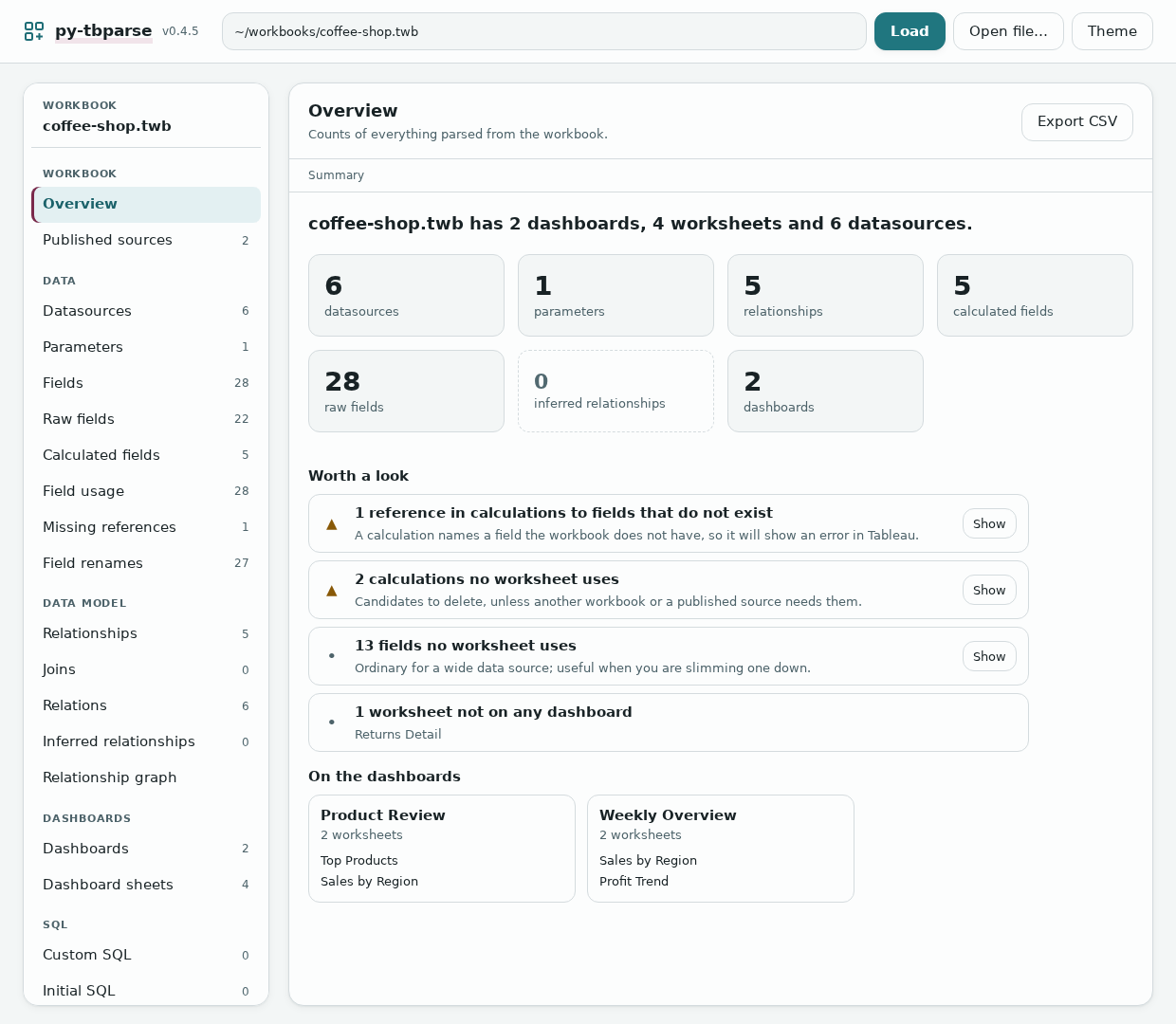
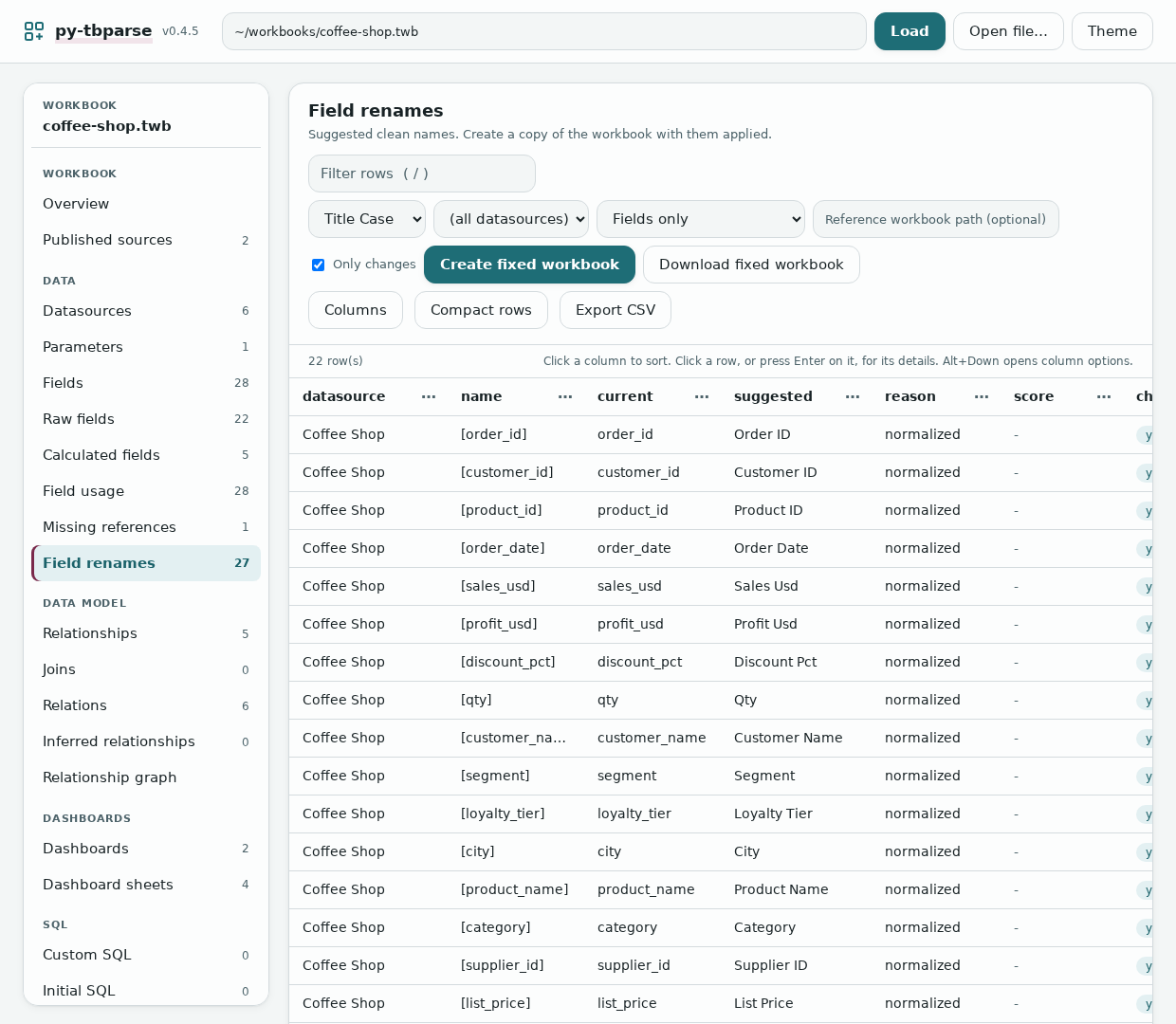
The sidebar lists every table with its row count. Click a column header to sort, type in the filter box to narrow rows (`/` jumps to it), click a row to see a long formula or SQL statement in full. The tiles on the overview open their tables. The graph view lets you copy or download the DOT text. The Field renames view has the buttons for the feature above: pick a style, datasource and optional reference workbook, then **Create fixed workbook** saves `<name>_renamed` beside the original (and says so if that file already exists) or **Download fixed workbook** sends it to your browser without saving anything. Everything else exports as CSV. It has a dark theme and works in a narrow window.
|
|
213
|
+
|
|
214
|
+
|
|
215
|
+
|
|
216
|
+
It's meant to run on your own machine for one person. It refuses requests that come from other websites, but there's no login, so don't put it on a shared network.
|
|
217
|
+
|
|
218
|
+
## Tests
|
|
219
|
+
|
|
220
|
+
```bash
|
|
221
|
+
pip install -e ".[test]"
|
|
222
|
+
pytest
|
|
223
|
+
```
|
|
224
|
+
|
|
225
|
+
The sample workbooks in `tests/fixtures/` come from the R package. `tests/fixtures/public/` holds real workbooks from Tableau's own [document-api-python](https://github.com/tableau/document-api-python) (MIT), used by the smoke tests.
|
|
226
|
+
|
|
227
|
+
`tests/corpus/` lists 200 more real workbooks from public repositories with MIT, Apache-2.0, ISC or CC0 licences, for integration tests and as examples (manifest, licence texts and where each file came from are in its README). The files themselves are not in git (about 26 MB): run `python scripts/fetch_corpus.py` to download them, checked against the manifest. `tests/test_corpus.py` then runs every feature over all of them; it skips when they are not fetched.
|
|
228
|
+
|
|
229
|
+
The GUI tests run the page in headless Chromium through Playwright and fail on any JavaScript error. They skip if the browser isn't installed. To run them:
|
|
230
|
+
|
|
231
|
+
```bash
|
|
232
|
+
pip install -e ".[test,browser]"
|
|
233
|
+
playwright install chromium # add --with-deps if you have root
|
|
234
|
+
./scripts/setup-browser-libs.sh # without root, this unpacks the system libraries locally
|
|
235
|
+
pytest tests/test_gui_browser.py
|
|
236
|
+
```
|
|
237
|
+
|
|
238
|
+
## Compared with the R package
|
|
239
|
+
|
|
240
|
+
The code follows the R original function by function, and the aim is the same output. Not everything is ported. Missing so far: formatting, tooltips, colors, axes and sorts, dashboard layout and actions, the analytics helpers (calculation complexity, field usage, replication brief) and the Shiny inspector. The GUI covers some of what the inspector did.
|
|
241
|
+
|
|
242
|
+
Where the R version has a bug, this one doesn't copy it. That currently covers joins and relationships on more than one key, nested joins, the include-parameters option, and calculations with brackets inside brackets.
|
|
243
|
+
|
|
244
|
+
## Why a Tableau parser
|
|
245
|
+
|
|
246
|
+
A `.twb` is XML and a `.twbx` is a zip containing one, so reading them from Python isn't hard. Power BI's `.pbix` is a binary format built on a proprietary storage engine, and getting into it from code took reverse-engineering projects like [PBIXRay](https://github.com/Hugoberry/pbixray) and [pbi-tools](https://github.com/pbi-tools/pbi-tools). On the server side it goes the other way: Tableau's own Python tooling ([tableauserverclient](https://pypi.org/project/tableauserverclient/) and `tabcmd`) is more mature and more open than what Microsoft has for the Power BI REST API.
|
|
247
|
+
|
|
248
|
+
## Credit
|
|
249
|
+
|
|
250
|
+
Based on [twbparser](https://github.com/PrigasG/twbparser) by George Arthur, MIT licensed.
|
|
@@ -0,0 +1,214 @@
|
|
|
1
|
+
# py-tbparse
|
|
2
|
+
|
|
3
|
+
Reads Tableau workbooks (`.twb` and `.twbx`) and gives you what's in them as pandas DataFrames: datasources, fields, calculated fields, joins, relationships, dashboards, custom SQL. It's plain Python. You don't need Tableau or R installed.
|
|
4
|
+
|
|
5
|
+
It began as a port of PrigasG's R package [twbparser](https://github.com/PrigasG/twbparser). The browser GUI, the command-line tool, workbook diffing and folder scanning are new here.
|
|
6
|
+
|
|
7
|
+

|
|
8
|
+
|
|
9
|
+
## Install
|
|
10
|
+
|
|
11
|
+
```bash
|
|
12
|
+
pip install py-tbparse
|
|
13
|
+
```
|
|
14
|
+
|
|
15
|
+
Or from a checkout:
|
|
16
|
+
|
|
17
|
+
```bash
|
|
18
|
+
git clone https://github.com/DDSNA/py-tbparse.git
|
|
19
|
+
cd py-tbparse
|
|
20
|
+
pip install -e .
|
|
21
|
+
```
|
|
22
|
+
|
|
23
|
+
One name throughout: `pip install py-tbparse`, `import py_tbparse`, run `py-tbparse` or `py-tbparse-gui`. (Releases up to 0.2.0 imported `twbparser_py` and ran `twbparser` / `twbparser-gui`; those names are gone.)
|
|
24
|
+
|
|
25
|
+
## Using it from Python
|
|
26
|
+
|
|
27
|
+
```python
|
|
28
|
+
from py_tbparse import TwbParser
|
|
29
|
+
|
|
30
|
+
p = TwbParser("workbook.twb") # or a .twbx
|
|
31
|
+
p.get_overview() # counts of everything
|
|
32
|
+
p.get_calculated_fields() # each calculation and its formula
|
|
33
|
+
p.get_relationships() # how the tables connect
|
|
34
|
+
```
|
|
35
|
+
|
|
36
|
+
Every getter returns a DataFrame. The rest are `get_datasources`, `get_parameters`, `get_fields`, `get_raw_fields`, `get_joins`, `get_relations`, `get_inferred_relationships`, `get_dashboards`, `get_dashboard_sheets`, `get_custom_sql`, `get_initial_sql` and `get_published_refs`. `get_relationship_graph_dot()` returns the data model as Graphviz text, and `validate()` looks for problems in the relationships. In Jupyter, a bare `p` shows the overview.
|
|
37
|
+
|
|
38
|
+
Two helpers work across workbooks:
|
|
39
|
+
|
|
40
|
+
```python
|
|
41
|
+
from py_tbparse import diff_workbooks, scan_folder
|
|
42
|
+
|
|
43
|
+
diff_workbooks(TwbParser("v1.twb"), TwbParser("v2.twb"), table="datasources")
|
|
44
|
+
scan_folder("./workbooks", table="datasources") # one table, every workbook in the folder
|
|
45
|
+
```
|
|
46
|
+
|
|
47
|
+
### Cleaning field names after a datasource switch
|
|
48
|
+
|
|
49
|
+
Pointing a workbook at a new datasource that only partly matches the old schema tends to leave ugly names: `ORDER_ID`, `orderId`, `Order ID (Orders1)`, `Order ID1`. `suggest_field_renames` proposes a clean name for each field. It only reports; it never edits the workbook.
|
|
50
|
+
|
|
51
|
+
```python
|
|
52
|
+
from py_tbparse import TwbParser, suggest_field_renames
|
|
53
|
+
|
|
54
|
+
new = TwbParser("after_switch.twb")
|
|
55
|
+
old = TwbParser("before_switch.twb") # optional: the schema you want to match
|
|
56
|
+
|
|
57
|
+
suggest_field_renames(new, reference=old, only_changed=True)
|
|
58
|
+
# name current suggested reason score
|
|
59
|
+
# [ORDER_ID] ORDER_ID Order ID matches reference 1.0
|
|
60
|
+
# [Sales Amount (Orders1)] Sales Amount (Orders1) Sales Amount matches reference 1.0
|
|
61
|
+
# [orderDate] orderDate Order Date normalized NaN
|
|
62
|
+
```
|
|
63
|
+
|
|
64
|
+
With a `reference` (a workbook, a fields table or a plain list of names), fields that match by name ignoring case, separators and Tableau's duplicate suffixes take the reference's exact spelling, and near-misses above `fuzzy_cutoff` (default 0.85) are matched too. Everything else is tidied by `normalize_name(name, style)`, where `style` is `title` (default), `snake`, `lower` or `keep`. Names that are already clean (`YTD Sales`, `iPhone Units`, `Country/Region`) are left alone. `1` and `(Table1)` suffixes are only dropped when the plain name exists in the same datasource (`Address Line 2` and `Q1` are never treated as duplicates), fuzzy matches never cross a different number, and two fields never get the same suggestion (the loser stays as it is, with `reason` set to `conflict`).
|
|
65
|
+
|
|
66
|
+
`p.get_field_renames()` does the same from a parser.
|
|
67
|
+
|
|
68
|
+
**Rename everything in the report, not just fields.** Pass `kinds` (or `--all` / `--kinds` on the command line) and worksheets, dashboards, datasources, parameters, folders and hierarchies are covered too:
|
|
69
|
+
|
|
70
|
+
```python
|
|
71
|
+
from py_tbparse import TwbParser, suggest_renames, apply_field_renames
|
|
72
|
+
|
|
73
|
+
p = TwbParser("report.twb")
|
|
74
|
+
suggest_renames(p, only_changed=True) # kind, datasource, name, current, suggested, ...
|
|
75
|
+
suggest_renames(p, kinds=["worksheet", "dashboard"]) # just the sheets
|
|
76
|
+
apply_field_renames(p, kinds="all") # writes report_renamed.twb
|
|
77
|
+
```
|
|
78
|
+
|
|
79
|
+
```bash
|
|
80
|
+
py-tbparse rename report.twb --all --only-changed
|
|
81
|
+
py-tbparse rename report.twb --kinds worksheet,dashboard --write-workbook
|
|
82
|
+
```
|
|
83
|
+
|
|
84
|
+
Each kind is renamed the way Tableau does it: fields, parameters and datasources get a caption (their internal names stay, so formulas and sheets keep working); a worksheet or dashboard is renamed in every place its name is written (the sheet, its window and thumbnail, the zones of dashboards that show it, actions, story points); a folder or hierarchy gets its new name. Worksheets and dashboards share one namespace, as they do in Tableau, so two of them never end up with the same name. A `reference` workbook lends its spelling to objects of the same kind. Datasources that Tableau named itself (`federated.0grg...`) and nobody captioned are left out. The `kind` column also appears in the CSV, so **Edit the suggestions yourself** works for sheets too. The `report-renames` table lists all of it, and the GUI's Field renames view has an "Everything in the report" switch. As with fields, none of this has been opened in Tableau itself.
|
|
85
|
+
|
|
86
|
+
**Edit the suggestions yourself.** Export them, change the `suggested` column in a spreadsheet (blank means leave the field alone), then apply your version to a copy of the workbook:
|
|
87
|
+
|
|
88
|
+
```bash
|
|
89
|
+
py-tbparse rename new.twb -r old.twb -f csv -o mapping.csv
|
|
90
|
+
py-tbparse rename new.twb --apply mapping.csv # writes new_renamed.twb; add --write-workbook PATH to choose the file
|
|
91
|
+
```
|
|
92
|
+
|
|
93
|
+
Your edits are applied as written, including rows the tool had marked `conflict`; two rows giving the same name in one datasource are rejected. From Python this is `apply_field_renames(p, renames=load_rename_mapping("mapping.csv"))`.
|
|
94
|
+
|
|
95
|
+
**What will stay broken.** `py-tbparse rename new.twb -r old.twb --missing` (or `compare_field_schemas(new, old)`) lists the fields with no counterpart after the switch: `old only` fields that nothing in the new source matches, and `new only` fields nothing in the old workbook matches, each with the closest name on the other side as a hint. Sheets using an `old only` field stay red after Replace Data Source until you map or recreate it.
|
|
96
|
+
|
|
97
|
+
To save the result, `p.write_renamed_workbook()` (or `apply_field_renames(p, ...)`) writes `<name>_renamed.twb` / `.twbx` next to the original. It sets each field's caption, which is how Tableau renames a field; the internal names that formulas and sheets use are not touched, and a `.twbx` keeps all its other contents. A field that only exists as a physical column (typical right after a datasource switch) gets a new minimal `<column>` element carrying the caption; that shape follows what Tableau writes but I have not opened such files in Tableau itself. It never modifies the original and refuses to overwrite an existing file unless you pass `overwrite=True`.
|
|
98
|
+
|
|
99
|
+
**When to run it.** Add the new datasource to a *copy* of the workbook first, then run this with the old workbook as `reference` and `datasource=` set to the new source, so only its fields are renamed. Open the fixed copy and use Replace Data Source; fields with matching names should re-link on their own. It also works after references have already broken, but it only fixes names: sheets that point at missing fields stay broken until you replace the source again. (Check this on a copy first; I have not tested the re-linking in Tableau itself.)
|
|
100
|
+
|
|
101
|
+
### Templates
|
|
102
|
+
|
|
103
|
+
Turn a finished workbook into a template, then make new workbooks from it with other data. Every sheet, dashboard, calculation and format comes along; only the data changes. The idea comes from Tableau's Accelerators and Power BI's `.pbit` files.
|
|
104
|
+
|
|
105
|
+
```bash
|
|
106
|
+
py-tbparse template make sales.twbx # writes sales.template.twbx
|
|
107
|
+
py-tbparse template show sales.template.twbx # the fields it needs, and its parameters
|
|
108
|
+
py-tbparse template apply sales.template.twbx --data q3.csv # suggested mapping + what would break; writes nothing
|
|
109
|
+
py-tbparse template apply sales.template.twbx --data q3.csv --mapping-out map.csv # save the mapping to edit
|
|
110
|
+
py-tbparse template apply sales.template.twbx --data q3.csv --mapping map.csv -p "Top N=10" --write
|
|
111
|
+
```
|
|
112
|
+
|
|
113
|
+
```python
|
|
114
|
+
from py_tbparse import make_template, load_template, read_data, suggest_mapping, apply_template
|
|
115
|
+
|
|
116
|
+
t = load_template(make_template("sales.twbx"))
|
|
117
|
+
data = read_data("q3.csv") # or a .twb / .twbx / .tds already connected to the new data
|
|
118
|
+
suggest_mapping(t, data) # field, required, used_by, mapped_to, status, ...
|
|
119
|
+
apply_template(t, data, params={"Top N": "10"}) # writes sales_q3.twbx
|
|
120
|
+
```
|
|
121
|
+
|
|
122
|
+
**What a template is.** An ordinary `.twbx` (Tableau still opens it) with a `template.json` manifest inside. The manifest lists the fields the workbook takes from its data, marking a field `required` when a sheet uses it, directly or through calculations, groups and sets. It also lists the parameters and where the data came from. Extracts, packaged data and cached query results are left out (`--keep-data` keeps them as sample data), and user names and passwords are blanked.
|
|
123
|
+
|
|
124
|
+
**Mapping.** Each required field is matched to a column of the new data by name, ignoring case and separators (`ORDER_DATE` → `Order Date`), with close spellings accepted above `--cutoff`. Types are checked like Tableau's Accelerator mapper: a text column is never offered for a number or a date, while integer vs decimal and date vs date-time map with a warning. A field whose type the author changed in Tableau keeps that type, and Tableau converts the column. Before anything is written you see which sheets would break for each field left without a column; writing then needs `--allow-missing`. Edit the mapping as a CSV, as with renames.
|
|
125
|
+
|
|
126
|
+
**What gets written.** The template's connection is replaced by one to the new data (a CSV file, or the connection of the workbook / `.tds` you pass). Every field keeps the local name its sheets and formulas use; only the physical column behind it changes. Parameter values are set with `-p NAME=VALUE`, checked against the parameter's type and its list of allowed values. The output (`<template>_<data>.twbx` beside the template, never overwritten) also stores `template-answers.json`: which template, data, mapping and parameters made it, so it can be re-made or checked later.
|
|
127
|
+
|
|
128
|
+
**Limits.** A CSV feeds one table. A template whose datasource joins several tables needs a workbook or `.tds` as its data, so the joins come along. Excel files are not read directly yet; save as CSV or pass a workbook connected to the sheet. As with renames, I have not opened the generated workbooks in Tableau itself, so check one before relying on it.
|
|
129
|
+
|
|
130
|
+
`p.get_field_usage()` (or `field_usage(p)`, the `field-usage` table) is the analysis behind `required`: for every field, the sheets, dashboards and calculations that use it.
|
|
131
|
+
|
|
132
|
+
### `.twbx` files
|
|
133
|
+
|
|
134
|
+
A `.twbx` is read directly from the zip and nothing gets written to disk. That means `p.twbx_dir` is `None`, and `p.path` is a made-up `<file>.twbx/<name>.twb` that you can't open. If you want the files out, extract them yourself:
|
|
135
|
+
|
|
136
|
+
```python
|
|
137
|
+
from py_tbparse import extract_twb_from_twbx, twbx_extract_files
|
|
138
|
+
|
|
139
|
+
extract_twb_from_twbx("workbook.twbx", extract_dir="out/")
|
|
140
|
+
twbx_extract_files("workbook.twbx", exdir="out/") # everything in the package
|
|
141
|
+
```
|
|
142
|
+
|
|
143
|
+
## Command line
|
|
144
|
+
|
|
145
|
+
```bash
|
|
146
|
+
py-tbparse workbook.twb # overview
|
|
147
|
+
py-tbparse workbook.twb tables # list the tables
|
|
148
|
+
py-tbparse workbook.twb calculated-fields
|
|
149
|
+
py-tbparse workbook.twb fields --format csv -o fields.csv
|
|
150
|
+
py-tbparse workbook.twbx dashboard-sheets --dashboard "Sales Overview"
|
|
151
|
+
py-tbparse workbook.twb validate # exit code 2 if it finds a problem
|
|
152
|
+
py-tbparse workbook.twb graph > model.dot # --include-inferred adds the guessed links
|
|
153
|
+
py-tbparse diff old.twb new.twb datasources
|
|
154
|
+
py-tbparse batch ./workbooks datasources
|
|
155
|
+
py-tbparse rename new.twb --reference old.twb --only-changed # suggested clean field names
|
|
156
|
+
py-tbparse rename new.twb -r old.twb --datasource federated.abc123 --write-workbook # and save new_renamed.twb
|
|
157
|
+
py-tbparse rename report.twb --all --write-workbook # sheets, dashboards, datasources, ... too
|
|
158
|
+
py-tbparse template make sales.twbx # see Templates above
|
|
159
|
+
py-tbparse template apply sales.template.twbx --data q3.csv --write
|
|
160
|
+
```
|
|
161
|
+
|
|
162
|
+
Tables: `overview`, `datasources`, `parameters`, `fields`, `raw-fields`, `calculated-fields`, `joins`, `relations`, `relationships`, `inferred-relationships`, `dashboards`, `dashboard-sheets`, `custom-sql`, `initial-sql`, `published-refs`, `field-usage`, `field-renames`, `report-renames`.
|
|
163
|
+
|
|
164
|
+
`--format` takes `table` (default), `csv` or `json`. `graph` always prints Graphviz text. `rename` takes `--reference`, `--datasource`, `--write-workbook [PATH]`, `--style`, `--cutoff`, `--only-changed`, `--all`, `--kinds`, `--apply MAPPING.csv`, `--missing`, `--format` and `--output`. `diff` and `batch` accept the same table names except `graph`, `validate` and `tables`.
|
|
165
|
+
|
|
166
|
+
## GUI
|
|
167
|
+
|
|
168
|
+
```bash
|
|
169
|
+
py-tbparse-gui workbook.twb # opens your browser with it loaded
|
|
170
|
+
py-tbparse-gui # starts empty, paste a path and hit Load
|
|
171
|
+
py-tbparse-gui --no-browser --port 8765 # server only, for a machine with no display
|
|
172
|
+
```
|
|
173
|
+
|
|
174
|
+
It uses only the standard library, so there's nothing more to install.
|
|
175
|
+
|
|
176
|
+
The sidebar lists every table with its row count. Click a column header to sort, type in the filter box to narrow rows (`/` jumps to it), click a row to see a long formula or SQL statement in full. The tiles on the overview open their tables. The graph view lets you copy or download the DOT text. The Field renames view has the buttons for the feature above: pick a style, datasource and optional reference workbook, then **Create fixed workbook** saves `<name>_renamed` beside the original (and says so if that file already exists) or **Download fixed workbook** sends it to your browser without saving anything. Everything else exports as CSV. It has a dark theme and works in a narrow window.
|
|
177
|
+
|
|
178
|
+

|
|
179
|
+
|
|
180
|
+
It's meant to run on your own machine for one person. It refuses requests that come from other websites, but there's no login, so don't put it on a shared network.
|
|
181
|
+
|
|
182
|
+
## Tests
|
|
183
|
+
|
|
184
|
+
```bash
|
|
185
|
+
pip install -e ".[test]"
|
|
186
|
+
pytest
|
|
187
|
+
```
|
|
188
|
+
|
|
189
|
+
The sample workbooks in `tests/fixtures/` come from the R package. `tests/fixtures/public/` holds real workbooks from Tableau's own [document-api-python](https://github.com/tableau/document-api-python) (MIT), used by the smoke tests.
|
|
190
|
+
|
|
191
|
+
`tests/corpus/` lists 200 more real workbooks from public repositories with MIT, Apache-2.0, ISC or CC0 licences, for integration tests and as examples (manifest, licence texts and where each file came from are in its README). The files themselves are not in git (about 26 MB): run `python scripts/fetch_corpus.py` to download them, checked against the manifest. `tests/test_corpus.py` then runs every feature over all of them; it skips when they are not fetched.
|
|
192
|
+
|
|
193
|
+
The GUI tests run the page in headless Chromium through Playwright and fail on any JavaScript error. They skip if the browser isn't installed. To run them:
|
|
194
|
+
|
|
195
|
+
```bash
|
|
196
|
+
pip install -e ".[test,browser]"
|
|
197
|
+
playwright install chromium # add --with-deps if you have root
|
|
198
|
+
./scripts/setup-browser-libs.sh # without root, this unpacks the system libraries locally
|
|
199
|
+
pytest tests/test_gui_browser.py
|
|
200
|
+
```
|
|
201
|
+
|
|
202
|
+
## Compared with the R package
|
|
203
|
+
|
|
204
|
+
The code follows the R original function by function, and the aim is the same output. Not everything is ported. Missing so far: formatting, tooltips, colors, axes and sorts, dashboard layout and actions, the analytics helpers (calculation complexity, field usage, replication brief) and the Shiny inspector. The GUI covers some of what the inspector did.
|
|
205
|
+
|
|
206
|
+
Where the R version has a bug, this one doesn't copy it. That currently covers joins and relationships on more than one key, nested joins, the include-parameters option, and calculations with brackets inside brackets.
|
|
207
|
+
|
|
208
|
+
## Why a Tableau parser
|
|
209
|
+
|
|
210
|
+
A `.twb` is XML and a `.twbx` is a zip containing one, so reading them from Python isn't hard. Power BI's `.pbix` is a binary format built on a proprietary storage engine, and getting into it from code took reverse-engineering projects like [PBIXRay](https://github.com/Hugoberry/pbixray) and [pbi-tools](https://github.com/pbi-tools/pbi-tools). On the server side it goes the other way: Tableau's own Python tooling ([tableauserverclient](https://pypi.org/project/tableauserverclient/) and `tabcmd`) is more mature and more open than what Microsoft has for the Power BI REST API.
|
|
211
|
+
|
|
212
|
+
## Credit
|
|
213
|
+
|
|
214
|
+
Based on [twbparser](https://github.com/PrigasG/twbparser) by George Arthur, MIT licensed.
|
|
Binary file
|
|
@@ -1,4 +1,4 @@
|
|
|
1
|
-
"""
|
|
1
|
+
"""py_tbparse: a native Python port of the twbparser R package.
|
|
2
2
|
|
|
3
3
|
Parses Tableau .twb/.twbx workbook files into pandas DataFrames. Ported
|
|
4
4
|
from https://github.com/PrigasG/twbparser (MIT licensed).
|
|
@@ -15,7 +15,26 @@ from .joins import extract_joins
|
|
|
15
15
|
from .parser import TwbParser
|
|
16
16
|
from .published import extract_published_refs
|
|
17
17
|
from .relationships import extract_relations, extract_relationships
|
|
18
|
+
from .rename import (
|
|
19
|
+
apply_field_renames,
|
|
20
|
+
compare_field_schemas,
|
|
21
|
+
load_rename_mapping,
|
|
22
|
+
normalize_name,
|
|
23
|
+
suggest_field_renames,
|
|
24
|
+
suggest_renames,
|
|
25
|
+
)
|
|
18
26
|
from .sql import extract_custom_sql, extract_initial_sql
|
|
27
|
+
from .templates import (
|
|
28
|
+
Template,
|
|
29
|
+
TemplateError,
|
|
30
|
+
apply_template,
|
|
31
|
+
load_mapping,
|
|
32
|
+
load_template,
|
|
33
|
+
make_template,
|
|
34
|
+
read_data,
|
|
35
|
+
suggest_mapping,
|
|
36
|
+
)
|
|
37
|
+
from .usage import field_usage
|
|
19
38
|
from .validators import validate_relationships
|
|
20
39
|
from ._xml import extract_twb_from_twbx, twbx_extract_files, twbx_list
|
|
21
40
|
|
|
@@ -44,6 +63,21 @@ __all__ = [
|
|
|
44
63
|
"diff_tables",
|
|
45
64
|
"diff_workbooks",
|
|
46
65
|
"scan_folder",
|
|
66
|
+
"apply_field_renames",
|
|
67
|
+
"compare_field_schemas",
|
|
68
|
+
"load_rename_mapping",
|
|
69
|
+
"normalize_name",
|
|
70
|
+
"suggest_field_renames",
|
|
71
|
+
"suggest_renames",
|
|
72
|
+
"field_usage",
|
|
73
|
+
"Template",
|
|
74
|
+
"TemplateError",
|
|
75
|
+
"make_template",
|
|
76
|
+
"load_template",
|
|
77
|
+
"read_data",
|
|
78
|
+
"suggest_mapping",
|
|
79
|
+
"load_mapping",
|
|
80
|
+
"apply_template",
|
|
47
81
|
]
|
|
48
82
|
|
|
49
83
|
try:
|