prosediff 0.1.0__tar.gz
This diff represents the content of publicly available package versions that have been released to one of the supported registries. The information contained in this diff is provided for informational purposes only and reflects changes between package versions as they appear in their respective public registries.
- prosediff-0.1.0/LICENSE +21 -0
- prosediff-0.1.0/PKG-INFO +324 -0
- prosediff-0.1.0/README.md +299 -0
- prosediff-0.1.0/pyproject.toml +82 -0
- prosediff-0.1.0/pyproject.toml.orig +65 -0
- prosediff-0.1.0/src/prosediff/__init__.py +6 -0
- prosediff-0.1.0/src/prosediff/__main__.py +5 -0
- prosediff-0.1.0/src/prosediff/cli.py +244 -0
- prosediff-0.1.0/src/prosediff/comments.py +206 -0
- prosediff-0.1.0/src/prosediff/diff.py +1337 -0
- prosediff-0.1.0/src/prosediff/footnotes.py +180 -0
- prosediff-0.1.0/src/prosediff/gui.py +599 -0
- prosediff-0.1.0/src/prosediff/mdstyle.py +91 -0
- prosediff-0.1.0/src/prosediff/render.py +40 -0
- prosediff-0.1.0/src/prosediff/sentences.py +184 -0
- prosediff-0.1.0/src/prosediff/sources.py +56 -0
- prosediff-0.1.0/src/prosediff/templates/report.html.j2 +647 -0
- prosediff-0.1.0/src/prosediff/word.py +423 -0
prosediff-0.1.0/LICENSE
ADDED
|
@@ -0,0 +1,21 @@
|
|
|
1
|
+
MIT License
|
|
2
|
+
|
|
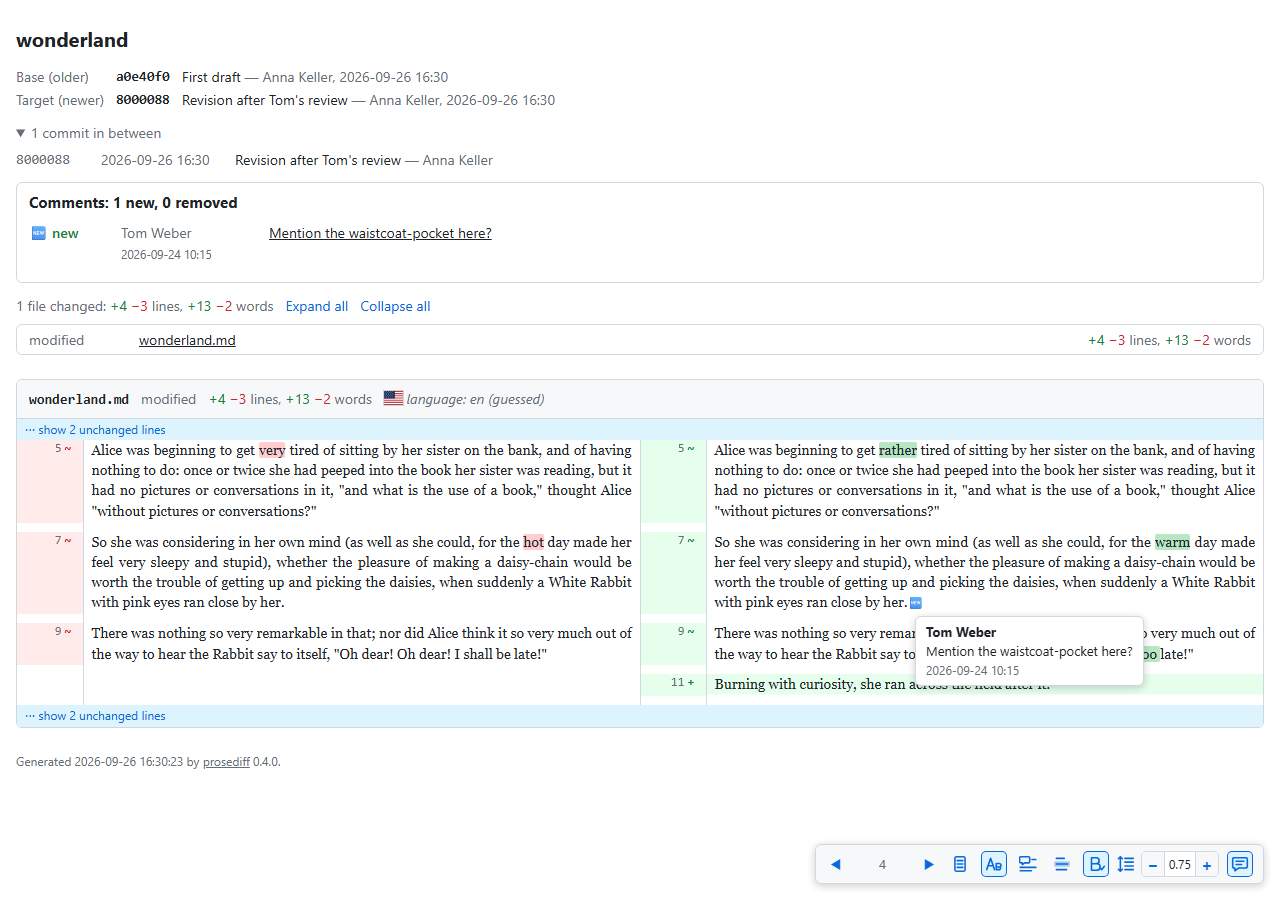
3
|
+
Copyright (c) 2026 Raffaele Mancuso
|
|
4
|
+
|
|
5
|
+
Permission is hereby granted, free of charge, to any person obtaining a copy
|
|
6
|
+
of this software and associated documentation files (the "Software"), to deal
|
|
7
|
+
in the Software without restriction, including without limitation the rights
|
|
8
|
+
to use, copy, modify, merge, publish, distribute, sublicense, and/or sell
|
|
9
|
+
copies of the Software, and to permit persons to whom the Software is
|
|
10
|
+
furnished to do so, subject to the following conditions:
|
|
11
|
+
|
|
12
|
+
The above copyright notice and this permission notice shall be included in all
|
|
13
|
+
copies or substantial portions of the Software.
|
|
14
|
+
|
|
15
|
+
THE SOFTWARE IS PROVIDED "AS IS", WITHOUT WARRANTY OF ANY KIND, EXPRESS OR
|
|
16
|
+
IMPLIED, INCLUDING BUT NOT LIMITED TO THE WARRANTIES OF MERCHANTABILITY,
|
|
17
|
+
FITNESS FOR A PARTICULAR PURPOSE AND NONINFRINGEMENT. IN NO EVENT SHALL THE
|
|
18
|
+
AUTHORS OR COPYRIGHT HOLDERS BE LIABLE FOR ANY CLAIM, DAMAGES OR OTHER
|
|
19
|
+
LIABILITY, WHETHER IN AN ACTION OF CONTRACT, TORT OR OTHERWISE, ARISING FROM,
|
|
20
|
+
OUT OF OR IN CONNECTION WITH THE SOFTWARE OR THE USE OR OTHER DEALINGS IN THE
|
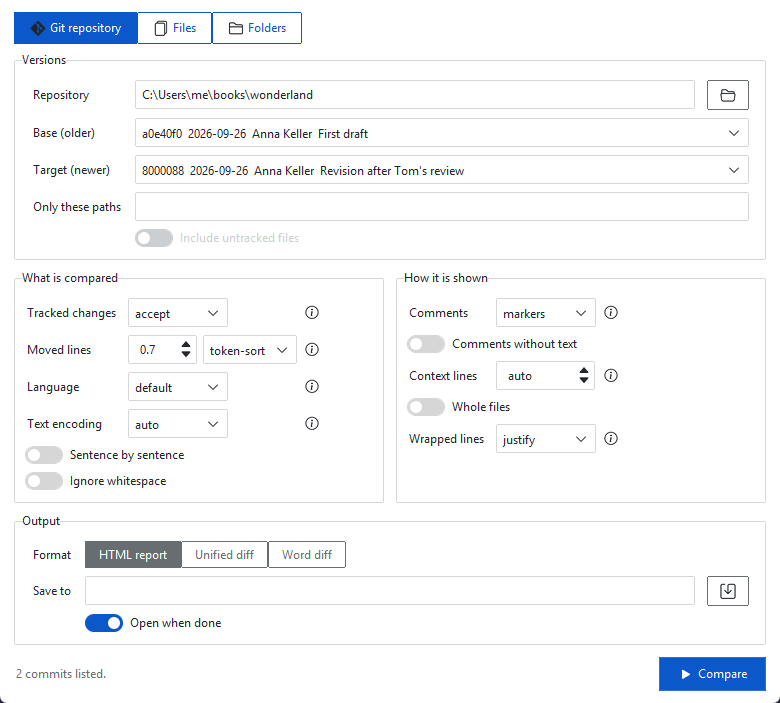
|
21
|
+
SOFTWARE.
|
prosediff-0.1.0/PKG-INFO
ADDED
|
@@ -0,0 +1,324 @@
|
|
|
1
|
+
Metadata-Version: 2.4
|
|
2
|
+
Name: prosediff
|
|
3
|
+
Version: 0.1.0
|
|
4
|
+
Summary: Side-by-side diff for prose, not code: optimised for Word .docx documents, Markdown included, from two files or from git
|
|
5
|
+
Keywords: diff,docx,word,markdown,prose,compare,track changes
|
|
6
|
+
Author: Raffaele Mancuso
|
|
7
|
+
Author-email: Raffaele Mancuso <raffaelemancuso532@gmail.com>
|
|
8
|
+
License-Expression: MIT
|
|
9
|
+
License-File: LICENSE
|
|
10
|
+
Classifier: Environment :: Console
|
|
11
|
+
Classifier: Intended Audience :: Science/Research
|
|
12
|
+
Classifier: Operating System :: OS Independent
|
|
13
|
+
Classifier: Programming Language :: Python :: 3
|
|
14
|
+
Classifier: Topic :: Text Processing
|
|
15
|
+
Requires-Dist: gitpython>=3.1.62
|
|
16
|
+
Requires-Dist: jinja2>=3.1.6
|
|
17
|
+
Requires-Dist: markupsafe>=3.0
|
|
18
|
+
Requires-Dist: python-docx>=1.2.0
|
|
19
|
+
Requires-Dist: rapidfuzz>=3.14.6
|
|
20
|
+
Requires-Dist: yasbd-lib>=1.0.0,<2
|
|
21
|
+
Requires-Python: >=3.11
|
|
22
|
+
Project-URL: Homepage, https://github.com/raffaelemancuso/prosediff
|
|
23
|
+
Project-URL: Issues, https://github.com/raffaelemancuso/prosediff/issues
|
|
24
|
+
Description-Content-Type: text/markdown
|
|
25
|
+
|
|
26
|
+
# prosediff
|
|
27
|
+
|
|
28
|
+
**Side-by-side comparison of prose, not code: Word documents (.docx) first,
|
|
29
|
+
Markdown too.**
|
|
30
|
+
|
|
31
|
+
Diff tools are made for code, where a line is a statement, a change is a
|
|
32
|
+
line and nobody comments inside the file. prosediff is made for prose, where
|
|
33
|
+
a line is a whole paragraph, a change is a few words inside it, paragraphs
|
|
34
|
+
move, and co-authors leave comments in the margin: papers, reports, books,
|
|
35
|
+
the drafts co-authors send back. It is optimised for Word files and works on
|
|
36
|
+
Markdown and any text file too; for code, a code diff tool serves better.
|
|
37
|
+
|
|
38
|
+
It writes a self-contained HTML page showing the differences between two
|
|
39
|
+
versions side by side: the older version on the left, the newer on the right,
|
|
40
|
+
each paragraph facing the paragraph it came from, changed words highlighted
|
|
41
|
+
inside it. Text that moved is followed to its new place **even when it was
|
|
42
|
+
edited on the way**. The versions are two Word documents, two Markdown or
|
|
43
|
+
text files, two folders, or commits of a git repository, its index (staged
|
|
44
|
+
changes) or working tree. Paragraphs wrap and are numbered, changes are
|
|
45
|
+
described in plain English, and the new and removed comments of Word
|
|
46
|
+
documents are shown and listed.
|
|
47
|
+
|
|
48
|
+
|
|
49
|
+
|
|
50
|
+
## Why prosediff
|
|
51
|
+
|
|
52
|
+
Tools for comparing versions of a text fall into two camps, and neither
|
|
53
|
+
serves a paper written with co-authors well:
|
|
54
|
+
|
|
55
|
+
- **Code diff tools** (`git diff`, GitHub and GitLab, diff2html, delta,
|
|
56
|
+
Meld and the like) compare plain text line by line. They show a Word
|
|
57
|
+
document as a binary file, and a paragraph kept on one long line as one
|
|
58
|
+
line that changed, often without wrapping it.
|
|
59
|
+
- **Word's own Compare Documents** reads Word files, but its result is a
|
|
60
|
+
third Word document full of revision marks, to review in Word: it cannot
|
|
61
|
+
compare a folder, a git history or a Markdown file, and it leaves you to
|
|
62
|
+
work out which comments are new.
|
|
63
|
+
|
|
64
|
+
prosediff sits between the two:
|
|
65
|
+
|
|
66
|
+
- **It compares Word documents directly**: `prosediff --files draft.docx
|
|
67
|
+
draft_returned.docx` shows what a co-author changed, whatever they tracked
|
|
68
|
+
or did not. Their tracked changes are accepted (or rejected) exactly as
|
|
69
|
+
Word would, spaces included, and **their comments are kept**: each shown
|
|
70
|
+
where it sits, with its author and date, new comments marked 🆕, and all
|
|
71
|
+
listed in a panel. Only new and removed comments are shown: those already
|
|
72
|
+
in the old version are left out, even where they moved. The same works on the
|
|
73
|
+
Markdown that `pandoc` makes of a Word file, and on Word files in git.
|
|
74
|
+
- **It lines the two versions up correctly**: each edited paragraph faces
|
|
75
|
+
the paragraph it came from, however much it was rewritten, and a paragraph
|
|
76
|
+
inserted, deleted or split does not shift the ones below it onto the wrong
|
|
77
|
+
partners. A paragraph unrelated to anything on the other side is shown as
|
|
78
|
+
removed or added rather than forced against a stranger. Comments and
|
|
79
|
+
footnote numbers do not disturb the alignment: a renumbered footnote or a
|
|
80
|
+
comment that moved is no change.
|
|
81
|
+
- **It follows text that moved, even when it changed**: a paragraph (or,
|
|
82
|
+
with `--by-sentence`, a sentence) moved elsewhere is shown at both ends,
|
|
83
|
+
tinted as a move, with the words edited on the way highlighted; how alike
|
|
84
|
+
it must stay to count as moved is set with `--move-similarity`. Code diff
|
|
85
|
+
tools show the same text as one deletion and one unrelated insertion.
|
|
86
|
+
- **It is made for prose**: long lines wrap, changes are highlighted word by
|
|
87
|
+
word and down to the letter within a word, each change is described in
|
|
88
|
+
plain English on hover (`changed "repeat" to "repeated"`), words are
|
|
89
|
+
counted as well as lines, and Markdown can be shown formatted.
|
|
90
|
+
- **It works from git or without it**: two commits, the staged or
|
|
91
|
+
uncommitted changes, two files or two folders, from the command line or
|
|
92
|
+
from a window.
|
|
93
|
+
- **The result is one self-contained HTML file**: no server, no network, no
|
|
94
|
+
Word needed to read it. It can be attached to an e-mail, so a co-author
|
|
95
|
+
sees what changed since they last read the paper, and printed or saved as
|
|
96
|
+
PDF.
|
|
97
|
+
|
|
98
|
+
## Usage
|
|
99
|
+
|
|
100
|
+
```
|
|
101
|
+
prosediff REPO BASE [TARGET] [options]
|
|
102
|
+
prosediff --files OLD NEW [options]
|
|
103
|
+
```
|
|
104
|
+
|
|
105
|
+
(from a checkout: `uv run prosediff ...`; installed: `uv tool install .`)
|
|
106
|
+
|
|
107
|
+
| Argument / option | Meaning |
|
|
108
|
+
|----------------------------|---------------------------------------------------------------|
|
|
109
|
+
| `REPO` | the repository, or any folder inside it |
|
|
110
|
+
| `BASE` | the older commit: hash, branch, tag, `HEAD~2`, ... |
|
|
111
|
+
| `TARGET` | the newer commit; without it, BASE is compared with the working tree (tracked files), as `git diff BASE` does |
|
|
112
|
+
| `--files OLD NEW` | compare two files (whatever their names) or two folders, outside git |
|
|
113
|
+
| `--cached`, `--staged` | compare BASE with the index instead, as `git diff --cached BASE` does |
|
|
114
|
+
| `--untracked` | with the working tree, also show the untracked files `.gitignore` does not exclude |
|
|
115
|
+
| `-w`, `--ignore-whitespace`| compare lines ignoring whitespace, as `git diff -w` |
|
|
116
|
+
| `-p`, `--path PATH` | restrict the diff to this file or folder (repeatable) |
|
|
117
|
+
| `-o`, `--output FILE` | output file (default `diff.html`) |
|
|
118
|
+
| `-U`, `--context N` | unchanged lines shown around each change, in every file; unset, 0 in Markdown files and Word documents (whose lines are whole paragraphs) and 3 in the others. In the GUI, the "Context lines" box: `auto` or a number |
|
|
119
|
+
| `--full` | show every line of each changed file |
|
|
120
|
+
| `--max-hidden N` | unchanged lines embedded per gap for the page to reveal (default 500); longer gaps are left out, to keep the page light |
|
|
121
|
+
| `--align left\|justify` | alignment of wrapped lines (default left) |
|
|
122
|
+
| `--no-fold-comments` | compare the comment markup of Markdown and Word documents as text; by default each comment added or removed since the base is shown as a 💬 marker (🆕 when added), with the author, the comment and its date on hover, and listed in a panel, while the comments both sides have are left out |
|
|
123
|
+
| `--empty-comments` | also show the comments that have no text, left out by default (listed as "(no text)" in the panel) |
|
|
124
|
+
| `--docx-changes accept\|reject\|all` | the tracked changes of Word documents: accept them (default), reject them, or show them as markup |
|
|
125
|
+
| `--md-filter COMMAND` | shell command (cmd.exe on Windows, sh elsewhere) both versions of every Markdown file are piped through, stdin to stdout, before comparing; line numbers are then those of the filtered text |
|
|
126
|
+
| `--by-sentence` | compare the prose of Markdown files and Word documents sentence by sentence instead of paragraph by paragraph: a sentence moved between paragraphs is recognised, and each sentence is labelled with its line and its place in it (`12.3`) |
|
|
127
|
+
| `--sentence-language CODE` | the language whose rules split sentences (default `en`; about forty are known, e.g. `it`, `de`, `fr`; others fall back to a simple rule) |
|
|
128
|
+
| `--move-similarity X` | how alike, above 0 and at most 1, an edited line must be to where it reappears to count as moved (default 0.8; 1: only lines moved unchanged) |
|
|
129
|
+
| `--version` | print the version |
|
|
130
|
+
|
|
131
|
+
Examples:
|
|
132
|
+
|
|
133
|
+
- `prosediff . HEAD~1 HEAD -o review.html`: the last commit;
|
|
134
|
+
- `prosediff . HEAD --untracked`: everything not yet committed;
|
|
135
|
+
- `prosediff . HEAD --cached`: what the next commit would record;
|
|
136
|
+
- `prosediff --files draft_v1.docx draft_v2_returned.docx`: what a co-author
|
|
137
|
+
changed and commented, from the two Word files;
|
|
138
|
+
- `prosediff --files submitted/ revised/`: two folders, file by file.
|
|
139
|
+
|
|
140
|
+
## The window
|
|
141
|
+
|
|
142
|
+
`prosediff-gui` opens a window to choose what to compare.
|
|
143
|
+
`prosediff-gui REPOSITORY` opens it with a git repository filled in (or the
|
|
144
|
+
repository a folder belongs to); `prosediff-gui FILE.docx` first asks, in a
|
|
145
|
+
file dialog, for the file to compare it with, the older of the two going on
|
|
146
|
+
the left; `prosediff-gui OLD NEW` opens it with two Markdown or Word files.
|
|
147
|
+
The Files tab has a button to swap the two.
|
|
148
|
+
|
|
149
|
+
To have it at hand, install it once:
|
|
150
|
+
|
|
151
|
+
```
|
|
152
|
+
uv tool install --editable C:\path\to\prosediff
|
|
153
|
+
```
|
|
154
|
+
|
|
155
|
+
This puts `prosediff` and `prosediff-gui` on `PATH` (editable: they always run
|
|
156
|
+
the project's current code; `uv tool uninstall prosediff` removes them). On
|
|
157
|
+
Windows, `prosediff-gui.exe` is a windowed program: double-clicked, pinned,
|
|
158
|
+
behind a shortcut or with files dropped on it, it opens no console.
|
|
159
|
+
`scripts/prosediff_gui.bat` (Windows) and `scripts/prosediff_gui.sh` (bash:
|
|
160
|
+
Cygwin, Git Bash, Linux, macOS) start the same window, the installed one when
|
|
161
|
+
there is one, else from the project; a batch file itself always shows a
|
|
162
|
+
console for a moment.
|
|
163
|
+
|
|
164
|
+
|
|
165
|
+
|
|
166
|
+
- **Git repository**: pick a folder; base and target are chosen among the
|
|
167
|
+
working tree, the index and the latest 200 commits (hash, date, author,
|
|
168
|
+
subject), or typed as any ref (`HEAD~15`, a tag). The window starts from
|
|
169
|
+
the uncommitted changes when there are any, otherwise from the last
|
|
170
|
+
commit. Optionally, untracked files and a list of paths (separated by `;`).
|
|
171
|
+
- **Files or folders**: two files (whatever their names, Word documents
|
|
172
|
+
included) or two folders.
|
|
173
|
+
- **Options**: besides those below, comparing sentence by sentence (with the
|
|
174
|
+
language of the text) and the similarity at which an edited line counts as
|
|
175
|
+
moved.
|
|
176
|
+
|
|
177
|
+
Below, the options that matter when reading a diff (comment markers, Word
|
|
178
|
+
tracked changes, alignment, context lines or whole files, whitespace) and
|
|
179
|
+
where to save the page (by default a new page in the temporary folder).
|
|
180
|
+
Compare (or Ctrl+Enter) writes the page and opens it in the browser; the
|
|
181
|
+
comparison runs in the background, and the window remembers the choices for
|
|
182
|
+
the next time (`%APPDATA%\prosediff\gui.json`).
|
|
183
|
+
|
|
184
|
+
## The page
|
|
185
|
+
|
|
186
|
+
- The two sides (hash or file name, subject, author, date) and, for
|
|
187
|
+
commits, the commits in between (reachable from the target, or from HEAD
|
|
188
|
+
for the index and the working tree, and not from the base; the 50 newest
|
|
189
|
+
are listed).
|
|
190
|
+
- A comments panel: every comment with its author and date, marked new,
|
|
191
|
+
removed or unchanged, each linked to the line it sits in (unchanged
|
|
192
|
+
comments are in a collapsed list). In the text, a comment is a 💬 marker,
|
|
193
|
+
or 🆕 when it was added since the base; hovering or focusing it shows the
|
|
194
|
+
author in bold, the comment below and its date in grey.
|
|
195
|
+
- The changed files with their counts of lines and words added and removed
|
|
196
|
+
(and moved lines), linked to their tables; buttons expand or collapse
|
|
197
|
+
every file at once.
|
|
198
|
+
- Each file as a collapsible four-column table, its header sticking to the
|
|
199
|
+
top while it scrolls. Long lines wrap instead of scrolling sideways, so
|
|
200
|
+
prose stays readable. Unchanged lines beyond the context are folded into a
|
|
201
|
+
"show N unchanged lines" link that reveals them.
|
|
202
|
+
- Changed words highlighted within changed lines; a word changed into a
|
|
203
|
+
similar one ("repeat" to "repeated") has only its changed letters
|
|
204
|
+
highlighted. Hovering a change shows it in plain English (`changed
|
|
205
|
+
"repeat" to "repeated"`, `added "Furthermore,"`), hovering a changed line
|
|
206
|
+
lists all of its changes.
|
|
207
|
+
- A removed line that reappears elsewhere in the file (at least 20 non-space
|
|
208
|
+
characters) is shown as moved, in its own colour, with "moved to line N" /
|
|
209
|
+
"moved from line N": as it was (spacing aside), or lightly edited (at
|
|
210
|
+
least 80% similar), in which case its edits are highlighted too.
|
|
211
|
+
- Changed images (PNG, JPEG, GIF, WebP, BMP, up to 5 MB) old and new side by
|
|
212
|
+
side; other binary files are listed but not shown.
|
|
213
|
+
- A toolbar: the number of changes, with `n` and `p` (or its arrows) to jump
|
|
214
|
+
to the next and previous change; four icon buttons (hovering any toolbar
|
|
215
|
+
item shows its name, what it does and its key): `u` for one column instead
|
|
216
|
+
of two (each changed line shows its old version above its new one); `f` for
|
|
217
|
+
Markdown formatted, on by default, or raw (formatted: the syntax hidden,
|
|
218
|
+
emphasis, headings, links and citations styled, prose in a proportional
|
|
219
|
+
font); `c` for colour-blind
|
|
220
|
+
colours (orange and blue instead of red and green); `t` to tint the whole
|
|
221
|
+
of an edited line, as most diff tools do (by default only its changed
|
|
222
|
+
words are coloured, and its gutter; the tint stops short of the space
|
|
223
|
+
between paragraphs); a spacing stepper, − and + either side of the value
|
|
224
|
+
(or `[` and `]`, or the arrow keys on the value, an ARIA spinbutton), for
|
|
225
|
+
less or more space between the paragraphs of Markdown and
|
|
226
|
+
Word documents; and two checkboxes for the comment tooltips (on by default)
|
|
227
|
+
and the change tooltips (off by default; with both on, a comment inside a
|
|
228
|
+
changed word shows the comment, and with only the change ones on, the change).
|
|
229
|
+
The browser remembers the views, the spacing and the checkboxes.
|
|
230
|
+
- Printing (or saving as PDF from the browser) opens every file, drops the
|
|
231
|
+
toolbar and buttons, keeps the colours and does not split a line across
|
|
232
|
+
pages.
|
|
233
|
+
|
|
234
|
+
Changes are also marked without colour, by a sign in the line-number gutter
|
|
235
|
+
(`−` removed, `+` added, `~` changed, `→` `←` moved), and every changed row
|
|
236
|
+
tells screen readers what it is. The page follows the browser's light or dark
|
|
237
|
+
mode and needs no network: the CSS, the JavaScript and the images are inline.
|
|
238
|
+
|
|
239
|
+
## How it works
|
|
240
|
+
|
|
241
|
+
GitPython resolves the sides and lists the changed files, with rename
|
|
242
|
+
detection (`git diff -M`); two folders are compared by path, a file that
|
|
243
|
+
disappears and reappears identical elsewhere counting as renamed. The lines
|
|
244
|
+
of every changed file are aligned by git itself, `git diff --no-index
|
|
245
|
+
--histogram --unified=0` on temporary copies, one process for all files, of
|
|
246
|
+
which only the hunk headers are read.
|
|
247
|
+
|
|
248
|
+
Within a block of replaced lines, each old line is paired with its most
|
|
249
|
+
similar new line. Similarity is the share of words and punctuation two lines
|
|
250
|
+
have in common, in order (twice their longest common subsequence over their
|
|
251
|
+
total length, computed by rapidfuzz), lines at least half similar are paired
|
|
252
|
+
so that the total similarity is highest without crossing, and the lines left
|
|
253
|
+
in between are paired in order. A line inserted in the middle of an edited
|
|
254
|
+
paragraph thus stands alone instead of shifting every pair below it. Paired
|
|
255
|
+
lines are compared again word by word, and a word replaced by a single word
|
|
256
|
+
is compared letter by letter when at least half its letters survive. Moved
|
|
257
|
+
lines are found among the lines left removed and added, identical ones
|
|
258
|
+
first, then the most similar pairs. The page is rendered with Jinja2.
|
|
259
|
+
|
|
260
|
+
A Word document is read into Markdown with python-docx, which opens the
|
|
261
|
+
document and resolves its styles, formatting, links and comments; its
|
|
262
|
+
paragraphs are then walked element by element, so everything lands where it
|
|
263
|
+
sits in the text: headings, list items, tables, footnotes and endnotes,
|
|
264
|
+
links, bold and italic, equations as linear text (`DV_(it) = β ⋅ (a)/(b)`),
|
|
265
|
+
and each comment, with its author and date, where it starts. Tracked changes
|
|
266
|
+
are settled during the walk (accepting keeps the inserted runs and drops the
|
|
267
|
+
deleted ones, rejecting the reverse, "all" keeps both as marked spans), so
|
|
268
|
+
the spaces at the edges of a change stay where Word had them, comments
|
|
269
|
+
anchored in deleted text are kept, and footnotes referenced only from
|
|
270
|
+
deleted text are dropped with it. Headers, footers and page layout are not
|
|
271
|
+
part of the comparison. Nothing outside Python is needed: no Word, no
|
|
272
|
+
pandoc. On a 12,000-word manuscript with 26 comments and tracked changes by
|
|
273
|
+
two co-authors, the accepted and rejected texts match pandoc's word for word.
|
|
274
|
+
Since nobody sees that Markdown, the rows of a Word document are numbered by
|
|
275
|
+
paragraph (1, 2, 3, and 3.1, 3.2 for the sentences of paragraph 3 with
|
|
276
|
+
`--by-sentence`) rather than by line of it; Markdown files keep their line
|
|
277
|
+
numbers.
|
|
278
|
+
|
|
279
|
+
Folding comments replaces each comment span, before any filter runs, with
|
|
280
|
+
one character of the Unicode private use area standing for its author and
|
|
281
|
+
text: a comment is then compared like a word, the same comment matches on
|
|
282
|
+
both sides even when its `id` was renumbered by a new conversion, and a
|
|
283
|
+
filter cannot cut it in two. The characters become markers when the page is
|
|
284
|
+
built. The comments present on both sides are then taken out of the text,
|
|
285
|
+
with the spaces around them (one is left where a comment stood between two
|
|
286
|
+
words), before the lines are lined up: they are never shown, and a
|
|
287
|
+
paragraph that only gained a comment moved over from its neighbour is not a
|
|
288
|
+
change. A paragraph with a new or removed comment is shown.
|
|
289
|
+
|
|
290
|
+
The formatted view recognises the common inline Markdown (headings, block
|
|
291
|
+
quotes, code, strong, emphasis, links, images, citations, pandoc spans with
|
|
292
|
+
attributes) with regular expressions, since no Markdown parser reports where
|
|
293
|
+
each inline element starts and ends in the source. Each character gets its
|
|
294
|
+
style classes, and every piece of text the diff emits is cut into runs of
|
|
295
|
+
equal style, so formatting and change markup never have to nest.
|
|
296
|
+
|
|
297
|
+
Files are read as UTF-8, with undecodable bytes replaced, and split into
|
|
298
|
+
lines as git does (on LF; CRLF counts as LF). A file is binary if its first
|
|
299
|
+
8,000 bytes contain a NUL byte, as git decides.
|
|
300
|
+
|
|
301
|
+
From Python:
|
|
302
|
+
|
|
303
|
+
```python
|
|
304
|
+
from prosediff import compare, compare_paths, render
|
|
305
|
+
|
|
306
|
+
html = render(compare("path/to/repo", "HEAD~1", "HEAD", context=3))
|
|
307
|
+
html = render(compare_paths("v1.docx", "v2.docx", fold_comments_md=True))
|
|
308
|
+
```
|
|
309
|
+
|
|
310
|
+
## Development
|
|
311
|
+
|
|
312
|
+
```
|
|
313
|
+
uv run pytest # the tests
|
|
314
|
+
uv run playwright install chromium # once, for the browser tests
|
|
315
|
+
uv run ruff check && uv run ruff format --check
|
|
316
|
+
uv run --with pillow python docs/make_screenshots.py # the README screenshots
|
|
317
|
+
```
|
|
318
|
+
|
|
319
|
+
The tests build throwaway repositories with GitPython and need `git` on
|
|
320
|
+
`PATH`; the browser tests need Playwright's Chromium, and are skipped
|
|
321
|
+
without it. The Word tests write their documents with python-docx, or as raw
|
|
322
|
+
XML for what it cannot write (tracked changes, footnotes, equations). `.github/workflows/tests.yml` runs
|
|
323
|
+
the linter, and the tests on Windows, Linux and macOS with Python 3.11 and
|
|
324
|
+
3.14.
|
|
@@ -0,0 +1,299 @@
|
|
|
1
|
+
# prosediff
|
|
2
|
+
|
|
3
|
+
**Side-by-side comparison of prose, not code: Word documents (.docx) first,
|
|
4
|
+
Markdown too.**
|
|
5
|
+
|
|
6
|
+
Diff tools are made for code, where a line is a statement, a change is a
|
|
7
|
+
line and nobody comments inside the file. prosediff is made for prose, where
|
|
8
|
+
a line is a whole paragraph, a change is a few words inside it, paragraphs
|
|
9
|
+
move, and co-authors leave comments in the margin: papers, reports, books,
|
|
10
|
+
the drafts co-authors send back. It is optimised for Word files and works on
|
|
11
|
+
Markdown and any text file too; for code, a code diff tool serves better.
|
|
12
|
+
|
|
13
|
+
It writes a self-contained HTML page showing the differences between two
|
|
14
|
+
versions side by side: the older version on the left, the newer on the right,
|
|
15
|
+
each paragraph facing the paragraph it came from, changed words highlighted
|
|
16
|
+
inside it. Text that moved is followed to its new place **even when it was
|
|
17
|
+
edited on the way**. The versions are two Word documents, two Markdown or
|
|
18
|
+
text files, two folders, or commits of a git repository, its index (staged
|
|
19
|
+
changes) or working tree. Paragraphs wrap and are numbered, changes are
|
|
20
|
+
described in plain English, and the new and removed comments of Word
|
|
21
|
+
documents are shown and listed.
|
|
22
|
+
|
|
23
|
+

|
|
24
|
+
|
|
25
|
+
## Why prosediff
|
|
26
|
+
|
|
27
|
+
Tools for comparing versions of a text fall into two camps, and neither
|
|
28
|
+
serves a paper written with co-authors well:
|
|
29
|
+
|
|
30
|
+
- **Code diff tools** (`git diff`, GitHub and GitLab, diff2html, delta,
|
|
31
|
+
Meld and the like) compare plain text line by line. They show a Word
|
|
32
|
+
document as a binary file, and a paragraph kept on one long line as one
|
|
33
|
+
line that changed, often without wrapping it.
|
|
34
|
+
- **Word's own Compare Documents** reads Word files, but its result is a
|
|
35
|
+
third Word document full of revision marks, to review in Word: it cannot
|
|
36
|
+
compare a folder, a git history or a Markdown file, and it leaves you to
|
|
37
|
+
work out which comments are new.
|
|
38
|
+
|
|
39
|
+
prosediff sits between the two:
|
|
40
|
+
|
|
41
|
+
- **It compares Word documents directly**: `prosediff --files draft.docx
|
|
42
|
+
draft_returned.docx` shows what a co-author changed, whatever they tracked
|
|
43
|
+
or did not. Their tracked changes are accepted (or rejected) exactly as
|
|
44
|
+
Word would, spaces included, and **their comments are kept**: each shown
|
|
45
|
+
where it sits, with its author and date, new comments marked 🆕, and all
|
|
46
|
+
listed in a panel. Only new and removed comments are shown: those already
|
|
47
|
+
in the old version are left out, even where they moved. The same works on the
|
|
48
|
+
Markdown that `pandoc` makes of a Word file, and on Word files in git.
|
|
49
|
+
- **It lines the two versions up correctly**: each edited paragraph faces
|
|
50
|
+
the paragraph it came from, however much it was rewritten, and a paragraph
|
|
51
|
+
inserted, deleted or split does not shift the ones below it onto the wrong
|
|
52
|
+
partners. A paragraph unrelated to anything on the other side is shown as
|
|
53
|
+
removed or added rather than forced against a stranger. Comments and
|
|
54
|
+
footnote numbers do not disturb the alignment: a renumbered footnote or a
|
|
55
|
+
comment that moved is no change.
|
|
56
|
+
- **It follows text that moved, even when it changed**: a paragraph (or,
|
|
57
|
+
with `--by-sentence`, a sentence) moved elsewhere is shown at both ends,
|
|
58
|
+
tinted as a move, with the words edited on the way highlighted; how alike
|
|
59
|
+
it must stay to count as moved is set with `--move-similarity`. Code diff
|
|
60
|
+
tools show the same text as one deletion and one unrelated insertion.
|
|
61
|
+
- **It is made for prose**: long lines wrap, changes are highlighted word by
|
|
62
|
+
word and down to the letter within a word, each change is described in
|
|
63
|
+
plain English on hover (`changed "repeat" to "repeated"`), words are
|
|
64
|
+
counted as well as lines, and Markdown can be shown formatted.
|
|
65
|
+
- **It works from git or without it**: two commits, the staged or
|
|
66
|
+
uncommitted changes, two files or two folders, from the command line or
|
|
67
|
+
from a window.
|
|
68
|
+
- **The result is one self-contained HTML file**: no server, no network, no
|
|
69
|
+
Word needed to read it. It can be attached to an e-mail, so a co-author
|
|
70
|
+
sees what changed since they last read the paper, and printed or saved as
|
|
71
|
+
PDF.
|
|
72
|
+
|
|
73
|
+
## Usage
|
|
74
|
+
|
|
75
|
+
```
|
|
76
|
+
prosediff REPO BASE [TARGET] [options]
|
|
77
|
+
prosediff --files OLD NEW [options]
|
|
78
|
+
```
|
|
79
|
+
|
|
80
|
+
(from a checkout: `uv run prosediff ...`; installed: `uv tool install .`)
|
|
81
|
+
|
|
82
|
+
| Argument / option | Meaning |
|
|
83
|
+
|----------------------------|---------------------------------------------------------------|
|
|
84
|
+
| `REPO` | the repository, or any folder inside it |
|
|
85
|
+
| `BASE` | the older commit: hash, branch, tag, `HEAD~2`, ... |
|
|
86
|
+
| `TARGET` | the newer commit; without it, BASE is compared with the working tree (tracked files), as `git diff BASE` does |
|
|
87
|
+
| `--files OLD NEW` | compare two files (whatever their names) or two folders, outside git |
|
|
88
|
+
| `--cached`, `--staged` | compare BASE with the index instead, as `git diff --cached BASE` does |
|
|
89
|
+
| `--untracked` | with the working tree, also show the untracked files `.gitignore` does not exclude |
|
|
90
|
+
| `-w`, `--ignore-whitespace`| compare lines ignoring whitespace, as `git diff -w` |
|
|
91
|
+
| `-p`, `--path PATH` | restrict the diff to this file or folder (repeatable) |
|
|
92
|
+
| `-o`, `--output FILE` | output file (default `diff.html`) |
|
|
93
|
+
| `-U`, `--context N` | unchanged lines shown around each change, in every file; unset, 0 in Markdown files and Word documents (whose lines are whole paragraphs) and 3 in the others. In the GUI, the "Context lines" box: `auto` or a number |
|
|
94
|
+
| `--full` | show every line of each changed file |
|
|
95
|
+
| `--max-hidden N` | unchanged lines embedded per gap for the page to reveal (default 500); longer gaps are left out, to keep the page light |
|
|
96
|
+
| `--align left\|justify` | alignment of wrapped lines (default left) |
|
|
97
|
+
| `--no-fold-comments` | compare the comment markup of Markdown and Word documents as text; by default each comment added or removed since the base is shown as a 💬 marker (🆕 when added), with the author, the comment and its date on hover, and listed in a panel, while the comments both sides have are left out |
|
|
98
|
+
| `--empty-comments` | also show the comments that have no text, left out by default (listed as "(no text)" in the panel) |
|
|
99
|
+
| `--docx-changes accept\|reject\|all` | the tracked changes of Word documents: accept them (default), reject them, or show them as markup |
|
|
100
|
+
| `--md-filter COMMAND` | shell command (cmd.exe on Windows, sh elsewhere) both versions of every Markdown file are piped through, stdin to stdout, before comparing; line numbers are then those of the filtered text |
|
|
101
|
+
| `--by-sentence` | compare the prose of Markdown files and Word documents sentence by sentence instead of paragraph by paragraph: a sentence moved between paragraphs is recognised, and each sentence is labelled with its line and its place in it (`12.3`) |
|
|
102
|
+
| `--sentence-language CODE` | the language whose rules split sentences (default `en`; about forty are known, e.g. `it`, `de`, `fr`; others fall back to a simple rule) |
|
|
103
|
+
| `--move-similarity X` | how alike, above 0 and at most 1, an edited line must be to where it reappears to count as moved (default 0.8; 1: only lines moved unchanged) |
|
|
104
|
+
| `--version` | print the version |
|
|
105
|
+
|
|
106
|
+
Examples:
|
|
107
|
+
|
|
108
|
+
- `prosediff . HEAD~1 HEAD -o review.html`: the last commit;
|
|
109
|
+
- `prosediff . HEAD --untracked`: everything not yet committed;
|
|
110
|
+
- `prosediff . HEAD --cached`: what the next commit would record;
|
|
111
|
+
- `prosediff --files draft_v1.docx draft_v2_returned.docx`: what a co-author
|
|
112
|
+
changed and commented, from the two Word files;
|
|
113
|
+
- `prosediff --files submitted/ revised/`: two folders, file by file.
|
|
114
|
+
|
|
115
|
+
## The window
|
|
116
|
+
|
|
117
|
+
`prosediff-gui` opens a window to choose what to compare.
|
|
118
|
+
`prosediff-gui REPOSITORY` opens it with a git repository filled in (or the
|
|
119
|
+
repository a folder belongs to); `prosediff-gui FILE.docx` first asks, in a
|
|
120
|
+
file dialog, for the file to compare it with, the older of the two going on
|
|
121
|
+
the left; `prosediff-gui OLD NEW` opens it with two Markdown or Word files.
|
|
122
|
+
The Files tab has a button to swap the two.
|
|
123
|
+
|
|
124
|
+
To have it at hand, install it once:
|
|
125
|
+
|
|
126
|
+
```
|
|
127
|
+
uv tool install --editable C:\path\to\prosediff
|
|
128
|
+
```
|
|
129
|
+
|
|
130
|
+
This puts `prosediff` and `prosediff-gui` on `PATH` (editable: they always run
|
|
131
|
+
the project's current code; `uv tool uninstall prosediff` removes them). On
|
|
132
|
+
Windows, `prosediff-gui.exe` is a windowed program: double-clicked, pinned,
|
|
133
|
+
behind a shortcut or with files dropped on it, it opens no console.
|
|
134
|
+
`scripts/prosediff_gui.bat` (Windows) and `scripts/prosediff_gui.sh` (bash:
|
|
135
|
+
Cygwin, Git Bash, Linux, macOS) start the same window, the installed one when
|
|
136
|
+
there is one, else from the project; a batch file itself always shows a
|
|
137
|
+
console for a moment.
|
|
138
|
+
|
|
139
|
+

|
|
140
|
+
|
|
141
|
+
- **Git repository**: pick a folder; base and target are chosen among the
|
|
142
|
+
working tree, the index and the latest 200 commits (hash, date, author,
|
|
143
|
+
subject), or typed as any ref (`HEAD~15`, a tag). The window starts from
|
|
144
|
+
the uncommitted changes when there are any, otherwise from the last
|
|
145
|
+
commit. Optionally, untracked files and a list of paths (separated by `;`).
|
|
146
|
+
- **Files or folders**: two files (whatever their names, Word documents
|
|
147
|
+
included) or two folders.
|
|
148
|
+
- **Options**: besides those below, comparing sentence by sentence (with the
|
|
149
|
+
language of the text) and the similarity at which an edited line counts as
|
|
150
|
+
moved.
|
|
151
|
+
|
|
152
|
+
Below, the options that matter when reading a diff (comment markers, Word
|
|
153
|
+
tracked changes, alignment, context lines or whole files, whitespace) and
|
|
154
|
+
where to save the page (by default a new page in the temporary folder).
|
|
155
|
+
Compare (or Ctrl+Enter) writes the page and opens it in the browser; the
|
|
156
|
+
comparison runs in the background, and the window remembers the choices for
|
|
157
|
+
the next time (`%APPDATA%\prosediff\gui.json`).
|
|
158
|
+
|
|
159
|
+
## The page
|
|
160
|
+
|
|
161
|
+
- The two sides (hash or file name, subject, author, date) and, for
|
|
162
|
+
commits, the commits in between (reachable from the target, or from HEAD
|
|
163
|
+
for the index and the working tree, and not from the base; the 50 newest
|
|
164
|
+
are listed).
|
|
165
|
+
- A comments panel: every comment with its author and date, marked new,
|
|
166
|
+
removed or unchanged, each linked to the line it sits in (unchanged
|
|
167
|
+
comments are in a collapsed list). In the text, a comment is a 💬 marker,
|
|
168
|
+
or 🆕 when it was added since the base; hovering or focusing it shows the
|
|
169
|
+
author in bold, the comment below and its date in grey.
|
|
170
|
+
- The changed files with their counts of lines and words added and removed
|
|
171
|
+
(and moved lines), linked to their tables; buttons expand or collapse
|
|
172
|
+
every file at once.
|
|
173
|
+
- Each file as a collapsible four-column table, its header sticking to the
|
|
174
|
+
top while it scrolls. Long lines wrap instead of scrolling sideways, so
|
|
175
|
+
prose stays readable. Unchanged lines beyond the context are folded into a
|
|
176
|
+
"show N unchanged lines" link that reveals them.
|
|
177
|
+
- Changed words highlighted within changed lines; a word changed into a
|
|
178
|
+
similar one ("repeat" to "repeated") has only its changed letters
|
|
179
|
+
highlighted. Hovering a change shows it in plain English (`changed
|
|
180
|
+
"repeat" to "repeated"`, `added "Furthermore,"`), hovering a changed line
|
|
181
|
+
lists all of its changes.
|
|
182
|
+
- A removed line that reappears elsewhere in the file (at least 20 non-space
|
|
183
|
+
characters) is shown as moved, in its own colour, with "moved to line N" /
|
|
184
|
+
"moved from line N": as it was (spacing aside), or lightly edited (at
|
|
185
|
+
least 80% similar), in which case its edits are highlighted too.
|
|
186
|
+
- Changed images (PNG, JPEG, GIF, WebP, BMP, up to 5 MB) old and new side by
|
|
187
|
+
side; other binary files are listed but not shown.
|
|
188
|
+
- A toolbar: the number of changes, with `n` and `p` (or its arrows) to jump
|
|
189
|
+
to the next and previous change; four icon buttons (hovering any toolbar
|
|
190
|
+
item shows its name, what it does and its key): `u` for one column instead
|
|
191
|
+
of two (each changed line shows its old version above its new one); `f` for
|
|
192
|
+
Markdown formatted, on by default, or raw (formatted: the syntax hidden,
|
|
193
|
+
emphasis, headings, links and citations styled, prose in a proportional
|
|
194
|
+
font); `c` for colour-blind
|
|
195
|
+
colours (orange and blue instead of red and green); `t` to tint the whole
|
|
196
|
+
of an edited line, as most diff tools do (by default only its changed
|
|
197
|
+
words are coloured, and its gutter; the tint stops short of the space
|
|
198
|
+
between paragraphs); a spacing stepper, − and + either side of the value
|
|
199
|
+
(or `[` and `]`, or the arrow keys on the value, an ARIA spinbutton), for
|
|
200
|
+
less or more space between the paragraphs of Markdown and
|
|
201
|
+
Word documents; and two checkboxes for the comment tooltips (on by default)
|
|
202
|
+
and the change tooltips (off by default; with both on, a comment inside a
|
|
203
|
+
changed word shows the comment, and with only the change ones on, the change).
|
|
204
|
+
The browser remembers the views, the spacing and the checkboxes.
|
|
205
|
+
- Printing (or saving as PDF from the browser) opens every file, drops the
|
|
206
|
+
toolbar and buttons, keeps the colours and does not split a line across
|
|
207
|
+
pages.
|
|
208
|
+
|
|
209
|
+
Changes are also marked without colour, by a sign in the line-number gutter
|
|
210
|
+
(`−` removed, `+` added, `~` changed, `→` `←` moved), and every changed row
|
|
211
|
+
tells screen readers what it is. The page follows the browser's light or dark
|
|
212
|
+
mode and needs no network: the CSS, the JavaScript and the images are inline.
|
|
213
|
+
|
|
214
|
+
## How it works
|
|
215
|
+
|
|
216
|
+
GitPython resolves the sides and lists the changed files, with rename
|
|
217
|
+
detection (`git diff -M`); two folders are compared by path, a file that
|
|
218
|
+
disappears and reappears identical elsewhere counting as renamed. The lines
|
|
219
|
+
of every changed file are aligned by git itself, `git diff --no-index
|
|
220
|
+
--histogram --unified=0` on temporary copies, one process for all files, of
|
|
221
|
+
which only the hunk headers are read.
|
|
222
|
+
|
|
223
|
+
Within a block of replaced lines, each old line is paired with its most
|
|
224
|
+
similar new line. Similarity is the share of words and punctuation two lines
|
|
225
|
+
have in common, in order (twice their longest common subsequence over their
|
|
226
|
+
total length, computed by rapidfuzz), lines at least half similar are paired
|
|
227
|
+
so that the total similarity is highest without crossing, and the lines left
|
|
228
|
+
in between are paired in order. A line inserted in the middle of an edited
|
|
229
|
+
paragraph thus stands alone instead of shifting every pair below it. Paired
|
|
230
|
+
lines are compared again word by word, and a word replaced by a single word
|
|
231
|
+
is compared letter by letter when at least half its letters survive. Moved
|
|
232
|
+
lines are found among the lines left removed and added, identical ones
|
|
233
|
+
first, then the most similar pairs. The page is rendered with Jinja2.
|
|
234
|
+
|
|
235
|
+
A Word document is read into Markdown with python-docx, which opens the
|
|
236
|
+
document and resolves its styles, formatting, links and comments; its
|
|
237
|
+
paragraphs are then walked element by element, so everything lands where it
|
|
238
|
+
sits in the text: headings, list items, tables, footnotes and endnotes,
|
|
239
|
+
links, bold and italic, equations as linear text (`DV_(it) = β ⋅ (a)/(b)`),
|
|
240
|
+
and each comment, with its author and date, where it starts. Tracked changes
|
|
241
|
+
are settled during the walk (accepting keeps the inserted runs and drops the
|
|
242
|
+
deleted ones, rejecting the reverse, "all" keeps both as marked spans), so
|
|
243
|
+
the spaces at the edges of a change stay where Word had them, comments
|
|
244
|
+
anchored in deleted text are kept, and footnotes referenced only from
|
|
245
|
+
deleted text are dropped with it. Headers, footers and page layout are not
|
|
246
|
+
part of the comparison. Nothing outside Python is needed: no Word, no
|
|
247
|
+
pandoc. On a 12,000-word manuscript with 26 comments and tracked changes by
|
|
248
|
+
two co-authors, the accepted and rejected texts match pandoc's word for word.
|
|
249
|
+
Since nobody sees that Markdown, the rows of a Word document are numbered by
|
|
250
|
+
paragraph (1, 2, 3, and 3.1, 3.2 for the sentences of paragraph 3 with
|
|
251
|
+
`--by-sentence`) rather than by line of it; Markdown files keep their line
|
|
252
|
+
numbers.
|
|
253
|
+
|
|
254
|
+
Folding comments replaces each comment span, before any filter runs, with
|
|
255
|
+
one character of the Unicode private use area standing for its author and
|
|
256
|
+
text: a comment is then compared like a word, the same comment matches on
|
|
257
|
+
both sides even when its `id` was renumbered by a new conversion, and a
|
|
258
|
+
filter cannot cut it in two. The characters become markers when the page is
|
|
259
|
+
built. The comments present on both sides are then taken out of the text,
|
|
260
|
+
with the spaces around them (one is left where a comment stood between two
|
|
261
|
+
words), before the lines are lined up: they are never shown, and a
|
|
262
|
+
paragraph that only gained a comment moved over from its neighbour is not a
|
|
263
|
+
change. A paragraph with a new or removed comment is shown.
|
|
264
|
+
|
|
265
|
+
The formatted view recognises the common inline Markdown (headings, block
|
|
266
|
+
quotes, code, strong, emphasis, links, images, citations, pandoc spans with
|
|
267
|
+
attributes) with regular expressions, since no Markdown parser reports where
|
|
268
|
+
each inline element starts and ends in the source. Each character gets its
|
|
269
|
+
style classes, and every piece of text the diff emits is cut into runs of
|
|
270
|
+
equal style, so formatting and change markup never have to nest.
|
|
271
|
+
|
|
272
|
+
Files are read as UTF-8, with undecodable bytes replaced, and split into
|
|
273
|
+
lines as git does (on LF; CRLF counts as LF). A file is binary if its first
|
|
274
|
+
8,000 bytes contain a NUL byte, as git decides.
|
|
275
|
+
|
|
276
|
+
From Python:
|
|
277
|
+
|
|
278
|
+
```python
|
|
279
|
+
from prosediff import compare, compare_paths, render
|
|
280
|
+
|
|
281
|
+
html = render(compare("path/to/repo", "HEAD~1", "HEAD", context=3))
|
|
282
|
+
html = render(compare_paths("v1.docx", "v2.docx", fold_comments_md=True))
|
|
283
|
+
```
|
|
284
|
+
|
|
285
|
+
## Development
|
|
286
|
+
|
|
287
|
+
```
|
|
288
|
+
uv run pytest # the tests
|
|
289
|
+
uv run playwright install chromium # once, for the browser tests
|
|
290
|
+
uv run ruff check && uv run ruff format --check
|
|
291
|
+
uv run --with pillow python docs/make_screenshots.py # the README screenshots
|
|
292
|
+
```
|
|
293
|
+
|
|
294
|
+
The tests build throwaway repositories with GitPython and need `git` on
|
|
295
|
+
`PATH`; the browser tests need Playwright's Chromium, and are skipped
|
|
296
|
+
without it. The Word tests write their documents with python-docx, or as raw
|
|
297
|
+
XML for what it cannot write (tracked changes, footnotes, equations). `.github/workflows/tests.yml` runs
|
|
298
|
+
the linter, and the tests on Windows, Linux and macOS with Python 3.11 and
|
|
299
|
+
3.14.
|