progress-table 3.0.0__tar.gz → 3.0.2__tar.gz
This diff represents the content of publicly available package versions that have been released to one of the supported registries. The information contained in this diff is provided for informational purposes only and reflects changes between package versions as they appear in their respective public registries.
- progress_table-3.0.2/PKG-INFO +159 -0
- progress_table-3.0.2/README_pypi.md +132 -0
- {progress_table-3.0.0 → progress_table-3.0.2}/progress_table/__init__.py +1 -1
- {progress_table-3.0.0 → progress_table-3.0.2}/pyproject.toml +5 -3
- progress_table-3.0.0/PKG-INFO +0 -25
- {progress_table-3.0.0 → progress_table-3.0.2}/.gitignore +0 -0
- {progress_table-3.0.0 → progress_table-3.0.2}/LICENSE.txt +0 -0
- {progress_table-3.0.0 → progress_table-3.0.2}/README.md +0 -0
- {progress_table-3.0.0 → progress_table-3.0.2}/progress_table/common.py +0 -0
- {progress_table-3.0.0 → progress_table-3.0.2}/progress_table/progress_table.py +0 -0
- {progress_table-3.0.0 → progress_table-3.0.2}/progress_table/styles.py +0 -0
|
@@ -0,0 +1,159 @@
|
|
|
1
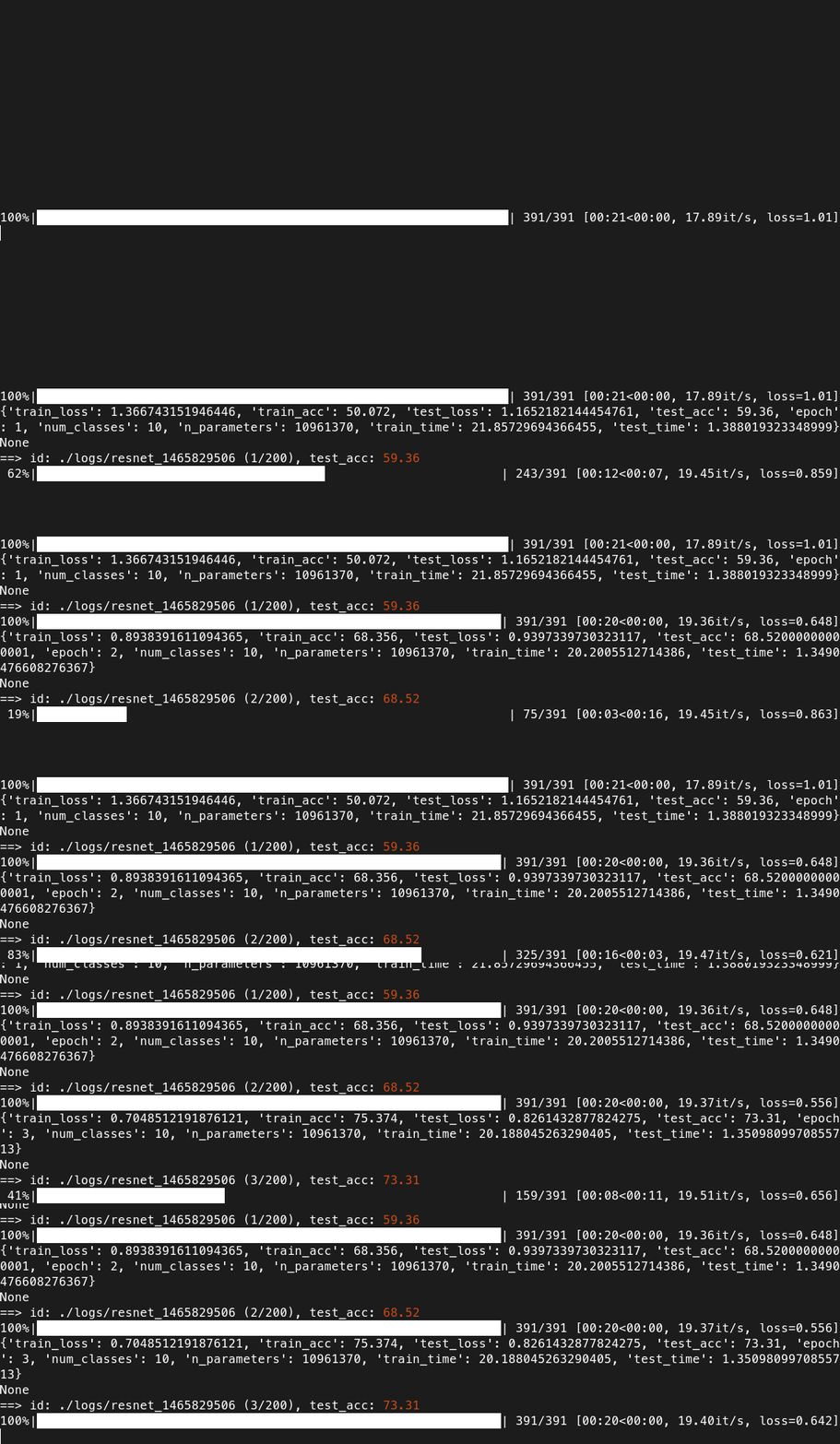
|
+
Metadata-Version: 2.4
|
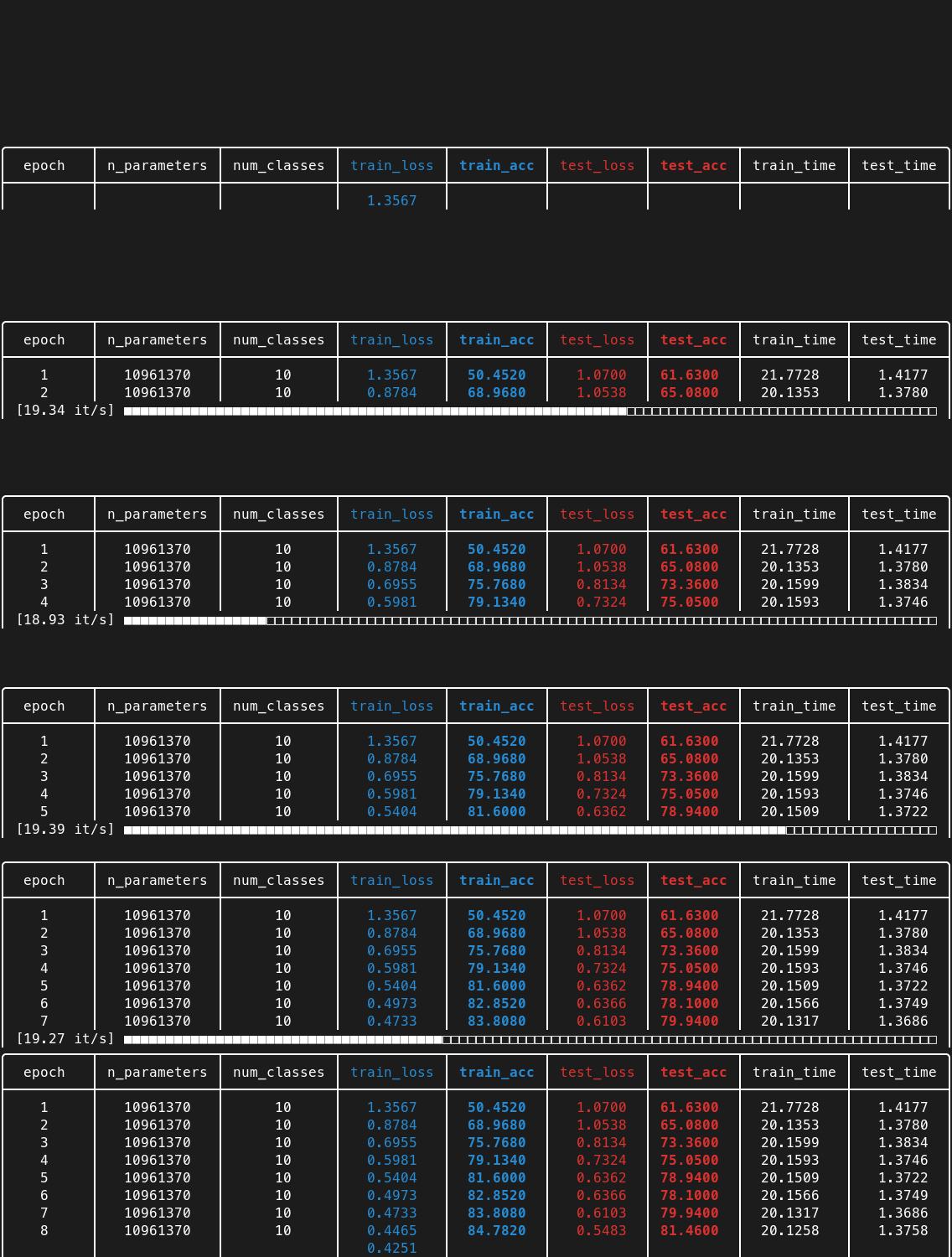
|
2
|
+
Name: progress-table
|
|
3
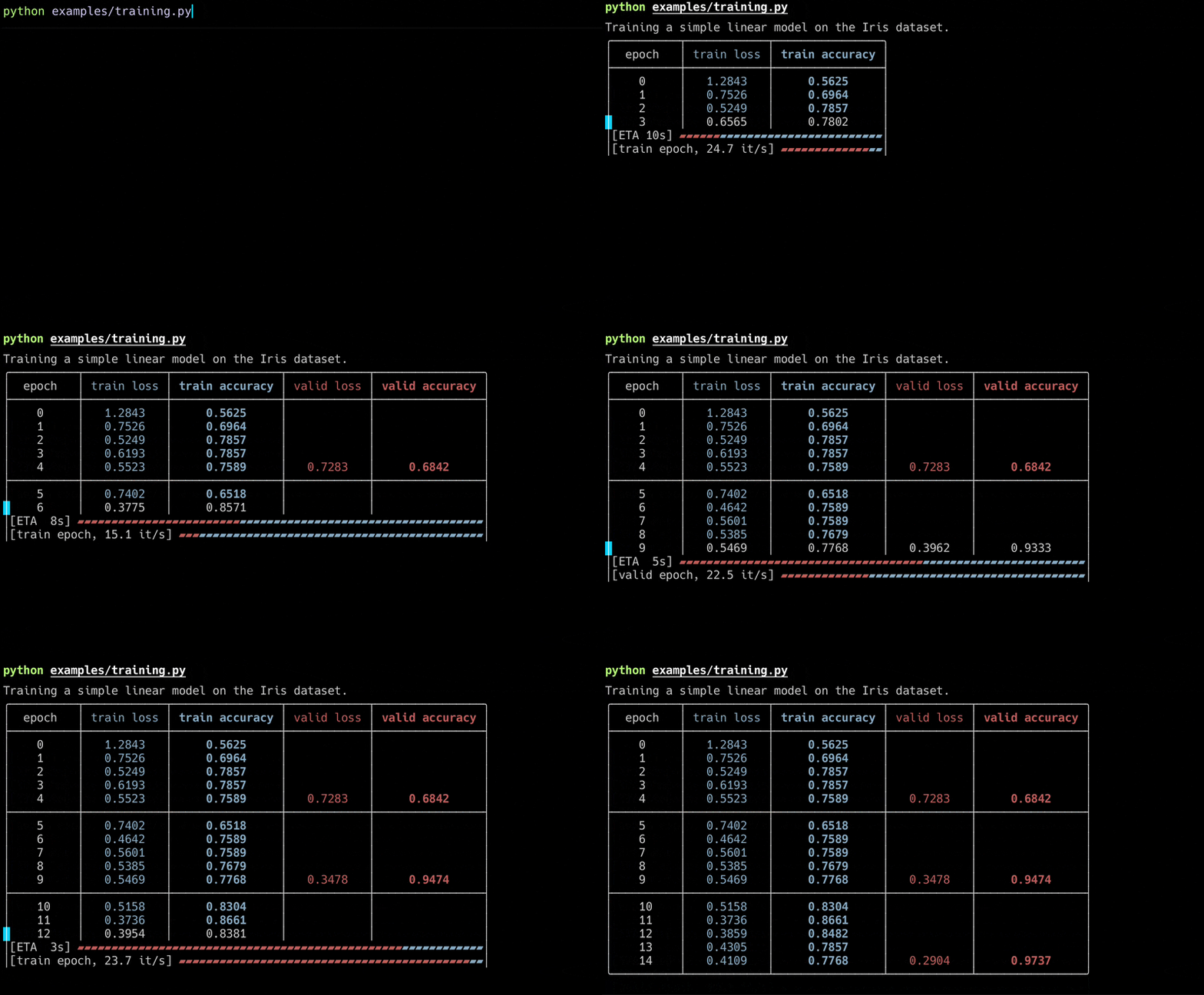
|
+
Version: 3.0.2
|
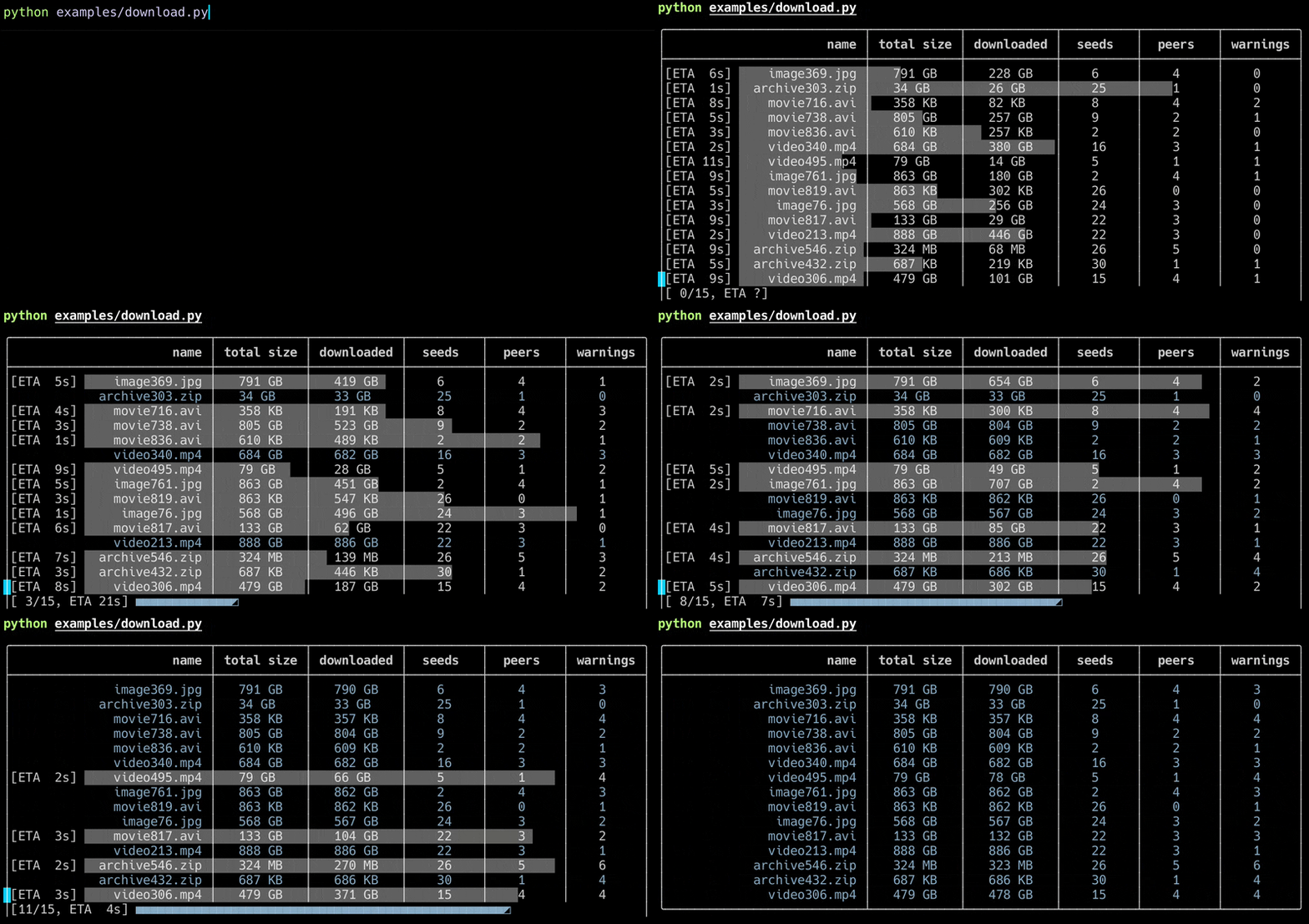
|
4
|
+
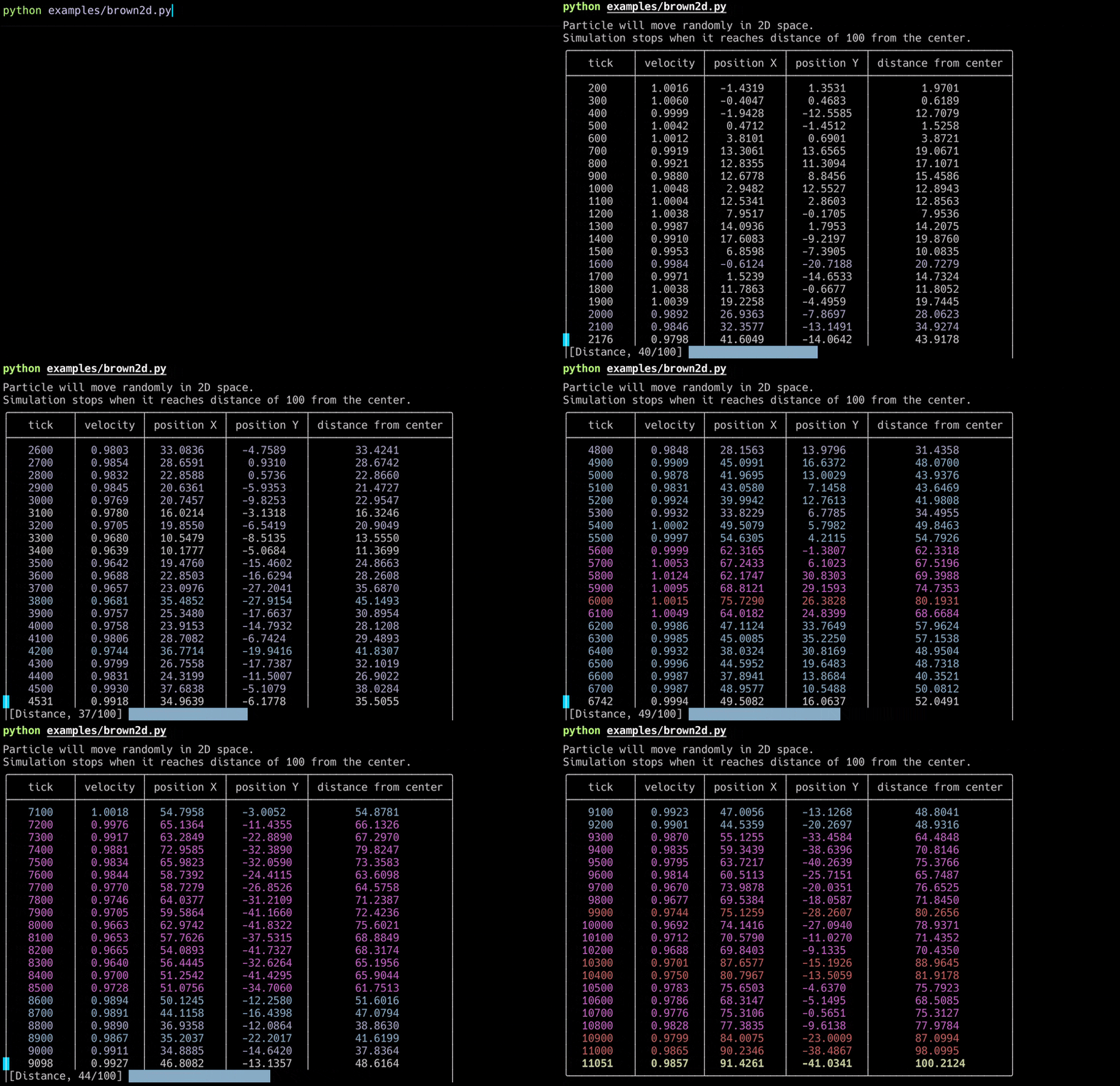
Summary: Display progress as a pretty table in the command line.
|
|
5
|
+
Project-URL: Home, https://github.com/gahaalt/progress-table
|
|
6
|
+
Project-URL: Documentation, https://github.com/sjmikler/progress-table/blob/main/docs
|
|
7
|
+
Author-email: Szymon Mikler <sjmikler@gmail.com>
|
|
8
|
+
License: MIT
|
|
9
|
+
License-File: LICENSE.txt
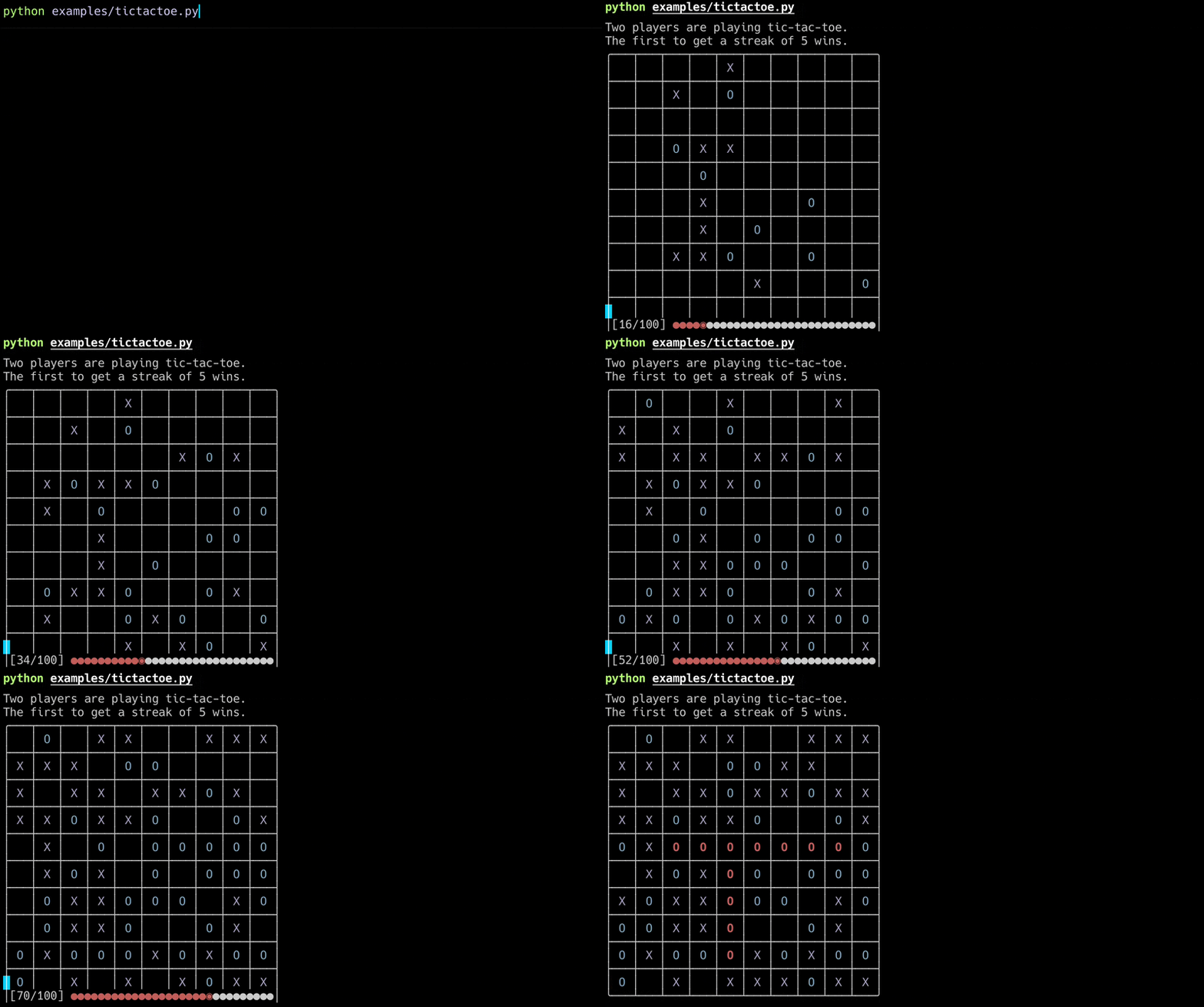
|
|
10
|
+
Classifier: License :: OSI Approved :: MIT License
|
|
11
|
+
Classifier: Programming Language :: Python :: 3
|
|
12
|
+
Classifier: Programming Language :: Python :: 3.7
|
|
13
|
+
Classifier: Programming Language :: Python :: 3.8
|
|
14
|
+
Classifier: Programming Language :: Python :: 3.9
|
|
15
|
+
Classifier: Programming Language :: Python :: 3.10
|
|
16
|
+
Classifier: Programming Language :: Python :: 3.11
|
|
17
|
+
Classifier: Programming Language :: Python :: 3.12
|
|
18
|
+
Classifier: Programming Language :: Python :: 3.13
|
|
19
|
+
Requires-Python: >=3.7
|
|
20
|
+
Requires-Dist: colorama
|
|
21
|
+
Provides-Extra: dev
|
|
22
|
+
Requires-Dist: black; extra == 'dev'
|
|
23
|
+
Requires-Dist: build; extra == 'dev'
|
|
24
|
+
Requires-Dist: isort; extra == 'dev'
|
|
25
|
+
Requires-Dist: twine; extra == 'dev'
|
|
26
|
+
Description-Content-Type: text/markdown
|
|
27
|
+
|
|
28
|
+
> Version 2.x.x introduces new features and new interactive modes.
|
|
29
|
+
>
|
|
30
|
+
> Version 3.x.x improves compatibility and stability.
|
|
31
|
+
>
|
|
32
|
+
> New features allow for previously impossible applications, see examples below.
|
|
33
|
+
|
|
34
|
+
# Progress Table
|
|
35
|
+
|
|
36
|
+
[](https://pypi.org/project/progress-table)
|
|
37
|
+
[](https://pypi.org/project/progress-table)
|
|
38
|
+
|
|
39
|
+
Lightweight utility to display the progress of your process as a pretty table in the command line.
|
|
40
|
+
|
|
41
|
+
* Alternative to TQDM whenever you want to track metrics produced by your process
|
|
42
|
+
* Designed to monitor ML experiments, but works for any metrics-producing process
|
|
43
|
+
* Allows you to see at a glance what's going on with your process
|
|
44
|
+
* Increases readability and simplifies your command line logging
|
|
45
|
+
|
|
46
|
+
### Change this:
|
|
47
|
+
|
|
48
|
+
|
|
49
|
+
|
|
50
|
+
### Into this:
|
|
51
|
+
|
|
52
|
+
|
|
53
|
+
|
|
54
|
+
## Examples
|
|
55
|
+
|
|
56
|
+
From `examples/` directory:
|
|
57
|
+
|
|
58
|
+
* Neural network training
|
|
59
|
+
|
|
60
|
+
|
|
61
|
+
|
|
62
|
+
* Progress of multi-threaded downloads
|
|
63
|
+
|
|
64
|
+
|
|
65
|
+
|
|
66
|
+
* Simulation and interactive display of Brownian motion
|
|
67
|
+
|
|
68
|
+
|
|
69
|
+
|
|
70
|
+
* Display of a game board
|
|
71
|
+
|
|
72
|
+
|
|
73
|
+
|
|
74
|
+
## Quick start code
|
|
75
|
+
|
|
76
|
+
```python
|
|
77
|
+
import random
|
|
78
|
+
import time
|
|
79
|
+
|
|
80
|
+
from progress_table import ProgressTable
|
|
81
|
+
|
|
82
|
+
# Create table object:
|
|
83
|
+
table = ProgressTable(num_decimal_places=1)
|
|
84
|
+
|
|
85
|
+
# You can (optionally) define the columns at the beginning
|
|
86
|
+
table.add_column("x", color="bold red")
|
|
87
|
+
|
|
88
|
+
for step in range(10):
|
|
89
|
+
x = random.randint(0, 200)
|
|
90
|
+
|
|
91
|
+
# You can add entries in a compact way
|
|
92
|
+
table["x"] = x
|
|
93
|
+
|
|
94
|
+
# Or you can use the update method
|
|
95
|
+
table.update("x", value=x, weight=1.0)
|
|
96
|
+
|
|
97
|
+
# Display the progress bar by wrapping an iterator or an integer
|
|
98
|
+
for _ in table(10): # -> Equivalent to `table(range(10))`
|
|
99
|
+
# Set and get values from the table
|
|
100
|
+
table["y"] = random.randint(0, 200)
|
|
101
|
+
table["x-y"] = table["x"] - table["y"]
|
|
102
|
+
table.update("average x-y", value=table["x-y"], weight=1.0, aggregate="mean")
|
|
103
|
+
time.sleep(0.1)
|
|
104
|
+
|
|
105
|
+
# Go to the next row when you're ready
|
|
106
|
+
table.next_row()
|
|
107
|
+
|
|
108
|
+
# Close the table when it's finished
|
|
109
|
+
table.close()
|
|
110
|
+
|
|
111
|
+
```
|
|
112
|
+
|
|
113
|
+
> Go to [integrations](https://github.com/sjmikler/progress-table/blob/main/docs//integrations.md)
|
|
114
|
+
> page to see examples of integration with deep learning libraries.
|
|
115
|
+
|
|
116
|
+
## Advanced usage
|
|
117
|
+
|
|
118
|
+
Go to [advanced usage](https://github.com/sjmikler/progress-table/blob/main/docs//advanced-usage.md) page for more information.
|
|
119
|
+
|
|
120
|
+
## Troubleshooting
|
|
121
|
+
|
|
122
|
+
### Exceesive output
|
|
123
|
+
|
|
124
|
+
Progress Table works correctly in most consoles, but there are some exceptions:
|
|
125
|
+
|
|
126
|
+
* Some cloud logging consoles (e.g. kubernetes) don't support `\r` properly. You can still use ProgressTable, but with `interactive=0` option. This mode will not display progress bars.
|
|
127
|
+
|
|
128
|
+
* Some consoles like 'PyCharm Python Console' or 'IDLE' don't support cursor movement. You can still use ProgressTable, but with `interactive=1` option. In this mode, you can display only a single progress bar.
|
|
129
|
+
|
|
130
|
+
> By default `interactive=2`. You can change the default 'interactive' with an argument when creating the table object or by setting 'PTABLE_INTERACTIVE' environment variable, e.g. `PTABLE_INTERACTIVE=1`.
|
|
131
|
+
|
|
132
|
+
### Other problems
|
|
133
|
+
|
|
134
|
+
If you encounter different messy outputs or other unexpected behavior: please create an issue!
|
|
135
|
+
|
|
136
|
+
## Installation
|
|
137
|
+
|
|
138
|
+
Install Progress Table easily with pip:
|
|
139
|
+
|
|
140
|
+
```
|
|
141
|
+
pip install progress-table
|
|
142
|
+
```
|
|
143
|
+
|
|
144
|
+
## Links
|
|
145
|
+
|
|
146
|
+
* [See on GitHub](https://github.com/gahaalt/progress-table)
|
|
147
|
+
* [See on PyPI](https://pypi.org/project/progress-table)
|
|
148
|
+
|
|
149
|
+
## Alternatives
|
|
150
|
+
|
|
151
|
+
* Progress bars: great for tracking progress, but they don't provide ways to display data in clear and compact way
|
|
152
|
+
* `tqdm`
|
|
153
|
+
* `rich.progress`
|
|
154
|
+
* `keras.utils.Progbar`
|
|
155
|
+
|
|
156
|
+
* Libraries displaying data: great for presenting tabular data, but they lack the progress tracking aspect
|
|
157
|
+
* `rich.table`
|
|
158
|
+
* `tabulate`
|
|
159
|
+
* `texttable`
|
|
@@ -0,0 +1,132 @@
|
|
|
1
|
+
> Version 2.x.x introduces new features and new interactive modes.
|
|
2
|
+
>
|
|
3
|
+
> Version 3.x.x improves compatibility and stability.
|
|
4
|
+
>
|
|
5
|
+
> New features allow for previously impossible applications, see examples below.
|
|
6
|
+
|
|
7
|
+
# Progress Table
|
|
8
|
+
|
|
9
|
+
[](https://pypi.org/project/progress-table)
|
|
10
|
+
[](https://pypi.org/project/progress-table)
|
|
11
|
+
|
|
12
|
+
Lightweight utility to display the progress of your process as a pretty table in the command line.
|
|
13
|
+
|
|
14
|
+
* Alternative to TQDM whenever you want to track metrics produced by your process
|
|
15
|
+
* Designed to monitor ML experiments, but works for any metrics-producing process
|
|
16
|
+
* Allows you to see at a glance what's going on with your process
|
|
17
|
+
* Increases readability and simplifies your command line logging
|
|
18
|
+
|
|
19
|
+
### Change this:
|
|
20
|
+
|
|
21
|
+

|
|
22
|
+
|
|
23
|
+
### Into this:
|
|
24
|
+
|
|
25
|
+

|
|
26
|
+
|
|
27
|
+
## Examples
|
|
28
|
+
|
|
29
|
+
From `examples/` directory:
|
|
30
|
+
|
|
31
|
+
* Neural network training
|
|
32
|
+
|
|
33
|
+

|
|
34
|
+
|
|
35
|
+
* Progress of multi-threaded downloads
|
|
36
|
+
|
|
37
|
+

|
|
38
|
+
|
|
39
|
+
* Simulation and interactive display of Brownian motion
|
|
40
|
+
|
|
41
|
+

|
|
42
|
+
|
|
43
|
+
* Display of a game board
|
|
44
|
+
|
|
45
|
+

|
|
46
|
+
|
|
47
|
+
## Quick start code
|
|
48
|
+
|
|
49
|
+
```python
|
|
50
|
+
import random
|
|
51
|
+
import time
|
|
52
|
+
|
|
53
|
+
from progress_table import ProgressTable
|
|
54
|
+
|
|
55
|
+
# Create table object:
|
|
56
|
+
table = ProgressTable(num_decimal_places=1)
|
|
57
|
+
|
|
58
|
+
# You can (optionally) define the columns at the beginning
|
|
59
|
+
table.add_column("x", color="bold red")
|
|
60
|
+
|
|
61
|
+
for step in range(10):
|
|
62
|
+
x = random.randint(0, 200)
|
|
63
|
+
|
|
64
|
+
# You can add entries in a compact way
|
|
65
|
+
table["x"] = x
|
|
66
|
+
|
|
67
|
+
# Or you can use the update method
|
|
68
|
+
table.update("x", value=x, weight=1.0)
|
|
69
|
+
|
|
70
|
+
# Display the progress bar by wrapping an iterator or an integer
|
|
71
|
+
for _ in table(10): # -> Equivalent to `table(range(10))`
|
|
72
|
+
# Set and get values from the table
|
|
73
|
+
table["y"] = random.randint(0, 200)
|
|
74
|
+
table["x-y"] = table["x"] - table["y"]
|
|
75
|
+
table.update("average x-y", value=table["x-y"], weight=1.0, aggregate="mean")
|
|
76
|
+
time.sleep(0.1)
|
|
77
|
+
|
|
78
|
+
# Go to the next row when you're ready
|
|
79
|
+
table.next_row()
|
|
80
|
+
|
|
81
|
+
# Close the table when it's finished
|
|
82
|
+
table.close()
|
|
83
|
+
|
|
84
|
+
```
|
|
85
|
+
|
|
86
|
+
> Go to [integrations](https://github.com/sjmikler/progress-table/blob/main/docs//integrations.md)
|
|
87
|
+
> page to see examples of integration with deep learning libraries.
|
|
88
|
+
|
|
89
|
+
## Advanced usage
|
|
90
|
+
|
|
91
|
+
Go to [advanced usage](https://github.com/sjmikler/progress-table/blob/main/docs//advanced-usage.md) page for more information.
|
|
92
|
+
|
|
93
|
+
## Troubleshooting
|
|
94
|
+
|
|
95
|
+
### Exceesive output
|
|
96
|
+
|
|
97
|
+
Progress Table works correctly in most consoles, but there are some exceptions:
|
|
98
|
+
|
|
99
|
+
* Some cloud logging consoles (e.g. kubernetes) don't support `\r` properly. You can still use ProgressTable, but with `interactive=0` option. This mode will not display progress bars.
|
|
100
|
+
|
|
101
|
+
* Some consoles like 'PyCharm Python Console' or 'IDLE' don't support cursor movement. You can still use ProgressTable, but with `interactive=1` option. In this mode, you can display only a single progress bar.
|
|
102
|
+
|
|
103
|
+
> By default `interactive=2`. You can change the default 'interactive' with an argument when creating the table object or by setting 'PTABLE_INTERACTIVE' environment variable, e.g. `PTABLE_INTERACTIVE=1`.
|
|
104
|
+
|
|
105
|
+
### Other problems
|
|
106
|
+
|
|
107
|
+
If you encounter different messy outputs or other unexpected behavior: please create an issue!
|
|
108
|
+
|
|
109
|
+
## Installation
|
|
110
|
+
|
|
111
|
+
Install Progress Table easily with pip:
|
|
112
|
+
|
|
113
|
+
```
|
|
114
|
+
pip install progress-table
|
|
115
|
+
```
|
|
116
|
+
|
|
117
|
+
## Links
|
|
118
|
+
|
|
119
|
+
* [See on GitHub](https://github.com/gahaalt/progress-table)
|
|
120
|
+
* [See on PyPI](https://pypi.org/project/progress-table)
|
|
121
|
+
|
|
122
|
+
## Alternatives
|
|
123
|
+
|
|
124
|
+
* Progress bars: great for tracking progress, but they don't provide ways to display data in clear and compact way
|
|
125
|
+
* `tqdm`
|
|
126
|
+
* `rich.progress`
|
|
127
|
+
* `keras.utils.Progbar`
|
|
128
|
+
|
|
129
|
+
* Libraries displaying data: great for presenting tabular data, but they lack the progress tracking aspect
|
|
130
|
+
* `rich.table`
|
|
131
|
+
* `tabulate`
|
|
132
|
+
* `texttable`
|
|
@@ -23,10 +23,11 @@ classifiers = [
|
|
|
23
23
|
"Programming Language :: Python :: 3.12",
|
|
24
24
|
"Programming Language :: Python :: 3.13",
|
|
25
25
|
]
|
|
26
|
+
readme = "README.md"
|
|
26
27
|
|
|
27
28
|
[project.urls]
|
|
28
|
-
Home = "https://github.com/gahaalt/progress-table
|
|
29
|
-
|
|
29
|
+
Home = "https://github.com/gahaalt/progress-table"
|
|
30
|
+
Documentation = "https://github.com/sjmikler/progress-table/blob/main/docs"
|
|
30
31
|
|
|
31
32
|
[project.optional-dependencies]
|
|
32
33
|
dev = ["black", "isort", "build", "twine"]
|
|
@@ -40,9 +41,10 @@ include = ["progress_table", "README.md"]
|
|
|
40
41
|
[tool.hatch.build.targets.wheel]
|
|
41
42
|
packages = ["progress_table"]
|
|
42
43
|
|
|
43
|
-
[tool.hatch.
|
|
44
|
+
[tool.hatch.metadata.hooks.custom]
|
|
44
45
|
path = "hooks.py"
|
|
45
46
|
|
|
47
|
+
|
|
46
48
|
# %%
|
|
47
49
|
|
|
48
50
|
[tool.pyright]
|
progress_table-3.0.0/PKG-INFO
DELETED
|
@@ -1,25 +0,0 @@
|
|
|
1
|
-
Metadata-Version: 2.4
|
|
2
|
-
Name: progress-table
|
|
3
|
-
Version: 3.0.0
|
|
4
|
-
Summary: Display progress as a pretty table in the command line.
|
|
5
|
-
Project-URL: Home, https://github.com/gahaalt/progress-table.git
|
|
6
|
-
Project-URL: Docs, https://github.com/sjmikler/progress-table/blob/main/docs
|
|
7
|
-
Author-email: Szymon Mikler <sjmikler@gmail.com>
|
|
8
|
-
License: MIT
|
|
9
|
-
License-File: LICENSE.txt
|
|
10
|
-
Classifier: License :: OSI Approved :: MIT License
|
|
11
|
-
Classifier: Programming Language :: Python :: 3
|
|
12
|
-
Classifier: Programming Language :: Python :: 3.7
|
|
13
|
-
Classifier: Programming Language :: Python :: 3.8
|
|
14
|
-
Classifier: Programming Language :: Python :: 3.9
|
|
15
|
-
Classifier: Programming Language :: Python :: 3.10
|
|
16
|
-
Classifier: Programming Language :: Python :: 3.11
|
|
17
|
-
Classifier: Programming Language :: Python :: 3.12
|
|
18
|
-
Classifier: Programming Language :: Python :: 3.13
|
|
19
|
-
Requires-Python: >=3.7
|
|
20
|
-
Requires-Dist: colorama
|
|
21
|
-
Provides-Extra: dev
|
|
22
|
-
Requires-Dist: black; extra == 'dev'
|
|
23
|
-
Requires-Dist: build; extra == 'dev'
|
|
24
|
-
Requires-Dist: isort; extra == 'dev'
|
|
25
|
-
Requires-Dist: twine; extra == 'dev'
|
|
File without changes
|
|
File without changes
|
|
File without changes
|
|
File without changes
|
|
File without changes
|
|
File without changes
|